Search Results: "reg"

5 June 2014

Dirk Eddelbuettel: RcppArmadillo 0.4.300.8.0

A new minor / bug fix release 4.300.8 of Armadillo, the templated C++ library for linear algebra, was tagged by Conrad in his SVN repo a few days ago, following earlier snapshots in the 4.300.* series. We had prepared two earlier releases for GitHub but not CRAN in order to accomodate the CRAN maintainer's desire of "a release every one to two months" expressed in the CRAN Repo Policy. However, two actual bugs in the interaction between MinGW and C++11 were reported on the rcpp-devel mailing list, and this releases addresses these. Hence time for new release 0.4.300.8.0 of RcppArmadillo which is now on CRAN and in Debian. This release brings a few upstream changes detailed below such as nice new upstream changes such as more robust norm() (and related) functions, and fixes related to matrix and cube interactions. From our end, we added a better detection of Windows via both _WIN32 and WIN32 (as the former apparently gets undefined by MinGW in C++11 mode). We also added the ability to turn on C++11 support from R (possible since R 3.1.0) yet also turn it off for Armadillo. This is needed as the prescribed compiler on Windows is g++ 4.6.2 -- which offers a subset of C++11 which is good enough for a number of things from the C++11 standard, but not advanced enough for everything which Armadillo uses when C++11 support is turned on. As Armadillo continues to offer a choice of C++ standards, we can use the ability to deploy C++11 only outside of its internals. It is worth repeating that this issue should only affect Windows users wishing to use C++11; other platforms are fine as they generally have more modern compilers.
Changes in RcppArmadillo version 0.4.300.8.0 (2014-05-31)
  • Upgraded to Armadillo release Version 4.300.8 (Medieval Cornea Scraper)
    • More robust norm-related functions
    • Fixes between interactions between cube and vector types.
  • Adds a #define ARMA_DONT_USE_CXX11 to provide an option to turn C++11 off for Armadillo (but client packages may still use it)
  • More robust Windows detection by using _WIN32 as well as WIN32 as the latter gets diabled by MinGW with C++11
  • On Windows, C++11 can be turned off as the Armadillo code base uses more features of C++11 than g++ 4.6.2 version in Rtools implements
Changes in RcppArmadillo version 0.4.300.5.0 (2014-05-19)
  • Upgraded to Armadillo release Version 4.300.5 (Medieval Cornea Scraper)
    • Handle possible underflows and overflows in norm(), normalise(), norm_dot()
    • Fix for handling of null vectors by norm_dot()
Changes in RcppArmadillo version 0.4.300.2.0 (2014-05-13)
  • Upgraded to Armadillo release Version 4.300.2 (Medieval Cornea Scraper)
    • faster find()
Courtesy of CRANberries, there is also a diffstat report for the most recent release As always, more detailed information is on the RcppArmadillo page. Questions, comments etc should go to the rcpp-devel mailing list off the R-Forge page.

This post by Dirk Eddelbuettel originated on his Thinking inside the box blog. Please report excessive re-aggregation in third-party for-profit settings.

4 June 2014

Russell Coker: Android Device Service Life

In recent years Android devices have been the most expensive things I ve purchased apart from airline tickets and other travel/holiday expenses. As they are expensive I d like to use them for as long as possible to get the most value for money. Also as I give my devices to relatives when they no longer work for me I d like to avoid having relatives hassling me about their phone not working as desired. So I ve been thinking about the features that I need to make it possible to use a phone or tablet for a long time. RAM The way Android works is that when an application in the foreground requests more memory background applications may be closed to free some memory. Android doesn t use swap by default, there is some documentation on how to enable it (and it s not difficult to figure out for anyone who has used Linux before) but generally it s not done. If you run a larger application the chances of apps closing in the background (causing delays when you switch back to them and possibly a loss of context if the app is buggy and doesn t preserve all state) are increased. As a general trend apps tend to get bigger to provide more features and also because users who own newer bigger devices don t complain as much about memory use. Also to make things worse new versions of Android tend to use more RAM. So a phone that runs well can suddenly start performing badly when you upgrade to a new version of Android (which incidentally usually can t be reversed) and upgrade to new versions of apps (which can t be reversed through the Google Play Store). The Sony Ericsson Xperia X10 was a very nice phone when it was released, it ran Android 2.1 very quickly. When I upgraded the Xperia X10s that my wife and I used to Android 2.3 (which was necessary to have the phone run as a Wifi access point) performance dropped considerably. The Android upgrade combined with newer larger apps means that those phones are barely usable now. 384M of RAM was plenty in early 2011 when I first used the Xperia X10 but it s not nearly enough now. Recently 2G of RAM has been the minimum for a mid-range or high-end phone. It seems difficult to imagine a new Android feature as compelling as the addition of Wifi access point support in Android 2.3 that would drive an upgrade to a future memory hogging version of the OS. It also seems difficult to imagine Android apps needing enough memory to destroy the performance of a phone with 2G of RAM. But then I couldn t imagine the 384M in an Xperia X10 becoming inadequate or the 512M in a Samsung Galaxy S becoming barely usable either. Storage Until fairly recently storage in an Android device was divided into USB attached storage (a VFAT filesystem that could be directly mounted on a PC) and a Linux filesystem that was used for all internal operations of the phone. On such devices it typically wasn t possible to change partition sizes without a lot more skill than most users possess and most of the storage space was reserved for USB attachment. If you only had a few Android apps and lots of photos, movies, etc then this worked well. But if you wanted to install larger Android apps then you would have big problems. Even with Android 4.x devices (which all seem to have a single filesystem) you can easily run out of space. Modern games often take several hundred megs of storage. Games that take 500M+ for the Android package install (which also requires the same amount of temporary space for installation and upgrade) are common. Sometimes games download data files after they have been installed for a total size approaching 2G (such as The Sims Freeplay). When I bought a Nexus 4 for my wife I got the version with 8G of storage because paying an extra $50 for the 16G version seemed unreasonable. 8G was fine for my wife, but when she got a new phone I gave the Nexus 4 to a relative who wanted to play The Sims and other big games. That relative isn t so happy about having a limited number of games on their phone and I have to fix it when storage space runs out and things start aborting (when storage runs out the Google App Store program aborts and uses lots of space for temporary files). I recently bought a tablet with 32G of storage and filled 16G on the first day (tablets are good for watching
TV and TV shows are big). Fortunately the tablet in question has a SD socket so that when space becomes a problem in a year or two I can buy an SD card and keep using it. An unfortunate recent decision by Google was to prevent apps from being run from a SD card. So even if you have a device with a SD socket you still need to have enough internal storage for all apps and their private data. At 500M+ for a modern game that means a device with 8G of storage (which includes space for the OS) will be lucky to get 8 games installed. If you want to use a phone to it s full capacity (playing various media files, games, etc) then it seems that the minimum storage capacity would be 8G of internal storage and a SD socket. For a device without an SD socket (such as the Nexus 5 with 16G or 32G of storage) your future use will be limited. 32G is probably enough for a phone given that you can recode movies to use less space (the FullHD screen on the Nexus 5 is nice but 720p movies will probably look good enough). But the larger screens of tablets demand better video quality so the Nexus tablets are probably a bad choice due to lack of storage space. Screen Size and Resolution I have previously written about the sizes of devices and how they may be used by people of various ages [1]. That should be of use for anyone who plans to use their old phone as an educational device for their children (which appears to be very common). But apart from that I can t think of any reason why size would suddenly make an old phone obsolete. Only young children will have their hands change size in any significant way. Resolution also shouldn t be a huge problem, the 480*854 screen on the Xperia X10 is fairly good for a 4 screen. While a higher resolution makes text more readable at a small size for most users the availability of a higher resolution screen isn t going to make their old phone obsolete. CPU The only Android devices I owned that appeared to develop CPU speed issues late in life were the Xperia X10 phones, and that might be more due to RAM limits and the OS upgrade. All the other devices were either obviously slow at purchase time or are still performing well now. CPU speed may make it difficult or impossible to play new games, but shouldn t affect other uses of a phone or tablet. Conclusion It seems to me that if you want to use an Android device for more than 2 years then storage capacity should be a major factor in choosing which device to purchase. It seems that lack of storage space is in many cases the main factor that makes older devices annoying or impossible to use.

Dirk Eddelbuettel: Introducing RPushbullet

A new package of mine appeared on CRAN today: RPushbullet. A few days ago, I had tweeted about a first version available via its GitHub repo. The package is now on CRAN which will make it easier to install for many. You still need an API key (free, after registration at Pushbullet) and one or more target devices to message to: an modern smartphone (Android, iPhone, ...) or a Chrome browser provided you also installed the corresponding app. I also set up a short web page on my server with some more information and an example. So pushbullet away...

This post by Dirk Eddelbuettel originated on his Thinking inside the box blog. Please report excessive re-aggregation in third-party for-profit settings.

3 June 2014

Vasudev Kamath: Using WSME with Flask microframework

After reading Julien Danjou's I found out WSME (Web Service Made Easy) a Python framework which allows us to easily create Web Services in Python. For SILPA we needed a REST like interface and I thought of giving it try as WSME readily advertised the Flask integration, and this post was born when I read the documentation for Flask integration. First of all Flask is a nice framework which will right way allow development of REST api for simple purposes, but my requirement was bit complicated where I had to expose function in a separate python modules through SILPA. I think detailed requirement can be part of another post, so let me explain how to use WSME with Flask app. WSME integration with Flask is done via decorator function wsmeext.flask.signature which expects you to provide it with signature of function to expose. And here is its documentation, basically signature of signature function is
wsmeext.flask.signature(return_type, *arg_types, **options)
Yeah thats all docs have sadly. So basically exposing is the only thing WSME handles for us here, routing and other stuffs need to be done by Flask itself. So lets consider a example, simple function to add as shown below.
def add(a, b):
    return a + b
For providing REST like service, all you need below code.
from flask import Flask
from wsmeext.flask import signature
app = Flask(__name__)
@app.route('/add')
@signature(int, int, int)
def add(a, b):
    return a + b
if __name__ == '__main__':
       app.run()
So first argument to signature is return type of function and rest arguments are the argument to function to be exposed. Now you can access the newly exposed service by visiting http://localhost:5000/add but don't forget to pass the arguments either via query string or through post. You can restrict methods of access via Flask's route. So what's the big deal of not having docs right?.. Well fun part began when we use bit more complex return type like dictionaries or lists . Below is modified code I'm using to demonstrate problem I faced during using dict as return type.
from flask import Flask
from wsmeext.flask import signature
app = Flask(__name__)
@app.route('/add')
@signature(dict, int, int)
def add(a, b):
    return  "result": a + b 
if __name__ == '__main__':
    app.run()
Basically I'm returning a dictionary containing result now, for demonstration purpose. When I run the application boom python barked at me with following message.
Traceback (most recent call last):
File "wsme_dummy.py", line 7, in <module>
 @signature(dict, int, int)
File "c:\Users\invakam2\.virtualenvs\wsmetest\lib\site-packages\wsmeext\flask.py", line 48, in decorator
 funcdef.resolve_types(wsme.types.registry)
File "c:\Users\invakam2\.virtualenvs\wsmetest\lib\site-packages\wsme\api.py", line 109, in resolve_types
 self.return_type = registry.resolve_type(self.return_type)
File "c:\Users\invakam2\.virtualenvs\wsmetest\lib\site-packages\wsme\types.py", line 739, in resolve_type
 type_ = self.register(type_)
File "c:\Users\invakam2\.virtualenvs\wsmetest\lib\site-packages\wsme\types.py", line 668, in register
 class_._wsme_attributes = None
TypeError: can't set attributes of built-in/extension type 'dict'
After going through code from files involved in above traces this is what I found
  1. wsmeext.flask.signature inturn uses wsme.signature which is just alias of wsme.api.signature.
  2. Link in documentation in sentence See @signature for parameter documentation is broken and should actually link to wsme.signature in docs.
  3. wsme.signature actually calls resolve_type to check on types of return and arguments. This function checks if types are instance of dict or list in such cases it creates instances of wsme.type.DictType and wsme.type.ArrayType respectively with values from the argument.
  4. When I just passed built-in type dict the control went to else part which just passed the type to wsme.type.Register.registry function which tries to set the attribute _wsme_attribute which actually raises TypeError as we can't set attribute for built-in types.
So by inspecting code of wsme.type.Registry.resolve_type and wsme.type.Registry.register its clear that what signature expects when arguments or return type is dictionary/list is instance of dictionary/list with type of value in it. May be sentence is bit vague but I'm not sure how to put it more clearly, as an example in our case add function returns dictioanry with key as string and value as int, so return type argument for signature will be str: int . Similarly if you return array with int values it will be [int]. With above understanding our add function now looks like below.
@signature( str: int , int, int)
def add(a, b):
   return  'result': a + b 
and now code worked just fine!. What I couldn't figure out here is there is no way to have tuple as return value or argument, but I guess that is not big deal. So immidiate task for me after finding this is fix the link in documentation to point to wsme.signature and probably put some note some where in documentation about above finding.

Daniel Pocock: Click to dial for mobile users of your web sites

If there was a trivial way to let mobile phone users call you from your web site, just by adding a single HTML element to the page, would you do it? In fact, there is. It doesn't even require a mobile WebRTC browser. It works for virtually any smartphone and a growing number of desktops too. Introducing the tel: URI The tel: URI is defined in RFC 3966. For most mobile phone users, if they click a link to a tel: URI, their browser will copy the link into their dialer for convenience. To protect users against calls to 0900 premium rate numbers, the user still has to make one more click to confirm they want to dial. Examples Here is a tel: URI:
tel:+44-20-7135-7070
Here is how to create a link with it: <a href="tel:+44-20-7135-7070">020 7135 7070 (from abroad: +44 20 7135 7070)</a> and here is how it looks on the page:
Call me on 020 7135 7070 (from abroad: +44 20 7135 7070)
(Note: some planet aggregation sites block the link in the example) and here is what appears on the mobile device after a user clicks the tel: URI link: For desktop users too Many desktop users can also benefit from tel: URIs. If they have a modern telephone system in their office, the system administrator may have already added a tel: URI handler to their desktop. Anyone with a software PBX or a SIP account can also potentially use the TBDialOut extension for Thunderbird to help convert address book phone numbers into tel: or sip: URIs or even URLs for some bespoke dialer. For those who want extra convenience, the Telify extension for Firefox will look for phone numbers in any HTML page and display them as tel: URIs so you can click them even if the web developer overlooked this.

1 June 2014

Antonio Terceiro: An introduction to the Debian Continuous Integration project

Debian is a big system. At the time of writing, looking at my local package list caches tells me that the unstable suite contains 21306 source packages, and 42867 binary packages on amd64. Between these 42867 binary packages, there is an unthinkable number of inter-package dependencies. For example the dependency graph of the ruby packages contains other 20-something packages. A new version of any of these packages can potentially break some functionality in the ruby package. And that dependency graph is very small. Looking at the dependency graph for, say, the rails package will make your eyes bleed. I tried it here, and GraphViz needed a PNG image with 7653 10003 pixels to draw it. It ain t pretty. Installing rails on a clean Debian system will pull in another 109 packages as part of the dependency chain. Again, as new versions of those packages are uploaded the archive, there is a probability that a backwards-incompatible change, or even a bug fix which was being worked around, might make some funcionality in rails stop working. Even if that probability is low for each package in the dependency chain, with enough packages the probability of any of them causing problems for rails is quite high. And still the rails dependency chain is not that big. libreoffice will pull in another 264 packages. gnome will pull in 1311 dependencies, and kde-full 1320 (!). With a system this big, problems will arrive, and that s a fact of life. As developers, what we can do is try to spot these problems as early as possible, and fixing them in time to make a solid release with the high quality Debian is known for. While automated testing is not the proverbial Silver Bullet of Software Engineering, it is an effective way of finding regressions. Back in 2006, Ian Jackson started the development of autopkgtest as a tool to test Debian packages in their installed form (as opposed to testing packages using their source tree). In 2011, the autopkgtest test suite format was proposed as a standard for the Debian project, in what we now know as the DEP-8 specification. Since then, some maintainers such as myself started experimenting with DEP-8 tests in their packages. There was an expectation in the air that someday, someone would run those tests for the entire archive, and that would be a precious source of QA information. Durign the holiday break last year, I decided to give it a shot. I initially called the codebase dep8. Later I renamed it to debci, since it could potentially also run other other types of test suites in the future. Since early January, ci.debian.net run an instance of debci for the Debian Project. The Debian continuous Integration will trigger tests at most 4 times a day, 3 hours after each dinstall run. It will update a local APT cache and look for packages that declare a DEP-8 test suite. Each package with a test suite will then have its test suite executed if there was any change in its dependency chain since the last test run. Existing test results are published at ci.debian.net every hour, and at the end of each batch a global status is updated. Maintainers can subscribe to a per package Atom feed to keep up with their package test results. People interested in the overall status can subscribe to a global Atom feed of events. Since the introduction of Debian CI in mid-January 2014, we have seen an amazing increase in the number of packages with test suites. We had little less than 200 packages with test suites back then, against around 350 now (early June 2014). The ratio of packages passing passing their test suite has also improved a lot, going from less than 50% to more than 75%. There is documentation available, including a FAQ for package maintainers with further information about how the system works, how to declare test suites in their packages and how to reproduce test runs locally. Also available is development information about debci itself, to those inclined to help improve the system. This is just the beginning. debci is under a good rate of development, and you can expect to see a constant flux of improvements. In special, I would like to mention a few people who are giving amazing contributions to the project:

31 May 2014

Dirk Eddelbuettel: RcppGSL 0.2.1 and 0.2.2

A few days ago, version 0.2.1 of RcppGSL---our interface package between R and the GNU GSL using our Rcpp package for seamless R and C++ integration---appeared on CRAN making it the first release in some time. And it turned that this version tickled an obscure and long-dormant bug under clang which was found on OS X Mavericks---which Kevin Ushey consequently squashed. So this is now reflected in version 0.2.2 which just arrived on CRAN. Besides the bugfix, a few things were modernized to reflect capabilities of Rcpp 0.11.0 and later. The releases also contain a few changes that had accumulated since the previous release in 2012 such as an additional example using B-splines, and use of updated vignette build options provided by R. The NEWS file entries follows below:
Changes in version 0.2.2 (2014-05-31)
  • A subtle bug (tickled only by clang on some OS versions) in vector and matrix view initialization was corrected by Kevin Ushey
Changes in version 0.2.1 (2014-05-26)
  • Added new example based on B-splines example in GSL manual illustrating simple GSL use via Rcpp attributes
  • Vignette compilation has been reverted to using highlight since version 0.4.2 or greater can be used as a vignette engine (with R 3.0.* or later).
  • Vignette compilation is now being done by R CMD build as R 3.0.0 supports different vignette engines, so the vignette build process has been simplified. A convenience helper script has also been added for command-line builds.
  • Unit tests now use sourceCpp() instead of cxxfunction() from the inline package
  • The DESCRIPTION file now uses Suggests: Rcpp (instead of Depends: Rcpp) to permit building of the vignette
  • The package now takes advantage of the simplified build process available with Rcpp (>= 0.11.0)
  • Similar updates to the build process were made for the example package included with RcppGSL
And courtesy of CRANberries, a summaries of changes to release 0.2.0 and this week's release 0.2.1 are available. More information is on the RcppGSL page. Questions, comments etc should go to the rcpp-devel mailing list off the R-Forge page.

This post by Dirk Eddelbuettel originated on his Thinking inside the box blog. Please report excessive re-aggregation in third-party for-profit settings.

29 May 2014

Petter Reinholdtsen: Free software car computer solution?

Dear lazyweb. I'm planning to set up a small Raspberry Pi computer in my car, connected to a small screen next to the rear mirror. I plan to hook it up with a GPS and a USB wifi card too. The idea is to get my own "Carputer". But I wonder if someone already created a good free software solution for such car computer. This is my current wish list for such system: If you know of any free software car computer system supporting some or all of these features, please let me know.

25 May 2014

Luca Falavigna: Adventures in cross-chroot creations

I ve been playing with qemu-user-static a bit to create a set of porterboxes for my Deb-o-Matic build farm. After reading gregoa s post on how to create cross-chroot with qemu-debootstrap, I was immediately able to create armel, armhf and powerpc boxes with very little efforts. I tried to extend the number of porterboxes available by adding mips* and s390x, in order to have all the Linux-based architectures supported in Jessie, but with no luck. Here s a summary of my attempts. MIPS*
Chroot creation fails under both mips and mipsel trying to configure libuuid1. The problem is due to the fact libuuid1 s postinst script calls groupadd and useradd. Those two utilities rely on NETLINK sockets, which apparently are not handled by QEMU at the moment. I raised the question upstream to see whether it is possible to solve this problem. s390x
Chroot creation used to fail with a SIGSEGV. This particular bug has been fixed recently, but it seems it s not enough to have a working chroot. It fails with some gzip errors, probably because some portions of dpkg-deb are not fully covered by qemu-s390x-static. Preparing to unpack .../base-files_7.3_s390x.deb ...
Unpacking base-files (7.3) ...
dpkg-deb (subprocess): decompressing archive member: internal gzip read error: '<fd:5>: incorrect data check'
/bin/tar: Unexpected EOF in archive
/bin/tar: Error is not recoverable: exiting now
dpkg-deb: error: subprocess tar returned error exit status 2
dpkg: error processing archive /var/cache/apt/archives/base-passwd_3.5.33_s390x.deb (--install):
subprocess dpkg-deb --control returned error exit status 2

19 May 2014

Mart&iacute;n Ferrari: Yakker, part 3: the service providers

This is the third post in a series of posts (part 1, part 2) describing a secure alternative to applications like WhatsApp. I started with the following statement:
I believe it is possible to build a system with the simplicity and functionality of WhatsApp or Viber, which provides end-to-end encryption, is built on free software and open protocols, that supports federation and is almost decentralised, and that would allow interested companies to turn a profit without compromising any of these principles.
In this post, I will discuss the SIP service providers, how to enable them to make a profit, while keeping the network open and secure.

Basics Service providers are expected to be third parties, either for-profit or not. PSTN termination would be an optional feature, possibly only offered by for-profit services. The services would consist in just a standard SIP service, with STUN/ICE for NAT traversal, plus an API for getting PSTN termination rates, credit balance, account creation, and for buying credit. All authentication will be performed with public key cryptography, using the data already available in the directory service. The idea would be that companies can make a profit by selling PSTN termination and SMS sending. In this way, users get good rates for calling/texting people who are not part of the network, and free SIP-to-SIP calls don't impose a big load on the service. It is expected that the providers would offer some free calls, to allow the users to test the service. Public providers like Betamax already offer free calls to land lines in many countries. To make this simple for the users, the client application would use the API to provide an unified interface to the service providers, without the need for passwords or a web browser. To support multiple services, the overseeing authority must be in charge of compiling a list of authorised providers, which then the client application would use when creating an account. Provider selection can be made automatically, depending on commercial agreements or user location, and for power users, the option to manually choose a provider should be offered. To ensure control of the providers, they should not be able to control the directory servers used. The client application should be careful in exposing as little private data as possible to them.

Account creation With the components described so far, we can think already of how account creation and first calls would be handled:
  1. The client application creates a public/private key pair.
  2. It requests the directory service to create an account for the public key and the phone number.
  3. The directory service uses an encrypted SMS challenge or other similar mechanism to authenticate the request.
  4. The public key is published, associated with the phone number.
  5. The client app gets a list of service providers, which includes configuration parameters and PSTN rates, and offers the user the chance to select one, or it is automatically selected.
  6. The client app then requests an account creation using the phone number as identification, while authenticating with the published key.
  7. The provider uses DNSSEC to validate the request, and an account is created.
  8. The client then creates an ENUM record in the directory service, associating the phone number with the SIP account.
  9. The client registers with the SIP service, again using the public key to authenticate, and can start making calls right away.
  10. When the user wants to make a non-free call, the application can offer to buy credit, or use the GSM network.

How is this different As you can see, there is not much difference with the current status. In fact, I would expect that traditional VoIP providers could become part of this network without much additional cost. The big differences are:
  • Authentication is delegated to the directory service.
  • The provider API, wich handles all administrative tasks, usually offered by web applications.
  • Account creation is 100% automated and immediate.
  • The provider must offer federated SIP service, and use encryption for all SIP transactions.
  • PSTN termination would ideally accept encrypted RTP streams, but that's probably too much to ask.

What's next In the next post I will describe what's possibly the most challenging part of this project: the client application.

Russell Coker: My First Ingress Anomaly

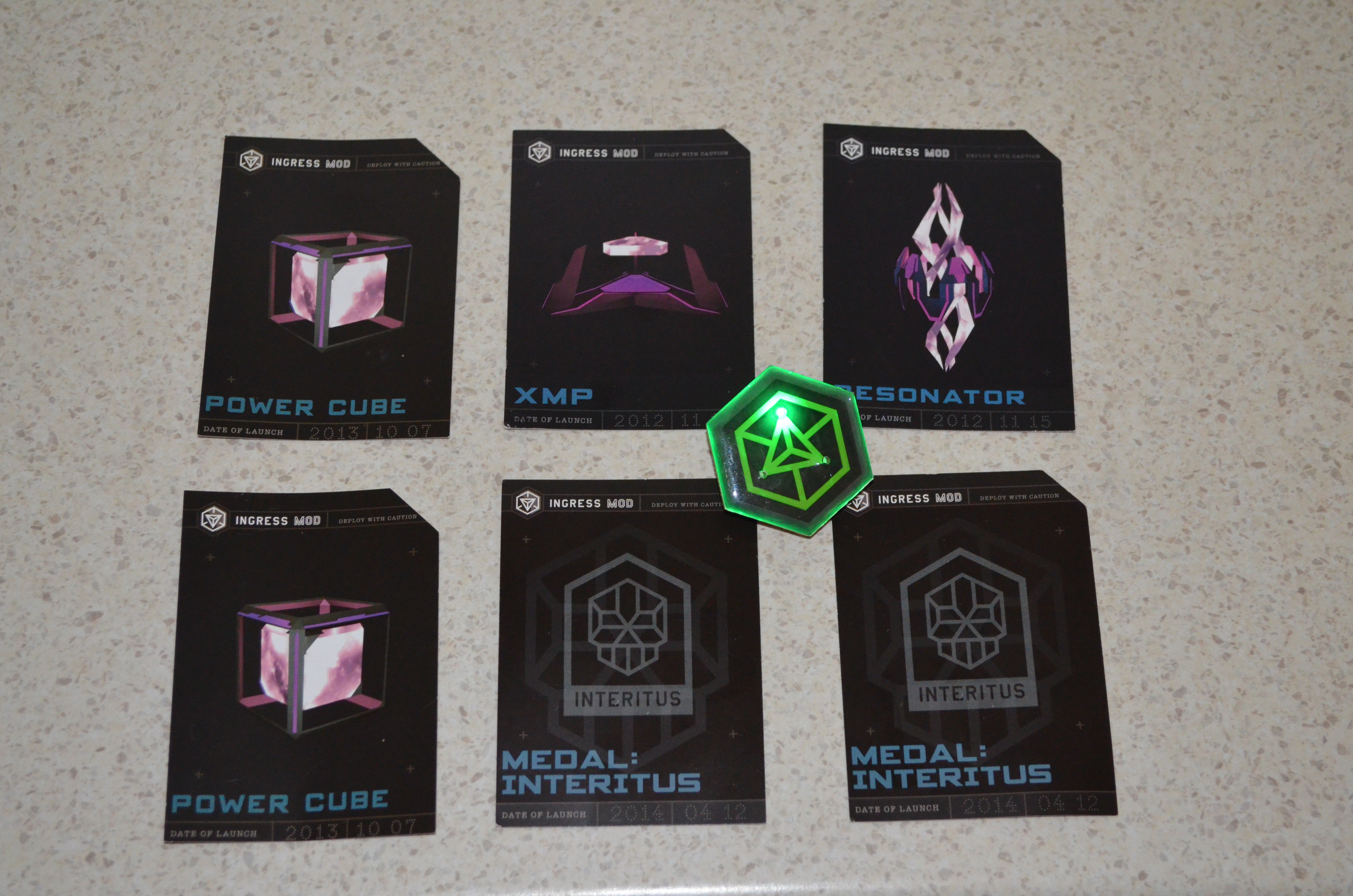
schwag from Ingress Anomaly Ingress is an Android phone game developed by Google where you have to go to various places to capture portals which are based on landmarks or places of note. There s a sci-fi back story which I haven t cared much about (my local library has a heap of good sci-fi books I don t have time to read). But if you are interested in low quality sci-fi you can start with the Youtube channel for Ingress [1]. But the best thing to do is to download the Ingress client program from the Google play store if you have an Android phone [2]. Periodically they have special events in the game called Anomalies , which usually involve many people competing to capture a small number of special portals. Usually a portal is fairly easy to capture so a high level player can easily capture a portal in at most a few minutes, but when there is a large group of players defending a portal by replacing the resonators as quickly as they are destroyed it becomes more challenging. I m not going to try to explain this properly as I presume that readers either already know or don t care. The Wikipedia page about Ingress has more information. On Saturday there was an Anomaly where the main city was Melbourne. My team (Enlightened) won the event in Australia but apparently the event in the US at the same time was won by the other team (Resistance). I had hoped that our event would be similar to some of the ones I ve seen on the Ingress Report (a fictional news service on youtube) in which actors from the sci-fi videos about Ingress attended. But unfortunately it seems that the actors stay in the US. Every player who was registered for the anomaly received a gift pack that contained three cards and a badge. The picture above shows the cards that my wife and I received along with one of our badges. The badges are green for Enlightened and blue for Resistance (the in-game colors) and have three flashing LEDs the photo has one of the LEDs lit up. The three cards have passcodes which can be redeemed for in-game items, the XMP, Power Cubes, and Resonators weren t that useful (10 not particularly rare items that I could get through 10 minutes of game playing). The Medal cards are for in-game badges showing the anomalies that we have played at, but they are bronze badges which again aren t much use as nothing less than silver will help in leveling up. Overall it was a good experience, we won, had a good after-party (with free snacks and one free drink per person), and the badges are nice. I recommend attending if there s an event in your area, and note that you don t need to be a high level player to attend, even L6 players were able to contribute.

18 May 2014

Benjamin Mako Hill: Installing GNU/Linux on a 2014 Lenovo Thinkpad X1 Carbon

I recently bought a new Lenovo X1 Carbon. It is the new second-generation, type 20A7 laptop, based on Intel s Haswell microarchiteture with the adaptive keyboard. It is the version released in 2014. I also ordered the Thinkpad OneLink Dock which I have returned for the OneLink Pro Dock which I have not yet received. The system is still very new, challenging, and different, but seems to support GNU/Linux reasonably well if you are willing to run a bleeding edge version and/or patch your kernel and if you are not afraid to spend an afternoon or two tweaking things. What follows are my installation notes for Debian testing (jessie) when I installed it in early May 2014. My general impressions about the laptop as a GNU/Linux system and overall are at the end of this write-up.
System Description The X1 Carbon I ordered included the 512GB SSD, the 14.0 inch WQHD (2560 1440) 260 nit touchscreen, and the maximum 8GB of memory. I believe the rest is not particularly negotiable but includes a 720p HD Camera, a 45.2Wh battery, and an Intel Dual Band Wireless 7260AC with Bluetooth 4.0. For those that are curious Here is the output of lspci on the system:
00:00.0 Host bridge: Intel Corporation Haswell-ULT DRAM Controller (rev 0b)
00:02.0 VGA compatible controller: Intel Corporation Haswell-ULT Integrated Graphics Controller (rev 0b)
00:03.0 Audio device: Intel Corporation Haswell-ULT HD Audio Controller (rev 0b)
00:14.0 USB controller: Intel Corporation Lynx Point-LP USB xHCI HC (rev 04)
00:16.0 Communication controller: Intel Corporation Lynx Point-LP HECI #0 (rev 04)
00:16.3 Serial controller: Intel Corporation Lynx Point-LP HECI KT (rev 04)
00:19.0 Ethernet controller: Intel Corporation Ethernet Connection I218-LM (rev 04)
00:1b.0 Audio device: Intel Corporation Lynx Point-LP HD Audio Controller (rev 04)
00:1c.0 PCI bridge: Intel Corporation Lynx Point-LP PCI Express Root Port 6 (rev e4)
00:1c.1 PCI bridge: Intel Corporation Lynx Point-LP PCI Express Root Port 3 (rev e4)
00:1d.0 USB controller: Intel Corporation Lynx Point-LP USB EHCI #1 (rev 04)
00:1f.0 ISA bridge: Intel Corporation Lynx Point-LP LPC Controller (rev 04)
00:1f.2 SATA controller: Intel Corporation Lynx Point-LP SATA Controller 1 [AHCI mode] (rev 04)
00:1f.3 SMBus: Intel Corporation Lynx Point-LP SMBus Controller (rev 04)
BIOS/Firmware The BIOS firmware is non-free and proprietary as it the case with all ThinkPads and nearly all laptops. According to this thread there is a bug in the default BIOS that means that suspend to RAM is broken in GNU/Linux. You can get updated BIOS at the Lenovo s ThinkPad X1 Carbon (Type 20A7, 20A8) Drivers and software page by looking in the the BIOS section. Honestly, the easiest approach is probably to download the Windows BIOS Update utility (documentation is here) which you can use to run the BIOS update from within Windows before you install GNU/Linux. If that s not an option (e.g., if you ve already installed GNU/Linux) the best method is to download the bootable CD ISO from the same page. Of course, since the X1 Carbon has no optical media, you have to find another way to boot the CD image. I struggled to get the ISO to boot from USB using the usually reliable dd method. This message suggest that the issue had to do with the El Torito wrapper:
I had to dump the eltorito image from the ISO they provide, after that I was able to dd the resulting image to a flash drive and the bios update went well, no cdrom needed.
I updated to version 1.13 of the BIOS which fixes the suspend/resume bug. By the time you read this, there may be newer versions that fix other things so check the Lenovo website.
Installing Debian I installed Debian testing using the March 19, 2014 Alpha 1 release of the Debian Installer for Jessie (currently testing). I installed in graphical mode. With the WQHD screen, everything was extremely tiny but it worked flawlessly. I downloaded the amd64 net install image from the normal place and installed the rest of the system using the built-in Ethernet port which required no firmware or extra drivers. I did the normal dd if=FILENAME.iso of=/dev/sdX method of getting the installer onto the a USB stick to boot. I turned off restricted boot in BIOS first. In general, the latest version of the Debian installation guide is always a good source of guidance on installing Debian. I used the Debian installer wizard to partition and selected Use entire disk and partition it for LVM and encrypted data which kept the UEFI partitions around. The system installed with no errors or issues and booted up normally afterward. The grub menu is hilariously narrow on the WQHD screen. If you want to use the built-in wireless and/or Bluetooth, you will need to install the non-free iwlwifi firmware package. It is very lame that we still have to do this to use hardware we have purchased.
What Works and Doesn t The following stuff works the first time I booted into the GNOME 3 desktop and logged in:
  • The WQHD 2560 1440 screen
  • The touchscreen
  • Both the TrackPoint and the touchpad
  • Built-in e1000e Ethernet using the dongle
  • The keyboard plus the adaptive row of F1-F12 keys.
  • External monitor using the full HDMI or mini-DisplayPort connectors
  • Audio (both speakers and microphone)
  • The camera/webcam
The following stuff works if you install non-free firmware:
  • Internal Wireless
  • Bluetooth 4.0
The following stuff works with qualifications:
  • Suspend to RAM Works once you have updated the firmware.
  • The adaptive keyboard The F1-F12 keys work but the button that theoretically lets you switch to different sets of function buttons (e.g., volume, brightness) does nothing.
  • Disabling the touchpad There is a BIOS option to disable the touchpad. It works in Windows and does nothing at all in GNU/Linux.
I have not tried:
  • The fingerprint reader
Disabling the touchpad As a long-term ThinkPad user, I love the TrackPoint pointing stick. If you plan on using this, the built-in touchpad is incredibly aggravating because it is very easy to brush against it while using the TrackPoint. In BIOS, there is an option to disable the touchpad. Although this works in Windows, it does absolutely nothing in GNU/Linux. Part of the issue is that, unlike the older X1 Carbon and other ThinkPads, there are no TrackPoint buttons. Instead of buttons, there are regions at the top of the touchpad which are configured, in software, to act like buttons. If you want to be able to click, the touchpad can never be truly turned off. This is not problem unique to the Haswell X1 Carbon and a number of people have been struggling with this issue on other Lenovo laptops. Essentially, what you need to do is configure your touchpad so that the buttons are where you want them and so that it ignores any input for the purposes of cursor movement. There are a few ways of doing this but this answer from an askubuntu.com question has the solution I ended up using:

Open file /usr/share/X11/xorg.conf.d/50-synaptics.conf for edit.

Find Section InputClass which the following line is Identifier Default clickpad buttons .

Edit option for SoftButtonAreas to values 64% 0 1 42% 36% 64% 1 42%, this is size of the right and middle button.

Enable option AreaBottomEdge and change value to 1, this will disable touchpad movement.

If everything done right, your class should looks like:

Section "InputClass"
     Identifier "Default clickpad buttons"
     MatchDriver "synaptics"
     Option "SoftButtonAreas" "64% 0 1 42% 36% 64% 1 42%"
     Option "AreaBottomEdge" "1"
EndSection
Essentially, the first Option line will create a middle button that is 32% of the width and 42% of the height, and a right button that is 32% of the width and 42% of the height. The synaptics manpage (man synpatics) will give you more detail on the general way this works. Of course, something does feel very wrong about editing a file in /usr/share.
Fixing the Adaptive Keyboard The most wild feature of the laptop is the adaptive keyboard strip. The strip is a back-lit LCD that looks almost like E Ink screen and acts as a touchscreen keyboard. The default mode gives you the F1-F12 keys. If you press the keys (since they aren t buttons, you just put your finger on top of them) they act like normal F-keys. You can Ctrl-Alt-F1, etc., to switch to virtual terminals out of the box. There are four modes: Function (i.e., normal F-keys), Home, Web, and Chat. The last three overlap quite a bit (e.g., they all have brightness and volume). You can play with an example on the Lenovo homepage. In Windows, switching programs will apparently change these keys so that an appropriate set of buttons is shown for the application you are using. You can also change these keys manually with a big Fn button at the far left of the adaptive keyboard strip. As I write this this, released kernels do not support the adaptive keyboard Fn button which means you cannot use anything other than the F-keys out of the box. I believe it also means that resuming from suspend to RAM breaks these keys. That said, Shuduo Sang from Canonical has released several versions of a patch to to the thinkpad_acpi kernel module which adds support for the Home mode. The other modes (web and chat) do not seem to be supported. The latest version of the patch is on on the Linux Kernel Mailing List and the relevant commits are:
330947b save and restore adaptive keyboard mode for suspend and,resume
3a9d20b support Thinkpad X1 Carbon 2nd generation's adaptive keyboard
Although this is not supported in Debian testing at the time of writing, a bug was filed in Debian and quickly fixed by Ben Hutchings in Debian kernel version 3.14.2-1 which is currently in sid/unstable. As a result, if you install the latest version kernel from Debian unstable (3.14.2-1 or later), the adaptive keyboard just works. If you aren t using Debian and if kernel you are using does not have support, you might be patching your kernel.
General Impressions As I have described in my interview with The Setup, I have been a user of ThinkPad X-series laptops for many years. This is my sixth X-series ThinkPad. Overall, I quite like the hardware! Once things mature a little bit, I think that this will be a great laptop for running GNU/Linux. That said, I ordered the laptop without realizing that the X1 Carbon had gone through a major revision! The keyboard was quite a suprise. I think that changing a system so radically without changing the model name/number is a very bad move on Lenovo s part. There are two remaining issues with the system I m still struggling with: (1) the keyboard layout is freaky and weird, and (2) the super high resolution screen breaks many things. The quality of the keyboard itself is great and worthy of the ThinkPad name. That said, there are two ways in which it is strange. The first is the adaptive keyboard strip. Overall, it works surprisingly well and I think it is a clever idea. My sense is that the strip is more annoying in Windows because it changes out from under you all the time. In GNU/Linux, only manual changing of modes is supported. This, in my opinion, is a feature. I do miss the real feedback you get from pressing keys but for F-keys and volume-keys that I don t use often this isn t too important. On the downside, I have realized several times that I had been holding down a button for several seconds and not noticed. The more annoying issue with the keyboard is the way that the other keys have moved around. Getting rid of the CapsLock is wonderful! How has this taken so long? Replacing it with a split Home and End keys is nuts. I ve remapped the Home and End to put Control back where it should be. My right Control to now Home but I still don t have an End key. The split Backspace and Delete is not a problem for me. The tilde/apostrophe is in a very bad place. There is no Insert, Print Screen/SysRq, Scroll Lock, Pause/Break or NumLock. They are all just gone. Surprisingly, I haven t missed any of them. The second issue is the 2560 1440 resolution on the 14 inch screen. I use a 27 inch external monitor with the same native resolution laptop but, by my arithmetic, the pixel density on the laptop is 210 DPI instead 109 DPI on the external monitor. The result is the scaling problem and it s a huge pain that seems mostly unsolved on any operating system. Fonts and widgets that look good on the laptop look huge on my external monitor. Stuff that looks good on my external monitor looks minuscule on the laptop. I routinely move windows between my laptop screen and my large monitor. Until I find a display system that can handle this kind of scaling effectively, this requires changing font size and zooming all the time. At the moment, I m shrinking and expanding my font size using the built in hot keys in Emacs, Gnome Terminal, and Firefox/Iceweasel. I love the high resolution screen but the current situation is crazy-making. Finally, this setup will not get you into the Church of Emacs and it s not about to find its way onto the FSF s list of endorsed hardware. For one, I paid the Windows tax. Beyond that, there is the non-free BIOS and the need for non-free firmware to use the wireless and Bluetooth. This is standard for ThinkPads but it isn t getting any easier to swallow. There are alternatives in the form of Gluglug s X60 laptops running CoreBoot, Lemote Yeelong laptops, Bunnie Huang s Novena and others that are better in these regards. I am very excited for these projects but, for a number of reasons, these just weren t an option for the laptop I use for my research computing.

15 May 2014

DebConf team: Sponsored registration for DebConf14 closes today (Posted by Steve Langasek)

Going to DebConf14!
Remember that if you would like to request sponsorship to attend DebConf14, the deadline for registration is today, Thursday, May 15. To be considered for sponsored attendance, your registration and sponsorship request must be received by the end of the day. For travel sponsorship requests, this includes complete information about the funding amount requested. We will happily approve travel sponsorship requests in the amount of $0, but after today you will not be able to change the amount of travel sponsorship you are requesting! Registrations will still be accepted after today in any of the basic, professional, and corporate categories, but requests for sponsorship will no longer be accepted. To register, please read this page and then fill out the registration form.

Russell Coker: Mobile Phones and Cognitive Costs

I previously wrote about the case for a Basic Income in Australia [1]. Since then I read an interesting article by Rutger Bregman in the Dutch site The Correspondent discussing the benefit that such Basic Income schemes have given in various places [2], he makes a great case for giving a Basic Income to poor people. However I believe that it should be provided to everyone. I believe that government payments shouldn t be means tested because the proportion of the population who earn more than the cutoff is usually very small (IE it doesn t save much money), because the money will be recovered from wealthy people in tax, and because the bureaucracy involved in determining who is eligible involves spending tax money to pay bureaucrats and costing everyone time in dealing with the process. The concept of an Attention Economy has been getting some interest recently. But discussions of it seem to be mostly concerned with the needs of fairly wealthy people, how to advertise to them, how to filter out unwanted ads for them, etc. But the costs in attention can be even worse for people on low incomes or social security because they have many attention costs that could be solved by money. Many common essential purchases (EG soap, basic foods, and purely functional clothes) can become difficult decisions if saving a few dollars is important. The amount of thought involved in buying such items can result in someone who s not well off having little energy to concentrate on other things. I think that to have an effective social security system we need to consider how much cognitive effort is being required of people who are receiving benefits. Last month I wrote yet another review of mobile phone plans in Australia [3]. Every time I do this it takes a significant amount of time because the Telcos devise overly complex plans to make it difficult to compare their offerings. It seems that they aim to make their offerings somewhat competitive if you can interpret them but confusing enough to allow many (most?) of their customers to pay needlessly high bills. I could just pick a random telco and pay whatever it takes, spending an extra $10 or $20 per month isn t such a big deal for me. Even though I advise a number of my relatives on the cheapest phone plan it s probably only barely saving enough money to be worth the effort, a major motivation for me is being stubborn and not wanting telcos to rip people off. The Importance of Mobile Phones A mobile phone seems to be essential for most people. Mobile phones are used for making medical appointments and for applying for work, so in almost every case some of the financial assistance paid to a job seeker or person on a disability pension will go towards mobile phone costs. The aims of the social security benefits seem to clearly involve a phone service. Given that most people who receive social security payments spend some of that money on mobile phone bills the government has a direct financial interest in not having such money wasted on needlessly expensive phone plans. As we also don t want to have people on social security spending time and attention trying to find the best phone plan it makes sense to have the government help manage this process. Good communications is regarded as essential to education and economic development. A huge amount of taxpayer money was spent on the NBN (and then wasted by Tony Abbott when he cancelled the original plans) for these benefits. Good phone access is also an issue of personal safety. While it is possible to call emergency services from a mobile phone that doesn t have a valid SIM there are probably few people who keep a spare phone charged for that purpose. Also there are a variety of issues that can impact life or health which can best be resolved by calling friends or relatives. Free Phones I think that the best solution to these problems is for the government to directly pay mobile phone bills. If we are going to have a Basic Income then the government should make the base payment for mobile phone calls for every resident, if not then the government should make the base payment for everyone who receives any form of social security payment. Obviously the amount of data that could be transferred over a 3G network is greatly in excess of the amount that any plans allow and offering true unlimited calling leads to people using mobile phones as baby-monitors, so some limits are necessary. But the government could cheaply pay for a phone plan that exceeds the requirements of most people and then allow anyone who wants more data or calls to pay extra. Which Plan? The cheapest all-inclusive mobile phone plan in recent times was Kogan who charged $299 per annum for 6G of data per month and unlimited calls. The cheapest current offer for unlimited calls seems to be Lebara s $30 per month offer which includes 2G of data. My observation is that people who use 3G Internet just for phone use (as opposed to tethering a laptop or providing home Internet), who use a home Wifi network for installing Android programs and don t play Ingress tend to use a lot less than 1G of data per month. I would use between 400M and 700M per month if I wasn t playing Ingress and didn t use my phone as a Wifi access point. In terms of call volume, 600 minutes a month should be enough to cover the basic needs of most people judging by the number of plans on offer with limits smaller than that. As a current Lebara offer is $30 per month for unlimited calls and 2G of data (and there are similar offers from other telcos), it should be possible for a telco to offer 600 minutes of calls and 1G of data for less than $15 per month. When the government is paying (no bad debts) and many of the users will use much less than the quota such a plan should be profitable at $10 per month or less. Implementation The way to implement this would be to start with a tender that has a hard requirement for the minimum amount of service provided. This would include the number of minutes per month for calls, the number of SMS sent, and the amount of data transfer. To avoid excessive billing (a standard telco scam) there should be a requirement that fees for extra use not exceed some small multiple of the base rate, for example if the government was paying $10 for 600 minutes of calls and 1G of data the excess usage charges could be capped at 3 cents per meg and 5 cents per minute (3* the base rate) which would be profitable for the telco but not a scam. If the telcos act in a market driven competitive manner they will compete to provide the most attractive offerings for $10 per month. If the build cost of the NBN had been invested at government bond rates (for any of the rates used for current bonds) then it would pay for the mobile phone bills for every resident forever, so the cost of providing phones for everyone is in the range of government telecommunications programs. If people who are working were to pay an extra $10 in tax and people who are on social security had their benefits reduced by $10 then that would be a great deal if it saved them the $20 or more that most people spend on a basic phone plan. Government Phone Delays A friend who s a single mother pays for an unlimited mobile phone plan because calls to the social security office are usually kept on hold for more than an hour. It s likely that she could save money over the course of a year by paying for a cheaper plan and just dealing with the occasional big bill, but she needs to budget carefully and feels that she can t take that risk. It seems stupid that government phone delays (partly caused by cutting funds for staff) cause increased expenses for people who are receiving social security payments. If the government implemented a smart queuing system that allowed them to call people back instead of making them wait on hold then it would save money overall. So there are obviously other ways that the government can save money on phone calls and time for everyone.

14 May 2014

Mart&iacute;n Ferrari: Yakker, part 2: the directory service

This is the second post in a series of posts describing a secure alternative to applications like WhatsApp. I started with the following statement:
I believe it is possible to build a system with the simplicity and functionality of WhatsApp or Viber, which provides end-to-end encryption, is built on free software and open protocols, that supports federation and is almost decentralised, and that would allow interested companies to turn a profit without compromising any of these principles.
In this post, I will outline the concepts behind the most critical component of the architecture: the directory service.

Outline I say this is the most critical component, because here lies what makes this architecture different, but also because this is the weakest link in the whole idea. I expect criticism, specially on some security trade-offs, and I hope that people that know better than me can help me improve it. The directory service is what allows the users to register easily, without using passwords, to be able to receive calls and messages from other users, even if they are not part of the network, and to do all this with a reasonable security model.

Let's get technical The directory service is basically a DNSSEC-protected DNS zone serving ENUM records, along with public keys associated with each user identifier. A TLS-enabled API will enable account creation and validation, DNS records publishing, and encrypted records querying. Applications not supporting that API use standard ENUM querying, and the user manually uses traditional web-based methods for account and records management. This allows interoperability with any existing clients and SIP services. The service will authenticate users by using the usual methods to probe ownership of phone numbers: sending an encrypted SMS with a secret that the client application uses then to claim the phone number. This same method can be used to validate ownership of identifiers that are not phone numbers, like pre-existing SIP or email addresses. Once the user is authenticated, the directory service will publish the user's public key and SIP address, both associated with the phone number. When a user wants to place a call or send a message, it uses a DNSSEC-enabled resolver to get securely the other party's public key and SIP address. The user can also perform bulk look-ups, to discover which people on theirs address book is already in the system. These operations disclose an important amount of private data, and I don't think this can be mitigated in an acceptable manner, and therefore the directory service needs to forget the queries as soon as possible, and not to store any logs of these. Also, DNS queries are not encrypted, and are thus vulnerable to snooping by third parties. To mitigate this, the service needs to implement an encrypted but anonymous API to perform queries, and thus offer extra privacy to clients that support the API. The idea is to have more than one service running on different domain names, but not many: they need to keep consistency and replicate among them, and the security and privacy implications of one service not being properly implemented or administered are too big. Therefore, there must not be more than a handful of these, they need to be properly audited, and must not be operated by any for-profit organisation.

Security The Web of Trust is hard. End users don't like hard. Traditional PKI is prohibitely costly, and broken. OTR is good, but is still not hassle-free. Using one of the proposed extensions to DANE, we can solve this problem: using DNSSEC, we can have each users' public key published where everybody can retrieve it securely. This published key can then be used for end-to-end encryption and client authentication with all the components of this architecture. Who creates the key pair? In the simple case, the client application creates the key pair, and stores it in an appropriate container in the mobile device. It then chooses one of many cooperating directory services, and gets the public key associated with the phone number. If the private key is lost (lost your phone?), a new pair is generated and published, after passing the same checks of number ownership, and the old keys are discarded. This opens the door for some attacks, but those can be mitigated by having the client application verify the public records periodically, and the service requiring extra checks for key replacement. For example, by also using a challenge sent by email. What if I want to do things my way? Perfect, you create your keys, and then use the same mechanisms to register with the identity service. Also, you use the service to tell other users to connect to your own SIP server when they want to talk to your phone number. Does this sound like ENUM? It is ENUM, but better. Just by adding DNSSEC, an unified API, and the capability of publishing key material along with the routing information, you got yourself a reasonably secure way of distributing keys and locating users.

Interaction with other components Once the user records are published, the SIP server can use the public key to authenticate the user, and removes the need for passwords. The same principle applies to account creation: if the user has published key material under a phone number's record, the SIP server must accept account creation requests for the same phone number, provided these are authenticated with the private key. If the user wants to switch providers, it is as simple as creating a new account in the new provider, and then updating the ENUM record. The client application queries the service (and possibly other ENUM providers) before placing a call or sending a message. If the peer has keys published, the client can refuse to communicate if the keys don't match, or the peer is not offering call encryption. When public keys are not found, the client can downgrade to traditional unauthenticated encryption, or unencrypted communications.

To be continued In the next posts, I will talk about the overseeing organisation, the SIP service providers, and the client application, and how they all fit together. Stay tuned!

C.J. Adams-Collier: Configuring voice service on a Cisco 2801 Integrated Services Router via Asterisk

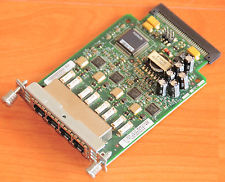
So I ve configured voice service a number of times, but never using Cisco equipment. There s a business starting up here on Orcas Island and they need a number of lines voice and fax service. I had a spare 2801 router laying around and heard that it s possible to provision voice service using these machines. So I looked on eBay for a module that will provide more than two FXS ports and decided on the VIC-4FXS. When it was delivered, I installed it and booted the router. It told me that it needed a PVDM DSP Module, so I got one of those as well. It has arrived. I have installed it. Now when I boot the router, I don t get a warning or an error. configure the router to send outbound calls to the SIP server configure the router to send inbound calls to FXS ports 2,3,4 in round robin

trunk group FXSlines
!
voice-port 0/2/1
 trunk-group FXSlines
!
voice-port 0/2/2
 trunk-group FXSlines
!
voice-port 0/2/3
 trunk-group FXSlines
configure the router to send inbound calls to the correct ports on the VIC-4FXS
dial-peer voice 1 pots
 preference 7
 destination-pattern 3602987792
 translate-outgoing called 10
 port 0/2/0
 forward-digits all
!
dial-peer voice 2 pots
 preference 2
 destination-pattern 3602987793
 translate-outgoing called 10
 port 0/2/1
 forward-digits all
!
dial-peer voice 3 pots
 preference 3
 destination-pattern 3602987794
 translate-outgoing called 10
 port 0/2/2
 forward-digits all
!
dial-peer voice 4 pots
 preference 4
 destination-pattern 3602987795
 translate-outgoing called 10
 port 0/2/3
 forward-digits all
configure the router to accept inbound calls from the asterisk call server
voice service voip
 allow-connections sip to sip
 no supplementary-service sip moved-temporarily
 no supplementary-service sip refer
 fax protocol t38 ls-redundancy 0 hs-redundancy 0 fallback cisco
 sip
  registrar server expires max 3600 min 3600
  localhost dns:8.8.8.8
configure the asterisk call server to send inbound calls to the router On asterisk call server, edit sip.conf to register with SIP server on cisco router at 172.16.78.209:
[fhvoice]
type=peer
insecure=port,invite
context=fhvoice
disallow=all
allow=ulaw
language=en
canreinvite=no
host=172.16.78.209
qualify=20000
dtmfmode=rfc2833
On asterisk call server, edit extensions.conf and add extensions to the incoming context:
exten => 3602987792,1,Dial(SIP/fhvoice/$ EXTEN ,30)
   same => n,Hangup()
exten => 3602987793,1,Dial(SIP/fhvoice/$ EXTEN ,30)
   same => n,Hangup()
exten => 3602987794,1,Dial(SIP/fhvoice/$ EXTEN ,30)
   same => n,Hangup()
exten => 3602987795,1,Dial(SIP/fhvoice/$ EXTEN ,30)
   same => n,Hangup()
configure the asterisk call server to accept outbound calls from the router

Steve Kemp: An email client and a new desk.

Today I released version 0.25 of my console mail client, which is a release focussed upon portability (DragonFly BSD, and MacOSX specifically). Over the past couple of weeks I've written a fair bit of code, wondering if I want to make the jump to a graphical email client, but the conclusion for the moment has to be no. With the scripting support built into my client, and even before then using the hooks/hacks that mutt supported, I just process mail so much more quickly than via a GUI system. I also benefit from reading the mail on the host to which it is delivered - mail gets filtered by something like procmail, and I read it in-situa. IMAP is available if I travel, but I rarely do so. Having a GUI client might be fun, but it would mean I'd read mail on my desktop - pretty much the only system I don't backup (except for images, videos, and local media). It would also involve running imapsync, or similar, to pull the mail in, and relaying through the remote server to avoid my ISPs poor IP-reputation. In short I believe if I use a GUI client I'll get slower, and I'll still need the remote host regardless. It was this time last year when I thought it was functional, but now it is functional, battle-tested, and reliable. So I guess I'm done with email for the next few years. Maybe in that time somebody will write something better - console based for preference, GUI as a last resort, and certainly not another webmail client. In other news .. I had a fun interview on Monday, it went well until they admitted they couldn't afford me - so their goal is to pay a junior member a small salary and hope to get somebody senior to work part-time for a similarly minimal salary. Might work for somebody else, but it wouldn't for me right now, so on that basis I declined. The most annoying thing about interviewing is the waiting, between the early flirting about duties and expectations, to scheduling meetings, and then awaiting decisions. On that note I'm half-way through building a new desk which is a nice physical job I can really concentrate upon. I'm currently waiting for the stain to dry on the legs, and then I'll get the damn thing finished. It probably looks more "rustic" than "modern", but it smells nice, so that's the main thing ;) Expect pictures when it is finished.

Francesca Ciceri: A month with Mozilla

Random thoughts of a new contributor I've started to contribute to Mozilla - and particularly to the Firefox Desktop QA team - at the end of March, in order to apply for the OPW with Mozilla as Bug Wrangler.
While being already part of the Free Software world as contributor clearly helps, it's always difficult to find your way at first in such a big project, no matter how helpful the people you're working with are. It's about trying to understand how the project is organized and who works on what, what is expected from you as contributor and the specific style of interaction and contribution accepted in the project. So, here's a couple of thought about it: the necessary disclaimer is that I'm a long-time Debian contributor meaning that, inevitably, Debian is my reference model. Also, everything I'm writing here regards only the specific part of the project I've been working in: Desktop QA and Bugmastering. Documentation The first thing that I noticed is the huge amount of documentation. Everything is very well documented and while this is definitely a plus in my book, it's sometimes difficult to keep track of all this resources. AFAICT, there are basically three main sources of documentation:
  1. the wiki
  2. the Mozilla Developer Network
  3. the site of the QA team
Some of the documents on these three different places are sometimes similar, making them redundant and it's difficult to remember where you read what. At least for me. My workaround has been to bookmark pages as a mad woman, and also to make a list on my wikipage of the pages I found more useful.
My top five of useful pages? Here we go!
  1. a bug's life: lifecycle of bugs in BMO
  2. Tyler's BMO survival guide (parts 1, 2 and 3)
  3. Tyler's Triage Guidelines
  4. on reducing testcases
  5. bug verification walkthrough
And speaking of triage, special shout-out for the most useful addon ever for Mozilla triagers/testers: Nightly Tester Tools. Community interaction For someone coming from Debian, where everything is done via public mailing lists and/or IRC chans, Mozilla was a bit of a cultural shock. The mailing lists are not very much used, at least in the QA community (or I'm not subscribed to the right ones ;)). As for IRC, while there are many channels, they are not very active: meetings and important discussions are held using a proprietary videoconference software (Vidyo), and are mostly restricted to employees (but other people can join if they have a guest URL). On the other hand, every time I asked for help - even the most stupid question - on IRC, I got a useful reply. And thanks to the folks on #testdays and #qa (especially petruta and Aleksej) I was able to speed up the learning process and understand how things work in the project. So, while I'd like to see more public meetings, it's also true that the community is working well on interaction among contributors. Community outreach This is where I think Debian could borrow a couple of ideas. Mozilla basically got me hooked thanks to their Bugdays: every Monday and Wednesday are - respectively - dedicated to Triage and Verification of bugs. The events are open to everyone, the wikipages for the events provide a good tutorial explaining the workflow in detail, and if you have any doubts there are always people willing to help you on the dedicated IRC chan. Every bug worked on during these events is also tagged: so that later it's possible to check how successful the day was in terms of participation. Bugzilla and the triaging/verification workflow About Bugzilla I can only say that I like it. I like how flexible is for search queries, I like the possibility to have custom tags on the whiteboard (as the [bugday-xxxxxx] one) and the smart way to interact among people in the bug without making the bug go stale (ie, mostly the needinfo feature). But beside the software used as BTS, I must admit that I really like the workflow and the whole concept of triaging in Mozilla. The granularity of rights (everyone, canconfirm, editbugs) and the clear procedure for a permission upgrade; the presence of a team constantly working on cleaning the incoming bugs, regardless of the product/component, to make easier for the developers the filtering and the resolution as well; the attention to details of the verification process: each bug marked as Resolved Fixed need to be Verified, to be sure that it's been actually fixed... All these things are really impressive. This, obviously, is something that can be done inside an upstream project where there are people doing paid work, and where the products are not too many. I cannot see how this kind of QA process can be applied to bugs against an entire OS.
But there are some things we (as in Debian) could take inspiration from. Organizing regular Bugdays, for instance. Creating a team of triagers to help both with incoming and with very old bugs. And this, again, is a kind of work that can be done by everyone, not only coding contributors: meaning that an additional effect would be to increase the diversity in the contributors pool. As a side note: I'll start my OPW internship next Monday, and will spend three months playing with bugs and learning how to be a Bug Wrangler! \o/\o/

Mart&iacute;n Ferrari: Introducing Yakker: an open, secure and distributed alternative to WhatsApp

Did I get your attention with the title? Good. In this post I will outline something that I have been thinking about for some months:
I believe it is possible to build a system with the simplicity and functionality of WhatsApp or Viber, which provides end-to-end encryption, is built on free software and open protocols, that supports federation and is almost decentralised, and that would allow interested companies to turn a profit without compromising any of these principles.

Introduction This is the first post of a series that I will be publishing in the next few days. Many parts of these posts will be technical, but I expect that the main concepts can be understood by a wider audience. What I am proposing seems like a bold statement, I know. Maybe there is some fatal flaw somewhere in my thinking, and that is why I am publishing this: I hope to get constructive feedback, and maybe get enough traction to start implementing it Real Soon Now . I have been thinking about this problem since February, when I discussed this extensively with friends at FOSDEM. I have already published a critique of Telegram, which had way more impact than I ever imagined, showing that there is people out there interested in this kind of stuff. The last posts about DNSSEC and DANE were part of my musings about this, too. There are many components that need to be built for this to happen. But more importantly, this can only be useful if it gains a critical mass. And that's why I think making this a viable business tool is very important. At the same time, that means I need to think extra carefully to make it impossible for any for-profit company to mutate this effort into Just Another Walled Garden. My goals for this architecture are:
  • First and foremost, target the same people that nowadays is using a plethora of walled gardens for their instant communication needs. That is WhatsApp, Viber, Skype, Facebook messenger, etc.
  • It must focus on mobile, that is what people care about, without forgetting about other use cases.
  • Creating an account and placing the first call/text message should be as easy as it is currently with the competition.
  • All communication must be encrypted end-to-end with public-key cryptography; nobody but the user has access to the private keys.
  • Most components must be decentralised, and allow for competition.
  • There should be as little trust as possible placed on any part of the system.
  • Anybody can set up a compatible service provider and offer it to its users, while having full interoperability with other providers.
  • Compatible services which are not part of the network must be able to interoperate.
  • Contacting a person should happen even if they are not subscribed to the service. The client application must fall-back seamlessly to using interoperability gateways, PSTN termination, or the mobile network.
  • Interoperability with the competition is desirable, but possibly is better left to be implemented by the client applications.

Components I have identified a few components needed for this to work, I will expand on each one later.
  1. A flagship mobile application for Android and iOS, based on Lumicall or CSIPSimple, but with several important modifications.
  2. One or many directory and authentication services, based on ENUM and DNSSEC. These are the most critical piece of this idea, and possibly must only be operated by community-governed non-profits.
  3. One or many service providers, that offer simple account creation, registration, and optionally PSTN termination (which can be the main way of generating profit). An API needs to be defined for operations that are not part of the communications protocol, like account creation, credit purchasing, and balance querying.
  4. A network governing charter, and a trusted non-profit organisation that oversees that any participating parties are following the charter. This organisation defines which directory services are to be trusted (and possibly operates one of them), and which service providers the client application can use to create accounts.

Key points Some of the issues that need to be solved are:
  • How to handle and distribute public keys securely without the user understanding anything about security.
  • How to make registration painless and password-free, while offering an acceptable level of security.
  • How to fund development of the client application, and maintenance of the directory services.
  • How to get companies interested in this, so them would bring users to the network.
  • How to allow the user to migrate from one service provider to another, to improve competition.
  • How to prevent any party from subverting the spirit of the network.
  • How to make the client application work everywhere and have reasonably quality.

To be continued I think I have answers to most of these problems. I will elaborate in the next few days, stay tuned! :-)

Footnotes The name is something I've chosen a name in less than 2 minutes, while starting this post, so probably is awful. The distributed part is only half true, as the directory services need to be centralised, but I think it's good enough. I am aware that Lumicall seems to be trying to build something similar. I only found about that recently, when I was thinking about this design. Sadly, I think it has several shortcomings, but it is definitely one of the building blocks of this project.

13 May 2014

Vasudev Kamath: Enabling DNSSEC for copyninja.info

Recently I've been seeing lot of posts about DNSSEC on Internet and I thought I should configure my domain to be secured by DNSSEC. copyninja.info domain is now secured with DNSSEC you can verify this by DNSSEC analyzer by Verisign and DNSViz online tool or by installing DNSSEC validator addon for your browser. There are good amount of tutorials and guides available to enable DNSSEC for your domain, still I want to note down steps I followed to here for the record (of course it will be helpful for me if I forget it ;-)) First step will be installing bind9 and dnssec-tools package, if you use aptitude installing dnssec-tools will pull down the bind9 unless you have configured aptitude to not install the Recommends. Next setting up the zone file for your domain, for this first make a copy of /etc/bind/db.local as /etc/bind/db.example.com, replace example.com with your domain name. Now you need to add your zone records to the zone file. Next edit the /etc/bind/named.conf.local file and add following lines
zone "example.com"  
    type master;
    file "/etc/bind/db.copyninja.info";
    allow-transfer  secondary; ;
 ;
Here replace secondary with your secondary DNS servers, if you don't have one you can ommit this but its always recommended to have secondary DNS servers for a zone, in cases when primary fails. After this we need to enable DNSSEC on bind, this is done by editing the file /etc/bind/named.conf.options. Add following lines into options section.
dnssec-validation yes;
dnssec-enable yes;
dnssec-lookaside auto;
A more explanation on this can be found on Linux Journal article. Now its time to create DNSSEC keys and sign your zone, more about different DNSSEC keys and records can be found in the Linux Journal Article on implementation. I used zonesigner utility from dnssec-tools which does job of signing and including KSK and ZSK keys into bind configuration which otherwise should be done manually. Here is the command line I used for generating keys, thanks to Jonas for this.
mkdir -p /etc/bind/keys
zonesigner -algorithm RSASHA256 -keydirectory /etc/bind/keys\
       -dsdir /etc/bind/keys -archivedir /etc/bind/keys/archive \
       /etc/bind/db.example.com
Here we store our keys into /etc/bind/keys directory, and use RSASHA256 algorithm for key generation which is more stronger than the default used RSASHA1 (atleast thats what Jonas told me). This will create ZSK and KSK for the signing zone and creates a signed zone file db.example.com.signed in same directory as original zone file. Now all you need to do is replace the zone file from db.example.com to db.example.com.signed in file directive with your named.conf.local file.
Note that this keys expire after 30 days so you need to resign your zone before 30 days. For resigning just run zonesigner from /etc/bind/keys. You can setup cron job to do this periodically.
zonesigner -zone example.com /path/to/db.example.com
Our signed zone is ready but we are not done yet! For DNSSEC to work others should trust your signed record for this you need to register your public keys with registrar for your domain and this can be done via your domain provider (in my case this is Gandi). You need to check your domain name providers documentation on how to do this. For Gandi users there is a nice documentation.

Next.

Previous.