Search Results: "ana"

9 November 2014

Lucas Nussbaum: Jessie frozen, can we release before FOSDEM?

Jessie was frozen on November 5th, as planned. At the time of the freeze, 310 RC bugs remained to be fixed. This is quite an achievement from the project as a whole, and the Release Team specifically. First, we froze on the date announced more than a year ago, and the freeze seems to have been well respected by all maintainers. Second, with 310 RC bugs at the time of the freeze, we are probably breaking a record for all recent Debian releases (though I don t have hard numbers for that). It seems that auto-removals of RC-buggy non-key packages helped a lot to keep the bug number under control. Assuming that all RC-buggy non-key packages were removed (which would be quite sad of course), we would even be down to about 150 RC bugs! Could we have the shorter Debian freeze ever? (wheezy: 44 weeks; squeeze: 26 weeks; lenny: 28 weeks; etch: 17 weeks). Given that FOSDEM is 12 weeks away, could we even release before FOSDEM, and have a big party there to celebrate? That s not impossible, but we need everybody s help. Random tip and tricks:

Steve Kemp: How could you rationally fork Debian?

The topic of Debian forks has come up a lot recently, and as time goes on I've actually started considering the matter seriously: How would you fork Debian? The biggest stumbling block is that the Debian distribution contains thousands of packages, which are maintained by thousands of developers. A small team has virtually no hope of keeping up to date, importing changes, dealing with bug-reports, etc. Instead you have to pick your battle and decide what you care about. This is why Ubuntu split things into "main" and "universe". Because this way they didn't have to deal with bug reports - instead they could just say "Try again in six months. Stuff from that repository isn't supported. Sorry!" So if you were going to split the Debian project into "supported" and "unsupported" what would you use as the dividing line? I think the only sensible approach would be : On that basis you'd immediately drop the support burden of GNOME, KDE, Firefox, Xine, etc. All the big, complex, and user-friendly stuff would just get thrown away. What you'd end up with would be a Debian-Server fork, or derivative. Things you'd package and care about would include: Would that be a useful split? I suspect it would. It would also be manageable by a reasonably small team. That split would also mean if you were keen on dropping any particular init-system you'd not have an unduly difficult job - your server wouldn't be running GNOME, for example. Of course if you're thinking of integrating a kernel and server-only stuff then you might instead prefer a BSD-based distribution. But if you did that you'd miss out on Docker. Hrm.

7 November 2014

Martin-Éric Racine: HEL has just frozen over. Wait. No. Debian did.

Noticing that Debian just entered its freeze, I went ahead and changed the APT sources on a spare host that is currently running stable. Then, it was time for this command to be executed:

sudo apt-get update && \
sudo apt-get install apt dpkg locales && \
sudo apt-get --purge dist-upgrade && \
sudo apt-get --fix-policy install && \
sudo apt-get --purge autoremove $(deborphan --guess-all)

I guess I'll be busy filing bug reports for the next few hours. Wish me (and each faulty package's maintainer) luck!

PS: Apparently, so many aspects of Debian have become dependent upon GPG features that merely upgrading APT, DPKG and libc6+locales is no longer enough. One must also upgrade gnupg and gnupg2. Thus, the second element of the above recipe has become:

sudo apt-get install apt dpkg gnupg gnupg2 locales && \

Hopefully, APT's dist-upgrade command already knows that these must be upgraded first...

PPS: Hosts running Network-Manager cannot be upgraded remotely, because Network-Manager insists upon killing the network connection and the SSH daemon with it, when its turn comes to get upgraded.

Niels Thykier: Release sprint Preparing for Jessie

The release team are doing a sprint right now up the mini-DebConf in Cambridge, kindly hosted by ARM. We have a fairly large agenda of around 10 items, ranging from simple things like determine the name for the next release to reviewing the list of RC bugs affecting Jessie. Personally, I am very pleased with our progress. We managed to finish 8 of items on the first day. Furthermore, we spent several hours on the RC bug list and keeping up with the unblock requests. There is also live status of the release team, courtesy of Jonathan Wiltshire. Mind you it is manually updated. We will announce the results of our sprint Sunday morning in our Release update talk. The announcement will also be posted to debian-devel-announce like our freeze announcement. Update: fix link to the live status

Riku Voipio: Adventures in setting up local lava service

Linaro uses LAVA as a tool to test variety of devices. So far I had not installed it myself, mostly due to assuming it to be enermously complex to set up. But thanks to Neil Williams work on packaging, installation has got a lot easier. Follow the Official Install Doc and Official install to debian Doc, roughly looking like: 1. Install Jessie into kvm

kvm -m 2048 -drive file=lava2.img,if=virtio -cdrom debian-testing-amd64-netinst.iso
2. Install lava-server

apt-get update; apt-get install -y postgresql nfs-kernel-server apache2
apt-get install lava-server
# answer debconf questions
a2dissite 000-default && a2ensite lava-server.conf
service apache2 reload
lava-server manage createsuperuser --username default --email=foo.bar@example.com
$EDITOR /etc/lava-dispatcher/lava-dispatcher.conf # make sure LAVA_SERVER_IP is right
That's the generic setup. Now you can point your browser to the IP address of the kvm machine, and log in with the default user and the password you made. 3 ... 1000 Each LAVA instance is site customized for the boards, network, serial ports, etc. In this example, I now add a single arndale board.

cp /usr/lib/python2.7/dist-packages/lava_dispatcher/default-config/lava-dispatcher/device-types/arndale.conf /etc/lava-dispatcher/device-types/
sudo /usr/share/lava-server/add_device.py -s arndale arndale-01 -t 7001
This generates us a almost usable config for the arndale. For site specifics I have usb-to-serial. Outside kvm, I provide access to serial ports using the following ser2net config:

7001:telnet:0:/dev/ttyUSB0:115200 8DATABITS NONE 1STOPBIT
7002:telnet:0:/dev/ttyUSB1:115200 8DATABITS NONE 1STOPBIT
TODO: make ser2net not run as root and ensure usb2serial devices always get same name.. For automatic power reset, I wanted something cheap, yet something that wouldn't require much soldering (I'm not a real embedded engineer.. I prefer software side ;) . Discussed with Hector, who hinted about prebuilt relay boxes. Chose one from Ebay, a kmtronic 8-port USB Relay. So now I have this cute boxed nonsense hack. The USB relay is driven with a short script, hard-reset-1

stty -F /dev/ttyACM0 9600
echo -e '\xFF\x01\x00' > /dev/ttyACM0
sleep 1
echo -e '\xFF\x01\x01' > /dev/ttyACM0
Sidenote: If you don't have or want automated power relay for lava, you can always replace this this script with something along "mpg123 puny_human_press_the_power_button_now.mp3" Both the serial port and reset script are on server with dns name aimless. So we take the /etc/lava-dispatcher/devices/arndale-01.conf that add_device.py created and make it look like:

device_type = arndale
hostname = arndale-01
connection_command = telnet aimless 7001
hard_reset_command = slogin lava@aimless -i /etc/lava-dispatcher/id_rsa /home/lava/hard-reset-1
Since in my case I'm only going to test with tftp/nfs boot, the arndale board needs only to be setup to have a u-boot bootloader ready on power-on. Now everything is ready for a test job. I have a locally built kernel and device tree, and I export the directory using the httpd available by default in debian.. Python!

cd out/
python -m SimpleHTTPServer
Go to the lava web server, select api->tokens and create a new token. Next we add the token and use it to submit a job

$ sudo apt-get install lava-tool
$ lava-tool auth-add http://default@lava-server/RPC2/
$ lava-tool submit-job http://default@lava-server/RPC2/ lava_test.json
submitted as job id: 1
$
The first job should now be visible in the lava web frontend, in the scheduler -> jobs part. If everything goes fine, the relay will click in a moment and the job will finish in a few minutes.

Johannes Schauer: automatically suspending cpu hungry applications

TLDR: Using the awesome window manager: how to automatically send SIGSTOP and SIGCONT to application windows when they get unfocused or focused, respectively, to let the application not waste CPU cycles when not in use. I don't require any fancy looking GUI, so my desktop runs no full-blown desktop environment like Gnome or KDE but instead only awesome as a light-weight window manager. Usually, the only application windows I have open are rxvt-unicode as my terminal emulator and firefox/iceweasel with the pentadactyl extension as my browser. Thus, I would expect that CPU usage of my idle system would be pretty much zero but instead firefox decides to constantly eat 10-15%. Probably to update some GIF animations or JavaScript (or nowadays even HTML5 video animations). But I don't need it to do that when I'm not currently looking at my browser window. Disabling all JavaScript is no option because some websites that I need for uni or work are just completely broken without JavaScript, so I have to enable it for those websites. Solution: send SIGSTOP when my firefox window looses focus and send SIGCONT once it gains focus again. The following addition to my /etc/xdg/awesome/rc.lua does the trick:
local capi =   timer = timer  
client.add_signal("focus", function(c)
if c.class == "Iceweasel" then
awful.util.spawn("kill -CONT " .. c.pid)
end
end)
client.add_signal("unfocus", function(c)
if c.class == "Iceweasel" then
local timer_stop = capi.timer timeout = 10
local send_sigstop = function ()
timer_stop:stop()
if client.focus.pid ~= c.pid then
awful.util.spawn("kill -STOP " .. c.pid)
end
end
timer_stop:add_signal("timeout", send_sigstop)
timer_stop:start()
end
end)
Since I'm running Debian, the class is "Iceweasel" and not "Firefox". When the window gains focus, a SIGCONT is sent immediately. I'm executing kill because I don't know how to send UNIX signals from lua directly. When the window looses focus, then the SIGSTOP signal is only sent after a 10 second timeout. This is done for several reasons: With this change, when I now open htop, the process consuming most CPU resources is htop itself. Success! Another cool advantage is, that firefox can now be moved completely into swap space in case I run otherwise memory hungry applications without ever requiring any memory from swap until I really use it again. I haven't encountered any disadvantages of this setup yet. If 10 seconds prove to be too short to copy and paste I can easily extend this delay. Even clicking on links in my terminal works flawlessly - the new tab will just only load once firefox gets focused again. EDIT: thanks to Helmut Grohne for suggesting to compare the pid instead of the raw client instance to prevent misbehaviour when firefox opens additional windows like the preferences dialog.

6 November 2014

Michal Čihař: Weblate 2.0

Weblate 2.0 has been released today. It comes with lot of improvements in backend and completely new user interface. Full list of changes for 2.0: You can find more information about Weblate on http://weblate.org, the code is hosted on Github. If you are curious how it looks, you can try it out on demo server. You can login there with demo account using demo password or register your own user. Ready to run appliances will be soon available in SUSE Studio Gallery. Weblate is also being used https://hosted.weblate.org/ as official translating service for phpMyAdmin, Gammu, Weblate itself and others. If you are free software project which would like to use Weblate, I'm happy to help you with set up or even host Weblate for you. Further development of Weblate would not be possible without people providing donations, thanks to everybody who have helped so far!

Filed under: English phpMyAdmin SUSE Weblate 0 comments Flattr this!

Matthias Klumpp: The state of AppStream/GNOME-Software in Debian Jessie

or Why do I not see any update notifications on my brand-new Debian Jessie installation?? This is a short explanation of the status quo, and also explains the no update notifications issue in a slightly more detailed way, since I am already getting bug reports for that. As you might know, GNOME provides GNOME-Software for installation of applications via PackageKit. In order to work properly, GNOME-Software needs AppStream metadata, which is not yet available in Debian. There was a GSoC student working on the necessary code for that, but the code is not yet ready and doesn t produce good results yet. Therefore, I postponed AppStream integration to Jessie+1, with an option to include some metadata for GNOME and KDE to use via a normal .deb package. Then, GNOME was updated to 3.14. GNOME 3.14 moved lots of stuff into GNOME-Software, including the support for update-notifications (which have been in g-s-d before). GNOME-Software is also the only thing which can edit the application groups in GNOME-Shell, at least currently. So obviously, there was no a much stronger motivation to support GNOME-Software in Jessie. The appstream-glib library, which GNOME-Software uses exclusively to read AppStream metadata, didn t support the DEP-11 metadata format which Debian uses in place of the original AppSTream XML for a while, but does so in it s current development branch. So that component had to be packaged first. Later, GNOME-Software was uploaded to the archive as well, but still lacked the required metadata. That data was provided by me as a .deb package later, locally generated using the current code by my SoC student (the data isn t great, but better than nothing). So far with the good news. But there are multiple issues at time. First of all, the appstream-data package didn t pass NEW so far, due to it s complex copyright situation (nothing we can t resolve, since app-install-data, which appstream-data would replace, is in Debian as well). Also, GNOME-Software is exclusively using offline-updates (more information also on [1] and [2]) at time. This isn t always working at the moment, since I haven t had the time to test it properly and I didn t expect it to be used in Debian Jessie as well[3]. Furthermore, the offline-updates feature requires systemd (which isn t an issue in itself, I am quite fine with that, but people not using it will get unexpected results, unless someone does the work to implement offline-updates with sysvinit). Since we are in freeze at time, and obviously this stuff is not ready yet, GNOME is currently without update notifications and without a way to change the shell application groups. So, how can we fix this? One way would of course be to patch notification support back into g-s-d, if the new layout there allows doing that. But that would not give us the other features GNOME-Software provides, like application-group-editing. Implementing that differently and patching it to make it work would be more or at least the same amount of work like making GNOME-Software run properly. I therefore prefer getting GNOME-Software to run, at least with basic functionality. That would likely mean hiding things like the offline-update functionality, and using online-updates with GNOME-PackageKit instead. Obviously, this approach has it s own issues, like doing most of the work post-freeze, which kind of defeats the purpose of the freeze and would need some close coordination with the release-team. So, this is the status quo at time. It is kind of unfortunate that GNOME moved crucial functionality into a new component which requires additional integration work by the distributors so quickly, but that s something which isn t worth to talk about. We need a way forward to bring update-notifications back, and there is currently work going on to do that. For all Debian users: Please be patient while we resolve the situation, and sorry for the inconvenience. For all developers: If you would like to help, please contact me or Laurent Bigonville, there are some tasks which could use some help.
As a small remark: If you are using KDE, you are lucky Apper provides the notification support like it always did, and thanks to improvements in aptcc and PackageKit, it even is a bit faster now. For the Xfce and <other_desktop> people, you need to check if your desktop provides integration with PackageKit for update-checking. At least Xfce doesn t, but after GNOME-PackageKit removed support for it (which was moved to gnome-settings-daemon and now to GNOME-Software) nobody stepped up to implement it yet (so if you want to do it it s not super-complicated, but knowledge of C and GTK+ is needed). - [3]: It looks like dpkg tries to ask a debconf question for some reason, or an external tool like apt-listchanges is interfering with the process, which must run completely unsupervised. There is some debugging needed to resolve these Debian-specific issues.

Dirk Eddelbuettel: A Software Carpentry workshop at Northwestern

On Friday October 31, 2014, and Saturday November 1, 2014, around thirty-five graduate students and faculty members attended a Software Carpentry workshop. Attendees came primarily from the Economics department and the Kellogg School of Management, which was also the host and sponsor providing an excellent venue with the Allen Center on the (main) Evanston campus of Northwestern University. The focus of the two-day workshop was an introduction, and practical initiation, to working effectively at the shell, getting introduced and familiar with the git revision control system, as well as a thorough introduction to working and programming in R---from the basics all the way to advanced graphing as well as creating reproducible research documents. The idea of the workshop had come out of discussion during our R/Finance 2014 conference. Bob McDonald of Northwestern, one of this year's keynote speakers, and I were discussing various topic related to open source and good programming practice --- as well as the lack of a thorough introduction to either for graduate students and researcher. And once I mentioned and explained Software Carpentry, Bob was rather intrigued. And just a few months later we were hosting a workshop (along with outstanding support from Jackie Milhans from Research Computing at Northwestern). We were extremely fortunate in that Karthik Ram and Ramnath Vaidyanathan were able to come to Chicago and act as lead instructors, giving me an opportunity to get my feet wet. The workshop began with a session on shell and automation, which was followed by three session focusing on R: a core introduction, a session focused on function, and to end the day, a session on the split-apply-combine approach to data transformation and analysis. The second day started with two concentrated session on git and the git workflow. In the afternoon, one session on visualization with R as well as a capstone-alike session on reproducible research rounded out the second day.

Things that worked The experience of the instructors showed, as the material was presented and an effective manner. The selection of topics, as well as the pace were seen by most students to be appropriate and just right. Karthik and Ramnath both did an outstanding job. No students experienced any real difficulties installing software, or using the supplied information. Participants were roughly split between Windows and OS X laptops, and had generally no problem with bash, git, or R via RStudio. The overall Software Carpentry setup, the lesson layout, the focus on hands-on exercises along with instruction, the use of the electronic noteboard provided by etherpad and, of course, the tried-and-tested material worked very well.

Things that could have worked better Even more breaks for exercises could have been added. Students had difficulty staying on pace in some of the exercise: once someone fell behind even for a small error (maybe a typo) it was sometimes hard to catch up. That is a general problem for hands-on classes. I feel I could have done better with the scope of my two session. Even more cohesion among the topics could have been achieved via a single continually used example dataset and analysis.

Acknowledgments Robert McDonald from Kellogg, and Jackie Milhans from Research Computing IT, were superb hosts and organizers. Their help in preparing for the workshop was tremendous, and the pick of venue was excellent, and allowed for a stress-free two days of classes. We could not have done this without Karthik and Ramnath, so a very big Thank You to both of them. Last but not least the Software Carpentry 'head office' was always ready to help Bob, Jackie and myself during the earlier planning stage, so another big Thank You! to Greg and Arliss.

5 November 2014

Rapha&#235;l Hertzog: My Free Software Activities in October 2014

My monthly report covers a large part of what I have been doing in the free software world. I write it for my donators (thanks to them!) but also for the wider Debian community because it can give ideas to newcomers and it s one of the best ways to find volunteers to work with me on projects that matter to me. Packaging work With the Jessie freeze approaching, I took care of packaging some new upstream releases that I wanted to get in. I started with zim 0.62, I had skipped 0.61 due to some annoying regressions. Since I had two bugs to forward, I took the opportunity to reach out to the upstream author to see if he had some important fixes to get into Jessie. This resulted in me pushing another update with 3 commits cherry picked from the upstream VCS. I also sponsored a wheezy-backports of the new version. I pushed two new bugfixes releases of Publican (4.2.3 and 4.2.6) but I had to include a work-around for a bug that I reported earlier on docbook-xml (#763598: the XML catalog doesn t allow libxml2/xmllint to identify the local copy of some entities files) and that is unlikely to be fixed in time for Jessie. Last but not least, I pushed the first point release of Django 1.7, aka version 1.7.1 to unstable and asked release managers to ensure it migrates to testing before the real freeze. This is important because the closer we are to upstream, the easier it is to apply security patches during the lifetime of Jessie (which will hopefully be 5 years, thanks to Debian LTS!). I also released a backport of python-django 1.7 to wheezy-backports. I sponsored galette 0.7.8+dfsg-1 fixing an RC bug so that it can get back to testing (it got removed from testing due to the bug). Debian LTS See my dedicated report for the paid work I did on that area. Apart from that, I took some time to get in touch with all the Debian consultants and see if they knew some companies to reach out. There are a few new sponsors in the pipe thanks to this, but given the large set of people that it represents, I was expecting more. I used this opportunity to report all bogus entries (i.e bouncing email, broken URL) to the maintainer of the said webpage. Distro Tracker Only 30 commits this month, with almost no external contribution, I m a bit saddened by this situation because it s not very difficult to contribute to this project and we have plenty of easy bugs to get you started. That said I m still happy with the work done. Most of the changes have been made for Kali but will be useful for all derivatives: it s now possible to add external repositories in the tracker and not display them in the list of available versions, and not generate automatic news about those repositories. There s a new derivative application which is only in its infancy but can already provide a useful comparison of a derivative with its parent. See it in action on the Kali Package Tracker: http://pkg.kali.org/derivative/ Thanks to Offensive Security which is sponsoring this work! Since I have pushed Django 1.7 to wheezy-backports, all distro tracker instances that I manage are now running that version of Django and I opted to make that version mandatory. This made it possible to add initial Django migrations and rely on this new feature for future database schema upgrade (I have voluntarily avoided schema change up to now to avoid problems migrating from South to Django migrations). Thanks See you next month for a new summary of my activities.

One comment Liked this article? Click here. My blog is Flattr-enabled.

Carl Chenet: Send the same short message on Twitter, Pump.io, Diaspora* and a lot more

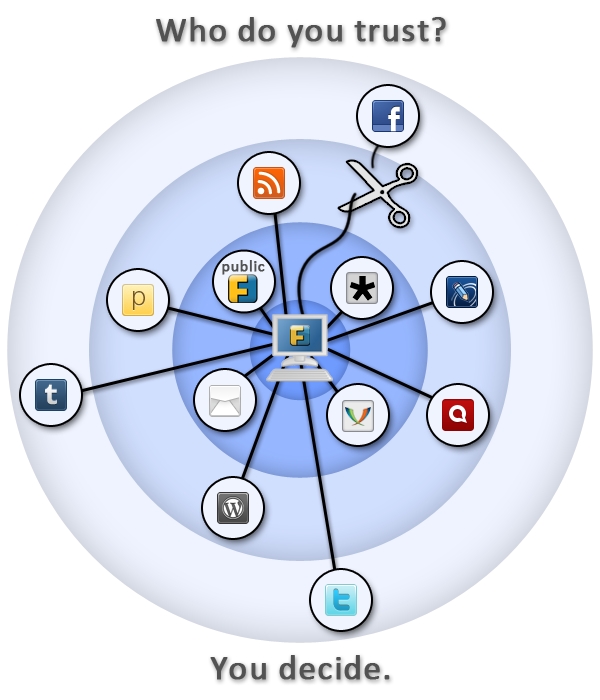
Follow me on Identi.ca or Twitter or Diaspora*diaspora-banner This is a feedback about installing a self hosted instance of Friendica on a Debian server (Jessie). If you re not interested in why I use Friendica, just go to Prerequisite for Friendica section below. Frustration about social networks Being a huge user of short messages, I was quite frustated to spend so much time on my Twitter account. To be quite honest, there is no much I like about this social network, except the huge population of people being potentially interested in what I write. twitter-logo I also have been using Identi.ca (now powered by Pump.io) for a while. But I tried for a while to manage both networks Pump.io and Twitter by hand and it was quite painful. And something was telling me another social network was going to appear from nowhere one of these days and I ll be just horrible to try to keep it up this way. identica-logo So I was looking for a scalable solution not asking too much personal investment. Subscribing to Diaspora* some days ago on the Framasphere pod, tintouli told me to try Friendica. Hmmm, what s Friendica ? f-intro Friendica is a content manager you can plug on almost anything: social networks (Facebook, Twitter, Pump.io, Diaspora*, ), but also WordPress, XMPP, emails I m in fact just discovering the power of this tool but to plug it on my different social network accounts was quite a good use case for me. And I guess if you re still reading, for you too. I tried to use some shared public servers but I was not quite happy with the result, one connector was still missing or public servers were really unstable. So I m at last self hosting my Friendica. Here is how. Prerequisite for Friendica You need to install the following packages: # apt-get install apache2 libapache2-mod-php5 php5 php5-curl php5-gd php5-mysql mysql-server git Having a already self-modified /etc/php5/apache2/php.ini, I encountered a small issue with libCurl and had to manually add the following line in the php.ini: extension=curl.so Setting up MySQL Connect to MySQL and create an empty database with a dedicated user: # mysql -u root -pV3rYS3cr3t -e create database friendica; GRANT ALL PRIVILEGES ON friendica.* TO friendica@localhost IDENTIFIED BY R3AlLyH4rdT0Gu3ss mysql Setting up Apache My server hosts several services, so I use a subdomain friendica.mydomain.com. If you use a subdomain, of course check you do have declared this subdomain in your DNS zone. apache-logo I use SSL encryption with a wildcard certificate for all my subdomains. My Friendica data are stored in /var/www/friendica. Here is my virtual host configuration for Friendica stored in the file /etc/apache2/sites-available/friendicassl.conf : <VirtualHost *:443>
ServerName friendica.mydomain.com
DocumentRoot /var/www/friendica/
DirectoryIndex index.php index.html
ErrorLog /var/log/apache2/friendica-error-ssl.log
TransferLog /var/log/apache2/friendica-access-ssl.log SSLEngine on
SSLCertificateFile /etc/ssl/certs/mydomain/mydomain.com.crt
SSLCertificateKeyFile /etc/ssl/private/mydomain.com.key
SSLVerifyClient None <Directory /var/www/friendica/>
AllowOverride All
Options FollowSymLinks
Order allow,deny
Allow from all
</Directory>
</VirtualHost> After writing the configuration file, just launch the following commands and it should be good for the Apache configuration: # a2ensite friendicassl && /etc/init.d/apache2 reload friendica-trust Setting up Friendica Get the master zip file of Friendica, copy it on your server and decompress it. Something like : # cd /var/www/ && wget https://github.com/friendica/friendica/archive/master.zip && unzip master.zip && mv friendica-master friendica You need to give www-data (Apache user) the rights to write in /var/www/friendica/view/smarty3/ : # chown -R www-data:www-data /var/www/friendica/view/smarty3 && chmod -R ug+w var/www/friendica/view/smarty3 Ok, I guess we re all set, lets launch the installation process! Using your web browser, connect to friendica.mydomain.com. First step you ll see the installation window which checks the prerequisite before installing. Complete if something is missing.
friendica-installation

First window of the Friendica installation process

Second step asks the host/user/password of the database, complete and the installation process starts. Hopefully all goes just fine. Next you ll have to create a /var/www/friendica/.htconfig.php with the content that the last page of the installation process provides. Just copy/paste, check the rights of this file and now you can connect again to see the register page of friendica at the url https://friendlica.mydomain.com/register . Pretty cool! Register a user That s a fairly easy step. You just need to check before that your server is able to send emails, because the password is going to be sent to you by email. If it is ok, you should now identify on the welcome page of friendica and access your account. That s a huge step to broadcast your short messages everywhere, but we have some last steps before being able to send your short messages on all the social networks we need. A small break, create an app for twitter on apps.twitter.com To send your short messages to Twitter, you need to create an app on apps.twitter.com. Just check you re logged in Twitter and connect to apps.twitter.com. Create an app called with a unique name (apparently), then go to the Keys and Access tokens page, note the consumer key and the consumer secret. You ll later need the name of the app, the consumer key and the consumer secret. friendica-decentralized-network Install and configure the addons Friendica uses an addon system in order to plug on the different third-parties it needs. We are going to configure Twitter, Pump.io and the Diaspora* plug. Let s go back to our server and launches some commands: # cd /tmp && git clone https://github.com/friendica/friendica-addons.git && cd friendica-addons # tar xvf twitter.tgz -C /var/www/friendica/addon # tar xvf pumpio.tgz -C /var/www/friendica/addon # cp -a diaspora /var/www/friendica/addon You need to modify your /var/www/friendica/.htconfig.php file and add the following content at the end: // names of your addons, separated by a comma $a->config['system']['addon'] = pumpio, twitter, diaspora ; // your Twitter consumer key
$a->config['twitter']['consumerkey'] = P4Jl2Pe4j7Lj91eIn0AR8vIl2 ; // your Twitter consumer secret
$a->config['twitter']['consumersecret'] = 1DnVkllPik9Ua8jW4fncxwtXZJbs9iFfI5epFzmeI8VxM9pqP1 ; // you Twitter app name $a->config['twitter']['application_name'] = whatever-twitter ; banner_friendica Connect again to Friendica. Go to settings => social networks, you will see the options for Twitter, Pump.io and Diaspora*. Complete the requested information for each of them. Important options you should not forget to check are: Pump.io Twitter Diaspora* Done? Now it s time to send your first broadcasted short message. Yay! Send a short message to your different social networks Connect to Friendica, click on the network page, write your short message in the Share box. Click on the lock lock, you ll see the following setup: friendica-post-default It means your short messages will be broadcasted to the three networks. Or more, it s up to you! That s my setup, feel free to modify. Now close the lock window and send your message. For me it takes some time to appear on Twitter and Diaspora* and it immediatly appears on Identi.ca. Last words friendica-stand Friendica offers to take back the control of your data, by broadcasting content on different media from a single source. While self hosting, you keep your data whatever happends and are not subject to companies losing your data like recently Twitpic. Moreover the philosophy behind Friendica pushed me to dig and test the solution What about you? How do you proceed to broadcast your short messages? Does Friendica offer a good solution in your opinion? Are you interested in the philosophy behind this project? Feel free to share your thoughs in the comments. LAST MINUTE: hey, this article is on Hacker News, don t hesitate to vote for it if you liked it!

4 November 2014

Tiago Bortoletto Vaz: A few words on the recent Brazilian elections

The Brazilian presidential election was exceedingly intense this year. Among many inferences that we can make by following the news and investigating data from the voting results I'd like to share this one, which in my opinion reflects quite well the vote preferences in the country. First, let me introduce you "Bel gua", a small town located in the Northeast region of Brazil. It has 6,524 habitants, 3 buses and 2 hospitals. According to the Brazilian Institute of Geography and Statistics (IBGE), the income per person in Bel gua is $146 BRL (or U$59) per month. Believe it or not, it used to be much less. Actually, the city reported in 2013 the highest economic jump in the country, rising more than a thousand positions in the ranking of GDP per capita (from position 4,991 to 3,849). This recent growth was consequence of the social welfare program of the Brazilian government, which also boosted artisanal and manioc flour production. This federal assistance is called "Bolsa fam lia", which benefits 1.814 families in Bel gua.
"Bolsa Fam lia currently gives families with per-capita monthly income below $140 BRL (poverty line, ~$56 USD) a monthly stipend of $32 BRL (~$13 USD) per vaccinated child (< 16 years old) attending school (up to 5), and $38 BRL (~$15 USD) per youth (16 or 17 years old) attending school (up to 2). Furthermore, to families whose per-capita monthly income below $70 BRL (extreme poverty line, ~$28 USD), the program gives the Basic Benefit $70 BRL per month." (from Wikipedia)
Contrary to what many of my middle-class friends believe, and as you can calculate yourself, this little amount of money does not offer anybody a luxury life. It does not make anybody stopping working, nor stopping looking for paid job (but yes, it makes people to start saying NO to forced labor, which is amazing, right?).
/images/belagua.jpg

Bel gua, where Dilma got 93.93% of votes (photo by Clarissa Carramilo / from G1)

Also, Bel gua has no much physicians around because doctors in Brazil usually wouldn't live in a such city. But now Bel gua population can be treated by foreign doctors imported by the recently launched program "Mais M dicos" (More Physicians for Brazil), which hosts two Cuban doctors 15km away. Finally, Bel gua people have light, due to the "Luz para Todos" ("Light for All") program. It's not surprising that Bel gua has re-elected the party which has motivated these changes. For 2014 presidential election, Bel gua people gave 3.558 votes (93.93%) to Dilma Rousseff (candidate of the current government, from a left-ish party), against 230 (6,07%) to A cio Neves (from the right coalition), being the city with the largest amount of votes for Dilma, proportionally, followed by "Serrano do Maranh o" (93,75%), which is located in the same region. On the other hand, the city which gave, proportionally, the largest amount of votes for A cio Neves has a population of 5,564,635 habitants, where most of citizens are not Brazilians, not yet. Miami, located in US, was the city where Brazilian residents would elect A cio by 7,225 votes (91,79%), against 646 (8,21%) for Dilma, followed by Atlanta/US (89,47%) and Houston/US (89,22%).
/images/miami.jpg

Miami, where 91,79% of Brazilians voted A cio (photo by Marc Averette / from Wikipedia)

It's so clear that we do what people call "selfish vote". In general, we don't care about which party has better proposals for the society as whole. Rich people will go against any serious social equality proposal, which will necessarily be followed by higher taxes on their fortunes. As middle class citizens, we care about dollar rates, because we want to get cheaper iStuff from Miami. We're also very upset by the fact that new apartments are being built without that small room in the back, which has been used to accommodate a subservient housemaid who, until last year was not even legally considered a worker. Those people from Bel gua, who used to live in extreme poverty for decades, serving as slaves, they mostly care about having something to eat. Now they eat, so they can think better, they can work, they can sell what they produce in their little yard. And like middle-class and rich citizens, they will give their vote in exchange of what they think is better for them. The big difference here is, if we ask Bel gua people why they voted for Dilma, with no embarrassment they will make it very clear, that's because her government has provided them lots of benefits. Asking the same question for most Brazilians in Miami, Atlant, Houston or S o Paulo, you'll get not only a bunch of allegedly moral/altruistic reasons, but they will also try to delegitimize in many ways the votes from those marginalized citizens. You'll never get the real reasons from them. They will even try to convince you that whoever receives federal assistance should automatically lose right to vote. Such a statement may seem ridiculous, however it has been very present recently. Actually, such hate speech is happening right now. While I'm writing this post about 2500 people are protesting in S o Paulo streets, asking for an immediate military coup because they don't agree with the elections result. These people keep pushing the limits of ridiculousness. Dilma won with 51.64% of valid votes, a very tight result. The country is clearly divided, mostly by hate, unfortunately.

2 November 2014

Thomas Goirand: OpenStack packaging activity: October 2014

Wednesday 1:
Uploaded python-xstatic-jquery removing the .pth file from package.
Uploaded python-taskflow 0.4 to experimental, needed by Cinder Juno RC1
Uploaded Cinder Juno RC1 to experimental Thuesday 2:
Finally understood that the issue with murano-dashboard was that it doesn t build without django-nose >= 1.2. Opened new patch at: https://review.openstack.org/125565
Uploaded murano-dashboard to Experimental, now using django-nose from wheezy-backports in my jenkins setup, so murano-dashboard can be built for Wheezy.
Uploaded python-oslotest 1.1.0.0 (really is upstream 1.1.0)
Uploaded python-oslo.serialization 1.0.0-1 (needed by Ceilometer Juno RC1)
Uploaded Ceilometer Juno RC1
Uploaded Heat Juno RC1
Uploaded oslo.rootwrap 1.3.0.0
Uploaded oslo.db 1.0.2 (bugfix release)
Wrote a new system in openstack-pkg-tools to generate init scripts and. service files from a template, so we don t have to write N times the same thing. Friday 3:
Reworked openstack-pkg-tools to generate automatically sysv-rc init scripts, upstart jobs and systemd unit files, making the system more unified and consistent.
Applied the new system to all packages in Juno.
Uploaded Keystone 2014.1.3-1 to Sid
Uploaded Nova 2014.1.3-1 to Sid
Uploaded Glance 2014.1.3-1 to Sid
Uploaded Neutron 2014.1.3-1 to Sid
Uploaded Horizon 2014.1.3-1 to Sid
Uploaded Cinder 2014.1.3-1 to Sid
Uploaded Trove 2014.1.3-1 to Sid
Uploaded Ceilometer 2014.1.3-1 to Sid Saturday 4:
Uploaded Horizon Juno RC1 to Experimental
Uploaded oslotest 1.1.0.0 to Experimental
Uploaded Ironic Juno RC1 to Experimental
Uploaded Designate Juno RC1 to Experimental
Uploaded Nova Juno RC1 to Experimental
Uploaded Neutron Juno RC1 to Experimental
Uploaded openstack-meta-packages 0.10 to Sid
Uploaded openstack-pkg-tools 13 to Experimental
Uploaded murano-agent Juno RC1 to Experimental Sunday 5:
Uploaded Sahara Juno RC1 to Experimental (it s been approved by FTP masters)
Uploaded Murano Juno RC1 to Experimental (it s been approved by FTP masters)
Fixed all debian/watch file to understand ~b and ~rc releases (fixed applied on both Icehouse and Juno branches, though no upload yet, I ll wait until uploads are needed to have this in the archive ).
Uploaded Trove Juno RC1 to Experimental
Uploaded Sahara Juno RC1 to Experimental With this last upload, everything of Juno RC1 is in Debian Experimental! \o/ Monday 6:
Uploaded some fixes for Nova 2014.1.3-2 in Sid:
* Removed contrib/boto_v6/* in debian/copyright, replaced bin/nova-manage by nova/cmd/ baremetal_, manage.py.
* Mangling upstream rc and beta versions in watch file.
* Added 9990_update_german_programm_messages.patch, thanks to Helge Kreutzmann <debian@helgefjell.de>.
* Fixed correct de.po (Closes: #763682).
* Added nl.po initial Debconf translation, thanks to Frans Spiesschaert <Frans.Spiesschaert@yucom.be> (Closes: #764125).
* Standards-Version is now 3.9.6 (no change).
Upstreamed german translation of po file: https://review.openstack.org/126212
Uploaded Designate 2014.1-12 to Sid, added new de.po also to the Juno branch on alioth (but didn t upload the fix yet).
Uploaded sphinxcontrib-httpdomain new upstream 1.3.0 release, added Python 3.x support to the package, and transitionning to the correct namespaced python-sphinxcontrib.httpdomain package name.
Spent most of the day fixing python-xstatic issues:
o uploaded libjs-twitter-bootstrap-datepicker 1.3.1
o uploaded python-xstatic-bootstrap-datepicker requiring this libjs package
o fixed python-xstatic-jquery-ui package
Now Horizon Juno RC1 builds well, and can be installed again. \o/ Tuesday 7:
Backported python-libvirt 1.2.8 in Wheezy (for Nova Juno support )
Uploaded Ceilometer Juno RC1 with ceilometer-agent-ipmi added (the package will therefore go through the NEW queue).
Uploaded python-requestbuilder 0.2.2-1, needed by the maintainers of euca2ools.
Ported the unified generated init system scripts to Icehouse packages.
Uploaded to Sid updates for: openstack-pkg-tools, ceilometer, cinder, glance, keystone, cinder, nova. Wednesday 8:
Uploaded openstack-pkg-tools 16 to Sid
Uploaded murano-dashboard (with upstream fix to remove font-awesome, which was the reason for FTP master s rejection)
Uploaded ceilometer Juno RC1 with new IPMI agent package (needed for Ironic support).
Uploaded heat 2014.1.3 which I forgot.
Tested https://review.openstack.org/#/c/126777/ which solves the bug I sent to launchpad and approved the patch.
Uploaded python-requestbuilder 0.2.3 Thesday 9:
Worked on fixing Neutron Alembic migration with SQLite3.
Uploade Neutron 2014.2~rc1-3 with a fix for a patch that was destroying dhcp.py. This still doesn t include the Alembic migration fixes, which are still a WIP. Firday 10:
Finished fixing Neutron SQLite 3 Alembic migrations.
Uploaded neutron 2014.2~rc1-3 with the fixes.
Fixed Ceilometer wrong generation of sample config file, using upstream patch (after discussing with Julien Danjou so he wrote it).
Uploaded Ceilometer 2014.2~rc1-4 with the fix
Checked that all packages can be installed in non-interactive mode. This works well now! \o/ Saturday 11:
Uploaded new version of python-xstatic-angular-cookies (ie: 1.2.24.1-2) which allows a higher version of libjs-angularjs (otherwise the package is not installable in Sid/Jessie since last version of angularjs is uploaded). Sunday 12:
Uploaded factory-boy fix for FTBFS
Uploaded python-django-appconf FTBFS
Uploaded Horizon Juno RC2
Uploaded Heat Juno RC3
Uploaded Trove Juno RC2
Uploaded Glance Juno RC2
Uploaded Sahara Juno RC2
Uploaded Nova Juno RC2
Uploaded Neutron Juno RC2
Uploaded Cinder Juno RC2
Uploaded murano-dashboard Juno RC2 Monday 13:
Uploaded python-heatclient 0.2.12-1 to Experimental
Uploaded python-yaql with RC bugfix to Sid (missing dep on python3-ply). Thuesday 14:
Fixed arping newly added dependency in Neutron
Started testing install of all of openstack Juno at once Wednesday 15:
Fixed missing configuration files in Ceilometer (ceilometer-api couldn t start)
Upgraded to Ceilometer Juno RC3.
Backported python-setuptools, as keystone and others are broken due to the namespace of modules not working correctly with the old version of python-pkg-resources. With the new one, everything is back in order. Thesday 16:
Uploaded to Debian Experimental the final release of Juno (ie: 2014.2) for:
Sahara
Nova
Ceilometer
Cinder
Heat
Neutron
Glance
Keystone
Horizon (with fix for Django 1.7 in the wsgi file)
Uploaded to Sid:
Swift 2.2.0
Horizon 2014.1.3-3 with fix for Django 1.7 in the wsgi file that was crashing apache. OpenStack Juno packages are out!!! (ready the day of the upstream release ) Friday 17:
Investigated Trove RC bug #765348, couldn t reproduce, and therefore closed it.
Uploaded Ironic Juno final to Experimental
Uploaded Designate Juno final to Experimental
Uploaded a fix for python-jingo which failed to build with Django 1.7. Sent pull request upstream: https://github.com/jbalogh/jingo/pull/63
Uploaded CVE-2014-7230 & CVE-2014-7231 fixes for both Cinder and Nova in Debian Sid, as per OSSA 2014-036 patches. No need to upload a fix for Trove, as 2014.1.3 already has the fixes. Saturday 18:
Started building Trusty packages
Fixed oslo-config so that it never depends on python3-argparse, which doesn t exist (uploaded to Experimental)
Uploaded python-django-pyscss 1.0.3-2 with python-simplejson now as build-depends (it failed to build in my Trusty jenkins without it).
Uploaded a fix for stevedore and oslo-config to not depends on python3-argparse in Ubuntu (added debian/py3dist-overrides) Sunday 19:
Uploaded python-taskflow with ordereddict in debian/pydist-overrides.
Backported JS packages for Horizon and libvirt for Trusty (from Sid). My new Jenkin server is now producing a full set of Juno packages for Ubuntu trusty. And of course, it s updated on each git push, just like for the Wheezy backports. Monday 20:
Added FORCE_COULEUR=1 when running tests in python-couleur, so that it doesn t fail when running with git-buildpackage. Uploaded result in Sid.
Fixed python-mockito so that it never downloads distribute or nose on its clean target, which was annoying when running git-buildpackage. Uploaded to Sid.
Started to work again on automatic package deployment using openstack-deploy, from the openstack-meta-packages source package. Thuesday 21, Wednesday 22:
Worked on testing packages, did couples of minor fixes, reworked some of the default configuration files to match the install-guide, move configuration directive to the correct new section in nova.conf, etc. Thursday 23:
Patch the Neutron chapter in the install-guide to take into account the changes done on Thuesday 21, Wednesday 22, and simplify the install procedure in Debian. https://review.openstack.org/#/c/130501/ Friday 24:
Busy packing my stuff for moving to France Not much packaging work, except more auto-deploy stuff and some tests. Saturday 25:
Uploaded Nova, Neutron, Cinder and Horizon Icehouse in Sid, including some debconf translation updates, beating the Jessie freeze deadline in 10 days.
Fixed and uploaded openstack-debian-images in Sid: the login option wasn t modifying the default sudoers file, which always contained debian , instead of the custom login. Sunday 26:
Traveled to Moscow Monday 27 & Tuesday 28:
Fixed some murano & murano-dashboard stuff, thanks to the help of some murano team members in Moscow office. Uploaded fixes for murano & murano-dashboard. Tested that murano-dashboard works well, and now it does! :)
Uploaded version dependency fixes for python-xstatic-angular-cookies and python-xstatic-d3 which couldn t be installed in Sid/Jessie because of libjs-* updates. Wednesday 29:
Meeting with Saratov team
Updated sahara endpoints, but didn t upload the package yet to Debian. Thursday 30:
Uploaded ruby-raemon needed for Astute (part of Fuel web).
Packaged ruby-symboltable (not uploaded yet). Friday 31:
Wrote unit test runner for python-webpy (the current package doesn t have unit test runs).
Uploaded python-dbutils (needed by python-web.py unit tests) to Sid: now in NEW queue
Uploaded python-nose-parametrized & python-nose-timer to Sid: now in NEW queue
Uploaded sahara -2 fixing the API endpoint registration URL and service name.
Uploaded python-sphinxcontrib.plantuml to Sid: : now in NEW queue

1 November 2014

Thorsten Alteholz: My Debian Activities in October 2014

FTP assistant This month has been the month before the freeze. Lots of people uploaded a package at the last moment and wanted to have it in testing before everything is over. This resulted in even more processed package than in September. I was able to accept 407 packages and had to reject 77. The whole FTP team managed it to bring the NEW queue below 40 waiting packages. As the Release team doesn t like to see binary-NEW packages appearing in unstable (at least those which change the soname of a lib), this number will increase again. But, that s life I am glad that a freeze happens only every few years. So I would particularly thank my dear wife for her patience, when she saw me sitting in front of that damned computer again and again. Squeeze LTS This was my fourth month that I did some work for the Squeeze LTS initiative, started by Raphael Hertzog at Freexian. This month I got assigned a workload of 13.75h and I spent these hours to upload new versions of I also prepared a new upload of wget and still wait for some feedback. In this case some default values had to be changed and I better wait a bit before I break some scripts. Moreover five CVEs accumulated for php5, so I guess another upload has to be done for this package. This will be ready in the next days I also tried to work on libtasn1-3 and librack-ruby. There hadn t been DSAs for these packages and I tried to dig into the upstream repositories. Unfortunately I failed to find the correct patches. Kudos to the Security Team who have to struggle with all kind of commit messages on a daily basis. Other packages I didn t have time to do any work on my own packages. But during my ftp-time I saw one or another package that deals with some kind of home automation. Up to now there doesn t seem to be a Debian group who deals with this topic. Maybe it is time to start one? Support If you would like to support my Debian work you could either be part of the Freexian initiative (see above) or consider to send some bitcoins to 1JHnNpbgzxkoNexeXsTUGS6qUp5P88vHej. Contact me at donation@alteholz.eu if you prefer another way to donate. Every kind of support is most appreciated.

30 October 2014

Matthew Garrett: Hacker News metrics (first rough approach)

I'm not a huge fan of Hacker News[1]. My impression continues to be that it ends up promoting stories that align with the Silicon Valley narrative of meritocracy, technology will fix everything, regulation is the cancer killing agile startups, and discouraging stories that suggest that the world of technology is, broadly speaking, awful and we should all be ashamed of ourselves.

But as a good data-driven person[2], wouldn't it be nice to have numbers rather than just handwaving? In the absence of a good public dataset, I scraped Hacker Slide to get just over two months of data in the form of hourly snapshots of stories, their age, their score and their position. I then applied a trivial test:
  1. If the story is younger than any other story
  2. and the story has a higher score than that other story
  3. and the story has a worse ranking than that other story
  4. and at least one of these two stories is on the front page
then the story is considered to have been penalised.

(note: "penalised" can have several meanings. It may be due to explicit flagging, or it may be due to an automated system deciding that the story is controversial or appears to be supported by a voting ring. There may be other reasons. I haven't attempted to separate them, because for my purposes it doesn't matter. The algorithm is discussed here.)

Now, ideally I'd classify my dataset based on manual analysis and classification of stories, but I'm lazy (see [2]) and so just tried some keyword analysis:
KeywordPenalisedUnpenalised
Women134
Harass20
Female51
Intel23
x8634
ARM34
Airplane12
Startup4626

A few things to note:
  1. Lots of stories are penalised. Of the front page stories in my dataset, I count 3240 stories that have some kind of penalty applied, against 2848 that don't. The default seems to be that some kind of detection will kick in.
  2. Stories containing keywords that suggest they refer to issues around social justice appear more likely to be penalised than stories that refer to technical matters
  3. There are other topics that are also disproportionately likely to be penalised. That's interesting, but not really relevant - I'm not necessarily arguing that social issues are penalised out of an active desire to make them go away, merely that the existing ranking system tends to result in it happening anyway.

This clearly isn't an especially rigorous analysis, and in future I hope to do a better job. But for now the evidence appears consistent with my innate prejudice - the Hacker News ranking algorithm tends to penalise stories that address social issues. An interesting next step would be to attempt to infer whether the reasons for the penalties are similar between different categories of penalised stories[3], but I'm not sure how practical that is with the publicly available data.

(Raw data is here, penalised stories are here, unpenalised stories are here)


[1] Moving to San Francisco has resulted in it making more sense, but really that just makes me even more depressed.
[2] Ha ha like fuck my PhD's in biology
[3] Perhaps stories about startups tend to get penalised because of voter ring detection from people trying to promote their startup, while stories about social issues tend to get penalised because of controversy detection?

comment count unavailable comments

Alessio Treglia: Handling identities in distributed Linux cloud instances

I ve many distributed Linux instances across several clouds, be them global, such as Amazon or Digital Ocean, or regional clouds such as TeutoStack or Enter. Probably many of you are facing the same issue: having a consistent UNIX identity across all multiple instances. While in an ideal world LDAP would be a perfect choice, letting LDAP open to the wild Internet is not a great idea. So, how to solve this issue, while being secure? The trick is to use the new NSS module for SecurePass. While SecurePass has been traditionally used into the operating system just as a two factor authentication, the new beta release is capable of holding extended attributes , i.e. arbitrary information for each user profile. We will use SecurePass to authenticate users and store Unix information with this new capability. In detail, we will: SecurePass and extended attributes The next generation of SecurePass (currently in beta) is capable of storing arbitrary data for each profile. This is called Extended Attributes (or xattrs) and -as you can imagine- is organized as key/value pair. You will need the SecurePass tools to be able to modify users extended attributes. The new releases of Debian Jessie and Ubuntu Vivid Vervet have a package for it, just:
# apt-get install securepass-tools
ERRATA CORRIGE: securepass-tools hasn t been uploaded to Debian yet, Alessio is working hard to make the package available in time for Jessie though.
For other distributions or previous releases, there s a python package (PIP) available. Make sure that you have pycurl installed and then:
# pip install securepass-tools
While SecurePass tools allow local configuration file, we highly recommend for this tutorial to create a global /etc/securepass.conf, so that it will be useful for the NSS module. The configuration file looks like:
[default]
app_id = xxxxx
app_secret = xxxx
endpoint = https://beta.secure-pass.net/
Where app_id and app_secrets are valid API keys to access SecurePass beta. Through the command line, we will be able to set UID, GID and all the required Unix attributes for each user:
# sp-user-xattrs user@domain.net set posixuid 1000
While posixuid is the bare minimum attribute to have a Unix login, the following attributes are valid: Install and Configure NSS SecurePass In a similar way to the tools, Debian Jessie and Ubuntu Vivid Vervet have native package for SecurePass:
# apt-get install libnss-securepass
For previous releases of Debian and Ubuntu can still run the NSS module, as well as CentOS and RHEL. Download the sources from: https://github.com/garlsecurity/nss_securepass Then:
./configure
make
make install (Debian/Ubuntu Only)
For CentOS/RHEL/Fedora you will need to copy files in the right place:
/usr/bin/install -c -o root -g root libnss_sp.so.2 /usr/lib64/libnss_sp.so.2
ln -sf libnss_sp.so.2 /usr/lib64/libnss_sp.so
The /etc/securepass.conf configuration file should be extended to hold defaults for NSS by creating an [nss] section as follows:
[nss]
realm = company.net
default_gid = 100
default_home = "/home"
default_shell = "/bin/bash"
This will create defaults in case values other than posixuid are not being used. We need to configure the Name Service Switch (NSS) to use SecurePass. We will change the /etc/nsswitch.conf by adding sp to the passwd entry as follows:
$ grep sp /etc/nsswitch.conf
 passwd:  files sp
Double check that NSS is picking up our new SecurePass configuration by querying the passwd entries as follows:
$ getent passwd user
 user:x:1000:100:My User:/home/user:/bin/bash
$ id user
 uid=1000(user)  gid=100(users) groups=100(users)
Using this setup by itself wouldn t allow users to login to a system because the password is missing. We will use SecurePass authentication to access the remote machine. Configure PAM for SecurePass On Debian/Ubuntu, install the RADIUS PAM module with:
# apt-get install libpam-radius-auth
If you are using CentOS or RHEL, you need to have the EPEL repository configured. In order to activate EPEL, follow the instructions on http://fedoraproject.org/wiki/EPEL Be aware that this has not being tested with SE-Linux enabled (check off or permissive). On CentOS/RHEL, install the RADIUS PAM module with:
# yum -y install pam_radius
Note: as per the time of writing, EPEL 7 is still in beta and does not contain the Radius PAM module. A request has been filed through RedHat s Bugzilla to include this package also in EPEL 7 Configure SecurePass with your RADIUS device. We only need to set the public IP Address of the server, a fully qualified domain name (FQDN), and the secret password for the radius authentication. In case of the server being under NAT, specify the public IP address that will be translated into it. After completion we get a small recap of the already created device. For the sake of example, we use secret as our secret password. Configure the RADIUS PAM module accordingly, i.e. open /etc/pam_radius.conf and add the following lines:
radius1.secure-pass.net secret 3
radius2.secure-pass.net secret 3
Of course the secret is the same we have set up on the SecurePass administration interface. Beyond this point we need to configure the PAM to correct manage the authentication. In CentOS, open the configuration file /etc/pam.d/password-auth-ac; in Debian/Ubuntu open the /etc/pam.d/common-auth configuration and make sure that pam_radius_auth.so is in the list.
auth required   pam_env.so
auth sufficient pam_radius_auth.so try_first_pass
auth sufficient pam_unix.so nullok try_first_pass
auth requisite  pam_succeed_if.so uid >= 500 quiet
auth required   pam_deny.so
Conclusions Handling many distributed Linux poses several challenges, from software updates to identity management and central logging. In a cloud scenario, it is not always applicable to use traditional enterprise solutions, but new tools might become very handy. To freely subscribe to securepass beta, join SecurePass on: http://www.secure-pass.net/open
And then send an e-mail to info@garl.ch requesting beta access.

Juliana Louback: JSCommunicator at xTupleCon 2014

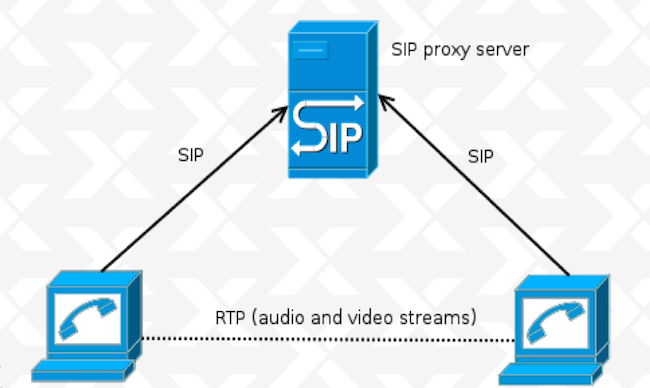
Two weeks ago I left NYC for a day trip to Norfolk, Virginia, to attend xTupleCon 2014. For those who don t know, xTuple is an incredibly reknown open source Enterprise Resource Planning (ERP) software. If you ve been following this blog, you might recall that during my participation in the Google Summer of Code 2014, I wrote a beta JSCommunicator extension for xTuple (to see how I went about doing that, look up Kickstarting the JSCommunicator-xTuple extension). Now, I wasn t flying down to Virginia on the eve of my first grad school midterms (gasp!) for fun - although I will admit, I enjoyed myself a fair amount. My GSoC mentor, Daniel Pocock was giving a talk about WebRTC and JSCommunicator at xTupleCon and invited me to participate. So that was the first perk of going to xTupleCon, I got to finally meet my GSoC mentor in person! During the presentation, Daniel provided a high level expanation of WebRTC and how it works. WebRTC (Web Real Time Communications) enables real time transmission of audio, video and data streams through browser-to-browser applications. This is one of the many perks of WebRTC; it doesn t require installation of plugins, making its use less vulnerable to security breaches. Websockets are used for the signalling channel and the SIP or XMPP can be used as the signaling protocol - in JSCommunicator, we used SIP. What was also done in JSCommunicator and can be done in other applications is to use a library to implement the signaling and SIP stack. JSCommunicator uses (and I highly reccomend) JsSIP. The basic SIP architecture is comprised of peers and a SIP Proxy Server that supports SIP over Websockets transport: sipArch If you have users behind NAT, you ll also need a TURN server for relay: sipArch2 In both cases, setup is not too difficult, particularly if using reSIProcate which offers both the SIP proxy and the TURN server. Daniel Pocock has an excellent post on how to setup and configure your SIP proxy and TURN server. With regard to JSCommunicator, it is a generic telephone in HTML5 which can easily be embedded in any web site or web app. Almost every aspect of JSCommunicator is easily customizable. More about JSCommunicator setup and architecture is detailed in a previous post. The JSCommunicator-xTuple extension can be installed in xTuple as an npm package (xtuple-jscommunicator). It is still at a very beta - or even pre-beta - stage and there are various limitations; the configuration must be hard-coded and dialing is done manually as opposed to clicking on a contact. Some of these limitations are features are on the wish list for future work. For example, some ideas for the next version of the extension are a click to dial from CRM records functionality and to bring up CRM records for an incomming call. Additionaly, the SIP proxy could be automatically installed with the xTuple server installation if desired. We closed the presentation with a live demo during which I made a video call from a JSCommunicator instance embedded in freephonebox.net to the JSCommunicator xTuple extension running on Daniel s laptop. Despite the occasionally iffy hotel Wifi, the demo was a hit - at one point I even left the conference room and took a quick walk around the hotel and invited other xTupleCon attendees to say hello to those in the room. The audience s reception was more enthusiastic than I anticipated, giving way to a pretty extensive Q&A session. It s great to see more and more people interested in WebRTC, I can t emphasize enough what a useful and versatile tool it is. Here s an action shot of part of the xTuple WebRTC presentation: xtuple

Keith Packard: Glamor cleanup

Glamor Cleanup Before I start really digging in to reworking the Render support in Glamor, I wanted to take a stab at cleaning up some cruft which has accumulated in Glamor over the years. Here's what I've done so far. Get rid of the Intel fallback paths I think it's my fault, and I'm sorry. The original Intel Glamor code has Glamor implement accelerated operations using GL, and when those fail, the Intel driver would fall back to its existing code, either UXA acceleration or software. Note that it wasn't Glamor doing these fallbacks, instead the Intel driver had a complete wrapper around every rendering API, calling special Glamor entry points which would return FALSE if GL couldn't accelerate the specified operation. The thinking was that when GL couldn't do something, it would be far faster to take advantage of the existing UXA paths than to have Glamor fall back to pulling the bits out of GL, drawing to temporary images with software, and pushing the bits back to GL. And, that may well be true, but what we've managed to prove is that there really aren't any interesting rendering paths which GL can't do directly. For core X, the only fallbacks we have today are for operations using a weird planemask, and some CopyPlane operations. For Render, essentially everything can be accelerated with the GPU. At this point, the old Intel Glamor implementation is a lot of ugly code in Glamor without any use. I posted patches to the Intel driver several months ago which fix the Glamor bits there, but they haven't seen any review yet and so they haven't been merged, although I've been running them since 1.16 was released... Getting rid of this support let me eliminate all of the _nf functions exported from Glamor, along with the GLAMOR_USE_SCREEN and GLAMOR_USE_PICTURE_SCREEN parameters, along with the GLAMOR_SEPARATE_TEXTURE pixmap type. Force all pixmaps to have exact allocations Glamor has a cache of recently used textures that it uses to avoid allocating and de-allocating GL textures rapidly. For pixmaps small enough to fit in a single texture, Glamor would use a cache texture that was larger than the pixmap. I disabled this when I rewrote the Glamor rendering code for core X; that code used texture repeat modes for tiles and stipples; if the texture wasn't the same size as the pixmap, then texturing would fail. On the Render side, Glamor would actually reallocate pixmaps used as repeating texture sources. I could have fixed up the core rendering code to use this, but I decided instead to just simplify things and eliminate the ability to use larger textures for pixmaps everywhere. Remove redundant pixmap and screen private pointers Every Glamor pixmap private structure had a pointer back to the pixmap it was allocated for, along with a pointer to the the Glamor screen private structure for the related screen. There's no particularly good reason for this, other than making it possible to pass just the Glamor pixmap private around a lot of places. So, I removed those pointers and fixed up the functions to take the necessary extra or replaced parameters. Similarly, every Glamor fbo had a pointer back to the Glamor screen private too; I removed that and now pass the Glamor screen private parameter as needed. Reducing pixmap private complexity Glamor had three separate kinds of pixmap private structures, one for 'normal' pixmaps (those allocated by them selves in a single FBO), one for 'large' pixmaps, where the pixmap was tiled across many FBOs, and a third for 'atlas' pixmaps, which presumably would be a single FBO holding multiple pixmaps. The 'atlas' form was never actually implemented, so it was pretty easy to get rid of that. For large vs normal pixmaps, the solution was to move the extra data needed by large pixmaps into the same structure as that used by normal pixmaps and simply initialize those elements correctly in all cases. Now, most code can ignore the difference and simply walk the array of FBOs as necessary. The other thing I did was to shrink the number of possible pixmap types from 8 down to three. Glamor now exposes just these possible pixmap types: Future Work

29 October 2014

Rhonda D'Vine: Feminist Year

If someone would have told me that I would visit three feminist events this year I would have slowly nodded at them and responded with "yeah, sure..." not believing it. But sometimes things take their own turns. It all started with the Debian Women Mini-Debconf in Barcelona. The organizers did ask me how they have to word the call for papers so that I would feel invited to give a speech, which felt very welcoming and nice. So we settled for "people who identify themselves as female". Due to private circumstances I didn't prepare well for my talk, but I hope it was still worth it. The next interesting part though happened later when there were lightning talks. Someone on IRC asked why there are male people in the lightning talks, which was explicitly allowed for them only. This also felt very very nice, to be honest, that my talk wasn't questioned. Those are amongst the reasons why I wrote My place is here, my home is Debconf. Second event I went to was the FemCamp Wien. It was my first event that was a barcamp, I didn't know what to expect organization wise. Topic-wise it was set about Queer Feminism. And it was the first event that I went to which had a policy. Granted, there was an extremely silly written part in it, which naturally ended up in a shit storm on twitter (which people from both sides did manage very badly, which disappointed me). Denying that there is sexism against cis-males is just a bad idea, but the background of it was that this wasn't the topic of this event. The background of the policy was that usually barcamps but events in general aren't considered that save of a place for certain people, and that this barcamp wanted to make it clear that people usually shying away from such events in the fear of harassment can feel at home there.
And what can I say, this absolutely was the right thing to do. I never felt any more welcomed and included in any event, including Debian events sorry to say that so frankly. Making it clear through the policy that everyone is on the same boat with addressing each other respectfully totally managed to do exactly that. The first session of the event about dominant talk patterns and how to work around or against them also made sure that the rest of the event was giving shy people a chance to speak up and feel comfortable, too. And the range of the sessions that were held was simply great. This was the event that I came up with the pattern that I have to define the quality of an event on the sessions that I'm unable to attend. The thing that hurt me most in the afterthought was that I couldn't attend the session about minorities within minorities. :/ Last but not least I attended AdaCamp Berlin. This was a small unconference/barcamp dedicated to increase women's participation in open technology and culture named after Ada Lovelace who is considered the first programmer. It was a small event with only 50 slots for people who identify as women. So I was totally hyper when I received the mail that was accepted. It was another event with a policy, and at first reading it looked strange. But given that there are people who are allergic to ingredients of scents, it made sense to raise awareness of that topic. And given that women are facing a fair amount of harassment in the IT and at events, it also makes sense to remind people to behave. After all it was a general policy for all AdaCamps, not for this specific one with only women.
I enjoyed the event. Totally. And that's not only because I was able to meet up with a dear friend who I haven't talked to in years, literally. I enjoyed the environment, and the sessions that were going on. And quite similar to the FemCamp, it started off with a session that helped a lot for the rest of the event. This time it was about the Impostor Syndrome which is extremely common for women in IT. And what can I say, I found myself in one of the slides, given that I just tweeted the day before that I doubted to belong there. Frankly spoken, it even crossed my mind that I was only accepted so that at least one trans person is there. Which is pretty much what the impostor syndrome is all about, isn't it. But when I was there, it did feel right. And we had great sessions that I truly enjoyed. And I have to thank one lady once again for her great definition on feminism that she brought up during one session, which is roughly that feminism for her isn't about gender but equality of all people regardless their sexes or gender definition. It's about dropping this whole binary thinking. I couldn't agree more. All in all, I totally enjoyed these events, and hope that I'll be able to attend more next year. From what I grasped all three of them think of doing it again, the FemCamp Vienna already has the date announced at the end of this year's event, so I am looking forward to meet most of these fine ladies again, if faith permits. And keep in mind, there will always be critics and haters out there, but given that thy wouldn't think of attending such an event anyway in the first place, don't get wound up about it. They just try to talk you down. P.S.: Ah, almost forgot about one thing to mention, which also helps a lot to reduce some barrier for people to attend: The catering during the day and for lunch both at FemCamp and AdaCamp (there was no organized catering at the Debian Women Mini-Debconf) did take off the need for people to ask about whether there could be food without meat and dairy products by offering mostly Vegan food in the first place, even without having to query the participants. Often enough people otherwise choose to go out of the event or bring their own food instead of asking for it, so this is an extremely welcoming move, too. Way to go!

/personal permanent link Comments: 2 Flattr this

27 October 2014

Petter Reinholdtsen: First Jessie based Debian Edu released (alpha0)

I am happy to report that I on behalf of the Debian Edu team just sent out this announcement:
The Debian Edu Team is pleased to announce the release of Debian Edu
Jessie 8.0+edu0~alpha0
Debian Edu is a complete operating system for schools. Through its
various installation profiles you can install servers, workstations
and laptops which will work together on the school network. With
Debian Edu, the teachers themselves or their technical support can
roll out a complete multi-user multi-machine study environment within
hours or a few days. Debian Edu comes with hundreds of applications
pre-installed, but you can always add more packages from Debian.
For those who want to give Debian Edu Jessie a try, download and
installation instructions are available, including detailed
instructions in the manual[1] explaining the first steps, such as
setting up a network or adding users. Please note that the password
for the user your prompted for during installation must have a length
of at least 5 characters!
 [1] <URL: https://wiki.debian.org/DebianEdu/Documentation/Jessie >
Would you like to give your school's computer a longer life? Are you
tired of sneaker administration, running from computer to computer
reinstalling the operating system? Would you like to administrate all
the computers in your school using only a couple of hours every week?
Check out Debian Edu Jessie!
Skolelinux is used by at least two hundred schools all over the world,
mostly in Germany and Norway.
About Debian Edu and Skolelinux
===============================
Debian Edu, also known as Skolelinux[2], is a Linux distribution based
on Debian providing an out-of-the box environment of a completely
configured school network. Immediately after installation a school
server running all services needed for a school network is set up just
waiting for users and machines being added via GOsa , a comfortable
Web-UI. A netbooting environment is prepared using PXE, so after
initial installation of the main server from CD or USB stick all other
machines can be installed via the network.  The provided school server
provides LDAP database and Kerberos authentication service,
centralized home directories, DHCP server, web proxy and many other
services.  The desktop contains more than 60 educational software
packages[3] and more are available from the Debian archive, and
schools can choose between KDE, Gnome, LXDE, Xfce and MATE desktop
environment.
 [2] <URL: http://www.skolelinux.org/ >
 [3] <URL: http://people.skolelinux.org/pere/blog/Educational_applications_included_in_Debian_Edu___Skolelinux__the_screenshot_collection____.html >
Full release notes and manual
=============================
Below the download URLs there is a list of some of the new features
and bugfixes of Debian Edu 8.0+edu0~alpha0 Codename Jessie. The full
list is part of the manual. (See the feature list in the manual[4] for
the English version.) For some languages manual translations are
available, see the manual translation overview[5].
 [4] <URL: https://wiki.debian.org/DebianEdu/Documentation/Jessie/Features >
 [5] <URL: http://maintainer.skolelinux.org/debian-edu-doc/ >
Where to get it
---------------
To download the multiarch netinstall CD release (624 MiB) you can use
 * ftp://ftp.skolelinux.org/skolelinux-cd/debian-edu-8.0+edu0~alpha0-CD.iso
 * http://ftp.skolelinux.org/skolelinux-cd/debian-edu-8.0+edu0~alpha0-CD.iso
 * rsync -avzP ftp.skolelinux.org::skolelinux-cd/debian-edu-8.0+edu0~alpha0-CD.iso .
The SHA1SUM of this image is: 361188818e036ce67280a572f757de82ebfeb095
New features for Debian Edu 8.0+edu0~alpha0 Codename Jessie released 2014-10-27
===============================================================================
Installation changes
--------------------
 * PXE installation now installs firmware automatically for the hardware present.
Software updates
----------------
Everything which is new in Debian Jessie 8.0, eg:
 * Linux kernel 3.16.x
 * Desktop environments KDE "Plasma" 4.11.12, GNOME 3.14, Xfce 4.10,
   LXDE 0.5.6 and MATE 1.8 (KDE "Plasma" is installed by default; to
   choose one of the others see manual.)
 * the browsers Iceweasel 31 ESR and Chromium 38 
 * !LibreOffice 4.3.3
 * GOsa 2.7.4
 * LTSP 5.5.4
 * CUPS print system 1.7.5
 * new boot framework: systemd
 * Educational toolbox GCompris 14.07 
 * Music creator Rosegarden 14.02
 * Image editor Gimp 2.8.14
 * Virtual stargazer Stellarium 0.13.0
 * golearn 0.9
 * tuxpaint 0.9.22
 * New version of debian-installer from Debian Jessie.
 * Debian Jessie includes about 42000 packages available for
   installation.
 * More information about Debian Jessie 8.0 is provided in the release
   notes[6] and the installation manual[7].
 [6] <URL: http://www.debian.org/releases/jessie/releasenotes >
 [7] <URL: http://www.debian.org/releases/jessie/installmanual >
Fixed bugs
----------
 * Inserting incorrect DNS information in Gosa will no longer break
   DNS completely, but instead stop DNS updates until the incorrect
   information is corrected (Debian bug #710362)
 * and many others.
Documentation and translation updates
------------------------------------- 
 * The Debian Edu Jessie Manual is fully translated to German, French,
   Italian, Danish and Dutch. Partly translated versions exist for
   Norwegian Bokmal and Spanish.
Other changes
-------------
 * Due to new Squid settings, powering off or rebooting the main
   server takes more time.
 * To manage printers localhost:631 has to be used, currently www:631
   doesn't work.
Regressions / known problems
----------------------------
 * Installing LTSP chroot fails with a bug related to eatmydata about
   exim4-config failing to run its postinst (see Debian bug #765694
   and Debian bug #762103).
 * Munin collection is not properly configured on clients (Debian bug
   #764594).  The fix is available in a newer version of munin-node.
 * PXE setup for Main Server and Thin Client Server setup does not
   work when installing on a machine without direct Internet access.
   Will be fixed when Debian bug #766960 is fixed in Jessie.
See the status page[8] for the complete list.
 [8] <URL: https://wiki.debian.org/DebianEdu/Status/Jessie >
How to report bugs
------------------
<URL: http://wiki.debian.org/DebianEdu/HowTo/ReportBugs >
About Debian
============
The Debian Project was founded in 1993 by Ian Murdock to be a truly
free community project. Since then the project has grown to be one of
the largest and most influential open source projects. Thousands of
volunteers from all over the world work together to create and
maintain Debian software. Available in 70 languages, and supporting a
huge range of computer types, Debian calls itself the universal
operating system.
Contact Information
For further information, please visit the Debian web pages[9] or send
mail to press@debian.org.
 [9] <URL: http://www.debian.org/ >

Next.

Previous.