Search Results: "tim"

26 April 2020

Russ Allbery: Review: The Last Goodbye

Review: The Last Goodbye, by Matt Potter
Publisher: Silvertail
Copyright: 2014-2016
Printing: 2016
ISBN: 1-909269-42-5
Format: Kindle
Pages: 308
In the contested space between the interested amateur and the trained expert lies the enthusiast. A topic has, for often inexplicable reasons, caught fire in their thoughts and become a mild obsession. They may not have formal training or systematic conceptual grounding beneath their interest, but they partly make up for that lack with sustained fascination. They research widely and obscurely about their particular focus, develop novel theories, see distinctions and classifications that few others would bother to investigate, and present their discoveries to anyone who will stand still long enough. And occasionally, when that interest happens to coincide with writing skill, they produce some surprisingly excellent essays or books. Matt Potter's enthusiasm is resignation letters.
Every damaging resignation letter, every cornered truth attack, every out-of-control speech by a former friend, is more than just an inconvenience, to be countered with positive spin and internal memos: it's an open challenge to the official version of the story, the perfectly controlled brand. They are breaks in an otherwise perfectly planned, smoothly executed narrative of the powerful. Holes in the program code. A rare, irresistible chance to hack into history's shiny, unstoppable operation.
The Last Goodbye: A History of the World in Resignation Letters is not, in truth, a history of the world. It is, first and foremost, a taxonomy, because there are types of resignation letters. The opening chapter, the truth bomb, is the type that one would expect upon discovering that someone wrote a book on the topic (that wasn't advice on how to write a good one). But there are other types, less heavy on the fireworks but just as fascinating. The unquotable expert construction. The knife in the back. The incoherent scream of rage. But also the surprisingly gentle and graceful conclusion.
It is the question that the letters themselves try in vain to answer, over and over again even as they explain, analyse, protest and bear witness to a million other details. The question is: Why? All the forces in the universe stack up against unburdening ourselves in a resignation letter. Professionally, it can be suicide. In practical terms, it is often self-defeating. Self-help books coach against unleashing its force; colleagues and confidantes urge caution, self-restraint. And yet we do it, and damn the consequences. We have no choice but to speak in sorrow, love, grief, cold anger, thirst for revenge, wounded pride, the pain of injustice, loyalty, pangs of regret, throes of vengeful madness, deluded righteousness, panic, black distress, isolation, ecstasies of martyrdom, and a million other shades of human extremity we need to say our piece even as we leave the stage.
The risk of the enthusiast's book is that the lack of structural grounding can leave the conclusions unsupported. A fair critique of this book is that it contains a lot of amateur sociology. Potter has a journalist's eye for motive and narrative, but some of his conclusions may not be warranted. But he compensates for the lack of rigor with, well, enthusiasm. Potter is fascinated by resignation letters and the insight they offer, and that fascination is irresistibly contagious. It's probably obvious that the chapters on truth bombs, fuck yous, and knives in the back have visceral appeal. The resignation letter as a force of truth-telling, as the revenge of a disregarded peon, as a crack in the alliance between the powerful that may let some truth shine through, is what got me to buy this book. And Potter doesn't disappoint; he quotes from both famous and nearly unknown examples, dissects the writing and the intent, and gives us a ringside seat to a few effective acts of revenge. That's not the best part of this book, though. The chapter that I will remember the longest is Potter's dissection of the constructed resignation letter. The carefully drafted public relations statement, the bland formality, the attempt to make a news story disappear. The conversation-ender. It's a truism that any area of human endeavor involves more expertise than those who have only observed it from the outside will realize, but I had never thought to apply that principle to the ghost-written resignation letter. The careful non-apology, the declaration that one has "become a distraction," the tell-tale phrasing of "spending more time with my family" is offensive in its bland dishonesty. But Potter shows that the blandness is expertly constructed to destroy quotability. Those statements are nearly impossible to remember or report on because they have been built that way: nouns carefully separated from verbs, all force dissipated by circuities and modifiers, and subtle grammatical errors introduced to discourage written news from including direct quotes. Potter's journalism background shines here because he can describe the effect on news reporting. He walks the reader through the construction to reveal that the writing is not incompetent but instead is skillfully bad in a way that causes one's attention to skitter off of it. The letter vanishes into its own vagueness. The goal is to smother the story in such mediocrity that it becomes forgettable. And it works. I've written several resignation letters of my own. Somewhat unusually, I've even sent several of them, although (as Potter says is typical) fewer than I've written. I've even written (and sent) the sort of resignation letter that every career advisor will say to never send. Potter's discussion of the motives and thought process behind those letters rang true for me. It's a raw and very human moment, one is never in as much control of it as one wishes, the cracks and emotions break through in the writing, and often those letters are trying to do far too many things at the same time. But it's also a moment in which one can say something important and have others listen, which can be weirdly challenging to do in the normal course of a job. Potter ends this book beautifully by looking at resignation letters that break or transcend the mold of most of the others he's examined: letters where the author seems to have found some peace and internal understanding and expresses that simply and straightforwardly. I found this surprisingly touching after the emotional roller-coaster of the rest of the book, and a lovely note on which to end. This is a great book. Potter has a good eye for language and the emotion encoded in it, a bracing preference for the common worker or employee over the manager or politician, and the skill to produce some memorable turns of phrase. Most importantly, he has the enthusiast's love of the topic. Even if you don't care about resignation letters going in, it will be hard to avoid some fascination with them by the end of this book. Recommended. This book was originally published as F*ck You and Goodbye in the UK. Rating: 8 out of 10

25 April 2020

Julian Andres Klode: An - EPYC - Focal Upgrade

Ubuntu Focal Fossa 20.04 was released two days ago, so I took the opportunity yesterday and this morning to upgrade my VPS from Ubuntu 18.04 to 20.04. The VPS provides: I rebooted one more time than necessary, though, as my cloud provider Hetzner recently started offering 2nd generation EPYC instances which I upgraded to from my Skylake Xeon based instance. I switched from the CX21 for 5.83 /mo to the CPX11 for 4.15 /mo. This involved a RAM downgrade - from 4GB to 2GB, but that s fine, the maximum usage I saw was about 1.3 GB when running dose-distcheck (running hourly); and it s good for everyone that AMD is giving Intel some good competition, I think. Anyway, to get back to the distribution upgrade - it was fairly boring. I started yesterday by taking a copy of the server and launching it locally in a lxd container, and then tested the upgrade in there; to make sure I m prepared for the real thing :) I got a confusing prompt from postfix as to which site I m operating (which is a normal prompt, but I don t know why I see it on an upgrade); and a few config files I had changed locally. As the server is managed by ansible, I just installed the distribution config files and dropped my changes (setting DPkg::Options "--force-confnew"; ;" in apt.conf), and then after the upgrade, ran ansible to redeploy the changes (after checking what changes it would do and adjusting a few things). There are two remaining flaws:
  1. I run rspamd from the upstream repository, and that s not built for focal yet. So I m still using the bionic binary, and have to keep bionic s icu 60 and libhyperscan4 around for it. This is still preventing CI of the ansible config from passing for focal, because it won t have the needed bionic packages around.
  2. I run weechat from the upstream repository, and apt can t tell the versions apart. Well, it can for the repositories, because they have Size fields - but status does not. Hence, it merges the installed version with the first repository it sees. What happens is that it installs from weechat.org, but then it believes the installed version is from archive.ubuntu.com and replaces it each dist-upgrade. I worked around it by moving the weechat.org repo to the front of sources.list, so that the it gets merged with that instead of the archive.ubuntu.com one, as it should be, but that s a bit ugly.
I also should start the migration to EC certificates for TLS, and 0-RTT handshakes, so that the initial visit experience is faster. I guess I ll have to move away from certbot for that, but I have not investigated this recently.

Reinhard Tartler: Building Packages with Buildah in Debian

1 Building Debian Packages with buildah
Building packages in Debian seems to be a solved problem. But is it? At the bottom, installing the dpkg-dev package provides all the basic tools needed. Assuming that you already succeeded with creating the necessary packaging metadata (i.e., debian/changelog, debian/control, debian/copyright, etc., and there are great helper tools for this such ash dh-make, dh-make-golang, etc.,) it should be as simple as invoking the dpkg-buildpackage tool. So what's the big deal here?

The issue is that dpkg-buildpackage expects to be called with an appropriately setup build context, that is, it needs to be called in an environment that satisfies all build dependencies on the system. Let's say you are building a package for Debian unstable on your Debian stable system (this is the common scenario for the official Debian build machines), you would need your build to link against libraries in unstable, not stable. So how to tell the package build process where to find its dependencies?

The answer (in Debian and many other Linux distributions) is you do not at all. This is actually a somewhat surprising answer for software developers without a Linux distribution development background1. Instead, chroots "simulate" an environment that has all dependencies that we want to build against at the system locations, that is. /usr/lib, etc.

Chroots are basically full system installations in a subdirectory that includes system and application libraries. In order to use them, a package build needs to use the chroot(2) system call, which is a privileged operation. Also creating these system installations is a somewhat finicky process. In Debian, we have tools that make this process easier, the most popular ones are probably pbuilder(1)2 and sbuild(1)3. Still, they are somewhat clumsy to use, add significant levels of abstraction in the sense that they do quite a bit of magic behind the scenes to work hide the fact that privileged operations (need root to run chroot(2), etc.) are required. They are also somewhat brittle, for instance, if a build process is aborted (SIGKILL, or system crash), you may end up with temporary directories and files under userids other than your own that again may require root-privileges to cleanup.

What if there was an easy way to do all of the above without any process running as root? Enter rootless buildah.

Modern Linux container technologies allow unprivileged users to "untie" a process from the system (cf. the unshare(2) system call). This means that a regular user may run a process (and its child processes) in an "environment" where system calls behave differently and provide a configurable amount of isolation levels. This article demonstrates a novel build tool buildah, which is:
  • easy to setup build environment from the command line
  • secure, as no process needs to run as root
  • simple in architecture, requires no running daemon like for example docker
  • convenient to use: you can debug your debian/rules interactively
Architecturally, buildah is written in golang and compiled as a (mostly) statically linked executable. It builds on top a number of libraries written in golang, including github.com/containers/storage and github.com/containers/image. The overlay functionality is provided by the fuse-overlayfs(1) utility.

1.1 Preparation:
The Kernel in Debian bullseye (and in buster, and recent Ubuntu kernels to the best of my knowledge) do support usernamespaces, but leave them disabled by default. Here is how to enable them:
echo kernel.unprivileged_userns_clone = 1   sudo tee -a /etc/sysctl.d/containers.conf
systemctl -p /etc/sysctl.d/containers.conf
I have to admit that I'm not entirely sure why the Debian kernels don't enable usernamespaces by default. I've found a reference on stackexchange4 that claims this disables some "hardening" features in the Debian kernel. I also understand this step is not necessary if you chose to compile and run a vanilla upstream kernel. I'd appreciate a better reference and am happy to update this text.
$ c=$(buildah from docker.io/debian:sid)
Getting image source signatures
Copying blob 2bbc6b8c460d done
Copying config 9b90abe801 done
Writing manifest to image destination
Storing signatures
This command downloads the image from docker.io and stores it locally in your home directory. Let's install essential utilities for building Debian packages:
1: buildah run $c apt-get update -qq
2: buildah run $c apt-get install dpkg-dev -y
3: buildah config --workingdir /src $c
4: buildah commit $c dpkg-dev
The command on line 1 and 2 execute the installation of compilers and dpkg development tools such as dpkg-buildpackage, etc. The buildah config command in line 4 arranges that whenever you start a shell in the container, the current working directory in the container is in /src. Don't worry about this location not existing yet, we will make sources from your host system available there. The last command creates an OCI image with the name dpkg-dev. BTW, the name you use for the image in the commit command can be used in podman (but not the "containers"). See 5 and 6 for a comparison between podman and buildah.
buildah images -a
This output might look like this:
  REPOSITORY                 TAG      IMAGE          ID   CREATED   SIZE             
localhost/dpkg-dev latest b85c34f95d3e 16 seconds ago 406 MB
docker.io/library/debian sid 9b90abe801db 11 hours ago 124 MB

1.2 Running a package build
Now we have a working container with the reference in the variable $c. To use it conveniently with source packages that I have stored in /srv/scratch/packages/containers, let's introduce a shell alias r like this:
alias r='buildah run --tty -v /srv/scratch/packages/containers:/src $c '
This allows you to easily execute commands in that container:
r pwd
r bash
The last command will give you an interactive shell that we'll be using for building packages!
siretart@x1:~/scratch/packages/containers/libpod$ r bash

root@x1:/src# cd golang-github-openshift-imagebuilder

root@x1:/src/golang-github-openshift-imagebuilder# dpkg-checkbuilddeps
dpkg-checkbuilddeps: error: Unmet build dependencies: debhelper (>= 11) dh-golang golang-any golang-github-containers-storage-dev (>= 1.11) golang-github-docker-docker-dev (>= 18.09.3+dfsg1) golang-github-fsouza-go-dockerclient-dev golang-glog-dev

root@x1:/src/golang-github-openshift-imagebuilder# apt-get build-dep -y .
Note, using directory '.' to get the build dependencies
Reading package lists... Done
Building dependency tree
Reading state information... Done
The following NEW packages will be installed:
[...]

root@x1:/src/golang-github-openshift-imagebuilder# dpkg-checkbuilddeps

root@x1:/src/golang-github-openshift-imagebuilder#
Now we have a environment that has all build-dependencies available and we are ready to build the package:
root@x1:/src/golang-github-openshift-imagebuilder# dpkg-buildpackage -us -uc -b
Assuming the package builds, the package build results are placed in /src inside the container, and are visible at ~/scratch/packages/containers on the host. There you can inspect, extract or even install them. The latter part allows you to interactively rebuild packages against updated dependencies, without the need of setting up an apt archive or similar.

2 Availability
The buildah(1) tool is available in debian/bullseye since 2019-12-17. Since is a golang binary, it only links dynamically against system libraries such as libselinux and libseccomp, which are all available in buster-backports. I'd expect buildah to just work on a debian/buster system as well provided you install those system libraries and possibly the backported Linux kernel.

Keeping the package at the latest upstream version is challenging because of its fast development pace that picks up new dependencies on golang libraries and new versions of existing libraries with every new upstream release. In general, this requires updating several source packages, and in many cases also uploading new source packages to the Debian archive that need to be processed by the Debian ftp-masters.

As an exercise, I suggest to install the buildah package from bullseye, 'git clone' the packaging repository from https://salsa.debian.org/go-team/packages/golang-github-containers-buildah and build the latest version yourself. Note, I would expect the above to even work on a Fedora laptop.

The Debian packages have not swept into the Ubuntu distributions yet, but I expect them to be included in the Ubuntu 20.10 release. In the mean time, ubuntu users can install the package that are provided by the upstream maintainers in the "Project Atomic" PPA at https://launchpad.net/~projectatomic/+archive/ubuntu/ppa

3 Related Tools
The buildah tool is accompanied with two "sister" tools:

The Skopeo package provides tooling to work with remote images registries. This allows you download, upload images to remote registries, convert container images between different formats. It has been available in Debian since 2020-04-20.

The podman tool is a 'docker' replacement. It provides a command-line interface that mimics the original docker command to an extend that a user familiar with docker might want to place this in their ~/.bashrc file:
alias docker='podman'
Unfortunately, at the time of writing podman is still being processed by the ftp-masters since 01-03-2020. At this point, I recommend building the package from our salsa repository at https://salsa.debian.org/debian/libpod

4 Conclusion
Building packages in the right build context is a fairly technical issue for which many tools have been written for. They come with different trade-off when it comes to usability. Containers promise a secure alternative to the tried and proven chroot-based approaches, and the buildah makes using this technology very easy to use.

I'd love to get into a conversation with you on how these tools work for you, and would like to encourage participation and assistance with keeping the complicated software stack up-to-date in Debian (and by extension, in derived distribution such as Ubuntu, etc.).

Footnotes:
1
At my day-job, we build millions of lines of C++ code on Solaris10 and AIX6, where concepts such as "chroots" are restricted to the super user 'root' and is therefore not available to developers, not even through wrappers. Instead, libraries and headers are installed into "refroots", that is, subdirectories that mimic the structure of the "sysroot" directories that are used in the embedded Linux community for cross-compiling packages, and we use Makefiles that set include flags (-I rules and -L flags) to tell the compiler and linker where to look.

24 April 2020

Mark Brown: Book club: Our Software Dependency Problem

A short while ago Daniel, Lars and I met to discuss Russ Cox s excellent essay Our Software Dependency Problem. This essay looks at software reuse in general, especially in the context of modern distribution methods like PyPI and NPM which make the whole process much more frictionless than traditional distribution methods used with languages like C. Possibly our biggest conclusion was that the essay is so eminently sensible that we mostly just talked about how much we agreed with it and how comprehensive it was, we particularly admired the clarity with which it explores how to evaluate the quality of free software projects. Next time we ll have to pick something more controversial to discuss!

23 April 2020

Evgeni Golov: Controlling roller shutters using a Shelly 2.5, ESPHome and Home Assistant

Our house has roller shutters on all windows and most of them have an electric motor to open and close them. The motors are Schellenberg shaft motors (not sure this is the right English term), that you can configure end positions for and then by applying current to the right pair of pins they move the shutters up and down until the current is removed or one of the endstops is reached. As the motors were installed over a long period of time, the attached control units varied in functionality: different ways to program open/close times, with and without battery for the clock/settings etc, but they all had something in common: no central management and pretty ugly. We decided to replace those control units with regular 2 gang light switches that match the other switches in the house. And as we didn't want to lose the automatic open/close timer, we had to add some smarts to it. Shelly 2.5 and ESPHome Say hello to Shelly 2.5! The Shelly 2.5 is an ESP8266 with two relays attached to it in a super tiny package you can hide in the wall behind a regular switch. Pretty nifty. It originally comes with a Mongoose OS based firmware and an own app, but ain't nobody needs that, especially nobody who wants to implement some crude logic. That said, the original firmware isn't bad. It has a no-cloud mode, a REST API and does support MQTT for integration into Home Assistant and others. My ESP firmware of choice is ESPHome, which you can flash easily onto a Shelly (no matter 1, 2 or 2.5) using a USB TTL adapter that provides 3.3V. Home Assistant has native ESPHome support with auto-discovery, which is much nicer than manually attaching things to MQTT topics. To get ESPHome compiled for the Shelly 2.5, we'll need a basic configuration like this:
esphome:
  name: shelly25
  platform: ESP8266
  board: modwifi
  arduino_version: 2.4.2
We're using board: modwifi as the Shelly 2.5 (and all other Shellys) has 2MB flash and the usually recommended esp01_1m would only use 1MB of that - otherwise the configurations are identical (see the PlatformIO entries for modwifi and esp01_1m). And arduino_version: 2.4.2 is what the Internet suggests is the most stable SDK version, and who will argue with the Internet?! Now an ESP8266 without network connection is boring, so we add a WiFi configuration:
wifi:
  ssid: !secret wifi_ssid
  password: !secret wifi_password
  power_save_mode: none
The !secret commands load the named variables from secrets.yaml. While testing, I found the network connection of the Shelly very unreliable, especially when placed inside the wall and thus having rather bad bad reception (-75dBm according to ESPHome). However, setting power_save_mode: none explicitly seems to have fixed this, even if NONE is supposed to be the default on ESP8266. At this point the Shelly has a working firmware and WiFi, but does not expose any of its features: no switches, no relays, no power meters. To fix that we first need to find out the GPIO pins all these are connected to. Thankfully we can basically copy paste the definition from the Tasmota (another open-source firmware for ESPs) template:
pin_led1: GPIO0
pin_button1: GPIO2
pin_relay1: GPIO4
pin_switch2n: GPIO5
pin_sda: GPIO12
pin_switch1n: GPIO13
pin_scl: GPIO14
pin_relay2: GPIO15
pin_ade7953: GPIO16
pin_temp: A0
If we place that into the substitutions section of the ESPHome config, we can use the names everywhere and don't have to remember the pin numbers. The configuration for the ADE7953 power sensor and the NTC temperature sensor are taken verbatim from the ESPHome documentation, so there is no need to repeat them here. The configuration for the switches and relays are also rather straight forward:
binary_sensor:
  - platform: gpio
    pin: $ pin_switch1n 
    name: "Switch #1"
    internal: true
    id: switch1
  - platform: gpio
    pin: $ pin_switch2n 
    name: "Switch #2"
    internal: true
    id: switch2
switch:
  - platform: gpio
    pin: $ pin_relay1 
    name: "Relay #1"
    internal: true
    id: relay1
    interlock: &interlock_group [relay1, relay2]
  - platform: gpio
    pin: $ pin_relay2 
    name: "Relay #2"
    internal: true
    id: relay2
    interlock: *interlock_group
All marked as internal: true, as we don't need them visible in Home Assistant. ESPHome and Schellenberg roller shutters Now that we have a working Shelly 2.5 with ESPHome, how do we control Schellenberg (and other) roller shutters with it? Well, first of all we need to connect the Up and Down wires of the shutter motor to the two relays of the Shelly. And if they would not be marked as internal: true, they would show up in Home Assistant and we would be able to flip them on and off, moving the shutters. But this would also mean that we need to flip them off each time after use, as while the motor knows when to stop and will do so, applying current to both wires at the same time produces rather interesting results. So instead of fiddling around with the relays directly, we define a time-based cover in our configuration:
cover:
  - platform: time_based
    name: "$ location  Rolladen"
    id: rolladen
    open_action:
      - switch.turn_on: relay2
    open_duration: $ open_duration 
    close_action:
      - switch.turn_on: relay1
    close_duration: $ close_duration 
    stop_action:
      - switch.turn_off: relay1
      - switch.turn_off: relay2
We use a time-based cover because that's the easiest thing that will also turn the relays off for us after the shutters have been opened/closed, as the motor does not "report" any state back. We could use the integrated power meter of the Shelly to turn off when the load falls under a threshold, but I was too lazy and this works just fine as it is. Next, let's add the physical switches to it. We could just add on_press automations to the binary GPIO sensors we configured for the two switch inputs the Shelly has. But if you have kids at home, you'll know that they like to press ALL THE THINGS and what could be better than a small kill-switch against small fingers?
switch:
  [ previous definitions go here ]
  - platform: template
    id: block_control
    name: "$ location  Block Control"
    optimistic: true
  - platform: template
    name: "Move UP"
    internal: true
    lambda:  -
      if (id(switch1).state && !id(block_control).state)  
        return true;
        else  
        return false;
       
    on_turn_on:
      then:
        cover.open: rolladen
    on_turn_off:
      then:
        cover.stop: rolladen
  - platform: template
    name: "Move DOWN"
    internal: true
    lambda:  -
      if (id(switch2).state && !id(block_control).state)  
        return true;
        else  
        return false;
       
    on_turn_on:
      then:
        cover.close: rolladen
    on_turn_off:
      then:
        cover.stop: rolladen
This adds three more template switches. The first one, "Block Control", is exposed to Home Assistant, has no lambda definition and is set to optimistic: true, which makes is basically a dumb switch that can be flipped at will and the only thing it does is storing the binary on/off state. The two others are almost identical. The name differs, obviously, and so does the on_turn_on automation (one triggers the cover to open, the other to close). And the really interesting part is the lambda that monitors one of the physical switches and if that is turned on, plus "Block Control" is off, reports the switch as turned on, thus triggering the automation. With this we can now block the physical switches via Home Assistant, while still being able to control the shutters via the same. All this (and a bit more) can be found in my esphome-configs repository on GitHub, enjoy!

22 April 2020

Jonathan Dowland: SUPERHOT

Continuing a series of blog posts about casual Nintendo Switch games, next in the series is SUPERHOT. Normally 19.99, I picked it up for 13.99 in a sale. That's a little bit more than I would usually pay for a casual game. SUPERHOT first came on my radar because someone I know from a baby group worked on their VR port in some capacity.
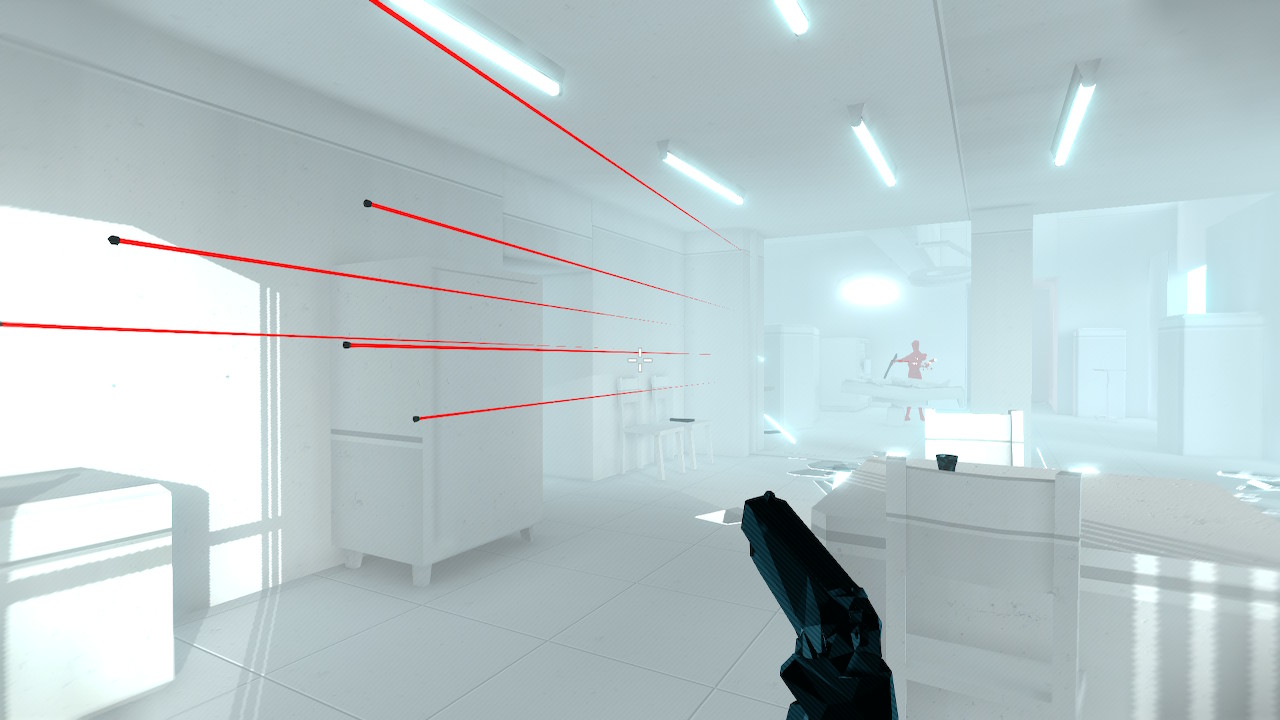
Slow-motion buckshot Slow-motion buckshot
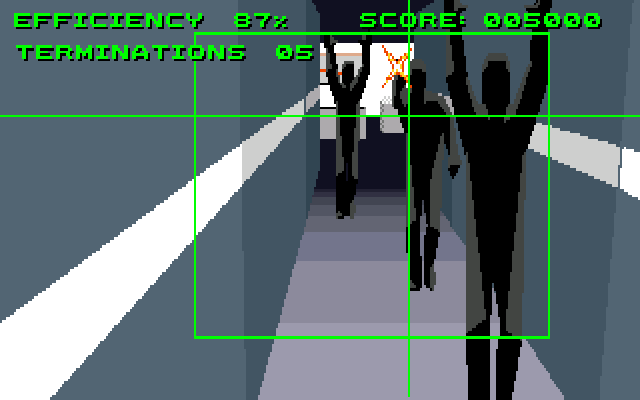
A first-person shooter, SUPERHOT's USP is that time only progresses when you move well, nearly. Time is slowed to a complete crawl when you are not moving. The game's visual style is very distinctive: Almost everything is a washed out grey or white colour and porcelean-like texture, except weapons and objects you can interact with, which are a matt black, and enemies, which are a bright red. It reminds me a lot of the 1992 Amiga game Robocop 3.
Robocop 3 Robocop 3
The play-style is very reminiscent of the "Bullet Time" sequences in The Matrix seemingly impossibly overwhelming odds deftly manoeuvred through thanks to superhuman reaction times. The game has a relatively short campaign of little vignettes, linked together by a cyberpunk narrative. The game is sometimes criticised for the short campaign, but for me that's ideal. And the vignettes being short and quite standalone suits my play requirements very well.
Amiga easter-egg Amiga easter-egg
The narrative interspersed between the play scenarios is a little bit over-long, and you can spend an unreasonable amount of time bashing buttons to get through it. Despite that it's a moderately interesting story. Once you've beaten the campaign, you can go back and play any of the scenarios again, or try the newly unlocked endless mode. I haven't tried that yet. The original prototype for the game is a free-to-play in-browser demo, available here. On Windows PC, there's a sequel-of-sorts in the works called MIND CONTROL DELETE with a lot of new features to add replay value.

21 April 2020

Matthew Garrett: Linux kernel lockdown, integrity, and confidentiality

The Linux kernel lockdown patches were merged into the 5.4 kernel last year, which means they're now part of multiple distributions. For me this was a 7-year journey, which means it's easy to forget that others aren't as invested in the code as I am. Here's what these patches are intended to achieve, why they're implemented in the current form and what people should take into account when deploying the feature.

Root is a user - a privileged user, but nevertheless a user. Root is not identical to the kernel. Processes running as root still can't dereference addresses that belong to the kernel, are still subject to the whims of the scheduler and so on. But historically that boundary has been very porous. Various interfaces make it straightforward for root to modify kernel code (such as loading modules or using /dev/mem), while others make it less straightforward (being able to load new ACPI tables that can cause the ACPI interpreter to overwrite the kernel, for instance). In the past that wasn't seen as a significant issue, since there were no widely deployed mechanisms for verifying the integrity of the kernel in the first place. But once UEFI secure boot became widely deployed, this was a problem. If you verify your boot chain but allow root to modify that kernel, the benefits of the verified boot chain are significantly reduced. Even if root can't modify the on-disk kernel, root can just hot-patch the kernel and then make this persistent by dropping a binary that repeats the process on system boot.

Lockdown is intended as a mechanism to avoid that, by providing an optional policy that closes off interfaces that allow root to modify the kernel. This was the sole purpose of the original implementation, which maps to the "integrity" mode that's present in the current implementation. Kernels that boot in lockdown integrity mode prevent even root from using these interfaces, increasing assurances that the running kernel corresponds to the booted kernel. But lockdown's functionality has been extended since then. There are some use cases where preventing root from being able to modify the kernel isn't enough - the kernel may hold secret information that even root shouldn't be permitted to see (such as the EVM signing key that can be used to prevent offline file modification), and the integrity mode doesn't prevent that. This is where lockdown's confidentiality mode comes in. Confidentiality mode is a superset of integrity mode, with additional restrictions on root's ability to use features that would allow the inspection of any kernel memory that could contain secrets.

Unfortunately right now we don't have strong mechanisms for marking which bits of kernel memory contain secrets, so in order to achieve that we end up blocking access to all kernel memory. Unsurprisingly, this compromises people's ability to inspect the kernel for entirely legitimate reasons, such as using the various mechanisms that allow tracing and probing of the kernel.

How can we solve this? There's a few ways:
  1. Introduce a mechanism to tag memory containing secrets, and only restrict accesses to this. I've tried to do something similar for userland and it turns out to be hard, but this is probably the best long-term solution.
  2. Add support for privileged applications with an appropriate signature that implement policy on the userland side. This is actually possible already, though not straightforward. Lockdown is implemented in the LSM layer, which means the policy can be imposed using any other existing LSM. As an example, we could use SELinux to impose the confidentiality restrictions on most processes but permit processes with a specific SELinux context to use them, and then use EVM to ensure that any process running in that context has a legitimate signature. This is quite a few hoops for a general purpose distribution to jump through.
  3. Don't use confidentiality mode in general purpose distributions. The attacks it protects against are mostly against special-purpose use cases, and they can enable it themselves.

My recommendation is for (3), and I'd encourage general purpose distributions that enable lockdown to do so only in integrity mode rather than confidentiality mode. The cost of confidentiality mode is just too high compared to the benefits it provides. People who need confidentiality mode probably already know that they do, and should be in a position to enable it themselves and handle the consequences.

comment count unavailable comments

Debian Project Leader: Bits from the new DPL

My fellow Debianites, It's been one month, one week and one day since I decided to run for this DPL term. The Debian community has been through a variety of interesting times during the last decade, and instead of focusing on grand, sweeping changes for Debian, core to my DPL campaign was to establish a sense of normality and stability so that we can work on community building, continue to focus on technical excellence and serve our users the best we can. Thing don't always work out as we plan, and for many of us, Debian recently had to take a back seat to personal priorities. Back when I posted my intention to run, there were 125 260 confirmed cases of COVID-19 globally. Today, that number is 20 times higher, with the actual infected number likely to be significantly higher. A large number of us are under lock-down, where we not only fear the disease and its effect on local hospitals and how it will affect our loved ones, but also our very livelihoods and the future of our local businesses and industry. I don't mean to be gloomy with the statement above, I am after all, an optimist - but unfortunately it does get even worse. Governments and corporations around the world have started to take advantage of COVID-19 in negative ways and are making large sweeping changes that undermine the privacy and rights of individuals everywhere. For many reasons, including those above, I believe that the Debian project is more important and relevant now than it's ever been before. The world needs a free, general purpose operating system, unburdened by the needs of profit, which puts the needs of its users first, providing a safe and secure platform for the computing needs of the masses. While we can't control or fix all the problems in the world, we can control our response to it, and be part of the solutions that bring the change we want to see. During my term as DPL, I will be available to help with problems in our community to the maximum extent that my time permits. If we help ourselves, we will be in a better position to help others. If you (or your team) get stuck and are in need of help, then please do not hessitate to e-mail me. A few thank-yous As incoming DPL, I'd like to thank Sam Hartman on behalf of the project for the work that he's done over the last year as DPL. It's a tremendous time commitment that requires constant attention to detail. On Sunday, Sam and I had a handover meeting where we discussed various DPL responsibilities including finances, delegations (including specifics of some delegations), legal matters, outreach and other questions I had. I'd also like to thank Sam for taking the time to do this. Thank you to Sruthi Chadran and Brian Gupta who took the time to also run for DPL this year. Both candidates brought important issues to the forefront and I hope to work with both of them on those in the near future. DPL Blog Today, I've started a new blog for the Debian Project Leader to help facilitate more frequent communication, and to reach a wider audience via Planet Debian. This will contain supplemental information to what I send to the debian-devel-announce mailing list. Want to help? In my platform, I listed some key areas that I'd like to work on. My work won't be limited to those, but it should give you some idea of the type of DPL that I'll be. If you'd like to get involved, feel free to join the #debian-dpl channel on the oftc IRC network, and please introduce yourself along with any areas of interest that you'd like to contribute to.

Wouter Verhelst: Extrepo GitLab update

Earlier this month, GitLab B.V.'s package signing key expired, requiring them to rotate their key. This means that anyone who uses one of their packages needs to jump through a number of manual hoops to update their apt key configuration, which is an annoying manual process that also requires people to download random files from the Internet -- something extrepo was written to prevent. At least they're served over https, but still. I didn't notice until today, but I just updated the extrepo metadata to carry the new key. That means that if you enable one of the GitLab repositories through extrepo enable, you will get the new key rather than the old one. On top of that, if you had already enabled the repository through extrepo, all that is needed for you right now to pull in the new key is to run extrepo update. While I do apologise for the late update, hopefully this should make some people's lives a bit easier. And if GitLab B.V. reads this: please send me a MR to the repository next time, so that we can make process be done in time ;-)

20 April 2020

Norbert Preining: Gaming: What Remains of Edith Finch

I never thought I could finish a game which is completely linear, has hardly any interaction necessary, hardly any riddles, no fighting. What Remains of Edith Finch taught be differently. And it is amazing.

A friend recently pointed me at a blog about casual games, and surprisingly I found two games I have played on the list: Firewatch and The Witness. One of the other games on the list was What Remains of Edith Finch. This games was lurking in my Steam library for quite some time, and I realized I actually started playing it long ago, but only for a few minutes, before having given up, back then. What a failure I realized! The games plays completely in the now deserted house of the family Finch. The youngest member of the family returns with a key to the house and uncovers the stories of her family. This is about all that is happening in the game. And it is so well done that I couldn t stop playing (wouldn t it be for my daughter interrupting me), and leaves you with the feeling to replay as soon as possible. The graphics are very well done, beautiful scenery, lots of love to details. The story progresses by walking (completely linearly) through the house, and text fragments appearing around you, telling part of the story, small hints, little secrets, everything that makes up a tangible set of family memories.

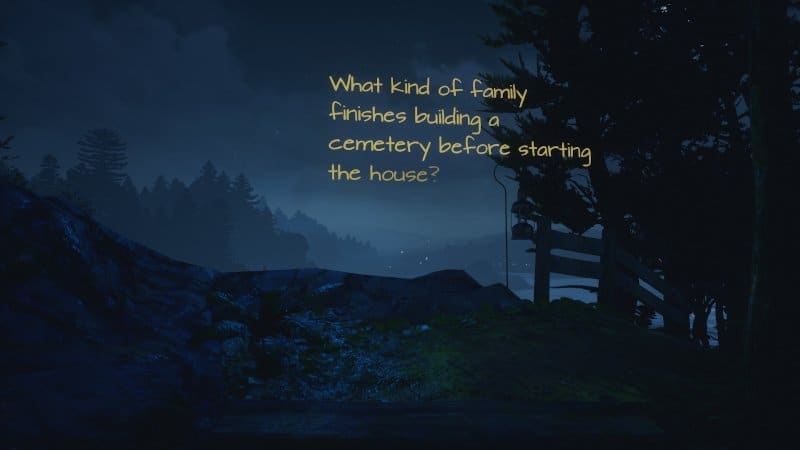
Exploring the house filled with locked rooms sealed as shrines for the deceased members of the family, Edith uncovers one by one the final moments of her family members, a family seemingly cursed. In these stories the player dives into the world and playing the role of the family members, re-living events of the past.
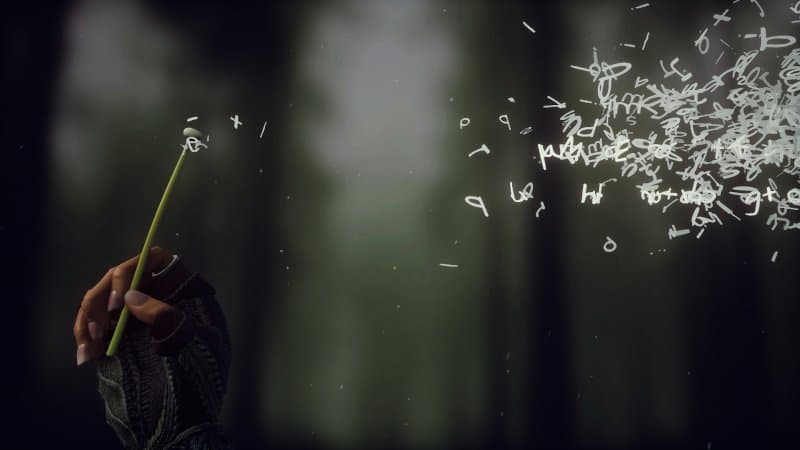
As I wrote in the beginning don t expect fights, don t expect riddles, but be prepared for an emotional roller coaster, for a deep dive into a well written family history with lots of weird twists. An absolute great game with a playing time of around 2h.

19 April 2020

Enrico Zini: Little wonders

Gibbsdavidl/CatterPlots
devel
Did you ever wish you could make scatter plots with cat shaped points? Now you can! - Gibbsdavidl/CatterPlots
What is the best tool to use for drawing vector pictures? For me and probably for many others, the answer is pretty obvious: Illustrator, or, maybe, Inkscape.
A coloring book to help folks understand how SELinux works. - mairin/selinux-coloring-book
The EURion constellation (also known as Omron rings[1] or doughnuts[2]) is a pattern of symbols incorporated into a number of banknote designs worldwide since about 1996. It is added to help imaging software detect the presence of a banknote in a digital image. Such software can then block the user from reproducing banknotes to prevent counterfeiting using colour photocopiers. According to research from 2004, the EURion constellation is used for colour photocopiers but probably not used in computer software.[3] It has been reported that Adobe Photoshop will not allow editing of an image of a banknote, but in some versions this is believed to be due to a different, unknown digital watermark rather than the EURion constellation.[4][3]
This huge collection of non-scary optical illusions and fascinating visual phenomena emphasizes interactive exploration, beauty, and scientific explanation.
Generated photos are created from scratch by AI systems. All images can be used for any purpose without worrying about copyrights, distribution rights, infringement claims, or royalties.
Dokumentarfilm ber die Rangierer im Bahnhof Dresden-Friedrichstadt in der DDR aus dem Jahr 1984.
Il termine sardo femina accabadora, femina agabbad ra o, pi comunemente, agabbadora o accabadora (s'agabbad ra, lett. "colei che finisce", deriva dal sardo s'acabbu, "la fine" o dallo spagnolo acabar, "terminare") denota la figura storicamente incerta di una donna che si incaricava di portare la morte a persone di qualunque et , nel caso in cui queste fossero in condizioni di malattia tali da portare i familiari o la stessa vittima a richiederla. In realt non ci sono prove di tale pratica, che avrebbe riguardato alcune regioni sarde come Marghine, Planargia e Gallura[1]. La pratica non doveva essere retribuita dai parenti del malato poich il pagare per dare la morte era contrario ai dettami religiosi e della superstizione.
Alright the people have spoken and they want more cat genetics. So, I present to you all "Cat Coat Genetics 101: A Tweetorial", feat. pics of many real life cats (for science, of course...this baby is Caterpillar).

Sven Hoexter: Emulating Raspi2 like hardware with Rasbian in 2020

To follow some older (as in two years) ARM assembler howto, I searched for a quick and dirty way to run a current Rasbian with qemu 4.2 on Debian/unstable. The end result are the following notes to get that up and running:
# Download a binary device tree file and matching kernel a good soul uploaded to github
wget https://github.com/vfdev-5/qemu-rpi2-vexpress/raw/master/kernel-qemu-4.4.1-vexpress
wget https://github.com/vfdev-5/qemu-rpi2-vexpress/raw/master/vexpress-v2p-ca15-tc1.dtb
# Download the official Rasbian image without X
wget -O raspbian_lite_latest.zip https://downloads.raspberrypi.org/raspbian_lite_latest
unzip raspbian_lite_latest.zip
# Convert it from the raw image to a qcow2 image and add some space
qemu-img convert -f raw -O qcow2 2020-02-13-raspbian-buster-lite.img rasbian.qcow2
qemu-img resize rasbian.qcow2 +2G
# start qemu
qemu-system-arm -m 2048M -M vexpress-a15 -cpu cortex-a15 \
 -kernel kernel-qemu-4.4.1-vexpress -no-reboot \
 -smp 2 -serial stdio \
 -dtb vexpress-v2p-ca15-tc1.dtb -sd rasbian.qcow2 \
 -append "root=/dev/mmcblk0p2 rw rootfstype=ext4 console=ttyAMA0,15200 loglevel=8" \
 -nic user,hostfwd=tcp::5555-:22
# login at the serial console as user pi with password raspberry
sudo -i
# enable ssh
systemctl enable ssh
# resize partition and filesystem
parted /dev/mmcblk0 resizepart 2 100%
resize2fs /dev/mmcblk0p2
Now I can login via ssh and start to play:
ssh pi@localhost -p 5555
So for me that is sufficient, I have network connectivity to install an editor, transfer files and can otherwise work with tmux to have some session multiplexing. Additional Notes

Russ Allbery: Review: Beyond the Galaxy

Review: Beyond the Galaxy, by Ethan Siegel
Publisher: World Scientific
Copyright: 2016
ISBN: 981-4667-16-1
Format: Kindle
Pages: 370
In the preface of this book, Ethan Siegel recounts his experience as a new college professor in 2009, thrilled to learn that he would be teaching the college's introductory astronomy class. The only disappointment was that he could not find a textbook that described astronomy the way that he wanted to teach it. Siegel did not want to simply describe the current astronomical understanding. He wanted to start at the beginning and tell a story. What questions did we start with? How did we answer them? What new questions did those answers provoke? I enjoyed Sabine Hossenfelder's Lost in Math, but I'm even happier that she included in it a recommendation of Beyond the Galaxy as a good introduction to modern astronomy. I am completely in agreement with Siegel: Astronomy is interesting however it is described, but the best presentation for the interested lay person who does not intend to become a professional astronomy is chronological. (I feel the same way about physics and mathematics.) The narrative structure of scientific discovery draws me in every time. It's so satisfying to see our knowledge growing, breakthrough by breakthrough, only to meet the next puzzling inconsistency. It also is a natural fit for bringing someone up to speed on a field, since the history of the field starts with simpler questions and problems, and the complications of later discoveries build on the gaps left by earlier theories. Siegel tells that story well. Beyond the Galaxy starts with observations of seasonal changes in the path of the Sun through the sky and phases of the moon, quickly moves on to Eratosthenes's calculation of the circumference of the Earth, and continues at pace through early astronomy. The first chapter brings the reader up to the start of the 20th century, after which Siegel slows down and spends the remaining 10 chapters on the last 100 years: special and general relativity, the expansion of the universe, the Big Bang, dark matter, dark energy, the inflationary period, and more. For me, this was perfect. The story of early astronomy and the fight over the heliocentric model of the universe is worth telling, but it's been told many times before and features prominently in history books outside of science classes. The weight of material in this book matched my interest: What new developments have there been after general relativity and the Big Bang theory? What inconsistencies are dark matter and dark energy explaining? What is the inflationary period and how did it modify the Big Bang theory? (My half-formed impression of this part of astronomy from news articles turned out to be almost entirely wrong.) And how do we know all of this? The question of how we know as much as we do about the early origins of the universe turned out to be far more interesting than I had realized. It's one of those pieces of science where, when given only the conclusions, it's hard to imagine how our theories could be as complete as they are. Siegel is a bit repetitive in how he talks about theory development and occasionally skims over the details to avoid getting too deep into techniques and math, but he does a great job explaining the predictions of a theory, the design of experiments to prove or disprove those predictions, and the implications for the boundaries of what we know. This is the first time someone has explained the theorized origin of matter-antimatter asymmetry in sufficient detail that I was able to understand and internalize it. Dark matter and dark energy are the current topics of astronomy that get the most press, and the coverage of both is very good here. I was particularly fascinated by the link between dark matter and the superstructures of the universe that we've discovered. Astronomy does scale in a way that no other science can manage, and the scale of structure we've discovered and been able to map has gone up considerably since the last time I refreshed my astronomical knowledge. If you're looking for a math-light, comprehensive introduction to modern astronomy, I can wholeheartedly recommend this book. That goes double if you, like me, prefer a chronological view of scientific discovery so that you can understand what questions people were trying to answer and how our understanding changed over time. One note on format: Astronomy being what it is, this book is very heavy on pictures. It is not at all suitable for a dedicated ebook reader. The Kindle tries, but the combination of a small screen and black and white e-ink fail miserably. I switched to reading on a tablet, and that was a far better experience. The Kindle app still struggles to put the figures next to the text that discusses them, but that's a typesetting problem that I often have with physical books as well. If you don't have a tablet and you aren't willing to read on a computer screen, you probably want a physical copy of this one (which, sadly, means academic textbook pricing). Rating: 8 out of 10

18 April 2020

Jonathan Dowland: How many function arguments?

In Haskell (and many other functional languages) it's quite common for the implementation of a function to reference one less argument than the type signature declares:
g :: foo -> bar
g = length . reverse
Known as point-free style by proponents (and pointless style by opponents), the function definition is a list of other functions which are composed together to produce a composite requiring a single argument: the missing one. Sometimes I come across the opposite: a function with a type signature and a definition beginning in a way similar to this
f :: foo -> bar
f a b =  
That is, the type signature declares that the function accepts a single argument of type foo, but the definition is in terms of two arguments. Huh? What's going on is that bar is really a type synonym for another function. In other words
type bar = baz -> qux
So we can consider f to actually be
f :: foo -> baz -> qux
With this definition of bar, in the definition of f above, the second parameter b maps to the type baz. When I've encountered this, I strongly suspect what has happened is the function was originally written with the longer type signature, and later on the type synonym was declared and function signatures updated to use it. I'm not aware of anyone advocating for this style.

Jonathan McDowell: Building a very minimal initramfs

I m working on trying to get a Qualcomm IPQ8064 device working properly. I d got as far as an extremely hacked up chain of networking booting and the serial console working, so the next stage was to try and get a basic userland in place to try and make poking things a bit easier. While I have a cross-compiling environment all setup (that s how I m building my kernels) I didn t really want to get into something complicated just to be able to poke around sysfs etc. I figured I could use a static BusyBox in an initramfs. I was right, but there were a couple of hiccups along the way so I m writing it up so I remember next time. First, I cheated and downloaded a prebuilt static binary from https://busybox.net/downloads/binaries/ (very convenient, thanks) - the IPQ8064 is a dual core ARMv7 so I used busybox-armv7l. There were various sites with init scripts to go along with this; I ended up with a variation of Star Brilliant s gist:
Minimal init script
#!/bin/busybox sh
busybox mkdir -p /dev /etc /proc /root /sbin /sys /usr/bin /usr/sbin
busybox mount -t proc proc /proc
busybox mount -t sysfs sys /sys
busybox mount -t devtmpfs dev /dev
echo Starting up...
echo ttyMSM0::respawn:/sbin/getty -L ttyMSM0 115200 vt100 >> /etc/inittab
echo Login with root and no password. > /etc/issue
echo >> /etc/issue
echo root::0:0:root:/root:/bin/sh > /etc/passwd
busybox mdev -s
busybox --install
hostname localhost
ip link set lo up
echo 5 > /proc/sys/kernel/printk
exec /linuxrc
busybox and the init script aren t sufficient. If you have any problems then you re going to want a console device. Otherwise you ll do what I did, forget to change one of the tty references in the script to the right device, and spend too long trying to figure out why you re not getting any output as soon as you start running userspace. It turns out that CONFIG_DEVTMPFS_MOUNT isn t sufficient for the initramfs (the Kconfig help even tells you that). So I need to create a /dev/console device file inside the initramfs too. And I don t build as root (and you shouldn t either) which makes creating a device node hard. It s ok though, because the Linux kernel doesn t need you to be root to build it, and it has a default initramfs with a console device in it. This is helpfully generated using usr/gen_init_cpio, which takes a file defining what you want to put in the cpio file that becomes your initramfs. I used the following:
Minimal initramfs creation file
# Simple busybox based initramfs
dir /dev 0755 0 0
nod /dev/console 0600 0 0 c 5 1
dir /root 0700 0 0
dir /bin 0755 0 0
dir /sbin 0755 0 0
file /init basic-init 0755 0 0
file /bin/busybox busybox-armv7l 0755 0 0
All that then needs to be done is linux/usr/gen_init_cpio initramfs.list > initramfs.cpio and the resulting initramfs.cpio is suitable for inclusion in your kernel. The precompiled binaries have a lot of stuff enabled, which makes for a pretty useful debugging environment with fairly minimal work.

14 April 2020

Markus Koschany: My Free Software Activities in March 2020

Welcome to gambaru.de. Here is my monthly report (+ the first week in April) that covers what I have been doing for Debian. If you re interested in Java, Games and LTS topics, this might be interesting for you. I am sure I am not the only one who will remember March 2020 in the future as a month nobody was really fond of. I was mostly occupied with non-Debian work and managed to get ill in the same week I wanted to celebrate my birthday but it didn t matter anyway because of ehm quarantine and social distancing. Maybe next year March will be great again.
Debian Games Debian Java Misc Debian LTS This was my 49. month as a paid contributor and I have been paid to work 10 hours on Debian LTS, a project started by Rapha l Hertzog. In that time I did the following: ELTS Extended Long Term Support (ELTS) is a project led by Freexian to further extend the lifetime of Debian releases. It is not an official Debian project but all Debian users benefit from it without cost. The current ELTS release is Debian 7 Wheezy . This was my 22. month and I have been paid to work 9 hours on ELTS. Thanks for reading and see you next time.

Emmanuel Kasper: Recommended keyboard settings for Productivity and Usability, for European Programmers

TLDR: setxkbmap -layout us -variant altgr-intl and become a happier programmer.
The case for QWERTY for European ProgrammersIf you re working on Unix / Linux, or C based programming languages, it can make sense to switch to the qwerty(us) keyboard layout. Why ?
Unix, C, Perl, Java, and most of programming languages have been conceived on QWERTY keyboards.
So when the designers choose special characters to use for the language synthax, they simply choose what was easy to access on their own keyboard. This has been historically documented for the vi editor.

To give an example, using an Unix shell you have to type the dot . and slash / symbols quite often to navigate the filesystem. The two keys producing these symbols, are nicely aligned on a QWERTY layout and do not require a key combination to be entered. So you can quickly enter something like ../.. using a single hand.
Now using a QWERTZ layout, like in Germany / Austria, you have the . symbol easily accessible, but you need to combine two keys ( Shift + 7 ) to get a / .
And if you are a poor soul using an AZERTY layout, to get the . and / symbol you need each time a key combo.
The need of key combos is bad not only for speed (multiple keys to lookup) but also for usability, as you have to stretch your fingers to reach the key if using a single hand, provoking repetitive strain injury. You might be smiling but this is commonly known amongst Emacs Users, due to the prominent use of commands using Ctrl and Alt combos, and led to the creation of an Emacs Ergonomic wiki.

This goes as well for many symbol commonly used in programming languages, think for instance about the semicolon ; for terminating a statement, the [ , and ] symbols for defining an array, and the backslash \ for escaping.
All these keys are accessible via a single keypress on qwerty and require key combos on qwertz and azerty. No wonder Linux, Minix and BSD were invented on non-azerty layouts: in France we were still busy typing the path to the source code, when in other parts of the world people already had the file open in their editor.
You don t need to throw away your existing keyboards when learning the qwerty (us) layout: for a couple of euros, you can find on ebay alternate keys stickers to put on your laptop.
Accessing keys with diacritics with the AltGr International variantNow if you want to switch to a qwerty keyboard layout, and you re French or German, you might wonder how to access the characters with diacritics, the and of French and and of German.
Fortunately there is a very clever keyboard variant for the us layout who uses the AltGr key, to make all these keys accessible, just hiding them behind the AltGr key.
Need ? that s just AltGr + e away. Needs ? That s just AltGr + , Needs ? AltGr +p
See the coolness of that ? You can type all international diacritics in an easy way, and there are even keyboard stickers for that too.

Now how to access to this layout of wonder ?
You can configure the layout and variant in Xorg, in debian/ubuntu that would be entering in /etc/default/keyboard
XKBLAYOUT="us"
XKBVARIANT="altgr-intl"
After restarting the X server, you can check that the settings have been applied with
setxkbmap -print -verbose 10
If using Gnome, you can also set the keyboard layout and variant by changing the schema org.gnome.desktop-inputsources, which will override the desktop-agnostic settings of /etc/default/keyboard.
For this you can either call
dconf write /org/gnome/desktop/input-sources/sources "[('xkb', 'us+altgr-intl')]"
or navigate with the gui tool dconf-settings to org.gnome.desktop-inputsources and set the value there.

If you want to further improve your keyboard layout, you can also have a look at swapping Ctrl and Alt, as described here (French language article) Happy hacking !

Dirk Eddelbuettel: gettz 0.0.4

A minor routine update 0.0.4 of gettz arrived on CRAN overnight. gettz provides a possible fallback in situations where Sys.timezone() fails to determine the system timezone. That happened when e.g. the file /etc/localtime somehow is not a link into the corresponding file with zoneinfo data in, say, /usr/share/zoneinfo. Since the package was written (in the fall of 2016), R added a similar extended heuristic approach itself. This release adds registration of the compiled routine via R_registerRoutines() and R_useDynamicSymbols(), adds .registration=TRUE to useDynLib() in NAMESPACE, and uses an unquoted symbol in .Call(). Two new badges were added to the README.md as well. And as in the previous release in 2016: No new code, or new features. Courtesy of CRANberries, there is a comparison to the previous release. More information is on the gettz page. For questions or comments use the issue tracker off the GitHub repo. If you like this or other open-source work I do, you can now sponsor me at GitHub. For the first year, GitHub will match your contributions.

This post by Dirk Eddelbuettel originated on his Thinking inside the box blog. Please report excessive re-aggregation in third-party for-profit settings.

Daniel Lange: I think we need more creativity in statistics

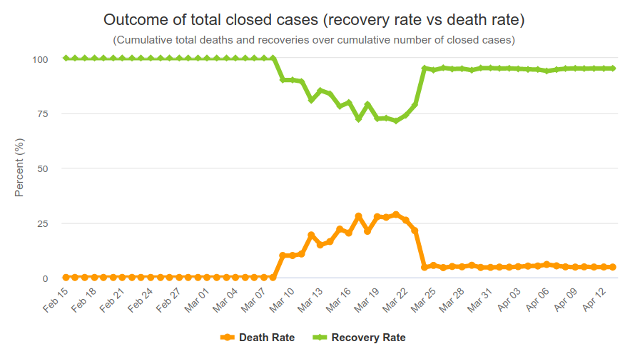
" 'Boa constrictors swallow their prey whole, without chewing it. After that they are not able to move, and they sleep through the six months that they need for digestion.' I pondered deeply, then, over the adventures of the jungle. And after some work with a colored pencil I succeeded in making my first drawing. My Drawing Number One. It looked something like this: Boa Constrictor by Antoine de Saint Exup ry I showed my masterpiece to the grown-ups, and asked them whether the drawing frightened them. But they answered: 'Frighten? Why should any one be frightened by a hat?' My drawing was not a picture of a hat. It was a picture of a boa constrictor digesting an elephant. But since the grown-ups were not able to understand it, I made another drawing: I drew the inside of a boa constrictor, so that the grown-ups could see it clearly. They always need to have things explained. My Drawing Number Two looked like this: Boa Constrictor in sectional drawing by Antoine de Saint Exup ry The grown-ups' response, this time, was to advise me to lay aside my drawings of boa constrictors, whether from the inside or the outside, and devote myself instead to geography, history, arithmetic, and grammar. That is why, at the age of six, I gave up what might have been a magnificent career as a painter. I had been disheartened by the failure of my Drawing Number One and my Drawing Number Two. Grown-ups never understand anything by themselves, and it is tiresome for children to be always and forever explaining things to them." from The Little Prince by Antoine de Saint Exup ry Outcome of Cases (Recovery or Death) in Germany by Worldometers from the Corona Fun with Statistics department at Worldometers (source, archive.org link)


Next.

Previous.