
I ve been using git
this last few days and I am still working on a workflow for my projects. Unfortunately, as
others have noticed, git violates
POLS is so many ways, it ends up being hard to get.
Creating a remote repository seems to be the first thing to bite a developer switching to git (mainly if coming from a centralized
SCM). I have not decided which is the best way of doing it, but I ve been using git-daemon via inetd and a path in my remote hosting holding all my repositories for public pulling, and ssh for pushing. Here is how to create it:
local$ ssh spectra@remotehost
remotehost$ mkdir /var/git/myproject.git
remotehost$ cd /var/git/myproject.git
remotehost$ git --bare init
remotehost$ logout
local$ cd myproject
local$ git remote add remotehost spectra@remotehost:/var/git/myproject.git
local$ git push remotehost master
...
otherlocal$ git clone git://remotelocal/myproject.git
otherlocal$ cd myproject
otherlocal$ git remote add remotehost spectra@remotehost:/var/git/myproject.git
(hack hack hack)
otherlocal$ git push remotehost master
Now everybody can pull your repository at
git://remotehost/myproject.git and you can push and pull to it via ssh. Note that you have to setup git-daemon, which is pretty straight forward. I am using it as an inetd daemon, but you can use it as a standalone one. Debian
has a package which does just that.
Now, some people think logging in a remote server just to create an empty repository is too much. Well repositories are just
.git directories. It happens that you can push for the first time by rsyncing your
.git with a remote host:
local$ cd myproject
local$ rsync -a .git/ spectra@remotehost:/var/git/myproject.git
local$ git remote add remotehost spectra@remotehost:/var/git/myproject.git
(hack hack hack)
local$ git push remotehost master
(Apparently you can push using rsync every time, but it s regarded as wiser to keep your probably crappy local repository commits separated from the public repository otherwise commit messages like Please, don t use this code are likely to pop up everywhere :) ). Now, I don t know if this have side effects, but it works :-)
Another thing to notice is that git is more directed at
pulling than
pushing. This may be because of its designer: the way Linus works is by pulling changes from others repositories and not by letting others push em into his one. And this is another violation of
POLS for most of the people, who is used to commit their changes into some remote repository. Rather than that, people using git would expose their own repositories in order to have it pulled by others.
I also agree with most of the git critics wrt git commands There s a lot of examples and I am not going deeper in this but I think it was a bad choice calling checkout what git does when told to checkout , for instance. Yes, I know different tools, different ways of seeing it but everyone was already used to what centralized SCMs call their operations, and I think it would only help git adopting same names for the same operations, and inventing new ones for those proper of decentralized operations. Anyway, once you get it (and I have not completely got it yet), it seems all flow as expected. If this adaptation fails, there s still
Easy Git to the rescue!
One last thing that I think contribute to the git sucks effect: git-svn. This is a great tool, but it was built from git s point of view Given it s intended as a glue for Subversion newcomers, it would benefit more from being built from svn s point of view. This was mentioned by a colleague developer in my company, when he just couldn t understand why one have to
git svn rebase instead of a simple
update. So git-svn also suffers of the bad command naming habit git do. Of course, that given that you came from this environment (I am sure git and git-svn makes perfect sense for Linus & cia :-) ). I have not tried yet, but
yap seems to be targeted on providing an alternative to git-svn.

Seen at work today while grovelling through some old code:
class Foo

public:
  Foo(); // Do not use -- no body on purpose

In other news, my HP 2510p's screen was replaced last month after the hinge snapped. A chunk of plastic off the hinge cover snapped off two days ago. I'm somewhat puzzled by this, since I can't see any plausible way force could be applied to it - it's as if it came away slightly and then got crushed when I tried to close the lid. On top of the motherboard having been replaced 4 times now (twice due to faulty power connectors, one due to the fan being replaced and the motherboard being swapped at the same time, once because the machine started refusing to boot at LCA) and it still being slightly tempremental when booting, I'm not overly impressed - especially when I've only had it 18 months. Nobody else I know with one seems to have had the same level of difficulty, though dreadful thermal issues (especially when using the dock) seem to be common.
The X200s looks awfully shiny, but the 1440x900 screen option doesn't appear to be available in the UK. Oddly, despite having a SIM slot, it also doesn't seem to come with an HSDPA option.


Can you tell there's a whole linux machine loaded with hundreds of albums in
there? Well, the USB ports on the front panel, and inside the cassete tape
deck are a bit of a giveaway, as are all the blinkenlights.
Details
here.
I'm still suprised I got it all squeezed in, put together, and working.
Some things fit better than I had any right to expect:
tiny airgap between the QNAP computer and front panel control
board |

I think I've made the decision that at some point in the next few months the
xen-hosting.org setup I maintain will be going away, and will be replaced with kvm-hosting(
.org).
The only issue I need to ponder is handling the migration with the minimum downtime.
The plan would probably involve upgrading the host machine to Lenny, then installing KVM and fiddling with filesystems until the guests boot. I suspect it wouldn't be a huge job, but there are a few issues that will need to be planned.
Most notably I expect that most of the current guests don't have grub installed, etc, so we'd be in the position to use an external kernel + initrd. That's not an insurmountable problem, but I know that externally supplied kernels have caused me problem in the past with KVM.
Perhaps the actual plan would be to wait until September at which point I could order a new machine and cancel the current one. That would mean another increase in spec and the migration process would be a lot simpler - instead of everybody being offline for a few hours I could migrate guests individually from the old host to the new.
Anyway decisions decisions ..
ObFilm: Buffy - But we'll pretend the TV series counts as a film, kthxbye?
Some time ago, I wrote some quick-and-dirty
greasemonkey javascripts to parse plain text bodies of
mail messages and mark up things such as quotes, so you could collapse/expand
them, colour quotes differently depending on depth, etc. As a result of that
experience and countless flamewars about top vs. bottom posting, I've often
thought that a markup language specifically designed for email was a good
idea. top/bottom posting could be a presentation decision of the client; you
could GPG-verify quoted mail; conventions like 'Re:' could be
internationalized, again on the client side, etc.
This morning I discovered
Mail Markup Language which
is exactly that. Unfortunately, it appears to have some outright bizarre
features. The RFC draft describing it is enormous, including a full XSLT
description of the markup language (and not in an appendix either); a legal
preface claiming that the entire thing was patent pending (and using a subset
of MML would be considered patent infringement); it claimes to obsolete
1939, 3501, 5322, which are POP3, IMAP4r1, and Internet Message Format
respectively.
You shouldn't judge a book by it's cover, but the fact their website displays
awfully for me (epiphany 2.22.x) did prepare me somewhat for the zaniness that
followed.
Yesterday, I posted
part 1 of how to think about compression. If you haven t read it already, take a look now, so this post makes sense.
Introduction
In the part 1 test, I compressed a 6GB tar file with various tools. This is a good test if you are writing an entire tar file to disk, or if you are writing to tape.
For part 2, I will be compressing each individual file contained in that tarball individually. This is a good test if you back up to hard disk and want quick access to your files. Quite a few tools take this approach rdiff-backup, rdup, and backuppc are among them.
We can expect performance to be worse both in terms of size and speed for this test. The compressor tool will be executed once per file, instead of once for the entire group of files. This will magnify any startup costs in the tool. It will also reduce compression ratios, because the tools won t have as large a data set to draw on to look for redundancy.
To add to that, we have the block size of the filesystem 4K on most Linux systems. Any file s actual disk consumption is always rounded up to the next multiple of 4K. So a 5-byte file takes up the same amount of space as a 3000-byte file. (This behavior is not unique to Linux.) If a compressor can t shrink enough space out of a file to cross at least one 4K barrier, it effectively doesn t save any disk space. On the other hand, in certain situations, saving one byte of data could free 4K of disk space.
So, for the results below, I use du to calculate disk usage, which reflects the actual amount of space consumed by files on disk.
The Tools
Based on comments in part 1, I added tests for lzop and xz to this iteration. I attempted to test pbzip2, but it would have taken 3 days to complete, so it is not included here more on that issue below.
The Numbers
Let s start with the table, using the same metrics as with
part 1:
| Tool |
MB saved |
Space vs. gzip |
Time vs. gzip |
Cost |
| gzip |
3081 |
100.00% |
100.00% |
0.41 |
| gzip -1 |
2908 |
104.84% |
82.34% |
0.36 |
| gzip -9 |
3091 |
99.72% |
141.60% |
0.58 |
| bzip2 |
3173 |
97.44% |
201.87% |
0.81 |
| bzip2 -1 |
3126 |
98.75% |
182.22% |
0.74 |
| lzma -1 |
3280 |
94.44% |
163.31% |
0.63 |
| lzma -2 |
3320 |
93.33% |
217.94% |
0.83 |
| xz -1 |
3270 |
94.73% |
176.52% |
0.68 |
| xz -2 |
3309 |
93.63% |
200.05% |
0.76 |
| lzop -1 |
2508 |
116.01% |
77.49% |
0.39 |
| lzop -2 |
2498 |
116.30% |
76.59% |
0.39 |
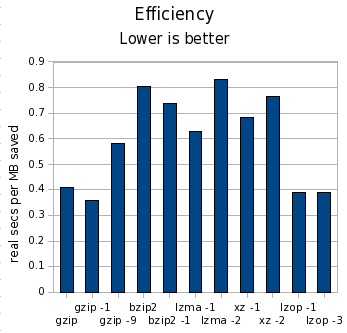
As before, in the MB saved column, higher numbers are better; in all other columns, lower numbers are better. I m using clock seconds here on a dual-core machine. The cost column is clock seconds per MB saved.
Let s draw some initial conclusions:
- lzma -1 continues to be both faster and smaller than bzip2. lzma -2 is still smaller than bzip2, but unlike the test in part 1, is now a bit slower.
- As you ll see below, lzop ran as fast as cat. Strangely, lzop -3 produced larger output than lzop -1.
- gzip -9 is probably not worth it it saved less than 1% more space and took 42% longer.
- xz -1 is not as good as lzma -1 in either way, though xz -2 is faster than lzma -2, at the cost of some storage space.
- Among the tools also considered for part 1, the difference in space and time were both smaller. Across all tools, the difference in time is still far more significant than the difference in space.
The Pretty Charts
Now, let s look at an illustration of this. As before, the sweet spot is the lower left, and the worst spot is the upper right. First, let s look at the compression tools themselves:
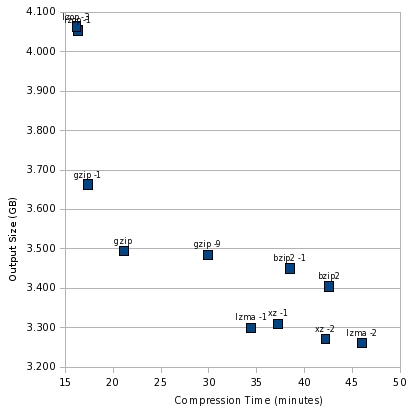
At the extremely fast, but not as good compression, end is lzop. gzip is still the balanced performer, bzip2 still looks really bad, and lzma -1 is still the best high-compression performer.
Now, let s throw cat into the mix:
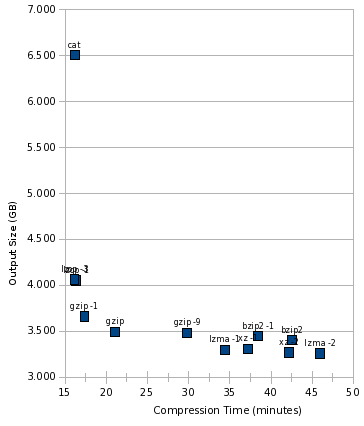
Here s something notable, that this graph makes crystal clear: lzop was just as fast as cat. In other words, it is likely that lzop was faster than the disk, and using lzop compression would be essentially free in terms of time consumed.
And finally, look at the cost:
What happened to pbzip2?
I tried the parallel bzip2 implementation just like last time, but it ran extremely slow. Interestingly, pbzip2 < notes.txt > notes.txt.bz2 took 1.002 wall seconds, but pbzip2 notes.txt finished almost instantaneously. This 1-second startup time for pbzip2 was a killer, and the test would have taken more than 3 days to complete. I killed it early and omitted it from my results. Hopefully this bug can be fixed. I didn t expect pbzip2 to help much in this test, and perhaps even to see a slight degradation, but not like THAT.
Conclusions
As before, the difference in time was far more significant than the difference in space. By compressing files individually, we lost about 400MB (about 7%) space compared to making a tar file and then combining that. My test set contained 270,101 files.
gzip continues to be a strong all-purpose contender, posting fast compression time and respectable compression ratios. lzop is a very interesting tool, running as fast as cat and yet turning in reasonable compression though 25% worse than gzip on its default settings. gzip -1 was almost as fast, though, and compressed better. If gzip weren t fast enough with -6, I d be likely to try gzip -1 before using lzop, since the gzip format is far more widely supported, and that s important to me for backups.
These results still look troubling for bzip2. lzma -1 continued to turn in far better times and compression ratios that bzip2. Even bzip2 -1 couldn t match the speed of lzma -1, and compressed barely better than gzip. I think bzip2 would be hard-pressed to find a comfortable niche anywhere by now.
As before, you can download
my spreadsheet with all the numbers behind these charts and the table.

It's time to drive some buzz this way ;-) Although this post will only be a pointer towards the Spanish post I made on
Planeta EDUSOL, for reasons soon to become obvious. In any case, the information I'm posting here is not exactly the same. Can you read Spanish? Please go on to
the invitation for the first videoconference for the EDUSOL Seminar.
This year, we the organizers of the
On-line Encounter of Education and Free Software (EDUSOL) are aiming higher - we are not "just" having a two-week encounter at the end of the year - We are having an all-year-long Seminar, focusing on
the collaborative construction of knowledge. People from quite distinct backgrounds will be part of this project, and we aim to drive it towards the publication of a book.
We (mainly,
Alejandro Miranda and me) have been quite busy bootstrapping this seminar, getting the proposed authors, thinking over the intended communication channels and ways, and setting up the needed infrastructure) and are ready to start the public-facing activities.
We will be having monthly videoconferencing sessions, the last Thursday each month, 16:00-18:00 Mexico Central time (currently GMT-6; GMT-5 after the beginning of April). The VC sessions will be also relayed through Ogg streams, and we will have an IRC channel available to offer full interactivity for those who do not have access to a H.323 VC setup.
This first session will be moderated by Victor Manuel Mart nez; the speakers will be Alejandro Miranda and myself - The topics we will present are:
- Short project presentation, delineating the list of invited authors and tematic lines we will pursue
- Description of the collaboration scheme we expect to hold, including how everybody (not just invited authors) can participate
- Presentation of one of the topics we will work into in the Seminar: Free Software and the Democratic Construction of the Society
If you have access to videoconferencing facilities, please get in touch with
Carlos Cruz, the Videoconferences Coordinator at the
Economic Research Institute, as soon as possible for all the needed coordination.
Yay!
This blog post is not strictly speaking news anymore - But for those who don't know it yet, three days ago
Debian 5.0 Lenny was released, after 22 months of work (plus fun, plus flamewars, plus everything that makes a Free Software lover tick). And, of course, that makes us all very happy and proud. As always, upgrading is a breeze. Hats off specially to Wolfgang and everybody who worked towards the great
release notes - No, it is not a simple task, by far. And I _do_ feel ashamed I didn't even beep that way :-(
So, many of us are in the middle of planning/executing our servers' migrations. So far, I'm amazed for good. Even hairy issues such as firmware removal are magically and beautifully taken care of - i.e. my firewall kindly informed me during update that I would need to install the non-free firmware for my BNX2 (Broadcom) network interfaces, and I was just a package away from absolute happiness. Lets see what happens next Friday, as I will be upgrading our storage+application server (which is _way_ more complex than the servers I've dealt with so far).
Anyway... But what good is a blog post if you are not ranting?
Many people recognize me as one of the most Debian-connected people in Mexico, and that's very good. And yes, besides being a Debian Developer, I am a co-sysadmin for the
main Debian mirror in Mexico. Some people have already asked me for CD-ROMs and DVDs. Of course, if I had a BluRay drive, I'm sure I'd also get requests for it.
People: Do you really want such media? Think again... Do you really want
31 CDs or
five DVDs for your favorite architecture? Ok, maybe many will say "nah, just give me the first one" - Then, do you want to limit your Debian experience to just the software that lives on the first 1/31th (or 1/5th) of it all?
Of course there are many situations where it is desirable. Low bandwidth users, or people with no regular connectivity, will be much better served by suitable media from which to install. However, most of us (computer geeks living in Mexico City - Yes, that's the people contacting me) have at least a 1Mbps connection at home. People, just get the
Netinst or Businesscard (180 or 40MB) images and download whatever is left via the network. Debian is
extremely network-friendly. And, believe me, even if packages are sorted by popularity (and that's why most people will be happy with the first DVD if needed), you never know if you will want precisely a package that sits towards the lonely tail of popularity.
And, yes, I did have my CD images handy for the Potato, Woody and Sarge cycles - but increasingly, it became easier for me just to ask apt-get to fetch stuff from the web (which is done without me moving from my comfy chair while I do anything else) than asking apt-get to ask me to go search for the f.*ing CD which I left dont-remember-where.
Anyway... I'm not saying
I won't burn your CDs - If you want them, please tell me in advance and come to my office, I'll be glad to give you some Debian disks. But spare the environment. We don't need to burn more and more disks. Use the network, be a better human being!
and the case against bzip2
Compression is with us all the time. I want to talk about general-purpose lossless compression here.
There is a lot of agonizing over compression ratios: the size of output for various sizes of input. For some situations, this is of course the single most important factor. For instance, if you re Linus Torvalds putting your code out there for millions of people to download, the benefit of saving even a few percent of file size is well worth the cost of perhaps 50% worse compression performance. He compresses a source tarball once a month maybe, and we are all downloading it thousands of times a day.
On the other hand, when you re doing backups, the calculation is different. Your storage media costs money, but so does your CPU. If you have a large photo collection or edit digital video, you may create 50GB of new data in a day. If you use a compression algorithm that s too slow, your backup for one day may not complete before your backup for the next day starts. This is even more significant a problem when you consider enterprises backing up terabytes of data each day.
So I want to think of compression both in terms of resulting size and performance. Onward
Starting Point
I started by looking at the
practical compression test, which has some very useful charts. He has charted savings vs. runtime for a number of different compressors, and with the range of different settings for each.
If you look at his first chart, you ll notice several interesting things:
- gzip performance flattens at about -5 or -6, right where the manpage tells us it will, and in line with its defaults.
- 7za -2 (the LZMA algorithm used in 7-Zip and p7zip) is both faster and smaller than any possible bzip2 combination. 7za -3 gets much slower.
- bzip2 s performance is more tightly clustered than the others, both in terms of speed and space. bzip2 -3 is about the same speed as -1, but gains some space.
All this was very interesting, but had one limitation: it applied only to the gimp source tree, which is something of a best-case scenario for compression tools.
A 6GB Test
I wanted to try something a bit more interesting. I made an uncompressed tar file of /usr on my workstation, which comes to 6GB of data. My /usr contains highly compressible data such as header files and source code, ELF binaries and libraries, already-compressed documentation files, small icons, and the like. It is a large, real-world mix of data.
In fact, every compression comparison I saw was using data sets less than 1GB in size hardly representative of backup workloads.
Let s start with the numbers:
| Tool |
MB saved |
Space vs. gzip |
Time vs. gzip |
Cost |
| gzip |
3398 |
100.00% |
100.00% |
0.15 |
| bzip2 |
3590 |
92.91% |
333.05% |
0.48 |
| pbzip2 |
3587 |
92.99% |
183.77% |
0.26 |
| lzma -1 |
3641 |
91.01% |
195.58% |
0.28 |
| lzma -2 |
3783 |
85.76% |
273.83% |
0.37 |
In the MB saved column, higher numbers are better; in all other columns, lower numbers are better. I m using clock seconds here on a dual-core machine. The cost column is clock seconds per MB saved.
What does this tell us?
- bzip2 can do roughly 7% better than gzip, at a cost of a compression time more than 3 times as long.
- lzma -1 compresses better than bzip2 -9 in less than twice the time of gzip. That is, it is significantly faster and marginally smaller than bzip2.
- lzma -2 is significantly smaller and still somewhat faster than bzip2.
- pbzip2 achieves better wall clock performance, though not better CPU time performance, than bzip2 though even then, it is only marginally better than lzma -1 on a dual-core machine.
Some Pretty Charts
First, let s see how the time vs. size numbers look:
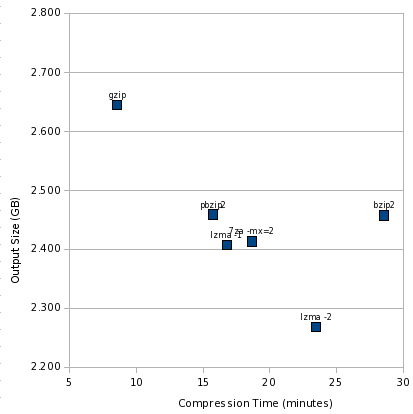
Like the other charts, the best area is the lower left, and worst is upper right. It s clear we have two outliers: gzip and bzip2. And a cluster of pretty similar performers.
This view somewhat magnifies the differences, though. Let s add cat to the mix:
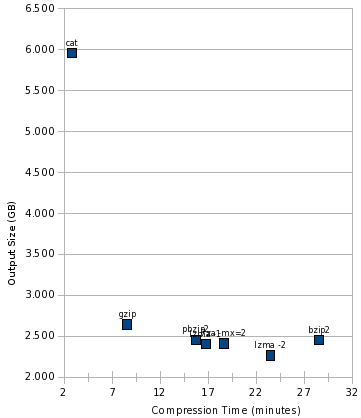
And finally, look at the cost:
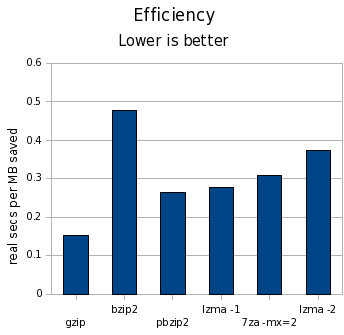
Conclusions
First off, the difference in time is far larger than the difference in space. We re talking a difference of 15% at the most in terms of space, but orders of magnitude for time.
I think this pretty definitively is a death knell for bzip2. lzma -1 can achieve better compression in significantly less time, and lzma -2 can achieve significantly better compression in a little less time.
pbzip2 can help even that out in terms of clock time on multicore machines, but 7za already has a parallel LZMA implementation, and it seems only a matter of time before /usr/bin/lzma gets it too. Also, if I were to chart CPU time, the numbers would be even less kind to pbzip2 than to bzip2.
bzip2 does have some interesting properties, such as resetting everything every 900K, which could provide marginally better safety than any other compressor here though I don t know if lzma provides similar properties, or could.
I think a strong argument remains that gzip is most suitable for backups in the general case. lzma -1 makes a good contender when space is at more of a premium. bzip2 doesn t seem to make a good contender at all now that we have lzma.
I have also made
my spreadsheet (OpenOffice format) containing the raw numbers and charts available for those interested.
Update
Part 2 of this story is now available, which considers more compression tools, and looks at performance compressing files individually rather than the large tar file.
In this age of bits and bytes, there are many virtual organizations and networks which produce all sorts of stuff we use on a daily basis. My two favorite institutions are Debian (not a surprise) and Wikipedia, not just because they oh-so-useful to me and many others, which they are, but because the social organizations behind these two entities are so (at times maddeningly) complex and full of nuance, they provide for endless analytical fascination.
One of my friends, Joe Reagle, who has recently graduated from my home department, is presenting is work on Wikipedia and I thought some local New York geeks might be interested. Information below:
All welcome
4:30 - 6:00 PM, Tuesday February 17
206 Vanderbilt Hall, 40 Wash. Sq. So.
Wikipedia: Nazis and Norms
Joseph Reagle, NYU Department of Media, Culture, and Communication
Abstract: In 1990 Mike Godwin coined his Law of Nazi Analogies to capture the common devolution of Usenet discourse into insulting comparisons with Nazis or Hitler. Eleven years later, Jimmy Wales wrote that it was important that the Wikipedia community preserve and extend our culture of co-operation, with all of us standing as firmly as possible against the culture of conflict embodied in Usenet. I argue Wikipedia is a realization even if flawed of a long-held vision for a universal encyclopedia: a technology inspired vision seeking to wed increased access to information with greater human accord. And I claim Wikipedia s collaborative culture is a big factor for this success: the norms of Neutral Point of View ensures that the scattered pieces of what we think we know can be joined and good faith facilitates the actual practice of fitting them together.


Well, no, neither FOSDEM nor Debian are dead. But FOSDEM
'09
is gone, over, and dealt with.
It was a breeze, for the most part. I'm
still not very happy
with the booth; that needs to be done better next year. Help and
suggestions in that area are more than welcome.
One thing that more than deserves a follow-up is
Lucas'
post about FOSDEM:
On a more sad note, the worst talk of the week-end was
without any possible doubt Frans Pop's release team bashing. Nobody is
claiming that the release management of the lenny release cycle was
perfect: there's always room for improvement. But given the context and
the constraints, I think that they did a very good job. Frans' talk
boiled down to: "The release team doesn't know what they are doing, I
would have done much better because I'm so qualified."
As the person responsible for allowing Frans on the schedule in the
first place, while being fully aware of the relationship between Frans
and the release team (not at first, but certainly in time to kick him
off if I'd have wanted to), I'd like to comment on that.
First of all, I do not agree that the last statement in the above is
true. Frans showed a few stories of things that went on in the release
team, and gave his opinion on what he believed went wrong. He also
explicitly said, at the beginning of the talk, that
none of the
talk was meant personally; that he wanted to offer some constructive
criticism instead. I believe he did not fail in doing that, but of
course YMMV.
Secondly, and more importantly, I do not believe it is healthy for
Debian (or any project, for that matter) to reject criticism. Indeed,
nobody is claiming perfection. I do not believe any venue where talks
can be had should be a
good news show
. People in a position of
power not just the release team, but also, say, the DPL,
ftp-masters, buildd maintainers and whatnot have received our
trust to do what they need to do to the best of their abilities. If
someone in the project would believe that I can significantly improve my
work as buildd maintainer, it is not just their right, but indeed their
duty to inform me of that fact. This is exactly what Frans was
attempting to do, and there is nothing wrong with that.
It is also not as if he's not tried reasoning with the release team
first. He has made suggestions, which have gotten ignored. I feel that
talking to more people about what he feels is right, to see whether
they agree with him, is the next logical step to take, and that this it
is exactly what Frans was attempting to do at FOSDEM.
Having said that, I agree that finishing the talk late was a very bad
thing. If anything, a talk on a subject like this should have
more, not less, time for discussion. So while I do not agree
that his
intentions were wrong, I do agree that the execution
could have been better.
There, that was criticism too. Now, what's next?
Oh yes, suggestions. If people have suggestions on how to improve the
Debian presence at FOSDEM next year (especially, as above, ideas for
creative use of the booth would be welcome), then please send me an
email, making sure the subject contains the word 'FOSDEM', so my
mailfilters know what to do with it. You'll preferably do so now, while
FOSDEM is still somewhat fresh in your memory; I'll take notes and use
those for doing better next year.
Thanks,
Apart from interesting features such as DRI2, KMS or input-hotplug,
there are some minor changes in X in experimental that actually
appear to disturb many users.
The first one is that Ctrl-Alt-Backspace does not kill X anymore.
There is no easy consensus here, but many people were annoyed of
killing X by mistake, so it's disabled by default now.
To reenable it, add to the ServerFlags section of your xorg.conf:
Option "DontZap" "off"
Another one is the background during X startup.
Say goodbye to the old well-known grey background.
Now you get a black background by default.
To revert to the old behavior, pass -retro on
the server command line (for instance in
/etc/X11/xinit/xserverrc).
Note that this option also reenables Ctrl-Alt-Backspace
killing the server.
Finally, you might also see
glxgears
reporting very low frame rates (60) on some hardware.
Well, please remember that it is not a benchmark, the
output basically means nothing.
This is why some distros even removed the fps output by default.
The thing is that recent DRM stacks will just synchronize
frame rendering on vertical blanks (can anybody here see
1000fps with human eye?).
So if you have a 60Hz refresh rate, glxgears will report
60fps, that's it.
But it has nothing to do with DRI or 3D being slow.
Please try some relevant 3D programs or benchmarks before
complaining :)

Suspense..... Will we release Lenny today? :-)
Whatever happens, I like the way these last two weeks were handled. The
clear communication from the release team made it clear to everybody what
the deadlines were.
That helped a lot in cooking up good Release Notes and the great
Release Annoucencement, as well as their translations. Of course, one
can regret that all had to happen in the very last weeks (the RN could
have been prepared earlier but nobody was in that mood except
certainly Martin Borgert who is trying to shake up the tree for
months...).
Again, great work, everybody and I wish the best to the folks who will
burn their week-end up to polish the last bits of that release.

Since several month,
awesome users have reported a bug with
OpenOffice.org. When using OOo and clicking on a menu, or using the mouse wheel to read a document, the currently selected tag (desktop) will change automagically to another one.
I've digged into awesome and found that awesome received a _NET_CURRENT_DESKTOP request. As defined by
EWMH, this kind of request are sent by a pager to change the active desktop.
That was weird. Nobody is using a pager here. So, I just kicked my gdb out, attached it to OOo, breaking on
XSendEvent call. And I got it:
Breakpoint 1, XSendEvent (dpy=0x1a00080, w=483, propagate=0, event_mask=1572864, event=0x7fff1fd70d70)
   at ../../src/SendEvent.c:46
(gdb) bt
#0  XSendEvent (dpy=0x1a00080, w=483, propagate=0, event_mask=1572864, event=0x7fff1fd70d70)
   at ../../src/SendEvent.c:46
#1  0x00007f8c0ab4193f in vcl_sal::WMAdaptor::switchToWorkArea ()
  from /usr/lib/openoffice/basis3.0/program/libvclplug_genlx.so
#2  0x00007f8c0aafdbd8 in X11SalFrame::Show ()
  from /usr/lib/openoffice/basis3.0/program/libvclplug_genlx.so
#3  0x00007f8c1378623c in Window::Show ()
  from /usr/lib/openoffice/program/../basis-link/program/libvcllx.so
#4  0x00007f8c13785f40 in Window::Show ()
  from /usr/lib/openoffice/program/../basis-link/program/libvcllx.so
#5  0x00007f8c1372cb54 in FloatingWindow::StartPopupMode ()
  from /usr/lib/openoffice/program/../basis-link/program/libvcllx.so
#6  0x00007f8c1373c877 in ?? () from /usr/lib/openoffice/program/../basis-link/program/libvcllx.so
#7  0x00007f8c1373ccf2 in ?? () from /usr/lib/openoffice/program/../basis-link/program/libvcllx.so
#8  0x00007f8c1373ce84 in ?? () from /usr/lib/openoffice/program/../basis-link/program/libvcllx.so
#9  0x00007f8c13795e7f in ?? () from /usr/lib/openoffice/program/../basis-link/program/libvcllx.so
#10 0x00007f8c13797e74 in ?? () from /usr/lib/openoffice/program/../basis-link/program/libvcllx.so
#11 0x00007f8c13796748 in ?? () from /usr/lib/openoffice/program/../basis-link/program/libvcllx.so
#12 0x00007f8c0aafe6f8 in X11SalFrame::HandleMouseEvent ()
  from /usr/lib/openoffice/basis3.0/program/libvclplug_genlx.so
#13 0x00007f8c0ab040c2 in X11SalFrame::Dispatch ()
  from /usr/lib/openoffice/basis3.0/program/libvclplug_genlx.so
#14 0x00007f8c0ab31625 in SalX11Display::Yield ()
  from /usr/lib/openoffice/basis3.0/program/libvclplug_genlx.so
#15 0x00007f8c0ab356f3 in ?? () from /usr/lib/openoffice/basis3.0/program/libvclplug_genlx.so
#16 0x00007f8c0ab2df1f in SalXLib::Yield () from /usr/lib/openoffice/basis3.0/program/libvclplug_genlx.so
#17 0x00007f8c135b050e in Application::Yield ()
  from /usr/lib/openoffice/program/../basis-link/program/libvcllx.so
#18 0x00007f8c135b0587 in Application::Execute ()
  from /usr/lib/openoffice/program/../basis-link/program/libvcllx.so
#19 0x00007f8c17517e80 in ?? () from /usr/lib/openoffice/program/../basis-link/program/libsofficeapp.so
#20 0x00007f8c135b4b24 in ?? () from /usr/lib/openoffice/program/../basis-link/program/libvcllx.so
#21 0x00007f8c135b4bc5 in SVMain () from /usr/lib/openoffice/program/../basis-link/program/libvcllx.so
#22 0x00007f8c1754ca6c in soffice_main ()
  from /usr/lib/openoffice/program/../basis-link/program/libsofficeapp.so
#23 0x000000000040105b in main ()
I started digging more into the code, and this is what I finally found in
salframe.cxx:
       // #i45160# switch to desktop where a dialog with parent will appear
       if( mpParent && mpParent->m_nWorkArea != m_nWorkArea )
           GetDisplay()->getWMAdaptor()->switchToWorkArea( mpParent->m_nWorkArea );
Beautiful! It even has a comment with a IssueZilla bug number. Let's go and see where it comes from.
After 10 minutes of research to find that fucking IZ, I finally found the link to the
issue #45160. The bug is IMHO not related to OOo but to a window manager doing poor job.
I've found that an awesome user already reported an bug err, wait, I mean an issue as
issue #96684 (remember there's no bug in OOo, only issues) and I commented about it.
UPDATE: It seems OOo developers have agreed to fix that bug eventually.

Just saw
some
interesting numbers about the sources of traffic for Stack Overflow:
Currently, 83% of our total traffic is from search engines, or rather, one
particular search engine:
| Search Engine | Visits |
| Google | 3,417,919 |
| Yahoo | 9,779 |
| Live | 5,638 |
| Search | 2,961 |
| AOL | 1,274 |
[...] Google delivers 350x the traffic to Stack Overflow that the next
best so-called "search engine" does. Three hundred and fifty
times!
I'm not sure that there's much I can really add to that, except perhaps a
quiet and dignified "Holy crap!".
We recently bought a Canon Vixia HG20 camcorder. The HG20 records in AVCHD format (MPEG-4 h.264) at up to 1920 1080. To get from the camcorder to a DVD (or something we can upload to the web), I need some sort of video editing software. This lets me trim out the boring bits, encode the video for DVD, etc.
Background
In addition to DVD creation and web uploading, I want the ability to burn high-definition video discs. 1920 1080 is significantly higher resolution than you get from a DVD. There are two main ways to go: a blu-ray format disc, or an AVCHD disc. A blu-ray disc has to be burned onto BD-R media, which costs about $5 each, using a blu-ray burner, which costs about $200. AVCHD discs use the same h.264 encoding that the camcorder does, meaning they have better compression and can be burned onto regular DVD+R media, fitting about 30 minutes onto a DVD. Moreover, it is possible to move AVCHD files directly from a camcorder to an AVCHD disc without re-encoding, resulting in higher quality and lower playing time. The nicer blu-ray players, such as the PS3, can play AVCHD discs.
AVCHD seems pretty clearly the direction the industry is moving. Compared to the tape-based HDV, ACVHD has higher quality with lower bitrates, better resolution, and much greater convenience. Hard disk or SD-based AVCHD camcorders are pretty competitive in terms of price by now too, often cheaper than tape-based ones.
The downside of AVCHD is that it takes more CPU power to process. Though as video tasks are often done in batch, that wouldn t have to be a huge downside. The bigger problem is that, though all the major video editing software claims to support AVCHD, nobody really supports it well yet.
The Contenders
Back when I got my first camcorder in about 2001 the one that I m replacing now you pretty much had to have a Mac to do any sort of reasonable consumer or prosumer-level video editing. We bought our first iMac back then to work with that, and it did work well with the MiniDV camera.
Today, there s a lot more competition out there. The Mac software stack has not really maintained its lead some would even say that it s regressed and the extremely high cost of buying a Mac capable of working with AVCHD, plus Final Cut Express, makes that option completely out of the question for me. It would be roughly $2500.
Nobody really supports AVCHD well yet, even on the Mac. Although most programs advertise support of smart rendering a technique that lets the software merely copy unchanged footage when outputting to the same format as the input none of them have smart rendering that actually works with AVCHD source material. Though this fact is never documented, though discussed on forums.
Another annoyance, having used Final Cut Express in the past, is that with these programs you can t just go to the timeline and say delete everything between 1:35 and 3:52 ; you have to go in and split up clips, then select and delete them. They seem to be way too concerned about dealing with individual clips.
I briefly used Cinelerra on Linux to do some video editing. It s a very powerful program, but geared at people that are far more immersed in video editing than I. For my needs, it didn t have enough automation and crashed too much and that was with MiniDV footage. It apparently does support AVCHD, but I haven t tried it.
I ve tried three programs and considered trying a fourth. Here are my experiences:
Ulead/Corel VideoStudio Pro X2
Commonly referenced as the go to program for video editing on Windows, I started with downloading the Free Trial of it from Corel. Corel claims that the free trial is full-featured all over on their website, but I could tell almost instantly that it wasn t. I wound up buying the full version, which came to about $65 after various discounts.
I wanted to like this program. Its output options include AVCHD disc, Blu-ray disc, DVD+R, and the like. Its input options include MiniDV, AVCHD, ripping from DVD, ripping from Bluray, and just about every other format you can think of. And it heavily advertised proxy editing , designed to let you edit a scaled-down version of AVCHD video with a low-CPU machine, but refer back to the original high-quality footage for the output.
It didn t pan out that way.
The biggest problem was the constant crashing. I really do mean constant. It probably crashed on me two dozen times in an hour. If you are thinking that means that it crashes pretty much as soon as I can get it re-opened, you d be correct. Click the Play button and it hangs. Click a clip and it hangs. Do anything and it hangs.
It did seem to work better with the parts of the source that had been converted to a low-res version with Smart Proxy, though it didn t eliminate the hangs, just reduced them. And every time I d have to End Task, it would forget what it had already converted via Smart Proxy even if I had recently saved the project and have to start over from scratch.
I spent some time trying to figure out why it always thought my project was 720 480 even when it was 1920 1080, and why the project properties box didn t even have an option for 1920 1080. After some forum searching, it turns out that the project properties box is totally irrelevant to the program. Yay for good design, anyone?
VideoStudio Pro X2 does have good output options, allowing combination of multiple source files onto a single DVD or AVCHD disc as separate titles. Unfortunately, its DVD/AVCHD rendering process also yes hangs more often than not.
The documentation for VideoStudio Pro X2 is of the useless variety. It s the sort of thing that feels like it s saying The trim tool is for trimming your clips without telling you what trimming your clips means, or making it obvious how to remove material from the middle of a clip.
The proxy editing feature isn t what it should be either. Instead of being something that just automatically happens and Works in the background, you have to manage its queue in the foreground and it forgets what it was doing whenever the program hangs.
On the rare occasion when pressing Play did not cause a hang, the AVCHD footage played back at about 0.5fps far, far worse than PowerDirector manages on the same machine. Bits that had been rendered for proxy editing did appear to play at full framerate.
I have applied for a refund for this purchase from Corel under their 30-day return policy, and have already uninstalled it from my disk. What a waste.
CyberLink PowerDirector 7 Ultra
This was the second program I tried, and the one I eventually bought. Its feature set is not quite as nice as Corel s, especially when it comes to versatility of output options. On the other hand, it feels done. It only crashed two or three times on me apparently that s GOOD on Windows? Things just worked. It appears to have proxy editing support, but it is completely transparent and plays back with a decent framerate even without it. It can output to AVCHD, Bluray, and DVD, though smart rendering doesn t work with AVCHD source material.
Its weakness compared to the Corel package is that it doesn t have as many options for formatting these discs. You can have only one title on a disc, though you can have many chapters. You have some, but not much, control over compression parameters. The same goes for exporting files for upload to the web or saving on your disk.
The documentation is polished and useful for the basics, though not extensive.
Overall, this package works, supports all the basics I wanted from it, so I m using it for now.
Adobe Premiere Elements 7
I downloaded the trial of this one too. I opened it up, and up popped a dialog box asking what resolution my project would be, interlacing settings, etc. I thought YES now that s the kind of program I want. As I tried out the interface, I kept thinking the same. This was a program not just for newbies, but for people that wanted a bit more control.
Until it came to the question of output. Premiere Elements 7 was the only package I looked at that had no option to burn an AVCHD disc. DVD or Blu-ray only. That s a deal-breaker for me. There s no excuse for a program in this price range to not support the only affordable HD disc option out there. So I didn t investigate very much farther.
Another annoying thing is that Adobe seems to treat all of their software as a commercial. I m a user, not an audience, dammit. I do not want to buy some photoshop.net subscription when I buy a video editing program. I do not want to see ads for stuff when I m reading PDFs. LEAVE ME ALONE, ADOBE.
I just felt sleazy even giving them my email address, let alone installing the program on my system. I think I will feel like a better person once I reboot into Windows and wipe it off my system.
Pinnacle Studio 12
Another program that comes highly rated. But I never installed it because its minimum system requirements state that it needs an Intel Core 2 Quad 2.66GHz or higher for 1920 1080 AVCHD editing. And I have only a Core 2 Duo 2.66GHz half the computing horsepower that it wants. And since they offer no free trial, I didn t bother even trying it, especially since PowerDirector got by fine with my CPU.
Conclusions
This seems to be a field where we can say all video editing software sucks; some just suck a little less. I m using PowerDirector for now, but all of the above programs should have new versions coming out this year, and I will be keeping a close eye to see if any of them stop being so bad.
It is funny the way things work out when you're looking for help.
Recently I was working on a Ruby + FUSE based filesystem and as part of the development I added simple diagnostic output via trivial code such as this:
@debug && puts "called foo(# param );"
That was adequate for minimal interactive use, but not so good for real live use. In real live use I started outputing messages to a dedicated logfile, but in practise became overwhelmed by thousands of lines of output describing everything ever applied to the filesystem.
I figured the natural solution was to have a ring-buffer. (Everybody knows what a ringbuffer is, right?) It could keep the last 500 messages and newer debug information would just replace older entreis. That'd be just enough to be useful if I had a problem, but not so overwhelming it would get ignored.
In Perl I found a nice ringbuffer library, but for Ruby nothing. Locking a region of shared memory via
shmget,
shmset and keeping an array of a few hunded strings would be simple, but it seems odd I have to code this myself.
I started searching around and I accidentally stumbled upon the unrelated
IPC::DirQueue perl module. Not useful for my ringbuffer logging problem, but beautifully useful.
There is no package for Debian but that was easily created:
dh-make-perl --build --cpan IPC::DirQueue
Already I have a million and one uses for it - not least to solve my problem of maintaining a centralised quarantine for all the spam mail rejected by N MX machines. (Which currently uses a combination of
rsync and lockfiles.)
This is the reason why sites like
Perl Advent Calendar are useful - they introduce a useful module every day or two, and introduce you to thinks that you can use in the future.
Of course keeping a sustainable site like that up and running is hard which is why sites like
debaday struggle to attract contributors, for example.
Anyway random happyness.
ObFilm: Lord of the rings: Two Towers


