Iustin Pop: SSD adventures
SSD adventures and fun times!
TL;DR: Oh boy. Things work now, but I'm not sure exactly what happened  When it all worked fine almost
In June, I bought a new laptop, and a new SSD for it. I used that model
of SSD before (Samsung 840 Evo), although not for a long time, so I
wasn't expecting anything unusual.
Since the laptop is a slower one, I installed Debian as follows:
connect SSD to my workstation, do an install on it (via Virtualbox
connected to the raw device), disconnect and install in the
laptop. First sign of trouble was that the SSD didn't boot reliably. I
said - maybe my Virtualbox method (new method) wasn't right - so I
reinstalled on the laptop, and everything was mostly OK.
Mostly OK because rarely the laptop had issues with seeing the
SSD. Maybe not cold booting, requiring a restart, or giving some ATA
errors on boot (bot nothing afterwards). I didn't use the laptop too
much - I mostly use it when travelling - so I didn't investigate
further.
Trouble begins
Fast forward to two weeks ago: I was preparing to leave on a trip, so
I booted the laptop (everything OK),
When it all worked fine almost
In June, I bought a new laptop, and a new SSD for it. I used that model
of SSD before (Samsung 840 Evo), although not for a long time, so I
wasn't expecting anything unusual.
Since the laptop is a slower one, I installed Debian as follows:
connect SSD to my workstation, do an install on it (via Virtualbox
connected to the raw device), disconnect and install in the
laptop. First sign of trouble was that the SSD didn't boot reliably. I
said - maybe my Virtualbox method (new method) wasn't right - so I
reinstalled on the laptop, and everything was mostly OK.
Mostly OK because rarely the laptop had issues with seeing the
SSD. Maybe not cold booting, requiring a restart, or giving some ATA
errors on boot (bot nothing afterwards). I didn't use the laptop too
much - I mostly use it when travelling - so I didn't investigate
further.
Trouble begins
Fast forward to two weeks ago: I was preparing to leave on a trip, so
I booted the laptop (everything OK),
When it all worked fine almost
In June, I bought a new laptop, and a new SSD for it. I used that model
of SSD before (Samsung 840 Evo), although not for a long time, so I
wasn't expecting anything unusual.
Since the laptop is a slower one, I installed Debian as follows:
connect SSD to my workstation, do an install on it (via Virtualbox
connected to the raw device), disconnect and install in the
laptop. First sign of trouble was that the SSD didn't boot reliably. I
said - maybe my Virtualbox method (new method) wasn't right - so I
reinstalled on the laptop, and everything was mostly OK.
Mostly OK because rarely the laptop had issues with seeing the
SSD. Maybe not cold booting, requiring a restart, or giving some ATA
errors on boot (bot nothing afterwards). I didn't use the laptop too
much - I mostly use it when travelling - so I didn't investigate
further.
Trouble begins
Fast forward to two weeks ago: I was preparing to leave on a trip, so
I booted the laptop (everything OK), apt-get dist-upgrade, synced my
git trees, etc. Everything was fine. The next day, in the airport
between two flights, the laptop doesn't boot - doesn't see the SSD at
all. I tried rebooting a gazillion times, nothing. I was quite upset -
at the hardware, and at me for not paying attention to the
unreliability signs before.
Once I arrived at the destination, I opened the laptop, tried
re-seating the SSD, nothing. I bought a SATA-to-USB bridge, and
surprise! Boots from the first, no issues. Diagnosis A: Laptop SATA
connector has issues.
I work with this SATA-to-USB bridge for a couple of days, but it was
quite slow (~20MB/s), so I buy a SATA-to-USB3 cradle, which should be
much faster. But the SSD was not visible in this cradle. Not only
that, but it was causing the laptop to hang in the POST screen -
reliably. Turn the cradle off, the laptop passes POST, turn it on, the
laptop took 2 minutes to pass the POST. OK, the cradle is
broken. Connect the SSD back to the USB2 thing not booting For about
five minutes, it was like "dead". After that, it booted and behaved
normally. I didn't know what to think, I just put it aside. So worked
for the rest of the week on the USB2 bridge, with no issues (once it
the SSD dropped off, but I think that was just USB being USB). So at
the end of the week, diagnosis (A) still was the main contender.
On the flight back home, I worked from the plane for a good number of
hours, again no issue. Laptop/SSD were fully powered off before the
flight, powered with no issues, worked fine. At the end of the flight
I completely shut down my laptop. Diagnosis A still on top.
Real trouble now
After getting home and sleeping a bit, I wanted to power up the laptop
just to transfer the code I wrote on the plane. But it didn't power
up. No problem, I said, now I actually have access to running Linux
machines and I can check what's happening. And to my surprise, the SSD
was behaving erratically:
- part of the time it was not seen at all, the block device was a
generic
kernel: scsi 21:0:0:0: Direct-Access USB TO I DE/SATA Device 0008 PQ: 0 ANSI: 0 - part of the time it was seen, i.e. the block device was visible as
kernel: scsi 22:0:0:0: Direct-Access     Samsunp      w 0 EVO 500G
0008 PQ: 0 ANSI: 0
, but with lots of ATA errors - it took ~10 minutes before I was able to access it at all
- access to the disk when it was visible and not erroring out was
slow; e.g. a
cfdisk /dev/sdbcould take >5 seconds before showing the screen
20:22:57 kernel: ata2.00: ATA-9: Samsung SSD 840 EVO 500GB, EXT0BB6Q, max UDMA/133
20:22:57 kernel: ata2.00: 976773168 sectors, multi 1: LBA48 NCQ (depth 31/32), AA
20:22:57 kernel: ata2.00: configured for UDMA/133
20:22:57 kernel: scsi 3:0:0:0: Direct-Access     ATA      Samsung SSD 840  EXT0 PQ: 0 ANSI: 5
20:22:57 kernel: sd 3:0:0:0: [sdc] 488397168 512-byte logical blocks: (250 GB/232 GiB)
20:22:57 kernel: sd 3:0:0:0: [sdc] Write Protect is off
20:22:57 kernel: sd 3:0:0:0: [sdc] Mode Sense: 00 3a 00 00
20:22:57 kernel: sd 3:0:0:0: [sdc] Write cache: enabled, read cache: enabled, doesn't support DPO or FUA
20:22:57 kernel: ata2.00: exception Emask 0x0 SAct 0x2 SErr 0x400001 action 0x6 frozen
20:22:57 kernel: ata2: SError:   RecovData Handshk
20:22:57 kernel: ata2.00: failed command: READ FPDMA QUEUED
20:22:57 kernel: ata2.00: cmd 60/08:08:68:01:00/00:00:00:00:00/40 tag 1 ncq 4096 in
20:22:57 kernel:         res 40/00:00:00:00:00/00:00:00:00:00/00 Emask 0x4 (timeout)
20:22:57 kernel: ata2.00: status:   DRDY
20:22:57 kernel: ata2: hard resetting link
20:22:57 kernel: ata2: SATA link up 6.0 Gbps (SStatus 133 SControl 300)
20:22:57 kernel: ata2.00: failed to get NCQ Send/Recv Log Emask 0x1
20:22:57 kernel: ata2.00: failed to get NCQ Send/Recv Log Emask 0x1
20:22:57 kernel: ata2.00: configured for UDMA/133
20:22:57 kernel: ata2.00: device reported invalid CHS sector 0
20:22:57 kernel: ata2: EH complete
20:22:57 kernel: ata2.00: exception Emask 0x0 SAct 0x400000 SErr 0x400001 action 0x6
20:22:57 kernel: ata2.00: irq_stat 0x44000008
20:22:57 kernel: ata2: SError:   RecovData Handshk
20:22:57 kernel: ata2.00: failed command: READ FPDMA QUEUED
20:22:57 kernel: ata2.00: cmd 60/08:b0:08:03:00/00:00:00:00:00/40 tag 22 ncq 4096 in
20:22:57 kernel:         res 41/84:00:08:03:00/00:00:00:00:00/00 Emask 0x410 (ATA bus error) <F>
20:22:57 kernel: ata2.00: status:   DRDY ERR
20:22:57 kernel: ata2.00: error:   ICRC ABRT
20:22:57 kernel: ata2: hard resetting link
20:22:57 kernel: ata2: SATA link up 6.0 Gbps (SStatus 133 SControl 300)
20:22:57 kernel: ata2.00: failed to get NCQ Send/Recv Log Emask 0x1
20:22:57 kernel: ata2.00: failed to get NCQ Send/Recv Log Emask 0x1
20:22:57 kernel: ata2.00: configured for UDMA/133
20:22:57 kernel: ata2: EH complete
cfdisk slowness. So after the data copy, I tested this:
- read the first ~1GB off the SSD: ~70MB/s
- rewrite it
- read it again: ~110MB/s
- the firmware upgrade and data fix on the "new" SSD: firmware upgrade almost instantly, no issues at all
- firmware upgrade on the "old" SSD:
Failed to upgrade firmware(or some message like that)
dd if=/dev/zero of=/dev/sdX is too common, let's try
a builtin (ATA) erase! After fighting with hdparm and the fact that
my BIOS does indeed "security freeze" on the drives (so you can't
change the security settings nor erase the drives), and finding an
article on the net that gives a few workaround, I manage to "unfreeze"
it by not only live unplugging the SATA cable, but also the power
cable, and plugging them back in. Time to erase.
Side-note here:
- hdparm says: "2min for SECURITY ERASE UNIT"; this actually takes ~40 seconds
- hdparm also says: "8min for ENHANCED SECURITY ERASE UNIT"; this takes only ~5 seconds!
 In a
In a  That's a lot stronger incentive than some paypal donation button or flattr
link! The details of how it works are explained on
That's a lot stronger incentive than some paypal donation button or flattr
link! The details of how it works are explained on
 I havent found much details online on how to perform a Moodle course mirror that could be browsed offline using
  . The stress has moved to the next
 We are less than 10 days away from the deadline for the Desktops DevRoom at FOSDEM 2015, the largest Free and Open Source event in Europe.
Do you think you can fill a room with 200+ people out of 6,000+ geeks? Prove it!
Check the
We are less than 10 days away from the deadline for the Desktops DevRoom at FOSDEM 2015, the largest Free and Open Source event in Europe.
Do you think you can fill a room with 200+ people out of 6,000+ geeks? Prove it!
Check the 

 The line of BASIC code that appears as the subject for this post is the title for a book I just finished reading And enjoyed thoroughly. The book is
 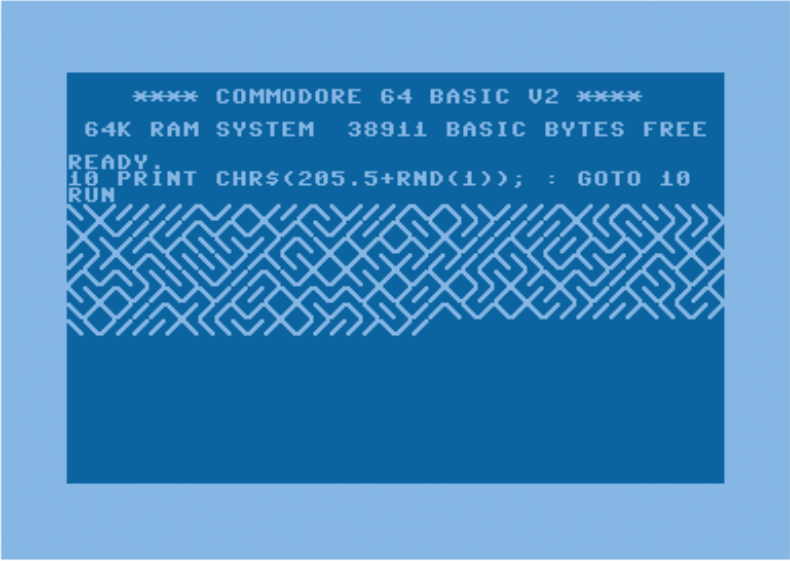 And the analysis is made from every possible angle: What do mazes mean in culture? What have they meant in cultures through history? What about regularity in art (mainly 20th century art)? How would this code look (or how it would be adapted) on contemporary non-C64 computers? And in other languages more popular today? What does randomness mean? And what does random() mean? What is BASIC, and how it came to the C64? What is the C64, and where did it come from? And several other beautiful chapters.
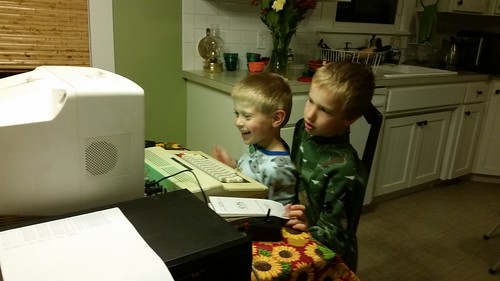
 The book was collaboratively written by ten different authors, in a Wiki-like fashion. And... Well, what else is there to say? I enjoyed so much reading through long chapters of my childhood, of what attracted me to computers, of my cultural traits and values... I really hope that, in due time, I can be a part of such a beautiful project!
 You may have heard that Uber has been under a bit of fire lately for its
desires to
You may have heard that Uber has been under a bit of fire lately for its
desires to 



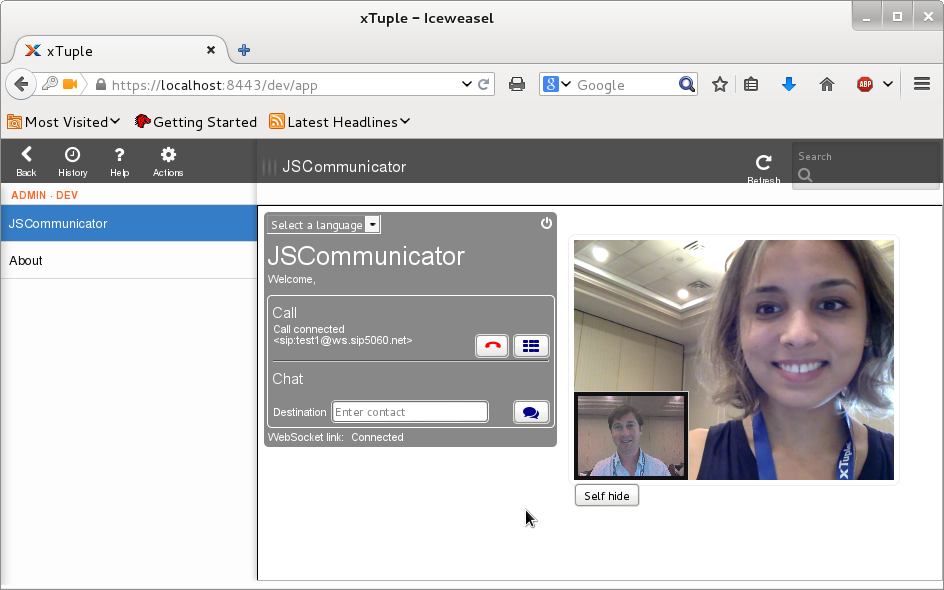 and gives a preview of the wide range of commercial opportunities that WebRTC is creating for software vendors to displace traditional telecommunications providers.
xTupleCon also gave me a great opportunity to see new features (like the
and gives a preview of the wide range of commercial opportunities that WebRTC is creating for software vendors to displace traditional telecommunications providers.
xTupleCon also gave me a great opportunity to see new features (like the 
 With
With  Tooz provides an API to manage group membership. The basic operations provided
are: the creation of a group, the ability to join it, leave it and list its
members. It's also possible to be notified as soon as a member joins or leaves a
group.
Leader election
Tooz provides an API to manage group membership. The basic operations provided
are: the creation of a group, the ability to join it, leave it and list its
members. It's also possible to be notified as soon as a member joins or leaves a
group.
Leader election
 Each group can have a leader elected. Each member can decide if it wants to run
for the election. If the leader disappears, another one is elected from the list
of current candidates. It's possible to be notified of the election result and
to retrieve the leader of a group at any moment.
Distributed locking
Each group can have a leader elected. Each member can decide if it wants to run
for the election. If the leader disappears, another one is elected from the list
of current candidates. It's possible to be notified of the election result and
to retrieve the leader of a group at any moment.
Distributed locking
 When trying to synchronize several workers in a distributed environment, you may
need a way to lock access to some resources. That's what a distributed lock can
help you with.
Adoption in OpenStack
When trying to synchronize several workers in a distributed environment, you may
need a way to lock access to some resources. That's what a distributed lock can
help you with.
Adoption in OpenStack
 I've rebuilt many Debian packages over the years, largely to fix bugs which affected me, or to add features which didn't make the cut in various releases. For example I made a package of fabric available for Wheezy, since it wasn't in the release. (Happily in that case a wheezy-backport became available. Similar cases involved repackaging gtk-gnutella when the protocol changed and the official package in the lenny release no longer worked.)
I generally release a lot of my own software as Debian packages, although I'll admit I've started switching to publishing Perl-based projects on CPAN instead - from which they can be debianized via
I've rebuilt many Debian packages over the years, largely to fix bugs which affected me, or to add features which didn't make the cut in various releases. For example I made a package of fabric available for Wheezy, since it wasn't in the release. (Happily in that case a wheezy-backport became available. Similar cases involved repackaging gtk-gnutella when the protocol changed and the official package in the lenny release no longer worked.)
I generally release a lot of my own software as Debian packages, although I'll admit I've started switching to publishing Perl-based projects on CPAN instead - from which they can be debianized via  Even before I install the app to find out if the government is monitoring me, Amnesty is keen to monitor my behaviour themselves.
While cookies are used widely, their presence on a site like Amnesty's only further desensitizes Internet users to the downside risks of tracking technologies. By using cookies, Amnesty is effectivley saying a little bit of tracking is justified for the greater good. Doesn't that sound eerily like the justification we often hear from governments too?
Is Amnesty part of the solution or part of the problem?
Amnesty is a well known and widely respected name when human rights are mentioned.
However, their advice that you can install an app onto a Windows computer or iPhone to detect spyware is like telling people that putting a seatbelt on a motorbike will eliminate the risk of death. It would be much more credible for Amnesty to tell people to start by avoiding cloud services altogether, browse the web with
Even before I install the app to find out if the government is monitoring me, Amnesty is keen to monitor my behaviour themselves.
While cookies are used widely, their presence on a site like Amnesty's only further desensitizes Internet users to the downside risks of tracking technologies. By using cookies, Amnesty is effectivley saying a little bit of tracking is justified for the greater good. Doesn't that sound eerily like the justification we often hear from governments too?
Is Amnesty part of the solution or part of the problem?
Amnesty is a well known and widely respected name when human rights are mentioned.
However, their advice that you can install an app onto a Windows computer or iPhone to detect spyware is like telling people that putting a seatbelt on a motorbike will eliminate the risk of death. It would be much more credible for Amnesty to tell people to start by avoiding cloud services altogether, browse the web with  Write to Amnesty
Amnesty became famous for their letter writing campaigns.
Maybe now is the time for people to write to Amnesty themselves, thank them for their efforts and encourage them to take more comprehensive action.
Feel free to cut and paste some of the following potential ideas
Write to Amnesty
Amnesty became famous for their letter writing campaigns.
Maybe now is the time for people to write to Amnesty themselves, thank them for their efforts and encourage them to take more comprehensive action.
Feel free to cut and paste some of the following potential ideas