Search Results: "ron"

11 October 2015

Ben Armstrong: Colours of Autumn 2015, Bluff Trail

My friend Ross Mayhew and I enjoyed a perfect Autumn afternoon yesterday, full of colours on the Bluff Trail. Not all of these photos do justice to the splendour and intricate detail I had hoped to capture, but I hope you enjoy them all the same. Click the photo to start the slideshow.
Late afternoon at the top of Pot Lake loopLate afternoon at the top of Pot Lake loop
On my way to hike, the Canada holly hints of things to come Canada holly berries bright red and close to the branch (vs. dusky red false holly berries on long stems) Unsure which fern this is. Ross says Christmas, but the leaf margins aren t serrated, but smooth. Sheltered by this mossy stump, a pretty mushroom Moss found climbing up a rotted stump, peculiar in that it has flat, fern-like fronds Ross and I spent a while examining this peculiar flat-fronded moss The reds of the huckleberries and maples were striking A tiny fern by a trickle of water across the path A familiar view overlooking Cranberry Lake, now in its fall splendour Brilliant Canada holly berries along the bog at our hike s end
facebooktwittergoogle_plusredditpinterestlinkedinmail

9 October 2015

Miriam Ruiz: Thick Skin (within Free/Open Source communities)

The definition of thick-skinned in different dictionaries ranges from not easily offended to largely unaffected by the needs and feelings of other people; insensitive , going through able to ignore personal criticism , ability to withstand criticism and show no signs of any criticism you may receive getting to you , an insensitive nature or impervious to criticism . It essentially describes an emotionally detached attitude regarding one s social environment, the capacity or ignoring or minimizing the effects of others criticism and the priorization of the protection of one s current state over the capacity of empathizing and taking into account what others may say that don t conform to one s current way of thinking. It is essentially setting up barriers against whatever others may do that might provoke any kind of crisis or change in you. There are a few underlying assumptions in the use of this term as a something good to have, when it comes to interactions with your own community: In the first place, it assumes that your own community is essentially hostile to you, and you will have to be constantly in guard against them. It assumes that it is better to set up barriers against the influence of others within your own comunity, because in fact your own peers are out there essentially to hurt you. Or, at least, they do not care a damn about you. In second place, it assumes that changes are wrong, that personal evolution is wrong, and that the more insensitive you are to your peer s opinions, the best, because they really have nothing to contribute to help you grow as a person. I m smart; you re dumb. I m big; you re little. I m right; you re wrong; And there s nothing you can do about it. (from the film Matilda). Matilda s dad is in fact the first reference that comes to my mind when we re talking about really thick skin. Scene of the film Matilda: I'm smart, You're dumb. I'm big, You're little. I'm right, You're wrong When the main recommendation when the level of aggressiveness within a community is that someone has to make their skin thicker, they are assuming that a bullying environment will help the results. This is nothing new. It s the same theoretical base that you can see in hazing and in other activities involving harassment, abuse or humiliation in college, when initiating a person into some groups. It s supposed to build character, to make someone closer to the alpha male stereotype and, in essence, make us better men (yes, I am using the word men on purpose, because insensitiveness is not usually seen as a positive trait in females). The assumption is that a community with a hard environment and individuals prepared for the war is more effective than a more civilized one. Luckily, that s not the point of view of most members of the Debian Community, and many other Free/Open Source projects. The Code of Conduct is very explicit when it says that a community in which people feel threatened is not a healthy community , and that is good. The Debian Project welcomes and encourages participation by everyone (Diversity Statement), including those with a thin skin, and I m happy about that. There are still a lot of things to improve, of course, but I have the feeling that -despite the occasional complains that having to be respectful to others take the fun away- we re moving in the right direction. The best tip I can give you on thickening your skin = don t. That is, don t thicken your skin. Having a thin skin means you re letting the world in, you re letting what s out there affect what s in you. It means you re connected. You re open. You re considerate and you ll consider it whatever it might be. Having a thin skin may be dangerous, sure, because you might take in so much that you pop, like that blueberry girl from Willy Wonka. But life is dangerous. A thick skin protects you from everything, but it also protects you from everything from the gentle touches of life, from the subtle emotions of others, the deep connections, the meaningful interactions. (Top Ten Tips on how to Thicken your Skin).

Enrico Zini: extract-xml-from-fattura-elettronica

Extracting XML payload from Italian Fattura Elettronica zipfiles This system does not even export to PDF. In order to provide my accountant with something better than a DER-encoded file with a random-looking name stored inside a zipfile, here is a script that at least extracts the unsigned XML payload out of a saved Fattura Elettronica. If you're giving a python course in Italy, this sounds like a nice early programming assignment.

8 October 2015

Lars Wirzenius: On Norbert Preining, Sarah Sharp, and Debian

I disagree with pretty much everything Norbert Preining says in his blog post about Sarah Sharp in response to Sharp's blog post Closing a door about leaving Linux kernel development. I think Preining mis-characterises what happens on the Linux kernel mailing list, and in Debian, in free software development in general, and what Sarah Sharp has said and done. I do not wish to participate in yet another discussion on the Debian Code of Conduct, respect, appropriate behaviour, or whether these things result in worse software. I won't spend any further of my time on debating, point-by-point, the arguments and straw-men Preining makes. Those discussions have happened often enough, without any effect on Preining and those who think like him. Likewise, despite the many times he makes the arguments, I continue to think he is wrong about everything on this topic. I do feel it is important to make it clear to the people reading Planet Debian, where both Preining's and my blogs are published, that his opinions are not mainstream in the Debian project, and that despite what he says, Debian development continues to be fun.

Jonathan McDowell: The sad state of home entertainment software platforms

I got home from a law lecture[1] today and took apart my TV. As you do. I d a couple of motivations for this. The TV is an LG 55LM8600-UC. That -UC is important - it means it s the US model. I shipped it back to the UK along with the rest of my belongings at the start of the year. It s a lovely TV, and I m very happy with the picture quality. Up until now I ve been running it through a 240v->120v transformer, because the back clearly states 120v 50/60Hz. Having had success converting my Roomba PSU to UK voltage I was wondering if it might be easy enough to do the same for the TV. So the first reason for taking it apart was to look at the PSU board and work out if I could replace it with a UK version, or fix up a handful of components myself. Turns out its rated for 100-240v 50/60Hz so it looks like it should be fine to plug into UK mains directly. And, having done so, it all seems fine. However I don t take any responsibility if you try this yourself and it all goes up in smoke. The other reason was to have a general poke at trying to get access to the onboard CPU - the firmware updates are signed and encrypted so I m a bit stuck working from just those. My TV is from the US; it therefore has an ATSC tuner, and is no good for picking up the DVB-T/T2 broadcast in the UK. It also has a range of smart apps built in. Of course are also tailored to the US, so the Amazon Instant Video app connects to amazon.com and is no use with my Amazon UK account. Netflix is smarter about this and detects where you re located rather than requiring logging in to the appropriate geographic site. However the Netflix app is old and doesn t support user profiles. Which causes a problem when I spend an afternoon watching Unbreakable Kimmy Schmidt and it screws up the recommendations for my girlfriend. In an ideal world I d easily be able to update the apps on my TV to recent versions appropriate for my geographic location. Instead, the current state of home entertainment software platforms is at least 10 years behind mobile phones. Some devices allow you to get hold of SDKs even as an end user, but you re stuck with a multiple ecosystems even between different models from the same manufacturer. LG has no interest in updating my 2012-era TV. They d rather I buy a nice new 2015 TV. Which means at present my TV is mostly a really nice monitor for my XBMC/Kodi box. I can get away with using my Blu-ray player for Netflix, as it does user profile, but it s also a US model and again Amazon Instant Video doesn t work with a UK account. I should point out /that/ box is from Panasonic, just in case anyone thinks I m needlessly picking on LG. My amp is an Onkyo and it would be nice if it could stream music from Amazon/Google as well (it supports Spotify and a couple of others already), but again no joy there. I understand there are DRM issues around video and audio content, but these problems seem to have largely been solved in the Android world while still providing a fairly standard development environment and allowing end users to install their own software. It would seem to make more sense if there was a standard TV / Blu-ray platform that the likes of Netflix and Amazon could write apps once for, reducing the effort required on both sides to get the latest and greatest services on end user equipment. I guess this is some of what Google was trying to achieve with Google TV, but it s probably less interesting to them than mobile devices as I certainly don t tend to do things like search on my TV; I just want to view content and would be mighty pissed off if it started advertising things at me unexpectedly. While I m not planning to buy a new TV any time soon, I could do with a UK spec 3D-capable Blu-ray player. Is there anything out there with some commitment to open apps / proper updates? I haven t found anything, but I d love to be proved wrong. [1] It was on the duty of care and negligence, if you care.

Mart n Ferrari: Pining for the good ol' days

Today, Norbert Preining wrote a blog post syndicated in planet talking about Sarah Sharp quitting Linux development, and making a parallel with the Debian community. Once again, he's complaining about how the fun from Debian has been lost because making sexist jokes, or treating other people like shit is not allowed any more. He seems to think the LKML is the ideal environment and that Debian should be more like it. He also celebrates that Ms Sharp12 left Linux, because evidently the freedom to be a jerk to each other is more important than the contributions that she -or any other person that finds that atmosphere toxic, like mjg- has produced or could have produced in the future.
I would like to tell readers of Planet Debian that this view is not the norm in Debian any more. We are working hard to make the project more inclusive, fun, and welcoming to everybody. Sadly, some people are still pining for the good ol' days, and won't give up so easily on their privilege.

  1. Whom he calls "one more SJW", I guess then that after all, this is just about ethics in FOSS development.
  2. At this point, using the term SJW in a discussion should equate to a Godwin, and mean that you lost the argument.
6 comments

Petter Reinholdtsen: The Story of Aaron Swartz - Let us all weep!

The movie "The Internet's Own Boy: The Story of Aaron Swartz" is both inspiring and depressing at the same time. The work of Aaron Swartz has inspired me in my work, and I am grateful of all the improvements he was able to initiate or complete. I wish I am able to do as much good in my life as he did in his. Every minute of this 1:45 long movie is inspiring in documenting how much impact a single person can have on improving the society and this world. And it is depressing in documenting how the law enforcement of USA (and other countries) is corrupted to a point where they can push a bright kid to his death for downloading too many scientific articles. Aaron is dead. Let us all weep. The movie is also available on Youtube. I wish there were Norwegian subtitles available, so I could show it to my parents.

Petter Reinholdtsen: The Story of Aron Swartz - Let us all weep!

The movie "The Internet's Own Boy: The Story of Aaron Swartz" is both inspiring and depressing at the same time. The work of Aaron Swartz has inspired me in my work, and I am grateful of all the improvements he was able to initiate or complete. I wish I am able to do as much good in my life as he did in his. Every minute of this 1:45 long movie is inspiring in documenting how much impact a single person can have on improving the society and this world. And it is depressing in documenting how the law enforcement of USA (and other countries) is corrupted to a point where they can push a bright kid to his death for downloading too many scientific articles. Aron is dead. Let us all weep. The movie is also available on Youtube. I wish there were Norwegian subtitles available, so I could show it to my parents.

Norbert Preining: Looking at the facts: Sarah Sharp s crusade

Much has been written around the internet about this geeky kernel maintainer Sarah Sharp who left kernel development. I have now spent two hours reading through lkml posts, and want to summarize a few mails from the long thread, since most of the usual news sites just rewrap the original blog of hers without adding any background. darth-cookie The whole thread evolved out call for stable kernel review by Greg Kroah-Hartman where he complained about too many patches that are not actually in rc1 before going into stable:
<rant>
  I'm sitting on top of over 170 more patches that have been marked for
  the stable releases right now that are not included in this set of
  releases.  The fact that there are this many patches for stable stuff
  that are waiting to be merged through the main -rc1 merge window cycle
  is worrying to me.
  [...]
from where it developed into a typical Linus rant on people flagging crap for stable, followed by some jokes:
On Fri, Jul 12, 2013 at 8:47 AM, Steven Rostedt <rostedt@goodmis.org> wrote:
> I tend to hold things off after -rc4 because you scare me more than Greg
> does ;-)
 
Have you guys *seen* Greg? The guy is a freakish giant. He *should*
scare you. He might squish you without ever even noticing.
 
              Linus
and Ingo Molnar giving advice to Greg KH:
So Greg, if you want it all to change, create some _real_ threat: be frank 
with contributors and sometimes swear a bit. That will cut your mailqueue 
in half, promise!
with Greg KH taking a funny position in answering:
Ok, I'll channel my "inner Linus" and take a cue from my kids and start
swearing more.
Up to now a pretty decent and normal thread with some jokes and poking, nobody minded, and reading through it I had a good time. The thread continues with a discussion on requirements what to submit to stable, and some side threads on particular commits. And then, out of the blue, Social Justice Warrior (SJW) Sarah Sharp pops in with a very important contribution:
Seriously, guys?  Is this what we need in order to get improve -stable?
Linus Torvalds is advocating for physical intimidation and violence.
Ingo Molnar and Linus are advocating for verbal abuse.
 
Not *fucking* cool.  Violence, whether it be physical intimidation,
verbal threats or verbal abuse is not acceptable.  Keep it professional
on the mailing lists.
 
Let's discuss this at Kernel Summit where we can at least yell at each
other in person.  Yeah, just try yelling at me about this.  I'll roar
right back, louder, for all the people who lose their voice when they
get yelled at by top maintainers.  I won't be the nice girl anymore.
Onto which Linus answers in a great way:
That's the spirit.
 
Greg has taught you well. You have controlled your fear. Now, release
your anger. Only your hatred can destroy me.
 
Come to the dark side, Sarah. We have cookies.
On goes Sarah, gearing up in her SJW mode and starting to rant:
However, I am serious about this.  Linus, you're one of the worst
offenders when it comes to verbally abusing people and publicly tearing
their emotions apart.
 
http://marc.info/?l=linux-kernel&m=135628421403144&w=2
http://marc.info/?l=linux-acpi&m=136157944603147&w=2
 
I'm not going to put up with that shit any more.
Linus himself made clear what he thinks of her:
Trust me, there's a really easy way for me to curse at people: if you
are a maintainer, and you make excuses for your bugs rather than
trying to fix them, I will curse at *YOU*.
 
Because then the problem really is you.
[...]
It is easy to verify what Linus said, by reading the above two links and the answers of the maintainers, both agreed that it was their failure and were sorry. (Mauro s answer, Rafael s answer) It is just the geeky SJW that was not even attacked (who would dare to attack a woman nowadays?). The overall reaction to her by the maintainers can be exemplified by Thomas Gleixner s post:
Just for the record. I got grilled by Linus several times over the
last years and I can't remember a single instance where it was
unjustified.
What follows is a nearly endless discussion with Sarah meandering around, changing permanently her opinion what is acceptable. Linus tried to explain to her in simple words, without success, she continues to rant around. Here arguments are so weak I had nothing but good laugh:
> Sarah, that's a pretty potent argument by Linus, that "acting 
> professionally" risks replacing a raw but honest culture with a
> polished but dishonest culture - which is harmful to developing
> good technology.
> 
> That's a valid concern. What's your reply to that argument?
 
I don't feel the need to comment, because I feel it's a straw man
argument.  I feel that way because I disagree with the definition of
professionalism that people have been pushing.
 
To me, being "professional" means treating each other with respect.  I
can show emotion, express displeasure, be direct, and still show respect
for my fellow developers.
 
For example, I find the following statement to be both direct and
respectful, because it's criticizing code, not the person:
 
"This code is SHIT!  It adds new warnings and it's marked for stable
when it's clearly *crap code* that's not a bug fix.  I'm going to revert
this merge, and I expect a fix from you IMMEDIATELY."
 
The following statement is not respectful, because it targets the
person:
 
"Seriously, Maintainer.  Why are you pushing this kind of *crap* code to
me again?  Why the hell did you mark it for stable when it's clearly
not a bug fix?  Did you even try to f*cking compile this?"
Fortunately, she was immediately corrected and Ingo Molnar wrote an excellent refutation (starting another funny thread) of all her emails, statements, accusations (all of the email is a good read):
_That_ is why it might look to you as if the person was
attacked, because indeed the actions of the top level maintainer were
wrong and are criticised.
 
... and now you want to 'shut down' the discussion. With all due respect,
you started it, you have put out various heavy accusations here and elsewhere,
so you might as well take responsibility for it and let the discussion be
brought to a conclusion, wherever that may take us, compared to your initial view?
(He retracted that last statement, though I don t see a reason for it) Last but not least, let us return to her blog post, where she states herself that:
FYI, comments will be moderated by someone other than me. As this is my blog, not a
government entity, I have the right to replace any comment I feel like with 
 fart fart fart fart .
and she made lots of use of it, I counted at least 10 instances. She seems to remove or fart fart fart any comment that is not in line with her opinion. Further evidence is provided by this post on lkml. Everyone is free to have his own opinion (sorry, his/her), and I am free to form my own opinion on Sarah Sharp by just simply reading the facts. I am more than happy that one more SJW has left Linux development, as the proliferation of cleaning of speech from any personality has taken too far a grip. Coming to my home-base in Debian, unfortunately there is no one in the position and the state of mind of Linus, so we are suffering the same stupidities imposed by social justice worriers and some brainless feminists (no, don t get me wrong, these are two independent attributes. I do NOT state that feminism is brainless) that Linus and the maintainer crew was able to fend of this time. I finish with my favorite post from that thread, by Steven Rosted (from whom I also stole the above image!):
On Tue, 2013-07-16 at 18:37 -0700, Linus Torvalds wrote:
> Emotions aren't bad. Quite the reverse. 
 
Spock and Dr. Sheldon Cooper strongly disagree.
Post Scriptum (after a bike ride) The last point by Linus is what I criticize most on Debian nowdays, it has become a sterilized over-governed entity, where most fun is gone. Making fun is practically forbidden, since there is the slight chance that some minority somewhere on this planet might feel hurt, and by this we are breaking the CoC. Emotions are restricted to the Happy happy how nice we are and how good we are level of US and also Japanese self-reenforcement society. Post Post Scriptum I just read Sarah Sharp s post on What makes a good community? , and without giving a full account or review, I am just pi**ed by the usage of the word microaggressions I can only recommend everyone to read this article and this article to get a feeling how bs the idea of microaggressions has taken over academia and obviously not only academia. Post3 Scriptum I am happy to see Lars Wirzenius, Gunnar Wolf, and Mart n Ferrari opposing my view. I agree with them that my comments concerning Debian are not mainstream in Debian something that is not very surprising, though, and I think it is great that they have fun in Debian, like many other contributors. Post4 Scriptum Although nobody will read this, here is a great response from a female developer:
[...] To Linus: You're a hero to many of us. Don't change. Please. You DO
NOT need to take time away from doing code to grow a pair of breasts
and judge people's emotional states: [...]
Nothing to add here!

7 October 2015

Ben Hutchings: Debian LTS work, September 2015

For my 10th month working on Debian LTS, I was assigned 14.5 hours of work by Freexian's Debian LTS initiative, but only worked for 9 hours. Front desk I had another week in the 'front desk' role, where I triaged new security issues for squeeze. Happily, few of them affected squeeze. linux-2.6 I reviewed a new upstream stable update, 2.6.32.68, and then applied it to our package once it was released. I backported a further 3 security fixes, uploaded the package and issued DLA-310-1. binutils binutils had several buffer overflow bugs to be fixed. They aren't very likely to be exploitable as most users won't be processing untrusted input with binutils. Nevertheless, I backported the fixes from upstream and (early this month) issued DLA-324-1.

Guido G nther: Debian work in September 2015

Debian LTS August was the fifth month I contributed to Debian LTS under the Freexian umbrella. In total I spent eight hours working on: Besides that I did CVE triaging of 9 CVEs to check if and how they affect oldoldstable security as part of my LTS front desk work. Other Debian work I finally sent out the summary of the 8th Debian Groupware Meeting we had in the Linuxhotel earlier this year and gave a short talk about Debian at the Zarafa Tour in the Netherlands.

Steve Kemp: Generating fingerprints from SSH keys

I've been allowing users to upload SSH public-keys, and displaying them online in a form. Displaying an SSH public key is a pain, because they're typically long. That means you need to wrap them, or truncate them, or you introduce a horizontal scroll-bar. So rather than displaying them I figured I'd generate a fingerprint when the key was uploaded and show that instead - This is exactly how github shows your ssh-keys. Annoyingly there is only one reasonable way to get a fingerprint from a key: You can sometimes calculate the key via more direct, but less obvious methods:
awk ' print $2 ' ~/.ssh/id_rsa.pub   base64 -d   md5sum
But that won't work for all key-types. It is interesting to look at the various key-types which are available these days:
mkdir ~/ssh/
cd ~/ssh/
for i in dsa ecdsa ed25519 rsa rsa1 ; do
  ssh-keygen -P "" -t $i -f $ i -key
done
I've never seen an ed25519 key in the wild. It looks like this:
$ cat ~/ssh/ed25519-key.pub
ssh-ed25519 AAAAC3NzaC1lZDI1NTE5AAAAIMcT04t6UpewqQHWI4gfyBpP/ueSjbcGEze22vdlq0mW skx@shelob
Similarly curve-based keys are short too, but not as short:
ecdsa-sha2-nistp256 AAAAE2VjZHNhLXNoYTItbmlzdHAyNTYAAAAIbmlzdHAyNTYAAABBBLTJ5+  \
 rWoq5cNcjXdhzRiEK3Yq6tFSYr4DBsqkRI0ZqJdb+7RxbhJYUOq5jsBlHUzktYhOahEDlc9Lezz3ZUqXg= skx@shelob
Remember what I said about wrapping? Ha! Anyway for the moment I've hacked up a simple perl module SSH::Key::Fingerprint which will accept a public key and return the fingerprint, as well as validating the key is well-formed and of a known-type. I might make it public in the future, but I think the name is all wrong. The only code I could easily find to do a similar job is this node.js package, but it doesn't work on all key-types. Shame. And that concludes this weeks super-happy fun-time TODO-list item.

Emanuele Rocca: systemd is your friend

Today I want to talk a bit about some cool features of systemd, the default Debian init system since the release of Jessie. Ubuntu has also adopted systemd in 15.04, meaning that you are going to find it literally everywhere.
Logging The component responsible for logging in systemd is called journal. It collects and stores logs in a structured, indexed journal (hence the name). The journal can replace traditional syslog daemons such as rsyslog and syslog-ng, or work together with them. By default Debian keeps on using rsyslog, but if you don't need to ship logs to a centralized server (or do other fancy things) it is possible to stop using rsyslog right now and rely on systemd-journal instead. The obvious question is: why would anybody use a binary format for logs instead of a bunch of tried and true plain-text files? As it turns out, there are quite a lot of good reasons to do so. The killer features of systemd-journald for me are:
  • Index tons of logs while being able to search with good performance: O(log(n)) instead of O(n) which is what you get with text files
  • No need to worry about log rotation anymore, in any shape or form
The last point in particular is really critical in my opinion. Traditional log rotation implementations rely on cron jobs to check how much disk space is used by logs, compressing/removing old files. Log rotation is usually: 1) annoying to configure; 2) hard to get right; 3) prone to DoS attacks. With journald, there is pretty much nothing to configure. Log rotation is built into the daemon disk space allocation logic itself. This also allows to avoid vulnerability windows due to time-based rotation, which is what you get with logrotate and friends. Enough high-level discussions though, here is how to use the journal! Check if you already have the directory /var/log/journal, otherwise create it (as root). Then restart systemd-journald as follows: sudo systemctl restart systemd-journald You can get all messages produced since the last boot with journalctl -b. All messages produced today can get extracted using journalctl --since=today. Want to get all logs related to ssh? Try with journalctl _SYSTEMD_UNIT=ssh.service. There are many more filtering options available, you can read all about them with man journalctl. journald's configuration file is /etc/systemd/journald.conf. Two of the most interesting options are SystemMaxUse and SystemKeepFree, which can be used to change the amount of disk space dedicated to logging. They default to 10% and 15% of the /var filesystem respectively. Here is a little cheatsheet:
journalctl -b                # Show all messages since last boot
journalctl -f                # Tail your logs
journalctl --since=yesterday # Show all messages produced since yesterday
journalctl -pcrit            # Filter messages by priority
journalctl /bin/su           # Filter messages by program
journalctl --disk-usage      # The amount of space in use for journaling
Further reading:
Containers A relatively little known component of systemd is systemd-nspawn. It is a small, straightforward container manager. If you don't already have a chroot somewhere, here is how to create a basic Debian Jessie chroot under /srv/chroots/jessie:
$ debootstrap jessie /srv/chroots/jessie http://http.debian.net/debian/
With systemd-nspawn you can easily run a shell inside the chroot:
$ sudo systemd-nspawn -D /srv/chroots/jessie
Spawning container jessie on /srv/chroots/jessie.
Press ^] three times within 1s to kill container.
/etc/localtime is not a symlink, not updating container timezone.
root@jessie:~#
Done. Everything works out of the box: no need for you to mount /dev, /run and friends, systemd-nspawn took care of that. Networking also works. If you want to actually boot the system, just add the -b switch to the previous command:
$ sudo systemd-nspawn -b -D /srv/chroots/jessie
Spawning container jessie on /srv/chroots/jessie.
Press ^] three times within 1s to kill container.
/etc/localtime is not a symlink, not updating container timezone.
systemd 215 running in system mode. (+PAM +AUDIT +SELINUX +IMA +SYSVINIT +LIBCRYPTSETUP +GCRYPT +ACL +XZ -SECCOMP -APPARMOR)
Detected virtualization 'systemd-nspawn'.
Detected architecture 'x86-64'.
Welcome to Debian GNU/Linux jessie/sid!
Set hostname to <orion>.
[  OK  ] Reached target Remote File Systems (Pre).
[  OK  ] Reached target Encrypted Volumes.
[  OK  ] Reached target Paths.
[  OK  ] Reached target Swap.
[  OK  ] Created slice Root Slice.
[  OK  ] Created slice User and Session Slice.
[  OK  ] Listening on /dev/initctl Compatibility Named Pipe.
[  OK  ] Listening on Delayed Shutdown Socket.
[  OK  ] Listening on Journal Socket (/dev/log).
[  OK  ] Listening on Journal Socket.
[  OK  ] Created slice System Slice.
[  OK  ] Created slice system-getty.slice.
[  OK  ] Listening on Syslog Socket.
         Mounting POSIX Message Queue File System...
         Mounting Huge Pages File System...
         Mounting FUSE Control File System...
         Starting Copy rules generated while the root was ro...
         Starting Journal Service...
[  OK  ] Started Journal Service.
[  OK  ] Reached target Slices.
         Starting Remount Root and Kernel File Systems...
[  OK  ] Mounted Huge Pages File System.
[  OK  ] Mounted POSIX Message Queue File System.
[  OK  ] Mounted FUSE Control File System.
[  OK  ] Started Copy rules generated while the root was ro.
[  OK  ] Started Remount Root and Kernel File Systems.
         Starting Load/Save Random Seed...
[  OK  ] Reached target Local File Systems (Pre).
[  OK  ] Reached target Local File Systems.
         Starting Create Volatile Files and Directories...
[  OK  ] Reached target Remote File Systems.
         Starting Trigger Flushing of Journal to Persistent Storage...
[  OK  ] Started Load/Save Random Seed.
         Starting LSB: Raise network interfaces....
[  OK  ] Started Create Volatile Files and Directories.
         Starting Update UTMP about System Boot/Shutdown...
[  OK  ] Started Trigger Flushing of Journal to Persistent Storage.
[  OK  ] Started Update UTMP about System Boot/Shutdown.
[  OK  ] Started LSB: Raise network interfaces..
[  OK  ] Reached target Network.
[  OK  ] Reached target Network is Online.
[  OK  ] Reached target System Initialization.
[  OK  ] Listening on D-Bus System Message Bus Socket.
[  OK  ] Reached target Sockets.
[  OK  ] Reached target Timers.
[  OK  ] Reached target Basic System.
         Starting /etc/rc.local Compatibility...
         Starting Login Service...
         Starting LSB: Regular background program processing daemon...
         Starting D-Bus System Message Bus...
[  OK  ] Started D-Bus System Message Bus.
         Starting System Logging Service...
[  OK  ] Started System Logging Service.
         Starting Permit User Sessions...
[  OK  ] Started /etc/rc.local Compatibility.
[  OK  ] Started LSB: Regular background program processing daemon.
         Starting Cleanup of Temporary Directories...
[  OK  ] Started Permit User Sessions.
         Starting Console Getty...
[  OK  ] Started Console Getty.
[  OK  ] Reached target Login Prompts.
[  OK  ] Started Login Service.
[  OK  ] Reached target Multi-User System.
[  OK  ] Reached target Graphical Interface.
         Starting Update UTMP about System Runlevel Changes...
[  OK  ] Started Cleanup of Temporary Directories.
[  OK  ] Started Update UTMP about System Runlevel Changes.
Debian GNU/Linux jessie/sid orion console
orion login:
That's it! Just one command to start a shell in your chroot or boot the container, again zero configuration needed. Finally, systemd provides a command called machinectl that allows you to introspect and control your container:
$ sudo machinectl status jessie
jessie
           Since: Wed 2015-10-07 11:22:56 CEST; 55min ago
          Leader: 32468 (systemd)
         Service: nspawn; class container
            Root: /srv/chroots/jessie
         Address: fe80::8e70:5aff:fe81:2290
                  192.168.122.1
                  192.168.1.13
              OS: Debian GNU/Linux jessie/sid
            Unit: machine-jessie.scope
                   32468 /lib/systemd/systemd
                   system.slice
                     dbus.service
                       32534 /usr/bin/dbus-daemon --system --address=systemd: --nofork --nopidfile -...
                     cron.service
                       32539 /usr/sbin/cron
                     systemd-journald.service
                       32487 /lib/systemd/systemd-journald
                     systemd-logind.service
                       32532 /lib/systemd/systemd-logind
                     console-getty.service
                       32544 /sbin/agetty --noclear --keep-baud console 115200 38400 9600 vt102
                     rsyslog.service
                       32540 /usr/sbin/rsyslogd -n
With machinectl you can also reboot, poweroff, terminate your containers and more. There are so many things to learn about systemd and containers! Here are some references. This stuff is pretty exciting. Now that all major distributions use systemd by default, we can expect to have access to tools like journalctl and systemd-nspawn everywhere!

6 October 2015

Ben Armstrong: Cranberry Lake and nearby bog Fall, 2015

On one of my regular walks with a friend, we decided today to walk part of the BLT Trail to Cranberry Lake and the bog just past it, an easy 5 km round trip.
On the trail to the lake, golds dominateOn the trail to the lake, golds dominate
A calm day, the lake like glassA calm day, the lake like glass
In the bog, copper and golden huesIn the bog, copper and golden hues
On the margins of the bog, brilliant orange and redOn the margins of the bog, brilliant orange and red
The reds, dark greens and dead trees in counterpointThe reds, dark greens and dead trees in counterpoint
At our turning point, my cranberry patch provided a puckery snackAt our turning point, my cranberry patch provided a puckery snack
facebooktwittergoogle_plusredditpinterestlinkedinmail

Thorsten Alteholz: My Debian Activities in September 2015

FTP assistant Another month passed and another statistic arrives: This month I marked 341 packages for accept and rejected only 48 of them. Almost like last month I had to send 14 emails to maintainers. Squeeze LTS This was my fifteenth month that I did some work for the Squeeze LTS initiative, started by Raphael Hertzog at Freexian. This month I only got a workload of 14.5h. I finally uploaded a new version of php5. Unfortunately in one library a parameter to a function call introduced new values. As a result all running processes that used the old version of that library produced an error message until they got restarted. As complaints showed up on all channels, I rechecked my patches again and again but could not find an error. I wonder whether this happened once before. At least the php package does not have a mechanism to restart something
Altogether I uploaded those DLAs: I also started to work on an upload of freeimage and the next upload of php5. This month I also had another term of doing frontdesk work. So I answered questions on the IRC channel and looked for CVEs that are important for Squeeze LTS or could be ignored. Other stuff Some time ago someone mentioned pump.io and that it would be nice to have it in Debian. I found a Wiki page listing dependencies, with lots of stuff already done and just a few holes. It didn t look like much work todo until I realized that this page showed only the surface and the shoals are hidden below. Anyway, I started to work on it and up to now are uploaded and are still in NEW. Luckily most of them could be handled by npm2deb, so it was mainly routine piece of work. So, expect more to come I also polished some smaller packages and could even close some bugs:

Gergely Nagy: What dh-exec is, and what it isn't for

Strange as it may be, it turns out I never wrote about dh-exec yet, even though it is close to being four years old. Gosh, time flies so fast when you're having fun! Since its first introduction, there's been a reasonable uptake in dh-exec use: as of this writing, 129 packages build-depend on dh-exec. One might think this would be a cause for celebration, that the package is put to great use. But it's not.You see, a significant number of those 129 packages are doing it wrong, and need not build-depend on dh-exec at all.The purpose of dh-exec is to allow one to do things stock debhelper can't do, such as renaming files during the dh_install phase, or applying architecture or build profile based filtering, or doing environment variable substitution. There are many legit uses for all of these features, but there are some which can be easily solved without using dh-exec. So first, I'll talk a bit about the don'ts.What not to use dh-exec forOne of the most abused part of dh-exec is its variable substitution feature, and it is often used without need, to install multiarch-related files. While that is one intended use-case, there are few situations currently in the archive that stock debhelper can't handle. Let me explain the situation!Lets assume we have an upstream package, where the build system is something as common as autotools or CMake, for which debhelper can automatically set the appropriate flags and paths. Furthermore, lets assume that the upstream build system would install the following files:
/usr/lib/x86_64-linux-gnu/libalala.so.1.2.3
/usr/lib/x86_64-linux-gnu/libalala.so.1
/usr/lib/x86_64-linux-gnu/libalala.so
/usr/lib/x86_64-linux-gnu/libalala.a
/usr/lib/x86_64-linux-gnu/pkgconfig/libalala.pc
/usr/include/lalala/lalala.h
We want to include the first two in the libalala1 package, the rest in libalala-dev, so what do we do? We use stock debhelper, of course! That is all you need. In this case, there is absolutely no need for dh-exec. While using dh-exec without need is not much of an issue, because it only increases the space required for the build and build times by a tiny bit, I would still strongly recommend not introducing dh-exec needlessly. Why? Because of simplicity and aesthetics.So, if you find yourself doing any of these, or similar, that's a sign you are doing things wrong:
usr/lib/$ DEB_HOST_MULTIARCH 
usr/lib/$ DEB_HOST_MULTIARCH /*.so.* /usr/lib/$ DEB_HOST_MULTIARCH /
usr/lib/$ DEB_HOST_MULTIARCH /pkgconfig/*.pc /usr/lib/$ DEB_HOST_MULTIARCH /pkgconfig
usr/lib/$ DEB_HOST_MULTIARCH /package/*.so /usr/lib/$ DEB_HOST_MULTIARCH /package
Unless there are other directories under usr/lib that are not the multiarch triplet, using stock debhelper and wildcards is not only more succinct, simpler and more elegant, but also lighter on resources required.When dh-exec becomes usefulChanging installation pathsOnce you want to change where things get installed, then dh-exec becomes useful:
usr/lib/*.so.* /usr/lib/$ DEB_HOST_MULTIARCH 
usr/lib/$ DEB_HOST_MULTIARCH /package/* /usr/lib/$ DEB_HOST_MULTIARCH /package-plugins/
some/dir/*.so.* /usr/lib/$ DEB_HOST_MULTIARCH 
This usually happens when upstream's build system can't easily be taught about multiarch paths. For most autotools and CMake-based packages, this is not the case.Variable substitutionConsider this case:
#!/usr/bin/dh-exec
/usr/share/octave/packages/mpi-$ DEB_VERSION_UPSTREAM /hello2dimmat.m /usr/share/doc/octave-mpi/examples/hello2dimmat.m
/usr/share/octave/packages/mpi-$ DEB_VERSION_UPSTREAM /hellocell.m /usr/share/doc/octave-mpi/examples/hellocell.m
Here, the build supplies $ DEB_VERSION_UPSTREAM , and using dh-exec allows one to have a generic debian/links file, that does not need updating whenever the upstream version changes. We can't use wildcards here, because dh_link does not expand them.Renaming filesIn case one needs to rename files during the dh_install phase, dh-exec can be put to use for great results:
ssh-agent-filter.bash-completion => usr/share/bash-completion/completions/ssh-agent-filter
FilteringSometimes one would wish to conditionally install something based on the architecture, or the build profile. In this case, dh-exec is the tool to turn to:
<!stage1 !stage2> ../../libdde-linux26/Makeconf* usr/share/libdde_linux26
usr/lib/gvfs/gvfsd-afc                                          [!hurd-any]
usr/lib/gvfs/gvfsd-gphoto2                                      [linux-any]

4 October 2015

Philipp Kern: Root on LVM on Debian s390x, new Hercules


Two s390x changes landed in Debian unstable today:
With this it should be possible to install Debian on s390x with root on LVM. I'd be happy to hear feedback about installations with any configuration, be it root on a single DASD or root on LVM. Unless you set both mirror/udeb/suite and mirror/suite to unstable you'll need to wait until the changes are in testing, though. (The debian-installer build does not matter as zipl-installer is not part of the initrd and sysconfig-hardware is part of the installation.)

Furthermore I uploaded a new version of Hercules - a z/Architecture emulator - to get a few more years of maintenance into Debian. See its upstream changelog for details on the changes (old 3.07 new 3.11).

At this point qemu at master is also usable for s390x emulation. It is much faster than Hercules, but it uses newfangled I/O subsystems like virtio. Hence we will need to do some more patching to make debian-installer just work. One patch for netcfg is in to support virtio networking correctly, but then it forces the user to configure a DASD. (Which would be as wrong if Fibre Channel were to be used.) In the end qemu and KVM on s390x look so much like a normal x86 VM that we could drop most of the special-casing of s390x (netcfg-static instead of netcfg; network-console instead of using the VM console; DASD configuration instead of simply using virtio-blk devices; I guess we get to keep zIPL for booting).

Jonathan Carter: Long Overdue Debconf 15 Post

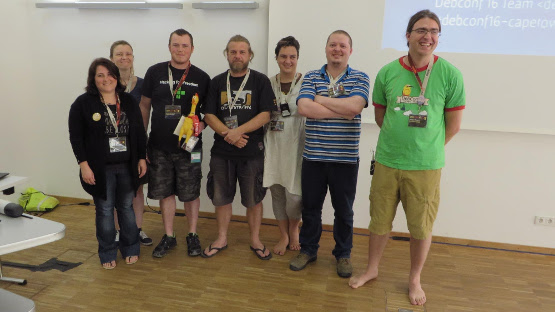
Debconf 15 In August (that was 2 months ago, really!?) I attended DebCamp and DebConf in Heidelberg, Germany. This blog post is somewhat belated due to the debbug (flu obtained during DebConf) and all the catching up I had to do since then. Debcamp Debcamp was great, I got to hack on some of my Python related packages that were in need of love for a long time and also got to spend a lot of time tinkering with VLC for the Video Team. Even better than that, I caught up with a lot of great people I haven t seen in ages (and met new ones) and stayed up waaaaay too late drinking beer, playing Mao and watching meteor showers. Debconf At Debconf, I gave a short talk about AIMS Desktop (slides) but also expanded on the licensing problems we ve had with Ubuntu on that project. Not all was bleak on the Ubuntu front though, some Ubuntu/Canonical folk were present at DebConf and said that they d gladly get involved with porting Ubiquity (the Ubuntu installer, a front-end to d-i) to Debian. That would certainly be useful to many derivatives including potentiall AIMS Desktop if it were to move over to Debian. AIMS Desktop talk slides: We re hosting DebConf in Cape Town next year and did an introduction during a plenary (slides). It was interesting spending some time with the DC15 team and learning how they work, it s amazing all the detail they have to care about and how easy they made it look from the outside, I hope the DC16 team will pull that off as well. Debconf 16 Slides: DC16 at DC15 talk DebConf 16 team members present at DebConf16 during DC16 presentation: I uploaded my photos to DebConf Gallery, Facebook and Google, take your pick ;-), many sessions were recorded, catch them on video.debian.net. If I had to summarize everything that I found interesting I d have to delay posting this entry even further, topics that were particularly interesting were: Pollito s First Trip to Africa In my state of flu with complete lack of concentration for anything work related, I went ahead and made a little short story documenting Pollito s (the DebConf mascot chicken) first trip to Africa. It s silly but it was fun to make and some people enjoyed it ^_^ Well, what else can I say? DebConf 15 was a blast! Hope to see you at Debconf 16!

Johannes Schauer: new sbuild release 0.66.0

I just released sbuild 0.66.0-1 into unstable. It fixes a whopping 30 bugs! Thus, I'd like to use this platform to: And a super big thank you to Roger Leigh who, despite having resigned from Debian, was always available to give extremely helpful hints, tips, opinion and guidance with respect to sbuild development. Thank you! Here is a list of the major changes since the last release:

2 October 2015

Daniel Pocock: Want to be selected for Google Summer of Code 2016?

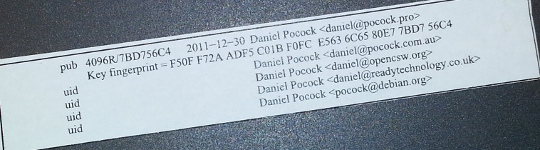
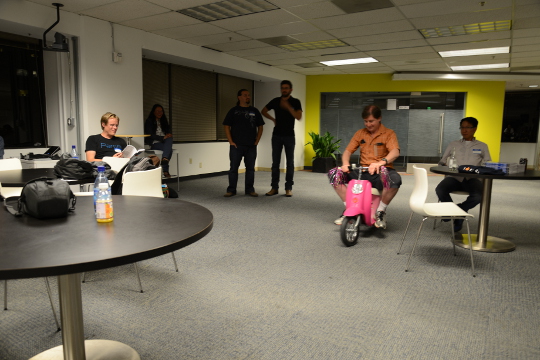
I've mentored a number of students in 2013, 2014 and 2015 for Debian and Ganglia and most of the companies I've worked with have run internships and graduate programs from time to time. GSoC 2015 has just finished and with all the excitement, many students are already asking what they can do to prepare and be selected for Outreachy or GSoC in 2016. My own observation is that the more time the organization has to get to know the student, the more confident they can be selecting that student. Furthermore, the more time that the student has spent getting to know the free software community, the more easily they can complete GSoC. Here I present a list of things that students can do to maximize their chance of selection and career opportunities at the same time. These tips are useful for people applying for GSoC itself and related programs such as GNOME's Outreachy or graduate placements in companies. Disclaimers There is no guarantee that Google will run the program again in 2016 or any future year until the Google announcement. There is no guarantee that any organization or mentor (including myself) will be involved until the official list of organizations is published by Google. Do not follow the advice of web sites that invite you to send pizza or anything else of value to prospective mentors. Following the steps in this page doesn't guarantee selection. That said, people who do follow these steps are much more likely to be considered and interviewed than somebody who hasn't done any of the things in this list. Understand what free software really is You may hear terms like free software and open source software used interchangeably. They don't mean exactly the same thing and many people use the term free software for the wrong things. Not all projects declaring themselves to be "free" or "open source" meet the definition of free software. Those that don't, usually as a result of deficiencies in their licenses, are fundamentally incompatible with the majority of software that does use genuinely free licenses. Google Summer of Code is about both writing and publishing your code and it is also about community. It is fundamental that you know the basics of licensing and how to choose a free license that empowers the community to collaborate on your code well after GSoC has finished. Please review the definition of free software early on and come back and review it from time to time. The The GNU Project / Free Software Foundation have excellent resources to help you understand what a free software license is and how it works to maximize community collaboration. Don't look for shortcuts There is no shortcut to GSoC selection and there is no shortcut to GSoC completion. The student stipend (USD $5,500 in 2014) is not paid to students unless they complete a minimum amount of valid code. This means that even if a student did find some shortcut to selection, it is unlikely they would be paid without completing meaningful work. If you are the right candidate for GSoC, you will not need a shortcut anyway. Are you the sort of person who can't leave a coding problem until you really feel it is fixed, even if you keep going all night? Have you ever woken up in the night with a dream about writing code still in your head? Do you become irritated by tedious or repetitive tasks and often think of ways to write code to eliminate such tasks? Does your family get cross with you because you take your laptop to Christmas dinner or some other significant occasion and start coding? If some of these statements summarize the way you think or feel you are probably a natural fit for GSoC. An opportunity money can't buy The GSoC stipend will not make you rich. It is intended to make sure you have enough money to survive through the summer and focus on your project. Professional developers make this much money in a week in leading business centers like New York, London and Singapore. When you get to that stage in 3-5 years, you will not even be thinking about exactly how much you made during internships. GSoC gives you an edge over other internships because it involves publicly promoting your work. Many companies still try to hide the potential of their best recruits for fear they will be poached or that they will be able to demand higher salaries. Everything you complete in GSoC is intended to be published and you get full credit for it. Imagine a young musician getting the opportunity to perform on the main stage at a rock festival. This is how the free software community works. It is a meritocracy and there is nobody to hold you back. Having a portfolio of free software that you have created or collaborated on and a wide network of professional contacts that you develop before, during and after GSoC will continue to pay you back for years to come. While other graduates are being screened through group interviews and testing days run by employers, people with a track record in a free software project often find they go straight to the final interview round. Register your domain name and make a permanent email address Free software is all about community and collaboration. Register your own domain name as this will become a focal point for your work and for people to get to know you as you become part of the community. This is sound advice for anybody working in IT, not just programmers. It gives the impression that you are confident and have a long term interest in a technology career. Choosing the provider: as a minimum, you want a provider that offers DNS management, static web site hosting, email forwarding and XMPP services all linked to your domain. You do not need to choose the provider that is linked to your internet connection at home and that is often not the best choice anyway. The XMPP foundation maintains a list of providers known to support XMPP. Create an email address within your domain name. The most basic domain hosting providers will let you forward the email address to a webmail or university email account of your choice. Configure your webmail to send replies using your personalized email address in the From header. Update your ~/.gitconfig file to use your personalized email address in your Git commits. Create a web site and blog Start writing a blog. Host it using your domain name. Some people blog every day, other people just blog once every two or three months. Create links from your web site to your other profiles, such as a Github profile page. This helps reinforce the pages/profiles that are genuinely related to you and avoid confusion with the pages of other developers. Many mentors are keen to see their students writing a weekly report on a blog during GSoC so starting a blog now gives you a head start. Mentors look at blogs during the selection process to try and gain insight into which topics a student is most suitable for. Create a profile on Github Github is one of the most widely used software development web sites. Github makes it quick and easy for you to publish your work and collaborate on the work of other people. Create an account today and get in the habbit of forking other projects, improving them, committing your changes and pushing the work back into your Github account. Github will quickly build a profile of your commits and this allows mentors to see and understand your interests and your strengths. In your Github profile, add a link to your web site/blog and make sure the email address you are using for Git commits (in the ~/.gitconfig file) is based on your personal domain. Start using PGP Pretty Good Privacy (PGP) is the industry standard in protecting your identity online. All serious free software projects use PGP to sign tags in Git, to sign official emails and to sign official release files. The most common way to start using PGP is with the GnuPG (GNU Privacy Guard) utility. It is installed by the package manager on most Linux systems. When you create your own PGP key, use the email address involving your domain name. This is the most permanent and stable solution. Print your key fingerprint using the gpg-key2ps command, it is in the signing-party package on most Linux systems. Keep copies of the fingerprint slips with you. This is what my own PGP fingerprint slip looks like. You can also print the key fingerprint on a business card for a more professional look. Using PGP, it is recommend that you sign any important messages you send but you do not have to encrypt the messages you send, especially if some of the people you send messages to (like family and friends) do not yet have the PGP software to decrypt them. If using the Thunderbird (Icedove) email client from Mozilla, you can easily send signed messages and validate the messages you receive using the Enigmail plugin. Get your PGP key signed Once you have a PGP key, you will need to find other developers to sign it. For people I mentor personally in GSoC, I'm keen to see that you try and find another Debian Developer in your area to sign your key as early as possible. Free software events Try and find all the free software events in your area in the months between now and the end of the next Google Summer of Code season. Aim to attend at least two of them before GSoC. Look closely at the schedules and find out about the individual speakers, the companies and the free software projects that are participating. For events that span more than one day, find out about the dinners, pub nights and other social parts of the event. Try and identify people who will attend the event who have been GSoC mentors or who intend to be. Contact them before the event, if you are keen to work on something in their domain they may be able to make time to discuss it with you in person. Take your PGP fingerprint slips. Even if you don't participate in a formal key-signing party at the event, you will still find some developers to sign your PGP key individually. You must take a photo ID document (such as your passport) for the other developer to check the name on your fingerprint but you do not give them a copy of the ID document. Events come in all shapes and sizes. FOSDEM is an example of one of the bigger events in Europe, linux.conf.au is a similarly large event in Australia. There are many, many more local events such as the Debian UK mini-DebConf in Cambridge, November 2015. Many events are either free or free for students but please check carefully if there is a requirement to register before attending. On your blog, discuss which events you are attending and which sessions interest you. Write a blog during or after the event too, including photos. Quantcast generously hosted the Ganglia community meeting in San Francisco, October 2013. We had a wild time in their offices with mini-scooters, burgers, beers and the Ganglia book. That's me on the pink mini-scooter and Bernard Li, one of the other Ganglia GSoC 2014 admins is on the right. Install Linux GSoC is fundamentally about free software. Linux is to free software what a tree is to the forest. Using Linux every day on your personal computer dramatically increases your ability to interact with the free software community and increases the number of potential GSoC projects that you can participate in. This is not to say that people using Mac OS or Windows are unwelcome. I have worked with some great developers who were not Linux users. Linux gives you an edge though and the best time to gain that edge is now, while you are a student and well before you apply for GSoC. If you must run Windows for some applications used in your course, it will run just fine in a virtual machine using Virtual Box, a free software solution for desktop virtualization. Use Linux as the primary operating system. Here are links to download ISO DVD (and CD) images for some of the main Linux distributions: If you are nervous about getting started with Linux, install it on a spare PC or in a virtual machine before you install it on your main PC or laptop. Linux is much less demanding on the hardware than Windows so you can easily run it on a machine that is 5-10 years old. Having just 4GB of RAM and 20GB of hard disk is usually more than enough for a basic graphical desktop environment although having better hardware makes it faster. Your experiences installing and running Linux, especially if it requires some special effort to make it work with some of your hardware, make interesting topics for your blog. Decide which technologies you know best Personally, I have mentored students working with C, C++, Java, Python and JavaScript/HTML5. In a GSoC program, you will typically do most of your work in just one of these languages. From the outset, decide which language you will focus on and do everything you can to improve your competence with that language. For example, if you have already used Java in most of your course, plan on using Java in GSoC and make sure you read Effective Java (2nd Edition) by Joshua Bloch. Decide which themes appeal to you Find a topic that has long-term appeal for you. Maybe the topic relates to your course or maybe you already know what type of company you would like to work in. Here is a list of some topics and some of the relevant software projects:


  • System administration, servers and networking: consider projects involving monitoring, automation, packaging. Ganglia is a great community to get involved with and you will encounter the Ganglia software in many large companies and academic/research networks. Contributing to a Linux distribution like Debian or Fedora packaging is another great way to get into system administration.
  • Desktop and user interface: consider projects involving window managers and desktop tools or adding to the user interface of just about any other software.
  • Big data and data science: this can apply to just about any other theme. For example, data science techniques are frequently used now to improve system administration.
  • Business and accounting: consider accounting, CRM and ERP software.
  • Finance and trading: consider projects like R, market data software like OpenMAMA and connectivity software (Apache Camel)
  • Real-time communication (RTC), VoIP, webcam and chat: look at the JSCommunicator or the Jitsi project
  • Web (JavaScript, HTML5): look at the JSCommunicator
Before the GSoC application process begins, you should aim to learn as much as possible about the theme you prefer and also gain practical experience using the software relating to that theme. For example, if you are attracted to the business and accounting theme, install the PostBooks suite and get to know it. Maybe you know somebody who runs a small business: help them to upgrade to PostBooks and use it to prepare some reports. Make something Make some small project, less than two week's work, to demonstrate your skills. It is important to make something that somebody will use for a practical purpose, this will help you gain experience communicating with other users through Github. For an example, see the servlet Juliana Louback created for fixing phone numbers in December 2013. It has since been used as part of the Lumicall web site and Juliana was selected for a GSoC 2014 project with Debian. There is no better way to demonstrate to a prospective mentor that you are ready for GSoC than by completing and publishing some small project like this yourself. If you don't have any immediate project ideas, many developers will also be able to give you tips on small projects like this that you can attempt, just come and ask us on one of the mailing lists. Ideally, the project will be something that you would use anyway even if you do not end up participating in GSoC. Such projects are the most motivating and rewarding and usually end up becoming an example of your best work. To continue the example of somebody with a preference for business and accounting software, a small project you might create is a plugin or extension for PostBooks. Getting to know prospective mentors Many web sites provide useful information about the developers who contribute to free software projects. Some of these developers may be willing to be a GSoC mentor. For example, look through some of the following: Getting on the mentor's shortlist Once you have identified projects that are interesting to you and developers who work on those projects, it is important to get yourself on the developer's shortlist. Basically, the shortlist is a list of all students who the developer believes can complete the project. If I feel that a student is unlikely to complete a project or if I don't have enough information to judge a student's probability of success, that student will not be on my shortlist. If I don't have any student on my shortlist, then a project will not go ahead at all. If there are multiple students on the shortlist, then I will be looking more closely at each of them to try and work out who is the best match. One way to get a developer's attention is to look at bug reports they have created. Github makes it easy to see complaints or bug reports they have made about their own projects or other projects they depend on. Another way to do this is to search through their code for strings like FIXME and TODO. Projects with standalone bug trackers like the Debian bug tracker also provide an easy way to search for bug reports that a specific person has created or commented on. Once you find some relevant bug reports, email the developer. Ask if anybody else is working on those issues. Try and start with an issue that is particularly easy and where the solution is interesting for you. This will help you learn to compile and test the program before you try to fix any more complicated bugs. It may even be something you can work on as part of your academic program. Find successful projects from the previous year Contact organizations and ask them which GSoC projects were most successful. In many organizations, you can find the past students' project plans and their final reports published on the web. Read through the plans submitted by the students who were chosen. Then read through the final reports by the same students and see how they compare to the original plans. Start building your project proposal now Don't wait for the application period to begin. Start writing a project proposal now. When writing a proposal, it is important to include several things:
  • Think big: what is the goal at the end of the project? Does your work help the greater good in some way, such as increasing the market share of Linux on the desktop?
  • Details: what are specific challenges? What tools will you use?
  • Time management: what will you do each week? Are there weeks where you will not work on GSoC due to vacation or other events? These things are permitted but they must be in your plan if you know them in advance. If an accident or death in the family cut a week out of your GSoC project, which work would you skip and would your project still be useful without that? Having two weeks of flexible time in your plan makes it more resilient against interruptions.
  • Communication: are you on mailing lists, IRC and XMPP chat? Will you make a weekly report on your blog?
  • Users: who will benefit from your work?
  • Testing: who will test and validate your work throughout the project? Ideally, this should involve more than just the mentor.
If your project plan is good enough, could you put it on Kickstarter or another crowdfunding site? This is a good test of whether or not a project is going to be supported by a GSoC mentor. Learn about packaging and distributing software Packaging is a vital part of the free software lifecycle. It is very easy to upload a project to Github but it takes more effort to have it become an official package in systems like Debian, Fedora and Ubuntu. Packaging and the communities around Linux distributions help you reach out to users of your software and get valuable feedback and new contributors. This boosts the impact of your work. To start with, you may want to help the maintainer of an existing package. Debian packaging teams are existing communities that work in a team and welcome new contributors. The Debian Mentors initiative is another great starting place. In the Fedora world, the place to start may be in one of the Special Interest Groups (SIGs). Think from the mentor's perspective After the application deadline, mentors have just 2 or 3 weeks to choose the students. This is actually not a lot of time to be certain if a particular student is capable of completing a project. If the student has a published history of free software activity, the mentor feels a lot more confident about choosing the student. Some mentors have more than one good student while other mentors receive no applications from capable students. In this situation, it is very common for mentors to send each other details of students who may be suitable. Once again, if a student has a good Github profile and a blog, it is much easier for mentors to try and match that student with another project. GSoC logo generic Conclusion Getting into the world of software engineering is much like joining any other profession or even joining a new hobby or sporting activity. If you run, you probably have various types of shoe and a running watch and you may even spend a couple of nights at the track each week. If you enjoy playing a musical instrument, you probably have a collection of sheet music, accessories for your instrument and you may even aspire to build a recording studio in your garage (or you probably know somebody else who already did that). The things listed on this page will not just help you walk the walk and talk the talk of a software developer, they will put you on a track to being one of the leaders. If you look over the profiles of other software developers on the Internet, you will find they are doing most of the things on this page already. Even if you are not selected for GSoC at all or decide not to apply, working through the steps on this page will help you clarify your own ideas about your career and help you make new friends in the software engineering community.

Next.

Previous.