Search Results: "gt"

31 July 2022

Russell Coker: Links July 2022

Darren Hayes wrote an interesting article about his battle with depression and his journey to accepting being gay [1]. Savage Garden had some great songs, Affirmation is relevant to this topic. Rorodi wrote an interesting article about the biggest crypto lending company being a Ponzi scheme [2]. One thing I find particularly noteworthy is how obviously scammy it is, even to the extent of having an ex porn star as an executive! Celsuis is now in the process of going bankrupt, 7 months after that article was published. Quora has an interesting discussion about different type casts in C++ [3]. C style casts shouldn t be used! MamaMia has an interesting article about Action Faking which means procrastination by doing tasks marginally related to the end goal [3]. This can mean include excessive study about the topic, excessive planning for the work, and work on things that aren t on the critical path first (EG thinking of a name for a project). Apple has a new Lockdown Mode to run an iPhone in a more secure configuration [4]. It would be good if more operating systems had a feature like this. Informative article about energy use of different organs [5]. The highest metabolic rates (in KCal/Kg/day) are for the heart and kidneys. The brain is 3rd on the list and as it s significantly more massive than the heart and kidneys it uses more energy, however this research was done on people who were at rest. Scientific American has an interesting article about brain energy use and exhaustion from mental effort [6]. Apparently it s doing things that aren t fun that cause exhaustion, mental effort that s fun can be refreshing.

Joachim Breitner: The Via Alpina red trail through Slovenia

This July my girlfriend and I hiked the Slovenian part of the Red Trail of the Via Alpina, from the edge of the Julian Alps to Trieste, and I d like to share some observations and tips that we might have found useful before our trip.
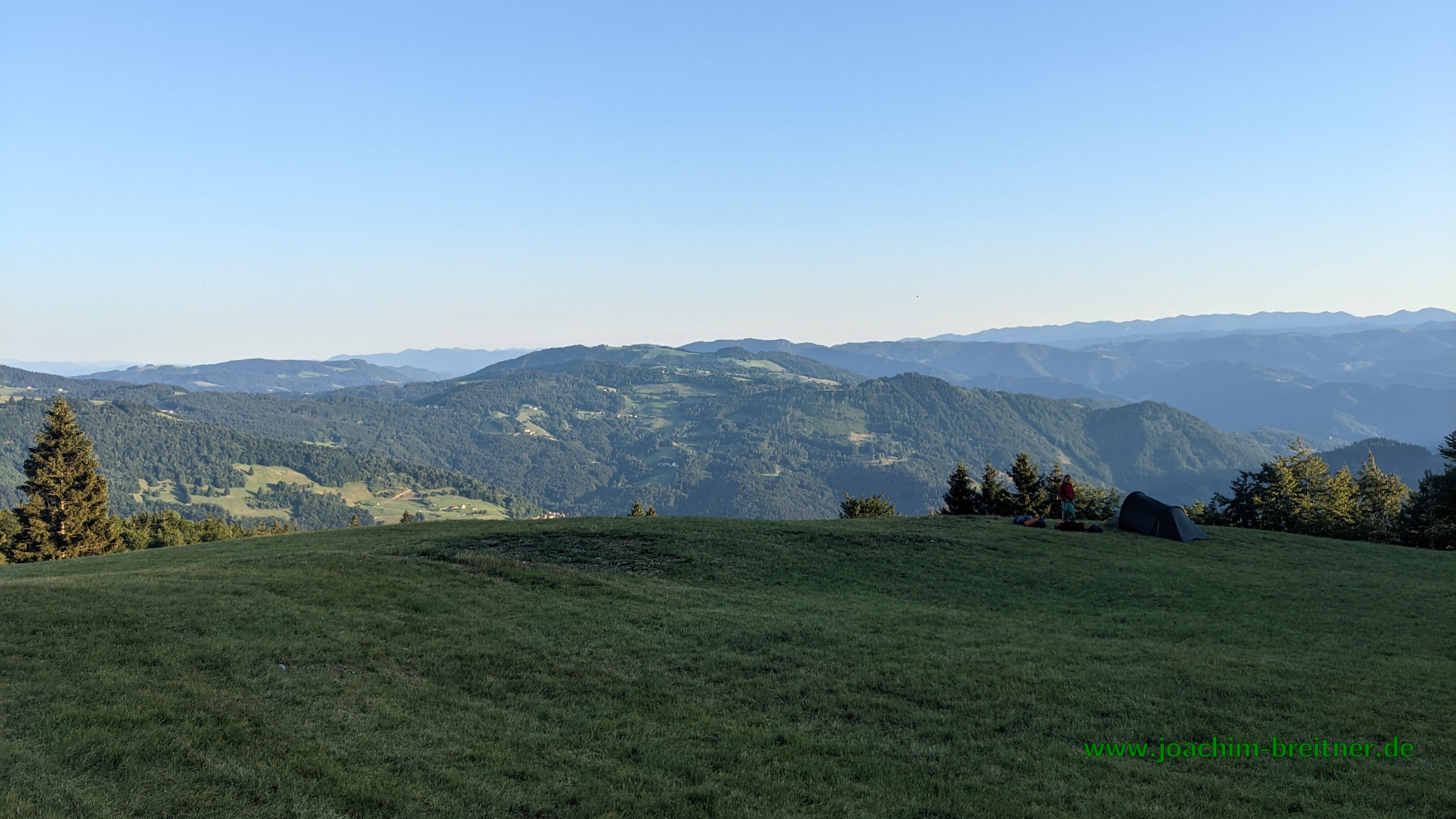
Our most favorite camp spot Our most favorite camp spot

Getting there As we traveled with complete camping gear and wanted to stay in our tent, we avoided the high alpine parts of the trail and started just where the trail came down from the Alps and entered the Karst. A great way to get there is to take the night train from Zurich or Munich towards Ljubljana, get off at Jesenice, have breakfast, take the local train to Podbrdo and you can start your tour at 9:15am. From there you can reach the trail at Pedrovo Brdo within 1 h.

Finding the way We did not use any paper maps, and instead relied on the OpenStreetMap data, which is very good, as well as the official(?) GPX tracks on Komoot, which are linked from the official route descriptions. We used OsmAnd. In general, trails are generally very well marked (red circle with white center, and frequent signs), but the signs rarely tell you which way the Via Alpina goes, so the GPS was needed. Sometimes the OpenStreetMap trail and the Komoot trail disagreed on short segments. We sometimes followed one and other times the other.

Variants We diverged from the trail in a few places:
  • We did not care too much about the horses in Lipica and at least on the map it looked like a longish boringish and sun-exposed detour, so we cut the loop and hiked from Prelo e pri Lokvi up onto the peak of the Veliko Gradi e (which unfortunately is too overgrown to provide a good view).
  • When we finally reached the top of Mali Kras and had a view across the bay of Trieste, it seemed silly to walk to down to Dolina, and instead we followed the ridge through Socerb, essentially the Alpe Adria Trail.
  • Not really a variant, but after arriving in Muggia, if one has to go to Trieste, the ferry is a probably nicer way to finish a trek than the bus.

Pitching a tent We used our tent almost every night, only in Idrija we got a room (and a shower ). It was not trivial to find good camp spots, because most of the trail is on hills with slopes, and the flat spots tend to have housed built on them, but certainly possible. Sometimes we hid in the forest, other times we found nice small and freshly mowed meadows within the forest.

Water Since this is Karst land, there is very little in terms of streams or lakes along the way, which is a pity. The Idrijca river right south of Idrija was very tempting to take a plunge. Unfortunately we passed there early in the day and we wanted to cover some ground first, so we refrained. As for drinking water, we used the taps at the bathrooms of the various touristic sites, a few (but rare) public fountains, and finally resorted to just ringing random doorbells and asking for water, which always worked.

Paths A few stages lead you through very pleasant narrow forest paths with a sight, but not all. On some days you find yourself plodding along wide graveled or even paved forest roads, though.

Landscape and sights The view from Nanos is amazing and, with this high peak jutting out over a wide plain, rather unique. It may seem odd that the trail goes up and down that mountain on the same day when it could go around, but it is certainly worth it. The Karst is mostly a cultivated landscape, with lots of forestry. It is very hilly and green, which is pretty, but some might miss some craggedness. It s not the high alps, after all, but at least they are in sight half the time. But the upside is that there are few sights along the way that are worth visiting, in particular the the Franja Partisan Hospital hidden in a very narrow gorge, the Predjama Castle and the kocjan Caves

Russell Coker: Workstations With ECC RAM

The last new PC I bought was a Dell PowerEdge T110II in 2013. That model had been out for a while and I got it for under $2000. Since then the CPI has gone up by about 20% so it s probably about $2000 in today s money. Currently Dell has a special on the T150 tower server (the latest replacement for the T110II) which has a G6405T CPU that isn t even twice as fast as the i3-3220 (3746 vs 2219) in the T110II according to passmark.com (AKA cpubenchmark.net). The special price is $2600. I can t remember the details of my choices when purchasing the T110II but I recall that CPU speed wasn t a priority and I wanted a cheap reliable server for storage and for light desktop use. So it seems that the current entry model in the Dell T1xx server line is less than twice as fast as fast as it was in 2013 while costing about 25% more! An option is to spend an extra $989 to get a Xeon E-2378 which delivers a reasonable 18,248 in that benchmark. The upside of a T150 is that is uses buffered DDR4 ECC RAM which is pretty cheap nowadays, you can get 32G for about $120. For systems sold as workstations (as opposed to T1xx servers that make great workstations but aren t described as such) Dell has the Precision line. The Precision 3260 Compact Workstation currently starts at $1740, it has a fast CPU but takes SO-DIMMs and doesn t come with ECC RAM. So to use it as a proper workstation you need to discard the RAM and buy DDR5 unbuffered/unregistered ECC SO-DIMMS which don t seem to be on sale yet. The Precision 3460 is slightly larger, slightly more expensive, and also takes SO-DIMMs. The Precision 3660 starts at $2550 and takes unbuffered DDR5 ECC RAM which is available and costs half as much as the SO-DIMM equivalent would cost (if you could even buy it), but the general trend in RAM prices is that unbuffered ECC RAM is more expensive than buffered ECC RAM. The upside to Precision workstations is that the range of CPUs available is significantly faster than for the T150. The HP web site doesn t offer prices on their Z workstations and is generally worse than the Dell web site in most ways. Overall I m disappointed in the range of workstations available now. As an aside if anyone knows of any other company selling workstations in Australia that support ECC RAM then please let me know.

30 July 2022

Mike Hommey: Announcing git-cinnabar 0.5.10

Git-cinnabar is a git remote helper to interact with mercurial repositories. It allows to clone, pull and push from/to mercurial remote repositories, using git. Get it on github. These release notes are also available on the git-cinnabar wiki. What s new since 0.5.9?

Ian Jackson: chiark s skip-skip-cross-up-grade

Two weeks ago I upgraded chiark from Debian jessie i386 to bullseye amd64, after nearly 30 years running Debian i386. This went really quite well, in fact! Background chiark is my colo - a server I run, which lives in a data centre in London. It hosts ~200 users with shell accounts, various websites and mailing lists, moderators for a number of USENET newsgroups, and countless other services. chiark s internal setup is designed to enable my users to do a maximum number of exciting things with a minimum of intervention from me. chiark s OS install dates to 1993, when I installed Debian 0.93R5, the first version of Debian to advertise the ability to be upgraded without reinstalling. I think that makes it one of the oldest Debian installations in existence. Obviously it s had several new hardware platforms too. (There was a prior install of Linux on the initial hardware, remnants of which can maybe still be seen in some obscure corners of chiark s /usr/local.) chiark s install is also at the very high end of the installation complexity, and customisation, scale: reinstalling it completely would be an enormous amount of work. And it s unique. chiark s upgrade history chiark s last major OS upgrade was to jessie (Debian 8, released in April 2015). That was in 2016. Since then we have been relying on Debian s excellent security support posture, and the Debian LTS and more recently Freexian s Debian ELTS projects and some local updates, The use of ELTS - which supports only a subset of packages - was particularly uncomfortable. Additionally, chiark was installed with 32-bit x86 Linux (Debian i386), since that was what was supported and available at the time. But 32-bit is looking very long in the tooth. Why do a skip upgrade So, I wanted to move to the fairly recent stable release - Debian 11 (bullseye), which is just short of a year old. And I wanted to crossgrade (as its called) to 64-bit. In the past, I have found I have had greater success by doing direct upgrades, skipping intermediate releases, rather than by following the officially-supported path of going via every intermediate release. Doing a skip upgrade avoids exposure to any packaging bugs which were present only in intermediate release(s). Debian does usually fix bugs, but Debian has many cautious users, so it is not uncommon for bugs to be found after release, and then not be fixed until the next one. A skip upgrade avoids the need to try to upgrade to already-obsolete releases (which can involve messing about with multiple snapshots from snapshot.debian.org. It is also significantly faster and simpler, which is important not only because it reduces downtime, but also because it removes opportunities (and reduces the time available) for things to go badly. One downside is that sometimes maintainers aggressively remove compatibility measures for older releases. (And compatibililty packages are generally removed quite quickly by even cautious maintainers.) That means that the sysadmin who wants to skip-upgrade needs to do more manual fixing of things that haven t been dealt with automatically. And occasionally one finds compatibility problems that show up only when mixing very old and very new software, that no-one else has seen. Crossgrading Crossgrading is fairly complex and hazardous. It is well supported by the low level tools (eg, dpkg) but the higher-level packaging tools (eg, apt) get very badly confused. Nowadays the system is so complex that downloading things by hand and manually feeding them to dpkg is impractical, other than as a very occasional last resort. The approach, generally, has been to set the system up to want to be the new architecture, run apt in a download-only mode, and do the package installation manually, with some fixing up and retrying, until the system is coherent enough for apt to work. This is the approach I took. (In current releases, there are tools that will help but they are only in recent releases and I wanted to go direct. I also doubted that they would work properly on chiark, since it s so unusual.) Peril and planning Overall, this was a risky strategy to choose. The package dependencies wouldn t necessarily express all of the sequencing needed. But it still seemed that if I could come up with a working recipe, I could do it. I restored most of one of chiark s backups onto a scratch volume on my laptop. With the LVM snapshot tools and chroots. I was able to develop and test a set of scripts that would perform the upgrade. This was a very effective approach: my super-fast laptop, with local caches of the package repositories, was able to do many edit, test, debug cycles. My recipe made heavy use of snapshot.debian.org, to make sure that it wouldn t rot between testing and implementation. When I had a working scheme, I told my users about the planned downtime. I warned everyone it might take even 2 or 3 days. I made sure that my access arrangemnts to the data centre were in place, in case I needed to visit in person. (I have remote serial console and power cycler access.) Reality - the terrible rescue install My first task on taking the service down was the check that the emergency rescue installation worked: chiark has an ancient USB stick in the back, which I can boot to from the BIOS. The idea being that many things that go wrong could be repaired from there. I found that that install was too old to understand chiark s storage arrangements. mdadm tools gave very strange output. So I needed to upgrade it. After some experiments, I rebooted back into the main install, bringing chiark s service back online. I then used the main install of chiark as a kind of meta-rescue-image for the rescue-image. The process of getting the rescue image upgraded (not even to amd64, but just to something not totally ancient) was fraught. Several times I had to rescue it by copying files in from the main install outside. And, the rescue install was on a truly ancient 2G USB stick which was terribly terribly slow, and also very small. I hadn t done any significant planning for this subtask, because it was low-risk: there was little way to break the main install. Due to all these adverse factors, sorting out the rescue image took five hours. If I had known how long it would take, at the beginning, I would have skipped it. 5 hours is more than it would have taken to go to London and fix something in person. Reality - the actual core upgrade I was able to start the actual upgrade in the mid-afternoon. I meticulously checked and executed the steps from my plan. The terrifying scripts which sequenced the critical package updates ran flawlessly. Within an hour or so I had a system which was running bullseye amd64, albeit with many important packages still missing or unconfigured. So I didn t need the rescue image after all, nor to go to the datacentre. Fixing all the things Then I had to deal with all the inevitable fallout from an upgrade. Notable incidents: exim4 has a new tainting system This is to try to help the sysadmin avoid writing unsafe string interpolations. ( Little Bobby Tables. ) This was done by Exim upstream in a great hurry as part of a security response process. The new checks meant that the mail configuration did not work at all. I had to turn off the taint check completely. I m fairly confident that this is correct, because I am hyper-aware of quoting issues and all of my configuration is written to avoid the problems that tainting is supposed to avoid. One particular annoyance is that the approach taken for sqlite lookups makes it totally impossible to use more than one sqlite database. I think the sqlite quoting operator which one uses to interpolate values produces tainted output? I need to investigate this properly. LVM now ignores PVs which are directly contained within LVs by default chiark has LVM-on-RAID-on-LVM. This generally works really well. However, there was one edge case where I ended up without the intermediate RAID layer. The result is LVM-on-LVM. But recent versions of the LVM tools do not look at PVs inside LVs, by default. This is to help you avoid corrupting the state of any VMs you have on your system. I didn t know that at the time, though. All I knew was that LVM was claiming my PV was unusable , and wouldn t explain why. I was about to start on a thorough reading of the 15,000-word essay that is the commentary in the default /etc/lvm/lvm.conf to try to see if anything was relevant, when I received a helpful tipoff on IRC pointing me to the scan_lvs option. I need to file a bug asking for the LVM tools to explain why they have declared a PV unuseable. apache2 s default config no longer read one of my config files I had to do a merge (of my changes vs the maintainers changes) for /etc/apache2/apache2.conf. When doing this merge I failed to notice that the file /etc/apache2/conf.d/httpd.conf was no longer included by default. My merge dropped that line. There were some important things in there, and until I found this the webserver was broken. dpkg --skip-same-version DTWT during a crossgrade (This is not a fix all the things - I found it when developing my upgrade process.) When doing a crossgrade, one often wants to say to dpkg install all these things, but don t reinstall things that have already been done . That s what --skip-same-version is for. However, the logic had not been updated as part of the work to support multiarch, so it was wrong. I prepared a patched version of dpkg, and inserted it in the appropriate point in my prepared crossgrade plan. The patch is now filed as bug #1014476 against dpkg upstream Mailman Mailman is no longer in bullseye. It s only available in the previous release, buster. bullseye has Mailman 3 which is a totally different system - requiring basically, a completely new install and configuration. To even preserve existing archive links (a very important requirement) is decidedly nontrivial. I decided to punt on this whole situation. Currently chiark is running buster s version of Mailman. I will have to deal with this at some point and I m not looking forward to it. Python Of course that Mailman is Python 2. The Python project s extremely badly handled transition includes a recommendation to change the meaning of #!/usr/bin/python from Python 2, to Python 3. But Python 3 is a new language, barely compatible with Python 2 even in the most recent iterations of both, and it is usual to need to coinstall them. Happily Debian have provided the python-is-python2 package to make things work sensibly, albeit with unpleasant imprecations in the package summary description. USENET news Oh my god. INN uses many non-portable data formats, which just depend on your C types. And there are complicated daemons, statically linked libraries which cache on-disk data, and much to go wrong. I had numerous problems with this, and several outages and malfunctions. I may write about that on a future occasion.
(edited 2022-07-20 11:36 +01:00 and 2022-07-30 12:28+01:00 to fix typos)


comment count unavailable comments

29 July 2022

Bits from Debian: New Debian Developers and Maintainers (May and June 2022)

The following contributors got their Debian Developer accounts in the last two months: The following contributors were added as Debian Maintainers in the last two months: Congratulations!

Reproducible Builds (diffoscope): diffoscope 220 released

The diffoscope maintainers are pleased to announce the release of diffoscope version 220. This version includes the following changes:
* Support Haskell 9.x series files and update the test files to match. Thanks
  to Scott Talbert for the relevant info about the new format.
  (Closes: reproducible-builds/diffoscope#309)
* Fix a regression introduced in diffoscope version 207 where diffoscope
  would crash if one directory contained a directory that wasn't in the
  other. Thanks to Alderico Gallo for the report and the testcase.
  (Closes: reproducible-builds/diffoscope#310)
You find out more by visiting the project homepage.

28 July 2022

Matthew Garrett: UEFI rootkits and UEFI secure boot

Kaspersky describes a UEFI-implant used to attack Windows systems. Based on it appearing to require patching of the system firmware image, they hypothesise that it's propagated by manually dumping the contents of the system flash, modifying it, and then reflashing it back to the board. This probably requires physical access to the board, so it's not especially terrifying - if you're in a situation where someone's sufficiently enthusiastic about targeting you that they're reflashing your computer by hand, it's likely that you're going to have a bad time regardless.

But let's think about why this is in the firmware at all. Sophos previously discussed an implant that's sufficiently similar in some technical details that Kaspersky suggest they may be related to some degree. One notable difference is that the MyKings implant described by Sophos installs itself into the boot block of legacy MBR partitioned disks. This code will only be executed on old-style BIOS systems (or UEFI systems booting in BIOS compatibility mode), and they have no support for code signatures, so there's no need to be especially clever. Run malicious code in the boot block, patch the next stage loader, follow that chain all the way up to the kernel. Simple.

One notable distinction here is that the MBR boot block approach won't be persistent - if you reinstall the OS, the MBR will be rewritten[1] and the infection is gone. UEFI doesn't really change much here - if you reinstall Windows a new copy of the bootloader will be written out and the UEFI boot variables (that tell the firmware which bootloader to execute) will be updated to point at that. The implant may still be on disk somewhere, but it won't be run.

But there's a way to avoid this. UEFI supports loading firmware-level drivers from disk. If, rather than providing a backdoored bootloader, the implant takes the form of a UEFI driver, the attacker can set a different set of variables that tell the firmware to load that driver at boot time, before running the bootloader. OS reinstalls won't modify these variables, which means the implant will survive and can reinfect the new OS install. The only way to get rid of the implant is to either reformat the drive entirely (which most OS installers won't do by default) or replace the drive before installation.

This is much easier than patching the system firmware, and achieves similar outcomes - the number of infected users who are going to wipe their drives to reinstall is fairly low, and the kernel could be patched to hide the presence of the implant on the filesystem[2]. It's possible that the goal was to make identification as hard as possible, but there's a simpler argument here - if the firmware has UEFI Secure Boot enabled, the firmware will refuse to load such a driver, and the implant won't work. You could certainly just patch the firmware to disable secure boot and lie about it, but if you're at the point of patching the firmware anyway you may as well just do the extra work of installing your implant there.

I think there's a reasonable argument that the existence of firmware-level rootkits suggests that UEFI Secure Boot is doing its job and is pushing attackers into lower levels of the stack in order to obtain the same outcomes. Technologies like Intel's Boot Guard may (in their current form) tend to block user choice, but in theory should be effective in blocking attacks of this form and making things even harder for attackers. It should already be impossible to perform attacks like the one Kaspersky describes on more modern hardware (the system should identify that the firmware has been tampered with and fail to boot), which pushes things even further - attackers will have to take advantage of vulnerabilities in the specific firmware they're targeting. This obviously means there's an incentive to find more firmware vulnerabilities, which means the ability to apply security updates for system firmware as easily as security updates for OS components is vital (hint hint if your system firmware updates aren't available via LVFS you're probably doing it wrong).

We've known that UEFI rootkits have existed for a while (Hacking Team had one in 2015), but it's interesting to see a fairly widespread one out in the wild. Protecting against this kind of attack involves securing the entire boot chain, including the firmware itself. The industry has clearly been making progress in this respect, and it'll be interesting to see whether such attacks become more common (because Secure Boot works but firmware security is bad) or not.

[1] As we all remember from Windows installs overwriting Linux bootloaders
[2] Although this does run the risk of an infected user booting another OS instead, and being able to see the implant

comment count unavailable comments

Dominique Dumont: How I investigated connection hogs on Kubernetes

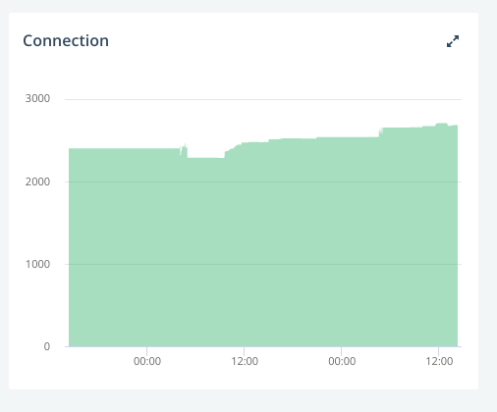
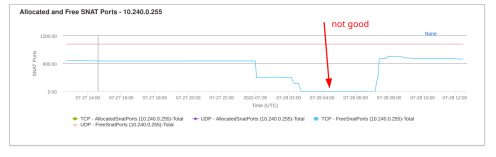
Hi My name is Dominhique Dumont, DevOps freelance in Grenoble, France. My goal is to share my experience regarding a production issue that occurred last week where my client complained that the applications was very slow and sometime showed 5xx errors. The production service is hosted on a Kubernetes cluster on Azure and use a MongoDB on ScaleGrid. I reproduced the issue on my side and found that the API calls were randomly failing due to timeouts on server side. The server logs were showing some MongoDB disconnections and reconnections and some time-out on MongoDB connections, but did not give any clue on why some connections to MongoDB server were failing. Since there was not clue in the cluster logs, I looked at ScaleGrid monitoring. There was about 2500 connections on MongoDB: 2022-07-19-scalegrid-connection-leak.png That seemed quite a lot given the low traffic at that time, but not necessarily a problem. Then, I went to the Azure console, and I got the first hint about the origin of the problem: the SNATs were exhausted on some nodes of the clusters. 2022-07-28_no-more-free-snat.png SNATs are involved in connections from the cluster to the outside world, i.e. to our MongoDB server and are quite limited: only 1024 SNAT ports are available per node. This was consistent with the number of used connections on MongoDB. OK, then the number of used connections on MongoDB was a real problem. The next question was: which pods and how many connections ? First I had to filter out the pods that did not use MongoDB. Fortunately, all our pods have labels so I could list all pods using MongoDB:
$ kubectl -n prod get pods -l db=mongo   wc -l
236
Hmm, still quite a lot. Next problem is to check which pod used too many MongoDB connections. Unfortunately, the logs mentioned that a connection to MongoDB was opened, but that did not give a clue on how many were used. Netstat is not installed on the pods, and cannot be installed since the pods are running as root (which is a good idea for security reasons) Then, my Debian Developer experience kicked in and I remembered that /proc file system on Linux gives a lot of information on consumed kernel resources, including resources consumed by each process. The trick is to know the PID of the process using the connections. In our case, Docker files are written in a way so the main process of a pod using NodeJS is 1, so, the command to list the connections of pod is:
$ kubectl -n prod exec redacted-pod-name-69875496f8-8bj4f -- cat /proc/1/net/tcp
  sl  local_address rem_address   st tx_queue rx_queue tr tm->when retrnsmt   uid  timeout inode                                                     
   0: AC00F00A:C9FA C2906714:6989 01 00000000:00000000 02:00000DA9 00000000  1001        0 376439162 2 0000000000000000 21 4 0 10 -1                 
   1: AC00F00A:CA00 C2906714:6989 01 00000000:00000000 02:00000E76 00000000  1001        0 376439811 2 0000000000000000 21 4 0 10 -1                 
   2: AC00F00A:8ED0 C2906714:6989 01 00000000:00000000 02:000004DA 00000000  1001        0 445806350 2 0000000000000000 21 4 30 10 -1                
   3: AC00F00A:CA02 C2906714:6989 01 00000000:00000000 02:000000DD 00000000  1001        0 376439812 2 0000000000000000 21 4 0 10 -1                 
   4: AC00F00A:C9FE C2906714:6989 01 00000000:00000000 02:00000DA9 00000000  1001        0 376439810 2 0000000000000000 21 4 0 10 -1                 
   5: AC00F00A:8760 C2906714:6989 01 00000000:00000000 02:00000810 00000000  1001        0 375803096 2 0000000000000000 21 4 0 10 -1                 
   6: AC00F00A:C9FC C2906714:6989 01 00000000:00000000 02:00000DA9 00000000  1001        0 376439809 2 0000000000000000 21 4 0 10 -1                 
   7: AC00F00A:C56C C2906714:6989 01 00000000:00000000 02:00000DA9 00000000  1001        0 376167298 2 0000000000000000 21 4 0 10 -1                 
   8: AC00F00A:883C C2906714:6989 01 00000000:00000000 02:00000734 00000000  1001        0 375823415 2 0000000000000000 21 4 30 10 -1 
OK, that s less appealing that netstat output. The trick is that rem_address and port are expressed in hexa. A quick calculation confirms the port 0x6989 is indeed port 27017, which is the listening port of MongoDB server. So the number of opened MongoDB connections is given by:
$ kubectl -n prod exec redacted-pod-name-69875496f8-8bj4f -- cat /proc/1/net/tcp   grep :6989   wc -l
9
What s next ? The ideal solution would be to fix the NodeJS code to handle correctly the termination of the connections, but that would have taken too long to develop. So I ve written a small Perl script to: Why restart a deployment instead of simply deleting the gluttonous pods? I wanted to avoid downtime if all pods of a deployment were to be killed. There s no downtime when applying rollout restart command on deployments. This script is now run regularly until the connections issue is fixed for good in NodeJS code. Thanks to this script, there s no need to rush a code modification. All in all, working around this connections issues was made somewhat easier thanks to:

27 July 2022

Vincent Bernat: ClickHouse SF Bay Area Meetup: Akvorado

Here are the slides I presented for a ClickHouse SF Bay Area Meetup in July 2022, hosted by Altinity. They are about Akvorado, a network flow collector and visualizer, and notably on how it relies on ClickHouse, a column-oriented database.
The meetup was recorded and available on YouTube. Here is the part relevant to my presentation, with subtitles:1
I got a few questions about how to get information from the higher layers, like HTTP. As my use case for Akvorado was at the network edge, my answers were mostly negative. However, as sFlow is extensible, when collecting flows from Linux servers instead, you could embed additional data and they could be exported as well. I also got a question about doing aggregation in a single table. ClickHouse can aggregate automatically data using TTL. My answer for not doing that is partial. There is another reason: the retention periods of the various tables may overlap. For example, the main table keeps data for 15 days, but even in these 15 days, if I do a query on a 12-hour window, it is faster to use the flows_1m0s aggregated table, unless I request something about ports and IP addresses.

  1. To generate the subtitles, I have used Amazon Transcribe, the speech-to-text solution from Amazon AWS. Unfortunately, there is no en-FR language available, which would have been useful for my terrible accent. While the subtitles were 100% accurate when the host, Robert Hodge from Altinity, was speaking, the success rate on my talk was quite lower. I had to rewrite almost all sentences. However, using speech-to-text is still useful to get the timings, as it is also something requiring a lot of work to do manually.

26 July 2022

Raphaël Hertzog: Freexian s report about Debian Long Term Support, June 2022

A Debian LTS logo
Like each month, have a look at the work funded by Freexian s Debian LTS offering. Debian project funding No any major updates on running projects.
Two 1, 2 projects are in the pipeline now.
Tryton project is in a review phase. Gradle projects is still fighting in work. In June, we put aside 2254 EUR to fund Debian projects. We re looking forward to receive more projects from various Debian teams! Learn more about the rationale behind this initiative in this article. Debian LTS contributors In June, 15 contributors have been paid to work on Debian LTS, their reports are available: Evolution of the situation In June we released 27 DLAs.

This is a special month, where we have two releases (stretch and jessie) as ELTS and NO release as LTS. Buster is still handled by the security team and will probably be given in LTS hands at the beginning of the August. During this month we are updating the infrastructure, documentation and improve our internal processes to switch to a new release.
Many developers have just returned back from Debconf22, hold in Prizren, Kosovo! Many (E)LTS members could meet face-to-face and discuss some technical and social topics! Also LTS BoF took place, where the project was introduced (link to video).
Thanks to our sponsors Sponsors that joined recently are in bold. We are pleased to welcome Alter Way where their support of Debian is publicly acknowledged at the higher level, see this French quote of Alterway s CEO.

Michael Ablassmeier: Added remote capability to virtnbdbackup

Latest virtnbdbackup version now supports backing up remote libvirt hosts, too. No installation on the hypervisor required anymore:
virtnbdbackup -U qemu+ssh://usr@hypervisor/system -d vm1 -o /backup/vm1
Same applies for restore operations, other enhancements are: Next up: add TLS support for remote NBD connections.

25 July 2022

Bits from Debian: DebConf22 closes in Prizren and DebConf23 dates announced

DebConf22 group photo - click to enlarge On Sunday 24 July 2022, the annual Debian Developers and Contributors Conference came to a close. Hosting 260 attendees from 38 different countries over a combined 91 event talks, discussion sessions, Birds of a Feather (BoF) gatherings, workshops, and activities, DebConf22 was a large success. The conference was preceded by the annual DebCamp held 10 July to 16 July which focused on individual work and team sprints for in-person collaboration towards developing Debian. In particular, this year there have been sprints to advance development of Mobian/Debian on mobile, reproducible builds and Python in Debian, and a BootCamp for newcomers, to get introduced to Debian and have some hands-on experience with using it and contributing to the community. The actual Debian Developers Conference started on Sunday 17 July 2022. Together with activities such as the traditional 'Bits from the DPL' talk, the continuous key-signing party, lightning talks and the announcement of next year's DebConf (DebConf23 in Kochi, India), there were several sessions related to programming language teams such as Python, Perl and Ruby, as well as news updates on several projects and internal Debian teams, discussion sessions (BoFs) from many technical teams (Long Term Support, Android tools, Debian Derivatives, Debian Installer and Images team, Debian Science...) and local communities (Debian Brasil, Debian India, the Debian Local Teams), along with many other events of interest regarding Debian and free software. The schedule was updated each day with planned and ad-hoc activities introduced by attendees over the course of the entire conference. Several activities that couldn\'t be organized in past years due to the COVID pandemic returned to the conference\'s schedule: a job fair, open-mic and poetry night, the traditional Cheese and Wine party, the group photos and the Day Trip. For those who were not able to attend, most of the talks and sessions were recorded for live streams with videos made, available through the Debian meetings archive website. Almost all of the sessions facilitated remote participation via IRC messaging apps or online collaborative text documents. The DebConf22 website will remain active for archival purposes and will continue to offer links to the presentations and videos of talks and events. Next year, DebConf23 will be held in Kochi, India, from September 10 to September 16, 2023. As tradition follows before the next DebConf the local organizers in India will start the conference activites with DebCamp (September 03 to September 09, 2023), with particular focus on individual and team work towards improving the distribution. DebConf is committed to a safe and welcome environment for all participants. See the web page about the Code of Conduct in DebConf22 website for more details on this. Debian thanks the commitment of numerous sponsors to support DebConf22, particularly our Platinum Sponsors: Lenovo, Infomaniak, ITP Prizren and Google. About Debian The Debian Project was founded in 1993 by Ian Murdock to be a truly free community project. Since then the project has grown to be one of the largest and most influential open source projects. Thousands of volunteers from all over the world work together to create and maintain Debian software. Available in 70 languages, and supporting a huge range of computer types, Debian calls itself the universal operating system. About DebConf DebConf is the Debian Project's developer conference. In addition to a full schedule of technical, social and policy talks, DebConf provides an opportunity for developers, contributors and other interested people to meet in person and work together more closely. It has taken place annually since 2000 in locations as varied as Scotland, Argentina, and Bosnia and Herzegovina. More information about DebConf is available from https://debconf.org/. About Lenovo As a global technology leader manufacturing a wide portfolio of connected products, including smartphones, tablets, PCs and workstations as well as AR/VR devices, smart home/office and data center solutions, Lenovo understands how critical open systems and platforms are to a connected world. About Infomaniak Infomaniak is Switzerland\'s largest web-hosting company, also offering backup and storage services, solutions for event organizers, live-streaming and video on demand services. It wholly owns its datacenters and all elements critical to the functioning of the services and products provided by the company (both software and hardware). About ITP Prizren Innovation and Training Park Prizren intends to be a changing and boosting element in the area of ICT, agro-food and creatives industries, through the creation and management of a favourable environment and efficient services for SMEs, exploiting different kinds of innovations that can contribute to Kosovo to improve its level of development in industry and research, bringing benefits to the economy and society of the country as a whole. About Google Google is one of the largest technology companies in the world, providing a wide range of Internet-related services and products such as online advertising technologies, search, cloud computing, software, and hardware. Google has been supporting Debian by sponsoring DebConf for more than ten years, and is also a Debian partner sponsoring parts of Salsa's continuous integration infrastructure within Google Cloud Platform. Contact Information For further information, please visit the DebConf22 web page at https://debconf22.debconf.org/ or send mail to press@debian.org.

23 July 2022

Wouter Verhelst: Planet Grep now running PtLink

Almost 2 decades ago, Planet Debian was created using the "planetplanet" RSS aggregator. A short while later, I created Planet Grep using the same software. Over the years, the blog aggregator landscape has changed a bit. First of all, planetplanet was abandoned, forked into Planet Venus, and then abandoned again. Second, the world of blogging (aka the "blogosphere") has disappeared much, and the more modern world uses things like "Social Networks", etc, making blogs less relevant these days. A blog aggregator community site is still useful, however, and so I've never taken Planet Grep down, even though over the years the number of blogs that was carried on Planet Grep has been reducing. In the past almost 20 years, I've just run Planet Grep on my personal server, upgrading its Debian release from whichever was the most recent stable release in 2005 to buster, never encountering any problems. That all changed when I did the upgrade to Debian bullseye, however. Planet Venus is a Python 2 application, which was never updated to Python 3. Since Debian bullseye drops support for much of Python 2, focusing only on Python 3 (in accordance with python upstream's policy on the matter), that means I have had to run Planet Venus from inside a VM for a while now, which works as a short-term solution but not as a long-term one. Although there are other implementations of blog aggregation software out there, I wanted to stick with something (mostly) similar. Additionally, I have been wanting to add functionality to it to also pull stuff from Social Networks, where possible (and legal, since some of these have... scary Terms Of Use documents). So, as of today, Planet Grep is no longer powered by Planet Venus, but instead by PtLink. Rather than Python, it was written in Perl (a language with which I am more familiar), and there are plans for me to extend things in ways that have little to do with blog aggregation anymore... There are a few other Planets out there that also use Planet Venus at this point -- Planet Debian and Planet FSFE are two that I'm currently already aware of, but I'm sure there might be more, too. At this point, PtLink is not yet on feature parity with Planet Venus -- as shown by the fact that it can't yet build either Planet Debian or Planet FSFE successfully. But I'm not stopping my development here, and hopefully I'll have something that successfully builds both of those soon, too. As a side note, PtLink is not intended to be bug compatible with Planet Venus. For one example, the configuration for Planet Grep contains an entry for Frederic Descamps, but somehow Planet Venus failed to fetch his feed. With the switch to PtLink, that seems fixed, and now some entries from Frederic seem to appear. I'm not going to be "fixing" that feature... but of course there might be other issues that will appear. If that's the case, let me know. If you're reading this post through Planet Grep, consider this a public service announcement for the possibility (hopefully a remote one) of minor issues.

22 July 2022

Aigars Mahinovs: Debconf 22 photos

Finally after a long break, the in-person Debconf is a thing again, this time Debconf 22 is happening in Prizren, Kosovo. And it has been my pleasure to again be here and take lots of pictures of the event and of the surroundings. The photos can be found in this Google Photo shared album and also on this git-lfs share. But the main photographic delight, as always is the DebConf 22 Group Photo. And here it is!!! DebConf 22 Group photo small You can also see it in:

20 July 2022

Antoine Beaupr : Relaying mail through debian.org

Back in 2020, I wrote this article about using DKIM to sign outgoing debian.org mail. This worked well for me for a while: outgoing mail was signed with DKIM and somehow was delivered. Maybe. Who knows. But now we have a relay server which makes this kind of moot. So I have changed my configuration to use that relay instead of sending email on my own. It seems more reliable that mail seems to be coming from a real debian.org machine, so I'm hoping this will have better reputation than my current setup. In general, you should follow the DSA documentation which includes a Postfix configuration. In my case, it was basically this patch:
diff --git a/postfix/main.cf b/postfix/main.cf
index 7fe6dd9e..eabe714a 100644
--- a/postfix/main.cf
+++ b/postfix/main.cf
@@ -55,3 +55,4 @@ smtp_sasl_security_options =
 smtp_sender_dependent_authentication = yes
 sender_dependent_relayhost_maps = hash:/etc/postfix/sender_relay
 sender_dependent_default_transport_maps = hash:/etc/postfix/sender_transport
+smtp_tls_policy_maps = hash:/etc/postfix/tls_policy
diff --git a/postfix/sender_relay b/postfix/sender_relay
index b486d687..997cce19 100644
--- /dev/null
+++ b/postfix/sender_relay
@@ -0,0 +1,2 @@
+# Per-sender provider; see also /etc/postfix/sasl_passwd.
+@debian.org    [mail-submit.debian.org]:submission
diff --git a/postfix/sender_transport b/postfix/sender_transport
index ca69bc7a..c506c1fc 100644
--- /dev/null
+++ b/postfix/sender_transport
@@ -0,0 +1,1 @@
+anarcat@debian.org     smtp:
diff --git a/postfix/tls_policy b/postfix/tls_policy
new file mode 100644
index 00000000..9347921a
--- /dev/null
+++ b/postfix/tls_policy
@@ -0,0 +1,1 @@
+submission.torproject.org:submission   verify ciphers=high
This configuration differs from the one provided by DSA because I already had the following configured:
sender_dependent_relayhost_maps = hash:/etc/postfix/sender_relay
smtp_sender_dependent_authentication = yes
smtp_sasl_auth_enable = yes
smtp_sasl_password_maps = hash:/etc/postfix/sasl_passwd
smtp_sasl_tls_security_options = noanonymous
I also don't show the patch on /etc/postfix/sasl_passwd for obvious security reasons. I also had to setup a tls_policy map, because I couldn't use dane for all my remotes. You'll notice I also had to setup a sender_transport because I use a non-default default_transport as well. It also seems like you can keep the previous DKIM configuration in parallel with this one, as long as you don't double-sign outgoing mail. Since this configuration here is done on my mail client (i.e. not on the server where I am running OpenDKIM), I'm not double-signing so I left the DKIM configuration alone. But if I wanted to remove it, the magic command is:
echo "del dkimPubKey"   gpg --clearsign   mail changes@db.debian.org

Enrico Zini: Deconstruction of the DAM hat

Further reading Talk notes Intro Debian Account Managers Responsibility for official membership What DAM is not Unexpected responsibilities DAM warnings DAM warnings? House rules Interpreting house rules Governance by bullying How about the Community Team? How about DAM? How about the DPL? Concentrating responsibility Empowering developers What needs to happen

19 July 2022

Russell Coker: DDC as a KVM Switch

With the recent resurgence in Covid19 I ve been working from home a lot and using both my work laptop and personal PC on the same monitor. HDMI KVM switches start at $150 and I didn t feel like buying one. So I wrote a script to change inputs on my monitor. The following script locks the session on the local machine and switches the monitor s input to the other machine. I ran the command ddcutil vcpinfo grep Input which shows that (on my monitor at least) 60 is the VCP for input. Then I ran the command ddcutil getvcp 60 to get the current value and tried setting values sequentially to find the value for the other port. Below is the script I m using on one system, the other is the same but setting the different port via setvcp. The loginctl command is to lock the screen to prevent accidental keyboard or mouse input from messing anything up.
# lock the session, assumes that seat0 is the only session
loginctl lock-session $(loginctl list-sessions grep "seat0 *$" cut -c1-7)
# 0xf is DisplayPort, 0x11 is HDMI-1
ddcutil setvcp 60 0x11
For keyboard, mouse, and speakers I m using a USB 2.0 hub that I can switch between computers. I idly considered getting a three-pole double-throw switch (four pole switches aren t available at my local electronic store) to switch USB 2.0 as I only need to switch 3 of the 4 wires. But for the moment just plugging the hub into different systems is enough, I only do that a couple of times a day.

Craig Small: Linux Memory Statistics

Pretty much everyone who has spent some time on a command line in Linux would have looked at the free command. This command provides some overall statistics on the memory and how it is used. Typical output looks something like this:
             total        used        free      shared  buff/cache  available
Mem:      32717924     3101156    26950016      143608     2666752  29011928
Swap:      1000444           0     1000444
Memory sits in the first row after the headers then we have the swap statistics. Most of the numbers are directly fetched from the procfs file /proc/meminfo which are scaled and presented to the user. A good example of a simple stat is total, which is just the MemTotal row located in that file. For the rest of this post, I ll make the rows from /proc/meminfo have an amber background. What is Free, and what is Used? While you could say that the free value is also merely the MemFree row, this is where Linux memory statistics start to get odd. While that value is indeed what is found for MemFree and not a calculated field, it can be misleading. Most people would assume that Free means free to use, with the implication that only this amount of memory is free to use and nothing more. That would also mean the used value is really used by something and nothing else can use it. In the early days of free and Linux statistics in general that was how it looked. Used is a calculated field (there is no MemUsed row) and was, initially, Total - Free. The problem was, Used also included Buffers and Cached values. This meant that it looked like Linux was using a lot of memory for something. If you read old messages before 2002 that are talking about excessive memory use, they quite likely are looking at the values printed by free. The thing was, under memory pressure the kernel could release Buffers and Cached for use. Not all of the storage but some of it so it wasn t all used. To counter this, free showed a row between Memory and Swap with Used having Buffers and Cached removed and Free having the same values added:
             total       used       free     shared    buffers     cached
Mem:      32717924    6063648   26654276          0     313552    2234436
-/+ buffers/cache:    3515660   29202264
Swap:      1000444          0    1000444
You might notice that this older version of free from around 2001 shows buffers and cached separately and there s no available column (we ll get to Available later.) Shared appears as zero because the old row was labelled MemShared and not Shmem which was changed in Linux 2.6 and I m running a system way past that version. It s not ideal, you can say that the amount of free memory is something above 26654276 and below 29202264 KiB but nothing more accurate. buffers and cached are almost never all-used or all-unused so the real figure is not either of those numbers but something in-between. Cached, just not for Caches That appeared to be an uneasy truce within the Linux memory statistics world for a while. By 2014 we realised that there was a problem with Cached. This field used to have the memory used for a cache for files read from storage. While this value still has that component, it was also being used for tmpfs storage and the use of tmpfs went from an interesting idea to being everywhere. Cheaper memory meant larger tmpfs partitions went from a luxury to something everyone was doing. The problem is with large files put into a tmpfs partition the Free would decrease, but so would Cached meaning the free column in the -/+ row would not change much and understate the impact of files in tmpfs. Lucky enough in Linux 2.6.32 the developers added a Shmem row which was the amount of memory used for shmem and tmpfs. Subtracting that value from Cached gave you the real cached value which we call main_cache and very briefly this is what the cached value would show in free. However, this caused further problems because not all Shem can be reclaimed and reused and probably swapped one set of problematic values for another. It did however prompt the Linux kernel community to have a look at the problem. Enter Available There was increasing awareness of the issues with working out how much memory a system has free within the kernel community. It wasn t just the output of free or the percentage values in top, but load balancer or workload placing systems would have their own view of this value. As memory management and use within the Linux kernel evolved, what was or wasn t free changed and all the userland programs were expected somehow to keep up. The kernel developers realised the best place to get an estimate of the memory not used was in the kernel and they created a new memory statistic called Available. That way if how the memory is used or set to be unreclaimable they could change it and userland programs would go along with it. procps has a fallback for this value and it s a pretty complicated setup.
  1. Find the min_free_kybtes setting in sysfs which is the minimum amount of free memory the kernel will handle
  2. Add a 25% to this value (e.g. if it was 4000 make it 5000), this is the low watermark
  3. To find available, start with MemFree and subtract the low watermark
  4. If half of both Inactive(file) and Active(file) values are greater than the low watermark, add that half value otherwise add the sum of the values minus the low watermark
  5. If half of Slab Claimable is greater than the low watermark, add that half value otherwise add Slab Claimable minus the low watermark
  6. If what you get is less than zero, make available zero
  7. Or, just look at Available in /proc/meminfo
For the free program, we added the Available value and the +/- line was removed. The main_cache value was Cached + Slab while Used was calculated as Total - Free - main_cache - Buffers. This was very close to what the Used column in the +/- line used to show. What s on the Slab? The next issue that came across was the use of slabs. At this point, main_cache was Cached + Slab, but Slab consists of reclaimable and unreclaimable components. One part of Slab can be used elsewhere if needed and the other cannot but the procps tools treated them the same. The Used calculation should not subtract SUnreclaim from the Total because it is actually being used. So in 2015 main_cache was changed to be Cached + SReclaimable. This meant that Used memory was calculated as Total - Free - Cached - SReclaimable - Buffers. Revenge of tmpfs and the return of Available The tmpfs impacting Cached was still an issue. If you added a 10MB file into a tmpfs partition, then Free would reduce by 10MB and Cached would increase by 10MB meaning Used stayed unchanged even though 10MB had gone somewhere. It was time to retire the complex calculation of Used. For procps 4.0.1 onwards, Used now means not available . We take the Total memory and subtract the Available memory. This is not a perfect setup but it is probably going to be the best one we have and testing is giving us much more sensible results. It s also easier for people to understand (take the total value you see in free, then subtract the available value). What does that mean for main_cache which is part of the buff/cache value you see? As this value is no longer in the used memory calculation, it is less important. Should it also be reverted to simply Cached without the reclaimable Slabs? The calculated fields In summary, what this means for the calculated fields in procps at least is: Almost everything else, with the exception of some bounds checking, is what you get out of /proc/meminfo which is straight from the kernel.

18 July 2022

Bits from Debian: DebConf22 welcomes its sponsors!

DebConf22 is taking place in Prizren, Kosovo, from 17th to 24th July, 2022. It is the 23rd edition of the Debian conference and organizers are working hard to create another interesting and fruitful event for attendees. We would like to warmly welcome the sponsors of DebConf22, and introduce you to them. We have four Platinum sponsors. Our first Platinum sponsor is Lenovo. As a global technology leader manufacturing a wide portfolio of connected products, including smartphones, tablets, PCs and workstations as well as AR/VR devices, smart home/office and data center solutions, Lenovo understands how critical open systems and platforms are to a connected world. Infomaniak is our second Platinum sponsor. Infomaniak is Switzerland's largest web-hosting company, also offering backup and storage services, solutions for event organizers, live-streaming and video on demand services. It wholly owns its datacenters and all elements critical to the functioning of the services and products provided by the company (both software and hardware). The ITP Prizren is our third Platinum sponsor. ITP Prizren intends to be a changing and boosting element in the area of ICT, agro-food and creatives industries, through the creation and management of a favourable environment and efficient services for SMEs, exploiting different kinds of innovations that can contribute to Kosovo to improve its level of development in industry and research, bringing benefits to the economy and society of the country as a whole. Google is our fourth Platinum sponsor. Google is one of the largest technology companies in the world, providing a wide range of Internet-related services and products such as online advertising technologies, search, cloud computing, software, and hardware. Google has been supporting Debian by sponsoring DebConf for more than ten years, and is also a Debian partner sponsoring parts of Salsa's continuous integration infrastructure within Google Cloud Platform. Our Gold sponsors are: Roche, a major international pharmaceutical provider and research company dedicated to personalized healthcare. Microsoft, enables digital transformation for the era of an intelligent cloud and an intelligent edge. Its mission is to empower every person and every organization on the planet to achieve more. Ipko Telecommunications, provides telecommunication services and it is the first and the most dominant mobile operator which offers fast-speed mobile internet 3G and 4G networks in Kosovo. Ubuntu, the Operating System delivered by Canonical. U.S. Agency for International Development, leads international development and humanitarian efforts to save lives, reduce poverty, strengthen democratic governance and help people progress beyond assistance. Our Silver sponsors are: Pexip, is the video communications platform that solves the needs of large organizations. Deepin is a Chinese commercial company focusing on the development and service of Linux-based operating systems. Hudson River Trading, a company researching and developing automated trading algorithms using advanced mathematical techniques. Amazon Web Services (AWS), is one of the world's most comprehensive and broadly adopted cloud platforms, offering over 175 fully featured services from data centers globally. The Bern University of Applied Sciences with near 7,800 students enrolled, located in the Swiss capital. credativ, a service-oriented company focusing on open-source software and also a Debian development partner. Collabora, a global consultancy delivering Open Source software solutions to the commercial world. Arm: with the world s Best SoC Design Portfolio, Arm powered solutions have been supporting innovation for more than 30 years and are deployed in over 225 billion chips to date. GitLab, an open source end-to-end software development platform with built-in version control, issue tracking, code review, CI/CD, and more. Two Sigma, rigorous inquiry, data analysis, and invention to help solve the toughest challenges across financial services. Starlabs, builds software experiences and focus on building teams that deliver creative Tech Solutions for our clients. Solaborate, has the world s most integrated and powerful virtual care delivery platform. Civil Infrastructure Platform, a collaborative project hosted by the Linux Foundation, establishing an open source base layer of industrial grade software. Matanel Foundation, operates in Israel, as its first concern is to preserve the cohesion of a society and a nation plagued by divisions. Bronze sponsors: bevuta IT, Kutia, Univention, Freexian. And finally, our Supporter level sponsors: Altus Metrum, Linux Professional Institute, Olimex, Trembelat, Makerspace IC Prizren, Cloud68.co, Gandi.net, ISG.EE, IPKO Foundation, The Deutsche Gesellschaft f r Internationale Zusammenarbeit (GIZ) GmbH. Thanks to all our sponsors for their support! Their contributions make it possible for a large number of Debian contributors from all over the globe to work together, help and learn from each other in DebConf22. DebConf22 logo

Next.

Previous.