Search Results: "tar"

9 April 2017

Matthew Garrett: A quick look at the Ikea Tr dfri lighting platform

Ikea recently launched their Tr dfri smart lighting platform in the US. The idea of Ikea plus internet security together at last seems like a pretty terrible one, but having taken a look it's surprisingly competent. Hardware-wise, the device is pretty minimal - it seems to be based on the Cypress[1] WICED IoT platform, with 100MBit ethernet and a Silicon Labs Zigbee chipset. It's running the Express Logic ThreadX RTOS, has no running services on any TCP ports and appears to listen on two single UDP ports. As IoT devices go, it's pleasingly minimal.

That single port seems to be a COAP server running with DTLS and a pre-shared key that's printed on the bottom of the device. When you start the app for the first time it prompts you to scan a QR code that's just a machine-readable version of that key. The Android app has code for using the insecure COAP port rather than the encrypted one, but the device doesn't respond to queries there so it's presumably disabled in release builds. It's also local only, with no cloud support. You can program timers, but they run on the device. The only other service it seems to run is an mdns responder, which responds to the _coap._udp.local query to allow for discovery.

From a security perspective, this is pretty close to ideal. Having no remote APIs means that security is limited to what's exposed locally. The local traffic is all encrypted. You can only authenticate with the device if you have physical access to read the (decently long) key off the bottom. I haven't checked whether the DTLS server is actually well-implemented, but it doesn't seem to respond unless you authenticate first which probably covers off a lot of potential risks. The SoC has wireless support, but it seems to be disabled - there's no antenna on board and no mechanism for configuring it.

However, there's one minor issue. On boot the device grabs the current time from pool.ntp.org (fine) but also hits http://fw.ota.homesmart.ikea.net/feed/version_info.json . That file contains a bunch of links to firmware updates, all of which are also downloaded over http (and not https). The firmware images themselves appear to be signed, but downloading untrusted objects and then parsing them isn't ideal. Realistically, this is only a problem if someone already has enough control over your network to mess with your DNS, and being wired-only makes this pretty unlikely. I'd be surprised if it's ever used as a real avenue of attack.

Overall: as far as design goes, this is one of the most secure IoT-style devices I've looked at. I haven't examined the COAP stack in detail to figure out whether it has any exploitable bugs, but the attack surface is pretty much as minimal as it could be while still retaining any functionality at all. I'm impressed.

[1] Formerly Broadcom

comment count unavailable comments

8 April 2017

Dirk Eddelbuettel: #4: Simpler shoulders()

Welcome to the fourth post in the repulsively random R ramblings series, or R4 for short. My twitter feed was buzzing about a nice (and as yet unpublished, ie not-on-CRAN) package thankr by Dirk Schumacher which compiles a list of packages (ordered by maintainer count) for your current session (or installation or ...) with a view towards saying thank you to those whose packages we rely upon. Very nice indeed. I had a quick look and run it twice ... and had a reaction of ewwww, really? as running it twice gave different results as on the second instance a boatload of tibblyverse packages appeared. Because apparently kids these day can only slice data that has been tidied or something. So I had another quick look ... and put together an alternative version using just base R (as there was only one subfunction that needed reworking):
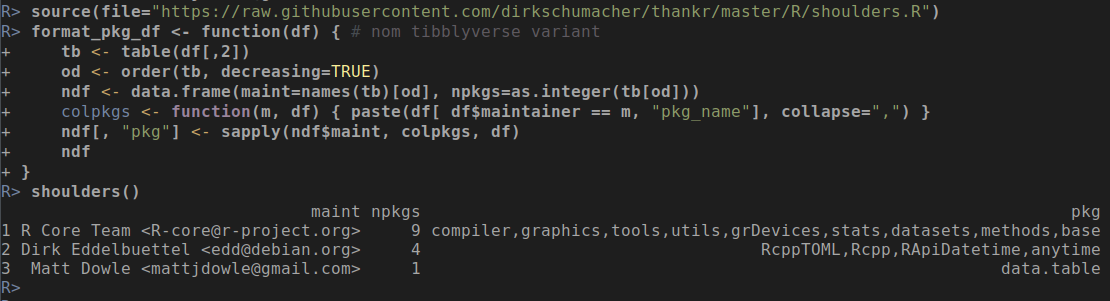
source(file="https://raw.githubusercontent.com/dirkschumacher/thankr/master/R/shoulders.R")
format_pkg_df <- function(df)   # non-tibblyverse variant
    tb <- table(df[,2])
    od <- order(tb, decreasing=TRUE)
    ndf <- data.frame(maint=names(tb)[od], npkgs=as.integer(tb[od]))
    colpkgs <- function(m, df)   paste(df[ df$maintainer == m, "pkg_name"], collapse=",")  
    ndf[, "pkg"] <- sapply(ndf$maint, colpkgs, df)
    ndf
 
A nice side benefit is that the function is now free of external dependencies (besides, of course, base R). Running this in the ESS session I had open gives:
R> shoulders()  ## by Dirk Schumacher, with small modifications
                               maint npkgs                                                                 pkg
1 R Core Team <R-core@r-project.org>     9 compiler,graphics,tools,utils,grDevices,stats,datasets,methods,base
2 Dirk Eddelbuettel <edd@debian.org>     4                                  RcppTOML,Rcpp,RApiDatetime,anytime
3  Matt Dowle <mattjdowle@gmail.com>     1                                                          data.table
R> 
and for good measure a screenshot is below:
I think we need a catchy moniker for R work using good old base R. SoberVerse? GrumbyOldFolksR? PlainOldR? Better suggestions welcome. Edit on 2017-04-09: And by now Dirk Schumacher fixed that little bug in thankr which was at the start of this. His shoulders() function is now free of side effects, and thankr is now a clean micropackage free of external depends from any verse, be it tiddly or grumpy. I look forward to seeing it on CRAN soon!

This post by Dirk Eddelbuettel originated on his Thinking inside the box blog. Please report excessive re-aggregation in third-party for-profit settings.

7 April 2017

Arturo Borrero Gonz lez: openvpn deployment with Debian Stretch

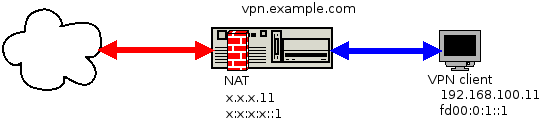
Debian Openvpn Debian Stretch feels like an excellent release by the Debian project. The final stable release is about to happen in the short term. Among the great things you can do with Debian, you could set up a VPN using the openvpn software. In this blog post I will describe how I ve deployed myself an openvpn server using Debian Stretch, my network environment and my configurations & workflow. Before all, I would like to reference my requisites and the characteristics of what I needed: I agree this is a rather complex scenario and not all the people will face these requirements. The service diagram has this shape: VPN diagram (DIA source file) So, it works like this:
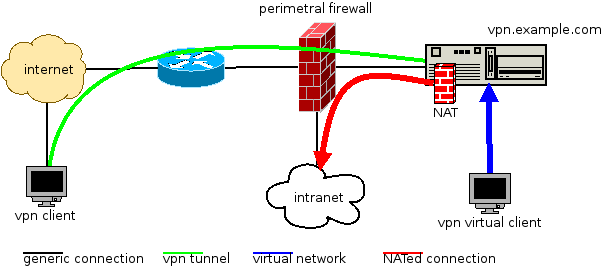
  1. clients connect via internet to our openvpn server, vpn.example.com
  2. the openvpn server validates the connection and the tunnel is established (green)
  3. now the client is virtually inside our network (blue)
  4. the client wants to access some intranet resource, the tunnel traffic is NATed (red)
Our datacenter intranet is using public IPv4 addressing, but the VPN tunnels use private IPv4 addresses. To don t mix public and private address NAT is used. Obviously we don t want to invest public IPv4 addresses in our internal tunnels. We don t have this limitations in IPv6, we could use public IPv6 addresses within the tunnels. But we prefer sticking to a hard dual stack IPv4/IPv6 approach and also use private IPv6 addresses inside the tunnels and also NAT the IPv6 from private to public. This way, there are no differences in how IPv4 and IPv6 network are managed. We follow this approach for the addressing: The NAT runs in the VPN server, since this is kind of a router. We use nftables for this task. As the final win, I will describe how we manage all this configuration using the git version control system. Using git we can track which admin made which change. A git hook will deploy the files from the git repo itself to /etc/ so the services can read them. The VPN server networking configuration is as follows (/etc/network/interfaces file, adjust to your network environments):
auto lo
iface lo inet loopback
# main public IPv4 address of vpn.example.com
allow-hotplug eth0
iface eth0 inet static
        address x.x.x.4
        netmask 255.255.255.0
        gateway x.x.x.1
# main public IPv6 address of vpn.example.com
iface eth0 inet6 static
        address x:x:x:x::4
        netmask 64
        gateway x:x:x:x::1
# NAT Public IPv4 addresses (used to NAT tunnel of client 1)
auto eth0:11
iface eth0:11 inet static
        address x.x.x.11
        netmask 255.255.255.0
# NAT Public IPv6 addresses (used to NAT tunnel of client 1)
iface eth0:11 inet6 static
        address x:x:x:x::11
        netmask 64
# NAT Public IPv4 addresses (used to NAT tunnel of client 2)
auto eth0:12
iface eth0:12 inet static
        address x.x.x.12
        netmask 255.255.255.0
# NAT Public IPv6 addresses (used to NAT tunnel of client 2)
iface eth0:12 inet6 static
        address x:x:x:x::12
        netmask 64
Thanks to the amazing and tireless work of the Alberto Gonzalez Iniesta (DD), the openvpn package in debian is in very good shape, ready to use. In vpn.example.com, install the required packages:
% sudo aptitude install openvpn openvpn-auth-ldap nftables git sudo
Two git repositories will be used, one for the openvpn configuration and another for nftables (the nftables config is described later):
% sudo mkdir -p /srv/git/vpn.example.com-nft.git
% sudo git init --bare /srv/git/vpn.example.com-nft.git
% sudo mkdir -p /srv/git/vpn.example.com-openvpn.git
% sudo git init --bare /srv/git/vpn.example.com-openvpn.git
% sudo chown -R :git /srv/git/*
% sudo chmod -R g+rw /srv/git/*
The repositories belong to the git group, a system group we create to let systems admins operate the server using git:
% sudo addgroup --system git
% sudo adduser admin1 git
% sudo adduser admin2 git
For the openvpn git repository, we need at least this git hook (file /srv/git/vpn.example.com-openvpn.git/hooks/post-receive with execution permission):
#!/bin/bash
NAME="hooks/post-receive"
OPENVPN_ROOT="/etc/openvpn"
export GIT_WORK_TREE="$OPENVPN_ROOT"
UNAME=$(uname -n)
info()
 
        echo "$ UNAME  $ NAME  $1 ..."
 
info "checkout latest data to $GIT_WORK_TREE"
sudo git checkout -f
info "cleaning untracked files and dirs at $GIT_WORK_TREE"
sudo git clean -f -d
For this hook to work, sudo permissions are required (file /etc/sudoers.d/openvpn-git):
User_Alias      OPERATORS = admin1, admin2
Defaults        env_keep += "GIT_WORK_TREE"
 
OPERATORS       ALL=(ALL) NOPASSWD:/usr/bin/git checkout -f
OPERATORS       ALL=(ALL) NOPASSWD:/usr/bin/git clean -f -d
Please review this sudoers file to match your environment and security requirements. The openvpn package deploys several systemd services:
% dpkg -L openvpn   grep service
/lib/systemd/system/openvpn-client@.service
/lib/systemd/system/openvpn-server@.service
/lib/systemd/system/openvpn.service
/lib/systemd/system/openvpn@.service
We don t need all of them, we can use the simple openvpn.service:
% sudo systemctl edit --full openvpn.service
And put a content like this:
% systemctl cat openvpn.service
# /etc/systemd/system/openvpn.service
[Unit]
Description=OpenVPN server
Documentation=man:openvpn(8)
Documentation=https://community.openvpn.net/openvpn/wiki/Openvpn23ManPage
Documentation=https://community.openvpn.net/openvpn/wiki/HOWTO
 
[Service]
PrivateTmp=true
KillMode=mixed
Type=forking
ExecStart=/usr/sbin/openvpn --daemon ovpn --status /run/openvpn/%i.status 10 --cd /etc/openvpn --config /etc/openvpn/server.conf --writepid /run/openvpn/server.pid
PIDFile=/run/openvpn/server.pid
ExecReload=/bin/kill -HUP $MAINPID
WorkingDirectory=/etc/openvpn
ProtectSystem=yes
CapabilityBoundingSet=CAP_IPC_LOCK CAP_NET_ADMIN CAP_NET_BIND_SERVICE CAP_NET_RAW CAP_SETGID CAP_SETUID CAP_SYS_CHROOT CAP_DAC_READ_SEARCH CAP_AUDIT_WRITE
LimitNPROC=10
DeviceAllow=/dev/null rw
DeviceAllow=/dev/net/tun rw
 
[Install]
WantedBy=multi-user.target
We can move on now to configure nftables to perform the NATs. First, it s good to load the NAT configuration at boot time, so you need a service file like this (/etc/systemd/system/nftables.service):
[Unit]
Description=nftables
Documentation=man:nft(8) http://wiki.nftables.org
 
[Service]
Type=oneshot
RemainAfterExit=yes
StandardInput=null
ProtectSystem=full
ProtectHome=true
WorkingDirectory=/etc/nftables.d
ExecStart=/usr/sbin/nft -f ruleset.nft
ExecReload=/usr/sbin/nft -f ruleset.nft
ExecStop=/usr/sbin/nft flush ruleset
 
[Install]
WantedBy=multi-user.target
The nftables git hooks are implemented as described in nftables managed with git. We are interested in the git hooks: (file /srv/git/vpn.example.com-nft.git/hooks/post-receive):
#!/bin/bash
NAME="hooks/post-receive"
NFT_ROOT="/etc/nftables.d"
RULESET="$ NFT_ROOT /ruleset.nft"
export GIT_WORK_TREE="$NFT_ROOT"
UNAME=$(uname -n)
info()
 
        echo "$ UNAME  $ NAME  $1 ..."
 
info "checkout latest data to $GIT_WORK_TREE"
sudo git checkout -f
info "cleaning untracked files and dirs at $GIT_WORK_TREE"
sudo git clean -f -d
info "deploying new ruleset"
set -e
cd $NFT_ROOT && sudo nft -f $RULESET
info "new ruleset deployment was OK"
This hook moves our nftables configuration to /etc/nftables.d and then applies it to the kernel. So a single commit changes the runtime configuration of the server. You could implement some QA using the git hook update, check this file! Remember, git hooks requires exec permissions to work. Of course, you will need again a sudo policy for these nft hooks. Finally, we can start configuring both openvpn and nftables using git. For the VPN you will require the configure the PKI side: server certificates, and the CA signing your client s certificates. You can check openvpn s own documentation about this. Your first commit for openvpn could be the server.conf file:
plugin		/usr/lib/openvpn/openvpn-plugin-auth-pam.so common-auth
mode		server
user		nobody
group		nogroup
port		1194
proto		udp6
daemon
comp-lzo
persist-key
persist-tun
tls-server
cert		/etc/ssl/private/vpn.example.com_pub.crt
key		/etc/ssl/private/vpn.example.com_priv.pem
ca		/etc/ssl/cacert/clients_ca.pem
dh		/etc/ssl/certs/dh2048.pem
cipher		AES-128-CBC
dev		tun
topology	subnet
server		192.168.100.0 255.255.255.0
server-ipv6	fd00:0:1:35::/64
ccd-exclusive
client-config-dir ccd
max-clients	100
inactive	43200
keepalive	10 360
log-append	/var/log/openvpn.log
status		/var/log/openvpn-status.log
status-version	1
verb		4
mute		20
Don t forget the ccd/ directory. This directory contains a file per user using the VPN service. Each file is named after the CN of the client certificate:
# private addresses for client 1
ifconfig-push		192.168.100.11 255.255.255.0
ifconfig-ipv6-push	fd00:0:1::11/64
# routes to the intranet network
push "route-ipv6 x:x:x:x::/64"
push "route x.x.3.128 255.255.255.240"
# private addresses for client 2
ifconfig-push		192.168.100.12 255.255.255.0
ifconfig-ipv6-push	fd00:0:1::12/64
# routes to the intranet network
push "route-ipv6 x:x:x:x::/64"
push "route x.x.3.128 255.255.255.240"
You end with at leats these files in the openvpn git tree:
server.conf
ccd/CN=CLIENT_1
ccd/CN=CLIENT_2
Please note that if you commit a change to ccd/, the changes are read at runtime by openvpn. In the other hand, changes to server.conf require you to restart the openvpn service by hand. Remember, the addressing is like this: Addressing (DIA source file) In the nftables git tree, you should put a ruleset like this (a single file named ruleset.nft is valid):
flush ruleset
table ip nat  
	map mapping_ipv4_snat  
		type ipv4_addr : ipv4_addr
		elements =  	192.168.100.11 : x.x.x.11,
				192.168.100.12 : x.x.x.12  
	 
	map mapping_ipv4_dnat  
		type ipv4_addr : ipv4_addr
		elements =  	x.x.x.11 : 192.168.100.11,
				x.x.x.12 : 192.168.100.12  
	 
	chain prerouting  
		type nat hook prerouting priority -100; policy accept;
		dnat to ip daddr map @mapping_ipv4_dnat
	 
	chain postrouting  
		type nat hook postrouting priority 100; policy accept;
		oifname "eth0" snat to ip saddr map @mapping_ipv4_snat
	 
 
table ip6 nat  
	map mapping_ipv6_snat  
		type ipv6_addr : ipv6_addr
		elements =  	fd00:0:1::11 : x:x:x::11,
				fd00:0:1::12 : x:x:x::12  
	 
	map mapping_ipv6_dnat  
		type ipv6_addr : ipv6_addr
		elements =  	x:x:x::11 : fd00:0:1::11,
				x:x:x::12 : fd00:0:1::12  
	 
	chain prerouting  
		type nat hook prerouting priority -100; policy accept;
		dnat to ip6 daddr map @mapping_ipv6_dnat
	 
	chain postrouting  
		type nat hook postrouting priority 100; policy accept;
		oifname "eth0" snat to ip6 saddr map @mapping_ipv6_snat
	 
 
table inet filter  
	chain forward  
		type filter hook forward priority 0; policy accept;
		# some forwarding filtering policy, if required, for both IPv4 and IPv6
	 
 
Since the server is in fact routing packets between the tunnel and the public network, we require forwarding enabled in sysctl:
net.ipv4.conf.all.forwarding = 1
net.ipv6.conf.all.forwarding = 1
Of course, the VPN clients will require a client.conf file which looks like this:
client
remote vpn.example.com 1194
dev tun
proto udp
resolv-retry infinite
comp-lzo
verb 5
nobind
persist-key
persist-tun
user nobody
group nogroup
 
tls-client
ca      /etc/ssl/cacert/server_ca.crt
pkcs12  /home/user/mycertificate.p12
verify-x509-name vpn.example.com name
cipher AES-128-CBC
auth-user-pass
auth-nocache
Workflow for the system admins:
  1. git clone the openvpn repo
  2. modify ccd/ and server.conf
  3. git commit the changes, push to the server
  4. if server.conf was modified, restart openvpn
  5. git clone the nftables repo
  6. modify ruleset
  7. git commit the changes, push to the server
Comments via email welcome!

6 April 2017

Reproducible builds folks: Reproducible Builds: week 101 in Stretch cycle

Here's what happened in the Reproducible Builds effort between Sunday March 26 and Saturday April 1 2017: Media coverage Sylvain Beucler wrote a follow-up post Practical basics of reproducible builds 2, which like last weeks article is about his experiences making software build reproducibly. Reproducible work in other projects Colin Watson started writing a patch to make launchpad store .buildinfo files. (It's not yet deployed.) Toolchain development and fixes Ximin Luo continued to work on BUILD_PATH_PREFIX_MAP patches for GCC 6 and dpkg. Packages reviewed and fixed, and bugs filed Chris Lamb: Mattia Rizzolo: Reviews of unreproducible packages 49 package reviews have been added, 25 have been updated and 42 have been removed in this week, adding to our knowledge about identified issues. 1 issue type has been updated: Weekly QA work During our reproducibility testing, FTBFS bugs have been detected and reported by: diffoscope development diffoscope 81 was uploaded to experimental by Chris Lamb. It included contributions from: reprotest development reprotest development continued in git, including contributions from: buildinfo.debian.net development buildinfo.debian.net development continued in git, including contributions from: reproducible-website development Holger switched reproducible-builds.org and www.reproducible-builds.org to letsencrypt certificates. Misc. This week's edition was written by Ximin Luo and Holger Levsen & reviewed by a bunch of Reproducible Builds folks on IRC & the mailing lists.

5 April 2017

Steinar H. Gunderson: Nageru 1.5.0 released

I just released version 1.5.0 of Nageru, my live video mixer. The biggest feature is obviously the HDMI/SDI live output, but there are lots of small nuggets everywhere; it's been four months in the making. I'll simply paste the NEWS entry here:
Nageru 1.5.0, April 5th, 2017
  - Support for low-latency HDMI/SDI output in addition to (or instead of) the
    stream. This currently only works with DeckLink cards, not bmusb. See the
    manual for more information.
  - Support changing the resolution from the command line, instead of locking
    everything to 1280x720.
  - The A/V sync code has been rewritten to be more in line with Fons
    Adriaensen's original paper. It handles several cases much better,
    in particular when trying to match 59.94 and 60 Hz sources to each other.
    However, it might occasionally need a few extra seconds on startup to
    lock properly if startup is slow.
  - Add support for using x264 for the disk recording. This makes it possible,
    among other things, to run Nageru on a machine entirely without VA-API
    support.
  - Support for 10-bit Y'CbCr, both on input and output. (Output requires
    x264 disk recording, as Quick Sync Video does not support 10-bit H.264.)
    This requires compute shader support, and is in general a little bit
    slower on input and output, due to the extra amount of data being shuffled
    around. Intermediate precision is 16-bit floating-point or better,
    as before.
  - Enable input mode autodetection for DeckLink cards that support it.
    (bmusb mode has always been autodetected.)
  - Add functionality to add a time code to the stream; useful for debugging
    latency.
  - The live display is now both more performant and of higher image quality.
  - Fix a long-standing issue where the preview displays would be too bright
    when using an NVIDIA GPU. (This did not affect the finished stream.)
  - Many other bugfixes and small improvements.
1.5.0 is on its way into Debian experimental (it's too late for the stretch release, especially as it also depends on Movit and bmusb from experimental), or you can get it from the home page as always.

Jonathan Carter: GNOME Shell Extensions in Debian 9.0

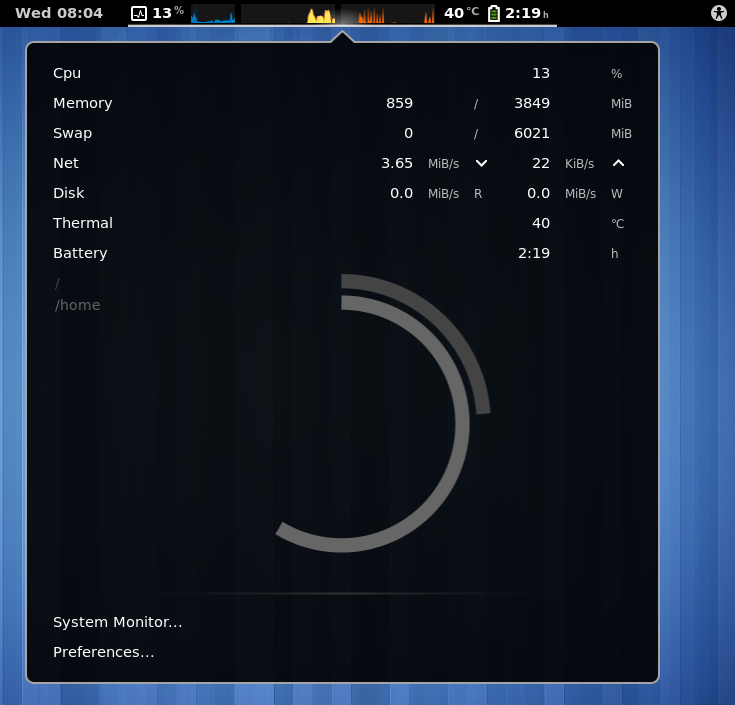
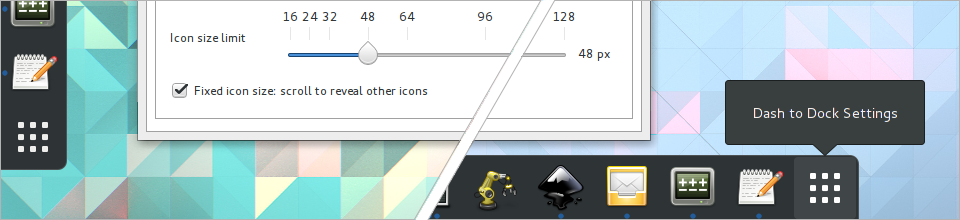
About GNOME 3 introduced an extensions framework that allows its users to extend the desktop shell by writing extensions using JavaScript and CSS. It works quite well and dozens of extensions have already been uploaded to the extensions site. Some of these solve some annoyances that users typically share with GNOME, while others add useful functionality. During DebCamp last year, I started packaging some of these for Debian. That s been going really well. Now that Ubuntu is finally dropping Unity in favour of GNOME, it helps to serve as a nudge to get this blog post out that s been stuck in drafts. These extensions also make their way into Ubuntu and other Debian/Ubuntu derivatives. Here are some extensions I ve been packaging that s already in the archive: gnome-shell-extension-dashtodock Provides a multitude of options for the shell dock. Not only really useful but also well maintained by upstream, see their website for more info. This is a great extension if you support previous Unity users, since you can set your panel to look and behave very similarly to Unity. I think the app launcher is slightly better in Gnome because apps are easier to discover. gnome-shell-extension-hide-activities Simple extension that hides the Activities button from the top left corner. gnome-shell-extension-impatience Speeds up shell animations. Animations can make the system more usable, but it can also be either distracting or cause some slight delays while waiting for the animation to complete. This gives you a sliding scale that lets you choose how much you d like to speed it up. gnome-shell-extension-move-clock Simple extension that moves the clock from the center of the panel to the right. gnome-shell-extension-refreshwifi In gnome-shell, network manager doesn t automatically refresh the list of available network, which can be quite annoying. Currently a user has to turn wifi off and back on in order to see a refreshed list. This has been fixed upstream and will be in the next version of GNOME. In the meantime, this extension fixes that. Update: Refreshing wifi in the background has been fixed in Gnome 3.22.2, which is now in stretch. This extension will be removed from the archives. gnome-shell-extension-remove-dropdown-arrows Items in the top panel contain dropdown arrows, which are useful for new users who might not be aware that they expand into more entries. For more experience users, the arrows tend to result in extra clutter in the panel, this extension hides those arrows. gnome-shell-extension-better-volume This allows you to hover over the volume control indicator and scroll up and down to increase/decrease the volume. Probably another extension that should really just be integrated into gnome-shell by default. gnome-shell-extension-hard-disk-led Many new laptops either don t have a hard disk L.E.D. anymore, or they hide it so that it s not really all that visible. This extension shows you hard disk activity in your panel. There s also work being done to make it report reads and writes separately. I ll be looking at backporting that when it s available. gnome-shell-extension-disconnect-wifi Allows you to disconnect from the current network without having to turn off wi-fi entirely. gnome-shell-extension-pixelsaver Title bars can be incredibly pixel-hungry, which isn t great on small displays. This extension hides the title bar when a window is maximised, and adds control buttons for that window to the top panel. gnome-shell-extension-system-monitor gnome-shell-extension-trash Displays a trash icon to the top panel when there are items in trash. From there you can view or delete the trash contents. gnome-shell-extension-multi-monitors This extension adds some tweaks for users of multiple monitors. It s most useful feature is that you can have desktop overviews on both displays and easily move apps between them. More extensions Here are some more extensions packaged in Debian that others have packaged: Didn t make it this time Both Debian and Ubuntu are in feature freeze right now, and the following didn t make it in the archives in time, but should be in the following releases (they re still installable via the extensions site in the meantime): Next steps Consider auto-enable Currently, when you install these debian packages, (most of) the extensions won t be enabled by default. Users have to use the gnome-tweak-tool to enable them after installation. The rationale behind this is that a system administrator of a network of computers might only want to enable certain extensions for certain users. After some more consideration, I think such administrators will probably already have a system (like a configuration management system) in place to manage this. So, to make it easier for the typical user, I think it s worth considering enabling these by default with installation. Feedback welcome :) Debian team The list of packaged extensions are growing fast, and it would be nice to have these team-maintained. It might be a good idea to start a team for this or use an existing team under the Debian gnome team namespace. Packaging guide I ve packaged enough Gnome extensions to be aware of the typical gotchas and things that need fixing. They re overall easy to package and a good place to start for someone who wants to get into packaging. I want to put together a good short guide on how to properly package gnome-shell extensions. Anything else? Any other extensions you d like to see packaged? Let me know. Even better, package it yourself and help test my extension package guide (once it exists) so that we can improve that too.

4 April 2017

Matthias Klumpp: On Tanglu

It s time for a long-overdue blogpost about the status of Tanglu. Tanglu is a Debian derivative, started in early 2013 when the systemd debate at Debian was still hot. It was formed by a few people wanting to create a Debian derivative for workstations with a time-based release schedule using and showcasing new technologies (which include systemd, but also bundling systems and other things) and built in the open with a community using the similar infrastructure to Debian. Tanglu is designed explicitly to complement Debian and not to compete with it on all devices. Tanglu has achieved a lot of great things. We were the first Debian derivative to adopt systemd and with the help of our contributors we could kill a few nasty issues affecting it and Debian before it ended up becoming default in Debian Jessie. We also started to use the Calamares installer relatively early, bringing a modern installation experience additionally to the traditional debian-installer. We performed the usrmerge early, uncovering a few more issues which were fed back into Debian to be resolved (while workarounds were added to Tanglu). We also briefly explored switching from initramfs-tools to Dracut, but this release goal was dropped due to issues (but might be revived later). A lot of other less-impactful changes happened as well, borrowing a lot of useful ideas and code from Ubuntu (kudos to them!). On the infrastructure side, we set up the Debian Archive Kit (dak), managing to find a couple of issues (mostly hardcoded assumptions about Debian) and reporting them back to make using dak for distributions which aren t Debian easier. We explored using fedmsg for our infrastructure, went through a long and painful iteration of build systems (buildbot -> Jenkins -> Debile) before finally ending up with Debile, and added a set of own custom tools to collect archive QA information and present it to our developers in an easy to digest way. Except for wanna-build, Tanglu is hosting an almost-complete clone of basic Debian archive management tools. During the past year however, the project s progress slowed down significantly. For this, mostly I am to blame. One of the biggest challenges for a young project is to attract new developers and members and keep them engaged. A lot of the people coming to Tanglu and being interested in contributing were unfortunately no packagers and sometimes no developers, and we didn t have the manpower to individually mentor these people and teach them the necessary skills. People asking for tasks were usually asked where their interests were and what they would like to do to give them a useful task. This sounds great in principle, but in practice it is actually not very helpful. A curated list of junior jobs is a much better starting point. We also invested almost zero time in making our project known and create the necessary buzz and excitement that s actually needed to sustain a project like this. Doing more in the advertisement domain and help newcomers area is a high priority issue in the Tanglu bugtracker, which to the day is still open. Doing good alone isn t enough, talking about it is of crucial importance and that is something I knew about, but didn t realize the impact of for quite a while. As strange as it sounds, investing in the tech only isn t enough, community building is of equal importance. Regardless of that, Tanglu has members working on the project, but way too few to manage a project of this magnitude (getting package transitions migrated alone is a large task requiring quite some time while at the same time being incredibly boring :P). A lot of our current developers can only invest small amounts of time into the project because they have a lot of other projects as well. The other issue why Tanglu has problems is too much stuff being centralized on myself. That is a problem I wanted to rectify for a long time, but as soon as a task wasn t done in Tanglu because no people were available to do it, I completed it. This essentially increased the project s dependency on me as single person, giving it a really low bus factor. It not only centralizes power in one person (which actually isn t a problem as long as that person is available enough to perform tasks if asked for), it also centralizes knowledge on how to run services and how to do things. And if you want to give up power, people will need the knowledge on how to perform the specific task first (which they will never gain if there s always that one guy doing it). I still haven t found a great way to solve this it s a problem that essentially kills itself as soon as the project is big enough, but until then the only way to counter it slightly is to write lots of documentation. Last year I had way less time to work on Tanglu than the project deserves. I also started to work for Purism on their PureOS Debian derivative (which is heavily influenced by some of the choices we made for Tanglu, but with different focus that s probably something for another blogpost). A lot of the stuff I do for Purism duplicates the work I do on Tanglu, and also takes away time I have for the project. Additionally I need to invest a lot more time into other projects such as AppStream and a lot of random other stuff that just needs continuous maintenance and discussion (especially AppStream eats up a lot of time since it became really popular in a lot of places). There is also my MSc thesis in neuroscience that requires attention (and is actually in focus most of the time). All in all, I can t split myself and KDE s cloning machine remains broken, so I can t even use that ;-). In terms of projects there is also a personal hard limit of how much stuff I can handle, and exceeding it long-term is not very healthy, as in these cases I try to satisfy all projects and in the end do not focus enough on any of them, which makes me end up with a lot of half-baked stuff (which helps nobody, and most importantly makes me loose the fun, energy and interest to work on it). Good news everyone! (sort of) So, this sounded overly negative, so where does this leave Tanglu? Fact is, I can not commit the crazy amounts of time for it as I did in 2013. But, I love the project and I actually do have some time I can put into it. My work on Purism has an overlap with Tanglu, so Tanglu can actually benefit from the software I develop for them, maybe creating a synergy effect between PureOS and Tanglu. Tanglu is also important to me as a testing environment for future ideas (be it in infrastructure or in the make bundling nice! department). So, what actually is the way forward? First, maybe I have the chance to find a few people willing to work on tasks in Tanglu. It s a fun project, and I learned a lot while working on it. Tanglu also possesses some unique properties few other Debian derivatives have, like being built from source completely (allowing us things like swapping core components or compiling with more hardening flags, switching to newer KDE Plasma and GNOME faster, etc.). Second, if we do not have enough manpower, I think converting Tanglu into a rolling-release distribution might be the only viable way to keep the project running. A rolling release scheme creates much less effort for us than making releases (especially time-based ones!). That way, users will have a constantly updated and secure Tanglu system with machines doing most of the background work. If it turns out that absolutely nothing works and we can t attract new people to help with Tanglu, it would mean that there generally isn t much interest from the developer or user side in a project like this, so shutting it down or scaling it down dramatically would be the only option. But I do not think that this is the case, and I believe that having Tanglu around is important. I also have some interesting plans for it which will be fun to implement for testing  The only thing that had to stop is leaving our users in the dark on what is happening. Sorry for the long post, but there are some subjects which are worth writing more than 140 characters about  If you are interested in contributing to Tanglu, get in touch with us! We have an IRC channel #tanglu-devel on Freenode (go there for quicker responses!), forums and mailinglists, It looks like I will be at Debconf this year as well, so you can also catch me there! I might even talk about PureOS/Tanglu infrastructure at the conference.

3 April 2017

Vincent Fourmond: Variations around ls -lrt

I have been using almost compulsively ls -lrt for a long time now. As per the ls man page, this command lists the files of the current directory, with the latest files at the end, so that they are the ones that show up just above your next command-line. This is very convenient to work with, hmmm, not-so-well-organized directories, because it just shows what you're working on, and you can safely ignore the rest. Typical example is a big Downloads directory, for instance, but I use it everywhere. I quickly used alias lrt="ls -lrt" to make it easier, but... I though I might have as well a reliable way to directly use what I saw. So I came up with the following shell function (zsh, but probably works with most Bourne-like shells):
lrt()  
    ls -lrt "$@"
    lrt="$(ls -rt "$@"   tail -n1)"
 
This small function runs ls -lrt as usual, but also sets the $lrt shell variable to the latest file, so you can use it in your next commands ! Especially useful for complex file names. Demonstration:
22:05 vincent@ashitaka ~/Downloads lrt
[...]
-rw-r--r-- 1 vincent vincent   1490027 Apr  2 15:44 k.zip
-rw-r--r-- 1 vincent vincent    668566 Apr  3 22:05 1-s2.0-S0013468617305947-main.pdf
22:06 vincent@ashitaka ~/Downloads cp -v $lrt ~/nice-paper.pdf
'1-s2.0-S0013468617305947-main.pdf' -> '/home/vincent/nice-paper.pdf'
This saves typing the name of the 1-s2.0-S0013468617305947-main.pdf: in this case, automatic completion doesn't help much, since many files in my Downloads directory start with the same orefix... I hope this helps !

Markus Koschany: My Free Software Activities in March 2017

Welcome to gambaru.de. Here is my monthly report that covers what I have been doing for Debian. If you re interested in Android, Java, Games and LTS topics, this might be interesting for you. Debian Android Debian Games Debian Java Debian LTS This was my thirteenth month as a paid contributor and I have been paid to work 14,75 hours on Debian LTS, a project started by Rapha l Hertzog. In that time I did the following: Misc Thanks for reading and see you next time.

2 April 2017

Eugene V. Lyubimkin: experiment: optionalising shared libraries without dl_open via generating stub libraries

Reading the discussion on debian-devel about shared library dependencies in C/C++, I wondered if it's possible to link with a shared library without having an absolute dependency on it.

The issue comes often when one has a piece of software which could use extra functionality the shared library (let's call it biglib) provides, but the developer/maintainer doesn't want to force all users to install it. The common solution seems to be either:

- defining a plugin interface and a bridge library (better detailed at here);

- dlopen/dlsym to load each library symbol by hand (good luck doing that for high-level C++ libraries).


Both solutions involve dlopen at one stage or another to avoid linking with a biglib, since if you do that, the application loader will refuse to load the application unless biglib and all of its dependencies are present. But what if application is prepared to fallback at run time, and just needs a way to be able to start without biglib?

I went ahead to check what if there was a stub library to provide all symbols which the application uses (directly or indirectly) out of biglib. Turns out that yes, at least for simple cases it seems to work. I've published my experimental stub generator at https://github.com/jackyf/so-stub .

For practical use, we'd also need a way to tell the loader that a stub library has to be loaded if the real library is not found. While there is many ways to instruct the loader to load something instead of system libraries (LD_PRELOAD, LD_LIBRARY_PATH, runpath, rpath), I found no way to load something if a system library was not found. In other words, I'd like to say "dear linker/loader, when you're loading myapp: if you didn't find libfoo1.so.4 in any of system directories configured, try also at /usr/lib/myapp/stubs/ (which'd contain stubbed libfoo1.so.4)". Apparently, nothing like "rpath-fallback" exists right now. I'm considering creating a feature request for such a "rpath-fallback" if the "optional libraries via stubs" idea gets wider support.

Ben Hutchings: Debian LTS work, March 2017

I was assigned 14.75 hours of work by Freexian's Debian LTS initiative and worked all of these hours. I prepared a security update for the Linux kernel and issued DLA 849-1. I also continued catching up with the backlog of fixes for the Linux 3.2 longterm stable branch. I released stable update 3.2.87 and started preparing the next stable update.
1 April 2017

Antoine Beaupr : My free software activities, February and March 2017

Looking into self-financing Before I begin, I should mention that I started tracking my time working on free software more systematically. I spend a lot of time on the computer, as regular readers of this blog might remember so I wanted to know exactly how much time was paid vs free work. I was already using org-mode's time clock system to keep track of my work hours, so I just extended this to my regular free software contributions, which also helps in writing those reports. It turns out that over 60% of my computer time is spent working on free software. That's huge! I was expecting something more along the range of 20 to 40% of my time. So I started thinking about ways of financing this work. I created a Patreon page but I'm hesitant into launching such a campaign: the only thing worse than "no patreon page" is "a patreon page with failed goals and no one financing it". So before starting such an effort, I'd like to get a feeling of what other people's experience with it are. I know that joeyh is close to achieving his goals, but I can't compare with the guy that invented git-annex or debhelper, so I'm concerned I wouldn't be able to raise the same level of funding. So any advice you have, feel free to contact me in private or in the comments. If you would be ready to fund my work, I'd love to know about it, obviously, but I guess I wouldn't get real numbers until I actually open up such a page... Now, onto the regular report.

Wallabako I spent a good chunk of time completing most of the things I had in mind for Wallabako, which I mentioned quickly in the previous report. Wallabako is now much easier to installed, with clearer instructions, an easier to use configuration file, more reliable synchronization and read status propagation. As usual the Wallabako README file has all the details. I've also looked at better integration with Koreader, the free software e-reader that forms the basis of the okreader free software distribution which has been able to port Debian to the Kobo e-readers, a project I am really excited about. This project has the potential of supporting Kobo readers beyond the lifetime that upstream grants it and removes a lot of proprietary software and spyware that ships with the Kobo readers. So I have made a few contributions to okreader and also on koreader, the ebook reader okreader is based on.

Stressant I rewrote stressant, my simple burn-in and stress-testing tool. After struggling in turn with Debirf, live-build, vmdebootstrap and even FAI, I just figured maybe it wasn't the best idea to try and reinvent that particular wheel: instead of reinventing how to build yet another Debian system build tool, maybe I should just reuse what's already there. It turns out there's a well known, succesful and fairly complete recovery system called Grml. It is a Debian Derivative, so all I needed to do was to stop procrastinating and actually write the actual stressant tool instead of just creating a distribution with a bunch of random tools shipped in. This allowed me to focus on which tools were the best to stress test different components. This selection ended up being: fio can also be used to overwrite disk drives with the proper options (--overwrite and --size=100%), although grml also ships with nwipe for wiping old spinning disks and hdparm to do a secure erase of SSD disks (whatever that's worth). Stressant still needs to be shipped with grml for this transition to be complete. In the meantime, I was able to configure the excellent public Gitlab CI service to provide ISO images with Stressant built-in as a stopgap measure. I also need to figure out a way to automate starting stressant from a boot menu to automate deployments on a larger scale, although because I have little need for the feature at this moment in time, this will likely wait for a sponsor to show up for this to be implemented. Still, stressant has useful features like the capability of sending logs by email using a fresh new implementation of the Python SMTPHandler (BufferedSMTPHandler) which waits for logging to complete before sending a single email. Another interesting piece of code in there is the NegateAction argparse handler that enables the use of "toggle flags" (e.g. --flag / --no-flag). I'm so happy with the code that I figure I could just share it here directly:
class NegateAction(argparse.Action):
    '''add a toggle flag to argparse

    this is similar to 'store_true' or 'store_false', but allows
    arguments prefixed with --no to disable the default. the default
    is set depending on the first argument - if it starts with the
    negative form (define by default as '--no'), the default is False,
    otherwise True.
    '''
    negative = '--no'
    def __init__(self, option_strings, *args, **kwargs):
        '''set default depending on the first argument'''
        default = not option_strings[0].startswith(self.negative)
        super(NegateAction, self).__init__(option_strings, *args,
                                           default=default, nargs=0, **kwargs)
    def __call__(self, parser, ns, values, option):
        '''set the truth value depending on whether
        it starts with the negative form'''
        setattr(ns, self.dest, not option.startswith(self.negative))
Short and sweet. I wonder why stuff like this is not in the standard library yet - maybe just because no one bothered yet? It'd be great to get feedback of more experienced Pythonistas on this one. I hope that my work on Stressant is complete. I get zero funding for this work, and have little use for it myself: I manage only a few machines and such a tool really shines when you regularly put new hardware online, which is (fortunately?) not my case anymore. I'd be happy, of course, to accompany organisations and people that wish to further develop and use such a tool. A short demo of stressant as well as detailed description of how it works is of course available in its README file.

Standard third party repositories After looking at improvements for the grml repository instructions, I realized there was no real "best practices" document on how to configure an Apt repository. Sure, there are tools like reprepro and others, but those hardly qualify as policy: they are very flexible and there are lots of ways to create insecure repositories or curl sh style instructions, which we of course generally want to avoid. While the larger problem of Unstrusted Debian packages remain generally unsolved (e.g. when you install any .deb file, it can get root on your system), it seemed to me one critical part of this problem was how to add a random third-party repository to your machine while limiting, as much as possible, what possible attackers could do with such a repository. In other words, to solve the more general problem of insecure .deb files, we also need to solve the distribution problem, otherwise fixing the .deb files themselves will be useless. This lead to the creation of standardized repository instructions that define:
  1. how to distribute the repository's public signing key (ie. over HTTPS)
  2. how to name suites and components (e.g. use stable and main unless you have a good reason, and explain yourself)
  3. recommend a healthy does of apt preferences pinning
  4. how to distribute keys (e.g. with a derive-archive-keyring package)
I've seen so many third party repositories get this wrong. For example, a lot of repositories recommend this type of command to intialize the OpenPGP trust path:
curl http://example.com/key.asc   apt-key add -
This has the following problems:
  • the key is transfered in plaintext and can easily be manipulated by an active attacker (e.g. a router on your path to the server or a neighbor in a Wifi cafe)
  • the key is added to the main trust root, which allows the key to authentify as the real Debian archive, therefore giving it all rights over all packages
  • since it's part of the global archive, it's difficult for a package to remove/add the key when a key rollover is necessary (and repositories generally don't provide a deriv-archive-keyring to do that process anyways)
An example of this are the Docker install instructions that, at least, manage to do this over HTTPS. Some other repositories don't even bother teaching people about the proper way of adding those keys. We settled for:
wget -O /usr/share/keyrings/deriv-archive-keyring.gpg https://deriv.example.net/debian/deriv-archive-keyring.gpg
That location was explicitly chosen to be out of the main trust directory, so that it needs to be explicitly added to the sources.list as well:
deb [signed-by=/usr/share/keyrings/deriv-archive-keyring.gpg] https://deriv.example.net/debian/ stable main
Similarly, we highly recommend users setup "apt pinning" to restrict what a given repository can do. Since pinning is so confusing, most people don't actually bother even configuring it and I have yet to see a single repo advise its users to configure those preferences, which are essential to limit what a repository can do. To keep configuration simple, we recommend this:
Package: *
Pin: origin deriv.example.net
Pin-Priority: 100
Obviously, for a single-package repository, the actual package name should be listed, e.g.:
Package: foo
Pin: origin deriv.example.net
Pin-Priority: 100
And the priority should probably be set to 1 unless you want to allow automatic upgrades. It is my hope that this design will get more traction in the years to come and become a de-facto standard that will be a key part in safely adding third party repositories. There is obviously much more work to be done to improve security when installing untrusted .deb files, and I encourage Debian developers to consider contributing to the UntrustedDebs discussions and particularly to the Teams/Dpkg/Spec/DeclarativePackaging work.

Signal R&D I spent a significant amount of time this month struggling with the Signal project on my phone. I'm still ambivalent on Signal: it's a centralized designed, too dependent on phone numbers, but I must admit they get a lot of things right and it's the only free-software platform that allows for easy-to-use, multi-platform videoconferencing that my family can use. I've been following Signal for a while: up until now, I had been using the LibreSignal rebuild of the official client, as it is distributed on a F-Droid repository. Because I try to avoid Google (proprietary) software on my phone, it's basically the only way I could even install Signal. Unfortunately, the repository is out of date and introduces another point of trust in the distribution model: now you not only need to trust the Signal authors to do the right thing, you also need to trust that F-Droid repo not to inject nasty code on your phone. I've therefore started a discussion about how Signal could be distributed outside of the Google Play Store. I'd like to think it's one of the things that led the Signal people to distribute an official copy of Signal outside of the playstore. After much struggling, I was able to upgrade to this official client and will be able to upgrade easily by just downloading the APK. (Do note that I ended up reinstalling and re-registering Signal, which unfortunately changed my secret keys.) I do hope Signal enters F-Droid one day, but it could take a while because it still doesn't work without Google services and barely works with MicroG, the free software alternative to the Google services clients. Moxie also set a list of requirements like crash reporting and statistics that need to be implemented on F-Droid's side before he agrees to the deployment, so this could take a while. I've also participated in the, ahem, discussion on the JWZ blog regarding a supposed vulnerability in Signal where it would leak previously unknown phone numbers to third parties. I reviewed the way the phone number is uploaded and, while it's possible to create a rainbow table of phone numbers (which are hashed with a truncated SHA-1 checksum), I couldn't verify the claims of other participants in the thread. For me, Signal still does the right thing with contacts, although I do question the way "read status" notifications get transmitted, but that belong in another bug report / blog post.

Debian Long Term Support (LTS) It's been more than a year working on Debian LTS, started by Raphael Hertzog at Freexian. I didn't work much in February so I had a lot of hours to catchup with, and was unfortunately unable to do so, partly because I was busy with other projects, and partly because my colleagues are doing a great job at resolving the most important issues. So one my concerns this month was finding work. It seemed that all the hard packages were either taken (e.g. my usual favorites, tiff and imagemagick, we done by others) or just too challenging (e.g. I don't feel quite comfortable tackling the LTS branch of the Linux kernel yet). I spent quite a bit of time trying to figure out what was wrong with pcre3, only to realise the "32" in the report was not about the architecture, but about the character width. Because of thise, I marked 4 CVEs (CVE-2017-7186, CVE-2017-7244, CVE-2017-7245, CVE-2017-7246) as "not-affected", since the 32-bith character support wasn't enabled in wheezy (or jessie, for that matter). I still spent some time trying to reproduce the issues, which require a compiler with an AddressSanitizer, something that was introduced in both Clang and GCC after Wheezy was released, which makes reproducing this fairly complicated... This allowed me to experiment more with Vagrant, however, and I have provided the Debian cloud team with a 32-bit Vagrant box that was merged in shortly after, although it doesn't show up yet in the official list of Debian images. Then I looked at the apparmor situation (CVE-2017-6507), Debian bug #858768). That was one tricky bug as well, since it's not a security issue in apparmor per se, but more an issue with things that assume a certain behavior from apparmor. I have concluded that Wheezy was not affected because there are no assumptions of proper isolation there - which are provided only starting from LXC 1.0 - and Docker is not in Wheezy. I also couldn't reproduce the issue on Jessie, but, as it turns out, the issue was sysvinit-specific, which is why I couldn't reproduce it under the default systemd configuration shipped with Jessie. I also looked at the various binutils security issues: as I reported on the mailing list, I didn't see anything serious enough in there to warrant a a security release and followed the lead of both the stable and Red Hat security teams by marking this "no-dsa". I similiarly reviewed the mp3splt security issues (specifically CVE-2017-5666) and was fairly puzzled by that issue, which seems to be triggered only the same address sanitization extensions than PCRE, although there was some pretty wild interplay with debugging flags in there. All in all, it seems we can't reproduce that issue in wheezy, but I do not feel confident enough in the results to push that issue aside for now. I finally uploaded the pending graphicsmagick issue (DLA-547-2), a regression update to fix a crash that was introduced in the previous release (DLA-547-1, mistakenly named DLA-574-1). Hopefully that release should clear up some of the confusion and fix the regression. I also released DLA-879-1 for the CVE-2017-6369 in firebird2.5 which was an interesting experiment: I couldn't reproduce the issue in a local VM. After following the Ubuntu setup tutorial, as I wasn't too familiar with the Firebird database until now (hint: the default username and password is sysdba/masterkey), I ended up assuming we were vulnerable and just backporting the patch after seeing the jessie folks push out a release just in case. I also looked at updating the ca-certificates package to deal with the pending WoSign/Startcom removal: I made an explicit list of the CAs that need to be removed after reviewing the Mozilla list. I also sent a patch for an unrelated issue where ca-certificates is writing to /usr/local (!!) in Debian bug #843722. I have also done some "meta" work in starting a discussion about fixing the missing DLA links in the tracker, as you will notice all of the above links lead to nowhere. Thanks to pabs, there are now some links but unfortunately there are about 500 DLAs missing from the website. We also discussed ways to Debian bug #859123, something which is currently a manual process. This is now in the hands of the excellent webmaster team. I have also filed a few missing security bugs (Debian bug #859135, Debian bug #859136), partly because I wanted to help the security team. But it turned out that I felt the script needed some improvements, so I submitted a patch to improve the script so it is easier to run.

Other projects As usual, there's the usual mixed bags of chaos: More stuff on Github...

Enrico Zini: Stereo remote control

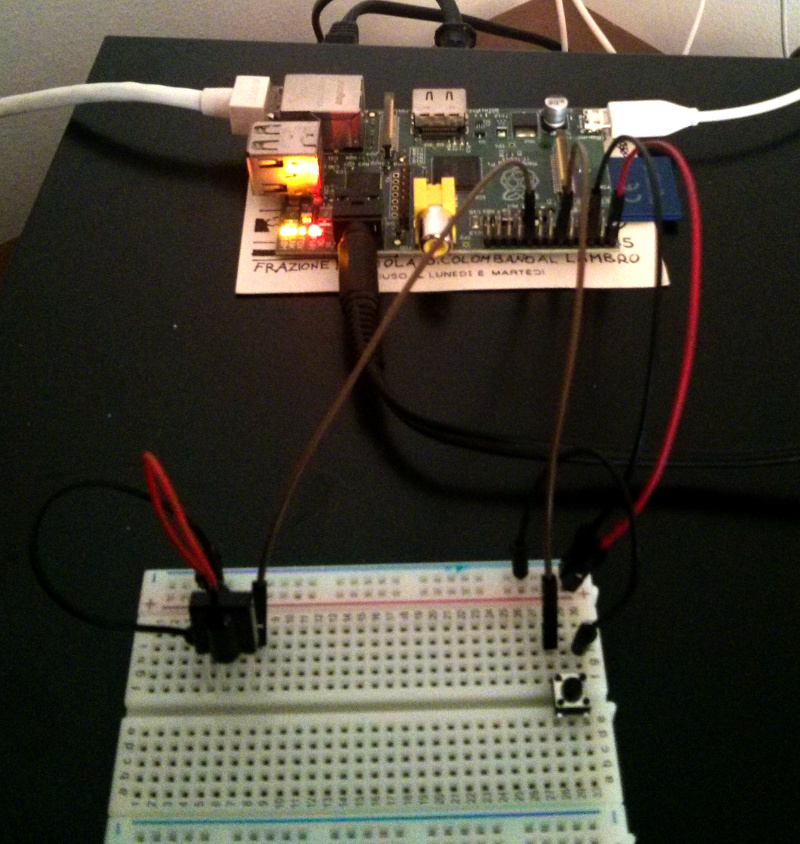
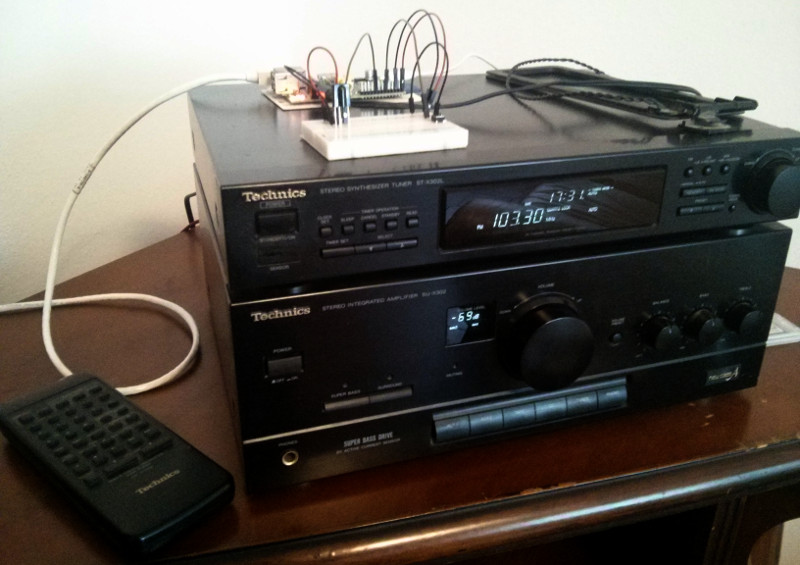
Wouldn't it be nice if I could use the hifi remote control to control mpd? It turns out many wishes can come true when one has a GPIO board. A friend of mine had a pile of IR receiver components in his stash and gave me one. It is labeled "38A 1424A", and the closest matching datasheet I found is this one. I wired the receiver with the control pin on GPIO port 24, and set up lirc by following roughly this guide. Hifi with shutdown button and IR receiver Enable lirc_rpi support I had to add these lines to /boot/config.txt to enable lirc_rpi support:
dtoverlay=lirc-rpi,gpio_in_pin=24,gpio_out_pin=22
dtparam=gpio_in_pull=up
At first I had missed configuration of the internal pull up resistor, and reception worked but was very, very poor. Then reboot. Install and configure lirc
apt install lirc
I added these lines to /etc/lirc/hardware.conf:
DRIVER="default"
DEVICE="/dev/lirc0"
MODULES="lirc_rpi"
Stopped lircd:
systemctl stop lirc
Tested that the receiver worked:
mode2 -d /dev/lirc0
Downloaded remote control codes for my hifi and put them in /etc/lirc/lircd.conf. Started lircd
systemctl start lirc
Tested that lirc could parse commands from my remote control:
$ irw
0000400405506035 00 CD_PAUSE RAK-SC304W
0000400405506035 01 CD_PAUSE RAK-SC304W
0000400405506035 02 CD_PAUSE RAK-SC304W
0000400405505005 00 CD_PLAY RAK-SC304W
0000400405505005 01 CD_PLAY RAK-SC304W
Interface lirc with mpd I made this simple lirc program and saved it in ~pi/.lircrc:
begin
     prog = irexec
     button = CD_NEXT
     config = mpc next
end
begin
     prog = irexec
     button = TAPE_FWD
     config = mpc next
end
begin
     prog = irexec
     button = TAPE_REW
     config = mpc prev
end
begin
     prog = irexec
     button = CD_PREV
     config = mpc prev
end
begin
     prog = irexec
     button = TAPE_PAUSE
     config = mpc pause
end
begin
     prog = irexec
     button = CD_PAUSE
     config = mpc pause
end
begin
     prog = irexec
     button = CD_PLAY
     config = mpc toggle
end
begin
     prog = debug
     button = TAPE_PLAY_RIGHT
     config = mpc toggle
end
Then wrote a systemd unit file to start irexec and saved it as /etc/systemd/system/mpd-irexec.service:
[Unit]
Description=Control mpd via lirc remote control
After=lirc mpd
[Service]
Type=simple
ExecStart=/usr/bin/irexec
Restart=always
User=pi
WorkingDirectory=~
[Install]
WantedBy=multi-user.target
Then systemctl start mpd-irexec to start irexec, and systemctl enable mpd-irexec to start irexec at boot. Profit! All of this was done by me, with almost no electronics training, following online tutorials for the hardware parts. To connect components I used a breadboard and female-male jumper leads, so I didn't have to solder, for which I have very little practice. Now the Raspberry Pi is so much a part of my hifi component that I can even control it with the hifi remote control. Given that I disconnected the CD and tape players, there are now at least 16 free buttons on the remote control that I can script however I like. Raspberry Pi closeup

Thorsten Alteholz: My Debian Activities in March 2017

FTP assistant This month I marked 111 packages for accept and sent four emails to maintainers asking questions. The bad number of the month are the 41 packages I had to reject. This rejection rate was the worst of all my NEW-months. May I ask everybody to pay a bit more attention before uploading/sponsoring a package? Debian LTS This was my thirty-third month that I did some work for the Debian LTS initiative, started by Raphael Hertzog at Freexian. This month my all in all workload has been 14.75h. During that time I did uploads of I also took care of radare and marked all CVEs as not-affected in Wheezy. My next package on the list will be qbittorrent. Other stuff I uploaded a new version of entropybroker to fix a bug with the handling of return codes of ppoll. This version will also make it to Stretch. The same happens with a bug in alljoyn-services-1509. I don t know why everybody talks about unblock-bugs that need to be filed!? The release team was always faster in granting the unblock than me in filing the corresponding bug. As my DOPOM for this month I adopted httperf, took care of some bugs and sent patches upstream. I also created a new project on Alioth that is called debian-mobcom (Alioth page), which shall be a place for all packages concerning mobile communication on the network part. I only uploaded libosmocore to experimental yet, so the package list is rather short.

David Kalnischkies: Winning the Google Open Source Lottery

I don't know about you, but I frequently get mails announcing that I was picked as the lucky winner of a lottery, compensation program or simply as "business associate". Obvious Spam of course, that never happens in reality. Just like my personal "favorite" at the moment: Mails notifying me of inheritance from a previously (more or less) unknown relative. Its just that this is what has happend basically a few weeks ago in reality to me (over the phone through) and I am still dealing with the bureaucracy required of teaching the legal system that I have absolutely no intention of becoming the legal successor of someone I haven't seen in 20 years, regardless of how close the family relation is on paper but that might be the topic of another day. On the 1st March a mail titled "Google Open Source Peer Bonus Program" looked at first as if it would fall into this lottery spam class. It didn't exactly help that the mail was multipart HTML and text, but the text really only the text, not mentioning the embedded links used in the HTML part. It even included a prominent and obvious red flag: "Please fill out the form". 20% Bayes score didn't come from nothing. Still, for better or worse the words "Open Source" made it unlikely to be spam similar to how the word PGP indicates authenticity. So it happened, another spam message became true for me. I wonder which one will be next You have probably figured out by now that I didn't know that program before. Kinda embarrassing for a previous Google Summer of Code student (GSoC is run by the same office), but the idea behind it is simple: Google employees can nominate contributors to open source stuff for a small monetary "thank you!" gift card. Earlier this week winners for this round were announced 52 contributors including yours truly. You might be surprised, but the rational given behind my name is APT (I got a private mail with the full rational from my "patron", just in case you wonder if at least I would know more). It is funny how a guy who was taken aback by the prospect of needing a package manager like YaST to use Linux contributed just months later the first patch to apt and has roughly 8 years later amassed more than 2400 commits. It's birthday season in my family with e.g. mine just a few days ago, so its seems natural that apt has its own birthday today just as if it would be part of my family: 19th years this little bundle of bugs joy is now! In more sober moments I wonder sometimes how apt and I would have turned out if we hadn't meet. Would apt have met someone else? Would I? Given that I am still the newest team member and only recently joined Debian as DD at all APT has some strange ways of showing that it loves you: It e.g. helps users compose mails which end in a dilemma to give a recent example. Perhaps you need to be a special kind of crazy1 to consider this good, but as I see it apt has a big enough userbase that regardless of what your patch is doing, someone will like it. That drastically increases the chances that someone will also like it enough to say so in public offsetting complains from all those who don't like the (effects of the) patch which are omnipresent. And twice in a blue moon some of those will even step forward and thank you explicitly. Not that it would be necessary, but it is nice anyhow. So, thanks for the love supercow, Google & apt users! Or in other words: APT might very well be one of the most friendly (package manager related) project to contribute to as the language-specific managers have smaller userbases and hence a smaller chance of having someone liking your work (in public) so contribute a patch or two and be loved, too! Disclaimer: I get no bonus for posting this nor are any other strings attached. Birthdays are just a good time to reflect. In terms of what I do with my new found riches (in case I really receive them I haven't yet so that could still be an elaborate scam ): APT is a very humble program, but even it is thinking about moving away from a dev-box with less than 4 GB of RAM and no SSD, so it is happily accepting the gift and expects me to upgrade sooner now. What kind of precedence this sets for the two decades milestone next year? If APT isn't obsolete by then We will see.

  1. which even ended up topping Hacker News around New Year's Eve who would have thought that apt and reproducibility bugs are top news ;)

Mike Hommey: Progress on git-cinnabar memory usage

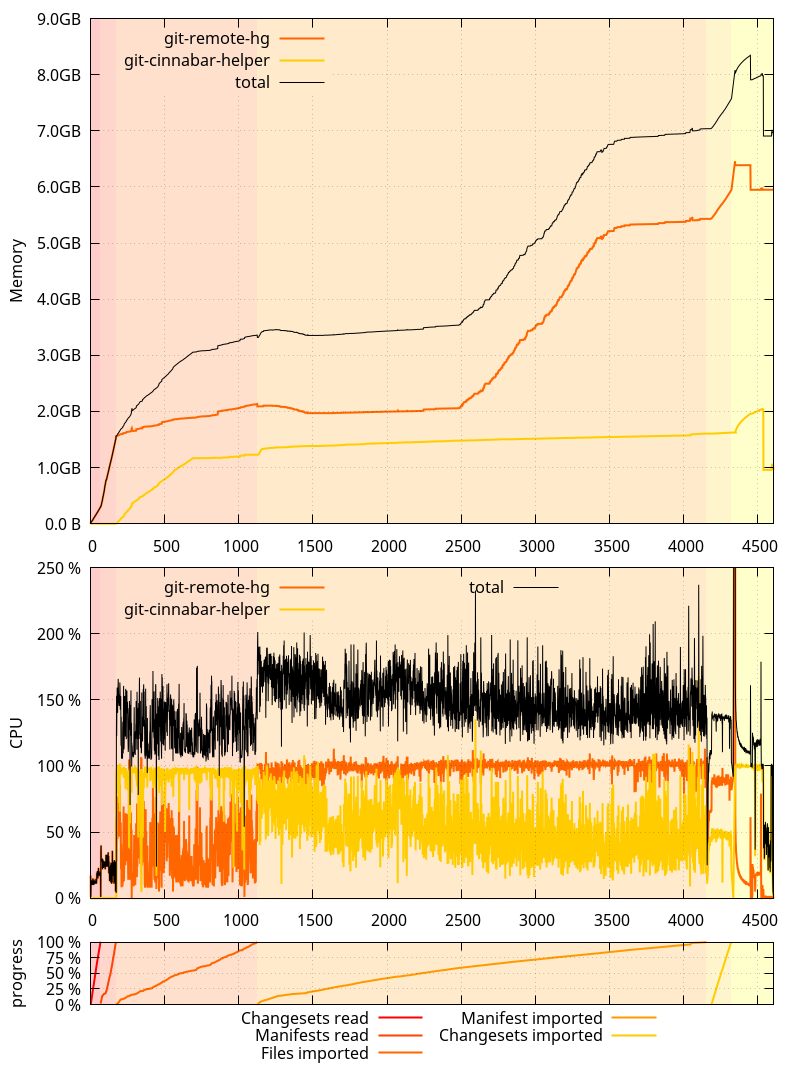
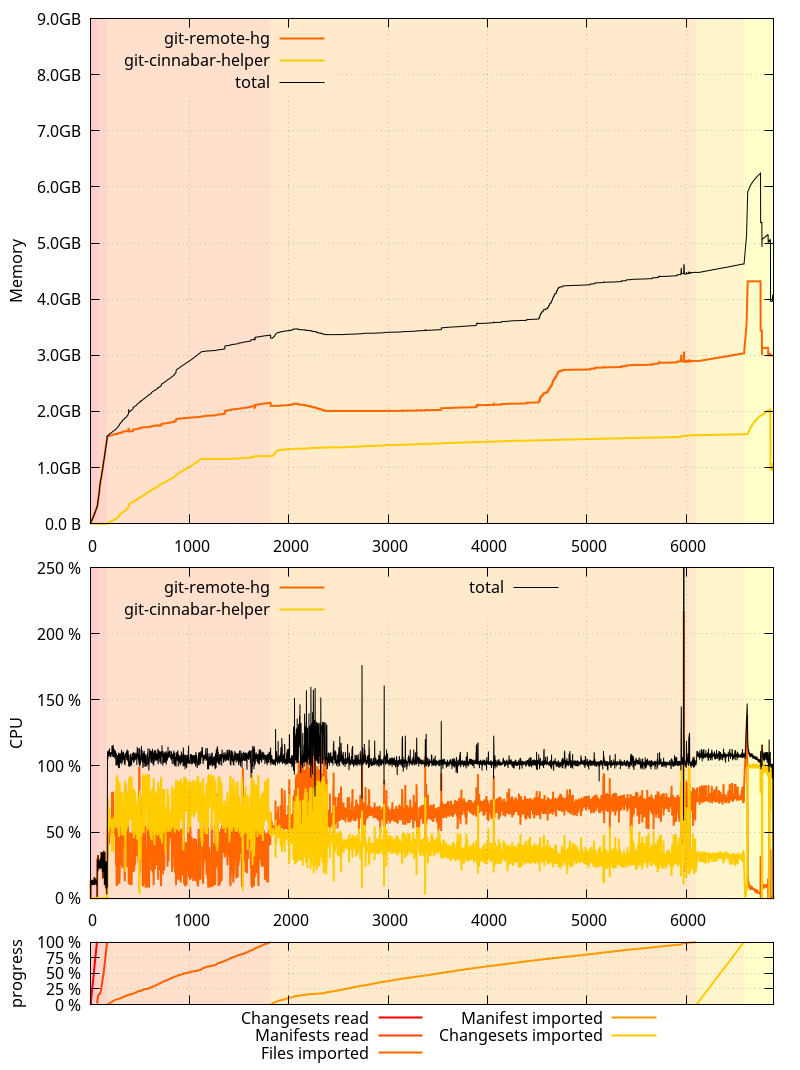
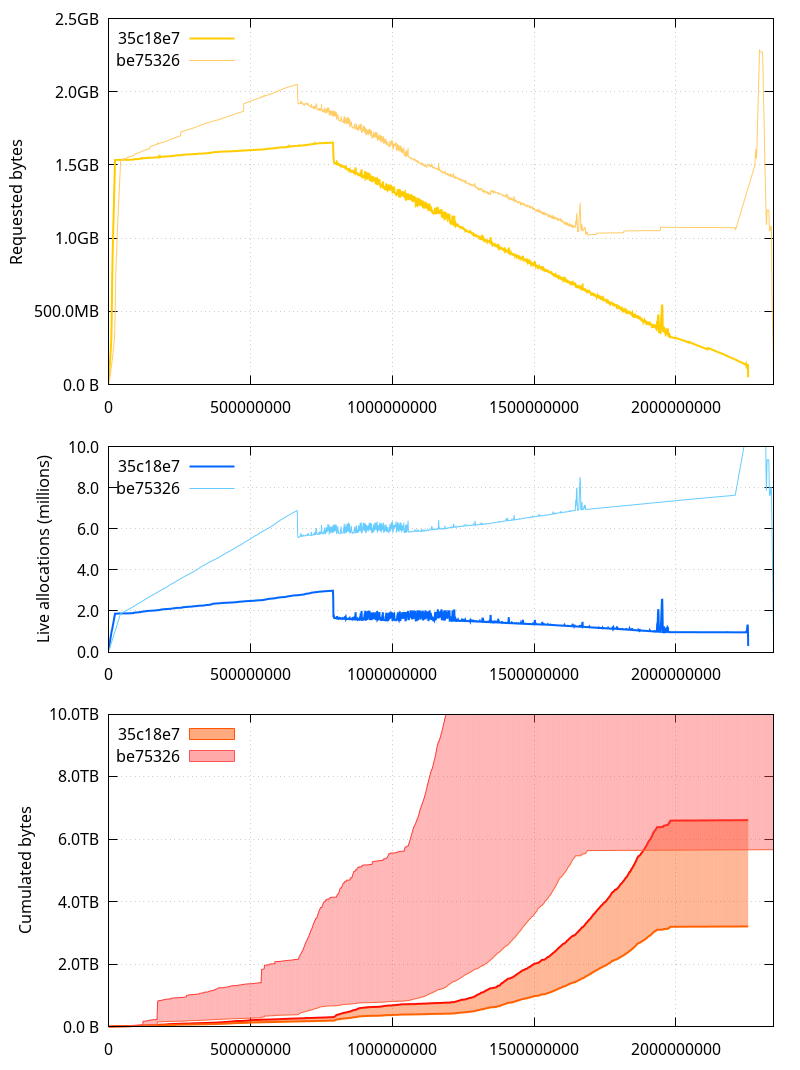
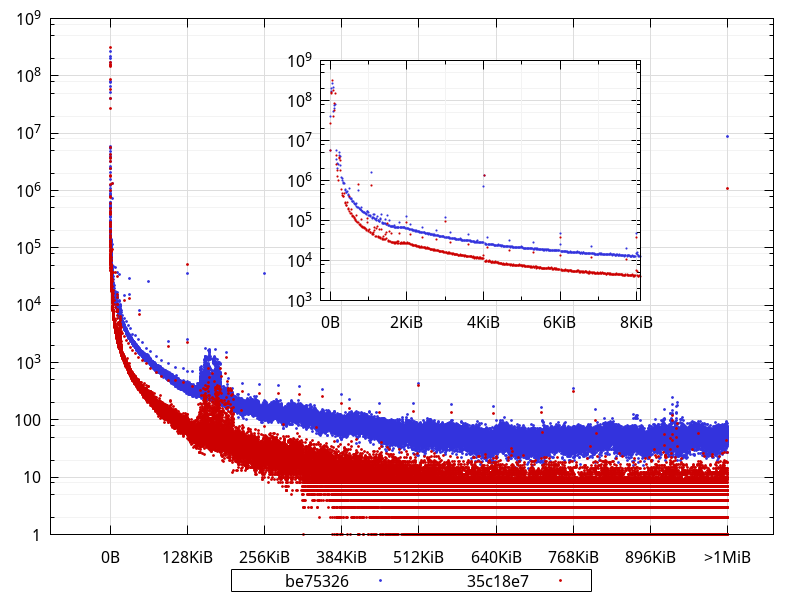
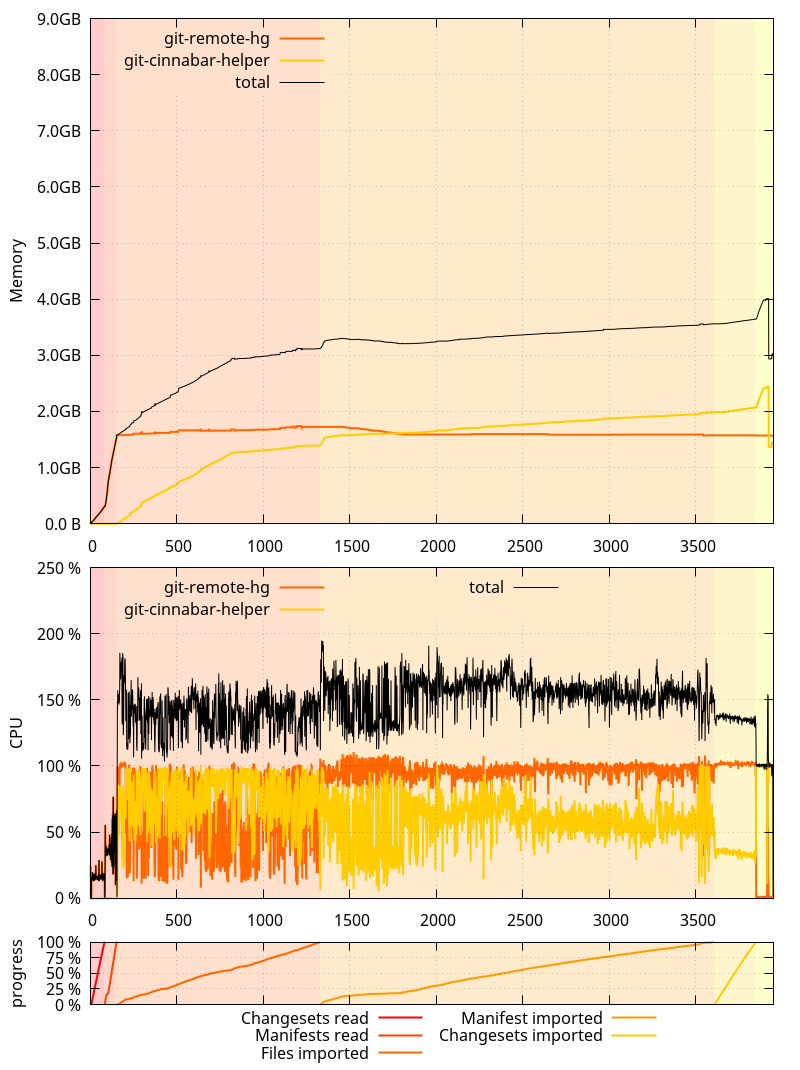
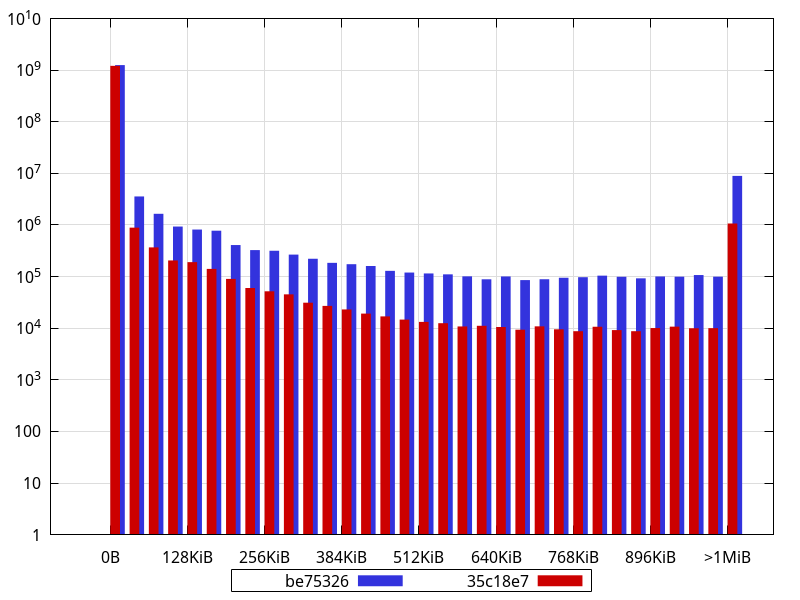
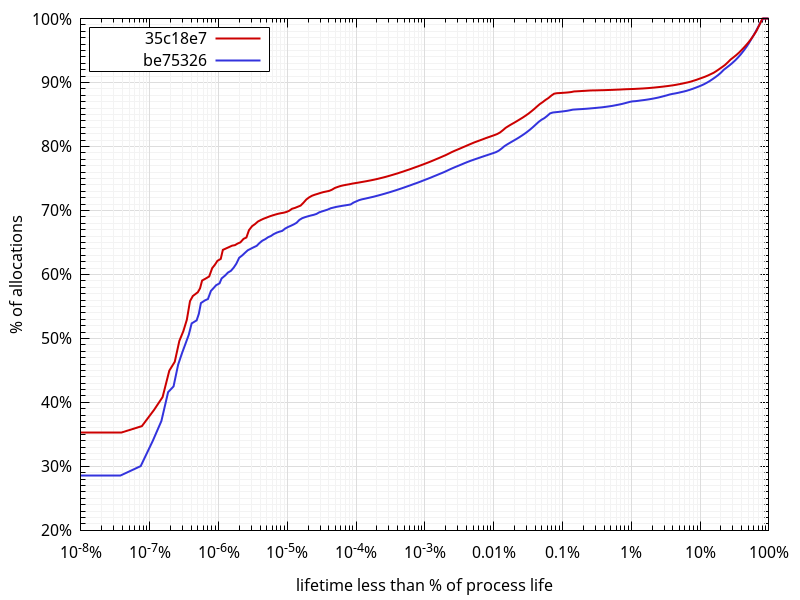
This all started when I figured out that git-cinnabar was using crazy amounts of memory when cloning mozilla-central. That pointed to memory allocation patterns that triggered a suboptimal behavior in the glibc memory allocator, and, while overall, git-cinnabar wasn t really abusing memory all things considered, it happened to be realloc()ating way too much. It also turned out that recent changes on the master branch had made most uses of fast-import synchronous, making the whole process significantly slower. This is where we started from on 0.4.0: And on the master branch as of be75326: An interesting thing to note here is that the glibc allocator runaway memory use was, this time, more pronounced on 0.4.0 than on master. It was the opposite originally, but as I mentioned in the past ASLR is making it not happen exactly the same way each time. While I m here, one thing I failed to mention in the previous posts is that all these measurements were done by cloning a local mercurial clone of mozilla-central, served from localhost via HTTP to eliminate the download time from hg.mozilla.org. And while mozilla-central itself has received new changesets since the first post, the local clone has not been updated, such that all subsequent clone tests I did were cloning the exact same repository under the exact same circumstances. After last blog post, I focused on the low hanging fruits identified so far: And this is how things now look on the master branch as of 35c18e7: So where does that put us? On a more granular level: What this means is that there s still room for improvement. But at this point, I d rather focus on other things. Logging all the memory allocations with the python allocator disabled still resulted in a 6.5GB compressed log file, containing 2.6 billion calls to malloc, calloc, free and realloc (down from 2.7 billions in be75326). The number of allocator calls done by the git-remote-hg process is down to 2.25 billions (from 2.34 billion in be75326). Surprisingly, while more things were moved to the helper, it still made less allocations than in be75326: 345 millions, down from 363 millions. Presumably, this is because the number of commands processed by the fast-import code was reduced. Let s now take a look at the various metrics we analyzed previously (the horizontal axis represents the number of allocator calls that happened before the measurement): A few observations to make here: [*] The upper bound is the sum of all sizes ever given to malloc, calloc, realloc etc. and the lower bound is the same, but removing the size of allocations passed as input to realloc (in practical words, this pretends reallocs never happened and that the final size for a given reallocated pointer is the one that counts) So presumably, some of the changes led to more short-lived allocations. Considering python uses its own allocator for sizes smaller than 512 bytes, it s probably not so much of a problem. But let s look at the distribution of buffer sizes (including all sizes given to realloc). (Bucket size is 16 bytes) What is not completely obvious from the logarithmic scale is that, in fact, 98.4% of the allocations are less than 512 bytes with the current master (35c18e7), and they were 95.5% with be75326. Interestingly, though, in absolute numbers, there are less allocations smaller than 512 bytes in current master than in be75326 (1,194,268,071 vs 1,214,784,494). This suggests the extra allocations that happen during some phases are larger than that. There are clearly less allocations across the board (apart from very few exceptions), and close to an order of magnitude less allocations larger than 1MiB. In fact, widening the bucket size to 32KiB shows an order of magnitude difference (or close) for most buckets: An interesting thing to note is how some sizes are largely overrepresented in the data with buckets of 16 bytes, like 768, 1104, 2048, 4128, with other smaller bumps for e.g. 2144, 2464, 2832, 3232, 3696, 4208, 4786, 5424, 6144, 6992, 7920 While some of those are powers of 2, most aren t, and some of them may actually represent objects sized with a power of 2, but that have an extra PyObject overhead. While looking at allocation stats, I got to wonder what the lifetimes of those allocations looked like. So I scanned the allocator logs and measured the distance between when an allocation is made and when it is freed, ignoring reallocs. To give a few examples of what I mean, the following allocation for p gets a lifetime of 0:
void *p = malloc(42);
free(p);
The following a lifetime of 1:
void *p = malloc(42);
void *other = malloc(42);
free(p);
And the following a lifetime of 1 as well:
void *p = malloc(42);
p = realloc(p, 84);
free(p);
(that is, it is not counted as two malloc/free pairs) The further away the free is from the corresponding malloc, the larger the lifetime. And the largest the lifetime can ever be is the total number of allocator function calls minus two, in the hypothetical case the very first allocation is freed as the very last (minus two because we defined the lifetime as the distance). What comes out of this data: All in all, what the data shows is that we re definitely in a better place now than we used to be a few days ago, and that there is still work to do on the memory front, but: So at this point, I won t look any deeper into the memory usage of the git-remote-hg python process, and will instead focus on the planned metadata storage changes. They will allow to share the metadata more easily (allowing faster and more straightforward gecko-dev graft), and will allow to import manifests earlier, which, as mentioned already, will help reduce memory use, but, more importantly, will allow to do more actual work while downloading the data. On slow networks, this is crucial to make clones and pulls faster.

Francois Marier: Manually expanding a RAID1 array on Ubuntu

Here are the notes I took while manually expanding an non-LVM encrypted RAID1 array on an Ubuntu machine. My original setup consisted of a 1 TB drive along with a 2 TB drive, which meant that the RAID1 array was 1 TB in size and the second drive had 1 TB of unused capacity. This is how I replaced the old 1 TB drive with a new 3 TB drive and expanded the RAID1 array to 2 TB (leaving 1 TB unused on the new 3 TB drive).

Partition the new drive In order to partition the new 3 TB drive, I started by creating a temporary partition on the old 2 TB drive (/dev/sdc) to use up all of the capacity on that drive:
$ parted /dev/sdc
unit s
print
mkpart
print
Then I initialized the partition table and creating the EFI partition partition on the new drive (/dev/sdd):
$ parted /dev/sdd
unit s
mktable gpt
mkpart
Since I want to have the RAID1 array be as large as the smaller of the two drives, I made sure that the second partition (/home) on the new 3 TB drive had:
  • the same start position as the second partition on the old drive
  • the end position of the third partition (the temporary one I just created) on the old drive
I created the partition and flagged it as a RAID one:
mkpart
toggle 2 raid
and then deleted the temporary partition on the old 2 TB drive:
$ parted /dev/sdc
print
rm 3
print

Create a temporary RAID1 array on the new drive With the new drive properly partitioned, I created a new RAID array for it:
mdadm /dev/md10 --create --level=1 --raid-devices=2 /dev/sdd1 missing
and added it to /etc/mdadm/mdadm.conf:
mdadm --detail --scan >> /etc/mdadm/mdadm.conf
which required manual editing of that file to remove duplicate entries.

Create the encrypted partition With the new RAID device in place, I created the encrypted LUKS partition:
cryptsetup -h sha256 -c aes-xts-plain64 -s 512 luksFormat /dev/md10
cryptsetup luksOpen /dev/md10 chome2
I took the UUID for the temporary RAID partition:
blkid /dev/md10
and put it in /etc/crypttab as chome2. Then, I formatted the new LUKS partition and mounted it:
mkfs.ext4 -m 0 /dev/mapper/chome2
mkdir /home2
mount /dev/mapper/chome2 /home2

Copy the data from the old drive With the home paritions of both drives mounted, I copied the files over to the new drive:
eatmydata nice ionice -c3 rsync -axHAX --progress /home/* /home2/
making use of wrappers that preserve system reponsiveness during I/O-intensive operations.

Switch over to the new drive After the copy, I switched over to the new drive in a step-by-step way:
  1. Changed the UUID of chome in /etc/crypttab.
  2. Changed the UUID and name of /dev/md1 in /etc/mdadm/mdadm.conf.
  3. Rebooted with both drives.
  4. Checked that the new drive was the one used in the encrypted /home mount using: df -h.

Add the old drive to the new RAID array With all of this working, it was time to clear the mdadm superblock from the old drive:
mdadm --zero-superblock /dev/sdc1
and then change the second partition of the old drive to make it the same size as the one on the new drive:
$ parted /dev/sdc
rm 2
mkpart
toggle 2 raid
print
before adding it to the new array:
mdadm /dev/md1 -a /dev/sdc1

Rename the new array To change the name of the new RAID array back to what it was on the old drive, I first had to stop both the old and the new RAID arrays:
umount /home
cryptsetup luksClose chome
mdadm --stop /dev/md10
mdadm --stop /dev/md1
before running this command:
mdadm --assemble /dev/md1 --name=mymachinename:1 --update=name /dev/sdd2
and updating the name in /etc/mdadm/mdadm.conf. The last step was to regenerate the initramfs:
update-initramfs -u
before rebooting into something that looks exactly like the original RAID1 array but with twice the size.

Russ Allbery: Review: Two Serpents Rise

Review: Two Serpents Rise, by Max Gladstone
Series: Craft #2
Publisher: Tor
Copyright: October 2013
ISBN: 1-4668-0204-9
Format: Mobi
Pages: 350
This is the second book in the Craft Sequence, coming after Three Parts Dead, but it's not a sequel. The only thing shared between the books is the same universe and magical system. Events in Two Serpents Rise were sufficiently distant from the events of the first book that it wasn't obvious (nor did it matter) where it fit chronologically. Caleb is a gambler and an investigator for Red King Consolidated, the vast firm that controls the water supply, and everything else, in the desert city of Dresediel Lex. He has a fairly steady and comfortable job in a city that's not comfortable for many, one of sharp divisions between rich and poor and which is constantly one water disturbance away from riot. His corporate work life frustrates his notorious father, a legendary priest of the old gods who were defeated by the Red King and who continues to fight an ongoing terrorist resistance to the new corporate order. But Caleb has as little as possible to do with that. Two Serpents Rise opens with an infiltration of the Bright Mirror Reservoir, one of the key components of Dresediel Lex's water supply. It's been infested with Tzimet: demon-like creatures that, were they to get into the city's water supply, would flow from faucets and feed on humans. Red King Incorporated discovered this one and sealed the reservoir before the worst could happen, but it's an unsettling attack. And while Caleb is attempting to determine what happened, he has an unexpected encounter with a cliff runner: a daredevil parkour enthusiast with an unexpected amulet of old Craft that would keep her invisible from most without the magical legacy Caleb is blessed (or cursed) with. He doesn't think her presence is related to the attack, but he can't be sure, particularly with the muddling fact that he finds her personally fascinating. Like Three Parts Dead, you could call Two Serpents Rise an urban fantasy in that it's a fantasy that largely takes place in cities and is concerned with such things as infrastructure, politics, and the machinery of civilization. However, unlike Three Parts Dead, it takes itself much more seriously and has less of the banter and delightful absurdity of the previous book. The identification of magic with contracts and legalities is less amusingly creative here and more darkly sinister. Partly this is because the past of Dresediel Lex is full of bloodthirsty gods and human sacrifice, and while Red King Consolidated has put an end to that practice, it lurks beneath the surface and is constantly brought to mind by some grisly artifacts. I seem to always struggle with fantasy novels based loosely on central American mythology. An emphasis on sacrifice and terror always seems to emerge from that background, and it verges too close to horror for me. It also seems prone to clashes of divine power and whim instead of thoughtful human analysis. That's certainly the case here: instead of Tara's creative sleuthing and analysis, Caleb's story is more about uncertainty, obsession, gambling, and shattering revelations. Magical rituals are described more in terms of their emotional impact than their world-building magical theory. I think this is mostly a matter of taste, and it's possible others would like Two Serpents Rise better than the previous book, but it wasn't as much my thing. The characters are a mixed bag. Caleb was a bit too passive to me, blown about by his father and his employer and slow to make concrete decisions. Mal was the highlight of the book for me, but I felt at odds with the author over that, which made the end of the book somewhat frustrating. Caleb has some interesting friends, but this is one of those books where I would have preferred one of the supporting cast to be the protagonist. That said, it's not a bad book. There are some very impressive set pieces, the supporting cast is quite good, and I am wholeheartedly in favor of fantasy novels that are built around the difficulties of water supply to a large, arid city. This sort of thing has far more to do with human life than the never-ending magical wars over world domination that most fantasy novels focus on, and it's not at all boring when told properly. Gladstone is a good writer, and despite the focus of this book not being as much my cup of tea, I'll keep reading this series. Followed by Full Fathom Five. Rating: 7 out of 10

Paul Wise: FLOSS Activities March 2017

Changes

Issues

Review

Administration
  • Debian systems: apply a patch to userdir-ldap, ask a local admin to reset a dead powerpc buildd, remove dead SH4 porterboxen from LDAP, fix perms on www.d.o OC static mirror, report false positives in an an automated abuse report, redirect 1 student to FAQs/support/DebianEdu, redirect 1 event organiser to partners/trademark/merchandise/DPL, redirect 1 guest account seeker to NM, redirect 1 @debian.org desirer to NM, redirect 1 email bounce to a changes@db.d.o user, redirect 2 people to the listmasters, redirect 1 person to Debian Pure Blends, redirect 1 user to a service admin and redirect 2 users to support
  • Debian packages site: deploy my ports/cruft changes
  • Debian wiki: poke at HP page history and advise a contributor, whitelist 13 email address, whitelist 1 domain, check out history of a banned IP, direct 1 hoster to DebConf17 sponsors team, direct 1 user to OpenStack packaging, direct 1 user to InstallingDebianOn and h-node.org, direct 2 users to different ways to help Debian and direct 1 emeritus DD on repository wiki page reorganisation
  • Debian QA: fix an issue with the PTS news, remove some debugging cruft I left behind, fix the usertags on a QA bug and deploy some code fixes
  • Debian mentors: security upgrades and service restarts
  • Openmoko: security upgrades and reboots

Communication

Sponsors The valgrind backport, samba and libthrift-perl bug reports were sponsored by my employer. All other work was done on a volunteer basis.

31 March 2017

Gunnar Wolf: Cannot help but sharing a historic video

People that know me know that I do whatever I can in order to avoid watching videos online if there's any other way to get to the content. It may be that I'm too old-fashioned, or that I have low attention and prefer to use a media where I can quickly scroll up and down a paragraph, or that I feel the time between bits of content is just a useless transition or whatever... But I bit. And I loved it. A couple of days ago, OS News featured a post titled From the AT&T Archives: The UNIX Operating System. It links to a couple of videos in AT&T's Youtube channel. I watched
AT&T Archives: The UNIX Operating System
, an amazing historic evidence: A 27 minute long documentary produced in 1981 covering... What is Unix. Why Unix is so unique, useful and friendly. What's the big deal about it? That this document shows first-hand that we are not repeating myths we came up with along the way: The same principles of process composition, of simplicity and robustness, but spoken directly by many core actors of the era Brian Kernighan (who drove a great deal of the technical explanation), Alfred Aho, Dennis Ritchie, Ken Thompson... And several more I didn't actually catch the names of. Of course, the video includes casual shots of life at AT&T, including lots of terminals (even some of which are quite similar to the first ones I used here in Mexico, of course), then-amazing color animation videos showing the state of the art of computer video 35 years ago... A delightful way to lose half an hour of productivity. And a bit of material that will surely find its way into my classes for some future semester :) [ps] Yes, I don't watch videos in Youtube. I don't want to enable its dirty Javascript. So, of course, I use the great Youtube-dl tool. I cannot share the video file itself here due to Youtube's service terms, but Youtube-dl is legal and free.

Next.

Previous.