Search Results: "spa"

11 April 2015

Steve Kemp: Some things get moved, some things get doubled in size.

Relocation
We're about three months away from relocating from Edinburgh to Newcastle and some of the immediate panic has worn off. We've sold our sofa, our spare sofa, etc, etc. We've bought a used dining-table, chairs, and a small sofa, etc. We need to populate the second-bedroom as an actual bedroom, do some painting, & etc, but things are slowly getting done. I've registered myself as a landlord with the city council, so that I can rent the flat out without getting into trouble, and I'm in the process of discussing the income possabilities with a couple of agencies. We're still unsure of precisely which hospital, from the many choices, in Newcastle my wife will be stationed at. That's frustrating because she could be in the city proper, or outside it. So we need to know before we can find a place to rent there. Anyway moving? It'll be annoying, but we're making progress. Plus, how hard can it be?
VLAN Expansion
I previously had a /28 assigned for my own use, now I've doubled that to a /27 which gives me the ability to create more virtual machines and run some SSL on some websites. Using SNI I've actually got the ability to run SSL almost all sites. So I configured myself as a CA and generated a bunch of certificates for myself. (Annoyingly few tutorials on running a CA mentioned SNI so it took a few attempts to get the SAN working. But once I got the hang of it it was simple enough.) So if you have my certificate authority file installed you can browse many, many of my interesting websites over SSL.
SSL
I run a number of servers behind a reverse-proxy. At the moment the back-end is lighttpd. Now that I have SSL setup the incoming requests hit the proxy, get routed to lighttpd and all is well. Mostly. However redirections break. A request for:
  • https://lumail.org/docs
Gets rewritten to:
  • http://lumail.org/docs/
That is because lighttpd generates the redirection and it only sees the HTTP connection. It seems there is mod_extforward which should allow the server to be aware of the SSL - but it doesn't do so in a useful fashion. So right now most of my sites are SSL-enabled, but sometimes they'll flip to naked and unprotected. Annoying. I don't yet have a solution..

10 April 2015

Andrew Shadura: Kallithea 0.2 released

This post is almost a carbon copy of the Kallithea 0.2 release notes. Kallithea project have just released Kallithea 0.2. Kallithea is a Python-based GPLv3 source code management software for web-based hosting of Mercurial and Git repositories. This release brings many changes since 0.1. Notably, pull requests system have been improved, making contributing changes more robust. The visual appearance has also been refined: modern font-based symbolic icons from FontAwesome and GitHub Octicons have replaced the previously used bitmap icons, and revision graphs are now drawn with HiDPI display support. Kallithea now supports Mercurial 3.3 and Dulwich 0.9.9. Several fixes in the database code boosted performance significantly. We have also updated our Javascript libraries: jQuery, CodeMirror and Mergely. Javascript and CSS code have been cleaned up, with less and less code depending on Yahoo UI library. Since 0.1 we have discovered two security issues, so all users are strongly recommended to upgrade. For more details on these issues, please see our Security Notices page For more information, see https://kallithea-scm.org/ or http://docs.kallithea-scm.org/. The summary of the changes since 0.1 release is below. Bug fixes: Features and improvements: Changes (might influence workflows): Cleanup:

9 April 2015

Mario Lang: A C++ sample collection

I am one of those people that best learns from looking at examples. No matter if I am trying to learn a programming pattern/idiom, or a completely new library or framework. Documentation is good (if it is good!) for diving into the details, but to get me started, I always want to look at a self contained example so that I can get a picture of the thing in my head. So I was very excited when a few days ago, CppSamples was announced on the ISO C++ Blog. While it is a very young site, it already contains some very useful gems. It is maintained over at GitHub, so it is also rather easy to suggest new additions, or improve the existing examples by submitting a pull request. Give it a try, it is really quite nice. In my book, the best resource I have found so far in 2015. BTW, Debian has a standard location for finding examples provided by a package. It is /usr/share/doc/<package>/examples/. I consider that very useful.

7 April 2015

Mario Lang: I am sorry, but this looks insane

I am a console user. I really just started to use X11 again about two weeks ago, to sometimes test an a Qt application I am developing. I am not using Firefox or anything similar, all my daily work happens in shells and inside of emacs, in a console, not in X11. BRLTTY runs all the time, translating the screen content to something that my braille display can understand, sent out via USB. So the most important programs to me, are really emacs, and brltty. This is my desktop, that is up since 179 days.
PID   USER      PR  NI    VIRT    RES    SHR S  %CPU %MEM     TIME+ COMMAND
 1227 message+  20   0    7140   2860    672 S   0,0  0,1 153:33.10 dbus-daemon
21457 root      20   0   44456   1116    788 S   0,0  0,1 146:42.47 packagekitd
    1 root      20   0   24348   2808   1328 S   0,0  0,1 109:16.99 systemd
 7897 mlang     20   0  585776 121656   4188 S   0,0  6,0 105:22.40 emacs
13332 root      20   0   10744    432    220 S   0,0  0,0  91:55.96 ssh
19581 root      20   0    4924   1632   1076 S   0,0  0,1  53:33.56 systemd
19596 root      20   0   20312   9764   9660 S   0,0  0,5  48:10.76 systemd-journal
10172 root      20   0   85308   2472   1672 S   0,0  0,1  20:30.18 NetworkManager
   29 root      20   0       0      0      0 S   0,0  0,0  18:40.24 kswapd0
13334 root      20   0  120564   5748    304 S   0,0  0,3  16:20.89 sshfs
    7 root      20   0       0      0      0 S   0,0  0,0  15:21.15 rcu_sched
14245 root      20   0    7620    316    152 S   0,0  0,0  15:08.64 ssh
  438 root      20   0       0      0      0 S   0,0  0,0  12:14.80 jbd2/dm-1-8
11952 root      10 -10   42968   2028   1420 S   0,0  0,1  10:36.20 brltty
I am sorry, but this doesn't look right, not at all. I am not even beginning to talk about dbus-daemon and systemd. Why the HECK does packagekitd (which I definitely don't use actively) use up more then two hours of plain CPU time? What did it do, talk to NSA via an asymmetric cipher, or what?! I play music via sshfs, sometimes FLAC files. That barely consumed more CPU time then brltty, which is probably the most active daemon on my system, erm, it should be. I don't want to chime into any flamewars. I have accepted that we have systemd. But this does not look right! I remember, back in the good old days, emacs and brltty were my top CPU users.

Petter Reinholdtsen: I'm going to the Open Source Developers' Conference Nordic 2015!

I am happy to let you all know that I'm going to the Open Source Developers' Conference Nordic 2015! It take place Friday 8th to Sunday 10th of May in Oslo next to where I work, and I finally got around to submitting a talk proposal for it (dead link for most people until the talk is accepted). As part of my involvement with the Norwegian Unix User Group member association I have been slightly involved in the planning of this conference for a while now, with a focus on organising a Civic Hacking Hackathon with our friends over at mySociety and Holder de ord. This part is named the 'My Society' track in the program. There is still space for more talks and participants. I hope to see you there. Check out the talks submitted and accepted so far.

6 April 2015

Daniel Leidert: Motion picture capturing: Debian + motion + Logitech C910

Woodpecker near the windowWinter time is a good time for some nature observation. Yesterday I had a woodpecker (picture) in front of my kitchen window. During the recent weeks there were long-tailed tits, a wren and other rarely seen birds. So I thought, it might be a good idea to capture some of these events :) I still own a Logitech C910 USB camera which allows HD video capturing up to 1080p. So I checked the web for some software that would begin video capturing in the case of motion detection and found motion, already available for Debian users. So I gave it a try. I tested all available resolutions of the camera together with the capturing results. I found that the resulting framerate of both the live stream and the captured video is highly depending on the resolution and some few configuration options. Below is a summary of my tests and the results I've achieved so far.

Logitech C910 HD cameraJust a bit of data regarding the camera. AFAIK it allows for fluent video streams up to 720p.
$ dmesg
[..]
usb 7-3: new high-speed USB device number 5 using ehci-pci
usb 7-3: New USB device found, idVendor=046d, idProduct=0821
usb 7-3: New USB device strings: Mfr=0, Product=0, SerialNumber=1
usb 7-3: SerialNumber: 91CF80A0
usb 7-3: current rate 0 is different from the runtime rate 16000
usb 7-3: current rate 0 is different from the runtime rate 32000
uvcvideo: Found UVC 1.00 device (046d:0821)
input: UVC Camera (046d:0821) as /devices/pci0000:00/0000:00:1a.7/usb7/7-3/7-3:1.2/input/input17

$ lsusb
[..]
Bus 007 Device 005: ID 046d:0821 Logitech, Inc. HD Webcam C910
[..]

$ v4l2-ctl -V -d /dev/video1
Format Video Capture:
Width/Height : 1280/720
Pixel Format : 'YUYV'
Field : None
Bytes per Line: 2560
Size Image : 1843200
Colorspace : SRGB
Also the uvcvideo kernel module is loaded and the user in question is part of the video group. Installation and startInstallation of the software is as easy as always:
apt-get install motion
It is possible to run the software as a service. But for testing, I copied /etc/motion/motion.conf to ~/.motion/motion.conf, fixed its permissions (you cannot copy the file as user - it's not world readable) and disabled the daemon mode.
daemon off
Note that in my case the correct device is /dev/video1 because the laptop has a built-in camera, that is /dev/video0. Also the target directory should be writeable by my user:
videodevice /dev/video1
target_dir ~/Videos
Then running motion from the command line ...
$ motion
[..]
[0] [NTC] [ALL] motion_startup: Motion 3.2.12+git20140228 Started
[..]
[1] [NTC] [ALL] motion_init: Thread 1 started , motion detection Enabled
[0] [NTC] [ALL] main: Thread 1 is device: /dev/video1 input -1
[1] [NTC] [VID] v4l2_get_capability:
------------------------
cap.driver: "uvcvideo"
cap.card: "UVC Camera (046d:0821)"
cap.bus_info: "usb-0000:00:1a.7-1"
cap.capabilities=0x84000001
------------------------
[1] [NTC] [VID] v4l2_get_capability: - VIDEO_CAPTURE
[1] [NTC] [VID] v4l2_get_capability: - STREAMING
[1] [NTC] [VID] v4l2_select_input: name = "Camera 1", type 0x00000002, status 00000000
[1] [NTC] [VID] v4l2_select_input: - CAMERA
[..]
[1] [NTC] [ALL] image_ring_resize: Resizing pre_capture buffer to 1 items
... will begin to capture motion detection events and also output a live stream. CTRL+C will stop it again. Live streamThe live stream is available by pointing the browser to localhost:8081. However, the stream seems to run at 1 fps (frames per second) and indeed does. The stream gets more quality by this configuration:
stream_motion on
stream_maxrate 100
The first option is responsible, that the stream only runs at one fps if there is no motion detection event. Otherwise the framerate increases to its maximum value, which is either the one given by stream_maxrate or the camera limit. The quality of the stream picture can be increased a bit further too by increasing the stream_quality value. Because I neither need the stream nor the control feed I disabled both:
stream_port 0
webcontrol_port 0
Picture capturingBy default there is video and picture capturing if a motion event is detected. I'm not interested in these pictures, so I turned them off:
output_pictures off
FYI: If you want a good picture quality, then the value of quality should very probably be increased. Video capturingThis is the really interesting part :) Of course if I will "shoot" some birds (with the camera), then a small image of say 320x240 pixels is not enough. The camera allows for a capture resolution up to 1920x1080 pixels (1080p). It is advertised for fluent video streams up to 720p (1280x720 pixels). So I tried the following resolutions: 320x240, 640x480, 800x600, 640x360 (360p), 1280x720 (720p) and 1920x1080 (1080p). These are easily configured by the width and height variables. For example the following configures motion for 1280x720 pixels (720p):
width 1280
height 720
The result was really disappointing. No event is captured with more then 20 fps. At higher resolutions the framerate drops even further and at the highest resolution of 1920x1080 pixels, the framerate is only two(!) fps. Also every created video runs much too fast and even faster by increasing the framerate variable. Of course its default value of 2 (fps) is not enough for fluent videos. AFAIK the C910 can run with 30 fps at 1280x720 pixels. So increasing the value of framerate, the maximum framerate recorded, is a must-do. (If you wanna test yourself, check the log output for the value following event_new_video FPS.)The solution to the issue, that videos are running too fast, however is to increase the pre_capture value, the number of pre-captured (buffered) pictures from before motion was detected. Even small values like 3..5 result in a distinctive improvement of the situation. Though increasing the value further didn't have any effect. So the values below should almost get the most out of the camera and result in videos in normal speed.
framerate 100
pre_capture 5
Videos in 1280x720 pixels are still captured with 10 fps and I don't know why. Running guvcview, the same camera allows for 30 fps in this resolution (even 60 fps in lower resolutions). However, even if the framerate could be higher, the resulting video runs fluently. Still the quality is just moderate (or to be honest, still disappointing). It looks "pixelated". Only static pictures are sharp. It took me a while to fix this too, because I first thought, the reason is the camera or missing hardware support. It is not :) The reason is, that ffmpeg is configured to produce a moderate(?)-quality video. The relevant variables are ffmpeg_bps and ffmpeg_variable_bitrate. I got the best results just changing the latter:
ffmpeg_variable_bitrate 2
Finally the resulting video quality is promising. I'll start with this configuration setting up an observation camera for the bird feeding ground.There is one more tweak for me. I got even better results by enabling the auto_brightness feature.
auto_brightness on
Complete configurationSo the complete configuration looks like this (only those options changed to the original config file)
daemon off
videodevice /dev/video1
width 1280
height 720
framerate 100
auto_brightness on
ffmpeg_variable_bitrate 2
target_dir /home/user/Videos
stream_port 0 #8081
stream_motion on
stream_maxrate 100
webcontrol_port 0 #8080
Links Continue with part II ...

Jonathan Carter: Squashfs Performance Testing

Experiments Last week I discovered The Fan Club s Experiments page. It reminds me of the Debian Experiments community on Google+. I like the concept of trying out all kinds of different things and reporting back to the community on how it works. I ve been meaning to do more of that myself so this is me jumping in and reporting back on something I ve been poking at this weekend. Introducing Squashfs Squashfs is a read-only compressed filesystem commonly used on embedded devices, Linux installation media and remote file systems (as is done in LTSP). Typically, a system like tmpfs, unionfs or aufs is mounted over this read-only system to make it usable as a root filesystem. It has plenty of other use cases too but for the purposes of this entry we ll stick with those use cases in mind. It supports gzip, lzo and xz(lzma) as compression back-ends. It also supports block sizes from 4K up to 1M. Compression technique as well as block size can have major effects on both performance and file size. In most cases the defaults will probably be sufficient, but if you want to find a good balance between performance and space saving, then you ll need some more insight. My Experiment: Test effects of squashfs compression methods and block sizes I m not the first person to have done some tests on squashfs performance and reported on it. Bernhard Wiedemann and the Squashfs LZMA project have posted some results before, and while very useful I want more information (especially compress/uncompress times). I was surprised to not find a more complete table elsewhere either. Even if such a table existed, I probably wouldn t be satisfied with it. Each squashfs is different and it makes a big difference whether it contains already compressed information or largely uncompressed information like clear text. I d rather be able to gather compression ratio/times for a specific image rather than for one that was used for testing purposes once-off. So, I put together a quick script that takes a squashfs image, extracts it to tmpfs, and then re-compressing it using it all the specified compression techniques and block sizes and then uncompressing those same images for their read speeds. My Testing Environment For this post, I will try out my script on the Ubuntu Desktop 14.04.2 LTS squashfs image. It s a complex image that contains a large mix of different kinds of files. I m extracting it to RAM since I want to avoid having disk performance as a significant factor. I m compressing the data back to SSD and extracting from there for read speed tests. The SSD seems fast enough not to have any significant effect on the tests. If you have a slow storage, the results of the larger images (with smaller block sizes) may be skewed unfavourably. As Bernhard mentioned on his post, testing the speed of your memory can also be useful, especially when testing on different kinds of systems and comparing the results:
# dd if=/dev/zero of=/dev/null bs=1M count=100000
104857600000 bytes (105 GB) copied, 4.90059 s, 21.4 GB/s
CPU is likely to be your biggest bottleneck by far when compressing. mksquashfs is SMP aware and will use all available cores by default. I m testing this on a dual core Core i7 laptop with hyper-threading (so squashfs will use 4 threads) and with 16GB RAM apparently transferring around 21GB/s. The results of the squashfs testing script will differ greatly based on the CPU cores, core speed, memory speed and storage speed of the computer you re running it on, so it shouldn t come as a surprise if you get different results than I did. If you don t have any significant bottleneck (like slow disks, slow CPU, running out of RAM, etc) then your results should more or less correspond in scale to mine for the same image. How to Run It Create a directory and place the filesystem you d like to test as filesystem.squashfs, then:
$ apt-get install squashfs-tools 
$ wget https://raw.githubusercontent.com/highvoltage/squashfs-experiments/master/test-mksquashfs.sh
$ bash test-mksquashfs.sh
With the default values in that file, you ll end up with 18 squashfs images taking up about 18GB of disk space. I keep all the results for inspection, but I ll probably adapt/fix the script to be more friendly to disk space usage some time. You should see output that look something like this, with all the resulting data in the ./results directory.
* Setting up...
- Testing gzip
  * Running a squashfs using compression gzip, blocksize 4096
  * Running a squashfs using compression gzip, blocksize 8192
  * Running a squashfs using compression gzip, blocksize 16384
  ...
- Testing lzo
  * Running a squashfs using compression lzo, blocksize 4096
  * Running a squashfs using compression lzo, blocksize 8192
  * Running a squashfs using compression lzo, blocksize 16384
  ...
- Testing xz
  * Running a squashfs using compression xz, blocksize 4096
  * Running a squashfs using compression xz, blocksize 8192
  * Running a squashfs using compression xz, blocksize 16384
  ...
* Testing uncompressing times...
  * Reading results/squashfs-gzip-131072.squashfs...
  * Reading results/squashfs-gzip-16384.squashfs...
  * Reading results/squashfs-gzip-32768.squashfs...
  ...
* Cleaning up...
On to the Results The report script will output the results into CSV. Here s the table with my results. Ratio is percentage of the size of the original uncompressed data, CTIME and UTIME is compression time and uncompress time for the entire image.
Filename Size Ratio CTIME UTIME
squashfs-gzip-4096.squashfs 1137016 39.66% 0m46.167s 0m37.220s
squashfs-gzip-8192.squashfs 1079596 37.67% 0m53.155s 0m35.508s
squashfs-gzip-16384.squashfs 1039076 36.27% 1m9.558s 0m26.988s
squashfs-gzip-32768.squashfs 1008268 35.20% 1m30.056s 0m30.599s
squashfs-gzip-65536.squashfs 987024 34.46% 1m51.281s 0m35.223s
squashfs-gzip-131072.squashfs 975708 34.07% 1m59.663s 0m22.878s
squashfs-gzip-262144.squashfs 970280 33.88% 2m13.246s 0m23.321s
squashfs-gzip-524288.squashfs 967704 33.79% 2m11.515s 0m24.865s
squashfs-gzip-1048576.squashfs 966580 33.75% 2m14.558s 0m28.029s
squashfs-lzo-4096.squashfs 1286776 44.88% 1m36.025s 0m22.179s
squashfs-lzo-8192.squashfs 1221920 42.64% 1m49.862s 0m21.690s
squashfs-lzo-16384.squashfs 1170636 40.86% 2m5.008s 0m20.831s
squashfs-lzo-32768.squashfs 1127432 39.36% 2m23.616s 0m20.597s
squashfs-lzo-65536.squashfs 1092788 38.15% 2m48.817s 0m21.164s
squashfs-lzo-131072.squashfs 1072208 37.43% 3m4.990s 0m20.563s
squashfs-lzo-262144.squashfs 1062544 37.10% 3m26.816s 0m15.708s
squashfs-lzo-524288.squashfs 1057780 36.93% 3m32.189s 0m16.166s
squashfs-lzo-1048576.squashfs 1055532 36.85% 3m42.566s 0m17.507s
squashfs-xz-4096.squashfs 1094880 38.19% 5m28.104s 2m21.373s
squashfs-xz-8192.squashfs 1002876 34.99% 5m15.148s 2m1.780s
squashfs-xz-16384.squashfs 937748 32.73% 5m11.683s 1m47.878s
squashfs-xz-32768.squashfs 888908 31.03% 5m17.207s 1m43.399s
squashfs-xz-65536.squashfs 852048 29.75% 5m27.819s 1m38.211s
squashfs-xz-131072.squashfs 823216 28.74% 5m42.993s 1m29.708s
squashfs-xz-262144.squashfs 799336 27.91% 6m30.575s 1m16.502s
squashfs-xz-524288.squashfs 778140 27.17% 6m58.455s 1m20.234s
squashfs-xz-1048576.squashfs 759244 26.51% 7m19.205s 1m28.721s
Some notes:

Eddy Petri&#537;or: HOWTO: Dnsmasq server for network booting using TFTP and DHCP

Dnsmasq is a very lightweight server that besides the expected DNS caching functionality, it also offers DHCP and TFTP functionality in a single binary.

This makes it very useful if one needs to network boot a system since you can have the TFTP and DHCP part of the setup done easily, and only add NFS for a complete network boot.

Add to that that

One extra nice thing dnsmasq has is that it can mark specific hosts, addresses or ranges with some internal markers, then use those markers as symbolic names to apply settings based for classes of devices.

In the configuration snippet below, there is a rule I set up to make sure I would apply the 'netbsd' label to any system connecting through specific ethernet interfaces (one is the interface of the system, the other is a USB NIC I use from time to time):
#You will need a range for static IPs in the main file
dhcp-range=192.168.77.250,192.168.77.254,static

# give the name 'kinder' to any machine connecting through the given ethernet nics and apply 'netbsd' label
dhcp-host=00:1a:70:99:60:BB,00:06:4F:0D:B1:95, kinder, 192.168.77.251, set:netbsd

# Machines tagged 'netbsd' shall use the given NFS root path
dhcp-option=tag:netbsd, option:root-path,/export/netbsd-nslu2/root
# Enable dnsmasq's built-in TFTP server
enable-tftp

# Set the root directory for files available via FTP.
tftp-root=/srv/tftp
Saving this configuration file in /etc/dnsmasq.d/kinder-netboot will enable this to be used by dnsmasq if this line is present in /etc/dnsmasq.conf
conf-dir=/etc/dnsmasq.d
Commenting it will disable the netbsd part easily.

2 April 2015

Rudy Godoy: No SSH for you how to fix OpenRG routers

I find interesting when faced a taken-for-granted situation, in particular in the tech world. This time s history is about an Internet ADSL connection that allows all traffic but SSH. Yes, you read it correctly. It was very bizarre confirming such event was a real-life situation. I don t claim to be a networking expert but at least I want to think I m well educated. After few minutes I ve focused my efforts on dealing with the ADSL router/modem s networking configuration. The device is provided by Movistar (formerly Telefonica) and it runs OpenRG. I ve discovered that other people have experienced the same issue and what Movistar did was basically replacing the device. Of course the problem is gone after that. So, this post is dedicated to those who don t give up. Following the steps below will allow SSH outbound traffic for a OpenRG-based device. OpenRG device specs
Software Version: 6.0.18.1.110.1.52 Upgrade
Release Date: Oct 7 2014
Diagnostic When you do the command below, it shows nothing but timeout. Even when you SSH the router it doesn t establish connection to it.
ssh -vv host.somewhere.com
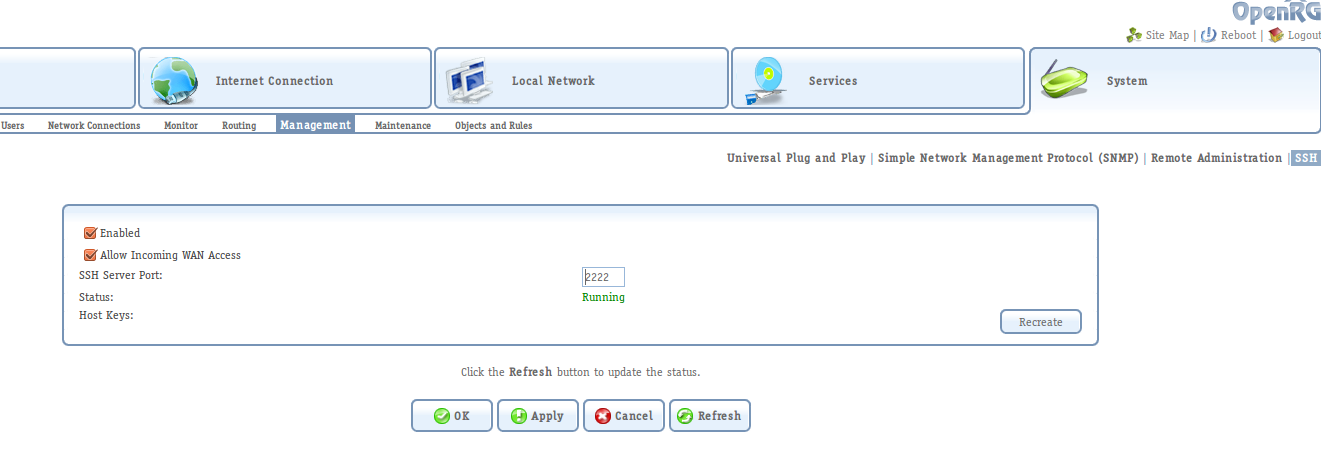
Solution Change router s SSH service port. This step will allow you to access the console-based configuration for the router (since I haven t found any way to do the steps described below from the web management interface). To do so, go to System > Management > SSH. Update the service port to something else than 22, for instance 2222.
OpenRG SSH service configuration

OpenRG SSH service configuration

Connect to the SSH interface Once you have changed the SSH service port, you can access it from a SSH client.
ssh -p 2222 admin@192.168.1.1
admin@192.168.1.1's password: 
OpenRG>
Once you have the console prompt, issue the following commands to allow SSH outbound traffic coming from the LAN and Wifi networks. After the last command, which saves and updates the device s configuration, you should be able to do SSH from any computer in your network to the Internet (thanks to tips from inkhorn).
OpenRG> conf set fw/policy/0/chain/fw_br0_in/rule/0/enabled 0
Returned 0
OpenRG> conf set fw/policy/0/chain/fw_br1_in/rule/0/enabled 0
Returned 0
OpenRG> conf reconf 1
Returned 0

1 April 2015

Joey Hess: I am ArchiveTeam

This seems as good a day as any to mention that I am a founding member of ArchiveTeam. ArchiveTeam logo Way back, when Geocities was closing down, I was one of a small rag-tag group who saved a copy of most of it. That snapshot has since generated more publicity than most other projects I've worked on. I've heard many heartwarning stories of it being the only remaining copy of baby pictures and writings of deceased friends, and so on. It's even been the subject of serious academic study as outlined in this talk, which is pretty awesome. Jason Scott in full stage regalia I'm happy to let this guy be the public face of ArchiveTeam in internet meme-land. It's a 0.1% project for me, and has grown into a well-oiled machine, albeit one that shouldn't need to exist. I only get involved these days when there's another crazy internet silo fire drill and/or I'm bored. (Rumors of me being the hand model for ArchiveTeam are, however, unsubstantiated.) Relevant XKCD

Benjamin Mako Hill: RomancR: The Future of the Sharing-Your-Bed Economy

romancer_logo Today, Aaron Shaw and I are pleased to announce a new startup. The startup is based around an app we are building called RomancR that will bring the sharing economy directly into your bedrooms and romantic lives. When launched, RomancR will bring the kind of market-driven convenience and efficiency that Uber has brought to ride sharing, and that AirBnB has brought to room sharing, directly into the most frustrating and inefficient domain of our personal lives. RomancR is Uber for romance and sex. Here s how it will work: Of course, there are many existing applications like Tinder and Grindr that help facilitate romance, dating, and hookups. Unfortunately, each of these still relies on old-fashion intrinsic ways of motivating people to participate in romantic endeavors. The sharing economy has shown us that systems that rely on these non-monetary motivations are ineffective and limiting! For example, many altruistic and socially-driven ride-sharing systems existed on platforms like Craigslist or Ridejoy before Uber. Similarly, volunteer-based communities like Couchsurfing and Hospitality Club existed for many years before AirBnB. None of those older systems took off in the way that their sharing economy counterparts were able to! The reason that Uber and AirBnB exploded where previous efforts stalled is that this new generation of sharing economy startups brings the power of markets to bear on the problems they are trying to solve. Money both encourages more people to participate in providing a service and also makes it socially easier for people to take that service up without feeling like they are socially in debt to the person providing the service for free. The result has been more reliable and effective systems for proving rides and rooms! The reason that the sharing economy works, fundamentally, is that it has nothing to do with sharing at all! Systems that rely on people s social desire to share without money projects like Couchsurfing are relics of the previous century. RomancR, which we plan to launch later this year, will bring the power and efficiency of markets to our romantic lives. You will leave your pitiful dating life where it belongs in the dustbin of history! Go beyond antiquated non-market systems for finding lovers. Why should we rely on people s fickle sense of taste and attractiveness, their complicated ideas of interpersonal compatibility, or their sense of altruism, when we can rely on the power of prices? With RomancR, we won t have to! Note: Thanks to Yochai Benkler whose example of how leaving a $100 bill on the bedside table of a person with whom you spent the night can change the nature of the a romantic interaction inspired the idea for this startup.

Benjamin Mako Hill: RomancR: The Future of the Sharing-Your-Bed Economy

romancer_logo Today, Aaron Shaw and I are pleased to announce a new startup. The startup is based around an app we are building called RomancR that will bring the sharing economy directly into your bedrooms and romantic lives. When launched, RomancR will bring the kind of market-driven convenience and efficiency that Uber has brought to ride sharing, and that AirBnB has brought to room sharing, directly into the most frustrating and inefficient domain of our personal lives. RomancR is Uber for romance and sex. Here s how it will work: Of course, there are many existing applications like Tinder and Grindr that help facilitate romance, dating, and hookups. Unfortunately, each of these still relies on old-fashion intrinsic ways of motivating people to participate in romantic endeavors. The sharing economy has shown us that systems that rely on these non-monetary motivations are ineffective and limiting! For example, many altruistic and socially-driven ride-sharing systems existed on platforms like Craigslist or Ridejoy before Uber. Similarly, volunteer-based communities like Couchsurfing and Hospitality Club existed for many years before AirBnB. None of those older systems took off in the way that their sharing economy counterparts were able to! The reason that Uber and AirBnB exploded where previous efforts stalled is that this new generation of sharing economy startups brings the power of markets to bear on the problems they are trying to solve. Money both encourages more people to participate in providing a service and also makes it socially easier for people to take that service up without feeling like they are socially in debt to the person providing the service for free. The result has been more reliable and effective systems for proving rides and rooms! The reason that the sharing economy works, fundamentally, is that it has nothing to do with sharing at all! Systems that rely on people s social desire to share without money projects like Couchsurfing are relics of the previous century. RomancR, which we plan to launch later this year, will bring the power and efficiency of markets to our romantic lives. You will leave your pitiful dating life where it belongs in the dustbin of history! Go beyond antiquated non-market systems for finding lovers. Why should we rely on people s fickle sense of taste and attractiveness, their complicated ideas of interpersonal compatibility, or their sense of altruism, when we can rely on the power of prices? With RomancR, we won t have to! Note: Thanks to Yochai Benkler whose example of how leaving a $100 bill on the bedside table of a person with whom you spent the night can change the nature of the a romantic interaction inspired the idea for this startup.

Lars Wirzenius: Obnam 4.1 released

It is with great pleasure and satisfaction that I release version 4.1 of Obnam, my backup program. This version includes a radically innovative approaches to data compression and de-duplication, as well as some other changes and bug fixes. Major user-visible changes: Minor user-visible changes: Bug fixes:

31 March 2015

Zlatan Todori : Interviews with FLOSS developers: Francesca Ciceri

Debian and FLOSS community don't only occupy coding developers. They occupy people who write news, who talk about FLOSS, who help on booths and conferences, who create artistic forms of the community and so many others that contribute in countless ways. A lady, that is doing many of that is Francesca Ciceri, known in Debian as MadameZou. She is non-packaging Debian Developer, a fearless warrior for diversity and a zombie fan. Although it sounds intimidating, she is deep caring and great human being. So, what has MadaZou to tell us? Picture of MadameZou Who are you? My name is Francesca and I'm totally flattered by your intro. The fearless warrior part may be a bit exaggerated, though. What have you done and what are you currently working on in FLOSS world? I've been a Debian contributor since late 2009. My journey in Debian has touched several non-coding areas: from translation to publicity, from videoteam to www. I've been one of the www.debian.org webmasters for a while, a press officer for the Project as well as an editor for DPN. I've dabbled a bit in font packaging, and nowadays I'm mostly working as a Front Desk member. Setup of your main machine? Wow, that's an intimate question! Lenovo Thinkpad, Debian testing. Describe your current most memorable situation as FLOSS member? Oh, there are a few. One awesome, tiring and very satisfying moment was during the release of Squeeze: I was member of the publicity and the www teams at the time, and we had to pull a 10 hours of team work to put everything in place. It was terrible and exciting at the same time. I shudder to think at the amount of work required from ftpmaster and release team during the release. Another awesome moment was my first Debconf: I was so overwhelmed by the sense of belonging in finally meeting all these people I've been worked remotely for so long, and embarassed by my poor English skills, and overall happy for just being there... If you are a Debian contributor I really encourage you to participate to Debian events, be they small and local or as big as DebConf: it really is like finally meeting family. Some memorable moments from Debian conferences? During DC11, the late nights with the "corridor cabal" in the hotel, chatting about everything. A group expedition to watch shooting stars in the middle of nowhere, during DC13. And a very memorable videoteam session: it was my first time directing and everything that could go wrong, went wrong (including the speaker deciding to take a walk outside the room, to demonstrate something, out of the cameras range). It was a disaster, but also fun: at the end of it, all the video crew was literally in stitches. But there are many awesome moments, almost too many to recall. Each conference is precious on that regard: for me the socializing part is extremely important, it's what cements relationships and help remote work go smoothly, and gives you motivation to volunteer in tasks that sometimes are not exactly fun. You are known as Front Desk member for DebConf's - what work does it occupy and why do you enjoy doing it? I'm not really a member of the team: just one of Nattie's minions! You had been also part of DebConf Video team - care to share insights into video team work and benefits it provides to Debian Project? The video team work is extremely important: it makes possible for people not attending to follow the conference, providing both live streaming and recording of all talks. I may be biased, but I think that DebConf video coverage and the high quality of the final recordings are unrivaled among FLOSS conferences - especially since it's all volunteer work and most of us aren't professional in the field. During the conference we take shifts in filming the various talks - for each talk we need approximately 4 volunteers: two camera operators, a sound mixer and the director. After the recording, comes the boring part: reviewing, cutting and sometimes editing the videos. It's a long process and during the conference, you can sometimes spot the videoteam members doing it at night in the hacklab, exhausted after a full day of filming. And then, the videos are finally ready to be uploaded, for your viewing pleasure. During the last years this process has become faster thanks to the commitment of many volunteers, so that now you have to wait only few days, sometimes a week, after the end of the conference to be able to watch the videos. I personally love to contribute to the videoteam: you get to play with all that awesome gear and you actually make a difference for all the people who cannot attend in person. You are also non-packaging Debian Developer - how does that feel like? Feels awesome! The mere fact that the Debian Project decided - in 2009 via a GR - to recognize the many volunteers who contribute without doing packaging work is a great show of inclusiveness, in my opinion. In a big project like Debian just packaging software is not enough: the final result relies heavily on translators, sysadmins, webmasters, publicity people, event organizers and volunteers, graphic artists, etc. It's only fair that these contributions are deemed as valuable as the packaging, and to give an official status to those people. I was one of the firsts non-uploading DD, four years ago, and for a long time it was just really an handful of us. In the last year I've seen many others applying for the role and that makes me really happy: it means that finally the contributors have realized that they deserve to be an official part of Debian and to have "citizenship rights" in the project. You were the leading energy on Debian's diversity statement - what gave you the energy to drive into it? It seemed the logical conclusion of the extremely important work that Debian Women had done in the past. When I first joined Debian, in 2009, as a contributor, I was really surprised to find a friendly community and to not be discriminated on account of my gender or my lack of coding skills. I may have been just lucky, landing in particularly friendly teams, but my impression is that the project has been slowly but unequivocally changed by the work of Debian Women, who raised first the need for inclusiveness and the awareness about the gender problem in Debian. I don't remember exactly how I stumbled upon the fact that Debian didn't have a Diversity Statement, but at first I was very surprised by it. I asked zack (Stefano Zacchiroli), who was DPL at the time, and he encouraged me to start a public discussion about it, sending out a draft - and helped me all the way along the process. It took some back and forth in the debian-project mailing list, but the only thing needed was actually just someone to start the process and try to poke the discussion when it stalled - the main blocker was actually about the wording of the statement. I learned a great deal from that experience, and I think it changed completely my approach in things like online discussions and general communication within the project. At the end of the day, what I took from that is a deep respect for who participated and the realization that constructive criticism does require certainly a lot of work for all parts involved, but can happen. As for the statement in itself: these things are as good as you keep them alive with best practices, but I think that are better stated explicitly rather than being left unsaid. You are involved also with another Front Desk, the Debian's one which is involved with Debian's New Members process - what are tasks of that FD and how rewarding is the work on it? The Debian Front Desk is the team that runs the New Members process: we receive the applications, we assign the applicant a manager, and we verify the final report. In the last years the workflow has been simplified a lot by the re-design of the nm.debian.org website, but it's important to keep things running smoothly so that applicants don't have too lenghty processes or to wait too much before being assigned a manager. I've been doing it for a less more than a month, but it's really satisfying to usher people toward DDship! So this is how I feel everytime I send a report over to DAM for an applicant to be accepted as new Debian Developer: Crazy pic How do you see future of Debian development? Difficult to say. What I can say is that I'm pretty sure that, whatever the technical direction we'll take, Debian will remain focused on excellence and freedom. What are your future plans in Debian, what would you like to work on? Definetely bug wrangling: it's one of the thing I do best and I've not had a chance to do that extensively for Debian yet. Why should developers and users join Debian community? What makes Debian a great and happy place? We are awesome, that's why. We are strongly committed to our Social Contract and to users freedom, we are steadily improving our communication style and trying to be as inclusive as possible. Most of the people I know in Debian are perfectionists and outright brilliant in what they do. Joining Debian means working hard on something you believe, identifying with a whole project, meeting lots of wonderful people and learning new things. It ca be at times frustrating and exhausting, but it's totally worth it. You have been involved in Mozilla as part of OPW - care to share insights into Mozilla, what have you done and compare it to Debian? That has been a very good experience: it meant have the chance to peek into another community, learn about their tools and workflow and contribute in different ways. I was an intern for the Firefox QA team and their work span from setting up specific test and automated checks on the three version of Firefox (Stable, Aurora, Nightly) to general bug triaging. My main job was bug wrangling and I loved the fact that I was a sort of intermediary between developers and users, someone who spoke both languages and could help them work together. As for the comparison, Mozilla is surely more diverse than Debian: both in contributors and users. I'm not only talking demographic, here, but also what tools and systems are used, what kind of skills people have, etc. That meant reach some compromises with myself over little things: like having to install a proprietary tool used for the team meetings (and getting crazy in order to make it work with Debian) or communicating more on IRC than on mailing lists. But those are pretty much the challenges you have to face whenever you go out of your comfort zone . You are also volunteer of the Organization for Transformative Works - what is it, what work do you do and care to share some interesting stuff? OTW is a non profit organization to preserve fan history and cultures, created by fans. Its work range from legal advocacy and lobbying for fair use and copyright related issues, developing and maintaining AO3 -- a huge fanwork archive based on open-source software --, to the production of a peer-reviewed academic journal about fanworks. I'm an avid fanfiction reader and writer, and joining the OTW volunteers seemed a good way to give back to the community - in true Debian fashion . As a volunteer, I work for the Translation Committee: we are more than a hundred people - divided in several language teams - translating the OTW website, the interface of AO3 archive, newsletter, announcements and news posts. We have a orga-wide diversity statement, training for recruits, an ever growing set of procedures to smooth our workflow, monthly meetings and movie nights. It's an awesome group to work with. I'm deeply invested in this kind of work: both for the awesomeness of OTW people and for the big role that fandom and fanworks have in my life. What I find amazing is that the same concept we - as in the FLOSS ecosystem - apply to software can be applied to cultural production: taking a piece of art you love and expand, remix, explore it. Just for the fun of it. Protect and encourage the right to play in this cultural sandbox is IMO essential for our society. Most of the participants in the fandom come from marginalised group or minorities whose point of view is usually not part of the mainstream narratives. This makes the act of writing, remixing and re-interpreting a story not only a creative exercise but a revolutionary one. As Elizabeth Minkel says: "My preferred explanation is the idea that the vast majority of what we watch is from the male perspective authored, directed, and filmed by men, and mostly straight white men at that. Fan fiction gives women and other marginalised groups the chance to subvert that perspective, to fracture a story and recast it in her own way." In other words, "fandom is about putting debate and conversation back into an artistic process". On a personal side - you do a lot of DIY, handmade works. What have you done, what joy does it bring to you and share with us a picture of it? I like to think that the hacker in me morphs in a maker whenever I can actually manipulate stuff. The urge to explore ways of doing things, of create and change is probably the same. I've been blessed with curiousity and craftiness and I love to learn new DIY techniques: I cannot describe it, really, but if I don't make something for a while I actually feel antsy. I need to create stuff. Nowadays, I'm mostly designing and sewing clothes - preferably reproductions of dresses from the 40s and the 50s - and I'm trying to make a living of that. It's a nice challenge: there's a lot of research involved, as I always try to be historically accurate in design, sewing tecniques and material, and many hours of careful attention to details. I'm right in the process of make photoshoots for most of my period stuff, so I'll share with you something different: a t-shirt refashion done with the DebConf11 t-shirt! (here's the tutorial) T-shirt pic

Niels Thykier: Jessie is coming the 2015-04-25

Indeed, we settled on a release date for Jessie and pretty quick too. I sent out a poll on the 28th of March and yesterday, it was clear that the 25th of April was our release date. :) With that said, we still have some items left that needs to be done.
Filed under: Debian, Release-Team

30 March 2015

Carl Chenet: Verify the backups of backup-manager

Follow me on Identi.ca or Twitter or Diaspora*diaspora-banner Backup-manager is a tool creating backups and storing them locally. It s really usefult to keep a regular backup of a quickly-changing trees of files (like a development environment) or for traditional backups if you have a NFS mount on your server. Backup-managers is also able to send backup itself to another server by FTP. In order to verify the backups created by backup-manager, we will use also Backup Checker (stars appreciated :) ), the automated tool to verify backups. For each newly-created backup we want to control that: Installing what we need We install backup-manager and backup checker. If you use Debian Wheezy, just use the following command:
apt-key adv --keyserver pgp.mit.edu --recv-keys 2B24481A \
&& echo "deb http://debian.mytux.fr wheezy main" > /etc/apt/sources.list.d/mytux.list \
&& apt-get update \
&& apt-get install backupchecker backup-manager
Backup Checker is also available for Debian Squeeze, Debian Sid, FreeBSD. Check out the documentation to install it from PyPi or from sources. Configuring Backup-Manager Backup-manager will ask what directory you want to store backups, in our case we choose /home/joe/dev/wip In the configuration file /etc/backup-manager.conf, you need to have the following lines:
export BM_BURNING_METHOD="none"
export BM_UPLOAD_METHOD="none"
export BM_POST_BACKUP_COMMAND="backupchecker -c /etc/backupchecker -l /var/log/backupchecker.log"
Configuring Backup Checker In order to configure Backup Checker, use the following commands:
# mkdir /etc/backupchecker && touch /var/log/backupchecker.log
Then write the following in /etc/backupchecker/backupmanager.conf:
[main]
name=backupmanager
type=archive
path=/var/archives/laptop-home-joe-dev-wip.%Y%m%d.master.tar.gz
files_list=/etc/backupchecker/backupmanager.list
You can see we re using placeholders for the path value, in order to match each time the latest archive. More information about Backup Checker placeholders in the official documentation. Last step, the description of your controls on the backup:
[files]
wip/data  type d
wip/config/accounts  md5 27c9d75ba5a755288dbbf32f35712338
wip/dump/dump.sql  >100mb
Launch Backup Manager Just launch the following command:
# backup-manager
After Backup Manager is launched, Backup Checker is automatically launched and verify the new backup of the day where Backup Manager stores the backups. Possible control failures Lets say the dump does not have the expected size. It means someone may have messed up with the database! Backup Checker will warn you with the following message in /var/log/backupchecker.log:
$ cat /var/log/backupchecker.log
WARNING:root:1 file smaller than expected while checking /var/archives/laptop-home-joe-dev-wip-20150328.tar.gz: 
WARNING:root:wip/dump/dump.sql size is 18. Should have been bigger than 104857600.
Other possible failures : someone created an account without asking anyone. The hash sum of the file will change. Here is the alert generated by Backup Checker:
$ cat /var/log/backupchecker.log
WARNING:root:1 file with unexpected hash while checking /var/archives/laptop-home-joe-dev-wip-20150328.tar.gz:
WARNING:root:wip/config/accounts hash is 27c9d75ba5a755288dbbf32f35712338. Should have been 27c9d75ba3a755288dbbf32f35712338.
Another possible failure: someone accidentally (or not) removed the data directory! Backup Checker will detect the missing directory and warn you:
$ cat /var/log/backupchecker.log
WARNING:root:1 file missing in /var/archives/laptop-home-joe-dev-wip-20150328.tar.gz: 
WARNING:root:wip/data
Awesome isn t it? The power of a backup tool combined with an automated backup checker. No more surprise when you need your backups. Moreover you spare the waste of time and efforts to control the backup by yourself. weneedyou What about you? Let us know what you think of it. We would be happy to get your feedbacks. The project cares about our users and the outdated feature was a awesome idea in a feature request by one of the Backup Checker user, thanks Laurent!

Dimitri John Ledkov: Boiling frog, or when did we loose it with /etc ?

$ sudo find /etc -type f wc -l
2794

StatelessWhen was the last time you looked at /etc and thought - "I honestly know what every single file in here is". Or for example had a thought "Each file in here is configuration changes that I made". Or for example do you have confidence that your system will continue to function correctly if any of those files and directories are removed?

Traditionally most *NIX utilities are simple enough utilities, that do not require any configuration files what's so ever. However most have command line arguments, and environment variables to manipulate their behavior. Some of the more complex utilities have configuration files under /etc, sometimes with "layer" configuration from user's home directory (~/). Most of them are generally widely accepted. However, these do not segregate upstream / distribution / site administrator / local administrator / user configuration changes. Most update mechanisms created various ways to deal with merging and maintaining the correct state of those. For example both dpkg & RPM (%config) have elaborate strategies and policies and ways to deal with them. However, even today, still, they cause problems: prompting user for whitespace changes in config files, not preserving user changes, or failing to migrate them.

I can't find exact date, but it has now been something like 12 years since XDG Base directory specification was drafted. It came from Desktop Environment requirements, but one thing it achieves is segregation between upstream / distro / admin / user induced changes. When applications started to implement Base directory specification, I started to feel empowered. Upstream ships sensible configs in /usr, distribution integrators ship their overlay tweaks packaged in /usr, my site admin applies further requirements in /etc, and as I user I am free to improve or brake everything with configs in ~/. One of the best things from this setup - no upgrade prompts, and ease of reverting each layer of those configs (or at least auditing where the settings are coming from).

However, the uptake of XDG Base directory spec is slow / non-existing among the core components of any OS today. And at the same time /etc has grown to be a dumping ground for pretty much everything under the sun:
  • Symlink farms - E.g. /etc/rc*.d/*, /etc/systemd/system/*.wants/*, /etc/ssl/certs/*
  • Cache files - E.g. /etc/ld.so.cache
  • Empty (and mandatory) directories
  • Empty (and mandatory) "configuration" files. - E.g. whitespace & comments only
Let's be brutally honest and say that none of the above belongs in /etc. /etc must be for end-user configuration only, made by the end user alone and nobody else (or e.g. an automation tool driven by the end-user, like puppet).

Documentation of available configuration options and syntax to specify those in the config files should be shipped... in the documentation. E.g. man pages, /usr/share/doc, and so on. And not as the system-wide "example" config files. Absence of the files in /etc must not be treated as fatal, but a norm, since most users use default settings (especially for the most obscure options). Lastly compiled-in defaults should be used where possible, or e.g. layer configuration from multiple locations (e.g. /usr, /etc, ~/ where appropriate).

Above observations are not novel, and shared by most developers and users in the wider open source ecosystem. There are many projects and concepts to deal with this problem by using automation (e.g. puppet, chef), by migrating to new layouts (e.g. implementing / supporting XDG base dir spec), using "app bundles" (e.g. mobile apps, docker), or fully enumerating/abstracting everything in a generic manner (e.g. NixOS). Whilst fixing the issue at hand, these solutions do increase the dependency on files in /etc to be available. In other words we grew a de-facto user-space API we must not break, because modifications to the well known files in /etc are expected to take effect by both users and many administrator tools.

Since August last year, I have joined Open Source Technology Center at Intel, and have been working on Clear Linux* Project for Intel Architecture. One of the goals we have set out is to achieve stateless operation - that is to have empty /etc by default, reserved for user modification alone, yet continuing to support all legacy / well-known configuration paths. The premise is that all software can be patched with auto-detection, built-in defaults or support for layered configuration to achieve this. I hope that this work would interest everyone and will be widely adopted.

Whilst the effort to convert everything is still on going, I want to discuss a few examples of any core system.

ShadowThe login(1) command, whilst having built-in default for every single option exits with status 1, if it cannot stat(2) login.defs(5) file.

The passwd(1) command will write out the salted/hashed password in the passwd(5) file, rather than in shadow(5), if it cannot stat the shadow(5) file. There is similar behavior with gshadow. I found it very ironic, that upstream project "shadow" does not use shadow(5) by default.

Similarly, stock files manipulated by passwd/useradd/groupadd utilities are not created, if missing.

Some settings in login.defs(5) are not applicable, when compiled with PAM support, yet present in the default shipped login.defs(5) file.

Patches to resolve above issues are undergoing review on the upstream mailing list.
DBusIn xml based configuration, includedir' elements are mandatory to exist on disk, that is empty directory must be present, if referenced. If these directories are non-existant, the configuration fails to load and the system or session bus are not started.

Similarly, upstream have general agreement with the stateless concept and patches to move all of dbus default configurations from /etc to /usr are being reviewed for inclusion at the bug tracker. I hope this change will make into the 1.10 stable release.

GNU Lib CToday, we live in a dual-stack IPv4 and IPv6 world, where even the localhost has multiple IP addresses. As a slightly ageist time reference, the first VCS I ever used was git. Thus when I read below, I get very confused:
$ cat /etc/host.conf
# The "order" line is only used by old versions of the C library.
order hosts,bind
multi on
Why not simply do this:
--- a/resolv/res_hconf.c
+++ b/resolv/res_hconf.c
@@ -309,6 +309,8 @@ do_init (void)
if (hconf_name == NULL)
hconf_name = _PATH_HOSTCONF;

+ arg_bool (ENV_MULTI, 1, "on", HCONF_FLAG_MULTI);
+
fp = fopen (hconf_name, "rce");
if (fp)

There are still many other packages that needed fixes similar to above. Stay tuned for further stateless observations about Glibc, OpenSSH, systemd and other well known packages.

In the mean time, you can try out https://clearlinux.org/ images that implement above and more already. If you want to chat about it more, comment on G+, find myself on irc - xnox @ irc.freenode.net #clearlinux and join our mailing list to kick the conversation off, if you are interested in making the world more stateless.

ps.
I am a professional Linux Distribution developer, currently employed by Intel, however the postings on this site are my own and don't necessarily represent Intel's or any other past/present/future employer positions, strategies, or opinions.

* Other names and brands may be claimed as the property of others


29 March 2015

Eddy Petri&#537;or: HOWTO: Disassemble a big endian Arm raw memory dump with objdump

This is trivial and very useful for embedded code dumps, but in case somebody (including future me) needs this, here it goes:
arm-none-eabi-objdump -D -b binary -m arm -EB dump.bin less
The options mean:
By default, endianness is assumed to be little endian, or at least that's happened with my toolchain.

Zlatan Todori : Its all about fun

The percentage that women in Debian occupy as DDs is ~2%. Yes, just ~2% ladies that are DDs! So that means ~98% of DDs are gentelmen. some picture with rage meme I know there are more of ladies in Debian, so I firstly urge you, for love of Debian, to apply if you are contributing to this project, love its community and want to see Debian taking over the universe (okay, it seems that we conquered outer space so we need a help on Earth). So why is the number this low? Well maybe it's too precious to us currently inside that we want to prevent it being spoiled from outside. Also there seems to be not that much of younger DDs. Why is that important - well, young people like to do it and not to think about it. Many time they just break it, but many time they also do a breakthrough. Why is difference important and why should we embrace it? It's very important because it breaks a monopoly on view and behavior. It brings views not just from a larger number of people, but also from people from different backgrounds, and in constructive conversation it can put even more pluses on current workflow or it can counter it with good arguments. In a project of its size and worldwide geolocation of its developers, this is true for Debian more then any other projects I know. We need more women so we can balance our inner workings and have a better understanding of humanity and how is it moving, what and why does it need and where is it steering. That way we can produce a community which will improve quality of OS that we produce - because of sheer number of different people working on the same thing bringing to it its own personal touch. So, ladies and youth all over the world, unite and join in Debian because without diversity Debian can't grow beyond its current size. Also, no, Debian is not about code only, it needs painters, musicians, people that want to talk about Debian, people that share love and happiness, people that want to build better communities, UI/UX designers, makers, people who know how to repair a bike, athletes, homebrew beer producers, lawyers (just while world gets rid of laws, then we don't need you), actors, writters... Why, well because world and communities are made up from all that diversity and that's what makes it a better and not a monotone place. But I just use Debian. Well, do you feel love towards Debian and its work? Would you like to feel more as integral part of community? If the answer is big fat YES, then you should be a DD too. Every person that feels it's part of Debians philosophy about freedom and behaving in good manner should join Debian. Every person that feels touched and enhanced by Debian's work should become part of community and share its experience how Debian touched their soul, impacted their life. If you love Debian, you should be free to contribute to it in whatever manner and you should be free to express your love towards it. If you think lintian is sexy, or shebang is a good friends of yours, or you enjoy talking to MadameZou about Debian and zombies (yeah, we do have all kinds of here), or you like Krita, or you hate the look of default XFCE theme, or you can prove that you a more crazy developer then paultag - just hop into community and try to integrate in it. You will meet great folks, have a lot of conversation about wine and cheese, play some dangerous card games and even learn about things like bokononism (yeah I am looking at you dkg!). Now for the current Debian community - what the hell is packaging and non-packaging Debian Developer? Are one better then others? Do others stink? They don't know to hug? WHAT? Yes I know that inexperienced person shouldn't have a permission to access Debian packaging infrastructure, but I have the feeling that even that person knows that. Every person should have a place in Debian and acknowledge other fields. So yes, software developers need access to Debian packaging infrastructure, painters don't. I think we can agree on this. So lets abolish the stupid term and remove the difference in our community. Lets embrace the difference, because if someone writes a good poem about Debian heroism I could like it more then flashplugin-nonfree! Yep, I made that comparison on purpose so you can give a thought about it. Debian has excellent community regarding operating system that it's producing. And it's not going away, not at least anytime soon. But it will not go forward if we don't give additional push as human beings, as people who care about their fellow Debianites. And we do care, I know that, we just need to push it more public. We don't hide bugs, we for sure shouldn't hide features. It will probably bring bad seeds too, but we have mechanisms and will to counter that. If we, on average 10 bad seeds, get some crazy good hacker or crazy lovely positive person like this lady, we will be on right path. Debian is a better place, it should lead in effort to bring more people into FLOSS world and it should allow people to bring more of diversity into Debian. draw a picture where it says next year 3 dpl candidates should be only women and at least one of them not involved in packaging

28 March 2015

Matt Zimmerman: What I think about thought

Only parts of us will ever
touch o n l y parts of others
one s own truth is just that really one s own truth.
We can only share the part that is u n d e r s t o o d b y within another s knowing acceptable t o t h e o t h e r t h e r e f o r e so one
is for most part alone.
As it is meant to be in
evidently in nature at best t h o u g h perhaps it could make
our understanding seek
another s loneliness out.
unpublished poem by Marilyn Monroe, via berlin-artparasites This poem inspired me to put some ideas into words this morning, an attempt to summarize my current working theory of consciousness. Ideas travel through space and time. An idea that exists in my mind is filtered through my ability to express it somehow (words, art, body language, ), and is then interpreted by your mind and its models for understanding the world. This shifts your perspective in some way, some or all of which may be unconscious. When our minds encounter new ideas, they are accepted or rejected, reframed, and integrated with our existing mental models. This process forms a sort of living ecosystem, which maintains equilibrium within the realm of thought. Ideas are born, divide, mutate, and die in the process. Language, culture, education and so on are stable structures which form and support this ecosystem. Consciousness also has analogues of the immune system, for example strongly held beliefs and models which tend to reject certain ideas. Here again these can be unconscious or conscious. I ve seen it happen that if someone hears an idea they simply cannot integrate, they will behave as if they did not hear it at all. Some ideas can be identified as such a serious threat that ignoring them is not enough to feel safe: we feel compelled to eliminate the idea in the external world. The story of Christianity describes a scenario where an idea was so threatening to some people that they felt compelled to kill someone who expressed it. A microcosm of this ecosystem also exists within each individual mind. There are mental structures which we can directly introspect and understand, and others which we can only infer by observing our thoughts and behaviors. These structures communicate with each other, and this communication is limited by their ability to speak each other s language . A dream, for example, is the conveyance of an idea from an unconscious place to a conscious one. Sometimes we get the message, and sometimes we don t. We can learn to interpret, but we can t directly examine and confirm if we re right. As in biology, each part of this process introduces uncountable errors , but the overall system is surprisingly robust and stable. This whole system, with all its many minds interacting, can be thought of as an intelligence unto itself, a gestalt consciousness. This interpretation leads to some interesting further conclusions: Naturally, this is by no means an original idea (can such a thing exist?). It is my own take on the subject, informed both consciously and unconsciously by my own study, first-hand experience, conversations I ve had with others, and so on. It s informed by the countless thinkers who have influenced me. Its expression is limited by my ability to write about it in a way that makes sense to other people.
Maybe some of this makes sense to you, and maybe I seem insane, or maybe both. Hopefully you don t find that you have an inexplicable unconscious desire to kill me!

Next.

Previous.