About a month ago, I got tired of waiting for the
newest member of
the Raspberry product
lineup
to be sold in Mexico, and I bought it from a Chinese reseller through
a big online shopping platform. I paid quite a bit of premium (~US$85
instead of the advertised US$15), and got it delivered ten days
later

Anyway, it s known this machine does not yet boot mainline Linux. The
vast majority of ARM systems require the bootloader to load a
Device
Tree file, presenting the hardware characteristics map. And while the
RPi Zero 2 W (hey what an
awful and confusing naming scheme they
chose!) is mostly similar to a RPi3B+, it is not quite the same
thing. A kernel with RPi3B+ s device tree will refuse to boot.
Anyway, I started digging, and found that some days ago
Stephan
Wahren sent a patch to the linux-arm-kernel mailing
list
with a matching device tree. Read the patch! It s quite simple to read
(what is harder is to know where each declaration should go, if you
want to write your own, of course). It basically includes all basic
details for the main chip in the RPi3 family (BCM2837), pulls in also
the declarations from the BCM2836 present in the RPi2, and adds the
necessary bits for the USB OTG connection and the WiFi and Bluetooth
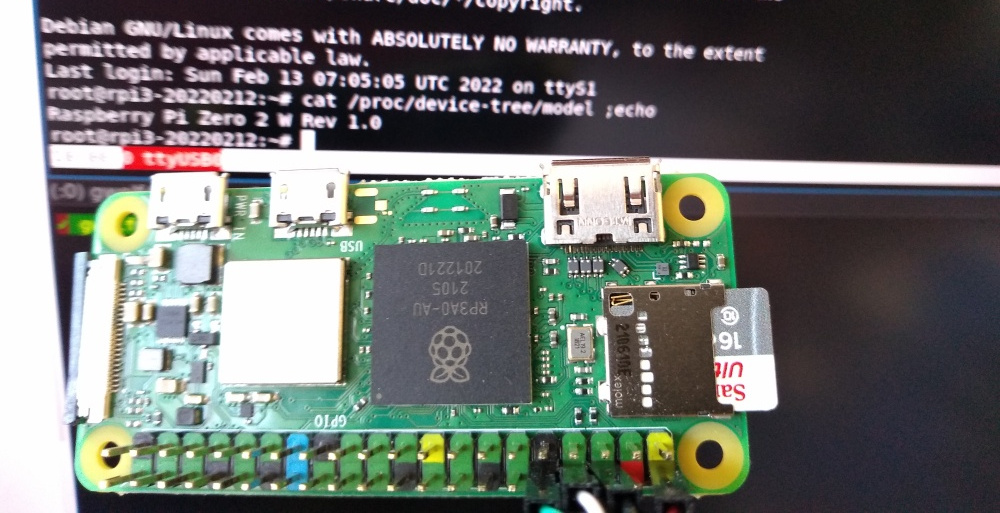
declarations. Registers the model name as
Raspberry Pi Zero 2 W,
which you can easily see in the following photo, informs the kernel it
has 512MB RAM, and Well, really, it s an easy device tree to read,
don t be shy!
So, I booted my RPi 3B+ with a
freshly downloaded Bookworm
image,
installed and unpacked
linux-source-5.15, applied Stephan s patch,
and added the following for the DTB to be generated in the arm64 tree
as well:
--- /dev/null   2022-01-26 23:35:40.747999998 +0000
+++ arch/arm64/boot/dts/broadcom/bcm2837-rpi-zero-2-w.dts       2022-02-13 06:28:29.968429953 +0000
@@ -0,0 +1 @@
+#include "arm/bcm2837-rpi-zero-2-w.dts"
Then, ran a simple
make dtbs, and Failed, because
bcm283x-rpi-wifi-bt.dtsi is not yet in the kernel .
OK, no worries: Getting wireless to work is a later step. I commented
out the lines causing conflict (10, 33-35, 134-136), and:
root@rpi3-20220212:/usr/src/linux-source-5.15# make dtbs
  DTC     arch/arm64/boot/dts/broadcom/bcm2837-rpi-zero-2-w.dtb
Great!
Just copied over that generated file to /boot/firmware/, moved the SD
over to my RPiZ2W, and behold! It boots!
When I bragged about it in
#debian-raspberrypi, steev suggested me
to pull in the
WiFi patch, that has also been
submitted
(but not yet accepted) for kernel inclusion. I did so, uncommented the
lines I modified, and built again. It builds correctly, and again
copied the DTB over. It still does not find the WiFi;
dmesg still
complains about a missing bit of firmware (
failed to load
brcm/brcmfmac43430b0-sdio.raspberrypi,model-zero-2-w.bin
). Steev
pointed out it can be downloaded from
RPi Distro s GitHub
page,
but I called it a night and didn t pursue it any further ;-)
So I understand this post is still a far cry from saying
our
images properly boot under a RPi 0 2 W ,
but we will get there



 . This is somewhat from a Republican perspective. That is also the reason they are much anti-science.
 The
The 
 As of 2022-02-16, Launchpad supports a couple of features on its
  Earlier this week, Neil McGovern
  I have been using
  Since it is my first package I made for Arch, it took me a bit of reading through the excellent wiki of Arch, and comparing a few other
  In 2017, I was attending FOSDEM when GNOME announced that I was to become the new Executive Director of the Foundation. Now, nearly 5 years later, I ve decided the timing is right for me to step back and for GNOME to start looking for its next leader. I ve been working closely with Rob and the rest of the board to ensure that there s an extended and smooth transition, and that GNOME can continue to go from strength to strength.
GNOME has changed a lot in the last 5 years, and a lot has happened in that time. As a Foundation, we ve gone from a small team of 3, to employing people to work on marketing, investment in technical frameworks, conference organisation and much more beyond. We ve become the default desktop on all major Linux distributions. We ve launched Flathub to help connect application developers directly to their users. We ve dealt with patent suits, trademarks, and bylaw changes. We ve moved our entire development platform to GitLab. We released 10 new GNOME releases, GTK 4 and GNOME 40. We ve reset our relationships with external community partners and forged our way towards that future we all dream of where everyone is empowered by technology they can trust.
For that future, we now need to build on that work. We need to look beyond the traditional role that desktop Linux has held and this is something that GNOME has always been able to do. I ve shown that the Foundation can be more than just a bank account for the project, and I believe that this is vital in our efforts to build a diverse and sustainable free software personal computing ecosystem. For this, we need to establish programs that align not only with the unique community and technology of the project, but also deliver those benefits to the wider world and drive real impact.
5 years has been the longest that the Foundation has had an ED for, and certainly the longest that I ve held a single post for. I remember my first GUADEC as ED. As you may know, like many of you, I m used to giving talks at conferences and yet I have never been so nervous as when I walked out on that stage. However, the welcome and genuine warmth that I received that day, and the continued support throughout the last 5 years makes me proud of what a welcoming and amazing community GNOME is. Thank you all.
In 2017, I was attending FOSDEM when GNOME announced that I was to become the new Executive Director of the Foundation. Now, nearly 5 years later, I ve decided the timing is right for me to step back and for GNOME to start looking for its next leader. I ve been working closely with Rob and the rest of the board to ensure that there s an extended and smooth transition, and that GNOME can continue to go from strength to strength.
GNOME has changed a lot in the last 5 years, and a lot has happened in that time. As a Foundation, we ve gone from a small team of 3, to employing people to work on marketing, investment in technical frameworks, conference organisation and much more beyond. We ve become the default desktop on all major Linux distributions. We ve launched Flathub to help connect application developers directly to their users. We ve dealt with patent suits, trademarks, and bylaw changes. We ve moved our entire development platform to GitLab. We released 10 new GNOME releases, GTK 4 and GNOME 40. We ve reset our relationships with external community partners and forged our way towards that future we all dream of where everyone is empowered by technology they can trust.
For that future, we now need to build on that work. We need to look beyond the traditional role that desktop Linux has held and this is something that GNOME has always been able to do. I ve shown that the Foundation can be more than just a bank account for the project, and I believe that this is vital in our efforts to build a diverse and sustainable free software personal computing ecosystem. For this, we need to establish programs that align not only with the unique community and technology of the project, but also deliver those benefits to the wider world and drive real impact.
5 years has been the longest that the Foundation has had an ED for, and certainly the longest that I ve held a single post for. I remember my first GUADEC as ED. As you may know, like many of you, I m used to giving talks at conferences and yet I have never been so nervous as when I walked out on that stage. However, the welcome and genuine warmth that I received that day, and the continued support throughout the last 5 years makes me proud of what a welcoming and amazing community GNOME is. Thank you all.

 Back to the old and new normal: inbox zero
So, a long time ago, on the last two days of January 2020 I had reached zero unread mails
in my inbox and all mailing lists and then... some stuff kept me distracted for a (too) long time...
And then two weeks ago on the 29th of January 2022, I've reached inbox zero again,
and again on the 30th and then I had a hardware issue and couldn't really use my computer
for two days (one day trying to fix, the other copying data around...) and thus
only on February 2nd I've hit zero unread mails again and again and again, every
day for the last 9 days up until today. Yay!
I'm sure there will be days (and weeks) where I won't manage to deal with all
my incoming mail everyday, but I surely hope I'll manage at least once a month.
As I did in 2019 when I started tracking this
Back to the old and new normal: inbox zero
So, a long time ago, on the last two days of January 2020 I had reached zero unread mails
in my inbox and all mailing lists and then... some stuff kept me distracted for a (too) long time...
And then two weeks ago on the 29th of January 2022, I've reached inbox zero again,
and again on the 30th and then I had a hardware issue and couldn't really use my computer
for two days (one day trying to fix, the other copying data around...) and thus
only on February 2nd I've hit zero unread mails again and again and again, every
day for the last 9 days up until today. Yay!
I'm sure there will be days (and weeks) where I won't manage to deal with all
my incoming mail everyday, but I surely hope I'll manage at least once a month.
As I did in 2019 when I started tracking this  Reaching inbox zero every day is good for several reasons and probably the most
important one is peace of mind. Even though the incoming flood of email never really
stops, by reaching inbox zero I can achieve the feeling that I've dealt with all
my emails for the day and that I can put email off my focus, at least for that
day and despite emails coming in...
...and then email is too easy to be used as a todo list. Narf. So I guess I need
to improve those workflows eventually as well. And offline days, do you remember
those? Fully offline even, and by choice?!!
Reaching inbox zero every day is good for several reasons and probably the most
important one is peace of mind. Even though the incoming flood of email never really
stops, by reaching inbox zero I can achieve the feeling that I've dealt with all
my emails for the day and that I can put email off my focus, at least for that
day and despite emails coming in...
...and then email is too easy to be used as a todo list. Narf. So I guess I need
to improve those workflows eventually as well. And offline days, do you remember
those? Fully offline even, and by choice?!!
 As a Debian Developer I have a discount on using Gandi and I ve been using it for quite a long time and have been very happy with it. I ve been using it for registering domains. For example this blog s domain is managed by my Gandi account.
Using publicly registered domain in private-only setup In addition to using this DNS registrar for public stuff, like a blog, one can also use it for a domain accessible only within a private network.
As a Debian Developer I have a discount on using Gandi and I ve been using it for quite a long time and have been very happy with it. I ve been using it for registering domains. For example this blog s domain is managed by my Gandi account.
Using publicly registered domain in private-only setup In addition to using this DNS registrar for public stuff, like a blog, one can also use it for a domain accessible only within a private network.
 Recently, I've wrote