Sporting a beautiful 10.1 1920x1200 display, the Lenovo IdeaPad Duet
Chromebook or Duet Chromebook, is one of the latest Chromebooks released,
and one of the few slate-style tablets, and it s only about 300 EUR (300 USD).
I ve had one for about 2 weeks now, and here are my thoughts.
Build & Accessories
The tablet is a fairly Pixel-style affair, in that the back has two components,
one softer blue one housing the camera and a metal feeling gray one. Build quality
is fairly good.
The volume and power buttons are located on the right side of the tablet, and
this is one of the main issues: You end up accidentally pressing the power button
when you want to turn your volume lower, despite the power button having a different
texture.
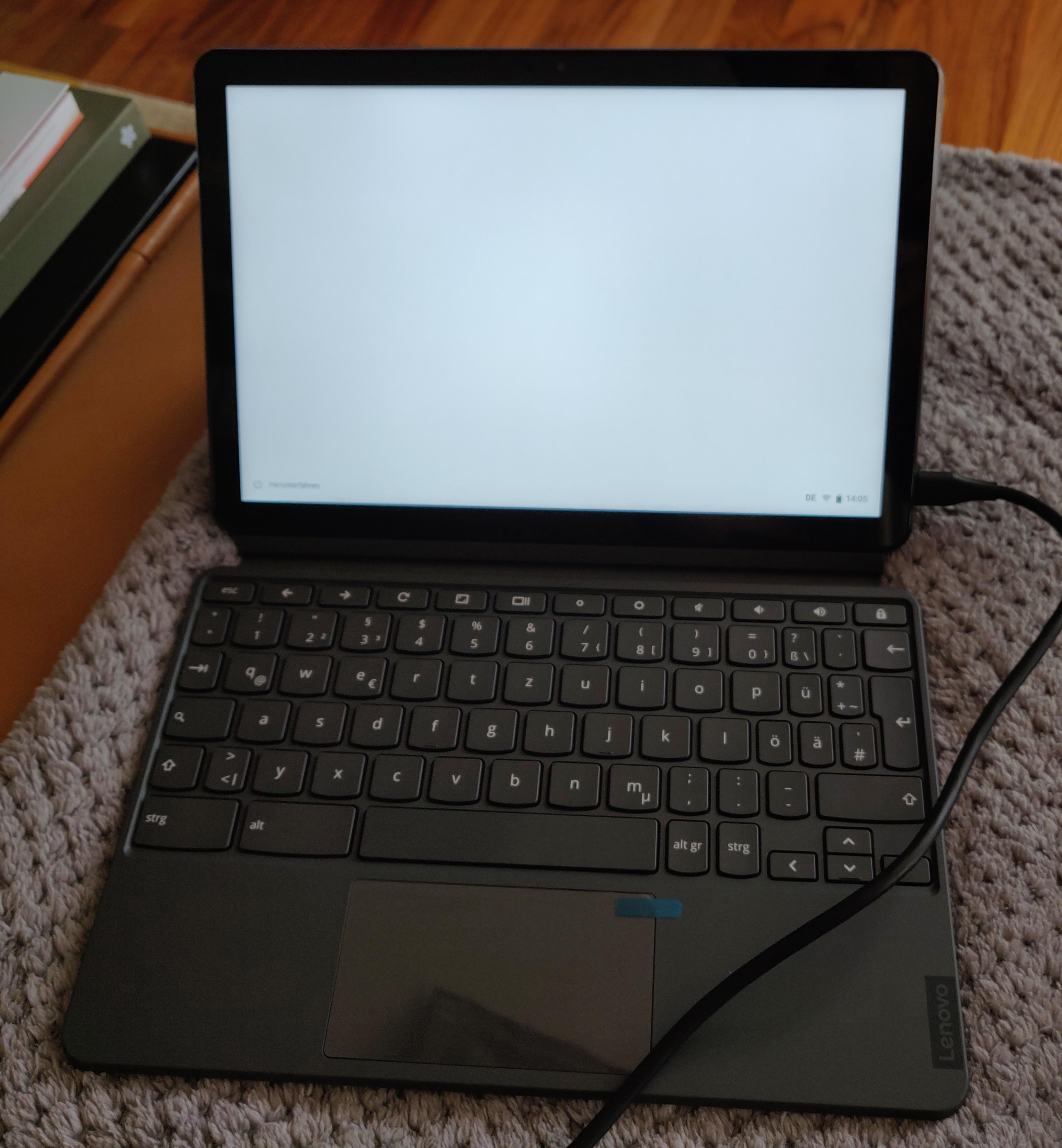
Alongside the tablet, you also find a kickstand with a textile back, and a
keyboard, both of which attach via magnets (and pogo pins for the keyboard).
The keyboard is crammed, with punctuation keys being halfed in size, and it
feels mushed compared to my usual experiences of ThinkPads and Model Ms, but
it s on par with other Chromebooks, which is surprising, given it s a tablet
attachment.
fully assembled chromebook duet
I mostly use the Duet as a tablet, and only attach the keyboard occasionally.
Typing with the keyboard on your lap is suboptimal.
My first Duet had a few bunches of dead pixels, so I returned it, as I had
a second one I could not cancel ordered as well. Oh dear. That one was fine!
Hardware & Connectivity
The Chromebook Duet is powered by a Mediatek Helio P60T SoC, 4GB of RAM,
and a choice of 64 or 128 GB of main storage.
The tablet provides one USB-C port for charging, audio output (a 3.5mm adapter
is provided in the box), USB hub, and video output; though, sadly, the latter
is restricted to a maximum of 1080p30, or 1440x900 at 60 Hz. It can be charged
using the included 10W charger, or use up to I believe 18W from a higher powered
USB-C PD charger. I ve successfully used the Chromebook with a USB-C monitor
with attached keyboard, mouse, and DAC without any issues.
On the wireless side, the tablet provides 2x2 Wifi AC and Bluetooth 4.2. WiFi
reception seemed just fine, though I have not done any speed testing, missing
a sensible connection at the moment. I used Bluetooth to connect to my smartphone
for instant tethering, and my Sony WH1000XM2 headphones, both of which worked
without any issues.
The screen is a bright 400 nit display with excellent viewing angles,
and the speakers do a decent job, meaning you can use easily use this
for watching a movie when you re alone in a room and idling around. It has
a resolution of 1920x1200.
The device supports styluses following the USI standard. As of right now, the
only such stylus I know about is an HP one, and it costs about 70 or so.
Cameras are provided on the front and the rear, but produce terrible images.
Software: The tablet experience
The Chromebook Duet runs Chrome OS, and comes with access to Android apps
using the play store (and sideloading in dev mode) and access to full Linux
environments powered by LXD inside VMs.
The screen which has 1920x1200 is scaled to a ridiculous 1080x675 by default
which is good for being able to tap buttons and stuff, but provides next to no
content. Scaling it to 1350x844 makes things more balanced.
The Linux integration is buggy. Touches register in different places than where
they happened, and the screen is cut off in full screen extremetuxracer, making
it hard to recommend for such uses.
Android apps generally work fine. There are some issues with the back gesture
not registering, but otherwise I have not found issues I can remember.
One major drawback as a portable media consumption device is that Android apps
only work in Widevine level 3, and hence do not have access to HD content, and
the web apps of Netflix and co do not support downloading. Though one of the Duets
actually said L1 in check apps at some point (reported in issue 1090330).
It s also worth
noting that Amazon Prime Video only renders in HD, unless you change your
user agent to say you are Chrome on Windows - bad Amazon!
The tablet experience also lags in some other ways, as the palm rejection is
overly extreme, causing it to reject valid clicks close to the edge of the display
(reported in issue 1090326).
The on screen keyboard is terrible. It only does one language at a time, forcing
me to switch between German and English all the time, and does not behave as you d
expect it when editing existing words - it does not know about them and thinks
you are starting a new one. It does provide a small keyboard that you can
move around, as well as a draw your letters keyboard, which could come in
handy for stylus users, I guess. In any case, it s miles away from gboard on
Android.
Stability is a mixed bag right now. As of Chrome OS 83, sites (well only Disney+
so far ) sometimes get killed with SIGILL or SIGTRAP, and the device rebooted
on its own once or twice. Android apps that use the DRM sometimes do not start,
and the Netflix Android app sometimes reports it cannot connect to the servers.
Performance
Performance is decent to sluggish, with micro stuttering in a lot of places. The
Mediatek CPU is comparable to Intel Atoms, and with only 4GB of RAM, and an entire
Android container running, it s starting to show how weak it is.
I found that Google Docs worked perfectly fine, as did websites such as
Mastodon, Twitter, Facebook. Where the device really struggled was Reddit,
where closing or opening a post, or getting a reply box could take 5 seconds
or more. If you are looking for a Reddit browsing device, this is not for you.
Performance in Netflix was fine, and Disney+ was fairly slow but still usable.
All in all, it s acceptable, and given the price point and the build quality,
probably the compromise you d expect.
Summary
tl;dr:
good: Build quality, bright screen, low price, included accessories
The Chromebook Duet or IdeaPad Duet Chromebook is a decent tablet that is built
well above its price point. It s lackluster performance and DRM woes make it
hard to give a general recommendation, though. It s not a good laptop.
I can see this as the perfect note taking device for students, and as a
cheap tablet for couch surfing, or as your on-the-go laptop replacement,
if you need it only occasionally.
I cannot see anyone using this as their main laptop, although I guess some
people only have phones these days, so: what do I know?
I can see you getting this device if you want to tinker with Linux on ARM, as
Chromebooks are quite nice to tinker with, and a tablet is super nice.
Racism is a free software issue. I gave a talk that touched on this at CopyLeft Conf 2019. I also talked a little bit about it at All Things Open 2019 and FOSDEM 2020 in my talk The Ethics Behind Your IoT. I know statistics, theory, and free software. I don t know about race and racism nearly as well. I might make mistakes I have made some and I will make more. Please, when I do, help me do better.
I want to look at a few particular technologies and think about how they reinforce systemic racism. Worded another way: how is technology racist? How does technology hurt Black Indigenous People of Color (BIPOC)? How does technology keep us racist? How does technology make it easier to be racist?
Breathalyzers
In the United States, Latinx folks are less likely to drink than white people and, overall, less likely to be arrested for DUIs3,4. However, they are more likely to be stopped by police while driving5,6.
Who is being stopped by police is up to the police and they pull over a disproportionate number of Latinx drivers. After someone is pulled over for suspected drunk driving, they are given a breathalyzer test. Breathalyzers are so easy to (un)intentionally mis-calibrate that they have been banned as valid evidence in multiple states. The biases of the police are not canceled out by the technology that should, in theory, let us know whether someone is actually drunk.
Facial Recognition
I could talk about for quite some time and, in fact, have. So have others. Google s image recognition software recognized black people as gorillas and to fix the issue it removed gorillas from it s image-labeling technology.
Facial recognition software does a bad job at recognizing black people. In fact, it s also terrible at identifying indigenous people and other people of color. (Incidentally, it s also not great at recognizing women, but let s not talk about that right now.)
As we use facial recognition technology for more things, from automated store checkouts (even more relevant in the socially distanced age of Covid-19), airport ticketing, phone unlocking, police identification, and a number of other things, it becomes a bigger problem that this software cannot tell the difference between two Asian people.
Targeted Advertising
Black kids see 70% more online ads for food than white kids, and twice as many ads for junk food. In general BIPOC youth are more likely to see junk food advertisements online. This is intentional, and happens after they are identified as BIPOC youth.
Technology Reinforces Racism; Racism Builds Technology
The technology we have developed reinforces racism on a society wide scale because it makes it harder for BIPOC people to interact with this world that is run by computers and software. It s harder to not be racist when the technology around us is being used to perpetuate racist paradigms. For example, if a store implements facial recognition software for checkout, black women are less likely to be identified. They are then more likely to be targeted as trying to steal from the store. We are more likely to take this to mean that black women are more likely to steal. This is how technology builds racism,
People are being excluded largely because they are not building these technologies, because they are not welcome in our spaces. There simply are not enough Black and Hispanic technologists and that is a problem. We need to care about this because when software doesn t work for everyone, it doesn t work. We cannot build on the promise of free and open source software when we are excluding the majority of people.
Armadillo is a powerful and expressive C++ template library for linear algebra aiming towards a good balance between speed and ease of use with a syntax deliberately close to a Matlab. RcppArmadillo integrates this library with the R environment and language and is widely used by (currently) 727 other packages on CRAN.
Conrad recently released a new upstream version 9.900.1 of Armadillo which we packaged and tested as usual first as a release candidate build and then as the release. As usual, logs from reverse-depends runs are in the rcpp-logs repo.
Apart from the new upstream release, we updated Travis use, ornamented the README a little, and smoothed over a rough corner from the recent R 4.0.0 release. All changes in the new release are noted below.
Changes in RcppArmadillo version 0.9.900.1.0 (2020-06-08)
Upgraded to Armadillo release 9.900.1 (Nocturnal Misbehaviour)
faster solve() for under/over-determined systems
faster eig_gen() and eig_pair() for large matrices
expanded eig_gen() and eig_pair() to optionally provide left and right eigenvectors
Switch Travis CI testing to R 4.0.0, use bionic as base distro and test R 3.6.3 and 4.0.0 in a matrix (Dirk in #298).
Add two badges to README for indirect use and the CSDA paper.
Adapt RcppArmadillo.package.skeleton() to a change in R 4.0.0 affecting what it exports in NAMESPACE.
As announced in a few tweets leading up to it, I took the date of what would have been the annual R/Finance conference as an opportunity to hold the one-hour tutorial / workshop with introductory Rcpp material which I often present on the first morning preceding the conference as a self-organized webinar. The live-streaming worked actually reasonably well via obs to youtube (even though the comprehensive software by the latter complained at times about insufficient bitstream rates the joys of living with a (near) monopolistic broadband provider whom I should leave for fiber ). Apparently around seventy people connected to the stream which is more than we usually have in the seminar room at UIC for the R/Finance morning.
The recording is now available here, and has already been seen over 200 times:
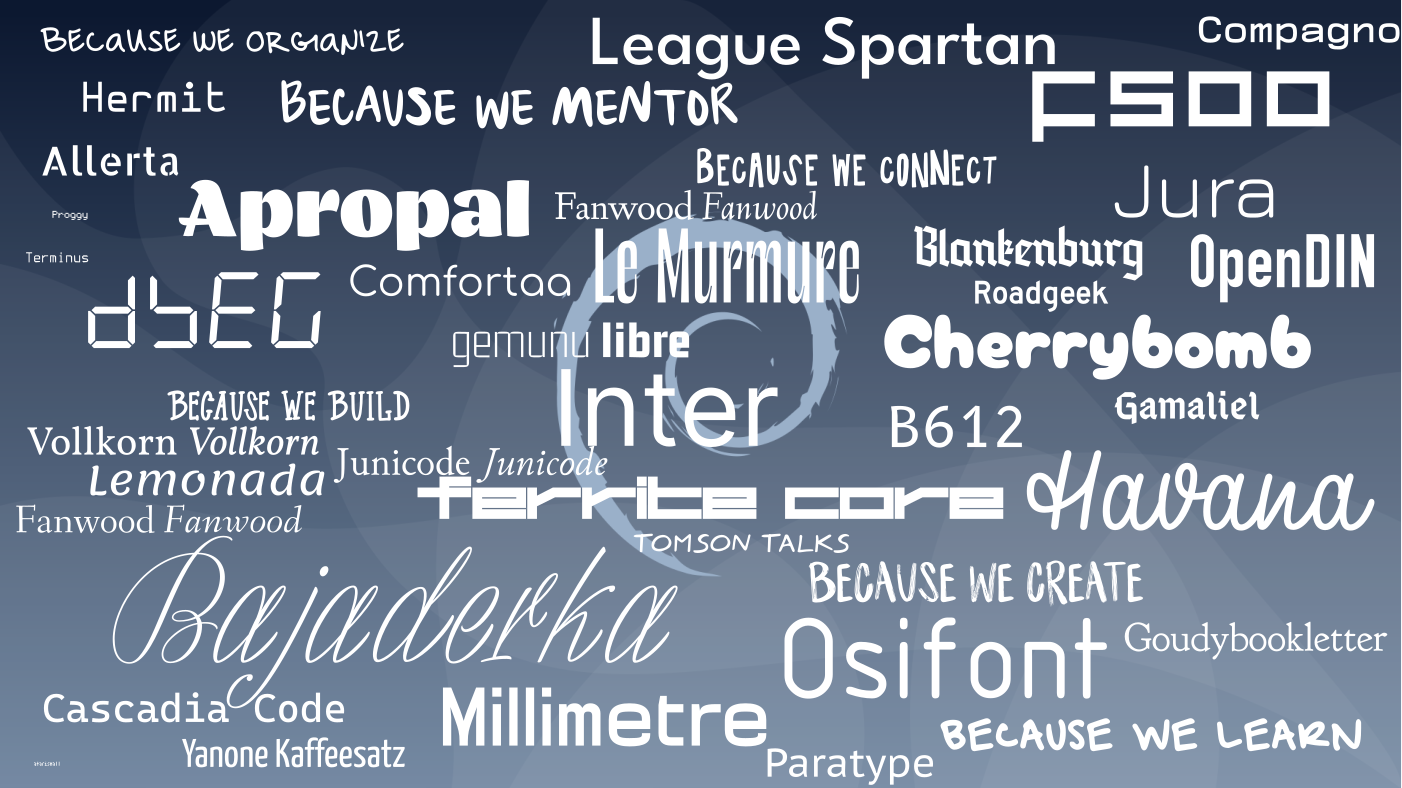
Debian comes with tons of fonts for all kinds of purposes,
you can easily list them all (almost) with: apt-cache search ^fonts-
Above you can see a nice composition with examples of several fonts.
The composition is published under the
MIT (Expat) license
and the source SVG (created with Inkscape) can be downloaded
here.
You will need the fonts to be installed in your system so the SVG is correctly rendered.
If you want to learn more you can have a look at the wiki page about fonts
(https://wiki.debian.org/Fonts),
and if you want to contribute or maintain fonts in Debian,
don't hesitate to join the Fonts Team!
This comic was based on this essay from Augusten Burroughs: How to live
unhappily ever after. In addition to the essay, I highly recommend
reading his books. It's also been described in psychology as flow.
Distributed teams are where people you work with aren t physically co-located, ie. they re at another office building, home or an outsourced company abroad. They re becoming increasingly popular, for DevOps and other teams, due to recruitment, diversity, flexibility and cost savings. Challenges arise due to timezones, language barriers, cultures and ways of working. People actively participating in Open Source communities tend to be effective in distributed teams. This session looks at how to apply core Open Source principles to distributed teams in Enterprise organisations, and the importance of shared purposes/goals, (mis)communication, leading vs managing teams, sharing and learning. We'll also look at practical aspects of what's worked well for others, such as alternatives to daily standups, promoting video conferencing, time management and virtual coffee breaks. This session is relevant for those leading or working in distributed teams, wanting to know how to cultivate an inclusive culture of increased trust and collaboration that leads to increased productivity and performance.
Another video in our T^4 series of video lightning talks with tips, tricks, tools, and toys (where we had seen the announcement, shells sessions one, two, and three, as well as one byobu session) is now up at YouTube. It goes a little deeper in the wonderful byobu and persistent sessions with multiple concurrent accesses illustrating why it is called both a text-based window manager and a terminal multiplexer :
This weekend I had some pretty good uncle time. My eleven year old nephew (after beating me in a fair match of tennis) wanted to play with his Lego Mindstorms set. He never even touches it unless I am around to help him, but then he quiet enjoys. As expected, when I ask him what we should try to build, he tends to come up with completely unrealistic or impossible ideas, and we have to somehow reduce the scope to something doable.
This time round, inspired by their autonomous vacuum cleaner, he wanted to build something like that. That was convenient, because now I could sell him what I wanted to try to do, namely make the robot follow a wall at more or less constant distance, as a useful first step.
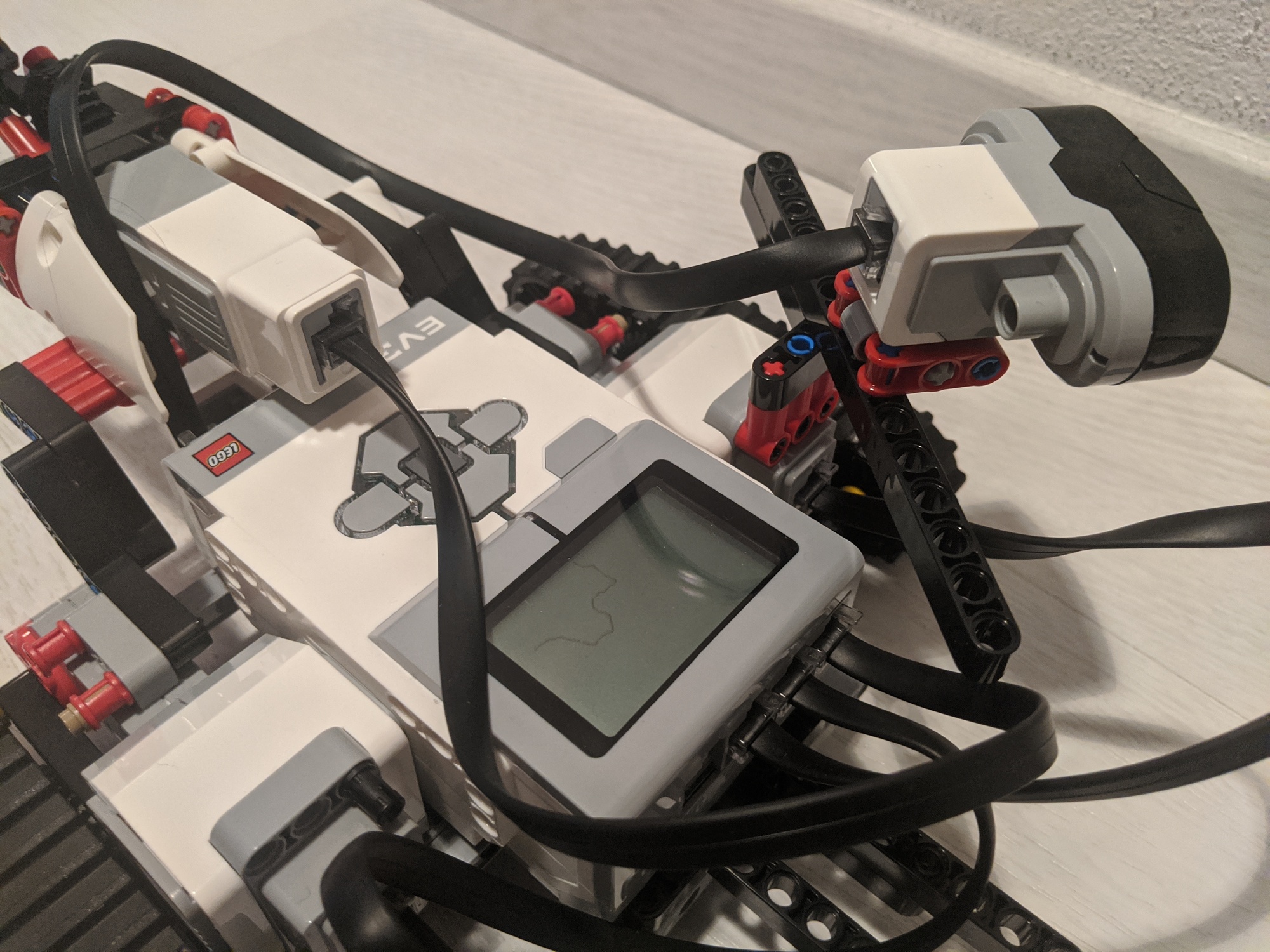
We mounted the infra red distance sensor at an 45 angle to the front-left, and then I built a very simple control loop measure the distance, subtract 40, apply a factor, and feed that into the steering input of the drive action, and repeat. I must admit that I was pretty proud to see just how well that very simple circuit worked: The little robot turned sharp corners in both directions, and otherwise drove nicely parallel and with constant distance to the wall.
I was satisfied with that achievement and would have happily ended it here before we might be disappointed by more ambitious and then failing goals.
But my nephew had not forgotten about the vacuum cleaner, and casually asked if I could make the robot draw an outline of its path, and thus of the room, on the display. Ok, where do I begin to explain just how unfeasible that is yes, it seemed one can draw to the display. But how should the robot know where it is? How far it turns? How far it went? This is programming by connecting boxes, and I would not expect such an interface to allow for complex logic (right?). And I would need trigonometry and stuff.
But he didn t quite believe it, and thus got me thinking indeed, the arithmetic block can evaluate more complex formulas, involving sin and cos so maybe if I can somehow keep track of where the robot is heading well, let s give it a try.
So by dragging boxes and connecting wires, I implemented a simple logic (three variables, x and y for current position, alpha for current heading; in each loop add the steering input onto alpha, and add (sin(alpha),cos(alpha)) onto the current position; throw in some linear factors to calibrate; draw pixel at (x, y)). And, to my nephew s joy and my astonishment, the robot was drawing a curvy line that clearly correlates with the taken path!
It wasn t respecting the angles perfectly, a square might not properly close, but half an hour earlier I would have actively bet against that we would pull this off!
After a few turns
I was, I must admit, a bit proud. But not only about the technical nerding, but also about my uncleing: That night, according to his parents, my nephew said that he can t remember ever being so happy!
FTP master
This month I accepted 211 packages and rejected only 9. The overall number of packages that got accepted was 228.
Debian LTS
This was my seventy-first month that I did some work for the Debian LTS initiative, started by Raphael Hertzog at Freexian.
This month my all in all workload has been 17.25h. During that time I did LTS uploads of:
[DLA 2196-2] pound regression update
[DLA 2219-1] feh security update for one CVE
[DLA 2218-1] transmission security update for one CVE
[DLA 2220-1] cracklib2 security update for one CVE
[DLA 2224-1] dosfstools security update for two CVEs
[DLA 2225-1] gst-plugins-good0.10 security update for two CVEs
[DLA 2226-1] gst-plugins-ugly0.10 security update for two CVEs
[DLA 2227-1] bind9 security update for two CVEs
I started to work on php5 as well but did not upload a fixed version yet.
Last but not least I did some days of frontdesk duties.
Debian ELTS
This month was the twenty third ELTS month.
During my small allocated time I uploaded:
ELA-230-1 for bind9 fixing two CVEs
ELA-231-1 for php5 fixing one CVE
I also did some days of frontdesk duties.
Other stuff
I improved packaging of
On my Go challenge I uploaded:
golang-github-apparentlymart-go-versions, golang-github-hashicorp-go-slug, golang-github-mozillazg-go-httpheader, golang-github-hashicorp-terraform-json, golang-github-hashicorp-terraform-plugin-test, golang-github-sean pager, golang-github-sean seed, golang-github-timberio-go-datemath,
Corels is now on CRAN! The package was introduced with an initial tweet which pointed to the GitHub repo.
The source code repo has since been relocated from my account to the (upstream) corels org in GitHub. And renamed: as the upstream (C++) repo as well as the existing Python package simply call is corels we now do too. The repo, to be distinguishable as a directory, will remain named rcppcorels.
We also describe the package a little on the corels package page. Some more work should go into along with work in the upstream repos, so please follow whichever GitHub repo you are interested in.
The work on corels is also what is described in the recent arXiv paper on Rcpp and libraries:
If you like this or other open-source work I do, you can now sponsor me at GitHub. For the first year, GitHub will match your contributions.
I ve been less good at taking adequate typing breaks during the
lockdown and I ve become concerned about how much chording my left
hand does on its own during typical Emacs usage, with caps lock
rebound to control, as I ve had it for years.
I thought that now was as good a time as any to do something drastic
about this. Here are my rebindings:
the keys on either side of the spacebar are control
the keys just outside of those are alt/meta
caps lock is Super, Windows or Command depending on OS
move any window manager keybindings which now become one handed
left hand chords such that they are not.
Optional extras:
left control is caps lock
right control is the compose key.
This has the following advantages:
you can easily achieve this rebinding on GNU/Linux,
Windows and macOS
almost every keyboard has enough keys near the spacebar to make it
work, and it s fine to have just one super key since it is not
involved in any one handed chords
does not involve relying on the difference between tapping and
releasing and holding a modifier key, which I find fragile
there are control and alt/meta keys available to both hands, so
there is much less call for one-handed chording
control and alt/meta are pressed by the thumb, the strongest finger,
so when one-handed chording does come up (e.g. C-x C-n without
having to switch between control keys) it s the least harmful form
my plan is to use the control/meta key available to the opposite hand
for the first key of each sequence, and allow some one handed
chording to complete the sequence.
there is some temptation to use a curled up little finger on the
new alt/meta key, I m finding, but I m trying to stop myself from
doing that.
The main disadvantage, aside from an adjustment period when I feel
that someone has inserted a massive marshmellow between me and my
computer, is that Ctrl-Alt combinations are a bit difficult; in Emacs,
C-M-SPC is hard to do without. However I think I ve found a decent
way to do it (thumb on control, curled ring finger on alt, possibly
little finger on shift for Emacs infamous C-M-S-v standard binding).
It's (yet again!) been a while since I blogged last, sorry...
It's been over ten years since I started
in Arm, and nine since I joined
Linaro as an assignee. It was
wonderful working with some excellent people in both companies, but around
the end of last year I started to think that it might be time to look
for something new and different. As is the usual way in Cambridge, I
ended up mentioning this to friends and things happened!
After discussions with a few companies, I decided to accept an
interesting-looking offer from a Norwegian company called Pexip. My good friend Vince had been raving
for a while about how much he enjoyed his job there, which was a very
good sign! He works from his home near Cambridge, and they were very
happy to take me on in a similar way. There will be occasional trips
to the UK office near Reading, or to the Norway HQ in Oslo. But most
of the time I'll be working in my home office with all the home
comforts and occasionally even an office dog!
As is common in the UK for senior staff, I had to give 3 months
notice with my resignation. When I told my boss in Arm
way way back in February that I had decided to leave,
I planned for a couple of weeks of down-time in between jobs. Perfect
timing! The third week of May in Cambridge is the summer Beer
Festival, and my birthday is the week after. All was looking good!
Then the world broke... :-(
As the "novel coronavirus" swept the world, countries closed down
and normal life all-but disappeared for many. I acknowledge I'm very
lucky here - I'm employed as a software engineer. I can effectively
work from home, and indeed I was already in the habit of doing that
anyway. Many people are not so fortunate. :-/ In this period, I've
heard of some people in the middle of job moves where their new
company have struggled and the new job has gone away. Thankfully,
Pexip have continued to grow during this time and were still very keen
to have me. I finally started this week!
So, what does Pexip do? The company develops and supplies a video
conferencing platform, mainly targeting large enterprise customers. We
have some really awesome technology, garnering great reviews from
customers all over the world. See the website for more information!
Where do I fit in? Pexip is a relatively small company with a very
flat setup in engineering, so that's a difficult question to answer!
I'll be starting working in the team developing and maintaining PexOS,
the small Linux-based platform on which other things depend. (No
prizes for guessing which distro it's based on!) But there's lots of
scope to get involved in all kinds of other areas as needs and
interests arise. I can't wait to get stuck in!
Although I'm no longer going to be working on Debian arm port
issues on work time, I'm still planning to help where I can. Let's see
how that works...
Preseeding is a very useful way of installing and pre-configuring a
Debian system in one go. You simply supply lots of the settings that
your new system will need up front, in a preseed
file. The installer will use those settings instead of asking
questions, and it will also pass on any extra settings via the debconf
database so that any further package setup will use them.
There is documentation about how to do this in the Debian wiki
at https://wiki.debian.org/DebianInstaller/Preseed,
and an example preseed file for our current stable release (Debian 10,
"buster") in
the release
notes.
One complaint I've heard is that it can be difficult to work out
exactly the right data to use in a preseed file, as the format is not
the easiest to work with by hand. It's also difficult to find
exactly what settings can be changed in a
preseed.
So, I've written a script to parse all the debconf templates in
each release in the Debian archive and dump all the possible settings
in each. I've put the results up online at
my debian-preseed site in
case it's useful. The data will be updated daily as needed to make
sure it's current.
Updated June 2020 - changed the URL for the
preseed site now I have a domain set up
at https://preseed.debian.net/.
### The blockade has ended! For some introduction..
Back in 2016, Telmex Mexico's foremost communications provider and,
through the brands grouped under the *Am rica M vil* brand, one of
Latin America's most important ISPs set up rules to block connecitons
to (at least) seven of Tor's *directory authorities* (*DirAuths*). We
believe they might have blocked all of them, in an attempt to block
connections from Tor from anywhere in their networks, but Tor is much
more resourceful than that so, the measure was not too effective.
Only... _Some_ blocking did hurt Telmex's users: The ability to play
an active role in Tor. The ability to host Tor relays at home. Why?
Because the *consensus protocol* requires relays to be reachable in
order to be measured from the network's *DirAuths*.
### Technical work to prove the blocking
We dug into the issue as part of the work we carried out in the
project I was happy to lead between 2018 and 2019, *UNAM/DGAPA/PAPIME
PE102718*. In March 2019, I presented a paper titled [Distributed
Detection of Tor Directory Authorities Censorship in
Mexico](https://www.thinkmind.org/index.php?view=article&articleid=icn_2019_6_20_38010)
([alternative download](http://ru.iiec.unam.mx/4538/) in the [Topic on
Internet Censorship and Surveillance (TICS) track](https://tics.site/)
of the XVIII International Conference on Networks.
Then... We had many talks inside our group, but nothing seemed to move
for several months. We did successfully push for increasing the number
of Tor relays in Mexico (we managed to go from two to eleven stable
relays not much in absolute terms, but quite good relatively, even
more considering most users were not technically able to run one!)
Jacobo N jera, journalist participant of our project, didn't leave
things there just lying around waiting magically for justice to
happen. Together with Vasilis Ververis, from the [Magma
Project](https://magma.lavafeld.org/), they presented some weeks ago a
[Case study: Tor Directory Authorities Censorship in
Mexico](https://magma.lavafeld.org/guide/data-analysis.html#case-study-tor-directory-authorities-censorship-in-mexico).
### Pushing to action
But a good part of being a journalist is knowing _how_ and _when_ to
spread the word. Having already two technical studies showing the
blocking in place, Jacobo presented his findings with [an article in
GlobalVoices: *The largest telecommunications operator in Mexico
blocks the secure
network*](https://es.globalvoices.org/2020/05/28/en-mexico-el-mas-grande-operador-de-telecomunicaciones-bloquea-la-internet-segura/). Surprisingly
(to me, at least), this story was picked up by a major Mexican
newspaper: The same evening the story hit GlobalVoices, [Rodrigo
Riquelme](https://www.eleconomista.com.mx/autor/rriquelme) posted an
article, in the Technology section of *El Economista*, titled [Telmex
blocks seven out of ten accesses to the Tor network in
Mexico](https://www.eleconomista.com.mx/tecnologia/Telmex-bloquea-siete-de-10-accesos-a-la-red-Tor-en-Mexico-20200528-0078.html). And
that very same day, Telmex sent a reply I am translating in full (that
is now included at the end of Riquelme's article):
> Mexico City, May 28, 2020
>
> In relation to Tor navigation from TELMEX's network, the company
> informs:
>
> In TELMEX, we are committed to the full respect to navigation
> freedom for all of our users.
>
> TELMEX practices no application-level blocking policies; the Tor
> application, as well as the rest of Internet applications, can be
> freely accessed from our network.
>
> In order to protect the Internauts' information, the seven refered
> nodes were in their time reported because they were associated with
> the distribution of the WannaCry ransomware, which is the reason
> they were filtered, but this does not hamper the use of the Tor
> application.
### So we got an answer...?
Jacobo knew we had to take advantage of this answer, and act fast! He
entered rush-writing mode and, with the help of our good friend and
lawyer Salvador Alc ntar, we wrote [a short letter to Renato Flores
Cartas, Corporative Communication of Am rica
M vil](https://internetanonima.net/respuesta-a-telmex-sobre-la-red-tor-en-mexico/),
and sent it on June 1st.
Next thing I know, this evening Jacobo was asking me if I could
confirm the blocking was lifted. What I could not believe it! But,
yes Today Jacobo published the confirmation that [the seven blocked
IP routes were finally reachable again from ASN 8151 (UNINET / Telmex
/ Am rica
M vil)!](https://internetanonima.net/confirmamos-desbloqueo-de-las-7-direcciones-de-la-red-tor-por-telmex/)
Of course, this story was picked up again by El Economista [Telmex
unblocks IP addresses for the Tor network's directory authority server
IPs in
Mexico](https://www.eleconomista.com.mx/tecnologia/Telmex-desbloquea-direcciones-IP-de-servidores-de-autoridad-de-la-red-Tor-en-Mexico-20200604-0094.html).
### Wrapping up
How can I put this in words? I am very, very, very, *very, very,
very*, **very, very, very** happy we managed to see this through!
Although we have been pushing for increasing the usage of Tor among
users at risk in Mexico Being a journalist, defending human rights,
are still a high-risk profession in my country. We strongly believe in
this, and will continue trying to raise awareness of the usage.
But, just as with free software, *using* network anonymization tools
is not all. We need more people to become active, to become engaged,
to *become active participants* in anonymization. As the adage says,
*anonymity loves company* In order to build strong, sufficient
anonymization capability for everybody that needs it, we need more
people to *provide relay services*. And this is a *huge* step to
improve Mexico's participation in the Tor network!
---
Image credits: [*Seeing My World Through a Keyhole*, by Kate Ter
Haar](https://www.flickr.com/photos/katerha/4592429363) (CC-BY); [Tor
logo (Wikimedia Commons)](https://commons.wikimedia.org/wiki/File:Tor-logo-2011-flat.svg)
Here's a practical example of applying Template Haskell to reduce
the amount of boilerplate code that is otherwise required. I wrote the below
after following this excellent blog post by Matt Parsons. This post will be much higher-level, read
Matt's blog for the gorier details.
Liquorice
Liquorice is a toy project of mine from a few years ago that lets you
draw 2D geometric structures similar to LOGO. Liquorice offers two interfaces:
pure functions that operate on an explicit Context (the pen location:
existing lines, etc.), and a second "stateful" interface where the input and
output are handled in the background.
I prefix the pure ones P. and the stateful ones S. in this blog post for
clarity.
The stateful interface can be much nicer to use for larger drawings.
Compare example8b.hs,
written in terms of the pure functions, and the stateful equivalent
example8.hs.
The majority of the stateful functions are "wrapped" versions of the pure
functions. For example, the pure function P.step takes two numbers
and moves the pen forward and sideways. Its type signature is
P.step :: Int -> Int -> Context -> Context
Here's the signature and implementation of the stateful equivalent:
S.step :: Int -> Int -> State Context ()
S.step x y = modify (P.step x y)
Writing these wrapped functions for the 29 pure functions is boilerplate that
can be generated automatically with Template Haskell.
Generating the wrapper functions
Given the Name of a function to wrap, we construct an instance of FunD, the
TH data-type representing a function definition. We use the base name of the
incoming function as the name for the new one.
mkWrap fn = do

    let name = mkName (nameBase fn)
    return $ FunD name [ Clause (map VarP args) (NormalB rhs) [] ]
To determine how many arguments the wrapper function needs to accept, we need
to determine the input function's arity. We use Template Haskell's reify
function to get type information about the function, and derive the arity from
that. Matt Parson's covers this exactly in his blog.
info    <- reify fn
let ty   = (\(VarI _ t _ ) -> t) info
let n    = arity ty - 1
args    <- replicateM n (newName "arg")
We can use the list "args" directly in the clause part of the function
definition, as the data-type expects a list. For the right-hand side, we need
to convert from a list of arguments to function application. That's a simple
left-fold:
-- mkFnApp f [a,b,c] => ((f a) b) c => f a b c
mkFnApp = foldl (\e -> appE e . varE)
rhs     <- [  modify $(mkFnApp (varE fn) args) :: State Context ()  ]
We use TH's oxford brackets for the definition of rhs. This permits us
to write real Haskell inside the brackets, and get an expression data-type
outside them. Within we have a splice (the $( )), which does the opposite:
the code is evaluated at compile time and generates an Exp that is then
converted into the equivalent Haskell code and spliced into place.
Finally, we need to apply the above to a list of Names. Sadly, we can't get at
the list of exported names from a Module automatically. There is an open
request for a TH extension for
this. In the meantime,
we export a list of the functions to wrap from the Pure module and operate
on that
Finally, we 'call' wrapPureFunctions at the top level in our state module
and Template Haskell splices all the function definitions into place.
The final code ended up only around 30 lines of code, and saved about the
same number of lines of boilerplate. But in doing this I noticed some missing
functions, and it will pay dividends if more pure functions are added.
Limitations
The current implementation has one significant limitation: it cannot handle
higher-order functions. An example of a pure higher-order function is
place, which moves the pen, performs an operation, and then moves it back:
P.place :: Int -> Int -> (Context -> Context) -> Context -> Context
Wrapping this is not sufficient because the higher-order parameter has
the pure function signature Context -> Context. If we wrapped it, the
stateful version of the function would accept a pure function as the
parameter, but you would expect it to accept another stateful function.
To handle these, at a minimum we would need to detect the function arguments
that have type Context -> Context and replace them with State Context ().
The right-hand side of the wrapped function would also need to do more work to
handle wrapping and unwrapping the parameter. I haven't spent much time
thinking about it but I'm not sure that a general purpose wrapper would work
for all higher-order functions. For the time being I've just re-implemented the
half-dozen of them.
For about two months I've been working on a new project, debplate,
which currently lives
at benh/debplate
on Salsa. This is a template system for Debian packages, primarily
intended to ease building multiple similar binary packages from a
single source. With some changes, it could also be useful for
making multiple source packages consistent
(issue
#9).
I want debplate to be capable of replacing the kernel team's
existing template system and a lot of its custom scripting, but it
is also meant to a general tool. I believe it's already capable of
supporting source packages with relatively simple needs, and there
are some examples of these in the debplate source. My long-term
goal is that debplate will replace most team-specific and
package-specific template systems, making those source packages
using it less unusual and easier to contribute to.
I gave
a short
talk about debplate at MiniDebConf Online on Sunday.
I was assigned 17.25 hours of work by Freexian's Debian LTS
initiative, and carried over 2.5 hours from April. I worked all
19.75 hours this month.
I sent
a request
for testing an update of the linux package to 3.16.83. I then
prepared and, after review, released Linux 3.16.84. I rebased the
linux package onto that and sent out
a further
request for testing. I then backported some additional security
fixes, but have still not made an upload.
I attended the LTS contributor meeting on IRC.
At work we have a wonderful pyhon tool that we are able to send CoAP messages to and from our products. Perfect for development work. However recently I needed to install a copy of the tools onto my personal laptop because the only work laptops I have access to have completely dead batteries and so are not suitable for taking out into a field to perform RF range tests .
As a company we have chosen not to package internal development tools I think that this is a mistake, but this is not my decision. So I simply copied across the coap tools directory and tried to run them. Obviously nothing worked! However, the error messages were enough to work out what dependencies I needed to resolve.
Error #1 Missing libasan.so.2 shared library By a process of deduction we found that gcc5 contains libasan2, quite old. Debian s snapshots was our saviour here:
great that was enough to get the port bindings to work
Error #2 google.protobuf
When I tried to issue coap requests I ran into missing python3 imports google.protobuf fortunately this is found packaged in Debian buster as party of python3-protobuf
The eleventh release of littler as a CRAN package is now available, following in the fourteen-ish year history as a package started by Jeff in 2006, and joined by me a few weeks later.
littler is the first command-line interface for R as it predates Rscript. It allows for piping as well for shebang scripting via #!, uses command-line arguments more consistently and still starts faster. It also always loaded the methods package which Rscript only started to do in recent years.
littler lives on Linux and Unix, has its difficulties on macOS due to yet-another-braindeadedness there (who ever thought case-insensitive filesystems as a default where a good idea?) and simply does not exist on Windows (yet the build system could be extended see RInside for an existence proof, and volunteers are welcome!). See the FAQ vignette on how to add it to your PATH.
A few examples are highlighted at the Github repo, as well as in the examples vignette.
This release adds a new helper / example script installBioc.r for BioConductor package installation, generalizes the roxygenize() wrapper roxy.r a little, and polished a couple of other corners.
The NEWS file entry is below.
Changes in littler version 0.3.10 (2020-06-02)
Changes in examples
The update.r script only considers writeable directories.
The rcc.r script tries to report full logs by setting _R_CHECK_TESTS_NLINES_=0.
The tt.r script has an improved ncpu fallback.
Several installation and updating scripts set _R_SHLIB_STRIP_ to TRUE.
A new script installBioc.r was added.
The --error option to install2.r was generalized (Sergio Oller in #78).
BigBlueButton, aka BBB, is a webrtc conferencing solution, that among many features, allows to record a conference, for later replay.
We have been working together with my colleague Fran ois Trahay, on a set of scripts (bbb-downloader) that will allow to easily (on Linux) download recordings of BBB conferences, for local backup, video editing, upload on video sharing platforms, etc. This is particularly useful in our distance learning contexts where students may have to catch up on a live session that was recorded.
We have integrated a hackish solution to capture, as a single video, presentations that contained slide deck presentations. Let me explain why this was necessary.
A nice feature of BBB is the fact that, to present a slides deck, you don t need to share your screen (as a video stream), but just have to upload your file, which is then auto-converted to images, that are sent to participants, in sync with your next/previous browsing of the slides.
This is great for participants with low bandwidth, which can see the slides ( static images) instead of receiving a full screen video stream.
But a side effect is that the recording of a class/conference that is done by BBB replays the slides just as it was done live : displaying images one after the other.
While it is easy to retrieve the audio, webcams of participants, or screen sharings as video streams, directly available from the recordings replay app, it is thus not the same for the slides, which don t come as a video.
Our script will perform a replay, using a Docker container which drives Selenium under the hood, to capture the full replay, as a single video, which then includes the slides and everything. You can see my demo of this process in the following video:
bbb-downloader full capture demo.
It takes long to replay, in real-time, the recordings, to perform this capture but it works. Kudos to elgalu/docker-selenium for the Docker env.
Feel free to test it and profit, or to report issues in the Guthub issues of the repo: https://github.com/trahay/bbb-downloader/.
 fully assembled chromebook duet


 Debian comes with tons of fonts for all kinds of purposes,
you can easily list them all (almost) with:
 This weekend I had some pretty good uncle time. My eleven year old nephew (after beating me in a fair match of tennis) wanted to play with his Lego Mindstorms set. He never even touches it unless I am around to help him, but then he quiet enjoys. As expected, when I ask him what we should try to build, he tends to come up with completely unrealistic or impossible ideas, and we have to somehow reduce the scope to something doable.
This time round, inspired by their autonomous vacuum cleaner, he wanted to build something like that. That was convenient, because now I could sell him what I wanted to try to do, namely make the robot follow a wall at more or less constant distance, as a useful first step.
We mounted the infra red distance sensor at an 45 angle to the front-left, and then I built a very simple control loop measure the distance, subtract 40, apply a factor, and feed that into the steering input of the drive action, and repeat. I must admit that I was pretty proud to see just how well that very simple circuit worked: The little robot turned sharp corners in both directions, and otherwise drove nicely parallel and with constant distance to the wall.
I was satisfied with that achievement and would have happily ended it here before we might be disappointed by more ambitious and then failing goals.
But my nephew had not forgotten about the vacuum cleaner, and casually asked if I could make the robot draw an outline of its path, and thus of the room, on the display. Ok, where do I begin to explain just how unfeasible that is yes, it seemed one can draw to the display. But how should the robot know where it is? How far it turns? How far it went? This is programming by connecting boxes, and I would not expect such an interface to allow for complex logic (
 The source code repo has since been relocated from my account to the (upstream)
 If you like this or other open-source work I do, you can now
 I ve been less good at taking adequate typing breaks during the
lockdown and I ve become concerned about how much chording my left
hand does on its own during typical Emacs usage, with caps lock
rebound to control, as I ve had it for years.
I thought that now was as good a time as any to do something drastic
about this. Here are my rebindings:
 It's (yet again!) been a while since I blogged last, sorry...
It's been over ten years since I started
in
 Where do I fit in? Pexip is a relatively small company with a very
flat setup in engineering, so that's a difficult question to answer!
I'll be starting working in the team developing and maintaining PexOS,
the small Linux-based platform on which other things depend. (No
prizes for guessing which distro it's based on!) But there's lots of
scope to get involved in all kinds of other areas as needs and
interests arise. I can't wait to get stuck in!
Although I'm no longer going to be working on Debian arm port
issues on work time, I'm still planning to help where I can. Let's see
how that works...
 ### The blockade has ended! For some introduction..
Back in 2016, Telmex Mexico's foremost communications provider and,
through the brands grouped under the *Am rica M vil* brand, one of
Latin America's most important ISPs set up rules to block connecitons
to (at least) seven of Tor's *directory authorities* (*DirAuths*). We
believe they might have blocked all of them, in an attempt to block
connections from Tor from anywhere in their networks, but Tor is much
more resourceful than that so, the measure was not too effective.
 Only... _Some_ blocking did hurt Telmex's users: The ability to play
an active role in Tor. The ability to host Tor relays at home. Why?
Because the *consensus protocol* requires relays to be reachable in
order to be measured from the network's *DirAuths*.
### Technical work to prove the blocking
We dug into the issue as part of the work we carried out in the
project I was happy to lead between 2018 and 2019, *UNAM/DGAPA/PAPIME
PE102718*. In March 2019, I presented a paper titled [Distributed
Detection of Tor Directory Authorities Censorship in
Mexico](https://www.thinkmind.org/index.php?view=article&articleid=icn_2019_6_20_38010)
([alternative download](http://ru.iiec.unam.mx/4538/) in the [Topic on
Internet Censorship and Surveillance (TICS) track](https://tics.site/)
of the XVIII International Conference on Networks.
Then... We had many talks inside our group, but nothing seemed to move
for several months. We did successfully push for increasing the number
of Tor relays in Mexico (we managed to go from two to eleven stable
relays not much in absolute terms, but quite good relatively, even
more considering most users were not technically able to run one!)

 Here's a practical example of applying
 For about two months I've been working on a new project, debplate,
which currently lives
at
 At work we have a wonderful pyhon tool that we are able to send CoAP messages to and from our products. Perfect for development work. However recently I needed to install a copy of the tools onto my personal laptop because the only work laptops I have access to have completely dead batteries and so are not suitable for taking out into a field to perform RF range tests .
 The eleventh release of

