
Search Results: "zed"

5 November 2007

Daniel Burrows: Building rails

In the 1860s, in the middle of one of the largest wars America has ever been involved in, a 690-mile railroad was built in a period of seven to nine years (depending on how you count), a rate of about five days per mile of track. Now, it's certainly true that this was accomplished through labor practices that were, by today's standards, more than a little bit questionable. However, I still am amazed that it's apparently going to take us twenty years to construct fifty miles of track in the Seattle area. By my count, that's a hundred and forty six days per mile of track. And I haven't even mentioned the harsh environmental conditions the transcontinental line faced, which a line in the Seattle metro area by and large does not.

I haven't decided how or whether to vote in the election tomorrow, but the timescale they're projecting is ... astonishing.

John Goerzen: Viper

Well, now this is quite the experience.

I've been trying Viper for the past few days. Viper, for those that don't know, is usually described as a set of Vi bindings for Emacs.

After reading the nearly 100 pages of documentation and trying it a bit, I have realized that this is not really an accurate description. Viper is a port of vi to Elisp.

But that doesn't really do it justice. Viper seems to have pretty much everything going for it that Vim does, and then some. It is extensible with Elisp, and works with all the Emacs major modes (indentation and so forth). Yet it also is a very authentic Vi implementation, yet more customizable than Vim. And, in my opinion, more capable than Vim too.

On the one hand, this is a really neat combination: the power of the vi editing commands with the power of Emacs and Elisp for indentation, customization, etc.

On the other hand, it makes my head hurt. While Viper and Vim both are supersets of the vi command set, they don't always implement extensions (such as multiple windows) the same way or with the same keys. Of course, you could remap them in both, but it's a bit jarring to run Viper in expert mode, press C-w to start creating a new window, and have it run the Emacs cut command. (You can run Viper in a more limited mode where it does not recognize any regular Emacs keys if you don't want that)

It's just weird. It mostly looks like Emacs. It is modal like Vim, and responds to all Vi and most Vim commands. It has an additional mode: the Emacs mode. Also if configured to run in expert configuration, Emacs commands are accepted most places. Yes, you can move with h, j, k, l and C-n, C-p, C-f, C-b all at the same time.

The main drawback I can see is that Viper mode doesn't work well with Info mode, which has other bindings for keyboard shortcuts... so all of a sudden, hjkl don't work in info mode.

I don't know yet if I'll use viper much, but it is a slick program.

Manoj Srivastava: Manoj: Filtering accuracy: Hard numbers

I have often posted on the accuracy of my mail filtering mechanisms on the mailing lists (I have not had a false positive in years, and I stash all discards/rejects locally, and do spot checks frequently; and I went through 6 months of exhaustive checks when I put this system in place). False negatives are down to about 3-4 a month (0.019%). Yes, that is right: I am claiming that my classification correctness record is 99.92 (99.98% accuracy for messages my classifiers are sure about). Incorrectly classified unsure ham is about 3-4(0.019%) a month; incorrectly classified unsure Spam is roughly the same, perhaps a little higher. Adding these to the incorrect classification, my best estimate of not confidently classified mail is 0.076%, based on the last 60 days of data (which is what gets you the 99.92%). I get unsure/retrain messages at the rate of about 20 a day (about 3.2% of non-spam email) about 2/3 rds of which are classified correctly; but either SA and crm114 disagree, or crm114 is unsure. So I have to look at about 20 messages a day to see if a ham message slipped in there; and train my filters based on these; and the process is highly automated (just uses my brain as a classifier). The mail statistics can be seen on my mail server. Oh, my filtering front end also switches between reject/discard and turns grey listing on and off based on whether or not the mail is coming from mailing lists/newsletters I have authorized; mimedefang-filter However, all these numbers are manually gathered, and I still have not gotten around to automating my setup s overall accuracy, but now I have some figures on one of the two classifies in my system. Here is the data from CRM114. I ll update the numbers below via cron. First, some context: when training CRM114 using the mailtrainer command, one can specify to leave out a certain percentage of the training set in the learn phase, and run a second pass over the mails so skipped to test the accuracy of the training. The way you do this is by specifying a regular expression to match the file names. Since my training set has message numbers, it was simple to use the least significant two digits as a regexp; but I did not like the idea of always leaving out the same messages. So I now generate two sets of numbers for every training run, and leave out messages with those two trailing digits, in effect reserving 2% of all mails for the accuracy run. An interesting thing to note is the assymetry in the accuracy: CRM114 has never identified a Spam message incorrectly. This is because the training mechanism is skewed towards letting a few spam messages slip through, rather than let a good message slip into the spam folder. I like that. So, here are the accuracy numbers for CRM114; adding in Spamassassin into the mix only improves the numbers. Also, I have always felt that a freshly learned css file is somewhat brittle in the sense that if one trains an unsure message, and then tried to TUNE (Train Until No Errors) the css file, a large number of runs through the training set are needed until the thing stabilizes. So it is as if the learning done initially was minimalistic, and adding the information for the new unsure message required all kinds of tweaking. After a while TOEing (Training on Errors) and TUNEing, this brittleness seems to get hammered out of the CSS files. I also expect to see accuracy rise as the css files get less brittle The table below starts with data from a newly minted .css file.
Accuracy number and validation regexp
Date Corpus Ham Spam Overall Validation
  Size Count Correct Accuracy Count Correct Accuracy Count Correct Accuracy Regexp
Wed Oct 31 10:22:23 UTC 2007 43319 492 482 97.967480 374 374 100.000000 866 856 98.845270 [1][6][_][_] [0][3][_][_]
Wed Oct 31 17:32:44 UTC 2007 43330 490 482 98.367350 378 378 100.000000 868 860 99.078340 [3][7][_][_] [2][3][_][_]
Thu Nov 1 03:01:35 UTC 2007 43334 491 483 98.370670 375 375 100.000000 866 858 99.076210 [2][0][_][_] [7][9][_][_]
Thu Nov 1 13:47:55 UTC 2007 43345 492 482 97.967480 376 376 100.000000 868 858 98.847930 [1][2][_][_] [0][2][_][_]
Sat Nov 3 18:27:00 UTC 2007 43390 490 480 97.959180 379 379 100.000000 869 859 98.849250 [4][1][_][_] [6][4][_][_]
Sat Nov 3 22:38:12 UTC 2007 43394 491 482 98.167010 375 375 100.000000 866 857 98.960740 [3][1][_][_] [7][8][_][_]
Sun Nov 4 05:49:45 UTC 2007 43400 490 483 98.571430 377 377 100.000000 867 860 99.192620 [4][6][_][_] [6][8][_][_]
Sun Nov 4 13:35:15 UTC 2007 43409 490 485 98.979590 377 377 100.000000 867 862 99.423300 [3][7][_][_] [7][9][_][_]
Sun Nov 4 19:22:02 UTC 2007 43421 490 486 99.183670 379 379 100.000000 869 865 99.539700 [7][2][_][_] [9][4][_][_]
Mon Nov 5 05:47:45 UTC 2007 43423 490 489 99.795920 378 378 100.000000 868 867 99.884790 [4][0][_][_] [8][3][_][_]
As you can see, the accuracy numbers are trending up, and already are nearly up to the values observed on my production system.

4 November 2007

Bernd Zeimetz: mod_wsgi 1.2 + 2.0~c1

mod_wsgi 1.2 + 2.0~c1 We had two mod_wsgi uploads a few days ago:

2 November 2007

Adam Rosi-Kessel: Catch-22 Poor Organization, and City Council Endorsements

I was quoted in a recent Needham Times article regarding my complaints with the T:
But Adam Rosi-Kessel, a Roslindale resident who takes the Needham Line to his job in the financial district, said 15- to 20-minute delays have kept him from getting to work before 9 a.m. since May. Now Rosi-Kessel, a lawyer who biked to work when he lived in Jamaica Plain, is thinking about trading in his Charlie Card again. It used to be, living here in Roslindale, the train was always the fastest way to get in, he said. Now, it s slowed down to the point where it s starting to get competitive with biking again.
I’m glad they got my biking quote. Here’s the part I don’t understand (emphasis added):
Massachusetts Bay Transportation Authority spokeswoman Lydia Rivera said Needham Line delays have been caused by construction work and speed restrictions on tracks that don t go anywhere near Needham. In order to maximize train use, the T often transfers trains between tracks, rather than leaving underused trains empty in the MBTA yard. The method helps the T get trains where they re needed most, but it also means a delay on one track can slow service on a seemingly unrelated track. It s a Catch-22, Rivera said.
I don’t think the T spokesperson knows what a “Catch-22″ is. I refer those interested to the Wikipedia article on the subject, but it is nicely summarized there as “heads I win, tails you lose.” The T’s problem is not a logical paradox, but some combination of inadequate resources and poor organization. Can someone please help them out? Also on Boston local topics: I’ve received several unattributed mailings lately related to the city council election that do not facially promote any particular candidate. Today’s mailing attacked Stephen Murphy for repeatedly trying (and failing) to win some other office or get some other job than City Councilor. The return address was 31 Milk Street, which is the address of many different businesses. A few days ago, I received another unattributed mailing bemoaning how long it has been since an at-large city councilor came from the Parkway Area (my neighborhood), but not mentioning any candidate in particular. My guess is these mailings are all meant to support John Connolly, a West Roxbury resident, attorney, and ostensibly good guy. I was feeling pretty happy about the possibility of Connolly replacing Murphy on the Council (I have to admit some unfair prejudice in that the only house in our neighborhood I’ve ever seen prominently posting a sign in support of Bush also features a Murphy billboard). But these questionable campaign tactics are giving me pause. Does anyone know anything more about this? In any case, here are my endorsements for next week’s election, notwithstanding the concern outlined above: (1) Felix Arroyo, (2) John Connolly, and (3) Sam Yoon. I have no pick for a fourth candidate. I’ll also throw in a vote for Matt Geary. I really wouldn’t want the socialists running the City, but a broader spectrum of political opinion within the council wouldn’t hurt. Incidentally, it is remarkably hard to find any information summarizing all of the candidates’ positions and records. It’s almost as if the election isn’t even happening. (A commenter properly points me to Brighton Centered as a good resource.) 11/3/07 Update: More discussion here. Technorati Tags: , , , , , , , , , , , ,

1 November 2007

David Nusinow: Call For Testing

I've just uploaded a new version of the xorg package to unstable. This package builds (somewhat confusingly, but trust me, there's a good reason) the xserver-xorg package that many people use to create their xorg.conf's. For this upload, we've been ripping out the logic in the xserver-xorg scripts that create the xorg.conf. The reason for this is that the X server can actually handle most of this configuration automatically at runtime, and I'm working on making it do even more. So rather than rely on a custom hacked together script we're moving towards a shared codebase that all linux and bsd distros should end up using to dynamically configure X at startup. This will be a significant win and it's really my primary release goal for Lenny.

So while this work is still ongoing, I'd like to ask that you all, our wonderful users of unstable, test these changes in the 7.3+3 package out. You see, we don't force an update to your xorg.conf, so your previous config should continue to work just like it always did. However, what we need to know if these slimmer xorg.confs work also. So if you have an xorg.conf that isn't customized, please copy and rename the copy somewhere (don't call the copy xorg.conf or else the server might load it even if it's not in the canonical /etc/X11 location) and run dpkg-reconfigure xserver-xorg to generate a new file. You'll see a lot less questions than in the past, but your old responses should be used by default. When you're done, restart the server and make sure it loaded like it used to. If not, please file a bug using reportbug against the xserver-xorg package.

This is still a work in progress, and I've still got a number of things I want to carefully extract from the scripts before the release, most notably any reliance on external programs like discover and xresprobe. But as things are, the configs should be slimmer and there's less time spent answering questions that aren't useful to getting a working X server running. I'm sure I'll send out another call for testing as I remove more major parts of the config, but this is an important step. Thanks everyone for helping make Lenny awesome!

30 October 2007

Andrew McMillan: Getting Blood from a Stone

Last week I installed Ubuntu Gutsy onto Heather's laptop. While Gutsy seems to be an easy task for most situations, installing it onto a Pentium 366 laptop with 200M of RAM and (particularly) an 800x600 screen was harder than it perhaps should have been. I'm sure that most installations these days aren't 800x600, but the graphical installer in Gutsy seems determined to make this painful. I had to move the toolbars to the sides of the screen, and then I could see the top half of the buttons on each page. It was like the page was sized for 600 vertical pixels, but the designer had forgotten about toolbars and title bars - not that I could see any screens in the process I followed that needed more than 5/6 of that screen anyway. Eventually I got it installed, and it even seemed to run OK once we booted into it. That's "OK for a 200M P366 with an 800x600 screen" though. Looking around at the price of a new laptop made putting up with that sort of performance a whole lot less palatable. The Acer Aspire 5310 (with free RAM upgrade) was $898 at Dick Smith, with a $99 cashback offer. A quick google shows that it's using the Broadcom 43xx wireless which isn't even close to being the best, but can be made to work with Linux. Everything else seemed likely to work, so we bought it. Installing Gutsy on it was nearly trivial, though I had to install bcm43xx-fwcutter on a different PC (my laptop, which is running Debian, in fact) to get the firmware for the WLAN before I could get the wireless working. I'm surprised that Broadcom still don't make that firmware publicly available somewhere, rather than forcing people to jump through the sort of hoops that would get them wanting an Intel chipset next time. Anyway, everything installed very easily, and the laptop is working quite nicely. Strangely neither sound, nor suspend to ram are working out of the box, but perhaps I'll get them going in due course. They're not so important in this case fortunately, but perhaps in due course I'll try and get them working and post some details about it. Much harder has been getting the fabled 'cashback' from Acer. I think I now know what I'm being paid $99 for. Firstly the only way to get your cashback is by registering through a webpage. Heather's first attempt to do this resulted in an error from our proxy about a malformed request, so I got called in. I tried registering using on my laptop, but couldn't even get to the cashback page. I then tried using IE6, with similar results. So perhaps it's my PC? I tried using a different PC, with the same result again! We tried ringing them up, but they were absolutely determined that (even after 20 minutes on the phone) they were not going to accept that information over the phone. So the only way to get the cashback from Acer was via their thoroughly broken website. Even their Contact Acer page is broken in firefox just showing a blank. Firefox users need not apply. Eventually, while spending some time in front of Heather's main computer (which had made it all the way through to submitting their on-line form before failing) I realised that the error she was getting was a proxy error from some in-form javascript submitting an invalid request, so I disabled the proxy, the form finally worked, and I managed to apply for the cashback. Now we just have to send the printed form in, along with some blood from our firstborn, the ashes of my grandmother, various barcodes, receipts and toenail clippings and we're sweet. They say they'll send us some money within 30 days. I think we should maybe frame it or something. I just know I'm going to feel really inclined to take advantage of cashback offers in future. In Other News: DVD Slideshow Meanwhile I've been playing with DVD Slideshow which seems to be just what my parents have been after for a while, so they don't have to keep their favourite photos on the camera to be able to show them off on someone's TV. It's great! At least it is great now after I changed all the calls to ffmpeg to add a 'k' after the bitrate parameter. But that's Open Source Software, I guess. I'll send a patch to them... :-)

27 October 2007

Russell Coker: A Traditional Approach to an IT Career

I have just read Career Development for Geeks [1] by Erik de Castro Lopo [2]. It makes some interesting points about a traditional approach to an IT career. The path I followed for most of my career (after I had a few years experience) was to work as a contractor and happily leave jobs without having anything else lined up. Erik suggests getting Engineers rather than managers to give references, it’s an interesting idea. Engineers can give better references about quality of work, while managers can speak on behalf of their employer (in theory). In practice a sane manager won’t give a bad review for legal reasons so the value of a reference from a manager is probably limited. Of course one problem with reviews is that I have never heard of a recruiting agent or employer actually verifying the ID of a reference. I could be listed on a friend’s CV as a senior manager in a multi-national company (which doesn’t have a major Australian presence) and give a good review and it seems unlikely that the typical recruiter would work it out. For someone with plenty of spare time and no significant assets (no risk of being sued) it could be entertaining to apply for a bunch of positions that they are not qualified for with friends using pre-paid mobile phones to give references. This could be done as a documentary on corporate hiring practices, or to simply try and get the highest paid job possible. Based on observing some former colleagues it seems that little skill is required to get a job and that when people do really badly they get paid for at least a few months. I am constantly amazed when reading reports about so-called “con artists” who commit crimes for what are often small amounts of money. Getting an income significantly greater than average without knowing anything about how to do the work is very common and is never treated as fraud (the classic example was a former colleague who wanted to write his own encryption algorithm but who didn’t even know about binary and therefore couldn’t use operations such as XOR). Erik’s main suggestion for dealing with recruiting agents is to talk about projet management issues (recruiters don’t understand technology). My way of dealing with them has been to assure them that I know it all and tell them to forward my CV to the client. Another suggestion is to learn new skills and diversify your skills. I don’t supoprt this because I believe that the majority of people who read my blog are significantly more skillful than the typical programmer. If an area of technology starts to go out of fashion then it’s the people with the least skills who suffer the most. If you are good at your work and enjoy it then it shouldn’t matter much if people around you are being laid off. Of course to rely on this you have to be working in a reasonably large field. For example if you develop software in a language which has hundreds of programmers then you may be at risk, but if there are tens of thousands of programmers using the language then you only need to be in the most skillful 10% to be assured of employment for the next decade or two. That said there are benefits to moving around, meeting new people, and working on new contracts. One thing you don’t want is to have 10 years of experience which are the same year repeated 10 times! Update: Here is a paper Erik submitted to OSDC on the same topic [3]. Mostly the advice is the same but with more detail and in a better format for reading.

22 October 2007

Joerg Jaspert: Clusterssh

Some people did ask me to add a “tech” category to my blog, and randomly post about useful little things that help making life easier. Well, Im not making a dedicated category for it, but one where I will put all my not-strictly-debian related “tech” content in. Up to now my blog only knew a debian category… :) Well, so the first thing i have a little to write about is clusterssh. It is similar to dsh, with the difference that clusterssh opens an xterm for every host you want to control, while dsh simply takes one commandline and executes it on the remote host(s). This way clusterssh allows you to step in and control a single host, if that one needs a little extra action, while keeping the connection to all other hosts open. After you are done with the extra action - just go back to control all hosts at once. Very helpful if you edit configuration files, and one hosts needs a little different value, while most stuff is the same. Or doing security upgrades and find out one of your colleagues was so “clever” to install an extra package which now makes aptitude want to remove half of your system. You can step in and fix the situation and then simply continue with all hosts. Usage of clusterssh is pretty simple - after you installed it type
  cssh machine1 machine2 machine3
and clusterssh will open 3 xterms and one control window. Whatever you type into that control window is then send to all 3 machines. cssh example1 As you can see in the picture I first executed one command on both hosts, by typing it into the CSSH window, and then selected one host directly, typing a command only this host sees. Now, we are all lazy, so lets make cssh easier to use. Noone wants to type hundreds of hostnames all the time. Luckily clusterssh has a concept where you map tags to servernames. If you are the admin of your machine and want to setup such a mapping for all of your users you edit /etc/clusters, if you just want to do it for yourself edit $HOME/.csshrc. Actually - do not edit it, but run

  cssh -u >$HOME/.csshrc
and edit the generated file. Ignore all of the config stuff for now, defaults are nice and good. Go to the bottom and add something similar to the following lines:
 clusters = foo bar
 foo = miau wuff:2222 root@milk:98 root@elsewhere
 bar = root@miau:443 web@ftp:443
Replace with hosts you can actually login to. The above defines two set of hosts, foo and bar. Now all I need to do to login to the defined machines is to type
 cssh foo
and clusterssh will open 4 xterms and login to the machines. At work I usually have up to 200-250 machines open with clusterssh, so it can handle large numbers of hosts at once. In such cases you might want to consider adding the -G parameter to the commandline, to not get clusterssh to resize the xterms. A last thing I like to do is - give the xterms opened by clusterssh a different layout. My window manager is setup to draw all my terminals maximized and also has some other settings that do not really help clusterssh terminals . But there is a simple way round this. Edit the following options in your .csshrc to look similar like
terminal_allow_send_events=-xrm '*.VT100.allowSendEvents:true'
terminal_args=-class CSSH
This will put all xterms into the class CSSH. As your normal settings usually apply to class XTerm this already ignores them. If you want to setup some more things, like a blue background and red foreground in CSSH windows, just add the following into your $HOME/.Xdefaults file (or do whatever steps your window manager might like to configure such things):
CSSH*background: Blue
CSSH*foreground: Red
Activate with xrdb -load ~/.Xdefaults, done.

Bernd Zeimetz: short package update

short package update Didn't find the time to blog lately, so here's the very short summary of (hopefully) all news regarding the more important packages I take care of: gimp-plugin-registry / gimp-refocus gimp-plugin-registry is at version 0.4.2-1 now, including several updates and new plugins since my last blog entry. Also I've moved the refocus plugin into gimp-plugin-registry - now gimp-refocus is only a transitional package, which will install gimp-plugin-registry. gimp-refocus will be removed from Debian before Lenny will be frozen. As it was not shipped with Etch there's no need keep the transitional package in the release. gpsd Successfully hijacked gpsd, the new upload fixed a lot of bugs, including one old RC bug which was the reason why gpsd was removed form testing. If you're using gpsd please check the packages in unstable - comments appreciated. If you've used libgps form the gpsd package before, you'll have to look into the libgps-dev and libgps16 packages now. Bugs against packages using the library were filed in time. Also I plan to get a beta version of 2.35 into experimental during the next weeks, which will come with a more or less completely rewritten NMEA layer and a lot of fixes and improvements. radiance Finally integrated in Debian! Development of radiance started in 1985 and is still actively developed, but nobody every thought about including it in Debian. I'll blog about radiance later, in the meantime please read this wikipedia article. viking Today the latest version 0.9.3 was uploaded to unstable. Most important addition: Realtime GPS tracking, using gpsd. If you're interested in OpenStreetMap, geocaching or any other fun with GPS devices, take a look into viking.

Enrico Zini: axi-simplequery

apt-xapian-index: performing a simple query I've recently posted an introduction of apt-xapian-index. Today I'll show how to make simple queries to apt-xapian-index. If you feel like reimplementing my examples in another language, let me know and I'll include it to the post. What I'm going to build is a replacement for apt-cache search that: This is just a beginning: in future blog posts I'll show how to enhance a search with interesting advanced features. First thing, we need to import the Xapian module, found in the package python-xapian. Documentation on the Python Xapian API can be found in /usr/share/doc/python-xapian.
import xapian
Then we open the apt-xapian-index database:
# Instantiate a xapian.Database object for read only access to the index
db = xapian.Database("/var/lib/apt-xapian-index/index")
Now we build a query from the command line arguments. We'll assume that if an argument is in the form foo::bar, then it's a Debtags tag instead of a normal keyword. For normal keywords, we also search for the stemmed version, so that we can, for example, find "editing" when the user searches for "edit".
# Stemmer function to generate stemmed search keywords
stemmer = xapian.Stem("english")
# Build the terms that will go in the query
terms = []
for word in args:
    if word.islower() and word.find("::") != -1:
        # According to /var/lib/apt-xapian-index/README, Debtags tags are
        # indexed with the 'XT' prefix.
        terms.append("XT"+word)
    else:
        # If it is not a Debtags tag, then we consider it a normal keyword.
        word = word.lower()  # The index stores keyword all in lowercase
        terms.append(word)
        # If the word has a stemmed version, add it to the query.
        # /var/lib/apt-xapian-index/README tells us that stemmed terms have a
        # 'Z' prefix.
        stem = stemmer(word)
        if stem != word:
            terms.append("Z"+stem)
Now we have the terms for the query, and we can create a query that ORs them together. One may ask, why OR and not AND? The reason is that, contrarily to apt-cache, Xapian scores results according to how well they matched. Matches that match all the terms will score higher than the others, so if we build an OR query what we really have is an AND query that gracefully degenerates to closer matches when they run out of perfect results. This allows stemmed searches to work nicely: if you look for 'editing', then the query will be 'editing OR Zedit'. Packages with the word 'editing' will match both and score higher, and packages with the word 'edited' will still match 'Zedit' and get included in the results.
# OR the terms together into a Xapian query.
#
query = xapian.Query(xapian.Query.OP_OR, terms)
We then run the query. Queries are run through a xapian.Enquire object:
# Perform the query
enquire = xapian.Enquire(db)
enquire.set_query(query)
The Enquire object returns results as an mset. An mset represents a view of the result set, and can be iterated to access the resulting documents. Here we iterate the mset and output the result of the query, looking up short descriptions with apt:
# Display the top 20 results, sorted by how well they match
matches = enquire.get_mset(0, 20)
print "%i results found." % matches.get_matches_estimated()
print "Results 1-%i:" % matches.size()
for m in matches:
    # /var/lib/apt-xapian-index/README tells us that the Xapian document data
    # is the package name.
    name = m[xapian.MSET_DOCUMENT].get_data()
    # Get the package record out of the Apt cache, so we can retrieve the short
    # description
    pkg = cache[name]
    # Print the match, together with the short description
    print "%i%% %s - %s" % (m[xapian.MSET_PERCENT], name, pkg.summary)
This is it. You can use the wsvn interface to get to the full source code. You can run the code passing keywords and Debtags tags. Try running it as:
    ./axi-query-simple.py role::program image edit
    ./axi-query-simple.py role::program game::arcade
    ./axi-query-simple.py kernel image
You can search Debtags tags using debtags tagsearch. In a later blog post, I'll show how to use apt-xapian-index to implement a better-than-you-would-ever-have-thought-possible tag search. Next in the series: adding simple result filters to the query.

20 October 2007

Jan Wagner: wordpress plugin and widget packages

Yesterday I was going through the plugins and widgets, if there are any updates or such. I realized again, that updating of plugins (and maybe searching for the relocated download source) makes me mad. Also testing and switching back is annoying much.
So I decided to package plugins and widgets I use. Since some plugins and widgets are not maintained long enought for any debian release cycle or getting obsolet with new wordpress releases, I decided to maintain the packages outside of the debian project. Anyways … some people are also scared about the security situation of wordpress. I guess this isn’t much better for wordpress extensions. Next pity, some extensions or any equivalents aren’t available for wordpress 2.3 (yet). If you run multiple blogs via the stock debian package and wan’t to make use of the new wordpress version in any of your sites, you have update all at once … which maybe not a way you want to go. I decided to repackage wordpress 2.3.0 as wordpress23, which allows you to install wordpress (<<2.3.0) and wordpress23 at same time. If you want to use debian plugin, widget or theme packages or use these from your normal wordpress installation (/usr/share/wordpress) with wordpress23, you need to symlink the dirs. For example:

# mv /usr/share/wordpress23/wp-content/plugins/ /usr/share/wordpress23/wp-content/plugins.orig
# mv /usr/share/wordpress23/wp-content/themes/ /usr/share/wordpress23/wp-content/themes.orig
# ln -s /usr/share/wordpress23/wp-content/plugins /usr/share/wordpress/wp-content/plugins
# ln -s /usr/share/wordpress23/wp-content/themes /usr/share/wordpress/wp-content/themes Remember that package updates of wordpress or wordpress23 may overwrite parts of /usr/share/wordpress/wp-content/[plugins themes] in such situation. BE CAREFULL! You can get the stuff via apt-line:

deb ftp://ftp.cyconet.org/debian wordpress main non-free contrib Or directly from: http://ftp.cyconet.org/debian/archive/wordpress/ The actual package list is: wordpress-plugin-af-extended-live-archive
wordpress-plugin-ald-spa
wordpress-plugin-all-in-one-seo-pack
wordpress-plugin-exec-php
wordpress-plugin-google-sitemap-generator
wordpress-plugin-landingsites
wordpress-plugin-lightbox-2
wordpress-plugin-now-reading
wordpress-plugin-page-links-to
wordpress-plugin-photopress
wordpress-plugin-related-posts
wordpress-plugin-rolemanager
wordpress-plugin-sideblog
wordpress-plugin-spam-karma
wordpress-plugin-stats
wordpress-plugin-ubernyms
wordpress-plugin-utw
wordpress-plugin-utwgooglesitemaps
wordpress-plugins
wordpress-widget-category-cloud
wordpress-widget-samsarin-php
wordpress-widget-utw-cloud
wordpress-widgets
wordpress23 If you want a plugin or widget included and it makes sence to do so, drop me a mail, where to grab. Be aware that UTW isn’t supported since wordpress 2.3 anymore. A tag system was included into wordpress and you need to search replacements for all the nice UTW extension! Stay tuned! , , , , ,

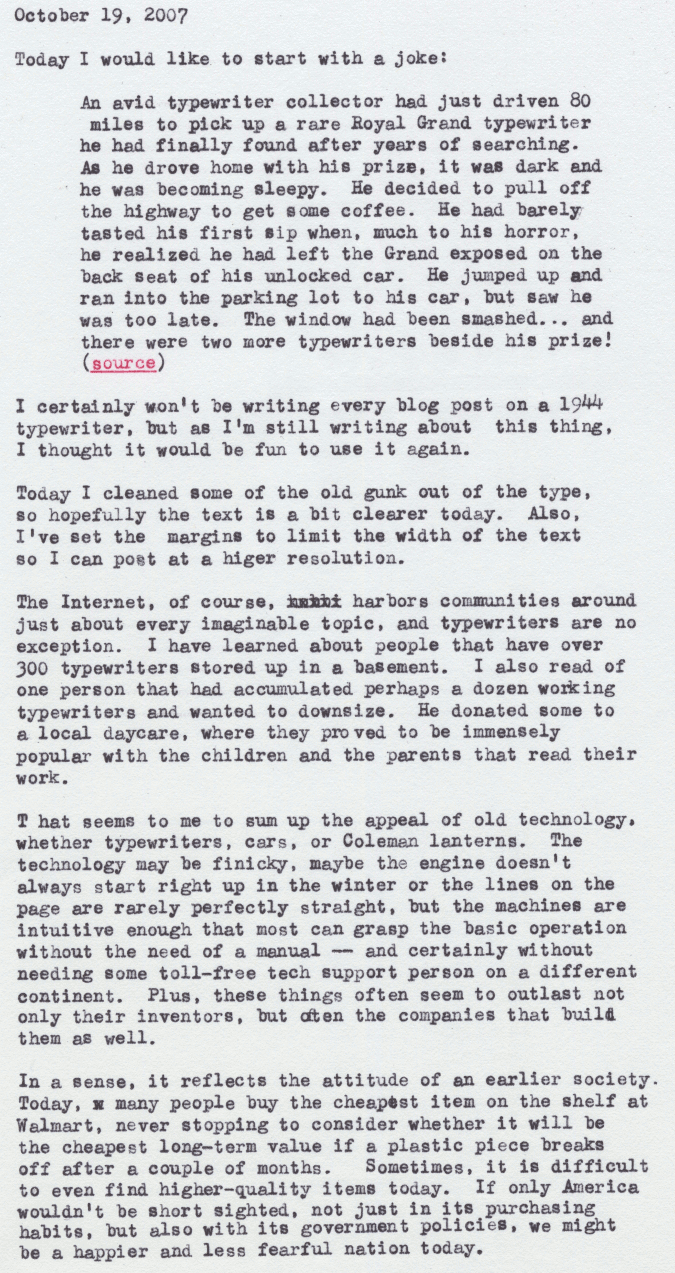
John Goerzen: Short-Term Thinking

Today I would like to start with a joke:
An avid typewriter collector had just driven 80 miles to pick up a rare Royal
Grand typewriter he had finally found after years of searching.  As he drove
home with his prize, it was dark and he was becoming sleepy.  He decided
to pull off the highway to get some coffee.  He had barely tasted his first
sip when, much to his horror, he realized he had left the Grand exposed on
the back seat of his unlocked car.  He jumped up and ran into the parking
lot to his car, but saw he was too late.  The window had been smashed...
and there were two more typewriters beside his prize!
I certainly won't be writing every blog post on a 1944 typewriter, but I'm
still writing about this thing, I thought it would be fun to use it again.
Today I cleaned some of the old gunk out of the type, so hopefully the
text is a bit clearer today.  Also, I've set the margins to limit the width
of the text so I can post at a higher resolution.
The Internet, of course, harbors communities around just about every
imaginable topic, and typewriters are no exception.  I have learned about people that have over 300 typewriters stored up in a basement.  I also read of one person that had accumulated perhaps a dozen working typewriters and wanted to downsize.  He donated some to a local daycare, where they proved to be immensely popular with the children and the parents that read their work.
That seems to sum up the appeal of old technology, whether typewriters, care, or Coleman lanterns.  The technology may be finicky, maybe the engine doesn't always start right up in the winter or the lines on the page are rarely perfectly straight, but the machines are intuitive enough that most can grasp the basic operation without the need of a manual -- and certainly without needing some toll-free tech support person on a different continent.  Plus, these things often seem to outlast not only their inventors, but often the companies that build them as well.
In a sense, it reflects the attitude of an earlier society.  Today, many people buy the cheapest item on the shelf at Walmart, never stopping to consider whether it will be the cheapest long-term value if a plastic piece breaks off after a couple of months.  Sometimes, it is difficult to even find higher-quality items today.  If only America wouldn't be short sighted, not just in its purchasing habits, but also with its government policies, we might be a happier and less fearful nation today. flickr page

19 October 2007

Mike Hommey: Gobuntu and Firefox

You may remember, a while ago, Mark Shuttleworth announced that there would be a 100% free version of Ubuntu Gutsy Gibbon :
Ubuntu 7.10 will feature a new flavour - as yet unnamed - which takes an ultra-orthodox view of licensing: no firmware, drivers, imagery, sounds, applications, or other content which do not include full source materials and come with full rights of modification, remixing and redistribution.
Later, we learned it would be named Gobuntu. Well, they didn’t quite follow their promise. Yes, Gobuntu includes Firefox, making it a pretty useless failed attempt. By the way, I’m still amazed so many people believe it was all about the trademarks. For them, I’ll quote something I wrote a year ago:
Trademark and copyright are different things. Mozilla has unnecessarily given a non-free license to clarify the trademark situation, but that is not required. To make it clear: Debian thinks the logos are not free because they are not free. Period.
I’m glad at least Mark Pilgrim got it right. Update: And as seen on Planet Mozilla, Robert Sayre obviously still hasn’t understood the issue.

17 October 2007

Miriam Ruiz: Weekend in Lyon: JDLL 2007

On 19th and 20th of October 2007 takes place “Les 9 mes Journ es Du Logiciel Libre” in Lyon, France, around the topics “Individual freedom and free software” and “Free Software for everyone”, the first of which will be analyzed from different point of views: legal, technical, historical, artistic, and others. The second will be addressed through different talks, covering many different aspects and areas of interests, including games. I’ve never been to Lyon before, I’ve been told it’s a really cute city, and I’m really looking forward to see you all, french guys, again there. :)

16 October 2007

Russell Coker: Introverts

I am amazed that I had never read the article Caring for Your Introvert [1] before. One of the interesting points concerned acting like an extrovert (I can do it for the duration of a typical job interview). Another was the issue of recovery time after having to deal with people. When living in hotels (which I did for about 18 months straight in 1999 and 2000) I found that some days I would reach my quota for dealing with people before I had dinner, going to bed hungry seemed like a better option than going to a restaurant. One thing that occurred to me is the lack of apparent introversion among most delegates at computer conferences. It seems that the majority of people who are any good at coding are introverts and you might expect an environment with a majority of introverts to be somewhat quiet. An interview with the author of the article [2] published 3 years later explains this (among other things). Here is a quote:
But once an introvert gets on a subject that they know about or care about or that intrigues them intellectually, the opposite often takes hold. They get passionately engaged and turned on by the conversation. But it’s not socializing that’s going on there. It’s learning or teaching or analyzing, which involves, I’m convinced, a whole different part of the brain from the socializing part. Which describes a lot of the activity at conferences. It’s standard practice for people to walk up and join a conversation that covers an area of technology that interests them and then just walk away when the topic changes. I wonder if any of the social networking and dating sites have a section for Myers-Briggs [3] test results. Via Tim Connors blog [4].

Raphael Geissert: sudo + apt-get + package upgrade + modified config files = root shell

I just got amazed by the fact that when the perfect condition is met, a user which can sudo apt-get has root shell access (since one could expect only installing/removing/purging/upgrading packages is allowed).

Whether expected or not, this is the HOW TO:


$ sudo apt-get upgrade
[...]
Configuration file /etc/foo.conf'
==> Modified (by you or by a script) since installation.
==> Package distributor has shipped an updated version.
What would you like to do about it ? Your options are:
Y or I : install the package maintainer's version
N or O : keep your currently-installed version
D : show the differences between the versions
Z : background this process to examine the situation
The default action is to keep your current version.
*** foo.conf (Y/I/N/O/D/Z) [default=N] ? z
Type exit' when you're done.
root@nova:/# whoami
root


I don't believe it's a bug, but I find it interesting.

Jaldhar Vyas: Neoconservatism Is Good For The Environment

One of the common criticisms of the war in Iraq is that it was just an excuse to plunder that nations' oil. Of course that wasn't the reason however on Blog Action Day I urge environmentalists to think about why that might have actually been a better reason than the ones the politicians gave. The world supply of oil will probably run out in my lifetime. While alternative sources of energy are being researched, they have yet to be viable on a large enough scale to keep the world economy running at its present rate of progress. For the time being we must depend on oil and it is of vital importance that this precious resource is managed carefully. The problem is that it is not. Whereas civilized countries use energy for good purposes most of the oil is produced in countries which can only be described as evil. Take Saddams Iraq for instance; apologists claim it was one of the most advanced Arab nations, but that isn't setting a very high bar is it? Oil wealth was not used to better the lives of citizens but to prop up a savage and despotic regime. It is the poor and desperate deprived of the ability to take part in free markets who despoil the environment in a struggle to survive. Look at the other major oil producers and there too you will see a veritable rogues gallery. Some of these villains may be motivated by fundamentalism, some by socialism but the effect is the same. The common man in their countries does not get to enjoy the fruits of progress They are forced to muddle along with old, energy-inefficient, pollution-causing tech and their large numbers and vast geographical range undermine any modest environmental gains made by a few middle-class Westerners. How could anyone who cares about the fate of our mother Earth stand by and watch her bounty being squandered by dictators? See rapidly dwindling resources wasted on jihad and revolution? The next time there is talk of war, be environmentally responsible and ask your representatives to make securing oil and spreading capitalism priorities. You owe it to your planet.

15 October 2007

Romain Francoise: In Rainbows

Once again, PopMatters is right on. I'm amazed that after all these years, international fame and millions of records sold, Radiohead can still get together and make an album such as In Rainbows, true to their sound, intricate and emotional, powerful. Wow.

Simon Richter: Hack mode versus sleeping

The last weeks, I've had a particularly unhealthy sleep cycle, mostly because I've always felt that I could do more on this or that project, and when I decided that it was time to sleep I still kept on thinking about the problem before I dozed off. Now I'm keeping a semi-strict timetable (instead of exact times, there are ranges, but there are non-negotiable, as much as that other person that goes into the shower in the morning tries), and generally that has helped me feel a lot better. I still cannot "switch off" though.

Next.

Previous.