Search Results: "ema"

6 February 2014

Steve Kemp: External Comments, updated

The simple external-comments code is now complete enough for me to stop poking it on a daily basis: All in all I'm pretty happy with the way it works, and the server-code. The client-side Javascript is less good, but I'm probably done poking that too. In an ideal world the client-side code should be a jQuery plugin, but I've not worked out how to make a static method (the JSONP callback) be a member of a jQuery plugin-object. So without that I have to re-pass the options around too many places, rather than making them a member of "this". Meh, pull requests welcome for adding new storage back-ends (redis and sqlite are supported by default), and similarly for cleanups. Links:

Tim Retout: FOSDEM 2014

I attended FOSDEM this year. As always, it was very busy, and the Brussels transport system was as confusing as ever. This time it was nice to accidentally bump into so many people I know from years past. Lunar's talk on reproducible builds of Debian packages was interesting - being able to independently verify that a particular binary package was built from a particular source package is quite attractive. Also Mailpile declared an alpha release. The bit in the talk that I didn't know already was the description of exactly how the search function works. Seeing how they integrate GPG into the contacts/compose features brought home how lacking most (all?) other mail clients are when it comes to usable encryption. On Sunday afternoon I managed to grab a seat in the Go devroom, to hear about crazy things like how YouTube are putting a daemon called Vitess in front of MySQL to abstract away sharding (at the cost of some transaction guarantees). You would have thought Google would already have a scalable data store of some sort? Other bits I remember: Michael Meeks talking about GPU-enabling spreadsheet formulae calculations. And hearing Wietse Venema talk about Postfix was pretty awesome.

Russ Allbery: New init system feature!

The Debian Technical Committee has concluded that all of the available init systems were missing a key technical feature, and, in the spirit of free software, has gone ahead and fixed that lack. All init systems currently packaged for Debian can now double as test case generators for Condorcet vote analysis. I'm not sure if this counts as an NMU. In the event that the Debian project votes on a General Resolution on the default init system, this blog post should be considered striken in its entirety and replaced by the most complex email message from Anthony Towns that the reader can find.

4 February 2014

Martín Ferrari: Telegram

This weekend I attended FOSDEM, as I did for the past 4 years. As always, it was a great experience, even if most of the talks I attended were not so interesting. One of the great things about these events, is to get together with other Free Software enthusiasts. One of them introduced me to the new kid on the block: Telegram. It is advertised as a free and secure replacement for WhatsApp, a mobile application I have been refusing to use for months, much to the anger of friends and family. People use WhatsApp because it saves them money to send SMS-like messages to other people. Which in my mind does not make much sense, as I can use email or XMPP for that same purpose, without having to enter just another walled garden. Sadly, people nowadays are using email less and less, and think that it is easier to send a Facebook message (it is not), and XMPP has became a de-facto walled garden since Google betrayed its users by dropping federation. WhatsApp has the advantage of having millions of users already inside their walled garden, like it happened with Facebook, MSN, or ICQ back in the day. Their success can possibly be attributed to the foolproof system it uses to discover contacts: it just sends your entire address book to their servers for matching against already registered users, which is in itself enough reason not to use it. So, when I was told of a secure, free and open alternative, I was eager to try it out. I started by opening their website to see what it was about. There, I found the first signs that something was wrong: no mention of licenses, almost no technical detail of how the protocol works, or how security is achieved. Still, my friend wanted to talk to me, so I rushed to install it and accept a laundry list of permissions in Android. That was a big mistake. The first thing the application did was to check my address book for contacts, without my permission or knowledge. I got greeted by being told that some of my contacts already have Telegram installed, and since then I keep getting notification that some more of my geek friends are installing it. So it is obvious that this company got all my records, breaking my privacy and security. This is enough for me to remove this piece of software from my phone, but it is not the end of the story. When checking it in more detail I found several other problems. The supposed "secret chat" cannot be possibly secure, as there is no verification of the remote party. It "just works", who cares if there is a man in the middle or not. Supposedly it employs a peer-to-peer connection, but I haven't verified that. On the other hand, the non-"secret" conversations are all routed to the main server. The client-to-server communication is supposedly encrypted, but it uses a home-made protocol (which everybody knows is a recipe for disaster), and the server has access to the cleartext of all your communications. Then, browsing the website, I've found that this "open" and "free" offer does not even have all the source code released. In particular, the server code is not public, nor you can set up your own server. Of course, it does not have federation, so even with the server code you wouldn't be able to talk with your friends. It all depends on two men funding and maintaining the project, so when the funds run out, one can only expect that all the users will be left in the dark. I think these arguments are enough to realise that Telegram is only marginally better than WhatsApp. It offers encryption at the transport layer, but you still are contributing to another walled garden, you are at the mercy of a company which does not have a funding plan, and the security practises range from weak to disturbing. In closing, if you are going to compromise your privacy, give away all your contacts' information, and rely on a single company to keep in touch with people, you might as well go and use what everybody else is using. Update: Even before submitting this post, I've found that some more qualified people has already dissected Telegram and concluded that it is basically snake oil. Please see this article. and proceed to uninstall Telegram.

3 February 2014

Wouter Verhelst: Waking up

Today is the monday after FOSDEM 2014, and I'm slowly waking up. Being in charge of the video team, and after having spent a whole week preparing followed by a whole weekend stressing about, today is a day of slowly waking up from hibernation and returning gear to various rental companies. At FOSDEM 2013, we had recorded five rooms. Even though we did lose a few talks, I felt pretty good about the whole thing, and I think we did pretty well then. It had been my plan to increase the number of rooms to be recorded from 5 to a reasonably higher number say, 10 or so but someone convinced me to do all of them. I'll readily admit I was afraid. Scratch that, I was terrified. Petrified, that we wouldn't be able to pull it off. For previous editions, we'd kept the number conservative, since video work is a high-risk business: if something goes wrong with volunteers work (say, the heralding volunteer doesn't show up), you find a replacement, or you have a staff member introduce a speaker, and the show will go on. Not so with video work: if something minor goes wrong, you will most likely lose content. If something minor goes wrong in one devroom, I'll deal with it. If something minor goes wrong in 20% of devrooms, that's 4 to 5 devrooms, and I can't deal with it. Moreover, finding enough volunteers to manage the video for five rooms was a challenge last year; I couldn't even begin to imagine how to do so for 22 of them. We did work out a way that didn't seem too far-fetched, and that might work: why not look for volunteers from the devrooms themselves? But then, they couldn't be expected to have the required experience, so we'd have to do a lot of handholding. The week before FOSDEM, four of us sat down in an office in Mechelen, and started preparing. We had a lot to do; and when you do, more jobs keep being added to the pile; TODO lists tend to grow longer, not shorter. Installing servers, testing cameras, setting twinpact dipswitches, configuring laptops. Changing a few tests in the config management system, and having to go over the laptops again. Buying extra gear. Buying yet more extra gear, several times. Buying cardboard boxes when it appeared that the plastic foldable ones we'd ordered wouldn't make it in time, and unloading the pallet of them when it did, after all, so we could load them into the van with all of the other gear. Laminating instruction sheets. Receiving shipments of rented gear. Calling another supplier last minute when one of our other suppliers had contacted us to let us know one of their cameras that they'd promised us had broken down, and couldn't be repaired in time. Calling that last-minute supplier again when we found out that some of the cameras we'd rented could do HDV only (and not DV), and we needed to find more than the ones we'd already asked for. Discovering that his cameras were of the same problematic model and so also couldn't be used. The feeling of relief when he called me a few hours later and told me he'd managed to scrounge up enough cameras to help us out after all. And then it was time to go to the ULB and start setting up everything. On friday, we had a little bit of help, but did have to do most of it ourselves. After setting up everything in every room and testing as much as possible within the time constraints that we had, we picked up the most expensive bits of the gear, brought it down to a safe place, and went home. On saturday and sunday, for me it was mostly a matter of handing out gear to various devrooms, running around to fix various issues, and then in the evening receiving boxes back, using a checklist to ensure everything expected was in the box (and that things not needed would remain in the room, or be sent back). It was exhausting, to the extent that on saturday afternoon, I had to take a bit of time off so I could go and rest. I think it's safe to say that something like this hasn't been done before. FOSDEM is a huge conference; most conferences with multiple rooms don't have more somewhere between 5 and 10 of them. The fact that we have so many more, and the fact that we record all of them, puts FOSDEM video work in a class of its own, to the extent that the professional cameramen I talked to in order to get the right cameras would incredulously ask "what do you need that for?" when I gave them the numbers we needed. As such, I didn't expect, nor was aiming for, perfection. Unfortunately, with video work it is close to impossible to attain perfection; I have told multiple people during the event that I would be happy if we reached 85% of talks recorded at acceptable quality; and though it is much too soon to say for certain, my gut feeling tells m that we've probably achieved that. One thing we hadn't planned for was streaming. During the past three years, FOSDEM enlisted the help and sponsorship of flumotion to get streaming going. Unfortunately, that did not work out this year; and since we already had far too much on our plates with everything else, we decided to forego streaming and focus on recording, only. A few days before the event, however, Steinar Gunderson took it upon himself to fix that. While we couldn't support him a great deal, we could give him access to the secondary laptops (which weren't otherwise doing much anyway) on which he could then do his thing. This was mostly transparent to us; we did communicate to some extent (e.g., when a machine that had been down had fixed and was working again), but he mostly did his thing while we did ours. Full details, for those who want it, in the linked blog post. Today, then, I spent most of my time handling hardware: waiting for other members of FOSDEM to drive the van up to my office; waiting for the laptop rental company to retrieve most of the laptops; waiting for two of the camera rental companies to retrieve their cameras and tripods; driving over to the final camera rental company to return their cameras and tripods; and finally, driving up to the ULB to retrieve the last laptops who had been copying files all night. As I write this, some video files have already been uploaded to the FOSDEM video archive. However, these are extremely low-quality renditions of video snippets that need to be reviewed; they are not ready yet for public consumption. When those files exist, expect an announcement through the main FOSDEM website.

Kees Cook: compiler hardening in Ubuntu and Debian

Back in 2006, the compiler in Ubuntu was patched to enable most build-time security-hardening features (relro, stack protector, fortify source). I wasn t able to convince Debian to do the same, so Debian went the route of other distributions, adding security hardening flags during package builds only. I remain disappointed in this approach, because it means that someone who builds software without using the packaging tools on a non-Ubuntu system won t get those hardening features. Think of a sysadmin trying the latest nginx, or a vendor like Valve building games for distribution. On Ubuntu, when you do that ./configure && make you ll get the features automatically. Debian, at the time, didn t have a good way forward even for package builds since it lacked a concept of global package build flags . Happily, a solution (via dh) was developed about 2 years ago, and Debian package maintainers have been working to adopt it ever since. So, while I don t think any distro can match Ubuntu s method of security hardening compiler defaults, it is valuable to see the results of global package build flags in Debian on the package archive. I ve had an on-going graph of the state of build hardening on both Ubuntu and Debian for a while, but only recently did I put together a comparison of a default install. Very few people have all the packages in the archive installed, so it s a bit silly to only look at the archive statistics. But let s start there, just to describe what s being measured. Here s today s snapshot of Ubuntu s development archive for the past year (you can see development opening after a release every 6 months with an influx of new packages):
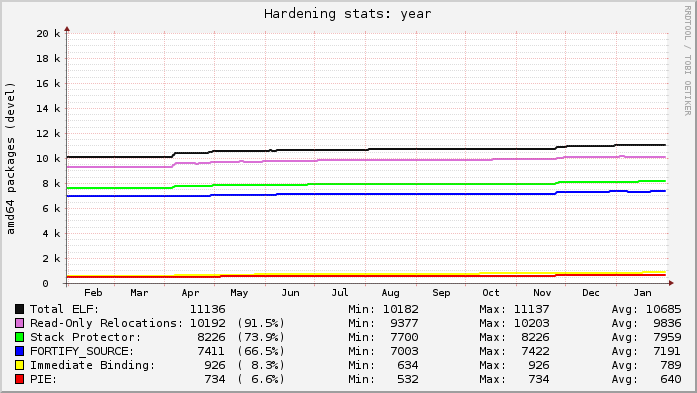
Here s today s snapshot of Debian s unstable archive for the past year (at the start of May you can see the archive unfreezing after the Wheezy release; the gaps were my analysis tool failing):
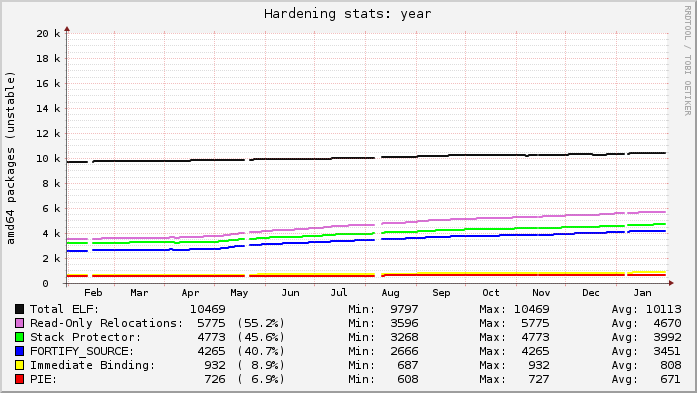
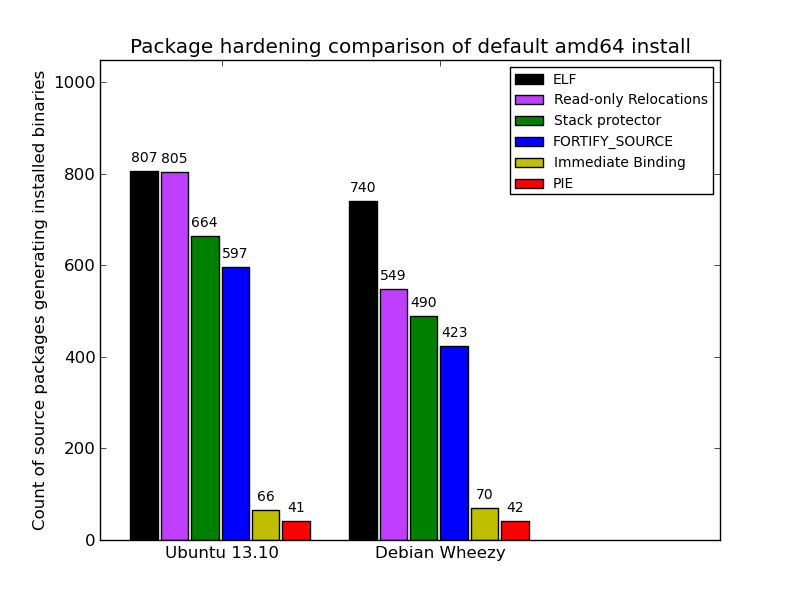
Ubuntu s lines are relatively flat because everything that can be built with hardening already is. Debian s graph is on a slow upward trend as more packages get migrated to dh to gain knowledge of the global flags. Each line in the graphs represents the count of source packages that contain binary packages that have at least 1 hit for a given category. ELF is just that: a source package that ultimately produces at least 1 binary package with at least 1 ELF binary in it (i.e. produces a compiled output). The Read-only Relocations ( relro ) hardening feature is almost always done for an ELF, excepting uncommon situations. As a result, the count of ELF and relro are close on Ubuntu. In fact, examining relro is a good indication of whether or not a source package got built with hardening of any kind. So, in Ubuntu, 91.5% of the archive is built with hardening, with Debian at 55.2%. The stack protector and fortify source features depend on characteristics of the source itself, and may not always be present in package s binaries even when hardening is enabled for the build (e.g. no functions got selected for stack protection, or no fortified glibc functions were used). Really these lines mostly indicate the count of packages that have a sufficiently high level of complexity that would trigger such protections. The PIE and immediate binding ( bind_now ) features are specifically enabled by a package maintainer. PIE can have a noticeable performance impact on CPU-register-starved architectures like i386 (ia32), so it is neither patched on in Ubuntu, nor part of the default flags in Debian. (And bind_now doesn t make much sense without PIE, so they usually go together.) It s worth noting, however, that it probably should be the default on amd64 (x86_64), which has plenty of available registers. Here is a comparison of default installed packages between the most recent stable releases of Ubuntu (13.10) and Debian (Wheezy). It s clear that what the average user gets with a default fresh install is better than what the archive-to-archive comparison shows. Debian s showing is better (74% built with hardening), though it is still clearly lagging behind Ubuntu (99%):
2014, Kees Cook. This work is licensed under a Creative Commons Attribution-ShareAlike 3.0 License.
Creative Commons License

Petter Reinholdtsen: Testing sysvinit from experimental in Debian Hurd

A few days ago I decided to try to help the Hurd people to get their changes into sysvinit, to allow them to use the normal sysvinit boot system instead of their old one. This follow up on the great Google Summer of Code work done last summer by Justus Winter to get Debian on Hurd working more like Debian on Linux. To get started, I downloaded a prebuilt hard disk image from http://ftp.debian-ports.org/debian-cd/hurd-i386/current/debian-hurd.img.tar.gz, and started it using virt-manager. The first think I had to do after logging in (root without any password) was to get the network operational. I followed the instructions on the Debian GNU/Hurd ports page and ran these commands as root to get the machine to accept a IP address from the kvm internal DHCP server:
settrans -fgap /dev/netdde /hurd/netdde 
kill $(ps -ef awk '/[p]finet/   print $2 ')
kill $(ps -ef awk '/[d]evnode/   print $2 ')
dhclient /dev/eth0
After this, the machine had internet connectivity, and I could upgrade it and install the sysvinit packages from experimental and enable it as the default boot system in Hurd. But before I did that, I set a password on the root user, as ssh is running on the machine it for ssh login to work a password need to be set. Also, note that a bug somewhere in openssh on Hurd block compression from working. Remember to turn that off on the client side. Run these commands as root to upgrade and test the new sysvinit stuff:
cat > /etc/apt/sources.list.d/experimental.list <<EOF
deb http://http.debian.net/debian/ experimental main
EOF
apt-get update
apt-get dist-upgrade
apt-get install -t experimental initscripts sysv-rc sysvinit \
    sysvinit-core sysvinit-utils 
update-alternatives --config runsystem
To reboot after switching boot system, you have to use reboot-hurd instead of just reboot, as there is not yet a sysvinit process able to receive the signals from the normal 'reboot' command. After switching to sysvinit as the boot system, upgrading every package and rebooting, the network come up with DHCP after boot as it should, and the settrans/pkill hack mentioned at the start is no longer needed. But for some strange reason, there are no longer any login prompt in the virtual console, so I logged in using ssh instead. Note that there are some race conditions in Hurd making the boot fail some times. No idea what the cause is, but hope the Hurd porters figure it out. At least Justus said on IRC (#debian-hurd on irc.debian.org) that they are aware of the problem. A way to reduce the impact is to upgrade to the Hurd packages built by Justus by adding this repository to the machine:
cat > /etc/apt/sources.list.d/hurd-ci.list <<EOF
deb http://darnassus.sceen.net/~teythoon/hurd-ci/ sid main
EOF
At the moment the prebuilt virtual machine get some packages from http://ftp.debian-ports.org/debian, because some of the packages in unstable do not yet include the required patches that are lingering in BTS. This is the completely list of "unofficial" packages installed:
# aptitude search '?narrow(?version(CURRENT),?origin(Debian Ports))'
i   emacs                   - GNU Emacs editor (metapackage)
i   gdb                     - GNU Debugger
i   hurd-recommended        - Miscellaneous translators
i   isc-dhcp-client         - ISC DHCP client
i   isc-dhcp-common         - common files used by all the isc-dhcp* packages
i   libc-bin                - Embedded GNU C Library: Binaries
i   libc-dev-bin            - Embedded GNU C Library: Development binaries
i   libc0.3                 - Embedded GNU C Library: Shared libraries
i A libc0.3-dbg             - Embedded GNU C Library: detached debugging symbols
i   libc0.3-dev             - Embedded GNU C Library: Development Libraries and Hea
i   multiarch-support       - Transitional package to ensure multiarch compatibilit
i A x11-common              - X Window System (X.Org) infrastructure
i   xorg                    - X.Org X Window System
i A xserver-xorg            - X.Org X server
i A xserver-xorg-input-all  - X.Org X server -- input driver metapackage
#
All in all, testing hurd has been an interesting experience. :) X.org did not work out of the box and I never took the time to follow the porters instructions to fix it. This time I was interested in the command line stuff.

Craig Small: jffnms 0.9.4

JFFNMS version 0.9.4 was released today, this version fixes some bugs that have recently appeared in previous versions.
Alarmed Interfaces and Events

Alarmed Interfaces and Events

The triggers rules editor had a problem where some of the rules clicked off the triggers would not appear or could not be edited correctly. Most of the Admin screens have the ability to sort the rows. This, unfortunately, didn t sort but the functionality has been restored. Most users are probably unaware of this, but the database schema is first created for MySQL and is then converted for PostgreSQL. The conversi0n process is far from ideal and hasn t worked until this release. More testing is required for PostgreSQL support but it should be a lot better.

2 February 2014

Gunnar Wolf: CuBox-i4Pro

CuBox-i4Pro
Somewhere back in August or September, I pre-ordered a CuBox-i A nicely finished, completely hackable, and reasonably powerful ARM system, nicely packaged and meant to be used to hack on. A sweet deal! There are four models (you can see the different models' specs here) I went for the top one, and bought a CuBox-i4Pro. That means, I have a US$130 nice little box, with 4 ARM7 cores, 2GB RAM, WiFi, and... well, all of its basic goodies and features. For some more details, look at the CuBox-i block diagram. I got it delivered by early January, and (with no real ARM experience on my side) I finally got to a point where I can, I believe, contribute something to its adoption/usage: How to get a basic Debian system installed and running in it. The ARM world is quite different to the x86 one: Compatibility is much harder, the computing platform does not self-describe properly, and a kernel must first understand how a specific subarchitecture is before being able to boot on it. Somewhere in the CuBox forums (or was it the IRC channel?) I learnt that the upstream Linux kernel does not yet boot on the i.MX6 chip (although support is rumored to be merged for the 3.14 release), so I am using both a kernel and an uBoot bootloader not built for (or by) Debian people. Besides that, the result I will describe is a kosher Debian install. Yes, I know that my orthodox friends and family will say that 99% kosher is taref... But remember I'm never ever that dogmatic. (yeah, right!) Note that there is a prebuilt image you can run if you are so inclined: In the CuBox-i forums and wiki, you will find links to a pre-installed Debian image you can use... But I cannot advise to do so. First, it is IMO quite bloated (you need a 4GB card for a very basic Debian install? Seriously?) Second, it has a whole desktop environment (LXDE, if I recall correctly) and a whole set of packages I will probably not use in this little box. Third, there is a preinstalled user, and that's a no-no (user: debian, password: debian). But, most importantly, fourth: It is a nightly build of the Testing (Jessie) suite... Built back in December. So no, as a Debian Developer, it's not something we should recommend our users to run! So, in the end and after quite a bit of frustration due to my lack of knowledge, here goes the list of steps I followed:
Using the CuBox
On the i2 and i4 models, you can use it either with a USB keyboard and a HDMI monitor, or by a serial consoles (smaller models do not have a serial console). I don't have a HDMI monitor handy (only a projector), so I prefer to use the serial terminal. Important details to avoid frustration: The USB keyboard has to be connected to the lower USB port, or it will be ignored during the boot process. And make sure your serial terminal is configured not to use hardware flow control. Minicom is configured by default to use hardware flow control, so it was not sending any characters to the CuBox. ^A-O gets you to the Minicom configuration, select Serial port setup, and disable it.
Set up the SD card
I created a 2GB partition, but much less can suffice; I'd leave it at least to 1GB to do the base install, although it can be less once the system is set up (more on this later). Partition and format using your usual tools (fdisk+mke2fs, or gparted, or whatever suits your style).
Install the bootloader
I followed up the instructions on this CuBox-i forums thread to get the SPL and uBoot bootloader running. In short, from this Google Drive folder, download the SPL-U-Boot.img.xz file, uncompress it (xz --decompress SPL-U-Boot.img.xz), and write it to the SD card just after the partition map: As root,
# dd if=SPL-U-Boot.img of=/dev/mmcblk0 bs=1024 seek=1.
Actually, to be honest: As I wanted something basic to be able to debug from, I downloaded (from the same Google Drive) the busybox.img.gz file. That's a bit easier to install from: xz --decompress busybox.img.xz, and just dump it into the SD from the beginning (as it does already include a partition table):
# dd if=busybox.img of=/dev/mmcblk0
This card is already bootable and minimal, and allows to debug some bits from the CuBox-i itself (as we will see shortly).
After this step, I created a second partition, as I said earlier. So, my mmcblk0p1 partition holds Busybox, and the second will hold Debian. We are still working from the x86 system, so we mount the SD card in /media/mmcblk0p2
Installing the base system
Without debian-installer to do the heavy lifting, I went for debootstrap. As I ran it from my PC, debootstrap's role will be for this first stage only to download and do a very initial pre-unpacking of the files: Bootstrapping a foreign architecture implies, right, using the --foreign switch:
debootstrap --foreign --arch=armhf wheezy /media/mmcblk0p2 http://http.debian.net/debian
You can add some packages you often use by specifying --include=foo,bar,baz
So, take note notes: This board is capable of running the armhf architecture (HF for Hardware Float). It can also run armel, but I understand it is way slower.
First boot (with busybox)
So, once debootstrap finishes, you are good to go to the real hardware! Unmount the SD card, put it in the little guy, plug your favorite console in (I'm using the serial port), and plug the power in! You should immediately see something like:
  1. U-Boot SPL 2013.10-rc4-gd05c5c7-dirty (Jan 12 2014 - 02:18:28)
  2. Boot Device: SD1
  3. reading u-boot.img
  4. Load image from RAW...
  5. U-Boot 2013.10-rc4-gd05c5c7-dirty (Jan 12 2014 - 02:18:28)
  6. CPU: Freescale i.MX6Q rev1.2 at 792 MHz
  7. Reset cause: POR
  8. Board: MX6-CuBox-i
  9. DRAM: 2 GiB
  10. MMC: FSL_SDHC: 0
  11. In: serial
  12. Out: vga
  13. Err: vga
  14. Net: phydev = 0x0
  15. Phy not found
  16. PHY reset timed out
  17. FEC
  18. (Re)start USB...
  19. USB0: USB EHCI 1.00
  20. scanning bus 0 for devices... 1 USB Device(s) found
  21. scanning usb for storage devices... 0 Storage Device(s) found
  22. scanning usb for ethernet devices... 0 Ethernet Device(s) found
  23. Hit any key to stop autoboot: 3

Let it boot (that means, don't stop autoboot), and you will soon see a familiar #, showing you are root in the busybox environment. Great! Now, mount the Debian partition:
# mount /dev/mmcblk0p2 /mnt
Finishing debootstrap's task
With everything in place, it's time for debootstrap to work. Chroot into the Debian partition:
# chroot /mnt
And ask Debootstrap to finish what it started:
# debootstrap --second-stage
Be patient, as this step takes quite a bit to be finished.
Some extra touches...
After this is done, your Debian system is almost ready to be booted into. Why almost? Because it still does not have any users, does not know its own name nor knows I want to use it via a serial terminal. Three very simple tasks to fix. First two:
  1. # passwd
  2. Enter new UNIX password:
  3. Retype new UNIX password:
  4. passwd: password updated successfully
  5. # echo cubox-i.gwolf.org > /etc/hostname

For the second one, add a line to /etc/inittab specifying the details of the serial console. You can just do this:
# echo 'T0:23:respawn:/sbin/getty -L ttymxc0 115200 vt100' >> /etc/inittab
Boot into Debian!
So, ready to boot Debian? Ok, first exit the chroot shell, to go back to the Busybox shell, unmount the Debian partition, and set the root partition read-only:
  1. # exit
  2. # umount /mnt
  3. # mount / -o remount,ro

Disconnect and connect power, and now, do interrupt the boot process when you see the Hit any key to stop automount prompt. To see the configuration of uboot, you can type printenv We will only modify the parameters given to the kernel:
  1. CuBox-i U-Boot > setenv root /dev/mmcblk0p2 rootfstype=ext3 ro rootwait
  2. CuBox-i U-Boot > boot

So, the kernel will load, and a minimal Debian system will be initialized. In my case, I get the following output:
  1. ** File not found /boot/busyEnv.txt **
  2. 4703740 bytes read in 390 ms (11.5 MiB/s)
  3. ## Booting kernel from Legacy Image at 10000000 ...
  4. Image Name: Linux-3.0.35-8
  5. Image Type: ARM Linux Kernel Image (uncompressed)
  6. Data Size: 4703676 Bytes = 4.5 MiB
  7. Load Address: 10008000
  8. Entry Point: 10008000
  9. Verifying Checksum ... OK
  10. Loading Kernel Image ... OK
  11. Starting kernel ...
  12. Unable to get enet.0 clock
  13. pwm-backlight pwm-backlight.0: unable to request PWM for backlight
  14. pwm-backlight pwm-backlight.1: unable to request PWM for backlight
  15. _regulator_get: get() with no identifier
  16. mxc_sdc_fb mxc_sdc_fb.2: NO mxc display driver found!
  17. INIT: version 2.88 booting
  18. [info] Using makefile-style concurrent boot in runlevel S.
  19. [....] Starting the hotplug events dispatcher: udevd. ok
  20. [....] Synthesizing the initial hotplug events...done.
  21. [....] Waiting for /dev to be fully populated...done.
  22. [....] Activating swap...done.
  23. [....] Cleaning up temporary files... /tmp. ok
  24. [....] Activating lvm and md swap...done.
  25. [....] Checking file systems...fsck from util-linux 2.20.1
  26. done.
  27. [....] Mounting local filesystems...done.
  28. [....] Activating swapfile swap...done.
  29. [....] Cleaning up temporary files.... ok
  30. [....] Setting kernel variables ...done.
  31. [....] Configuring network interfaces...done.
  32. [....] Cleaning up temporary files.... ok
  33. [....] Setting up X socket directories... /tmp/.X11-unix /tmp/.ICE-unix. ok
  34. INIT: Entering runlevel: 2
  35. [info] Using makefile-style concurrent boot in runlevel 2.
  36. [....] Starting enhanced syslogd: rsyslogd. ok
  37. [....] Starting periodic command scheduler: cron. ok
  38. Debian GNU/Linux 7 cubox-i.gwolf.org ttymxc0
  39. cubox-i login:

And that's it, the system is live and ready for my commands!
So, how big is this minimal Debian installed system? I cheated a bit on this, as I had already added emacs and screen to the system, so yours will be a small bit smaller. But anyway Lets clear our cache of downloaded packages, and see the disk usage information:
  1. root@cubox-i:~# apt-get clean
  2. root@cubox-i:~# df -h
  3. Filesystem Size Used Avail Use% Mounted on
  4. rootfs 1008M 347M 611M 37% /
  5. /dev/root 1008M 347M 611M 37% /
  6. devtmpfs 881M 0 881M 0% /dev
  7. tmpfs 177M 132K 177M 1% /run
  8. tmpfs 5.0M 0 5.0M 0% /run/lock
  9. tmpfs 353M 0 353M 0% /run/shm

So, instead of a 4GB install, we have a 350MB one. Great improvement! Now, lets get it to do something useful, in a most Debianic way!

Chris Lamb: Defaulting to comparing against yourself on Strava

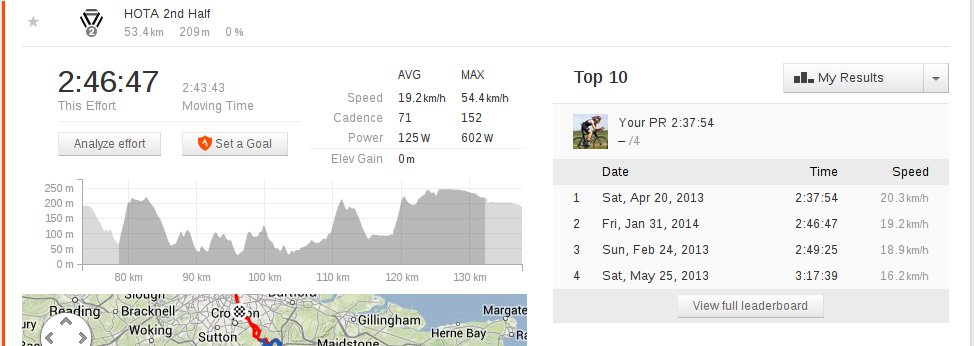
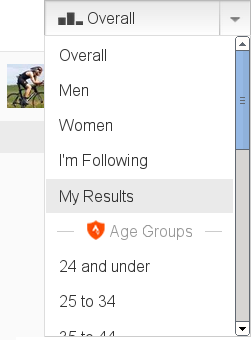
Strava's brand positioning is based around challenging and comparing yourself to others through virtual competitions and leaderboards. I am not against the competitive spirit in principle, but my personal experience is that most psychologically and physiologically rewarding training comes from comparing your own past performances to today or from setting long term goals. I accordingly use the service as a glorified training diary, with the public leaderboards serving only as curiosa or as an occasional check on hubris. (Zen-like introspection aside, using public data as a guide in a metropolis such as London is problematic as rankings are distorted by professional racers, KOM hunters, drafting, fraud and obviously traffic conditions.) To make this easier, I wrote a Chrome extension that changes the default leaderboard to "My Results" instead of "Overall" when viewing a segment effort: https://chris-lamb.co.uk/wp-content/2014/my_results.png The other leaderboards can still be viewed via the usual selector: https://chris-lamb.co.uk/wp-content/2014/my_results_dropdown.png I've found it curious but not altogether surprising how this mere change of default dramatically affects one's mindset. Source code is available. If you found this extension useful, you might like my extension to quickly switch between metric and imperial units.
1 February 2014

Paul Tagliamonte: Iron-Blogger starts again

After years under Mako s loving care, iron-blogger is now under new leadership. The triumvirate consists of Me, Molly and John. If any interesting Boston-area people want to join, just email us!

Alexander Wirt: next stop: FOSDEM 2014

This year I am able to join the Debian Booth on FOSDEM again. I am also looking forward to meet some projects like foreman and many others. I also hope that I find the time to do some listmaster work, like accepting new lists or getting my new solr based search engine for lists.debian.org online. If you want to meet me, try the debian booth or drop me a short mail or twitter message (@formorer).

30 January 2014

Russell Coker: The Movie Experience

Phandroid has one of many articles about a man being detained for wearing Google Glass in a cinema [1]. The article states as a fact that it s probably not smart to bring a recording device into a movie theater which is totally bogus. I ve visited a government office where recording devices were prohibited, they provided a locker for me to store everything that could be used for electronic storage outside their main security zone, that s what you do when you ban recording devices. Any place that doesn t have such facilities really isn t banning recording. The Gadgeteer has the original story with more detail with an update showing that the Department of Homeland Security were responsible for detaining the victim [2]. There are lots of issues here with DHS continuing to do nothing good and more bad things than most people suspect and with the music and film industry organisations attacking innocent people. But one thing that seems to be ignored is that movies are a recreational activity, so it s an experience that they are selling not just a movie. Any organisation that wants to make money out of movies really should be trying to make movies fun. The movie experience has always involved queuing, paying a lot of money for tickets ($20 per seat seems common), buying expensive drinks/snacks, and having to waste time on anti-piracy adverts. Now they are adding the risk of assault, false-arrest, and harassment under color of law to the down-sides of watching a movie. Downloading a movie via Bittorrent takes between 20 minutes and a few hours (depending on size and internet connectivity). Sometimes it can be quicker to download a movie than to drive to a cinema and if you are organising a group to watch a movie it will definitely be easier to download it. When you watch a movie at home you can pause it for a toilet break and consume alcoholic drinks while watching (I miss the Dutch cinemas where an intermission and a bar were standard features). It s just a better experience to download a movie via Bittorrent. I ve previously written about the way that downloading movies is better than buying a DVD [3], now they are making the cinema a worse experience too. I sometimes wonder if groups like the MPAA are actually trying to make money from movies or whether they just want to oppress their audiences for fun or psychological research. I could imagine someone like the young Phillip Zimbardo working for the MPAA and doing experiments to determine how badly movie industry employees can treat their customers before the customers revolt. Anyone who watches a Jack Ryan movie (or any movie with a Marty-Stu/Gary-Stu character) obviously doesn t even want to experience the stress of an unhappy ending to a movie. It seems obvious that such people won t want the stress of potentially being assaulted in the cinema. In terms of economics it seems a bad idea to do anything about recording in the cinema. When I was 11 I was offered the opportunity to watch a movie that had been recorded by a video camera in the US before it was released in Australia, I wasn t interested because watching a low quality recording wouldn t be fun. It seems to me that if The Pirate Bay (the main site for Bittorrent downloads of movies) [4] was filled with awful camera recordings of movies then it would discourage people from using it. A quick search shows some camera recordings on The Pirate Bay, it seems that if you want to download a movie of reasonable quality then you have to read the Wikipedia page about Pirated Movie Release Types [5] to make sure that you get a good quality download. But if you buy a DVD in a store or visit a cinema then you are assured of image and sound quality. If the movie industry were smarter they would start uploading camera recordings of movies described as Blue-Ray rips to mess with Bittorrent users and put newbies off downloading movies.

29 January 2014

Daniel Pocock: Lumicall: giving you choice when you dial

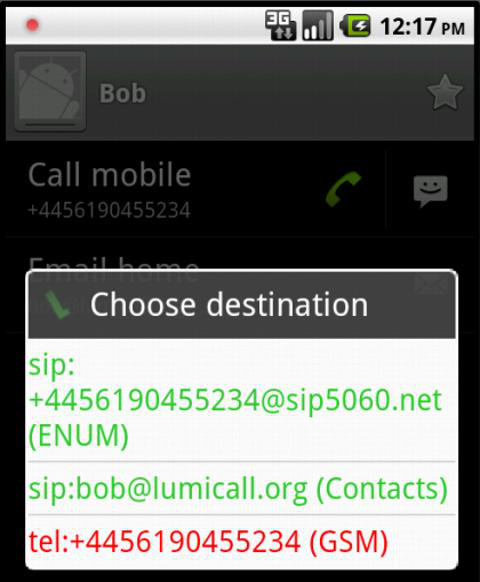
One of the distinguishing features of Lumicall, the free and open SIP/VoIP app for Android, is the unique dialing experience. In fact, even regular softphones for the desktop/laptop don't currently offer the same power when you want to make a call. In my previous blog, I looked at the ENUM technology that underpins part of this compelling new user experience. Here we can step back and look at the bigger picture. Choice is important, sneak preview of Sunday's talk at FOSDEM The fundamental reason for the dialing popup is to give the user choice. Choice is important. With that in mind, one of the key revelations that I will discuss during my talk about Lumicall this Sunday at FOSDEM is that I would like to give users the opportunity to use the Lumicall dialer with other VoIP apps, including Jitsi for Android and CSipSimple. To facilitate this, I hope to separate the dialing logic from the app and make it available as a standalone app or library module that can be used in any free communications software. Users expect convenience, Lumicall tries to deliver Have you noticed how many people will pick up their mobile phone to make a call even when they have a regular phone within reach? Have you found yourself calling your friends' mobile numbers even though you have their home and office numbers in your address book too? These mobile network calls are often at least ten times more expensive than landline calls and by definition they are infinitely more expensive than free calls made over the Internet. So why do people behave this way? The answer is simple: convenience. The caller does not want to make multiple efforts to dial, nor does he want to lose one or two minutes speaking to a secretary, colleague or spouse of the person he is trying to call. Dialing from the address book in his own mobile phone and calling the mobile number of the person he wants to speak with is the shortest path to success. It is efficient, it is compelling and it is what users expect. Free software products wanting to make an impact need to carefully align themselves with these user expectations and that is exactly what Lumicall tries to do. Choose your own adventure: dial the digits, use the address book or surf your call history Any of these everyday dialing practices triggers the Lumicall dialer. In this example, the user is trying to call Bob from the address book: While the user may have simply pressed the "call" button, Lumicall alerts them to several ways that they may proceed:
  • The first choice is a SIP address found in the ENUM directory, sip:+4456190455234@sip5060.net. Lumicall will take all the phone numbers associated with Bob in the address book and report any ENUM results associated with them. Here, just a single ENUM result is display.
  • The second choice is a SIP address constructed from Bob's email address. Lumicall found the email address in the address book entry and discovered that Bob's domain, lumicall.org, has a NAPTR record for SIP. Based on this discovery, Lumicall feels there is a good probability the email address is also a SIP address. If multiple email addresses are in the address book, they will all be checked for NAPTR.
  • (Not shown in the picture) if Lumicall has been configured to use a SIP-to-PSTN gateway account, it will display the option to call Bob's number through the gateway in blue
  • Finally, at the bottom of the list, Lumicall offers the option to call Bob's number in the normal manner, through the GSM network. This option is colour-coded in red to emphasize that it is usually the most expensive.
The tip of the iceberg This experience is a big improvement over the experience of the old rotary dial but it could also be taken even further. People don't always respond to their SIP address, especially if they live in a country where mobile data is not yet the norm. These are areas where Lumicall could be improved. For example, we could use SIP presence to make sure that Bob really is online before displaying the SIP option. This would reduce frustration and boost confidence in SIP. We could even go beyond that: Bob could use the SIP presence mechanism to advertise whether or not he is on a slow mobile data network or a fast network like 4G or wifi. You may choose to defer your call to Bob until he enters wifi coverage where the call quality is likely to be better and maybe video will be possible. This latter opportunity also has privacy implications: Bob may only choose to share that live insight into his network coverage with contacts he trusts. Try it at FOSDEM I will spend some time around the real-time lounge at FOSDEM and would be delighted to get feedback from users who are trying Lumicall, FreePhoneBox.net, JSCommunicator, DruCall or the new Debian SIP service.

Emanuele Rocca: Antifeatures and Antibugs

Software Engineering distinguishes between software features and software bugs. It is usually understood that features are positive, expected characteristics of a computer program. Features make users happy by allowing them to do something useful, interesting, or fun. Something good, anyways. Bugs are instead undesirable and annoying. You're sitting there at your computer writing a long email and the software crashes right before your email is sent. Bad stuff. Features are generally implemented by programmers on purpose, whereas bugs are purely unintentional. They are mistakes. You don't make a mistake on purpose. We might at this point be inclined to think that: i) what is good for users is done on purpose by software manufacturers; ii) what is bad for users was not meant to be. It happened by mistake. Here is a handy table to visualize this idea:
On purpose By mistake
Good Feature
Bad Bug
It seems to make a lot of sense. But you might have noticed that two cells of the table are empty. Right! In a great talk titled When Free Software isn't better, Benjamin Mako Hill mentions the concept of antifeatures, and how they relate to Free Software. Antifeatures are features that make the software do something users will hate. Something they will hate so much they would pay to have those features removed, if that's an option. Microsoft Windows 7 is used in the talk to provide some examples of software antifeatures: the Starter Edition does not allow users to change their background image. Also, it limits the amount of usable memory on the computer to 2GBs, regardless of how much memory the system actually has. Two antifeatures engineered to afflict users to the point that they will purchase a more expensive version of the software, if they have the means to do that. I have another nice example. The Spotify music streaming service plays advertisements between songs every now and then. To make sure users are annoyed as much as possible, Spotify automatically pauses an advertisement if it detects that the volume is being lowered. A poor Spotify user even tried to report the bug on The Spotify Community forum, only to find out that what she naively considered as a software error was "intentional behavior". A spectacular antifeature indeed. Whenever a piece of technology does something you most definitely do not want it to do, such as allowing the NSA to take complete control of your Apple iPhone, including turning on its microphone and camera against your will, that's an antifeature.
On purpose By mistake
Good Feature
Bad Antifeature Bug
Both bugs and antifeatures are bad for users. The difference between them is that antifeatures are engineered. Time and money are spent to make sure the goal is reached. A testing methodology is followed. "Are we really sure customers cannot change their wallpaper even if they try very very hard?" Engineering processes, of course, can fail. If the poor devils at Microsoft who implemented those harassments would have made a mistake that allows users to somehow change their wallpaper on Windows Starter... Well, I would call that a glorious antibug.
On purpose By mistake
Good Feature Antibug
Bad Antifeature Bug
There is no place for antifeatures in Free and Open Source Software. Free Software gives users control over what their software does. Imagine Mozilla adding a feature to Firefox that sets your speakers volume to 11 and starts playing a random song from the black metal artist Burzum every time you add a bookmark, unless you pay for Mozilla Firefox Premium Edition. The source code for Firefox is available under a free license. People who are not into Burzum's music would immediately remove this neat antifeature. I have spent many years of my life advocating Free and Open Source Software, perhaps using the wrong arguments. Mako's talk made me think about all this (thanks mate!). All these years I've been preaching about the technical superiority of Free Software, despite evidence of thousands of bugs and usability issues in the very programs I am using, and contributing to develop. Free Software is not better than Proprietary Software per se. Sometimes it is, sometimes it's not. But it gives you control, and freedom. When it annoys you, when it doesn't do what you expect and want, you can be sure it's not on purpose. And we can fix it together.

Alexander Wirt: everything comes to an end

I was a member of the credativ family for almost 10 years. It was a great and and demanding time where I did things I never imagined I would have to do them :). I started as an apprentice and finished as a technical lead. In the last summer one of my best friends - if not my best - and I developed the idea of me joining his company hs42 as their new Head of IT. The whole concept is interesting, most time I ll do home-office and for ~ 1 week in a month I ll join the company in Oldenburg. After a lot of thinking I accepted that offer. That means that I left credativ in December. Being an open source consultant is interesting on the one hand, but somewhat annoying on the other hand. You will always do new things, but often you are not in the position of designing, deciding or even running them. I was always something that is nowadays known as a devop - a long time before this was getting hip . Now I have the opportunity to design, develop and run my own systems. That also means a little bit windows, but opsi exists :). Running systems on your own is different from the usual consultant work. Being a consultant often means that you design and implement something and after it works you have to give your baby into the hands of someone else. Running them on your own also means you can do constant improvement to something, not only when its broken. The job should give me more time for open source and my family, which is a good thing. It is still a little bit odd to work from home, but being together with your family most of the time is a great thing - and I don t want to miss it. The new job also allows me to work as consultant on my own, so if you need a Debian, E-Mail, Linux or whatever guy that helps you in doing things - get in touch with me. The time at credativ was a great one and I look back with a smile to all the good things. If you need Open Source Support they are the people you should ask. I will stay connected with credativ in many ways.

Enrico Zini: correctness

On political correctness I am reading "Four ways to forgiveness" by Ursula Le Guin. This is how the book begins:
On the planet 0 there has not been a war for five thousand years, she read, and on Gethen there has never been a war. She stopped reading, to rest her eyes and because she was trying to train herself to read slowly, not gobble words down in chunks the way Tikuli gulped his food. There has never been a war : in her mind the words stood clear and bright, surrounded by and sinking into an infinite, dark, soft incredulity. What would that world be, a world without war? It would be the real world Peace was the true life, the life of working and learning and bringing up children to work and learn. War, which devoured work, learning, and children, was the denial of reality. But my people, she thought, know only how to deny. Born in the dark shadow of power misused, we set peace outside our world, a guiding and unattainable light. All we know to do is fight. Any peace one of us can make in our life is only a denial that the war is going on, a shadow of the shadow, a doubled unbelief.
That made me realise that several times I perceived political correctness as "only a denial that the war is going on". Last night I watched this video, which I felt was very relevant to this. Indeed, I have more respect for someone who listens to me and makes a good effort to understand what I said, then rudely disagrees, than for someone who is very politely ignoring everything I am trying to say. This is how I feel like this experience can be distilled into an actionable item:
Replying to an email is probably going to be useless, unless I am willing to make an effort to understand what the other person is trying to say, from their own point of view.

28 January 2014

Bits from Debian: Debian.org enabled for SIP federation and WebRTC, XMPP/Jabber to follow

Debian System Administrators working in conjunction with pkg-voip team member Daniel Pocock have set up a SIP proxy and TURN server for debian.org. Specifically, the SIP proxy provides a way for Debian Developers to use their Debian email ID as a SIP address for making calls to other project members and exchanging calls with any other domain that is enabled for SIP. The repro SIP proxy from reSIProcate has been chosen for this project. The TURN server provides a mechanism for users of SIP or XMPP (Jabber) to relay audio and video streams through a public IP address when necessary, eliminating many of the quality issues that arise when NAT devices block the media streams in one or both directions. The service allows the users to connect directly with the SIP device or softphone of their choosing, including many of those packaged in Debian such as Jitsi and Empathy or third party solutions like Lumicall or CSipSimple on Android. The SIP proxy also includes a WebRTC interface, allowing Debian Developers to immediately try WebRTC voice and video calls without installing or configuring any software of their own other than a web browser. A second stage of the project involves providing an XMPP (Jabber) server with similar capabilities for federated communications between debian.org users and other domains. Further details will be announced in the weeks ahead. It is a significant feature of the Debian Project philosophy that we can operate the entire project using free software, specifically, using software available in Debian packages running on our own infrastructure and without a dependency on third party cloud solutions.These new services for project members fulfill those expectations. It is particularly relevant for situations where real-time communication (voice or video) collaboration takes place with third parties such as applicants for Google Summer of Code, Outreach Program for Women, sponsors, media and other free software projects. Project specific details and a user guide are available now on the Debian Wiki at http://wiki.debian.org/UnifiedCommunications/DebianDevelopers

27 January 2014

Jo Shields: Dear Debian Developers, lrn2gpg

For some strange reason, I ve been receiving a lot of GPG-signed mail from Debian Developers and Maintainers lately. In response to each of these mails, I need to send a GPG-encrypted reply. The rate at which I m able to send replies has been significantly hampered by the poor state in which many DD/DM s maintain their GPG keys. Here are a few common mistakes, so you can consider correcting them. Ensure you have a UID for the email address(es) you use When I send an encrypted mail, I need to be sure that the recipient is legit. This means any decent mail client should refuse to send an encrypted message to foo@bar.com unless that email address is known somehow to GPG. In many cases, someone with a valid key for foo@bar.com would send their signed mail from foobar@gmail.com without that being a valid UID. In some cases, foo@bar.com isn t even a valid email address anymore (i.e. the bar.com mail server says no such mailbox). You should have a UID for each address you use. Signatures are per-UID You may well have a valid UID for foo@debian.org, foo@bar.com, and foobar@gmail.com but the PGP trust model doesn t automatically trust every UID as much as its peers. Each individual UID needs to be trusted (i.e. signed/uploaded) by others. What if you added billg@microsoft.com as a UID should that automatically be trusted? Clearly not. Just because you have foo@debian.org doesn t mean it s trusted for encryption without some signatures. Make sure you actually have an encrypting subkey GPG sucks, and as a result, it reports Skipping unusable pubkey when the issue is a lack of valid encrypting subkeys. If you have revoked all encrypting subkeys, or allowed them to expire, then I cannot send you encrypted mail. Exact naming matters Bob Bobbertson <foo@bar.com> and B b B bb rts n <foo@bar.com> are different people. Check your mail client s From: setting, to ensure it matches your UID. If not, fix one of them. Check your webmail plugin isn t shit Some people use third party plugins to integrate GPG into their webmail client (e.g. Hotmail or GMail). Make sure this actually works. Don t use Enigmail Enigmail is a popular plugin to integrate GPG into Mozilla Thunderbird. It doesn t work, in most cases. Almost every single BADSIG in my inbox is due to Enigmail. Thunderbird will insert spurious line wraps and escape characters into your mail after signing, resulting in invalid signatures. It s mostly okay if you never quote mail, and restrict messages to about 70 characters. I know plenty of Debian Developers don t care about GPG other than for package signing but please, for the sanity of the rest of us, take an occasional moment to care a little. I should note that the worst offenders for keys which don t just work were Developers with 1024D keys the best behaved were Maintainers of all stripes.

26 January 2014

Niels Thykier: Release architecture meeting 2014-01-26

Today, we held an one-hour IRC-meeting to debate the status of the current architectures in sid. During that one hour, we brought up all 13 architectures. We made a decision on 9 of the architectures. The remaining 4 will be revisited within 2 months. As for the actual results, we will announce these on debian-devel-announce with our next bits mail. I suspect the announcement to happen within a couple of days. I am quite pleased that we managed to keep the meeting to one hour. Especially considering that it was planned less than a week ago. One of the things, that I believe helped us, was that we had summarised the status for each architecture prior to the meeting. In my view, the summary allowed us to finish at least half of the architectures within their allocated 5 minutes. In fact, we had 20 minutes for the last 2 architectures partly because amd64 + i386 combined took about a minute. A second thing that helped us stay on time was cutting debates short. Obviously, with less than 5 minutes per architecture, there was little time for debate and, I admit, that was by design. This meant that we had to defer 4 decisions for later. We are currently waiting for information, which we hope to have soon. More on that in the announcement later.
I would like to thank the attendees for contributing to a productive and short meeting. It was a pleasure and I hope we can repeat the success next time. :)

Next.

Previous.