Jonathan Dowland: Portland, Oregon and Beatdown Records, Newcastle

 Powell's frontage
 Music Millennium. Keep Portland Weird!
Powell's frontage
Music Millennium. Keep Portland Weird!
 As I mentioned a couple of weeks ago, I've been trying to hack an Orbic Speed RC400L mobile hotspot so it'll automatically boot when power is attached. When plugged in it would flash a "Welcome" screen and then switch to a display showing the battery charging - it wouldn't show up on USB, and didn't turn on any networking. So, my initial assumption was that the bootloader was making a policy decision not to boot Linux. After getting root (as described in the previous post), I was able to cat /proc/mtd and see that partition 7 was titled "aboot". Aboot is a commonly used Android bootloader, based on Little Kernel - LK provides the hardware interface, aboot is simply an app that runs on top of it. I was able to find the source code for Quectel's aboot, which is intended to run on the same SoC that's in this hotspot, so it was relatively easy to line up a bunch of the Ghidra decompilation with actual source (top tip: find interesting strings in your decompilation and paste them into github search, and see whether you get a repo back).
boot_reason = read_pmic_boot_reason();
switch(boot_reason)
case 0x10:
  bootparam = strdup("androidboot.poweronreason=PWRKEY");
  break;
case 0x20:
  bootparam = strdup("androidboot.poweronreason=USB");
  break;
default:
  bootparam = strdup("androidboot.poweronreason=Hard_Reset");
Changing the 0x20 to 0xff meant that the USB case would never be detected, and it would fall through to the default. All the userland code was happy to accept "Hard_Reset" as a legitimate reason to boot, and now plugging in USB results in the modem booting to a functional state. Woo. A first update to the recently-released package spdl is now om CRAN. The key focus of spdl is a offering the same interface from both R and C++ for logging by relying on spdlog via my RcppSpdlog package.
This release exposes simple helpers
fmt() (to format text according to the included fmt library) and cat() which formats and prints.
The very short NEWS entry for this release follows.
Courtesy of my CRANberries, there is also a diffstat report. More detailed information is on the spdl page. If you like this or other open-source work I do, you can sponsor me at GitHub.Changes in spld version 0.0.2 (2022-12-01)
- Helper functions
fmt()andcat()have been added
This post by Dirk Eddelbuettel originated on his Thinking inside the box blog. Please report excessive re-aggregation in third-party for-profit settings.
Reading some documentation about using
hledger, a particular
passage jumped out at me:
It should be easy to work towards eventual consistency. I should be able to do them bit by little bit, leaving things half-done, and picking them up later with little (mental) effort. Eventually my records would be perfect and consistent.This has been an approach I've used for many things in my life for a long time. It has something in common with eat the elephant one mouthful at a time. I think there are some categories of problems that you can't solve this way: perhaps because with this approach you are always stuck in a local minima/maxima. On the other hand I often feel that there's no way I can address some problems at all without doing so in the smallest of steps. Personal finance is definitely one of those.
A new package made it to CRAN today: spdl. It provides a very simple interface to spdlog with the key focus being that provides the same interface from both R and C++. I had brought spdlog to R a little while ago via RcppSpdlog, but its use was generally limited to C++ code where we would write something like (taken from one of the examples included in the package)
I then provided C-level exports from the package accessible in other package but with that the signature only became longer as it also included the package name, here RcppSpdlog. So I experimented a little with that and added another more compactly named namespace spdl around it. So then it becomes
which now also shows the power of the included fmt library. And I got quite used to that and now wanted to same from R! But to create a new namespace, we need a new package. So we made one. Now from R too:
We layered a very simple wrapper for fmt over this. All R argument are passed to format() and we simply send a vector of strings over the C interface to the RcppSpdlog package where the templated formatter of fmt is invoked but for character values. You can equally well format the string locally first. Everything works: from paste() to sprintf() to any of the existing string interpolators all of which are nice. But none works just like fmt and I wanted to have the same formatter in both languages, and like how fmt works.
By tradition, the NEWS entry for this release follows.
More detailed information is on the spdl page. If you like this or other open-source work I do, you can sponsor me at GitHub.Changes in spld version 0.0.1 (2022-11-21)
- Initial release of R and C++ loggers using
spdl::*namespace
This post by Dirk Eddelbuettel originated on his Thinking inside the box blog. Please report excessive re-aggregation in third-party for-profit settings.
I buy a lot of music from Bandcamp, but I rarely if
ever download it: I rely on streaming it from the Bandcamp website, or mobile
App. The prepper/archivist/hoarder in me is a little uncomfortable about that.
During the Pandemic, Bandcamp started a scheme called Bandcamp Fridays: days
on which they waive their revenue share for music purchases, meaning musicians
get a larger proportion of the proceeds. It proved an enormous success, and
they've kept them going: you can check when the next one is scheduled via
https://isitbandcampfriday.com/.
Bandcamp appear to offer a really good deal to artists (in comparison to other
platforms) so I'm not too concerned about their percentage on other days of the
year. But it occurred to me that if I wanted to maintain a habit of taking a
local copy of the music I buy, perhaps I should schedule doing so on Bandcamp Fridays.
A version 0.0.10 of RcppSpdlog is now on CRAN and in Debian. RcppSpdlog bundles spdlog, a wonderful header-only C++ logging library with all the bells and whistles you would want that was written by Gabi Melman, and also includes fmt by Victor Zverovich.
This release continues on the path started less than two weeks ago with the RcppSpdlog 0.0.9 release. We continue to support both R and C++ access by adding a (simple) variadic template formatter exposing fmt::format() (by focusing on just string arguments). This can be accessed from R via the exact same formatting strings that fmt uses, and which we have come to like for its simplicity. Of course if one prefers a different string interpolation method, or plain sprintf(), or even paste: they all work as all that matters is that a character variable gets passed on. We also added a little bit of new documentation in the vignette.
The NEWS entry for this release follows.
Courtesy of my CRANberries, there is also a diffstat report. More detailed information is on the RcppSpdlog page, or the package documention site. If you like this or other open-source work I do, you can sponsor me at GitHub.Changes in RcppSpdlog version 0.0.10 (2022-11-17)
- Support variadic templates with fmt::format
- Add R formatting helper which converts arguments to character taking advantage of variadic template logger: fmt logging from R
- Expand vignette
This post by Dirk Eddelbuettel originated on his Thinking inside the box blog. Please report excessive re-aggregation in third-party for-profit settings.
i3
configuration to Sway, and adapt my systemd startup sequence to the
new environment. Screen sharing only works with Pipewire, so I also
did that migration, which basically requires an upgrade to Debian
bookworm to get a nice enough Pipewire release.
I'm testing Wayland on my laptop, but I'm not using it as a daily
driver because I first need to upgrade to Debian bookworm on my main
workstation.
Most irritants have been solved one way or the other. My main problem
with Wayland right now is that I spent a frigging week doing the
conversion: it's exciting and new, but it basically sucked the life
out of all my other projects and it's distracting, and I want it to
stop.
The rest of this page documents why I made the switch, how it
happened, and what's left to do. Hopefully it will keep you from
spending as much time as I did in fixing this.
TL;DR: Wayland is mostly ready. Main blockers you might find are
that you need to do manual configurations, DisplayLink (multiple
monitors on a single cable) doesn't work in Sway, HDR and color
management are still in development.
I had to install the following packages:
apt install \
    brightnessctl \
    foot \
    gammastep \
    gdm3 \
    grim slurp \
    pipewire-pulse \
    sway \
    swayidle \
    swaylock \
    wdisplays \
    wev \
    wireplumber \
    wlr-randr \
    xdg-desktop-portal-wlr
$HOME, mostly dealing with my esoteric
systemd startup sequence, which you won't have to deal with if you are
not a fan.
It s amazing. I have never experienced gaming on Linux that looked this smooth in my life.... I'm not a gamer, but I do care about latency. The longer version is worth a read as well. The point here is not to bash one side or the other, or even do a thorough comparison. I start with the premise that Xorg is likely going away in the future and that I will need to adapt some day. In fact, the last major Xorg release (21.1, October 2021) is rumored to be the last ("just like the previous release...", that said, minor releases are still coming out, e.g. 21.1.4). Indeed, it seems even core Xorg people have moved on to developing Wayland, or at least Xwayland, which was spun off it its own source tree. X, or at least Xorg, in in maintenance mode and has been for years. Granted, the X Window System is getting close to forty years old at this point: it got us amazingly far for something that was designed around the time the first graphical interface. Since Mac and (especially?) Windows released theirs, they have rebuilt their graphical backends numerous times, but UNIX derivatives have stuck on Xorg this entire time, which is a testament to the design and reliability of X. (Or our incapacity at developing meaningful architectural change across the entire ecosystem, take your pick I guess.) What pushed me over the edge is that I had some pretty bad driver crashes with Xorg while screen sharing under Firefox, in Debian bookworm (around November 2022). The symptom would be that the UI would completely crash, reverting to a text-only console, while Firefox would keep running, audio and everything still working. People could still see my screen, but I couldn't, of course, let alone interact with it. All processes still running, including Xorg. (And no, sorry, I haven't reported that bug, maybe I should have, and it's actually possible it comes up again in Wayland, of course. But at first, screen sharing didn't work of course, so it's coming a much further way. After making screen sharing work, though, the bug didn't occur again, so I consider this a Xorg-specific problem until further notice.) There were also frustrating glitches in the UI, in general. I actually had to setup a compositor alongside i3 to make things bearable at all. Video playback in a window was laggy, sluggish, and out of sync. Wayland fixed all of this.
man -k sway to find what they need. I don't think we need that kind
of elitism in our communities, to put this bluntly.
But let's put that aside: Sway is still a no-brainer. It's the easiest
thing to migrate to, because it's mostly compatible with i3. I had
to immediately fix those resources to get a minimal session going:
| i3 | Sway | note |
|---|---|---|
set_from_resources |
set |
no support for X resources, naturally |
new_window pixel 1 |
default_border pixel 1 |
actually supported in i3 as well |
brightnessctl instead of
xbacklight to change the backlight levels.
See a copy of my full sway/config for details.
Other options include:
nm-applet work. Based on this
nm-applet.service, I found that you need to pass --indicator for
it to show up at all.
In theory, tray icon support was merged in 1.5, but in practice
there are still several limitations, like icons not
clickable. Also, on startup, nm-applet --indicator triggers this
error in the Sway logs:
nov 11 22:34:12 angela sway[298938]: 00:49:42.325 [INFO] [swaybar/tray/host.c:24] Registering Status Notifier Item ':1.47/org/ayatana/NotificationItem/nm_applet'
nov 11 22:34:12 angela sway[298938]: 00:49:42.327 [ERROR] [swaybar/tray/item.c:127] :1.47/org/ayatana/NotificationItem/nm_applet IconPixmap: No such property  IconPixmap
nov 11 22:34:12 angela sway[298938]: 00:49:42.327 [ERROR] [swaybar/tray/item.c:127] :1.47/org/ayatana/NotificationItem/nm_applet AttentionIconPixmap: No such property  AttentionIconPixmap
nov 11 22:34:12 angela sway[298938]: 00:49:42.327 [ERROR] [swaybar/tray/item.c:127] :1.47/org/ayatana/NotificationItem/nm_applet ItemIsMenu: No such property  ItemIsMenu
nov 11 22:36:10 angela sway[313419]: info: fcft.c:838: /usr/share/fonts/truetype/dejavu/DejaVuSans.ttf: size=24.00pt/32px, dpi=96.00
bar.tray_output property in the
Sway config, try: tray_output *.
The non-working tray was the biggest irritant in my migration. I have
used nmtui to connect to new Wifi hotspots or change connection
settings, but that doesn't support actions like "turn off WiFi".
I eventually fixed this by switching from py3status to
waybar, which was another yak horde shaving session, but
ultimately, it worked.
echo MOZ_ENABLE_WAYLAND=1 >> ~/.config/environment.d/firefox.conf && apt install xdg-desktop-portal-wlr
MOZ_ENABLE_WAYLAND=1 firefox
if [ "$XDG_SESSION_TYPE" == "wayland" ]; then
    export MOZ_ENABLE_WAYLAND=1
fi
XDG_SESSION_TYPE is not actually set when starting Sway from gdm3
which I find really confusing, and I'm not the only one. So
the above trick doesn't actually work, even if the environment
(XDG_SESSION_TYPE) is set correctly, because we don't have
conditionals in environment.d(5).
(Note that systemd.environment-generator(7) do support running
arbitrary commands to generate environment, but for some some do not
support user-specific configuration files... Even then it may be a
solution to have a conditional MOZ_ENABLE_WAYLAND environment, but
I'm not sure it would work because ordering between those two isn't
clear: maybe the XDG_SESSION_TYPE wouldn't be set just yet...)
At first, I made this ridiculous script to workaround those
issues. Really, it seems to me Firefox should just parse the
XDG_SESSION_TYPE variable here... but then I realized that Firefox
works fine in Xorg when the MOZ_ENABLE_WAYLAND is set.
So now I just set that variable in environment.d and It Just Works :
MOZ_ENABLE_WAYLAND=1
chromium -enable-features=UseOzonePlatform -ozone-platform=wayland
Use system title bar and
borders
setting.
It can do some screensharing. Sharing a window and a tab seems to
work, but sharing a full screen doesn't: it's all black. Maybe not
ready for prime time.
And since Firefox can do what I need under Wayland now, I will not
need to fight with Chromium to work under Wayland:
apt purge chromium
--enable-features=WaylandWindowDecorations --ozone-platform-hint=auto
$PATH in /etc! and certain things are simply not
working in my setup. For example, this hook never gets ran on startup:
(add-hook 'after-init-hook 'server-start t)
redshift -m drm -PO 3000
gammastep with a simple gammastep.service file
associated with the sway-session.target.
nov 16 16:41:43 angela sway[843121]: 00:00:00.002 [ERROR] [wlr] [libseat] [common/terminal.c:162] Could not open target tty: Permission denied
foot-terminfo package
on the remote host, which is available in Debian stable.
This should eventually resolve itself, as Debian bookworm has a newer
version. Note that some corrections were also shipped in the
20211113 release, but that is also shipped in Debian bookworm.
That said, I am almost certain I will have to revert back to xterm
under Xwayland at some point in the future. Back when I was using
GNOME Terminal, it would mostly work for everything until I had to use
the serial console on a (HP ProCurve) network switch, which have a
fancy TUI that was basically unusable there. I fully expect such
problems with foot, or any other terminal than xterm, for that matter.
The foot wiki has good troubleshooting instructions as well.
Update: I did find one tiny thing to improve with foot, and it's the
default logging level which I found pretty verbose. After discussing
it with the maintainer on IRC, I submitted this patch to tweak
it, which I described like this on Mastodon:
today's reason why i will go to hell when i die (TRWIWGTHWID?): a 600-word, 63 lines commit log for a one line change: https://codeberg.org/dnkl/foot/pulls/1215It's Friday.
| Tool | In Debian | Notes |
|---|---|---|
| alfred | yes | general launcher/assistant tool |
| bemenu | yes, bookworm+ | inspired by dmenu |
| cerebro | no | Javascript ... uh... thing |
| dmenu-wl | no | fork of dmenu, straight port to Wayland |
| Fuzzel | ITP 982140 | dmenu/drun replacement, app icon overlay |
| gmenu | no | drun replacement, with app icons |
| kickoff | no | dmenu/run replacement, fuzzy search, "snappy", history, copy-paste, Rust |
| krunner | yes | KDE's runner |
| mauncher | no | dmenu/drun replacement, math |
| nwg-launchers | no | dmenu/drun replacement, JSON config, app icons, nwg-shell project |
| Onagre | no | rofi/alfred inspired, multiple plugins, Rust |
| menu | no | dmenu/drun rewrite |
| Rofi (lbonn's fork) | no | see above |
| sirula | no | .desktop based app launcher |
| Ulauncher | ITP 949358 | generic launcher like Onagre/rofi/alfred, might be overkill |
| tofi | yes, bookworm+ | dmenu/drun replacement, C |
| wmenu | no | fork of dmenu-wl, but mostly a rewrite |
| Wofi | yes | dmenu/drun replacement, not actively maintained |
| yofi | no | dmenu/drun replacement, Rust |
input-method-unstable-v2 protocol (sample
emoji picker, but is not packaged in Debian.
As it turns out, wtype just works as expected, and fixing this was
basically a two-line patch. Another alternative, not in Debian, is
wofi-pass.
The other problem is that I actually heavily modified rofi. I use
"modis" which are not actually implemented in wofi or tofi, so I'm
left with reinventing those wheels from scratch or using the rofi +
wayland fork... It's really too bad that fork isn't being
reintegrated...
For now, I'm actually still using rofi under Xwayland. The main
downside is that fonts are fuzzy, but it otherwise just works.
Note that wlogout could be a partial replacement (just for the
"power menu").
mpv seems to work fine under Wayland,
better than Xorg on my new laptop (as mentioned in the introduction),
and that before the version which improves Wayland support
significantly, by bringing native Pipewire support and DMA-BUF
support.
gmpc is more of a problem, mainly because it is abandoned. See
2022-08-22-gmpc-alternatives for the full discussion, one of
the alternatives there will likely support Wayland.
Finally, I might just switch to sublime-music instead... In any
case, not many changes here, thankfully.
swayidle with a configuration based on
the systemd integration wiki page but with additional tweaks from
this service, see the resulting swayidle.service file.
Interestingly, damjan also has a service for swaylock itself,
although it's not clear to me what its purpose is...
--audio, duh). It's also
packaged in Debian.
One has to wonder how this works while keeping the "between app
security" that Wayland promises, however... Would installing such a
program make my system less secure?
Many other options are available, see the awesome Wayland
screencasting list.
.Xresources - just say goodbye to that old resource system, it
was used, in my case, only for rofi, xterm, and ... Xboard!? swaymsg input 0:0:X11_keyboard xkb_layout de
 input *
     xkb_layout "ca,us"
     xkb_options "grp:sclk_toggle"
nm-applet work. based on
this nm-applet.service, I found that you need to pass --indicator. In
theory, tray icon support was merged in 1.5, but in practice
there are still several limitations, like icons not
clickable. On startup, nm-applet --indicator triggers this
error in the Sway logs:
 nov 11 22:34:12 angela sway[298938]: 00:49:42.325 [INFO] [swaybar/tray/host.c:24] Registering Status Notifier Item ':1.47/org/ayatana/NotificationItem/nm_applet'
 nov 11 22:34:12 angela sway[298938]: 00:49:42.327 [ERROR] [swaybar/tray/item.c:127] :1.47/org/ayatana/NotificationItem/nm_applet IconPixmap: No such property  IconPixmap
 nov 11 22:34:12 angela sway[298938]: 00:49:42.327 [ERROR] [swaybar/tray/item.c:127] :1.47/org/ayatana/NotificationItem/nm_applet AttentionIconPixmap: No such property  AttentionIconPixmap
 nov 11 22:34:12 angela sway[298938]: 00:49:42.327 [ERROR] [swaybar/tray/item.c:127] :1.47/org/ayatana/NotificationItem/nm_applet ItemIsMenu: No such property  ItemIsMenu
 nov 11 22:36:10 angela sway[313419]: info: fcft.c:838: /usr/share/fonts/truetype/dejavu/DejaVuSans.ttf: size=24.00pt/32px, dpi=96.00
bar.tray_output property in the Sway config, try: tray_output *.
Note that there is currently (November 2022) a pull request to
hook up a "Tray D-Bus Menu" which, according to Reddit might
fix this, or at least be somewhat relevant.
This was the biggest irritant in my migration. I have used nmtui
to connect to new Wifi hotspots or change connection settings, but
that doesn't support actions like "turn off WiFi".
I eventually fixed this by switching from py3status to
waybar.i3 I was using this bespoke i3-focus
script, which doesn't work under Sway, swayr an option, not in
Debian. So I put together this other bespoke hack from
multiple sources, which works.| X11 | Wayland | In Debian |
|---|---|---|
arandr |
wdisplays | yes |
autorandr |
kanshi | yes |
xdotool |
wtype | yes |
xev |
wev | yes |
xlsclients |
swaymsg -t get_tree |
yes |
xrandr |
wlr-randr | yes |
xlsclients but is not
packaged in Debian.
See also:
.xsession like
this:
#!/bin/sh
. ~/.shenv
systemctl --user import-environment
exec systemctl --user start --wait xsession.target
xsession.target is not started by the Sway
session. It seems to just start a default.target, which is really
not what we want because we want to associate the services directly
with the graphical-session.target, so that they don't start when
logging in over (say) SSH.
damjan on #debian-systemd showed me his sway-setup which
features systemd integration. It involves starting a different session
in a completely new .desktop file. That work was submitted
upstream but refused on the grounds that "I'd rather not give a
preference to any particular init system." Another PR was
abandoned because "restarting sway does not makes sense: that
kills everything".
The work was therefore moved to the wiki.
So. Not a great situation. The upstream wiki systemd
integration suggests starting the systemd target from within
Sway, which has all sorts of problems:
$PATH and environment.
So I went down that rabbit hole and managed to correctly configure
Sway to be started from the systemd --user session.
I have partly followed the wiki but also picked ideas from damjan's
sway-setup and xdbob's sway-services. Another option is
uwsm (not in Debian).
This is the config I have in .config/systemd/user/:
I have also configured those services, but that's somewhat optional:
You will also need at least part of my sway/config, which
sends the systemd notification (because, no, Sway doesn't support any
sort of readiness notification, that would be too easy). And you might
like to see my swayidle-config while you're there.
Finally, you need to hook this up somehow to the login manager. This
is typically done with a desktop file, so drop
sway-session.desktop in /usr/share/wayland-sessions and
sway-user-service somewhere in your $PATH (typically
/usr/bin/sway-user-service).
The session then looks something like this:
$ systemd-cgls   head -101
Control group /:
-.slice
 user.slice (#472)
    user.invocation_id: bc405c6341de4e93a545bde6d7abbeec
    trusted.invocation_id: bc405c6341de4e93a545bde6d7abbeec
   user-1000.slice (#10072)
      user.invocation_id: 08f40f5c4bcd4fd6adfd27bec24e4827
      trusted.invocation_id: 08f40f5c4bcd4fd6adfd27bec24e4827
     user@1000.service   (#10156)
        user.delegate: 1
        trusted.delegate: 1
        user.invocation_id: 76bed72a1ffb41dca9bfda7bb174ef6b
        trusted.invocation_id: 76bed72a1ffb41dca9bfda7bb174ef6b
       session.slice (#10282)
         xdg-document-portal.service (#12248)
           9533 /usr/libexec/xdg-document-portal
           9542 fusermount3 -o rw,nosuid,nodev,fsname=portal,auto_unmount,subt
         xdg-desktop-portal.service (#12211)
           9529 /usr/libexec/xdg-desktop-portal
         pipewire-pulse.service (#10778)
           6002 /usr/bin/pipewire-pulse
         wireplumber.service (#10519)
           5944 /usr/bin/wireplumber
         gvfs-daemon.service (#10667)
           5960 /usr/libexec/gvfsd
         gvfs-udisks2-volume-monitor.service (#10852)
           6021 /usr/libexec/gvfs-udisks2-volume-monitor
         at-spi-dbus-bus.service (#11481)
           6210 /usr/libexec/at-spi-bus-launcher
           6216 /usr/bin/dbus-daemon --config-file=/usr/share/defaults/at-spi2
           6450 /usr/libexec/at-spi2-registryd --use-gnome-session
         pipewire.service (#10403)
           5940 /usr/bin/pipewire
         dbus.service (#10593)
           5946 /usr/bin/dbus-daemon --session --address=systemd: --nofork --n
       background.slice (#10324)
         tracker-miner-fs-3.service (#10741)
           6001 /usr/libexec/tracker-miner-fs-3
       app.slice (#10240)
         xdg-permission-store.service (#12285)
           9536 /usr/libexec/xdg-permission-store
         gammastep.service (#11370)
           6197 gammastep
         dunst.service (#11958)
           7460 /usr/bin/dunst
         wterminal.service (#13980)
           69100 foot --title pop-up
           69101 /bin/bash
           77660 sudo systemd-cgls
           77661 head -101
           77662 wl-copy
           77663 sudo systemd-cgls
           77664 systemd-cgls
         syncthing.service (#11995)
           7529 /usr/bin/syncthing -no-browser -no-restart -logflags=0 --verbo
           7537 /usr/bin/syncthing -no-browser -no-restart -logflags=0 --verbo
         dconf.service (#10704)
           5967 /usr/libexec/dconf-service
         gnome-keyring-daemon.service (#10630)
           5951 /usr/bin/gnome-keyring-daemon --foreground --components=pkcs11
         gcr-ssh-agent.service (#10963)
           6035 /usr/libexec/gcr-ssh-agent /run/user/1000/gcr
         swayidle.service (#11444)
           6199 /usr/bin/swayidle -w
         nm-applet.service (#11407)
           6198 /usr/bin/nm-applet --indicator
         wcolortaillog.service (#11518)
           6226 foot colortaillog
           6228 /bin/sh /home/anarcat/bin/colortaillog
           6230 sudo journalctl -f
           6233 ccze -m ansi
           6235 sudo journalctl -f
           6236 journalctl -f
         afuse.service (#10889)
           6051 /usr/bin/afuse -o mount_template=sshfs -o transform_symlinks -
         gpg-agent.service (#13547)
           51662 /usr/bin/gpg-agent --supervised
           51719 scdaemon --multi-server
         emacs.service (#10926)
            6034 /usr/bin/emacs --fg-daemon
           33203 /usr/bin/aspell -a -m -d en --encoding=utf-8
         xdg-desktop-portal-gtk.service (#12322)
           9546 /usr/libexec/xdg-desktop-portal-gtk
         xdg-desktop-portal-wlr.service (#12359)
           9555 /usr/libexec/xdg-desktop-portal-wlr
         sway.service (#11037)
           6037 /usr/bin/sway
           6181 swaybar -b bar-0
           6209 py3status
           6309 /usr/bin/i3status -c /tmp/py3status_oy4ntfnq
           6969 Xwayland :0 -rootless -terminate -core -listen 29 -listen 30 -
       init.scope (#10198)
         5909 /lib/systemd/systemd --user
         5911 (sd-pam)
     session-7.scope (#10440)
       5895 gdm-session-worker [pam/gdm-password]
       6028 /usr/libexec/gdm-wayland-session --register-session sway-user-serv
[...]
$PATH, which
broke a lot of my workflow. It's hard to tell exactly how Wayland
gets started or where to inject environment. This discussion
suggests a few alternatives and this Debian bug report discusses
this issue as well.
I eventually picked environment.d(5) since I already manage my user
session with systemd, and it fixes a bunch of other problems. I used
to have a .shenv that I had to manually source everywhere. The only
problem with that approach is that it doesn't support conditionals,
but that's something that's rarely needed.
apt install pipewire pipewire-audio-client-libraries pipewire-pulse wireplumber
systemctl --user daemon-reload
systemctl --user --now disable pulseaudio.service pulseaudio.socket
systemctl --user --now enable pipewire pipewire-pulse
systemctl --user mask pulseaudio
~/.config/pipewire/pipewire-pulse.conf.d/autoconnect.conf:
context.exec = [
      path = "pactl"        args = "load-module module-always-sink"
      path = "pactl"        args = "load-module module-switch-on-connect"
    #  path = "/usr/bin/sh"  args = "~/.config/pipewire/default.pw"
]
~/.config/pipewire/pipewire.conf (or
pipewire-pulse.conf, maybe) directly, as that will break your
setup. If you want to add to that file, first copy the template from
/usr/share/pipewire/pipewire-pulse.conf first.
So far I'm happy with Pipewire in bookworm, but I've heard mixed
reports from it. I have high hopes it will become the standard media
server for Linux in the coming months or years, which is great because
I've been (rather boldly, I admit) on the record saying I don't like
PulseAudio.
Rereading this now, I feel it might have been a little unfair, as
"over-engineered and tries to do too many things at once" applies
probably even more to Pipewire than PulseAudio (since it also handles
video dispatching).
That said, I think Pipewire took the right approach by implementing
existing interfaces like Pulseaudio and JACK. That way we're not
adding a third (or fourth?) way of doing audio in Linux; we're just
making the server better.
d c 06 10:36:31 curie sway[343384]: 23:32:14.034 [ERROR] [wlr] [libinput] event5 - SONiX USB Keyboard: client bug: event processing lagging behind by 37ms, your system is too slow
notmuch new).
The proposed fix for this in Sway is to gain real time privileges
and add the CAP_SYS_NICE capability to the binary. We'll see how
that goes in Debian once 1.8 gets released and shipped.
xeyes (in the x11-apps package) will run in Wayland, and can
actually be used to easily see if a given window is also in
Wayland. If the "eyes" follow the cursor, the app is actually running
in xwayland, so not natively in Wayland.
Another way to see what is using Wayland in Sway is with the command:
swaymsg -t get_tree
chooser installed, see
xdg-desktop-portal-wrl(5))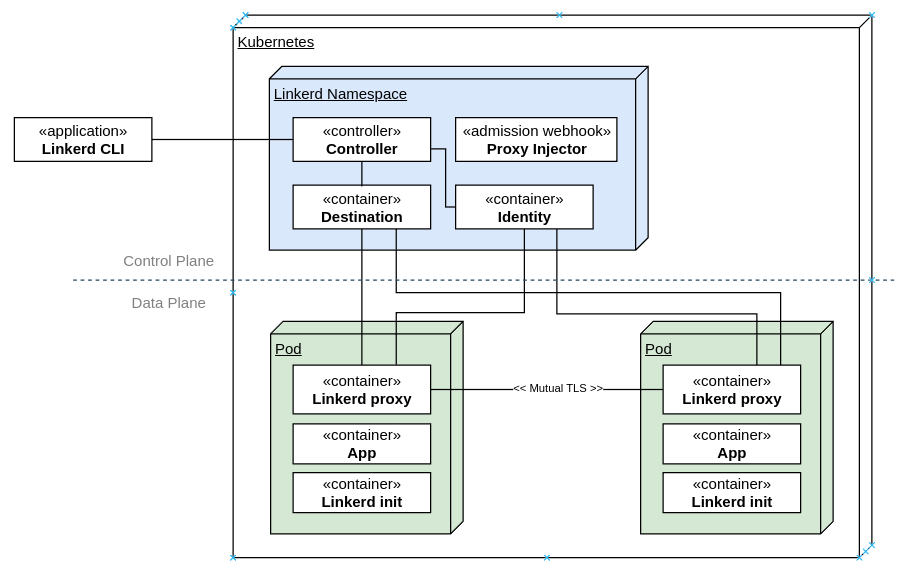
$ kubectl get pods -AThe first step would be to setup the Linkerd CLI:
NAMESPACE NAME READY STATUS RESTARTS AGE
kube-system calico-kube-controllers-59697b644f-7fsln 1/1 Running 2 (119m ago) 7d
kube-system calico-node-6ptsh 1/1 Running 2 (119m ago) 7d
kube-system calico-node-7x5j8 1/1 Running 2 (119m ago) 7d
kube-system calico-node-qlnf6 1/1 Running 2 (119m ago) 7d
kube-system coredns-565d847f94-79jlw 1/1 Running 2 (119m ago) 7d
kube-system coredns-565d847f94-fqwn4 1/1 Running 2 (119m ago) 7d
kube-system etcd-k8s-master 1/1 Running 2 (119m ago) 7d
kube-system kube-apiserver-k8s-master 1/1 Running 2 (119m ago) 7d
kube-system kube-controller-manager-k8s-master 1/1 Running 2 (119m ago) 7d
kube-system kube-proxy-4n9b7 1/1 Running 2 (119m ago) 7d
kube-system kube-proxy-k4rzv 1/1 Running 2 (119m ago) 7d
kube-system kube-proxy-lz2dd 1/1 Running 2 (119m ago) 7d
kube-system kube-scheduler-k8s-master 1/1 Running 2 (119m ago) 7d
$ curl --proto '=https' --tlsv1.2 -sSfL https://run.linkerd.io/install shOn most systems, this should be sufficient to setup the CLI. You may need to restart your terminal to load the updated paths. If you have a non-standard configuration and linkerd is not found after the installation, add the following to your PATH to be able to find the cli:
export PATH=$PATH:~/.linkerd2/bin/At this point, checking the version would give you the following:
$ linkerd versionSetting up Linkerd Control PlaneBefore installing Linkerd on the cluster, run the following step to check the cluster for pre-requisites:
Client version: stable-2.12.2
Server version: unavailable
$ linkerd check --pre
Linkerd core checks
===================
kubernetes-api
--------------
  can initialize the client
  can query the Kubernetes API
kubernetes-version
------------------
  is running the minimum Kubernetes API version
  is running the minimum kubectl version
pre-kubernetes-setup
--------------------
  control plane namespace does not already exist
  can create non-namespaced resources
  can create ServiceAccounts
  can create Services
  can create Deployments
  can create CronJobs
  can create ConfigMaps
  can create Secrets
  can read Secrets
  can read extension-apiserver-authentication configmap
  no clock skew detected
linkerd-version
---------------
  can determine the latest version
  cli is up-to-date
Status check results areAll the pre-requisites appear to be good right now, and so installation can proceed.The first step of the installation is to setup the Custom Resource Definitions (CRDs) that Linkerd requires. The linkerd cli only prints the resource YAMLs to standard output and does not create them directly in Kubernetes, so you would need to pipe the output to kubectl apply to create the resources in the cluster that you re working with.
$ linkerd install --crds   kubectl apply -f -
Rendering Linkerd CRDs...
Next, run  linkerd install   kubectl apply -f -  to install the control plane.
customresourcedefinition.apiextensions.k8s.io/authorizationpolicies.policy.linkerd.io createdNext, install the Linkerd control plane components in the same manner, this time without the crds switch:
customresourcedefinition.apiextensions.k8s.io/httproutes.policy.linkerd.io created
customresourcedefinition.apiextensions.k8s.io/meshtlsauthentications.policy.linkerd.io created
customresourcedefinition.apiextensions.k8s.io/networkauthentications.policy.linkerd.io created
customresourcedefinition.apiextensions.k8s.io/serverauthorizations.policy.linkerd.io created
customresourcedefinition.apiextensions.k8s.io/servers.policy.linkerd.io created
customresourcedefinition.apiextensions.k8s.io/serviceprofiles.linkerd.io created
$ linkerd install kubectl apply -f -Kubernetes will start spinning up the data plane components and you should see the following when you list the pods:
namespace/linkerd created
clusterrole.rbac.authorization.k8s.io/linkerd-linkerd-identity created
clusterrolebinding.rbac.authorization.k8s.io/linkerd-linkerd-identity created
serviceaccount/linkerd-identity created
clusterrole.rbac.authorization.k8s.io/linkerd-linkerd-destination created
clusterrolebinding.rbac.authorization.k8s.io/linkerd-linkerd-destination created
serviceaccount/linkerd-destination created
secret/linkerd-sp-validator-k8s-tls created
validatingwebhookconfiguration.admissionregistration.k8s.io/linkerd-sp-validator-webhook-config created
secret/linkerd-policy-validator-k8s-tls created
validatingwebhookconfiguration.admissionregistration.k8s.io/linkerd-policy-validator-webhook-config created
clusterrole.rbac.authorization.k8s.io/linkerd-policy created
clusterrolebinding.rbac.authorization.k8s.io/linkerd-destination-policy created
role.rbac.authorization.k8s.io/linkerd-heartbeat created
rolebinding.rbac.authorization.k8s.io/linkerd-heartbeat created
clusterrole.rbac.authorization.k8s.io/linkerd-heartbeat created
clusterrolebinding.rbac.authorization.k8s.io/linkerd-heartbeat created
serviceaccount/linkerd-heartbeat created
clusterrole.rbac.authorization.k8s.io/linkerd-linkerd-proxy-injector created
clusterrolebinding.rbac.authorization.k8s.io/linkerd-linkerd-proxy-injector created
serviceaccount/linkerd-proxy-injector created
secret/linkerd-proxy-injector-k8s-tls created
mutatingwebhookconfiguration.admissionregistration.k8s.io/linkerd-proxy-injector-webhook-config created
configmap/linkerd-config created
secret/linkerd-identity-issuer created
configmap/linkerd-identity-trust-roots created
service/linkerd-identity created
service/linkerd-identity-headless created
deployment.apps/linkerd-identity created
service/linkerd-dst created
service/linkerd-dst-headless created
service/linkerd-sp-validator created
service/linkerd-policy created
service/linkerd-policy-validator created
deployment.apps/linkerd-destination created
cronjob.batch/linkerd-heartbeat created
deployment.apps/linkerd-proxy-injector created
service/linkerd-proxy-injector created
secret/linkerd-config-overrides created
$ kubectl get pods -AThe components are running in the new linkerd namespace.To verify the setup, run a check:
...
linkerd linkerd-destination-67b9cc8749-xqcbx 4/4 Running 0 69s
linkerd linkerd-identity-59b46789cc-ntfcx 2/2 Running 0 69s
linkerd linkerd-proxy-injector-7fc85556bf-vnvw6 1/2 Running 0 69s
$ linkerd check
Linkerd core checks
===================
kubernetes-api
--------------
  can initialize the client
  can query the Kubernetes API
kubernetes-version
------------------
  is running the minimum Kubernetes API version
  is running the minimum kubectl version
linkerd-existence
-----------------
  'linkerd-config' config map exists
  heartbeat ServiceAccount exist
  control plane replica sets are ready
  no unschedulable pods
  control plane pods are ready
  cluster networks contains all pods
  cluster networks contains all services
linkerd-config
--------------
  control plane Namespace exists
  control plane ClusterRoles exist
  control plane ClusterRoleBindings exist
  control plane ServiceAccounts exist
  control plane CustomResourceDefinitions exist
  control plane MutatingWebhookConfigurations exist
  control plane ValidatingWebhookConfigurations exist
  proxy-init container runs as root user if docker container runtime is used
linkerd-identity
----------------
  certificate config is valid
  trust anchors are using supported crypto algorithm
  trust anchors are within their validity period
  trust anchors are valid for at least 60 days
  issuer cert is using supported crypto algorithm
  issuer cert is within its validity period
  issuer cert is valid for at least 60 days
  issuer cert is issued by the trust anchor
linkerd-webhooks-and-apisvc-tls
-------------------------------
  proxy-injector webhook has valid cert
  proxy-injector cert is valid for at least 60 days
  sp-validator webhook has valid cert
  sp-validator cert is valid for at least 60 days
  policy-validator webhook has valid cert
  policy-validator cert is valid for at least 60 days
linkerd-version
---------------
  can determine the latest version
  cli is up-to-date
control-plane-version
---------------------
  can retrieve the control plane version
  control plane is up-to-date
  control plane and cli versions match
linkerd-control-plane-proxy
---------------------------
  control plane proxies are healthy
  control plane proxies are up-to-date
  control plane proxies and cli versions match
Status check results areEverything looks good.Setting up the Viz ExtensionAt this point, the required components for the service mesh are setup, but let s also install the viz extension, which provides a good visualization capabilities that will come in handy subsequently. Once again, linkerd uses the same pattern for installing the extension.
$ linkerd viz install kubectl apply -f -A few seconds later, you should see the following in your pod list:
namespace/linkerd-viz created
clusterrole.rbac.authorization.k8s.io/linkerd-linkerd-viz-metrics-api created
clusterrolebinding.rbac.authorization.k8s.io/linkerd-linkerd-viz-metrics-api created
serviceaccount/metrics-api created
clusterrole.rbac.authorization.k8s.io/linkerd-linkerd-viz-prometheus created
clusterrolebinding.rbac.authorization.k8s.io/linkerd-linkerd-viz-prometheus created
serviceaccount/prometheus created
clusterrole.rbac.authorization.k8s.io/linkerd-linkerd-viz-tap created
clusterrole.rbac.authorization.k8s.io/linkerd-linkerd-viz-tap-admin created
clusterrolebinding.rbac.authorization.k8s.io/linkerd-linkerd-viz-tap created
clusterrolebinding.rbac.authorization.k8s.io/linkerd-linkerd-viz-tap-auth-delegator created
serviceaccount/tap created
rolebinding.rbac.authorization.k8s.io/linkerd-linkerd-viz-tap-auth-reader created
secret/tap-k8s-tls created
apiservice.apiregistration.k8s.io/v1alpha1.tap.linkerd.io created
role.rbac.authorization.k8s.io/web created
rolebinding.rbac.authorization.k8s.io/web created
clusterrole.rbac.authorization.k8s.io/linkerd-linkerd-viz-web-check created
clusterrolebinding.rbac.authorization.k8s.io/linkerd-linkerd-viz-web-check created
clusterrolebinding.rbac.authorization.k8s.io/linkerd-linkerd-viz-web-admin created
clusterrole.rbac.authorization.k8s.io/linkerd-linkerd-viz-web-api created
clusterrolebinding.rbac.authorization.k8s.io/linkerd-linkerd-viz-web-api created
serviceaccount/web created
server.policy.linkerd.io/admin created
authorizationpolicy.policy.linkerd.io/admin created
networkauthentication.policy.linkerd.io/kubelet created
server.policy.linkerd.io/proxy-admin created
authorizationpolicy.policy.linkerd.io/proxy-admin created
service/metrics-api created
deployment.apps/metrics-api created
server.policy.linkerd.io/metrics-api created
authorizationpolicy.policy.linkerd.io/metrics-api created
meshtlsauthentication.policy.linkerd.io/metrics-api-web created
configmap/prometheus-config created
service/prometheus created
deployment.apps/prometheus created
service/tap created
deployment.apps/tap created
server.policy.linkerd.io/tap-api created
authorizationpolicy.policy.linkerd.io/tap created
clusterrole.rbac.authorization.k8s.io/linkerd-tap-injector created
clusterrolebinding.rbac.authorization.k8s.io/linkerd-tap-injector created
serviceaccount/tap-injector created
secret/tap-injector-k8s-tls created
mutatingwebhookconfiguration.admissionregistration.k8s.io/linkerd-tap-injector-webhook-config created
service/tap-injector created
deployment.apps/tap-injector created
server.policy.linkerd.io/tap-injector-webhook created
authorizationpolicy.policy.linkerd.io/tap-injector created
networkauthentication.policy.linkerd.io/kube-api-server created
service/web created
deployment.apps/web created
serviceprofile.linkerd.io/metrics-api.linkerd-viz.svc.cluster.local created
serviceprofile.linkerd.io/prometheus.linkerd-viz.svc.cluster.local created
$ kubectl get pods -AThe viz components live in the linkerd-viz namespace.You can now checkout the viz dashboard:
...
linkerd-viz prometheus-b5865f776-w5ssf 1/2 Running 0 35s
linkerd-viz tap-64f5c8597b-rqgbk 2/2 Running 0 35s
linkerd-viz tap-injector-7c75cfff4c-wl9mx 2/2 Running 0 34s
linkerd-viz web-8c444745-jhzr5 2/2 Running 0 34s
$ linkerd viz dashboard
Linkerd dashboard available at:
http://localhost:50750
Grafana dashboard available at:
http://localhost:50750/grafana
Opening Linkerd dashboard in the default browser
Opening in existing browser session.
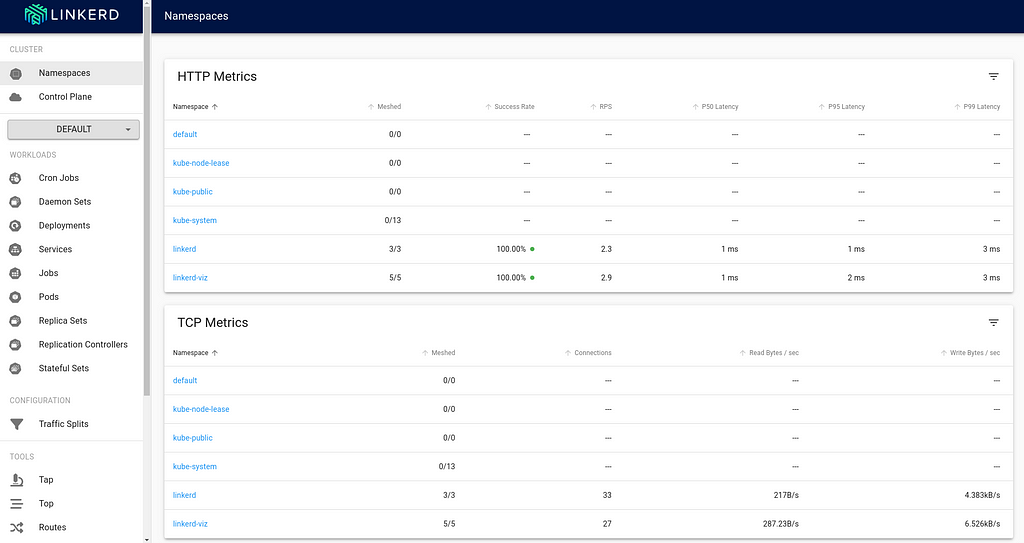
$ cat deploy.yaml
apiVersion: apps/v1
kind: Deployment
metadata:
  name: nginx-deployment
spec:
  selector:
    matchLabels:
      app: nginx
  replicas: 2
  template:
    metadata:
      labels:
        app: nginx
    spec:
      containers:
      - name: nginx
        image: nginx:latest
        ports:
        - containerPort: 80
$ kubectl apply -f deploy.yamlBack in the viz dashboard, I do see the workload deployed, but it isn t currently communicating with the Linkerd control plane, and so doesn t show any metrics, and the Meshed count is 0:
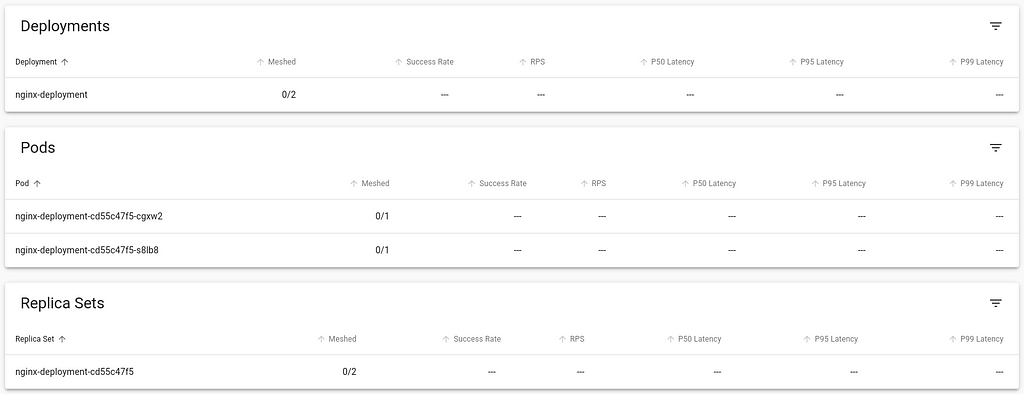
$ kubectl get pod nginx-deployment-cd55c47f5-cgxw2 -o yamlLet s directly inject the linkerd data plane into this running container. We do this by retrieving the YAML of the deployment, piping it to linkerd cli to inject the necessary components and then piping to kubectl apply the changed resources.
apiVersion: v1
kind: Pod
metadata:
annotations:
cni.projectcalico.org/containerID: aee0295dda906f7935ce5c150ae30360005f5330e98c75a550b7cc0d1532f529
cni.projectcalico.org/podIP: 172.16.36.89/32
cni.projectcalico.org/podIPs: 172.16.36.89/32
creationTimestamp: "2022-11-05T19:35:12Z"
generateName: nginx-deployment-cd55c47f5-
labels:
app: nginx
pod-template-hash: cd55c47f5
name: nginx-deployment-cd55c47f5-cgxw2
namespace: default
ownerReferences:
- apiVersion: apps/v1
blockOwnerDeletion: true
controller: true
kind: ReplicaSet
name: nginx-deployment-cd55c47f5
uid: b604f5c4-f662-4333-aaa0-bd1a2b8b08c6
resourceVersion: "22979"
uid: 8fe30214-491b-4753-9fb2-485b6341376c
spec:
containers:
- image: nginx:latest
imagePullPolicy: Always
name: nginx
ports:
- containerPort: 80
protocol: TCP
resources:
terminationMessagePath: /dev/termination-log
terminationMessagePolicy: File
volumeMounts:
- mountPath: /var/run/secrets/kubernetes.io/serviceaccount
name: kube-api-access-2bt6z
readOnly: true
dnsPolicy: ClusterFirst
enableServiceLinks: true
nodeName: k8s-node1
preemptionPolicy: PreemptLowerPriority
priority: 0
restartPolicy: Always
schedulerName: default-scheduler
securityContext:
serviceAccount: default
serviceAccountName: default
terminationGracePeriodSeconds: 30
tolerations:
- effect: NoExecute
key: node.kubernetes.io/not-ready
operator: Exists
tolerationSeconds: 300
- effect: NoExecute
key: node.kubernetes.io/unreachable
operator: Exists
tolerationSeconds: 300
volumes:
- name: kube-api-access-2bt6z
projected:
defaultMode: 420
sources:
- serviceAccountToken:
expirationSeconds: 3607
path: token
- configMap:
items:
- key: ca.crt
path: ca.crt
name: kube-root-ca.crt
- downwardAPI:
items:
- fieldRef:
apiVersion: v1
fieldPath: metadata.namespace
path: namespace
status:
conditions:
- lastProbeTime: null
lastTransitionTime: "2022-11-05T19:35:12Z"
status: "True"
type: Initialized
- lastProbeTime: null
lastTransitionTime: "2022-11-05T19:35:16Z"
status: "True"
type: Ready
- lastProbeTime: null
lastTransitionTime: "2022-11-05T19:35:16Z"
status: "True"
type: ContainersReady
- lastProbeTime: null
lastTransitionTime: "2022-11-05T19:35:13Z"
status: "True"
type: PodScheduled
containerStatuses:
- containerID: containerd://f088f200315b44cbeed16499aba9b2d1396f9f81645e53b032d4bfa44166128a
image: docker.io/library/nginx:latest
imageID: docker.io/library/nginx@sha256:943c25b4b66b332184d5ba6bb18234273551593016c0e0ae906bab111548239f
lastState:
name: nginx
ready: true
restartCount: 0
started: true
state:
running:
startedAt: "2022-11-05T19:35:15Z"
hostIP: 192.168.2.216
phase: Running
podIP: 172.16.36.89
podIPs:
- ip: 172.16.36.89
qosClass: BestEffort
startTime: "2022-11-05T19:35:12Z"
$ kubectl get deploy nginx-deployment -o yaml linkerd inject - kubectl apply -f -
deployment "nginx-deployment" injected
deployment.apps/nginx-deployment configuredBack in the viz dashboard, the workload now is integrated into Linkerd control plane.
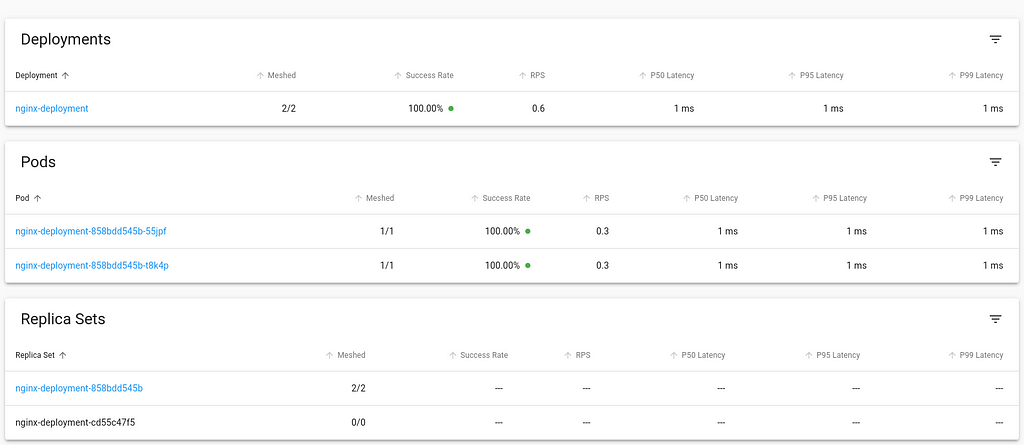
$ kubectl get pod nginx-deployment-858bdd545b-55jpf -o yamlAt this point, the necessary components are setup for you to explore Linkerd further. You can also try out the jaeger and multicluster extensions, similar to the process of installing and using the viz extension and try out their capabilities.Inject Linkerd data plane automaticallyIn this approach, we shall we how to instruct Kubernetes to automatically inject the Linkerd data plane to workloads at deployment time.We can achieve this by adding the linkerd.io/inject annotation to the deployment descriptor which causes the proxy injector admission hook to execute and inject linkerd data plane components automatically at the time of deployment.
apiVersion: v1
kind: Pod
metadata:
annotations:
cni.projectcalico.org/containerID: 1ec3d345f859be8ead0374a7e880bcfdb9ba74a121b220a6fccbd342ac4b7ea8
cni.projectcalico.org/podIP: 172.16.36.90/32
cni.projectcalico.org/podIPs: 172.16.36.90/32
linkerd.io/created-by: linkerd/proxy-injector stable-2.12.2
linkerd.io/inject: enabled
linkerd.io/proxy-version: stable-2.12.2
linkerd.io/trust-root-sha256: 354fe6f49331e8e03d8fb07808e00a3e145d2661181cbfec7777b41051dc8e22
viz.linkerd.io/tap-enabled: "true"
creationTimestamp: "2022-11-05T19:44:15Z"
generateName: nginx-deployment-858bdd545b-
labels:
app: nginx
linkerd.io/control-plane-ns: linkerd
linkerd.io/proxy-deployment: nginx-deployment
linkerd.io/workload-ns: default
pod-template-hash: 858bdd545b
name: nginx-deployment-858bdd545b-55jpf
namespace: default
ownerReferences:
- apiVersion: apps/v1
blockOwnerDeletion: true
controller: true
kind: ReplicaSet
name: nginx-deployment-858bdd545b
uid: 2e618972-aa10-4e35-a7dd-084853673a80
resourceVersion: "23820"
uid: 62f1857a-b701-4a19-8996-b5b605ff8488
spec:
containers:
- env:
- name: _pod_name
valueFrom:
fieldRef:
apiVersion: v1
fieldPath: metadata.name
- name: _pod_ns
valueFrom:
fieldRef:
apiVersion: v1
fieldPath: metadata.namespace
- name: _pod_nodeName
valueFrom:
fieldRef:
apiVersion: v1
fieldPath: spec.nodeName
- name: LINKERD2_PROXY_LOG
value: warn,linkerd=info
- name: LINKERD2_PROXY_LOG_FORMAT
value: plain
- name: LINKERD2_PROXY_DESTINATION_SVC_ADDR
value: linkerd-dst-headless.linkerd.svc.cluster.local.:8086
- name: LINKERD2_PROXY_DESTINATION_PROFILE_NETWORKS
value: 10.0.0.0/8,100.64.0.0/10,172.16.0.0/12,192.168.0.0/16
- name: LINKERD2_PROXY_POLICY_SVC_ADDR
value: linkerd-policy.linkerd.svc.cluster.local.:8090
- name: LINKERD2_PROXY_POLICY_WORKLOAD
value: $(_pod_ns):$(_pod_name)
- name: LINKERD2_PROXY_INBOUND_DEFAULT_POLICY
value: all-unauthenticated
- name: LINKERD2_PROXY_POLICY_CLUSTER_NETWORKS
value: 10.0.0.0/8,100.64.0.0/10,172.16.0.0/12,192.168.0.0/16
- name: LINKERD2_PROXY_INBOUND_CONNECT_TIMEOUT
value: 100ms
- name: LINKERD2_PROXY_OUTBOUND_CONNECT_TIMEOUT
value: 1000ms
- name: LINKERD2_PROXY_CONTROL_LISTEN_ADDR
value: 0.0.0.0:4190
- name: LINKERD2_PROXY_ADMIN_LISTEN_ADDR
value: 0.0.0.0:4191
- name: LINKERD2_PROXY_OUTBOUND_LISTEN_ADDR
value: 127.0.0.1:4140
- name: LINKERD2_PROXY_INBOUND_LISTEN_ADDR
value: 0.0.0.0:4143
- name: LINKERD2_PROXY_INBOUND_IPS
valueFrom:
fieldRef:
apiVersion: v1
fieldPath: status.podIPs
- name: LINKERD2_PROXY_INBOUND_PORTS
value: "80"
- name: LINKERD2_PROXY_DESTINATION_PROFILE_SUFFIXES
value: svc.cluster.local.
- name: LINKERD2_PROXY_INBOUND_ACCEPT_KEEPALIVE
value: 10000ms
- name: LINKERD2_PROXY_OUTBOUND_CONNECT_KEEPALIVE
value: 10000ms
- name: LINKERD2_PROXY_INBOUND_PORTS_DISABLE_PROTOCOL_DETECTION
value: 25,587,3306,4444,5432,6379,9300,11211
- name: LINKERD2_PROXY_DESTINATION_CONTEXT
value:
"ns":"$(_pod_ns)", "nodeName":"$(_pod_nodeName)"
- name: _pod_sa
valueFrom:
fieldRef:
apiVersion: v1
fieldPath: spec.serviceAccountName
- name: _l5d_ns
value: linkerd
- name: _l5d_trustdomain
value: cluster.local
- name: LINKERD2_PROXY_IDENTITY_DIR
value: /var/run/linkerd/identity/end-entity
- name: LINKERD2_PROXY_IDENTITY_TRUST_ANCHORS
value:
-----BEGIN CERTIFICATE-----
MIIBiDCCAS6gAwIBAgIBATAKBggqhkjOPQQDAjAcMRowGAYDVQQDExFpZGVudGl0
eS5saW5rZXJkLjAeFw0yMjExMDUxOTIxMDlaFw0yMzExMDUxOTIxMjlaMBwxGjAY
BgNVBAMTEWlkZW50aXR5LmxpbmtlcmQuMFkwEwYHKoZIzj0CAQYIKoZIzj0DAQcD
QgAE8AgxbWWa1qgEgN3ykFAOJ3sw9nSugUk1N5Qfvo6jXX/8/TZUW0ddko/N71+H
EcKc72kK0tlclj8jDi3pzJ4C0KNhMF8wDgYDVR0PAQH/BAQDAgEGMB0GA1UdJQQW
MBQGCCsGAQUFBwMBBggrBgEFBQcDAjAPBgNVHRMBAf8EBTADAQH/MB0GA1UdDgQW
BBThSr0yAj5joW7pj/NZPYcfIIepbzAKBggqhkjOPQQDAgNIADBFAiAomg0TVn6N
UxhOyzZdg848lAvH0Io9Ra/Ef2hxZGN0LgIhAIKjrsgDUqZA8XHiiciYYicxFnKr
Tw5yj9gBhVAgYCaB
-----END CERTIFICATE-----
- name: LINKERD2_PROXY_IDENTITY_TOKEN_FILE
value: /var/run/secrets/tokens/linkerd-identity-token
- name: LINKERD2_PROXY_IDENTITY_SVC_ADDR
value: linkerd-identity-headless.linkerd.svc.cluster.local.:8080
- name: LINKERD2_PROXY_IDENTITY_LOCAL_NAME
value: $(_pod_sa).$(_pod_ns).serviceaccount.identity.linkerd.cluster.local
- name: LINKERD2_PROXY_IDENTITY_SVC_NAME
value: linkerd-identity.linkerd.serviceaccount.identity.linkerd.cluster.local
- name: LINKERD2_PROXY_DESTINATION_SVC_NAME
value: linkerd-destination.linkerd.serviceaccount.identity.linkerd.cluster.local
- name: LINKERD2_PROXY_POLICY_SVC_NAME
value: linkerd-destination.linkerd.serviceaccount.identity.linkerd.cluster.local
- name: LINKERD2_PROXY_TAP_SVC_NAME
value: tap.linkerd-viz.serviceaccount.identity.linkerd.cluster.local
image: cr.l5d.io/linkerd/proxy:stable-2.12.2
imagePullPolicy: IfNotPresent
lifecycle:
postStart:
exec:
command:
- /usr/lib/linkerd/linkerd-await
- --timeout=2m
livenessProbe:
failureThreshold: 3
httpGet:
path: /live
port: 4191
scheme: HTTP
initialDelaySeconds: 10
periodSeconds: 10
successThreshold: 1
timeoutSeconds: 1
name: linkerd-proxy
ports:
- containerPort: 4143
name: linkerd-proxy
protocol: TCP
- containerPort: 4191
name: linkerd-admin
protocol: TCP
readinessProbe:
failureThreshold: 3
httpGet:
path: /ready
port: 4191
scheme: HTTP
initialDelaySeconds: 2
periodSeconds: 10
successThreshold: 1
timeoutSeconds: 1
resources:
securityContext:
allowPrivilegeEscalation: false
readOnlyRootFilesystem: true
runAsUser: 2102
terminationMessagePath: /dev/termination-log
terminationMessagePolicy: FallbackToLogsOnError
volumeMounts:
- mountPath: /var/run/linkerd/identity/end-entity
name: linkerd-identity-end-entity
- mountPath: /var/run/secrets/tokens
name: linkerd-identity-token
- mountPath: /var/run/secrets/kubernetes.io/serviceaccount
name: kube-api-access-9zpnn
readOnly: true
- image: nginx:latest
imagePullPolicy: Always
name: nginx
ports:
- containerPort: 80
protocol: TCP
resources:
terminationMessagePath: /dev/termination-log
terminationMessagePolicy: File
volumeMounts:
- mountPath: /var/run/secrets/kubernetes.io/serviceaccount
name: kube-api-access-9zpnn
readOnly: true
dnsPolicy: ClusterFirst
enableServiceLinks: true
initContainers:
- args:
- --incoming-proxy-port
- "4143"
- --outgoing-proxy-port
- "4140"
- --proxy-uid
- "2102"
- --inbound-ports-to-ignore
- 4190,4191,4567,4568
- --outbound-ports-to-ignore
- 4567,4568
image: cr.l5d.io/linkerd/proxy-init:v2.0.0
imagePullPolicy: IfNotPresent
name: linkerd-init
resources:
limits:
cpu: 100m
memory: 20Mi
requests:
cpu: 100m
memory: 20Mi
securityContext:
allowPrivilegeEscalation: false
capabilities:
add:
- NET_ADMIN
- NET_RAW
privileged: false
readOnlyRootFilesystem: true
runAsNonRoot: true
runAsUser: 65534
terminationMessagePath: /dev/termination-log
terminationMessagePolicy: FallbackToLogsOnError
volumeMounts:
- mountPath: /run
name: linkerd-proxy-init-xtables-lock
- mountPath: /var/run/secrets/kubernetes.io/serviceaccount
name: kube-api-access-9zpnn
readOnly: true
nodeName: k8s-node1
preemptionPolicy: PreemptLowerPriority
priority: 0
restartPolicy: Always
schedulerName: default-scheduler
securityContext:
serviceAccount: default
serviceAccountName: default
terminationGracePeriodSeconds: 30
tolerations:
- effect: NoExecute
key: node.kubernetes.io/not-ready
operator: Exists
tolerationSeconds: 300
- effect: NoExecute
key: node.kubernetes.io/unreachable
operator: Exists
tolerationSeconds: 300
volumes:
- name: kube-api-access-9zpnn
projected:
defaultMode: 420
sources:
- serviceAccountToken:
expirationSeconds: 3607
path: token
- configMap:
items:
- key: ca.crt
path: ca.crt
name: kube-root-ca.crt
- downwardAPI:
items:
- fieldRef:
apiVersion: v1
fieldPath: metadata.namespace
path: namespace
- emptyDir:
name: linkerd-proxy-init-xtables-lock
- emptyDir:
medium: Memory
name: linkerd-identity-end-entity
- name: linkerd-identity-token
projected:
defaultMode: 420
sources:
- serviceAccountToken:
audience: identity.l5d.io
expirationSeconds: 86400
path: linkerd-identity-token
status:
conditions:
- lastProbeTime: null
lastTransitionTime: "2022-11-05T19:44:16Z"
status: "True"
type: Initialized
- lastProbeTime: null
lastTransitionTime: "2022-11-05T19:44:19Z"
status: "True"
type: Ready
- lastProbeTime: null
lastTransitionTime: "2022-11-05T19:44:19Z"
status: "True"
type: ContainersReady
- lastProbeTime: null
lastTransitionTime: "2022-11-05T19:44:15Z"
status: "True"
type: PodScheduled
containerStatuses:
- containerID: containerd://62028867c48aaa726df48249a27c52cd8820cd33e8e5695ad0d322540924754e
image: cr.l5d.io/linkerd/proxy:stable-2.12.2
imageID: cr.l5d.io/linkerd/proxy@sha256:787db5055b2a46a3c4318ef3b632461261f81254c8e47bf4b9b8dab2c42575e4
lastState:
name: linkerd-proxy
ready: true
restartCount: 0
started: true
state:
running:
startedAt: "2022-11-05T19:44:16Z"
- containerID: containerd://8f8ce663c19360a7b6868ace68a4a5119f0b18cd57ffebcc2d19331274038381
image: docker.io/library/nginx:latest
imageID: docker.io/library/nginx@sha256:943c25b4b66b332184d5ba6bb18234273551593016c0e0ae906bab111548239f
lastState:
name: nginx
ready: true
restartCount: 0
started: true
state:
running:
startedAt: "2022-11-05T19:44:19Z"
hostIP: 192.168.2.216
initContainerStatuses:
- containerID: containerd://c0417ea9c8418ab296bf86077e81c5d8be06fe9b87390c138d1c5d7b73cc577c
image: cr.l5d.io/linkerd/proxy-init:v2.0.0
imageID: cr.l5d.io/linkerd/proxy-init@sha256:7d5e66b9e176b1ebbdd7f40b6385d1885e82c80a06f4c6af868247bb1dffe262
lastState:
name: linkerd-init
ready: true
restartCount: 0
state:
terminated:
containerID: containerd://c0417ea9c8418ab296bf86077e81c5d8be06fe9b87390c138d1c5d7b73cc577c
exitCode: 0
finishedAt: "2022-11-05T19:44:16Z"
reason: Completed
startedAt: "2022-11-05T19:44:15Z"
phase: Running
podIP: 172.16.36.90
podIPs:
- ip: 172.16.36.90
qosClass: Burstable
startTime: "2022-11-05T19:44:15Z"
$ cat deploy.yamlThis annotation can also be specified at the namespace level to affect all the workloads within the namespace. Note that any resources created before the annotation was added to the namespace will require a rollout restart to trigger the injection of the Linkerd components.Uninstalling LinkerdNow that we have walked through the installation and setup process of Linkerd, let s also cover how to remove it from the infrastructure and go back to the state prior to its installation.The first step would be to remove extensions, such as viz.
apiVersion: apps/v1
kind: Deployment
metadata:
name: nginx-deployment
spec:
selector:
matchLabels:
app: nginx
replicas: 2
template:
metadata:
labels:
app: nginx
annotations:
linkerd.io/inject: enabled
spec:
containers:
- name: nginx
image: nginx:latest
ports:
- containerPort: 80
$ linkerd viz uninstall kubectl delete -f -In order to uninstall the control plane, you would need to first uninject the Linkerd control plane components from any existing running pods by:
clusterrole.rbac.authorization.k8s.io "linkerd-linkerd-viz-metrics-api" deleted
clusterrole.rbac.authorization.k8s.io "linkerd-linkerd-viz-prometheus" deleted
clusterrole.rbac.authorization.k8s.io "linkerd-linkerd-viz-tap" deleted
clusterrole.rbac.authorization.k8s.io "linkerd-linkerd-viz-tap-admin" deleted
clusterrole.rbac.authorization.k8s.io "linkerd-linkerd-viz-web-api" deleted
clusterrole.rbac.authorization.k8s.io "linkerd-linkerd-viz-web-check" deleted
clusterrole.rbac.authorization.k8s.io "linkerd-tap-injector" deleted
clusterrolebinding.rbac.authorization.k8s.io "linkerd-linkerd-viz-metrics-api" deleted
clusterrolebinding.rbac.authorization.k8s.io "linkerd-linkerd-viz-prometheus" deleted
clusterrolebinding.rbac.authorization.k8s.io "linkerd-linkerd-viz-tap" deleted
clusterrolebinding.rbac.authorization.k8s.io "linkerd-linkerd-viz-tap-auth-delegator" deleted
clusterrolebinding.rbac.authorization.k8s.io "linkerd-linkerd-viz-web-admin" deleted
clusterrolebinding.rbac.authorization.k8s.io "linkerd-linkerd-viz-web-api" deleted
clusterrolebinding.rbac.authorization.k8s.io "linkerd-linkerd-viz-web-check" deleted
clusterrolebinding.rbac.authorization.k8s.io "linkerd-tap-injector" deleted
role.rbac.authorization.k8s.io "web" deleted
rolebinding.rbac.authorization.k8s.io "linkerd-linkerd-viz-tap-auth-reader" deleted
rolebinding.rbac.authorization.k8s.io "web" deleted
apiservice.apiregistration.k8s.io "v1alpha1.tap.linkerd.io" deleted
mutatingwebhookconfiguration.admissionregistration.k8s.io "linkerd-tap-injector-webhook-config" deleted
namespace "linkerd-viz" deleted
authorizationpolicy.policy.linkerd.io "admin" deleted
authorizationpolicy.policy.linkerd.io "metrics-api" deleted
authorizationpolicy.policy.linkerd.io "proxy-admin" deleted
authorizationpolicy.policy.linkerd.io "tap" deleted
authorizationpolicy.policy.linkerd.io "tap-injector" deleted
server.policy.linkerd.io "admin" deleted
server.policy.linkerd.io "metrics-api" deleted
server.policy.linkerd.io "proxy-admin" deleted
server.policy.linkerd.io "tap-api" deleted
server.policy.linkerd.io "tap-injector-webhook" deleted
$ kubectl get deployments
NAME               READY   UP-TO-DATE   AVAILABLE   AGE
nginx-deployment   2/2     2            2           10m
$ kubectl get deployment nginx-deployment -o yaml linkerd uninject - kubectl apply -f -
deployment "nginx-deployment" uninjected
deployment.apps/nginx-deployment configuredNow you can delete the control plane.
$ linkerd uninstall kubectl delete -f -At this point we re back to the original state:
clusterrole.rbac.authorization.k8s.io "linkerd-heartbeat" deleted
clusterrole.rbac.authorization.k8s.io "linkerd-linkerd-destination" deleted
clusterrole.rbac.authorization.k8s.io "linkerd-linkerd-identity" deleted
clusterrole.rbac.authorization.k8s.io "linkerd-linkerd-proxy-injector" deleted
clusterrole.rbac.authorization.k8s.io "linkerd-policy" deleted
clusterrolebinding.rbac.authorization.k8s.io "linkerd-destination-policy" deleted
clusterrolebinding.rbac.authorization.k8s.io "linkerd-heartbeat" deleted
clusterrolebinding.rbac.authorization.k8s.io "linkerd-linkerd-destination" deleted
clusterrolebinding.rbac.authorization.k8s.io "linkerd-linkerd-identity" deleted
clusterrolebinding.rbac.authorization.k8s.io "linkerd-linkerd-proxy-injector" deleted
role.rbac.authorization.k8s.io "linkerd-heartbeat" deleted
rolebinding.rbac.authorization.k8s.io "linkerd-heartbeat" deleted
customresourcedefinition.apiextensions.k8s.io "authorizationpolicies.policy.linkerd.io" deleted
customresourcedefinition.apiextensions.k8s.io "httproutes.policy.linkerd.io" deleted
customresourcedefinition.apiextensions.k8s.io "meshtlsauthentications.policy.linkerd.io" deleted
customresourcedefinition.apiextensions.k8s.io "networkauthentications.policy.linkerd.io" deleted
customresourcedefinition.apiextensions.k8s.io "serverauthorizations.policy.linkerd.io" deleted
customresourcedefinition.apiextensions.k8s.io "servers.policy.linkerd.io" deleted
customresourcedefinition.apiextensions.k8s.io "serviceprofiles.linkerd.io" deleted
mutatingwebhookconfiguration.admissionregistration.k8s.io "linkerd-proxy-injector-webhook-config" deleted
validatingwebhookconfiguration.admissionregistration.k8s.io "linkerd-policy-validator-webhook-config" deleted
validatingwebhookconfiguration.admissionregistration.k8s.io "linkerd-sp-validator-webhook-config" deleted
namespace "linkerd" deleted
$ kubectl get pods -AI hope you find this useful to get you started on your journey with Linkerd. Head on over to the docs for more information, guides and best practices.
NAMESPACE NAME READY STATUS RESTARTS AGE
default nginx-deployment-cd55c47f5-99xf2 1/1 Running 0 82s
default nginx-deployment-cd55c47f5-tt58t 1/1 Running 0 86s
kube-system calico-kube-controllers-59697b644f-7fsln 1/1 Running 2 (3h39m ago) 7d1h
kube-system calico-node-6ptsh 1/1 Running 2 (3h39m ago) 7d1h
kube-system calico-node-7x5j8 1/1 Running 2 (3h39m ago) 7d1h
kube-system calico-node-qlnf6 1/1 Running 2 (3h39m ago) 7d1h
kube-system coredns-565d847f94-79jlw 1/1 Running 2 (3h39m ago) 7d2h
kube-system coredns-565d847f94-fqwn4 1/1 Running 2 (3h39m ago) 7d2h
kube-system etcd-k8s-master 1/1 Running 2 (3h39m ago) 7d2h
kube-system kube-apiserver-k8s-master 1/1 Running 2 (3h39m ago) 7d2h
kube-system kube-controller-manager-k8s-master 1/1 Running 2 (3h39m ago) 7d2h
kube-system kube-proxy-4n9b7 1/1 Running 2 (3h39m ago) 7d2h
kube-system kube-proxy-k4rzv 1/1 Running 2 (3h39m ago) 7d2h
kube-system kube-proxy-lz2dd 1/1 Running 2 (3h39m ago) 7d2h
kube-system kube-scheduler-k8s-master 1/1 Running 2 (3h39m ago) 7d2h
A brand-new version 0.0.9 of RcppSpdlog got onto CRAN overnight. RcppSpdlog bundles spdlog, a wonderful header-only C++ logging library with all the bells and whistles you would want that was written by Gabi Melman, and also includes fmt by Victor Zverovich.
This release contains two changes. First, we extend usability by offering both a set of simple R functions for logging from R, and a matching set of functions at the C++ level that are directly callable (and exported) from this package (so that client packages do not need to compile). Both these changes are described (as sections seven and eight) in the vignette. Second, while we were working on this Gabi released version 1.11.0 upstream so we included this as well.
The NEWS entry for this release follows.
Courtesy of my CRANberries, there is also a diffstat report. More detailed information is on the RcppSpdlog page, or the package documention site. If you like this or other open-source work I do, you can sponsor me at GitHub.Changes in RcppSpdlog version 0.0.9 (2022-11-04)
- Add both an R and an C++ interface to
spdlog- Update GitHub Actions to checkout@v3
- Add a shorter aliased namespace for C++
- Upgraded to upstream releases spdlog 1.11.0
This post by Dirk Eddelbuettel originated on his Thinking inside the box blog. Please report excessive re-aggregation in third-party for-profit settings.
 I m trying to replace my old OpenPGP key with a new one. The old key wasn t compromised or lost or anything
bad. Is still valid, but I plan to get rid of it soon. It was created in 2013.
The new key id fingerprint is:
AA66280D4EF0BFCC6BFC2104DA5ECB231C8F04C4
I plan to use the new key for things like encrypted emails, uploads to the Debian archive, and more. Also,
the new key includes an identity with a newer personal email address I plan to use soon: arturo.bg@arturo.bg
The new key has been uploaded to some public keyservers.
If you would like to sign the new key, please follow the steps in the Debian wiki.
-----BEGIN PGP PUBLIC KEY BLOCK-----
mQINBGNjvX4BEADE4w5x0SQmxWLAI1R17RCC98ngTkD/FMyos0GF5xmv0VJeLYhw
x6oJRmiNGHY8+gjq7SyVCWmlwbLKBEPFNI1k5WcrTB+ClgGkWB5KBnbLKm6CSP4N
ccSbrUQrZW+zxk3Q5h3CJljZpmflB2dvRfnDMSSaw8zOc37EtszW3AVVKNYAu3wj
mXpfwI72/OSELhSvhkr51L+ZlEYUMCITeO+jpiWsnU+sA8oKKPjW4+X8cjrN4eFa
1PAPILDf+Omst5SKM2aV5LGZ8rBzb5wNJF6yDexDw2XmfbFWLOfYzFRY6GTXJz/p
8Fh6O1wkHM9RnwmesCXTtkaGQsVFiVsoqGFyzrkIdWPUruB3RG5EzOkapWi/cnbD
1sy7yrUgy99Ew5yzmLaZ40hmRyq/gBBw4yRkdQaddbkErx+9hT+2tJELa5wrmWkb
FtaVZ38xC6gacOZqRjp0Xqtr0jobI0vED8vzIyY0zJwWM0Hu6qqq4hkLWZHjCy8a
T5Oe/Cb78Kqwa2mzJfncDahPxcgxpnbkYdvKokRtNBDftLVEz+Do8Dczw7Me4BoK
HmU8wLyeGeDTmeoBXpxKH90T+rQokgsiiD13bWZ+nBxILun1tjOTVVONG6SHdP3f
unolq8SU3K+m67lLa+pWjyYcNRS2OTWGOz/1zsH2R39ZOyfGD09/10aAKwARAQAB
tC1BcnR1cm8gQm9ycmVybyBHb256YWxleiA8YXJ0dXJvLmJnQGFydHVyby5iZz6J
AlQEEwEKAD4WIQSqZigNTvC/zGv8IQTaXssjHI8ExAUCY2O9fgIbAwUJA8JnAAUL
CQgHAwUVCgkICwUWAgMBAAIeAQIXgAAKCRDaXssjHI8ExCZdD/9Z3vR4sV7vBED4
+mCjdNWWf/mw5YlkZo+XQiMVVss4HfQLdt7VxXgGdcOz5Hond9ax3+qeCEo4DdXq
TC0ACpSCu/TPil6vzbE/kO6i6a4oZjFyteAbbcMXP35stbtDM0U5EZH0adIKknfF
msIPTIdJ/dpkcshtBJIoPqjuuTEBa7bF3OYCajHVqwP4Wsgjy4TvDOwl3hy7bhrQ
ZZHqbh7kW40+alQYaJ8jDvbDh/jhN1/pEiZS9ETu0JfBAF3PYPRLW6XedvwZiPWd
jTXwJd0E+vN5LE1Go8OaYvZb9iitZ21UaYOUnFuhw7SEOSQGfEUBs39+41gBj6vW
05HKCEA6kda9NpfptMbUoSSU+hwRfNA5TdnlxtcRv4NqUigzqa1LoXLdxTsyus+K
BL7dRpKXc72JCrEA3vClisD2FgsxLLRCCSDVM8UM/it/YW7tv42XuhQkTW+okQX4
c5laMzTL+ZV8UOoshseTDOsQsdXhskdnWbnuSwAez2/Dd1gHczuN/+lPiiEnyaTF
XgH17K/F25+92MmwPQcFRVPQcYcbyx1VylA6aCgK6gOEqHCejlZv5XLouzbQh1j1
k6MjUR1ncz8vPV5xSuOMAISqozJ9GxUZT2O3o9Vc9pNg5UEzqTvyURgLOdie8yM4
T93S3nKuHVZ++ZVxEOlPnfEfbFP+xbQrQXJ0dXJvIEJvcnJlcm8gR29uemFsZXog
PGFydHVyb0BkZWJpYW4ub3JnPokCVAQTAQoAPhYhBKpmKA1O8L/Ma/whBNpeyyMc
jwTEBQJjY73LAhsDBQkDwmcABQsJCAcDBRUKCQgLBRYCAwEAAh4BAheAAAoJENpe
yyMcjwTEMKQQAIe18Np+jdhwxHEFZNppBQ69BtyrnPQg4K5VngZ0NUZdVi+/FU7q
Tc9Z1qNydnXgmav3dafL2/l5zDX9wz7mQD2F0a6luOxZwl1PE6iP5f3cUD7uC9zb
148i1bZGEJbO4iNZKTlJKlbNR9m1PG47pv964CHZnNGp6lsnEspxe2G8DJD48Pje
gbhYukgOtIhQ1CaB1fc8aVwZvXZVSbNBLAqp7pAGhTFJqzHE8/U0sn1/V/wPzFAd
TZtWzKfYAkIIFJI5Rr6LVApIwIe7nWymTdgH4crCd2GZkGR+d6ihPKVSxUAUfoAx
EJQUSJY8rYi39gSDhPuEoK8BYXS1nWFGJiNV1o8xaljQo8rNT9myCaeZuQBLX41/
LRzK4XrxYPvjZpKNucc7fSK+UFriQGzdcAaWtW45Kp/8GmAoLVyCD0DPZNWNJdxp
IORhB33aWakhvDKgaLQa16MJ8fSc3ytn/1lxWzDXA1j05i81y/AOKPtCwBKzQWPF
biuZs3kJgZagLq6L6VOQDHlKqf+jqfl1fWeo04iDg98e0TYKABUfiTz8/MdQcV/X
8VkCgtuZ8BcPPyYzBjvuXWZTvdu0n2pikqAPL4u2cbWfD8JIP2AVCJp9HMGKvENo
XcJgY4h6T3rrC/9EidxECfXlsDbUJxLq0WfJLik84+LRtde3kZiReaIRtC5BcnR1
cm8gQm9ycmVybyBHb256YWxleiA8YXJ0dXJvQG5ldGZpbHRlci5vcmc+iQJUBBMB
CgA+FiEEqmYoDU7wv8xr/CEE2l7LIxyPBMQFAmNjvd8CGwMFCQPCZwAFCwkIBwMF
FQoJCAsFFgIDAQACHgECF4AACgkQ2l7LIxyPBMSP/g/+MHmxCAi/X+NMHodg9Qou
wEG4Vf1uluAE6c+c1QECCdtSsRjBs1dZoJzGsA23t4LWqluyaptuLDWJQEz+EVKR
mG0bvvropNaoOEShnY069pg7lUHuO/GLeDRhfEH3KT45sIVbLly8QkoGaINSCDLe
RBNaHC6feIC8NfQzQEt72nbi4SgdSQUg0F3lj4WxxECVhXsw/YCqh1d3QYqwRVEE
lCGQ4EbavjtRhO8U7dcL1VwHemKHNq3XvM3PJf1OoPgxWqFW5rHbAdlXdN3WAI6u
DAy7kY+qihz3w6rIDTFq6I3YBTrZ44J+5mN21ZC2iDXAsa/C3Uam0vFsjs/pizuq
WgGI9Vmsyap+bOOjuRSX4hemZoOT4a2GC723fS1dFresYWo3MmwfA3sjgV5tK3ZN
XIpxYIvi6HAHLOAarDaE8Sha1GHvrmPwfZ+cEgTL0mqW3efSF3AFmGHduMB+agzK
rM9sksrRQhbY2fHnBLo1t06SQx3rmhlz5mD1ljQEIzna9D6QKleRu4hgImRLHnCB
CN3o+mZa1MHhaIFzViaD2i3Fv2+bYgT7vnS4QAneLW8O/ZgpAc2MUxMoci5JNyfJ
mWdae7Kbs4Z8rrt/mH2gYyioSB0po4VtVwKWEUW9cLtZusA6mFnMviFpfjakb9TX
MimBAv9hAYpxd+HdfHinmqS0MEFydHVybyBCb3JyZXJvIEdvbnphbGV6IDxhYm9y
cmVyb0B3aWtpbWVkaWEub3JnPokCVAQTAQoAPhYhBKpmKA1O8L/Ma/whBNpeyyMc
jwTEBQJjY735AhsDBQkDwmcABQsJCAcDBRUKCQgLBRYCAwEAAh4BAheAAAoJENpe
yyMcjwTEGooP/20PR5N34m7CNtyaO96H5W0ULuAuSNuoXaKWDo5LGU6zzDriXbIu
ryYtR66vWF5suf7fHZYX8Ufq4PEsG1UNYEGA9hnjPg3oVwGzBJI7f6Rl2P5Pc8wJ
Eq2kN/xKmfUKIrvgh1f5xgFqC4hzcLDkVlLsPowZWfep8dLY4mtVrsrCD1URhelw
zRDGZ3rTVHWXmfXbSHWR2bgZIIrCtVF8BHStg5b6HuAWpj4Oa0eMfBde0N2RZkLE
ye/r2y/lraHfpT7MXnRMcEmltrv8fic7yvj/Nh4ESWr7UmfbV+GiSw9dc/AlVMXM
ihaW0eXv4F5uMtLJOiqI7bv3UfWSvoqwf2a8EPnzOeBBHhQOOJN7O4UzKBK5GAO8
C3k0I1AV3cTmrXrqT/5yoYAHSekDFCIPES//6Y/pO0ITtCbXkA5e8vaulJbtyXpE
g0Z7I7M1kikL6reZ2PuzsR0psEb/x81bWXODIegyOJolPXMRAY7n9J0xpCnSW9yr
CN4j6YT3Oame04JslwX5Xg1cyheuiusotETYNSKRaGaYBCxYffOWoTLNIBa+RCGc
SVOzJq5pd8fVRM1h2ZZFnfpPJBUb62qPsbk6VwmesGoGevB70zcNQYEI+c35kRfM
IOuJWRIN3Wxx0rpxb5E3i/3TASHM86Dix1VW9vsC/atGU/cgaoTOiNVztDdBcnR1
cm8gQm9ycmVybyBHb256YWxleiA8YXJ0dXJvLmJvcnJlcm8uZ2xlekBnbWFpbC5j
b20+iQJUBBMBCgA+FiEEqmYoDU7wv8xr/CEE2l7LIxyPBMQFAmNjvg8CGwMFCQPC
ZwAFCwkIBwMFFQoJCAsFFgIDAQACHgECF4AACgkQ2l7LIxyPBMS7NA/9F7OL/j7a
xnTDjxAHEiyrCzrBQc/DEAM/yim8E+0UBeTJSZR/bShtbvLbSukeL43tKksPhN/X
skjRF8sJ8KWUnpmSWjv1DQTh7AtkJqACnq7+VtQZq3yuKUCNRNpM8lSFxtmYDUqE
XXD4eMXKoJfdphQ+qpViba+RGXg6sd69Dq739zT/OFMuKZ33z8h7hVNXmoWGcBz6
txvN3cWVJhTLdiBvtn38/0dX7IupQLypLOtP0oZdjoUjkRxTo5biOxt3hUGnxS4x
97PPeRGc4j7lv5ADwFV8bo+g54ZMGRjOcyZmA7dlWFN51JrTx3udW2jgXkYqm7UM
xP4lNwDs9TmT3jan6wR08uwlDakOXfDm3gCQEviN+350sJs2tY+JKBN4QR7NpqeU
2aDFOo0G/0ggf0QbFsMkaTSozerVHRGXMdAi+pbYA6pPWPu8lHIkvvdoj4xUu+Ko
cHX0DCRxmL9mylTbZEanrp5gSpne79McrkbQX2/Yc8lWykCtL5/jHVTD4iNiO5Rf
IJYPAVmC2nlj2URfzwGjjoL5apTStZfng4H2Ccq+3cmhwOXI7pb+PsGeI5PND00A
qHFxe590HFhPxLHoftMIlspstoCvHYGcWQxHNbXW6ccmhHdNYT8Pn4ecKgfr6pCt
0ysilOD2ppPJ88hffKA4nTdtX2Tz2ZwOYwG5Ag0EY2O9fgEQALrapVuv1IcLDit8
9gejdA/Dtlufb2/baImVaQD+dTx2QdMxxEiNKl00a5OhMzXDj9tFrB1Lv4z0t8cY
iDJ+NuydDGgz3MlJgWW0GlpAz8yiul2iqTnkWl3cWeiI+VaX8wzL+acmmkPvlrN8
hM7I55BPr8uBWVIQ7VDmI+ts8gi73xE+Etzzrh13GSSnnYnezfGUQrNfYFcip7D0
hB3bpUIGiPdQ45vSZqXUQx/B6FlabiIGRau8Rt4vaEBGXGFZ9rIR+rMJWx6GqYX4
uY1KM2JZ3SKHk++MWGYdzHdM2oaP6xckZq+u/WiwutkYLLO2hnr03lcAu1IDT1C1
YNPrbTKfqUt+3r0oUK5BrG1Cjdc1mZqcXzYcexOLp79FJLb0t5wPdfgU8dT10kjE
uQxeSYiS4oSpikVQkKoFk++/U95d/z/y/81A6v+cfRus6mW+wRSFSwks7Q5ct7zW
UyKELLC4i4EDgnJXmavVcBD0TWzhH/rZpz9FsO4Mb18IYwbV1/144019/RjiPk5Z
MMNdsjorjV2MtrCIoeAGRgZhbFP2P7CcZOp6ZWzjj40ENlElbLp3VCfkYcTiPHJv
2iaiDz2Mhfmhb1Q/5d/a9tYTYINPmv2QVo+m5Zf+1/U29d2HZMRhD4aqDsivvgtd
GpAnKeus6ePSMqpwjO6v2bmQhjpbABEBAAGJAjwEGAEKACYWIQSqZigNTvC/zGv8
IQTaXssjHI8ExAUCY2O9fgIbDAUJA8JnAAAKCRDaXssjHI8ExA5AD/9VWS1/jHM9
aE3HKCDL4CpiXQPc4ds+3/ft6LXwuCMA/tkt8I4svKZGCCi/X5NfiQetVD+cSzVO
nmloctMt/24yjnGNNSFsDozkn/RqzZIhLJBI69gX4JWR4wpeh4kXMItNM5ZlYw3H
DmuLrf/ey8E2NzbFdzj1VQNoENuwtL2pIJrvK92AcS7acvP0FpiS8riLc5a933SW
oPgelQ1j/04WAH8cyKXB/pruq3OhtK0/b8ylIeI0f7a57dxQj5wysyBVKl+EJd/n
UhypVqMDRWL7N0FttGb9gZ6OVvQnt7iwbtS3tYqAK479+GZwi/Wh/RB2dCDyz8jk
zE0j6y7huP4XzpbBbPVntLDdVAYmpW6iIaTWYxlu79FEUw4JmZdY7hJoEDpHuDIz
ylo0YQgjnRfRfWSdnGCosFrY5UgThPVTaQAILCPtdVyWY4/6s1UaeNs3H0PRA5mz
UT4vDKxGq9gXHnE+qg3dfwMcLR3cDPPWUFVeTfNitZ3Y9eV7SdbQXt5NeOXzFadz
DBc9ZzNx3rBEyUUooU0MEmbltyUFM7R/hVcdpFxs12SgHrvgh13tuxVVVNBXTwwo
pSxmap42vHJERQ8ZJQ4lrvnxNZcuwLHSZK7xVzb0b/1wMooNnhw18vlStMWQJwKl
DiXs/L/ifab2amg9jshULAPgVSw7QeP2OQ==
=UABf
-----END PGP PUBLIC KEY BLOCK-----
DD9861AB23DC3333892E07A968E713981D1515F8
Cheers!
I hope you had a nice Halloween!
I've collected together some songs that I've enjoyed over the last couple of
years that loosely fit a theme: ambient, instrumental, experimental, industrial,
dark, disconcerting, etc. I've prepared a Spotify playlist of most of
them, but not all. The list is inline below as well, with many (but not all)
tracks linking to Bandcamp, if I could find them there.
This is a bit late, sorry. If anyone listens to something here and has any
feedback I'd love to hear it.
(If you are reading this on an aggregation site, it's possible the embeds won't
work. If so, click through to my main site)
Spotify playlist: https://open.spotify.com/playlist/3bEvEguRnf9U1RFrNbv5fk?si=9084cbf78c364ac8;
The list, with Bandcamp embeds where possible:
I haven't posted a crate digging picture for a while: Amongst other
distractions, I needed to replace my turntable needle. The dead needle lasted
me about 20 years, although a fair chunk of that was not spent not doing
anything.
 I've been working with and on container technology for seven years, but I still
learn new things every day. Recently I read the excellent LWN article Docker
and the OCI container ecosystem and this was
news to me:
Running the docker CLI under a process supervisor only results in supervising the CLI process. This has a variety of consequences for users of these tools. For example, any attempt to limit a container's memory usage by running the CLI as a systemd service will fail; the limits will only apply to the CLI and its non-existent children. In addition, attempts to terminate a client process may not result in terminating all of the processes in the container.Huh of course! I hadn't really thought about that. I run a small number of containers on my home system via
docker (since I was using it at work) and
systemd, and sometimes I have weird consistency issues. This explains them.
Later:
As a result, Podman plays nicely with tools like systemd; using podman run with a process supervisor works as expected, because the processes inside the container are children of podman run. The developers of Podman encourage people to use it in this way by a command to generate systemd units for Podman containers.Given the above, it seemed like a good idea to migrate my few local containers over to Podman. This was easy. The first part is copying the images from Docker's storage to Podman's. To do this, I used the
skopeo tool:
sudo skopeo copy docker-daemon,containers-storage :octoprint/octoprint:latest
# podman run -d --rm \
    --name octoprint \
    -p 8080:80 \
    -v /archive/octoprint:/octoprint \
    --device /dev/ttyACM0:/dev/ttyACM0 \
    octoprint/octoprint
podman generate to create a Systemd
unit file which describes creating an equivalent container:
# cd /etc/systemd/system
# podman generate systemd octoprint \
    --new \
    --name \
    --files


 . For those who have read this blog, do know that India is and has been in casteism from ever. They even took the fair comment and applied it to all Brahmins. According to them, all Brahmins are fair and hence have god-given right to lord over others. What is called the Eton boy s network serves the same in this casteism. The only solution is those idea under limelight and investigate. To take the above, how does one prove that all fair people are wise and peaceful while all people black and brown are violent. If that is so, how does one count for Mahatma Gandhi, Martin Luther King Junior, Nelson Mandela, Michael Jackson the list is probably endless. And not to forget that when Mahatma Gandhiji did his nonviolent movements either in India or in South Africa, both black and brown people in millions took part. Similar examples of Martin Luther King Jr. I know and read of so many non-violent civl movements that took place in the U.S. For e.g. Rosa Parks and the Montgomery Bus Boycott. So just based on these examples, one can conclude that at least the part about the fair having exclusive rights to being fair and noble is not correct.
Now as far as violence goes, while every race, every community has had done violence in the past or been a victim of the same. So no one is and can be blameless, although in light of the above statement, the question can argumentated as to who were the Vikings? Both popular imagination and serious history shares stories about Vikings. The Vikings were somewhat nomadic in nature even though they had permanent settlements but even then they went on raids, raped women, captured both men and women and sold them at slaves. So they are what pirates came to be, but not the kind Hollywood romanticizes about. Europe in itself has been a tale in conflict since time immemorial. It is only after the formation of EU that most of these countries stopped fighting each other From a historical point perspective, it is too new. So even the part of fair being non-violent dies in face of this evidence. I could go on but this is enough on that topic.
There is also the EU Entry/Exit system that would come next year.
Why am I sharing about what is happening in UK Rail, because the Indian Government wants to follow the same thing, and fooling the public into saying we would do it better. What inevitably will happen is that ticket prices go up, people no longer use the service, the number of services go down and eventually they are cancelled. This has happened both in Indian Railways as well as Airlines. In fact, GOI just recently announced a credit scheme just a few days back to help Airlines stay afloat. I was chatting with a friend who had come down to Pune from Chennai and the round-trip cost him INR 15k/- on that single trip alone. We reminisced how a few years ago, 8 years to be precise, we could buy an Air ticket for 2.5k/- just a few days before the trip and did it. I remember doing/experiencing at least a dozen odd trips via air in the years before 2014. My friend used to come to Pune, almost every weekend because he could afford it, now he can t do that. And these are people who are in the above 5-10% of the population. And this is not just in UK, but also in the United States. There is one big difference though, the U.S. is mainly a freight carrier while the UK Railway Operations are mostly passenger based. What was and is interesting that Scotland had to nationalize their services as they realized the Operators cannot or will not function when they were most needed. Most of the public even in the UK seem to want a nationalized rail service, at least their polls say so. So, it would definitely be interesting to see what happens in the UK next year.
In the end, I know I promised to share about books, but the above incidents have just been too fascinating to not just share the news but also share what I think about them. Free markets function good where there is competition, for example what is and has been happening in China for EV s but not where you have natural monopolies. In all Railway privatization, you have to handover the area to one person, then they have no motivation. If you have multiple operators, then there would always be haggling as to who will run the train and at what time. In either scenario, it doesn t work and raises prices while not delivering anything better
I do take examples from UK because lot of things are India are still the legacy of the British. The whole civil department that was created in 1953 is/was a copy of the British civil department at that time and it is to this day.
P.S. Just came to know that the UK Chancellor Kwasi Kwarteng was just sacked as UK Chancellor. I do commend Truss for facing the press even though she might be dumped a week later unlike our PM who hasn t faced a single press conference in the last 8 odd years.
 Just read this, beautifully done.
LaTeX the age-old typesetting system makes me angry. Not because it's bad.
To clarify, not because there's something better. But because there should
be.
When writing a document using LaTeX, if you are prone to procrastination
it can be very difficult to focus on the task at hand, because there are so
many yaks to shave. Here's a few points of advice.
exuberant-ctags to generate more useful tags for LaTeX
documents than what you get OOTB, including jumping to \label s and
the BibTeX source of \cite s. See this stackoverflow post.hi def link texTodo Comment
\begin code /\end code
which are executed by Haskell's GHCi interpreter, and the indentation can
interfere with Haskell's indentation rules..tex
files whose purpose is to let me build just one chapter or section at a time.\\todo ).
And finally
 This entry explains how I have configured a linux bridge,
dnsmasq and
iptables to be able to run and communicate different virtualization systems
and containers on laptops running Debian GNU/Linux.
I ve used different variations of this setup for a long time with
VirtualBox and KVM for
the Virtual Machines and Linux-VServer,
OpenVZ, LXC and lately
Docker or Podman for the
Containers.
systemd and network-manager to configure the
WiFi and Ethernet interfaces, but for the bridge I use bridge-utils with
ifupdown (as I said this setup is old, I guess ifupdow2 and ifupdown-ng
will work too).
To start and stop the DNS and DHCP services and add NAT rules when the
bridge is brought up or down I execute a script that uses:
ip from iproute2 to get the network information,dnsmasq to provide the DNS and DHCP services (currently only the
dnsmasq-base package is needed and it is recommended by network-manager,
so it is probably installed),iptables to configure NAT (for now docker kind of forces me to keep using
iptables, but at some point I d like to move to nftables).sudo apt install bridge-utils dnsmasq-base ifupdown iproute2 iptablesifupdow is available on the file
/etc/network/interfaces.d/vmbr0:
# Virtual servers NAT Bridge
auto vmbr0
iface vmbr0 inet static
    address         10.0.4.1
    network         10.0.4.0
    netmask         255.255.255.0
    broadcast       10.0.4.255
    bridge_ports    none
    bridge_maxwait  0
    up              /usr/local/sbin/vmbridge $ IFACE  start nat
pre-down /usr/local/sbin/vmbridge $ IFACE stop natifupdown make sure that /etc/network/interfaces
contains the line:
source /etc/network/interfaces.d/*/etc/network/interfaces directly, if you prefer.10.0.4.1 and
assumes that the machines connected to it will use the 10.0.4.0/24 network;
you can change the network address if you want, as long as you use a private
range and it does not collide with networks used in your Virtual Machines all
should be OK.
The vmbridge script is used to start the dnsmasq server and setup the NAT
rules when the interface is brought up and remove the firewall rules and stop
the dnsmasq server when it is brought down.vmbridge scriptThe vmbridge script launches an instance of dnsmasq that binds to the
bridge interface (vmbr0 in our case) that is used as DNS and DHCP server.
The DNS server reads the /etc/hosts file to publish local DNS names and
forwards all the other requests to the the dnsmasq server launched by
NetworkManager that is listening on the loopback interface.
As this server already does catching we disable it for our server, with the
added advantage that, if we change networks, new requests go to the new
resolvers because the DNS server handled by NetworkManager gets restarted and
flushes its cache (this is useful if we connect to a new network that has
internal DNS servers that are configured to do split DNS for internal services;
if we use this model all requests get the internal address as soon as the DNS
server is queried again).
The DHCP server is configured to provide IPs to unknown hosts for a sub range
of the addresses on the bridge network and use fixed IPs if the /etc/ethers
file has a MAC with a matching hostname on the /etc/hosts file.
To make things work with old DHCP clients the script also adds checksums to
the DHCP packets using iptables (when the interface is not linked to a
physical device the kernel does not add checksums, but we can fix it adding a
rule on the mangle table).
If we want external connectivity we can pass the nat argument and then the
script creates a MASQUERADE rule for the bridge network and enables IP
forwarding.
The script source code is the following:
#!/bin/sh
set -e
# ---------
# VARIABLES
# ---------
LOCAL_DOMAIN="vmnet"
MIN_IP_LEASE="192"
MAX_IP_LEASE="223"
# ---------
# FUNCTIONS
# ---------
get_net()
  NET="$(
    ip a ls "$ BRIDGE " 2>/dev/null   sed -ne 's/^.*inet \(.*\) brd.*$/\1/p'
  )"
  [ "$NET" ]   return 1

checksum_fix_start()
  iptables -t mangle -A POSTROUTING -o "$ BRIDGE " -p udp --dport 68 \
    -j CHECKSUM --checksum-fill 2>/dev/null   true

checksum_fix_stop()
  iptables -t mangle -D POSTROUTING -o "$ BRIDGE " -p udp --dport 68 \
    -j CHECKSUM --checksum-fill 2>/dev/null   true

nat_start()
  [ "$NAT" = "yes" ]   return 0
  # Configure NAT
  iptables -t nat -A POSTROUTING -s "$ NET " ! -d "$ NET " -j MASQUERADE
  # Enable forwarding (just in case)
  echo 1 >/proc/sys/net/ipv4/ip_forward

nat_stop()
  [ "$NAT" = "yes" ]   return 0
  iptables -t nat -D POSTROUTING -s "$ NET " ! -d "$ NET " \
    -j MASQUERADE 2>/dev/null   true

do_start()
  # Bridge address
  _addr="$ NET%%/* "
  # DNS leases (between .MIN_IP_LEASE and .MAX_IP_LEASE)
  _dhcp_range="$ _addr%.* .$ MIN_IP_LEASE ,$ _addr%.* .$ MAX_IP_LEASE "
  # Bridge mtu
  _mtu="$(
    ip link show dev "$ BRIDGE "
      sed -n -e '/mtu/   s/^.*mtu \([0-9]\+\).*$/\1/p  '
  )"
  # Compute extra dnsmasq options
  dnsmasq_extra_opts=""
  # Disable gateway when not using NAT
  if [ "$NAT" != "yes" ]; then
    dnsmasq_extra_opts="$dnsmasq_extra_opts --dhcp-option=3"
  fi
  # Adjust MTU size if needed
  if [ -n "$_mtu" ] && [ "$_mtu" -ne "1500" ]; then
    dnsmasq_extra_opts="$dnsmasq_extra_opts --dhcp-option=26,$_mtu"
  fi
  # shellcheck disable=SC2086
  dnsmasq --bind-interfaces \
    --cache-size="0" \
    --conf-file="/dev/null" \
    --dhcp-authoritative \
    --dhcp-leasefile="/var/lib/misc/dnsmasq.$ BRIDGE .leases" \
    --dhcp-no-override \
    --dhcp-range "$ _dhcp_range " \
    --domain="$ LOCAL_DOMAIN " \
    --except-interface="lo" \
    --expand-hosts \
    --interface="$ BRIDGE " \
    --listen-address "$ _addr " \
    --no-resolv \
    --pid-file="$ PIDF " \
    --read-ethers \
    --server="127.0.0.1" \
    $dnsmasq_extra_opts
  checksum_fix_start
  nat_start

do_stop()
  nat_stop
  checksum_fix_stop
  if [ -f "$ PIDF " ]; then
    kill "$(cat "$ PIDF ")"   true
    rm -f "$ PIDF "
  fi

do_status()
  if [ -f "$ PIDF " ] && kill -HUP "$(cat "$ PIDF ")"; then
    echo "dnsmasq RUNNING"
  else
    echo "dnsmasq NOT running"
  fi

do_reload()
  [ -f "$ PIDF " ] && kill -HUP "$(cat "$ PIDF ")"

usage()
  echo "Uso: $0 BRIDGE (start stop [nat]) status reload"
  exit 1

# ----
# MAIN
# ----
[ "$#" -ge "2" ]   usage
BRIDGE="$1"
OPTION="$2"
shift 2
NAT="no"
for arg in "$@"; do
  case "$arg" in
  nat) NAT="yes" ;;
  *) echo "Unknown arg '$arg'" && exit 1 ;;
  esac
done
PIDF="/var/run/vmbridge-$ BRIDGE -dnsmasq.pid"
case "$OPTION" in
start) get_net && do_start ;;
stop) get_net && do_stop ;;
status) do_status ;;
reload) get_net && do_reload ;;
*) echo "Unknown command '$OPTION'" && exit 1 ;;
esac
# vim: ts=2:sw=2:et:ai:sts=2/etc/NetworkManager/NetworkManager.conf file has the following
contents:
[main]
plugins=ifupdown,keyfile
[ifupdown]
managed=falseifupdown alone and, by
default, will send the connection DNS configuration to systemd-resolved if it
is installed.
As we want to use dnsmasq for DNS resolution, but we don t want
NetworkManager to modify our /etc/resolv.conf we are going to add the
following file (/etc/NetworkManager/conf.d/dnsmasq.conf) to our system:
[main]
dns=dnsmasq
rc-manager=unmanagedNetworkManager service:
$ sudo systemctl restart NetworkManager.serviceNetworkManager will start a dnsmasq service that queries
the servers provided by the DHCP servers we connect to on 127.0.0.1:53 but
will not touch our /etc/resolv.conf file.
systemd-resolvedIf we start using our own name server but our system has systemd-resolved
installed we will no longer need or use the DNS stub; programs using it will
use our dnsmasq server directly now, but we keep running systemd-resolved
for the host programs that use its native api or access it through
/etc/nsswitch.conf (when libnss-resolve is installed).
To disable the stub we add a /etc/systemd/resolved.conf.d/disable-stub.conf
file to our machine with the following content:
# Disable the DNS Stub Listener, we use our own dnsmasq
[Resolve]
DNSStubListener=nosystemd-resolved to make sure that the stub is stopped:
$ sudo systemctl restart systemd-resolved.service/etc/resolv.confFirst we remove the existing /etc/resolv.conf file (it does not matter if it
is a link or a regular file) and then create a new one that contains at least
the following line (we can add a search line if is useful for us):
nameserver 10.0.4.1dnsmasq server launched when we bring up the
vmbr0 for multiple systems:
/etc/nsswitch.conf and libnss-resolve is installed it is queried first,
but the systemd-resolved uses it as forwarder by default if needed),DHCP for
network configuration and attach their virtual interfaces to our bridge,/etc/resolv.conf (if we have entries that use loopback addresses the
containers that don t use the host network tend to fail, as those addresses
inside the running containers are not linked to the loopback device of the
host).$ # Bring interface up
$ sudo ifup vmbr0
$ # Check that it is available
$ ip a ls dev vmbr0
4: vmbr0: <NO-CARRIER,BROADCAST,MULTICAST,UP> mtu 1500 qdisc noqueue state DOWN
group default qlen 1000
link/ether 0a:b8:ef:b8:07:6c brd ff:ff:ff:ff:ff:ff
inet 10.0.4.1/24 brd 10.0.4.255 scope global vmbr0
valid_lft forever preferred_lft forever
$ # View the listening ports used by our dnsmasq servers
$ sudo ss -tulpan grep dnsmasq
udp UNCONN 0 0 127.0.0.1:53 0.0.0.0:* users:(("dnsmasq",pid=1733930,fd=4))
udp UNCONN 0 0 10.0.4.1:53 0.0.0.0:* users:(("dnsmasq",pid=1705267,fd=6))
udp UNCONN 0 0 0.0.0.0%vmbr0:67 0.0.0.0:* users:(("dnsmasq",pid=1705267,fd=4))
tcp LISTEN 0 32 10.0.4.1:53 0.0.0.0:* users:(("dnsmasq",pid=1705267,fd=7))
tcp LISTEN 0 32 127.0.0.1:53 0.0.0.0:* users:(("dnsmasq",pid=1733930,fd=5))
$ # Verify that the DNS server works on the vmbr0 address
$ host www.debian.org 10.0.4.1
Name: 10.0.4.1
Address: 10.0.4.1#53
Aliases:
www.debian.org has address 130.89.148.77
www.debian.org has IPv6 address 2001:67c:2564:a119::77/etc/hosts and /etc/ethers files and reload the dnsmasq configuration
using the vmbridge script:
$ sudo /usr/local/sbin/vmbridge vmbr0 reloaddnsmasq server and it reloads the
files; after that we can refresh the DHCP addresses from the client machines or
start using the new DNS names immediately. Welcome to the September 2022 report from the Reproducible Builds project! In our reports we try to outline the most important things that we have been up to over the past month. As a quick recap, whilst anyone may inspect the source code of free software for malicious flaws, almost all software is distributed to end users as pre-compiled binaries. If you are interested in contributing to the project, please visit our Contribute page on our website.
 David A. Wheeler reported to us that the US National Security Agency (NSA), Cybersecurity and Infrastructure Security Agency (CISA) and the Office of the Director of National Intelligence (ODNI) have released a document called Securing the Software Supply Chain: Recommended Practices Guide for Developers (PDF).
As David remarked in his post to our mailing list, it expressly recommends having reproducible builds as part of advanced recommended mitigations . The publication of this document has been accompanied by a press release.
analyze open source packages for reproducibility. We start with an existing package (for example, the NPM left-pad package, version 1.3.0), and we try to answer the question, Do the package contents authentically reflect the purported source code?
More details can be found in the README.md file within the code repository.
 David A. Wheeler also pointed out that there are some potential upcoming changes to the OpenSSF Best Practices badge for open source software in relation to reproducibility. Whilst the badge programme has three certification levels ( passing , silver and gold ), the gold level includes the criterion that The project MUST have a reproducible build .
David reported that some projects have argued that this reproducibility criterion should be slightly relaxed as outlined in an issue on the
best-practices-badge GitHub project. Essentially, though, the claim is that the reproducibility requirement doesn t make sense for projects that do not release built software, and that timestamp differences by themselves don t necessarily indicate malicious changes. Numerous pragmatic problems around excluding timestamps were raised in the discussion of the issue.
 Sonatype, a pioneer of software supply chain management , issued a press release month to report that they had found:
[ ] a massive year-over-year increase in cyberattacks aimed at open source project ecosystems. According to early data from Sonatype s 8th annual State of the Software Supply Chain Report, which will be released in full this October, Sonatype has recorded an average 700% jump in repository attacks over the last three years.More information is available in the press release.
A number of changes were made to the Reproducible Builds website and documentation this month, including Chris Lamb adding a redirect from /projects/ to /who/ in order to keep old or archived links working [ ], Jelle van der Waa added a Rust programming language example for SOURCE_DATE_EPOCH [ ][ ] and Mattia Rizzolo included Protocol Labs amongst our project-level sponsors [ ].
 There was a large amount of reproducibility work taking place within Debian this month:
nfft source package was removed from the archive, and now all packages in Debian bookworm now have a corresponding .buildinfo file. This can be confirmed and tracked on the associated page on the tests.reproducible-builds.org site.
man-db asking for an update and whether to remove the patch tag for now. This was subsequently removed and the maintainer started to address the issue.gmp to DELAYED/15, fixing #1009931.plymouth and asked for the maintainer s opinion on the patch. This resulted in the maintainer improving Vagrant s original patch (and uploading it) as well as filing an issue upstream.time to DELAYED/15, fixing #983202.mylvmbackup (#782318)libranlip. (#788000, #846975 & #1007137)libranlip to DELAYED/10.cclive. (#824501)cclive to DELAYED/10.linuxtv-dvb-apps) and so the bug was marked as done .clhep).#debian-reproducible IRC channel.
cmake_rpath_contains_build_path [ ], nondeterministic_version_generated_by_python_param [ ] and timestamps_in_documentation_generated_by_org_mode [ ]. Furthermore, two new issue types were created: build_path_used_to_determine_version_or_package_name [ ] and captures_build_path_via_cmake_variables [ ].
 diffoscope is our in-depth and content-aware diff utility. Not only can it locate and diagnose reproducibility issues, it can provide human-readable diffs from many kinds of binary formats. This month, Chris Lamb prepared and uploaded versions
222 and 223 to Debian, as well as made the following changes:
cbfstools utility is now provided in Debian via the coreboot-utils package so we can enable that functionality within Debian. [ ]
glibc/seccomp that was preventing the Docker-contained diffoscope instance from spawning any external processes whatsoever [ ]. I also updated the requirements.txt file, as some of the specified packages were no longer available [ ][ ].
file version 5.43 [ ] and Mattia Rizzolo updated the packaging:
coreboot-utils in the Build-Depends and Test-Depends fields so that it is available for tests. [ ]Breaks/Replaces that have been obsoleted since the release of Debian bullseye. [ ]0.7.22 was uploaded to Debian unstable by Holger Levsen, which included the following changes by Philip Hands:
setarch(8) utility can actually execute before including an architecture to test. [ ]*.*deb in the default artifact_pattern in order to archive all results of the build. [ ]head(1) utility. [ ]DateTime (fails to build in 2038)FreeRCT (date-related issue)clanlib1 (filesystem ordering)cli (fails to build in 2038)deepin-gettext-tools (patch+version update toolchain sort python glob)mariadb (fails to build in 2038)mercurial (fails to build in 2038)mirrormagic (parallelism-related issue)ocaml-extlib (parallelism-related issue)python-xmlrpc/python-softlayer (fails to build in 2038)python (fails to build in 2038)q3rally (zip-related issue)rnd_jue (parallelism-related issue)rsync (workaround an issue in GCC 7.x)scons (SOURCE_DATE_EPOCH-related issue)stratagus (date-related issue)triplane (nondeterminism caused by uninitialised memory)tyrquake (date-related issue)gnome-online-accounts.LANGUAGE environment variable inconsistently affecting the output of objects.inv files.mp4v2 (date-related issue)mm-common (uid/gid issue)aardvark-dns (date-related issue)extrepo-data.tmpreaper.xmlrpc-epi.pal.nvram-wakeup.netris.netpbm-free.lookup.logtools.libid3tag.log4cpp.libimage-imlib2-perl.jnettop.gwaei.ipfm.tarlz.w3cam.ifstat.xserver-xorg-input-joystick.chibicc.python-omegaconf.snapper.libreswan.pure-ftpd.xcolmix.gigalomania.xjump.waili.sjeng.seqtk.shapetools.rotter.rakarrack.rig.postal.netkit-rsh.libapache-mod-evasive.paxctl.png23d.perl-byacc.poster.powerdebug.aespipe.aewm++-goodies.apache-upload-progress-module.ascii2binary.bible-kjv.dradio.libapache2-mod-python.tempest-for-eliza.aplus-fsf.wrapsrv.uclibc.xppaut.xvier.xserver-xorg-video-glide.z80asm.yaskkserv.edid-decode.dustmite.dustmite.libapache2-mod-authnz-pam.kafs-client.yaku-ns.bplay.chise-base.checkpw.clamz.libapache2-mod-auth-pgsql. The Reproducible Builds project runs a significant testing framework at tests.reproducible-builds.org in order to check packages and other artifacts for reproducibility. This month, however, the following changes were made:
scp -p in order to preserve modification times when syncing live ISO images. [ ]scp(1) correctly [ ] and consquently add support to use both scp -p and regular scp [ ].#reproducible-builds on irc.oftc.net.
rb-general@lists.reproducible-builds.org
Next.