Search Results: "cas"

9 November 2014

Lucas Nussbaum: Jessie frozen, can we release before FOSDEM?

Jessie was frozen on November 5th, as planned. At the time of the freeze, 310 RC bugs remained to be fixed. This is quite an achievement from the project as a whole, and the Release Team specifically. First, we froze on the date announced more than a year ago, and the freeze seems to have been well respected by all maintainers. Second, with 310 RC bugs at the time of the freeze, we are probably breaking a record for all recent Debian releases (though I don t have hard numbers for that). It seems that auto-removals of RC-buggy non-key packages helped a lot to keep the bug number under control. Assuming that all RC-buggy non-key packages were removed (which would be quite sad of course), we would even be down to about 150 RC bugs! Could we have the shorter Debian freeze ever? (wheezy: 44 weeks; squeeze: 26 weeks; lenny: 28 weeks; etch: 17 weeks). Given that FOSDEM is 12 weeks away, could we even release before FOSDEM, and have a big party there to celebrate? That s not impossible, but we need everybody s help. Random tip and tricks:

John Goerzen: Being Different

This evening, after the boys were in bed, Laura and I sat down to an episode of MASH (a TV series from the 70s) and leftover homemade pumpkin bars. She commented, Sometimes I wonder what generation we re in. This doesn t seem to be something people our age are usually doing. Probably true. I suppose people my age aren t usually learning to play the penny whistle or put up antennas in trees either. We ve had a fun day today a different sort of day in a lot of ways. We took the boys for their first Wichita Symphony Orchestra experience they were doing their first-ever family concert (Beethoven Lived Upstairs, which combined Beethoven s music with a two-person play aimed at kids). And they had an instrument petting zoo beforehand. Both boys loved it.
From November 8, 2014
After that, we took them to a sushi place for the first time. We ordered different types of rolls for our table, encouraging them to start with the California roll. They loved it (though Oliver did complain it was a bit hard to eat). Jacob happily devoured everything he could that wasn t spicy. He would have probably devoured the plate of California roll slices by himself if I hadn t stopped him and encouraged him to slow down and try some other things too. It doesn t seem very common around here to take 5-year-olds to a sushi place and plan on them eating the same sort of food that the adults around them are. It is a lot of fun to be different. Jacob and Oliver both have their unique personalities and interests, and I hope that they continue to find strength and joy in all the ways they are unique.

7 November 2014

Richard Hartmann: Release Critical Bug report for Week 45

WE ARE FROZEN! Please note that Lucas hacked a "key packages" count into this list. If you have spare cycles, look at those first. I hope to have a (somewhat) random bug of the week thingie by next week which picks stalled bugs for increased exposure. As you can see, we are a bit worse than in the Squeeze cycle, but way ahead of Wheezy. Stats with proper diffs will also start next week. The UDD bugs interface currently knows about the following release critical bugs: How do we compare to the Squeeze release cycle?
Week Squeeze Wheezy Diff
43 284 (213+71) 468 (332+136) +184 (+119/+65)
44 261 (201+60) 408 (265+143) +147 (+64/+83)
45 261 (205+56) 425 (291+134) +164 (+86/+78)
46 271 (200+71) 401 (258+143) +130 (+58/+72)
47 283 (209+74) 366 (221+145) +83 (+12/+71)
48 256 (177+79) 378 (230+148) +122 (+53/+69)
49 256 (180+76) 360 (216+155) +104 (+36/+79)
50 204 (148+56) 339 (195+144) +135 (+47/+90)
51 178 (124+54) 323 (190+133) +145 (+66/+79)
52 115 (78+37) 289 (190+99) +174 (+112/+62)
1 93 (60+33) 287 (171+116) +194 (+111/+83)
2 82 (46+36) 271 (162+109) +189 (+116/+73)
3 25 (15+10) 249 (165+84) +224 (+150/+74)
4 14 (8+6) 244 (176+68) +230 (+168/+62)
5 2 (0+2) 224 (132+92) +222 (+132/+90)
6 release! 212 (129+83) +212 (+129/+83)
7 release+1 194 (128+66) +194 (+128/+66)
8 release+2 206 (144+62) +206 (+144/+62)
9 release+3 174 (105+69) +174 (+105/+69)
10 release+4 120 (72+48) +120 (+72/+48)
11 release+5 115 (74+41) +115 (+74/+41)
12 release+6 93 (47+46) +93 (+47/+46)
13 release+7 50 (24+26) +50 (+24/+26)
14 release+8 51 (32+19) +51 (+32/+19)
15 release+9 39 (32+7) +39 (+32/+7)
16 release+10 20 (12+8) +20 (+12/+8)
17 release+11 24 (19+5) +24 (+19/+5)
18 release+12 2 (2+0) +2 (+2/+0)
Graphical overview of bug stats thanks to azhag:

Riku Voipio: Adventures in setting up local lava service

Linaro uses LAVA as a tool to test variety of devices. So far I had not installed it myself, mostly due to assuming it to be enermously complex to set up. But thanks to Neil Williams work on packaging, installation has got a lot easier. Follow the Official Install Doc and Official install to debian Doc, roughly looking like: 1. Install Jessie into kvm

kvm -m 2048 -drive file=lava2.img,if=virtio -cdrom debian-testing-amd64-netinst.iso
2. Install lava-server

apt-get update; apt-get install -y postgresql nfs-kernel-server apache2
apt-get install lava-server
# answer debconf questions
a2dissite 000-default && a2ensite lava-server.conf
service apache2 reload
lava-server manage createsuperuser --username default --email=foo.bar@example.com
$EDITOR /etc/lava-dispatcher/lava-dispatcher.conf # make sure LAVA_SERVER_IP is right
That's the generic setup. Now you can point your browser to the IP address of the kvm machine, and log in with the default user and the password you made. 3 ... 1000 Each LAVA instance is site customized for the boards, network, serial ports, etc. In this example, I now add a single arndale board.

cp /usr/lib/python2.7/dist-packages/lava_dispatcher/default-config/lava-dispatcher/device-types/arndale.conf /etc/lava-dispatcher/device-types/
sudo /usr/share/lava-server/add_device.py -s arndale arndale-01 -t 7001
This generates us a almost usable config for the arndale. For site specifics I have usb-to-serial. Outside kvm, I provide access to serial ports using the following ser2net config:

7001:telnet:0:/dev/ttyUSB0:115200 8DATABITS NONE 1STOPBIT
7002:telnet:0:/dev/ttyUSB1:115200 8DATABITS NONE 1STOPBIT
TODO: make ser2net not run as root and ensure usb2serial devices always get same name.. For automatic power reset, I wanted something cheap, yet something that wouldn't require much soldering (I'm not a real embedded engineer.. I prefer software side ;) . Discussed with Hector, who hinted about prebuilt relay boxes. Chose one from Ebay, a kmtronic 8-port USB Relay. So now I have this cute boxed nonsense hack. The USB relay is driven with a short script, hard-reset-1

stty -F /dev/ttyACM0 9600
echo -e '\xFF\x01\x00' > /dev/ttyACM0
sleep 1
echo -e '\xFF\x01\x01' > /dev/ttyACM0
Sidenote: If you don't have or want automated power relay for lava, you can always replace this this script with something along "mpg123 puny_human_press_the_power_button_now.mp3" Both the serial port and reset script are on server with dns name aimless. So we take the /etc/lava-dispatcher/devices/arndale-01.conf that add_device.py created and make it look like:

device_type = arndale
hostname = arndale-01
connection_command = telnet aimless 7001
hard_reset_command = slogin lava@aimless -i /etc/lava-dispatcher/id_rsa /home/lava/hard-reset-1
Since in my case I'm only going to test with tftp/nfs boot, the arndale board needs only to be setup to have a u-boot bootloader ready on power-on. Now everything is ready for a test job. I have a locally built kernel and device tree, and I export the directory using the httpd available by default in debian.. Python!

cd out/
python -m SimpleHTTPServer
Go to the lava web server, select api->tokens and create a new token. Next we add the token and use it to submit a job

$ sudo apt-get install lava-tool
$ lava-tool auth-add http://default@lava-server/RPC2/
$ lava-tool submit-job http://default@lava-server/RPC2/ lava_test.json
submitted as job id: 1
$
The first job should now be visible in the lava web frontend, in the scheduler -> jobs part. If everything goes fine, the relay will click in a moment and the job will finish in a few minutes.

Johannes Schauer: automatically suspending cpu hungry applications

TLDR: Using the awesome window manager: how to automatically send SIGSTOP and SIGCONT to application windows when they get unfocused or focused, respectively, to let the application not waste CPU cycles when not in use. I don't require any fancy looking GUI, so my desktop runs no full-blown desktop environment like Gnome or KDE but instead only awesome as a light-weight window manager. Usually, the only application windows I have open are rxvt-unicode as my terminal emulator and firefox/iceweasel with the pentadactyl extension as my browser. Thus, I would expect that CPU usage of my idle system would be pretty much zero but instead firefox decides to constantly eat 10-15%. Probably to update some GIF animations or JavaScript (or nowadays even HTML5 video animations). But I don't need it to do that when I'm not currently looking at my browser window. Disabling all JavaScript is no option because some websites that I need for uni or work are just completely broken without JavaScript, so I have to enable it for those websites. Solution: send SIGSTOP when my firefox window looses focus and send SIGCONT once it gains focus again. The following addition to my /etc/xdg/awesome/rc.lua does the trick:
local capi =   timer = timer  
client.add_signal("focus", function(c)
if c.class == "Iceweasel" then
awful.util.spawn("kill -CONT " .. c.pid)
end
end)
client.add_signal("unfocus", function(c)
if c.class == "Iceweasel" then
local timer_stop = capi.timer timeout = 10
local send_sigstop = function ()
timer_stop:stop()
if client.focus.pid ~= c.pid then
awful.util.spawn("kill -STOP " .. c.pid)
end
end
timer_stop:add_signal("timeout", send_sigstop)
timer_stop:start()
end
end)
Since I'm running Debian, the class is "Iceweasel" and not "Firefox". When the window gains focus, a SIGCONT is sent immediately. I'm executing kill because I don't know how to send UNIX signals from lua directly. When the window looses focus, then the SIGSTOP signal is only sent after a 10 second timeout. This is done for several reasons: With this change, when I now open htop, the process consuming most CPU resources is htop itself. Success! Another cool advantage is, that firefox can now be moved completely into swap space in case I run otherwise memory hungry applications without ever requiring any memory from swap until I really use it again. I haven't encountered any disadvantages of this setup yet. If 10 seconds prove to be too short to copy and paste I can easily extend this delay. Even clicking on links in my terminal works flawlessly - the new tab will just only load once firefox gets focused again. EDIT: thanks to Helmut Grohne for suggesting to compare the pid instead of the raw client instance to prevent misbehaviour when firefox opens additional windows like the preferences dialog.

6 November 2014

Michal Čihař: Weblate 2.0

Weblate 2.0 has been released today. It comes with lot of improvements in backend and completely new user interface. Full list of changes for 2.0: You can find more information about Weblate on http://weblate.org, the code is hosted on Github. If you are curious how it looks, you can try it out on demo server. You can login there with demo account using demo password or register your own user. Ready to run appliances will be soon available in SUSE Studio Gallery. Weblate is also being used https://hosted.weblate.org/ as official translating service for phpMyAdmin, Gammu, Weblate itself and others. If you are free software project which would like to use Weblate, I'm happy to help you with set up or even host Weblate for you. Further development of Weblate would not be possible without people providing donations, thanks to everybody who have helped so far!

Filed under: English phpMyAdmin SUSE Weblate 0 comments Flattr this!

Dirk Eddelbuettel: RPushbullet 0.1.1

A minor bugfix release 0.1.1 of the RPushbullet package (interfacing the neat Pushbullet service) landed on CRAN yesterday morning. It cleans up a small issue related to the ability to transfer files between devices via the Pushbullet service where the ability to select a (non-default) target device has now been restored. With that, allow me to borrow one excellent use case of RPushbullet from the blog of Karl Broman: how to use RPushbullet for error notifications from R:
options(error = function()  
    library(RPushbullet)
    pbPost("note", "Error", geterrmessage())
 )
This is very clever: should an error occur, you get immediate notification in browser or on your phone. Left as an exercise for the reader is to combine this with the equally excellent rfoaas package (github cran) to get appropriately colourful error messages... More details about the package are at the RPushbullet webpage and the RPushbullet GitHub repo. Courtesy of CRANberries, there is also a diffstat report for this release.

This post by Dirk Eddelbuettel originated on his Thinking inside the box blog. Please report excessive re-aggregation in third-party for-profit settings.

Lisandro Damián Nicanor Pérez Meyer: Early announce: Qt4 removal in Jessie+1

We the Debian Qt/KDE Team want to early-announce [maintainer warning] our decision to remove Qt4 from Jessie+1. This warning is mostly targeted at upstreams.

Qt4 has been deprecated since Qt5's first release on December 19th 2012, that means almost two years ago!

So far we had bugfixes-only releases, but upstream has announced that they will end this support on august 2015. This already means we will have to do a special effort from that point on for Jessie in case RC bugs appears, so having it in Jessie+1 is simply a non-go.

Some of us where involved in various Qt4 to Qt5 migrations [0] and we know for sure that porting stuff from Qt4 to Qt5 is much much easier and less painful than it was from Qt3 to Qt4.

We also understand that there is still a lot of software still using Qt4. In order to easy the transition time we have provided Wheezy backports for Qt5.

Don't forget to take a look at the C++ API change page [1] whenever you start porting your application.

[0] http://perezmeyer.blogspot.com.ar/2014/03/porting-qt-4-apps-to-qt-5-example-with.html
[1] http://qt-project.org/doc/qt-5.0/qtdoc/sourcebreaks.html

[maintainer warning] **Remember the freeze** and do not upload packages ported to Qt5 to unstable. The best thing you can do now is to ask your upstream if the code can be compiled against Qt5 and, why not, try it yourself.

Our first priority now is to release Jessie, and this is why this is an early announce.

5 November 2014

Carl Chenet: Send the same short message on Twitter, Pump.io, Diaspora* and a lot more

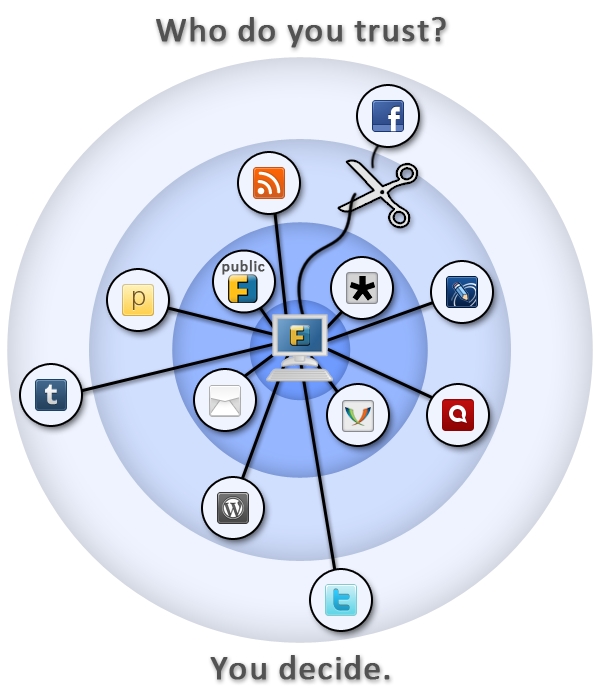
Follow me on Identi.ca or Twitter or Diaspora*diaspora-banner This is a feedback about installing a self hosted instance of Friendica on a Debian server (Jessie). If you re not interested in why I use Friendica, just go to Prerequisite for Friendica section below. Frustration about social networks Being a huge user of short messages, I was quite frustated to spend so much time on my Twitter account. To be quite honest, there is no much I like about this social network, except the huge population of people being potentially interested in what I write. twitter-logo I also have been using Identi.ca (now powered by Pump.io) for a while. But I tried for a while to manage both networks Pump.io and Twitter by hand and it was quite painful. And something was telling me another social network was going to appear from nowhere one of these days and I ll be just horrible to try to keep it up this way. identica-logo So I was looking for a scalable solution not asking too much personal investment. Subscribing to Diaspora* some days ago on the Framasphere pod, tintouli told me to try Friendica. Hmmm, what s Friendica ? f-intro Friendica is a content manager you can plug on almost anything: social networks (Facebook, Twitter, Pump.io, Diaspora*, ), but also WordPress, XMPP, emails I m in fact just discovering the power of this tool but to plug it on my different social network accounts was quite a good use case for me. And I guess if you re still reading, for you too. I tried to use some shared public servers but I was not quite happy with the result, one connector was still missing or public servers were really unstable. So I m at last self hosting my Friendica. Here is how. Prerequisite for Friendica You need to install the following packages: # apt-get install apache2 libapache2-mod-php5 php5 php5-curl php5-gd php5-mysql mysql-server git Having a already self-modified /etc/php5/apache2/php.ini, I encountered a small issue with libCurl and had to manually add the following line in the php.ini: extension=curl.so Setting up MySQL Connect to MySQL and create an empty database with a dedicated user: # mysql -u root -pV3rYS3cr3t -e create database friendica; GRANT ALL PRIVILEGES ON friendica.* TO friendica@localhost IDENTIFIED BY R3AlLyH4rdT0Gu3ss mysql Setting up Apache My server hosts several services, so I use a subdomain friendica.mydomain.com. If you use a subdomain, of course check you do have declared this subdomain in your DNS zone. apache-logo I use SSL encryption with a wildcard certificate for all my subdomains. My Friendica data are stored in /var/www/friendica. Here is my virtual host configuration for Friendica stored in the file /etc/apache2/sites-available/friendicassl.conf : <VirtualHost *:443>


ServerName friendica.mydomain.com
DocumentRoot /var/www/friendica/
DirectoryIndex index.php index.html
ErrorLog /var/log/apache2/friendica-error-ssl.log
TransferLog /var/log/apache2/friendica-access-ssl.log SSLEngine on
SSLCertificateFile /etc/ssl/certs/mydomain/mydomain.com.crt
SSLCertificateKeyFile /etc/ssl/private/mydomain.com.key
SSLVerifyClient None <Directory /var/www/friendica/>
AllowOverride All
Options FollowSymLinks
Order allow,deny
Allow from all
</Directory>
</VirtualHost> After writing the configuration file, just launch the following commands and it should be good for the Apache configuration: # a2ensite friendicassl && /etc/init.d/apache2 reload friendica-trust Setting up Friendica Get the master zip file of Friendica, copy it on your server and decompress it. Something like : # cd /var/www/ && wget https://github.com/friendica/friendica/archive/master.zip && unzip master.zip && mv friendica-master friendica You need to give www-data (Apache user) the rights to write in /var/www/friendica/view/smarty3/ : # chown -R www-data:www-data /var/www/friendica/view/smarty3 && chmod -R ug+w var/www/friendica/view/smarty3 Ok, I guess we re all set, lets launch the installation process! Using your web browser, connect to friendica.mydomain.com. First step you ll see the installation window which checks the prerequisite before installing. Complete if something is missing.
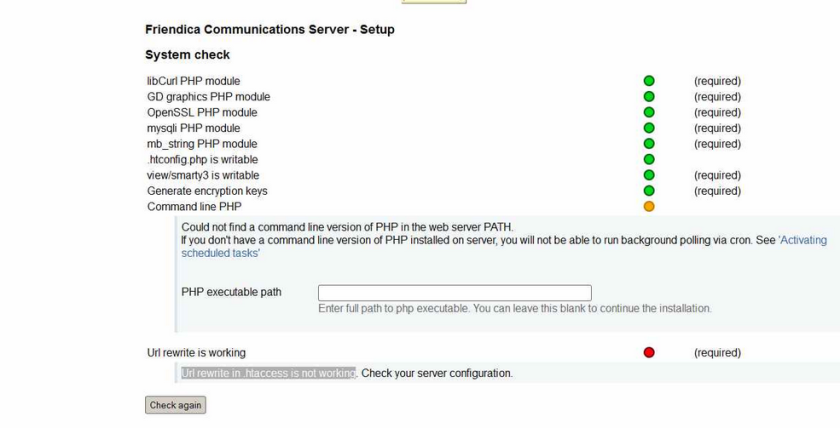
friendica-installation

First window of the Friendica installation process

Second step asks the host/user/password of the database, complete and the installation process starts. Hopefully all goes just fine. Next you ll have to create a /var/www/friendica/.htconfig.php with the content that the last page of the installation process provides. Just copy/paste, check the rights of this file and now you can connect again to see the register page of friendica at the url https://friendlica.mydomain.com/register . Pretty cool! Register a user That s a fairly easy step. You just need to check before that your server is able to send emails, because the password is going to be sent to you by email. If it is ok, you should now identify on the welcome page of friendica and access your account. That s a huge step to broadcast your short messages everywhere, but we have some last steps before being able to send your short messages on all the social networks we need. A small break, create an app for twitter on apps.twitter.com To send your short messages to Twitter, you need to create an app on apps.twitter.com. Just check you re logged in Twitter and connect to apps.twitter.com. Create an app called with a unique name (apparently), then go to the Keys and Access tokens page, note the consumer key and the consumer secret. You ll later need the name of the app, the consumer key and the consumer secret. friendica-decentralized-network Install and configure the addons Friendica uses an addon system in order to plug on the different third-parties it needs. We are going to configure Twitter, Pump.io and the Diaspora* plug. Let s go back to our server and launches some commands: # cd /tmp && git clone https://github.com/friendica/friendica-addons.git && cd friendica-addons # tar xvf twitter.tgz -C /var/www/friendica/addon # tar xvf pumpio.tgz -C /var/www/friendica/addon # cp -a diaspora /var/www/friendica/addon You need to modify your /var/www/friendica/.htconfig.php file and add the following content at the end: // names of your addons, separated by a comma $a->config['system']['addon'] = pumpio, twitter, diaspora ; // your Twitter consumer key
$a->config['twitter']['consumerkey'] = P4Jl2Pe4j7Lj91eIn0AR8vIl2 ; // your Twitter consumer secret
$a->config['twitter']['consumersecret'] = 1DnVkllPik9Ua8jW4fncxwtXZJbs9iFfI5epFzmeI8VxM9pqP1 ; // you Twitter app name $a->config['twitter']['application_name'] = whatever-twitter ; banner_friendica Connect again to Friendica. Go to settings => social networks, you will see the options for Twitter, Pump.io and Diaspora*. Complete the requested information for each of them. Important options you should not forget to check are: Pump.io Twitter Diaspora* Done? Now it s time to send your first broadcasted short message. Yay! Send a short message to your different social networks Connect to Friendica, click on the network page, write your short message in the Share box. Click on the lock lock, you ll see the following setup: friendica-post-default It means your short messages will be broadcasted to the three networks. Or more, it s up to you! That s my setup, feel free to modify. Now close the lock window and send your message. For me it takes some time to appear on Twitter and Diaspora* and it immediatly appears on Identi.ca. Last words friendica-stand Friendica offers to take back the control of your data, by broadcasting content on different media from a single source. While self hosting, you keep your data whatever happends and are not subject to companies losing your data like recently Twitpic. Moreover the philosophy behind Friendica pushed me to dig and test the solution What about you? How do you proceed to broadcast your short messages? Does Friendica offer a good solution in your opinion? Are you interested in the philosophy behind this project? Feel free to share your thoughs in the comments. LAST MINUTE: hey, this article is on Hacker News, don t hesitate to vote for it if you liked it!

1 November 2014

Thorsten Alteholz: My Debian Activities in October 2014

FTP assistant This month has been the month before the freeze. Lots of people uploaded a package at the last moment and wanted to have it in testing before everything is over. This resulted in even more processed package than in September. I was able to accept 407 packages and had to reject 77. The whole FTP team managed it to bring the NEW queue below 40 waiting packages. As the Release team doesn t like to see binary-NEW packages appearing in unstable (at least those which change the soname of a lib), this number will increase again. But, that s life I am glad that a freeze happens only every few years. So I would particularly thank my dear wife for her patience, when she saw me sitting in front of that damned computer again and again. Squeeze LTS This was my fourth month that I did some work for the Squeeze LTS initiative, started by Raphael Hertzog at Freexian. This month I got assigned a workload of 13.75h and I spent these hours to upload new versions of I also prepared a new upload of wget and still wait for some feedback. In this case some default values had to be changed and I better wait a bit before I break some scripts. Moreover five CVEs accumulated for php5, so I guess another upload has to be done for this package. This will be ready in the next days I also tried to work on libtasn1-3 and librack-ruby. There hadn t been DSAs for these packages and I tried to dig into the upstream repositories. Unfortunately I failed to find the correct patches. Kudos to the Security Team who have to struggle with all kind of commit messages on a daily basis. Other packages I didn t have time to do any work on my own packages. But during my ftp-time I saw one or another package that deals with some kind of home automation. Up to now there doesn t seem to be a Debian group who deals with this topic. Maybe it is time to start one? Support If you would like to support my Debian work you could either be part of the Freexian initiative (see above) or consider to send some bitcoins to 1JHnNpbgzxkoNexeXsTUGS6qUp5P88vHej. Contact me at donation@alteholz.eu if you prefer another way to donate. Every kind of support is most appreciated.

Riku Voipio: Using networkd for kvm tap networking

Setting up basic systemd-network was recently described by Joachim, and the post inspired me to try it as well. The twist is that in my case I need a bridge for my KVM with Lava server and arm/aarch64 qemu system emulators...For background, qemu/kvm support a few ways to provide network to guests. The default is user networking, which requires no privileges, but is slow and based on ancient SLIRP code. The other common option is tap networking, which is fast, but complicated to set up. Turns out, with networkd and qemu bridge helper, tap is easy to set up.

$ for file in /etc/systemd/network/*; do echo $file; cat $file; done
/etc/systemd/network/eth.network
[Match]
Name=eth1
[Network]
Bridge=br0

/etc/systemd/network/kvm.netdev
[NetDev]
Name=br0
Kind=bridge

/etc/systemd/network/kvm.network
[Match]
Name=br0
[Network]
DHCP=yes

Diverging from Joachims simple example, we replaced "DHCP=yes" with "Bridge=br0". Then we proceed to define the bridge (in the kvm.netdev) and give it an ip via dhcp in kvm.network. From the kvm side, if you haven't used the bridge helper before, you need to give the helper permissions (setuid root or cap_net_admin) to create a tap device to attach on the bridge. The helper needs an configuration file to tell what bridge it may meddle with.

# cat > /etc/qemu/bridge.conf <<__END__
allow br0
__END__
# setcap cap_net_admin=ep /usr/lib/qemu/qemu-bridge-helper
Now we can start kvm with bridge networking as easily as with user networking:

$ kvm -m 2048 -drive file=jessie.img,if=virtio -net bridge -net nic,model=virtio -serial stdio
The manpages systemd.network(5) and systemd.netdev(5) do a great job explaining the files. Qemu/kvm networking docs are unfortunately not as detailed.

31 October 2014

Russell Coker: Samsung Galaxy Note 3

In June last year I bought a Samsung Galaxy Note 2 [1]. Generally I was very happy with that phone, one problem I had is that less than a year after purchasing it the Ingress menus burned into the screen [2]. 2 weeks ago I bought a new Galaxy Note 3. One of the reasons for getting it is the higher resolution screen, I never realised the benefits of a 1920*1080 screen on a phone until my wife got a Nexus 5 [3]. I had been idly considering a Galaxy Note 4, but $1000 is a lot of money to pay for a phone and I m not sure that a 2560*1440 screen will offer much benefit in that size. Also the Note 3 and Note 4 both have 3G of RAM, as some applications use more RAM when you have a higher resolution screen the Note 4 will effectively have less usable RAM than the Note 3. My first laptop cost me $3,800 in 1998, that s probably more than $6,000 in today s money. The benefits that I receive now from an Android phone are in many ways greater than I received from that laptop and that laptop was definitely good value for money for me. If the cheapest Android phone cost $6,000 then I d pay that, but given that the Note 3 is only $550 (including postage) there s no reason for me to buy something more expensive. Another reason for getting a new phone is the limited storage space in the Note 2. 16G of internal storage is a limit when you have some big games installed. Also the recent Android update which prevented apps from writing to the SD card meant that it was no longer convenient to put TV shows on my SD card. 32G of internal storage in the Note 3 allows me to fit everything I want (including the music video collection I downloaded with youtube-dl). The Note 2 has 16G of internal storage and an 8G SD card (that I couldn t fully use due to Android limitations) while the Note 3 has 32G (the 64G version wasn t on sale at any of the cheap online stores). Also the Note 3 supports an SD card which will be good for my music video collection at some future time, this is a significant benefit over the Nexus 5. In the past I ve written about Android service life and concluded that storage is the main issue [4]. So it is a bit unfortunate that I couldn t get a phone with 64G of storage at a reasonable price. But the upside is that getting a cheaper phone allows me to buy another one sooner and give the old phone to a relative who has less demanding requirements. In the past I wrote about the warranty support for my wife s Nexus 5 [5]. I should have followed up on that before, 3 days after that post we received a replacement phone. One good thing that Google does is to reserve money on a credit card to buy the new phone and then send you the new phone before you send the old one back. So if the customer doesn t end up sending the broken phone they just get billed for the new phone, that avoids excessive delays in getting a replacement phone. So overall the process of Google warranty support is really good, if 2 products are equal in other ways then it would be best to buy from Google to get that level of support. I considered getting a Nexus 5 as the hardware is reasonably good (not the greatest but quite good enough) and the price is also reasonably good. But one thing I really hate is the way they do the buttons. Having the home button appear on the main part of the display is really annoying. I much prefer the Samsung approach of having a hardware button for home and touch-screen buttons outside the viewable area for settings and back. Also the stylus on the Note devices is convenient on occasion. The Note 3 has a fake-leather back. The concept of making fake leather is tacky, I believe that it s much better to make honest plastic that doesn t pretend to be something that it isn t. However the texture of the back improves the grip. Also the fake stitches around the edge help with the grip too. It s tacky but utilitarian. The Note 3 is slightly smaller and lighter than the Note 2. This is a good technical achievement, but I d rather they just gave it a bigger battery. Update USB 3 One thing I initially forgot to mention is that the Note 3 has USB 3. This means that it has a larger socket which is less convenient when you try and plug it in at night. USB 3 seems unlikely to provide any benefit for me as I ve never had any of my other phones transfer data at rates more than about 5MB/s. If the Note 3 happens to have storage that can handle speeds greater than the 32MB/s a typical USB 2 storage device can handle then I m still not going to gain much benefit. USB 2 speeds would allow me to transfer the entire contents of a Note 3 in less than 20 minutes (if I needed to copy the entire storage contents). I can t imagine myself having a real-world benefit from that. The larger socket means more fumbling when charging my phone at night and it also means that the Note 3 cable can t be used in any other phone I own. In a year or two my wife will have a phone with USB 3 support and that cable can be used for charging 2 phones. But at the moment the USB 3 cable isn t useful as I don t need to have a phone charger that can only charge one phone. Conclusion The Note 3 basically does everything I expected of it. It s just like the Note 2 but a bit faster and with more storage. I m happy with it.

Konstantinos Margaritis: SIMD on javascript, MHO

Just read the Mozilla announcement on SIMD.js and I can say I got mixed feelings about this. I don't really comment other news/blogs/announcements, but this is an exception. On one hand, I definitely welcome more SIMD use everywhere, being a SIMD advocate and enthusiast for many years (since 2004 actually). So seeing more of it and by someone such as Mozilla, that's even better! On the other hand, wait, that's SIMD in Javascript?!? Really? Why? As if we already covered native coverage of SIMD in every other part, including the browser itself (No browser uses SIMD extensively in its core, though that would prove to be of actual benefit, the only SIMD code I know of is in the media playback code, which is usually some external library like ffmpeg/x264/etc that already has SIMD optimized parts anyway. So, instead of using resources to optimize the core browser with SIMD -I'm sure there will be plenty of opportunities in the codebase for such optimizations- so that every web application, including Javascript ones will be optimized, or even the JS JITs themselves, yet Mozilla wants to push the effort to the web app developer to use their SIMD.js to do the equivalent of what SIMD coders have been doing to native apps for a long time now, only for JS apps. Ok, so what's the gain? I read the PDF presentation that shows mandebrot.js to go from 9 FPS to 37FPS using SIMD.js. Admittedly that's impressive. But it also proves that the whole buzz about lower energy footprint computers, power efficiency is just useless. Why is that? For comparison running Xaos (fractal/mandelbrot program) on my very low end PC (2-core Athlon X2, AM2 socket, so DDR2) gives me ~250FPS, and I'm not even sure it's using SSE at all (from a simple check it doesn't). Zooming is realtime and at full detail. In the same talk, there was a benchmark of LLVM Javascript being as fast as C++ or 1.5x the native running time. I admit haven't tried the tests listed, but the mandelbrot test was using asm.js and 9 is definetely not 250/1.5. But I guess I'm just picky. So, the latest trend of moving everything to the browser and JS,means that instead of optimizing my apps to run great on native, instead of making stuff running faster on my 5Wt big.Little 8-core ARM SoC, I have to get a much more power-hungry CPU to see the same performance. I'm totally against that. I want my newer CPUs, who are more energy-efficient and faster to actually feel like THAT. I don't want to upgrade just to experience the performance of a 486 20 years ago! The talk mentioned HTML5 (and hence javascript) overtaking all other platforms for application development everywhere, including the smartphones. I certainly hope that's not the case, and I know of many people who also don't feel that way. We're not buying the "Everything on the web/cloud" paradigm, but I guess we're just a minority. I could go on for a long time, but I have an actual SIMD-related bug to fix, cheers. Note: I used to have comments enabled on my blog, but moderating spam was too time consuming, even with CAPTCHAs, so I disabled them entirely, if anyone could suggest of a better method, I'd gladly take advice -have been thinking about disqus, not sure if it's actually a good solution).

30 October 2014

Alessio Treglia: Handling identities in distributed Linux cloud instances

I ve many distributed Linux instances across several clouds, be them global, such as Amazon or Digital Ocean, or regional clouds such as TeutoStack or Enter. Probably many of you are facing the same issue: having a consistent UNIX identity across all multiple instances. While in an ideal world LDAP would be a perfect choice, letting LDAP open to the wild Internet is not a great idea. So, how to solve this issue, while being secure? The trick is to use the new NSS module for SecurePass. While SecurePass has been traditionally used into the operating system just as a two factor authentication, the new beta release is capable of holding extended attributes , i.e. arbitrary information for each user profile. We will use SecurePass to authenticate users and store Unix information with this new capability. In detail, we will: SecurePass and extended attributes The next generation of SecurePass (currently in beta) is capable of storing arbitrary data for each profile. This is called Extended Attributes (or xattrs) and -as you can imagine- is organized as key/value pair. You will need the SecurePass tools to be able to modify users extended attributes. The new releases of Debian Jessie and Ubuntu Vivid Vervet have a package for it, just:
# apt-get install securepass-tools
ERRATA CORRIGE: securepass-tools hasn t been uploaded to Debian yet, Alessio is working hard to make the package available in time for Jessie though.
For other distributions or previous releases, there s a python package (PIP) available. Make sure that you have pycurl installed and then:
# pip install securepass-tools
While SecurePass tools allow local configuration file, we highly recommend for this tutorial to create a global /etc/securepass.conf, so that it will be useful for the NSS module. The configuration file looks like:
[default]
app_id = xxxxx
app_secret = xxxx
endpoint = https://beta.secure-pass.net/
Where app_id and app_secrets are valid API keys to access SecurePass beta. Through the command line, we will be able to set UID, GID and all the required Unix attributes for each user:
# sp-user-xattrs user@domain.net set posixuid 1000
While posixuid is the bare minimum attribute to have a Unix login, the following attributes are valid: Install and Configure NSS SecurePass In a similar way to the tools, Debian Jessie and Ubuntu Vivid Vervet have native package for SecurePass:
# apt-get install libnss-securepass
For previous releases of Debian and Ubuntu can still run the NSS module, as well as CentOS and RHEL. Download the sources from: https://github.com/garlsecurity/nss_securepass Then:
./configure
make
make install (Debian/Ubuntu Only)
For CentOS/RHEL/Fedora you will need to copy files in the right place:
/usr/bin/install -c -o root -g root libnss_sp.so.2 /usr/lib64/libnss_sp.so.2
ln -sf libnss_sp.so.2 /usr/lib64/libnss_sp.so
The /etc/securepass.conf configuration file should be extended to hold defaults for NSS by creating an [nss] section as follows:
[nss]
realm = company.net
default_gid = 100
default_home = "/home"
default_shell = "/bin/bash"
This will create defaults in case values other than posixuid are not being used. We need to configure the Name Service Switch (NSS) to use SecurePass. We will change the /etc/nsswitch.conf by adding sp to the passwd entry as follows:
$ grep sp /etc/nsswitch.conf
 passwd:  files sp
Double check that NSS is picking up our new SecurePass configuration by querying the passwd entries as follows:
$ getent passwd user
 user:x:1000:100:My User:/home/user:/bin/bash
$ id user
 uid=1000(user)  gid=100(users) groups=100(users)
Using this setup by itself wouldn t allow users to login to a system because the password is missing. We will use SecurePass authentication to access the remote machine. Configure PAM for SecurePass On Debian/Ubuntu, install the RADIUS PAM module with:
# apt-get install libpam-radius-auth
If you are using CentOS or RHEL, you need to have the EPEL repository configured. In order to activate EPEL, follow the instructions on http://fedoraproject.org/wiki/EPEL Be aware that this has not being tested with SE-Linux enabled (check off or permissive). On CentOS/RHEL, install the RADIUS PAM module with:
# yum -y install pam_radius
Note: as per the time of writing, EPEL 7 is still in beta and does not contain the Radius PAM module. A request has been filed through RedHat s Bugzilla to include this package also in EPEL 7 Configure SecurePass with your RADIUS device. We only need to set the public IP Address of the server, a fully qualified domain name (FQDN), and the secret password for the radius authentication. In case of the server being under NAT, specify the public IP address that will be translated into it. After completion we get a small recap of the already created device. For the sake of example, we use secret as our secret password. Configure the RADIUS PAM module accordingly, i.e. open /etc/pam_radius.conf and add the following lines:
radius1.secure-pass.net secret 3
radius2.secure-pass.net secret 3
Of course the secret is the same we have set up on the SecurePass administration interface. Beyond this point we need to configure the PAM to correct manage the authentication. In CentOS, open the configuration file /etc/pam.d/password-auth-ac; in Debian/Ubuntu open the /etc/pam.d/common-auth configuration and make sure that pam_radius_auth.so is in the list.
auth required   pam_env.so
auth sufficient pam_radius_auth.so try_first_pass
auth sufficient pam_unix.so nullok try_first_pass
auth requisite  pam_succeed_if.so uid >= 500 quiet
auth required   pam_deny.so
Conclusions Handling many distributed Linux poses several challenges, from software updates to identity management and central logging. In a cloud scenario, it is not always applicable to use traditional enterprise solutions, but new tools might become very handy. To freely subscribe to securepass beta, join SecurePass on: http://www.secure-pass.net/open
And then send an e-mail to info@garl.ch requesting beta access.

Juliana Louback: JSCommunicator at xTupleCon 2014

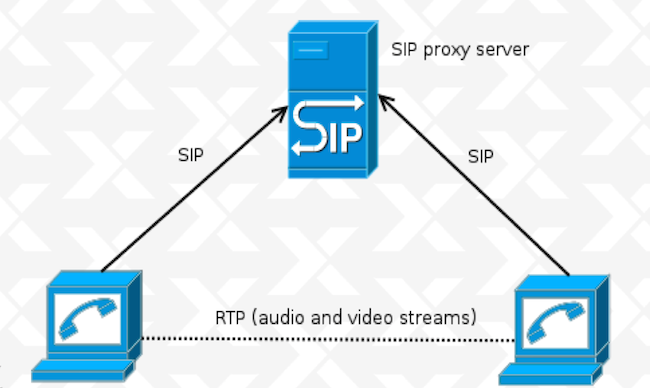
Two weeks ago I left NYC for a day trip to Norfolk, Virginia, to attend xTupleCon 2014. For those who don t know, xTuple is an incredibly reknown open source Enterprise Resource Planning (ERP) software. If you ve been following this blog, you might recall that during my participation in the Google Summer of Code 2014, I wrote a beta JSCommunicator extension for xTuple (to see how I went about doing that, look up Kickstarting the JSCommunicator-xTuple extension). Now, I wasn t flying down to Virginia on the eve of my first grad school midterms (gasp!) for fun - although I will admit, I enjoyed myself a fair amount. My GSoC mentor, Daniel Pocock was giving a talk about WebRTC and JSCommunicator at xTupleCon and invited me to participate. So that was the first perk of going to xTupleCon, I got to finally meet my GSoC mentor in person! During the presentation, Daniel provided a high level expanation of WebRTC and how it works. WebRTC (Web Real Time Communications) enables real time transmission of audio, video and data streams through browser-to-browser applications. This is one of the many perks of WebRTC; it doesn t require installation of plugins, making its use less vulnerable to security breaches. Websockets are used for the signalling channel and the SIP or XMPP can be used as the signaling protocol - in JSCommunicator, we used SIP. What was also done in JSCommunicator and can be done in other applications is to use a library to implement the signaling and SIP stack. JSCommunicator uses (and I highly reccomend) JsSIP. The basic SIP architecture is comprised of peers and a SIP Proxy Server that supports SIP over Websockets transport: sipArch If you have users behind NAT, you ll also need a TURN server for relay: sipArch2 In both cases, setup is not too difficult, particularly if using reSIProcate which offers both the SIP proxy and the TURN server. Daniel Pocock has an excellent post on how to setup and configure your SIP proxy and TURN server. With regard to JSCommunicator, it is a generic telephone in HTML5 which can easily be embedded in any web site or web app. Almost every aspect of JSCommunicator is easily customizable. More about JSCommunicator setup and architecture is detailed in a previous post. The JSCommunicator-xTuple extension can be installed in xTuple as an npm package (xtuple-jscommunicator). It is still at a very beta - or even pre-beta - stage and there are various limitations; the configuration must be hard-coded and dialing is done manually as opposed to clicking on a contact. Some of these limitations are features are on the wish list for future work. For example, some ideas for the next version of the extension are a click to dial from CRM records functionality and to bring up CRM records for an incomming call. Additionaly, the SIP proxy could be automatically installed with the xTuple server installation if desired. We closed the presentation with a live demo during which I made a video call from a JSCommunicator instance embedded in freephonebox.net to the JSCommunicator xTuple extension running on Daniel s laptop. Despite the occasionally iffy hotel Wifi, the demo was a hit - at one point I even left the conference room and took a quick walk around the hotel and invited other xTupleCon attendees to say hello to those in the room. The audience s reception was more enthusiastic than I anticipated, giving way to a pretty extensive Q&A session. It s great to see more and more people interested in WebRTC, I can t emphasize enough what a useful and versatile tool it is. Here s an action shot of part of the xTuple WebRTC presentation: xtuple

Keith Packard: Glamor cleanup

Glamor Cleanup Before I start really digging in to reworking the Render support in Glamor, I wanted to take a stab at cleaning up some cruft which has accumulated in Glamor over the years. Here's what I've done so far. Get rid of the Intel fallback paths I think it's my fault, and I'm sorry. The original Intel Glamor code has Glamor implement accelerated operations using GL, and when those fail, the Intel driver would fall back to its existing code, either UXA acceleration or software. Note that it wasn't Glamor doing these fallbacks, instead the Intel driver had a complete wrapper around every rendering API, calling special Glamor entry points which would return FALSE if GL couldn't accelerate the specified operation. The thinking was that when GL couldn't do something, it would be far faster to take advantage of the existing UXA paths than to have Glamor fall back to pulling the bits out of GL, drawing to temporary images with software, and pushing the bits back to GL. And, that may well be true, but what we've managed to prove is that there really aren't any interesting rendering paths which GL can't do directly. For core X, the only fallbacks we have today are for operations using a weird planemask, and some CopyPlane operations. For Render, essentially everything can be accelerated with the GPU. At this point, the old Intel Glamor implementation is a lot of ugly code in Glamor without any use. I posted patches to the Intel driver several months ago which fix the Glamor bits there, but they haven't seen any review yet and so they haven't been merged, although I've been running them since 1.16 was released... Getting rid of this support let me eliminate all of the _nf functions exported from Glamor, along with the GLAMOR_USE_SCREEN and GLAMOR_USE_PICTURE_SCREEN parameters, along with the GLAMOR_SEPARATE_TEXTURE pixmap type. Force all pixmaps to have exact allocations Glamor has a cache of recently used textures that it uses to avoid allocating and de-allocating GL textures rapidly. For pixmaps small enough to fit in a single texture, Glamor would use a cache texture that was larger than the pixmap. I disabled this when I rewrote the Glamor rendering code for core X; that code used texture repeat modes for tiles and stipples; if the texture wasn't the same size as the pixmap, then texturing would fail. On the Render side, Glamor would actually reallocate pixmaps used as repeating texture sources. I could have fixed up the core rendering code to use this, but I decided instead to just simplify things and eliminate the ability to use larger textures for pixmaps everywhere. Remove redundant pixmap and screen private pointers Every Glamor pixmap private structure had a pointer back to the pixmap it was allocated for, along with a pointer to the the Glamor screen private structure for the related screen. There's no particularly good reason for this, other than making it possible to pass just the Glamor pixmap private around a lot of places. So, I removed those pointers and fixed up the functions to take the necessary extra or replaced parameters. Similarly, every Glamor fbo had a pointer back to the Glamor screen private too; I removed that and now pass the Glamor screen private parameter as needed. Reducing pixmap private complexity Glamor had three separate kinds of pixmap private structures, one for 'normal' pixmaps (those allocated by them selves in a single FBO), one for 'large' pixmaps, where the pixmap was tiled across many FBOs, and a third for 'atlas' pixmaps, which presumably would be a single FBO holding multiple pixmaps. The 'atlas' form was never actually implemented, so it was pretty easy to get rid of that. For large vs normal pixmaps, the solution was to move the extra data needed by large pixmaps into the same structure as that used by normal pixmaps and simply initialize those elements correctly in all cases. Now, most code can ignore the difference and simply walk the array of FBOs as necessary. The other thing I did was to shrink the number of possible pixmap types from 8 down to three. Glamor now exposes just these possible pixmap types: Future Work

Matthew Garrett: On joining the FSF board

I joined the board of directors of the Free Software Foundation a couple of weeks ago. I've been travelling a bunch since then, so haven't really had time to write about it. But since I'm currently waiting for a test job to finish, why not?

It's impossible to overstate how important free software is. A movement that began with a quest to work around a faulty printer is now our greatest defence against a world full of hostile actors. Without the ability to examine software, we can have no real faith that we haven't been put at risk by backdoors introduced through incompetence or malice. Without the freedom to modify software, we have no chance of updating it to deal with the new challenges that we face on a daily basis. Without the freedom to pass that modified software on to others, we are unable to help people who don't have the technical skills to protect themselves.

Free software isn't sufficient for building a trustworthy computing environment, one that not merely protects the user but respects the user. But it is necessary for that, and that's why I continue to evangelise on its behalf at every opportunity.

However.

Free software has a problem. It's natural to write software to satisfy our own needs, but in doing so we write software that doesn't provide as much benefit to people who have different needs. We need to listen to others, improve our knowledge of their requirements and ensure that they are in a position to benefit from the freedoms we espouse. And that means building diverse communities, communities that are inclusive regardless of people's race, gender, sexuality or economic background. Free software that ends up designed primarily to meet the needs of well-off white men is a failure. We do not improve the world by ignoring the majority of people in it. To do that, we need to listen to others. And to do that, we need to ensure that our community is accessible to everybody.

That's not the case right now. We are a community that is disproportionately male, disproportionately white, disproportionately rich. This is made strikingly obvious by looking at the composition of the FSF board, a body made up entirely of white men. In joining the board, I have perpetuated this. I do not bring new experiences. I do not bring an understanding of an entirely different set of problems. I do not serve as an inspiration to groups currently under-represented in our communities. I am, in short, a hypocrite.

So why did I do it? Why have I joined an organisation whose founder I publicly criticised for making sexist jokes in a conference presentation? I'm afraid that my answer may not seem convincing, but in the end it boils down to feeling that I can make more of a difference from within than from outside. I am now in a position to ensure that the board never forgets to consider diversity when making decisions. I am in a position to advocate for programs that build us stronger, more representative communities. I am in a position to take responsibility for our failings and try to do better in future.

People can justifiably conclude that I'm making excuses, and I can make no argument against that other than to be asked to be judged by my actions. I hope to be able to look back at my time with the FSF and believe that I helped make a positive difference. But maybe this is hubris. Maybe I am just perpetuating the status quo. If so, I absolutely deserve criticism for my choices. We'll find out in a few years.

comment count unavailable comments

29 October 2014

Steve Kemp: A brief introduction to freebsd

I've spent the past thirty minutes installing FreeBSD as a KVM guest. This mostly involved fetching the ISO (I chose the latest stable release 10.0), and accepting all the defaults. A pleasant experience. As I'm running KVM inside screen I wanted to see the boot prompt, etc, via the serial console, which took two distinct steps: To configure boot messages to display via the serial console, issue the following command as the superuser:
 # echo 'console="comconsole"' >> /boot/loader.conf
To get a login: prompt you'll want to edit /etc/ttys and change "off" to "on" and "dialup" to "vt100" for the ttyu0 entry. Once you've done that reload init via:
 # kill -HUP 1
Enable remote root logins, if you're brave, or disable PAM and password authentication if you're sensible:
 vi /etc/ssh/sshd_config
 /etc/rc.d/sshd restart
Configure the system to allow binary package-installation - to be honest I was hazy on why this was required, but I ran the two command and it all worked out:
 pkg
 pkg2ng
Now you may install a package via a simple command such as:
 pkg add screen
Removing packages you no longer want is as simple as using the delete option:
 pkg delete curl
You can see installed packages via "pkg info", and there are more options to be found via "pkg help". In the future you can apply updates via:
 pkg update && pkg upgrade
Finally I've installed 10.0-RELEASE which can be upgraded in the future via "freebsd-update" - This seems to boil down to "freebsd-update fetch" and "freebsd-update install" but I'm hazy on that just yet. For the moment you can see your installed version via:
 uname -a ; freebsd-version
Expect my future CPAN releases, etc, to be tested on FreeBSD too now :)

26 October 2014

Colin Watson: Moving on, but not too far

The Ubuntu Code of Conduct says:
Step down considerately: When somebody leaves or disengages from the project, we ask that they do so in a way that minimises disruption to the project. They should tell people they are leaving and take the proper steps to ensure that others can pick up where they left off.
I've been working on Ubuntu for over ten years now, almost right from the very start; I'm Canonical's employee #17 due to working out a notice period in my previous job, but I was one of the founding group of developers. I occasionally tell the story that Mark originally hired me mainly to work on what later became Launchpad Bugs due to my experience maintaining the Debian bug tracking system, but then not long afterwards Jeff Waugh got in touch and said "hey Colin, would you mind just sorting out some installable CD images for us?". This is where you imagine one of those movie time-lapse clocks ... At some point it became fairly clear that I was working on Ubuntu, and the bug system work fell to other people. Then, when Matt Zimmerman could no longer manage the entire Ubuntu team in Canonical by himself, Scott James Remnant and I stepped up to help him out. I did that for a couple of years, starting the Foundations team in the process. As the team grew I found that my interests really lay in hands-on development rather than in management, so I switched over to being the technical lead for Foundations, and have made my home there ever since. Over the years this has given me the opportunity to do all sorts of things, particularly working on our installers and on the GRUB boot loader, leading the development work on many of our archive maintenance tools, instituting the +1 maintenance effort and proposed-migration, and developing the Click package manager, and I've had the great pleasure of working with many exceptionally talented people. However. In recent months I've been feeling a general sense of malaise and what I've come to recognise with hindsight as the symptoms of approaching burnout. I've been working long hours for a long time, and while I can draw on a lot of experience by now, it's been getting harder to summon the enthusiasm and creativity to go with that. I have a wonderful wife, amazing children, and lovely friends, and I want to be able to spend a bit more time with them. After ten years doing the same kinds of things, I've accreted history with and responsibility for a lot of projects. One of the things I always loved about Foundations was that it's a broad church, covering a wide range of software and with a correspondingly wide range of opportunities; but, over time, this has made it difficult for me to focus on things that are important because there are so many areas where I might be called upon to help. I thought about simply stepping down from the technical lead position and remaining in the same team, but I decided that that wouldn't make enough of a difference to what matters to me. I need a clean break and an opportunity to reset my habits before I burn out for real. One of the things that has consistently held my interest through all of this has been making sure that the infrastructure for Ubuntu keeps running reliably and that other developers can work efficiently. As part of this, I've been able to do a lot of work over the years on Launchpad where it was a good fit with my remit: this has included significant performance improvements to archive publishing, moving most archive administration operations from excessively-privileged command-line operations to the webservice, making build cancellation reliable across the board, and moving live filesystem building from an unscalable ad-hoc collection of machines into the Launchpad build farm. The Launchpad development team has generally welcomed help with open arms, and in fact I joined the ~launchpad team last year. So, the logical next step for me is to make this informal involvement permanent. As such, at the end of this year I will be moving from Ubuntu Foundations to the Launchpad engineering team. This doesn't mean me leaving Ubuntu. Within Canonical, Launchpad development is currently organised under the Continuous Integration team, which is part of Ubuntu Engineering. I'll still be around in more or less the usual places and available for people to ask me questions. But I will in general be trying to reduce my involvement in Ubuntu proper to things that are closely related to the operation of Launchpad, and a small number of low-effort things that I'm interested enough in to find free time for them. I still need to sort out a lot of details, but it'll very likely involve me handing over project leadership of Click, drastically reducing my involvement in the installer, and looking for at least some help with boot loader work, among others. I don't expect my Debian involvement to change, and I may well find myself more motivated there now that it won't be so closely linked with my day job, although it's possible that I will pare some things back that I was mostly doing on Ubuntu's behalf. If you ask me for help with something over the next few months, expect me to be more likely to direct you to other people or suggest ways you can help yourself out, so that I can start disentangling myself from my current web of projects. Please contact me sooner or later if you're interested in helping out with any of the things I'm visible in right now, and we can see what makes sense. I'm looking forward to this!

Russ Allbery: California general election

Probably only of interest to California residents. Time again for the general election voting. This is probably too late to be helpful for a lot of people voting permanent absentee, but may as well write this down anyway. (Hm, I apparently didn't do this in 2012.) Propositions: Proposition 1: YES. Now is one of the best times in history to borrow money for infrastructure improvements, and our water infrastructure in the state can certainly use it. Proposition 2: YES. I have somewhat mixed feelings about this, since I hate passing complex legislation like this via proposition, but this already went through the legislature. It would be dumb for the federal government, which can more easily borrow money, but given how the finances of state governments work in the US, this sort of rainy day fund is probably prudent. This one seems reasonably well-designed, and the opposition is panic about a secondary effect on how school reserves are managed that can be changed with later legislative action and which is rather unconvincing. Proposition 45: YES. I can't get very enthused about yet more bandaids on top of our completely broken health care system, but forcing insurance companies to justify rate increases results in some public pressure against profit-taking by insurance companies. Single payer is what we actually need, but this might be mildly helpful. Plus, the argument against is more incoherent nonsense. So, I'm voting yes, but I don't think it's important and I won't mind if it loses. Proposition 46: NO. There are a lot of things that we should do about preventable medical errors, starting with funding our health care system properly, testing drugs properly, and investing in proper inspections and medical licensing investigations. Drug testing doctors is not among those things. This is a well-meaning but horrible idea pushed by a victim's advocacy group that won't do anything to improve our health care system. The fear-mongering of the opponents about malpractice lawsuits is a bit much, but there are essentially no positive benefits here. Proposition 47: YES. Requires that misdemeanor crimes actually be misdemeanors, rather than giving prosecutors discretion to charge them as felonies if the person charged happens to be black-- er, I mean, if the prosecutor doesn't like them for some reason. Obviously a good idea on all fronts: stop over-charging crimes, stop giving prosecutors discretion to choose the impact of laws on particular people (since they rarely use it appropriately), and further try to decriminalize our completely worthless "war on drugs." Proposition 48: YES. I'm opposed to the Indian gaming system in general, but this proposition appears to be a rather cynical attempt to block new casino development by tribes that already have casinos. My general feeling is that if we're going to have casinos, they should generally be legal; the bizarre system where each casino is subject to public approval seems designed to create political cronyism. State offices: I'm not going to comment on the partisan offices, since no one interesting survived the primaries. Across the board, it's basically the Democratic incumbants against various Republicans. The state Republican party in California is dominated by science denialists, Randian objectivists, and people who think the solution to all problems is ensuring rich people don't pay taxes, so it takes rather a lot to get me to vote for any of them. At the moment, the Democrats are doing a reasonably good job running the state, so while I'd vote for challengers from the left against several of them, given the boring candidate slate, I'm just voting Democrat down the line. California has a system that requires voter approval for various state judicial offices. In general, I don't agree with voter approval for judges, since voters are rarely in a position to make reasonable choices about justices. Since there's a Democratic administration in power at the moment, these are probably the best judges that we're going to get (the few I've heard of are good choices), and I don't think the yes/no approval voting is useful anyway. So I'm voting to approve across the board. Superintendent of Public Instruction: Tom Torlakson. I'm not a huge fan of Torlakson, but Tuck is a Harvard MBA who ran charter schools and then a school privatization initiative. Everyone always claims that they want to reduce bureaucracy and empower teachers, but Tuck has a past track record of trying to do so by taking public education private, something that I am passionately opposed to. So Torlakson it is. Local measures: Measure B: YES. Increases the local hotel tax and uses it for local infrastructure. I'm generally in favor of raising taxes, and the amount certainly won't be significant in the ridiculous Palo Alto hotel market. The arguments against feature one of my favorite stupid right-wing talking points: the tax is unfair because it isn't earmarked to benefit the people paying it. Measure C: YES. Reasonable, small reform of the local utility tax, opposed by the Libertarian Party and "taxpayer associations" using an "all taxation is theft" argument. What's not to like? Measure D: NO. Reduces the size of the city council for no clear reason. The stated reasons are saving money (not credible given how little money is involved) and making city meetings not take as long. I'm going to need something better than that to vote for this. Local offices: Judge of the Superior Court, Office #24: Matthew S. Harris. I'm making one exception for my normal rule against voting for former prosecutors for judges because the incumbant, Diane Ritchie, is apparently a train wreck. All it takes is a quick Google search to reveal multiple news stories about strange behavior, clear conflicts of interest, and other serious problems, including a rebuke by the local bar association. Even if not all of that information is true, judges should be above reproach, or at least farther above reproach than this. Palo Alto City Council: I have an agenda here: I think housing density is about the best thing that the local community could support. Housing density enables better mass transit options, makes housing more affordable and brings more housing under possible rent control, and simply makes more sense given the cost of housing in the area. A lot of the city council members run on low-density or anti-growth platforms; I vote against those and for people who support development. And, of course, I'll filter out candidates who believe stupid things, like claiming a minimum wage is un-American (Seelam-Sea Reddy). The best seem to be Greg Scharff, A.C. Johnston, Nancy Shepherd, Cory Wolbach, and Wayne Douglass. Palo Alto Unified School District: The Democratic party has endorsed four out of the five candidates, so it probably doesn't matter too much. Gina Dalma and Ken Dauber sound like the best of the candidates to me, so I will probably vote for them. Santa Clara Valley Water District #7: I voted for Brian Schmidt last time, and I don't see a reason to change my mind. His opponent is a Silicon Valley millionaire who is spending a surprisingly large amount of money on this race and is involved with a business that sells software to water boards, which raises some eyebrows.

Next.

Previous.