Search Results: "ag"

14 February 2006

Daniel Baumann: Debian Live Initiative

I already got some feedback about the "device driver check CD"-thing. People got confused about it, so I will tell you a bit more about my intentions (although I wanted to start doing this not until next week, duuh). What is wrong with current live systems? There are already several Debian-based live systems and they are doing a great job. But, from the Debian perspective, most of them have one or more of the following disadvantages: Why create our own live system? Debian is the Universal Operating System: IMHO we should have an official live system for showing arround and to officially represent the true, one and only Debian system with the following main advantages: Creating the Debian Live framework Such a life system framework would allow to create different images for different scenarios: The last one is this "confusing" thing I mentioned before. Wouldn't it be nice to have a live system to easy detect hardware? Imagine, you could take such an image, burn it on a CD or copy it on a USB-stick, go to your hardware shop and boot it. Since this system would use only official Debian packages, you can easily verify if your favourite piece of hardware is supported by Debian. Doubts like "it runs with Knoppix, so hopefully it runs with Debian too" are history by that. Maybe someone could implement then some sort of application which checks the hardware against Kenshis Debian GNU/Linux hardware compatibility list and displays some sort of report about the compatibility level of the tested hardware. I will definitely work on that goal. But first, I have to do a bit of research about the best techniques and create the framework arround it... Thanks to Myon for setting up the record live.debian.net.

Martin F. Krafft: Gripes with Firefox

Mozilla Firefox has done some good to the Web as a whole. I still wonder why, for $DEITY's sake, it does everything different from a normal application. To be precise, Firefox sucks just a little too much for my taste. Today's gripe: I have two machines here, my laptop and my workstation. The workstation is headless due to a broken monitor, but it's connected to the stereo. My music collection is served by libapache2-mod-musicindex over HTTP, and I have not yet figured out how to configure mocp to actually play remote playlists (any ideas?). Thus, these days I X-forward Firefox to my laptop to surf the list and select the songs. But try this: start Firefox locally, then start an instance through an X-enabled SSH session: it will open a new window of the running local session, which is really not what I want nor expect. It seems like the requirement to surf from somewhere else is an out of bounds concept for the Firefox developers. Thanks for trying (and failing) to be smart, Mr. Firefox. Why don't you rather concentrate on processing clicks and keystrokes when you should, rather than ignoring them from time to time? Update: Matt Brubeck tells me that MOZ_NO_REMOTE=1 in the environment does what I want. Future versions will have a -no-remote command-line argument. I think it should become default. Please see #352809 if you have an opinion on this. PS: Firefox and OpenOffice.org seem to be two flagship products of the F/OSS world. At the same time, they are probably the two best examples of programmes orthogonal to the Unix philosophy. Does that mean that the Unix philosophy is the wrong way? Holy Shit!

13 February 2006

Joey Hess: patch followup

Followup on my previous review of Ubuntu's patches to my packages: So things have improved for my packages, at least after I made a stink about it and some people pretty clearly made it a priority to fix it. I doubt that this can be extrapolated to any other set of packages though. Total useful stuff gleaned this time: One minor build-depends fix, one icon.
Total estimated time to subit those to Debian BTS: approximatly 2 minutes.
Total time it took me to extract them from the diffs: about an hour.

David Moreno Garza: Dear Mr. I m too good to call or write my fans

Or… Dear Mr. “I’m too good to make things properly for portability on Ruby packages”. Lucas Nussbaum did a great job on the pkg-ruby-extras team by writing the web page called Upstream developers, be nice to distribution (re) packagers, where he notes the problems we have brought by RubyGems, broken install.rb, extconf.rb, etc. and the like. Thanks, Lucas!

Amaya Rodrigo: British Comedy, Old and New

Let me point you to a couple of British TV series that I have discovered this year and loved.

* The old: After watching the two seasons of Faulty Towers, a British Comedy from the 70s with John Cleese (Monty Python), I will never be able to thank Lars enough for discovering it to me.

* The new: I am now completely hooked to The IT Crowd. I specially liked the first Episode. Geek humor on TV (and done right)? Yes! Absolutely drolling

Daniel Baumann: Re: Device driver check CD

Roland, you are stealing my thunder! *grr* Approximately three weeks ago, I decided to start the "Debian Live" initiative in my semester break - first unofficial, then trying to bring it into Debian and become an official subproject. One of the most important reason for me is having excately such a "device driver check CD"... However, today is the first day of my break and I will start working on it with the beginning of the next week.

Ross Burton: More Avahi Love

Today's Avahi Love posting covers publishing SFTP servers. My NAS box runs SSH, so I can use the ssh: method in gnome-vfs to browse the filesystem (it uses SFTP). The magic service file is:
<?xml version="1.0" standalone='no'?>
<service-group>
  <name replace-wildcards="yes">Remote Files on %h</name>
  <service>
    <type>_sftp-ssh._tcp</type>
    <port>22</port>
  </service>
</service-group>
Restart Avahi and then with a suitable Avahi-enabled gnome-vfs, there will be entries in Places → Network Servers for each machine that file is installed on. Kick arse!

Roland Mas: Device driver check CD

Lars Wirzenius kindly added some visibility to Kenshi Muto’s Debian GNU/Linux hardware compatibility list, and had the interesting idea of mentioning live-cds in the same post. That gave me an idea: why not prepare a minimal live-cd dedicated to hardware compatibility testing? It could automatically open a browser on that check page, try multiple screen resolutions and sound systems and report the results, run glxgears, etc. Just boot on that CD in the computer shop, wait for a few moments, and see in big, easily readable letters, whether a configuration actually works with free software. Don’t forget to exclaim loudly if the shop attendant told you it would work and the tests show it doesn’t. I’m told there’s a tool to automate the creation of live-cds. Any takers for that task?

Erich Schubert: PHP crap of the day: b2evolution

My father wanted to try out b2evolution. Oh my god... He was not able to login. With the help of ethereal we found out that b2evolution uses the following line of code to determine your cookie domain:
$cookie_domain = ($basehost == 'localhost') ? '' : '.'. $basehost;
which will not work when you have a local net with hostnames such as "linux1" because this tries to restrict the cookie to .linux1. Changing it to
$cookie_domain = '';
worked like a charm. Why is there not a single PHP program that just works? Is it the language that invites you to write crappy code, or is it the users of PHP that have no clue?

Benjamin Mako Hill: Debian: A Force To Be Reckoned With

I submitted the following proposal for a talk at Debconf6:
This talk offers a "Debian Themed" quick tour through the academic, legal, and business worlds. It overs insight into what everyone outside of Debian is saying about, doing with, and learning from the Debian project. In doing so, it hopes to give Debian participants some insight into fields and areas that they are largely unfamiliar with (e.g., management, sociology, anthropology, economics, computer supported collaborative work, etc.). It illuminates what others -- especially academics -- find useful or inspiring about the project and to facilitate self-reflection and self-improvement within Debian. It reflects on the impact that Debian has had in the world beyond the Debian project and, in particular, in those areas that many Debian developers may not be familiar with.
The good news is that the proposal was accepted. The bad news is that this means I actually have to finish doing the research to make the talk happen. To make the talk excellent, I wanted to solicit examples from you, great Debian community. I've already got my own list but I'd like to hear what you think I should talk about? What I'm not looking for is examples of people or organizations that use Debian. This talk is not about people who use the OS or the people who build it. This is about people who have learned from Debian as a community. Primarily, I'm looking for academic publications on Debian. However, anyone who has learned and designed a system or community based on such a paper or from observation would be good as well. People who use or have learned from our voting structure might be a good example as would communities with a Debian-derived social contract. Software engineering research is fair game. Be creative but remember that I've got a limited time on the podium and may be forced into the unpleasant position of being ruthlessly selective. Please add examples to this wiki page or just email mako@debian.org. That's if for now and I'll see you in... Umm... Oaxtepec.

Erich Schubert: SELinux hack of the day: disable history when not sysadm_r

zsh: can't write history file /root/.zsh/history You'll get this error message on logout when your ssh login is to a userid which may not write your home directory (such as staff_t, when logging into root whose files usually are sysadm_home_r). Here's a simple workaround for you zsh users:
if id   grep -q sysadm_r; then
        export SAVEHIST=1500
        export HISTFILE=~/.zsh/history
        export HISTSIZE=1500
fi
This will only enable history when you are sysadm_r. Bash users probably can use
if ! id   grep -q sysadm_r; then
       shopt -u cmdhist
fi

12 February 2006

Andrew Pollock: [life] Massive road trip coming up

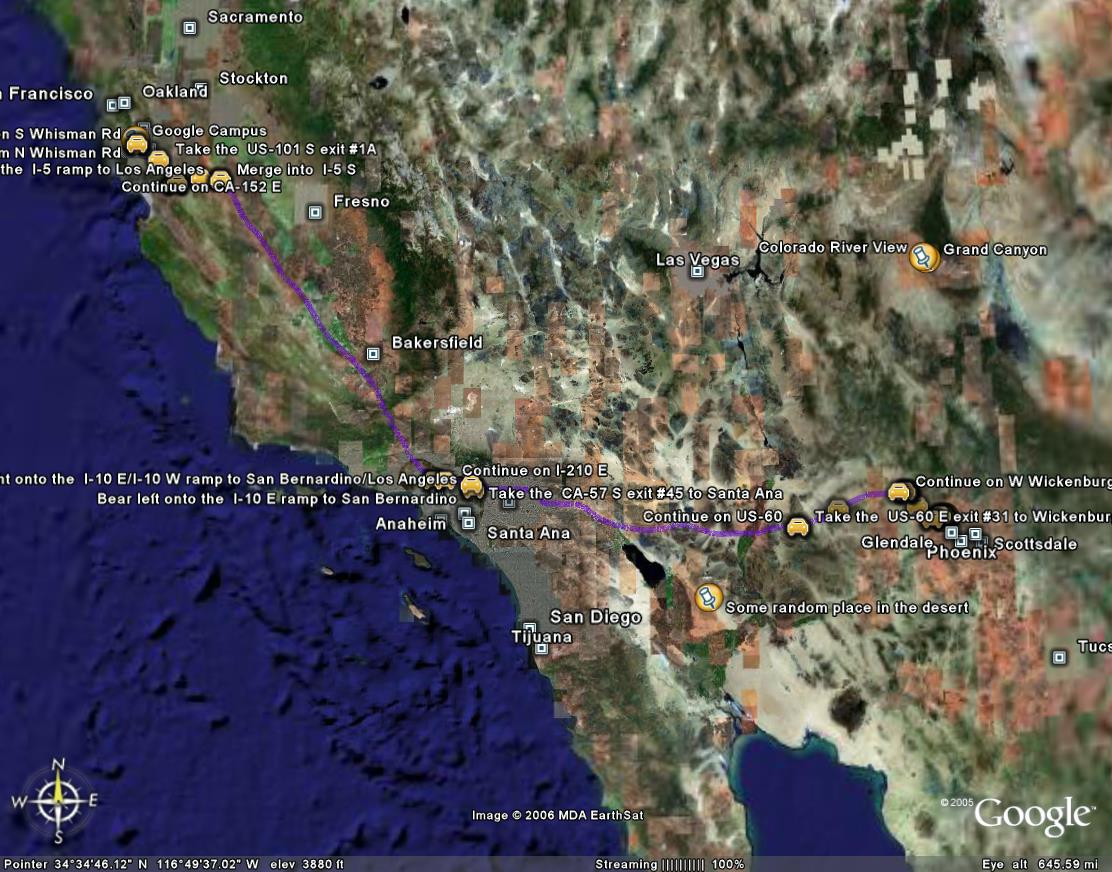
Given that next weekend is a long weekend on account of President's Day, we've decided to go visit our friends Craig and Sarah in Phoenix. My manager has kindly allowed me to work from Phoenix for the remainder of the week, so we'll head back again on the following weekend. I just fed all the relevant data into Google Earth, to get a bit of a perspective on how long and how big the trip is going to be (and it looks big). I've never used Earth for routing before, and it's really cool to "play" the trip's route and have it zoom into each turn. So from home to Craig and Sarah's place is 727 miles (1169 kilometres), but we're going to meet up in the desert, which is only 575 miles (925 kilometres), and then we'll do the remaining 216 miles (347 kilometres) on Sunday night after we've stayed with them in their enormous caravan (or trailer as I guess they call it over here) and fool around in their dune buggy. Here's the direct route from home to Craig and Sarah's place in Phoenix, for perspective. The desert stopover (marked) is a little bit south of this route: Route of our road trip to Phoenix We're planning on stopping over in Los Angeles (Hollywood to be precise) on the way back so we can briefly check it out.

Ross Burton: Sound Juicer "For All Of These Simple Things And Much More" 2.13.5

Sound Juicer "For All Of These Simple Things And Much More" 2.13.5 is out. Tarballs are available on burtonini.com, or from the GNOME FTP servers. Bug fixes: Translators: Priit Laes (et), ygimantas Beru ka (lt)

Paul van Tilburg: GNOME Bashing & Early Rising

Early Rising Simon, I have been following the early riser program for 8 months now. I wrote about my experience some time ago. It still is working well for me, although I had a little trouble with it when I moved to Edinburgh. However, my headaches warn me and make sure I stay in the program. GNOME It has been quite a meme to bash GNOME the last few weeks. Since bashing generally doesn’t help the motivation of any hackers and people working hard to accomplish a goal, I want to rebuke it a bit. Two and a half years ago I got my PowerBook. After five years of using a Pentium-233 with 64MB I suddenly had some CPU power. Since my old environment (WindowMaker) was broken on PPC at the moment, I decided to go with GNOME. Coming from WindowMaker it really felt like things were done quite differently, but being open-minded I tried to let it all go. The thing is, do I really want to configure everything? I liked configuring a lot back then, it was like an addiction. Now that I have gotten used to GNOME (let’s call it The GNOME way™), it just feels bothersome, getting in my way. When I encounter a GNOME desktop I immediately can work with it and don’t feel the need to redo the complete setup. When I look back, the only things I really want to change are the programs I use, the information I see and the way I control it all. This basic stuff I easily can do with launchers, applets and keybindings. Also have I been observing and helping some new users. And somehow I still keep reaching the moment that I can hear myself say, “Ow, hehe, yeah… that doesn’t work quite right yet. Just open a terminal (eek!) and edit this and that file.” So, we are not there yet. For me GNOME offers innovation, sufficient configurability, and an efficient do-not-get-in-my-way workspace. The change from WindowMaker to GNOME has been to me as my switch from Windows to Linux, a thing I ventured into open-minded and worked out quite well. Won’t this result into a dull monoculture of desktop setups? Maybe so, but I don’t have to be different in every way just to make the statement that I am different. OK guys, bash away now… oh, and thanks GNOME people!

Wouter Verhelst: Whoops.

To all of you who have root on LVM: Do not assume it is a good idea to make a snapshot of your current root volume and then to reboot with that as root. Unless you have dm-snapshot compiled in your kernel or on your initrd, it will not work. In an unrelated message, I'm writing a bootable CD for my desktop right now, because it won't boot currently. Hmm, maybe they are related after all. Next time, I'll just boot with /bin/bash as my shell, and pivot_root into the snapshot device (which I will then create on the fly). That should work.

Florian Ragwitz: I'm back...

No news for almost 3 months.. well, I am back now. Some things that happened during this time: I'm sure I've missed important things, but that's it for the moment. I hope I'll manage to do more frequent updates in the future.

Andres Seco Hernandez: Happy Birthday, guadawireless


Four years ago, Febreary 7, 2002, some people in Guadalajara, Spain, starts connecting some houses using 802.11b in ad-hoc mode. After 4 years, there are a very interesting network of 89 operational and ready to free use nodes conecting the set of free networks of Guadalajara. You can see it at http://www.guadawireless.net.

A lot of services inside the network are free too, and almost all the servers in the network are hosted by Debian running machines. There are a lot of Linksys WRT54G using diferent versions of free firmwares (mainly OpenWRT), and a lot of SMC/USR access points with LinuxAP firmware.

Thanks to all the people involved in the project and happy birthday.

Andres Seco Hernandez: Too much work may be no good


Sometimes i ask me about the sense of too much work, too many pending tasks and getting involved in more things i can do. Perhaps i am the type of people that can not say "no" when somebody ask me to do something.

I think there are two type of people from the point of view of creativity and contribution of contents , providers and consumers, servers and clients ;-). Some of my friends are only consumers, they do not want to provide anything of this type of things (documents, images, events, aplications, theathre, etc.), they even think that near people that is creating and contributing are going to be in trouble and are going to have a lot of work that will prevent to have time to dedicate it to they themselves. And perhaps they are right.

But somebody will have it to do.

Since i can remember, i have been in the side of the "servers". In the theater of the school, in the choir of the church, developing aplications, coordinating free network projects, etc.

And i know i have lost a lot of experiences in the side of the "clients". I am surprised of the amount of things that I am losing myself not being an Internet "consumer" or a theater "consumer" or a computer "consumer".

But somebody will have it to do.

Have a good day.

11 February 2006

Axel Beckert: SuSE sucks!

Since SuSE closes the security support two years after release and the recent KDE JavaShit remote code execution hole wasn’t patched as fast as I would have expected it (the patch came out after the upgrade I’m writing about here) in the SuSE 9.0 which was installed on my 2.66 GHz AMD desktop at work (it started as in 2002 as a SuSE 7.3 on a 400 MHz box and has been upgraded since then to 8.0, 8.2 and 9.0 IIRC), I decided, it’s now really time to upgrade to SuSE 10.0. (Although 10.1 will be out soon, I just don’t want to wait for it.) And since my boss only wants SuSE boxes and neither Debian (which I would prefer) nor Gentoo (which a colleague prefers), I couldn’t simply install Sarge on this box although I would have chosen that option if it would have been available. Since my former SuSE experiences told me that this would mean a lot of trouble, I took notes from the beginning, once for the blog and once for my boss to show him, that most trouble doesn’t come from me being a power user used to being allowed to touch any config file (like I am on Debian). Preparations So I begin with the preparations: Starting the 400 MHz Debian Woody box on my desktop (whose operating system is more than a year older than SuSE 9.0 and still has security support, yeah!) I usually need to build custom Debian packages for customers. There I could chat in IRC and took notes while trying to upgrade and get the whole thing working again. When everything was ready, I put the SuSE DVD in — just to notice, that it’s just a CD-ROM. So I put the SuSE 10.0 CD1 in the CD-ROM drive and typed “sudo shutdown -r now” in the shell. The box starts shutting down and tells me:
Please stand by while rebooting the system…
But it didn’t reboot. I waited for several minutes, nothing happend. Well, seems as if the SuSE upgrade already starts as I expect it to end: Horrible. Read more…

Ross Burton: ZeroConf Bookmarks in Epiphany

Yesterday I noticed that Epiphany in Ubuntu (and probably Debian too) is now build with Zeroconf support, which means it will detect any web sites exported over Zeroconf and add them to the bookmarks. This totally rocks, as instead of having a number of bookmarks for various administration pages on my machines, the machines can export them over Zeroconf and when I am at home and those machines are on, they'll appear magically. The first step to having Zeroconf enlightenment is to ensure avahi-daemon is installed on all machines. It doesn't matter if there are some machines that it cannot be installed on (i.e. router running embedded software), as other machines can publish their name and services on their behalf. The first service I published is the web-based admin pages for my printer. The printer is connected to a small server called Melchett (a Buffalo LinkStation) which is running CUPS. By creating /etc/avahi/services/cups.service on Melchett with the following contents, the web site is published:
<?xml version="1.0" standalone='no'?>
<!DOCTYPE service-group SYSTEM "avahi-service.dtd">
<service-group>
  <name>Epson Stylus Photo R220 Admin</name>
  <service>
    <type>_http._tcp</type>
    <port>631</port>
    <txt-record>path=/printers/epson-stylus-photo-r220</txt-record>
  </service>
</service-group>
Each .service file in /etc/avahi/services defines a group of services. A group has a name, and a set of services. Each service has a number of properties:
Type
Specifies what the type of the service is (_http._tcp is HTTP over TCP). There is a canonical list of types available. This is a required element.
Port
What port the service is listening on. This is a required element, there is no default port 80 for _http._tcp services.
Text Record
This sets arbitary key-value pairs, which are interpreted on a per-service manner. For _http._tcp services the valid keys are u (username), p (password) and path.
There are also domain-name and host-name properties, but these are not used in this service description as the service is on the local machine. In summary, you can see that I have specified that there is a web page accessible via HTTP on this machine, available on port 631 at the path /printers/epson-stylus-photo-r220. When other machines search the network for web pages they'll find this service entry (with the hostname properties filled in by Avahi), and generate the URL http://melchett.local:631/printers/epson-stylus-photo-r220 A quick pop into Epiphany shows that this is indeed the case, there is now a Local Sites category in the bookmarks containing Epson Stylus Photo R220 Admin. There is one other thing I need to explain: how to publish services on behalf of other machines. Until this afternoon this required something to run avahi-publish-address to give the machine a Zeroconf name, but this afternnon Trent committed static name mapping to Avahi. When this is in a released version, I'll continue this article.

Next.

Previous.