So recently I posted on twitter about a sudden gain in strength:
I have conquered pull-ups!
On Saturday night I could do 1.5. Today I could do 11!
(Chinups were always easy.)
#fitness Steve Kemp (@Stolen_Souls) June 15, 2015
To put that more into context I should give a few more details. In the past I've been using an assisted pull-up machine, which offers a counterweight to make such things easier.
When I started the exercise I assumed I couldn't do it for real, so I
used the machine and set it on 150lb. Over a few weeks I got as far as
being able to use it with only 80lb. (Which means I was lifting my
entire body-weight minus 80lb. With the assisted-pullup machine smaller
numbers are best!)
One evening I was walking to the cinema with my wife and told her I thought I'd be getting close to doing one real pull-up soon, which sounds a little silly, but I guess is pretty common for random men who are 40 as I almost am. As it happens there were some climbing equipment nearby so I said "Here see how close I am", and I proceeded to do 1.5 pullups. (The second one was bad, and didn't count, as I got 90% of the way "up".)
Having had that success I knew I could do "almost two", and I set a goal for the next gym visit: 3 x 3-pullups. I did that. Then I did two more for fun on the way out (couldn't quite manage a complete set.)
So that's the story of how I went from doing 1.5 pullus to doing 11 in less than a week. These days I can easily do 3x3, but struggle with more. It'll come, slowly.
So pull-up vs. chin-up? This just relates to which way you place your hands: palm facing you (chin-up) and palm way from you (pull-up).
Some technical details here but chinups are easier, and more bicep-centric.
Anyway too much writing. My next challenge is the one-armed pushup. However long it takes, and I think it will take a while, that's what I'm working toward.
Well, there we are, trying to build another round of TeX Live packages for Debian, just to realize that the lintian error that should have been downgraded to warning (or removed) is still around, due to doubts about the license. Ok. Well, anyway, but what I found is even more funny:
which is about one of the most used images in images processing courses, Lenna:
Without comments, I just quote the lintian error it is a whole lot of fun to read.
Ref: https://en.wikipedia.org/wiki/Lenna, https://www.debian.org/vote/2012/vote_002, #771191
Info: The given source file is cropped from playboy centerfold.
This image is a picture of Lena S derberg, shot by photographer Dwight Hooker, cropped from the centerfold of the November 1972 issue of Playboy magazine.
According to Hutchison, Jamie (May June 2001). Culture, Communication, and an Information Age Madonna (PDF). IEEE Professional Communication Society Newsletter 45 (3). (page 5 second column second paragraph), this image is distributable but not free.
Moreover, Lenna photo has been pointed to as an example of sexism in the sciences, reinforcing gender stereotypes.
Please use well known and free test image.
Please also submit md5sum, sha1sum, and sha256 of this file as a bug report for lintian.
How fortunate our generation is that we don t have anything else to care about
Anyway, back to rebuilding orig.tars, source packages, and binary packages!
What happened about the reproducible
builds effort this week:
Toolchain fixes
Norbert Preining uploaded texinfo/6.0.0.dfsg.1-2 which makes texinfo indices reproducible. Original patch by Chris Lamb.
Lunar submitted recently rebased patches to make the file order of files inside .deb stable.
akira filled #789843 to make tex4ht stop printing timestamps in its HTML output by default.
Dhole wrote a patch for xutils-dev to prevent timestamps when creating gzip compresed files.
Reiner Herrmann sent a follow-up patch for wheel to use UTC as timezone when outputing timestamps.
Mattia Rizzolo started a discussion regarding the failure to build from source of subversion when -Wdate-time is added to CPPFLAGS which happens when asking dpkg-buildflags to use the reproducible profile. SWIG errors out because it doesn't recognize the aforementioned flag.
Trying to get the .buildinfo specification to more definitive state, Lunar started a discussion on storing the checksums of the binary package used in dpkg status database.
akira discovered while proposing a fix for simgrid that CMake internal command to create tarballs would record a timestamp in the gzip header. A way to prevent it is to use the GZIP environment variable to ask gzip not to store timestamps, but this will soon become unsupported. It's up for discussion if the best place to fix the problem would be to fix it for all CMake users at once.
Infrastructure-related work
Andreas Henriksson did a delayed NMU upload of pbuilder which adds minimal support for build profiles and includes several fixes from Mattia Rizzolo affecting reproducibility tests.
Neils Thykier uploaded lintian which both raises the severity of package-contains-timestamped-gzip and avoids false positives for this tag (thanks to Tomasz Buchert).
Petter Reinholdtsen filled #789761 suggesting that how-can-i-help should prompt its users about fixing reproducibility issues.
Packages fixed
The following packages became reproducible due to changes in their
build dependencies:
autorun4linuxcd,
libwildmagic,
lifelines,
plexus-i18n,
texlive-base,
texlive-extra,
texlive-lang.
The following packages became reproducible after getting fixed:
Patches submitted which have not made their way to the archive yet:
#789648 on apt-dater by Dhole: allow the build date to be set externally and set it to the time of the latest debian/changelog entry.
#789715 on simgrid by akira: fix doxygen and patch CMakeLists.txt to give GZIP=-n for tar.
#789728 on aegisub by Juan Picca: get rid of __DATE__ and __TIME__ macros.
#789747 on dipy by Juan Picca: set documentation date for Sphinx.
#789748 on jansson by Juan Picca: set documentation date for Sphinx.
#789799 on tmexpand by Chris Lamb: remove timestamps, hostname and username from the build output.
#789804 on libevocosm by Chris Lamb: removes generated files which include extra information about the build environment.
#789963 on qrfcview by Dhole: removes the timestamps from the the generated PNG icon.
#789965 on xtel by Dhole: removes extra timestamps from compressed files by gzip and from the PNG icon.
#790010 on simbody by akira: set HTML_TIMESTAMP=NO in Doxygen configuration.
#790023 on stx-btree by akira: pass HTML_TIMESTAMP=NO to Doxygen.
#790034 on siscone by akira: removes $datetime from footer.html used by Doxygen.
#790035 on thepeg by akira: set HTML_TIMESTAMP=NO in Doxygen configuration.
#790072 on libxray-spacegroup-perl by Chris Lamb: set $Storable::canonical = 1 to make space_groups.db.PL output deterministic.
#790074 on visp by akira: set HTML_TIMESTAMP=NO in Doxygen configuration.
#790081 on wfmath by akira: set HTML_TIMESTAMP=NO in Doxygen configuration.
#790082 on wreport by akira: set HTML_TIMESTAMP=NO in Doxygen configuration.
#790088 on yudit by Chris Lamb: removes timestamps from the build system by passing a static comment.
#790122 on clblas by akira: set HTML_TIMESTAMP=NO in Doxygen configuration.
#790133 on dcmtk by akira: set HTML_TIMESTAMP=NO in Doxygen configuration.
#790139 on glfw3 by akira: patch for Doxygen timestamps further improved by James Cowgill by removing $datetime from the footer.
#790228 on gtkspellmm by akira: set HTML_TIMESTAMP=NO in Doxygen configuration.
#790232 on ucblogo by Reiner Herrmann: set LC_ALL to C before sorting.
#790235 on basemap by Juan Picca: set documentation date for Sphinx.
#790258 on guymager by Reiner Herrmann: use the date from the latest debian/changelog as build date
#790309 on pelican by Chris Lamb: removes useless (and unreproducible) tests.
debbindiff development
debbindiff/23 includes a few bugfixes by Helmut Grohne that result in a significant speedup (especially on larger files). It used to exhibit the quadratic time string concatenation antipattern.
Version 24 was released on June 23rd in a hurry to fix an undefined variable introduced in the previous version. (Reiner Herrmann)
debbindiff now has a test suite! It is written using the PyTest framework (thanks Isis Lovecruft for the suggestion). The current focus has been on the comparators, and we are now at 93% of code coverage for these modules.
Several problems were identified and fixed in the process: paths appearing in output of javap, readelf, objdump, zipinfo, unsqusahfs; useless MD5 checksum and last modified date in javap output; bad handling of charsets in PO files; the destination path for gzip compressed files not ending in .gz; only metadata of cpio archives were actually compared. stat output was further trimmed to make directory comparison more useful.
Having the test suite enabled a refactoring of how comparators were written, switching from a forest of differences to a single tree. This helped removing dust from the oldest parts of the code.
Together with some other small changes, version 25 was released on June 27th. A follow up release was made the next day to fix a hole in the test suite and the resulting unidentified leftover from the comparator refactoring. (Lunar)
Documentation update
Ximin Luo improved code examples for some proposed environment variables for reference timestamps. Dhole added an example on how to fix timestamps C pre-processor macros by adding a way to set the build date externally. akira documented her fix for tex4ht timestamps.
Package reviews
94 obsolete
reviews have
been removed, 330 added and 153 updated this week.
Hats off for Chris West (Faux) who investigated many fail to build from source issues and reported the relevant bugs.
Slight improvements were made to the scripts for editing the review database, edit-notes and clean-notes. (Mattia Rizzolo)
Meetings
A meeting was held on June 23rd. Minutes are available.
The next meeting will happen on Tuesday 2015-07-07 at 17:00 UTC.
Misc.
The Linux Foundation announced that it was funding the work of Lunar and h01ger on reproducible builds in Debian and other distributions. This was further relayed in a Bits from Debian blog post.
After my last post on Portal, there was a sale of The Talos Principle, so I got it and started playing. And soon I got stuck at these kind of puzzles where one has to fit in pieces into a frame. As a logician I hate to solve something by trial and error, so I decided I write a solver for these kind of puzzles, based on a propositional logic encoding and satisfiability solver. Sometimes it is good to be logician!
In the Talos Principle, access to new worlds and specific items is often blocked by gates that open by putting Sigils into the frame. Of course, collecting the sigils is the most challenging part, but that is often solvable by logical thinking. On the other hand, solving these fitting puzzles drove me crazy, so let us solve them with a SAT solver.
Encoding
I used a propositional encoding that for each combination of cells and sigils assigns a propositional variable, which is true if the specific sigil rests in on that cell in the final solution. That is, we have variable (encoded as x_i_j_n) where runs over the cells of the frame, and over the (numbered) sigils.
Setup
I have written a perl program that for a definition of a puzzle (see later), outputs SMT2 code, which then is checked for satisfiability and generation of model with the z3 solver (which is available in Debian).
Necessary assertions
We have to state relations between these propositional variables to obtain a proper solution, in particular we have added the following statements:
every field has at least one sigil on it
every field has at most one sigil on it
every sigil is used at least once
defining equations for the sigil s form
Let us go through them one by one:
Every field has at least on sigil on it
That is an easy part by asserting
In the SMT2 code it would look like
(assert (or x_i_j_1 x_i_j_2 ... x_i_j_n))
Every field has at most one sigil on it
This can be achieved by asserting for each tile and each pair of different sigil (numbers), that not both of the two hold:
Every sigil is used at least once
This was a bit a tricky one. First I thought I want to express that every sigil is used exactly once by excluding that for one sigil there are more fields assigned to it then the sigil contains parts. So if a sigil occupies 4 tiles, then every combination of 5 tiles needs to evaluate to false. But with 8 8 or so frames, the number of combinations simply explodes to above several million, which brings my harddrive size and z3 to an end.
The better idea was to say that every sigil was used at least once. Since all sigils together exactly fill the frame, this is enough. This can be done easily by assuming that for each sigil, at least one of the tiles is assigned to it:
or in SMT code for a 6 6 frame and the first sigil:
(assert (or x_1_1_n x_1_2_n ... x_6_6_1))
Defining equations for the sigil s form
Of course the most important part are the defining equations for the various sigils. Here I choose the following path:
choose for each sigil form an anchor point
for each tile in the frame and each sigil, put the anchor of the sigil on the tile, and express the 4 directions of rotation
So for example for the top-most sigil in the above photo, I choose the anchor point to be the center, and if that was in , I need to assume that for the upright position
holds. In the same way, when rotated right, we need
All these options have to be disjunctively connected, in SMT code for the case where the anchor lies at (4,2).
When generating these equations one has to be careful not to include rotated sigils that stick out of the frame, though.
Although the above might not be the optimal encoding, the given assertions suffice to check for SAT and produce a model, which allows me to solve the riddles.
Implementation in Perl
To generate the SMT2 code, I used a Perl script, which is very quickly hacked together. The principle function is (already coded for the above riddle):
where the first two arguments define the size of the frame, and the rest are codes for sigil types:
a podest, the first sigil in the above screen shot
b stick, the third sigil above, the long stick
cl club left, the forth sigil above, a club facing left
cr club right, the sixth sigil above, a club facing right
q square, the ninth sigil above
sl step left, the last sigil in the above image
sr step right, mirror of step left (not used above)
This function first sets up the header of the smt2 file, followed by shipping out all the necessary variable definitions, in SMT these are defined as Boolean functions, and the other assertions (please see the Perl code linked below for details). The most interesting part are the definitions of the sigils:
# for each piece, call the defining assertionsformy$n(1..$nn)my$p=$pieces[$n-1];print"(assert (or\n";formy$i(1..$xx)formy$j(1..$yy)if($peq'q')
type_square($xx,$yy,$i,$j,$n);elsif($peq'a')
type_potest($xx,$yy,$i,$j,$n);....
Every sigil type has its own definiton, in case of the a podest, the type_podest function:
sub type_potest my($xx,$yy,$i,$j,$n)=@_;my($il,$jl,$ir,$jr,$iu,$ju);$il=$i-1;$ir=$i+1;$iu=$i;$jl=$jr=$j;$ju=$j+1;
do_rotate_shipout($xx,$yy,$i,$j,$n,$il,$jl,$ir,$jr,$iu,$ju);
This function is prototypical, one defines the tiles a sigil occupies if the anchor is placed on (i,j) for an arbitrary orientation of the sigil, and then calls do_rotate_shipout on the list of occupied tiles. This function in turn is very simple:
sub do_rotate_shipout my($xx,$yy,$i,$j,$n,@pairs)=@_;formy$g(0..3)@pairs= rotate90($i,$j,@pairs);
check_and_shipout($xx,$yy,$n,$i,$j,@pairs);
as it only rotates four times by 90 degrees, and then checks whether the rotated sigil is completely within the frame, and if yes ships out the assertion code. The rotation is done by multiplying the vector from (i,j) to the tile position with the (0 -1 1 0) matrix and adding it again to (i,j):
sub rotate90 my($i,$j,@pairs)=@_;my@ret;while(@pairs)my$ii=shift@pairs;my$jj=shift@pairs;my$ni=$i-($jj-$j);my$nj=$j+($ii-$i);push@ret,$ni,$nj;return@ret;
There are a few more functions, for those interested, the full Perl code is here: tangram.pl. There is no user interface or any config file reading done, I just edit the source code if I need to solve a riddle.
Massaging the output
Last but not least, the output of the z3 solver is a bit noisy, so I run the output through a few Unix commands to get only the true assignments, which gives me the location of the tiles. That is, I run the following pipeline:
One of my clients has a NAS device. Last week they tried to do what should have been a routine RAID operation, they added a new larger disk as a hot-spare and told the RAID array to replace one of the active disks with the hot-spare. The aim was to replace the disks one at a time to grow the array. But one of the other disks had an error during the rebuild and things fell apart.
I was called in after the NAS had been rebooted when it was refusing to recognise the RAID. The first thing that occurred to me is that maybe RAID-5 isn t a good choice for the RAID. While it s theoretically possible for a RAID rebuild to not fail in such a situation (the data that couldn t be read from the disk with an error could have been regenerated from the disk that was being replaced) it seems that the RAID implementation in question couldn t do it. As the NAS is running Linux I presume that at least older versions of Linux have the same problem. Of course if you have a RAID array that has 7 disks running RAID-6 with a hot-spare then you only get the capacity of 4 disks. But RAID-6 with no hot-spare should be at least as reliable as RAID-5 with a hot-spare.
Whenever you recover from disk problems the first thing you want to do is to make a read-only copy of the data. Then you can t make things worse. This is a problem when you are dealing with 7 disks, fortunately they were only 3TB disks and only each had 2TB in use. So I found some space on a ZFS pool and bought a few 6TB disks which I formatted as BTRFS filesystems. For this task I only wanted filesystems that support snapshots so I could work on snapshots not on the original copy.
I expect that at some future time I will be called in when an array of 6+ disks of the largest available size fails. This will be a more difficult problem to solve as I don t own any system that can handle so many disks.
I copied a few of the disks to a ZFS filesystem on a Dell PowerEdge T110 running kernel 3.2.68. Unfortunately that system seems to have a problem with USB, when copying from 4 disks at once each disk was reading about 10MB/s and when copying from 3 disks each disk was reading about 13MB/s. It seems that the system has an aggregate USB bandwidth of 40MB/s slightly greater than USB 2.0 speed. This made the process take longer than expected.
One of the disks had a read error, this was presumably the cause of the original RAID failure. dd has the option conv=noerror to make it continue after a read error. This initially seemed good but the resulting file was smaller than the source partition. It seems that conv=noerror doesn t seek the output file to maintain input and output alignment. If I had a hard drive filled with plain ASCII that MIGHT even be useful, but for a filesystem image it s worse than useless. The only option was to repeatedly run dd with matching skip and seek options incrementing by 1K until it had passed the section with errors.
for n in /dev/loop[0-6] ; do echo $n ; mdadm examine -v -v scan $n grep Events ; done
Once I had all the images I had to assemble them. The Linux Software RAID didn t like the array because not all the devices had the same event count. The way Linux Software RAID (and probably most RAID implementations) work is that each member of the array has an event counter that is incremented when disks are added, removed, and when data is written. If there is an error then after a reboot only disks with matching event counts will be used. The above command shows the Events count for all the disks.
Fortunately different event numbers aren t going to stop us. After assembling the array (which failed to run) I ran mdadm -R /dev/md1 which kicked some members out. I then added them back manually and forced the array to run. Unfortunately attempts to write to the array failed (presumably due to mismatched event counts).
Now my next problem is that I can make a 10TB degraded RAID-5 array which is read-only but I can t mount the XFS filesystem because XFS wants to replay the journal. So my next step is to buy another 2*6TB disks to make a RAID-0 array to contain an image of that XFS filesystem.
Finally backups are a really good thing
TeX Live 2015 has been released, and normal operation with daily updates has started. During the freeze time and afterwards I have made a few changes to the TeX Live Manager (tlmgr) that I want to highlight here.
The main changes are better error and return code handling (which should be hardly visible for the users), and more more informative output of the tlmgr info action, incorporating more data from the TeX Catalogue.
Error handling
With a program that started as an experiment that has grown into the central configuration and management program, there are lots of old code pieces that did not do proper error signaling via return values. That meant that the return value of a tlmgr run didn t have any meaning, mostly because it was 0 (success) most of the times.
I have now tried to do proper return code handling throughout the tlmgr code base, that is the tlmgr.pl and the necessary Perl modules.
While this should not be a user visible changes, it turned out that the MacOS TeX Live Utility by Adam Maxwell (btw, a great program, it would be nice to have something similar written for Unix replacing the bit clumsy tlmgr gui), got broken for paper configuration, due to forgotten return value fixes in the TLPaper.pm module. That is fixed now in our repository.
All in all we do hope that the return value of a tlmgr run now gives proper information about success or error. I might add a bit more semantics by returning bit-values in case of errors, but this is in early stages of thinking.
TeX Catalogue data in tlmgr info
Since more or less the very beginning we incorporated information from the TeX Catalogue into our database. In particular did we carry over the license information, version, CTAN directory, and date of last change of information in the Catalogue.
Recently (or not so recently, I actually don t know), CTAN has enriched their package view with more information, in particular a list of topics, and a list of related packages. Take for example the Asana-math package. It s CTAN page now displays besides the previously available information also a list of topics and a list of related packages. The topic index can also be browsed directly when searching for a specific package.
I have now added functionality in the TeX Live Manager that tlmgr info also prints out the topic names and related packages. In the case of Asana Math fonts, that would look like:
$ tlmgr info Asana-Math
package:     Asana-Math
category:    Package
shortdesc:   A font to typeset maths in Xe(La)TeX and Lua(La)TeX.
longdesc:    The Asana-Math font is an OpenType font that includes almost all mathematical Unicode symbols and it can be used to typeset mathematical text with any software that can understand the MATH OpenType table (e.g., XeTeX 0.997 and Microsoft Word 2007). The font is beta software. Typesetting support for use with LaTeX is provided by the fontspec and unicode-math packages.
installed:   Yes
revision:    37556
sizes:       doc: 9k, run: 1177k
relocatable: No
cat-version: 000.955
cat-date:    2015-06-02 20:04:19 +0200
cat-license: ofl
cat-topics:  font font-maths font-otf font-ttf
cat-related: stix xits
collection:  collection-fontsextra
GUIs could use the topic names and related packages to link directly to the CTAN page.
At the moment the related packages are named according to CTAN standards, which are a bit different from what we use in TeX Live. I am not sure whether I will change that, or ship out both names. We will see.
The changes are currently in testing, see section about Test version here, and will be pushed out in due time, probably in the next week.
As usual, in case of any problems or bugs, please contact us at the TeX Live mailing list.
Enjoy.
My first mobile phone lasted for days between charges. I never really found out how long it s battery would last because there was no way that I could use it to deplete the charge in any time that I could spend awake. Even if I had managed to run the battery out the phone was designed to accept 4*AA batteries (it s rechargeable battery pack was exactly that size) so I could buy spare batteries at any store.
Modern phones are quite different in physical phone design (phones that weigh less than 4*AA batteries aren t uncommon), functionality (fast CPUs and big screens suck power), and use (games really drain your phone battery). This requires much more effective chargers, when some phones are intensively used (EG playing an action game with Wifi enabled) they can t be charged as they use more power than the plug-pack supplies. I ve previously blogged some calculations about resistance and thickness of wires for phone chargers [1], it s obvious that there are some technical limitations to phone charging based on the decision to use a long cable at ~5V.
My calculations about phone charge rate were based on the theoretical resistance of wires based on their estimated cross-sectional area. One problem with such analysis is that it s difficult to determine how thick the insulation is without destroying the wire. Another problem is that after repeated use of a charging cable some conductors break due to excessive bending. This can significantly increase the resistance and therefore increase the charging time. Recently a charging cable that used to be really good suddenly became almost useless. My Galaxy Note 2 would claim that it was being charged even though the reported level of charge in the battery was not increasing, it seems that the cable only supplied enough power to keep the phone running not enough to actually charge the battery.
I recently bought a USB current measurement device which is really useful. I have used it to diagnose power supplies and USB cables that didn t work correctly. But one significant way in which it fails is in the case of problems with the USB connector. Sometimes a cable performs differently when connected via the USB current measurement device.
The CurrentWidget program [2] on my Galaxy Note 2 told me that all of the dedicated USB chargers (the 12V one in my car and all the mains powered ones) supply 1698mA (including the ones rated at 1A) while a PC USB port supplies ~400mA. I don t think that the Note 2 measurement is particularly reliable. On my Galaxy Note 3 it always says 0mA, I guess that feature isn t implemented. An old Galaxy S3 reports 999mA of charging even when the USB current measurement device says ~500mA. It seems to me that method the CurrentWidget uses to get the current isn t accurate if it even works at all.
Android 5 on the Nexus 4/5 phones will tell the amount of time until the phone is charged in some situations (on the Nexus 4 and Nexus 5 that I used for testing it didn t always display it and I don t know why). This is an useful but it s still not good enough.
I think that what we need is to have the phone measure the current that s being supplied and report it to the user. Then when a phone charges slowly because apps are using some power that won t be mistaken for a phone charging slowly due to a defective cable or connector.
this works great to guarantee those packages are installed, but if a newer version is available in the repositories, that wont be installed. If you want CFEngine to do that too, then the web suggests this trick:
which tweak the install system declaring that you want to install version 999999999 of each package, so if you have available a higher version than the one installed, CFEngine will happily upgrade it for you. It works great.. but sometimes it doesn't. why oh why?
That's because Debian versions can have a epoch: every plain version (like 1.0-1) has an implicit epoch of 0, and same goes for the 999999999 above, that means if any of the installed packages has an epoch, that version will sort higher than 999999999 and the package wont be upgraded. If you want to be sure to upgrade every package, then the right solution is:
I've been a proponet of CaCert.org for
a long time and I'm still using those certificates in some places, but
lately I gave in and searched for something that validates even on iOS.
It's not that I strictly need it, it's more a favour to make life for
friends and family easier.
I turned down startssl.com
because I always manage to somehow lose the client certificate for the
portal login. Plus I failed to generate several certificates for subdomains within
the primary domain. I want to use different keys on purpose so
SANs
are not helpful, neither are wildcard certs for which you've to pay anyway.
Another point against a wildcard cert from startssl is that I'd like
to refrain from sending in my scanned papers for verification.
On a sidenote I'm also not a fan of random email address extractions from whois
to sent validation codes to. I just don't see why the
abuse desk of a registrar should be able to authorize on DV certificates
for a domain under my control.
So I decided to pay the self proclaimed leader of the snakeoil industrie (Comodo) via
cheapsslshop.com. That
made 12USD for a 3 year Comodo DV certificate. Fair enough
for the mailsetup I share with a few friends, and the cheapest one I could find at that time. Actually
no hassle with logins or verification. It looks a bit like a scam but the payment is done via 2checkout
if I remember correctly and the certificate got issued via a voucher code by Comodo directly. Drawback: credit card payment.
Now while we're all waiting for letsencrypt.org I learned
about the free offer of wosign.com. The CA is issued by
the StartSSL Root CA, so technically we're very close to step one. Beside of that I only had to
turn off uBlock origin and the rest of the JavaScript worked fine with Iceweasel once I clicked
on the validity time selection checkbox. They offer the certificate for up to 3 years, you can paste your
own csr and you can add up to 100 SANs. The only drawback is that it took them about 12 hours to
issue the certificate and the mails look a hell lot like spam if you sent them through Spamassassin.
That provides now a free and validating certificate for sven.stormbind.net
in case you'd like to check out the chain. The validation chain is even one certificate shorter then the
chain for the certificate I bought from Comodo. So in case anyone else is waiting for letsencrypt to
start, you might want to check wosign until Mozilla et al are ready.
From my point of view the only reason to pay one of the major CAs is for the service
of running a reliable OCSP system. I also pointed that out
here. It's more and more about the service you buy and no longer just money for a
few ones and zeroes.
Debian now have over 22 000 source packages and 45 500 binary packages. To counter that, the FTP masters and I have created a dak tool to automatically remove packages from unstable! This is also much more efficient than only removing them from testing! :)
The primary goal of the auto-decrufter is to remove a regular manual work flow from the FTP masters. Namely, the removal of the common cases of cruft, such as Not Built from Source (NBS) and Newer Version In Unstable (NVIU). With the auto-decrufter in place, such cruft will be automatically removed when there are no reverse dependencies left on any architecture and nothing Build-Depends on it any more.
Despite the implication in the opening of this post, this will in fact not substantially reduce the numbers of packages in unstable. :) Nevertheless, it is still very useful for the FTP masters, the release team and packaging Debian contributors.
The reason why the release team benefits greatly from this tool, is that almost every transition generates one piece of NBS -cruft. Said piece of cruft currently must be removed from unstable before the transition can progress into its final phase. Until recently that removal has been 100% manual and done by the FTP masters.
The restrictions on auto-decrufter means that we will still need manual decrufts. Notably, the release team will often complete transitions even when some reverse dependencies remain on non-release architectures. Nevertheless, it is definitely an improvement.
Omelettes and eggs: As an old saying goes You cannot make an omelette without breaking eggs . Less so when the only test suite is production. So here are some of the broken eggs caused by implementation of the auto-decrufter:
About 30 minutes of dak rm (without no-action) would unconditionally crash.
A broken dinstall when dak auto-decruft was run without dry-run for the first time.
A boolean condition inversion causing removals to remove the override for partial removals (and retain it for full removals).
Side-effect, this broke Britney a couple of times because dak now produced some unexpected Packages files for unstable.
Of the 3, the boolean inversion was no doubt the worst. By the time we had it fixed, at least 50 (unique) binary packages had lost their override . Fortunately, it was possible to locate these issues using a database query and they have now been fixed.
Before I write any more non-trivial patches for dak, I will probably invest some time setting up a basic test framework for dak first.
Filed under: Debian, Release-Team
#789396 on libsidplayfp by akira: set HTML_TIMESTAMP=NO in Doxygen configuration.
#789399 on psocksxx by akira: set HTML_TIMESTAMP=NO in Doxygen configuration.
#789405 on qdjango by akira: set HTML_TIMESTAMP=NO in Doxygen configuration.
#789406 on qof by akira: set HTML_TIMESTAMP=NO in Doxygen configuration.
#789428 on qsapecng by akira: pass HTML_TIMESTAMP=NO to Doxygen.
reproducible.debian.net
Bugs with the ftbfs usertag are now visible on the bug graphs. This explain the recent spike. (h01ger)
Andreas Beckmann suggested a way to test building packages using the funny paths that one can get when they contain the full Debian package version string.
debbindiff development
Lunar started an important refactoring introducing abstactions for containers and files in order to make file type identification more flexible, enabling fuzzy matching, and allowing parallel processing.
Documentation update
Ximin Luo detailed the proposal to standardize environment variables to pass a reference source date to tools that needs one (e.g. documentation generator).
Package reviews
41 obsolete
reviews have
been removed, 168 added and 36 updated this week.
Some more issues affecting packages failing to build from source have been identified.
Meetings
Minutes
have been posted for Tuesday June 16th meeting.
The next meeting is
scheduled Tuesday June 23rd at 17:00 UTC.
Presentations
Lunar presented the project in French during Pas Sage en Seine in Paris. Video and slides are available.
The version of btrfs-tools in Debian/Jessie is incapable of creating a filesystem that can be mounted by the kernel in Debian/Wheezy. If you want to use a BTRFS filesystem on Jessie and Wheezy (which isn t uncommon with removable devices) the only options are to use the Wheezy version of mkfs.btrfs or to use a Jessie kernel on Wheezy. I recently got bitten by this issue when I created a BTRFS filesystem on a removable device with a lot of important data (which is why I wanted metadata duplication and checksums) and had to read it on a server running Wheezy. Fortunately KVM in Wheezy works really well so I created a virtual machine to read the disk. Setting up a new KVM isn t that difficult, but it s not something I want to do while a client is anxiously waiting for their data.
BTRFS has been working well for me apart from the Jessie/Wheezy compatability issue (which was an annoyance but didn t stop me doing what I wanted). I haven t written a BTRFS status report for a while because everything has been OK and there has been nothing exciting to report.
I regularly get errors from the cron jobs that run a balance supposedly running out of free space. I have the cron jobs due to past problems with BTRFS running out of metadata space. In spite of the jobs often failing the systems keep working so I m not too worried at the moment. I think this is a bug, but there are many more important bugs.
Linux kernel version 3.19 was the first version to have working support for RAID-5 recovery. This means version 3.19 was the first version to have usable RAID-5 (I think there is no point even having RAID-5 without recovery). It wouldn t be prudent to trust your important data to a new feature in a filesystem. So at this stage if I needed a very large scratch space then BTRFS RAID-5 might be a viable option but for anything else I wouldn t use it. BTRFS still has had little performance optimisation, while this doesn t matter much for SSD and for single-disk filesystems for a RAID-5 of hard drives that would probably hurt a lot. Maybe BTRFS RAID-5 would be good for a scratch array of SSDs. The reports of problems with RAID-5 don t surprise me at all.
I have a BTRFS RAID-1 filesystem on 2*4TB disks which is giving poor performance on metadata, simple operations like ls -l on a directory with ~200 subdirectories takes many seconds to run. I suspect that part of the problem is due to the filesystem being written by cron jobs with files accumulating over more than a year. The btrfs filesystem command (see btrfs-filesystem(8)) allows defragmenting files and directory trees, but unfortunately it doesn t support recursively defragmenting directories but not files. I really wish there was a way to get BTRFS to put all metadata on SSD and all data on hard drives. Sander suggested the following command to defragment directories on the BTRFS mailing list:
find / -xdev -type d -execdir btrfs filesystem defrag -c +
Below is the output of zfs list -t snapshot on a server I run, it s often handy to know how much space is used by snapshots, but unfortunately BTRFS has no support for this.
NAME
USED
AVAIL
REFER
MOUNTPOINT
hetz0/be0-mail@2015-03-10
2.88G
387G
hetz0/be0-mail@2015-03-11
1.12G
388G
hetz0/be0-mail@2015-03-12
1.11G
388G
hetz0/be0-mail@2015-03-13
1.19G
388G
Hugo pointed out on the BTRFS mailing list that the following command will give the amount of space used for snapshots. $SNAPSHOT is the name of a snapshot and $LASTGEN is the generation number of the previous snapshot you want to compare with.
btrfs subvolume find-new $SNAPSHOT $LASTGEN awk ' total = total + $7 END print total '
One upside of the BTRFS implementation in this regard is that the above btrfs command without being piped through awk shows you the names of files that are being written and the amounts of data written to them. Through casually examining this output I discovered that the most written files in my home directory were under the .cache directory (which wasn t exactly a surprise).
Now I am configuring workstations with a separate subvolume for ~/.cache for the main user. This means that ~/.cache changes don t get stored in the hourly snapshots and less disk space is used for snapshots.
Conclusion
My observation is that things are going quite well with BTRFS. It s more than 6 months since I had a noteworthy problem which is pretty good for a filesystem that s still under active development. But there are still many systems I run which could benefit from the data integrity features of ZFS and BTRFS that don t have the resources to run ZFS and need more reliability than I can expect from an unattended BTRFS system.
At this time the only servers I run with BTRFS are located within a reasonable drive from my home (not the servers in Germany and the US) and are easily accessible (not the embedded systems). ZFS is working well for some of the servers in Germany. Eventually I ll probably run ZFS on all the hosted servers in Germany and the US, I expect that will happen before I m comfortable running BTRFS on such systems. For the embedded systems I will just take the risk of data loss/corruption for the next few years.
There are many translation plugins available for WordPress, and most of them deal with translations of articles. This might be of interest for others, but not for me. If you have a blog with visitors from various language background, because you are living abroad, or writing in several languages, you might feel tempted to provide visitors with a localized environment , meaning that as much as possible is translated into the native language of the visitor, without actually translating content but allowing to.
In my case I am writing mostly in English and Japanese, but sometimes (in former times) in Italian and now and then in my mother tongue, German. Visitors from my site are from all over the world, but at least for Japanese visitors I wanted to provide a localized environment. This blog describes how to get as much as possible translated of your blog, and here I mean not the actual articles, because this is the easy part and most translation plugins handle that fine, but the things around the articles (categories, tags, headers, ).
Starting point and aims
My starting point was a blog where I already had language added as extra taxonomy, and have tagged all articles with a language. But I didn t have any other translation plugin installed or used. Furthermore, I am using a child theme of the main theme in use (that is always a good idea anyway!). And of course, the theme you are using should be prepared for translation, that is that most literal strings in the theme source code are wrapped in __( ... ) or _e( ... ) calls. And by the way, if you don t have the language taxonomy, don t worry, that will come in automatically.
One more thing: The following descriptions are not for the very beginner. I expect certain fluency with WordPress, where for example themese and plugins keep their files, as well as PHP programming experience is needed for some of the steps.
With this starting point my aims were quite clear:
allow for translation of articles
translate as much as possible of the surroundings
auto-selection of language either depending on article or on browser language of visitor
by default show all articles independent of selected language
if possible, keep database clean as far as possible
Translation plugins
There is a huge bunch of translation plugins, localization plugins, or internationalization plugins out there, and it is hard to select one. I don t say that what I propose here is the optimal solution, just one that I was pointed at by a colleague, namely utilizing the xili-language plugin.
Installation and initial setup
Not much to say here, just follow the usual procedure (search, install, activate), followed by the initial setup of xili-language. If you haven t had a language taxonomy by now, you can add languages from the preference page of xili-language, first tab. After having added some languages you should have something similar to the above screen shot. Having defined your languages, you can assign a language to your articles, but for now nothing has actually changed on the blog pages.
As I already mentioned, I assume that you are using a child theme. In this case you should consult the fourth tab of the xili-language settings page, called Managing language files, where on the right you should see / set up things in a way that translations in the child theme override the ones in the main theme, see screen shot on the right. I just mention here that there is another xili plugin, xili-dictionary, that can do a lot of things for you when it comes to translation but I couldn t figure out its operation mode, so I switched back (i.e., uninstalled that plugin) and used normal .po/.mo files as described in the next section.
Adding translations po and mo files
Translations are handled in normal (at least for the Unix world) gettext format. Matthias wrote about this in this blog. In principle you have to:
create a directory languages in your child theme folder
create there .po file named local-LL.po or local-LL_DD.po, where LL and LL_DD are the same as the values in the field ISO Names in the list of defined languages (see above)
convert the .po files to .mo files using
msgfmt local-LL.po -o local-LL.mo
The contents of the po files are described in Matthias blog, and in the following when I say add a translation, then I mean: adding a stanza
msgid "some string"
msgstr "translation of some string"
to the po file, and not forgetting to recompile it to mo file.
So let us go through a list of changes I made to translate various pieces of the blog appearance:
Translation of categories
This is the easiest part, simply throw in the names of your categories into the respective local-DD_LL.po file, and be ready. In my case I used local-ja.po which besides other categories contains stanzas like:
msgid "Travel"
msgstr " "
Translation of widget titles
In most cases the widget titles are already automatically translated, if the plugin/widget author cared for it, meaning that he called the widget_title filter on the title. If this does not happen, please report this to the widget/plugin author. I have done this for example for the simple links plugin, which I use for various elements of the side-bar. The author was extremely responsive and the fix will be in the next release is already in the latest release big thanks!
Translation of tags
This is a bit a problem, as the tags appear in various places on my blog: next to the title line and the footer of each blog, as well as in the tag cloud in the side bar.
Furthermore, I want to translate tags instead of having related tag groups as provided by xili tidy tags plugin, so we have to deal with the various appearances of tags one by one:
Tags on the main page shown by the theme
This is the easier part in my case I had already a customized content.php and content-single.php in my child theme folder. If not, you need to copy the one from the parent theme and change the appearance of it to translate tags. Since this is something that depends on the specific theme, I cannot give detailed advice, but if you see something like:
(there are for sure simpler ways ) This code loops over the tags and translates them using the __ function. Note that the second parameter must be the text domain of the parent theme.
If you have done this right and the web site is still running (I recommend testing it on a test installation I had white pages many times due to php programming errors), and of course you have actual translations available and are looking at a localized version of the web site, then the list of tags as shown by your theme should be translated.
Tag cloud widget
This one is a tricky one: The tag cloud widget comes by default with WordPress, but doesn t translate the tags. I tried a few variants (e.g. creating a new widget as extension of the original tag cloud widget, and only changing the respective functions), but that didn t work out at all. I finally resorted to a trick: Reading the code of the original widget, I saw that it applies the tag-sort-filter filter on the array of tags. That allows us to hook into the tag cloud creating and translate the tags.
You have to add the following code to your child theme s functions.php:
function translate_instead_of_sort($tags)foreach((array)$tagsas$tag)$tag->name= __($tag->name,'mistylake');return$tags;
add_action('tag_cloud_sort','translate_instead_of_sort');
(again, don t forget to change the text domain in the __(.., ..) call!) There might be some more things one could do, like changing the priority to be used after the sorting, or sort directly, but I haven t played around with that. Using the above code and translating several of the tags, the tag cloud now looks like the screenshot on the right I know, it could use some tweaking. Also, now the untranslated tags are sorted all before the translated, things one probably can address with the priority of the filter.
Having done the above things, my blog page when Japanese is selected is now mostly in Japanese, with of course the exception the actual articles, which are in a variety of languages.
Open problems
There are a few things I haven t managed till now to translate, and they are mostly related to the Jetpack plugin, but not only:
translation of the calendar it is strange that although this is a standard widget of WordPress, the translation somehow does not work out there
transalation of the meta text entries (Log in, RSS feed, ) interestingly, even adding the translation of these strings did not help get them translated
translation of simple links text fields here I haven t invested by now
translation of (Jetpack) subscribe to this blog widget
I have a few ideas how to tackle this problem: With Jetpack the biggest problem seems that all the strings are translated in a different text domain. So one should be able to add some code to the functions.php to override/add translations to the jetpack text domain. But somehow it didn t work out in my case. The same goes for things that are in the WordPress core and use the translation functions without a text domain so I guess the translation function will use the main WordPress translation files/text domain.
Conclusion
The good thing of the xili-language plugin is that it does not change the actual posts (some plugins save the translations in the the post text), and is otherwise not too intrusive IMHO. Still, it falls short of allowing to translate various parts of the blog, including the widget areas.
I am not sure whether there are better plugins for this usage scenario, I would be surprised if not, but all the plugins I have seen were doing a bit too much on the article translation side and not enough on the translation of the surroundings side.
In any case, I would like to see more separation between the functionality of localization (translating the interface) and translation (translating the content). But at the moment I don t have enough impetus to write my own plugin for this.
If you have any suggestions for improvement, please let me know!
Enjoy.
Ok, I have to admit, I sometimes do game and recently I finished Portal. Quite old (released in 2007), but still lots of fun. I started playing it about one year ago, off and on, until I recently finished the last level. Took me about 1 year of playing to finish the actual playing time of about 10h I guess you can see how much an addict I am
I have never been a gamer, and I think there are only three set of games I played for extended periods of time:
The Myst Series Fully played: Myst, Riven, Myst III Exile, and partly Uru: Ages beyond Myst, Myst IV Revelation, never played Myst V End of Ages
Puzzle games where one explores worlds that are created by writing books. I remember jotting down loads of notes and building models to solve all the problems (before the walk-through times), only to get stuck at one of the final riddles that were color based, practically impossible for me.
The Descent Series Descent, Descent II, Descent 3 These were some of the first games playable on Linux back in the old times, distributed by Linux Game Development, now long defunct. I still remember fighting with getting my joystick supported to play D3
Hard-core board gamer who I am (I prefer playing with people real games without computer), I loved the Myst series for its crazy riddles, where solving them often needs a combination of logical thinking, recognizing patterns in images and sounds, and piecing together long list of hints. This is something a normal board game cannot provide.
From the Descent series I loved the complete freedom of movement. Normal first-person shooters are just like humans running around, a bit of jumping and crouching, but Descent gives you 6D freedom which led to some people getting sick while watching me playing.
From the Civilization series I don t know what I liked particularly, but it got you involved and allowed you to play long rounds.
After these sins of youngsters, I haven t played for long long time, until a happy coincidence (of being Debian Developer) brought Steam onto my (Linux) machine together with a bunch of games I received for free. One of the games was Portal.
Portal is in the style of Myst games one can place dual portals in various places, and by entering one of the portals, one leaves through the other. Using this one has to manage to solve loads of puzzle, evade being shot, dissolved in acid, crashed to death, etc etc, with the only aim to leave the underground station.
Besides shooting these portals there are some cubes that one can carry around and use for a variety of purposes, like putting them onto buttons, using them as stairs, protecting yourself from being shot, etc. But that s already all the tools one has. Despite of this, the levels pose increasingly difficult problems, and one is surprised how strange things one can achieve with these limited abilities and no, one cannot buy new power-ups, its not WoW. Logical thinking, tactic, and a certain level of reaction suffices.
While not as philosophical as Myst, it was still a lot of fun. The only thing I am a bit unclear is, where to go from here. There are two possible successors: The logical one would be Portal 2. But I recently found a game that reminded me even more of the Myst series, combined with Portal: The Talos Principle, with stunning graphics:
And filled with riddles again, maybe not as involved as in the Myst series (I don t know by now), but still a bit more challenging than Portal s one:
Difficult decision. If you have any other suggestions, please let me know!
Recently, I've been fighting with the never ending issue of timezones. I never
thought I would have plunged into this rabbit hole, but hacking on OpenStack
and Gnocchi I felt into that trap easily is, thanks to Python.
Why you really, really, should never ever deal with timezones
To get a glimpse of the complexity of timezones, I recommend that you watch
Tom Scott's video on the subject. It's fun and it
summarizes remarkably well the nightmare that timezones are and why you should
stop thinking that you're smart.
The importance of timezones in applications
Once you've heard what Tom says, I think it gets pretty clear that a timestamp
without any timezone attached does not give any useful information. It should
be considered irrelevant and useless. Without the necessary context given by
the timezone, you cannot infer what point in time your application is really
referring to.
That means your application should never handle timestamps with no timezone
information. It should try to guess or raises an error if no timezone is
provided in any input.
Of course, you can infer that having no timezone information means UTC. This
sounds very handy, but can also be dangerous in certain applications or
language such as Python, as we'll see.
Indeed, in certain applications, converting timestamps to UTC and losing the
timezone information is a terrible idea. Imagine that a user create a recurring
event every Wednesday at 10:00 in its local timezone, say CET. If you convert
that to UTC, the event will end up being stored as every Wednesday at 09:00.
Now imagine that the CET timezone switches from UTC+01:00 to UTC+02:00: your
application will compute that the event starts at 11:00 CET every Wednesday.
Which is wrong, because as the user told you, the event starts at 10:00 CET,
whatever the definition of CET is. Not at 11:00 CET. So CET means CET, not
necessarily UTC+1.
As for endpoints like REST API, a thing I daily deal with, all timestamps
should include a timezone information. It's nearly impossible to know what
timezone the timestamps are in otherwise: UTC? Server local? User local? No way
to know.
Python design & defect
Python comes with a timestamp object named datetime.datetime. It can store
date and time precise to the microsecond, and is qualified of timezone "aware"
or "unaware", whether it embeds a timezone information or not.
To build such an object based on the current time, one can use
datetime.datetime.utcnow() to retrieve the date and time for the UTC
timezone, and datetime.datetime.now() to retrieve the date and time for the
current timezone, whatever it is.
As you can notice, none of these results contains timezone information. Indeed,
Python datetime API always returns unaware datetime objects, which is very
unfortunate. Indeed, as soon as you get one of this object, there is no way to
know what the timezone is, therefore these objects are pretty "useless" on
their own.
Armin Ronacher proposes that an application always consider that the unaware datetime objects from Python are considered as UTC.
As we just saw, that statement cannot be considered true for objects returned
by datetime.datetime.now(), so I would not advise doing so. datetime
objects with no timezone should be considered as a "bug" in the application.
Recommendations
My recommendation list comes down to:
Always use aware datetime object, i.e. with timezone information. That
makes sure you can compare them directly (aware and unaware datetime
objects are not comparable) and will return them correctly to users.
Leverage pytz to have timezone objects.
Use ISO 8601 as input and output
string format. Use datetime.datetime.isoformat() to return timestamps as string formatted
using that format, which includes the timezone information.
If you need to parse strings containing ISO 8601 formatted timestamp, you can
rely on the iso8601, which returns
timestamps with correct timezone information. This makes timestamps directly
comparable:
If you need to store those timestamps, the same rule should apply. If you rely
on MongoDB, it assumes that all the timestamp are in UTC,
so be careful when storing them you will have to normalize the timestamp to
UTC.
For MySQL, nothing is assumed, it's up to the application
to insert them in a timezone that makes sense to it. Obviously, if you have
multiple applications accessing the same database with different data sources,
this can end up being a nightmare.
PostgreSQL has a
special data type that is recommended
called timestamp with timezone, and which can store the timezone associated,
and do all the computation for you. That's the recommended way to store them
obviously. That does not mean you should not use UTC in most cases; that just
means you are sure that the timestamp are stored in UTC since it's written in
the database, and you check if any other application inserted timestamps with
different timezone.
OpenStack status
As a side note, I've improved OpenStack situation recently by changing the
oslo.utils.timeutils
module to deprecate some useless and dangerous functions. I've also added
support for returning timezone aware objects when using the
oslo_utils.timeutils.utcnow() function. It's not possible to make it a
default unfortunately for backward compatibility reason, but it's there
nevertheless, and it's advised to use it. Thanks to my colleague
Victor for the help!
Have a nice day, whatever your timezone is!
Joachim Breitner uploaded ghc/7.8.4-9 which uses a hash of the command line instead of the pid when calculating a random directory name.
Lunar uploaded mozilla-devscripts/0.42 which now properly sets the timezone. Patch by Reiner Herrmann.
Dmitry Shachnev uploaded python-qt4/4.11.4+dfsg-1 which now outputs the list of imported module in a stable order. The issue has been fixed upstream. Original patch by Reiner Herrmann.
Norbert Preining uploaded tex-common/6.00 which tries to ensure reproducible builds in files generated by dh_installtex.
Daniel Kahn Gillmor's report on help2man started a discussion with Brendan O'Dea and Ximin Luo about standardizing a common environment variable that would provide a replacement for an embedded build date. After various proposals and research by Ximin about date handling in several programming languages, the best solution seems to define SOURCE_DATE_EPOCH with a value suitable for gmtime(3).
Martin Borgert wondered if Sphinx could be changed in a way that would avoid having to tweak debian/rules in packages using it to produce HTML documentation.
#788238 on kfreebsd-10 by Steven Chamberlain: fix mtimes in source tarball.
#788246 on pyepr by Juan Picca: set documentation date for Sphinx.
#788247 on grapefruit by Juan Picca: set documentation date for Sphinx.
#788249 on pastescript by Juan Picca: set documentation date for Sphinx.
#788275 on geoip-database by Reiner Herrmann: sets the embedded timestamp to the date from the latest changelog entry and normalizes the used timezone to UTC..
#788336 on irrlicht by akira: removes $datetime from the file footer.html. Now fixed upstream..
#788393 on brian by Juan Picca: set documentation date for Sphinx.
#788402 on linop by Juan Picca: set documentation date for Sphinx.
#788403 on pyevolve by Juan Picca: set documentation date for Sphinx.
#788406 on argvalidate by Juan Picca: set documentation date for Sphinx.
#788467 on astroquery by Juan Picca: set documentation date for Sphinx.
#788476 on mpi4py by Juan Picca: set documentation date for Sphinx.
#788599 on wtforms by Juan Picca: set documentation date for Sphinx.
#788618 on rumor by Holger Levsen: set TZ to UTC when building the documentation.
#788722 on thuban by Reiner Herrmann: set the date embedded in man pages to the changelog date.
reproducible.debian.net
A new variation to better notice when a package captures the environment has been introduced. (h01ger)
The test on Debian packages works by building the package twice in a short time frame. But sometimes, a mirror push can happen between the first and the second build, resulting in a package built in a different build environment. This situation is now properly detected and will run a third build automatically. (h01ger)
OpenWrt, the distribution specialized in embedded devices like small routers, is now being tested for reproducibility. The situation looks very good for their packages which seems mostly affected by timestamps in the tarball. System images will require more work on debbindiff to be better understood. (h01ger)
debbindiff development
Reiner Herrmann added support for decompling Java .class file and .ipk package files (used by OpenWrt). This is now available in version 22 released on 2015-06-14.
Documentation update
Stephen Kitt
documented
the new --insert-timestamp available since
binutils-mingw-w64 version 6.2
available to insert a ready-made date in PE binaries built with
mingw-w64.
Package reviews
195 obsolete
reviews have
been removed, 65 added and 126 updated this week.
New identified issues:
Misc.
Holger Levsen reported an issue with the locales-all package that Provides: locales but is actually missing some of the files provided by locales.
Coreboot upstream has been quick to react after the
announcement
of the tests set up the week
before. Patrick Georgi has fixed all issues in a couple of days and all
Coreboot images are now reproducible (without a payload).
SeaBIOS is one of the most frequently used payload
on PC hardware and can now be made
reproducible
too.
Paul Kocialkowski wrote to the mailing
list
asking for help on getting U-Boot tested for
reproducibility.
Lunar had a chat with maintainers of Open Build
Service to better
understand the difference between their system and what we are doing for
Debian.
It is a bit work to figure out the ownership structure of companies
in Norway. The information is publicly available, but one need to
recursively look up ownership for all owners to figure out the complete
ownership graph of a given set of companies. To save me the work in
the future, I wrote a script to do this automatically, outputting the
ownership structure using the Graphviz/dotty format. The data source
is web scraping from Proff, because
I failed to find a useful source directly from the official keepers of
the ownership data, Br nn ysundsregistrene.
To get an ownership graph for a set of companies, fetch
the code from git and run it using the organisation number. I'm
using the Norwegian newspaper Dagbladet as an example here, as its
ownership structure is very simple:
% time ./bin/eierskap-dotty 958033540 > dagbladet.dot
real    0m2.841s
user    0m0.184s
sys     0m0.036s
%
The script accept several organisation numbers on the command line,
allowing a cluster of companies to be graphed in the same image. The
resulting dot file for the example above look like this. The edges
are labeled with the ownership percentage, and the nodes uses the
organisation number as their name and the name as the label:
To view the ownership graph, run "dotty dagbladet.dot" or
convert it to a PNG using "dot -T png dagbladet.dot >
dagbladet.png". The result can be seen below:
Note that I suspect the "Aller Holding A/S" entry to be incorrect
data in the official ownership register, as that name is not
registered in the official company register for Norway. The ownership
register is sensitive to typos and there seem to be no strict checking
of the ownership links.
Let me know if you improve the script or find better data sources.
The code is licensed according to GPL 2 or newer.
Update 2015-06-15: Since the initial post I've been told that
"Aller
Holding A/S" is a Danish company, which explain why it did not
have a Norwegian organisation number. I've also been told that there
is a web
services API available from Br nn ysundsregistrene, for those
willing to accept the terms or pay the price.
I have previously written about the gitlab CI runners that use docker. Yesterday I made some changes to procps and pushed them to gitlab which would then start the CI. This morning I checked and it said build failed ok, so that s not terribly unusual. The output from the runner was:
gitlab-ci-multi-runner 0.3.3 (dbaf96f)
Using Docker executor with image csmall/testdebian ...
Pulling docker image csmall/testdebian ...
Build failed with Error: image csmall/testdebian: not found
Hmm, I know I have that image, it just must be the runner so, let s see what images I have:
$ docker images
REPOSITORY TAG IMAGE ID CREATED VIRTUAL SIZE
Now, I know I have images, I had about 10 or so of them, where did they go? I even looked in the /var/lib/docker directories and can see the json configs, what have you done with my images docker?
Storage Drivers
The first hint I got from stackexchange where someone lost their AUFS images and needed to load the aufs kernel module. Now I know there are two places or methods where docker stores its images. They are called aufs and devicemapper. There is some debate around which one is better and to be honest with what I do I don t much care, I just want it to work.
The version of kernel is significant. It seems the default storage container was AUFS and this requires the aufs.ko kernel module. Linux 4.0 (the version shipped with Debian) does NOT have that module, or at least I couldn t find it.
For new images, this isn t a problem. Docker will just create the new images using devicemapper and everyone is happy. The problem is where you have old aufs images, like me. I want those images.
Rescue the Images
I m not sure if this is the best or most correct way of getting your images, but for me it worked. I got the idea basically from someone who wanted to switch from aufs to devicemapper images for other reasons.
You first need to reboot and select at the grub prompt a 3.x kernel that has aufs support. Then when the system comes up, you should see all your images, like this:
$ docker images
REPOSITORY TAG IMAGE ID CREATED VIRTUAL SIZE
csmall/testdebian latest 6979033105a4 5 weeks ago 369.4 MB
gcc5.1 b063030b23b8 5 weeks ago 1.225 GB
gcc 5.1.0 b063030b23b8 5 weeks ago 1.225 GB
gcc latest b063030b23b8 5 weeks ago 1.225 GB
ruby 2.1 236bf35223e7 6 weeks ago 779.8 MB
ruby 2.1.6 236bf35223e7 6 weeks ago 779.8 MB
debian jessie 41b730702607 6 weeks ago 125.1 MB
debian latest 41b730702607 6 weeks ago 125.1 MB
debian 8 41b730702607 6 weeks ago 125.1 MB
debian 8.0 41b730702607 6 weeks ago 125.1 MB
busybox buildroot-2014.02 8c2e06607696 8 weeks ago 2.433 MB
busybox latest 8c2e06607696 8 weeks ago 2.433 MB
What a relief to see this! Work out what images you need to transfer over. In my case it was just the csmall/testdebian one. You need to save it to a tar file.
$ docker save csmall/testdebian > csmall-testdebian.tar.gz
Once you have all your images you want, reboot back to your 4.x kernel. You then need to load each image back into docker.
$ docker load csmall-testdebian.tar.gz
and then test to see its there
$ docker images
REPOSITORY TAG IMAGE ID CREATED VIRTUAL SIZE
csmall/testdebian latest 6979033105a4 5 weeks ago 368.3 MB
The size of my image was slightly different. I m not too sure why this is the case but assume it is to do with the storage types. My CI builds now run, they re failing because my test program is trying to link with the library (it shouldn t be) but at least its not a docker problem.
The recent AWS introduction of the Elastic File System gives you an automatic grow-and-shrink capability as an NFS mount, an exciting option that takes away the previous overhead in creating shared block file systems for EC2 instances.
However it should be noted that the same auto-management of capacity is not true in the EC2 instance s Elastic Block Store (EBS) block storage disks; sizing (and resizing) is left to the customer. With current 2015 EBS, one cannot simply increase the size of an EBS Volume as the storage becomes full; (as at June 2015) an EBS volume, once created, has fixed size. For many applications, that lack of resize function on its local EBS disks is not a problem; many server instances come into existence for a brief period, process some data and then get Terminated, so long term managment is not needed.
However for a long term data store on an instance (instead of S3, which I would recommend looking closely at from a durability and pricing fit), and where I want to harness the capacity to grow (or shrink) disk for my data, then I will need to leverage some slightly more advanced disk management. And just to make life interesting, I wish to do all this while the data is live and in-use, if possible.
Enter: Logical Volume Management, or LVM. It s been around for a long, long time: LVM 2 made a debut around 2002-2003 (2.00.09 was Mar 2004) and LVM 1 was many years before that so it s pretty mature now. It s a powerful layer that sits between your raw storage block devices (as seen by the operating system), and the partitions and file systems you would normally put on them.
In this post, I ll walk through the process of getting set up with LVM on Debian in the AWS EC2 environment, and how you d do some basic maintenance to add and remove (where possible) storage with minimal interruption.
Getting Started
First a little prep work for a new Debian instance with LVM.
As I d like to give the instance its own ability to manage its storage, I ll want to provision an IAM Role for EC2 Instances for this host. In the AWS console, visit IAM, Roles, and I ll create a new Role I ll name EC2-MyServer (or similar), and at this point I ll skip giving it any actual privileges (later we ll update this). As at this date, we can only associate an instance role/profile at instance launch time.
Now I launch a base image Debian EC2 instance launched with this IAM Role/Profile; the root file system is an EBS Volume. I am going to put data that I ll be managing on a separate disk from the root file system.
First, I need to get the LVM utilities installed. It s a simple package to install: the lvm2 package. From my EC2 instance I need to get root privileges (sudo -i) and run:
apt update && apt install lvm2
After a few moments, the package is installed. I ll choose a location that I want my data to live in, such as /opt/. I want a separate disk for this task for a number of reasons:
Root EBS volumes cannot currently be encrypted using Amazon s Encrypted EBS Volumes at this point in time. If I want to also use AWS encryption option, it ll have to be on a non-root disk. Note that instance-size restrictions also exist for EBS Encrypted Volumes.
It s possibly not worth make a snapshot of the Operating System at the same time as the user content data I am saving. The OS install (except the /etc/ folder) can almost entirely be recreated from a fresh install. so why snapshot that as well (unless that s your strategy for preserving /etc, /home, etc).
The type of EBS volume that you require may be different for different data: today (Apr 2015) there is a choice of Magnetic, General Purpose 2 (GP2) SSD, and Provisioned IO/s (PIOPS) SSD, each with different costs; and depending on our volume, we may want to select one for our root volume (operating system), and something else for our data storage.
I may want to use EBS snapshots to clone the disk to another host, without the base OS bundled in with the data I am cloning.
I will create this extra volume in the AWS console and present it to this host. I ll start by using a web browser (we ll use CLI later) with the EC2 console.
The first piece of information we need to know is where my EC2 instance is running. Specifically, the AWS Region and Availability Zone (AZ). EBS Volumes only exist within the one designated AZ. If I accidentally make the volume(s) in the wrong AZ, then I won t be able to connect them to my instance. It s not a huge issue, as I would just delete the volume and try again.
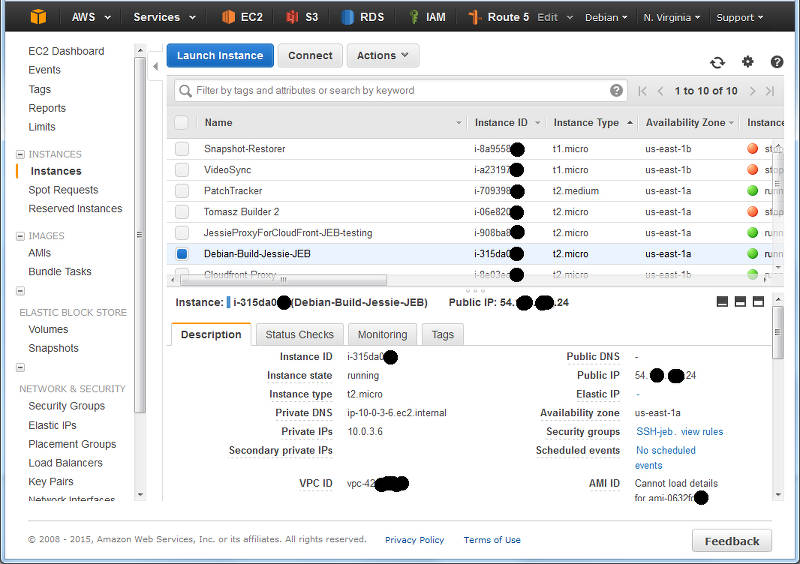
I navigate to the Instances panel of the EC2 Console, and find my instance in the list:
A (redacted) list of instance from the EC2 console.
Here I can see I have located an instance and it s running in US-East-1A: that s AZ A in Region US-East-1. I can also grab this with a wget from my running Debian instance by asking the MetaData server:
The returned text is simply: us-east-1a .
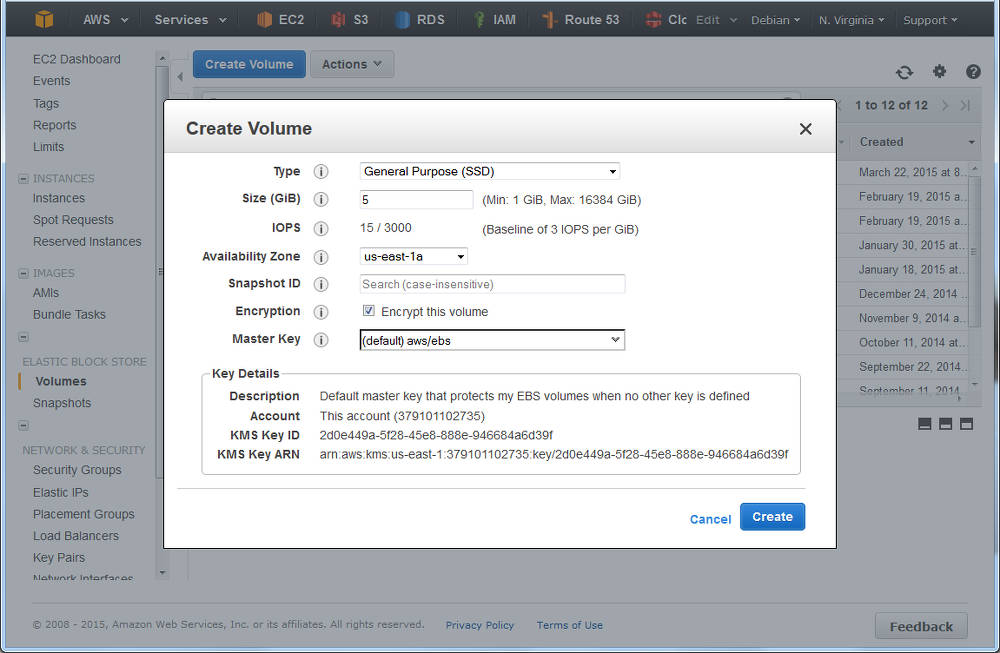
Time to navigate to Elastic Block Store , choose Volumes and click Create :
Creating a volume in AWS EC2: ensure the AZ is the same as your instance
You ll see I selected that I wanted AWS to encrypt this and as noted above, at this time that doesn t include the t2 family. However, you have an option of using encryption with LVM where the customer looks after the encryption key see LUKS.
What s nice is that I can do both have AWS Encrypted Volumes, and then use encryption on top of this, but I have to manage my own keys with LUKS, and should I lose them, then I can keep all the cyphertext!
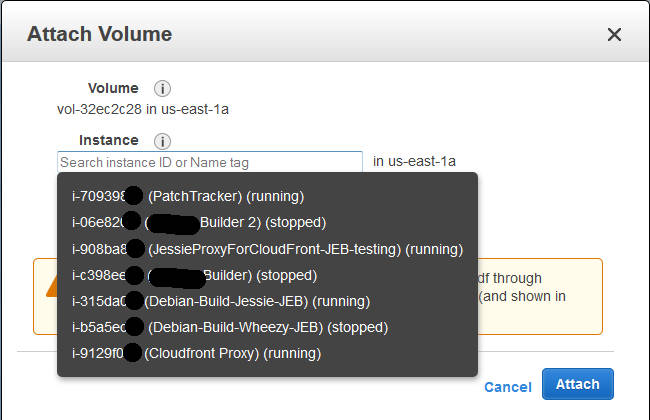
I deselected this for my example (with a t2.micro), and continue; I could see the new volume in the list as creating , and then shortly afterwards as available . Time to attach it: select the disk, and either right-click and choose Attach , or from the menu at the top of the list, chose Actions -> Attach (both do the same thing).
Attaching a volume to an instance: you ll be prompted for the compatible instances in the same AZ.
At this point in time your EC2 instance will now notice a new disk; you can confirm this with dmesg tail , and you ll see something like:
[1994151.231815] xvdg: unknown partition table
(Note the time-stamp in square brackets will be different).
Previously at this juncture you would format the entire disk with your favourite file system, mount it in the desired location, and be done. But we re adding in LVM here between this raw device, and the filesystem we are yet to make .
Marking the block device for LVM
Our first operation with LVM is to put a marker on the volume to indicate it s being use for LVM so that when we scan the block device, we know what it s for. It s a really simple command:
pvcreate /dev/xvdg
The device name above (/dev/xvdg) should correspond to the one we saw from the dmesg output above. The output of the above is rather straight forward:
Physical volume "/dev/xvdg" successfully created
Checking our EBS Volume
We can check on the EBS volume which LVM sees as a Physical Volume using the pvs command.
Here we see the entire disk is currently unused.
Creating our First Volume Group
Next step, we need to make an initial LVM Volume Group which will use our Physical volume (xvdg). The Volume Group will then contain one (or more) Logical Volumes that we ll format and use. Again, a simple command to create a volume group by giving it its first physical device that it will use:
# vgcreate  OptVG /dev/xvdg
  Volume group "OptVG" successfully created
And likewise we can check our set of Volume Groups with vgs :
The Attribute flags here indicate this is writable, resizable, and allocating extents in normal mode. Lets proceed to make our (first) Logical Volume in this Volume Group:
# lvcreate -n OptLV -L 4.9G OptVG
  Rounding up size to full physical extent 4.90 GiB
  Logical volume "OptLV" created
You ll note that I have created our Logical Volume as almost the same size as the entire Volume Group (which is currently one disk) but I left some space unused: the reason for this comes down to keeping some space available for any jobs that LVM may want to use on the disk and this will be used later when we want to move data between raw disk devices.
If I wanted to use LVM for Snapshots, then I d want to leave more space free (unallocated) again.
We can check on our Logical Volume:
The attribytes indicating that the Logical Volume is writeable, is allocating its data to the disk in inherit mode (ie, as the Volume Group is doing), and that it is active. At this stage you may also discover we have a device /dev/OptVG/OptLV, and this is what we re going to format and mount. But before we do, we should review what file system we ll use.
Filesystems
Popular Linux file systems
Name
Shrink
Grow
Journal
Max File Sz
Max Vol Sz
btrfs
Y
Y
N
16 EB
16 EB
ext3
Y off-line
Y
Y
2 TB
32 TB
ext4
Y off-line
Y
Y
16 TB
1 EB
xfs
N
Y
Y
8 EB
8 EB
zfs*
N
Y
Y
16 EB
256 ZB
For more details see Wikipedia comparison. Note that ZFS requires 3rd party kernel module of FUSE layer, so I ll discount that here. BTRFS only went stable with Linux kernel 3.10, so with Debian Jessie that s a possibility; but for tried and trusted, I ll use ext4.
The selection of ext4 also means that I ll only be able to shrink this file system off-line (unmounted).
I ll make the filesystem:
# mkfs.ext4 /dev/OptVG/OptLV
mke2fs 1.42.12 (29-Aug-2014)
Creating filesystem with 1285120 4k blocks and 321280 inodes
Filesystem UUID: 4f831d17-2b80-495f-8113-580bd74389dd
Superblock backups stored on blocks:
  32768, 98304, 163840, 229376, 294912, 819200, 884736
Allocating group tables: done
Writing inode tables: done
Creating journal (32768 blocks): done
Writing superblocks and filesystem accounting information: done
And now mount this volume and check it out:
# mount /dev/OptVG/OptLV /opt/
# df -HT /opt
Filesystem  Type  Size  Used Avail Use% Mounted on
/dev/mapper/OptVG-OptLV ext4  5.1G  11M  4.8G  1% /opt
Lastly, we want this to be mounted next time we reboot, so edit /etc/fstab and add the line:
/dev/OptVG/OptLV /opt ext4 noatime,nodiratime 0 0
With this in place, we can now start using this disk. I selected here not to update the filesystem every time I access a file or folder updates get logged as normal but access time is just ignored.
Time to expand
After some time, our 5 GB /opt/ disk is rather full, and we need to make it bigger, but we wish to do so without any downtime. Amazon EBS doesn t support resizing volumes, so our strategy is to add a new larger volume, and remove the older one that no longer suits us; LVM and ext4 s online resize ability will allow us to do this transparently.
For this example, we ll decide that we want a 10 GB volume. It can be a different type of EBS volume to our original we re going to online-migrate all our data from one to the other.
As when we created the original 5 GB EBS volume above, create a new one in the same AZ and attach it to the host (perhaps a /dev/xvdh this time). We can check the new volume is visible with dmesg again:
[1999786.341602] xvdh: unknown partition table
And now we initalise this as a Physical volume for LVM:
# pvcreate /dev/xvdh
  Physical volume "/dev/xvdh" successfully created
And then add this disk to our existing OptVG Volume Group:
# vgextend OptVG /dev/xvdh
  Volume group "OptVG" successfully extended
We can now review our Volume group with vgs, and see our physical volumes with pvs:
There are now 2 Physical Volumes we have a 4.9 GB filesystem taking up space, so 10.09 GB of unallocated space in the VG.
Now its time to stop using the /dev/xvgd volume for any new requests:
# pvchange -x n /dev/xvdg
  Physical volume "/dev/xvdg" changed
  1 physical volume changed / 0 physical volumes not changed
At this time, our existing data is on the old disk, and our new data is on the new one. Its now that I d recommend running GNU screen (or similar) so you can detach from this shell session and reconnect, as the process of migrating the existing data can take some time (hours for large volumes):
During the move, checking the Monitoring tab in the AWS EC2 Console for the two volumes should show one with a large data Read metric, and one with a large data Write metric clearly data should be flowing off the old disk, and on to the new.
A note on disk throughput
The above move was a pretty small, and empty volume. Larger disks will take longer, naturally, so getting some speed out of the process maybe key. There s a few things we can do to tweak this:
EBS Optimised: a launch-time option that reserves network throughput from certain instance types back to the EBS service within the AZ. Depending on the size of the instance this is 500 MB/sec up to 4GB/sec. Note that for the c4 family of instances, EBS Optimised is on by default.
Size of GP2 disk: the larger the disk, the longer it can sustain high IO throughput but read this for details.
Size and speed of PIOPs disk: if consistent high IO is required, then moving to Provisioned IO disk may be useful. Looking at the (2 weeks) history of Cloudwatch logs for the old volume will give me some idea of the duty cycle of the disk IO.
Back to the move
Upon completion I can see that the disk in use is the new disk and not the old one, using pvs again:
So all 5 GB is now unused (compare to above, where only 96 MB was PFree). With that disk not containing data, I can tell LVM to remove the disk from the Volume Group:
# vgreduce OptVG /dev/xvdg
  Removed "/dev/xvdg" from volume group "OptVG"
Then I cleanly wipe the labels from the volume:
# pvremove /dev/xvdg
  Labels on physical volume "/dev/xvdg" successfully wiped
If I really want to clean the disk, I could choose to use shred(1) on the disk to overwrite with random data. This can take a lng time
Now the disk is completely unused and disassociated from the VG, I can return to the AWS EC2 Console, and detach the disk:
Detach an EBS volume from an EC2 instance
Wait for a few seconds, and the disk is then shown as available ; I then chose to delete the disk in the EC2 console (and stop paying for it).
Back to the Logical Volume it s still 4.9 GB, so I add 4.5 GB to it:
# lvresize -L +4.5G /dev/OptVG/OptLV
  Size of logical volume OptVG/OptLV changed from 4.90 GiB (1255 extents) to 9.40 GiB (2407 extents).
  Logical volume OptLV successfully resized
We now have 0.6GB free space on the physical volume (pvs confirms this).
Finally, its time to expand out ext4 file system:
# resize2fs /dev/OptVG/OptLV
resize2fs 1.42.12 (29-Aug-2014)
Filesystem at /dev/OptVG/OptLV is mounted on /opt; on-line resizing required
old_desc_blocks = 1, new_desc_blocks = 1
The filesystem on /dev/OptVG/OptLV is now 2464768 (4k) blocks long.
And with df we can now see:
# df -HT /opt/
Filesystem  Type  Size  Used Avail Use% Mounted on
/dev/mapper/OptVG-OptLV ext4  9.9G  12M  9.4G  1% /opt
Automating this
The IAM Role I made at the beginning of this post is now going to be useful. I ll start by adding an IAM Policy to the Role to permit me to List Volumes, Create Volumes, Attach Volumes and Detach Volumes to my instance-id. Lets start with creating a volume, with a policy like this:
This policy puts some restrictions on the volumes that this instance can create: only within the given Availability Zone (matching our instance), only GP2 SSD (no PIOPs volumes), and size no more than 250 GB. I ll add another policy to permit this instance role to tag volumes in this AZ that don t yet have a tag called InstanceId:
Now that I can create (and then tag) volumes, this becomes a simple procedure as to what else I can do to this volume. Deleting and creating snapshots of this volume are two obvious options, and the corresponding policy:
Of course it would be lovely if I could use a variable inside the policy condition instead of the literal string of the instance ID, but that s not currently possible.
Clearly some of the more important actions I want to take are to attach and detach a volume to my instance:
Now with this in place, we can start to fire up the AWS CLI we spoke of. We ll let the CLI inherit its credentials form the IAM Instance Role and the polices we just defined.
and at this stage, the above manipulation of the raw block device with LVM can begin. Likewise you can then use the CLI to detach and destroy any unwanted volumes if you are migrating off old block devices.
After long time of waiting we finally released TeX Live 2015. Get some champagne, and ready to party!
Get it via downloading the net-installer, by obtaining a DVD, or downloading the iso. Besides the huge list up updates to packages and loads of bug fixes to all the programs, here are some notable news:
new LaTeX2e release which automatically includes fixltx2e
pdfTeX got improved jpeg support (exif and JFIF)
luaTeX got a new library newtokenlib
XeTeX got image handling fixes
MetaPost got a new numbersystem binary, and Japanese variants were added (upmpost and updvitomp)
MacTeX s Ghostscript packages got a facelift with better CJK support, other Unix-like distributions can do the same with my the newly included script cjk-gs-integrate (also one one my projects)
architectures: *kfreebsd was removed,and some additional platforms available as custom binaries. The DVD does not contain all platforms (due to space reasons), but all of them can be installed via the net-installer.
Regular updates of the repository will start in due course.
Thanks to all the contributors for the hard work. Let s have a party!
 So recently I posted on twitter about a sudden gain in strength:
 Well, there we are, trying to build another round of TeX Live packages for Debian, just to realize that the
 What happened about the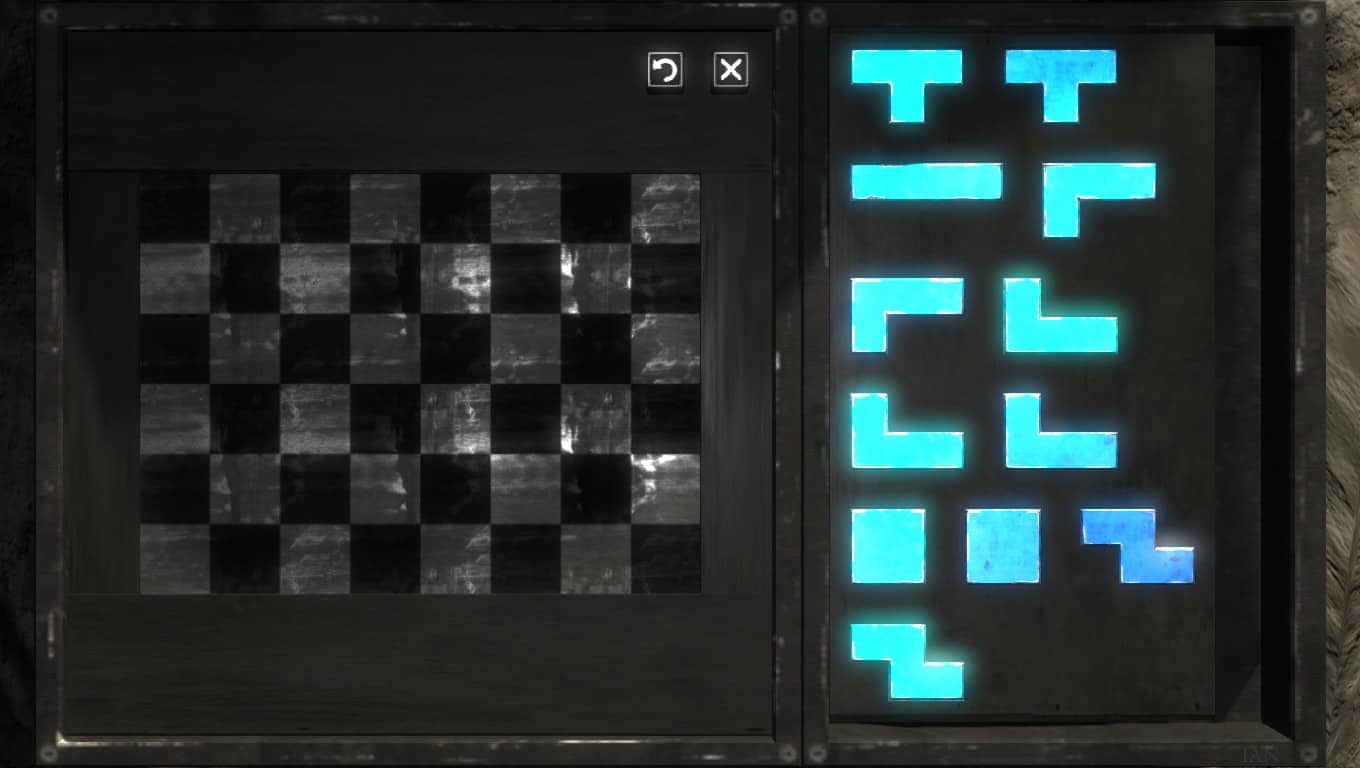

 The main changes are better error and return code handling (which should be hardly visible for the users), and more more informative output of the tlmgr info action, incorporating more data from the
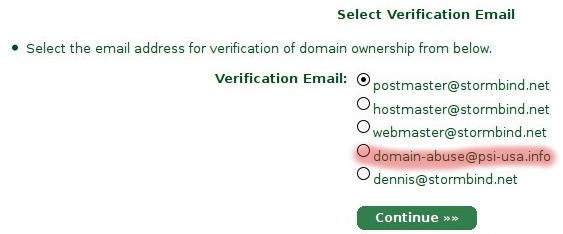 So I decided to pay the self proclaimed leader of the snakeoil industrie (Comodo) via


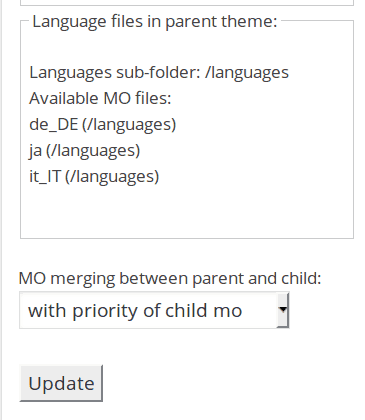






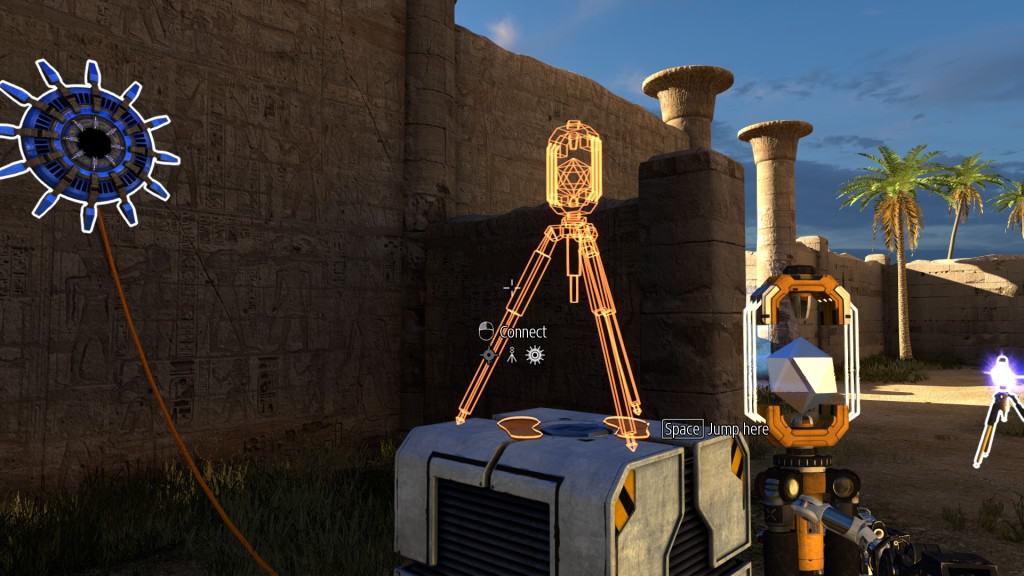
 Recently, I've been fighting with the never ending issue of timezones. I never
thought I would have plunged into this rabbit hole, but hacking on OpenStack
and Gnocchi I felt into that trap easily is, thanks to Python.
Why you really, really, should never ever deal with timezones
To get a glimpse of the complexity of timezones, I recommend that you watch
Recently, I've been fighting with the never ending issue of timezones. I never
thought I would have plunged into this rabbit hole, but hacking on OpenStack
and Gnocchi I felt into that trap easily is, thanks to Python.
Why you really, really, should never ever deal with timezones
To get a glimpse of the complexity of timezones, I recommend that you watch


 Note that I suspect the "Aller Holding A/S" entry to be incorrect
data in the official ownership register, as that name is not
registered in the official company register for Norway. The ownership
register is sensitive to typos and there seem to be no strict checking
of the ownership links.
Let me know if you improve the script or find better data sources.
The code is licensed according to GPL 2 or newer.
Update 2015-06-15: Since the initial post I've been told that
"
Note that I suspect the "Aller Holding A/S" entry to be incorrect
data in the official ownership register, as that name is not
registered in the official company register for Norway. The ownership
register is sensitive to typos and there seem to be no strict checking
of the ownership links.
Let me know if you improve the script or find better data sources.
The code is licensed according to GPL 2 or newer.
Update 2015-06-15: Since the initial post I've been told that
" The recent