Search Results: "sf"

12 June 2010

Matt Zimmerman: How to decide what to read (and what not to read)?

Like you, dear Internet readers, I have no shortage of reading material. I have ready access to more engaging, high quality, informative and relevant information than I can possibly digest. Every day, I have to choose what to read, and what to pass by. This seems like an important thing to do well, and I wonder if I do a good enough job of it. This is just one example of a larger breadth/depth problem, but I m finding the general problem difficult to stomach, so I m focusing on reading for the moment. These are my primary sources of reading material on a day-to-day basis: How do you decide what to read, and what not to read? How does your experience differ between your primary information sources? How have you tried to improve?

Russell Coker: Defense in Depth and Sudo

My blog post about logging in as root and whether sudo provides any benefit [1] got some interest on Redit. In the Reddit comments on my post [2] there are a lot of strange things. One interesting comment was to suggest that logging in as non-root provided defense in depth . The NSA is credited with inventing the term Defense in Depth as applied to the computer industry, they have a PDF that gives an overview of the concept [3]. It seems that Defense in Depth is all about having multiple different layers of security, firewalls, IDS/IPS, passwords, PKI, etc. Entering the same password twice (once to login and once to run sudo which seems to be a fairly typical configuration of sudo) hardly seems to count. Can using sudo provide Defense in Depth benefits? With a typical configuration the use of sudo provides no real protection. The user either enters their own password or the root password to gain full root access, in either case the attacker can exploit their session and get the password. A session exploit can be easily arranged by creating a shell function or alias that makes sudo run something else (such as using netcat to send the password out over the network). One way of making this sort of attack more difficult is to make root own the user home directory, files such as ~/.login that are used by the user shell, the ~/.ssh directory and the ~/.ssh/authorized_keys file. This way a hostile party can t change the configuration, so a successful attack has to involve a long running process that uses ptrace to intercept the shell and divert an attempt to run sudo. If the non-root user is prevented from using ptrace then things start to become a little more difficult for the attacker. In some quick tests I was able to capture about half the data through messing with /proc/X/fd/0 and /proc/X/fd/1 for a target process, but it seems that it would be difficult to get an entire password that way. To disable ptrace you could compile a kernel without ptrace support, use a SE Linux policy that prevents prevent ptrace access for the sessions in question, or make the user s shell SETGID. If the root account and the account used for su or sudo use different authentication methods, where the options include ssh authorized keys, password, and security token (maybe both password and token for the root account) then it does seem that it would provide some Defense in Depth benefits. sudo can be used to only permit executing certain commands. While this is a real security benefit it doesn t allow full sysadmin work, merely delegating some portions of operations to people who don t have full sysadmin rights. As someone needs to have full access to fix any problem that might occur on the machine someone needs to have access to run any command as root. So while sudo is great for providing limited administrative access to certain junior people, it s not going to stop an attack on a member of the sysadmin team. Conclusion In a typical sudo configuration the non-root account is configured in a default Unix manner (with the user having ownership of their home directory). The user who logs in to that account controls it s environment through .login and other scripts, so sudo doesn t gain anything. In a typical configuration ptrace is enabled so even if the critical environment files can t be modified by a hostile party they can get the same result through ptrace. Admittedly using a SETGID shell is not going to be difficult to implement after you have changed the ownership of the home directory. If you have a configuration where ptrace is not available and the non-root user can t modify their own profile files then it starts to become difficult for an attacker. If root authentication requires using a security token such that every login uses a different code and the code expires rapidly then it becomes even more difficult for an attacker. But for all configurations that are close to the default for every OS that I ve ever used none of these conditions hold. Also none of those conditions held for any of the systems I ve been employed to use which were configured to require su or sudo for root access. As it seems that most sudo configurations don t provide any extra security, and that auditing the actions of the sysadmin can be better done in other ways (such as the Bash 4.1 syslog feature) [4] it seems that for the vast majority of systems sudo doesn t provide a benefit. The fact that sudo could provide a benefit if configured in a way that is quite different to all the defaults and the ways that it is typically used is worth noting. I m not going to argue with anyone who wants to configure their systems in such a manner and who believes that they need to do so. But anyone who thinks that sudo is the only way to go because the Ubuntu default configuration does it really needs to investigate the issues. Remember that blind faith in the security choices of other people can be a security problem.

Russell Coker: Links June 2010

Seth Berkley gave an interesting TED talk about developing vaccines against the HIV and Influenza viruses [1]. The part I found most interesting was the description of how vaccines against viruses are currently developed using eggs and how they plan to use bacteria instead for faster and cheaper production. One of the problems with using eggs is that if the chickens catch the disease and die then you can t make a vaccine. Aigars Mahinovs wrote a really good review of Microsoft Azure and compared it to Amazon EC2 [2]. It didn t surprise me that Azure compared poorly to the competition. Johanna Blakley gave an insightful TED talk about IP lessons from the fashion industry [3]. She explained how an entire lack of IP protection other than trademark law was an essential part of the success of the fashion industry. She also compared the profits in various industries and showed that industries with little or no IP protection involve vastly larger amounts of money than industries with strong IP protection. Lisa D wrote an insightful post about whether Autism Spectrum Disorders (such as Asperger Syndrome) should be considered to be disabilities [4]. I don t entirely agree with her, but she makes some really good points. Sharmeen Obaid-Chinoy gave an interesting TED talk about the way the Taliban train young children to become suicide bombers [5]. Apparently the Taliban prey on large poor families, sometimes paying the parents for taking children away to school . At the Taliban schools the children are beaten, treated poorly, and taught theology by liars who will say whatever it takes to get a result. Then after being brain-washed they are sent out to die. Wired has an interesting article about Charles Komanoff s research into New York traffic problems [6]. He aims to track all the economic externalities of traffic patterns and determine incentives to encourage people to do things that impose less costs on the general economy. His suggestions include making all bus travel free as the externality of the time spent collecting fares is greater than the fare revenue. It s a really interesting article, his research methods should be implemented when analysing traffic in all large cities, and many of his solutions can be implemented right now without further analysis such as free buses and variable ticket pricing according to the time of day. William Li gave an interesting TED talk about starving cancer by preventing new blood vessels from growing to feed it [7]. Drugs to do this have been shown to increase the life expectancy of cancer patients by more than 100% on average. Also autopsies of people who died in car accidents show that half the women in their 40 s had breast cancer and half the men in their 50 s prostate cancer but those cancers didn t grow due to a natural lack of blood supply, so the aim here is to merely promote what naturally happens in terms of regulating cancers and preventing them from growing larger than 0.5mm^3. There are a number of foods that prevent blood vessels growing to cancers which includes dark chocolate! ;) Also drugs which prevent blood vessel growth also prevent obesity, I always thought that eating chocolate all the time prevented me from getting fat due to the central nervous system stimulants that kept me active Graham Hill gave an inspiring TED talk about becoming a weekday vegetarian [8]. Instead of making a commitment to being always vegetarian he s just mostly vegetarian (only eating meat on Sundays). He saves most of the environmental cost and doesn t feel guilty if he ever misses a day. It s an interesting concept. Cory Doctorow wrote an insightful article for the Guardian about the phrase Information Wants To Be Free [9]. He points out that really it s people who want to be free from the tyranny that is being imposed on us in the name of anti-piracy measures. He also points out that it s a useful straw-man for the MAFIAA to use when claiming that we are all pirates. The Atlantic has an interesting article about the way that Google is working to save journalistic news [10]. Adam Sadowsky gave an interesting TED talk about creating a Rube Goldberg machine for the OK Go video This Too Shall Pass [11]. At the end of the talk they include a 640*480 resolution copy of the music video. Brian Cox gave an interesting TED talk advocating increased government spending on scientific research [12]. Among other things he pointed out that the best research indicates that the amount of money the US government invested in the Apollo program was returned 14* to the US economy due to exports of new American products that were based on that research. It s surprising that any justification other than the return on investment for the Apollo program is needed! Moot gave an interesting TED talk about Anonymity [13]. I don t think that he made a good case for anonymity, he cited one person being identified and arrested for animal cruelty due to the efforts of 4chan people and also the campaign against the Cult of Scientology (which has not been very successful so far). Rory Sutherland gave an intriguing TED talk titled Sweat the Small Stuff [14]. He describes how small cheap changes can often provide greater benefits than huge expensive changes and advocates corporations having a Chief Detail Officer to take charge of identifying and implementing such changes. TED Hosted an interesting debate between pro and anti nuclear campaigners [15]. They agreed that global warming is a significant imminent problem but disagree on what methods should be implemented to solve it.

11 June 2010

Petter Reinholdtsen: Automatic upgrade testing from Lenny to Squeeze

The last few days I have done some upgrade testing in Debian, to see if the upgrade from Lenny to Squeeze will go smoothly. A few bugs have been discovered and reported in the process (#585410 in nagios3-cgi, #584879 already fixed in enscript and #584861 in kdebase-workspace-data), and to get a more regular testing going on, I am working on a script to automate the test. The idea is to create a Lenny chroot and use tasksel to install a Gnome or KDE desktop installation inside the chroot before upgrading it. To ensure no services are started in the chroot, a policy-rc.d script is inserted. To make sure tasksel believe it is to install a desktop on a laptop, the tasksel tests are replaced in the chroot (only acceptable because this is a throw-away chroot). A naive upgrade from Lenny to Squeeze using aptitude dist-upgrade currently always fail because udev refuses to upgrade with the kernel in Lenny, so to avoid that problem the file /etc/udev/kernel-upgrade is created. The bug report #566000 make me suspect this problem do not trigger in a chroot, but I touch the file anyway to make sure the upgrade go well. Testing on virtual and real hardware have failed me because of udev so far, and creating this file do the trick in such settings anyway. This is a known issue and the current udev behaviour is intended by the udev maintainer because he lack the resources to rewrite udev to keep working with old kernels or something like that. I really wish the udev upstream would keep udev backwards compatible, to avoid such upgrade problem, but given that they fail to do so, I guess documenting the way out of this mess is the best option we got for Debian Squeeze. Anyway, back to the task at hand, testing upgrades. This test script, which I call upgrade-test for now, is doing the trick:
#!/bin/sh
set -ex
if [ "$1" ] ; then
    desktop=$1
else
    desktop=gnome
fi
from=lenny
to=squeeze
exec < /dev/null
unset LANG
mirror=http://ftp.skolelinux.org/debian
tmpdir=chroot-$from-upgrade-$to-$desktop
fuser -mv .
debootstrap $from $tmpdir $mirror
chroot $tmpdir aptitude update
cat > $tmpdir/usr/sbin/policy-rc.d <<EOF
#!/bin/sh
exit 101
EOF
chmod a+rx $tmpdir/usr/sbin/policy-rc.d
exit_cleanup()  
    umount $tmpdir/proc
 
mount -t proc proc $tmpdir/proc
# Make sure proc is unmounted also on failure
trap exit_cleanup EXIT INT
chroot $tmpdir aptitude -y install debconf-utils
# Make sure tasksel autoselection trigger.  It need the test scripts
# to return the correct answers.
echo tasksel tasksel/desktop multiselect $desktop   \
    chroot $tmpdir debconf-set-selections
# Include the desktop and laptop task
for test in desktop laptop ; do
    echo > $tmpdir/usr/lib/tasksel/tests/$test <<EOF
#!/bin/sh
exit 2
EOF
    chmod a+rx $tmpdir/usr/lib/tasksel/tests/$test
done
DEBIAN_FRONTEND=noninteractive
DEBIAN_PRIORITY=critical
export DEBIAN_FRONTEND DEBIAN_PRIORITY
chroot $tmpdir tasksel --new-install
echo deb $mirror $to main > $tmpdir/etc/apt/sources.list
chroot $tmpdir aptitude update
touch $tmpdir/etc/udev/kernel-upgrade
chroot $tmpdir aptitude -y dist-upgrade
fuser -mv
I suspect it would be useful to test upgrades with both apt-get and with aptitude, but I have not had time to look at how they behave differently so far. I hope to get a cron job running to do the test regularly and post the result on the web. The Gnome upgrade currently work, while the KDE upgrade fail because of the bug in kdebase-workspace-data I am not quite sure what kind of extract from the huge upgrade logs (KDE 167 KiB, Gnome 516 KiB) it make sense to include in this blog post, so I will refrain from trying. I can report that for Gnome, aptitude report 760 packages upgraded, 448 newly installed, 129 to remove and 1 not upgraded and 1024MB need to be downloaded while for KDE the same numbers are 702 packages upgraded, 507 newly installed, 193 to remove and 0 not upgraded and 1117MB need to be downloaded I am very happy to notice that the Gnome desktop + laptop upgrade is able to migrate to dependency based boot sequencing and parallel booting without a hitch. Was unsure if there were still bugs with packages failing to clean up their obsolete init.d script during upgrades, and no such problem seem to affect the Gnome desktop+laptop packages.

10 June 2010

Dirk Eddelbuettel: RcppArmadillo 0.2.2

Following the Rcpp 0.8.1 release we made yesterday, we released RcppArmadillo release 0.2.2 this morning. RcppArmadillo uses Rcpp (and some 'glue' code) to provide a transparent interface from R to Conrad Sanderson's impressive Armadillo library for linear algebra. This release works well with the most recent inline release 0.3.5. One can now employ inlined R code as we generalized how/which headers are included and how library / linking information is added thanks a plugin mechanism. This is the first RcppArmadillo version to provide such a plugin, We also updated the included Armadillo headers to its most recent release 0.9.10, added some more operators and provide a utility function RcppArmadillo:::CxxFlags() to provide include directory information on the fly. An example of the direct inline approach for the fastLm function:
library(inline)
library(RcppArmadillo)
src <- '
	Rcpp::NumericVector yr(ys);			// creates Rcpp vector from SEXP
	Rcpp::NumericMatrix Xr(Xs);			// creates Rcpp matrix from SEXP
	int n = Xr.nrow(), k = Xr.ncol();

	arma::mat X(Xr.begin(), n, k, false);   	// reuses memory and avoids extra copy
	arma::colvec y(yr.begin(), yr.size(), false);

	arma::colvec coef = arma::solve(X, y);      	// fit model y ~ X
	arma::colvec res = y - X*coef;			// residuals

	double s2 = std::inner_product(res.begin(), res.end(), res.begin(), double())/(n - k);
							// std.errors of coefficients
	arma::colvec std_err = arma::sqrt(s2 * arma::diagvec( arma::inv(arma::trans(X)*X) ));

	return Rcpp::List::create(Rcpp::Named("coefficients") = coef,
				  Rcpp::Named("stderr")       = std_err,
				  Rcpp::Named("df")           = n - k
				  );
'
fun <- cxxfunction(signature(ys="numeric", Xs="numeric"), src, plugin="RcppArmadillo")
This creates a compiled function fun which, by using Armadillo, regresses a vector ys on a matrix Xs (just how the fastLmPure() function in the package does) --- yet is constructed on the fly using cxxfunction from inline. More information is on the RcppArmadillo page. Questions, comments etc should go to the rcpp-devel mailing list off the R-Forge page.

9 June 2010

Russell Coker: Mailing List Meta-Discussions

It seems that most mailing lists occasionally have meta-discussions about what is on-topic, the few that don t are the ones that have very strong moderation authoritarian moderators who jump on the first infraction and clearly specify the rules. I don t recall the list of acceptable topics for any mailing list including also discussions about what is on-topic . As this is the Internet I m sure that someone will immediately point out an example of such a list, but apart from the counter-example that someone will provide it seems obvious that for the majority of mailing lists a meta-discussion is not strictly on topic. Regardless of a meta-discussion not being on-topic I don t think there s anything wrong with such a discussion on occasion. But if a meta-discussion is to be based on the volume of off-topic messages it would be nice if the people who advocate such a position could try and encourage the discussion in a way that reduced the number of messages. Replying to lots of messages is not a good strategy if your position is that there are too many messages. If a meta-discussion is going to be about moving off-topic discussions to other forums that are more appropriate then it would be nice to have the meta-discussion move to another forum if possible. My previous post which advocates creating a separate mailing list for chatty messages was an attempt to move a discussion to a different forum [1]. Anyone who believes that such discussions don t belong on a list such as debian-private is free to commit their thoughts to some place that they consider more appropriate and provide the URL to any interested parties. I think that it s worth noting that the only comment on my previous post is one that describes how to filter mail to split the traffic from the debian-private list into different mailboxes. I had hoped that other people would write blog posts advocating their positions which would allow us to consider the merits of various ideas without the he-said-she-said element of mailing list discussions. Most mailing lists have a policy against profanity and some go further and ban personal abuse. Therefore it seems hypocritical to advocate a strict interpretation of the rules in regard to what is on-topic while also breaking the rules regarding profanity or personal abuse. I don t think it s asking a lot to suggest that the small minority of messages that someone writes on the topic of a list meta-discussion should obey the set of rules that they advocate I m not suggesting that someone should obey all the rules all the time, just when they are trying to enforce them. Also you can argue that a list policy against profanity doesn t preclude sending profane messages off-list, but if the off-list messages are for the purpose of promoting the list rules it still seems hypocritical to use profanity. It is a fair point that off-topic discussions and jokes can distract people from important issues and derail important discussions. It would be good if people who take such positions would implement them in terms of meta-discussions. If the purpose of a meta-discussion is to avoid distraction from important issues then it seems like a really good idea to try and avoid distraction in the meta-discussion thread. I wonder whether a meta-discussion can provide anything other than a source of lulz for all the people who don t care about the issue in question. The meta-discussions in the Debian project seem to always result in nothing changing, not even when the majority of people who comment agree that the current situation is not ideal. When an almost identical meta-discussion happens regularly it seems particularly pointless to start such a discussion for the purpose of reducing off-topic content. Revisiting an old discussion can do some good when circumstances change or when someone has some new insight. I know that it s difficult to avoid being sucked into such discussions, when I was diagnosed with AS [2] I decided to try and minimise my involvement in such discussions but I haven t been as successful at doing so as I had hoped.

David Welton: Some difficult decisions?

I am, by nature, a tinkerer. I love to build things to see how they will work or because I have an idea that I think is fun. I am not so much of a natural business guy. I go build something "because it's there". Or rather, it's there in my mind, and I want to make it. I earn money, however, via consulting work. There are problems with this line of business though, namely that it doesn't scale very well unless, besides being good at a skill, you've also got the skills to build up a consulting business, which is very much about adding and managing people, something I'm not all that passionate about and would rather avoid. So what happens is that you go through slumps with less than full capacity, and then things pick up again, and before you know it, you hit your upper limit and can't take on any new work, putting a ceiling over your potential earnings. Sure, you can raise prices a bit, but that'll only get you so far. For a while now, I've been considering this problem, and I think some sort of product would be an ideal way out. Stories like Balsamiq's are inspirational, and along the lines of what I think might be nice. Don't get me wrong, I like my clients and like to help people solve problems a lot, but it's a stressful job in that you're never very far from having no income. I'm not much of an entrepreneur, though, in the sense of someone with a nose for making money. I tend to think about building something cool first, and not really worrying about making money with it. Predictably, some of the sites I have created are popular, but don't make any money. Sure, they have some ads, but that doesn't really make much unless you get really huge page views or have some sort of content that attracts users who will click on very lucrative advertisements. I've started to think that perhaps I should constrain myself in new initiatives to creating things that have a direct source of revenue: you want to use it, you pay. In my daydream world, I'd probably just hack on open source all day long, but there's no money in that for someone like me who is not the author of some huge, famous piece of software, nor a particularly great hacker in any case (I've met some, like Andrew Tridgell, and it's a really humbling experience). So that brings up the question of what to do with the aforementioned sites. One option would be to sell them off via a site like flippa.com, another would be simply to just let them sit there and stew, but they do take up some resources on my server, and require some maintainance now and then, and they're a bit of a distraction too (I start wondering about things to add or how to fiddle with them). Maybe there's a way to make money from some of them, but I'm too blind to see it. The ones I'm thinking about, are, in no particular order:

8 June 2010

Uwe Hermann: flashrom 0.9.2 released -- Open-Source, crossplatform BIOS / EEPROM / flash chip programmer

The long-pending 0.9.2 version of the open-source, cross-platform, commandline flashrom utility has been released. From the announce:
New major user-visible features:
* Dozens of newly supported mainboards, chipsets and flash chips.
* Support for Dr. Kaiser PC-Waechter PCI devices (FPGA variant).
* Support for flashing SPI chips with the Bus Pirate.
* Support for the Dediprog SF100 external programmer.
* Selective blockwise erase for all flash chips.
* Automatic chip unlocking.
* Support for each programmer can be selected at compile time.
* Generic detection for unknown flash chips.
* Common mainboard features are now detected automatically.
* Mainboard matching via DMI strings.
* Laptop detection which triggers safety measures.
* Test flags for all part of flashrom operation.
* Windows support for USB-based and serial-based programmers.
* NetBSD support.
* DOS support.
* Slightly changed command line invocation. Please see the man page for details. Experimental new features:
* Support for some NVIDIA graphics cards.
* Chip test pattern generation.
* Bit-banging SPI infrastructure.
* Nvidia MCP6*/MCP7* chipset detection.
* Support for Highpoint ATA/RAID controllers. Infrastructural improvements and fixes:
* Lots of cleanups.
* Various bugfixes and workarounds for broken third-party software.
* Better error messages.
* Reliability fixes.
* Adjustable severity level for messages.
* Programmer-specific chip size limitation warnings.
* Multiple builtin frontends for flashrom are now possible.
* Increased strictness in board matching.
* Extensive selfchecks on startup to protect against miscompilation.
* Better timing precision for touchy flash chips.
* Do not rely on Linux kernel bugs for mapping memory.
* Improved documentation.
* Split frontend and backend functionality.
* Print runtime and build environment information.
The list of supported OSes and architectures is slowly getting longer, e.g. these have been tested: Linux, FreeBSD, NetBSD, DragonFly BSD, Nexenta, Solaris and Mac OS X. There's partial support for DOS (no USB/serial flashers) and Windows (no PCI flashers). Initial (partial) PowerPC and MIPS support has been merged, ARM support and other upcoming. Also, the list of external (non-mainboard) programmers increases, e.g. there is support for NICs (3COM, Realtek, SMC, others upcoming), SATA/IDE cards from Silicon Image and Highpoint, some NVIDIA cards, and various USB- or parallelport- or serialport- programmers such as the Busirate, Dediprog SF100, FT2232-based SPI programmers and more. More details at flashrom.org and in the list of supported chips, chipsets, baords, and programmers. I uploaded an svn version slightly more recent than 0.9.2 to Debian unstable, which should reach Debian testing (and Ubuntu I guess) soonish.

7 June 2010

Mart&iacute;n Ferrari: Python WTF

Lately, I have recurring WTF moments when working with Python. I'm still more or less a novice in Python, as I started to use it in my day job last year, so sometimes it could be blamed to ignorance. Today I was writing some code that takes any file descriptor as argument, and thought it could be nice to accept also objects that represent one. But it seems there is no common ancestor to file objects and socket objects, for example. In Perl, I'd just check for IO::Handle. Then, I wrote code to check if a passed argument was a socket, or a file descriptor to one, with some obvious check: isinstance(s, socket.socket). WRONG, when you create sockets with socketpair, they are of an undocumented type which is not a descendant of socket, nor of SocketType! (There is a patch for this since 2007) In general, I have found a lack of any reasonable object hierarchy, and many inconsistencies in the low-level interfaces, which is a pity, because Python is in general quite tidy. Comparing with Perl is unavoidable, and I would have expected that Python had learnt more from it. Another thing that amazes me is the lack of anything like CPAN, which is one of the reasons Perl was so successful. The cheese factory doesn't come close, as you need to publish your files somewhere else, there is no automated testing, no automatically generated documentation, or anything that requires access to the source code. In Perl-land, many people loathe the venerable MakeMaker, and some of the alternatives are ugly as hell. The Python equivalent (or so) to Makemaker, distutils, looks to me like a bad joke: advanced customisation is black magic (if possible at all), and doesn't provide absolutely basic things like running your unit tests! After fighting with it for some days, I decided to go back writing my own Makefile and calling distutils just to build and install. Tags: Planet Debian, Planet Lugfi, Programaci n

5 June 2010

Ingo Juergensmann: Drupal - direkt import into database

I was trying the last week to import data from one database into a Drupal database. Basically this worked fairly well. The needed fields from the old database are easy to get by simple SELECT statements. Because I don't know anything about PHP, I doing the export/import with a Python script directly into the database. After all this is about articles, comments and tags, that need to be imported into a Drupal database.

The articles will be stored into tables node_revisions, node and node_counter. The tags into tables term_data and term_node. Comments will go into table comments. Here are the INSERTs:

Articles:

"insert into node_revisions (uid, body, teaser, log, timestamp, format, nid, title) values ('3', '%s', '%s', '', '%s', '1', '%s', '%s')" % (body, body, timestamp, i, title)

"insert into node (vid, type, uid, status, created, changed, comment, promote, moderate, sticky, language, tnid, translate, title) values ('%s', 'blog', '3', '1', '%s', '%s', '2', '1', '0', '0', '', '0', '0', '%s')" % (vid, timestamp, timestamp, title)

"insert into node_counter (nid,totalcount,daycount,timestamp) values ('%s', '100', '0','%s')" % (nid, timestamp)

Tags:

"insert into term_data (vid, name) values ('3', '%s')" % tag

"insert into term_node (nid, vid, tid) values ('%s', '%s', '%s')" % (nid, vid, tagtid)

Comments:

"insert into comments (pid, nid, uid, subject, comment, hostname, timestamp, status, format, thread, name, mail, homepage) values ('%s', '%s', '0', '%s', '%s', '%s', '%s', '0', '1', '01', '%s', '%s', '%s')" % (parentid, nid, ctitle, cbody, cip, ctimestamp, cauthor, cemail, curl)

sql="insert into term_node (nid, vid, tid) values ('%s', '%s', '%s')" % (nid, vid, tid)

The import is successful as there are comments and tags attached to each article or node. But there are still some problems. When accessing Recent Posts there are no entries listed. Yet, Drupal still thinks there are so many articles that it lists more than 30 pages:

Recent Post Errors

Something similar happens to the tags. The tags are actually assigned to and are displayed as well with the nodes. But when accessign taxonomys vocabular and trying to list the terms, the resulting page is empty:

Tag Errors

If my understanding of the Drupal6 database (on PostgreSQL this is) is correct, everything should be fine and properly stored into the database. But apparently there's something missing. But what? As already mentioned I have no clue about PHP, so using node_api or any other API calls by Drupal/PHP is no option for me. Except when the calls can be placed via Pythons system() call.

If anyone has some tips or hints for me, I would appreciate when you write a comment.

When there's interest I can provide the entire Python import script. I'm going to make it public anyway, when the last problems are solved.

Ingo Juergensmann: Drupal - direct import into database

I was trying the last week to import data from one database into a Drupal database. Basically this worked fairly well. The needed fields from the old database are easy to get by simple SELECT statements. Because I don't know anything about PHP, I doing the export/import with a Python script directly into the database. After all this is about articles, comments and tags, that need to be imported into a Drupal database.

The articles will be stored into tables node_revisions, node and node_counter. The tags into tables term_data and term_node. Comments will go into table comments. Here are the INSERTs:

Articles:

"insert into node_revisions (uid, body, teaser, log, timestamp, format, nid, title) values ('3', '%s', '%s', '', '%s', '1', '%s', '%s')" % (body, body, timestamp, i, title)

"insert into node (vid, type, uid, status, created, changed, comment, promote, moderate, sticky, language, tnid, translate, title) values ('%s', 'blog', '3', '1', '%s', '%s', '2', '1', '0', '0', '', '0', '0', '%s')" % (vid, timestamp, timestamp, title)

"insert into node_counter (nid,totalcount,daycount,timestamp) values ('%s', '100', '0','%s')" % (nid, timestamp)

Tags:

"insert into term_data (vid, name) values ('3', '%s')" % tag

"insert into term_node (nid, vid, tid) values ('%s', '%s', '%s')" % (nid, vid, tagtid)

Comments:

"insert into comments (pid, nid, uid, subject, comment, hostname, timestamp, status, format, thread, name, mail, homepage) values ('%s', '%s', '0', '%s', '%s', '%s', '%s', '0', '1', '01', '%s', '%s', '%s')" % (parentid, nid, ctitle, cbody, cip, ctimestamp, cauthor, cemail, curl)

sql="insert into term_node (nid, vid, tid) values ('%s', '%s', '%s')" % (nid, vid, tid)

The import is successful as there are comments and tags attached to each article or node. But there are still some problems. When accessing Recent Posts there are no entries listed. Yet, Drupal still thinks there are so many articles that it lists more than 30 pages:

Recent Post Errors

Something similar happens to the tags. The tags are actually assigned to and are displayed as well with the nodes. But when accessign taxonomys vocabular and trying to list the terms, the resulting page is empty:

Tag Errors

If my understanding of the Drupal6 database (on PostgreSQL this is) is correct, everything should be fine and properly stored into the database. But apparently there's something missing. But what? As already mentioned I have no clue about PHP, so using node_api or any other API calls by Drupal/PHP is no option for me. Except when the calls can be placed via Pythons system() call.

If anyone has some tips or hints for me, I would appreciate when you write a comment.

When there's interest I can provide the entire Python import script. I'm going to make it public anyway, when the last problems are solved.

UPDATE:

Killes on IRC hinted me that node_comment_statistics and term_hierarchy needs to be filled as well. Thanks for the hint!

1 June 2010

Steve Langasek: bzr-git case study

Robert Collins did a very nice writeup not so long ago of creating a Debian package with bzr-builddeb, but he starts from the assumption that upstream also uses bzr. As we all know, there are many projects that have their upstream sources in a VCS, but don't use bzr. Can we still get reasonable results from bzr-builddeb, including the ability to merge new upstream releases direct from the VCS, if, say, upstream is using git? Yes, we can! Of course, if you're happy with using git as the VCS for your Debian packaging already, there's probably no compelling reason for you to switch to bzr. But if you prefer to use bzr and have been frustrated at having to choose between being able to use the VCS client of your choice for your packages and being able to use your VCS client to access upstream revision history, read on. Thanks to the fine work of Jelmer Vernooij and friends, bzr-git has been usable for a while if you just want to track the default git branch. But what if you care about tracking multiple upstream branches? Enter bzr git-import, which we'll use to set up a bzr repo from scratch for our cifs-utils package, with a full import of all the branches of upstream's git tree. First we do some work to set up a shared bzr repository. As long as we're going to the effort of mirroring all the git branches, we probably want to publish them for other people to use, so we make sure our bzr repository is reasonably configured for sharing data between branches:
$ bzr init-repo --no-trees cifs-utils.server
Shared repository (format: 2a)
Location:
  shared repository: cifs-utils.server
$ cd cifs-utils.server
Then we use bzr git-import, provided by the bzr-git plugin, to do a full import of the upstream branches into a cleverly named subdirectory:
$ bzr git-import git://git.samba.org/cifs-utils.git upstream
[/                   ] Counting objects: 181, done.
Now we create our own local 'trunk' for the package, by branching from the upstream tag matching the release version we're going to package.
$ bzr branch -r tag:cifs-utils-4.0rc1 upstream/HEAD trunk
Branched 42 revision(s).
Do a little more prep work for future branches...
$ mkdir branches
And that's it. Now we have a bzr repo locally that we can push out to our hosting server of choice (N.B.: we could do this all directly on the server, but alioth doesn't currently have bzr-git installed):
$ rsync -az . alioth.debian.org:/bzr/pkg-samba/cifs-utils/
$
Now that we have a bzr repository, it's time to get ourselves a working directory and do some packaging. We're probably going to work with multiple branches locally as well, so we create another shared repository for local use, and get a copy of the trunk branch we created before.
$ bzr init-repo cifs-utils
Shared repository with trees (format: 2a)
Location:
  shared repository: cifs-utils
$ cd cifs-utils
$ bzr co bzr+ssh://bzr.debian.org/bzr/pkg-samba/cifs-utils/trunk
Now we grab the upstream tarball, and whip up some quick packaging with (what else?) debhelper 7:
$ wget ftp://ftp.samba.org/pub/samba/cifs-utils/cifs-utils-4.0rc1.tar.bz2
$ ln -s cifs-utils-4.0rc1.tar.bz2 cifs-utils_4.0~rc1.orig.tar.bz2
$ cd trunk
$ mkdir -p debian/source
$ echo '3.0 (quilt)' > debian/source/format
$ echo 7 > debian/compat
$ cp /usr/share/doc/debhelper/examples/rules.tiny debian/rules
$ dch --package cifs-utils --versio 4.0~rc1-1 --create 'Initial package'
Create debian/control by hand, generate an initial source package, and import it into bzr with bzr-builddeb.
$ debuild -uc -us -S -i
$ rm -r debian
$ bzr import-dsc ../*.dsc
$
Since we want to continue tracking upstream development, we need to periodically sync our bzr import of the git tree.
$ bzr git-import git://git.samba.org/cifs-utils.git bzr+ssh://bzr.debian.org/bzr/pkg-samba/cifs-utils/upstream
$
And when we find a new upstream version in that import that we want to package, bzr-builddeb makes this a snap, too.
$ cd cifs-utils
$ wget ftp://ftp.samba.org/pub/samba/cifs-utils/cifs-utils-$version.tar.bz2
$ cd trunk
$ bzr merge-upstream --v3 --version $version_with_epoch \
    ../cifs-utils-$version.tar.bz2 -r tag:cifs-utils-$version \
    bzr+ssh://bzr.debian.org/bzr/pkg-samba/cifs-utils/upstream/HEAD
No distribution specified, and no changelog, assuming 'debian'
Committing to: /tmp/tmpbzOVMs/upstream/
Committed revision 2.
All changes applied successfully.
The new upstream version has been imported.
You should now review the changes and then commit.
$ bzr diff
<review changes>
$ bzr commit -m "merge upstream $version"
Committing to: bzr+ssh://bzr.debian.org/bzr/pkg-samba/cifs-utils/trunk
modified debian/changelog
Committed revision 50.
$
And that's it! It's exciting to see signs of real interoperability between DVCSes at last. Thanks to everyone who's helped make it possible!

Russell Coker: Can SE Linux Implement Traditional Unix Users and Groups?

I was asked by email whether SE Linux could implement traditional Unix users and groups. The Strictly Literal Answer to that Question The core of the SE Linux access control is the domain-type model where every process has a domain and every object that a process can access (including other processes) has a type. Domains are not strongly differentiated from types. It would be possible to create a SE Linux policy that created a domain for every combination of UID and GID that is valid for a user shell given that such combinations are chosen by the sysadmin who could limit them to some degree. There are about 2^32 possible UIDs and about 2^32 possible GIDs, as every domain is listed in kernel memory we obviously can t have 2^64 domains, but we could have enough to map a typical system that s in use. Of course the possible combinations of supplemental groups probably makes this impossible for even relatively small systems, but we can use a simpler model that doesn t emulate supplemental groups. For files there are more possible combinations because anyone who is a member of a group can create a SETGID directory and let other users create files in it. But in a typical system the number of groups is not much greater than the number of users the maximum number of groups is typically the number of users plus about 60. So if we had 100 users then the number of combinations of UID and GID would be something like 100*(100+60)=16,000 it should be possible to have that many domains in a SE Linux policy (but not desirable). Then all that would be needed is rules specifying that each domain (which is based on a combination of UID and GID) can have certain types of access to certain other types based on them having either the same UID or the same GID. Such a policy would be large, it would waste a lot of kernel memory, it would need to be regenerated whenever a user is added, and it s generally something you don t want to use. No-one has considered implementing such a policy, I merely describe it to illustrate why certain configuration options are not desirable. The rest of this post is about realistic things that you can do with SE Linux policy and how it will be implemented in Debian/Squeeze. My previous post titled Is SE Linux Unixish? addresses this issue at a more conceptual level and also considers MAC vs DAC [1]. The History of mapping Unix Accounts to SE Linux Access Control In the early releases of SE Linux (long before it was included in Fedora) every user who could login to a system needed to have their user-name compiled into the policy. The policy specified which roles the user could access, the roles specified which domains could be accessed, and therefore what the user could do. The identity of files on disk was used for two purposes, one was logging (you could see who created a file) and the other was a permission check for the SE Linux patched version of Vixie cron which would not execute any command on behalf of a user unless the identity on the crontab file in the cron spool matched the identity used to run it this is an analogy of the checks that Vixie cron makes on the Unix UID of the crontab file (some other cron daemons do fewer checks). Having to recompile policy source every time you added a user was annoying. So a later development was to allow arbitrary mappings between Unix account names and SE Linux Identities (which included a default identity) and another later development was to have a utility program semanage to map particular Unix account and group names to SE Linux identities. This was all done years ago. Fedora Core 5 which was released in 2006 had the modular policy which included these features (apart from mapping Unix groups to SE Linux identities which was more recent). Fedora Core 5 also introduced MCS which was comprised of a set of categories that a security context may have. The sysadmin would configure the set of categories that each account would have. A recent development has been a concept named UBAC (User Based Access Control) which basically means that a process running directly on behalf of a regular user (IE with a SE Linux identity that s not system_u) can only access files that have an identity of system_u or which have the same identity as the process. This means that you can only access your own files or system files not files of other users which may have inappropriate Unix permissions. So for example if a user with a SE Linux identity of john gives their home directory the Unix permission mode of 0777 then a user with a SE Linux identity of jane can t access their files. Of course this means that if you have a group of people working together on a project then they probably need to all have the same Identity and in practice you would probably end up with everyone having the same identity. I ve given up on the idea of using UBAC in Debian. The Current Plan for Users and SE Linux Access Control in Debian My plan is to have things work in Squeeze in much the same way as in Lenny. You have a SE Linux identity assigned to a login session and everything related to it (including cron jobs) based on the Unix account name or possibly the Unix group name (if there are login entries for both the user-name and the group-name then the user-name entry has precedence). The mapping between Unix accounts and SE Linux identities is configured by the sysadmin and SE Linux identities don t matter much for the Targeted configuration (which is what most people use). The identity determines which roles may be used and also has a limit on the MCS categories. The MCS categories are also specified in the login configuration which has to be a sub-set of the categories used by the identity record. So for example the following is the output of a couple of commands run on a Debian/Unstable system. They show that the test Unix account is assigned a SE Linux identity of staff_u and an MCS range of s0-s0:c1 (this means it creates files by default at level s0 and can also write to other files at that level, but can also have read/write access to files at the level s0:c1 ). The staff_u identity (as shown in the output of semanage user -l can be used with all categories in the set s0:c0.c1023 where the dot means the set of categories from c0 to c1023 inclusive) but in the case of the test user only one category will be used. The test group however (as expressed with %test ) is given the identity user_u and is not permitted to use any categories.
# semanage login -l
Login Name    SELinux User    MLS/MCS Range           
%test         user_u          s0                     
__default__   unconfined_u    s0-s0:c0.c1023         
root          unconfined_u    s0-s0:c0.c1023         
system_u      system_u        s0-s0:c0.c1023         
test          staff_u         s0-s0:c1               
# semanage user -l
             Labeling   MLS/       MLS/                         
SELinux User Prefix     MCS Level  MCS Range         SELinux Roles
root         sysadm     s0         s0-s0:c0.c1023    staff_r sysadm_r system_r
staff_u      staff      s0         s0-s0:c0.c1023    staff_r sysadm_r
sysadm_u     sysadm     s0         s0-s0:c0.c1023    sysadm_r
system_u     user       s0         s0-s0:c0.c1023    system_r
unconfined_u unconfined s0         s0-s0:c0.c1023    system_r unconfined_r
user_u       user       s0         s0                user_r
I hope to get the policy written to support multiple user roles in time for the release of Squeeze. If I don t make it then I will put such a policy on my own web site and try to get it included in an update. The policy currently basically works for a Targeted configuration where the users are not confined (apart from MCS). How MMCS Basically Works The vast majority of SE Linux users run with the MCS policy rather than the MLS policy. For Debian I have written a modified version of MCS that I call MMCS. MMCS is mandatory (you can t relabel files to escape it) and it prevents write-down. If a process has the range s0-s0:c1,c3 then it has full access to files labelled as s0, s0:c1, s0:c3, and s0:c1,c3 and any files it creates will be labeled as s0. If a process has the range s0:c1-s0:c1,c3 then it has read-only access to files labelled as s0 and s0:c3 and read-write access to files labelled as s0:c1 and s0:c1,c3. This means that any secret data it accesses that was labelled with category c1 can t be leaked down to a file that is not labelled with that category. Now MCS currently has no network access controls, so there s nothing stopping a user from using scp or other network utilities to transfer files. But that s the way with most usable systems. I don t think that this is necessarily a problem, the almost total lack of network access controls in a traditional Unix model doesn t seem to concern most people. Now to REALLY Answer that Question SE Linux is a Mandatory Access Control (MAC) system, this makes it inherently different to a Discretionary Access Control (DAC) system such as traditional Unix access controls. Unix permissions are based on each file having a UID, a GID, and a set of permissions and each process having a UID, a GID, and a set of supplementary GIDs. If a user runs a setuid or setgid program then the process will have extra privileges. It also has a lot of stuff that most people aren t aware of such as real vs effective UIDs, the tag bit, setgid directories, and lots more including some quite arbitrary things like making ports <1024 special. SE Linux is based on every object (process, file, socket, etc) having a single security label which includes an identity, a role, a type, and a sensitivity label (MCS categories or an MLS range). There is no support for an object to have more than one label. The SE Linux equivalent to setuid/setgid files is a label for a file which triggers a domain transition when it s executed. This differs from setuid files in that the domain transition is complete (the old privileges can t be restored) and the transition is generally not to a strict super-set of the access (usually a different sub-set of possible access and sometimes to lesser access). These differences are quite fundamental. So really SE Linux can t implement traditional Unix access control. What SE Linux is designed to do is to provide a second layer of defense and to also provide access controls that have different aims than that of Unix permissions such as being mandatory and implementing features such as MLS.

29 May 2010

Bernd Zeimetz: installing debian on the guruplug server plus

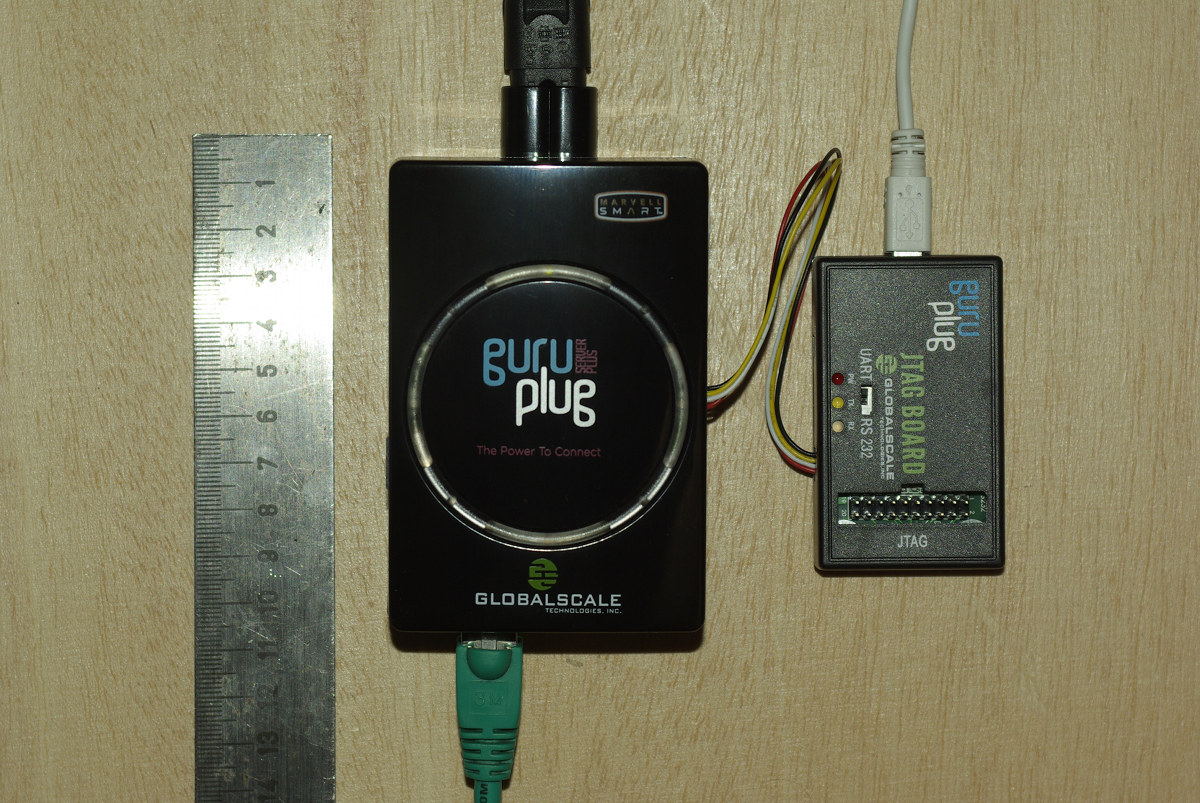
Yesterday finally my GuruPlug Server Plus arrived. Took longer than expected, but as it seems Globalscale had some issues with the power supplies and they were replaced before shipping the GuruPlugs. GuruPlug Server Plus and JTAG Board

The GuruPlug Basically the GuruPlugs are an enhanced version of the well known SheevaPlugs, the biggest difference is probably the need for an external JTAG/UART<>RS232 board to access the serial console. Good thing is that the board comes with a normal JTAG connector and an additional RS232 connector and 2.5V DC power outlet, so it will be useful for other devices, too. Globalscale could have chosen different connectors with less wiggly cables, though. As I was not able to find a useful howto about installing Debian on the Guruplug, I've written down what I did to install Debian unstable on a micro SD card using the Debian installer for the GuruPlug. I did not have a look who modified the Debian installer to work on the plug, but thanks for that! The instructions below are based on Martin Michlmayer's awesome SheevaPlug documentation, the hints from oinkzwurgl.org/guruplug and various forum posts in the plugforum.

Preparations Please note that I'm not resposible for whatever you're doing with your plug. If you follow this tutorial and end up with a brick, it is your fault, not mine. To install the GuruPlug you need the JTAG Board. Connect the UART port to the GuruPlug and the JTAG board to your computer, it should show up as FTDI (thanks for using good chips!) USB<>Serial converter. Serial port settings are 115200, 8-N-1, no hw/sw flow control. The other thing you should prepare is a working tftpd, I'm using aftpd.
apt-get install aftpd
Recent versions share files from /srv/tftp/, in case you're running Lenny /var/lib/tftpboot/ should be the place to drop your files. When everything is connected properly the boot process should show up in minicom, make sure to press some key to enter uBoot. The first thing you should do is to save the original uBoot environment in case you want to restore the factory settings later. Run
printenv
and save the output somewhere.

Upgrading uBoot Unfortunately the uBoot version on the GuruPlug is pretty old and seems to have some issues in booting from USB devices, so the first thing you should do is to upgrade it. You might want to investigate if there is even a better, more recent uBoot version available somewhere, or build one on your own, but I didn't bother and took the uBoot.guruplug.bin from here. The main issue with that is that booting from USB still seems to be buggy (even for FAT partitions) and that ext2load is still not supported. Otherwise it works well :-). I'm mainly following Martin Michlmayer's tutorial again. Download the uBoot.guruplug.bin and drop it into the tftpd directory. Make sure you always set the plug's IP address (ipaddr) and your server's IP address (serverip) properly. I'll use 192.168.121.253 for the plug and 192.168.121.2 for the server in all examples, make sure to change that for your own needs. Stop if something goes wrong, especially when the tftp download failed.
setenv ipaddr 192.168.121.253
setenv serverip 192.168.121.2
tftp 0x6400000 uBoot.guruplug.bin
nand erase 0x00000000 0x0100000
nand write 0x6400000 0x0000000 0x80000
reset
Enter uBoot again after the reset.

Preparing the installer Download uImage and uInitrd to your tftpd directory. Although I've heard that setting mainlineLinux/arcNumber in the uBoot environment is not necessary anymore for very recent kernel, lets set them to make sure the Debian kernel works:
setenv mainlineLinux yes
setenv arcNumber 2097
saveenv
reset
Again, enter uBoot after the reset.

Running the installer Run the following in the uBoot console:
setenv ipaddr 192.168.121.253
setenv serverip 192.168.121.2
tftpboot 0x01100000 uInitrd
tftpboot 0x00800000 uImage
setenv bootargs console=ttyS0,115200n8 base-installer/initramfs-tools/driver-policy=most
bootm 0x00800000 0x01100000
You should see the installer starting now. You might want to follow the following hints:
  • Before configuring the network, go back and set the debconf priority to low, Then continue. While chosing the Debian mirror, chose sid as the Debian version to install. If you don't have sid as choice, use a different mirror. The kernel in testing does not boot on the GuruPlug, you need 2.6.32-13 from sid.
  • You might want to load the 'network console' installer component and continue via ssh. Makes things fater and colourful.
  • Suggested partitioning: I've installed Debian to an 8GB micro SDcard. The SDcard reader is connected via USB and shows up as /dev/sdb (/dev/sda should be the internal NAND and not shown by the installer). I've used 150MB ext2 for /boot and the rest of the space for /, using ext4. You might want to use the noatime option on both filesystems to avoid unnecessary write access to the SDcard. You might choose to add a swap partition, but SDcards are so slow, so I've skipped that.
When you continue the installation, you will hit the following problem:
  • The installer might fail on 'Make the system bootable' (not sure if it does for you, it did so with the kernel from testing).
  • The uBoot is not able to boot from your /boot anyway. USB support is buggy and ext2load missing.
We'll work around these issues by writing the kernel and initrd into the plug's NAND. To do so, enter a shell in the installer and chroot into the install target. We'll then create the necessary uImage.bin and uInitrd and scp them to our tftpd directory:
chroot /target /bin/bash
cd /boot
mkimage -n vmlinuz -A arm -O linux -T kernel -C none -a 0x00008000 -e 0x00008000 -d /boot/vmlinuz uImage.bin
mkimage -n 'vmlinuz initrd' -A arm -O linux -T ramdisk -C gzip -d /boot/initrd.img uInitrd
scp uI* root@192.168.121.2:/srv/tftp
Now leave the shell, finish the installation and reboot, enter uBoot again.

Make the plug bootable To write kernel and initrd to the NAND memory, we have to transfer it via tftp first, then erase the NAND area we want to write to and then write it to the NAND. The values I've chosen here should be fine for the current Debian kernel, but you might need to change the necessary size for the initrd. To do so have a look at the output while transferring the initrd - the transferred bytes are displayed. They have to fit into the amount of bytes you write (the last option to nand write.e).
setenv ipaddr 192.168.121.253
setenv serverip 192.168.121.2
tftp 0x6400000 uImage.bin
nand erase 0x100000 0x400000
nand write.e 0x6400000 0x100000 0x400000
tftp 0x6400000 uInitrd
nand erase 0x500000 0x1fb00000
nand write.e 0x6400000 0x500000 0x600000
Now we need to set the necessary boot options. Make sure to change the root device if you've chosen a different layout from that I've suggested above, or if you're not using a SDcard.
setenv bootargs_debian 'console=ttyS0,115200 root=/dev/sdb2'
setenv bootcmd_nand 'nand start; nand read.e 0x00800000 0x100000 0x400000; nand read.e 0x01100000 0x500000 0x600000'
setenv bootcmd 'setenv bootargs $(bootargs_debian); run bootcmd_nand; bootm 0x00800000 0x01100000'
saveenv
run bootcmd

Finish Your GuruPlug should boot your new Debian installation now. Have fun! I'll try to keep the howto updated for changes in uBoot and the installer, but I might not have the time to so quickly. Patches and comments are welcome!.
root@guruplug:~# uname -a
Linux guruplug 2.6.32-5-kirkwood #1 Fri May 21 05:44:29 UTC 2010 armv5tel GNU/Linux
root@guruplug:~# cat /proc/cpuinfo 
Processor   : Feroceon 88FR131 rev 1 (v5l)
BogoMIPS    : 1192.75
Features    : swp half thumb fastmult edsp 
CPU implementer : 0x56
CPU architecture: 5TE
CPU variant : 0x2
CPU part    : 0x131
CPU revision    : 1
Hardware    : Marvell GuruPlug Reference Board
Revision    : 0000
Serial      : 0000000000000000
root@guruplug:~# 

27 May 2010

Matt Zimmerman: Rethinking the Ubuntu Developer Summit

This is a repost from the ubuntu-devel mailing list, where there is probably some discussion happening by now. After each UDS, the organizers evaluate the event and consider how it could be further improved in the future. As a result of this process, the format of UDS has evolved considerably, as it has grown from a smallish informal gathering to a highly structured matrix of hundreds of 45-to-60-minute sessions with sophisticated audiovisual facilities. If you participated in UDS 10.10 (locally or online), you have hopefully already completed the online survey, which is an important part of this evaluation process. A survey can t tell the whole story, though, so I would also like to start a more free-form discussion here among Ubuntu developers as well. I have some thoughts I d like to share, and I m interested in your perspectives as well. Purpose The core purpose of UDS has always been to help Ubuntu developers to explore, refine and share their plans for the subsequent release. It has expanded over the years to include all kinds of contributors, not only developers, but the principle remains the same. We arrive at UDS with goals, desires and ideas, and leave with a plan of action which guides our work for the rest of the cycle. The status quo UDS looks like this: This screenshot is only 1600 1200, so there are another 5 columns off the right edge of the screen for a total of 18 rooms. With 7 time slots per day over 5 days, there are over 500 blocks in the schedule grid. 9 tracks are scattered over the grid. We produce hundreds of blueprints representing projects we would like to work on. It is an impressive achievement to pull this event together every six months, and the organizers work very hard at it. We accomplish a great deal at every UDS, and should feel good about that. We must also constantly evaluate how well it is working, and make adjustments to accommodate growth and change in the project. How did we get here? (this is all from memory, but it should be sufficiently accurate to have this discussion) In the beginning, before it was even called UDS, we worked from a rough agenda, adding items as they came up, and ticking them off as we finished talking about them. Ad hoc methods worked pretty well at this scale. As the event grew, and we held more and more discussions in parallel, it was hard to keep track of who was where, and we started to run into contention. Ubuntu and Launchpad were planning their upcoming work together at the same time. One group would be discussing topic A, and find that they needed the participation of person X, who was already involved in another discussion on topic B. The A group would either block, or go ahead without the benefit of person X, neither of which was seen to be very effective. By the end of the week, everyone was mentally and physically exhausted, and many were ill. As a result, we decided to adopt a schedule grid, and ensure that nobody was expected to be in two places at once. Our productivity depended on getting precisely the right people face to face to tackle the technical challenges we faced. This meant deciding in advance who should be present in each session, and laying out the schedule to satisfy these constraints. New sessions were being added all the time, so the UDS organizers would stay up late at night during the event, creating the schedule grid for the next day. In the morning, over breakfast, everyone would tell them about errors, and request revisions to the schedule. Revisions to the schedule were painful, because we had to re-check all of the constraints by hand. So, in the geek spirit, we developed a program which would read in the constraints and generate an error-free schedule. The UDS organizers ran this at the end of each day during the event, checked it over, and posted it. In the morning, over breakfast, everyone would tell them about constraints they hadn t been aware of, and request revisions to the schedule. Revisions to the schedule were painful, because a single changed constraint would completely rearrange the schedule. People found themselves running all over the place to different rooms throughout the day, as they were scheduled into many different meetings back-to-back. At around this point, UDS had become too big, and had too many constraints, to plan on the fly (unconference style). We resolved to plan more in advance, and agree on the scheduling constraints ahead of time. We divided the event into tracks, and placed each track in its own room. Most participants could stay in one place throughout the day, taking part in a series of related meetings except where they were specifically needed in an adjacent track. We created the schedule through a combination of manual and automatic methods, so that scheduling constraints could be checked quickly, but a human could decide how to resolve conflicts. There was time to review the schedule before the start of the event, to identify and fix problems. Revisions to the schedule during the event were fewer and less painful. We added keynote presentations, to provide opportunities to communicate important information to everyone, and ease back into meetings after lunch. Everyone was still exhausted and/or ill, and tiredness took its toll on the quality of discussion, particularly toward the end of the week. Concerns were raised that people weren t participating enough, and might stay on in the same room passively when they might be better able to contribute to a different session happening elsewhere. As a result, the schedule was randomly rearranged so that related sessions would not be held in the same room, and everyone would get up and move at the end of each hour. This brings us roughly to where things stand today. Problems with the status quo
  1. UDS is big and complex. Creating and maintaining the schedule is a lot of work in itself, and this large format requires a large venue, which in turn requires more planning and logistical work (not to mention cost). This is only worthwhile if we get proportionally more benefit out of the event itself.
  2. UDS produces many more blueprints than we need for a cycle. While some of these represent an explicit decision not to pursue a project, most of them are set aside simply because we can t fit them in. We have the capacity to implement over 100 blueprints per cycle, but we have *thousands* of blueprints registered today. We finished less than half of the blueprints we registered for 10.04. This means that we re spending a lot of time at UDS talking about things which can t get done that cycle (and may never get done).
  3. UDS is (still) exhausting. While we should work hard, and a level of intensity helps to energize us, I think it s a bit too much. Sessions later in the week are substantially more sluggish than early on, and don t get the full benefit of the minds we ve brought together. I believe that such an intense format does not suit the type of work being done at the event, which should be more creative and energetic.
  4. The format of UDS is optimized for short discussions (as many as we can fit into the grid). This is good for many technical decisions, but does not lend itself as well to generating new ideas, deeply exploring a topic, building broad consensus or tackling big picture issues facing the project. These deeper problems sometimes require more time. They also benefit tremendously from face-to-face interaction, so UDS is our best opportunity to work on them, and we should take advantage of it.
  5. UDS sessions aim for the minimum level of participation necessary, so that we can carry on many sessions in parallel: we ask, who do we need in order to discuss this topic? This is appropriate for many meetings. However, some would benefit greatly from broader participation, especially from multiple teams. We don t always know in advance where a transformative idea will come from, and having more points of view represented would be valuable for many UDS topics.
  6. UDS only happens once per cycle, but design and planning need to continue throughout the cycle. We can t design everything up front, and there is a lot of information we don t have at the beginning. We should aim to use our time at UDS to greatest effect, but also make time to continue this work during the development cycle. design a little, build a little, test a little, fly a little
Proposals
  1. Concentrate on the projects we can complete in the upcoming cycle. If we aren t going to have time to implement something until the next cycle, the blueprint can usually be deferred to the next cycle as well. By producing only moderately more blueprints than we need, we can reduce the complexity of the event, avoid waste, prepare better, and put most of our energy into the blueprints we intend to use in the near future.
  2. Group related sessions into clusters, and work on them together, with a similar group of people. By switching context less often, we can more easily stay engaged, get less fatigued, and make meaningful connections between related topics.
  3. Organize for cross-team participation, rather than dividing teams into tracks. A given session may relate to a Desktop Edition feature, but depends on contributions from more than just the Desktop Team. There is a lot of design going on at UDS outside of the Design track. By working together to achieve common goals, we can more easily anticipate problems, benefit from diverse points of view, and help each other more throughout the cycle.
  4. Build in opportunities to work on deeper problems, during longer blocks of time. As a platform, Ubuntu exists within a complex ecosystem, and we need to spend time together understanding where we are and where we are going. As a project, we have grown rapidly, and need to regularly evaluate how we are working and how we can improve. This means considering more than just blueprints, and sometimes taking more than an hour to cover a topic.

Rog rio Brito: Please let me zoom my documents!

It all started when I tried to typeset my documents with the Utopia typeface, which is Free Software, since Adobe liberated it to the TeX Users Group. There are some nice packages for changing fonts in LaTeX with Utopia, like mathdesign and fourier. But I wanted to play with a new toy, XeTeX. Then, seeing as small caps was missing from the fonts that Adobe donated, I tried to just fake them with a program that I had never heard of before: fontforge. My first attempt wasn t that very successful, but, after reading a little bit of the code, the reason for the problem was soon discovered. At the same time, I wanted to see what I had done with a PDF reader. The options aren t many here: xpdf was already removed from Debian s unstable (which is the distribution that I use), trying to update it proved to be unsuccessful and upstream isn t that active (which, by the way, led to the creation of the poppler project). Unfortunately, some of the Free PDF viewers seem to be limited to a maximum zoom of 400%, while some documents seem to demand more zooming (especially those with little, tiny letters, and for those people, like myself, that don t have good eyesight). Patching the programs to eliminate those hardcoded limits isn t that hard, but the results with evince and epdfview can be frightening: a very simple document, when zoomed with epdfview to, say, 1600% uses so much memory that one needs to watch out for the Out Of Memory killer and so much swapping that it is hard to believe. Don t believe my words. Just try it. But, hey, I just want to see a document without having to suffer too much. And 400% isn t enough for many documents that I have. Especially when I want to see how a given font has been rendered on a document. I have not yet investigated the real cause of the huge memory consumption, but I would trust the words of the developers, that evince does everything in a big piece of memory. On the other hand, if one compiles poppler right from the sources, its demo program for the glib backend can display files in a zippy manner, even with very large zooms. xpdf, though, works very well with higher zoom levels, without making the whole computer grind to a halt. Seeing as Martin Pitt has stripped xpdf to be able to use the poppler backend, I was animated to have the best of both worlds: the frequent updates of poppler and the lightness of xpdf. Martin s port of xpdf doesn t compile with a recent poppler, though: the library has changed a lot since 2006. And, in many respects, for good reason, since the original code is not that clean. But it makes harder for luses like me to use code based on fast-changing libraries. Well, to cut a long story short, after two afternoons hunting down a version of poppler that would allow me to compile Martin s xpdf version, I got bored and tried to attack the problem. Now I can use this alternative version of xpdf with the poppler backend, with very little dependencies and with little memory usage on my computer. I m keeping it for my private use, but if anybody else is interested, please let me know.

Stefano Zacchiroli: Debian-based scientific computing at EDF

why Debian for scientific computing: a case study Yesterday I've been invited to visit EDF R&D center at Clamart, near Paris. They wanted to discuss their Debian usage and present some of the cool stuff they're doing. The most interesting component is an in-house Debian-based distribution called "calibre", which has been presented at RMLL 2008. Even though it is now growing desktop profiles (currently deployed on about 1'200 desktops and counting), calibre was mainly developed for clusters dedicated to scientific computing. Current cluster deployments at EDF are not that big, but still comprise hundreds of machines for about 40 teraFLOPS, with their largest cluster in Top 500. The main goal of calibre was to quickly bring a complete cluster from the bare metal to production state. The goal has been quite successfully achieved: using Debian and FAI they get a cluster of 200 machines ready for production in about 1 hour and a half, installing more than 3'000 packages on each machine (as the cluster will be used for heterogeneous purposes, rather than for a handful of specific applications). What I found most interesting of the visit are the reasons for choosing Debian over other (commercial) distros for their scientific computing purposes: EDF is generally keen of contributing back to Debian (even though the team behind calibre is still small), and I've been happy to walk them through how they can contribute. The last interesting feedback I've to share, is that they feel a bit alone in what they're doing (which is unsurprisingly, given that their communication on the matter has been rather limited thus far ...). Still, there is probably room for synergies that can be better exploited among users with similar needs. So, are you a cluster / scientific computing user of Debian? Then let me know, and I'll be happy to get you in touch with EDF and other users with similar interests.

26 May 2010

Stefano Zacchiroli: EDF and Debian values

Debian-based scientific computing at EDF Yesterday I've been invited to visit EDF R&D center at Clamart, near Paris. They wanted to discuss their Debian usage and present some of the cool stuff they're doing. The most interesting component is an in-house Debian-based distribution called "calibre", whish has been presented at RMLL 2008. Even though it is now growing desktop profiles (currently deployed on about 1'200 desktops and counting), calibre was mainly developed for clusters dedicated to scientific computing. Current cluster deployments at EDF are not that big, but still comprise hundreds of machines for about 40 teraFLOPS, with their largest cluster in Top 500. The main goal of calibre was to quickly bring a complete cluster from the bare metal to production state. The goal has been quite successfully achieved: using Debian and FAI they get a cluster of 200 machines ready for production in about 1 hour and a half, installing more than 3'000 packages on each machine (as the cluster will be used for heterogeneous purposes, rather than for a handful of specific applications). What I found most interesting of the visit are the reasons for choosing Debian over other (commercial) distros for their scientific computing purposes: EDF is generally keen of contributing back to Debian (even though the team behind calibre is still small), and I've been happy to walk them through how they can contribute. The last interesting feedback I've to share, is that they feel a bit alone in what they're doing (which is unsurprisingly, given that their communication on the matter has been rather limited thus far ...). Still, there is probably room for synergies that can be better exploited among users with similar needs. So, are you a cluster / scientific computing user of Debian? Then let me know, and I'll be happy to get you in touch with EDF and other users with similar interests.

24 May 2010

Carl Chenet: Nagstamon 0.9.3 in sid

Nagstamon 0.9.3 just landed in Sid. Nagstamon is a Nagios status monitor for the desktop. It connects to multiple Nagios or Opsview monitoring servers and resides in systray or as a floating statusbar at the desktop showing a brief summary of critical, warning, unknown, unreachable and down hosts and services and pops up a detailed status overview when moving the mouse pointer over it. Connecting to displayed hosts and services is easily established by context menu via SSH, RDP and VNC. Users can be notified by sound. Hosts and Services can be filtered by category and regular expressions.

Nagstamon in the toolbar

Successfully tested Nagios versions include 2.x and 3.x. Opsview connectivity has been tested with Opsview 3.5.

Hosts details with Nagstamon

If you don t like having a Nagios webpage always running in your web browser, you ll appreciate Nagstamon.

Asheesh Laroia: Kat and Asheesh, on identity

Six months ago, I was talking with Kat. We were talking about talking. On imperfection Kat wrote:
<mindspillage> I think I have to be very very comfortable around someone to be able to be imperfect around them.
<mindspillage> (at least, without feeling horribly embarrassed about it)
<mindspillage> More so if what I'm doing is part of my identity.
It's safe to be bad at dancing, she explained; she doesn't consider herself a good dancer, so nothing's at risk. On flames I had recently written about diversity in free software. Kat showed me a piece she had written, but not yet published, on a similar topic. I thought she should simply publish the piece as-is. Instead, she worried:
<mindspillage> I feel like I have a hard time getting across what I think without coming across as antagonistic.
I've felt the same way. Years ago, I told my friend Venkatesh that had sent a flame to a mailing list we're both on. He retorted that my flames lack flame. So then I thought about why I might feel I've written a flame, even when no one else felt that way. I wrote to Kat:
<paulproteus> Expressing oneself is a frustrating experience.
<paulproteus> It may seem like you're taking this out on other people.
<paulproteus> In fact, you're just frustrated.
<paulproteus> And fighting (successfully) your own urges to just be quiet.
<paulproteus> So at the end you'll feel like you fought a battle, and that seems like you wrote something that others would feel is antagonistic.
Maybe for Kat's writing and my "flames", there was some sort of antagonistic process in which we fought ourselves. That fight doesn't have a lot to do with the resulting text, so it's invisible to the reader. I think this process might leave us vulnerable in another way: if our urges to stay quiet come from a sense of isolation, and we manage to stay quiet about that feeling, no one will sympathize with us. We'll appear to be healthy, active participants in a conversation where we express ourselves. Other people with a similar "process" for self-expression won't get a chance to empathize. (This is why I'm interested in putting together a Debian for Shy People caucus. I hope my Debconf proposal for a Birds of a Feather session is accepted!) On finding a way out We concluded on a happy note:
<mindspillage> I haven't been answering Wikimedia mail for a while. Then I figured out that I don't have to use my real name, so I don't have to answer as someone with responsibility, I can just be some random volunteer.
<mindspillage> Most of it is silly and trivial. But sometimes I am really able to address someone's concern or change someone's mind, and I forget how good that feels.
<mindspillage> (There are some real jerks too.)
<mindspillage> I got someone who was being snarky to apologize for being so rude. That was kind of awesome. Sometimes it doesn't take very much to make me happy.
P.S. A note from the archives Apparently, for me, speaking French is exempt from the above restrictions.

Next.

Previous.