Search Results: "nate"

20 June 2013

MJ Ray: What s the current state of Windows Anti-Virus?

One of our co-op s clients asked me what I use for anti-virus at the moment and tips for what they should use on their Windows system. Well, flame me now, but I don t actually use any anti-virus at the moment: I rely on system security, firewalling and intrusion detection. The diversity of GNU/Linux software and I use some pretty odd stuff probably helps too. Even if I did want to run antivirus software, most of what s available for GNU is actually aimed at detecting and preventing transmission of Windows viruses. There are few real-world GNU viruses and fewer attack opportunities left open. Also, I prefer firewalling and fairly paranoid security settings because, like an antibiotic, an antivirus is only effective once the virus is already on your system somehow hopefully held in quarantine by the browser or email client and not actively malignant in the processor. There s quite a list at http://en.wikipedia.org/wiki/Comparison_of_antivirus_software#Microsoft_Windows but I expect most of the purchase-free proprietary ones (labelled as Free or Freemium but you usually pay by watching adverts) will try to sell you upgrades, as that s how their production is funded. If you don t mind doing such things, you can disable the ads in at least one of them The only very free ones I found were Immunet (also funded by upgrades not sure if it s actually Free and Open Source Software) and ClamWin (donation-funded) which both use the same scanning engine. If I had to use Microsoft Windows, I think I d probably use and donate to ClamWin, install the (altruism-funded I think) Clam Sentinel alongside it and be rather cautious about what I downloaded or used online. I m a bit worried that it doesn t do great in reviews, though. What do/would you do? I don t really know about paying for security. The only paid product I ve really seen has been Norton and that seemed no better than the ad-funded ones, still getting in the way and always trying to sell upgrades. It also irks me that there s this huge market just to fix fundamental defects in Microsoft s product. There s a Microsoft Security Essentials add-on listed on Wikipedia, but it does fairly badly in this PC Magazine review and do any of them do intrusion detection? And finally, if you do decide to download something new, I strongly suggest getting it from a trusted source and/or triple-checking the link with wikipedia, a magazine review like CNET and a search engine. Don t just trust a search engine, because fake antivirus software is a big way of getting viruses and worse onto computers: there s even one calling itself Microsoft Security Essentials 2011 !

18 June 2013

Daniel Pocock: RSA Key Sizes: 2048 or 4096 bits?

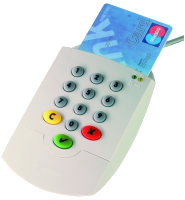
Many people are taking a fresh look at IT security strategies in the wake of the NSA revelations. One of the issues that comes up is the need for stronger encryption, using public key cryptography instead of just passwords. This is sometimes referred to as certificate authentication, but certificates are just one of many ways to use public key technology. One of the core decisions in this field is the key size. Most people have heard that 1024 bit RSA keys have been cracked and are not used any more for web sites or PGP. The next most fashionable number after 1024 appears to be 2048, but a lot of people have also been skipping that and moving to 4096 bit keys. This has lead to some confusion as people try to make decisions about which smartcards to use, which type of CA certificate to use, etc. The discussion here is exclusively about RSA key pairs, although the concepts are similar for other algorithms (although key lengths are not equivalent) The case for using 2048 bits instead of 4096 bits
  • Some hardware (many smart cards, some card readers, and some other devices such as Polycom phones) don't support anything bigger than 2048 bits.
  • Uses less CPU than a longer key during encryption and authentication
  • Using less CPU means using less battery power (important for mobile devices)
  • Uses less storage space: while not an issue on disk, this can be an issue in small devices like smart cards that measure their RAM in kilobytes rather than gigabytes
So there are some clear benefits of using 2048 bit keys and not just jumping on the 4096 bit key bandwagon The case for using 4096 bits
  • For some types of attack, security is not just double, it is exponential. 4096 is significantly more secure in this scenario. If an attack is found that allows a 2048 bit key to be hacked in 100 hours, that does not imply that a 4096 bit key can be hacked in 200 hours. The hack that breaks a 2048 bit key in 100 hours may still need many years to crack a single 4096 bit key
  • Some types of key (e.g. an OpenPGP primary key which is signed by many other people) are desirable to keep for an extended period of time, perhaps 10 years or more. In this context, the hassle of replacing all those signatures may be quite high and it is more desirable to have a long-term future-proof key length.
The myth of certificate expiration Many types of public key cryptography, such as X.509, offer an expiry feature. This is not just a scheme to force you to go back to the certificate authority and pay more money every 12 months. It provides a kind of weak safety net in the case where somebody is secretly using an unauthorised copy of the key or a certificate that the CA issued to an imposter. However, the expiry doesn't eliminate future algorithmic compromises. If, in the future, an attacker succeeds in finding a shortcut to break 2048 bit keys, then they would presumably crack the root certificate as easily as they crack the server certificates and then, using their shiny new root key, they would be in a position to issue new server certificates with extended expiry dates. Therefore, the expiry feature alone doesn't protect against abuse of the key in the distant future. It does provide some value though: forcing people to renew certificates periodically allows the industry to bring in new minimum key length standards from time to time. In practical terms, content signed with a 2048 bit key today will not be valid indefinitely. Imagine in the year 2040 you want to try out a copy of some code you released with a digital signature in 2013. In 2040, that signature may not be trustworthy: most software in that era would probably see the key and tell you there is no way you can trust it. The NIST speculates that 2048 bit keys will be valid up to about the year 2030, so that implies that any code you sign with a 2048 bit key today will have to be resigned with a longer key in the year 2029. You would do that re-signing in the 2048 bit twilight period while you still trust the old signature. Fortunately, there are likely to be few projects where such old code will be in demand. 4096 in practice One of the reasons I decided to write this blog is the fact that some organisations have made the 4096 bit keys very prominent (although nobody has made them mandatory as far as I am aware). Debian's guide to key creation currently recommends 4096 bit keys (although it doesn't explicitly mandate their use) Fedora's archive keys are all 4096 bit keys. The CACert.org project has developed a 4096 bit root These developments may leave people feeling a little bit naked if they have to use a shorter 2048 bit key for any of the reasons suggested above (e.g. for wider choice of smart cards and compatibility with readers). It has also resulted in some people spending time looking for 4096 bit smart cards and compatible readers when they may be better off just using 2048 bits and investing their time in other security improvements. In fact, the "risk" of using only 2048 rather than 4096 bits in the smartcard may well be far outweighed by the benefits of hardware security (especially if a smartcard reader with pin-pad is used) My own conclusion is that 2048 is not a dead duck and using this key length remains a valid decision and is very likely to remain so for the next 5 years at least. The US NIST makes a similar recommendation and suggests it will be safe until 2030, although it is the minimum key length they have recommended. My feeling is that the Debian preference for 4096 bit PGP keys is not based solely on security, rather, it is also influenced by the fact that Debian is a project run by volunteers. Given this background, there is a perception that if everybody migrates from 1024 to 2048, then there would be another big migration effort to move all users from 2048 to 4096 and that those two migrations could be combined into a single effort going directly from 1024 to 4096, reducing the future workload of the volunteers who maintain the keyrings. This is a completely rational decision for administrative reasons, but it is not a decision that questions the security of using 2048 bit keys today. Therefore, people should not see Debian's preference to use 4096 bit keys as a hint that 2048 bit keys are fundamentally flawed. Unlike the Debian keys (which are user keys), the CACert.org roots and Fedora archive signing keys are centrally managed keys with a long lifetime and none of the benefits of using 2048 bit keys is a compelling factor in those use cases. Practical issues to consider when choosing key-length Therefore, the choice of using 2048 or 4096 is not pre-determined, and it can be balanced with a range of other decisions:
  • Key lifetime: is it a long life key, such as an X.509 root for an in-house CA or an OpenPGP primary key? Or is it just for a HTTPS web server or some other TLS server that can be replaced every two years?
  • Is it for a dedicated application (e.g. a closed user group all using the same software supporting 4096 bit) or is it for a widespread user base where some users need to use 2048 bit due to old software/hardware?
  • Is it necessary to use the key(s) in a wide variety of smartcard readers?
  • Is it a mobile application (where battery must be conserved) or a server that is likely to experience heavy load?

16 June 2013

Daniel Pocock: Monitoring with Ganglia: an O'Reilly community book project

I recently had the opportunity to contribute to an O'Reilly community book project, developing the book Monitoring with Ganglia in collaboration with other members of the Ganglia team

The project itself, as a community book, pays no royalties back to the contributors, as we have chosen to donate all proceeds to charity. People who contributed to the book include
Robert Alexander, Jeff Buchbinder, Frederiko Costa, Alex Dean, Dave Josephsen, Bernard Li, Matt Massie, Brad Nicholes, Peter Phaal and Vladimir Vuksan and we also had generous assistance from various members of the open source community who assisted in the review process. Ganglia itself started at University of California, Berkeley as an initiative of Matt Massie, for monitoring HPC cloud infrastructure My own contact with Ganglia only began in 2008 when I was offered the opportunity to work full-time on the enterprise-wide monitoring systems for a large investment bank. Ganglia had been chosen for this huge project due to it's small footprint, support for many platforms and it's ability to work on a heterogeneous network as well as providing dedicated features for the bank's HPC grid. This brings me to one important point about Ganglia: it's not just about HPC any more. While it is extremely useful for clusters, grids and clouds, it is also quite suitable for a mixed network of web servers, mail servers, databases and all the other applications you may find in a small business, education or ISP environment. Instantly up and running with packages One of the most compelling features, even for small sites with less than 10 nodes, is the ease of installation: install the packages on Debian, Ubuntu, Fedora, OpenCSW and some other platforms, and it just works. Ganglia nodes will find each other over multicast, instantly, no manual configuration changes necessary. On one of the nodes, the web interface must be installed for viewing the statistics. Dare I say it: it is so easy, you hardly even need the book for a small installation. Where the book is really compelling is if you have hundreds or thousands of nodes, if you want custom charts or custom metrics or anything else beyond just installing the package. If monitoring is more than 10% of your job, the book is probably a must-have. Excellent open source architecture Ganglia's simplicity is largely thanks to the way it leverages other open source projects such as Tobi Oetiker's RRDtool and PHP Anybody familiar with these tools will find Ganglia is particularly easy to work with and customise. Custom metrics: IO service times One of my own contributions to the project has been the creation of ganglia-modules-linux, some plugins for Linux-specific metrics and ganglia-modules-solaris providing some similar metrics for Solaris. These projects on github provide an excellent base for people to fork and implement their own custom metrics in C or C++ The book provides a more detailed account of how to work with the various APIs for Python, C/C++, gmetric (command line/shell scripts) and Java. The new web interface For people who had tried earlier versions of Ganglia (and for those people who installed versions < 3.3.0 and still haven't updated), the new web interface is a major improvement and well worth the effort to install. It is available on the most recent packages (for example, it is in Debian 7 (wheezy) but not in Debian 6.) It was originally promoted as a standalone project (code-named gweb2) but was adopted as the official Ganglia web interface around the release of Ganglia 3.3.0. This web page provides a useful overview of what has changed and here is the original release announcement.

15 June 2013

C.J. Adams-Collier: Need help from Debian Developers, please.

Hi folks, I used to work at F5, and I pulled a bunch of equipment out of the recycle bin while I was there in order to help me populate the customer end premesis device inventory for a carrier network / ISP I am setting up. They decided to terminate my employment at the end of August last year, and I ve been wondering what to do with all of this equipment. I figured that it s been long enough that I can give them a call, so I did. I asked them whether I should consider buying BIG-IP hardware off of e-Bay if it said that it did not come with a license. The customer service agent told me that I should probably not consider doing any such thing, since I would have to pay a hefty fee to F5 before they would even provide a license. It looks like I d have to shell out fifty thousand dollars to get a proper F5 Networks Inc. license for these many surplus BIG-IP devices I have. I guess I ll just have to go with an improper (or maybe I mean not for profit) operating system like Debian. I wonder if I can get the current linux kernel to pick up these broadcom 10GE chips or whether I ll have to wait for someone to release Free as in speech firmware for them that I can make use of. Do any of you DDs want a shell on a linux box with a 10-port 10GE switch attached by PCI-e? I bet I could get a Debian chroot environment running in the system s stock rescue firmware. I bet I could then determine why the watchdog timer keeps tripping when I boot with other kernels If you decide to accept the offer of a shell on this box, please try to avoid rebooting it. It tends to pop my breakers and I have to run to the shop before the UPSs run out of juice.

12 June 2013

Daniel Pocock: When conspiracy theories come true

In a blog attempting to join the dots between Australia's intelligence services and the US PRISM program, I speculated that Australia has had extensive access to data harvested by PRISM. My hunch has just been exposed rather dramatically today: Top secret data center under construction to house all our secrets. "There has been no discussion of the project in Senate estimates committee hearings, and the public reports of Parliament's joint committee on intelligence and security make no reference to it." The news story also suggests that the relationship is bi-directional, with data harvested from Australian ISPs cross referenced against US databases from Facebook and Google. From a human rights perspective, the implications of this data sharing are much more dramatic than the NSA just snooping on US citizens within the US. While Australia often tries to portray the image that it is a safe and happy country, it has a dark side. Police are kept busy investigating politicians and Government officials: Prime Minister and her associates connected to a union slush fund, the central bank's banknote printing agency's chief executive and 8 colleagues on conspiracy charges and even a senator on good old fashioned shoplifting and assault charges Exporting PRISM data to a human rights backwater As an Australian, my own rights and those of my family are more heavily protected and respected living in Europe than if I lived in my country of birth. Australia does not have a bill of rights like the US (where PRISM data is harvested) or the European Convention of Human Rights. Once US data is exported to Australia, it can be used to support sinister programs like the indefinite detention of coloured people in sinister desert camps. Just this week, the Government left over 50 bodies of poor refugees for the sharks to eat. For someone with such a lack of a conscience, can you imagine them thinking twice about using PRISM data for unscrupulous purposes? Is US PRISM data at greater risk? Despite the stench of corruption and lip service to human rights, is there any hard evidence that PRISM data will be at greater risk if allowed into the hands of Australians? Death by SMS One former Australian official (having dual-citizenship with Sri Lanka) is accused of facilitating war crimes in the Sri Lankan civil war. At present he is Sri Lanka's ambassador at the UN, giving him the benefit of diplomatic immunity. When he was working for Australia, how much data did he have access to? Isn't it ludicrous that in the name of stopping terrorism, data may have been collected and handed to war criminals on a silver platter? Behind enemy lines Like James Bond in reverse, an Australian official was exposed unofficially engaging in a relationship with a Vietnamese spy colonel. In addition to the $20 million in bribery to win a bank note printing contract, is data being used as a tool to leverage trade negotiations, officially or otherwise? If an Australian official with top-secret clearance ends up under the control of a foreign agent, what is the risk that they would be exploited to obtain PRISM data? Defence minister resignation in Chinese spy scandal In 2009 Australia's defence minister was identified having close links to a Chinese-Australian business woman including all the usual little luxuries: first class flights, apartment rental and joint business deals with family members. He subsequently resigned. Little details were made public. How much PRISM data was directly available to political officials like the defence minister? Disappearing Prime Ministers The disappearance of a serving Prime Minister, Harold Holt, during the cold war remains an unsolved mystery to this day. People continue to ask was he swept out to sea or voluntarily whisked away in a Chinese or Soviet nuclear submarine. While Australia has traditionally had strong ties to Britain and the US, there have been exceptions to the rule. Fortunately this all happened before PRISM and Harold Holt red submarine rumours are no more well-founded than the UFO theories of his abduction. Where did all the data go? As the music industry has found out the hard way, digital data can be copied at will with the originator having no control. The revelations that Britain and Australia are in on the PRISM shenanigans only confirms that this data is seen as a new form of currency for exchange in geo-political posturing. While used weapons take decades to work their way down the chain, data can spread at the speed of light.

Dominique Dumont: Improving error messages of Dpkg dependency parser

Hello Config::Model::Dpkg project (a Debian source package model based on Config::Model) is partly based on a ParseRec::Descent grammar. This grammar is used to parse the dependency of a Debian source package. This article will show how such a grammar is written, its limitation regarding error handling and how to improve the situation. Debian package main data is described in debian/control file. This file can feature a list of dependencies, i.e. a list of package that must be installed for the package to work. These dependencies are declared in fields like Build-Depends , or Depends as a list of package. For Dpkg model purpose, I needed only to parse one item of a dependency list at a time. This dependency item can be a simple package name: foo or a package name with a version requirement: foo ( > 1.24 ) or a package name with architectures restrictions: foo [alpha amd64 hurd-arm linux-armeb] or both: foo ( > 1.24 ) [alpha amd64 hurd-arm linux-armeb] or a list of alternate choices combining the possibilities above: foo ( > 1.24 ) bar [ linux-any] baz ( << 3.14 ) [ ! hurd-armel !hurd-armeb ] or a variable that is replaced during package build: $ perl-depends Writing a Parse::RecDescent grammar to parse this is relatively straightforward. The first production handles alternate dependencies separated by and raises an error if some text was not consumed by the dependencies:
dependency_item: depend(s /\ /) eofile  
A dependency as explained above is expressed as:
depend: pkg_dep   variable
A variable like $ foo or $ bar -1.24~ is parsed with:
variable: /\$ [\w:\-]+ [\w\.\-~+]*/
This rule handles a package name with optional version or arch restriction:
pkg_dep: pkg_name dep_version(?) arch_restriction(?) 
pkg_name: /[a-z0-9][a-z0-9\+\-\.]+/
The remaining rules are quite simple:
dep_version: '(' oper version ')' 
oper: '<<'   '<='   '='   '>='   '>>'
version: variable   /[\w\.\-~:+]+/
arch_restriction: '[' arch(s) ']'
arch:  /!?[\w-]+/
eofile: /^\Z/
The grammar above works well to parse the dependency. You can test it with this small Perl script:
#!/usr/bin/perl
use strict;
use warnings;
use 5.010 ;
use Parse::RecDescent ;
my $parser = Parse::RecDescent->new(join('',));
my $dep = shift ;
say "parsing '$dep'";
my $ret = $parser->dependency_item($dep) ;
say "result is ", $ret if $ref ;
__DATA__
# insert grammar here !!!
Unfortunately, any error in the optional parts (i.e version requirements and arch restriction) leads to an error message which is not very helpful. The error message only mention that some text could not be parsed:
parsing 'foo ( != 1.24 )   bar'
       ERROR (line 1): Invalid dependency item: Was expecting /\ / but found
                       "( != 1.24 )   bar" instead
or
parsing 'foo [ arm & armel]   bar'
       ERROR (line 1): Invalid dependency item: Was expecting /\ / but found
                       "[ arm & armel]   bar" instead
The problem comes from the fact that version requirements or arch restrictions are optional. For instance if a version requirement has a syntax error, Parse::RecDescent will try to parse it as an arch restriction. This arch restriction rule will also fail and the last terminal ( eofile ) will fail. So the error message does not hint at the actual syntax problem. To generate better error messages, I improved the suggestion made in Parse::RecDescent FAQ. Instead of calling a plain subroutine, I use a sub reference that will store the error messages in a closure. This sub ref is declared in a start-up action. Note that the sub ref explicitly returns undef. I ll explain why later.
 
    my @dep_errors ;
    my $add_error = sub  
        my ($err, $txt) = @_ ;
        push @dep_errors, "$err: '$txt'" ;
        return ;
      ;
 
The following production always fails while ensuring that the error list is reset. This production is always run at the beginning of the dependency parsing:
dependency:   @dep_errors = ();  
Here s the actual dependency production that is run when dependency method is called on the parser. It will return an array ref containing (1, data) if the dependency is valid or (0, errors) otherwise:
dependency: depend(s /\ /) eofile
   
    $return = [ 1 , @ $item[1]  ] ;


    push( @dep_errors, "Cannot parse: '$text'" ) unless @dep_errors ;
    $return =  [ 0, @dep_errors ];
   
The following productions don t change much:
depend: pkg_dep   variable
variable: /\$ [\w:\-]+ [\w\.\-~+]*/
pkg_dep: pkg_name dep_version(?) arch_restriction(?) 
dep_version: '(' oper version ')'
The first rule of this production parses the package name which must be followed by a space, end of string ( or ['. A positive look-ahead assertion is used so only the package name is consumed. If the first rule fails, the second rule provides a meaningful error message. The second rule will match anything which is not a space and create an error message. Since $add_error returns undef, the second rule returns undef and the production fails. So the text stored in the error message is not consumed:
pkg_name: /[a-z0-9][a-z0-9\+\-\.]+(?=\s \Z \( \[)/
      /\S+/   $add_error->("bad package name", $item[1]) ; 
The same trick is used with these productions:
oper: '<<'   '='   '>>'
      /\S+/   $add_error->("bad dependency version operator", $item[1]) ; 
version: variable   /[\w\.\-~:+]+(?=\s \) \Z)/
      /\S+/   $add_error->("bad dependency version", $item[1]) ; 
The action of this production is a little bit more tricky. The action ensures that '!' are either added before all arch or not at all. Otherwise an error message is generated and added to the list of errors:
arch_restriction: '[' osarch(s) ']'
     
        my $mismatch = 0;
        # $ref contains ['!',os,arch] or ['',os,arch]
        my $ref = $item[2] ;
        for (my $i = 0; $i < $#$ref -1 ; $i++ )  
            $mismatch  = ($ref->[$i][0] xor $ref->[$i+1][0]) ;
         
        my @a = map   ($_->[0]   '') . ($_->[1]   '') . $_->[2]   @$ref ;
        if ($mismatch)  
            $add_error->("some names are prepended with '!' while others aren't.", "@a") ;
         
        else  
            $return = 1 ;
         
     
The check above is possible only if the "osarch" production returns an array ref containing something like ('!','linux','any') for "!linux-any' or ('','linux','any') for "linux-any":
osarch: not(?) os(?) arch
     
        $return =  [ $item[1][0], $item[2][0], $item[3] ];
     
      /.?(?=\s \] \Z)/   $add_error->("bad arch specification: ", $item[1]) ;  
not: '!'
Here's the remaining of the grammar:
os: /(any uclibc-linux linux kfreebsd knetbsd etc...)-/
     /\w+/ '-'   $add_error->("bad os in architecture specification", $item[1]) ; 
arch: / (any  alpha amd64  arm\b  arm64  etc... )
        (?=(\]  ))
      /x
        /\w+/   $add_error->("bad arch in architecture specification", $item[1]) ; 
eofile: /^\Z/
That's all for grammar 2.0... Before someone yells: "Show me the message ! ", here are some example of bad dependencies and their error message generated by the parser:
parse 'foo ( != 1.24 )   bar'
result is: 0 bad dependency version operator: '!='
parsing 'foo [ arm & armel]   bar'
result is: 0 bad arch specification: : '&'
parsing 'foo [ arm armel ]   bar [!moo]'
result is: 0 bad arch specification: : ']' bad arch in architecture specification: 'moo'
The 2 first error messages are spot on the actual error. The second one has a false positive (']' is correct) but correctly highlights the wrong arch name ('moo'). Mission accomplished. In order to keep this post (relatively) simple, I've removed the part that actually store parsed data. They don't really matter for error handling. Nevertheless, you may see the whole grammar in Config::Model::Dpkg::Dependency module. All the best
Tagged: Config::Model, debian, dpkg, package, Parse::RecDescent, Perl

Wouter Verhelst: Blog fixed again

It was pointed out to me that some requests on my blog returned RSS rather than HTML content. This was the result of an upgrade from Debian 6.0 "squeeze" to 7.0 "wheezy", which changed something so that content negotiation for PHP files was disabled. I'm not sure what exactly changed; it's either the default in apache upstream, or something in a file that I hadn't modified and thus was replaced with the upgrade. At any rate, the fact was that I had configured mod_mime to have a line like
AddType application/rss+xml;qs=0.9 .rss
Which was sufficient, in squeeze, to tell apache not to prefer RSS files over their PHP variants. I found that in wheezy, the PHP mime type was not listed anywhere, which, combined with mod_negotiation's default setting of MultiviewsMatch NegotiatedOnly meant that the .php files weren't even being considered. The short-term solution was thus to add a line for PHP files:
AddType application/x-httpd-php .php
An alternate solution would be to switch to MultiviewsMatch Any, but I'd recommend against that, for reasons explained in the documentation. Of course, the long-term solution is to finally do that migration from blosxom-with-php-export to ikiwiki that I've been off and on contemplating ever since Joey announced he'd started working on ikiwiki. But, well, that's not for today.

11 June 2013

Steve Kemp: Migrations and changes

So I'd previously talked about migrating machines. From having one virtual machine running "mail" + "web" + "stuff" I've now got three hosts:
ssh.steve.org.uk
This is supposed to be used solely for shell access, email reading, IRC. Sadly it still hosts one website, the web interface to my Mercurial repositories. This can't be moved without moving the repositories which is a step too far. Although I don't particularly want people browsing my code/changes I do want them to be able to clone them. If I could get anonymous-SSH checkouts working, sanely, then I'd be happy, but I don't see how to do that.
skx-web
This hosts all my websites except for two. The two that are excluded are my mercurial repositories, which still lives on ssh.steve.org.uk, and my blogspam service.
blogspam
This runs my blogspam.net service. I wish I could retired this, since it uses cruftly XML::RPC. I'd rather see a RESTful application sending/receiving JSON. Sadly I can't kill it without annoying a lot of people. So it must remain.
I chose to add the blogspam guest, because that service does really take over an IP, and it just seemed simplest to move it to one machine. As a quick hack both http://repository.steve.org.uk & http://blogspam.net/ run under Apache. Although the other websites run under their own UID with thttpd + my proxy. Now time to change the subject entirely. I've recently joined gym. Which isn't as horrible as I thought it might be, though as a matter of policy I refuse to go on any of those fancy running/jogging machines. The first three weeks I just alternated between the cycling machines and the rowing machines. Initially ten minutes on each, then twenty, then thirty. Now I'm being all brave and adventurous, using new machines and pieces of equipment. Writing this I've got a dull ache in both my arms, after doing seated-dips with 100Lbs. So I guess I'm starting to make progress. No specific goals in mind, but I've been paying slightly more attention to my diet over the past month and I think if I'm a "little fitter" and have "slightly nicer arms" then I'll be happy enough. I've no desire to go all anal and count calories, or give up chocolate and beer. So it is almost hard to explain why I'm going, but .. it is fun, and watching the numbers change is fun too. I'll probably post more about this in the future.

Daniel Pocock: Interrupt-free computing

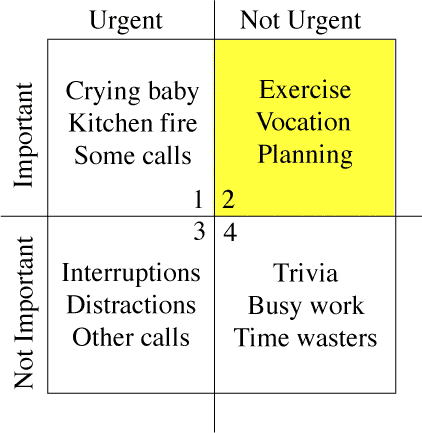
On debian-devel, there has been a discussion about the security issues of "spontaneously" appearing popups demanding the root password to make immediate security updates. There is a much more general issue related to this: computing without interruptions. Most of us have probably seen some friend or acquaintance with a (usually non-Linux) PC that is constantly beeping and flashing with chat notifications, new email popups, Adobe update this, Java update that, etc. In one recent case I came across somebody who had experienced a dramatic drop in his productivity as a consequence - giving him a laptop with a freshly installed copy of Linux made a dramatic difference to his work. I can already hear people insisting that security trumps everything (which isn't an original argument either) and that popups can't be avoided. A search on the web for "computing without interruptions" reveals users have a particular distaste for these things appearing while watching a video. Websites responding to that complaint fill the search results. With many types of interactive real-time content (video, WebRTC phone/video calls and so on) deployed within browsers, it is even more important for UI designers to contemplate when it is not appropriate to interrupt a user and to do everything possible to avoid interrupting the user. Preparing for disaster On the other hand, just ignoring security updates and not telling the user their disk is filling until 0 bytes remain available could only shift the problem down the road (from constant annoyance to periodic crisis). That said, sometimes you can still fill the disk very suddenly (especially with fast SSDs) and rather than relying on popups to keep users away from the precipice, applications (particularly the core desktop and daemon processes) could be tested more regularly to ensure they remain resilient in full disk situations. Managing information overload Popups are just part of a wider problem of information overload. There are emails too: some applications, such as Drupal, will send daily or weekly emails to a user if their system is not up to date. For many virtual-hosted sites, this starts to resemble a small flood. There is a flaw in this design: applications are competing for attention by sending more and more emails and popups or making them more annoying (e.g. the security updates in Debian 6 were ignorable popups in the top right-hand corner of the screen, Debian 7's Gnome Classic mode displays a big password prompt in the middle of the screen). The solution would be to develop a mechanism for unifying, de-duplicating and then prioritising these information/event flows. Some fault alerting systems already do this for their own events - these are niche solutions that aren't always applicable to the average PC-owner, although the principles are well tested. Some email organisation tools have similar features, but only for email. I'm not currently aware of any solution that synthesizes such an experience for all possible information sources. Setting priorities One well-read work on this subject in the business world is The 7 Habits of Highly Effective People (Stephen R. Covey, 1989). Of particular interest for the problem at hand is the priority matrix (borrowed from the Eisenhower Method): The left column, Urgent items, typically must be executed by a certain date (e.g. buying a gift before a birthday or installing a new SSL certificate before the old one expires). A security update or Acrobat reader update does not have this same characteristic. Under this model:
Urgent Non-urgent
Important Replace SSL certificate
Buy birthday gift
Security update
Run backup job
Not important Register for conference before deadline for free gift Non-security update for Acrobat reader
Covey even released an Outlook plugin, Plan Plus to help people organise their tasks (and their lives) using his methodology. Unfortunately it is closed-source software with a terrible set of ratings on Amazon - this review from a customer stands out: "My take is that Franklin does not consider robust software nor customer support to be either Urgent or Important." Could this be replicated more successfully with an open-source plugin for Mozilla Lightning or a similar productivity tool, and could the concept be extended across the range of data sources, including email, calendar items, system notifications and more to provide a unified approach to both the computing platform and general productivity (real-life) time management? Would this help solve the same problem in a more effective manner? In other words, would such an effort to help users integrate the demands of technology with the other demands of life make them more likely to keep their systems up to date? The wider community experience Going beyond the desktop/user experience, could this model be extended to automatically integrate external tasks, such as handling bug reports, moderating mailing lists and other slightly tedious things that have to be given regular attention to keep the free-software world moving along smoothly? Managing down-time For people who work in computing, there is almost no down-time any more. Even when on holiday, checking in for a flight might involve navigating through a buggy wifi access control system and an annoying set of advertisements from your low-cost airline as you try to print a boarding pass. These things often trigger thoughts about similar issues on client projects. Glancing at your email to find the booking number could awaken thoughts of a whole lot of projects you had tried to put out of your mind for a week. This is another area where excessive popups and emails can only compound the problem. Who really wants to download and install security updates while on holiday using an intermittent wifi connection? Managing all these events through a common mechanism may also finally make it possible to have an "ordinary user" experience with your PC. In practice, this might mean being able to view information/events through a time-of-day filter or "holiday mode" - and only on demand. A worthy design goal? Would any free software operating system make it a design goal to give their users a 100% interrupt-free experience? Of course there would still be things like chat notifications - but those would only be possible when a user has signed-in to a chat application. The distinction for the interrupt-free experience would only need to apply to default system behavior and not to every application.

Petter Reinholdtsen: Fixing the Linux black screen of death on machines with Intel HD video

When installing RedHat, Fedora, Debian and Ubuntu on some machines, the screen just turn black when Linux boot, either during installation or on first boot from the hard disk. I've seen it once in a while the last few years, but only recently understood the cause. I've seen it on HP laptops, and on my latest acquaintance the Packard Bell laptop. The reason seem to be in the wiring of some laptops. The system to control the screen background light is inverted, so when Linux try to turn the brightness fully on, it end up turning it off instead. I do not know which Linux drivers are affected, but this post is about the i915 driver used by the Packard Bell EasyNote LV, Thinkpad X40 and many other laptops. The problem can be worked around two ways. Either by adding i915.invert_brightness=1 as a kernel option, or by adding a file in /etc/modprobe.d/ to tell modprobe to add the invert_brightness=1 option when it load the i915 kernel module. On Debian and Ubuntu, it can be done by running these commands as root:
echo options i915 invert_brightness=1   tee /etc/modprobe.d/i915.conf
update-initramfs -u -k all
Since March 2012 there is a mechanism in the Linux kernel to tell the i915 driver which hardware have this problem, and get the driver to invert the brightness setting automatically. To use it, one need to add a row in the intel_quirks array in the driver source drivers/gpu/drm/i915/intel_display.c (look for "static struct intel_quirk intel_quirks"), specifying the PCI device number (vendor number 8086 is assumed) and subdevice vendor and device number. My Packard Bell EasyNote LV got this output from lspci -vvnn for the video card in question:
00:02.0 VGA compatible controller [0300]: Intel Corporation \
    3rd Gen Core processor Graphics Controller [8086:0156] \
    (rev 09) (prog-if 00 [VGA controller])
 Subsystem: Acer Incorporated [ALI] Device [1025:0688]
 Control: I/O+ Mem+ BusMaster+ SpecCycle- MemWINV- VGASnoop- \
    ParErr- Stepping- SE RR- FastB2B- DisINTx+
 Status: Cap+ 66MHz- UDF- FastB2B+ ParErr- DEVSEL=fast >TAbort- \
    <tabort-><mabort->SERR- <perr- intx-="INTx-" latency:="Latency:"><unassigned> [disabled]
 Capabilities: <access denied="denied">
 Kernel driver in use: i915
The resulting intel_quirks entry would then look like this:
struct intel_quirk intel_quirks[] =  
       ...
        /* Packard Bell EasyNote LV11HC needs invert brightness quirk */
	  0x0156, 0x1025, 0x0688, quirk_invert_brightness  ,
       ...
 
According to the kernel module instructions (as seen using modinfo i915), information about hardware needing the invert_brightness flag should be sent to the dri-devel (at) lists.freedesktop.org mailing list to reach the kernel developers. But my email about the laptop sent 2013-06-03 have not yet shown up in the web archive for the mailing list, so I suspect they do not accept emails from non-subscribers. Because of this, I sent my patch also to the Debian bug tracking system instead as BTS report #710938, to make sure the patch is not lost. Unfortunately, it is not enough to fix the kernel to get Laptops with this problem working properly with Linux. If you use Gnome, your worries should be over at this point. But if you use KDE, there is something in KDE ignoring the invert_brightness setting and turning on the screen during login. I've reported it to Debian as BTS report #711237, and have no idea yet how to figure out exactly what subsystem is doing this. Perhaps you can help? Perhaps you know what the Gnome developers did to handle this, and this can give a clue to the KDE developers? Or you know where in KDE the screen brightness is changed during login? If so, please update the BTS report (or get in touch if you do not know how to update BTS).

8 June 2013

Thorsten Glaser: Waypoint Statistics

mirabilos  found waypoints I ve finally gotten around to listing all Waypoints (Geocaches, Opencaches, Closedcaches, Earthcaches, Terracaches including Locationless, Navicaches, etc.) I ve found a box, enjoyful, educating, a good place to hide one myself, etc. and putting up a list and, of course, generate my own statpic.

I ll put them up for the other project members, too (already made a picture for gecko2@ but bsiegert@ still needs one; we also need to collect offline lists of found, owned and attended waypoints) A bit of background story: I decided, years ago, to have an offline list of cache finds in case something would happen. Just, I had found way too many already, so this was a huge bit of work. Oh well I of course procrastinated, and then something did happen (Opencaching wanting to force a Restricted Commons licence; me disagreeing and suggesting a change; some trigger-happy person immediately deleting my account without waiting for the discussion or the decision period to end; weeks of forum discussions; Opencaching allowing dual-licencing; them telling me they can t restore my data probably never heard of databa sorry, MySQL backups). And I still didn t have the list. Now I do; recreated even the OC information from what was still accessible and with help from one OC supporter ( mic@ , thanks); merged caches that are co-listed on several platforms, etc. (still need to put in the FTF/STF/TTF/4TF/LTF and voting/favourites information) and a statpic, all in Open Source and Open Data, in cvs(1) with mksh(1) and a frontend for libgd2 I admit, but we had been using that for the MirWebsite for a while already. I suggest every geocacher keep an offline or local record of all their finds (and hides and attended logs) for things like this, in case some platform decides to let s say, put your data into the cloud where it is? I don t know .

5 June 2013

Johannes Schauer: Reliable IMAP synchronization with IDLE support

The task: reliably synchronize my local MailDir with several remote IMAP mailboxes with IDLE support so that there is no need to poll with small time intervals to get new email immediately. Most graphical mail clients like icedove/thunderbird or evolution have IDLE support which means that their users get notified about new email as soon as it arrives. I prefer to handle email fetching/reading/sending using separate programs so after having used icedove for a long time, I switched to a offlineimap/mutt based setup a few years ago. Some while after that I discovered sup and later notmuch/alot which made me switch again. Now my only remaining problem is the synchronization between my local email and several remote IMAP servers. Using offlineimap worked fine in the beginning but soon I discovered some of its shortcomings. It would for example sometimes lock up or simply crash when I switched between different wireless networks or switched to ethernet or UMTS. Crashing was not a big problem as I just put it into a script which re-executed it every time it crashed. The problem was it locking up for one of its synchronizing email accounts while the others were kept in sync as usual. This once let to me missing five days of email because offlineimap was not crashing and I believed everything was fine (new messages from the other accounts were scrolling by as usual) while people were sending me worried emails whether I was okay or if something bad had happened. I nearly missed a paper submission deadline and another administrative deadline due to this. This was insanely annoying. It turned out that other mail synchronization programs suffered from the same lockup problem so I stuck with offlineimap and instead executed it as:
while true; do
timeout --signal=KILL 1m offlineimap
notmuch new
sleep 5m
done
Which would synchronize my email every five minutes and kill offlineimap if a synchronization took more than one minute. While I would've liked an email synchronizer which would not need this measure, this worked fine over the months. After some while it bugged me that icedove (which my girlfriend is using) was receiving email nearly instantaneously after they arrived and I couldnt have this feature with my setup. This instantaneous arrival of email works by using the IMAP IDLE command which allows the server to notify the client once new email arrives instead of the client having to poll for new email in small intervals. Unfortunately offlineimap (and any other email synchronizer I found) would not support the IDLE command. There is a fork of it which supports IDLE by using a newer python imap library but this is of little use to me as there is no possibility of a hook which executes when new email arrives so that I can execute notmuch new on the new email. At this point I could've used inotify to execute notmuch new upon arrival of new email but I went another way. Here is a short python script idle.py which connects to my IMAP servers and sends the IDLE command:
import imaplib
import select
import sys

class mysock():
def __init__(self, name, server, user, passwd, directory):
self.name = name
self.directory = directory
self.M = imaplib.IMAP4(server)
self.M.login(user, passwd)
self.M.select(self.directory)
self.M.send("%s IDLE\r\n"%(self.M._new_tag()))
if not self.M.readline().startswith('+'): # expect continuation response
exit(1)

def fileno(self):
return self.M.socket().fileno()

if __name__ == '__main__':
sockets = [
mysock("Name1", "imap.foo.bar", "user1", "pass1", "folder1"),
mysock("Name1", "imap.foo.bar", "user1", "pass1", "folder2"),
mysock("Name2", "imap.blub.bla", "user2", "pass2", "folder3")
]
readable, _, _ = select.select(sockets, [], [], 1980) # 33 mins timeout

found = False
for sock in readable:
if sock.M.readline().startswith('* BYE '): continue
print "-u basic -o -q -f %s -a %s"%(sock.directory, sock.name)
found = True
break

if not found:
print "-u basic -o"
It would create a connection to every directory I want to watch on every email account I want to synchronize. The select call will expire after 33 minutes as most email servers would drop the connection if nothing happens at around 30 minutes. If something happened within that time though, the script would output the arguments to offlineimap to do a quick check on just that mailbox on that account. If nothing happened, the script would output the arguments to offlineimap to do a full check on all my mailboxes.
while true; do
args= timeout --signal=KILL 35m python idle.py
echo "idle timed out" >&2;
args="-u basic -o";

echo "call offlineimap with: $args" >&2
timeout --signal=KILL 1m offlineimap $args
echo "offlineimap timed out" >&2;
continue;

notmuch new
done
Every call which interacts with the network is wrapped in a timeout command to avoid any funny effects. Should the python script timeout, a full synchronization with offlineimap is triggered. Should offlineimap timeout, an error message is written to stderr and the script continues. The above naturally has the disadvantage of not immediately responding to new email which arrives during the time that idle.py is not running. But as this email will be fetched once the next message arrives on the same account, there is no much waiting time and so far, this problem didnt bite me. Is there a better way to synchronize my email and at a same time make use of IDLE? I'm surprised I didnt find software which would offer this feature.

4 June 2013

Keith Packard: dri3 extension

Completing the DRI3 Extension This week marks a pretty significant milestone for the glorious DRI3000 future. The first of the two new extensions is complete and running both full Gnome and KDE desktops. DRI3 Extension Overview The DRI3 extension provides facilities for building direct rendering libraries to work with the X window system. DRI3 provides three basic mechanisms:
  1. Open a DRM device.
  2. Share kernel objects associated with X pixmaps. The direct rendering client may allocate kernel objects itself and ask the X server to construct a pixmap referencing them, or the client may take an existing X pixmap and discover the underlying kernel object for it.
  3. Synchronize access to the kernel objects. Within the X server, Sync Fences are used to serialize access to objects. These Sync Fences are exposed via file descriptors which the underlying driver can use to implement synchronization. The current Intel DRM driver passes a shared page containing a Linux Futex.
Opening the DRM Device Ideally, the DRM application would be able to just open the graphics device and start drawing, sending the resulting buffers to the X server for display. There s work going on to make this possible, but the current situation has the X server in charge of blessing the file descriptors used by DRM clients. DRI2 does this by having the DRM client fetch a magic cookie from the kernel and pass that to the X server. The cookie is then passed to the kernel which matches it up with the DRM client and turns on rendering access for that application. For DRI3, things are much simpler the DRM client asks the X server to pass back a file descriptor for the device. The X server opens the device, does the magic cookie dance all by itself (at least for now), and then passes the file descriptor back to the application.
 
    DRI3Open
    drawable: DRAWABLE
    driverType: DRI3DRIVER
    provider: PROVIDER
       
    nfd: CARD8
    driver: STRING
    device: FD
 
    Errors: Drawable, Value, Match
    This requests that the X server open the direct rendering
    device associated with drawable, driverType and RandR
    provider. The provider must support SourceOutput or SourceOffload.
    The direct rendering library used to implement the specified
    'driverType' is returned in 'driver'. The file
    descriptor for the device is returned in 'device'. 'nfd' will
    be set to one (this is strictly a convenience for XCB which
    otherwise would need request-specific information about how
    many file descriptors were associated with this reply).
Sharing Kernel Pixel Buffers An explicit non-goal of DRI3 is support for sharing buffers that don t map directly to regular X pixmaps. So, GL ancillary buffers like depth and stencil just don t apply here. The shared buffers in DRI3 are regular X pixmaps in the X server. This provides a few obvious benefits over the DRI2 scheme: In the kernel, the buffers are referenced by DMA-BUF handles, which provides a nice driver-independent mechanism.
  1. Lifetimes are easily managed. Without being associated with a separate drawable, it s easy to know when to free the Pixmap.
  2. Regular X requests apply directly. For instance, copying between buffers can use the core CopyArea request.
To create back- and fake-front- buffers for Windows, the application creates a kernel buffer, associates a DMA-BUF file descriptor with that and then sends the fd to the X server with a pixmap ID to create the associated pixmap. Doing it in this direction avoids a round trip.
 
    DRI3PixmapFromBuffer
    pixmap: PIXMAP
    drawable: DRAWABLE
    size: CARD32
    width, height, stride: CARD16
    depth, bpp: CARD8
    buffer: FD
 
    Errors: Alloc, Drawable, IDChoice, Value, Match
    Creates a pixmap for the direct rendering object associated
    with 'buffer'. Changes to pixmap will be visible in that
    direct rendered object and changes to the direct rendered
    object will be visible in the pixmap.
    'size' specifies the total size of the buffer bytes. 'width',
    'height' describe the geometry (in pixels) of the underlying
    buffer. 'stride' specifies the number of bytes per scanline in
    the buffer. The pixels within the buffer may not be arranged
    in a simple linear fashion, but 'size' will be at least
    'height' * 'stride'.
    Precisely how any additional information about the buffer is
    shared is outside the scope of this extension.
    If buffer cannot be used with the screen associated with
    drawable, a Match error is returned.
    If depth or bpp are not supported by the screen, a Value error
    is returned.
To provide for texture-from-pixmap, the application takes the pixmap ID and passes that to the X server which returns the a file descriptor for a DMA-BUF which is associated with the underlying kernel buffer.
 
    DRI3BufferFromPixmap
    pixmap: PIXMAP
       
    depth: CARD8
    size: CARD32
    width, height, stride: CARD16
    depth, bpp: CARD8
    buffer: FD
 
    Errors: Pixmap, Match
    Pass back a direct rendering object associated with
    pixmap. Changes to pixmap will be visible in that
    direct rendered object and changes to the direct rendered
    object will be visible in the pixmap.
    'size' specifies the total size of the buffer bytes. 'width',
    'height' describe the geometry (in pixels) of the underlying
    buffer. 'stride' specifies the number of bytes per scanline in
    the buffer. The pixels within the buffer may not be arranged
    in a simple linear fashion, but 'size' will be at least
    'height' * 'stride'.
    Precisely how any additional information about the buffer is
    shared is outside the scope of this extension.
    If buffer cannot be used with the screen associated with
    drawable, a Match error is returned.
Tracking Window Size Changes When Eric Anholt and I first started discussing DRI3, we hoped to avoid needing to learn about the window size from the X server. The thought was that the union of all of the viewports specified by the application would form the bounds of the drawing area. When the window size changed, we expected the application would change the viewport. Alas, this simple plan isn t sufficient here a few GL functions are not limited to the viewport. So, we need to track the actual window size and monitor changes to it. DRI2 does this by delivering invalidate events to the application whenever the current buffer isn t valid; the application discovers that this event has been delivered and goes to as the X server for the new buffers. There are a couple of problems with this approach:
  1. Any outstanding DRM rendering requests will still draw to the old buffers.
  2. The Invalidate events must be captured before the application sees the related ConfigureNotify event so that the GL library can react appropriately.
The first problem is pretty intractable within DRI2 the application has no way of knowing whether a frame that it has drawn was delivered to the correct buffer as the underlying buffer object can change at any time. DRI3 fixes this by having the application in control of buffer management; it can easily copy data from the previous back buffer to the new back buffer synchronized to its own direct rendering. The second problem was solved in DRI2 by using the existing Xlib event hooks; the GL library directly implements the Xlib side of the DRI2 extension and captures the InvalidateBuffers events within that code, delivering those to the driver code. The problem with this solution is that Xlib holds the Display structure mutex across this whole mess, and Mesa must be very careful not to make any Xlib calls during the invalidate call. For DRI3, I considered placing the geometry data in a shared memory buffer, but my future plans for the Present extension led me to want an X event instead (more about the Present extension in a future posting). An X ConfigureNotify event is sufficient for the current requirements to track window sizes accurately. However, there s no easy way for the GL library to ensure that ConfigureNotify events will be delivered to the application other application code may (and probably will) adjust the window event mask for its own uses. I considered adding the necessary event mask tracking code within XCB, but again, knowing that the Present extension would probably need additional information anyhow, decided to create a new event instead. Using an event requires that XCB provide some mechanism to capture those events, keep them from the regular X event stream, and deliver them to the GL library. A further requirement is that the GL library be absolutely assured of receiving notification about these events before the regular event processing within the application will see a core ConfigureNotify event. The method I came up with for XCB is fairly specific to my requirements. The events are always XGE events, and are tagged with a special event context ID , an XID allocated for this purpose. The combination of the extension op-code, the event type and this event context ID are used to split off these events to custom event queues using the following APIs:
/**
 * @brief Listen for a special event
 */
xcb_special_event_t *xcb_register_for_special_event(xcb_connection_t *c,
                                                    uint8_t extension,
                                                    uint16_t evtype,
                                                    uint32_t eid,
                                                    uint32_t *stamp);
This creates a special event queue which will contain only events matching the specified extension/type/event-id triplet.
/**
 * @brief Returns the next event from a special queue
 */
xcb_generic_event_t *xcb_check_for_special_event(xcb_connection_t *c,
                                                 xcb_special_event_t *se);
This pulls an event from a special event queue. These events will not appear in the regular X event queue and so applications will never see them. There s one more piece of magic here the stamp value passed to xcbregisterforspecialevent. This pointer refers to a location in memory which will be incremented every time an event is placed in the special event queue. The application can cheaply monitor this memory location for changes and known when to check the queue for events. Within GL, the value used is the existing dri2 stamp value. That is checked at the top of the rendering operation; if it has changed, the drawing buffers will be re-acquired. Part of the buffer acquisition process is a check for special events related to the window. For now, I ve placed these events in the DRI3 extension. However, they will move to the Present extension once that is working.
 
    DRI3SelectInput
    eventContext: DRI3EVENTID
    window: WINDOW
    eventMask: SETofDRI3EVENT
 
    Errors: Window, Value, Match, IDchoice
    Selects the set of DRI3 events to be delivered for the
    specified window and event context. DRI3SelectInput can
    create, modify or delete event contexts. An event context is
    associated with a specific window; using an existing event
    context with a different window generates a Match error.
    If eventContext specifies an existing event context, then if
    eventMask is empty, DRI3SelectInput deletes the specified
    context, otherwise the specified event context is changed to
    select a different set of events.
    If eventContext is an unused XID, then if eventMask is empty
    no operation is performed. Otherwise, a new event context is
    created selecting the specified events.
The events themselves look a lot like a configure notify event:
 
    DRI3ConfigureNotify
    type: CARD8         XGE event type (35)
    extension: CARD8        DRI3 extension request number
    length: CARD16          2
    evtype: CARD16          DRI3_ConfigureNotify
    eventID: DRI3EVENTID
    window: WINDOW
    x: INT16
    y: INT16
    width: CARD16
    height: CARD16
    off_x: INT16
    off_y: INT16
    pixmap_width: CARD16
    pixmap_height: CARD16
    pixmap_flags: CARD32
 
    'x' and 'y' are the parent-relative location of 'window'.
Note that there are a couple of odd additional fields offx, offy, pixmapwidth, pixmapheight and pixmap_flags are all place-holders for what I expect to end up in the Present extension. For now, in DRI3, they should be ignored. Synchronization The DRM application needs to know when various X requests related to its buffers have finished. In particular, when performing a buffer swap, the client wants to know when that completes, and be able to block until it has. DRI2 does this by having the application make a synchronous request from the X server to get the names of the new back buffer for drawing the next frame. This has two problems:
  1. The synchronous round trip to the X server isn t free. Other running applications may cause fairly arbitrary delays in getting the reply back from the X server.
  2. Synchronizing with the X server doesn t ensure that GPU operations are necessarily serialized between the application and the X server.
What we want is a serialization guarantee between the X server and the DRM application that operates at the GPU level. I ve written a couple of times (dri3k first steps and Shared Memory Fences) about using X Sync extension Fences (created by James Jones and Aaron Plattner) for this synchronization and wanted to get a bit more specific here. With the X server, a Sync extension Fence is essentially driver-specific, allowing the hardware design to control how the actual synchronization is performed. DRI3 creates a way to share the underlying operating system object by passing a file descriptor from application to the X server which somehow references that device object. Both sides of the protocol need to tacitly agree on what it means.
 
    DRI3FenceFromFD
    drawable: DRAWABLE
    fence: FENCE
    initially-triggered: BOOL
    fd: FD
 
    Errors: IDchoice, Drawable
    Creates a Sync extension Fence that provides the regular Sync
    extension semantics along with a file descriptor that provides
    a device-specific mechanism to manipulate the fence directly.
    Details about the mechanism used with this file descriptor are
    outside the scope of the DRI3 extension.
For the current GEM kernel interface, because all GPU access is serialized at the kernel API, it s sufficient to serialize access to the kernel itself to ensure operations are serialized on the GPU. So, for GEM, I m using a shared memory futex for the DRI3 synchronization primitive. That does not mean that all GPUs will share this same mechanism. Eliminate the kernel serialization guarantee and some more GPU-centric design will be required. What about Swap Buffers? None of the above stuff actually gets bits onto the screen. For now, the GL implementation is simply taking the X pixmap and copying it to the window at SwapBuffers time. This is sufficient to run applications, but doesn t provide for all of the fancy swap options, like limiting to frame rate or optimizing full-screen swaps. I ve decided to relegate all of that functionality to the as-yet-unspecified Present extension. Because the whole goal of DRI3 was to get direct rendered application contents into X pixmaps, the Present extension will operate on those X objects directly. This means it will also be usable with non-DRM applications that use simple X pixmap based double buffering, a class which includes most existing non-GL based Gtk+ and Qt applications. So, I get to reduce the size of the DRI3 extension while providing additional functionality for non direct-rendered applications. Current Status As I said above, all of the above functionality is running on my systems and has booted both complete KDE and Gnome sessions. There have been some recent DMA-BUF related fixes in the kernel, so you ll need to run the latest 3.9.x stable release or a 3.10 release candidate. Here s references to all of the appropriate git repositories: DRI3 protocol and spec:
git://people.freedesktop.org/~keithp/dri3proto      master
XCB protocol
git://people.freedesktop.org/~keithp/xcb/proto.git  dri3
XCB library
git://people.freedesktop.org/~keithp/xcb/libxcb.git dri3
xshmfence library:
git://people.freedesktop.org/~keithp/libxshmfence.git   master
X server:
git://people.freedesktop.org/~keithp/xserver.git    dri3
Mesa:
git://people.freedesktop.org/~keithp/mesa.git       dri3
Next Steps Now it s time to go write the Present extension and get that working. I ll start coding and should have another posting here next week.

Petter Reinholdtsen: Debian Edu interview: C dric Boutillier

It has been a while since my last English Debian Edu and Skolelinux interview last November. But the developers and translators are still pulling along to get the Wheezy based release out the door, and this time I managed to get an interview from one of the French translators in the project, C dric Boutillier. Who are you, and how do you spend your days? I am 34 year old. I live near Paris, France. I am an assistant professor in probability theory. I spend my daytime teaching mathematics at the university and doing fundamental research in probability in connexion with combinatorics and statistical physics. I have been involved in the Debian project for a couple of years and became Debian Developer a few months ago. I am working on Ruby packaging, publicity and translation. How did you get in contact with the Skolelinux / Debian Edu project? I came to the Debian Edu project after a call for translation of the Debian Edu manual for the release of Debian Edu Squeeze. Since then, I have been working on updating the French translation of the manual. I had the opportunity to make an installation of Debian Edu in a virtual machine when I was preparing localised version of some screen shots for the manual. I was amazed to see it worked out of the box and how comprehensive the list of software installed by default was. What amazed me was the complete network infrastructure directly ready to use, which can and the nice administration interface provided by GOsa . What pleased me also was the fact that among the software installed by default, there were many "traditional" educative software to learn languages, to count, to program... but also software to develop creativity and artistic skills with music (Ardour, Audacity) and movies/animation (I was especially thinking of Stopmotion). I am following the development of Debian Edu and am hanging out on #debian-edu. Unfortunately, I don't much time to get more involved in this beautiful project. What do you see as the advantages of Skolelinux / Debian Edu? For me, the main advantages of Skolelinux/Debian Edu are its community of experts and its precise documentation, as well as the fact that it provides a solution ready to use. I would add also the fact that it is based on the rock solid Debian distribution, which ensures stability and provides a huge collection of educational free software. What do you see as the disadvantages of Skolelinux / Debian Edu? Maybe the lack of manpower to do lobbying on the project. Sometimes, people who need to take decisions concerning IT do not have all the elements to evaluate properly free software solutions. The fact that support by a company may be difficult to find is probably a problem if the school does not have IT personnel. One can find support from a company by looking at the wiki dokumentation, where some countries already have a number of companies providing support for Debian Edu, like Germany or Norway. This list is easy to find readily from the manual. However, for other countries, like France, the list is empty. I guess that consultants proposing support for Debian would be able to provide some support for Debian Edu as well. Which free software do you use daily? I am using the KDE Plasma Desktop. But the pieces of software I use most runs in a terminal: Mutt and OfflineIMAP for emails, latex for scientific documents, mpd for music. VIM is my editor of choice. I am also using the mathematical software Scilab and Sage (built from source as not completely packaged for Debian, yet). Do you have any suggestions for teachers interested in using the free software in Debian to teach mathematics and statistics? I do not have any "nice" recommendations for statistics. At our university, we use both R and Scilab to teach statistics and probabilistic simulations. For geometry, there are nice programs: I like also cantor, which provides a uniform interface to SciLab, Sage, Octave, etc... Which strategy do you believe is the right one to use to get schools to use free software? My suggestions would be to

Rapha&#235;l Hertzog: My Free Software Activities in May 2013

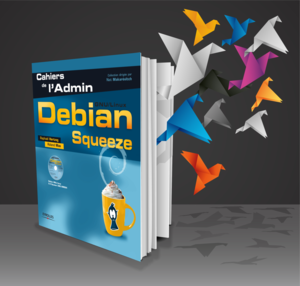
This is my monthly summary of my free software related activities. If you re among the people who made a donation to support my work (70 , thanks everybody!), then you can learn how I spent your money. Otherwise it s just an interesting status update on my various projects. The Debian Administrator s Handbook Spanish translation completed. The Spanish team finished the translation of the book. The PDF build process was not yet ready to build translations so I had to fix this. At the same time, I also improved the mobipocket build script to make use of Amazon s kindlegen when available (since Amazon now requires the use of this tool to generate Mobipocket files that can be distributed on their platform). Once those issues were sorted I made some promotion of this first completed translation because they really deserve some big kudos ! Plans for the French translation. You know that the Debian Administrator s Handbook came to life as a translation of the French book Cahier de l Admin Debian (published by Eyrolles). This means that we currently have a free translation of a proprietary book. It s a bid of an odd situation that I always wanted to fix. I discussed with Eyrolles to find out how we could publish the original book under the same licenses that we picked for the English book and the result is that we setup a new crowdfunding campaign to liberate the French book and then make it an official French translation of the Debian Administrator s Handbook. Read the rest and support us on the ulule project page (a kickstarter like for people who are not based in the US). Liberate the Debian Handbook Debian France I updated our membership management application (galette) to version 0.7.4.1 with numerous bug fixes but the true highlight this month was Solutions Libres et Opensource , a tradeshow in Paris where Tanguy Ortolo, me, and other volunteers (C dric Boutillier, Arnaud G., and some that I have forgotten, thanks to them!), held a Debian booth for two consecutive days (May 28-29). For once we had lots of goodies to sell (buffs, mouse pad, polos, stickers, etc.) and the booth was very well attended. The Debian Booth (Tanguy on the left, Rapha l on the right) Google s Summer of Code Last month I was rater overwhelmed with queries from students who were interested in applying for the Package Tracking System Rewrite project that I offered to mentor as part of Google s Summer of Code. In the end, I got 6 good student applications that Stefano and me evaluated. We selected Marko Lalic. The Community Bonding Period is just starting and we re fleshing out details on how we will organize the work. We ll try to use the IRC channel #debian-qa on OFTC for questions and answers and weekly meetings. Misc Debian packaging I packaged zim 0.60 and with the release of Wheezy, I uploaded to unstable all the packages that I staged in experimental (cpputest, publican). I sponsored the upload of libmicrohttpd 0.9.27-1. I filed a couple of bug reports that I experienced with the upcoming dpkg 1.17.0 (#709172, #709009). In both cases, the package was using a wrongly hardcoded path to dpkg-divert (the binary moved from /usr/sbin/ to /usr/bin/ a while ago and the compatibility symlink is dropped now). I also dealt with #709064 where the user reported upgrade issues related to multiarch. I also filed an upstream bug report on publican to request some way to avoid so much duplication of files (actually I filed it as a response to the Debian bug #708705 that I received). Kali work I had to update OpenVAS for Kali but some parts failed to build in a Debian 7 environment. I diagnosed the problem and submitted a patch upstream. I also got in touch with the Debian OpenVAS maintainer as I wanted to contribute the package back to Debian, but timing issues have pushed this back for a little longer. Thanks See you next month for a new summary of my activities.
One comment Liked this article? Click here. My blog is Flattr-enabled.

3 June 2013

Matthew Garrett: Dealing with UEFI non-volatile memory quirks

Since I wrote this, we've made some worthwhile progress on avoiding damaging Samsung hardware. The first is that the samsung-laptop driver appeared to be causing the firmware to attempt to write to an area of memory that was marked in the chipset, triggering a Machine Check Exception. That was what generated the pstore output that caused the problem originally. The driver now refuses to load if EFI is enabled, which avoids the problem. It's not ideal, since it's currently the only mechanism we have for certain functionality on Samsung laptops, but there you go.

The second problem was that avoiding crashing on boot didn't actually fix the problem in any fundamental way. Even with pstore disabled, it was possible for userspace to fill the nvram and trigger the same problem. Our first approach to this was to prevent any writes to nvram if the UEFI QueryVariableInfo() call reported that more than 50% of the nvram storage space would be used. That was safe, but led to another issue. The nvram storage area is typically implemented as part of the same flash chip as the firmware. Flash isn't arbitrarily accessible - changing the contents of a block typically involves rewriting the entire block. It's impractical to rewrite the entire nvram area on every write, so what actually happens is that deleting variables just results in them being marked as inactive but doesn't actually free up the space. The firmware can later perform some sort of garbage collection to free it up.

This caused us problems, since inactive space that hasn't been garbage collected yet isn't actually available, and as a result firmware implementations tend to count it as used. Say you had 64KB of nvram and wrote 32KB of variables. We'd then refuse to write any more because you'd drop below 50%. So you delete 16KB of the variables you've created and try again. Unfortunately, the firmware still thinks that there's 32KB in use and Linux would still refuse.

If you were lucky, rebooting would trigger a garbage collection run. If you weren't, it wouldn't. Problematic. Our next approach was to try to account for the space actually actively used by the variables, rather than relying on what the firmware told us via QueryVariableInfo(). This seems simple enough - just add up the size of all the variables and subtract that from the overall size to determine how much of the "used" space is actually just old inactive variables that can be ignored. However, there's still some problems there. The first is that each variable has some additional overhead associated with it, and the size of that overhead varies depending on the system vendor. We had to make a conservative guess, which could cause problems if systems had large numbers of small variables. The second is that the only variables the kernel can see are those that are flagged as runtime-visible. There may also be a significant quantity of nvram used to store variables that are only visible in boot services code. We could work around this by adding up sizes while we're still in boot services code, but on some systems calling QueryVariableInfo() before ExitBootServices() results in later calls to GetNextVariable() jumping to invalid addresses and crashing the kernel. Not a great approach.

Meanwhile, Samsung got back to us and let us know that their systems didn't require more than 5KB of nvram space to be available, which meant we could get rid of the 50% value and replace it with 5KB. The hope was that any system that booted with only 5KB of space available in nvram would trigger a garbage collection run. Unfortunately, it turned out that that wasn't true - some systems will only trigger garbage collection if the OS actually makes an attempt to write a variable that won't otherwise fit.

Hence this patch. The new approach is to ask the firmware how much space is available. If the size of the new variable would reduce this to less than 5K, we attempt to create a variable bigger than the remaining space. This should cause the firmware to realise that it's out of room and either (depending on implementation) perform a garbage collection run at runtime or set a flag that will cause the system to perform garbage collection on the next reboot. We then call QueryVariableInfo() again to see whether a garbage collection run actually happened, and if so check whether we now have enough space. If so, we go ahead and write the variable. If not, we tell userspace that there's not enough space.

This seems to work in all the situations I've tested, and it should avoid ending up in a situation where a Samsung can end up bricked. However, it's firmware, so who knows whether it's going to break things for someone else.

comment count unavailable comments

2 June 2013

Vagrant Cascadian: debian alarm clock

I finally used my new alarm clock for it's intended purpose, to wake up far earlier than I would normally be inclined. I set the alarm with the "at" command, playing an ogg file previously downloaded off of libre.fm... and groggily awoke to music of my choosing. Admittedly, my search began looking for a replacement for an aging music player, which had no built-in speakers, so didn't work as an alarm clock. Some time ago, the headphone jack broke, so it had kind of functioned as a glorified clock with 6GB of storage and a very little screen... I wanted something more capable; one of my requirements was that it would be feasible to run Debian a well as being relatively portable. I ended with something a little overpowered for an alarm clock... Hello, openpandora! Sporting a 1GHz ARMv7, 512MB of ram, 512MB built-in storage, two SD card slots, wifi, nearly full keyboard, 800x480 touchscreen, useable mouse nubs, 10 hours of battery life under active use... so it's nearly a netbook replacement. Yay, feature creep! It's far lighter than my netbook and fits in the palm of my hand. It fits in my pocket, but barely. Didn't spend much time using the OS it came with, ngstr m. There was already a wiki page about running Debian squeeze using the armel port, but the hardware looked like it could run armhf. Used qemu-debootstrap to build a Debian Wheezy armhf image on an SD card, and figured out the relatively simple process of booting the kernel shipped with it with an alternate root device. And it worked! But the kernel was a litle bit older than what's was in Wheezy, at the time, so I spent a couple days getting the kernel to build from the latest linux sorce package in Debian. There was a pandora git reposiory for linux 3.2.39, and most of the patches applied cleanly(those that didn't seemed already applied with the newer version). After a few build cycles, managed to get a working kernel, though haven't yet trimmed down the kernel config to my liking. Ideally, it'll get sufficiently upstreamed to be able to use the omap kernel variant. Also put together a package that configures the keyboard map, touchscreen and some cpu frequency scaling settings. Still need to document all that. Spent a week without a laptop or other computer while traveling... and the openpandora running Debian Wheezy held up pretty well.

29 May 2013

Russell Coker: Nexus 4

My wife has had a LG Nexus 4 for about 4 months now so it s time for me to review it and compare it to my Samsung Galaxy S3. A Sealed Case The first thing to note about the Nexus 4 is that it doesn t support changing a battery or using micro-SD storage. The advantage of these design choices is that it allows reduced weight and greater strength compared to what the phone might otherwise be. Such choices would also allow the phone to be slightly cheaper which is a massive advantage, it s worth noting that the Nexus 4 is significantly cheaper than any other device I can buy with comparable specs. My wife s phone has 8G of storage (not RAM thanks Robin) and cost $369 at the start of the year while the current price is $349 for the 8G version and $399 for the 16G version. Of course one down-side of this is that if you need 16G of storage then you need to spend an extra $50 on the 16G phone instead of buying a phone with 8G of storage and inserting a 16GB micro-SD card which costs $19 from OfficeWorks. Also there s no option of using a 32G SD card (which costs less than $50) or a 64G SD card. Battery etc The battery on the Nexus 4 isn t nearly big enough, when playing Ingress it lasts about half as long as my Galaxy S3, about 90 minutes to fully discharge. If it was possible to buy a bigger battery from a company like Mugan Power then the lack of battery capacity wouldn t be such a problem. But as it s impossible to buy a bigger battery (unless you are willing to do some soldering) the only option is an external battery. I was unable to find a Nexus 4 case which includes a battery (which is probably because the Nexus 4 is a lot less common than the Galaxy S3) so my wife had to buy an external battery. If you are serious about playing Ingress with a Nexus 4 then you will end up with a battery in your pocket and cable going to your phone from the battery, this is a real annoyance. While being a cheap fast phone with a clear screen makes it well suited to Ingress the issue of having a cable permanently attached is a real down-side. One significant feature of the Nexus 4 is that it supports wireless charging. I have no immediate plans to use that feature and the wireless charger isn t even on sale in Australia. But if the USB connector was to break then I could buy a wireless charger from the US and keep using the phone, while for every other phone I own a broken connector would render the phone entirely useless. Screen Brightness I have problems with my Galaxy S3 not being bright enough at midday when on auto brightness. I have problems with my wife s Nexus 4 being too bright in most situations other than use at midday. Sometimes at night it s painfully bright. The brightness of the display probably contributes to the excessive battery use. I don t know whether all Nexus 4 devices are like this or whether there is some variance. In any case it would be nice if the automatic screen brightness could be tuned so I could make it brighter on my phone and less bright on my wife s. According to AndroSensor my Galaxy S3 thinks that the ambient light in my computer room is 28 lux while my wife s Nexus 4 claims it s 4 lux. So I guess that part of the problem is the accuracy of the light sensors in the phones. On-Screen Buttons I am a big fan of hardware buttons. Hardware buttons work reliably when your fingers are damp and can be used by feel at night. My first Android phone the Sony-Ericsson Xperia X10 had three hardware buttons for settings, home, and back as well as buttons for power, changing volume, and taking a photo which I found very convenient. My Galaxy S3 has hardware buttons for power, home, and volume control. I think that Android phones should have more hardware buttons not less. Unfortunately it seems that Google and the phone manufacturers disagree with me and the trend is towards less buttons. Now the Nexus 4 only has hardware buttons for power, and volume control. One significant advantage of the Galaxy S3 over the Nexus 4 is that the S3 s settings and back buttons while not implemented in hardware are outside the usable screen area. So the 4.8 1280*720 display is all for application data while the buttons for home, settings, and back on the Nexus 4 take up space on the screen so only a subset of the 4.7 1280*768 is usable by applications. While according to specs the Nexus 4 has a screen almost as big as the Galaxy S3 and a slightly higher resolution in practice it has an obviously smaller screen with fewer usable pixels. Also one of the changes related to having the buttons on-screen means that the settings button is often in the top right corner which I find annoying. I didn t like that aspect of the GUI the first time I used a tablet running Android 3.0 and I still don t like it now. GPS My wife s Nexus 4 seems to be much less accurate than my Galaxy S3 for GPS. I don t know how much of this is due to phone design and how much is due to random factors in manufacturing. I presume that a large portion of it is due to random manufacturing issues because other people aren t complaining about it. Maybe she just got unlucky with an inaccurate phone. Shape and Appearance One feature that I really like in the Samsung Galaxy S is that it has a significant ridge surrounding the screen. If you place a Galaxy S face-down on a desk that makes it a lot less likely to get a scratch on the screen. The LG U990 Viewty also had a similar ridge. Of course the gel case I have bought for every Android phone has solved this problem, but it would really be nice to have a phone that I consider usable without needing to buy such a case. The Nexus 4 has a screen that curves at the edges which if anything makes the problem worse than merely lacking a ridge around the edge. On the up-side the Nexus 4 looks and feels nice before you use it. The back of the Nexus 4 sparkles, that s nice but when you buy a gel case (which doesn t seem to be optional with modern design trends) you don t get to see it. The Nexus 4 is a very attractive package, it s really a pity that they didn t design it to be usable without a gel case. Conclusion Kogan is currently selling the Galaxy S3 with 16G of storage for $429. When comparing that to the 16G version of the Nexus 4 at $399 that means there s a price of $30 to get a SD socket, the option of replacing a battery, one more hardware button, and more screen space. So when comparing the Google offers for the Nexus 4 with the Kogan offer on the Galaxy S3 or the Galaxy Note which also has 16G of storage and sells for $429 the Google offer doesn t seem appealing to me. The Nexus 4 is still a good phone and is working well for my wife, but she doesn t need as much storage as I do. Also when she got her phone the Galaxy S3 was much more expensive than it is now. Also Kogan offer the 16G version of the Nexus 4 for $389 which makes it more appealing when compared to the Galaxy S3. It s surprising that they can beat Google on price. Generally I recommend the Nexus 4 without hesitation to anyone who wants a very capable phone for less than $400 and doesn t need a lot of storage. If you need more storage then the Galaxy S3 is more appealing. Also if you need to use a phone a lot then a Galaxy S3 with a power case works well in situations where the Nexus 4 performs poorly.

28 May 2013

Daniel Pocock: Google's XMPP users left high and dry

A few weeks ago, I was alarmed to discover Empathy's dependency on the Google version of XMPP, particularly for NAT traversal It was surprising to see those fears confirmed so quickly with Google moving away from open XMPP connectivity, particularly for multimedia protocols such as voice and video, leaving open source clients like Empathy who put their trust in Google high-and-dry. With Empathy being the default chat client on the Gnome desktop of Debian and Fedora, this is quite a serious situation. Fortunately, the latest versions of Debian 7 (wheezy) and Fedora 19 (Schrodinger's Cat (beta)) contain their best ever support for VoIP and RTC federation on the server side. Still under construction, the RTCquickStart.org guide tries to make it easier than ever to put the necessary packages to use - anybody who already runs their own mail, DNS or web server can become their own VoIP/SIP/XMPP provider in less than an hour. One particular point to note is that TURN servers work equally well for both SIP and XMPP users. Getting close to 100% support for VoIP users behind NAT requires a TURN server. It is possible to mix and match the reSIProcate TURN server, reTurn with any popular SIP and Jabber servers on Debian, Ubuntu or Fedora. Also look at the Turnserver.org project and RFC 5766 TURN server project I'd strongly encourage those who are concerned about this latest development to come and join the discussion in the Free RTC mailing list sponsored by the Free Software Foundation Europe

Russell Coker: SCSI Failures

For a long time it was widely regarded that SCSI was the interface for all serious drives that were suitable for Enterprise Use or for anything else which requires reliable operation. On the other hand IDE was for cheap disks that were only suitable for home use. The SCSI vs IDE issue continues to this day but now we have SAS and SATA filling the same market niches with the main difference between the current debate and the debate a decade ago being that a SATA disk can be connected on a SAS bus. Both SAS and SATA have a single data cable for each disk which avoids the master/slave configuration on IDE and the issue of bus device ID number (from 0-7 or 0-15) and termination on SCSI. Termination When a high speed electrical signal travels through a cable some portion of the signal will be reflected from any cable end point or any point of damage. To prevent the signal reflection from the end of a cable you can have a set of resistors (or some other terminating device) at the end of the cable, see the Terminator(electrical) Wikipedia page [1] for a brief overview. As an aside I think that page could do with some work, if you are an EE with a bit of spare time then improving that page would be a good thing. SCSI was always designed to have termination while IDE never was. I presume that this was largely due to the cable length (18 for IDE vs 1.5m to 25m for SCSI) and the number of devices (2 for IDE vs 7 or 15 for SCSI). I also presume that some of the problems that I ve had with IDE systems have been related to signal problems that could have been avoided with a terminated bus. My first encounter with SCSI was when working for a small business that focused on WindowsNT software development. Everyone in the office knew a reasonable amount about computers and was happy to adjust the hardware of their own workstation. A room full of people who didn t understand termination who fiddled with SCSI buses tended to give a bad result. On the up-side I learned that a SCSI bus can work most of the time if you have a terminator in the middle of the cable and a hard drive at the end. There have been two occasions when I ve been at ground zero for a large deployment of servers from a company I ll call Moon Computers. In both cases there were two particularly large and expensive servers in a cluster and one of the cluster servers had data loss from bad SCSI termination. This is particularly annoying as the terminators have different colours, all that was needed to get the servers working was to change the hardware to make them look the same. As an aside the company with no backups [2] had one of the servers with bad SCSI termination. Heat SCSI disks and now SAS disks tend to be designed for higher performance, this usually means greater heat dissipation. A disk that dissipates a lot of heat won t necessarily work well in a desktop case with small and quiet fans. This can become a big problem if you have workstations running 24*7 in a hot place (such as any Australian city that s not in Tasmania) and turn the air-conditioner off on the weekends. One of my clients lost a few disks before they determined that IDE disks are the only option for systems that are to survive Australian heat without any proper cooling. Differences between IDE/SATA and SCSI/SAS In 2009 I wrote about vibration and SATA performance [3]. Rumor has it that SCSI/SAS disks are designed to operate in environments where there is a lot of vibration (servers with lots of big fans and fast disks) while IDE/SATA disks are designed for desktop and laptop systems in quiet environments. One thing I d like to do is to test performance of SATA vs SAS disks in a server that vibrates. SCSI/SAS disks have apparently been designed for operation in a RAID array and therefore will give a faster timeout on a read error (so another disk can return the data). While IDE/SATA disks are designed for a non-RAID situation and will spend longer trying to read the data. There are also various claims about the error rates from SCSI/SAS disks being better than those of IDE/SATA disks. But I think that in all cases the error rates are small enough not to be a problem if you use a filesystem like ZFS or BTRFS but they are also large enough to be a significant risk with modern data volumes if you have a lesser filesystem. Data Loss from Storage Failure In the data loss that I ve personally observed from storage failures the loss from SCSI problems (termination and heat) is about equal to all the hardware related data loss I ve seen on IDE disks. Given that the majority of disks I ve been responsible for have been IDE and SATA that s a bad sign for SCSI use in practice. But all serious data loss that I ve seen has involved the use of a single disk (no RAID) and inadequate backups. So a basic RAID-1 or RAID-5 installation will solve most hardware related data loss problems. There was one occasion when heat caused two disks in a RAID-1 to give errors at the same time, but by reading from both disks I managed to get almost all the data back, RAID can save you from some extreme error conditions. That situation would have been ideal for BTRFS or ZFS to recover data. Conclusion SCSI and SAS are designed for servers, using them in non-server systems seems to be a bad idea. Using SATA disks in servers can have problems too, but not typically problems that involve massive data loss. Using technology that is too complex for the people who install it seems risky. That includes allowing programmers to plug SCSI disks into their workstations and whoever it was from Moon computers or their resellers who apparently couldn t properly terminate a SCSI bus. It seems that the biggest advantage of SAS over SCSI is that SAS is simple enough for most people to be able to correctly install it. Making servers similar to the systems that the system administrators use at home seems like a really good idea. I think that one of the biggest benefits of using x86 systems as servers is that skills learned on home PCs can be transferred to administration of servers. Of course it would also be a good idea to have test servers that are identical to servers in production so that the sysadmin team can practice and make mistakes on systems that aren t mission critical, but companies seem to regard that as a waste of money apparently the risk of down-time is cheaper.

Next.

Previous.