Search Results: "cas"

26 December 2014

Vasudev Kamath: Notes: LXC How-To

LXC - Linux Containers allows us to run multiple isolated Linux system under same control host. This will be useful for testing application without changing our existing system. To create an LXC container we use the lxc-create command, it can accepts the template option, with which we can choose the OS we would like to run under the virtual isolated environment. On a Debian system I see following templates supported
[vasudev@rudra: ~/ ]% ls /usr/share/lxc/templates
lxc-alpine*    lxc-archlinux*  lxc-centos*  lxc-debian*    lxc-fedora*  lxc-openmandriva*  lxc-oracle*  lxc-sshd*    lxc-ubuntu-cloud*
lxc-altlinux*  lxc-busybox*    lxc-cirros*  lxc-download*  lxc-gentoo*  lxc-opensuse*      lxc-plamo*   lxc-ubuntu*
For my application testing I wanted to create a Debian container for my By default the template provided by lxc package creates Debian stable container. This can be changed by passing the option to debootstrap after -- as shown below.
sudo MIRROR=http://localhost:9999/debian lxc-create -t debian \
     -f   container.conf -n container-name -- -r sid
-r switch is used to specify the release, MIRROR environment variable is used to choose the required Debian mirror. I wanted to use my own local approx installation, so I can save some bandwidth. container.conf is the configuration file used for creating the LXC, in my case it contains basic information on how container networking should b setup. The configuration is basically taken from LXC Debian wiki
lxc.utsname = aptoffline-dev
lxc.network.type = veth
lxc.network.flags = up
lxc.network.link = br0.1
lxc.network.name = eth0
lxc.network.ipv4 = 192.168.3.2/24
lxc.network.veth.pair = vethvm1
I'm using VLAN setup described in Debian wiki: LXC VLAN Networking page. Below is my interfaces file.
iface eth0.1 inet manual
iface br0.1  inet manual
   bridge_ports eth0.1
   bridge_fd 0
   bridge_maxwait 0
Before launching the LXC make sure you run below command
sudo ifup eth0.1
sudo ifup br0.1
# Also give ip to bridge in same subnet as lxc.network.ipv4
sudo ip addr add 192.168.3.1/24 dev br0.1
I'm giving ip address to bridge so that I can communicate with container from my control host, once it comes up. Now start the container using below command
sudo lxc-start -n container -d -c tty8
We are starting lxc in daemon mode and attaching it to console tty8. If you want, you can drop -d and -c option to start lxc in foreground. But its better you start it in background and attach using lxc-console command shown below.
sudo lxc-console -n container -t tty8
You can detach from console using Ctrl+a q combination and let lxc execute in background. Its also possible to simply ssh into the running container since we have enabled networking. Stopping the container should be done using lxc-stop command, but without -k switch (kill) this command never returned. Even with timeout container is not stopped.
sudo lxc-stop -n container
-r can be used for reboot of container. Since I couldn't get clean shutdown I normally attach the console and issue a halt command in container itself. Not sure if this is the right way, but it gets the thing done. I consider Linux container as a better alternative for spawning a virtual Linux environment instead of running a full blown VM like Virtualbox or VMware.

25 December 2014

Russ Allbery: Review: Bad Pharma

Review: Bad Pharma, by Ben Goldacre
Publisher: Faber and Faber
Copyright: 2012, 2013
Printing: 2014
ISBN: 0-86547-806-6
Format: Trade paperback
Pages: 397
If you have previously read Bad Science by Ben Goldacre, it's doubtful you need me to do anything other than point out that he has a new book. Oh, and it's subtitled How Drug Companies Mislead Doctors and Harm Patients, and it's written with the same indignant determination, clear explanation, and appreciation for real science as Bad Science. If you haven't read Bad Science, I recommend it. You don't have to read it before Bad Pharma, but it's a more approachable start, and a funnier book. Bad Science opens with some obviously horrible examples, and slowly develops the tools required to analyze more advanced and deceptive quackery. Bad Pharma jumps straight into the deep end of statistical biases in data, how and why they're introduced, and why they undermine your health care. This is a more serious book than Bad Science, since it lacks the medical quackery that is so ludicrous it's funny. Everything in Bad Science is successfully sold to someone there are people who believe in candling but most readers of the book can laugh a bit that anyone would believe in such things before getting to the parts of the book where the quackery is widespread and kills people. Bad Pharma focuses on the mainstream pharmaceutical industry and the way that it distorts the scientific process, which leads to serious consequences quite quickly. Goldacre is more pointedly on a mission here than in his previous book. This is not just an expos . It includes detailed recommendations for how to make the drug evaluation process better, and some specific ethical recommendations for doctors to avoid being unduly influenced by drug company marketing. But before that, he provides the best detailed explanation of how the drug research and approval process is supposed to work that I've seen. There's also a lot of good information about how to detect trials and related studies that haven't been done properly, and how to separate marketing language from scientific evidence. Goldacre wisely does not get into all the details of how to do a trial properly, which would be way beyond the scope of this book, but he does provide valuable rules of thumb and red flags that indicate when someone is probably not doing the trial properly. A point that's both frustrating and enlightening, and made very well by this book, is that fixing many of the problems with the drug approval process is not that difficult. Fixing all of them would be exceedingly difficult, of course, since they involve humans, complex financial motivations, the effectiveness of propaganda, and talented people who are paid well to create favorable impressions for new drugs. But we could get quite significant benefits from a few straightforward enhancements of the existing drug approval process, such as requiring that all clinical trials be pre-registered and all trial results published as a prerequisite for any drug approval. Goldacre makes his case for these changes forcefully and persuasively, and with justified anger. The current situation is bad enough for people like me who are only potential patients with no urgent medical issues. For a practicing doctor like Goldacre, it's infuriating to be actively denied the information required to effectively save people's lives. Normally, I find books like this interesting, but depressing and frustratingly limited. It's easy to write books about abuses that currently exist, or the limitations of the current approach. It's much harder to do what Goldacre does here: clearly describe the goals and ideals of drug testing for the lay reader, detail how the current approaches fall short of that goals, and then propose practical and concrete ways to correct the situation. And keep the details interesting and entertaining enough that I enjoyed reading every page of a nearly 400 page book. This is not a book that will fill you with trust or enthusiasm for the medical establishment (anywhere in the world). But it's still oddly comforting: we do know how to do these things properly, and occasionally we even act on that knowledge. These problems are serious, but they should provoke outrage partly because they're correctable and yet aren't being corrected. And there are doctors like Goldacre who are trying to push medicine towards proper use of evidence, research, and knowledge, instead of commercial manipulation. Recommended if you have any interest at all in how medicine or scientific research is actually done, and what its pitfalls look like. Rating: 8 out of 10

23 December 2014

Michael Stapelberg: Debian Code Search: taming the latency tail

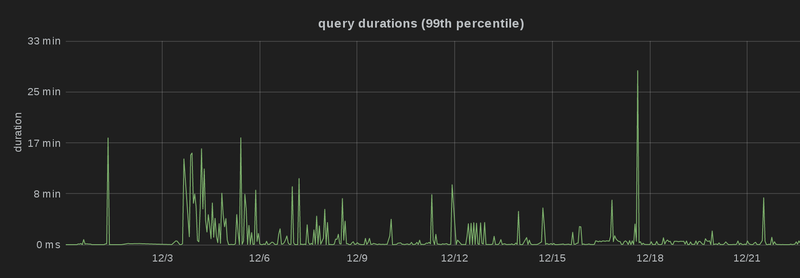
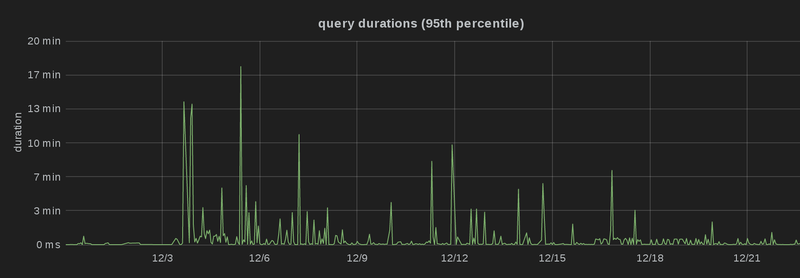
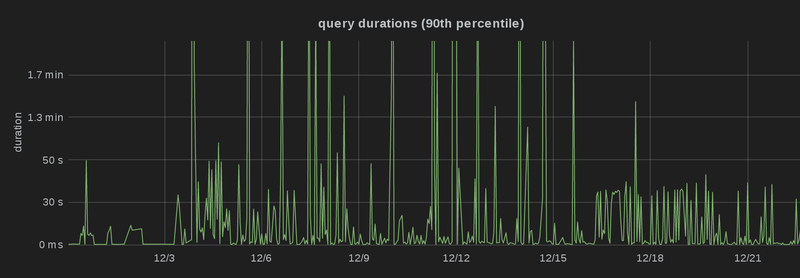
It s been a couple of weeks since I ve launched Debian Code Search Instant, so people have had the chance to use it for a while and that gives me plenty of data points to look at :-). For every query, I log the search term itself as well as the duration the query took to execute. That way, I can easily identify queries that take a long time and see why that is. There is a class of queries for which Debian Code Search (DCS) doesn t perform so well, and that s queries that consist of trigrams which are extremely common. Whenever DCS receives such a query, it needs to search through a lot of files. Note that it doesn t really matter if there are plenty of results or not it s the number of files that potentially contain a result which matters. One such query is arse (we get a lot of curse words). It consists of only two trigrams ( ars and rse ), which are extremely common in program source code. As a couple of examples, the terms parse , sparse , charset and coarse are all matched by that. As an aside, if you really want to search for just arse , use word boundaries, i.e. \barse\b , which also makes the query significantly faster. Fixing the overloaded frontend When DCS first received the query, arse would lead to our frontend server crashing. That was due to (intentionally) unoptimized code we were aggregating all search results from all 6 source backends in memory, sorted them, and then wrote them out to disk. I addressed this in commit d2922fe92 with the following measures:
  1. Instead of keeping the entire result in memory, just write the result to a temporary file on disk ( unsorted.json ) and store pointers into that file in memory, i.e. (offset, length) tuples. In order to sort the results, we also need to store the ranking and the path (to resolve ties and thereby guarantee a stable result order over multiple search queries). For grouping the results by source package, we need to keep the package name.
  2. If you think about it, you don t need the entire path in order to break a tie the hash is enough, as it defines an ordering. That ordering may be different, but any ordering is good enough for the purpose of merely breaking a tie in a deterministic way. I m using Go s hash/fnv, the only non-cryptographic (fast!) hash function that is included in Go s standard library.
  3. Since this was still leading to Out Of Memory errors, I decided to not store a copy of the package name in each search result, but rather use a pointer into a string pool containing all package names. The number of source package names is relatively small, in the order of 20,000, whereas the number of search results can be in the millions. Using the stringpool is a clear win the overhead in the case where #results < #srcpackages is negligible, but as soon as #results > #srcpackages, you save memory.
With all of that fixed, the query became at all possible, albeit with a runtime of around 20 minutes. Double Writing When running such a long-running query, I noticed that the query ran smooth for a while, but then it took multiple seconds without any visible progress at the end of the query before the results appeared. This was due to the frontend ranking the results and then converting unsorted.json into actual result pages. Since we provide results ordered by ranking, but also results grouped by source packages, it was writing every result twice to disk. What s even worse is that due to re-ordering, every read was essentially random (as opposed to sequential reads). What s even worse is that nobody will ever click through all the hundreds of thousands of result pages, so they are prepared entirely in vain. Therefore, with commit c744b236e I made the frontend generate these result pages on demand. This cut down the time for the ranking phase at the end of each query from 20-30 seconds (for big queries) to typically less than one second. Profiling/Monitoring After adding monitoring to each of the source-backends, I realized that during these long-running queries, the disk I/O and network I/O was nowhere near my expectations: each source-backend was sending only a low single-digit number of megabytes per second back to the frontend (typically somewhere between 1 MB/s and 3 MB/s). This didn t match up at all with the bandwidth I observed in earlier performance tests, so I used wget -O /dev/null to send a query and discard the result in order to get some theoretical performance numbers. Suddenly, I was getting more than 10 MB/s worth of results, maxing out the disks with a read rate of about 200 MB/s. So where is the bottleneck? I double-checked that neither the CPU on any of our VMs, nor the network between them was saturated. Note that as of this point, the CPU of the frontend was at roughly 70% (of one core), which didn t seem a lot to me. Then, I followed this excellent tutorial on profiling Go programs to see where the frontend is spending its time. Turns out, the biggest consumer of CPU time was the encoding/json Go package, which is used for deserializing results received from the backend and serializing them again before sending them to the client. Since I was curious about it for a while already, I decided to give cap n proto a try to replace JSON as serialization mechanism for communication between the source backends and the frontend. Switching to it (commit 8efd3b41) brought down the CPU load immensely, and made the query a bit faster. In addition, I killed the next biggest consumer: the lseek(2) syscall, which we used to call with SEEK_CUR and an offset of 0 so that it would tell us the current position. This was necessary in the first place because we don t know in advance how many bytes we re going to write when serializing a result to disk. The replacement is a neat little trick:
type countingWriter int64
func (c *countingWriter) Write(p []byte) (n int, err error)  
    *c += countingWriter(len(p))
    return len(p), nil
 
// [ ]
// Then, use an io.MultiWriter like this:
var written countingWriter
w := io.MultiWriter(s.tempFiles[backendidx], &written)
result.WriteJSON(w)
With some more profiling, the new bottleneck was suddenly the read(2) syscall, issued by the cap n proto deserialization, operating directly on the network connection buffer. strace revealed that crunching through the results of one source backend for a long query, read(2) was called about 250,000 times. By simply using a buffered reader (commit 684467ae), I could reduce that to about 2,000 times. Another bottleneck was the fact that for every processed result, the frontend needed to update the query state, which is shared amongst all goroutines (there is one goroutine for each source backend). All that parallelism isn t very effective if you need to synchronize the state updates in the end. So with commit 5d46a572, I refactored the state to be per-backend, so that locking is only necessary for the first couple of results, and the vast vast majority of results can be processed entirely without locking. This brought down the query time from 20 minutes to about 5 minutes, but I still wasn t happy with the bandwidth: the frontend was doing a bit over 10 MB/s of reads from all source backends combined, whereas with wget I could get around 40 MB/s with the same query. At this point, the CPU utilization was around 7% of one core on the frontend, and profiling didn t immediately reveal an obvious culprit. After a bit of experimenting (by commenting out code here and there ;-)), I figured out that the problem was that the frontend was still converting these results from capnproto buffers to JSON. While that doesn t take a lot of CPU time, it delays the network stream from the source-backend: once the local and remote TCP buffers are full, the source-backend will (intentionally!) not continue with its search, so that it doesn t run out of memory. I m still convinced that s a good idea, and in fact I was able to solve the problem in an elegant way: instead of writing JSON to disk and generating result pages on demand, we now write capnproto directly to disk (commit 466b7f3e) and convert it to JSON only before sending out the result pages. That decreases the overall CPU time since we only need to convert a small fraction of the results to JSON, but most importantly, the frontend is now not in the critical path anymore. It can directly pass the data through, and in fact it uses an io.TeeReader to do exactly that. Conclusion With all of these optimizations, we re now down to about 2.5 minutes for the search query arse , and the architecture of the system actually got simpler to reason about. Most importantly, though, the optimizations don t only play out for a single query, but for many different queries. I ve deployed the optimized version at the 15th of December 2014, and you can see that the 99th, 95th and 90th percentile latency dropped significantly, i.e. there are a lot fewer spikes than before, and more queries are processed faster, which is particularly obvious in the third graph (which is capped at 2 minutes):


Russ Allbery: Review: Wakulla Springs

Review: Wakulla Springs, by Andy Duncan & Ellen Klages
Publisher: Tor
Copyright: October, 2013
ASIN: B00EWZDPH4
Format: Kindle
Pages: 99
This is another nominee for the 2014 Hugo Awards (for works published in 2013), this time in the novella category. In this case, though, I read the free ebook version from Tor (Macmillan) rather than the version from the voter packet, since I usually grab all the free ebooks of Tor.com stories. (Even if I'm quite behind in reading them, since I don't read much short fiction.) As an independently-published novella, it gets its own review in the book category. Wakulla Springs is the story of three generations (and four protagonists) who lived near or visited Wakulla Springs in the Florida panhandle. This is a real place: a huge freshwater springs and underwater cave system, now protected as a national park. Two of the four episodes in this story revolve around the filming of movies: a Tarzan movie and Creature from the Black Lagoon. This actually happened as well, although of course the story takes liberties with the details. This is also the story of race relations in the American deep south: the tense and uncertain interactions between black locals and rich white people, both locals and people from the film industry who came for a brief time and then left again. It's also a story about water, swimming, and the sense of being part of the water and knowing it well. This story doesn't develop any particular point; rather, it's more of a collection of character sketches, grabbing moments in time, glimpsing what it's like to cross racial barriers and to feel at home with one's choices. It's also, in a nicely subtle way, about encountering mythical creatures that are not part of one's world. To the locals, the film stars who visit Wakulla Springs are as wild and strange as the imagined creatures of the swamp, and in their way even more foreign. What this is not, though, is science fiction, or even fantasy. One of the complaints I'd heard about Wakulla Springs in the context of the Hugos was that it didn't qualify as a genre story. I'm usually inclined to dismiss these sorts of complaints, since they're often put forth by people with a far narrower definition of genre than mine. But, having read this story, I have to concur. It's very well-written and engaging, but it's not genre in any sense that I'd define it. There are some rare mentions of mythical creatures, but only in ways that are part of the setting, and which are no more fantastic than I'd expect from many mainstream stories. I'm a bit baffled why an SFF publisher would have bought it for an explicitly SFF forum; I have to assume that it's just because it's well-written and the authors have both written SFF. That said, even though this is not the sort of story I'd normally seek out, I'm still glad I read it. I thought the best part of the story was the first, which follows a black woman who takes a job at the Wakulla Springs resort during the filming of a Tarzan movie. The color lines are simply taken for granted by everyone, but Johnny Weissmuller comes off very well in his fictional representation and adds an enthusiastic energy that plays off well against the thoughtful care of the protagonist. The second part echoes this with a boy as the protagonist, but shifts a generation later. This means the color line is fought instead of simply assumed, although with limited success. I thought this part of the story had the best descriptions of the joy of swimming, and once again the movie folks bring a disruptive and positive change to the tightly-drawn lines of local roles and politics. The third and fourth parts I found slighter, elaborating on the story by showing the reader glimpses of the later life of the first two protagonists, but not, I thought, adding anything fundamental to the story. I'm not sure this would be satisfying if you were looking for a science fiction or fantasy story, but it's a solid mainstream story about race, class, and the joy of knowing and feeling a place. It captures an angle of Hollywood that I've rarely seen in movies: a disruptive and almost subversive playfulness and energy that doesn't fix problems but that does provide moments of escape from the realities of the world, even outside of the film. Worth reading, particularly since it's free. Rating: 7 out of 10

22 December 2014

Erich Schubert: Java sum-of-array comparisons

This is a follow-up to the post by Daniel Lemire on a close topic.
Daniel Lemire hat experimented with boxing a primitive array in an interface, and has been trying to measure the cost.
I must admit I was a bit sceptical about his results, because I have seen Java successfully inlining code in various situations.
For an experimental library I occasionally work on, I had been spending quite a bit of time on benchmarking. Previously, I had used Google Caliper for it (I even wrote an evaluation tool for it to produce better statistics). However, Caliper hasn't seen much updates recently, and there is a very attractive similar tool at openJDK now, too: Java Microbenchmarking Harness (actually it can be used for benchmarking at other scale, too).
Now that I have experience in both, I must say I consider JMH superior, and I have switched over my microbenchmarks to it. One of the nice things is that it doesn't make this distinction of micro vs. macrobenchmarks, and the runtime of your benchmarks is easier to control.
I largely recreated his task using JMH. The benchmark task is easy: compute the sum of an array; the question is how much the cost is when allowing different data structures than double[].
My results, however, are quite different. And the statistics of JMH indicate the differences may be not significant, and thus indicating that Java manages to inline the code properly.
adapterFor       1000000  thrpt  50  836,898   13,223  ops/s
adapterForL      1000000  thrpt  50  842,464   11,008  ops/s
adapterForR      1000000  thrpt  50  810,343    9,961  ops/s
adapterWhile     1000000  thrpt  50  839,369   11,705  ops/s
adapterWhileL    1000000  thrpt  50  842,531    9,276  ops/s
boxedFor         1000000  thrpt  50  848,081    7,562  ops/s
boxedForL        1000000  thrpt  50  840,156   12,985  ops/s
boxedForR        1000000  thrpt  50  817,666    9,706  ops/s
boxedWhile       1000000  thrpt  50  845,379   12,761  ops/s
boxedWhileL      1000000  thrpt  50  851,212    7,645  ops/s
forSum           1000000  thrpt  50  845,140   12,500  ops/s
forSumL          1000000  thrpt  50  847,134    9,479  ops/s
forSumL2         1000000  thrpt  50  846,306   13,654  ops/s
forSumR          1000000  thrpt  50  831,139   13,519  ops/s
foreachSum       1000000  thrpt  50  843,023   13,397  ops/s
whileSum         1000000  thrpt  50  848,666   10,723  ops/s
whileSumL        1000000  thrpt  50  847,756   11,191  ops/s
The postfix is the iteration type: sum using for loops, with local variable for the length (L), or in reverse order (R); while loops (again with local variable for the length). The prefix is the data layout: the primitive array, the array using a static adapter (which is the approach I have been using in many implementations in cervidae) and using a "boxed" wrapper class around the array (roughly the approach that Daniel Lemire has been investigating. On the primitive array, I also included the foreach loop approach (for(double v:array) ).
If you look at the standard deviations, the results are pretty much identical, except for reverse loops. This is not surprising, given the strong inlining capabilities of Java - all of these codes will lead to next to the same CPU code after warmup and hotspot optimization.
I do not have a full explanation of the differences the others have been seeing. There is no "polymorphism" occurring here (at runtime) - there is only a single Array implementation in use; but this was the same with his benchmark.
Here is a visualization of the results (sorted by average):
Result boxplots
As you can see, most results are indiscernible. The measurement standard deviation is higher than the individual differences. If you run the same benchmark again, you will likely get a different ranking.
Note that performance may - drastically - drop once you use multiple adapters or boxing classes in the same hot codepath. Java Hotspot keeps statistics on the classes it sees, and as long as it only sees 1-2 different types, it performs quite aggressive optimizations instead of doing "virtual" method calls.

21 December 2014

Russ Allbery: Review: 2014 Hugos: Novelettes

Review: 2014 Hugos: Novelettes, edited by Loncon 3
Publisher: Loncon 3
Copyright: 2014
Format: Kindle
This is another weird "book review" covering the Hugo-nominated novelettes for the 2014 Hugos (given for works published in 2014) at Loncon 3, the 2014 Worldcon. The "editor" is the pool of attendees and supporting members who chose to nominate works, all of which had been previously edited by other editors in their original publication. I received all of these as part of the Hugo voter's packet for being a supporting member, but they all appear to be available for free on the Internet (at least at the time of this writing). "The Exchange Officers" by Brad Torgersen: An okay, if not particularly ground-breaking, military SF story, ruined for me by the ham-handed introduction of superficial jingoism. The protagonists are doing a tour as remote operators of humanoid battle suits in orbit: not a new premise, but a servicable one. Since this is military SF, they predictably have to defend a space installation against attackers. So we get a bit of drama, a bit of zero-g combat, and the fun of people learning how to remotely operate suits. You've probably read this before, but it passes the time reasonably well. Unfortunately, Torgersen decided to make the villains the Chinese military for no adequately-explained reason. (Well, I'm being kind; I suspect the reason is the standard yellow peril nonsense, but that's less generous.) So there is snide commentary about how only the military understand the Chinese threat and a fair bit of old-fashioned jingoism mixed in to the story, to its detriment. If you like this sort of thing, it's a typical example, although it escapes me why people thought it was exceptional enough to warrant nomination. (5) "The Lady Astronaut of Mars" by Mary Robinette Kowal: Once again, my clear favorite among the stories also won, which is a lovely pattern. Elma was the female astronaut in an alternate history in which manned space exploration continued to grow, leading to permanent settlement on Mars. She spent lots of time being photographed, being the smiling face of the space program, while her husband worked on the math and engineering of the launches. Now, she's an old woman, taking care of her failing and frail husband, her career behind her. Or so she thinks, before an offer that forces an impossible choice between space and staying with her husband for his final days. This is indeed the tear-jerker that it sounds like, but it's not as maudlin as it might sound. Kowal does an excellent job with Elma's characterization: she's no-nonsense, old enough to be confident in her opinions, and knows how to navigate through the world. The story is mixed with nostalgia and memories, including a reminder of just what Elma meant to others. It touches on heroism, symbolism, and the horrible choices around dying loved ones, but I thought it did so deftly and with grace. I was expecting the story to be too obvious, but I found I enjoyed the quotidian feel. It's not a story to read if you want to be surprised, but I loved the small touches. (9) "Opera Vita Aeterna" by Vox Day: Before the review, a note that I consider obligatory. The author of this story is an aggressively misogynistic white supremacist, well-known online for referring to black people as savages and arguing women should not be allowed to vote. To what extent you choose to take that into account when judging his fiction is up to you, but I don't think it should go unsaid. "Opera Vita Aeterna" is the story of a monastery in a typical fantasy world (at least as far as one can tell from this story; readers of Vox Day's fantasy series will probably know more background). At the start of the story, it gets an unexpected visit from an elf. Not just any elf, either, but one of the most powerful magicians of his society. He comes to the monastery out of curiousity about the god that the monks worship and stays for a project of illuminating their scriptures, while having theological debates with the abbot. This story is certainly not the offensive tirade that you might expect from its author. Its biggest problem is that nothing of substance happens in the story, either theologically or via more conventional action. It's a lot of description, a lot of talking, a lot of warmed-over Christian apologetics that dodges most of the hard problems, and a lot of assertions that the elf finds something of interest in this monastery. I can believe this could be the case, but Vox Day doesn't really show why. There is, at the end of the story, some actual drama, but I found it disappointing and pointless. It leads nowhere. The theology has the same problem: elves supposedly have no souls, which is should be the heart of a theological question or conflict Vox Day is constructing, but that conflict dies without any resolution. We know nothing more about the theology of this world at the end of the story than we do at the beginning. Some of the descriptions here aren't bad, and the atmosphere seems to want to develop into a story. But that development never happens, leaving the whole work feeling fundamentally pointless. (4) "The Truth of Fact, the Truth of Feelng" by Ted Chiang: This is another oddly-constructed story, although I think a bit more successful. It's a story in two interwoven parts. One is a fictional essay, told in a non-fiction style, about a man living in a future world with ubiquitous life recording and very efficient search software. Any part of one's life can be easily found and reviewed. The other is the story of a boy from a tribal culture during European colonialism. He learns to read and write, and from that a respect for written records, which come into conflict with the stories that the tribe elders tell about the past. The purpose of both of these stories is to question both the value and the implications of recording everything in a way that preserves and guarantees the facts instead of individual interpretations. The boy's story calls this into question; the narrator's story offers ambiguous support for its value and a deeper plea for giving people space to change. I found the style a bit difficult to get used to, since much of it did not feel like a story. But it grew on me as I read it, and the questions Chiang raises have stuck with me since. The problem of how and when to allow for change in others when we have perfect (or at least vastly improved) memory is both important and complicated, and this is one of the better presentations of the problem that I've seen. It's more of a think-y piece, and closer to non-fiction than a story, but I thought it was worth reading. (8) "The Waiting Stars" by Aliette de Bodard: I keep wanting to like de Bodard's space opera world of AIs and living ships, but it never quite works for me. I've read several stories set in this universe now, and it has some neat ideas, but I always struggle with the characters. This story at least doesn't have quite as much gruesome pregnancy as the previous ones (although there's still some). "The Waiting Stars" opens with a raid on a ship graveyard, an attempt to rescue and "reboot" an AI starship under the guidance of another Mind. This is intermixed with another story about a woman who was apparently rescued in childhood from birthing ship Minds and raised in a sort of foster institution. This feels like a flashback at first, but its interaction with the rest of the story is something more complicated. The conceptual trick de Bodard pulls here is thought-provoking, but once again I struggled to care about all of the characters. I also found the ending discouraging and unsatisfying, which didn't help. Someone who isn't me might really like this story, but it wasn't my thing. (6) Rating: 6 out of 10

Steve McIntyre: UEFI Debian installer work for Jessie, part 2

A month ago , I wrote about my plans for improved (U)EFI support in Jessie. It's about time I gave an update on progress! I spoke about adding support for installing grub-efi into the removable media path (#746662). That went into Debian's grub packages already, but there were a couple of bugs. First of all, the code could end up prompting people about EFI questions even when they didn't have any grub-efi packages installed. Doh! (#773004). Then there was an unexpected bug with case-insensitive file name handling on FAT/VFAT filesystems (#773092). I've posted (and tested!) patches to fix both, hopefully in an upload any day now. Next, I mentioned getting i386 UEFI support going again. This is a major feature that a lot of people have been asking for. It's also going to involve quite a bit of effort... Our existing (amd64) UEFI-capable images in Debian use the standard x86 El Torito CD boot method, with two boot images provided. One of these images gives us the traditional isolinux BIOS-boot support. The second option is an alternate El Torito image, including at a 64-bit version of grub-efi. For most machines, this works just fine - the BIOS or UEFI firmware will automatically pick the correct image and everybody's happy. This even works on our multi-arch i386/amd64 CDs and DVDs - isolinux will boot either kernel from the first El Torito image, or the alternate UEFI image is amd64 only. However, I can now see that there's been a long-standing issue with those multi-arch images, and it's to do with Macs. On the advice of Matthew Garrett, I've borrowed an old 32-bit Intel Mac to help testing, and it's quite instructive in terms of buggy firmware! The firmware on older 32-bit Intel Macs crashes hard when it detects more than one El Torito boot image, and I've now seen this happen myself. I've not had any bug reports about this, so I can only assume that we haven't had many users try that image. As far as I can tell, they've been using the normal i386 images in BIOS boot mode, and then struggling to get bootloaders working afterwards. There are a number of different posts on the net explaining how to do that. That's OK, but... If I now start adding 32-bit UEFI support to our standard set of i386 images, this will prevent users of old Macs from installing Debian. I could just say "screw it" and decide to not support those users at all, but that's not a very nice thing to do. If we want to continue to support them and add 32-bit UEFI support, I'll have to add another flavour of i386 image, either a "Mac special" or a "32-bit UEFI special". I'm not keen on doing that if I could avoid it, but the two options are mutually exclusive. Given the Mac problem is only on older hardware which (hopefully!) will be dying out, I'll probably pick that one as the special-case CD, and I'll make an extra netinst flavour only for those users to boot off. So, I've started playing with i386 UEFI stuff in the last couple of weeks too. I almost immediately found some showstopper behaviour bugs in the i386 versions of efivar and efibootmgr (#773412 and #773007), but I've debugged these with our Debian maintainer (Jared Dominguez) and the upstream developer (Peter Jones) and fixes should be in Jessie very soon. As I mentioned last month, the machines that most people have been requesting support for are the latest Bay Trail-based laptops and tablets. There are using 64-bit Intel Atom CPUs, but crippled with 32-bit UEFI firmware with no BIOS compatibility mode. This makes for some interesting issues. It's probably impossible to get a true answer why these machines are so broken by design, but there are several rumours. As far as I can see, most of these machines seem to ship with a limited version of 32-bit Windows 8.1. 32-bit Windows is smaller than 64-bit Windows, so fits much better in limited on-board storage space. But 32-bit Windows won't boot from 64-bit UEFI, so the firmware needed buggering to match. Ugh! To support these Bay Trail machines properly, we'll want to add a 32-bit UEFI installation option to our 64-bit images. I can tweak our CDs so that both 32-bit and 64-bit versions of grub-efi are included, and the on-board UEFI will load the right one needed. Then I'll need to make sure that all the 64-bit images also include grub-efi-ia32-bin from now on. With some extra logic, we'll need to remember that these new machines need that package installing instead of grub-efi-amd64-bin. It shouldn't be too hard, but let's see! :-) So, I've been out and bought one of these machines, an Asus X205TA. Lucas agreed that Debian will reimburse me (thanks!), so I'm not stuck with spending my own money on an otherwise unwanted machine! I can see via Google that none of the mainstream Linux distros support the Bay Trail machines fully yet, so there's not a lot of documentation yet. Initial boot on the new machine was easy using a quick-hack i386 UEFI image on USB, but from there everything went downhill quickly. I'll need to investigate some more, but the laptop's own keyboard and trackpad are not detected by the installer system. Neither is its built-in WiFi. Yay! I had to go and dig out a USB hub to connect the installer image USB key, a keyboard, mouse and a USB hard drive to the machine, as it only has 2 USB ports. I've taken a complete backup of the on-board 32GB flash before I start experimenting, so I can restore the machine back to its virgin state for future testing. I guess I now have a project to keep me busy over Christmas...! In other news, we've been continuing work on UEFI support for and within the new arm64 port. My ARM/Linaro colleague Leif Lindholm has been back-porting upstream kernel features and bug fixes to make d-i work, and filing Debian bugs when silly things break on arm64 because people don't think about other architectures (e.g #773311, doh!). As there are more and more people interested in (U)EFI support these days, I've also proposed that we create a new debian-efi mailing list to help focus discussion. See #773327 and follow up there if you think you'd use the list too! You can help! Same as 2 years ago, I'll need help testing some of these images. For the 32-bit UEFI support, I now have some relevant hardware myself, but testing on other machines too will be very important! I'll start pushing unofficial Jessie EFI test images shortly - watch this space.

20 December 2014

Rudy Godoy: Apache Phoenix for Cloudera CDH

Apache Phoenix is a relational database layer over HBase delivered as a client-embedded JDBC driver targeting low latency queries over HBase data. Apache Phoenix takes your SQL query, compiles it into a series of HBase scans, and orchestrates the running of those scans to produce regular JDBC result sets. What the above statement means for developers or data scientists is that you can talk SQL to your HBase cluster. Sounds good right? Setting up Phoenix on Cloudera CDH can be really frustrating and time-consuming. I wrapped-up references from across the web with my own findings to have both play nice. Building Apache Phoenix Because of dependency mismatch for the pre-built binaries, supporting Cloudera s CDH requires to build Phoenix using the versions that match the CDH deployment. The CDH version I used is CDH4.7.0. This guide applies for any version of CDH4+. Note: You can find CDH components version in the CDH Packaging and Tarball Information section for the Cloudera Release Guide . Current release information (CDH5.2.1) is available in this link. Preparing Phoenix build environment Phoenix can be built using maven or gradle. General instructions can be found in the Building Phoenix Project webpage. Before building Phoenix you need to have: Checkout correct Phoenix branch Phoenix has two major release versions: Clone the Phoenix git repository
git clone https://github.com/apache/phoenix.git
Work with the correct branch
git fetch origin
git checkout 3.2
Modify dependencies to match CDH Before building Phoenix, you will need to modify the dependencies to match the version of CDH you are trying to support. Edit phoenix/pom.xml and do the following changes: Add Cloudera s Maven repository
+  <repository>
+  <id>cloudera</id>
+  https://repository.cloudera.com/artifactory/cloudera-repos/
+  </repository>
Change component versions to match CDH s.
  
-  <hadoop-one.version>1.0.4</hadoop-one.version>
-  <hadoop-two.version>2.0.4-alpha</hadoop-two.version>
+  <hadoop-one.version>2.0.0-mr1-cdh4.7.0</hadoop-one.version>
+  <hadoop-two.version>2.0.0-cdh4.7.0</hadoop-two.version>
  <!-- Dependency versions -->
-  <hbase.version>0.94.19
+  <hbase.version>0.94.15-cdh4.7.0
  <commons-cli.version>1.2</commons-cli.version>
-  <hadoop.version>1.0.4
+  <hadoop.version>2.0.0-cdh4.7.0
  <pig.version>0.12.0</pig.version>
  <jackson.version>1.8.8</jackson.version>
  <antlr.version>3.5</antlr.version>
  <log4j.version>1.2.16</log4j.version>
  <slf4j-api.version>1.4.3.jar</slf4j-api.version>
  <slf4j-log4j.version>1.4.3</slf4j-log4j.version>
-  <protobuf-java.version>2.4.0</protobuf-java.version>
+  <protobuf-java.version>2.4.0a</protobuf-java.version>
  <commons-configuration.version>1.6</commons-configuration.version>
  <commons-io.version>2.1</commons-io.version>
  <commons-lang.version>2.5</commons-lang.version>
Change target version, only if you are building for Java 6. CDH4 is built for JRE 6.
  <artifactId>maven-compiler-plugin</artifactId>
  <version>3.0</version>
  <configuration>
-  <source>1.7</source>
-  <target>1.7</target>
+  <source>1.6</source>
+  <target>1.6</target>
  </configuration>
Phoenix building Once, you have made the changes you are set to build Phoenix. Our CDH4.7.0 cluster uses Hadoop 2, so make sure to activate the hadoop2 profile.
mvn package -DskipTests -Dhadoop.profile=2
If everything goes well, you should see the following result:
[INFO] ------------------------------------------------------------------------
[INFO] Reactor Summary:
[INFO]
[INFO] Apache Phoenix .................................... SUCCESS [2.729s]
[INFO] Phoenix Hadoop Compatibility ...................... SUCCESS [0.882s]
[INFO] Phoenix Core ...................................... SUCCESS [24.040s]
[INFO] Phoenix - Flume ................................... SUCCESS [1.679s]
[INFO] Phoenix - Pig ..................................... SUCCESS [1.741s]
[INFO] Phoenix Hadoop2 Compatibility ..................... SUCCESS [0.200s]
[INFO] Phoenix Assembly .................................. SUCCESS [30.176s]
[INFO] ------------------------------------------------------------------------
[INFO] BUILD SUCCESS
[INFO] ------------------------------------------------------------------------
[INFO] Total time: 1:02.186s
[INFO] Finished at: Mon Dec 15 13:18:48 PET 2014
[INFO] Final Memory: 45M/1330M
[INFO] ------------------------------------------------------------------------
Phoenix Server component deployment Since Phoenix is a JDBC layer on top of HBase a server component has to be deployed on every HBase node. The goal is to have Phoenix server component added to HBase classpath. You can achieve this goal either by copying the server component directly to HBase s lib directory, or copy the component to an alternative path then modify HBase classpath definition. For the first approach, do:
cp phoenix-assembly/target/phoenix-3.2.3-SNAPSHOT-server.jar /opt/cloudera/parcels/CDH/lib/hbase/lib/
Note: In this case CDH is a synlink to the current active CDH version. For the second approach, do:
cp phoenix-assembly/target/phoenix-3.2.3-SNAPSHOT-server.jar /opt/phoenix/
Then add the following line to /etc/hbase/conf/hbase-env.sh
/etc/hbase/conf/hbase-env.sh
export HBASE_CLASSPATH_PREFIX=/opt/phoenix/phoenix-3.2.3-SNAPSHOT-server.jar
Wether you ve used any of the methods, you have to restart HBase. If you are using Cloudera Manager, restart the HBase service. To validate that Phoenix is on HBase class path, do:
sudo -u hbase hbase classpath   tr ':' '\n'   grep phoenix
Phoenix server validation Phoenix provides a set of client tools that you can use to validate the server component functioning. However, since we are supporting CDH4.7.0 we ll need to make few changes to such utilities so they use the correct dependencies. phoenix/bin/sqlline.py: sqlline.py is a wrapper for the JDBC client, it provides a SQL console interface to HBase through Phoenix.
index f48e527..bf06148 100755
--- a/bin/sqlline.py
+++ b/bin/sqlline.py
@@ -53,7 +53,8 @@ colorSetting = "true"
 if os.name == 'nt':
  colorSetting = "false"
-java_cmd = 'java -cp "' + phoenix_utils.hbase_conf_path + os.pathsep + phoenix_utils.phoenix_client_jar + \
+extrajars="/opt/cloudera/parcels/CDH/lib/hadoop/lib/commons-collections-3.2.1.jar:/opt/cloudera/parcels/CDH/lib/hadoop/hadoop-auth-2.0.0-cdh4.7.0.jar:/opt/cloudera/parcels/CDH/lib/hadoop/hadoop-common-2.0.0-cdh4.7.0.jar:/opt/cloudera/parcerls/CDH/lib/oozie/libserver/hbase-0.94.15-cdh4.7.0.jar"
+java_cmd = 'java -cp ".' + os.pathsep + extrajars + os.pathsep + phoenix_utils.hbase_conf_path + os.pathsep + phoenix_utils.phoenix_client_jar + \
  '" -Dlog4j.configuration=file:' + \
  os.path.join(phoenix_utils.current_dir, "log4j.properties") + \
  " sqlline.SqlLine -d org.apache.phoenix.jdbc.PhoenixDriver \
phoenix/bin/psql.py: psql.py is a wrapper tool that can be used to create and populate HBase tables.
index 34a95df..b61fde4 100755
--- a/bin/psql.py
+++ b/bin/psql.py
@@ -34,7 +34,8 @@ else:
 # HBase configuration folder path (where hbase-site.xml reside) for
 # HBase/Phoenix client side property override
-java_cmd = 'java -cp "' + phoenix_utils.hbase_conf_path + os.pathsep + phoenix_utils.phoenix_client_jar + \
+extrajars="/opt/cloudera/parcels/CDH/lib/hadoop/lib/commons-collections-3.2.1.jar:/opt/cloudera/parcels/CDH/lib/hadoop/hadoop-auth-2.0.0-cdh4.7.0.jar:/opt/cloudera/parcels/CDH/lib/hadoop/hadoop-common-2.0.0-cdh4.7.0.jar:/opt/cloudera/parcerls/CDH/lib/oozie/libserver/hbase-0.94.15-cdh4.7.0.jar"
+java_cmd = 'java -cp ".' + os.pathsep + extrajars + os.pathsep + phoenix_utils.hbase_conf_path + os.pathsep + phoenix_utils.phoenix_client_jar + \
  '" -Dlog4j.configuration=file:' + \
  os.path.join(phoenix_utils.current_dir, "log4j.properties") + \
  " org.apache.phoenix.util.PhoenixRuntime " + args
After you have done such changes you can test connectivity by issuing the following commands:
./bin/sqlline.py zookeeper.local
Setting property: [isolation, TRANSACTION_READ_COMMITTED]
issuing: !connect jdbc:phoenix:zookeeper.local none none org.apache.phoenix.jdbc.PhoenixDriver
Connecting to jdbc:phoenix:zookeeper.local
14/12/16 19:26:10 WARN conf.Configuration: dfs.df.interval is deprecated. Instead, use fs.df.interval
14/12/16 19:26:10 WARN conf.Configuration: hadoop.native.lib is deprecated. Instead, use io.native.lib.available
14/12/16 19:26:10 WARN conf.Configuration: fs.default.name is deprecated. Instead, use fs.defaultFS
14/12/16 19:26:10 WARN conf.Configuration: topology.script.number.args is deprecated. Instead, use net.topology.script.number.args
14/12/16 19:26:10 WARN conf.Configuration: dfs.umaskmode is deprecated. Instead, use fs.permissions.umask-mode
14/12/16 19:26:10 WARN conf.Configuration: topology.node.switch.mapping.impl is deprecated. Instead, use net.topology.node.switch.mapping.impl
14/12/16 19:26:11 WARN conf.Configuration: fs.default.name is deprecated. Instead, use fs.defaultFS
14/12/16 19:26:11 WARN util.NativeCodeLoader: Unable to load native-hadoop library for your platform... using builtin-java classes where applicable
14/12/16 19:26:12 WARN conf.Configuration: fs.default.name is deprecated. Instead, use fs.defaultFS
Connected to: Phoenix (version 3.2)
Driver: PhoenixEmbeddedDriver (version 3.2)
Autocommit status: true
Transaction isolation: TRANSACTION_READ_COMMITTED
Building list of tables and columns for tab-completion (set fastconnect to true to skip)...
77/77 (100%) Done
Done
sqlline version 1.1.2
0: jdbc:phoenix:zookeeper.local>
Then, you can either issue SQL-commands or Phoenix-commands.
0: jdbc:phoenix:zookeeper.local> !tables
+------------------------------------------+------------------------------------------+------------------------------------------+---------------------------+
  TABLE_CAT    TABLE_SCHEM    TABLE_NAME    TABLE_TYPE  
+------------------------------------------+------------------------------------------+------------------------------------------+---------------------------+
  null    SYSTEM    CATALOG    SYSTEM TABLE   
  null    SYSTEM    SEQUENCE    SYSTEM TABLE   
  null    SYSTEM    STATS    SYSTEM TABLE   
  null    null    STOCK_SYMBOL    TABLE   
  null    null    WEB_STAT    TABLE   
+------------------------------------------+------------------------------------------+------------------------------------------+---------------------------+

18 December 2014

Mario Lang: deluXbreed #2 is out!

The third installment of my crossbreed digital mix podcast is out! This time, I am featuring Harder & Louder and tracks from Behind the Machine and the recently released Remixes.
  1. Apolloud - Nagazaki
  2. Apolloud - Hiroshima
  3. SA+AN - Darksiders
  4. Im Colapsed - Cleaning 8
  5. Micromakine & Switch Technique - Ascension
  6. Micromakine - Cyberman (Dither Remix)
  7. Micromakine - So Good! (Synapse Remix)
How was DarkCast born and how is it done? I always loved 175BPM music. It is an old thing that is not going away soon :-). I recently found that there is a quite active culture going on, at least on BandCamp. But single tracks are just that, not really fun to listen to in my opinion. This sort of music needs to be mixed to be fun. In the past, I used to have most tracks I like/love as vinyl, so I did some real-world vinyl mixing myself. But these days, most fun music is only available digitally, at least easily. Some people still do vinyl releases, but they are actually rare. So for my personal enjoyment, I started to digitally mix tracks I really love, such that I can listen to them without "interruption". And since I am an iOS user since three years now, using the podcast format to get stuff onto my devices was quite a natural choice. I use SoX and a very small shell script to create these mixes. Here is a pseudo-template:
sox --combine mix-power \
" sox \" sox 1.flac -p\" \" sox 3.flac -p speed 0.987 delay 2:28.31 2:28.31\" -p" \
" sox \" sox 2.flac -p delay 2:34.1 2:34.1\" -p" \
mix.flac
As you can imagine, it is quite a bit of fiddling to get these scripts to do what you want. But it is a non-graphical method to get things done. If you know of a better tool, possibly with a bit of real-time controls, to get the same job done, wihtout having to resort to a damn GUI, let me know.

17 December 2014

Gregor Herrmann: GDAC 2014/17

my list of IRC channels (& the list of people I'm following on micro-blogging platforms) has a heavy debian bias. a thing I noticed today is that I had read (or at least: seen) messages in 6 languages (English, German, Castilian, Catalan, French, Italian). thanks guys for the free language courses :) (& the opportunity to at least catch a glimpse into other cultures)
this posting is part of GDAC (gregoa's debian advent calendar), a project to show the bright side of debian & why it's fun for me to contribute.

15 December 2014

Gustavo Noronha Silva: Web Engines Hackfest 2014

For the 6th year in a row, Igalia has organized a hackfest focused on web engines. The 5 years before this one were actually focused on the GTK+ port of WebKit, but the number of web engines that matter to us as Free Software developers and consultancies has grown, and so has the scope of the hackfest. It was a very productive and exciting event. It has already been covered by Manuel Rego, Philippe Normand, Sebastian Dr ge and Andy Wingo! I am sure more blog posts will pop up. We had Martin Robinson telling us about the new Servo engine that Mozilla has been developing as a proof of concept for both Rust as a language for building big, complex products and for doing layout in parallel. Andy gave us a very good summary of where JS engines are in terms of performance and features. We had talks about CSS grid layouts, TyGL a GL-powered implementation of the 2D painting backend in WebKit, the new Wayland port, announced by Zan Dobersek, and a lot more. With help from my colleague ChangSeok OH, I presented a description of how a team at Collabora led by Marco Barisione made the combination of WebKitGTK+ and GNOME s web browser a pretty good experience for the Raspberry Pi. It took a not so small amount of both pragmatic limitations and hacks to get to a multi-tab browser that can play youtube videos and be quite responsive, but we were very happy with how well WebKitGTK+ worked as a base for that. One of my main goals for the hackfest was to help drive features that were lingering in the bug tracker for WebKitGTK+. I picked up a patch that had gone through a number of iterations and rewrites: the HTML5 notifications support, and with help from Carlos Garcia, managed to finish it and land it at the last day of the hackfest! It provides new signals that can be used to authorize notifications, show and close them. To make notifications work in the best case scenario, the only thing that the API user needs to do is handle the permission request, since we provide a default implementation for the show and close signals that uses libnotify if it is available when building WebKitGTK+. Originally our intention was to use GNotification for the default implementation of those signals in WebKitGTK+, but it turned out to be a pain to use for our purposes. GNotification is tied to GApplication. This allows for some interesting features, like notifications being persistent and able to reactivate the application, but those make no sense in our current use case, although that may change once service workers become a thing. It can also be a bit problematic given we are a library and thus have no GApplication of our own. That was easily overcome by using the default GApplication of the process for notifications, though. The show stopper for us using GNotification was the way GNOME Shell currently deals with notifications sent using this mechanism. It will look for a .desktop file named after the application ID used to initialize the GApplication instance and reject the notification if it cannot find that. Besides making this a pain to test our test browser would need a .desktop file to be installed, that would not work for our main API user! The application ID used for all Web instances is org.gnome.Epiphany at the moment, and that is not the same as any of the desktop files used either by the main browser or by the web apps created with it. For the future we will probably move Epiphany towards this new era, and all users of the WebKitGTK+ API as well, but the strictness of GNOME Shell would hurt the usefulness of our default implementation right now, so we decided to stick to libnotify for the time being. Other than that, I managed to review a bunch of patches during the hackfest, and took part in many interesting discussions regarding the next steps for GNOME Web and the GTK+ and Wayland ports of WebKit, such as the potential introduction of a threaded compositor, which is pretty exciting. We also tried to have Bastien Nocera as a guest participant for one of our sessions, but it turns out that requires more than a notebook on top of a bench hooked up to a TV to work well. We could think of something next time ;D. I d like to thank Igalia for organizing and sponsoring the event, Collabora for sponsoring and sending ChangSeok and myself over to Spain from far away Brazil and South Korea, and Adobe for also sponsoring the event! Hope to see you all next year!
Web Engines Hackfest 2014 sponsors: Adobe, Collabora and Igalia

Web Engines Hackfest 2014 sponsors: Adobe, Collabora and Igalia

Thomas Goirand: Supporting 3 init systems in OpenStack packages

tl;dr: Providing support for all 3 init systems (sysv-rc, Upstart and systemd) isn t hard, and generating the init scripts / Upstart job / systemd using a template system is a lot easier than I previously thought. As always, when writing this kind of blog post, I do expect that others will not like what I did. But that s the point: give me your opinion in a constructive way (please be polite even if you don t like what you see I had too many times had to read harsh comments), and I ll implement your ideas if I find it nice. History of the implementation: how we came to the idea I had no plan to do this. I don t believe what I wrote can be generalized to all of the Debian archive. It s just that I started doing things, and it made sense when I did it. Let me explain how it happened. Since it s clear that many, and especially the most advanced one, may have an opinion about which init system they prefer, and because I also support Ubuntu (at least Trusty), I though it was a good idea to support all the main init system: sysv-rc, Upstart and systemd. Though I have counted (for the sake of being exact in this blog) : OpenStack in Debian contains currently 64 init scripts to run daemons in total. That s quite a lot. A way too much to just write them, all by hand. Though that s what I was doing for the last years until this the end of this last summer! So, doing all by hand, I first started implementing Upstart. Its support was there only when building in Ubuntu (which isn t the correct thing to do, this is now fixed, read further ). Then we thought about adding support for systemd. Gustavo Panizzo, one of the contributors in the OpenStack packages, started implementing it in Keystone (the auth server for OpenStack) for the Juno release which was released this October. He did that last summer, early enough so we didn t expect anyone to use the Juno branch Keystone. After some experiments, we had kind of working. What he did was invoking /etc/init.d/keystone start-systemd , which was still using start-stop-daemon. Yes, that s not perfect, and it s better to use systemd foreground process handling, but at least, we had a unique place where to write the startup scripts, where we check the /etc/default for the logging configuration, configure the log file, and so on. Then around in october, I took a step backward to see the whole picture with sysv-rc scripts, and saw the mess, with all the tiny, small difference between them. It became clear that I had to do something to make sure they were all the same, with the support for the same things (like which log system to use, where to store the PID, create /var/lib/project, /var/run/project and so on ). Last, on this month of December, I was able to fix the remaining issues for systemd support, thanks to the awesome contribution of Mikael Cluseau on the Alioth OpenStack packaging list. Now, the systemd unit file is still invoking the init script, but it s not using start-stop-daemon anymore, no PID file involved, and daemons are used as systemd foreground processes. Finally, daemons service files are also activated on installation (they were not previously). Implementation So I took the simplistic approach to use always the same template for the sysv-rc switch/case, and the start and stop functions, happening it at the end of all debian/*.init.in scripts. I started to try to reduce the number of variables, and I was surprised of the result: only a very small part of the init scripts need to change from daemon to daemon. For example, for nova-api, here s the init script (LSB header stripped-out):
DESC="OpenStack Compute API"
PROJECT_NAME=nova
NAME=$ PROJECT_NAME -api
That is it: only 3 lines, defining only the name of the daemon, the name of the project it attaches (eg: nova, cinder, etc.), and a long description. There s of course much more complicated init scripts (see the one for neutron-server in the Debian archive for example), but the vast majority only needs the above. Here s the sysv-rc init script template that I currently use:
#!/bin/sh
# The content after this line comes from openstack-pkg-tools
# and has been automatically added to a .init.in script, which
# contains only the descriptive part for the daemon. Everything
# else is standardized as a single unique script.
# Author: Thomas Goirand <zigo@debian.org>
# PATH should only include /usr/* if it runs after the mountnfs.sh script
PATH=/sbin:/usr/sbin:/bin:/usr/bin
if [ -z "$ DAEMON " ] ; then
	DAEMON=/usr/bin/$ NAME 
fi
PIDFILE=/var/run/$ PROJECT_NAME /$ NAME .pid
if [ -z "$ SCRIPTNAME " ] ; then
	SCRIPTNAME=/etc/init.d/$ NAME 
fi
if [ -z "$ SYSTEM_USER " ] ; then
	SYSTEM_USER=$ PROJECT_NAME 
fi
if [ -z "$ SYSTEM_USER " ] ; then
	SYSTEM_GROUP=$ PROJECT_NAME 
fi
if [ "$ SYSTEM_USER " != "root" ] ; then
	STARTDAEMON_CHUID="--chuid $ SYSTEM_USER :$ SYSTEM_GROUP "
fi
if [ -z "$ CONFIG_FILE " ] ; then
	CONFIG_FILE=/etc/$ PROJECT_NAME /$ PROJECT_NAME .conf
fi
LOGFILE=/var/log/$ PROJECT_NAME /$ NAME .log
if [ -z "$ NO_OPENSTACK_CONFIG_FILE_DAEMON_ARG " ] ; then
	DAEMON_ARGS="$ DAEMON_ARGS  --config-file=$ CONFIG_FILE "
fi
# Exit if the package is not installed
[ -x $DAEMON ]   exit 0
# If ran as root, create /var/lock/X, /var/run/X, /var/lib/X and /var/log/X as needed
if [ "x$USER" = "xroot" ] ; then
	for i in lock run log lib ; do
		mkdir -p /var/$i/$ PROJECT_NAME 
		chown $ SYSTEM_USER  /var/$i/$ PROJECT_NAME 
	done
fi
# This defines init_is_upstart which we use later on (+ more...)
. /lib/lsb/init-functions
# Manage log options: logfile and/or syslog, depending on user's choosing
[ -r /etc/default/openstack ] && . /etc/default/openstack
[ -r /etc/default/$NAME ] && . /etc/default/$NAME
[ "x$USE_SYSLOG" = "xyes" ] && DAEMON_ARGS="$DAEMON_ARGS --use-syslog"
[ "x$USE_LOGFILE" != "xno" ] && DAEMON_ARGS="$DAEMON_ARGS --log-file=$LOGFILE"
do_start()  
	start-stop-daemon --start --quiet --background $ STARTDAEMON_CHUID  --make-pidfile --pidfile $ PIDFILE  --chdir /var/lib/$ PROJECT_NAME  --startas $DAEMON \
			--test > /dev/null   return 1
	start-stop-daemon --start --quiet --background $ STARTDAEMON_CHUID  --make-pidfile --pidfile $ PIDFILE  --chdir /var/lib/$ PROJECT_NAME  --startas $DAEMON \
			-- $DAEMON_ARGS   return 2
 
do_stop()  
	start-stop-daemon --stop --quiet --retry=TERM/30/KILL/5 --pidfile $PIDFILE
	RETVAL=$?
	rm -f $PIDFILE
	return "$RETVAL"
 
do_systemd_start()  
	exec $DAEMON $DAEMON_ARGS
 
case "$1" in
start)
	init_is_upstart > /dev/null 2>&1 && exit 1
	log_daemon_msg "Starting $DESC" "$NAME"
	do_start
	case $? in
		0 1) log_end_msg 0 ;;
		2) log_end_msg 1 ;;
	esac
;;
stop)
	init_is_upstart > /dev/null 2>&1 && exit 0
	log_daemon_msg "Stopping $DESC" "$NAME"
	do_stop
	case $? in
		0 1) log_end_msg 0 ;;
		2) log_end_msg 1 ;;
	esac
;;
status)
	status_of_proc "$DAEMON" "$NAME" && exit 0   exit $?
;;
systemd-start)
	do_systemd_start
;;  
restart force-reload)
	init_is_upstart > /dev/null 2>&1 && exit 1
	log_daemon_msg "Restarting $DESC" "$NAME"
	do_stop
	case $? in
	0 1)
		do_start
		case $? in
			0) log_end_msg 0 ;;
			1) log_end_msg 1 ;; # Old process is still running
			*) log_end_msg 1 ;; # Failed to start
		esac
	;;
	*) log_end_msg 1 ;; # Failed to stop
	esac
;;
*)
	echo "Usage: $SCRIPTNAME  start stop status restart force-reload systemd-start " >&2
	exit 3
;;
esac
exit 0
Nothing particularly fancy here You ll noticed that it s really OpenStack centric (see the LOGFILE and CONFIGFILE things ). You may have also noticed the call to init_is_upstart which is needed for upstart support. I m not sure if it s at the correct place in the init script. Should I put that on top of the script? Was I right with the exit values for it? Please send me your comments Then I thought about generalizing all of this. Because not only the sysv-rc scripts needed to be squared-up, but also Upstart. The approach here was to source the sysv-rc script in debian/*.init.in, and then generate the Upstart job accordingly, using the above 3 variables (or more as needed). Here, the fun is that, instead of taking the approach of calculating everything at runtime with the sysv-rc, for Upstart jobs, many things are calculated at build time. For each debian/*.init.in script that the debian/rules finds, pkgos-gen-upstart-job is called. Here s pkgos-gen-upstart-job:
#!/bin/sh
INIT_TEMPLATE=$ 1 
UPSTART_FILE= echo $ INIT_TEMPLATE    sed 's/.init.in/.upstart/' 
# Get the variables defined in the init template
. $ INIT_TEMPLATE 
## Find out what should go in After=
#SHOULD_START= cat $ INIT_TEMPLATE    grep "# Should-Start:"   sed 's/# Should-Start://' 
#
#if [ -n "$ SHOULD_START " ] ; then
#	AFTER="After="
#	for i in $ SHOULD_START  ; do
#		AFTER="$ AFTER $ i .service "
#	done
#fi
if [ -z "$ DAEMON " ] ; then
        DAEMON=/usr/bin/$ NAME 
fi
PIDFILE=/var/run/$ PROJECT_NAME /$ NAME .pid
if [ -z "$ SCRIPTNAME " ] ; then
	SCRIPTNAME=/etc/init.d/$ NAME 
fi
if [ -z "$ SYSTEM_USER " ] ; then
	SYSTEM_USER=$ PROJECT_NAME 
fi
if [ -z "$ SYSTEM_GROUP " ] ; then
	SYSTEM_GROUP=$ PROJECT_NAME 
fi
if [ "$ SYSTEM_USER " != "root" ] ; then
	STARTDAEMON_CHUID="--chuid $ SYSTEM_USER :$ SYSTEM_GROUP "
fi
if [ -z "$ CONFIG_FILE " ] ; then
	CONFIG_FILE=/etc/$ PROJECT_NAME /$ PROJECT_NAME .conf
fi
LOGFILE=/var/log/$ PROJECT_NAME /$ NAME .log
DAEMON_ARGS="$ DAEMON_ARGS  --config-file=$ CONFIG_FILE "
echo "description \"$ DESC \"
author \"Thomas Goirand <zigo@debian.org>\"
start on runlevel [2345]
stop on runlevel [!2345]
chdir /var/run
pre-start script
	for i in lock run log lib ; do
		mkdir -p /var/\$i/$ PROJECT_NAME 
		chown $ SYSTEM_USER  /var/\$i/$ PROJECT_NAME 
	done
end script
script
	[ -x \"$ DAEMON \" ]   exit 0
	DAEMON_ARGS=\"$ DAEMON_ARGS \"
	[ -r /etc/default/openstack ] && . /etc/default/openstack
	[ -r /etc/default/\$UPSTART_JOB ] && . /etc/default/\$UPSTART_JOB
	[ \"x\$USE_SYSLOG\" = \"xyes\" ] && DAEMON_ARGS=\"\$DAEMON_ARGS --use-syslog\"
	[ \"x\$USE_LOGFILE\" != \"xno\" ] && DAEMON_ARGS=\"\$DAEMON_ARGS --log-file=$ LOGFILE \"
	exec start-stop-daemon --start --chdir /var/lib/$ PROJECT_NAME  \\
		$ STARTDAEMON_CHUID  --make-pidfile --pidfile $ PIDFILE  \\
		--exec $ DAEMON  -- --config-file=$ CONFIG_FILE  \$ DAEMON_ARGS 
end script
" >$ UPSTART_FILE 
The only thing which I don t know how to do, is how to implement the Should-Start / Should-Stop in an Upstart job. Can anyone shoot me a mail and tell me the solution? Then, I wanted to add support for systemd. Here, we cheated, since we only just called the sysv-rc script from the systemd unit, however, the systemd-start target uses exec, so the process stays in the foreground. It s also much smaller than the Upstart thing. However, here, I could implement the After thing, corresponding to the Should-Start:
#!/bin/sh
INIT_TEMPLATE=$ 1 
SERVICE_FILE= echo $ INIT_TEMPLATE    sed 's/.init.in/.service/' 
# Get the variables defined in the init template
. $ INIT_TEMPLATE 
if [ -z "$ SCRIPTNAME " ] ; then
	SCRIPTNAME=/etc/init.d/$ NAME 
fi
if [ -z "$ SYSTEM_USER " ] ; then
	SYSTEM_USER=$ PROJECT_NAME 
fi
if [ -z "$ SYSTEM_GROUP " ] ; then
	SYSTEM_GROUP=$ PROJECT_NAME 
fi
# Find out what should go in After=
SHOULD_START= cat $ INIT_TEMPLATE    grep "# Should-Start:"   sed 's/# Should-Start://' 
if [ -n "$ SHOULD_START " ] ; then
	AFTER="After="
	for i in $ SHOULD_START  ; do
		AFTER="$ AFTER $ i .service "
	done
fi
echo "[Unit]
Description=$ DESC 
$AFTER
[Service]
User=$ SYSTEM_USER 
Group=$ SYSTEM_GROUP 
WorkingDirectory=/var/lib/$ PROJECT_NAME 
PermissionsStartOnly=true
ExecStartPre=/bin/mkdir -p /var/lock/$ PROJECT_NAME  /var/log/$ PROJECT_NAME  /var/lib/$ PROJECT_NAME 
ExecStartPre=/bin/chown $ SYSTEM_USER :$ SYSTEM_GROUP  /var/lock/$ PROJECT_NAME  /var/log/$ PROJECT_NAME  /var/lib/$ PROJECT_NAME 
ExecStart=$ SCRIPTNAME  systemd-start
Restart=on-failure
[Install]
WantedBy=multi-user.target
" >$ SERVICE_FILE 
As you can see, it s calling /etc/init.d/$ SCRIPTNAME sytemd-start, which isn t great. I d be happy to have comments from systemd user / maintainers on how to fix it to make it better. Integrating in debian/rules To integrate with the Debian package build system, we only need had to write this:
override_dh_installinit:
	# Create the init scripts from the template
	for i in  ls -1 debian/*.init.in  ; do \
		MYINIT= echo $$i   sed s/.init.in//  ; \
		cp $$i $$MYINIT.init ; \
		cat /usr/share/openstack-pkg-tools/init-script-template >>$$MYINIT.init ; \
		pkgos-gen-systemd-unit $$i ; \
	done
	# If there's an upstart.in file, use that one instead of the generated one
	for i in  ls -1 debian/*.upstart.in  ; do \
		MYPKG= echo $$i   sed s/.upstart.in//  ; \
		cp $$MYPKG.upstart.in $$MYPKG.upstart ; \
	done
	# Generate the upstart job if there's no already existing .upstart.in
	for i in  ls debian/*.init.in  ; do \
		MYINIT= echo $$i   sed s/.init.in/.upstart.in/  ; \
		if ! [ -e $$MYINIT ] ; then \
			pkgos-gen-upstart-job $$i ; \
		fi \
	done
	dh_installinit --error-handler=true
	# Generate the systemd unit file
	# Note: because dh_systemd_enable is called by the
	# dh sequencer *before* dh_installinit, we have
	# to process it manually.
	for i in  ls debian/*.init.in  ; do \
		pkgos-gen-systemd-unit $$i ; \
		MYSERVICE= echo $$i   sed 's/debian\///'  ; \
		MYSERVICE= echo $$MYSERVICE   sed 's/.init.in/.service/'  ; \
		dh_systemd_enable $$MYSERVICE ; \
	done
As you can see, it s possible to use a debian/*.upstart.in and not use the templating system, in the more complicated case (I needed it mostly for neutron-server and neutron-plugin-openvswitch-agent). Conclusion I do not pretend that what I wrote in the openstack-pkg-tools is the ultimate solution. But I m convince that it answers our own need as the OpenStack maintainers in Debian. There s a lot of room for improvements (like implementing the Should-Start in Upstart jobs, or stop calling the sysv-rc script in the systemd units), but that this is a very good move that we did to use templates and generated scripts, as the init scripts are a way more easy to maintain now, in a much more unified way. As I m not completely satisfied for the systemd and Upstart implementation, I m sure that there s already a huge improvements on the sysv-rc script maintainability. Last and again: please send your comments and help improving the above! :)

14 December 2014

Mario Lang: Data-binding MusicXML

My long-term free software project (Braille Music Compiler) just produced some offspring! xsdcxx-musicxml is now available on GitHub. I used CodeSynthesis XSD to generate a rather complete object model for MusicXML 3.0 documents. Some of the classes needed a bit of manual adjustment, to make the client API really nice and tidy. During the process, I have learnt (as is almost always the case when programming) quite a lot. I have to say, once you got the hang of it, CodeSynthesis XSD is really a very powerful tool. I definitely prefer having these 100k lines of code auto-generated from a XML Schema, instead of having to implement small parts of it by hand. If you are into MusicXML for any reason, and you like C++, give this library a whirl. At least to me, it is what I was always looking for: Rather type-safe, with a quite self-explanatory API. For added ease of integration, xsdcxx-musicxml is sub-project friendly. In other words, if your project uses CMake and Git, adding xsdcxx-musicxml as a subproject is as easy as using git submodule add and putting add_subdirectory(xsdcxx-musicxml) into your CMakeLists.txt. Finally, if you want to see how this library can be put to use: The MusicXML export functionality of BMC is all in one C++ source file: musicxml.cpp.

12 December 2014

Jingjie Jiang: Week1

Down the rabbit hole Starting from this week, my OPW period officially begins.
I am thankful and very grateful to this chance. One for the reason I can get an opportunity to contribute to a beneficial, working, meaningful, real-world software. The other seemingly reason is, I can learn much experience and design philosophy from my mentors zack and matthieu. :) This week my fix is on, bug #763921. It s basically making the folder page rendering providing more information, specifically the ls -l format. This offers information such as filetype, permission, size, etc. I learned some new knowledge about man 2 stat , and also got more familiar(actually confident) with front end stuff, namely css. I also get myself familiar with the python test (coverage). Next week, I will try to increase the test coverage a bit. Tests is an essential part of software. It ensures the correctness and robustness. And more importantly, by making tests, we can easily debug the software. The so called, The trello cards of next week is interesting. (in case you dunno the site, it s here:http://trello.com Let s see it.

EvolvisForge blog: Tip of the day: don t use purge when cross-grading

A surprise to see my box booting up with the default GRUB 2.x menu, followed by cannot find a working init . What happened? Well, grub:i386 and grub:x32 are distinct packages, so APT helpfully decided to purge the GRUB config. OK. Manual boot menu entry editing later, re-adding GRUB_DISABLE_SUBMENU=y and GRUB_CMDLINE_LINUX= syscall.x32=y to /etc/default/grub, removing quiet again from GRUB_CMDLINE_LINUX_DEFAULT, and uncommenting GRUB_TERMINAL=console and don t forget to sudo update-grub . There. This should work. On the plus side, nvidia-driver:i386 seems to work but not with boinc-client:x32 (why, again? I swear, its GPU detection has been driving me nuts on > of all systems I installed it on, already!). On the minus side, I now have to figure out why tglase@tglase:~ $ sudo ifup -v tap1
Configuring interface tap1=tap1 (inet)
run-parts exit-on-error verbose /etc/network/if-pre-up.d
run-parts: executing /etc/network/if-pre-up.d/bridge
run-parts: executing /etc/network/if-pre-up.d/ethtool
ip addr add 192.168.0.3/255.255.255.255 broadcast 192.168.0.3 peer 192.168.0.4 dev tap1 label tap1
Cannot find device tap1
Failed to bring up tap1. this happens. This used to work before the cktN kernels.

9 December 2014

Joey Hess: podcasts that don't suck, 2014 edition

Also, out of the podcasts I listed previously, I still listen to and enjoy Free As In Freedom, Off the Hook, and the Long Now Seminars. PS: A nice podcatcher, for the technically inclined is git-annex importfeed. Featuring list of feeds in a text file, and distributed podcatching!

Wouter Verhelst: Playing with ExtreMon

Munin is a great tool. If you can script it, you can monitor it with munin. Unfortunately, however, munin is slow; that is, it will take snapshots once every five minutes, and not look at systems in between. If you have a short load spike that takes just a few seconds, chances are pretty high munin missed it. It also comes with a great webinterfacefrontendthing that allows you to dig deep in the history of what you've been monitoring. By the time munin tells you that your Kerberos KDCs are all down, you've probably had each of your users call you several times to tell you that they can't log in. You could use nagios or one of its brethren, but it takes about a minute before such tools will notice these things, too. Maybe use CollectD then? Rather than check once every several minutes, CollectD will collect information every few seconds. Unfortunately, however, due to the performance requirements to accomplish that (without causing undue server load), writing scripts for CollectD is not as easy as it is for Munin. In addition, webinterfacefrontendthings aren't really part of the CollectD code (there are several, but most that I've looked at are lacking in some respect), so usually if you're using CollectD, you're missing out some. And collectd doesn't do the nagios thing of actually telling you when things go down. So what if you could see it when things go bad? At one customer, I came in contact with Frank, who wrote ExtreMon, an amazing tool that allows you to visualize the CollectD output as things are happening, in a full-screen fully customizable visualization of the data. The problem is that ExtreMon is rather... complex to set up. When I tried to talk Frank into helping me getting things set up for myself so I could play with it, I got a reply along the lines of...
well, extremon requires a lot of work right now... I really want to fix foo and bar and quux before I start documenting things. Oh, and there's also that part which is a dead end, really. Ask me in a few months?
which is fair enough (I can't argue with some things being suboptimal), but the code exists, and (as I can see every day at $CUSTOMER) actually works. So I decided to just figure it out by myself. After all, it's free software, so if it doesn't work I can just read the censored code. As the manual explains, ExtreMon is a plugin-based system; plugins can add information to the "coven", read information from it, or both. A typical setup will run several of them; e.g., you'd have the from_collectd plugin (which parses the binary network protocol used by collectd) to get raw data into the coven; you'd run several aggregator plugins (which take that raw data and interpret it, allowing you do express things along the lines of "if the system's load gets above X, set load.status to warning"; and you'd run at least one output plugin so that you can actually see the damn data somewhere. While setting up ExtreMon as is isn't as easy as one would like, I did manage to get it to work. Here's what I had to do. You will need: First, we clone the ExtreMon git repository:
git clone https://github.com/m4rienf/ExtreMon.git extremon
cd extremon
There's a README there which explains the bare necessities on getting the coven to work. Read it. Do what it says. It's not wrong. It's not entirely complete, though; it fails to mention that you need to Make sure the dump.py script outputs something from collectd. You'll know when it shows something not containing "plugin" or "plugins" in the name. If it doesn't, fiddle with the #x3. lines at the top of the from_collectd file until it does. Note that ExtreMon uses inotify to detect whether a plugin has been added to or modified in its plugins directory; so you don't need to do anything special when updating things. Next, we build the java libraries (which we'll need for the display thing later on):
cd java/extremon
mvn install
cd ../client/
mvn install
This will download half the Internet, build some java sources, and drop the precompiled .jar files in your $HOME/.m2/repository. We'll now build the display frontend. This is maintained in a separate repository:
cd ../..
git clone https://github.com/m4rienf/ExtreMon-Display.git display
cd display
mvn install
This will download the other half of the Internet, and then fail, because Frank forgot to add a few repositories. Patch (and push request) on github With that patch, it will build, but things will still fail when trying to sign a .jar file. I know of four ways on how to fix that particular problem:
  1. Add your passphrase for your java keystore, in cleartext, to the pom.xml file. This is a terrible idea.
  2. Pass your passphrase to maven, in cleartext, by using some command line flags. This is not much better.
  3. Ensure you use the maven-jarsigner-plugin 1.3.something or above, and figure out how the maven encrypted passphrase store thing works. I failed at that.
  4. Give up on trying to have maven sign your jar file, and do it manually. It's not that hard, after all.
If you're going with 1 through 3, you're on your own. For the last option, however, here's what you do. First, you need a key:
keytool -genkeypair -alias extremontest
after you enter all the information that keytool will ask for, it will generate a self-signed code signing certificate, valid for six months, called extremontest. Producing a code signing certificate with longer validity and/or one which is signed by an actual CA is left as an exercise to the reader. Now, we will sign the .jar file:
jarsigner target/extremon-console-1.0-SNAPSHOT.jar extremontest
There. Who needs help from the internet to sign a .jar file? Well, apart from this blog post, of course. You will now want to copy your freshly-signed .jar file to a location served by HTTPS. Yes, HTTPS, not HTTP; ExtreMon-Display will fail on plain HTTP sites. Download this SVG file, and open it in an editor. Find all references to be.grep as well as those to barbershop and replace them with your own prefix and hostname. Store it along with the .jar file in a useful directory. Download this JNLP file, and store it on the same location (or you might want to actually open it with "javaws" to see the very basic animated idleness of my system). Open it in an editor, and replace any references to barbershop.grep.be by the location where you've stored your signed .jar file. Add the chalice_in_http plugin from the plugins directory. Make sure to configure it correctly (by way of its first few comment lines) so that its input and output filters are set up right. Add the configuration snippet in section 2.1.3 of the manual (or something functionally equivalent) to your webserver's configuration. Make sure to have authentication chalice_in_http is an input mechanism. Add the chalice_out_http plugin from the plugins directory. Make sure to configure it correctly (by way of its first few comment lines) so that its input and output filters are set up right. Add the configuration snippet in section 2.2.1 of the manual (or something functionally equivalent) to your webserver's configuration. Authentication isn't strictly required for the output plugin, but you might wish for it anyway if you care whether the whole internet can see your monitoring. Now run javaws https://url/x3console.jnlp to start Extremon-Display. At this point, I got stuck for several hours. Whenever I tried to run x3mon, this java webstart thing would tell me simply that things failed. When clicking on the "Details" button, I would find an error message along the lines of "Could not connect (name must not be null)". It would appear that the Java people believe this to be a proper error message for a fairly large number of constraints, all of which are slightly related to TLS connectivity. No, it's not the keystore. No, it's not an API issue, either. Or any of the loads of other rabbit holes that I dug myself in. Instead, you should simply make sure you have Server Name Indication enabled. If you don't, the defaults in Java will cause it to refuse to even try to talk to your webserver. The ExtreMon github repository comes with a bunch of extra plugins; some are special-case for the place where I first learned about it (and should therefore probably be considered "examples"), others are general-purpose plugins which implement things like "is the system load within reasonable limits". Be sure to check them out. Note also that while you'll probably be getting most of your data from CollectD, you don't actually need to do that; you can write your own plugins, completely bypassing collectd. Indeed, the from_collectd thing we talked about earlier is, simply, also a plugin. At $CUSTOMER, for instance, we have one plugin which simply downloads a file every so often and checks it against a checksum, to verify that a particular piece of nonlinear software hasn't gone astray yet again. That doesn't need collectd. The example above will get you a small white bar, the width of which is defined by the cpu "idle" statistic, as reported by CollectD. You probably want more. The manual (chapter 4, specifically) explains how to do that. Unfortunately, in order for things to work right, you need to pretty much manually create an SVG file with a fairly strict structure. This is the one thing which Frank tells me is a dead end and needs to be pretty much rewritten. If you don't feel like spending several days manually drawing a schematic representation of your network, you probably want to wait until Frank's finished. If you don't mind, or if you're like me and you're impatient, you'll be happy to know that you can use inkscape to make the SVG file. You'll just have to use dialog behind ctrl+shift+X. A lot. Once you've done that though, you can see when your server is down. Like, now. Before your customers call you.

Tanguy Ortolo: Using bsdtar to change an archive format

Streamable archive formats Package icon Archive formats such as tar(5) and cpio(5) have the advantage of being streamable, so you can use them for transferring data with pipes and remote shells, without having to store the archive in the middle of the process, for instance:
$ cd public_html/blog
$ rgrep -lF "archive" data/articles \
        pax -w \
        ssh newserver "mkdir public_html/blog ;
                       cd public_html/blog ;
                       pax -r"
Turning a ZIP archive into tarball Unfortunately, many people will send you data in non-streamable archive formats such as ZIP . For such cases, bsdtar(1) can be useful, as it is able to convert an archive from one format to another:
$ bsdtar -cf - @archive.zip \
        COMMAND
These arguments tell bsdtar to: The result is a tape archive, which is easier to manipulate in a stream than a ZIP archive. Notes
  1. Some will say that although ZIP is based on an file index, it can be stream because that index is placed at the end of the archive. In fact, that characteristic only allows to stream the archive creation, but requires to store the full archive before being able to extract it. .

8 December 2014

Bernhard R. Link: The Colon in the Shell.

I was recently asked about some construct in a shell script starting with a colon(:), leading me into a long monologue about it. Afterwards I realized I had forgotten to mention half of the nice things. So here for your amusement some usage for the colon in the shell: To find the meaning of ":" in the bash manpage[1], you have to look at the start of the SHELL BUILTIN COMMANDS section. There you find:
: [arguments]
	No effect; the command does nothing beyond expanding arguments and performing any specified redirections.  A zero exit code is returned.
If you wonder what the difference to true is: I don't know any difference (except that there is no /bin/:) So what is the colon useful for? You can use it if you need a command that does nothing, but still is a command. Then there is more things you can do with the colon, most I'd put under "abuse": This is of course not a complete list. But unless I missed something else, those are the most common cases I run into. [1] <rant>If you never looked at it, better don't start: the bash manpage is legendary for being quite useless as hiding all information in other information in a quite absurd order. Unless you look at documentation about how to write a shell script parser, then the bash manpage is really what you want to read.</rant>

7 December 2014

Sven Hoexter: Failing with F5: Implementing HTTP session persistence

In the old days people deployed the Apache HTTPD together with mod_jk and mod_balancer in front of Apache Tomcat instances to achieve scalability and resilience. That sooner or later turns out to not provide features you nowadays would like to have to run a service 24/7. So it happened that I had to jump into the sometimes cold sea of managing services fronted by F5 BigIP devices, a somewhat common load balancing solution. Soon after you start to introduce loadbalancing, because you grow beyond the "one fat webserver" state, you'll have the requirement to implement some way of session persistence. In the old days you might have added a unique jvmRoute value to your mod_balancer pool and to your tomcat configuration to match the connection to the right pool member. If you're clever you've set it on the Tomcat as a variable that automatically builds up the jvmRoute based on the hostname, so you can add new instances without having to touch the Tomcat configuration. In case you were not that clever (like we were when we started) you might have added placeholders in the server.xml to set the jvmRoute value in your deployment script. I think in a somewhat better world your first step usually is to introduce a shared session store, be it the php session handler backed by a memcached or Hazelcast for the Java afficionados, to avoid the persistence requirement on your balancer. But if you grow even bigger the requirement will soon reappear because you might have to add some form of sharding and now have to sent users to the same cluster serving a specific shard. In the end all of that is not cool and your developers have to be aware of those issues. For all cases where fault tolerance within the session is not a priority we aimed for something that we can enable or disable on the balancer without application code changes. The "let the box do its job" solution The nicest solution from our point of view is letting the F5 inject a cookie that points the device on subsequent requests to the right pool node. If you like you can define the cookie name, a timeout, force the injection on replies and some other tunables. Take a look at the help for ltm persistence cookie if you'd like to have a look at the details. The "let's do it by hand but on the box" solution Most Java frameworks provide a session cookie called JSESSIONID. Why not use that one and add a persistence table entry on the BigIP with the cookie as the lookup key? As always if there's no solution provided out of the box you can implement an iRule for it. Kind of an F5 mantra. There are many examples out there, here is what we ended up with:
when HTTP_REQUEST  
    if   [HTTP::cookie "JSESSIONID"] ne ""  
        persist uie [string tolower [HTTP::cookie "JSESSIONID"]] 1800 
     
 
when HTTP_RESPONSE  
    if   [HTTP::cookie "JSESSIONID"] ne ""  
        persist add uie [string tolower [HTTP::cookie "JSESSIONID"]] 1800
     
 
And here is where I failed Now imagine you're running an application that so far handles only machine to machine traffic without session persistence. A few month later you're approached to enable session persistence, because someone introduced a management console for the application as a web user interface. Without further ado you jump on board and provide - showcasing the flexibility of the new balancer - session persistence based on cookies injected by the BigIP. You've done it before, you enable it for the test environment, everything looks fine, you enable it for the production setup. Everything is fine (at least for now ...), the WUI workes fine, sessions are persistent to the node the user hit first. A month or two later someone from the development team approaches you again, this time asking if the balancing setup has some issues because over 90% of the live traffic hit one of the two machines in the pool until it wents down due to a crash or a deployment. Then about 90% hit the other node, even after the crashed one is resurrected. But every time the developer tests the balancing with a "while true" loop sending several hundred requests via curl the balancing is perfectly equal. After beeing puzzled by the behaviour myself we started to look at the live traffic with tcpdump and suddenly it was all clear when I saw the BigIP cookie beeing passed around. Actually everything behaved as we configured it. The application used a proper HTTP library and that one implemented cookies: If you receive one you're polite and pass it back to the sender. The original sender of course also implements HTTP with cookie support and now, due to the natur of the traffic, we have long living connections between two applications passing around the same cookie. On every single HTTP request sent through this connection. And every time the balancer will look at the cookie and happily base the routing decision on the pool member noted in this cookie. When we tested with curl we did not have the usage of cookies on our mind. Because our false assumption was that the applications do not create cookies for machine to machine traffic. Nobody, including myself, actively remembered the decision to base the session persistence on cookies injected by the balancer. We went on and switched to the iRule mentioned above. Luckily we already had that one implemented and tested for a different use case with the requirement to not inject additional cookies.
  1. Can we maybe improve the change process for the balancer to handle a mixed traffic scenario?
  2. Do we need monitoring to monitor the balancing of requests?
  3. Is it a wise idea to mix machine2machine and user2machine traffic on the same port?
  4. Should we maybe, if we seperate properly, place management applications on a different system?
  5. Is our documentation sufficient?
Combine 3. and 4. and ask yourself how resilient you are if someone tries to exhaust the memory of the balancer with a lot of connection attempts that have random JSESSIONID cookies? Or is it even possible to exhaust ressource with faked BigIP cookies you inject? Maybe it's even a vector for something like http://events.ccc.de/congress/2011/Fahrplan/attachments/2007_28C3_Effective_DoS_on_web_application_platforms.pdf? Quite some questions left to think about and draft answers for.

Next.

Previous.