Search Results: "xam"

31 October 2012

Russell Coker: Links October 2012

The F Word has an informative post about men commenting on Feminist blogs [1]. Most of it applies to any situation where a member of a powerful group comments on an issue related to a minority group. Near the end they say: I ll also paraphrase and flesh out the most useful piece of advice I ever read, when I made the effort to research white privilege: don t expect the minority to trust you. Trust is earned, and you re just another commenter who they can t tell apart from any other commenter. You re entering someone else s space, where different rules apply. You get to have the rest of the world for people to assume you re a wonderful person. Here, you re just another one of them , and given the track record of them , it s up to you to listen, learn and prove that you re being thoughtful and honestly trying to examine your privilege. Sociological Images has an interesting article on people s perception of the sky colour it seems that the blue sky meme is modern [2]. Charles Stross wrote an interesting article about the possible uses for future low power computers [3]. He gets a bit over-excited about the possibilities for sensing making a tiny computer that can sense so many things isn t going to be easy (DSLRs are big for a reason). But having lots of powerful computers everywhere does provide lots of interesting and potentially bad opportunities. Martin Bekkelund has an interesting article about Amazon wiping DRM infected books that it had sold to a customer without giving a refund or an explanation [4]. If you want to buy ebooks it seems that the sensible thing to do would be to immediately crack them or download them from The Pirate Bay so Amazon can t steal them back. Rebecca Saxe gave an interesting talk about trying to develop methods for conflict resolution through neuroscience [5]. Barry Eisler has written an interesting article about the corruption of journalists [6]. It s really worth reading, some of the methods of corruption apply to even the more casual bloggers. Krebs on Security has an informative article about the Microsoft Tech Support phone scams [7]

30 October 2012

Raphaël Hertzog: Auto Mounting Windows Shares in GNOME with Gigolo and gvfs-fuse

The traditional way to mount Windows (or Samba) shares involves hardcoding the credentials in a plain-text file and some /etc/fstab entry to mount it automatically at boot time. If you don t want to store a plain-text copy of your password, you re bound to mount your shares interactively. This is clearly sub-optimal and I thought that there must be a better way to handle this in the context of a GNOME desktop (which already supports connecting to such shares in the file browser). So I looked for a solution and after a bit of googling I found one. Start by installing a few packages:
$ sudo apt-get install gigolo gvfs-fuse
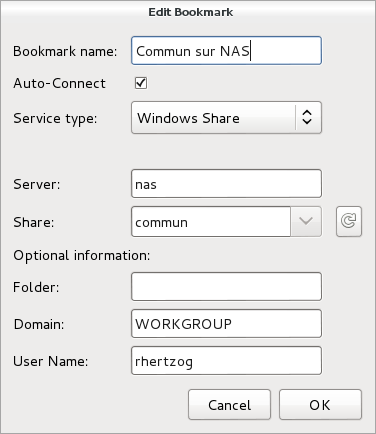
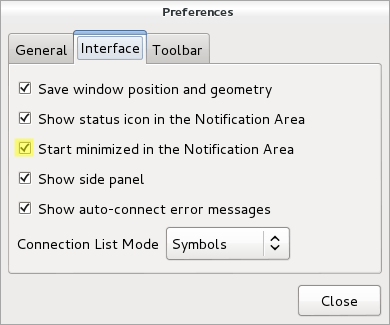
Launch Gigolo, setup your shares as bookmarks and mark them as Auto-Connect . During (first) connection, you will be prompted for your password and you have the possibility to store it in the GNOME keyring (and here it s encrypted, not in plain-text!). You should also configure the Gigolo preferences so that it starts minimized in the system tray (because we re going to run it on session startup):
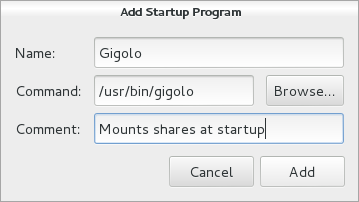
The last step is to ensure that Gigolo is executed at the start of each GNOME session. Unfortunately this GNOME feature is no longer accessible from the control center so you have to execute gnome-session-properties manually (from a terminal or the command line accessible via Alt+F2). Click on Add to add a new startup program: You re done! The main limitation is that those shares are not real mounts, instead they are available within GNOME s virtual file system (GVFS). If you use only 100% GNOME application, then it s not a problem but otherwise it s pretty annoying. You can t cd in those shares from a terminal for example. There s a workaround though, it s called gvfs-fuse and you installed it right at the start of this HOWTO. This service hooks into GVFS and exports all the virtual filesystem(s) in a real fuse-based mount that is automatically setup in ~/.gvfs/. However for this to work, the user must be in the fuse group. So you should run something like this:
$ sudo adduser $USER fuse
By the way, I haven t found a way to use a non-hidden directory so if you want this directory to be more visible, I suggest that you create a symlink pointing to it.
Do you want to read more HOWTO like this one? Click here to subscribe to my free newsletter, you can opt to receive future articles by email.

No comment Liked this article? Click here. My blog is Flattr-enabled.

Matthew Garrett: A detailed technical description of Shim

Shim is the first stage bootloader we've been implementing for supporting Secure Boot. It's called Shim because it serves as an object to fit the gap between the Microsoft trust root and our own trust root. As originally envisaged it would do nothing other than load and execute appropriately signed binaries, but it's got a little more complicated than that now. It is, however, basically feature complete at this point - I don't expect it to grow significantly further.

(For those of you following along at home, the Shim source code I'm talking about is here)

First, it checks whether the user has disabled local signature verification in check_mok_sb(). This is done by reading the MokSBState UEFI variable and verifying that it has the correct variable attributes, ensuring that it was created in the trusted boot services environment. If so, and if it's set appropriately, signature verification is disabled for the rest of Shim. Shim then pauses for a couple of seconds while displaying a message indicating that it's running in insecure mode.

Next, Shim checks whether the user has set any variables that indicate that a Mok request has been made in check_mok_request(). If so, it launches MokManager. The mechanism by which this is done is described later.

Shim then copies the Mok key database into a runtime variable, which makes it accessible to the kernel (mirror_mok_list()). The kernel can then use the Mok keys when performing module signature verification. Next, as the last step before launching the next stage bootloader, Shim installs a UEFI protocol that permits other applications to call back into Shim. We're now ready to branch off from Shim into the actual bootloader.

To do this, Shim has to do a few things. First, we need to get the bootloader off disk. This involves finding Shim's path, which we can do by opening the loaded image protocol on Shim's image handle, turning that into a string, walking backwards along it until we find a directory separator, stripping the filename and appending the path to the second stage bootloader. This is then turned back into a binary device path, all of this happening in generate_path(). The binary is then read off disk in load_image(), using the simple filesystem protocol. We open the device, open a reference to the file, check how large the file is, allocate a buffer to hold the file and then read it off disk into that buffer. Everything so far has been fairly straightforward, but now things get more complicated.

handle_image() is the real meat of Shim. First it has to examine the header data in read_header(), copying the relevant bits into a context structure that will be used later. Some basic sanity checks on the binary are also performed here. If we're running in secure mode (ie, Secure Boot is enabled and we haven't been toggled into insecure mode) we then need to verify that the binary matches the signature and hasn't been blacklisted.

verify_buffer() has to implement the Microsoft Authenticode specification, which details which sections of the binary have to be hashed and in which order. The actual hashing is done in generate_hash(), which calls into the crypto code to add each binary section to the hashed data. The comments in generate_hash() describe what's going on there clearly enough. The crypto code itself is a copy of the crypto library extracted from the Tiano source tree. It's a relatively thin layer on top of OpenSSL, so the code's been fairly well tested.

Once we have the hash, we need to verify the signature. First, we ensure that the Mok database hasn't been modified from the OS (verify_mok()). Next, we check whether the binary's hash or signature have been blacklisted (check_blacklist()). This is done for each of the SHA1 and SHA256 hashes of the binary (the two hashes implemented in Tiano) and the certificate. If any of these match an entry in the dbx variable or a built-in blacklist, Shim will refuse to run them. Next, we simply do the same for the whitelist. If the binary's hash is either in the db variable or the Mok list, or if it's signed with a certificate that chains back to an entry in either db or the Mok list, we'll run it. Finally, the signature is checked against any built-in keys. Certificate verification is carried out with the AuthenticodeVerify() function, which again comes from Tiano's crypto library and is mostly implemented in OpenSSL.

If the binary passed signature validation we return to handle_image() and now load the binary's sections into their desired addresses. That buffer is handed to relocate_coff() which runs through the binary's relocation entries and fixes them up. There's one last subtlety, which is that because we've been fixing this up by hand, the image handle still refers to the shim binary. We fix the ImageBase and ImageSize values in the loaded image protocol to match the newly relocated binary, which is vital because otherwise grub is unable to find its built in modules. Finally, we jump into the binary's entry point. What the binary does next is up to it - if it's a bootloader, there's a good chance that it'll simply launch an OS and we'll never return. If it does return, we restore ImageBase and ImageSize, uninstall the protocol we installed and exit ourselves. If Shim exits (either because the second stage bootloader wasn't present, didn't verify, or exited) then control will simply pass on to the next boot option in the UEFI priority list. If there's nothing else, the platform will do something platform defined.

And that's how Shim works.

comment count unavailable comments

Matthew Garrett: Getting started with UEFI development

It's not difficult to write a UEFI application under Linux. You'll need three things:


So, let's write a trivial UEFI application. Here's one from the gnu-efi source tree:
#include <efi.h>
#include <efilib.h>
EFI_STATUS
efi_main (EFI_HANDLE image, EFI_SYSTEM_TABLE *systab)
 
        SIMPLE_TEXT_OUTPUT_INTERFACE *conout;
        conout = systab->ConOut;
        InitializeLib(image, systab);
        uefi_call_wrapper(conout->OutputString, 2, conout, L"Hello World!\n\r");
        return EFI_SUCCESS;
 
The includes are fairly obvious. efi.h gives you UEFI functions defined by the specification, and efilib.h gives you functions provided by gnu-efi. The runtime will call efi_main() rather than main(), so that's our main function. It returns an EFI_STATUS which will in turn be returned to whatever executed the binary. The EFI_HANDLE image is a pointer to the firmware's context for this application, which is used in certain calls. The EFI_SYSTEM_TABLE *systab is a pointer to the UEFI system table, which in turn points to various other tables.

So far so simple. Now things get interesting. The heart of the UEFI programming model is a set of protocols that provide interfaces. Each of these interfaces is typically a table of function pointers. In this case, we're going to use the simple text protocol to print some text. First, we get a pointer to the simple text output table. This is always referenced from the system table, so we can simply assign it. InitializeLib() just initialises some internal gnu-efi functions - it's not technically required if we're purely calling native UEFI functions as we are here, but it's good style since forgetting it results in weird crashes.

Anyway. We now have conout, a pointer to a SIMPLE_TEXT_OUTPUT_INTERFACE structure. This is described in section 11.4 of the UEFI spec, but looks like this:
typedef struct _EFI_SIMPLE_TEXT_OUTPUT_PROTOCOL  
    EFI_TEXT_RESET Reset;
    EFI_TEXT_STRING OutputString;
    EFI_TEXT_TEST_STRING TestString;
    EFI_TEXT_QUERY_MODE QueryMode;
    EFI_TEXT_SET_MODE SetMode;
    EFI_TEXT_SET_ATTRIBUTE SetAttribute;
    EFI_TEXT_CLEAR_SCREEN ClearScreen;
    EFI_TEXT_SET_CURSOR_POSITION SetCursorPosition;
    EFI_TEXT_ENABLE_CURSOR EnableCursor;
    SIMPLE_TEXT_OUTPUT_MODE *Mode;
  EFI_SIMPLE_TEXT_OUTPUT_PROTOCOL;
The majority of these are functions - the only exception is the SIMPLE_TEXT_OUTPUT_MODE pointer, which points to the current mode. In an ideal world you'd be able to just call these directly, but sadly UEFI and Linux calling conventions are different and we need some thunking. That's where the uefi_call_function() call comes in. This takes a UEFI function as its first argument (in this case, conout->OutputString), the number of arguments (2, in this case) and then the arguments. Checking the spec for OutputString, we see this:
typedef
EFI_STATUS
(EFIAPI *EFI_TEXT_STRING) (
    IN EFI_SIMPLE_TEXT_OUTPUT_PROTOCOL *This,
    IN CHAR16 *String
);
The first argument is a pointer to the specific instance of the simple text output protocol. This permits multiple instances of the same protocol to exist on a single machine, without having to duplicate all of the code. The second argument is simply a UCS-2 string. Our conout pointer is a pointer to the protocol, so we pass that as the first argument. For the second argument, we pass L"Hello World!\n", with the L indicating that this is a wide string rather than a simple 8-bit string. uefi_call_function() then rearranges these arguments into the appropriate calling convention and calls the UEFI function. The firmware then prints "Hello World!" on the screen. Success.

(Warning: uefi_call_function() does no type checking on its arguments, so if you pass in a struct instead of a pointer it'll build without complaint and then give you a bizarre error at runtime)

Finally, we clean up by simply returning EFI_SUCCESS. Nothing more for us to worry about. That's the simple case. What about a more complicated one? Let's do something with that EFI_HANDLE that got passed into efi_main().
#include <efi.h>
#include <efilib.h>
EFI_STATUS
efi_main (EFI_HANDLE image, EFI_SYSTEM_TABLE *systab)
 
        EFI_LOADED_IMAGE *loaded_image = NULL;
        EFI_GUID loaded_image_protocol = LOADED_IMAGE_PROTOCOL;
        EFI_STATUS status;
        InitializeLib(image, systab);
        status = uefi_call_wrapper(systab->BootServices->HandleProtocol,
                                3,
                                image, 
                                &loaded_image_protocol, 
                                (void **) &loaded_image);
        if (EFI_ERROR(status))  
                Print(L"handleprotocol: %r\n", status);
         
        Print(L"Image base        : %lx\n", loaded_image->ImageBase);
        Print(L"Image size        : %lx\n", loaded_image->ImageSize);
        Print(L"Image file        : %s\n", DevicePathToStr(loaded_image->FilePath));
        return EFI_SUCCESS;
 
UEFI handles can have multiple protocols attached to them. A handle may represent a piece of physical hardware, or (as in this case) it can represent a software object. In this case we're going to get a pointer to the loaded image protocol that's associated with the binary we're running. To do this we call the HandleProtocol() function from the Boot Services table. Boot services are documented in section 6 of the UEFI specification and are the interface to the majority of UEFI functionality. HandleProtocol takes an image and a protocol identifier, and hands back a pointer to the protocol. UEFI protocol identifiers are all GUIDs and defined in the specification. If you call HandleProtocol on a handle that doesn't implement the protocol you request, you'll simply get an error back in the status argument. No big deal.

The loaded image protocol is fairly different to the simple text output protocol in that it's almost entirely data rather than function pointers. In this case we're printing the address that our executable was loaded at and the size of our relocated executable. Finally, we print the path of the file. UEFI device paths are documented in section 9.2 of the UEFI specification. They're a binary representation of a file path, which may include the path of the device that the file is on. DevicePathToStr is a gnu-efi helper function that converts the objects it understands into a textual representation. It doesn't cover the full set of specified UEFI device types, so in some corner cases it may print "Unknown()".

That covers how to use protocols attached to the image handle. How about protocols that are attached to other handles? In that case we can do something like this:
#include <efi.h>
#include <efilib.h>
EFI_STATUS
efi_main (EFI_HANDLE image_handle, EFI_SYSTEM_TABLE *systab)
 
        EFI_STATUS status;
        EFI_GRAPHICS_OUTPUT_PROTOCOL *gop;
        EFI_GUID gop_guid = EFI_GRAPHICS_OUTPUT_PROTOCOL_GUID;
        InitializeLib(image_handle, systab);
        status = uefi_call_wrapper(systab->BootServices->LocateProtocol,
                                   3,
                                   &gop_guid,
                                   NULL,
                                   &gop);
        Print(L"Framebuffer base is at %lx\n", gop->Mode->FrameBufferBase);
        return EFI_SUCCESS;
 
This will find the first (where first is an arbitrary platform ordering) instance of a protocol and return a pointer to it. If there may be multiple instances of a protocol (as there often are with the graphics output protocol) you should use LocateHandleBuffer() instead. This returns an array of handles that implement the protocol you asked for - you can then use HandleProtocol() to give you the instance on the specific handle. There's various helpers in gnu-efi like LibLocateHandle() that make these boilerplate tasks easier. You can find the full list in /usr/include/efi/efilib.h.

That's a very brief outline of how to use basic UEFI functionality. The spec documents the full set of UEFI functions available to you, including things like direct block access, filesystems and networking. The process is much the same in all cases - you locate the handle that you want to interact with, open the protocol that's installed on it and then make calls using that protocol.Building these examplesBuilding these examples is made awkward due to UEFI wanting PE-COFF binaries and Linux toolchains building ELF binaries. You'll want a makefile something like this:
ARCH            = $(shell uname -m   sed s,i[3456789]86,ia32,)
LIB_PATH        = /usr/lib64
EFI_INCLUDE     = /usr/include/efi
EFI_INCLUDES    = -nostdinc -I$(EFI_INCLUDE) -I$(EFI_INCLUDE)/$(ARCH) -I$(EFI_INCLUDE)/protocol
EFI_PATH        = /usr/lib64/gnuefi
EFI_CRT_OBJS    = $(EFI_PATH)/crt0-efi-$(ARCH).o
EFI_LDS         = $(EFI_PATH)/elf_$(ARCH)_efi.lds
CFLAGS          = -fno-stack-protector -fpic -fshort-wchar -mno-red-zone $(EFI_INCLUDES)
ifeq ($(ARCH),x86_64)
        CFLAGS  += -DEFI_FUNCTION_WRAPPER
endif
LDFLAGS         = -nostdlib -znocombreloc -T $(EFI_LDS) -shared -Bsymbolic -L$(EFI_PATH) -L$(LIB_PATH) \
                  $(EFI_CRT_OBJS) -lefi -lgnuefi
TARGET  = test.efi
OBJS    = test.o
SOURCES = test.c
all: $(TARGET)
test.so: $(OBJS)
       $(LD) -o $@ $(LDFLAGS) $^ $(EFI_LIBS)
%.efi: %.so
        objcopy -j .text -j .sdata -j .data \
                -j .dynamic -j .dynsym  -j .rel \
                -j .rela -j .reloc -j .eh_frame \
                --target=efi-app-$(ARCH) $^ $@
There's rather a lot going on here, but the important stuff is the CFLAGS line and everything after that. First, we need to disable the stack protection code - there's nothing in the EFI runtime for it to call into, so we'll build a binary with unresolved symbols otherwise. Second, we need to build position independent code, since UEFI may relocate us anywhere. short-wchar is needed to indicate that strings like L"Hi!" should be 16 bits per character, rather than gcc's default of 32 bits per character. no-red-zone tells the compiler not to assume that there's 256 bytes of stack available to it. Without this, the firmware may modify stack that the binary was depending on.

The linker arguments are less interesting. We simply tell it not to link against the standard libraries, not to merge relocation sections, and to link in the gnu-efi runtime code. Nothing very exciting. What's more interesting is that we build a shared library. The reasoning here is that we want to perform all our linking, but we don't want to build an executable - the Linux executable runtime code would be completely pointless in a UEFI binary. Once we have our .so file, we use objcopy to pull out the various sections and rebuild them into a PE-COFF binary that UEFI will execute.

comment count unavailable comments

29 October 2012

Matthew Garrett: Ted Ts'o is a rape apologist and why this matters

(This post contains some discussion of rape and sexual assault but does not go into any specifics)

There was a brief controversy at Linux.conf.au back in 2011. The final keynote speaker gave a compelling presentation on online privacy, including some slides containing sexualised imagery. This was against the terms of the conference policies, and resulted in an apology from the conference organisers and the speaker. The situation was unfortunate but well handled, and that should have been the end of it.

Afterwards, there was some pushback on the conference mailing list. Concerns were raised about the policy being overly restrictive and the potential for it to be used to stifle speech that influential groups disagreed with. I don't agree with these arguments, but discussion of why policies have been implemented is completely natural and provides an opportunity for a community to determine what its expected standards are.

And then Ted Ts'o effectively called rape victims liars[1]. At first I assumed that this was just some sort of horrific failure to understand the implications of what he was saying, so I emailed him to check. The reply I got drew a pretty clear distinction between the case of a drunk college student raping another drunk college student in their room and the case of knifepoint rape in a dark park. You know, the difference between accidental rape and rape rape. The difference between the one any of us might have done and the one that only bad people do. Legitimate rape and the "rape" that those feminists talk about. The distinction that lets rapists convince themselves that they didn't really rape anyone because they weren't holding a knife at the time.

Ted Ts'o argues that only a small percentage of rape really counts as what people think of as rape. Ted Ts'o is a rape apologist.

There's an ongoing scandal in the UK at the moment. A well known DJ, Jimmy Savile, died last year. He grew up in a working class family, but through hard work and natural talent was one of the most significant figures in promoting pop music in the UK in the 50s and 60s, and worked in various parts of the BBC for the best part of 30 years. He spent significant amounts of time raising money for charity, and it's estimated that he raised over 40 million for various causes. Since his death, around 300 people have accused him of sexually abusing them. The BBC is desperately trying to explain why it cancelled an expose shortly before it aired. Multiple people who worked there at the time claim that everyone knew he was involved in indecent activities, but saying anything would risk both their career and the charities that depended on his fundraising. Nobody said anything, and he was allegedly free to continue his abuse.

Ted Ts'o is a significant figure in the Linux kernel community. He has expressed abhorrent beliefs that damage that community. Condemnation was limited to a mailing list with limited readership, meaning, effectively, that nobody said anything. Last week the Ada Initiative published a blog post pointing out the damage that did, and I realised that my effective silence was not only helping to alienate 50% of the population from involving themselves with Linux, it was also implicitly supporting my community leadership. I was giving the impression that I was basically fine with our community leaders telling people that it wasn't really rape if you were both drunk enough. I was increasing the chances of members of our community being sexually assaulted. Silence is endorsement. Saying nothing is not ok.

In the absence of an apology and explanation from Ted, I'll be interacting with him to the bare minimum that I'm compelled to as a result of my job. I won't be attending any Linux Foundation events he's involved in organising. If I'm running any events, I won't be inviting him. At a time when we're finally making progress in making our community more open and supportive, we don't need leaders who undermine that work. Support organisations who encourage that progress, not the people who help drag us back.

Footnotes

[1]The original archive has vanished. I've put up a copy of the relevant thread here. Throughout, Ted states that he's actually arguing against the idea that women need to be frightened of sexual assault, and not against the definition of rape. Except saying things like This one does a pretty good job of taking apart the Koss / Ms. Magazine study, which is the source for the "1 in 4" number. For example, it points out that over half of those cases were ones where undergraduates were plied with alcohol, and did not otherwise involve using physical force or other forms of coercion is difficult to read in any way other than "Half of the people you're counting as having been raped haven't really been raped", and favourably referring to an article that asserts that the rate of false rape reports is probably close to 50% is pretty strong support for the idea that many rape victims are liars.

(Update 2012/10/30: Adam Williamson suggests in this comment that this mail is a better example of Ted's behaviour - there's some explicit victim blaming and a lot of "Is that rape" questioning with the obvious implication that the answer should be "no". Ted Ts'o is a victim blaming rape apologist.)

(Update 2012/11/05: It's been suggested that I haven't been sufficiently clear about which of Ted's statements justify my claims. So, here we go.

In this mail, Ted links to and endorses this article. He explicitly links to it because of its treatment of rape statistics. Quoting directly from that article:
the rate of false reports is at least 9 percent and probably closer to 50 percent
Ted explicitly endorses an article that claims that a significant percentage of reported rapes are false. The study that generated that figure is held in poor regard by other researchers in the field - Australian police figures indicate that 2.1% of rape accusations were classified as false. Ted asserts that he was trying to argue against poor use of statistics, so it's a fair assumption that he agrees with the alternative statistics that he's citing. Ted believes that many rape victims are making false accusations. Ted believes that many rape victims are liars.

Again in this mail, Ted argues against a claimed figure that 1 in 4 women have been sexually assaulted. One of his arguments is that Also found in the Koss study, although not widely reported, was the statistic that of the women whom she classified as being raped (although 73% refused to self-classify the event as rape), 46% of them had subsequent sex with the reported assailant. Ted disagrees with a statistic because some rape victims subsequently have sex with the reported assailant. This means that Ted believes that this indicates that they were not really raped. Ted is a rape apologist.)

comment count unavailable comments

Nathan Handler: Hello Chronicle!

Over the years, I have had many different blogs. I mainly use them to post updates regarding my work in the FOSS community, with most of these relating to Ubuntu/Debian. My most recent blog was a Wordpress instance I ran on a VPS provided by a friend. This worked pretty well, but for various reasons, I no longer have access to that box. Earlier today, I started thinking about launching a new blog. The first problem I had to overcome was deciding where to host it. Many of the groups I am involved with provide members with a ~/public_html directory that can be used to host simple HTML+Javascript+CSS websites. However, most of these sites do not have the ability to use PHP, CGI, or access databases. I realized rather quickly that if I were to find a blogging platform that I could run from a ~/public_html directory on one of those machines, I would never have the problem of not having a host for my blog ever again. There is a near infinite number of free web hosts that can handle simple HTML sites. One key feature of any blog is the ability for readers to subscribe to it. Usually, the blogging platform handles automatically updating the feed when a new post is published. However, my simple HTML blog would not be able to do that. Since I knew I did not want to manually update the feeds, I started looking for a way to generate the feed locally on my personal machine and then push it to the remote site that is hosting my blog. About this time, I started compiling a list of features I would need to make this blogging platform usable. In no particular order, they included: After some searching, I found an application developed by Steve Kemp called Chronicle. Chronicle supports all of the features I described plus many more. It is also very quick and easy to setup. If you are running Debian, Chronicle is available from the repositories. Start by installing Chronicle. Note that these steps should all be done on your personal machine, not the machine that is going to host your blog.
sudo apt-get install chronicle
There are a few other packages that you can install to extend the functionality of Chronicle
sudo apt-get install memcached libcache-memcached-perl libhtml-calendarmonthsimple-perl libtext-vimcolor-perl libtext-markdown-perl
Next, create a few folders to hold our blog. We will store our raw blog posts in ~/blog/input and have the generated HTML versions go in ~/blog/output.
mkdir -p ~/blog/ input,output 
Now, we need to configure some preferences. We will base our preferences on the global configuration file shipped with the package.
cp /etc/chroniclerc ~/.chroniclerc
Open up the new ~/.chroniclerc file in your favorite editor. It is pretty well commented, but I will still explain the changes I made. input is the path to where your blog posts can be found. These are the raw blog posts, not the generated HTML versions of the posts. In our example, this should be set to ~/blog/input. pattern tells Chronicle which files in the input directory are blog posts. We will use a .txt extension to denote these files. Therefore, set pattern to *.txt. output is the directory where Chronicle should store the generated HTML versions of the blog posts. This should be ~/blog/output theme-dir is the directory that holds all of the themes. Chronicle ships with a couple of sample themes that you can use. Set this to /usr/share/chronicle/themes theme is the name of the theme you want to use. We will just use the default them, so set this to default entry-count specifies how many blog posts should be displayed on the HTML index page for the blog. I like to keep this fairly small, so I set mine to 10. rss-count is similar to entry-count, but it specifies the number of blog posts to include in the RSS feed. I also set this to 10 format specifies the format used in the raw blog posts. I write mine in markdown, but multimarkdown, textile, and html are also supported. Since most ~/public_html directories do not support CGI. We will disable comments by setting no-comments to 1 suffix gets appended to the filenames of all of the generated blog posts. Set this to .html url_prefix is the first part of the URL for the blog. If the index.html file for the blog is going to be available at http://example.com/blog/ , set this to *http://example.com/~user/blog/ blog_title is whatever you want your blog to be called. The title is displayed at the top of the site. Set it to something like Your Name's Blog post-build is a very useful setting. It allows us to have Chronicle perform some action after it finishes running. We will use this to copy our blog to the remote host's public_html directory. Set this field to something like scp -r output/* user@example.com:~/public_html/blog. You will probably want to setup SSH so that you do not need to enter a password each time. Finally, date-archive-path will allow you to get the nice year/month directories to sort your posts. Set this to 1. Your final ~/.chroniclerc should look something like this:
input = ~/blog
pattern = *.txt
output = ~/blog/output
theme-dir = /usr/share/chronicle/themes
theme = default
entry-count = 10
rss-count = 10
format = markdown
no-comments = 1
suffix = .html
url_prefix = http://example.com/~user/blog/
blog_title    = Your Name's Blog
post-build = scp -r output/* user2@example.com:~/public_html/blog
date-archive-path = 1
You are now ready to start writing your first blog post. Open up ~/blog/MyFirstBlogPost.txt in your favorite text editor. Modify it to look like this:
Title: My First Blog Post
Tags: MyTag
Date: October 29, 2012
This is my **first** blog post.
Notice the metadata stored at the top? This is required for every post. Chronicle uses it to figure out the post title, tags, and date. It has some logic to try and guess this information if missing, but it is probably safest if you specify it. The empty line between the metadata and the post content is also required. Remember, we configured Chronicle to treat these as Markdown files, so feel free to utilize any Markdown formatting you wish. Finally, run chronicle from a terminal. If all goes well, it should generate your blog and copy the files to the remote host. You can now go to http://example.com/~user/blog to view it. One final suggestion would be to store the entire blog in a git repository. This will allow you to utilize all of the features of a VCS, such as reverting any accidental changes or allowing multiple people to collaborate on a blog post at the same time.

28 October 2012

Roland Mas: Guitar Hero drumkits and MIDI, again

Almost a year after my previous post, I felt inclined to spend another Sunday (this one was chilly rather than rainy) working on my script to integrate the drumkit of Guitar Hero World Tour for Wii within a MIDI environment. And wiigh2midi got, if not a rewrite, then at least a few enhancements since I last mentioned it here. It's still not something that I'd put in everyone's hands, but it's coming to be seriously usable. I wonder if there'd be any interest in me packaging that and uploading it to Debian? It would need some cleanup first (and a more generic name, since it's far from restricted to Guitar Hero controllers or drumkits), but I guess it could be useful. Ping me if you're interested.

27 October 2012

Soeren Sonnenburg: Shogun at Google Summer of Code 2012

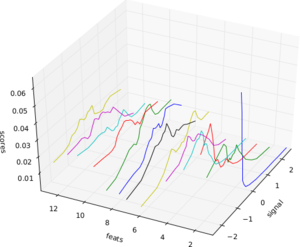
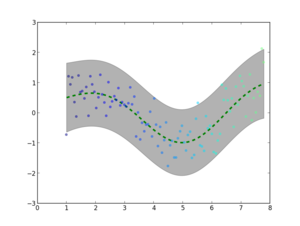
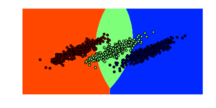
The summer came finally to an end and (yes in Berlin we still had 20 C end of October), unfortunately, so did GSoC with it. This has been the second time for SHOGUN to be in GSoC. For those unfamiliar with SHOGUN - it is a very versatile machine learning toolbox that enables unified large-scale learning for a broad range of feature types and learning settings, like classification, regression, or explorative data analysis. I again played the role of an org admin and co-mentor this year and would like to take the opportunity to summarize enhancements to the toolbox and my GSoC experience: In contrast to last year, we required code-contributions in the application phase of GSoC already, i.e., a (small) patch was mandatory for your application to be considered. This reduced the number of applications we received: 48 proposals from 38 students instead of 70 proposals from about 60 students last year but also increased the overall quality of the applications. In the end we were very happy to get 8 very talented students and have the opportunity of boosting the project thanks to their hard and awesome work. Thanks to google for sponsoring three more students compared to last GSoC. Still we gave one slot back to the pool for good to the octave project (They used it very wisely and octave will have a just-in-time compiler now, which will benefit us all!). SHOGUN 2.0.0 is the new release of the toolbox including of course all the new features that the students have implemented in their projects. On the one hand, modules that were already in SHOGUN have been extended or improved. For example, Jacob Walker has implemented Gaussian Processes (GPs) improving the usability of SHOGUN for regression problems. A framework for multiclass learning by Chiyuan Zhang including state-of-the-art methods in this area such as Error-Correcting Output Coding (ECOC) and ShareBoost, among others. In addition, Evgeniy Andreev has made very important improvements w.r.t. the accessibility of SHOGUN. Thanks to his work with SWIG director classes, now it is possible to use python for prototyping and make use of that code with the same flexibility as if it had been written in the C++ core of the project. On the other hand, completely new frameworks and other functionalities have been added to the project as well. This is the case of multitask learning and domain adaptation algorithms written by Sergey Lisitsyn and the kernel two-sample or dependence test by Heiko Strathmann. Viktor Gal has introduced latent SVMs to SHOGUN and, finally, two students have worked in the new structured output learning framework. Fernando Iglesias made the design of this framework introducing the structured output machines into SHOGUN while Michal Uricar has implemented several bundle methods to solve the optimization problem of the structured output SVM. It has been very fun and interesting how the work done in different projects has been put together very early, even during the GSoC period. Only to show an example of this dealing with the generic structured output framework and the improvements in the accessibility. It is possible to make use of the SWIG directors to implement the application specific mechanisms of a structured learning problem instance in python and then use the rest of the framework (written in C++) to solve this new problem. Students! You all did a great job and I am more than amazed what you all have achieved. Thank you very much and I hope some of you will stick around. Besides all these improvements it has been particularly challenging for me as org admin to scale the project. While I could still be deeply involved in each and every part of the project last GSoC, this was no longer possible this year. Learning to trust that your mentors are doing the job is something that didn't come easy to me. Having had about monthly all-hands meetings did help and so did monitoring the happiness of the students. I am glad that it all worked out nicely this year too. Again, I would like to mention that SHOGUN improved a lot code-base/code-quality wise. Students gave very constructive feedback about our (lack) of proper Vector/Matrix/String/Sparse Matrix types. We now have all these implemented doing automagic memory garbage collection behind scenes. We have started to transition to use Eigen3 as our matrix library of choice, which made quite a number of algorithms much easier to implement. We generalized the Label framework (CLabels) to be tractable for not just classification and regression but multitask and structured output learning. Finally, we have had quite a number of infrastructure improvements. Thanks to GSoC money we have a dedicated server for running the buildbot/buildslaves and website. The ML Group at TU Berlin does sponsor virtual machines for building SHOGUN on Debian and Cygwin. Viktor Gal stepped up providing buildslaves for Ubuntu and FreeBSD. Gunnar Raetschs group is supporting redhat based build tests. We have Travis CI running testing pull requests for breakage even before merges. Code quality is now monitored utilizing LLVMs scan-build. Bernard Hernandez appeared and wrote a fancy new website for SHOGUN. A more detailed description of the achievements of each of the students follows:

26 October 2012

Steve Kemp: slaughter 2.x is getting closer

Work on slaughter 2.x is going rather well. The scripting hasn't changed, and no primitives have been altered to break backward compatibility, but it is probably best to release this as "slaughter2" - because the way to specify the source from which to pull scripts has changed. Previously we'd specify two arguments (or have them in a configuration file): That would result in policies being downloaded from:
  http://example.com/slaughter/
Now the rework is complete we use "transports" and "prefixes". The new way to specify the old default is to run with:
--transport=http --prefix=http://example.com/slaughter/
I've implemented four transports thus far: The code has been made considerably neater, the test-cases are complete, and the POD/inline documentation is almost 100% complete. Adding additional revision-controlled transports would be trivial at this point - but I suspect I'd be wasting my time if I were to add CVS support! Life is good. Though I've still got a fair bit more documentation, prettification and updates to make before I'm ready to release it. Play along at home if you wish: via the repository.

Petter Reinholdtsen: 12 years of outages - summarised by Stuart Kendrick

I work at the University of Oslo looking after the computers, mostly on the unix side, but in general all over the place. I am also a member (and currently leader) of the NUUG association, which in turn make me a member of USENIX. NUUG is an member organisation for us in Norway interested in free software, open standards and unix like operating systems, and USENIX is a US based member organisation with similar targets. And thanks to these memberships, I get all issues of the great USENIX magazine ;login: in the mail several times a year. The magazine is great, and I read most of it every time. In the last issue of the USENIX magazine ;login:, there is an article by Stuart Kendrick from Fred Hutchinson Cancer Research Center titled "What Takes Us Down" (longer version also available from his own site), where he report what he found when he processed the outage reports (both planned and unplanned) from the last twelve years and classified them according to cause, time of day, etc etc. The article is a good read to get some empirical data on what kind of problems affect a data centre, but what really inspired me was the kind of reporting they had put in place since 2000. The centre set up a mailing list, and started to send fairly standardised messages to this list when a outage was planned or when it already occurred, to announce the plan and get feedback on the assumtions on scope and user impact. Here is the two example from the article: First the unplanned outage:
Subject:     Exchange 2003 Cluster Issues
Severity:    Critical (Unplanned)
Start: 	     Monday, May 7, 2012, 11:58
End: 	     Monday, May 7, 2012, 12:38
Duration:    40 minutes
Scope:	     Exchange 2003
Description: The HTTPS service on the Exchange cluster crashed, triggering
             a cluster failover.
User Impact: During this period, all Exchange users were unable to
             access e-mail. Zimbra users were unaffected.
Technician:  [xxx]
Next the planned outage:
Subject:     H Building Switch Upgrades
Severity:    Major (Planned)
Start:	     Saturday, June 16, 2012, 06:00
End:	     Saturday, June 16, 2012, 16:00
Duration:    10 hours
Scope:	     H2 Transport
Description: Currently, Catalyst 4006s provide 10/100 Ethernet to end-
	     stations. We will replace these with newer Catalyst
	     4510s.
User Impact: All users on H2 will be isolated from the network during
     	     this work. Afterward, they will have gigabit
     	     connectivity.
Technician:  [xxx]
He notes in his article that the date formats and other fields have been a bit too free form to make it easy to automatically process them into a database for further analysis, and I would have used ISO 8601 dates myself to make it easier to process (in other words I would ask people to write '2012-06-16 06:00 +0000' instead of the start time format listed above). There are also other issues with the format that could be improved, read the article for the details. I find the idea of standardising outage messages seem to be such a good idea that I would like to get it implemented here at the university too. We do register planned changes and outages in a calendar, and report the to a mailing list, but we do not do so in a structured format and there is not a report to the same location for unplanned outages. Perhaps something for other sites to consider too?

Dirk Eddelbuettel: Accelerating R code: Computing Implied Volatilities Orders of Magnitude Faster

This blog, together with Romain's, is one of the main homes of stories about how Rcpp can help with getting code to run faster in the context of the R system for statistical programming and analysis. By making it easier to get already existing C or C++ code to R, or equally to extend R with new C++ code, Rcpp can help in getting stuff done. And it is often fairly straightforward to do so. In this context, I have a nice new example. And for once, it is work-related. I generally cannot share too much of what we do there as this is, well, proprietary, but I have this nice new example. The other day, I was constructing (large) time series of implied volatilities. Implied volatilities can be thought of as the complement to an option's price: given a price (and all other observables which can be thought of as fixed), we compute an implied volatility price (typically via the standard Black-Scholes model). Given a changed implied volatility, we infer a new price -- see this Wikipedia page for more details. In essence, it opens the door to all sorts of arbitrage and relative value pricing adventures. Now, we observe prices fairly frequently to create somewhat sizeable time series of option prices. And each price corresponds to one matching implied volatility, and for each such price we have to solve a small and straightforward optimization problem: to compute the implied volatility given the price. This is usually done with an iterative root finder. The problem comes from the fact that we have to do this (i) over and over and over for large data sets, and (ii) that there are a number of callbacks from the (generic) solver to the (standard) option pricer. So our first approach was to just call the corresponding function GBSVolatility from the fOption package from the trusted Rmetrics project by Diethelm Wuertz et al. This worked fine, but even with the usual tricks of splitting over multiple cores/machines, it simply took too long for the resolution and data amount we desired. One of the problems is that this function (which uses the proper uniroot optimizer in R) is not inefficient per se, but simply makes to many function call back to the option pricer as can be seen from a quick glance at the code. The helper function .fGBSVolatility gets called time and time again:
R> GBSVolatility
function (price, TypeFlag = c("c", "p"), S, X, Time, r, b, tol = .Machine$double.eps, 
    maxiter = 10000) 
 
    TypeFlag = TypeFlag[1]
    volatility = uniroot(.fGBSVolatility, interval = c(-10, 10), 
        price = price, TypeFlag = TypeFlag, S = S, X = X, Time = Time, 
        r = r, b = b, tol = tol, maxiter = maxiter)$root
    volatility
 
<environment: namespace:fOptions>
R> 
R> .fGBSVolatility
function (x, price, TypeFlag, S, X, Time, r, b, ...) 
 
    GBS = GBSOption(TypeFlag = TypeFlag, S = S, X = X, Time = Time, 
        r = r, b = b, sigma = x)@price
    price - GBS
 
<environment: namespace:fOptions>
So the next idea was to try the corresponding function from my RQuantLib package which brings (parts of) QuantLib to R. That was seen as been lots faster already. Now, QuantLib is pretty big and so is RQuantLib, and we felt it may not make sense to install it on a number of machines just for this simple problem. So one evening this week I noodled around for an hour or two and combined (i) a basic Black/Scholes calculation and (ii) a standard univariate zero finder (both of which can be found or described in numerous places) to minimize the difference between the observed price and the price given an implied volatility. With about one hundred lines in C++, I had something which felt fast enough. So today I hooked this into R via a two-line wrapper in quickly-created package using Rcpp. I had one more advantage here. For our time series problem, the majority of the parameters (strike, time to maturity, rate, ...) are fixed, so we can structure the problem to be vectorised right from the start. I cannot share the code or more the details of my new implementation. However, both GBSVolatility and EuropeanOprionImpliedVolatility are on CRAN (and as I happen to maintain these for Debian, also just one sudo apt-get install r-cran-foptions r-cran-rquantlib away if you're on Debian or Ubuntu). And writing the other solver is really not that involved. Anyway, here is the result, courtesy of a quick run via the rbenchmark package. We create a vector of length 500; the implied volatility computation will be performed at each point (and yes, our time series are much longer indeed). This is replicated 100 times (as is the default for rbenchmark) for each of the three approaches:
xyz@xxxxxxxx:~$ r xxxxR/packages/xxxxOptions/demo/timing.R
    test replications elapsed  relative user.self sys.self user.child sys.child
3 zzz(X)          100   0.038     1.000     0.040    0.000          0         0
2 RQL(X)          100   3.657    96.237     3.596    0.060          0         0
1 fOp(X)          100 448.060 11791.053   446.644    1.436          0         0
xyz@xxxxxxxx:~$ 
The new local solution is denoted by zzz(X). It is already orders of magnitude faster than the RQL(x) function using RQuantLib (which is, I presume, due to my custom solution internalising the loop). And the new approach is a laughable amount faster than the basic approach (shown as fOp) via fOptions. For one hundred replications of solving implied volatilities for all elements of a vector of size 500, the slow solution takes about 7.5 minutes --- while the fast solution takes 38 milliseconds. Which comes to a relative gain of over 11,000. So sitting down with your C++ compiler to craft a quick one-hundred lines, combining two well-known and tested methods, can reap sizeable benefits. And Rcpp makes it trivial to call this from R.

25 October 2012

Lucas Nussbaum: Release Critical Bugs report for week 43

During the Squeeze release cycle, Alexander Reichle-Schmehl used to blog every week about this. Let s try to continue the tradition. The UDD bugs interface currently knows about the following release critical bugs: Note: I m looking for someone to send this posts on a regular basis. All you need is a blog syndicated on Planet Debian (there s a secret UDD page that generates the HTML code for you ;) ). Contact me if you are interested. taken!

24 October 2012

Steve Kemp: So slaughter is definitely getting overhauled

There have been a few interesting discussions going on in parallel about my slaughter sysadmin tool. I've now decided there will be a 2.0 release, and that will change things for the better. At the moment there are two main parts to the system:
Downloading polices
These are instructions/perl code that are applied to the local host.
Downloading files
Polices are allowed to download files. e.g. /etc/ssh/sshd_config templates, etc.
Both these occur over HTTP fetches (SSL may be used), and there is a different root for the two trees. For example you can see the two public examples I have here: A fetch of the policy "foo.policy" uses the first prefix, and a fetch of the file "bar" uses the latter prefix. (In actual live usage I use a restricted location because I figured I might end up storing sensitive things, though I suspect I don't.) The plan is to update the configuration file to read something like this:
transport = http
#
# Valid options will be
#    rsync   http   git   mercurial   ftp
#
#
# each transport will have a different prefix
#
prefix = http://static.steve.org.uk/private
# for rsync:
#  prefix=rsync.example.com::module/
#
# for ftp:
#  prefix=ftp://ftp.example.com/pub/
#
#  for git:
#  prefix=git://github.com/user/repo.git
#
#  for mercurial
#  prefix=http://repo.example.com/path/to/repo
#
I anticipate that the HTTP transport will continue to work the way it currently does. The other transports will clone/fetch the appropriate resource recursively to a local directory - say /var/cache/slaughter. So the complete archive of files/policies will be available locally. The HTTP transport will continue to work the same way with regard to file fetching, i.e. fetching them remotely on-demand. For all other transports the "remote" file being copied will be pulled from the local cache. So assuming this:
transport = rsync
prefix    = rsync.company.com::module/
Then the following policy will result in the expected action:
if ( UserExists( User => "skx" ) )
 
    # copy
    FetchFile(
            Source => "/global-keys",
              Dest => "/home/skx/.ssh/authorized_keys2",
             Owner => "skx",
             Group => "skx",
              Mode => "600" );
 
The file "/global-keys" will refer to /var/cache/slaughter/global-keys which will have been already downloaded. I see zero downside to this approach; it allows HTTP stuff to continue to work as it did before, and it allows more flexibility. We can benefit from knowing that the remote policies are untampered with, for example, via the checking built into git/mercurial, and the speed gains of rsync. There will also be an optional verification stage. So the code will roughly go like this: I'm not anticipating additional changes, but I'm open to persuasion.

22 October 2012

Petter Reinholdtsen: Amazon steal books from customer and throw out her out without any explanation

A blog post from Martin Bekkelund today tell the story of how Amazon erased the books from a customer's kindle, locked the account and refuse to tell the customer why. If a real book store did this to a customer, it would be called breaking into private property and theft. The story has spread around the net today. A bit more background information is available in Norwegian from digi.no. It is no surprise that digital restriction mechanisms (DRM) are used this way, as it has been warned about such abuse since DRM was introduced many years back. And Amazon proved in 2009 that it was willing to break into customers equipment and remove the books people had bought, when it removed the book 1984 by George Orwell from all the customers who had bought it. From the official comments, it even sounded like Amazon would never do that again. And here we are, three years later. And thought this action is against Norwegian regulations and law, it is according to the terms of use as written by Amazon, and it is hard to hold Amazon accountable to Norwegian laws. It is just yet another example of unacceptable terms of use on the web, and how they are used to remove customer rights. Luckily for electronic books, there are alternatives without unacceptable terms. For example Project Gutenberg (about 40,000 books), Project Runenberg (1,652 books) and The Internet Archive (3,641,797 books) have heaps of books without DRM, which can read by anyone and shared with anyone. Update 2012-10-23: This story broke in the morning on Monday. In the evening after the story had spread all across the Internet, Amazon restored the account of the user, as reported by digi.no and NRK. Apparently public pressure work. The story from Martin have seen several twitter messages per minute the last 24 hours, which is quite a lot, and is still drawing a lot of attention. But even when the account is restored, the fundamental problem still exist. I recommend reading two opinions from Simon Phipps and Glen Moody if you want to learn more about the fundamentals and more details about the original story.

Erich Schubert: Changing Gnome 3 colors

One thing that many people dislike about Gnome 3, in my opinion is that the authors/maintainers impose a lot of decisions on you. They are in fact not really hard coded, but I found documentation to be really inaccessble on how to change them.
For example colors. I found it extremely badly documented on how to customize GTK colors. And at the same time, a lot of the themes do not work reliably across different Gnome versions. For example the unico engine in Debian experimental is currently incompatible with the main GTK version there (and even worse, GTK does not realize this and refuse to load the incompatible engine). A lot of the themes you can get on gnome-look.org for example use unico. So it's pretty easy to get stuck with a non-working GTK 3, this really should not happen that easily. (I do not blame the Debian maintainers to not have worked around this using package conflicts yet - it's in experimental after all. But upstream should know when they are breaking APIs!)
For my work on the ELKI data mining framework I do a lot of work in Eclipse. And here GTK3 really is annoying, in particular the default theme. Next to unusable, actually, as code documentation tooltips show up black-on-black.
Recently, Gnome seems to be mostly driven by a mix of design and visual motivation. Gnome shell is a good example. No classic Linux user I've met likes it, even my dad immediately asked me how to get the classic panels back. It is only the designers that seem to love it. I'm concerned that they are totally off on their audience, they seem to target the mac OSX users instead of the Linux users. This is a pity, and probably much more a reason why Gnome so far does not succeed on the Desktop: it keeps on forgetting the users it already has. They by now seem to move to XFCE and LXDE because neither the KDE nor the Gnome crowd care about classic Linux users in the hunt for copying OSX & Co.
Anyway, enough ranting. Here is a simple workaround -- that hopefully is more stable across GTK/Gnome versions than all those themes out there -- that just slightly adjusts the default theme:
$ gsettings set \
org.gnome.desktop.interface gtk-color-scheme '
os_chrome_fg_color:black;
os_chrome_bg_color:#FED;
os_chrome_selected_fg_color:black;
os_chrome_selected_bg_color:#f5a089;
selected_fg_color:white;
selected_bg_color:#c50039;
theme_selected_fg_color:black;
theme_selected_bg_color:#c50039;
tooltip_fg_color:black;
tooltip_bg_color:#FFC;
'
This will turn your panel from a designer-hip black back to a regular grayish work panel. If you are working a lot with Eclipse, you'll love the last two options. That part makes the tooltips readable again! Isn't that great? Instead of caring about what is the latest hipster colors, we now have readable tooltips for developers again instead of all that fancy-schmanzy designer orgasms!
Alternatively, you can use dconf-editor to set and edit the value. The tricky part was to find out which variables to set. The (undocumented?) os_chrome stuff seems to be responsible for the panel. Feel free to change the colors to whatever you prefer!
GTK is quite customizable. And the gsettings mechanism actually is quite nice for this. It just seems to be really badly documented. The Adwaita theme in particular seems to have quite some hard-coded relationships also for the colors. And I havn't found a way (without doing a complete new theme) to just reduce padding, for example. In particular, as there probably are a hundred of CSS parameters that one would need to override to get it into everywhere (and with the next Gnome, there will be again two dozen to add?)
Above method just seems to be the best way to tweak the looks. At least the colors, since that is all that you can do this way. If you want to customize more, you probably have to do a complete theme. At which point, you probably have to redo this at every new version. And to pick on Miguel de Icaza: the kernel APIs are extremely stable, in particular compared to the mess that Gnome has been across versions. And at every new iteration, they manage to offend a lot of their existing users (and end up looking more and more like Apple - maybe we should copy more from where we are good at, instead of copying OSX and .NET?).

Julien Danjou: Inside Synaps, a CloudWatch-like implementation for OpenStack

A few days ago, Samsung released the source code of Synaps, an implementation of the Amazon Web Service CloudWatch API for OpenStack. Being a developer on the Ceilometer project, I've been curious to look on this project and how it could overlap with Ceilometer or other projects like Heat. What is CloudWatch? CloudWatch is a monitoring system provided by Amazon on its Web Services platform to monitor services. This allows you get notifications and trigger an action on certain threshold. For example, this can be used to scale your architecture by monitoring the number of requests you get on it and its general load by starting new servers. Synaps Synaps is written in around 7k lines of Python (with 28 % of which are comments), reuses at least one common module of OpenStack (openstack.common.cfg) and copy some modules from Nova. One thing that strikes me, is that there seems to be only a few unit tests compared to most OpenStack projects. Also, many parts of the code and documentation contains text written in korean, which won't be very helpful for most people! :-) It uses some external technologies, like Storm, Cassandra to store its persistent data and Pandas to do data analysis. The API server provides an EC2 compatible API only: no OpenStack specific API. This is probably not a bad thing for now, since I am not aware of any work in this direction. The API access directly the Cassandra back-end for read operation, but relies on RPC to do writes. This way, a set of daemon handles the write using the Storm part of Synaps and do data aggregation. The authentication only supports LDAP, but it should still be possible to add a driver for Keystone. A Java and a Python SDK are provided to record metrics into Synaps, but there's not enough documentation for it to be useful. Overlap with Heat For now, there's not a lot of overlap with Heat, because Heat does not implement completely the CloudWatch API. Heat actually still misses a lot of the CloudWatch functions. But as soon as it will implement the CloudWatch API completely, the overlap will be complete with Synaps in this regard. One divergence point however, is that Heat uses RPC to access data from the storage back-end via its engine (the central daemon), whereas Synaps directly connects to Cassandra. Also, Heat relies on SQLAlchemy, like most OpenStack projects needing a database. Overlap with Ceilometer One of the goal of Ceilometer is to provide data probes and pollsters for all OpenStack components (Nova, Swift, Quantum ) whereas Synaps let the OpenStack users to put any kind of metric inside it, and therefore doesn't provide anything for now. But the storage of metrics is the main common point between Synaps and Ceilometer. Synaps chose only one technology, Cassandra, to store its metrics, whereas Ceilometer took care of building an abstraction layer for the storage engine. Ceilometer currently allows an operator to use SQL or MongoDB, but Cassandra could likely be added. Data metric consolidation is done by Synaps. This makes sense, since Synaps don't need to have the full data history to trigger alarms. On the opposite, Ceilometer needs to have a full history to allow things like billing, and don't do any aggregation on data. Also, in Synaps, the data analysis is done using Pandas. This means the data used are retrieved from the Cassandra back-end, and then transformed by Pandas inside Synaps in something else. It's likely that in such a case, Synaps should use CQL to achieve that. Ceilometer manipulates the data near their storage: it means that the computation are done by back-end to be efficient (SQL, mapreduce ). Conclusion Considering Samsung open-sourced Synaps late in the development process, I don't feel like they aimed to have it becoming a core component. This is always sad, because the effort put into this implementation are big and it would have probably little to add some abstraction layers to follow what other OpenStack projects do. But this takes time and energy, and it's understandable that Samsung didn't want to achieve this in a short time frame. There's a part of the code and architecture that overlaps with Ceilometer and Heat. Ceilometer is becoming a specialized point to store data metrics from any source: so it's sad, but understandable, that Synaps did not tried to reuse it. Fortunately, Heat is working with Ceilometer to achieve exactly that. This means OpenStack would have only one metrics storage point, used for billing, for monitoring and alarming. Therefore, I think Synaps is an implementation of CloudWatch that should be looked at as an inspiration for Heat and Ceilometer to build a better and more integrated solution!

20 October 2012

Vincent Bernat: Network lab with KVM

To experiment with network stuff, I was using UML-based network labs. Many alternatives exist, like GNS3, Netkit, Marionnet or Cloonix. All of them are great viable solutions but I still prefer to stick to my minimal home-made solution with UML virtual machines. Here is why: The use of UML had some drawbacks: However, UML features HostFS, a filesystem providing access to any part of the host filesystem. This is the killer feature which allows me to not use any virtual disk image and to get access to my home directory right from the guest. I discovered recently that KVM provided 9P, a similar filesystem on top of VirtIO, the paravirtualized IO framework.

Setting up the lab The setup of the lab is done with a single self-contained shell file. The layout is similar to what I have done with UML. I will only highlight here the most interesting steps.

Booting KVM with a minimal kernel My initial goal was to experiment with Nicolas Dichtel s IPv6 ECMP patch. Therefore, I needed to configure a custom kernel. I have started from make defconfig, removed everything that was not necessary, added what I needed for my lab (mostly network stuff) and added the appropriate options for VirtIO drivers:
CONFIG_NET_9P_VIRTIO=y
CONFIG_VIRTIO_BLK=y
CONFIG_VIRTIO_NET=y
CONFIG_VIRTIO_CONSOLE=y
CONFIG_HW_RANDOM_VIRTIO=y
CONFIG_VIRTIO=y
CONFIG_VIRTIO_RING=y
CONFIG_VIRTIO_PCI=y
CONFIG_VIRTIO_BALLOON=y
CONFIG_VIRTIO_MMIO=y
No modules. Grab the complete configuration if you want to have a look. From here, you can start your kernel with the following command ($LINUX is the appropriate bzImage):
kvm \
  -m 256m \
  -display none \
  -nodefconfig -no-user-config -nodefaults \
  \
  -chardev stdio,id=charserial0,signal=off \
  -device isa-serial,chardev=charserial0,id=serial0 \
  \
  -chardev socket,id=con0,path=$TMP/vm-$name-console.pipe,server,nowait \
  -mon chardev=con0,mode=readline,default \
  \
  -kernel $LINUX \
  -append "init=/bin/sh console=ttyS0"
Of course, since there is no disk to boot from, the kernel will panic when trying to mount the root filesystem. KVM is configured to not display video output (-display none). A serial port is defined and uses stdio as a backend1. The kernel is configured to use this serial port as a console (console=ttyS0). A VirtIO console could have been used instead but it seems this is not possible to make it work early in the boot process. The KVM monitor is setup to listen on an Unix socket. It is possible to connect to it with socat UNIX:$TMP/vm-$name-console.pipe -.

Initial ramdisk UPDATED: I was initially unable to mount the host filesystem as the root filesystem for the guest directly by the kernel. In a comment, Josh Triplett told me to use /dev/root as the mount tag to solve this problem. I keep using an initrd in this post but the lab on Github has been updated to not use one. Here is how to build a small initial ramdisk:
# Setup initrd
setup_initrd()  
    info "Build initrd"
    DESTDIR=$TMP/initrd
    mkdir -p $DESTDIR
    # Setup busybox
    copy_exec $($WHICH busybox) /bin/busybox
    for applet in $($ DESTDIR /bin/busybox --list); do
        ln -s busybox $ DESTDIR /bin/$ applet 
    done
    # Setup init
    cp $PROGNAME $ DESTDIR /init
    cd "$ DESTDIR " && find .   \
       cpio --quiet -R 0:0 -o -H newc   \
       gzip > $TMP/initrd.gz
 
The copy_exec function is stolen from the initramfs-tools package in Debian. It will ensure that the appropriate libraries are also copied. Another solution would have been to use a static busybox. The setup script is copied as /init in the initial ramdisk. It will detect it has been invoked as such. If it was omitted, a shell would be spawned instead. Remove the cp call if you want to experiment manually. The flag -initrd allows KVM to use this initial ramdisk.

Root filesystem Let s mount our root filesystem using 9P. This is quite easy. First KVM needs to be configured to export the host filesystem to the guest:
kvm \
  $ PREVIOUS_ARGS  \
  -fsdev local,security_model=passthrough,id=fsdev-root,path=$ ROOT ,readonly \
  -device virtio-9p-pci,id=fs-root,fsdev=fsdev-root,mount_tag=rootshare
$ ROOT can either be / or any directory containing a complete filesystem. Mounting it from the guest is quite easy:
mkdir -p /target/ro
mount -t 9p rootshare /target/ro -o trans=virtio,version=9p2000.u
You should find a complete root filesystem inside /target/ro. I have used version=9p2000.u instead of version=9p2000.L because the later does not allow a program to mount() a host mount point2. Now, you have a read-only root filesystem (because you don t want to mess with your existing root filesystem and moreover, you did not run this lab as root, did you?). Let s use an union filesystem. Debian comes with AUFS while Ubuntu and OpenWRT have migrated to overlayfs. I was previously using AUFS but got errors on some specific cases. It is still not clear which one will end up in the kernel. So, let s try overlayfs. I didn t find any patchset ready to be applied on top of my kernel tree. I was working with David Miller s net-next tree. Here is how I have applied the overlayfs patch on top of it:
$ git remote add torvalds git://git.kernel.org/pub/scm/linux/kernel/git/torvalds/linux-2.6.git
$ git fetch torvalds
$ git remote add overlayfs git://git.kernel.org/pub/scm/linux/kernel/git/mszeredi/vfs.git
$ git fetch overlayfs
$ git merge-base overlayfs.v15 v3.6
4cbe5a555fa58a79b6ecbb6c531b8bab0650778d
$ git checkout -b net-next+overlayfs
$ git cherry-pick 4cbe5a555fa58a79b6ecbb6c531b8bab0650778d..overlayfs.v15
Don t forget to enable CONFIG_OVERLAYFS_FS in .config. Here is how I configured the whole root filesystem:
info "Setup overlayfs"
mkdir /target
mkdir /target/ro
mkdir /target/rw
mkdir /target/overlay
# Version 9p2000.u allows to access /dev, /sys and mount new
# partitions over them. This is not the case for 9p2000.L.
mount -t 9p        rootshare /target/ro      -o trans=virtio,version=9p2000.u
mount -t tmpfs     tmpfs     /target/rw      -o rw
mount -t overlayfs overlayfs /target/overlay -o lowerdir=/target/ro,upperdir=/target/rw
mount -n -t proc  proc /target/overlay/proc
mount -n -t sysfs sys  /target/overlay/sys
info "Mount home directory on /root"
mount -t 9p homeshare /target/overlay/root -o trans=virtio,version=9p2000.L,access=0,rw
info "Mount lab directory on /lab"
mkdir /target/overlay/lab
mount -t 9p labshare /target/overlay/lab -o trans=virtio,version=9p2000.L,access=0,rw
info "Chroot"
export STATE=1
cp "$PROGNAME" /target/overlay
exec chroot /target/overlay "$PROGNAME"
You have to export your $ HOME and the lab directory from host:
kvm \
  $ PREVIOUS_ARGS  \
  -fsdev local,security_model=passthrough,id=fsdev-root,path=$ ROOT ,readonly \
  -device virtio-9p-pci,id=fs-root,fsdev=fsdev-root,mount_tag=rootshare \
  -fsdev local,security_model=none,id=fsdev-home,path=$ HOME  \
  -device virtio-9p-pci,id=fs-home,fsdev=fsdev-home,mount_tag=homeshare \
  -fsdev local,security_model=none,id=fsdev-lab,path=$(dirname "$PROGNAME") \
  -device virtio-9p-pci,id=fs-lab,fsdev=fsdev-lab,mount_tag=labshare

Network You know what is missing from our network lab? Network setup. For each LAN that I will need, I spawn a VDE switch:
# Setup a VDE switch
setup_switch()  
    info "Setup switch $1"
    screen -t "sw-$1" \
        start-stop-daemon --make-pidfile --pidfile "$TMP/switch-$1.pid" \
        --start --startas $($WHICH vde_switch) -- \
        --sock "$TMP/switch-$1.sock"
    screen -X select 0
 
To attach an interface to the newly created LAN, I use:
mac=$(echo $name-$net   sha1sum   \
            awk ' print "52:54:" substr($1,0,2) ":" substr($1, 2, 2) ":" substr($1, 4, 2) ":" substr($1, 6, 2) ')
kvm \
  $ PREVIOUS_ARGS  \
  -net nic,model=virtio,macaddr=$mac,vlan=$net \
  -net vde,sock=$TMP/switch-$net.sock,vlan=$net
The use of a VDE switch allows me to run the lab as a non-root user. It is possible to give Internet access to each VM, either by using -net user flag or using slirpvde on a special switch. I prefer the latest solution since it will allow the VM to speak to each others.

Debugging This lab was mostly done to debug both the kernel and Quagga. Each of them can be debugged remotely.

Kernel debugging While the kernel features KGDB, its own debugger, compatible with GDB, it is easier to use the remote GDB server built inside KVM.
kvm \
  $ PREVIOUS_ARGS  \
  -gdb unix:$TMP/vm-$name-gdb.pipe,server,nowait
To connect to the remote GDB server from the host, first locate the vmlinux file at the root of the source tree and run GDB on it. The kernel has to be compiled with CONFIG_DEBUG_INFO=y to get the appropriate debugging symbols. Then, use socat with the Unix socket to attach to the remote debugger:
$ gdb vmlinux
GNU gdb (GDB) 7.4.1-debian
Reading symbols from /home/bernat/src/linux/vmlinux...done.
(gdb) target remote   socat UNIX:$TMP/vm-$name-gdb.pipe -
Remote debugging using   socat UNIX:/tmp/tmp.W36qWnrCEj/vm-r1-gdb.pipe -
native_safe_halt () at /home/bernat/src/linux/arch/x86/include/asm/irqflags.h:50
50   
(gdb)
You can now set breakpoints and resume the execution of the kernel. It is easier to debug the kernel if optimizations are not enabled. However, it is not possible to disable them globally. You can however disable them for some files. For example, to debug net/ipv6/route.c, just add CFLAGS_route.o = -O0 to net/ipv6/Makefile, remove net/ipv6/route.o and type make.

Userland debugging To debug a program inside KVM, you can just use gdb as usual. Your $HOME directory is available and it should be therefore straightforward. However, if you want to perform some remote debugging, that s quite easy. Add a new serial port to KVM:
kvm \
  $ PREVIOUS_ARGS  \
  -chardev socket,id=charserial1,path=$TMP/vm-$name-serial.pipe,server,nowait \
  -device isa-serial,chardev=charserial1,id=serial1
Starts gdbserver in the guest:
$ libtool execute gdbserver /dev/ttyS1 zebra/zebra
Process /root/code/orange/quagga/build/zebra/.libs/lt-zebra created; pid = 800
Remote debugging using /dev/ttyS1
And from the host, you can attach to the remote process:
$ libtool execute gdb zebra/zebra
GNU gdb (GDB) 7.4.1-debian
Reading symbols from /home/bernat/code/orange/quagga/build/zebra/.libs/lt-zebra...done.
(gdb) target remote   socat UNIX:/tmp/tmp.W36qWnrCEj/vm-r1-serial.pipe
Remote debugging using   socat UNIX:/tmp/tmp.W36qWnrCEj/vm-r1-serial.pipe
Reading symbols from /lib64/ld-linux-x86-64.so.2...(no debugging symbols found)...done.
Loaded symbols for /lib64/ld-linux-x86-64.so.2
0x00007ffff7dddaf0 in ?? () from /lib64/ld-linux-x86-64.so.2
(gdb)

Demo For a demo, have a look at the following video (it is also available as an Ogg Theora video).
<iframe frameborder="0" height="270" src="http://www.dailymotion.com/embed/video/xuglsg" width="480"></iframe>

  1. stdio is configured such that signals are not enabled. KVM won t stop when receiving SIGINT. This is important for the usage we want to have.
  2. Therefore, it is not possible to mound a fresh /proc on top of the existing one. I have searched a bit but didn t find why. Any comments on this is welcome.

Bernhard R. Link: Fun with physics: Quantum Leaps

A quantum leap is a leap between two states where there is no state in between. That makes it usually quite small, but also quite sudden (think of Lasers). So a quantum leap is a jump not allowing any intermediate states, i.e. a "abrupt change, sudden increase" like Merriam Webster defines it. This then get a "dramatic advance" and suddenly the meaning shifted from something so small it could not be divided to something quite big. But before you complain people use the new common meaning instead of the classic physicalistic meaning, ask yourself: Would you prefer if people kept talking about "disruptive" changes to announce they did something big? Update: I'm using quantum jump in the sense as for example used in http://en.wikipedia.org/wiki/Atomic_electron_transition. If quantum jump is something different to you, my post might not make much sense.

19 October 2012

Sylvain Le Gall: Book review: Puppet 2.7 Cookbook

I recently read this book and it was enlightening -- that is the least I can say. It is organized into a set of recipes addressing the most common problems you have with puppet. I think the whole point is about being practical and it gives you various ways to achieve the same goal, depending if you want to do a quick and dirty hack or pick a long term solution. The whole book aims at being practical and it achieves this goal pretty well. However, it is not for beginners. Puppet itself is not for beginner and you should already have written and run into problem to really take advantage of this book. I read the book in 5 days (only while commuting), and at each page I thought : "OMG, they do that like this" or "of course, you should use git + that" and wait impatiently coming back home to test all this stuff. The book is really about technical details and how to organize yourself to write nice Puppet classes. I have been an "irregular" user of Puppet since 4 years. I was mainly running it to distribute files on all my computers. Since 3 weeks, I am applying the recipes found in this book and it is just like discovering that you own something worth a million euros. Let look at some example: Before: Replace the whole file. Now: Use Augeas to just change the value and don't touch to the rest of the file. The book makes me discover Augeas and it rocks !!! Before:_ Loosy darcs repository inside /etc/ and edit directly the master. Now: Shiny git repository in my home directory, using a Makefile to validate Puppet syntax, simulate applying it and effectively apply it to the current node before deploying it through git push. Before: Nothing because I didn't think it was possible. Now: Generate a configuration file using a template, install it, run the exim4 update script and restart the service. Before: Copy a file and restart it. Now: Use Augeas and a template with a loop to change what is needed for each node depending on which user I want to allow to connect on this node. Use different SSH port for every vserver that share the same IP and distribute an /etc/ssh_config to propagate the default ports set for all the vservers... (just being able to do that is worth the price of the book). Before: Complain, whine and give up. Now: Go to Puppet Forge, take inspiration for similar module, re-read part of the book, find an idea and apply it. And so forth and so on. This book made me love puppets again. I warmly recommend it to you.

15 October 2012

Pietro Abate: Improved dose-builddebcheck

The new release of dose, apart from a few bug fixes, ships a new and improved version of dose-builddebcheck (man page). All the improvements done to dose-builddebcheck are from a set of patches submitted by Johannes Schauer in the context of the Bootstrap GSoC. We are still actively working on this. I invite you to read josh's recent blog post on the topic. For more background and discussion, you can have a look at the archives of this mailing list. Dose-builddebcheck (or buildcheck for short) is similar in intent to dose-debcheck but for source packages. Buildcheck allows you to check, just by looking at the Source and Packages files, if all the dependencies can be satisfied and installed, all this in a matter of seconds (less then 30 secs to test all the source packages in sid on my laptop). A simple example :
deb-buildcheck.native \
--deb-native-arch=amd64 \
tests/DebianPackages/Sid-amd64-Packages-050812.bz2
tests/DebianPackages/Sid-Sources-050812.bz2

native-architecture: amd64
background-packages: 55945
foreground-packages: 18175
broken-packages: 64

real 0m22.223s
user 0m21.937s
sys 0m0.204s
This will check for all source packages in the Source file if their build dependencies can satisfied on amd64 given the Packages binary file. This is nice but nothing new. A script based on the old edos tools has been around for quite a long time. We want more ! The new exciting feature brought by Johannes is the capability of checking source packages for cross-compilation :
dose-builddebcheck -f -e -s --checkonly picolisp \
--deb-native-arch=amd64 \
--deb-foreign-archs=armel \
--deb-host-arch=armel \
tests/DebianPackages/Sid-amd64-Packages-050812.bz2 \
tests/DebianPackages/Sid-armel-Packages-050812.bz2 \
tests/DebianPackages/Sid-Sources-050812.bz2

(I)Sources: Parsing Sources file tests/DebianPackages/Sid-Sources-single-version-050812.bz2...
(I)Format822: total packages 17723
(I)Format822: Merging repositories
(I)Packages: Parsing Packages file tests/DebianPackages/Sid-armel-Packages-050812.bz2...
(I)Packages: Parsing Packages file tests/DebianPackages/Sid-amd64-Packages-050812.bz2...
(I)Format822: total packages 58095

native-architecture: amd64
foreign-architecture: armel
host-architecture: armel
report:
-
package: src:apicolisp
version: 3.1.0.7-1
architecture: kopensolaris-amd64,solaris-amd64,amd64,any-i386,any-armel,any-armeb,any-arm,any-avr32,any-hppa,any-m32r,any-m68k,any-mips,any-mipsel,any-powerpc,any-s390,any-sh3,any-sh3eb,any-sh4,any-sh4eb,any-sparc,any-armhf
source: picolisp (= 3.1.0.7-1)
status: ok

background-packages: 75818
foreground-packages: 17723
broken-packages: 0
This will check, if the source package 'picolisp' in the Sources file can be cross compiled for 'armel' on the native architecture 'amd64' given the list of binary packages in the Packages file. The generated report is, as for dose-debcheck, encoded in yaml and it can be simply parsed using an off-the-shelf library. Apt is the canonical tool that can be used to check if a package can be cross compiled. Josh found a few discrepancies between dose and apt results. This was a very good test for both tools: Bug #683786 is a very interesting read... Dose 3.1.1 (the latest release) should land soon in experimental. Otherwise you can get it from our (new) project homepage.

Next.

Previous.