Search Results: "tar"

13 June 2017

Raphaël Hertzog: Freexian s report about Debian Long Term Support, May 2017

A Debian LTS logoLike each month, here comes a report about the work of paid contributors to Debian LTS. Individual reports In May, about 182 work hours have been dispatched among 11 paid contributors. Their reports are available: Evolution of the situation The number of sponsored hours did not change and we are thus still a little behind our objective. The security tracker currently lists 44 packages with a known CVE and the dla-needed.txt file 42. The number of open issues is close to last month. Thanks to our sponsors New sponsors are in bold (none this month unfortunately).

No comment Liked this article? Click here. My blog is Flattr-enabled.

Gunnar Wolf: Reporting progress on the translation infrastructure

Some days ago, I blogged asking for pointers to get started with the translation of Made with Creative Commons. Thank you all for your pointers and ideas! To the people that answered via private mail, via IRC, via comments on the blog. We have made quite a bit of progress so far; I want to test some things before actually sending a call for help. What do we have?
Git repository set up
I had already set up a repository at GitLab; right now, the contents are far from useful, they merely document what I have done so far. I have started talking with my Costa Rican friend Leo Arias, who is also interested in putting some muscle behind this translation, and we are both the admins to this project.
Talked with the authors
Sarah is quite enthusiastic about us making this! I asked her to hold a little bit before officially announcing there is work ongoing... I want to get bits of infrastructure ironed out first. Important Talking with her, she discussed the tools they used for authoring the book. It made me less of a purist :) Instead of starting from something "pristine", our master source will be the PDF export of the Google Docs document.
Markdown conversion
Given that translation tools work over the bits of plaintext, we want to work with the "plainest" rendition of the document, which is Markdown. I found that Pandoc does a very good approximation to what we need (that is, introduces very little "ugly" markup elements). Converting the ODT into Markdown is as easy as:
$ pandoc -f odt MadewithCreativeCommonsmostup-to-dateversion.odt -t markdown > MadewithCreativeCommonsmostup-to-dateversion.md
Of course, I want to fine-tune this as much as possible.
Producing a translatable .po file
I have used Gettext to translate user interfaces; it is a tool very well crafted for that task. Translating a book is quite different: How and where does it break and join? How are paragraphs "strung" together into chapters, parts, a book? That's a task for PO 4 Anything (po4a). As simple as this:
po4a-gettextize -f text -m MadewithCreativeCommonsmostup-to-dateversion.md -p MadewithCreativeCommonsmostup-to-dateversion.po -M utf-8
I tested the resulting file with my good ol' trusty poedit, and it works... Very nicely!
What is left to do?

12 June 2017

Sven Hoexter: UEFI PXE preseeded Debian installation on HPE DL120

We bought a bunch of very cheap low end HPE DL120 server. Enough to warrant a completely automated installation setup. Shouldn't be that much of a deal, right? Get dnsmasq up and running, feed it a preseed.cfg and be done with it. In practise it took us more hours then we expected. Setting up the hardware Our hosts are equipped with an additional 10G dual port NIC and we'd like to use this NIC for PXE booting. That's possible, but it requires you to switch to UEFI boot. Actually it enables you to boot from any available NIC. Setting up dnsmasq We decided to just use the packaged debian-installer from jessie and do some ugly things like overwritting files in /usr/lib via ansible later on. So first of all install debian-installer-8-netboot-amd64 and dnsmasq, then enroll our additional config for dnsmasq, ours looks like this:
domain=int.foobar.example
dhcp-range=192.168.0.240,192.168.0.242,255.255.255.0,1h
dhcp-boot=bootnetx64.efi
pxe-service=X86-64_EFI, "Boot UEFI PXE-64", bootnetx64.efi
enable-tftp
tftp-root=/usr/lib/debian-installer/images/8/amd64/text
dhcp-option=3,192.168.0.1
dhcp-host=00:c0:ff:ee:00:01,192.168.0.123,foobar-01
Now you've to link /usr/lib/debian-installer/images/8/amd64/text/bootnetx64.efi to /usr/lib/debian-installer/images/8/amd64/text/debian-installer/amd64/bootnetx64.efi. That got us of the ground and we had a working UEFI PXE boot that got us into debian-installer. Feeding d-i the preseed file Next we added some grub.cfg settings and parameterized some basic stuff to be handed over to d-i via the kernel command line. You'll find the correct grub.cfg in /usr/lib/debian-installer/images/8/amd64/text/debian-installer/amd64/grub/grub.cfg. We added the following two lines to automate the start of the installer:
set default="0"
set timeout=5
and our kernel command line looks like this:
 linux    /debian-installer/amd64/linux vga=788 --- auto=true interface=eth1 netcfg/dhcp_timeout=60 netcfg/choose_interface=eth1 priority=critical preseed/url=tftp://192.168.0.2/preseed.cfg quiet
Important points: preseeed.cfg, GPT and ESP One of the most painful points was the fight to find out the correct preseed values to install with GPT to create a ESP (EFI system partition) and use LVM for /. Relevant settings are:
# auto method must be lvm
d-i partman-auto/method string lvm
d-i partman-lvm/device_remove_lvm boolean true
d-i partman-md/device_remove_md boolean true
d-i partman-lvm/confirm boolean true
d-i partman-lvm/confirm_nooverwrite boolean true
d-i partman-basicfilesystems/no_swap boolean false
# Keep that one set to true so we end up with a UEFI enabled
# system. If set to false, /var/lib/partman/uefi_ignore will be touched
d-i partman-efi/non_efi_system boolean true
# enforce usage of GPT - a must have to use EFI!
d-i partman-basicfilesystems/choose_label string gpt
d-i partman-basicfilesystems/default_label string gpt
d-i partman-partitioning/choose_label string gpt
d-i partman-partitioning/default_label string gpt
d-i partman/choose_label string gpt
d-i partman/default_label string gpt
d-i partman-auto/choose_recipe select boot-root-all
d-i partman-auto/expert_recipe string \
boot-root-all :: \
538 538 1075 free \
$iflabel  gpt   \
$reusemethod    \
method  efi   \
format    \
. \
128 512 256 ext2 \
$defaultignore    \
method  format   format    \
use_filesystem    filesystem  ext2   \
mountpoint  /boot   \
. \
1024 4096 15360 ext4 \
$lvmok    \
method  format   format    \
use_filesystem    filesystem  ext4   \
mountpoint  /   \
. \
1024 4096 15360 ext4 \
$lvmok    \
method  format   format    \
use_filesystem    filesystem  ext4   \
mountpoint  /var   \
. \
1024 1024 -1 ext4 \
$lvmok    \
method  format   format    \
use_filesystem    filesystem  ext4   \
mountpoint  /var/lib   \
.
# This makes partman automatically partition without confirmation, provided
# that you told it what to do using one of the methods above.
d-i partman-partitioning/confirm_write_new_label boolean true
d-i partman/choose_partition select finish
d-i partman-md/confirm boolean true
d-i partman/confirm boolean true
d-i partman/confirm_nooverwrite boolean true
# This is fairly safe to set, it makes grub install automatically to the MBR
# if no other operating system is detected on the machine.
d-i grub-installer/only_debian boolean true
d-i grub-installer/with_other_os boolean true
d-i grub-installer/bootdev  string /dev/sda
I hope that helps to ease the processes to setup automated UEFI PXE installations for some other people out there still dealing with bare metal systems. Some settings took us some time to figure out, for example d-i partman-efi/non_efi_system boolean true required some searching on codesearch.d.n (amazing ressource if you're writing preseed files and need to find the correct templates) and reading scripts on git.d.o where you'll find the source for partman-* and grub-installer. Kudos Thanks especially to P.P. and M.K. to figure out all those details.

11 June 2017

Benjamin Mako Hill: The Wikipedia Adventure

I recently finished a paper that presents a novel social computing system called the Wikipedia Adventure. The system was a gamified tutorial for new Wikipedia editors. Working with the tutorial creators, we conducted both a survey of its users and a randomized field experiment testing its effectiveness in encouraging subsequent contributions. We found that although users loved it, it did not affect subsequent participation rates.
Start screen for the Wikipedia Adventure.
A major concern that many online communities face is how to attract and retain new contributors. Despite it s success, Wikipedia is no different. In fact, researchers have shown that after experiencing a massive initial surge in activity, the number of active editors on Wikipedia has been in slow decline since 2007.
The number of active, registered editors ( 5 edits per month) to Wikipedia over time. From Halfaker, Geiger, and Morgan 2012.
Research has attributed a large part of this decline to the hostile environment that newcomers experience when begin contributing. New editors often attempt to make contributions which are subsequently reverted by more experienced editors for not following Wikipedia s increasingly long list of rules and guidelines for effective participation. This problem has led many researchers and Wikipedians to wonder how to more effectively onboard newcomers to the community. How do you ensure that new editors Wikipedia quickly gain the knowledge they need in order to make contributions that are in line with community norms? To this end, Jake Orlowitz and Jonathan Morgan from the Wikimedia Foundation worked with a team of Wikipedians to create a structured, interactive tutorial called The Wikipedia Adventure. The idea behind this system was that new editors would be invited to use it shortly after creating a new account on Wikipedia, and it would provide a step-by-step overview of the basics of editing.

The Wikipedia Adventure was designed to address issues that new editors frequently encountered while learning how to contribute to Wikipedia. It is structured into different missions that guide users through various aspects of participation on Wikipedia, including how to communicate with other editors, how to cite sources, and how to ensure that edits present a neutral point of view. The sequence of the missions gives newbies an overview of what they need to know instead of having to figure everything out themselves. Additionally, the theme and tone of the tutorial sought to engage new users, rather than just redirecting them to the troves of policy pages. Those who play the tutorial receive automated badges on their user page for every mission they complete. This signals to veteran editors that the user is acting in good-faith by attempting to learn the norms of Wikipedia.

An example of a badge that a user receives after demonstrating the skills to communicate with other users on Wikipedia.
Once the system was built, we were interested in knowing whether people enjoyed using it and found it helpful. So we conducted a survey asking editors who played the Wikipedia Adventure a number of questions about its design and educational effectiveness. Overall, we found that users had a very favorable opinion of the system and found it useful.
Survey responses about how users felt about TWA.
Survey responses about what users learned through TWA.
We were heartened by these results. We d sought to build an orientation system that was engaging and educational, and our survey responses suggested that we succeeded on that front. This led us to ask the question could an intervention like the Wikipedia Adventure help reverse the trend of a declining editor base on Wikipedia? In particular, would exposing new editors to the Wikipedia Adventure lead them to make more contributions to the community? To find out, we conducted a field experiment on a population of new editors on Wikipedia. We identified 1,967 newly created accounts that passed a basic test of making good-faith edits. We then randomly invited 1,751 of these users via their talk page to play the Wikipedia Adventure. The rest were sent no invitation. Out of those who were invited, 386 completed at least some portion of the tutorial. We were interested in knowing whether those we invited to play the tutorial (our treatment group) and those we didn t (our control group) contributed differently in the first six months after they created accounts on Wikipedia. Specifically, we wanted to know whether there was a difference in the total number of edits they made to Wikipedia, the number of edits they made to talk pages, and the average quality of their edits as measured by content persistence. We conducted two kinds of analyses on our dataset. First, we estimated the effect of inviting users to play the Wikipedia Adventure on our three outcomes of interest. Second, we estimated the effect of playing the Wikipedia Adventure, conditional on having been invited to do so, on those same outcomes. To our surprise, we found that in both cases there were no significant effects on any of the outcomes of interest. Being invited to play the Wikipedia Adventure therefore had no effect on new users volume of participation either on Wikipedia in general, or on talk pages specifically, nor did it have any effect on the average quality of edits made by the users in our study. Despite the very positive feedback that the system received in the survey evaluation stage, it did not produce a significant change in newcomer contribution behavior. We concluded that the system by itself could not reverse the trend of newcomer attrition on Wikipedia. Why would a system that was received so positively ultimately produce no aggregate effect on newcomer participation? We ve identified a few possible reasons. One is that perhaps a tutorial by itself would not be sufficient to counter hostile behavior that newcomers might experience from experienced editors. Indeed, the friendly, welcoming tone of the Wikipedia Adventure might contrast with strongly worded messages that new editors receive from veteran editors or bots. Another explanation might be that users enjoyed playing the Wikipedia Adventure, but did not enjoy editing Wikipedia. After all, the two activities draw on different kinds of motivations. Finally, the system required new users to choose to play the tutorial. Maybe people who chose to play would have gone on to edit in similar ways without the tutorial. Ultimately, this work shows us the importance of testing systems outside of lab studies. The Wikipedia Adventure was built by community members to address known gaps in the onboarding process, and our survey showed that users responded well to its design. While it would have been easy to declare victory at that stage, the field deployment study painted a different picture. Systems like the Wikipedia Adventure may inform the design of future orientation systems. That said, more profound changes to the interface or modes of interaction between editors might also be needed to increase contributions from newcomers.

This blog post, and the open access paper that it describes, is a collaborative project with Sneha Narayan, Jake Orlowitz, Jonathan Morgan, and Aaron Shaw. Financial support came from the US National Science Foundation (grants IIS-1617129 and IIS-1617468), Northwestern University, and the University of Washington. We also published all the data and code necessary to reproduce our analysis in a repository in the Harvard Dataverse. Sneha posted the material in this blog post over on the Community Data Science Collective Blog.

Francois Marier: Mysterious 400 Bad Request in Django debug mode

While upgrading Libravatar to a more recent version of Django, I ran into a mysterious 400 error. In debug mode, my site was working fine, but with DEBUG = False, I would only a page containing this error:
Bad Request (400)
with no extra details in the web server logs.

Turning on extra error logging To see the full error message, I configured logging to a file by adding this to settings.py:
LOGGING =  
    'version': 1,
    'disable_existing_loggers': False,
    'handlers':  
        'file':  
            'level': 'DEBUG',
            'class': 'logging.FileHandler',
            'filename': '/tmp/debug.log',
         ,
     ,
    'loggers':  
        'django':  
            'handlers': ['file'],
            'level': 'DEBUG',
            'propagate': True,
         ,
     ,
 
Then I got the following error message:
Invalid HTTP_HOST header: 'www.example.com'. You may need to add u'www.example.com' to ALLOWED_HOSTS.

Temporary hack Sure enough, putting this in settings.py would make it work outside of debug mode:
ALLOWED_HOSTS = ['*']
which means that there's a mismatch between the HTTP_HOST from Apache and the one that Django expects.

Root cause The underlying problem was that the Libravatar config file was missing the square brackets around the ALLOWED_HOSTS setting. I had this:
ALLOWED_HOSTS = 'www.example.com'
instead of:
ALLOWED_HOSTS = ['www.example.com']

9 June 2017

Petter Reinholdtsen: Release 0.1.1 of free software archive system Nikita announced

I am very happy to report that the Nikita Noark 5 core project tagged its second release today. The free software solution is an implementation of the Norwegian archive standard Noark 5 used by government offices in Norway. These were the changes in version 0.1.1 since version 0.1.0 (from NEWS.md): If this sound interesting to you, please contact us on IRC (#nikita on irc.freenode.net) or email (nikita-noark mailing list).

John Goerzen: Fixing the Problems with Docker Images

I recently wrote about the challenges in securing Docker container contents, and in particular with keeping up-to-date with security patches from all over the Internet. Today I want to fix that. Besides security, there is a second problem: the common way of running things in Docker pretends to provide a traditional POSIX API and environment, but really doesn t. This is a big deal. Before diving into that, I want to explain something: I have often heard it said the Docker provides single-process containers. This is unambiguously false in almost every case. Any time you have a shell script inside Docker that calls cp or even ls, you are running a second process. Web servers from Apache to whatever else use processes or threads of various types to service multiple connections at once. Many Docker containers are single-application, but a process is a core part of the POSIX API, and very little software would work if it was limited to a single process. So this is my little plea for more precise language. OK, soapbox mode off. Now then, in a traditional Linux environment, besides your application, there are other key components of the system. These are usually missing in Docker containers. So today, I will fix this also. In my docker-debian-base images, I have prepared a system that still has only 11MB RAM overhead, makes minimal changes on top of Debian, and yet provides a very complete environment and API. Here s what you get: The above goes into my minimal image. Additional images add layers on top of it, and here are some of the features they add: All of the above, including the optional features, has an 11MB overhead on start. Not bad for so much, right? From here, you can layer on top all your usual Dockery things. You can still run one application per container. But you can now make sure your disk doesn t fill up from logs, run your database vacuuming commands at will, have your blog download its RSS feeds every few minutes, etc all from within the container, as it should be. Furthermore, you don t have to reinvent the wheel, because Debian already ships with things to take care of a lot of this out of the box and now those tools will just work. There is some popular work done in this area already by phusion s baseimage-docker. However, I made my own for these reasons: Finally a word on the choice to use sysvinit. It would have been simpler to use systemd here, since it is the default in Debian these days. Unfortunately, systemd requires you to poke some holes in the Docker security model, as well as mount a cgroups filesystem from the host. I didn t consider this acceptable, and sysvinit ran without these workarounds, so I went with it. With all this, Docker becomes a viable replacement for KVM for various services on my internal networks. I ll be writing about that later.

Jonathan Dowland: Western Digital Hard Drive head parking

I stumbled across some information about pathological behaviour of Western Digital Green (and some Red) hard drives relating to drive-head parking when the device is idle. In some circumstances, a particular pattern of drive activity can result in the drive head being repeatedly parked and un-parked in short intervals, possibly* resulting in excess wear on the drive. Apparently* the drive head parking is recorded in the S.M.A.R.T. "Load Cycle Count" attribute. I have two WD Red drives in my NAS, one for live data and one for backup. The latter drive is basically unused most of the day until scheduled backup jobs kick in and those jobs are all clustered together. I already unmount the backup filesystems when the jobs are not active (I wrote about this in mount-on-demand backups). Inspecting the S.M.A.R.T. attributes was surprising:
drive power on hours load cycle count
regular 12143 348
backup 12191 13043
It certainly looks like my backup drive has a much higher load cycle count than you might expect for a mostly-idle drive. I checked the attributes again 24 hours later and the regular drive had incremented by a single cycle, whilst the backup drive went up by 56. There are some official tools from Western Digital that makes an adjustment to the idle timeouts for head parking on the drives. There's also an unofficial tool idle3tcl to do the same, which is packaged in Debian. The unofficial tool let you set and fetch a particular value from the drive firmware. I don't know for sure* that the official tool does exactly the same thing, and nothing else. One advantage of the unofficial tool is it lets you read the value as well as write it. I tried the unofficial tool to get the drive's default value, which was 0x8a, and bump it to the maximum of 0xff. I then tried the official tool then fetched the value again: interestingly the official tool had reset the value back to 0x8a. I haven't managed to assess the impact of these changes on the attrition rate yet because I need to perform a cold boot for the change to take effect and that isn't convenient just now. My plan is to try and disable the feature completely via the unofficial tool. If that rectifies the issue I will then investigate changing the power management settings by hand at backup start/end time, perhaps via hdparm. ( The problem with these kind of issues is there is precious little in the way of reliable documentation as to the real issue, real drive behaviour, etc. I've marked a few sections of this blog post with * asterisks to indicate where we are having to make informed guesses. )

8 June 2017

Eriberto Mota: OpenVAS 9 from Kali Linux 2017.1 to Debian 9

The OpenVAS OpenVAS is a framework of several services and tools offering a comprehensive and powerful vulnerability scanning and vulnerability management solution. The framework is part of Greenbone Networks' commercial vulnerability management solution from which developments are contributed to the Open Source community since 2009. OpenVAS is composed of some elements, as OpenVAS-Cli, Greenbone Security Assistant, OpenVAS Scanner and OpenVAS Manager. The official OpenVAS homepage is http://www.openvas.org. From Kali Linux 2017.1 to Debian 9 Ok, this is a temporary solution. Now (June 2017), Debian 9 wasn't released yet and OpenVAS 9 is not available in Debian in good conditions (it is in Experimental but a bit problematic). I think that we will have OpenVAS in backports soon. The OpenVAS 9 from Kali is working perfect for Debian 9. So, to take advantage of this, adopt the following procedures:

1. Add a line to end of /etc/apt/sources.list file:

deb http://http.kali.org/kali kali-rolling main

2. Run:

# apt-get update
# apt-get install -t kali-rolling openvas

(if you want to simulate before install, add a -s option before -t)

3. Rermove or comment the previous line added to /etc/apt/sources.list file to avoid future problems in your Debian.

4. Run the following command to configure the OpenVAS and to download the initial database:

# openvas-setup

This step may take some time. Note that the initial password for user admin will be created and shown.

5. Finally, open a web browser and access the address https://127.0.0.1:9392 (use https!!!). Alternatively, you can call http://127.0.0.1 to be automagically redirected to https://127.0.0.1:9392.

The default user is admin and the password was shown in the last step. You will can change this password inside OpenVAS (menu Administration > Users > Edit User, which is an blue icon).

If your password was lost, you will be able to create a new administrative user via shell command. See the section "Some tips" below.

6. To see the packages installed from Kali Linux, use the command:

$ dpkg -l   grep kali
Some tips To create a new administrative user called test:
# openvasmd --create-user test --role Admin
To update the database (NVTs):
# openvasmd --update
# openvasmd --rebuild
# service openvas-scanner restart
To solve the message "Login failed. Waiting for OMP service to become available":
# openvas-start
To make OpenVAS listen all network interfaces, allowing one to call the service in a remote web browser (http://remote-server, port 80 only), edit the /lib/systemd/system/greenbone-security-assistant.service and change:
ExecStart=/usr/sbin/gsad --foreground --listen=127.0.0.1 --port=9392 --mlisten=127.0.0.1 --mport=9390

to

ExecStart=/usr/sbin/gsad --foreground --listen=0.0.0.0 --port=9392 --mlisten=127.0.0.1 --mport=9390
After the change, reload the configuration and restart the service:
# systemctl daemon-reload
# systemctl restart greenbone-security-assistant
Quick start for beginners If OpenVAS isn't familiar for you, I have a suggestion for a quick test. Firstly, download Ubuntu Server 8.04 from this page and install it inside a virtual machine, selecting all services as LAMP, SSH etc. I used the i386 version and VirtualBox. After this, use OpenVAS to scan the Ubuntu (menu Scans > Tasks > a pink icon with a magic wand in the upper left corner). After the scan, click over the blue bar where we will can see the word "Done". Enjoy!

7 June 2017

Alexander Wirt: Upcoming Alioth Sprint

As some of you already know we do need a replacement for alioth.debian.org. It is based on wheezy and a heavily modified version of Fusionforge. Unfortunately I am the last admin left for alioth and I am not really familiar with fusionforge. After some chatting with a bunch of people we decided that we should replace alioth with a stripped down version of new services. We want to start with the basic things, git and and identity provider. For git there are two candidates: gitlab and pagure. Gitlab is really nice, but has a big problem: it is Opencore, which that it is not entirely opensource. I don t think we should use software licensed under such a model for one of our core services. That brings us to the last candidate: pagure. Pagure is a nice project based on gitolite, it is developed by the fedora project which use it for all their repos. Pagure isn t packaged for Debian yet, but that is work in progress (#829046). If you can lend a helping hand to the packager, please do so. To get things started we will have a Alioth Sprint from 18th to 20th August 2017 in Hamburg, Germany. If you want to join us, add yourself to the wikipage. For further discussions I created a mailinglist on alioth. Please subscribe if you are interested in that topic.

Jeremy Bicha: GNOME Tweak Tool 3.25.2

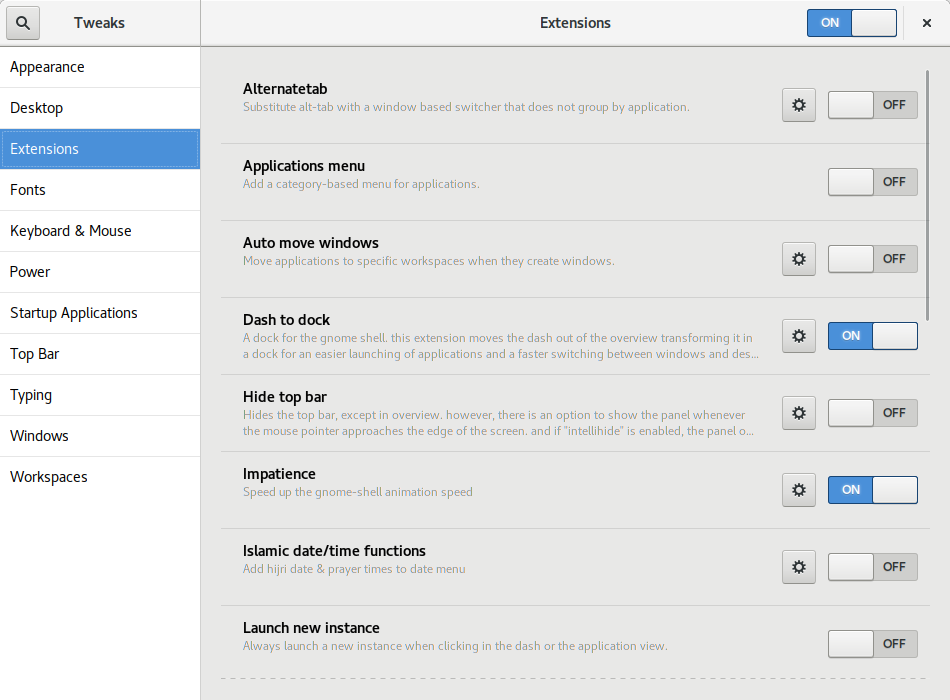
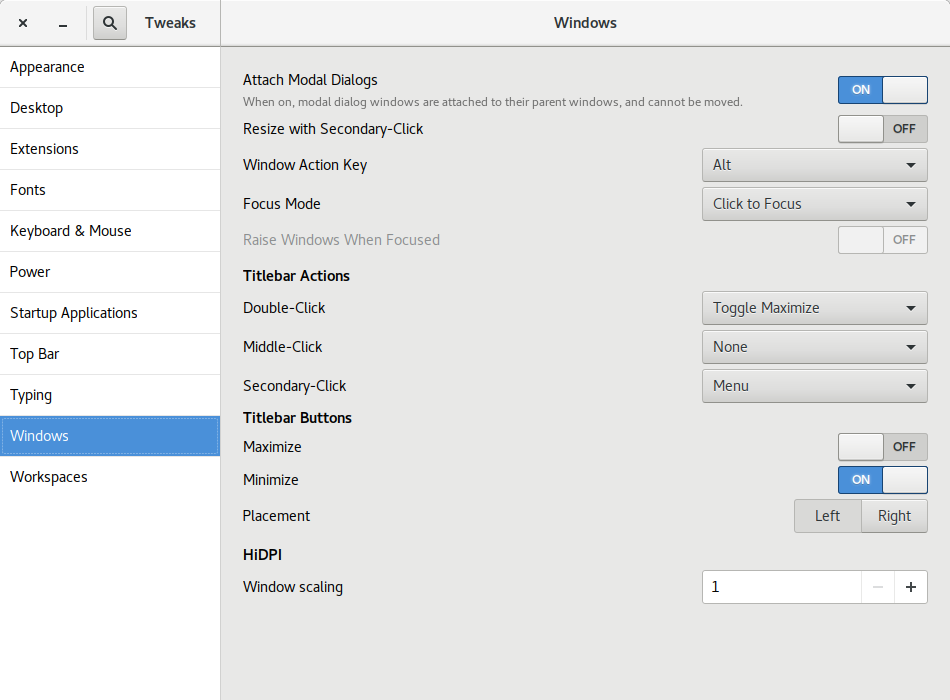
Today, I released the first development snapshot (3.25.2) of what will be GNOME Tweak Tool 3.26. Many of the panels have received UI updates. Here are a few highlights. Before this version, Tweak Tool didn t report its own version number on its About dialog! Also, as far as I know, there was no visible place in the default GNOME install for you to see what version of GTK+ is on your system. Especially now that GNOME and GTK+ releases don t share the same version numbers any more, I thought it was useful information to be in a tweak app. Florian M llner updated the layout of the GNOME Shell Extensions page: Rui Matos added a new Disable While Typing tweak to the Touchpad section. Alberto Fanjul added a Battery Percentage tweak for GNOME Shell s top bar. I added a Left/Right Placement tweak for the window buttons (minimize, maximize, close) . This screenshot shows a minimize and close button on the left. I think it s well known that Ubuntu s window buttons have been on the left for years but GNOME has kept the window buttons on the right. In fact, the GNOME 3 default is a single close button (see the other screenshots). For Unity (Ubuntu s default UI from 2011 until this year), it made sense for the buttons to be on the left because of how Unity s menu bar worked (the right side was used by the indicator system status menus). I don t believe the Ubuntu Desktop team has decided yet which side the window buttons will be on or which buttons there will be. I m ok with either side but I think I have a slight preference towards putting them on the right like Windows does. One reason I m not too worried about the Ubuntu default is that it s now very easy to switch them to the other side! If Ubuntu includes a dock like the excellent Dash to Dock in the default install, I think it makes sense for Ubuntu to add a minimize button by default. My admittedly unusual opinion is that there s no need for a maximize button.
  1. For one thing, GNOME is thoroughly tested with one window button; adding a second one shouldn t be too big of a deal, but maybe adding a 3rd button might not work as well with the design of some apps.
  2. When I maximize an app, I either double-click the titlebar or drag the app to the top of the screen so a maximize button just isn t needed.
  3. A dedicated maximize just doesn t make as much sense when there is more than one possible maximization state. Besides traditional maximize, there is now left and right semi-maximize. There s even a goal for GNOME 3.26 to support quarter-tiling .
Other Changes and Info

6 June 2017

Gunnar Wolf: Made with Creative Commons: Starting a translation project

Dear Lazyweb, About a week ago, I learnt about the release of an interesting book by the fine people at Creative Commons: Made with Creative Commons. The book itself is, of course, CC BY-SA-licensed. I downloaded it and started reading right away. Some minutes later, I ordered a dead-tree copy, which arrived a couple of days ago. (I'm linking to the publisher's page, but bought it from Amazon M xico... Shipping it from Denmark would not have been as cheap and fast, I guess). Anyway, given my workplace, given the community I know, given I know something like this is much needed... I will start a Spanish translation of the content. There are at least two other people interested in participating, and I haven't yet publicized my intentions (this is the first public statement about it). So, dear Lazyweb: What I need is a good framework for doing this. I started by creating a Git repository, and we were discussing to translate to Markdown (to later format according to the desired output) but then I thought... If we want the translation to be updateable, and to be able to properly accept other people's work, maybe a better format is warranted? So, my current idea is to create a Markdown version for the English original, and find a way to shoehorn^Wseparate it by paragraphs and feed it to Gettext, which is the best translation framework I have used (but is meant for code translation, not for full-text)... Dear lazyweb: What tools do you recommend me to use? Quite important to me: Are they Free tools? Are they easy to use by third-parties, maybe incorporating work via Git? Or, at least, via a Web front-end that allows me as a project lead to review and approve/fix/reject strings? Thanks, lazyweb!

Reproducible builds folks: Reproducible Builds: week 110 in Stretch cycle

Here's what happened in the Reproducible Builds effort between Sunday May 28 and Saturday June 3 2017: Past an upcoming events Documentation updates Toolchain development and fixes Patches and bugs filed 4 package reviews have been added, 6 have been updated and 25 have been removed in this week, adding to our knowledge about identified issues. Weekly QA work During our reproducibility testing, FTBFS bugs have been detected and reported by: diffoscope development tests.reproducible-builds.org Mattia Rizzolo: Daniel Kahn Gillmor: Vagrant Cascadian: Holger Levsen: Misc. This week's edition was written by Chris Lamb, Bernhard M. Wiedemann and Holger Levsen & reviewed by a bunch of Reproducible Builds folks on IRC & the mailing lists.

Russ Allbery: Review: Star Healer

Review: Star Healer, by James White
Series: Sector General #6
Publisher: Orb
Copyright: 1984
Printing: 2002
ISBN: 0-312-87770-6
Format: Trade paperback
Pages: 206
Star Healer is the sixth book of the Sector General series, and I think it may be the first novel in the series that was written as a novel instead of a fix-up of short stories. That makes it not a bad place to start in the series if one would rather not deal with fix-ups or barely-disguised short story collections. There isn't a huge amount of character development over the course of this series (at least to this point), so the main thing you would lose by starting here is some built-up reason for caring about the main character. This is the third book in the Alien Emergencies omnibus (the book referenced in the publication information here). Most of the previous stories have focused on Conway, a Senior Physician in the sprawling and wonderfully well-equipped multi-species hospital called Sector General and, in recent stories, the head physician in the hospital's ambulance ship. Becoming a Senior Physician at Sector General is quite the accomplishment, and a fine point to reach in the career of any doctor specializing in varied life forms, but there is another tier above: the Diagnosticians, who are the elite of Sector General. The difference is education tapes. Deep knowledge of even one specific type of life is a lot to ask of a doctor, as shown by the increasing specialization of human medicine. Sector General, which deals with wildly varying ailments of thousands of species including entirely unknown ones (if, admittedly, primarily trauma, at least in the stories shown), would be an impossible task. White realizes this and works around it with education tapes that temporarily embed in a doctor's head the experience of a doctor of another species entirely. This provides the native expertise missing, but it comes with the full personality of the doctor who recorded the tape, including preferences for food and romantic attachment that may be highly disorienting. Senior Physicians use a tape at a time, and then have it erased again when they don't need it. Diagnosticians juggle four or more tapes at the same time, and keep them for long periods or even permanently, allowing them to do ground-breaking original research. The opening of Star Healer is an offer from the intimidating Chief Psychologist of Sector General: he has a shot at Diagnostician. But it's a major decision that he should think over first, so the next step is to take a vacation of sorts on a quiet world with a small human scientific station. Oh, and there's a native medical problem, although not one with much urgency. Conway doesn't do a lot of resting, because of course he gets pulled into trying to understand the mystery of an alien species that is solitary to the point of deep and unbreakable social taboos against even standing close to other people. This is a nice cultural puzzle in line with the rest of the series, but it also leaves Conway with a new ally: an alien healer in a society in which being a doctor is difficult to the point of near hopelessness. It's not much of a spoiler to say that of course Conway decides to try for Diagnostician after his "vacation." The rest of the book is him juggling multiple cases with his new and often conflicting modes of thinking, and tackling problems that require a bit less in the way of puzzle-solving and a bit more in the way of hard trade-off decisions and quick surgical action. Senior Physicians may be able to concentrate on just one puzzle at a time; Diagnosticians have to juggle several. And they're larger, more long-term problems, focusing on how to improve a general problem for a whole species rather than just heal a specific injured alien. One interesting aspect of this series, which is very much on display here, is that Sector General most definitely does not have a Prime Directive. They are cautious about making contact with particularly primitive civilizations for fear that spacefarers would give them an inferiority complex, but sometimes they do anyway. And if they run into some biological system that offends their sensibilities, they try to fix it, not just observe it. White frequently shows species caught in what the characters call "biological traps," unable to develop farther because of some biological adaptation that gets in their way, and Sector General tries to fix those. It's an interesting ethical problem that I wish they'd think about a bit more. It's not clear they're wrong, and I think it's correct to take an expansive view of the mission to heal, but there's also a sense in which Sector General is modifying culture and biology to make aliens more like them. (The parallels between this and all the abusive paternalism that human cultures do around disability is a little too close to home to be comfortable, and now I kind of wish it hadn't occurred to me.) The gender roles, sadly, continue to be dire, although mostly ignorable because the one major female character is generally just shown as another doctor with little attention to sex. But apparently women (of every species!) cannot become Diagnosticians because they have an insurmountable biological aversion to sharing their minds with a learning tape from any doctor who doesn't find them physically attractive, which is just... sigh. It's sad that someone who could write an otherwise remarkably open-minded and pacifist series of stories, in sharp contrast with most of SF history, would still have that large of a blind spot. Apart from the times gender comes up, I liked this book more than the rest of the series, in part because I strongly prefer novels to short stories. There's more room to develop the story, and while characterization continues to not be White's strong point and that space mostly goes to more puzzles instead, he does provide an interesting set of interlocking puzzles. The problem posed by the aliens Conway meets on his "vacation" isn't fully resolved here (presumably that's for a future book), but he does solve several other significant problems and develops his own problem-solving style in more depth than in previous stories. Mildly recommended, particularly if you like this series in general. Followed by Code Blue - Emergency. Rating: 7 out of 10

John Goerzen: Family Spring: A Story in Photos

This has been a spring with times to relax, times to be busy, times of anticipation of a new baby, and times of enjoying our family. Rather than write a lot of words about it, I m telling the story in photos. To view, click here, then click Show Info in the upper right to see captions. You can pause it with the button in the lower left, and use arrow keys to advance. Alternatively, there s a captionless slideshow available here. Here s one photo to get you started: Happy about the little sister on the way

4 June 2017

Dirk Eddelbuettel: RcppArmadillo 0.7.900.2.0

armadillo image The new RcppArmadillo release 0.7.900.2.0 is now on CRAN, and the Debian package was just updated as well. Armadillo is a powerful and expressive C++ template library for linear algebra aiming towards a good balance between speed and ease of use with a syntax deliberately close to a Matlab. RcppArmadillo integrates this library with the R environment and language--and is widely used by (currently) 350 other packages on CRAN---an increase of 32 since the last CRAN release of 0.7.800.2.0 in April! With the 7.900.* series of Armadillo, Conrad has started to more fully utilize OpenMP (also see Wikipedia on OpenMP) for operations that can be parallelized. To use this in your package you need to update its src/Makevars ,.win file similarly to what the skeleton default now uses
PKG_CXXFLAGS = $(SHLIB_OPENMP_CXXFLAGS) 
PKG_LIBS = $(SHLIB_OPENMP_CFLAGS) $(LAPACK_LIBS) $(BLAS_LIBS) $(FLIBS)
and you may want to enable C++11 while you are at it---though this may pose issues with older-than-ancient RHEL installations which are still (way too) pervasive so we do not do it by default (yet). Here, we once again rely on the build infrastructure automagically provided by R itself: if and when OpenMP is available, R will use it via $(SHLIB_OPENMP_CXXFLAGS) etc; see the fine WRE manual for details. That said, some operating systems make this harder than other, and macOS usually takes the crown. See for example this blog post by James for surviving in that environment. I am a little short of details because on Linux these things just work, and have for well over a decade. The rcpp-devel mailing list will be the best place for questions. Changes in this release relative to the previous CRAN release are as follows:

Changes in RcppArmadillo version 0.7.900.2.0 (2017-06-02)
  • Upgraded to Armadillo release 7.900.2 (Evil Banana Republic)
    • Expanded clamp() to handle cubes
    • Computationally expensive element-wise functions (such as exp(), log(), cos(), etc) can now be automatically sped up via OpenMP; this requires a C++11/C++14 compiler with OpenMP 3.0+ support for GCC and clang compilers
    • One caveat: when using GCC, use of -march=native in conjunction with -fopenmp may lead to speed regressions on recent processors
  • Added gcc 7 to support compiler check (James Balamuta in #128 addressing #126).
  • A unit test helper function for rmultinom was corrected (#133).
  • OpenMP support was added to the skeleton helper in inline.R

Courtesy of CRANberries, there is a diffstat report. More detailed information is on the RcppArmadillo page. Questions, comments etc should go to the rcpp-devel mailing list off the R-Forge page.

This post by Dirk Eddelbuettel originated on his Thinking inside the box blog. Please report excessive re-aggregation in third-party for-profit settings.

Lars Wirzenius: Vmdb2 first alpha release: Debian disk image creation tool

tl;dr: Get vmdebootstrap replacement from http://git.liw.fi/vmdb2 and run it from the source tree. Tell me if something doesn't work. Send patches. Many years ago I wrote vmdebootstrap, a tool for installing Debian on a disk image for virtual machines. I had a clear personal need: I was setting up a CI system and it needed six workers: one each for Debian oldstable, stable, and unstable, on two architectures (i386, amd64). Installing Debian six times in the same way is a lot of work, so I figured how difficult can it be to automate it. Turns out that not difficult at all, except to install a bootloader. (Don't ask me why I didn't use any of the other tools for this. It was long ago, and while some of the tools that now exist probably did exist then, I like writing code and learning things while doing it.) After a while I was happy with what the program did, but didn't want to upload it to Debian, and didn't want to add the kinds of things other people wanted, so I turned vmdebootstrap over to Neil Williams, who added a ton of new features. Unfortunately, it turned out that my initial architecture was not scaleable, and also the code I wrote wasn't very good, and there weren't any tests. Neil did heroic work forcing my crappy software into doing things I never envisioned. Last year he needed a break and asked me to take vmdebootstrap back. I did, and have been hiding from the public eye ever since, since I was so ashamed of the code. (I created a new identity and pretended to be an international assassin and backup specialist, travelling the world forcing people to have at least one tested backup of their system. If you've noticed reports in the press about people reporting near-death experiences while holding a shiny new USB drive, that would've been my fault.) Pop quiz: if you have a program with ten boolean options ("do this, except if that option is given, do the other thing"), how many black box tests do you need to test all the functionality? If one run of the program takes half an hour, how long will a full test suite run? I did some hard thinking about vmdebootstrap, and came to the sad conclusion that it had reached the end of its useful life as a living software project. There was no reasonable way to add most of the additional functionality people were asking for, and even maintaining the current code was too tedious a task to consider seriously. It was time to make a clean break of the past and start over, without caring about backwards compatibility. After all, the old code wasn't going anywhere so anyone who needed it could still use it. There was no need to burden a new program with my past mistakes. All new mistakes were called for. At the Cambridge mini-Debconf of November, 2016, I gave a short presentation of what I was going to do. I also posted about my plans to the debian-cloud list. In short, I would write a new, more flexible and cleaner replacement to be called vmdb2. For various personal reasons, I've not been able to spend as much time on vmdb2 as I'd like to, but I've now reached the point where I'd like to announce the first alpha version publically. The source code is hosted here: http://git.liw.fi/vmdb2 . There are .deb packages at my personal public APT repo (http://liw.fi/code/), but vmdb2 is easy enough to run directly from a git checkout:
sudo ./vmdb2 foo.vmdb --output foo.img
There's no need to install it to try it. What works: What doesn't work: I'm not opposed to adding support for those, but they're not directly interesting to me. For example, I only have amd64 machines. The best way to get support for additional features is to tell me how, preferably in the form of patches. (If I have to read tons of docs, or other people's code, and then write code and iterate while other people tell me it doesn't work, it's probably not happening.) Why would you be interested in vmdb2? There's a lot of other tools to do what it does, so perhaps you shouldn't care. That's fine. I like writing tools for myself. But if this kind of tool is of interest to you, please do have a look. A short tutorial: vmdb2 wants you to give it a "specification file" (conventionally suffixed .vmdb, because someone stole the .spec suffix, but vmdb2 doesn't care about the name). Below is an example. vmdb2 image specification files are in YAML, since I like YAML, and specify a sequence of steps to take to build the image. Each step is a tiny piece of self-contained functionality provided by a plugin.
steps:
  - mkimg: "  output  "
    size: 4G
  - mklabel: msdos
    device: "  output  "
  - mkpart: primary
    device: "  output  "
    start: 0%
    end: 100%
    part-tag: root-part
The above create an image (name is specified with the --output option), which is four gigabytes in size, and create a partitition table and a single partition that fills the whole disk. The "tag" is given so that later steps can easily refer to the partition. If you prefer another way to partition the disk, you can achieve that by adding more "mkpart" steps. For example, for UEFI you'll want to have an EFI partition.
  - mkfs: ext4
    partition: root-part
  - mount: root-part
    fs-tag: root-fs
The above formats the partition with the ext4 filesystem, and then mounts it. The mount point will be a temporary directory created by vmdb2, and a tag is again given to the mount point so it can be referred to.
  - unpack-rootfs: root-fs
The above unpacks a tar archive to put content into the filesystem, if the tar archive exists. The tar archive is specified with the --rootfs-tarball command line option.
  - debootstrap: stretch
    mirror: http://http.debian.net/debian
    target: root-fs
    unless: rootfs_unpacked
  - apt: linux-image-amd64
    fs-tag: root-fs
    unless: rootfs_unpacked
  - cache-rootfs: root-fs
    unless: rootfs_unpacked
The above will run debootstrap and install a kernel into the filesystem, but skip doing that if the rootfs tarball was used. Also, the tarball is created if it didn't exist. This way the tarball is used by all but the first run, which saves a bit of time. On my laptop and with a local mirror, debootstrap and kernel installation takes on the order of nine minutes (500 to 600 seconds), whereas unpacking the tar archive is a bit faster (takes around 30 seconds). When iterating over things other than debootstrap, this speeds things up something wonderful, and seems worth the complexity. The "unless:" mechanism is generic. All the steps share some state, and the unpack-rootfs step sets the "rootfs_unpacked" flag in the shared state. The "unless:" field tells vmdb2 to check for the flag and if it is not set, or if it is set to false ("unless it is set to true"), vmdb2 will execute the step. vmdb2 may get more such flags in the future, if there's need.
  - chroot: root-fs
    shell:  
      sed -i '/^root:[^:]*:/s//root::/' /etc/passwd
      echo pc-vmdb2 > /etc/hostname
The above executes a couple of shell commands in a chroot of the root filesystem we've just created. In this case they remove a login password from root, and set the hostname. This is a replacement of the vmdebootstrap "customize" script, but it can be inserted anywhere into the sequence of steps. There's boot chroot and non-chroot variants of the step. This is a good point to mention that writing customize scripts gets quite repetitive and tedious after a while, so vmdb2 has a plugin to run Ansible instead. You can customize your image with that instead, while the image is being built and not have to wait until you boot the image and running Ansible over ssh.
  - grub: bios
    root-fs: root-fs
    root-part: root-part
    device: "  output  "
    console: serial
Finally, install a boot loader, grub. This shows the BIOS variant, UEFI is also supported. This also configures grub and the kernel to use a serial console. There's a "yarn" (test suite) to build and smoke test an image with vmdb2 to make sure at least the basic functionality works. The smoke test boots the image under Qemu, logs in as root, and tells the VM to power off. Very, very basic, but has already found actual bugs in vmdb2. The smoke test needs the serial console to work. As with vmdebootstrap originally, I don't particularly want to maintain the package in Debian. I've added Debian packaging (so that I can install it on my own machines), but I already have enough packages to maintain, so I'm hoping someone else will volunteer to take on the Debian maintainership and bug handling duties. If you would like vmdb2 to do more things to suit you better, I'm happy to explain how to write plugins to provide more types of steps. If you are currently using vmdebootstrap, either directly or as part of another tool, I encourage you to have a look at vmdb2. In the long term, I would like to retire vmdebootstrap entirely, once vmdb2 can do everything vmdebootstrap can do, and few people use vmdebootstrap. This may take a while. In any case, whether you want a new image building tool or not, happy hacking.

3 June 2017

Norbert Preining: TeX Live 2017 released

TeX Live 2017 has been released! CTAN mirrors are busy updating. Get out bottles of good wine, and enjoy a good long download
Besides the huge amount of package updates due to the 2 month testing hiatus, I want to pick a few changes before copying the complete changelog entry: Additional TEXMF trees tlmgr got a new functionality to easily add and remove additional TEXMF trees to the search path. MikTeX had this features since long, and it was often requested. As it turned out, it is a rather trivial thing to achieve by some texmf.cnf lines. The rest is just front end in tlmgr. Here a few invocations (not very intelligent usage, though):

$ tlmgr conf auxtrees show
tlmgr: no auxiliary texmf trees defined.
$ tlmgr conf auxtrees add /projects/book-abc
$ tlmgr conf auxtrees
List of auxiliary texmf trees:
  /projects/book-abc
$ tlmgr conf auxtrees remove /projects/book-abc
$ tlmgr conf auxtrees show
tlmgr: no auxiliary texmf trees defined.
TeX Live Manager interactive shell tlmgr also got an interactive shell now, that can also be used for scripting. Available commands are all the usual command line actions, plus a few more (see documentation). Again, here a simple session:
$ tlmgr shell
protocol 1
tlmgr> load local
OK
tlmgr> load remote
tlmgr: package repositories
	main = /home/norbert/public_html/tlnet (verified)
	koma = http://www.komascript.de/repository/texlive/2017 (verified)
OK
tlmgr> update --list
tlmgr: package repositories
	main = /home/norbert/public_html/tlnet (verified)
	koma = http://www.komascript.de/repository/texlive/2017 (verified)
tlmgr: saving backups to /home/norbert/tl/2017/tlpkg/backups
tlmgr: no updates available
OK
tlmgr> byebye
$
User versus System mode for updmap and fmtutil I have reported on this during BachoTeX/TUG 2017, here are the slides, that the two central configuration programs updmap and fmtutil will change their operation mode slightly by disallowing invocations without mde specification. That is, one either needs to call updmap -sys (or updmap-sys, nothing changed here from previous years) or updmap -user (or updmap-user, new in TeX Live 2017). We hope by this and the accompanying web page of recommendations to help users not to shoot themselves to often by calling updmap without knowing the consequences. The upcoming proceedings of the BachoTeX will also comtain an article fully documenting both updmap and fmtutil including the most recent changes.
These were only a few changes where I had my fingers in the development. For the full list, read on below. Now get ready for partying, and also for the end of the peace, because daily package updates will restart in the next days. Enjoy Changes since TeX Live 2016 The following list of changes is directly from the TeX Live documentation.

Holger Levsen: 20170603-stretch

Stretch So I have done my (hopefully) last uploads for Stretch (r0) today and want to share how pleased I've been with this release cycle. It was the smoothest freeze I've witnessed so far, I really liked the clear and documented rules from the Release Team, their regular release infos on d-d-a and publically logged IRC meetings plus the easy-to-remember URL http://release.debian.org (nicely redirecting to https), where one can easily find those relevant dates, emails and rules. Plus, useful bug views via https://udd.debian.org. There is more, but to me the last (and probably most important) factor to all this has been that most of this actually hasn't been new in this release cycle, but rather that by now a significant number of developers are aware of this and mostly have acted accordingly and communicated this further. Kudos and many thanks to the Release team, you have been amazing! Many thanks also to everyone who has contributed nicely to those 24838 source packages! You rock as well. And then I'll also like the upcoming quieter two weeks, also to prepare the Debian Edu Stretch announcement :) And then, finally, I really really look forward to the next development cycle and being able to meaningful start working on reproducible Buster!

Ingo Juergensmann: Back to the roots: FidoNet - I'm back!

Last month I blogged about Fidonet. This month I can report that I'm back in FidoNet. While I was 2:2449/413 back then, my new node number is now 2:2452/413@fidonet. The old network 2:2449 is still listed in the Fidonet nodelist, but no longer active, but maybe I can revive that network at a later time. Who knows. The other problem I complained last month about was missing software in Debian. There is binkd and ifcico as mailer software and crashmail and ifmail as a tosser, but no reader software. So how did I get started again? First, I got into mood by watching all parts of the BBS documentary about BBSes: It's a nice watch, so even when you don't plan to start a BBS or join Fidonet like I did, you can see Tom Jennings and others talking about BBSes in general and Fidonet. It's somewhat a nice way-back machine and it made me to actually start my comeback to Fidonet. I tried to compile some projects from Sourceforge like fidoip or GoldEdPlus, but all projects were in a state where they didn't compile without additional work under Debian. At least with those included debian/rules that have. So I decided to reactivate my old Fidonet software on my Amiga. Instead of GMS_Mailer I found AmiBinkd on Aminet which runs quite well. With that setup I was able to call to other Fidonet nodes and do some filerequests. That way I found out that 2:2452/250 is one of the still reachable Fidonet boxes in Germany and soon I became 2:2452/413. Still running on my Amiga with Mailmanager as Tosser and Reader and AmiBinkd as a mailer. Using Fidonet is quite different nowadays as you don't need to call out via phone line anymore, but use Internet connections instead. Although this is nice and much faster and with no additional costs and you can use "crash mail", it's not the same fun as dialing into a mailbox by modem and hear the typical sqeaking sound of a modem connecting. So I bought a Zyxel U-1496E modem on Ebay for 5.50 and connected it to my FritzBox 7490. This works quite well and I could place calls via the modem using TrapDoor as a mailer on my Amiga. Anyway, using my Amiga was only a temporary solution to get me up & running again. The goal is to run a full featured Fidonet node on Debian on my colocated server in the datacenter and in the meanwhile I was able to switch the DNS record from my Amiga to the server in the datacenter, running with binkd from Debian and Husky suite as tosser. Husky is complete Fidonet suite, including tosser, areafix, filefix, tic-file processor, etc. However there are no Debian packages available - at least not easily to find. Philipp Giebel pointed me in an Fidonet echoarea to his own personal repository for Debian and Raspbian:
https://www.kuehlbox.wtf/index.php#repo
He was very helpful in getting me started on Linux with Husky and shared many of his config files with me. Big thanks for that! He also used our discussions to write a blog article about this. Although it's German only you can find the necessary config files. You can find that on:
https://www.stimpyrama.org/blog/17-computer/138-ftnsetup
It covers nearly all necessary aspects:
  • how to setup his repo in your apt sources
  • install the necessary packages
  • configuration of husky, binkd and goldedplus with example configs
  • some tips & tricks like some keyboard shortcuts for goldedplus, etc.
So, this is really helpful for everyone that wants to join Fidonet as well. You can use goldedplus as a reader for Fidonet, or when you just want to be a point and not a full node, you might want to try OpenXP on Linux. OpenXP includes everything you'll need for a point, like a mailer, reader and tosser. You can even use it as a mail reader via POP3/IMAP or to read Internet News (aka newsgroups). It's still possible to run a Fidonet node on Amiga, on Linux and of course other operations systems like Windows and even OS/2. And with HotdogEd there is even Fidonet software available on your Android smartphone! But why Fidonet if you already have the Internet at your fingertips? Well, this is something you need to decide for yourself, but for me there are several reasons why I joined Fidonet after 17 years of inactivity again:
  • It's not the Internet! :-) This means basically no spam mails. At least I didn't experience any spam so far.
  • It's a small and welcoming community.
  • There is not only Fidonet itself (with zone 1:* to 5:*), but other zones as well, like for example AmigaNet with zone 39:* or fsxNet with zone 21:*. FTN technology makes it easy to setup a own network based on a certain topic.
  • It's a technology that enabled people to communicate worldwide with each other, long before the Internet was available for everyone! This is some kind of technical heritage I find worthwhile to preserve.
  • Although most people of us can enjoy a free and open Internet, this is not valid for everyone in the world. Nowadays some regimes decide to block and censor the Internet for their citizens. Fidonet or FTN technology can enable those citizens to still communicate free and without censorship when even Tor is not working anymore because the Internet at all has been taken down in a country. Often enough you can still use phone lines and therefor you can use modems to connect to mailboxes and exchange mails and files. FTN is optimized for this kind of dialup connections and this is one of the main reasons why I don't want to only offer connections via Internet but also by modem to my Fidonet node.
So, be invited to join Fidonet as well!
Kategorie:

Next.

Previous.