Search Results: "nate"

12 July 2013

Daniel Pocock: Practical VPNs with strongSwan, Shorewall, Linux firewalls and OpenWRT routers

There is intense interest in communications privacy at the moment thanks to the Snowden scandal. Open source software has offered credible solutions for privacy and encryption for many years. Sadly, making these solutions work together is not always plug-and-play. In fact, secure networking, like VoIP, has been plagued by problems with interoperability and firewall/filtering issues although now the solutions are starting to become apparent. Here I will look at some of them, such as the use of firewall zones to simplify management or the use of ECDSA certificates to avoid UDP fragmentation problems. I've drawn together a lot of essential tips from different documents and mailing list discussions to demonstrate how to solve a real-world networking problem. A typical network scenario and requirements Here is a diagram of the network that will be used to help us examine the capabilities of these open source solutions. Some comments about the diagram:
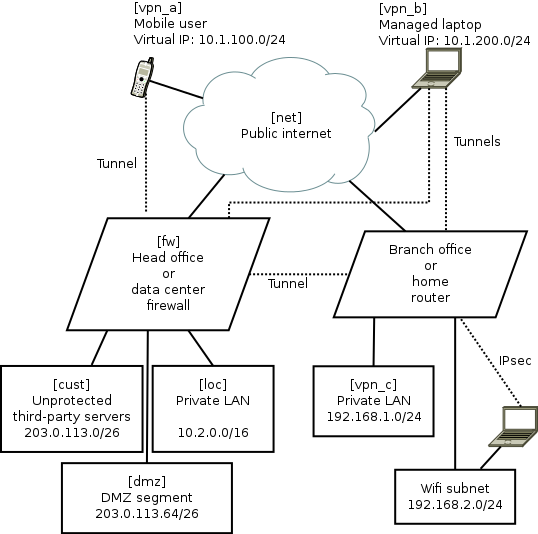
  • The names in square brackets are the zones for Shorewall, they are explained later.
  • The dotted lines are IPsec tunnels over the untrusted Internet.
  • The road-warrior users (mobiles and laptops) get virtual IP addresses from the VPN gateway. The branch offices/home routers do not use virtual IPs.
  • The mobile phones are largely untrusted: easily lost or stolen, many apps have malware, they can only tunnel to the central VPN and only access a very limited range of services.
  • The laptops are managed devices so they are trusted with access to more services. For efficiency they can connect directly to branch office/home VPNs as well as the central server.
  • Smart-phone user browsing habits are systematically monitored by mobile companies with insidious links into mass-media and advertising. Road-warriors sometimes plug-in at client sites or hotels where IT staff may monitor their browsing. Therefore, all these users want to tunnel all their browsing through the VPN.
  • The central VPN gateway/firewall is running strongSwan VPN and Shorewall firewall on Linux. It could be Debian, Fedora or Ubuntu. Other open source platforms such as OpenBSD are also very well respected for building firewall and VPN solutions, but Shorewall, which is one of the key ingredients in this recipe, only works on Linux at present.
  • The branch office/home network could be another strongSwan/Shorewall server or it could also be an OpenWRT router
  • The default configuration for most wifi routers creates a bridge joining wifi users with wired LAN users. Not here, it has been deliberately configured as an independent network. Road-warriors who attach to the wifi must use VPN tunnelling to access the local wired network. In OpenWRT, it is relatively easy to make the Wifi network an independent subnet. This is an essential security precaution because wifi passwords should not be considered secure: they are often transmitted to third parties, for example, by the cloud backup service in many newer smart phones.
Package mayhem The major components are packaged on all the major Linux distributions. Nonetheless, in every case, I found that it is necessary to re-compile fresh strongSwan packages from sources. It is not so hard to do but it is necessary and worth the effort. Here are related blog entries where I provide the details about how to re-build fresh versions of the official packages with all necessary features enabled: Using X.509 certificates as a standard feature of the VPN For convenience, many people building a point-to-point VPN start with passwords (sometimes referred to as pre-shared keys (PSK)) as a security mechanism. As the VPN grows, passwords become unmanageable. In this solution, we only look at how to build a VPN secured by X.509 certificates. The certificate concept is not hard. In this scenario, there are a few things that make it particularly easy to work with certificates:
  • strongSwan comes with a convenient command line tool, ipsec pki. Many of it's functions are equivalent to things you can do with OpenSSL or GnuTLS. However, the ipsec pki syntax is much more lightweight and simply provides a convenient way to do the things you need to do when maintaining a VPN.
  • Many of the routine activities involved in certificate maintainence can be scripted. My recent blog about using Android clients with strongSwan gives a sample script demonstrating how ipsec pki commands can be used to prepare a PKCS#12 (.p12) file that can be easily loaded into an Android device using the SD-card.
  • For building a VPN, there is no need to use a public certificate authority such as Verisign. Consequently, there is no need to fill in all their forms or make any payments for each device/certificate. Some larger organisations do choose to outsource their certificate management to such firms. For smaller organisations, an effective and sometimes better solution can be achieved by maintaining the process in-house with a private root CA.
UDP fragmentation during IPsec IKEv2 key exchange and ECDSA A common problem for IPsec VPNs using X.509 certificates is the fragmentation of key exchange datagrams during session setup. Sometimes it works, sometimes it doesn't. Various workarounds exist, such as keeping copies of all certificates from potential peers on every host. As the network grows, this becomes inconvenient to maintain and to some extent it eliminates the benefits of using PKI. Fortunately, there is a solution: Elliptic Curve Cryptography (ECC). Many people currently use RSA key-pairs. Best practice suggests using RSA keys of at least 2048 bits and often 4096 bits. Using ECC with a smaller 384-bit key is considered to be equivalent to a 7680 bit RSA key pair. Consequently, ECDSA certificates are much smaller than RSA certificates. Furthermore, at these key sizes, the key exchange packets are almost always smaller than the typical 1500 byte MTU. A further demand for ECDSA is arising due to the use of ECC within smart cards. Many smartcards don't support any RSA key larger than 2048 bits. The highly secure 384-bit ECC key is implemented in quite a few common smart cards. Smart card vendors have shown a preference for the ECC keys due to the US Government's preference for ECC and the lower computational overheads make them more suitable for constrained execution environments. Anyone who wants to use smart cards as part of their VPN or general IT security now, or in the future, needs to consider ECC/ECDSA. Making the network simple with Shorewall zones For this example, we are not just taking some easy point-to-point example. We have a real-world, multi-site, multi-device network with road warriors. Simplifying this architecture is important to help us understand and secure it. The solution? Each of these is abstracted to a "zone" in Shorewall. In the diagram above, the zone names are in square brackets. The purpose of each zone is described below:
Zone name Description
loc This is the private LAN and contains servers like databases, private source code respositories and NFS file servers
dmz This is the DMZ and contains web servers that are accessible from the public internet. Some of these servers talk to databases or message queues in the LAN network loc
vpn_a These are road warriors that are not very trustworthy, such as mobile devices. They are occasionally stolen and usually full of spyware (referred to by users as "apps"). They have limited access to ports on some DMZ servers, e.g. for sending and receiving mail using SMTP and IMAP (those ports are not exposed to the public Internet at large). They use the VPN tunnel for general internet access/browsing, to avoid surveillance by their mobile carrier.
vpn_b These are managed laptops that have a low probability of malware infection. They may well be using smart cards for access control. Consequently, they are more trusted than the vpn_a users and have access to some extra intranet pages and file servers. Like the smart-phone users, they use the VPN tunnel for general internet access/browsing, to avoid surveillance by third-party wifi hotspot operators.
vpn_c This firewall zone represents remote sites with managed hardware, such as branch offices or home networks with IPsec routers running OpenWRT.
cust These are servers hosted for third-parties or collaborative testing/development purposes. They have their own firewall arrangements if necessary.
net This zone represents traffic from the public Internet.
A practical Shorewall configuration Shorewall is chosen to manage the iptables and ip6tables firewall rules. Shorewall provides a level of abstraction that makes netfilter much more manageable than manual iptables scripting. The Shorewall concept of zones is very similar to the zones implemented in OpenWRT and this is an extremely useful paradigm for firewall management. Practical configuration of Shorewall is very well explained in the Shorewall quick start. The one thing that is not immediately obvious is a strategy for planning the contents of the /etc/shorewall/policy and /etc/shorewall/rules files. The exact details for making it work effectively with a modern IPsec VPN are not explained in a single document, so I've gathered those details below as well. An effective way to plan the Shorewall zone configuration is with a table like this:
Destination zone
loc dmz vpn_a vpn_b vpn_c cust net
Source zone loc \
dmz ? \ X X X
vpn_a ? ? \ X X
vpn_b ? ? X \ X
vpn_c X \
cust X ? X X X \
net X ? X X X \
The symbols in the table are defined:
Symbol Meaning
ACCEPT in policy file
X REJECT or DROP in policy file
? REJECT or DROP in policy file, but ACCEPT some specific ports in the rules file
Naturally, this modelling technique is valid for both IPv4 and IPv6 firewalling (with Shorewall6) Looking at the diagram in two dimensions, it is easy to spot patterns. Each pattern can be condensed into a single entry in the rules file. For example, it is clear from the first row that the loc zone can access all other zones. That can be expressed very concisely with a single line in the policy file:
loc all ACCEPT
Specific Shorewall tips for use with IPsec VPNs and strongSwan Shorewall has several web pages dedicated to VPNs, including the IPsec specific documentation.. Personally, I found that I had to gather a few details from several of these pages to make an optimal solution. Here are those tips:
  • Ignore everything about the /etc/shorewall/tunnels file. It is not needed and not used any more
  • Name the VPN zones (we call them vpn_a, vpn_b and vpn_c) in the zones file but there is no need to put them in the /etc/shorewall/interfaces file.
  • The /etc/shorewall/hosts file is not just for hosts and can be used to specify network ranges, such as those associated with the VPN virtual IP addresses. The ranges you put in this file should match the rightsourceip pool assignments in strongSwan's /etc/ipsec.conf
  • One of the examples suggests using mss=1400 in the /etc/shorewall/zones file. I found that is too big and leads to packets being dropped in some situations. To start with, try a small value such as 1024 and then try larger values later after you prove everything works. Setting mss for IPsec appears to be essential.
  • Do not use the routefilter feature in the /etc/shorewall/interfaces file as it is not compatible with IPsec
Otherwise, just follow the typical examples from the Shorewall quick start guide and configure it to work the way you want. Here is an example /etc/shorewall/zones file:
fw firewall
net ipv4
dmz ipv4
loc ipv4
cust ipv4
vpn_a ipsec mode=tunnel mss=1024
vpn_b ipsec mode=tunnel mss=1024
vpn_c ipsec mode=tunnel mss=1024
Here is an example /etc/shorewall/hosts file describing the VPN ranges from the diagram:
vpn_a eth0:10.1.100.0/24 ipsec
vpn_b eth0:10.1.200.0/24 ipsec
vpn_c eth0:192.168.1.0/24 ipsec
Here is an example /etc/shorewall/policy file based on the table above:
loc all ACCEPT
vpn_c all ACCEPT
cust net ACCEPT
net cust ACCEPT
all all REJECT
Here is an example /etc/shorewall/rules file based on the network:
SECTION ALL
# allow connections to the firewall itself to start VPNs:
# Rule  source    dest    protocol/port details
ACCEPT   all       fw                ah
ACCEPT   all       fw                esp
ACCEPT   all       fw                udp 500
ACCEPT   all       fw                udp 4500
# allow access to HTTP servers in DMZ:
ACCEPT   all       dmz               tcp 80
# allow connections from HTTP servers to MySQL database in private LAN:
ACCEPT   dmz       loc:10.2.0.43     tcp 3306
# allow connections from all VPN users to IMAPS server in private LAN:
ACCEPT vpn_a,vpn_b,vpn_c loc:10.2.0.58 tcp 993
# allow VPN users (but not the smartphones in vpn_a) to the
# PostgresQL database for PostBooks accounting system:
ACCEPT vpn_b,vpn_c loc:10.2.0.48      tcp 5432
SECTION ESTABLISHED
ACCEPT   all       all
SECTION RELATED
ACCEPT   all       all
Once the files are created, Shorewall can be easily activated with:
# shorewall compile && shorewall restart
strongSwan IPsec VPN setup Like Shorewall, strongSwan is also very well documented and I'm just going to focus on those specific areas that are relevant to this type of VPN project.
  • Allow the road-warriors to send all browsing traffic over the VPN means including leftsubnet=0.0.0.0/0 in the VPN server's /etc/ipsec.conf file. Be wary though: sometimes the road-warriors start sending the DHCP renewal over the tunnel instead of to their local DHCP server.
  • As we are using Shorewall zones for firewalling, you must set the options leftfirewall=no and lefthostaccess=no in ipsec.conf. Shorewall already knows about the remote networks as they are defined in the /etc/shorewall/hosts file and so firewall rules don't need to be manipulated each time a tunnel goes up or down.
  • As discussed above, X.509 certificates are used for peer authentication. In the certificate Distinguished Name (DN), store the zone name in the Organizational Unit (OU) component, for example, OU=vpn_c, CN=gw.branch1.example.org
  • In the ipsec.conf file, match the users to connections using wildcard specifications such as rightid="OU=vpn_a, CN=*"
  • Put a subjectAltName with hostname in every certificate. The --san option to the ipsec pki commands adds the subjectAltName.
  • Keep the certificate distinguished names (DN) short, this makes the certificate smaller and reduces the risk of fragmented authentication packets. Many examples show a long and verbose DN such as C=GB, O=Acme World Wide Widget Corporation, OU=Engineering, CN=laptop1.eng.acme.example.org. On a private VPN, it is rarely necessary to have all that in the DN, just include OU for the zone name and CN for the host name.
  • As discussed above, use the ECDSA scheme for keypairs (not RSA) to ensure that the key exchange datagrams don't suffer from fragmentation problems. For example, generate a keypair with the command ipsec pki --gen --type ecdsa --size 384 > user1Key.der
  • Road warriors should have leftid=%fromcert in their ipsec.conf file. This forces them to use the Distinguished Name and not the subjectAltName (SAN) to identify themselves.
  • For road warriors who require virtual tunnel IPs, configure them to request both IPv4 and IPv6 addresses (dual stack) with leftsourceip=%config4,%config6 and on the VPN gateway, configure the ranges as arguments to rightsourceip
  • To ensure that roadwarriors query the LAN DNS, add the DNS settings to strongswan.conf and make sure road warriors are using a more recent strongSwan version that can dynamically update /etc/resolv.conf. Protecting DNS traffic is important for privacy reasons. It also makes sure that the road-warriors can discover servers that are not advertised in public DNS records.
Central firewall/VPN gateway configuration Although they are not present in the diagram, IPv6 networks are also configured in these strongSwan examples. It is very easy to combine IPv4 and IPv6 into a single /etc/ipsec.conf file. As long as the road-warriors have leftsourceip=%config4,%config6 in their own configurations, they will operate dual-stack IPv4/IPv6 whenver they connect to the VPN. Here is an example /etc/ipsec.conf for the central VPN gateway:
config setup
        charonstart=yes
        charondebug=all
        plutostart=no
conn %default
        ikelifetime=60m
        keylife=20m
        rekeymargin=3m
        keyingtries=1
        keyexchange=ikev2
conn branch1
        left=198.51.100.1
        leftsubnet=203.0.113.0/24,10.0.0.0/8,2001:DB8:12:80:/64
        leftcert=fw1Cert.der
        leftid=@fw1.example.org
        leftfirewall=no
        lefthostaccess=no
        right=%any
        rightid=@branch1-fw.example.org
        rightsubnet=192.168.1.0/24
        auto=add
conn rw_vpn_a
        left=198.51.100.1
        leftsubnet=0.0.0.0/0,::0/0
        leftcert=fw1Cert.der
        leftid=@fw1.example.org
        leftfirewall=no
        lefthostaccess=no
        right=%any
        rightid="OU=vpn_a, CN=*"
        rightsourceip=10.1.100.0/24,2001:DB8:1000:100::/64
        auto=add
conn rw_vpn_b
        left=198.51.100.1
        leftsubnet=0.0.0.0/0,::0/0
        leftcert=fw1Cert.der
        leftid=@fw1.example.org
        leftfirewall=no
        lefthostaccess=no
        right=%any
        rightid="OU=vpn_b, CN=*"
        rightsourceip=10.1.200.0/24,2001:DB8:1000:200::/64
        auto=add
Sample branch office or home router VPN configuration Here is an example /etc/ipsec.conf for the Linux server or OpenWRT VPN at the branch office or home:
conn head_office
        left=%defaultroute
        leftid=@branch1-fw.example.org
        leftcert=branch1-fwCert.der
        leftsubnet=192.168.1.0/24,2001:DB8:12:80:/64
        leftfirewall=no
        lefthostaccess=no
        right=fw1.example.org
        rightid=@fw1.example.org
        rightsubnet=203.0.113.0/24,10.0.0.0/8,2001:DB8:1000::/52
        auto=start
# notice we only allow vpn_b users, not vpn_a
# these users are given virtual IPs from our own
# 192.168.1.0 subnet
conn rw_vpn_b
        left=branch1-fw.example.org
        leftsubnet=192.168.1.0/24,2001:DB8:12:80:/64
        leftcert=branch1-fwCert.der
        leftid=@branch1-fw.example.org
        leftfirewall=no
        lefthostaccess=no
        right=%any
        rightid="OU=vpn_b, CN=*"
        rightsourceip=192.168.1.160/27,2001:DB8:12:80::8000/116
        auto=add
Further topics Shorewall and Shorewall6 don't currently support a unified configuration. This can make it slightly tedious to duplicate rules between the two IP variations. However, the syntax for IPv4 and IPv6 configuration is virtually identical. Shorewall only currently supports Linux netfilter rules. In theory it could be extended to support other types of firewall API, such as pf used by OpenBSD and the related BSD family of systems. A more advanced architecture would split the single firewall into multiple firewall hosts, like the inner and outer walls of a large castle. The VPN gateway would also become a standalone host in the DMZ. This would require more complex routing table entries. Smart cards with PIN numbers provide an effective form of two-factor authentication that can protect certificates for remote users. Smart cards are documented well by strongSwan already so I haven't repeated any of that material in this article. Managing a private X.509 certificate authority in practice may require slightly more effort than I've described, especially when an organisation grows. Small networks and home users don't need to worry about these details too much, but for most deployments it is necessary to consider things like certificate revocation lists and special schemes to protect the root certificate's private key. EJBCA is one open source project that might help. Some users may want to consider ways to prevent the road-warriors from accidentally browsing the Internet when the IPsec tunnel is not active. Such policies could be implemented with some basic iptables firewalls rules in the road-warrior devices. Summary Using these strategies and configuration tips, planning and building a VPN will hopefully be much simpler. Please feel free to ask questions on the mailing lists for any of the projects discussed in this blog.

11 July 2013

Johannes Schauer: Using botch to generate transition build orders

In October 2012, Joachim Breitner asked me whether botch (well, it didnt have a name back then) can also be used to calculate a build order for recompiling ~450 haskell-packages with a new ghc version (it was probably the 7.6.1 release) to upload them to experimental. What is still blocking this ability is the inability of botch to directly read *.dsc files instead of having to rely on Packages and Sources files. On the other hand (in case there exists a set of Packages and Sources files) it is now much easier to use botch for such a use case for which it was not originally designed. To demonstrate how botch can be used to calculate the build order for library transitions, I wrote the script create-transition-order.sh which executes the individual tools in the correct order with the correct arguments. To validate the correctness of botch, I compared the output to the order which ben produces for transitions. The create-transition-order.sh script is called with a ben query string and optionally a snapshot.debian.org timestamp as its arguments. The script relies on ben being installed because ben query strings cannot be translated into grep-dctrl query strings as ben query splits fields which contain comma separated values at the comma before searching for strings. Unfortunately the script also currently relies on a yet unreleased ben feature which allows ben download to create a ben.cache file. You can track the progress of this feature as bug#714703. Creating a ben.cache file is necessary because some queries rely on an association between binary and source packages which is not present in all packages in a Packages file. For example the haskell transition query makes use of this feature by including the .source field in its query. The result of these trials was, that botch produced nearly the same build order for nearly all transitions. The only differences are due to shortcomings of ben and botch. For example, ben is not able to create an order for transitions where involved packages form one or more cycles. A prominent example is the haskell transition where ghc itself is only built during step 15 after many other packages which would have needed ghc to be compiled. Botch solves this problem by reducing all strongly connected components in a cyclic graph to a single vertex before creating the order. This operation makes the graph acyclic and creating a build order trivial. The only remaining problems can then be found within the strongly connected components (for Haskell they are of maximum size two) but the overall build order is correct. On the other hand botch has no notion of packages which are affected by a transition and thus creates a build order which in some cases is longer than the one created by ben. When generating the interdependencies between packages, ben only considers those which are part of the transition. Botch on the other hand considers all dependency relationships. It would be simple to solve this issue in botch by removing unaffected packages from the dependency graph through edge contraction (an operation already used by botch for other tasks). This exercise also let me find another bug in dose3 where libdose would not associate a binary package with a binNMU version with its associated source package but instead report a version mismatch error. This problem was also reported in the process.

Daniel Pocock: Using debcheckout to build strongSwan 5.0 on Debian wheezy

Normally most people try to use packages from a stable Linux distribution because of their convenience and security support. Sometimes it's necessary to use a newer version, I recently had to do this with strongSwan and I'm sharing the procedure for other people to try. These days, it is actually very very easy to build a new version of a package from source and this procedure will work for many Debian packages. Debian wheezy ships with strongSwan version 4.5 packages. These are lacking support for a couple of features I needed, including dual-stack IPv4/IPv6 virtual IPs on a single user connection and maintaining the DNS server list on road-warriors Oddly enough, for a variety of reasons, I had to rebuild strongSwan on all the platforms where I wanted to use it (not just on Debian). I recently described how to build it with ECDSA support on Fedora and also how to build it with ECDSA support on OpenWRT. Following all of these procedures you will end up with strongSwan packages on all systems that can interoperate using dual stack IPv4, IPv6 and establish connections quickly, securely and reliably using ECC certificates. Get the build dependencies Many packages require extra tools and header files when building. These are packages that are not usually installed or required when running the package. However, they are very easy to get. For strongSwan:
sudo apt-get update
sudo apt-get install devscripts fakeroot
sudo apt-get build-dep strongswan
This should download and install the necessary dependencies. Notice we also installed the devscripts package, it provides the very handy debcheckout utility. Obtain and build the package Now for the real work. Fortunately this is not too hard either:
mkdir ~/ws
cd ~/ws
debcheckout strongswan
cd strongswan
dpkg-buildpackage -rfakeroot -uc -b
Look in the directory ~/ws and you will find the .deb package files. Problems? On my own system, I observed that I could upgrade from the existing packages to the v5.0.4-6 package without any change to the configuration files. It just worked. Hopefully, these packages will eventually end up in Debian's backports catalog where you can install them without compiling. Nonetheless, problems for these packages can still be submitted through Debian's bug tracker - just make sure you clearly indicate that you built the package from source and give the git commit number (output of the command cd ~/ws/strongswan && git show head -1) Before trying the package and definitely before reporting any problem, it is worth checking the bug tracker and the Package Tracking System for known issues

9 July 2013

Raphaël Hertzog: My Free Software Activities in June 2013

This is my monthly summary of my free software related activities. If you re among the people who made a donation to support my work (106.39 , thanks everybody!), then you can learn how I spent your money. Otherwise it s just an interesting status update on my various projects. Debian France I handled some subscriptions that we collected during Solutions Linux at the end of last month and I also worked on updating the accounts in preparation of our annual general assembly. As the current president, I wrote a moral assessment of the organization and I helped Sylvestre Ledru (the treasurer) to prepare an overview of our financial situation (which is rather good). The plan for this general assembly included the renewal of 6 of our 9 board members so I tried to motivate some persons to candidate and I m pretty happy to see that we managed to have 9 candidates for 6 seats, a real election for once. :-) And as usual, I updated Galette to version 0.7.4.2 and I filed a couple of tickets (#621, #622). Debian Package Tracking System We re getting close to one month of work on the Google Summer of Code Project that rewrites the Package Tracking System. On average I spent a good 1h30 per day on reviewing the code, giving my feedback, and preparing the user stories for the next iteration, plus a 2 hour meeting each Wednesday afternoon. This is more than I expected but at I m rather happy with the result so far. We have a live test instance updated each week (after the end of the iteration) at pts.debian.net. The web interface is empty because the bulk of the work has been spent on the email interface for now, but it s now feature complete and already has seen some improvements compared to the current implementation (fixing #340863 for example). You can interact with it by sending mails to control@pts.debian.net. The Debian Administrator s Handbook The fundraising for the liberation of the original book in French met its initial target very quickly and we added new targets with supplementary rewards (more ebook from Eyrolles, donation to Debian). All the supplementary targets were met, although the last one took until the last day! Thanks to all the supporters, we now have a French translation of the Debian Administrator s Handbook which is free and we have collected about 2700 EUR for Debian. Debian Packaging I got a couple of release critical bug reports that I had to fix: And trying to anticipate future issues, I filed an upstream ticket on feed2omb (#33) to see whether upstream had plans to support the new pump.io API that identi.ca is supposed to use soonish. Kali Linux I filed a couple of Debian bugs: #711866 to request a new upstream version of w3af in Debian, #711044 to report a missing dependency in LSB meta-informations of the vsftpd init script. I worked on packaging passing-the-hash. Basically this is a fork of several software just to override some NTLM authentication functions. In some cases, I managed to avoid the fork by transforming the patches in LD_PRELOAD libraries that override the specific symbol of the patched functions. Among the forked software, there was winexe which wasn t packaged yet. So I packaged it but we quickly ran into some segfaults (which was already reported to upstream since a few months). I investigated the problem and prepared a patch. It has been submitted to upstream and merged. Thanks See you next month for a new summary of my activities.

No comment Liked this article? Click here. My blog is Flattr-enabled.

Daniel Pocock: Enabling Elliptic Curve Cryptography in OpenWRT and strongSwan VPNs

OpenWRT currently ships an OpenSSL package with Elliptic Curve Cryptography (ECC) disabled. This is very inconvenient as ECC is now standard in other distributions like Debian and Ubuntu and it is necessary to solve certain problems such as making IPsec VPNs work reliably It is relatively easy to enable it, this also provides a useful opportunity to see how the OpenWRT build system works. Preparing the build environment The build was done on a Debian 7 (wheezy) workstation. It is necessary to install some packages that provide tools needed for the build:
apt-get install gcc binutils flex make unzip gawk libz-dev linux-libc-dev
Rebuild the OpenSSL and StrongSwan packages This was tested with an ar71xx CPU-based router. You can easily change the config (run make menuconfig just before make defconfig) for other variations of router.
Running strongSwan IPsec on a router requires a router with plenty of flash, RAM and CPU power. Cheap routers with limited flash will not be able to install the packages at all. I tested on the Buffalo WZR-HP-AG300H-EU which has 32MB flash and 128MB RAM Here are the commands executed on the Debian build workstation:
mkdir ~/ws
cd ~/ws
svn checkout svn://svn.openwrt.org/openwrt/trunk openwrt-trunk
cd openwrt-trunk
./scripts/feeds update -a
./scripts/feeds install -a
wget -O .config \
  http://danielpocock.com/sites/danielpocock.com/files/openwrt.config.txt
sed -i -e 's/no-ec//' package/libs/openssl/Makefile 
make defconfig
make -j 13
The "make" command will build all the packages. It takes some time. Copy the packages to a router The actual location of the packages in your source tree depends on the CPU architecture you chose to build for. You can find them with a command such as:
find . -name '*.ipk'
Here we look at how to copy the packages for the ar71xx based router into the /tmp directory on the router. The router IP is 192.168.1.1 below:
cd ./bin/ar71xx/packages/
scp libopenssl_1.0.1e-1_ar71xx.ipk strongswan*.ipk root@192.168.1.1:/tmp
Installing the packages It is relatively easy to install the packages using the opkg utility on OpenWRT. When using self-compiled packages, you are likely to get errors about the checksums. OpenWRT compares the checksum of the package to the checksum from the package catalog file. You can delete the catalog file (e.g. rm /var/opkg-lists/attitude_adjustment) and then opkg will install the package without complaining. The file is automatically placed there each time you run opkg update so there is no harm in deleting it. In my earlier blog, I looked at how to link Android clients to the strongSwan VPN. Unfortunately Android has a bug in ECC support too and must still be used with RSA certificates. Nonetheless, the OpenWRT VPN will be quite happy talking to Linux laptops and servers - you may need to rebuild OpenSSL and StrongSwan on any Fedora, Red Hat or CentOS systems that require ECC support too. As you migrate from RSA to ECC certificates it is quite feasible to have both types of certificates in use at the same time. strongSwan supports this type of hybrid environment. To make the migration to ECC go smoothly it is desirable to ensure all boxes have ECC support at the earliest opportunity.

5 July 2013

Petter Reinholdtsen: The Thinkpad is dead, long live the Thinkpad X230?

Half a year ago, I reported that I had to find a replacement for my trusty old Thinkpad X41. Unfortunately I did not have much time to spend on it, and it took a while to find a model I believe will do the job, but two days ago the replacement finally arrived. I ended up picking a Thinkpad X230 with SSD disk (NZDAJMN). I first test installed Debian Edu Wheezy as a roaming workstation, and it seemed to work flawlessly. But my second installation with encrypted disk was not as successful. More on that below. I had a hard time trying to track down a good laptop, as my most important requirements (robust and with a good keyboard) are never listed in the feature list. But I did get good help from the search feature at Prisjakt, which allowed me to limit the list of interesting laptops based on my other requirements. A bit surprising that SSD disk are not disks according to that search interface, so I had to drop specifying the number of disks from my search parameters. I also asked around among friends to get their impression on keyboards and robustness. So the new laptop arrived, and it is quite a lot wider than the X41. I am not quite convinced about the keyboard, as it is significantly wider than my old keyboard, and I have to stretch my hand a lot more to reach the edges. But the key response is fairly good and the individual key shape is fairly easy to handle, so I hope I will get used to it. My old X40 was starting to fail, and I really needed a new laptop now. :) Turning off the touch pad was simple. All it took was a quick visit to the BIOS during boot it disable it. But there is a fatal problem with the laptop. The 180 GB SSD disk lock up during load. And this happen when installing Debian Wheezy with encrypted disk, while the disk is being filled with random data. I also tested to install Ubuntu Raring, and it happen there too if I reenable the code to fill the disk with random data (it is disabled by default in Ubuntu). And the bug with is already known. It was reported to Debian as BTS report #691427 2012-10-25 (journal commit I/O error on brand-new Thinkpad T430s ext4 on lvm on SSD). It is also reported to the Linux kernel developers as Kernel bugzilla report #51861 2012-12-20 (Intel SSD 520 stops working under load (SSDSC2BW180A3L in Lenovo ThinkPad T430s)). It is also reported on the Lenovo forums, both for T430 2012-11-10 and for X230 03-20-2013. The problem do not only affect installation. The reports state that the disk lock up during use if many writes are done on the disk, so it is much no use to work around the installation problem and end up with a computer that can lock up at any moment. There is even a small C program available that will lock up the hard drive after running a few minutes by writing to a file. I've contacted my supplier and asked how to handle this, and after contacting PCHELP Norway (request 01D1FDP) which handle support requests for Lenovo, his first suggestion was to upgrade the disk firmware. Unfortunately there is no newer firmware available from Lenovo, as my disk already have the most recent one (version LF1i). I hope to hear more from him today and hope the problem can be fixed. :)

4 July 2013

Julien Danjou: OpenStack meets Lisp: cl-openstack-client

A month ago, a mail hit the OpenStack mailing list entitled "The OpenStack Community Welcomes Developers in All Programming Languages". You may know that OpenStack is essentially built using Python, and therefore it is the reference language for the client libraries implementations. As a Lisp and OpenStack practitioner, I used this excuse to build a challenge for myself: let's prove this point by bringing Lisp into OpenStack!
Welcome cl-openstack-client, the OpenStack client library for Common Lisp! The project is hosted on the classic OpenStack infrastructure for third party project, StackForge. It provides the continuous integration system based on Jenkins and the Gerrit infrastructure used to review contributions. How the tests works OpenStack projects ran a fabulous contribution workflow, which I already talked about, based on tools like Gerrit and Jenkins. OpenStack Python projects are used to run tox, to build a virtual environment and run test inside. We don't have such thing in Common Lisp as far as I know, so I had to build it myself. Fortunately, using Quicklisp, the fabulous equivalent of Python's PyPI, it has been a breeze to set this up. cl-openstack-client just includes a basic shell script that does the following: I just run the test using SBCL, though adding more compiler on the table would be a really good plan in the future, and should be straightforward. You can admire a log from a successful test run done when I proposed a patch via Gerrit, to check what it looks like. Implementation status For the curious, here's an example of how it works:
* (require 'cl-openstack-client)
* (use-package 'cl-keystone-client)
* (defvar k (make-instance 'connection-v2 :username "demo" :password "somepassword" :tenant-name "demo" :url "http://devstack:5000"))

K

* (authenticate k)

((:ISSUED--AT . "2013-07-04T05:59:55.454226")
(:EXPIRES . "2013-07-05T05:59:55Z")
(:ID
. "wNFQwNzo1OTo1NS40NTQyMthisisaverylongtokenwNFQwNzo1OTo1NS40NTQyM")
(:TENANT (:DESCRIPTION) (:ENABLED . T)
(:ID . "1774fd545df4400380eb2b4f4985b3be") (:NAME . "demo")))

* (connection-token-id k)

"wNFQwNzo1OTo1NS40NTQyMthisisaverylongtokenwNFQwNzo1OTo1NS40NTQyM"

Unfortunately, the implementation is far from being complete. It only implements for now the Keystone token retrieval. I've actually started this project to build an already working starting point. With this, future potential contributors will be able to spend efforts on writing code, and not on setting up the basic continuous integration system or module infrastructure. If you wish to help me and contribute, just follow the OpenStack Gerrit workflow howto or feel free to come by me and ask any question (I'm hanging out on #lisp on Freenode too). See you soon, hopping to bring more Lisp into OpenStack!

Julien Danjou: OpenStack meets Lisp: cl-openstack-client

A month ago, a mail hit the OpenStack mailing list entitled "The OpenStack Community Welcomes Developers in All Programming Languages". You may know that OpenStack is essentially built using Python, and therefore it is the reference language for the client libraries implementations. As a Lisp and OpenStack practitioner, I used this excuse to build a challenge for myself: let's prove this point by bringing Lisp into OpenStack!
Welcome cl-openstack-client, the OpenStack client library for Common Lisp! The project is hosted on the classic OpenStack infrastructure for third party project, StackForge. It provides the continuous integration system based on Jenkins and the Gerrit infrastructure used to review contributions. How the tests works OpenStack projects ran a fabulous contribution workflow, which I already talked about, based on tools like Gerrit and Jenkins. OpenStack Python projects are used to run tox, to build a virtual environment and run test inside. We don't have such thing in Common Lisp as far as I know, so I had to build it myself. Fortunately, using Quicklisp, the fabulous equivalent of Python's PyPI, it has been a breeze to set this up. cl-openstack-client just includes a basic shell script that does the following: I just run the test using SBCL, though adding more compiler on the table would be a really good plan in the future, and should be straightforward. You can admire a log from a successful test run done when I proposed a patch via Gerrit, to check what it looks like. Implementation status For the curious, here's an example of how it works:
* (require 'cl-openstack-client)
* (use-package 'cl-keystone-client)
* (defvar k (make-instance 'connection-v2 :username "demo" :password "somepassword" :tenant-name "demo" :url "http://devstack:5000"))

K

* (authenticate k)

((:ISSUED--AT . "2013-07-04T05:59:55.454226")
(:EXPIRES . "2013-07-05T05:59:55Z")
(:ID
. "wNFQwNzo1OTo1NS40NTQyMthisisaverylongtokenwNFQwNzo1OTo1NS40NTQyM")
(:TENANT (:DESCRIPTION) (:ENABLED . T)
(:ID . "1774fd545df4400380eb2b4f4985b3be") (:NAME . "demo")))

* (connection-token-id k)

"wNFQwNzo1OTo1NS40NTQyMthisisaverylongtokenwNFQwNzo1OTo1NS40NTQyM"

Unfortunately, the implementation is far from being complete. It only implements for now the Keystone token retrieval. I've actually started this project to build an already working starting point. With this, future potential contributors will be able to spend efforts on writing code, and not on setting up the basic continuous integration system or module infrastructure. If you wish to help me and contribute, just follow the OpenStack Gerrit workflow howto or feel free to come by me and ask any question (I'm hanging out on #lisp on Freenode too). See you soon, hopping to bring more Lisp into OpenStack!

Petter Reinholdtsen: The Thinkpad is dead, long live the Thinkpad X230

Half a year ago, I reported that I had to find a replacement for my trusty old Thinkpad X41. Unfortunately I did not have much time to spend on it, but today the replacement finally arrived. I ended up picking a Thinkpad X230 with SSD disk (NZDAJMN). I first test installed Debian Edu Wheezy as a roaming workstation, and it worked flawlessly. As I write this, it is installing what I hope will be a more final installation, with a encrypted hard drive to ensure any dope head stealing it end up with an expencive door stop. I had a hard time trying to track down a good laptop, as my most important requirements (robust and with a good keyboard) are never listed in the feature list. But I did get good help from the search feature at <ahref>Prisjakt, which allowed me to limit the list of interesting laptops based on my other requirements. A bit surprising that SSD disk are not disks, so I had to drop number of disks from my search parameters. I am not quite convinced about the keyboard, as it is significantly wider than my old keyboard, and I have to stretch my hand a lot more to reach the edges. But the key response is fairly good and the individual key shape is fairly easy to handle, so I hope I will get used to it. My old X40 was starting to fail, and I really needed a new laptop now. :) I look forward to figuring out how to turn off the touch pad.

2 July 2013

Ond&#345;ej &#268;ert&iacute;k: My impressions from the SciPy 2013 conference

I have attended the SciPy 2013 conference in Austin, Texas. Here are my impressions.

Number one is the fact that the IPython notebook was used by pretty much everyone. I use it a lot myself, but I didn't realize how ubiquitous it has become. It is quickly becoming the standard now. The IPython notebook is using Markdown and in fact it is better than Rest. The way to remember the "[]()" syntax for links is that in regular text you put links into () parentheses, so you do the same in Markdown, and append [] for the text of the link. The other way to remember is that [] feel more serious and thus are used for the text of the link. I stressed several times to +Fernando Perez and +Brian Granger how awesome it would be to have interactive widgets in the notebook. Fortunately that was pretty much preaching to the choir, as that's one of the first things they plan to implement good foundations for and I just can't wait to use that.

It is now clear, that the IPython notebook is the way to store computations that I want to share with other people, or to use it as a "lab notebook" for myself, so that I can remember what exactly I did to obtain the results (for example how exactly I obtained some figures from raw data). In other words --- instead of having sets of scripts and manual bash commands that have to be executed in particular order to do what I want, just use IPython notebook and put everything in there.

Number two is that how big the conference has become since the last time I attended (couple years ago), yet it still has the friendly feeling. Unfortunately, I had to miss a lot of talks, due to scheduling conflicts (there were three parallel sessions), so I look forward to seeing them on video.

+Aaron Meurer and I have done the SymPy tutorial (see the link for videos and other tutorial materials). It's been nice to finally meet +Matthew Rocklin (very active SymPy contributor) in person. He also had an interesting presentation
about symbolic matrices + Lapack code generation. +Jason Moore presented PyDy.
It's been a great pleasure for us to invite +David Li (still a high school student) to attend the conference and give a presentation about his work on sympygamma.com and live.sympy.org.

It was nice to meet the Julia guys, +Jeff Bezanson and +Stefan Karpinski. I contributed the Fortran benchmarks on the Julia's website some time ago, but I had the feeling that a lot of them are quite artificial and not very meaningful. I think Jeff and Stefan confirmed my feeling. Julia seems to have quite interesting type system and multiple dispatch, that SymPy should learn from.

I met the VTK guys +Matthew McCormick and +Pat Marion. One of the keynotes was given by +Will Schroeder from Kitware about publishing. I remember him stressing to manage dependencies well as well as to use BSD like license (as opposed to viral licenses like GPL or LGPL). That opensource has pretty much won (i.e. it is now clear that that is the way to go).

I had great discussions with +Francesc Alted, +Andy Terrel, +Brett Murphy, +Jonathan Rocher, +Eric Jones, +Travis Oliphant, +Mark Wiebe, +Ilan Schnell, +St fan van der Walt, +David Cournapeau, +Anthony Scopatz, +Paul Ivanov, +Michael Droettboom, +Wes McKinney, +Jake Vanderplas, +Kurt Smith, +Aron Ahmadia, +Kyle Mandli, +Benjamin Root and others.


It's also been nice to have a chat with +Jason Vertrees and other guys from Schr dinger.

One other thing that I realized last week at the conference is that pretty much everyone agreed on the fact that NumPy should act as the default way to represent memory (no matter if the array was created in Fortran or other code) and allow manipulations on it. Faster libraries like Blaze or ODIN should then hook themselves up into NumPy using multiple dispatch. Also SymPy would then hook itself up so that it can be used with array operations natively. Currently SymPy does work with NumPy (see our tests for some examples what works), but the solution is a bit fragile (it is not possible to override NumPy behavior, but because NumPy supports general objects, we simply give it SymPy objects and things mostly work).

Similar to this, I would like to create multiple dispatch in SymPy core itself, so that other (faster) libraries for symbolic manipulation can hook themselves up, so that their own (faster) multiplication, expansion or series expansion would get called instead of the SymPy default one implemented in pure Python.

Other blog posts from the conference:

Lars Wirzenius: Consistency in backups

A backup run takes time. During a backup run the live data may change. This can mean that the snapshot of the live data may not be internally consistent. For example, suppose you're writing an e-mail when the backup starts automatically. If the timing goes wrong in exactly the right way, the backup might capture both the draft e-mail you were writing when the backup started, and the sent e-mail, when you finished the draft and sent the mail before the backup ended. Or, worse, the backup might miss both the draft and the sent e-mail. The next backup run will, certainly, get the sent e-mail, but what if you have a disaster before that happens? Internal consistency of data can be quite difficult to achive. Some programs, such as MySQL, don't do a good job of keeping the data consistent on-disk, making it difficult for the backup program to get a proper setup. (In that case, a standard trick is to "dump" or "export" the data in a consistent form, and back that up instead.) In an ideal situation, when the backup starts, the system would have a way to tell all running programs to store all their state on disk in a recoverable manner (save all open documents, dump data base content, etc), and once that is done, the backup program creates a snapshot of the filesystem. Unfortunately, I don't know of any operating system that can request consistent state from running applications. Snapshotting, however, is easy-peasy. It can be achieved by the filesystem (e.g., btrfs), or using LVM. Doing the snapshots requires root privileges, but that can probably be arranged. However, snapshotting like this, without getting all programs to commit their state to disk first, is not a guarantee of consistency. A thorough way to be consistent is to shut down the computer, and then reboot it into a special backup mode (similar to single-user mode), where no services or applications are running. However, this is, for most people, much too heavyweight a procedure to be worth it. Does consistency really matter? It matters a lot when the live data is being changed actively and consistency of the data is critical. For example, a bank's database of the amount of money in each account is quite critical: if data is not backed up consistently, money can be lost or created spontaneously, and that's probably a bad thing. Most people, however, don't need to worry a lot, and merely need to be aware of the issue, and perhaps mitigate it by backing up when the computer is mostly idle, and run backups often enough. Oh dear. This blog post contains too few jokes. I seem to have run out of jokes to make, so that will conclude this series of blog posts. I hope it was useful to some.

28 June 2013

Vincent Bernat: lan o: a task launcher powered by cgroups

A few months ago, I was looking for a piece of software to spawn long-running tasks on behalf of some daemon with the benefit of the tasks not being interrupted when this daemon is restarted. Here are the specifications: The last requirement explains why tasks are not spawned directly by the daemon requesting them: its complexity or the way it needs to be operated may need frequent restarts. Even if it is possible to re-execute a daemon while keeping its children, like stateful re-exec support in Upstart, this is quite difficult: internal state should be serialized and restored. Part of this state can be contained into a third-party library. While Upstart or systemd seemed to be good candidates for this purpose, I didn t find a straightforward way to run arbitrary tasks without any privilege1. Here comes lan o2. It is a very simple task launcher. It can run any tasks, stop them and check if they are still running. It leverages cgroups in recent Linux kernels and avoids the use of any daemon.

Quick tour Before looking at how lan o works, let s have a look at how it can be used. To avoid usage conflicts, each task is run in the context of a namespace that needs to be initialized:
$ sudo lanco testns init -u $(id -un) -g $(id -gn)
This is the only command that needs to be run as root. Subsequent ones can be run as a normal user. Let s run some task:
$ lanco testns run first-task openssl speed aes
$ lanco testns check first-task && echo "Still running"
Still running
$ lanco testns ls
testns
   first-task
      28456 openssl speed aes 
  
The output of the task is logged into a file:
$ head -3 /var/log/lanco-testns/task-first-task.log
Doing aes-128 cbc for 3s on 16 size blocks: 8678442 aes-128 cbc's in 2.85s
Doing aes-128 cbc for 3s on 64 size blocks: 2478283 aes-128 cbc's in 2.99s
Doing aes-128 cbc for 3s on 256 size blocks: 628105 aes-128 cbc's in 3.00s
If the task is too long, we can kill it:
$ lanco testns run first-task openssl speed aes
$ lanco testns stop first-task
You cannot run a task that already exists or kill a task that does not exist:
$ lanco testns run first-task openssl speed aes
2013-06-09T22:50:34 [WARN/run] task first-task is already running
$ lanco testns stop second-task
2013-06-09T22:50:45 [WARN/stop] task second-task is not running
Thanks to the use of cgroups, lan o is able to track multiple processes even when they are forking away3:
$ lanco testns run second-task sh -c \
>  "while true; do (sleep 30 &)& sleep 1; done"
$ lanco testns ls
testns
   first-task
      28456 openssl speed aes 
   second-task
      29572 sh -c while true; do (sleep 30 &)& sleep 1; done 
      29575 sleep 30 
      29593 sleep 30 
      29596 sleep 30 
      29599 sleep 30 
      29622 sleep 30 
      29644 sleep 1 
      29645 sleep 30 
  
$ lanco testns stop second-task
$ lanco testns check second-task   echo "Killed!"
Killed!
Also, there is a top-like command (lanco testns top): lanco top

Using cgroups Control groups (cgroups) is a mechanism to partition a set of tasks and their future children into hierarchical groups with a set of parameters.

Hierarchy Let s start with the hierarchical stuff first. To create a new hierarchy, you have to mount the cgroup filesystem on some empty directory. Usually, cgroups hierarchies are setup in /sys/fs/cgroups which is a tmpfs filesystem:
# mount -t tmpfs tmpfs /sys/fs/cgroup -o nosuid,nodev,noexec,relatime,mode=755
Now, we can create our first hierarchy:
# cd /sys/fs/cgroup
# mkdir my-first-hierarchy
# mount -t cgroup cgroup my-first-hierarchy -o name=my-first-hierarchy,none
# ls -1 my-first-hierarchy
cgroup.clone_children
cgroup.event_control
cgroup.procs
notify_on_release
release_agent
tasks
We ll see later the purpose of none. The most interesting file is tasks. It contains the PIDs of all processes in our group. Since there are currently no sub-group, all processes are part of it. Let s create a sub-group and attach a process to it:
# mkdir first-child
# cd first-child
# ls -1
cgroup.clone_children
cgroup.event_control
cgroup.procs
notify_on_release
tasks
# echo $$ > tasks
# cat tasks
23184
23311
# cat /proc/$$/cgroup 
9:name=my-first-hierarchy:/first-child
8:perf_event:/
7:blkio:/
6:net_cls:/
5:freezer:/
4:devices:/
3:cpuacct,cpu:/
2:cpuset:/
1:name=systemd:/user/bernat/1
We have added our shell to the new cgroup. Moreover, all its children will also be part of this group. This explains why we have two tasks: the shell and cat. The last command is quite interesting: for each hierarchy, it shows which cgroup the task belongs to. For a given hierarchy, each task is exactly in one group. The most useful features of lan o are done using just this: a namespace is a named hierarchy and each task is enclosed into a cgroup so it can be tracked properly.

Subsystems A subsystem makes use of the task grouping provided by cgroups to assign resources to a set of tasks. Each available subsystem can only be in one hierarchy, so the usual way to setup things is to assign a hierarchy for each subsystem4. Let s have a look at the cpuset subsystem: it allows to assign tasks to specific CPUs and memory nodes (for NUMA systems). Let s suppose we have 4 cores and we want to assign the first core to common system tasks and the three remaining ones to nginx:
# cd /sys/fs/cgroup
# mkdir cpuset
# mount -t cgroup cgroup cpuset -o cpuset
# echo 0-3 > cpuset/cpuset.cpus
# echo 0 > cpuset/cpuset.mems
# mkdir cpuset/system
# echo 0 > cpuset/system/cpuset.cpus
# echo 0 > cpuset/system/cpuset.mems
# for task in $(cat cpuset/tasks); do
>    echo $task > cpuset/system/tasks
> done
# mkdir cpuset/nginx
# echo 1-3 > cpuset/nginx/cpuset.cpus
# echo 0 > cpuset/nginx/cpuset.mems
# for task in $(pidof nginx); do
>    echo $task > cpuset/nginx/tasks
> done
The first mount is not needed if something else (like systemd) has setup the appropriate subsystem. Now, even if some system process is going crazy, it won t affect the performance of your webserver. The kernel comes with a more complete documentation if you need additional details on cgroups. There are high level tools to manipulate them, like the tools provided by libcg, but they are currently quite buggy and invasive.

Use in lan o Here are the features used by lan o:
  • For each namespace, a specific named hierarchy is created.
  • By setting the appropriate permissions on the hierarchy, an unprivileged user can create subgroups.
  • Each submitted task has its own sub-group for tracking purpose.
  • Actions can be executed when a task terminates by using the release agent mechanism5.
  • The cpuacct subsystem is used to track CPU usage: a group is created in this subsystem for this purpose.

  1. Both systemd and Upstart are difficult to run without being PID 1 and without being root. They both support user sessions but this requires to use them as PID 1 as well. I discovered later than runit would have been a good fit: it does not require to be PID 1, it does not need to be run as root and the service directory can be specified by an environment variable. It could have been tweaked to meet the above requirements.
  2. Lan o means launcher in esperanto. The unusual diacritic on the letter c is not present in many web fonts, so the rendering may be a little odd.
  3. Linux cgroups do not provide any facility to kill a whole group. We need to iterate through the processes and kill them one by one. lan o does not try to freeze processes before killing them and therefore may be inefficient against violent fork bombs.
  4. The cpu and cpuacct subsystems are the notable exception. There seems to be little use to keep them in separate hierarchies, so they are part of the same hierarchy.
  5. Unfortunately, only one global release agent per hierarchy can be used. Since lan o provides with the ability to execute an arbitrary command when a task terminates, the command needs to be stored on the filesystem for the release agent of the namespace to execute it.

Russ Allbery: Review: This Alien Shore

Review: This Alien Shore, by C.S. Friedman
Publisher: DAW
Copyright: 1998
Printing: July 1999
ISBN: 0-88677-799-2
Format: Mass market
Pages: 564
Jamisia is an orphan taken in by the Shido corporation, but she has a fairly comfortable and happy life in Shido Station. She lives in the care of her tutor, has friends, has something that feels like a relatively normal life. Then the station is attacked and destroyed by a rival corporation and she barely escapes in a one-person lifeboat, sent inexplicably by her tutor with a fake identity to rendezvous with a spaceship heading for the up-and-out. That begins a long and quite confusing flight away from everything she's known, and a discovery that her life is far more complicated than she thought. Meanwhile, far from the backwater of corporate tyranny that Earth has become, a new computer virus is wreaking havoc on Guild outpilots. The Guild navigate the ainniq: a sort of subspace that allows ships to slip between nodes without regard to distance. This is the only acceptable method of interstellar travel now that humans know that the more conventional Hausman Drive causes massive genetic mutations, and only Guerans have the secret of navigating it safely. But a virus of a sophistication no one has seen before appears to be targeting outpilot brains through their implants. This Alien Shore is told in two threads but multiple characters and viewpoints. Jamisia (yes, I stumbled over that name the entire book) spends nearly the whole book running while discovering that her head is a very complicated place for very bad reasons. Meanwhile, various other people (most notably the careful and meticulous Kio Masada) are analyzing and tracing the virus, which is of deep concern to the powers that be in the Guaran-controlled network of human colonies. The threads do come together eventually, helped by a young and much more impulsive hacker named Phoenix who is also on the trail of the virus, but it takes much longer than I expected. The book is a bit of cyberpunk, a bit of space opera, and is stuffed to the brim with world-building ideas. There's always something that feels slightly emotionally off about C.S. Friedman novels. Her characters are a bit too intense, a bit too full of primary colors and inherent natures. They don't do a lot of changing; they're just a little too much purely themselves to feel quite accurate. Sometimes it matters and sometimes it doesn't. This is one of the books where it mostly doesn't, partly because it's full of such an amazing variety of characters, and partly because Friedman does a great job adding situational complexity by playing them off of each other and showing them through each other's eyes. Pyschological realism, though, this isn't, nor would I look to Friedman for that. That's somewhat unfortunate given how central psychology is to this book. The focus that slowly emerges from this novel is the whole-hearted embrace of psychological difference as a force for creativity, power, and perspective. Acceptance, respect for, and integration of difference borders on a religious belief for Guerans, which makes this book one of the most wholeheartedly inclusive stories (at least for psychology) I've read. I loved that message enough to overlook the fact that those psychological differences are not treated with much subtlety. The most central of the differences (a very mild spoiler, but one that's essentially given away on the back cover and that is easy to guess early in the book) is multiple personalities. Sadly, I thought that was also the least successful. Friedman treats the topic respectfully and as a difficult asset, which I liked, but it's bog-standard fictional multiple personalities. The presentation owes much more to popular fiction than to the reality of disassociative identity, and the notes that Friedman hits (and the characteristics that the multiples embody) are predictable. However, her second major psychological idea is simply brilliant. The Guerans have developed a coding system for people to communicate their psychological profile to anyone who sees them, and all of the Gueran characters in the novel actively engage with that system and make extensive use of it. Friedman hints at a great deal of subtlety: a wealth of primary patterns (many of which are described in quite enjoyable animal metaphors as chapter epigraphs), secondary patterns that can be layered underneath, and a complex interaction of base patterns and patterns for daily mood. Here, I think Friedman's mild tendency towards archetypal characters helps, since it makes the psychological coding system clearer for the reader. I wish it had been more central to the story and explained further, although I can see the risk of turning the novel into an RPG sourcebook. (Although, now that I mention it, I would love to read an RPG sourcebook for this universe.) The other point for which I have to give Friedman huge credit is that at least half of the book is about a computer virus, the analysis of that virus, and the hacking culture of her future universe, and at no point during the story did I want to start throwing things. There are no completely unbelievable magic computer programs, the sense of movement of data and virtual presence through computer networks seemed vaguely plausible and less steeped in unrealistic VR metaphors, the sense of aesthetics of code is captured remarkably well for a story of this sort, and Friedman even brings some variety to her computer-savvy characters. There are a few mildly stereotyped young hackers (although even those have a tendency to have more depth than the stereotype), but Friedman also populates her electronic world with the other types you rarely see in these novels: thoughtful, brilliant, but meticulous researchers, competent technicians who don't engage as much on the aesthetic aspects, and even moderately-intelligent users who pay attention to the computers their lives are built around. I could actually believe in both these people and the software they use with only the suspension of disbelief required for any future SF. That's not to say there are no flaws, quibbles, or places where computers probably won't ever work that way. But that's part of what makes me so impressed. Friedman is still using computers and hacking in the direct service of a fairly typical SF plot to achieve specific dramatic ends and to create a mystery. She's not building the story around actual technology; she's staying fairly close to the sort of technology and plots that a lot of cyberpunk and hacking novels have. And yet she manages not to make the computing entirely stupid or unbelievable. It's existence proof that an SF author can pay attention to experts and research without compromising the story they want to tell. I want to take this book and smack Robert Sawyer upside the head with it. This is a great idea book with a heavily computer-driven plot strand that I quite enjoyed. It is, however, not without its flaws. The virus-hunting part of the plot is significantly more interesting than Jamisia's flight, particularly given that she keeps running, and running, and running, encountering various people who seem important and end up not being important at all. It takes more than half the book before anything particularly interesting happens to her; up until then, I was dragging myself through her segments so that I could get back to Masada and the other Guerans. She's also annoyingly dim about some things. I figured out what the deep secret in her brain was within the first four or five chapters (it's entirely obvious from the political structure of Friedman's universe), and I have no idea why it took everyone else so long to figure it out. There is also, as mentioned, the slightly off feeling of the characters that I find typical of Friedman, and a cut-throat power struggle at the heart of the book that just didn't have enough psychological believability to fully engage me. But the ideas are wonderful: technology-driven political structures, corporate-controlled states, ideological clashes, lots of believable cultural interactions, and a neat two-option interstellar travel system (even if the nature of the Hausman Drive damage bears no resemblence to any genetic science known to our reality). And that's on top of a wonderful visual language of psychology and discussions of computer security that I actually enjoyed reading. Friedman's the sort of author who won't be to everyone's tastes. You have to have some tolerance for her tendency to write grand clashes of power between highly flawed, aggressively emotional people. Sometimes you have to put up with rather a lot of setup. But I really liked this novel. I suspect I'm editing out a lot of the boring bits in my memory, but I fondly remember that edited version as a ton of fun. Rating: 8 out of 10

Paul Wise: OpenPGP keysigning: alternate encodings for fingerprint exchange

I think that hexadecimal is a fairly poor pre-encoding for information exchange via data to speech and speech to data engines (aka voice boxes, brains and fingers). Reading out and typing long strings of hexadecimal digits at OpenPGP keysignings is tedious and annoying. There have been some experiments using photography and QR codes for this, which I think is pretty cool but not always practical since not everyone has a camera and QR code software installed. An alternative to this might be to pre-encode using a different scheme that encodes to less words in English speech. Diceware is one possibility that I recently experimented with. Diceware is a password generation scheme that encodes data from a random number generator (aka some dice) using a list of 7776 words. Each word thus represents a 5 digit number in base 6. Diceware is mainly used for generating strong and easier to remember passwords. So Diceware is the coupling between a non-digital random number generator and an interesting encoding scheme. Below are my fingerprints in Diceware and Hexadecimal form. The Diceware form is longer to type at 69 characters, 40 for hex. The Diceware form has the advantage that it is only 16 words to say while the hexadecimal form is 40. I don't know if this will be more practical than hex but I can almost remember my entire fingerprint after reading it a few times so hopefully that will translate to practical use. A rough script for encoding your fingerprint in the Diceware encoding is available but I haven't implemented the reverse yet. I would be glad if someone could check it for correctness.
Diceware:    frame maze bear usgs deter wag prissy bush hoyt mayo upton child indy
Hexadecimal: 610B 28B5 5CFC FE45 EA1B  563B 3116 BA5E 9FFA 69A3
If you want to discuss this topic and try it out in person and attempt to understand my accent, I'll be at DebConf13 and OHM2013. Some downsides that I can think of are accents, multiple spellings and the inclusion of non-words and special characters in the wordlist. These can be solved by using a different wordlist created specifically for OpenPGP fingerprint exchange that only includes suitable words. Update: there is a standard called PGP Word List that is much better than Diceware for this purpose. It maps 256 words to individual bytes, with different lists for odd and even bytes. Unfortunately it doesn't appear to be supported by GnuPG or signing-party. This post was inspired by the screenshots for RedPhone. You can comment on this post on debian-project.

27 June 2013

Tollef Fog Heen: Getting rid of NSCA using Python and Chef

NSCA is a tool used to submit passive check results to nagios. Unfortunately, an incompatibility was recently introduced between wheezy clients and old servers. Since I don't want to upgrade my server, this caused some problems and I decided to just get rid of NSCA completely. The server side of NSCA is pretty trivial, it basically just adds a timestamp and a command name to the data sent by the client, then changes tabs into semicolons and stuffs all of that down Nagios' command pipe. The script I came up with was:
#! /usr/bin/python
# -* coding: utf-8 -*-
import time
import sys
# format is:
# [TIMESTAMP] COMMAND_NAME;argument1;argument2; ;argumentN
#
# For passive checks, we want PROCESS_SERVICE_CHECK_RESULT with the
# format:
#
# PROCESS_SERVICE_CHECK_RESULT;<host_name>;<service_description>;<return_code>;<plugin_output>
#
# return code is 0=OK, 1=WARNING, 2=CRITICAL, 3=UNKNOWN
#
# Read lines from stdin with the format:
# $HOSTNAME\t$SERVICE_NAME\t$RETURN_CODE\t$TEXT_OUTPUT
if len(sys.argv) != 2:
    print "Usage:  0  HOSTNAME".format(sys.argv[0])
    sys.exit(1)
HOSTNAME = sys.argv[1]
timestamp = int(time.time())
nagios_cmd = file("/var/lib/nagios3/rw/nagios.cmd", "w")
for line in sys.stdin:
    (_, service, return_code, text) = line.split("\t", 3)
    nagios_cmd.write(u"[ timestamp ] PROCESS_SERVICE_CHECK_RESULT; hostname ; service ; return_code ; text \n".format
                     (timestamp = timestamp,
                      hostname = HOSTNAME,
                      service = service,
                      return_code = return_code,
                      text = text))
The reason for the hostname in the line (even though it's overridden) is to be compatible with send_nsca's input format. Machines submit check results over SSH using its excellent ForceCommand capabilities, the Chef template for the authorized_keys file looks like:
<% for host in @nodes %>
command="/usr/local/lib/nagios/nagios-passive-check-result <%= host[:hostname] %>",no-port-forwarding,no-X11-forwarding,no-agent-forwarding,no-pty ssh-rsa <%= host[:keys][:ssh][:host_rsa_public] %> <%= host[:hostname] %>
<% end %>
The actual chef recipe looks like:
nodes = []
search(:node, "*:*") do  n 
  # Ignore not-yet-configured nodes                                                                       
  next unless n[:hostname]
  next unless n[:nagios]
  next if n[:nagios].has_key?(:ignore)
  nodes << n
end
nodes.sort!    a,b  a[:hostname] <=> b[:hostname]  
print nodes
template "/etc/ssh/userkeys/nagios" do
  source "authorized_keys.erb"
  mode 0400
  variables( 
              :nodes => nodes
             )
end
cookbook_file "/usr/local/lib/nagios/nagios-passive-check-result" do
  mode 0555
end
user "nagios" do
  action :manage
  shell "/bin/sh"
end
To submit a check, hosts do:
printf "$HOSTNAME\t$SERVICE_NAME\t$RET\t$TEXT\n"   ssh -i /etc/ssh/ssh_host_rsa_key -o BatchMode=yes -o StrictHostKeyChecking=no -T nagios@$NAGIOS_SERVER

Paul Tagliamonte: Migrating to a feed reader service

I ve moved to using newsblur, a hosted F/OSS RSS feed reader. I really like it a lot, and I highly recommend it to anyone looking for a new feed reader. I also strongly encourage you to donate / pay for an account, it s rare we get a hosted F/OSS solution like this, and I d like to see more of it. That s all, really.

26 June 2013

Russ Allbery: Review: River of Stars

Review: River of Stars, by Guy Gavriel Kay
Publisher: Roc
Copyright: April 2013
ISBN: 0-451-46497-4
Format: Hardcover
Pages: 639
In Under Heaven, Guy Gavriel Kay applied his style of slightly fantastic alternate history to Tang Dynasty China and wrote possibly the best book of his career. In River of Stars, he takes the unusual step of revisiting one of his historical worlds, something I don't think he's done explicitly apart from the Sarantime Mosaic duology. River of Stars is set in the same land of Kitai, Kay's alternate China, four centuries later. It's a stand-alone novel, not a sequel, but the effects of the events of the earlier book are deeply felt on the structure of society. Under Heaven was one of my favorite books of all time, so you can imagine how eagerly I've been awaiting this book ever since it was announced. It starts, once again, in the distant regions of Kitai, this time with a boy. Ren Daiyan is the second son of a minor clerk in a backwater town with a very atypical dream for someone of his social rank: to win back the lost provinces of Kitai from the Xiaolu and restore the glory of the empire as the center of the world. One sees little hope for this dream in a world where no one with any choice in the matter would let their sons join the discredited and suspected army. And, as River of Stars opens, it's become much less likely since the town's only teacher has closed his school and left. As with Under Heaven, the unfolding of Daiyan's life is full of surprises, all of which should be enjoyed in the flow of the story. Here, I think the cover flap even gives away too much information, despite only mentioning events at the start of the book, since the incident that it recounts has much more impact without being spoiled. I recommend avoiding any plot summary and just reading, and therefore will avoid giving any more details. River of Stars, in another echo of its predecessor novel, has a second, female protagonist. Lin Shan is the daughter of a scholar on the edges of imperial court life, a man who has quietly but persistently refused to educate her differently than he would have educated a son. This matters in the time of this novel. Kitai has turned more conservative, turned away from the roles of women in public life seen (in their limited ways) in Under Heaven, and has pressed women into new roles of formal modesty. Shan has been set up for a difficult life. But she's also brilliant, careful, and canny, making use of opportunties, and manages to make several extraordinary friends within the power structures of the court. It's impossible not to compare this novel to Under Heaven, but that's an unfair standard to which to hold any novel. So I will say up front that, at least for me, River of Stars does not capture quite the same magic. Shen Tai was a brilliant protagonist, and his unwanted journey into the circles of power was the perfect palette on which to mix personal integrity with sweeping politics. It used history as a backdrop for a novel that was always grounded in Shen Tai's modest ambitions and quiet integrity. Neither Daiyan nor Shen are that character, nor is River of Stars that book. This novel is far more political from the start, concerned directly with issues of governance, court intrigue, and military maneuvers. Even with Shen to ground the story, the personal is the political and the events of history have been moved to center stage. I've seen Kay approach a history both ways, and I prefer when he uses history as backdrop rather than focus. I find it easier to identify and celebrate with the protagonists when their journies are less caught up in grand events. When, as here, the personal becomes the political, it creates a darker tone. The stakes are higher, and there is little separable individual triumph to blunt the tragic moments. That said, Kay remains at the height of his form. Once again, this novel contains some of the best conversations I have ever read. I'm not sure what Kay is doing that other novelists aren't. It may be that he is discarding some realism in favor of presenting the purified essence of sharp and dangerous exchanges (more on that in a bit). But there are several conversations here that read like the distilled essence of a high-stakes, insightful exchange between fearsomely intelligent adversaries: steeped in strategy, carefully managed for effect, and full of thrilling rhetorical tightropes. There are also moments that literally sent shivers up my spine: moments when the story changes, and lives change, in ways that I was not expecting at all. The story is beautifully stage-managed, imbuing every moment with a feeling of a broader resonance. I do have to warn, as with all Kay but particularly recent writing, that this is done openly and explicitly via an omniscient and very obvious narrative voice. Kay writes in the style of high fantasy in which the narrator is nearly a character in the story, one who foreshadows events and shares observations directly with the reader. Some people dislike that style inherently, and if so, Kay may not be for you. I love it when it's done well, and I don't think anyone does it better than Kay. I feel like I'm in the hands of a master storyteller who is carefully crafting the story to preserve surprise and suspense and who knows exactly where he wants the story to go. That's fitting, since one of the major themes of this book is stories and legends, and how they are shaped by events but then come to shape events in turn. River of Stars is partly about the construction of stories in the way that Under Heaven was partly about poetry. Some of the characters try to control the setting and subject matter, some use stories as a way to focus their personal motivation, and some use them to define their lives. But stories also shape politics because they can define popular reaction and the limits of the possible. This theme is subtle through much of the book, but the more I thought about it the more I noticed it woven through the story. Unfortunately, and very unusually for one of Kay's novels, the journey was intense but the destination was mildly unsatisfying. I don't want to give away any detail of the plot, so this is necessarily vague, but while I intellectually appreciate the themes that I think Kay was exploring, I think River of Stars lacks the powerful catharsis that I normally get from his novels. This for me returns to the focus on the politics over the personal (which is in some ways another of the themes of the novel). The catharsis in a novel for me begins and ends with the characters, and these characters didn't have quite enough independence from the broader sweep of events. Another theme of the novel is the degree to which every character is operating within tight constraints. This also showed up in Under Heaven, but Under Heaven was full of characters who subverted and manipulated those constraints. In River of Stars, they are more often suffocating. Shen is my favorite character, and I think the strongest character in the novel, because she manages to work around the most constraints and has the most personal story. But the roles into which she's forced remain smothering and push her out of the center of the action. Her life is full of lovely details (I particularly liked her domestic situation, which shows a family model that I think was far more common in reality than it has been in fiction and one that I would like to see portrayed far more often), but she simply doesn't have realistic room, within the society portrayed here, to maneuver to the catharsis I was looking for. One other, minor note: as in Tigana, but more blatantly, unusual sexual desires make an appearance linked with the closest thing this story has to a villain. (In this case, femdom BDSM, although shown so glancingly that I suspect some readers will not pick up on what's being described.) It was neither unrealistic nor out of character, but there is a moment of nastiness that caught me by surprise and bothered me. I hope eventually to see alternative sexuality show up in a Kay novel without the negative linkages. It's not quite characterization by stereotype (I think Kay was going for a deeper point about the constrained roles available to women), but it's close enough to not work for me. I'm spending a lot of words on what didn't quite work for me, but that's because it's complex to explain, not because this is a bad story. Rather the opposite: it's an excellent novel that I didn't enjoy quite as much as its predecessor for reasons that are very individual to me. It's quite likely that those with different narrative preferences or different tolerances for certain emotional tones in novels will have a far different reaction. The quality of the writing is quite high, provided that you don't mind Kay's intrusive narrator, and several moments in this novel made me catch my breath in wonder. If you like Kay, read this; it's very much worth your time. If you're new to Kay, I would start with Under Heaven, which is near the top of my list of novels to recommend to anyone. Then read this, since seeing how the world develops and how the events of the previous novel change and shape subsequent politics is fascinating. It's not quite at the same level, but it's very much worth reading on its own terms. Rating: 9 out of 10

25 June 2013

Wouter Verhelst: Output

Reading package lists... Done
Building dependency tree       
Reading state information... Done
The following packages will be REMOVED:
  aptitude*
0 upgraded, 0 newly installed, 1 to remove and 41 not upgraded.
After this operation, 4650 kB disk space will be freed.
Do you want to continue [Y/n]? 
It just so happens that I've been blogging long enough that I can say with pretty good confidence that I've been using aptitude for about eight years now. Originally, the aptitude resolver was mostly good enough that in most cases, I could just tell aptitude to mark packages for upgrades, and it'd work; only in a few cases did I have to tell it to find a different solution. Unfortunately, this is no longer the case; when given a complex problem, aptitude is far too happy to just go ahead and remove packages these days. Sometimes, when I tell it to upgrade package "foo", it'll find that something is uninstallable, and then tell me that by removing package "foo" (but upgrading some of the libraries it depends on) we can get the situation resolved. The resolver has some more bugs, but this really is the worst of it. Recently, I've noticed that nowadays I often find myself fighting aptitude trying to remove packages, to the point that eventually it gives up and I have to retry with "apt-get update" or "apt-get dist-upgrade" or similar. Which then works flawlessly. I've decided that enough is enough, and I'll just stick with apt-get for now.

23 June 2013

Ben Armstrong: Tutorial: wheezy live iso-hybrid with persistence on USB

As of wheezy, Debian no longer offers for download any prebuilt hdd (formerly known as usb-hdd) live images, which, in squeeze, were necessary if you wanted to use persistence. The good news is, since the new wheezy iso-hybrid images use xorisso, you can copy an image to a USB key and repartition it to add a persistence partition. Unfortunately, the filesystem itself is read-only, so you have to manually append the persistence boot parameter each time you boot the image. If that doesn t bother you, you can skip this whole tutorial and just follow the instructions in live-manual for adding a persistence partition and you re all set. This tutorial explains how to extract the contents of a wheezy iso-hybrid live image to a USB key and modify it to boot with this parameter permanently enabled. I am writing it solely as a workaround and do not endorse this as a means to customize Debian Live images in general. I would love to help make a more convenient, supported way to accomplish the same thing for a future release. Meanwhile, the supported and recommended way to make any change to a Debian Live image is to build it from scratch using live-build, as described in live-manual. A simplified Debian Live Images Autobuilder web service is available that works well for many common customizations, if you prefer. Please use one of these methods if you want to do this, or other customizations in the supported way. Otherwise, read on. Prerequisites Identify the USB key device Caution: Always double-check the device you are writing to is the correct one to avoid losing precious data. There are two things to do to protect yourself. The first is, don t write the USB key as root. The second is, first use ls -l /dev/disk/by-id to identify which device is the target USB key.
lrwxrwxrwx 1 root root  9 Jun 22 11:58 
usb-SanDisk_Cruzer_Contour_0000184CA87406BC-0:0 -> ../../sdb
As you can see, my SanDisk Cruzer Countour is /dev/sdb. For the rest of the tutorial, I ll be referring to this device as /dev/sdX to avoid unfortunate cut-and-paste disasters. When you follow along, make sure you substitute the correct device for your USB key on your system. Initialize the USB key Start by plugging in the key and unmounting any automounted partitions to ensure nothing is accessing the device, e.g.
$ umount /dev/sdX1
Now make changes to the partition table. Use parted because it may be run as an ordinary user and has some advanced capabilities beyond more basic tools like fdisk.
$ /sbin/parted
WARNING: You are not superuser.  Watch out for permissions.
GNU Parted 2.3
Using /dev/sdX
Welcome to GNU Parted! Type 'help' to view a list of commands.
(parted) print devices
/dev/sdX (8221MB)
(parted) select                                                           
New device?  [/dev/sdX]?                                                  
Using /dev/sdX
(parted)
Note that when run as an ordinary user, if you only have one removable drive (which may include mp3 players, cameras, e-readers) plugged in, parted immediately selects that device. But just to be sure, use print devices to list the devices and select to if you need to select a different one, as shown above. Repartition the USB key Once you ve verified you have the correct device, start repartitioning. Write a new partition table with mklabel msdos to wipe out all of the old partitions on it. You may skip this step and adapt the remaining instructions if there are partitions you need to keep. This is your last chance to bail if the device is wrong, so make sure it is the correct one before proceeding.
(parted) mklabel msdos
Warning: The existing disk label on /dev/sdX will be destroyed and all data
on this disk will be lost. Do you want to continue?
Yes/No? y
Error: Partition(s) 1, 2, 3, 4, 5, 6, 7, 8, 9, 10, 11, 12, 13, 14, 15, 16 on
/dev/sdX have been written, but we have been unable to inform the kernel of
the change, probably because it/they are in use.  As a result, the old
partition(s) will remain in use.  You should reboot now before making further
changes.
Ignore/Cancel? i
(parted)
The error is normal, and appears when you run parted as an ordinary user, so it is OK each time it appears to press i to ignore it. For the rest of this tutorial I will omit these errors from the output for brevity. Make three partitions, a fat32 partition for the image itself that is 5% larger than the size of the ISO, a 1G ext4 partition for persistence, and an extra fat32 partition for the rest of the space. Put the extra partition first so that other OSes you might use the key with will be able to use it. Use relative positioning from the end of the device to make it easy to put all of the rest of the space in the first partition. Finally, flag the live image partition bootable.
(parted) mkpart primary fat32 1 -1897M
(parted) mkpart primary ext4 -1897M -897M
(parted) mkpart primary fat32 -897M -0
(parted) set 3 boot on
(parted) quit
Information: You may need to update /etc/fstab.
Unplug the USB key and plug it in again so that the kernel will re-read the updated partition table. If there were old filesystems on the key that were automounted, unmount them again. Now we re ready to make the new filesystems.
$ umount /dev/sdX1
$ /sbin/mkdosfs -nEXTRA /dev/sdX1
mkdosfs 3.0.16 (01 Mar 2013)
$ /sbin/mkfs.ext4 -q -Lpersistence /dev/sdX2
$ /sbin/mkdosfs -nLXDE /dev/sdX3
mkdosfs 3.0.16 (01 Mar 2013)
Make the USB key bootable Use install-mbr to install an MBR on the key and syslinux to install the bootloader to boot into your live image partition.
$ /sbin/install-mbr /dev/sdX
$ syslinux -i /dev/sdX3
Mount the partitions Unplug the key and plug it in again so the new partitions will be automounted. Observe where the partitions are mounted with df.
$ df
...
/dev/sdX1        6204568         4   6204564   1% /media/EXTRA
/dev/sdX3         831888         4    831884   1% /media/LXDE
/dev/sdX2         944120      1204    894124   1% /media/persistence
Extract the ISO contents to the key To continue preparing this key as an unprivileged user, use p7zip to extract the ISO. You may alternatively mount the ISO loopback and extract it that way, but you must be root to do that.
$ cd /media/LXDE
$ 7z x ~/debian-live-7.0.0-amd64-lxde-desktop.iso
...
Extracting  live/filesystem.packages-remove
...
When live/filesystem.squashfs is extracted (right after live/filesystem.packages-remove) it will take the longest time of all of the files to extract, as it contains the whole live filesystem. Be patient and eventually it and all other files on the image will finish extracting.
...
Everything is Ok
Folders: 245
Files: 370
Size:       892183367
Compressed: 895483904
Modify the bootloader configuration files The syslinux bootloader configuration directory and files within it are named isolinux when installed on an ISO. You need to rename the directory and two files changing isolinux to syslinux so the bootloader will find them on your fat32 live image partition.
$ mv isolinux syslinux
$ mv syslinux/isolinux.cfg syslinux/syslinux.cfg
$ mv syslinux/isolinux.bin syslinux/syslinux.bin
Enable full persistence Next, append persistence to the live boot parameters and turn on full persistence by putting / union in a persistence.conf file in the persistence partition.
$ sed -i 's/\(append boot=.*\)$/\1 persistence/' syslinux/live.cfg
$ cd /media/persistence
$ echo / union > persistence.conf
Reboot into the live system Now your USB key is ready to boot with full persistence enabled. Have fun!

21 June 2013

Joachim Breitner: Haskell and Debian talk at HaL8

I just finished my Haskell und Debian talk at the Haskell-Workshop HaL8 in Leipzig. Unfortunately I was thrown a off track by time constraints and since there were much less beginners and interested visitors in the audience than I had anticipated, so I skipped some parts and improvised others somewhat chaotically, so the presentation was not up to the standards that I expect from my talks. If you have attended (or if you have not) I recommend you have a look at the extended abstract (in German), which contains what I skipped and is much clearer than what I said.

Next.

Previous.