Search Results: "will"

17 May 2017

Daniel Pocock: Hacking the food chain in Switzerland

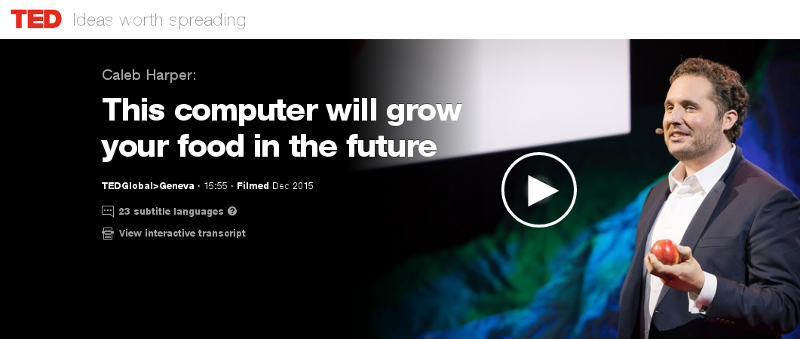
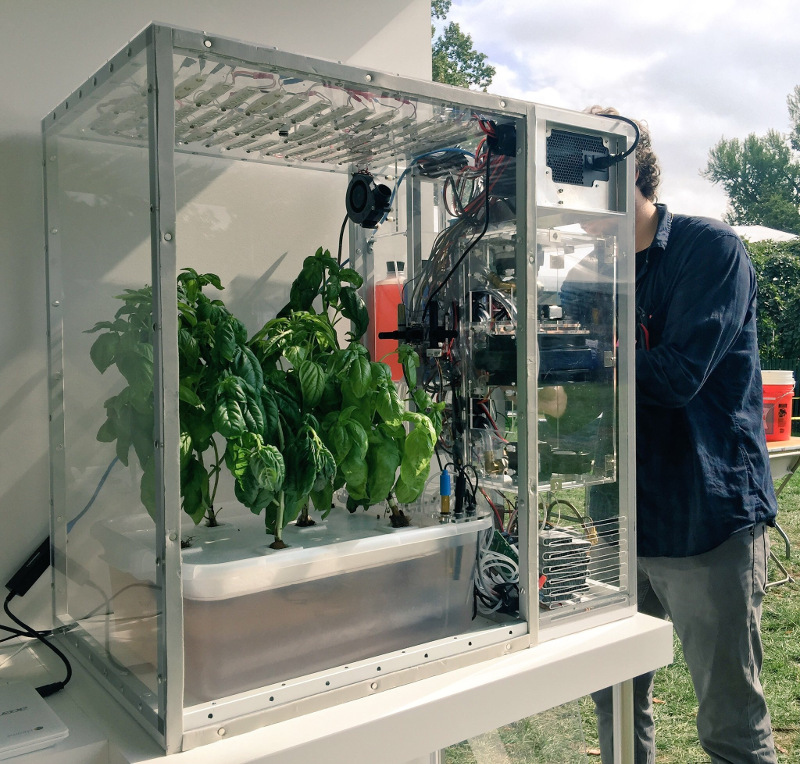
A group has recently been formed on Meetup seeking to build a food computer in Zurich. The initial meeting is planned for 6:30pm on 20 June 2017 at ETH, (Zurich Centre/Zentrum, R mistrasse 101). The question of food security underlies many of the world's problems today. In wealthier nations, we are being called upon to trust a highly opaque supply chain and our choices are limited to those things that major supermarket chains are willing to stock. A huge transport and storage apparatus adds to the cost and CO2 emissions and detracts from the nutritional value of the produce that reaches our plates. In recent times, these problems have been highlighted by the horsemeat scandal, the Guacapocalypse and the British Hummus crisis. One interesting initiative to create transparency and encourage diversity in our diets is the Open Agriculture (OpenAg) Initiative from MIT, summarised in this TED video from Caleb Harper. The food produced is healthier and fresher than anything you might find in a supermarket and has no exposure to pesticides. An open source approach to food An interesting aspect of this project is the promise of an open source approach. The project provides hardware plans, a a video of the build process, source code and the promise of sharing climate recipes (scripts) to replicate the climates of different regions, helping ensure it is always the season for your favour fruit or vegetable. Do we need it? Some people have commented on the cost of equipment and electricity. Carsten Agger recently blogged about permaculture as a cleaner alternative. While there are many places where people can take that approach, there are also many overpopulated regions and cities where it is not feasible. Some countries, like Japan, have an enormous population and previously productive farmland contaminated by industry, such as the Fukushima region. Growing our own food also has the potential to reduce food waste, as individual families and communities can grow what they need. Whether it is essential or not, the food computer project also provides a powerful platform to educate people about food and climate issues and an exciting opportunity to take the free and open source philosophy into many more places in our local communities. The Zurich Meetup group has already received expressions of interest from a diverse group including professionals, researchers, students, hackers, sustainability activists and free software developers. Next steps People who want to form a group in their own region can look in the forum topic "Where are you building your Food Computer?" to find out if anybody has already expressed interest. Which patterns from the free software world can help more people build more food computers? I've already suggested using Debian's live-wrapper to distribute a runnable ISO image that can boot from a USB stick, can you suggest other solutions like this? Can you think of any free software events where you would like to see a talk or exhibit about this project? Please suggest them on the OpenAg forum. There are many interesting resources about the food crisis, an interesting starting point is watching the documentary Food, Inc. If you are in Switzerland, please consider attending the meeting on at 6:30pm on 20 June 2017 at ETH (Centre/Zentrum), Zurich. One final thing to contemplate: if you are not hacking your own food supply, who is?
Jamie McClelland: Late to the Raspberry Pi party

I finally bought my first raspberry pi to setup as a router and wifi access point. It wasn't easy. I first had to figure out what to buy. I think that was the hardest part. I ended up with: I already have a cable matters USB to ethernet device, which will provide the second ethernet connection so this device can actually work as a router. I studiously followed the directions to download the raspbian image and copy it to my micro sd card. I also touched a file on the boot partition called ssh so ssh would start automatically. Note: I first touched the ssh file on the root partition (sdb2) before realizing it belonged on the boot partition (sdb1). And, despite ambiguous directions found on the Internet, lowercase 'ssh' for the filename seems to do the trick. Then, I found the IP address with the help of NMAP (sudo nmap -sn 192.168.69.*) and tried to ssh in but alas...
Connection reset by 192.168.69.116 port 22
No dice. So, I re-mounted the sdb2 partition of the micro sd card and looked in var/log/auth.log and found:
May  5 19:23:00 raspberrypi sshd[760]: error: Could not load host key: /etc/ssh/ssh_host_ed25519_key
May  5 19:23:00 raspberrypi sshd[760]: fatal: No supported key exchange algorithms [preauth]
May  5 19:23:07 raspberrypi sshd[762]: error: key_load_public: invalid format
May  5 19:23:07 raspberrypi sshd[762]: error: Could not load host key: /etc/ssh/ssh_host_rsa_key
May  5 19:23:07 raspberrypi sshd[762]: error: key_load_public: invalid format
May  5 19:23:07 raspberrypi sshd[762]: error: Could not load host key: /etc/ssh/ssh_host_dsa_key
May  5 19:23:07 raspberrypi sshd[762]: error: key_load_public: invalid format
May  5 19:23:07 raspberrypi sshd[762]: error: Could not load host key: /etc/ssh/ssh_host_ecdsa_key
May  5 19:23:07 raspberrypi sshd[762]: error: key_load_public: invalid format
How did that happen? And wait a minute...
0 jamie@turkey:~$ ls -l /mnt/etc/ssh/ssh_host_ecdsa_key
-rw------- 1 root root 0 Apr 10 05:58 /mnt/etc/ssh/ssh_host_ecdsa_key
0 jamie@turkey:~$ date
Fri May  5 15:44:15 EDT 2017
0 jamie@turkey:~$
Are the keys embedded in the image? Isn't that wrong? I fixed with:
0 jamie@turkey:mnt$ sudo rm /mnt/etc/ssh/ssh_host_*
0 jamie@turkey:mnt$ sudo ssh-keygen -q -f /mnt/etc/ssh/ssh_host_rsa_key -N '' -t rsa
0 jamie@turkey:mnt$ sudo ssh-keygen -q -f /mnt/etc/ssh/ssh_host_dsa_key -N '' -t dsa
0 jamie@turkey:mnt$ sudo ssh-keygen -q -f /mnt/etc/ssh/ssh_host_ecdsa_key -N '' -t ecdsa
0 jamie@turkey:mnt$ sudo ssh-keygen -q -f /mnt/etc/ssh/ssh_host_ed25519_key -N '' -t ed25519
0 jamie@turkey:mnt$
NOTE: I just did a second installation and this didn't happen. Maybe something went wrong as I experiment with SSH vs ssh on the boot partition? Then I could ssh in. I removed the pi user account and added my ssh key to /root/.ssh/authorized_keys and put a new name "mondragon" in the /etc/hostname file. And... I upgraded to Debian stretch and rebooted. Then, I followed these instructions for fixing the wifi (replacing the firmware does still work for me). I plugged my cable matters USB/Ethernet adapter into the device so it would be recognized, but left it dis-connected. Next I started to configure the device to be a wifi access point using this excellend tutorial, but decided I wanted to setup my networks using systemd-networkd instead. Since /etc/network/interaces already had eth0 set to manual (because apparently it is controlled by dhcpcd instead), I didn't need any modifications there. However, I wanted to use the dhcp client built-in to systemd-networkd, so to prevent dhcpcd from obtaining an IP address, I purged dhcpcd:
apt-get purge dhcpcd5
I was planning to also use systemd-networkd to name the devices (using *.link files) but nothing I could do could convince systemd to rename them, so I gave up and added /etc/udev/rules.d/70-persistent-net.rules:
    SUBSYSTEM=="net", ACTION=="add", DRIVERS=="?*", ATTR address =="b8:27:eb:ce:b5:c3", ATTR dev_id =="0x0", ATTR type =="1", NAME:="wan"
    SUBSYSTEM=="net", ACTION=="add", DRIVERS=="?*", ATTR address =="a0:ce:c8:01:20:7d", ATTR dev_id =="0x0", ATTR type =="1", NAME:="lan"
    SUBSYSTEM=="net", ACTION=="add", DRIVERS=="?*", ATTR address =="b8:27:eb:9b:e0:96", ATTR dev_id =="0x0", ATTR type =="1", NAME:="wlan"
(If you are copying and pasting the mac addresses will have to change.) Then I added the following files:
root@mondragon:~# head /etc/systemd/network/*
==> /etc/systemd/network/50-lan.network <==
[Match]
Name=lan
[Network]
Address=192.168.69.1/24
==> /etc/systemd/network/55-wlan.network <==
[Match]
Name=wlan
[Network]
Address=10.0.69.1/24
==> /etc/systemd/network/60-wan.network <==
[Match]
Name=wan
[Network]
DHCP=v4
IPForward=yes
IPMasquerade=yes
root@mondragon:~#
Sadly, IPMasquerade doesn't seem to work either for some reason, so...
root@mondragon:~# cat /etc/systemd/system/masquerade.service 
[Unit]
Description=Start masquerading because Masquerade=yes not working in wan.network.
[Service]
Type=oneshot
ExecStart=/sbin/iptables -t nat -A POSTROUTING -o wan -j MASQUERADE
[Install]
WantedBy=network.target
root@mondragon:~#
And, systemd DHCPServer worked, but then it didn't and I couldn't figure out how to debug, so...
apt-get install dnsmasq
Followed by:
root@mondragon:~# cat /etc/dnsmasq.d/mondragon.conf 
# Don't provide DNS services (unbound does that).
port=0
interface=lan
interface=wlan
# Only provide dhcp services since systemd-networkd dhcpserver seems
# flakey.
dhcp-range=set:cable,192.168.69.100,192.168.69.150,255.255.255.0,4h
dhcp-option=tag:cable,option:dns-server,192.168.69.1
dhcp-option=tag:cable,option:router,192.168.69.1
dhcp-range=set:wifi,10.0.69.100,10.0.69.150,255.255.255.0,4h
dhcp-option=tag:wifi,option:dns-server,10.0.69.1
dhcp-option=tag:wifi,option:router,10.0.69.1
root@mondragon:~#
It would probably be simpler to have dnsmasq provide DNS service also, but I happen to like unbound:
apt-get install unbound
And...
root@mondragon:~# cat /etc/unbound/unbound.conf.d/server.conf 
server:
    interface: 127.0.0.1
    interface: 192.168.69.1
    interface: 10.0.69.1
    access-control: 192.168.69.0/24 allow
    access-control: 10.0.69.0/24 allow
    # We do query localhost for our stub zone: loc.cx
    do-not-query-localhost: no
    # Up this level when debugging.
    log-queries: no
    logfile: ""
    #verbosity: 1
    # Settings to work better with systemcd
    do-daemonize: no
    pidfile: ""
root@mondragon:~# 
Now on to the wifi access point.
apt-get install hostapd
And the configuration file:
root@mondragon:~# cat /etc/hostapd/hostapd.conf
# This is the name of the WiFi interface we configured above
interface=wlan
# Use the nl80211 driver with the brcmfmac driver
driver=nl80211
# This is the name of the network
ssid=peacock
# Use the 2.4GHz band
hw_mode=g
# Use channel 6
channel=6
# Enable 802.11n
ieee80211n=1
# Enable WMM
wmm_enabled=1
# Enable 40MHz channels with 20ns guard interval
ht_capab=[HT40][SHORT-GI-20][DSSS_CCK-40]
# Accept all MAC addresses
macaddr_acl=0
# Use WPA authentication
auth_algs=1
# Require clients to know the network name
ignore_broadcast_ssid=0
# Use WPA2
wpa=2
# Use a pre-shared key
wpa_key_mgmt=WPA-PSK
# The network passphrase
wpa_passphrase=xxxxxxxxxxxx
# Use AES, instead of TKIP
rsn_pairwise=CCMP
root@mondragon:~#
The hostapd package doesn't have a systemd start up file so I added one:
root@mondragon:~# cat /etc/systemd/system/hostapd.service 
[Unit]
Description=Hostapd IEEE 802.11 AP, IEEE 802.1X/WPA/WPA2/EAP/RADIUS Authenticator
Wants=network.target
Before=network.target
Before=network.service
[Service]
ExecStart=/usr/sbin/hostapd /etc/hostapd/hostapd.conf
[Install]
WantedBy=multi-user.target
root@mondragon:~#
My last step was to modify /etc/ssh/sshd_config so it only listens on the lan and wlan interfaces (listening on wlan is a bit of a risk, but also useful when mucking with the lan network settings to ensure I don't get locked out).

Dirk Eddelbuettel: Upcoming Rcpp Talks

Very excited about the next few weeks which will cover a number of R conferences, workshops or classes with talks, mostly around Rcpp and one notable exception: If you are near one those events, interested and able to register (for the events requiring registration), I would love to chat before or after.

16 May 2017

Daniel Pocock: Building an antenna and receiving ham and shortwave stations with SDR

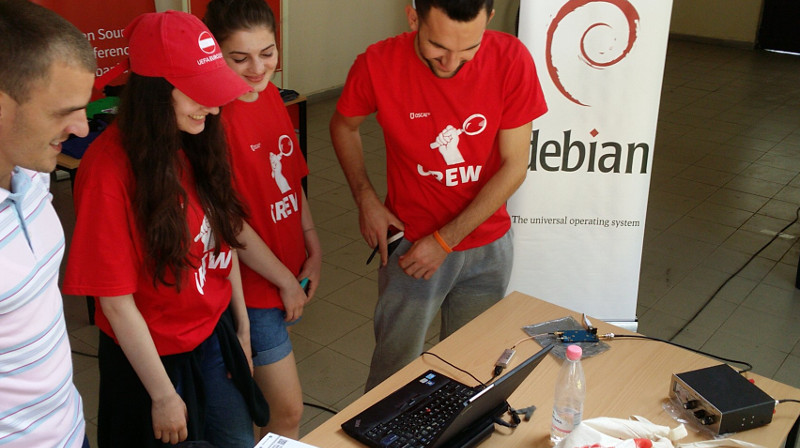
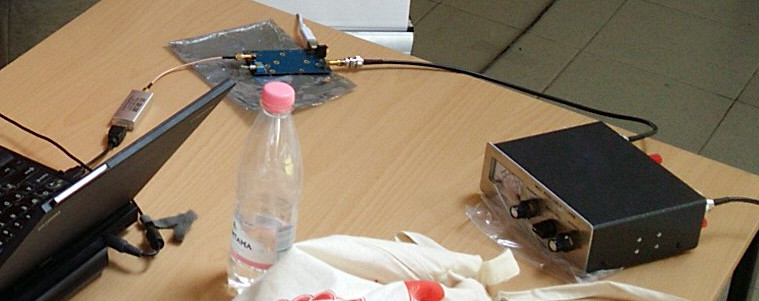
In my previous blog on the topic of software defined radio (SDR), I provided a quickstart guide to using gqrx, GNU Radio and the RTL-SDR dongle to receive FM radio and the amateur 2 meter (VHF) band. Using the same software configuration and the same RTL-SDR dongle, it is possible to add some extra components and receive ham radio and shortwave transmissions from around the world. Here is the antenna setup from the successful SDR workshop at OSCAL'17 on 13 May: After the workshop on Saturday, members of the OSCAL team successfully reconstructed the SDR and antenna at the Debian info booth on Sunday and a wide range of shortwave and ham signals were detected: Here is a close-up look at the laptop, RTL-SDR dongle (above laptop), Ham-It-Up converter (above water bottle) and MFJ-971 ATU (on right): Buying the parts
Component Purpose, Notes Price/link to source
RTL-SDR dongle Converts radio signals (RF) into digital signals for reception through the USB port. It is essential to buy the dongles for SDR with TCXO, the generic RTL dongles for TV reception are not stable enough for anything other than TV. ~ 25
Enamelled copper wire, 25 meters or more Loop antenna. Thicker wire provides better reception and is more suitable for transmitting (if you have a license) but it is heavier. The antenna I've demonstrated at recent events uses 1mm thick wire. ~ 10
4 (or more) ceramic egg insulators Attach the antenna to string or rope. Smaller insulators are better as they are lighter and less expensive. ~ 10
4:1 balun The actual ratio of the balun depends on the shape of the loop (square, rectangle or triangle) and the point where you attach the balun (middle, corner, etc). You may want to buy more than one balun, for example, a 4:1 balun and also a 1:1 balun to try alternative configurations. Make sure it is waterproof, has hooks for attaching a string or rope and an SO-239 socket. from 20
5 meter RG-58 coaxial cable with male PL-259 plugs on both ends If using more than 5 meters or if you want to use higher frequencies above 30MHz, use thicker, heavier and more expensive cables like RG-213. The cable must be 50 ohm. ~ 10
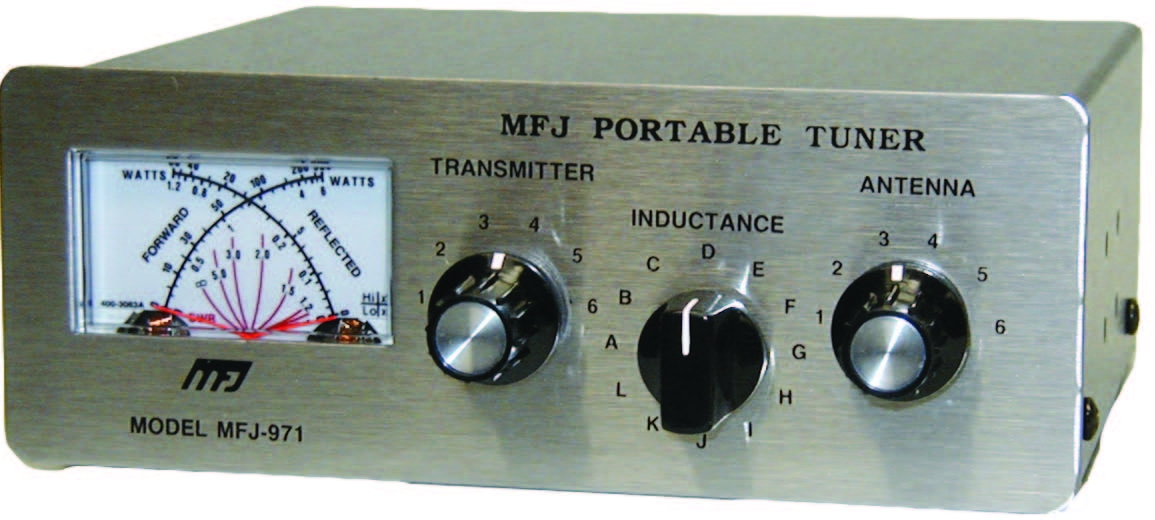
Antenna Tuning Unit (ATU) I've been using the MFJ-971 for portable use and demos because of the weight. There are even lighter and cheaper alternatives if you only need to receive. ~ 20 for receive only or second hand
PL-259 to SMA male pigtail, up to 50cm, RG58 Joins the ATU to the upconverter. Cable must be RG58 or another 50 ohm cable ~ 5
Ham It Up v1.3 up-converter Mixes the HF signal with a signal from a local oscillator to create a new signal in the spectrum covered by the RTL-SDR dongle ~ 40
SMA (male) to SMA (male) pigtail Join the up-converter to the RTL-SDR dongle ~ 2
USB charger and USB type B cable Used for power to the up-converter. A spare USB mobile phone charge plug may be suitable. ~ 5
String or rope For mounting the antenna. A ligher and cheaper string is better for portable use while a stronger and weather-resistent rope is better for a fixed installation. 5
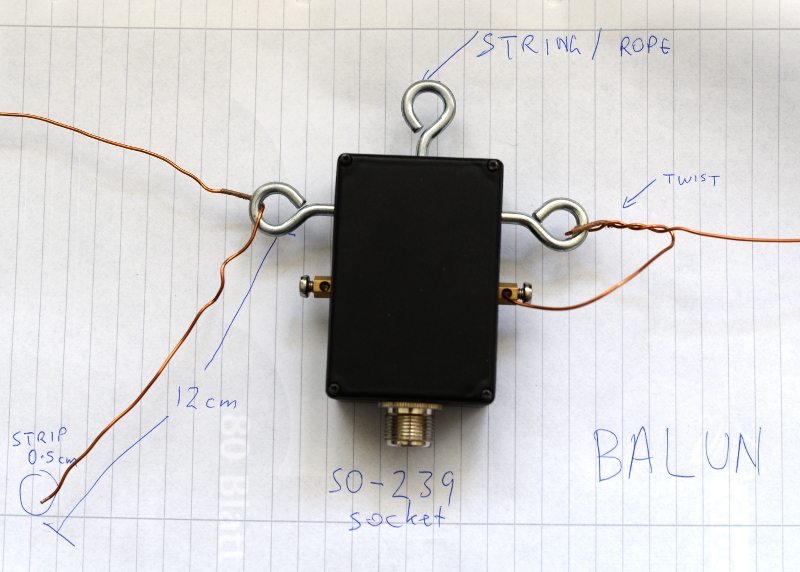
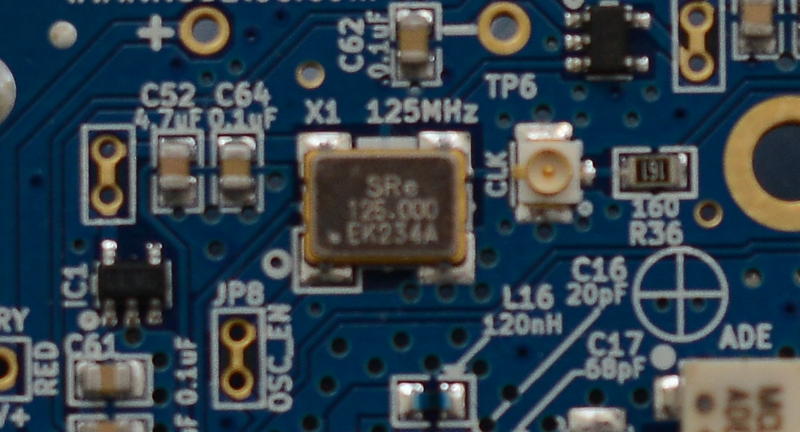
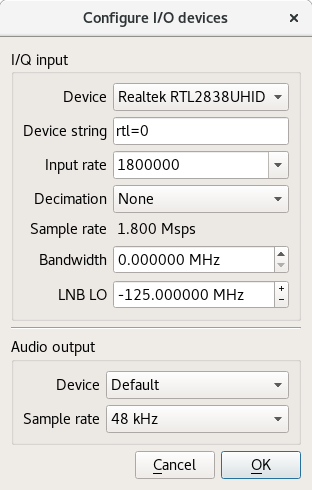
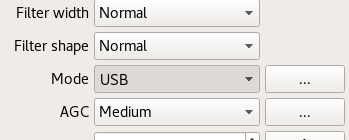
Building the antenna There are numerous online calculators for measuring the amount of enamelled copper wire to cut. For example, for a centre frequency of 14.2 MHz on the 20 meter amateur band, the antenna length is 21.336 meters. Add an extra 24 cm (extra 12 cm on each end) for folding the wire through the hooks on the balun. After cutting the wire, feed it through the egg insulators before attaching the wire to the balun. Measure the extra 12 cm at each end of the wire and wrap some tape around there to make it easy to identify in future. Fold it, insert it into the hook on the balun and twist it around itself. Use between four to six twists. Strip off approximately 0.5cm of the enamel on each end of the wire with a knife, sandpaper or some other tool. Insert the exposed ends of the wire into the screw terminals and screw it firmly into place. Avoid turning the screw too tightly or it may break or snap the wire. Insert string through the egg insulators and/or the middle hook on the balun and use the string to attach it to suitable support structures such as a building, posts or trees. Try to keep it at least two meters from any structure. Maximizing the surface area of the loop improves the performance: a circle is an ideal shape, but a square or 4:3 rectangle will work well too. For optimal performance, if you imagine the loop is on a two-dimensional plane, the first couple of meters of feedline leaving the antenna should be on the plane too and at a right angle to the edge of the antenna. Join all the other components together using the coaxial cables. Configuring gqrx for the up-converter and shortwave signals Inspect the up-converter carefully. Look for the crystal and find the frequency written on the side of it. The frequency written on the specification sheet or web site may be wrong so looking at the crystal itself is the best way to be certain. On my Ham It Up, I found a crystal with 125.000 written on it, this is 125 MHz. Launch gqrx, go to the File menu and select I/O devices. Change the LNB LO value to match the crystal frequency on the up-converter, with a minus sign. For my Ham It Up, I use the LNB LO value -125.000000 MHz. Click OK to close the I/O devices window. On the Input Controls tab, make sure Hardware AGC is enabled. On the Receiver options tab, change the Mode value. Commercial shortwave broadcasts use AM and amateur transmission use single sideband: by convention, LSB is used for signals below 10MHz and USB is used for signals above 10MHz. To start exploring the 20 meter amateur band around 14.2 MHz, for example, use USB. In the top of the window, enter the frequency, for example, 14.200 000 MHz. Now choose the FFT Settings tab and adjust the Freq zoom slider. Zoom until the width of the display is about 100 kHZ, for example, from 14.15 on the left to 14.25 on the right. Click the Play icon at the top left to start receiving. You may hear white noise. If you hear nothing, check the computer's volume controls, move the Gain slider (bottom right) to the maximum position and then lower the Squelch value on the Receiver options tab until you hear the white noise or a transmission. Adjust the Antenna Tuner knobs Now that gqrx is running, it is time to adjust the knobs on the antenna tuner (ATU). Reception improves dramatically when it is tuned correctly. Exact instructions depend on the type of ATU you have purchased, here I present instructions for the MFJ-971 that I have been using. Turn the TRANSMITTER and ANTENNA knobs to the 12 o'clock position and leave them like that. Turn the INDUCTANCE knob while looking at the signals in the gqrx window. When you find the best position, the signal strength displayed on the screen will appear to increase (the animated white line should appear to move upwards and maybe some peaks will appear in the line). When you feel you have found the best position for the INDUCTANCE knob, leave it in that position and begin turning the ANTENNA knob clockwise looking for any increase in signal strength on the chart. When you feel that is correct, begin turning the TRANSMITTER knob. Listening to a transmission At this point, if you are lucky, some transmissions may be visible on the gqrx screen. They will appear as darker colours in the waterfall chart. Try clicking on one of them, the vertical red line will jump to that position. For a USB transmission, try to place the vertical red line at the left hand side of the signal. Try dragging the vertical red line or changing the frequency value at the top of the screen by 100 Hz at a time until the station is tuned as well as possible. Try and listen to the transmission and identify the station. Commercial shortwave broadcasts will usually identify themselves from time to time. Amateur transmissions will usually include a callsign spoken in the phonetic alphabet. For example, if you hear "CQ, this is Victor Kilo 3 Tango Quebec Romeo" then the station is VK3TQR. You may want to note down the callsign, time, frequency and mode in your log book. You may also find information about the callsign in a search engine. The video demonstrates reception of a transmission from another country, can you identify the station's callsign and find his location? If you have questions about this topic, please come and ask on the Debian Hams mailing list. The gqrx package is also available in Fedora and Ubuntu but it is known to crash on startup in Ubuntu 17.04. Users of other distributions may also want to try the Debian Ham Blend bootable ISO live image as a quick and easy way to get started.

Francois Marier: Recovering from an unbootable Ubuntu encrypted LVM root partition

A laptop that was installed using the default Ubuntu 16.10 (xenial) full-disk encryption option stopped booting after receiving a kernel update somewhere on the way to Ubuntu 17.04 (zesty). After showing the boot screen for about 30 seconds, a busybox shell pops up:
BusyBox v.1.21.1 (Ubuntu 1:1.21.1-1ubuntu1) built-in shell (ash)
Enter 'help' for list of built-in commands.
(initramfs)
Typing exit will display more information about the failure before bringing us back to the same busybox shell:
Gave up waiting for root device. Common problems:
  - Boot args (cat /proc/cmdline)
    - Check rootdelay= (did the system wait long enough?)
    - Check root= (did the system wait for the right device?)
  - Missing modules (cat /proc/modules; ls /dev)
ALERT! /dev/mapper/ubuntu--vg-root does not exist. Dropping to a shell! 
BusyBox v.1.21.1 (Ubuntu 1:1.21.1-1ubuntu1) built-in shell (ash)   
Enter 'help' for list of built-in commands.  
(initramfs)
which now complains that the /dev/mapper/ubuntu--vg-root root partition (which uses LUKS and LVM) cannot be found. There is some comprehensive advice out there but it didn't quite work for me. This is how I ended up resolving the problem.

Boot using a USB installation disk First, create bootable USB disk using the latest Ubuntu installer:
  1. Download an desktop image.
  2. Copy the ISO directly on the USB stick (overwriting it in the process):
     dd if=ubuntu.iso of=/dev/sdc1
    
and boot the system using that USB stick (hold the option key during boot on Apple hardware).

Mount the encrypted partition Assuming a drive which is partitioned this way:
  • /dev/sda1: EFI partition
  • /dev/sda2: unencrypted boot partition
  • /dev/sda3: encrypted LVM partition
Open a terminal and mount the required partitions:
cryptsetup luksOpen /dev/sda3 sda3_crypt
vgchange -ay
mount /dev/mapper/ubuntu--vg-root /mnt
mount /dev/sda2 /mnt/boot
mount -t proc proc /mnt/proc
mount -o bind /dev /mnt/dev
Note:
  • When running cryptsetup luksOpen, you must use the same name as the one that is in /etc/crypttab on the root parition (sda3_crypt in this example).
  • All of these partitions must be present (including /proc and /dev) for the initramfs scripts to do all of their work. If you see errors or warnings, you must resolve them.

Regenerate the initramfs on the boot partition Then "enter" the root partition using:
chroot /mnt
and make sure that the lvm2 package is installed:
apt install lvm2
before regenerating the initramfs for all of the installed kernels:
update-initramfs -c -k all

15 May 2017

Gunnar Wolf: Starting a project on private and anonymous network usage

I am starting a work with the students of LIDSOL (Laboratorio de Investigaci n y Desarrollo de Software Libre, Free Software Research and Development Laboratory) of the Engineering Faculty of UNAM:
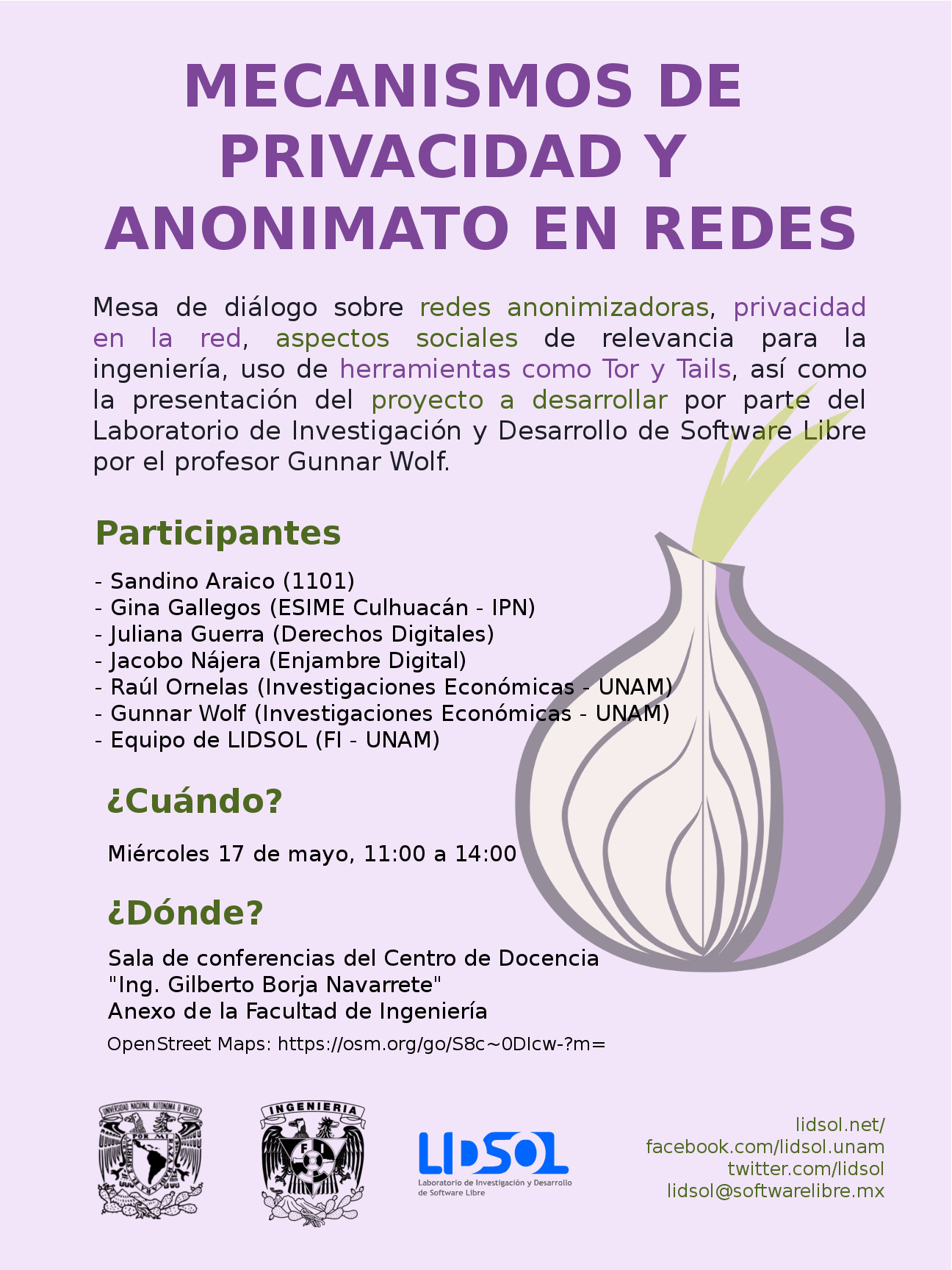
We want to dig into the technical and social implications of mechanisms that provide for anonymous, private usage of the network. We will have our first formal work session this Wednesday, for which we have invited several interesting people to join the discussion and help provide a path for our oncoming work. Our invited and confirmed guests are, in alphabetical order:

intrigeri: GNOME and Debian usability testing, May 2017

During the Contribute your skills to Debian event that took place in Paris last week-end, we conducted a usability testing session. Six people were tasked with testing a few aspects of the GNOME 3.22 desktop environment and of the Debian 9 (Stretch) operating system. A number of other people observed them and took notes. Then, two observers and three testers analyzed the results, that we are hereby presenting: we created a heat map visualization, summed up the challenges met during the tests, and wrote this blog post together. We will point the relevant upstream projects to our results. A couple of other people also did some usability testing but went in much more depth: their feedback is much more detailed and comes with a number of improvement ideas. I will process and publish their results as soon as possible. Missions Testers were provided a laptop running GNOME on a a Debian 9 (Stretch) Live system. A quick introduction (mostly copied from the one we found in some GNOME usability testing reports) was read. Then they were asked to complete the following tasks. A. Nautilus Mission A.1 Download and rename file in Nautilus
  1. Download a file from the web, a PDF document for example.
  2. Open the folder in which the file has been downloaded.
  3. Rename the dowloaded file to SUCCESS.pdf.
  4. Toggle the browser window to full screen.
  5. Open the file SUCCESS.pdf.
  6. Go back to the File manager.
  7. Close the file SUCCESS.pdf.
Mission A.2 Manipulate folders in Nautilus
  1. Create a new folder named cats in your user directory.
  2. Create a new folder named to do in your user directory.
  3. Move the cats folder to the to do folder.
  4. Delete the cats folder.
Mission A.3 Create a bookmark in Nautilus
  1. Create a folder named unicorns in your personal directory.
  2. This folder is important. Add a bookmark for unicorns in order to find it again in a few weeks.
Mission A.4 Nautilus display settings Folders and files are usually listed as icons, but they can also be displayed differently.
  1. Configure the File manager to make it show items as a list, with one file per line.
  2. You forgot your glasses and the font size is too small for you to see the text: increase the size of the text.
B. Package management Introduction On Debian, each application is available as a "package" which contains every file needed for the software to work. Unlike in other operating systems, it is rarely necessary and almost never a good idea, to download and install software from the authors website. We can rather install it from an online library managed by Debian (like an appstore). This alternative offers several advantages, such as being able to update all the software installed in one single action. Specific tools are available to install and update Debian packages. Mission B.1 Install and remove packages
  1. Install the vlc package.
  2. Start VLC.
  3. Remove the vlc package.
Mission B.2 Search and install a package
  1. Find a piece of software which can download files with BitTorrent in a graphical interface.
  2. Install the corresponding package.
  3. Launch that BitTorrent software.
Mission B.3 Upgrade the system Make sure the whole system (meaning all installed packages) is up to date. C. Settings Mission C.1 Change the desktop background
  1. Download an image you like from the web.
  2. Set the downloaded image as the desktop wallpaper.
Mission C.2 Tweak temporary files management Configure the system so that temporary files older than three days are deleted automatically. Mission C.3 Change the default video player
  1. Install VLC (ask for help if you could not do it during the previous mission).
  2. Make VLC the default video player.
  3. Download a video file from the web.
  4. Open the downloaded video, then check if it opens with VLC.
Mission C.4 Add and remove world clocks When you click the time and date in the top bar, a menu pops-up. There, you can display clocks in several time-zones.
  1. Add a clock with Rio de Janeiro timezone, then another showing the current time in Boston.
  2. Check that the time and date menu now displays these two additional clocks.
  3. Remove the Boston clock.
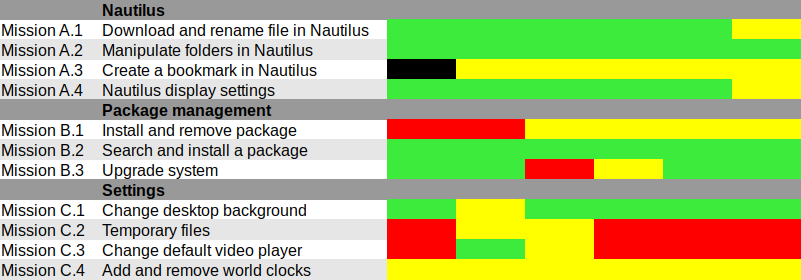
Results and analysis Heat map We used Jim Hall's heat map technique to summarize our usability test results. As Renata puts it, it is "a great way to see how the users performed on each task. The heat map clarifies how easy or difficult it was for the participant to accomplish a certain task.
  1. Scenario tasks (from the usability test) are arranged in rows.
  2. Test participants (for each tester) are arranged in columns.
  3. The colored blocks represent each tester s difficulty with each scenario task.
Green blocks represent the ability of the participant to accomplish the tasks with little or no difficulty. Yellow blocks indicate the tasks that the tester had significant difficulties accomplishing. Red blocks indicate that testers experienced extreme difficulty or where testers completed the tasks incorrectly. Black blocks indicate tasks the tester was unable to complete." Alternatively, here is the spreadsheet that was used to create this picture, with added text to avoid relying on colors only. Most tasks were accomplished with little or no difficulty so we will now focus on the problematic parts. What were the challenges? The heat map shows several "hot" rows, that we will now be looking at in more details. Mission A.3 Create a bookmark in Nautilus Most testers right-clicked the folder first, and eventually found they could simply drag'n'drop to the bookmarks location in the sidebar. One tester thought that he could select a folder, click the hamburger icon, and from there use the "Bookmark this folder" menu item. However, this menu action only works on the folder one has entered, not on the selected one. Mission B.1 Install and remove a package Here we faced a number of issues caused by the fact that Debian Live images don't include package indices (with good reason), so no package manager can list available software. Everyone managed to start a graphical package manager via the Overview (or via the CLI or Alt-F2 for a couple power users). Some testers tried to use GNOME Software, which listed only already installed packages (Debian bug #862560) and provided no way we could find to refresh the package indices. That's arguably a bug in Debian Live, but still: GNOME Software might display some useful information when it detects this unusual situation. We won't list here all the obstacles that were met in Synaptic: it's no news its usability is rather sub-optimal and better alternatives (such as GNOME Software) are in the works. Mission C.2 Tweak temporary files management The mission was poorly phrased: some observers had to clarify that it was specifically about GNOME, and not generic Linux system administration: some power-users were already searching the web for command-line tools to address the task at hand. Even with this clarification, no tester would have succeeded without being told they were allowed to use the web with a search query including the word "GNOME", or use the GNOME help or the Overview. Yet eventually all testers succeeded. It's interesting to note that regular GNOME users had the same problem as others: they did not try searching "temporary" in the Overview and did not look-up the GNOME Help until they were suggested to do so. Mission C.3 Change the default video player One tester configured one single video file format to be opened by default with VLC, via right-click in Nautilus Open with etc. He believed this would be enough to make VLC the default video player, missing the subtle difference between "default video player" and "default player for one single video format". One tester tried to complete this task inside VLC itself and then needed some help to succeed. It might be that the way web browsers ask "Do you want ThisBrowser to become the default web browser?" gave a hint an application GUI is the right place to do it. Two testers searched "default" in the Overview (perhaps the previous mission dealing with temporary files was enough to put them in this direction). At least one tester was confused since the only search result (Details View information about your system), which is the correct one to get there, includes the word View, which suggests that one cannot modify settings there, but only view them. One long-term GNOME user looked in Tweak Tool first, and then used the Overview. Here again, GNOME users experienced essentially the same issues as others. Mission C.4 Add and remove world clocks One tester tried to look for the clock on the top right corner of the screen, then realized it was in the middle. Other than this, all testers easily found a way to add world clocks. However, removing a world clock was rather difficult; although most testers managed to do it, it took them a number of attempts to succeed:
  1. Several testers left-clicked or right-clicked the clock they wanted to remove, expecting this would provide them with a way to remove it (which is not the case).
  2. After a while, all testers noticed the Select button (that has no text label nor tooltip info), which allowed them to select the clock they wanted to remove; then, most testers clicked the 1 selected button, hoping it would provide a contextual menu or some other way to act on the selected clocks (it doesn't).
  3. Eventually, everyone managed to locate the Delete button on the bottom right corner of the window; some testers mentioned that it is less visible and flashy than the blue bar that appears on the top of the screen once they had entered "Selection" mode.
General notes and observations

13 May 2017

Vincent Fourmond: Run QSoas complely non-interactively

QSoas can run scripts, and, since version 2.0, it can be run completely without user interaction from the command-line (though an interface may be briefly displayed). This possibility relies on the following command-line options:If you create a script.cmds file containing the following commands:
generate-buffer -10 10 sin(x)
save sin.dat
and run the following command from your favorite command-line interpreter:
~ QSoas --stdout --run '@ script.cmds' --exit-after-running
This will create a sin.dat file containing a sinusoid. However, if you run it twice, a Overwrite file 'sin.dat' ? dialog box will pop up. You can prevent that by adding the /overwrite=true option to save. As a general rule, you should avoid all commands that may ask questions in the scripts; a /overwrite=true option is also available for save-buffers for instance.I use this possibility massively because I don't like to store processed files, I prefer to store the original data files and run a script to generate the processed data when I want to plot or to further process them. It can also be used to generate fitted data from saved parameters files. I use this to run automatic tests on Linux, Windows and Mac for every single build, in order to quickly spot platform-specific regressions.To help you make use of this possibility, here is a shell function (Linux/Mac users only, add to your $HOME/.bashrc file or equivalent, and restart a terminal) to run directly on QSoas command files:
qs-run ()  
        QSoas --stdout --run "@ $1" --exit-after-running
 
To run the script.cmds script above, just run
~ qs-run script.cmds

About QSoasQSoas is a powerful open source data analysis program that focuses on flexibility and powerful fitting capacities. It is described in Fourmond, Anal. Chem., 2016, 88 (10), pp 5050 5052. Current version is 2.1

12 May 2017

Mart n Ferrari: 6 days to SunCamp

Only six more days to go before SunCamp! If you are still considering it, hurry up, you might still find cheap tickets for the low season. It will be a small event (about 20-25 people), with a more intimate atmosphere than DebConf. There will be people fixing RC bugs, preparing stuff for after the release, or just discussing with other Debian folks. There will be at least one presentation from a local project, and surely some members of nearby communities will join us for the day like they did last year. See you all in Lloret! Comment

11 May 2017

Arturo Borrero Gonz lez: Debunk some Debian myths

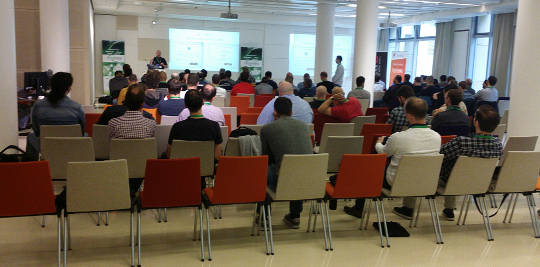
Debian CUSL 11 Debian has many years of history, about 25 years already. With such a long travel over the continous field of developing our Universal Operating System, some myths, false accusations and bad reputation has arisen. Today I had the opportunity to discuss this topic, I was invited to give a Debian talk in the 11 Concurso Universitario de Software Libre , a Spanish contest for students to develop and dig a bit into free-libre open source software (and hardware). In this talk, I walked through some of the most common Debian myths, and I would like to summarize here some of them, with a short explanation of why I think they should be debunked. Picture of the talk myth #1: Debian is old software Please, use testing or stable-backports. If you use Debian stable your system will in fact be stable and that means: updates contain no new software but only fixes. myth #2: Debian is slow We compile and build most of our packages with industry-standard compilers and options. I don t see a significant difference on how fast linux kernel or mysql run in a CentOS or in Debian. myth #3: Debian is difficult I already discussed about this issue back in Jan 2017, Debian is a puzzle: difficult. myth #4: Debian has no graphical environment This is, simply put, false. We have gnome, kde, xfce and more. The basic Debian installer asks you what do you want at install time. myth #5: since Debian isn t commercial, the quality is poor Did you know that most of our package developers are experts in their packages and in their upstream code? Not all, but most of them. Besides, many package developers get paid to do their Debian job. Also, there are external companies which do indeed offer support for Debian (see freexian for example). myth #6: I don t trust Debian Why? Did we do something to gain this status? If so, please let us know. You don t trust how we build or configure our packages? You don t trust how we work? Anyway, I m sorry, you have to trust someone if you want to use any kind of computer. Supervising every single bit of your computer isn t practical for you. Please trust us, we do our best. myth #7: nobody uses Debian I don t agree. Many people use Debian. They even run Debian in the International Space Station. Do you count derivatives, such as Ubuntu? I believe this myth is just pointless, but some people out there really think nobody uses Debian. myth #8: Debian uses systemd Well, this is true. But you can run sysvinit if you want. I prefer and recommend systemd though :-) myth #9: Debian is only for servers No. See myths #1, #2 and #4. You may download my slides in PDF and in ODP format (only in Spanish, sorry for English readers).
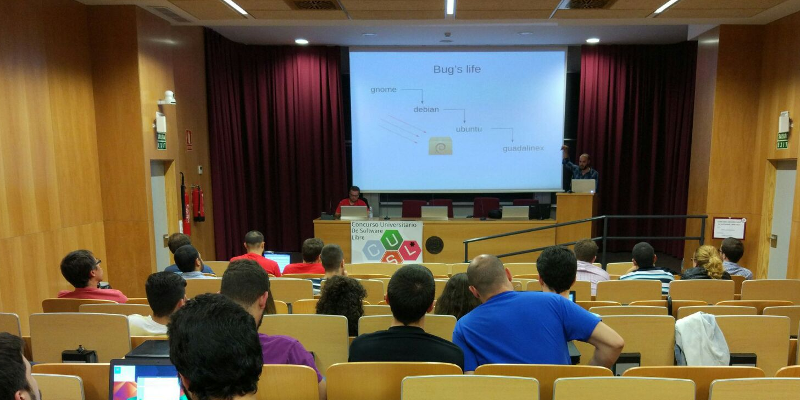

9 May 2017

Matthew Garrett: Intel AMT on wireless networks

More details about Intel's AMT vulnerablity have been released - it's about the worst case scenario, in that it's a total authentication bypass that appears to exist independent of whether the AMT is being used in Small Business or Enterprise modes (more background in my previous post here). One thing I claimed was that even though this was pretty bad it probably wasn't super bad, since Shodan indicated that there were only a small number of thousand machines on the public internet and accessible via AMT. Most deployments were probably behind corporate firewalls, which meant that it was plausibly a vector for spreading within a company but probably wasn't a likely initial vector.

I've since done some more playing and come to the conclusion that it's rather worse than that. AMT actually supports being accessed over wireless networks. Enabling this is a separate option - if you simply provision AMT it won't be accessible over wireless by default, you need to perform additional configuration (although this is as simple as logging into the web UI and turning on the option). Once enabled, there are two cases:
  1. The system is not running an operating system, or the operating system has not taken control of the wireless hardware. In this case AMT will attempt to join any network that it's been explicitly told about. Note that in default configuration, joining a wireless network from the OS is not sufficient for AMT to know about it - there needs to be explicit synchronisation of the network credentials to AMT. Intel provide a wireless manager that does this, but the stock behaviour in Windows (even after you've installed the AMT support drivers) is not to do this.
  2. The system is running an operating system that has taken control of the wireless hardware. In this state, AMT is no longer able to drive the wireless hardware directly and counts on OS support to pass packets on. Under Linux, Intel's wireless drivers do not appear to implement this feature. Under Windows, they do. This does not require any application level support, and uninstalling LMS will not disable this functionality. This also appears to happen at the driver level, which means it bypasses the Windows firewall.
Case 2 is the scary one. If you have a laptop that supports AMT, and if AMT has been provisioned, and if AMT has had wireless support turned on, and if you're running Windows, then connecting your laptop to a public wireless network means that AMT is accessible to anyone else on that network[1]. If it hasn't received a firmware update, they'll be able to do so without needing any valid credentials.

If you're a corporate IT department, and if you have AMT enabled over wifi, turn it off. Now.

[1] Assuming that the network doesn't block client to client traffic, of course

comment count unavailable comments

Reproducible builds folks: Reproducible Builds: week 106 in Stretch cycle

Here's what happened in the Reproducible Builds effort between Sunday April 30 and Saturday May 6 2017: Past and upcoming events Between May 5th-7th the Reproducible Builds Hackathon 2017 took place in Hamburg, Germany. On May 6th Mattia Rizzolo gave a talk on Reproducible Builds at DUCC-IT 17 in Vicenza, Italy. On May 13th Chris Lamb will give a talk on Reproducible Builds at OSCAL 2017 in Tirana, Albania. Media coverage Toolchain development and fixes Packages reviewed and fixed, and bugs filed Chris Lamb: Reviews of unreproducible packages 93 package reviews have been added, 12 have been updated and 98 have been removed in this week, adding to our knowledge about identified issues. The following issues have been added: 2 issue types have been updated: The following issues have been removed: Weekly QA work During our reproducibility testing, FTBFS bugs have been detected and reported by: diffoscope development strip-nondeterminism development
This week's edition was written by Chris Lamb, Holger Levsen and Ximin Luo & reviewed by a bunch of Reproducible Builds folks on IRC & the mailing lists.

Martin Pitt: Cockpit is now just an apt install away

Cockpit has now been in Debian unstable and Ubuntu 17.04 and devel, which means it s now a simple
$ sudo apt install cockpit
away for you to try and use. This metapackage pulls in the most common plugins, which are currently NetworkManager and udisks/storaged. If you want/need, you can also install cockpit-docker (if you grab docker.io from jessie-backports or use Ubuntu) or cockpit-machines to administer VMs through libvirt. Cockpit upstream also has a rather comprehensive Kubernetes/Openstack plugin, but this isn t currently packaged for Debian/Ubuntu as kubernetes itself is not yet in Debian testing or Ubuntu. After that, point your browser to https://localhost:9090 (or the host name/IP where you installed it) and off you go.

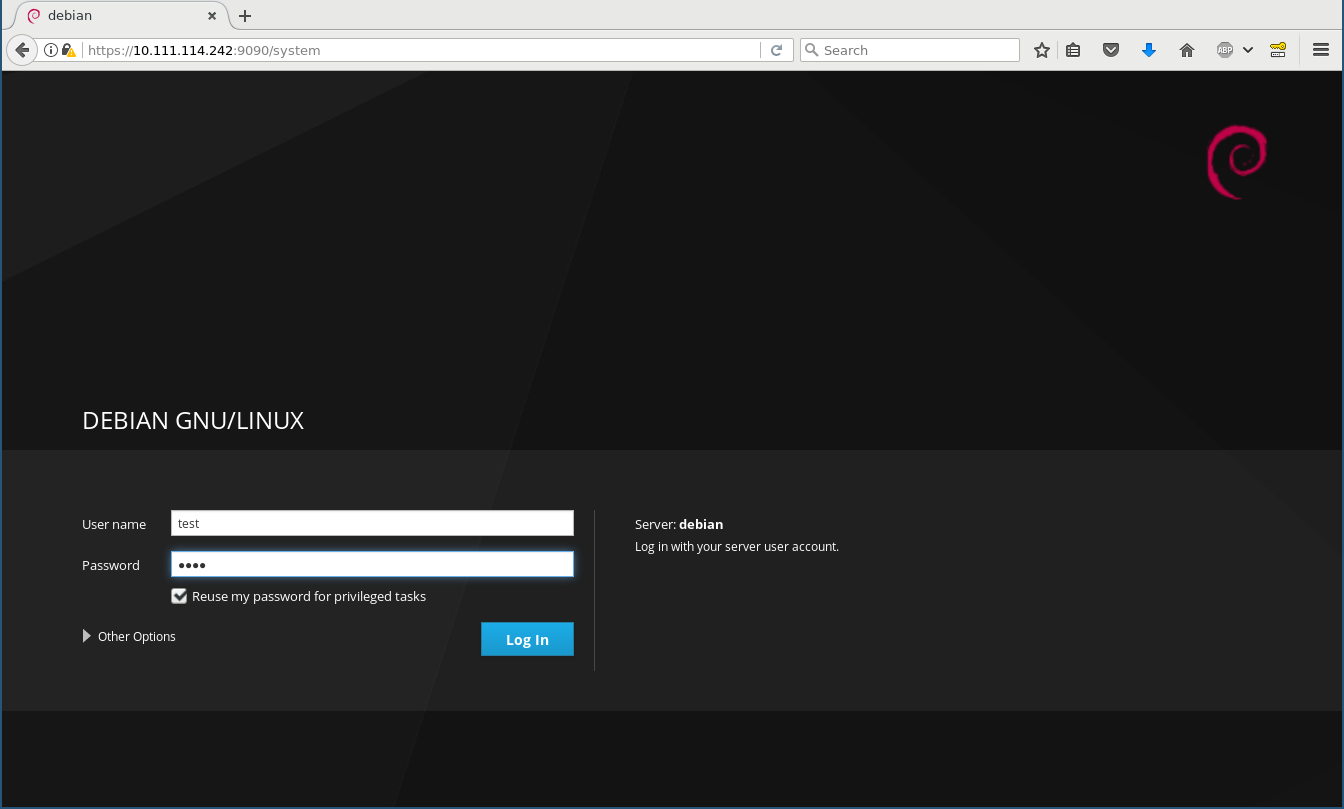
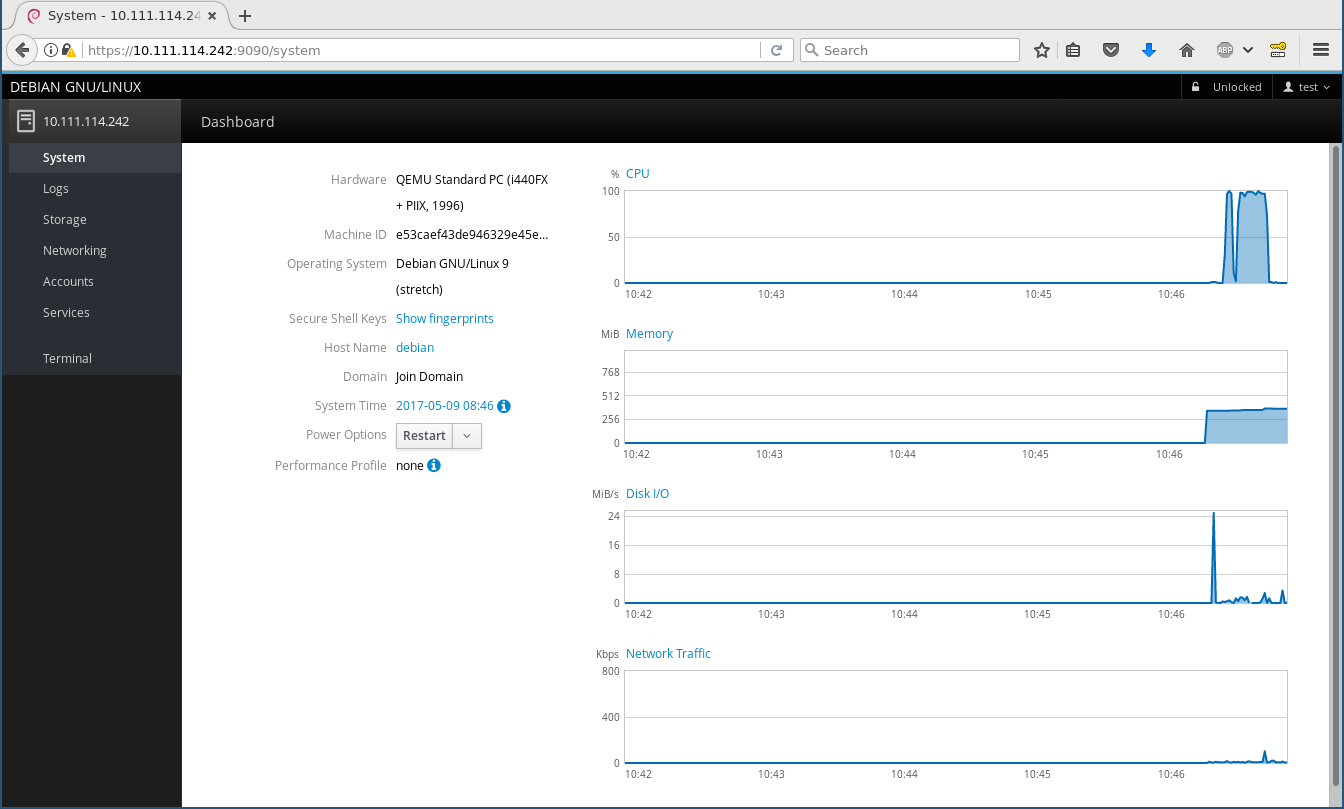
What is Cockpit? Think of it as an equivalent of a desktop (like GNOME or KDE) for configuring, maintaining, and interacting with servers. It is a web service that lets you log into your local or a remote (through ssh) machine using normal credentials (PAM user/password or SSH keys) and then starts a normal login session just as gdm, ssh, or the classic VT logins would. Login screen System page The left side bar is the equivalent of a task switcher , and the applications (i. e. modules for administering various aspects of your server) are run in parallel. The main idea of Cockpit is that it should not behave special in any way - it does not have any specific configuration files or state keeping and uses the same Operating System APIs and privileges like you would on the command line (such as lvmconfig, the org.freedesktop.UDisks2 D-Bus interface, reading/writing the native config files, and using sudo when necessary). You can simultaneously change stuff in Cockpit and in a shell, and Cockpit will instantly react to changes in the OS, e. g. if you create a new LVM PV or a network device gets added. This makes it fundamentally different to projects like webmin or ebox, which basically own your computer once you use them the first time. It is an interface for your operating system, which even reflects in the branding: as you see above, this is Debian (or Ubuntu, or Fedora, or wherever you run it on), not Cockpit .

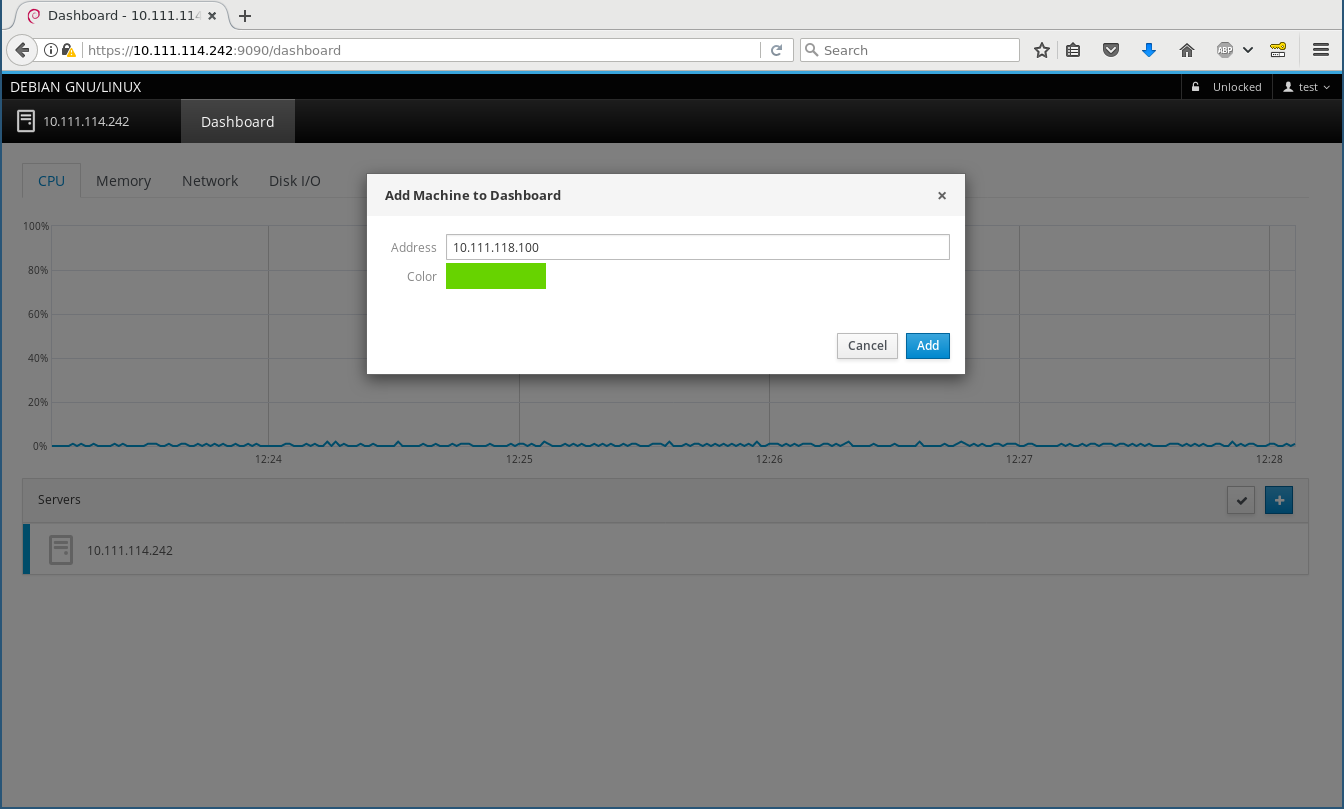
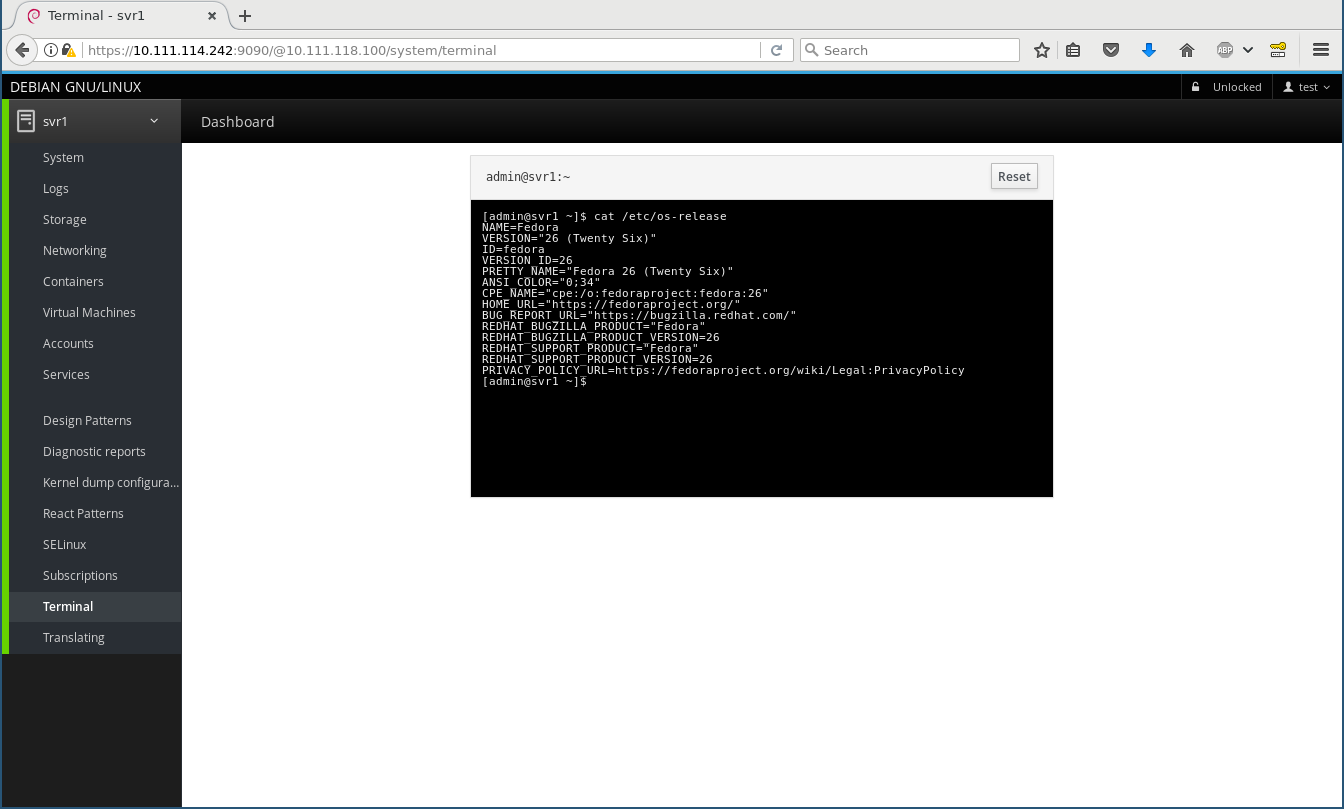
Remote machines In your home or small office you often have more than one machine to maintain. You can install cockpit-bridge and cockpit-system on those for the most basic functionality, configure SSH on them, and then add them on the Dashboard (I add a Fedora 26 machine here) and from then on can switch between them on the top left, and everything works and feels exactly the same, including using the terminal widget: Add remote Remote terminal The Fedora 26 machine has some more Cockpit modules installed, including a lot of playground ones, thus you see a lot more menu entries there.

Under the hood Beneath the fancy Patternfly/React/JavaScript user interface is the Cockpit API and protocol, which particularly fascinates me as a developer as that is what makes Cockpit so generic, reactive, and extensible. This API connects the worlds of the web, which speaks IPs and host names, ports, and JSON, to the local host only world of operating systems which speak D-Bus, command line programs, configuration files, and even use fancy techniques like passing file descriptors through Unix sockets. In an ideal world, all Operating System APIs would be remotable by themselves, but they aren t. This is where the cockpit bridge comes into play. It is a JSON (i. e. ASCII text) stream protocol that can control arbitrarily many channels to the target machine for reading, writing, and getting notifications. There are channel types for running programs, making D-Bus calls, reading/writing files, getting notified about file changes, and so on. Of course every channel can also act on a remote machine. One can play with this protocol directly. E. g. this opens a (local) D-Bus channel named d1 and gets a property from systemd s hostnamed:
$ cockpit-bridge --interact=---
  "command": "open", "channel": "d1", "payload": "dbus-json3", "name": "org.freedesktop.hostname1"  
---
d1
  "call": [ "/org/freedesktop/hostname1", "org.freedesktop.DBus.Properties", "Get",
          [ "org.freedesktop.hostname1", "StaticHostname" ] ],
  "id": "hostname-prop"  
---
and it will reply with something like
d1
 "reply":[[ "t":"s","v":"donald" ]],"id":"hostname-prop" 
---
( donald is my laptop s name). By adding additional parameters like host and passing credentials these can also be run remotely through logging in via ssh and running cockpit-bridge on the remote host. Stef Walter explains this in detail in a blog post about Web Access to System APIs. Of course Cockpit plugins (both internal and third-party) don t directly speak this, but use a nice JavaScript API. As a simple example how to create your own Cockpit plugin that uses this API you can look at my schroot plugin proof of concept which I hacked together at DevConf.cz in about an hour during the Cockpit workshop. Note that I never before wrote any JavaScript and I didn t put any effort into design whatsoever, but it does work .

Next steps Cockpit aims at servers and getting third-party plugins for talking to your favourite part of the system, which means we really want it to be available in Debian testing and stable, and Ubuntu LTS. Our CI runs integration tests on all of these, so each and every change that goes in is certified to work on Debian 8 (jessie) and Ubuntu 16.04 LTS, for example. But I d like to replace the external PPA/repository on the Install instructions with just it s readily available in -backports ! Unfortunately there s some procedural blockers there, the Ubuntu backport request suffers from understaffing, and the Debian stable backport is blocked on getting it in to testing first, which in turn is blocked by the freeze. I will soon ask for a freeze exception into testing, after all it s just about zero risk - it s a new leaf package in testing. Have fun playing around with it, and please report bugs! Feel free to discuss and ask questions on the Google+ post.

8 May 2017

Bits from Debian: Bursary applications for DebConf17 are closing in 48 hours!

This is a final reminder: if you intend to apply for a DebConf17 bursary and have not yet done so, please proceed as soon as possible. Bursary applications for DebConf17 will be accepted until May 10th at 23:59 UTC. Applications submitted after this deadline will not be considered. You can apply for a bursary when you register for the conference. Remember that giving a talk is considered towards your bursary; if you have a submission to make, submit it even if it is only sketched-out. You will be able to detail it later. Please make sure to double-check your accommodation choices (dates and venue). Details about accommodation arrangements can be found on the wiki. Note: For DebCamp we only have on-site accommodation available. The option chosen in the registration system will only be for the DebConf period (August 5 to 12). See you in Montr al! DebConf17 logo

Daniel Pocock: Visiting Kamailio World (Sold Out) and OSCAL'17

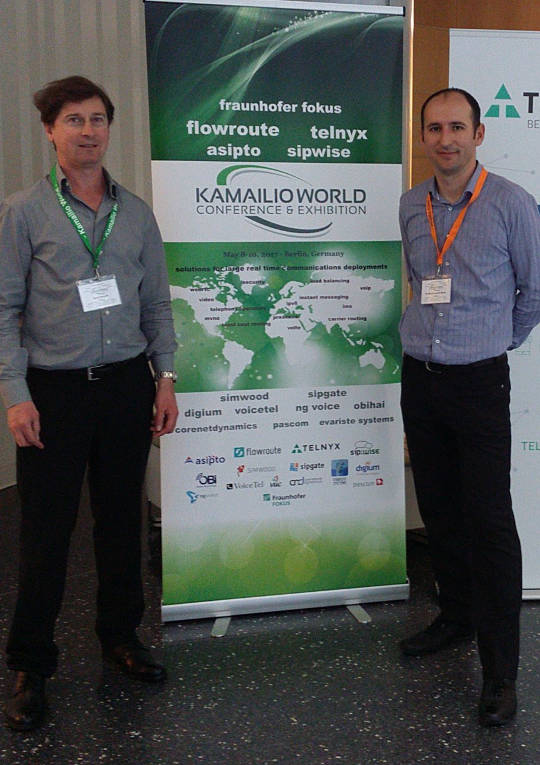
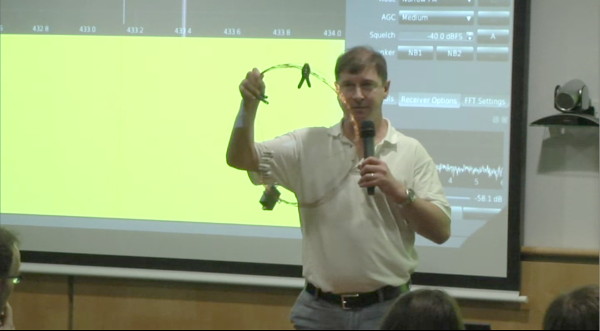
This week I'm visiting Kamailio World (8-10 May, Berlin) and OSCAL'17 (13-14 May, Tirana). Kamailio World Kamailio World features a range of talks about developing and using SIP and telephony applications and offers many opportunities for SIP developers, WebRTC developers, network operators and users to interact. Wednesday, at midday, there is a Dangerous Demos session where cutting edge innovations will make their first (and potentially last) appearance. Daniel Pocock and Daniel-Constantin Mierla at Kamailio World, Berlin, 2017 OSCAL'17, Tirana OSCAL'17 is an event that has grown dramatically in recent years and is expecting hundreds of free software users and developers, including many international guests, to converge on Tirana, Albania this weekend. On Saturday I'll be giving a workshop about the Debian Hams project and Software Defined Radio. On Sunday I'll give a talk about Free Real-time Communications (RTC) and the alternatives to systems like Skype, Whatsapp, Viber and Facebook.
Lars Wirzenius: Ick2 design discussion

Recently, Daniel visited us in Helsinki. In addition to enjoying local food and scenerey, we spent some time together in front of a whiteboard to sketch out designs for Ick2. Ick is my continuous integration system, and it's all Daniel's fault for suggesting the name. Ahem. I am currently using the first generation of Ick and it is a rigid, cumbersome, and fragile thing. It works well enough that I don't miss Jenkins, but I would like something better. That's the second generation of Ick, or Ick2, and that's what we discussed with Daniel. Where pretty much everything in Ick1 is hardcoded, everything in Ick2 will be user-configurable. It's my last, best chance to go completely overboard in the second system syndrome manner. Where Ick1 was written in a feverish two-week hacking session, rushed because my Jenkins install at the time had broken one time too many, we're taking our time with Ick2. Slow and careful is the tune this time around. Our "minimum viable product" or MVP for Ick2 is defined like this:
Ick2 builds static websites from source in a git repository, using ikiwiki, and published to a web server using rsync. A change to the git repository triggers a new build. It can handle many separate websites, and if given enough worker machines, can build many of them concurrently.
This is a real task, and something we already do with Ick1 at work. It's a reasonable first step for the new program. Some decisions we made: The initial pipelines will be basically like this, but expressed in some way by the user:
  1. Clone the source repoistory.
  2. Run ikiwiki --build to build the website.
  3. Run rsync to publish the website on a server.
Assumptions: Actions the Ick2 controller API needs to support: A sketch API: Sequence: The next step will probably be to sketch a yarn test suite of the API and implement a rudimentary one.

Mike Gabriel: [Arctica Project] Release of nx-libs (version 3.5.99.7)

Introduction NX is a software suite which implements very efficient compression of the X11 protocol. This increases performance when using X applications over a network, especially a slow one. NX (v3) has been originally developed by NoMachine and has been Free Software ever since. Since NoMachine obsoleted NX (v3) some time back in 2013/2014, the maintenance has been continued by a versatile group of developers. The work on NX (v3) is being continued under the project name "nx-libs". Release Announcement On Friday, May 5th 2017, version 3.5.99.7 of nx-libs has been released [1]. Credits A special thanks goes to Ulrich Sibiller for tracking down a regression bug that caused a tremendously slowed down keyboard input on high latency connections. Thanks for that! Another thanks goes to the Debian project for indirectly providing us with so many build platforms. We are nearly at the point where nx-libs builds on all architectures supported by the Debian project. (Runtime stability is a completely different issue, we will get to this soon). Changes between 3.5.99.6 and 3.5.99.7 Change Log The complete list of changes (since 3.5.99.6) can be obtained from here. Known Issues A list of known issues can be obtained from the nx-libs issue tracker [issues]. Binary Builds You can obtain binary builds of nx-libs for Debian (jessie, stretch, unstable) and Ubuntu (trusty, xenial) via these apt-URLs: Our package server's archive key is: 0x98DE3101 (fingerprint: 7A49 CD37 EBAE 2501 B9B4 F7EA A868 0F55 98DE 3101). Use this command to make APT trust our package server:
 wget -qO - http://packages.arctica-project.org/archive.key   sudo apt-key add -
The nx-libs software project brings to you the binary packages nxproxy (client-side component) and nxagent (nx-X11 server, server-side component). The nxagent Xserver can be used from remote sessions (via nxcomp compression library) or as a next Xserver. Ubuntu developers, please note: we have added nightly builds for Ubuntu latest to our build server. At the moment, you can obtain nx-libs builds for Ubuntu 16.10 (yakkety) and 17.04 (zenial) as nightly builds. References

Russ Allbery: Review: Chimes at Midnight

Review: Chimes at Midnight, by Seanan McGuire
Series: October Daye #7
Publisher: DAW
Copyright: 2013
ISBN: 1-101-63566-5
Format: Kindle
Pages: 346
Chimes at Midnight is the seventh book of the October Daye series and builds heavily on the previous books. Toby has gathered quite the group of allies by this point, and events here would casually spoil some of the previous books in the series (particularly One Salt Sea, which you absolutely do not want spoiled). I strongly recommend starting at the beginning, even if the series is getting stronger as it goes along. This time, rather than being asked for help, the book opens with Toby on a mission. Goblin fruit is becoming increasingly common on the streets of San Francisco, and while she's doing all she can to find and stop the dealers, she's finding dead changelings. Goblin fruit is a pleasant narcotic to purebloods, but to changelings it's instantly and fatally addictive. The growth of the drug trade means disaster for the local changelings, particularly since previous events in the series have broken a prominent local changeling gang. That was for the best, but they were keeping goblin fruit out, and now it's flooding into the power vacuum. In the sort of idealistic but hopelessly politically naive move that Toby is prone to, she takes her evidence to the highest local authority in faerie: the Queen of the Mists. The queen loathes Toby and the feeling is mutual, but Toby's opinion is that this shouldn't matter: these are her subjects and goblin fruit is widely recognized as a menace. Even if she cares nothing for their lives, a faerie drug being widely sold on the street runs the substantial risk that someone will give it to humans, potentially leading to the discovery of faerie. Sadly, but predictably, Toby has underestimated the Queen's malevolence. She leaves the court burdened not only with the knowledge that the Queen herself is helping with the distribution of goblin fruit, but also an impending banishment thanks to her reaction. She has three days to get out of the Queen's territory, permanently. Three days that the Luidaeg suggests she spend talking to people who knew King Gilad, the former and well-respected king of the local territory who died in the 1906 earthquake, apparently leaving the kingdom to the current Queen. Or perhaps not. As usual, crossing Toby is a very bad idea, and getting Toby involved in politics means that one should start betting heavily against the status quo. Also, as usual, things initially go far too well, and then Toby ends up in serious trouble. (I realize the usefulness of raising the stakes of the story, but I do prefer the books of this series that don't involve Toby spending much of the book ill.) However, there is a vast improvement over previous books in the story: one key relationship (which I'll still avoid spoiling) is finally out of the precarious will-they, won't-they stage and firmly on the page, and it's a relationship that I absolutely love. Watching Toby stomp people who deserve to be stomped makes me happy, but watching Toby let herself be happy and show it makes me even happier. McGuire also gives us some more long-pending revelations. I probably should have guessed the one about one of Toby's long-time friends and companions much earlier, although at least I did so a few pages before Toby found out. I have some strong suspicions about Toby's own background that were reinforced by this book, and will be curious to see if I'm right. And I'm starting to have guesses about the overall arc of the series, although not firm ones. One of my favorite things in long-running series is the slow revelation of more and more world background, and McGuire does it in just the way I like: lots of underlying complexity, reveals timed for emotional impact but without dragging on things that the characters should obviously be able to figure out, and a whole bunch of layered secrets that continue to provide more mystery even after one layer is removed. The plot here is typical of the plot of the last couple of novels in the series, which is fine by me since my favorite part of this series is the political intrigue (and Toby realizing that she has far more influence than she thinks). It helps that I thought Arden was great, given how central she is to this story. I liked her realistic reactions to her situation, and I liked her arguments with Toby. I'm dubious how correct Toby actually was, but we've learned by now that arguments from duty are always going to hold sway with her. And I loved Mags and the Library, and hope we'll be seeing more of them in future novels. The one quibble I'll close with, since the book closed with it, is that I found the ending rather abrupt. There were several things I wanted to see in the aftermath, and the book ended before they could happen. Hopefully that means they'll be the start of the next book (although a bit of poking around makes me think they may be in a novella). If you've liked the series so far, particularly the couple of books before this one, this is more of what you liked. Recommended. Followed by The Winter Long. Rating: 8 out of 10

7 May 2017

Dirk Eddelbuettel: RInside 0.2.14

A new release 0.2.14 of RInside is now on CRAN and in Debian. RInside provides a set of convenience classes which facilitate embedding of R inside of C++ applications and programs, using the classes and functions provided by Rcpp. It has been nearly two years since the last release, and a number of nice extensions, build robustifications and fixes had been submitted over this period---see below for more. The only larger and visible extension is both a new example and some corresponding internal changes to allow a readline prompt in an RInside application, should you desire it. RInside is stressing the CRAN system a little in that it triggers a number of NOTE and WARNING messages. Some of these are par for the course as we get close to R internals not all of which are "officially" in the API. This lead to the submission sitting a little longer than usual in incoming queue. Going forward we may need to find a way to either sanction these access point, whitelist them or, as a last resort, take the package off CRAN. Time will tell. Changes since the last release were:

Changes in RInside version 0.2.14 (2017-04-28)
  • Interactive mode can use readline REPL ( ukasz aniewski-Wo k in #25, and Dirk in #26)
  • Windows macros checks now uses _WIN32 (Kevin Ushey in #22)
  • The wt example now links with libboost_system
  • The Makevars file is now more robist (Mattias Ellert in #21)
  • A problem with empty environment variable definitions on Windows was addressed (Jeroen Ooms in #17 addressing #16)
  • HAVE_UINTPTR_T is defined only if not already defined
  • Travis CI is now driven via run.sh from our forked r-travis

CRANberries also provides a short report with changes from the previous release. More information is on the RInside page. Questions, comments etc should go to the rcpp-devel mailing list off the Rcpp R-Forge page, or to issues tickets at the GitHub repo.

This post by Dirk Eddelbuettel originated on his Thinking inside the box blog. Please report excessive re-aggregation in third-party for-profit settings.

Vasudev Kamath: Tips for fuzzing network programs with AFL

Fuzzing is method of producing random malformed inputs for a software and observe the software behavior. If a software crashes then there is a bug and it can have security implications. Fuzzing has gained a lot of interest now a days, especially with automated tools like American Fuzzy Lop (AFL) which can easily help you to fuzz the program and record inputs which causes crash in the software. American Fuzzy Lop is a file based fuzzer which feeds input to program via standard input. Using it with network program like server's or clients is not possible in the original state. There is a version of AFL with patches to allow it fuzz network programs, but this patch is not merged upstream and I do not know if it ever makes into upstream or not. Also the above repository contains version 1.9 which is older compared to currently released versions. There is another method for fuzzing network program using AFL with help of LD_PRELOAD tricks. preeny is a project which provides library which when used with LD_PRELOAD can desocket the network program and make it read from stdin. There is this best tutorial from LoLWare which talks about fuzzing Nginx with preeny and AFL. There is a best AFL workflow by Foxglove Security which gives start to finish details about how to use AFL and its companion tool to do fuzzing. So I'm not going to talk about any steps of fuzzing in this post instead I'm going to list down my observations on changes that needs to be done to get clean fuzzing with AFL and preeny.
  1. desock.so provided by preeny works only with read and write (or rather other system call does not work with stdin) system calls and hence you need to make sure you replace any reference to send, sendto, recv and recvfrom with read and write system calls respectively. Without this change program will not read input provided by AFL on standard input.
  2. If your network program is using forking or threading model make sure to remove all those and make it plain simple program which receives request and sends out response. Basically you are testing the ability of program to handle malformed input so we need very minimum logic to make program do what it is supposed to do when AFL runs it.
  3. If you are using infinite loop like all normal programs replace the infinite loop with below mentioned AFL macro and use afl-clang-fast to compile it. This speeds up the testing as AFL will run the job n times before discarding the current fork and doing a fresh fork. After all fork is costly affair.
while(__AFL_LOOP(1000))   // Change 1000 with iteration count
             // your logic here
 
With above modification I could fuzz a server program talking binary protocol and another one talking textual protocol. In both case I used Wireshark capture to get the packet extract raw content and feed it as input to AFL. I was successful in finding crashes which are exploitable in case of textual protocol program than in binary protocol case. In case of binary protocol AFL could not easily find new paths which probably is because of bad inputs I provided. I will continue to do more experiment with binary protocol case and provide my findings as new updates here. If you have anything more to add do share with me :-). Happy fuzzing!.

Next.

Previous.