Search Results: "tim"

3 August 2020

Holger Levsen: 20200803-debconf5

DebConf5 This tshirt is 15 years old and from DebConf5. It still looks quite nice! :) DebConf5 was my 3rd DebConf and took place in Helsinki, or rather Espoo, in Finland. This was one of my most favorite DebConfs (though I basically loved them all) and I'm not really sure why, I guess it's because of the kind of community at the event. We stayed in some future dorms of the universtity, which were to be first used by some European athletics chamopionship and which we could use even before that, guests zero. Being in Finland there were of course saunas in the dorms, which we frequently used and greatly enjoyed. Still, one day we had to go on a trip to another sauna in the forest, because of course you cannot visit Finland and only see one sauna. Or at least, you should not. Another aspect which increased community bonding was that we had to authenticate using 802.10 (IIRC, please correct me) which was an authentication standard mostly used for wireless but which also works for wired ethernet, except that not many had used it on Linux before. Thus quite some related bugs were fixed in the first days of DebCamp... Then my powerpc ibook also decided to go bad, so I had to remove 30 screws to get the harddrive out and 30 screws back in, to not have 30 screws laying around for a week. Then I put the harddrive into a spare (x86) laptop and only used my /home partition and was very happy this worked nicely. And then, for travelling back, I had to unscrew and screw 30 times again. (I think my first attempt took 1.5h and the fourth only 45min or so ;) Back home then I bought a laptop where one could remove the harddrive using one screw. Oh, and then I was foolish during the DebConf5 preparations and said, that I could imagine setting up a team and doing video recordings, as previous DebConfs mostly didn't have recordings and the one that had, didn't have releases of them... And so we did videos. And as we were mostly inexperienced we did them the hard way: during the day we recorded on tape and then when the talks were done, we used a postprocessing tool called 'cinelerra' and edited them. And because Eric Evans was on the team and because Eric worked every night almost all night, all nights, we managed to actually release them all when DebConf5 was over. I very well remember many many (23 or 42) Debian people cleaning the dorms thoroughly (as they were brand new..) and Eric just sitting somewhere, exhausted and watching the cleaners. And everybody was happy Eric was idling there, cause we knew why. In the aftermath of DebConf5 Ben Hutchings then wrote videolink (removed from sid in 2013) which we used to create video DVDs of our recordings based on a simple html file with links to the actual videos. There were many more memorable events. The boat ride was great. A pirate flag appeared. One night people played guitar until very late (or rather early) close to the dorms, so at about 3 AM someone complained about it, not in person, but on the debian-devel mailinglist. And those drunk people playing guitar, replied immediatly on the mailinglist. And then someone from the guitar group gave a talk, at 9 AM, and the video is online... ;) (It's a very slowwwwwww talk.) If you haven't been to or close to the polar circles it's almost impossible to anticipate how life is in summer there. It get's a bit darker after midnight or rather after 1 AM and then at 3 AM it get's light again, so it's reaaaaaaally easy to miss the night once and it's absolutly not hard to miss the night for several nights in a row. And then I shared a room with 3 people who all snore quite loud... There was more. I was lucky to witness the first (or second?) cheese and whine party which at that time took place in a dorm room with, dunno 10 people and maybe 15 kinds of cheese. And, of course, I met many wonderful people there, to mention a few I'll say Jesus, I mean mooch or data, Amaya and p2. And thanks to some bad luck which turned well, I also had my first time ever Sushi in Helsinki. And and and. DebConfs are soooooooo good! :-) I'll stop here as I originally planned to only write a paragraph or two about each and there are quite some to be written! Oh, and as we all learned, there are probably no mosquitos in Helsinki, just in Espoo. And you can swim naked through a lake and catch a taxi on the other site, with no clothes and no money, no big deal. (And you might not believe it, but that wasn't me. I cannot swim that well.)

Sylvain Beucler: Debian LTS and ELTS - July 2020

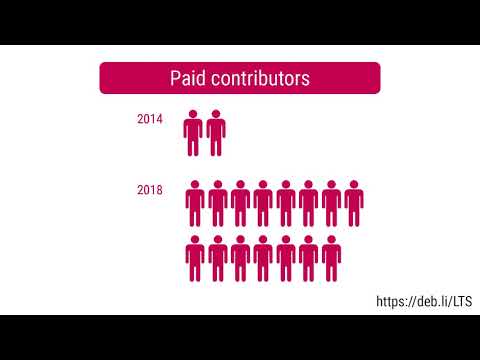
Debian LTS Logo Here is my transparent report for my work on the Debian Long Term Support (LTS) and Debian Extended Long Term Support (ELTS), which extend the security support for past Debian releases, as a paid contributor. In July, the monthly sponsored hours were split evenly among contributors depending on their max availability - I was assigned 25.25h for LTS (out of 30 max; all done) and 13.25h for ELTS (out of 20 max; all done). We shifted suites: welcome Stretch LTS and Jessie ELTS. The LTS->ELTS switch happened at the start of the month, but the oldstable->LTS switch happened later (after finalizing and flushing proposed-updates to a last point release), causing some confusion but nothing major. ELTS - Jessie LTS - Stretch Documentation/Scripts

Arnaud Rebillout: GoAccess 1.4, a detailed tutorial

GoAccess v1.4 was just released a few weeks ago! Let's take this chance to write a loooong tutorial. We'll go over every steps to install and operate GoAccess. This is a tutorial aimed at those who don't play sysadmin every day, and that's why it's so long, I did my best to provide thorough explanations all along, so that it's more than just a "copy-and-paste" kind of tutorial. And for those who do play sysadmin everyday: please try not to fall asleep while reading, and don't hesitate to drop me an e-mail if you spot anything inaccurate in here. Thanks! Introduction So what's GoAccess already? GoAccess is a web log analyzer, and it allows you to visualize the traffic for your website, and get to know a bit more about your visitors: how many visitors and hits, for which pages, coming from where (geolocation, operating system, web browser...), etc... It does so by parsing the access logs from your web server, be it Apache, NGINX or whatever. GoAccess gives you different options to display the statistics, and in this tutorial we'll focus on producing a HTML report. Meaning that you can see the statistics for your website straight in your web browser, under the form of a single HTML page. For an example, you can have a look at the stats of my blog here: http://goaccess.arnaudr.io. GoAccess is written in C, it has very few dependencies, it had been around for about 10 years, and it's distributed under the MIT license. Assumptions This tutorial is about installing and configuring, so I'll assume that all the commands are run as root. I won't prefix each of them with sudo. I use the Apache web server, running on a Debian system. I don't think it matters so much for this tutorial though. If you're using NGINX it's fine, you can keep reading. Also, I will just use the name SITE for the name of the website that we want to analyze with GoAccess. Just replace that with the real name of your site. I also assume the following locations for your stuff: If you have your stuff in /srv/SITE/ log,www instead, no worries, just adjust the paths accordingly, I bet you can do it. Installation The latest version of GoAccess is v1.4, and it's not yet available in the Debian repositories. So for this part, you can follow the instructions from the official GoAccess download page. Install steps are explained in details, so there's nothing left for me to say :) When this is done, let's get started with the basics. We're talking about the latest version v1.4 here, let's make sure:
$ goaccess --version
GoAccess - 1.4.
...
Now let's try to create a HTML report. I assume that you already have a website up and running. GoAccess needs to parse the access logs. These logs are optional, they might or might not be created by your web server, depending on how it's configured. Usually, these log files are named access.log, unsurprisingly. You can check if those logs exist on your system by running this command:
find /var/log -name access.log
Another important thing to know is that these logs can be in different formats. In this tutorial we'll assume that we work with the combined log format, because it seems to be the most common default. To check what kind of access logs your web server produces, you must look at the configuration for your site. For an Apache web server, you should have such a line in the file /etc/apache2/sites-enabled/SITE.conf:
CustomLog $ APACHE_LOG_DIR /SITE/access.log combined
For NGINX, it's quite similar. The configuration file would be something like /etc/nginx/sites-enabled/SITE, and the line to enable access logs would be something like:
access_log /var/log/nginx/SITE/access.log
Note that NGINX writes the access logs in the combined format by default, that's why you don't see the word combined anywhere in the line above: it's implicit. Alright, so from now on we assume that yes, you have access log files available, and yes, they are in the combined log format. If that's the case, then you can already run GoAccess and generate a report, for example for the log file /var/log/apache2/access.log
goaccess \
    --log-format COMBINED \
    --output /tmp/report.html \
    /var/log/apache2/access.log
It's possible to give GoAccess more than one log files to process, so if you have for example the file access.log.1 around, you can use it as well:
goaccess \
    --log-format COMBINED \
    --output /tmp/report.html \
    /var/log/apache2/access.log \
    /var/log/apache2/access.log.1
If GoAccess succeeds (and it should), you're on the right track! All is left to do to complete this test is to have a look at the HTML report created. It's a single HTML page, so you can easily scp it to your machine, or just move it to the document root of your site, and then open it in your web browser. Looks good? So let's move on to more interesting things. Web server configuration This part is very short, because in terms of configuration of the web server, there's very little to do. As I said above, the only thing you want from the web server is to create access log files. Then you want to be sure that GoAccess and your web server agree on the format for these files. In the part above we used the combined log format, but GoAccess supports many other common log formats out of the box, and even allows you to parse custom log formats. For more details, refer to the option --log-format in the GoAccess manual page. Another common log format is named, well, common. It even has its own Wikipedia page. But compared to combined, the common log format contains less information, it doesn't include the referrer and user-agent values, meaning that you won't have it in the GoAccess report. So at this point you should understand that, unsurprisingly, GoAccess can only tell you about what's in the access logs, no more no less. And that's all in term of web server configuration. Configuration to run GoAccess unprivileged Now we're going to create a user and group for GoAccess, so that we don't have to run it as root. The reason is that, well, for everything running unattended on your server, the less code runs as root, the better. It's good practice and common sense. In this case, GoAccess is simply a log analyzer. So it just needs to read the logs files from your web server, and there is no need to be root for that, an unprivileged user can do the job just as well, assuming it has read permissions on /var/log/apache2 or /var/log/nginx. The log files of the web server are usually part of the adm group (though it might depend on your distro, I'm not sure). This is something you can check easily with the following command:
ls -l /var/log   grep -e apache2 -e nginx
As a result you should get something like that:
drwxr-x--- 2 root adm 20480 Jul 22 00:00 /var/log/apache2/
And as you can see, the directory apache2 belongs to the group adm. It means that you don't need to be root to read the logs, instead any unprivileged user that belongs to the group adm can do it. So, let's create the goaccess user, and add it to the adm group:
adduser --system --group --no-create-home goaccess
addgroup goaccess adm
And now, let's run GoAccess unprivileged, and verify that it can still read the log files:
setpriv \
    --reuid=goaccess --regid=goaccess \
    --init-groups --inh-caps=-all \
    -- \
    goaccess \
    --log-format COMBINED \
    --output /tmp/report2.html \
    /var/log/apache2/access.log
setpriv is the command used to drop privileges. The syntax is quite verbose, it's not super friendly for tutorials, but don't be scared and read the manual page to learn what it does. In any case, this command should work, and at this point, it means that you have a goaccess user ready, and we'll use it to run GoAccess unprivileged. Integration, option A - Run GoAccess once a day, from a logrotate hook In this part we wire things together, so that GoAccess processes the log files once a day, adds the new logs to its internal database, and generates a report from all that aggregated data. The result will be a single HTML page. Introducing logrotate In order to do that, we'll use a logrotate hook. logrotate is a little tool that should already be installed on your server, and that runs once a day, and that is in charge of rotating the log files. "Rotating the logs" means moving access.log to access.log.1 and so on. With logrotate, a new log file is created every day, and log files that are too old are deleted. That's what prevents your logs from filling up your disk basically :) You can check that logrotate is indeed installed and enabled with this command (assuming that your init system is systemd):
systemctl status logrotate.timer
What's interesting for us is that logrotate allows you to run scripts before and after the rotation is performed, so it's an ideal place from where to run GoAccess. In short, we want to run GoAccess just before the logs are rotated away, in the prerotate hook. But let's do things in order. At first, we need to write a little wrapper script that will be in charge of running GoAccess with the right arguments, and that will process all of your sites. The wrapper script This wrapper is made to process more than one site, but if you have only one site it works just as well, of course. So let me just drop it on you like that, and I'll explain afterward. Here's my wrapper script:
 1
 2
 3
 4
 5
 6
 7
 8
 9
10
11
12
13
14
15
16
17
18
19
20
21
22
23
24
25
26
27
28
29
30
31
32
33
34
35
36
37
38
39
40
41
42
43
44
45
46
47
48
49
50
#!/bin/bash
# Process log files /var/www/apache2/SITE/access.log,
# only if /var/lib/goaccess-db/SITE exists.
# Create HTML reports in $1, a directory that must exist.
set -eu
OUTDIR=
LOGDIR=/var/log/apache2
DBDIR=/var/lib/goaccess-db
fail()   echo >&2 "$@"; exit 1;  
[ $# -eq 1 ]   fail "Usage: $(basename $0) OUTPUT_DIRECTORY"
OUTDIR=$1
[ -d "$OUTDIR" ]   fail "'$OUTDIR' is not a directory"
[ -d "$LOGDIR" ]   fail "'$LOGDIR' is not a directory"
[ -d "$DBDIR"  ]   fail "'$DBDIR' is not a directory"
for d in $(find "$LOGDIR" -mindepth 1 -maxdepth 1 -type d); do
    site=$(basename "$sitedir")
    dbdir=$DBDIR/$site
    logfile=$d/access.log
    outfile=$OUTDIR/$site.html
    if [ ! -d "$dbdir" ]   [ ! -e "$logfile" ]; then
        echo "  Skipping site '$site'"
        continue
    else
        echo "  Processing site '$site'"
    fi
    setpriv \
        --reuid=goaccess --regid=goaccess \
        --init-groups --inh-caps=-all \
        -- \
    goaccess \
        --agent-list \
        --anonymize-ip \
        --persist \
        --restore \
        --config-file /etc/goaccess/goaccess.conf \
        --db-path "$dbdir" \
        --log-format "COMBINED" \
        --output "$outfile" \
        "$logfile"
done
So you'd install this script at /usr/local/bin/goaccess-wrapper for example, and make it executable:
chmod +x /usr/local/bin/goaccess-wrapper
A few things to note: As is, the script makes the assumption that the logs for your site are logged in a sub-directory /var/log/apache2/SITE/. If it's not the case, adjust that in the wrapper accordingly. The name of this sub-directory is then used to find the GoAccess database directory /var/lib/goaccess-db/SITE/. This directory is expected to exist, meaning that if you don't create it yourself, the wrapper won't process this particular site. It's a simple way to control which sites are processed by this GoAccess wrapper, and which sites are not. So if you want goaccess-wrapper to process the site SITE, just create a directory with the name of this site under /var/lib/goaccess-db:
mkdir -p /var/lib/goaccess-db/SITE
chown goaccess:goaccess /var/lib/goaccess-db/SITE
Now let's create an output directory:
mkdir /tmp/goaccess-reports
chown goaccess:goaccess /tmp/goaccess-reports
And let's give a try to the wrapper script:
goaccess-wrapper /tmp/goaccess-reports
ls /tmp/goaccess-reports
Which should give you:
SITE.html
At the same time, you can check that GoAccess populated the database with a bunch of files:
ls /var/lib/goaccess-db/SITE
Setting up the logrotate prerotate hook At this point, we have the wrapper in place. Let's now add a pre-rotate hook so that goaccess-wrapper runs once a day, just before the logs are rotated away. The logrotate config file for Apache2 is located at /etc/logrotate.d/apache2, and for NGINX it's at /etc/logrotate.d/nginx. Among the many things you'll see in this file, here's what is of interest for us: In the config file, there is also this snippet:
prerotate
    if [ -d /etc/logrotate.d/httpd-prerotate ]; then \
        run-parts /etc/logrotate.d/httpd-prerotate; \
    fi; \
endscript
It indicates that scripts in the directory /etc/logrotate.d/httpd-prerotate/ will be executed before the rotation takes place. Refer to the man page run-parts(8) for more details... Putting all of that together, it means that logs from the web server are rotated once a day, and if we want to run scripts just before the rotation, we can just drop them in the httpd-prerotate directory. Simple, right? Let's first create this directory if it doesn't exist:
mkdir -p /etc/logrotate.d/httpd-prerotate/
And let's create a tiny script at /etc/logrotate.d/httpd-prerotate/goaccess:
1
2
#!/bin/sh
exec goaccess-wrapper /tmp/goaccess-reports
Don't forget to make it executable:
chmod +x /etc/logrotate.d/httpd-prerotate/goaccess
As you can see, the only thing that this script does is to invoke the wrapper with the right argument, ie. the output directory for the HTML reports that are generated. And that's all. Now you can just come back tomorrow, check the logs, and make sure that the hook was executed and succeeded. For example, this kind of command will tell you quickly if it worked:
journalctl   grep logrotate
Integration, option B - Run GoAccess once a day, from a systemd service OK so we've just seen how to use a logrotate hook. One downside with that is that we have to drop privileges in the wrapper script, because logrotate runs as root, and we don't want to run GoAccess as root. Hence the rather convoluted syntax with setpriv. Rather than embedding this kind of thing in a wrapper script, we can instead run the wrapper script from a [systemd][] service, and define which user runs the wrapper straight in the systemd service file. Introducing systemd niceties So we can create a systemd service, along with a systemd timer that fires daily. We can then set the user and group that execute the script straight in the systemd service, and there's no need for setpriv anymore. It's a bit more streamlined. We can even go a bit further, and use systemd parameterized units (also called templates), so that we have one service per site (instead of one service that process all of our sites). That will simplify the wrapper script a lot, and it also looks nicer in the logs. With this approach however, it seems that we can't really run exactly before the logs are rotated away, like we did in the section above. But that's OK. What we'll do is that we'll run once a day, no matter the time, and we'll just make sure to process both log files access.log and access.log.1 (ie. the current logs and the logs from yesterday). This way, we're sure not to miss any line from the logs. Note that GoAccess is smart enough to only consider newer entries from the log files, and discard entries that are already in the database. In other words, it's safe to parse the same log file more than once, GoAccess will do the right thing. For more details see "INCREMENTAL LOG PROCESSING" from man goaccess. systemd]: https://freedesktop.org/wiki/Software/systemd/ Implementation And here's how it all looks like. First, a little wrapper script for GoAccess:
 1
 2
 3
 4
 5
 6
 7
 8
 9
10
11
12
13
14
15
16
17
18
19
20
21
22
23
24
25
26
27
28
29
30
31
32
#!/bin/bash
# Usage: $0 SITE DBDIR LOGDIR OUTDIR
set -eu
SITE=$1
DBDIR=$2
LOGDIR=$3
OUTDIR=$4
LOGFILES=()
for ext in log log.1; do
    logfile="$LOGDIR/access.$ext"
    [ -e "$logfile" ] && LOGFILES+=("$logfile")
done
if [ $ #LOGFILES[@]  -eq 0 ]; then
    echo "No log files in '$LOGDIR'"
    exit 0
fi
goaccess \
    --agent-list \
    --anonymize-ip \
    --persist \
    --restore \
    --config-file /etc/goaccess/goaccess.conf \
    --db-path "$DBDIR" \
    --log-format "COMBINED" \
    --output "$OUTDIR/$SITE.html" \
    "$ LOGFILES[@] "
This wrapper does very little. Actually, the only thing it does is to check for the existence of the two log files access.log and access.log.1, to be sure that we don't ask GoAccess to process a file that does not exist (GoAccess would not be happy about that). Save this file under /usr/local/bin/goaccess-wrapper, don't forget to make it executable:
chmod +x /usr/local/bin/goaccess-wrapper
Then, create a systemd parameterized unit file, so that we can run this wrapper as a systemd service. Save it under /etc/systemd/system/goaccess@.service:
[Unit]
Description=Update GoAccess report - %i
ConditionPathIsDirectory=/var/lib/goaccess-db/%i
ConditionPathIsDirectory=/var/log/apache2/%i
ConditionPathIsDirectory=/tmp/goaccess-reports
PartOf=goaccess.service
[Service]
Type=oneshot
User=goaccess
Group=goaccess
Nice=19
ExecStart=/usr/local/bin/goaccess-wrapper \
 %i \
 /var/lib/goaccess-db/%i \
 /var/log/apache2/%i \
 /tmp/goaccess-reports
So, what is a systemd parameterized unit? It's a service to which you can pass an argument when you enable it. The %i in the unit definition will be replaced by this argument. In our case, the argument will be the name of the site that we want to process. As you can see, we use the directive ConditionPathIsDirectory= extensively, so that if ever one of the required directories does not exist, the unit will just be skipped (and marked as such in the logs). It's a graceful way to fail. We run the wrapper as the user and group goaccess, thanks to User= and Group=. We also use Nice= to give a low priority to the process. At this point, it's already possible to test. Just make sure that you created a directory for the GoAccess database:
mkdir -p /var/lib/goaccess-db/SITE
chown goaccess:goaccess /var/lib/goaccess-db/SITE
Also make sure that the output directory exists:
mkdir /tmp/goaccess-reports
chown goaccess:goaccess /tmp/goaccess-reports
Then reload systemd and fire the unit to see if it works:
systemctl daemon-reload
systemctl start goaccess@SITE.service
journalctl   tail
And that should work already. As you can see, the argument, SITE, is passed in the systemctl start command. We just append it after the @, in the name of the unit. Now, let's create another GoAccess service file, which sole purpose is to group all the parameterized units together, so that we can start them all in one go. Note that we don't use a systemd target for that, because ultimately we want to run it once a day, and that would not be possible with a target. So instead we use a dummy oneshot service. So here it is, saved under /etc/systemd/system/goaccess.service:
[Unit]
Description=Update GoAccess reports
Requires= \
 goaccess@SITE1.service \
 goaccess@SITE2.service
[Service]
Type=oneshot
ExecStart=true
As you can see, we simply list the sites that we want to process in the Requires= directive. In this example we have two sites named SITE1 and SITE2. Let's ensure that everything is still good:
systemctl daemon-reload
systemctl start goaccess.service
journalctl   tail
Check the logs, both sites SITE1 and SITE2 should have been processed. And finally, let's create a timer, so that systemd runs goaccess.service once a day. Save it under /etc/systemd/system/goaccess.timer.
[Unit]
Description=Daily update of GoAccess reports
[Timer]
OnCalendar=daily
RandomizedDelaySec=1h
Persistent=true
[Install]
WantedBy=timers.target
Finally, enable the timer:
systemctl daemon-reload
systemctl enable --now goaccess.timer
At this point, everything should be OK. Just come back tomorrow and check the logs with something like:
journalctl   grep goaccess
Last word: if you have only one site to process, of course you can simplify, for example you can hardcode all the paths in the file goaccess.service instead of using a parameterized unit. Up to you. Daily operations So in this part, we assume that you have GoAccess all setup and running, once a day or so. Let's just go over a few things worth noting. Serve your report Up to now in this tutorial, we created the reports in /tmp/goaccess-reports, but that was just for the sake of the example. You will probably want to save your reports in a directory that is served by your web server, so that, well, you can actually look at it in your web browser, that was the point, right? So how to do that is a bit out of scope here, and I guess that if you want to monitor your website, you already have a website, so you will have no trouble serving the GoAccess HTML report. However there's an important detail to be aware of: GoAccess shows all the IP addresses of your visitors in the report. As long as the report is private it's OK, but if ever you make your GoAccess report public, then you should definitely invoke GoAccess with the option --anonymize-ip. Keep an eye on the logs In this tutorial, the reports we create, along with the GoAccess databases, will grow bigger every day, forever. It also means that the GoAccess processing time will grow a bit each day. So maybe the first thing to do is to keep an eye on the logs, to see how long it takes to GoAccess to do its job every day. Also, maybe you'd like to keep an eye on the size of the GoAccess database with:
du -sh /var/lib/goaccess-db/SITE
If your site has few visitors, I suspect it won't be a problem though. You could also be a bit pro-active in preventing this problem in the future, and for example you could break the reports into, say, monthly reports. Meaning that every month, you would create a new database in a new directory, and also start a new HTML report. This way you'd have monthly reports, and you make sure to limit the GoAccess processing time, by limiting the database size to a month. This can be achieved very easily, by including something like YEAR-MONTH in the database directory, and in the HTML report. You can handle that automatically in the wrapper script, for example:
sfx=$(date +'%Y-%m')
mkdir -p $DBDIR/$sfx
goaccess \
    --db-path $DBDIR/$sfx \
    --output "$OUTDIR/$SITE-$sfx.html" \
    ...
You get the idea. Further notes Migration from older versions With the --persist option, GoAccess keeps all the information from the logs in a database, so that it can re-use it later. In prior versions, GoAccess used the Tokyo Cabinet key-value store for that. However starting from v1.4, GoAccess dropped this dependency and now uses its own database format. As a result, the previous database can't be used anymore, you will have to remove it and restart from zero. At the moment there is no way to convert the data from the old database to the new one. If you're interested, this is discussed upstream at [#1783][bug-1783]. Another thing that changed with this new version is the name for some of the command-line options. For example, --load-from-disk was dropped in favor of --restore, and --keep-db-files became --persist. So you'll have to look at the documentation a bit, and update your script(s) accordingly. Other ways to use GoAccess It's also possible to do it completely differently. You could keep GoAccess running, pretty much like a daemon, with the --real-time-html option, and have it process the logs continuously, rather than calling it on a regular basis. It's also possible to see the GoAccess report straight in the terminal, thanks to libncurses, rather than creating a HTML report. And much more, GoAccess is packed with features. Conclusion I hope that this tutorial helped some of you folks. Feel free to drop an e-mail for comments.

2 August 2020

Enrico Zini: Toxic positivity links

That which we do not bring to consciousness appears in our lives as fate. Carl Jung
Emotional support of others can take the form of surface-level consolation. But compassion means being willing to listen and feel, even when it's uncomfortable.
Ultimately, the driving force behind the power of positive thinking meme is the word power. But what about those whose bodies are not powerful? What about those who are vulnerable? What about those who are tired, isolated, and struggling? What about those who are ill? What about those who lack
I have often been dismissive or unhelpful when someone close to me was dealing with painful circumstances, having learned to accentuate the positive. In the more recent past, I have recognized these behavioral patterns as part of what some mental health professionals term, toxic positivity.
Toxic positivity is the overgeneralization of a happy, optimistic state resulting in the denial & invalidation of the authentic human emotional experience.

Holger Levsen: 20200802-debconf4

DebConf4 This tshirt is 16 years old and from DebConf4. Again, I should probably wash it at 60 celcius for once... DebConf4 was my 2nd DebConf and took place in Porto Alegre, Brasil. Like many DebConfs, it was a great opportunity to meet people: I remember sitting in the lobby of the venue and some guy asked me what I did in Debian and I told him about my little involvements and then asked him what he was doing, and he told me he wanted to become involved in Debian again, after getting distracted away. His name was Ian Murdock... DebConf4 also had a very cool history session in the hallway track (IIRC, but see below) with Bdale Garbee, Ian Jackson and Ian Murdock and with a young student named Biella Coleman busy writing notes. That same hallway also saw the kickoff meeting of the Debian Women project, though sadly today http://tinc.debian.net ("there's no cabal") only shows an apache placeholder page and not a picture of that meeting. DebCon4 was also the first time I got a bit involved in preparing DebConf, together with Jonas Smedegaard I've set up some computers there, using FAI. I had no idea that this was the start of me contributing to DebConfs for text ten years. And of course I also saw some talks, including one which I really liked, which then in turn made me notice there were no people doing video recordings, which then lead to something... I missed the group picture of this one. I guess it's important to me to mention it because I've met very wonderful people at this DebConf... (some mentioned in this post, some not. You know who you are!) Afterwards some people stayed in Porto Alegre for FISL, where we saw Lawrence Lessing present Creative Commons to the world for the first time. On the flight back I sat next to a very friendly guy from Poland and we talked almost the whole flight and then we never saw each other again, until 15 years later in Asia... Oh, and then, after DebConf4, I used IRC for the first time. And stayed in the #debconf4 IRC channel for quite some years :) Finally, DebConf4 and more importantly FISL, which was really big (5000 people?) and after that, the wizard of OS conference in Berlin (which had a very nice talk about Linux in different places in the world, illustrating the different states of 'first they ignore you, then they laugh at you, then they fight you, then you win'), made me quit my job at a company supporting Windows- and Linux-setups as I realized I'd better start freelancing with Linux-only jobs. So, once again, my life would have been different if I would not have attended these events! Note: yesterdays post about DebConf3 was thankfully corrected twice. This might well happen to this post too! :)

Andrew Cater: Debian 10.5 media testing - 202001082250 - last few debian-live images being tested for amd64 - Calamares issue - Post 5 of several.

Last few debian-live images being tested for amd64. We have found a bug with the debian-live Gnome flavour. This specifically affects installs after booting from the live media and then installing to the machine using the Calamares installer found on the desktop. The bug was introduced as a fix for one issue that has produced further buggy behaviour as a result.

Fixes are known - we've had highvoltage come and debug them with us - but will not be put out with this release but will wait for the 10.6 release which will allow for a longer time for debugging overall.

You can still run from the live-media, you can still install with the standard Debian installers found in the menu of the live-media disk - this is _only_ a limited time issue with the Calamares installer. At this point in the release cycle, it's been judged better to release the images as they are - with known and documented issues - than to try and debug them in a hurry and risk damaging or delaying a stable point release.

Enrico Zini: Gender, inclusive communities, and dragonflies

From https://en.wikipedia.org/wiki/Dragonfly#Sex_ratios:
Sex ratios The sex ratio of male to female dragonflies varies both temporally and spatially. Adult dragonflies have a high male-biased ratio at breeding habitats. The male-bias ratio has contributed partially to the females using different habitats to avoid male harassment. As seen in Hine's emerald dragonfly (Somatochlora hineana), male populations use wetland habitats, while females use dry meadows and marginal breeding habitats, only migrating to the wetlands to lay their eggs or to find mating partners. Unwanted mating is energetically costly for females because it affects the amount of time that they are able to spend foraging.

1 August 2020

Molly de Blanc: busy busy

I ve been working with Karen Sandler over the past few months on the first draft of the Declaration of Digital Autonomy. Feedback welcome, please be constructive. It s a pretty big deal for me, and feels like the culmination of a lifetime of experiences and the start of something new. We talked about it at GUADEC and HOPE. We don t have any other talks scheduled yet, but are available for events, meetups, dinner parties, and b nai mitzvahs.

Holger Levsen: 20200801-debconf3

DebConf3 This tshirt is 17 years old and from DebConf3. I should probably wash it at 60 celcius for once... DebConf3 was my first DebConf and took place in Oslo, Norway, in 2003. I was very happy to be invited, like any Debian contributor at that time, and that Debian would provide food and accomodation for everyone. Accomodation was sleeping on the floor in some classrooms of an empty school and I remember having tasted grasshoppers provided by a friendly Gunnar Wolf there, standing in line on the first day with the SSH maintainer (OMG!1 (update: I originally wrote here that it wasn't Colin back then, but Colin mailed me to say that he was indeed maintaining SSH even back then, so I've met a previous maintainer there)) and meeting the one Debian person I had actually worked with before: Thomas Lange or MrFAI (update: Thomas also mailed me and said this was at DebConf5). In Oslo I also was exposed to Skolelinux / Debian Edu for the first time, saw a certain presentation from the FTP masters and also noticed some people recording the talks, though as I learned later these videos were never released to the public. And there was this fiveteen year old called Toresbe, who powered on the PDP's which were double his age. And then actually made use of them. And and and. I'm very happy I went to this DebConf. Without going my Debian journey would have been very different today. Thanks to everyone who made this such a welcoming event. Thanks to anyone who makes any event welcoming! :)

Andrew Cater: Debian 10.5 Buster point release 20200801 - all of the fixes :)

The point release is happening today for Debian Buster 10.5. This is an important release because it incorporates all the recent security fixes from the latest GRUB / Secure Boot "Boothole" security problems.

Behind the scenes, there has been a lot of work to get this right: a release subject to an embargo to allow all the Linux releases to co-ordinate this as far as possible, lots of consistent effort, lots of cooperation - the very best of Free/Libre/Open Source working together.

Secure Boot shims are signed with a different key to go to upstream this time around: in due course, when revocation of old, insecure code happens to plug the security hole, older media may be deny-listed. All the updates for all the affected packages (listed in https://www.debian.org/security/2020-GRUB-UEFI-SecureBoot/ ) are included in this release.

This has been a major wake-up call: the work behind the scenes has meant that each affected Linux distribution will be in a much better position going forward and working together is always good.

Utkarsh Gupta: FOSS Activites in July 2020

Here s my (tenth) monthly update about the activities I ve done in the F/L/OSS world.

Debian
This was my 17th month of contributing to Debian. I became a DM in late March last year and a DD last Christmas! \o/ Well, this month I didn t do a lot of Debian stuff, like I usually do, however, I did a lot of things related to Debian (indirectly via GSoC)! Anyway, here are the following things I did this month:

Uploads and bug fixes:

Other $things:
  • Mentoring for newcomers.
  • FTP Trainee reviewing.
  • Moderation of -project mailing list.
  • Sponsored php-twig for William, ruby-growl, ruby-xmpp4r, and uby-uniform-notifier for Cocoa, sup-mail for Iain, and node-markdown-it for Sakshi.

GSoC Phase 2, Part 2! In May, I got selected as a Google Summer of Code student for Debian again! \o/
I am working on the Upstream-Downstream Cooperation in Ruby project. The first three blogs can be found here: Also, I log daily updates at gsocwithutkarsh2102.tk. Whilst the daily updates are available at the above site^, I ll breakdown the important parts of the later half of the second month here:
  • Marc Andre, very kindly, helped in fixing the specs that were failing earlier this month. Well, the problem was with the specs, but I am still confused how so. Anyway..
  • Finished documentation of the second cop and marked the PR as ready to be reviewed.
  • David reviewed and suggested some really good changes and I fixed/tweaked that PR as per his suggestion to finally finish the last bits of the second cop, RelativeRequireToLib.
  • Merged the PR upon two approvals and released it as v0.2.0!
  • We had our next weekly meeting where we discussed the next steps and the things that are supposed to be done for the next set of cops.
  • Introduced rubocop-packaging to the outer world and requested other upstream projects to use it! It is being used by 13 other projects already!
  • Started to work on packaging-style-guide but I didn t push anything to the public repository yet.
  • Worked on refactoring the cops_documentation Rake task which was broken by the new auto-corrector API. Opened PR #7 for it. It ll be merged after the next RuboCop release as it uses CopsDocumentationGenerator class from the master branch.
  • Whilst working on autoprefixer-rails, I found something unusual. The second cop shouldn t really report offenses if the require_relative calls are from lib to lib itself. This is a false-positive. Opened issue #8 for the same.

Debian (E)LTS
Debian Long Term Support (LTS) is a project to extend the lifetime of all Debian stable releases to (at least) 5 years. Debian LTS is not handled by the Debian security team, but by a separate group of volunteers and companies interested in making it a success. And Debian Extended LTS (ELTS) is its sister project, extending support to the Jessie release (+2 years after LTS support). This was my tenth month as a Debian LTS and my first as a Debian ELTS paid contributor.
I was assigned 25.25 hours for LTS and 13.25 hours for ELTS and worked on the following things:

LTS CVE Fixes and Announcements:

ELTS CVE Fixes and Announcements:

Other (E)LTS Work:
  • Did my LTS frontdesk duty from 29th June to 5th July.
  • Triaged qemu, firefox-esr, wordpress, libmediainfo, squirrelmail, xen, openjpeg2, samba, and ldb.
  • Mark CVE-2020-15395/libmediainfo as no-dsa for Jessie.
  • Mark CVE-2020-13754/qemu as no-dsa/intrusive for Stretch and Jessie.
  • Mark CVE-2020-12829/qemu as no-dsa for Jessie.
  • Mark CVE-2020-10756/qemu as not-affected for Jessie.
  • Mark CVE-2020-13253/qemu as postponed for Jessie.
  • Drop squirrelmail and xen for Stretch LTS.
  • Add notes for tomcat8, shiro, and cacti to take care of the Stretch issues.
  • Emailed team@security.d.o and debian-lts@l.d.o regarding possible clashes.
  • Maintenance of LTS Survey on the self-hosted LimeSurvey instance. Received 1765 (just wow!) responses.
  • Attended the fourth LTS meeting. MOM here.
  • General discussion on LTS private and public mailing list.

Other(s)
Sometimes it gets hard to categorize work/things into a particular category.
That s why I am writing all of those things inside this category.
This includes two sub-categories and they are as follows.

Personal: This month I did the following things:
  • Released v0.2.0 of rubocop-packaging on RubyGems!
    It s open-sourced and the repository is here.
    Bug reports and pull requests are welcomed!
  • Released v0.1.0 of get_root on RubyGems!
    It s open-sourced and the repository is here.
  • Wrote max-word-frequency, my Rails C1M2 programming assignment.
    And made it pretty neater & cleaner!
  • Refactored my lts-dla and elts-ela scripts entirely and wrote them in Ruby so that there are no issues and no false-positives!
    Check lts-dla here and elts-ela here.
  • And finally, built my first Rails (mini) web-application!
    The repository is here. This was also a programming assignment (C1M3).
    And furthermore, hosted it at Heroku.

Open Source: Again, this contains all the things that I couldn t categorize earlier.
Opened several issues and PRs:
  • Issue #8273 against rubocop, reporting a false-positive auto-correct for Style/WhileUntilModifier.
  • Issue #615 against http reporting a weird behavior of a flaky test.
  • PR #3791 for rubygems/bundler to remove redundant bundler/setup require call from spec_helper generated by bundle gem.
  • Issue #3831 against rubygems, reporting a traceback of undefined method, rubyforge_project=.
  • Issue #238 against nheko asking for enhancement in showing the font name in the very font itself.
  • PR #2307 for puma to constrain rake-compiler to v0.9.4.
  • And finally, I joined the Cucumber organization! \o/

Thank you for sticking along for so long :) Until next time.
:wq for today.

Paul Wise: FLOSS Activities July 2020

Focus This month I didn't have any particular focus. I just worked on issues in my info bubble.

Changes

Issues

Review

Administration
  • Debian wiki: unblock IP addresses, approve accounts, reset email addresses

Communication

Sponsors The purple-discord, ifenslave and psqlodbc work was sponsored by my employer. All other work was done on a volunteer basis.

31 July 2020

Chris Lamb: Free software activities in July 2020

Here is my monthly update covering what I have been doing in the free and open source software world during July 2020 (previous month): For Lintian, the static analysis tool for Debian packages:

Reproducible Builds One of the original promises of open source software is that distributed peer review and transparency of process results in enhanced end-user security. However, whilst anyone may inspect the source code of free and open source software for malicious flaws, almost all software today is distributed as pre-compiled binaries. This allows nefarious third-parties to compromise systems by injecting malicious code into ostensibly secure software during the various compilation and distribution processes. The motivation behind the Reproducible Builds effort is to ensure no flaws have been introduced during this compilation process by promising identical results are always generated from a given source, thus allowing multiple third-parties to come to a consensus on whether a build was compromised. The project is proud to be a member project of the Software Freedom Conservancy. Conservancy acts as a corporate umbrella allowing projects to operate as non-profit initiatives without managing their own corporate structure. If you like the work of the Conservancy or the Reproducible Builds project, please consider becoming an official supporter. This month, I:

diffoscope Elsewhere in our tooling, I made the following changes to diffoscope, including preparing and uploading versions 150, 151, 152, 153 & 154 to Debian:

Debian In Debian, I made the following uploads this month:

Debian LTS This month I have worked 18 hours on Debian Long Term Support (LTS) and 12 for the Extended LTS project. This included: You can find out more about the project via the following video:

30 July 2020

Russell Coker: Links July 2020

iMore has an insightful article about Apple s transition to the ARM instruction set for new Mac desktops and laptops [1]. I d still like to see them do something for the server side. Umair Haque wrote an insightful article about How the American Idiot Made America Unlivable [2]. We are witnessing the destruction of a once great nation. Chris Lamb wrote an interesting blog post about comedy shows with the laugh tracks edited out [3]. He then compares that to social media with the like count hidden which is an interesting perspective. I m not going to watch TV shows edited in that way (I ve enjoyed BBT inspite of all the bad things about it) and I m not going to try and hide like counts on social media. But it s interesting to consider these things. Cory Doctorow wrote an interesting Locus article suggesting that we could have full employment by a transition to renewable energy and methods for cleaning up the climate problems we are too late to prevent [4]. That seems plausible, but I think we should still get a Universal Basic Income. The Thinking Shop has posters and decks of cards with logical fallacies and cognitive biases [5]. Every company should put some of these in meeting rooms. Also they have free PDFs to download and print your own posters. gayhomophobe.com [6] is a site that lists powerful homophobic people who hurt GLBT people but then turned out to be gay. It s presented in an amusing manner, people who hurt others deserve to be mocked. Wired has an insightful article about the shutdown of Backpage [7]. The owners of Backpage weren t nice people and they did some stupid things which seem bad (like editing posts to remove terms like lolita ). But they also worked well with police to find criminals. The opposition to what Backpage were doing conflates sex trafficing, child prostitution, and legal consenting adult sex work. Taking down Backpage seems to be a bad thing for the victims of sex trafficing, for consenting adult sex workers, and for society in general. Cloudflare has an interesting blog post about short lived certificates for ssh access [8]. Instead of having user s ssh keys stored on servers each user has to connect to a SSO server to obtain a temporary key before connecting, so revoking an account is easy.

29 July 2020

Dima Kogan: An awk corner case?

So even after years and years of experience, core tools still find ways to surprise me. Today I tried to do some timestamp comparisons with mawk (vnl-filter, to be more precise), and ran into a detail of the language that made it not work. Not a bug, I guess, since both mawk and gawk are affected. I'll claim "language design flaw", however. Let's say I'm processing data with unix timestamps in it (seconds since the epoch). gawk and recent versions of mawk have strftime() for that:
$ date
Wed Jul 29 15:31:13 PDT 2020
$ date +"%s"
1596061880
$ date +"%s"   mawk ' print strftime("%H",$1) '
15
And let's say I want to do something conditional on them. I want only data after 9:00 each day:
$ date +"%s"   mawk 'strftime("%H",$1) >= 9  print "Yep. After 9:00" '
That's right. No output. But it is 15:31 now, and I confirmed above that strftime() reports the right time, so it should know that it's after 9:00, but it doesn't. What gives? As we know, awk (and perl after it) treat numbers and strings containing numbers similarly: 5+5 and ="5"+5= both work the same, which is really convenient. This can only work if it can be inferred from context whether we want a number or a string; it knows that addition takes two numbers, so it knows to convert ="5"= into a number in the example above. But what if an operator is ambiguous? Then it picks a meaning based on some internal logic that I don't want to be familiar with. And apparently awk implements string comparisons with the same < and > operators, as numerical comparisons, creating the ambiguity I hit today. strftime returns strings, and you get silent, incorrect behavior that then demands debugging. How to fix? By telling awk to treat the output of strftime() as a number:
$ date +"%s"   mawk '0+strftime("%H",$1) >= 9  print "Yep. After 9:00" '
Yep. After 9:00
With the benefit of hindsight, they really should not have reused any operators for both number and string operations. Then these ambiguities wouldn't occur, and people wouldn't be grumbling into their blogs decades after these decisions were made.

Dirk Eddelbuettel: Installing and Running Ubuntu on a 2015-ish MacBook Air

So a few months ago kiddo one dropped an apparently fairly large cup of coffee onto her one and only trusted computer. With a few months (then) to graduation (which by now happened), and with the apparent genuis bar verdict of it s a goner a new one was ordered. As it turns out this supposedly dead one coped well enough with the coffee so that after a few weeks of drying it booted again. But give the newer one, its apparent age and whatnot, it was deemed surplus. So I poked around a little on the interwebs and conclude that yes, this could work. Fast forward a few months and I finally got hold of it, and had some time to play with it. First, a bootable usbstick was prepared, and the machine s content was really (really, and check again: really) no longer needed, I got hold of it for good. tl;dr It works just fine. It is a little heavier than I thought (and isn t air supposed to be weightless?) The ergonomics seem quite nice. The keyboard is decent. Screen-resolution on this pre-retina simple Air is so-so at 1440 pixels. But battery live seems ok and e.g. the camera is way better than what I have in my trusted Lenovo X1 or at my desktop. So just as a zoom client it may make a lot of sense; otherwise just walking around with it as a quick portable machine seems perfect (especially as my Lenovo X1 still (ahem) suffers from one broken key I really need to fix ). Below are some lightly edited notes from the installation. Initial steps were quick: maybe an hour or less? Customizing a machine takes longer than I remembered, this took a few minutes here and there quite a few times, but always incremental.

Initial Steps
  • Download of Ubuntu 20.04 LTS image: took a few moments, even on broadband, feels slower than normal (fast!) Ubuntu package updates, maybe lesser CDN or bad luck
  • Startup Disk Creator using a so-far unused 8gb usb drive
  • Plug into USB, recycle power, press Option on macOS keyboard: voila
  • After a quick hunch no to live/test only and yes to install, whole disk
  • install easy, very few questions, somehow skips wifi
  • so activate wifi manually and everythings pretty much works

Customization
  • First deal with fn and ctrl key swap. Install git and followed this github repo which worked just fine. Yay. First (manual) Linux kernel module build needed need in half a decade? Longer?
  • Fire up firefox, go to download chrome , install chrome. Sign in. Turn on syncing. Sign into Pushbullet and Momentum.
  • syncthing which is excellent. Initially via apt, later from their PPA. Spend some time remembering how to set up the mutual handshakes between devices. Now syncing desktop/server, lenovo x1 laptop, android phone and this new laptop
  • keepassx via apt and set up using Sync/ folder. Now all (encrypted) passwords synced.
  • Discovered synergy now longer really free, so after a quick search found and installed barrier (via apt) to have one keyboard/mouse from desktop reach laptop.
  • Added emacs via apt, so far empty , so config files yet
  • Added ssh via apt, need to propagate keys to github and gitlab
  • Added R via add-apt-repository --yes "ppa:marutter/rrutter4.0" and add-apt-repository --yes "ppa:c2d4u.team/c2d4u4.0+". Added littler and then RStudio
  • Added wajig (apt frontend) and byobu, both via apt
  • Created ssh key, shipped it to server and github + gitlab
  • Cloned (not-public) dotfiles repo and linked some dotfiles in
  • Cloned git repo for nord-theme for gnome terminal and installed it; also added it to RStudio via this repo
  • Emacs installed, activated dotfiles, then incrementally install a few elpa-* packages and a few M-x package-install including nord-theme, of course
  • Installed JetBrains Mono font from my own local package; activated for Gnome Terminal and Emacs
  • Install gnome-tweak-tool via apt, adjusted a few settings
  • Ran gsettings set org.gnome.desktop.wm.preferences focus-mode 'sloppy'
  • Set up camera following this useful GH repo
  • At some point also added slack and zoom, because, well, it is 2020
  • STILL TODO:
    • docker
    • bother with email setup?,
    • maybe atom/code/ ?

28 July 2020

Chris Lamb: Pop culture matters

Many people labour under the assumption that pop culture is trivial and useless while only 'high' art can grant us genuine and eternal knowledge about the world. Given that we have a finite time on this planet, we are all permitted to enjoy pop culture up to a certain point, but we should always minimise our interaction with it, and consume more moral and intellectual instruction wherever possible. Or so the theory goes. What these people do not realise is that pop and mass culture can often provide more information about the world, humanity in general and what is even more important ourselves. This is not quite the debate around whether high art is artistically better, simply that pop culture can be equally informative. Jeremy Bentham argued in the 1820s that "prejudice apart, the game of push-pin is of equal value with the arts and sciences of music and poetry", that it didn't matter where our pleasures come from. (John Stuart Mill, Bentham's intellectual rival, disagreed.) This fundamental question of philosophical utilitarianism will not be resolved here. However, what might begin to be resolved is our instinctive push-back against pop culture. We all share an automatic impulse to disregard things we do not like and to pretend they do not exist, but this wishful thinking does not mean that these cultural products do not continue to exist when we aren't thinking about them and, more to our point, continue to influence others and even ourselves. Take, for example, the recent trend for 'millennial pink'. With its empty consumerism, faux nostalgia, reductive generational stereotyping, objectively ugly sthetics and tedious misogyny (photographed with Rose Gold iPhones), the very combination appears to have been deliberately designed to annoy me, curiously providing circumstantial evidence in favour of intelligent design. But if I were to immediately dismiss millennial pink and any of the other countless cultural trends I dislike simply because I find them disagreeable, I would be willingly keeping myself blind to their underlying ideology, their significance and their effect on society at large. If I had any ethical or political reservations I might choose not to engage with them economically or to avoid advertising them to others, but that is a different question altogether. Even if we can't notice this pattern within ourselves we can first observe it in others. We can all recall moments where someone has brushed off a casual reference to pop culture, be it Tiger King, TikTok, team sports or Taylor Swift; if you can't, simply look for the abrupt change of tone and the slightly-too-quick dismissal. I am not suggesting you attempt to dissuade others or even to point out this mental tic, but merely seeing it in action can be highly illustrative in its own way. In summary, we can simultaneously say that pop culture is not worthy of our time relative to other pursuits while consuming however much of it we want, but deliberately dismissing pop culture doesn't mean that a lot of other people are not interacting with it and is therefore undeserving of any inquiry. And if that doesn't convince you, just like the once-unavoidable millennial pink, simply sticking our collective heads in the sand will not mean that wider societal-level ugliness is going to disappear anytime soon. Anyway, that's a very long way of justifying why I plan to re-watch TNG.

Jonathan Carter: Free Software Activities for 2020-06

Hmm, this is the latest I ve posted my monthly updates yet (nearly by a month!). June was both crazy on the incoming side, and at the same time I just wasn t that productive (at least since then I caught up a lot). In theory, lockdown means that I spend less time in traffic, in shops or with friends and have more time to do stuff, in practice I go to bed later and later and waste more time watching tv shows and playing mobile games. A cycle that I have at least broken free from since June.

Debian Package Uploads 2020-06-04: Upload package btfs (2.21-1) to Debian unstable. 2020-06-04: Upload package gnome-shell-extension-disconnect-wifi (24-1) to Debian unstable. 2020-06-18: Sponsor package gamemode (1.5.1-5) for Debian unstable (Games team request). 2020-06-21: Upload package calamares (3.2.26-1) to Debian unstable. 2020-06-21: Upload package s-tui (1.0.1-1) to Debian unstable. 2020-06-29: Sponsor package libinih (48-1~bpo10+1) for Debian buster-backports. 2020-06-30: Upload packge calamares (3.2.26-1~bpo10+1) to Debian buster-backports. 2020-06-30: Upload package toot (0.27.0-1) to Debian unstable. 2020-06-30: Upload package calamares (3.2.26.1-1) to Debian unstable.

Steve Kemp: I'm a bit of a git (hacker?)

Sometimes I enjoy reading the source code to projects I like, use, or am about to install for the first time. This was something I used to do on a very regular basis, looking for security issues to report. Nowadays I don't have so much free time, but I still like to inspect the source code to new applications I install, and every now and again I'll find the time to look at the source to random projects. Reading code is good. Reading code is educational. One application I've looked at multiple times is redis, which is a great example of clean and well-written code. That said when reading the redis codebase I couldn't help noticing that there were a reasonably large number of typos/spelling mistakes in the comments, so I submitted a pull-request: Sadly that particular pull-request didn't receive too much attention, although a previous one updating the configuration file was accepted. I was recently reminded of these pull-requests when I was when I was doing some other work. So I figured I'd have a quick scan of a couple of other utilities. In the past I'd just note spelling mistakes when I came across them, usually I'd be opening each file in a project one by one and reading them from top to bottom. (Sometimes I'd just open files in emacs and run "M-x ispell-comments-and-strings", but more often I'd just notice them with my eyes). It did strike me that if I were to do this in a more serious fashion it would be good to automate it. So this time round I hacked up a simple "dump comments" utility, which would scan named files and output the contents of any comments (be they single-line, or multi-line). Once I'd done that I could spell-check easily:
 $ go run dump-comments.go *.c > comments
 $ aspell -c comments
Anyway the upshot of that was a pull-request against git: We'll see if that makes its way live sometime. In case I get interested in doing this again I've updated my sysbox-utility collection to have a comments sub-command. That's a little more robust and reliable than my previous hack:
$ sysbox comments -pretty=true $(find . -name '*.c')
..
..
The comments sub-command has support for: Adding new support would be trivial, I just need a start and end pattern to search against. Pull-requests welcome:

Russ Allbery: Review: The City in the Middle of the Night

Review: The City in the Middle of the Night, by Charlie Jane Anders
Publisher: Tor
Copyright: February 2019
Printing: February 2020
ISBN: 1-4668-7113-X
Format: Kindle
Pages: 366
January is a tidally-locked planet divided between permanent night and permanent day, an unfortunate destination for a colony starship. Now, humans cling to a precarious existence along the terminator, huddling in two wildly different cities and a handful of smaller settlements, connected by a road through the treacherous cold. The novel opens with Sophie, a shy university student from the dark side of the city of Xiosphant. She has an overwhelming crush on Bianca, her high-class, self-confident roommate and one of the few people in her life to have ever treated her with compassion and attention. That crush, and her almost non-existent self-esteem, lead her to take the blame for Bianca's petty theft, resulting in what should have been a death sentence. Sophie survives only because she makes first contact with a native intelligent species of January, one that the humans have been hunting for food and sport. Sadly, I think this is enough Anders for me. I've now bounced off two of her novels, both for structural reasons that I think go deeper than execution and indicate a fundamental mismatch between what Anders wants to do as an author and what I'm looking for as a reader. I'll talk more about what this book is doing in a moment, but I have to start with Bianca and Sophie. It's difficult for me to express how much I loathed this relationship and how little I wanted to read about it. It took me about five pages to peg Bianca as a malignant narcissist and Sophie's all-consuming crush as dangerous codependency. It took the entire book for Sophie to figure out how awful Bianca is to her, during which Bianca goes through the entire abusive partner playbook of gaslighting, trivializing, contingent affection, jealous rage, and controlling behavior. And meanwhile Sophie goes back to her again, and again, and again, and again. If I hadn't been reading this book on a Kindle, I think it would have physically hit a wall after their conversation in the junkyard. This is truly a matter of personal taste and preference. This is not an unrealistic relationship; this dynamic happens in life all too often. I'm sure there is someone for whom reading about Sophie's spectacularly poor choices is affirming or cathartic. I've not personally experienced this sort of relationship, which doubtless matters. But having empathy for someone who is making awful and self-destructive life decisions and trusting someone they should not be trusting and who is awful to them in every way is difficult work. Sophie is the victim of Bianca's abuse, but she does so many stupid and ill-conceived things in support of this twisted relationship that I found it very difficult to not get angry at her. Meanwhile, Anders writes Sophie as so clearly fragile and uncertain and devoid of a support network that getting angry at her is like kicking a puppy. The result for me was spending nearly an entire book in a deeply unpleasant state of emotional dissonance. I may be willing to go through that for a close friend, but in a work of fiction it's draining and awful and entirely not fun. The other viewpoint character had the opposite problem for me. Mouth starts the book as a traveling smuggler, the sole survivor of a group of religious travelers called the Citizens. She's practical, tough, and guarded. Beneath that, I think the intent was to show her as struggling to come to terms with the loss of her family and faith community. Her first goal in the book is to recover a recording of Citizen sacred scripture to preserve it and to reconnect with her past. This sounds interesting on the surface, but none of it gelled. Mouth never felt to me like someone from a faith community. She doesn't act on Citizen beliefs to any meaningful extent, she rarely talks about them, and when she does, her attitude is nostalgia without spirituality. When Mouth isn't pursuing goals that turn out to be meaningless, she aimlessly meanders through the story. Sophie at least has agency and makes some important and meaningful decisions. Mouth is just there, even when Anders does shattering things to her understanding of her past. Between Sophie and Bianca putting my shoulders up around my ears within the first few pages of the first chapter and failing to muster any enthusiasm for Mouth, I said the eight deadly words ("I don't care what happens to these people") about a hundred pages in and the book never recovered. There are parts of the world-building I did enjoy. The alien species that Sophie bonds with is not stunningly original, but it's a good (and detailed) take on one of the alternate cognitive and social models that science fiction has dreamed up. I was comparing the strangeness and dislocation unfavorably to China Mi ville's Embassytown while I was reading it, but in retrospect Anders's treatment is more decolonialized. Xiosphant's turn to Circadianism as their manifestation of order is a nicely understated touch, a believable political overreaction to the lack of a day/night cycle. That touch is significantly enhanced by Sophie's time working in a salon whose business model is to help Xiosphant residents temporarily forget about time. And what glimmers we got of politics on the colony ship and their echoing influence on social and political structures were intriguing. Even with the world-building, though, I want the author to be interested in and willing to expand the same bits of world-building that I'm engaged with. Anders didn't seem to be. The reader gets two contrasting cities along a road, one authoritarian and one libertine, which makes concrete a metaphor for single-axis political classification. But then Anders does almost nothing with that setup; it's just the backdrop of petty warlord politics, and none of the political activism of Bianca's student group seems to have relevance or theoretical depth. It's a similar shallowness as the religion of Mouth's Citizens: We get a few fragments of culture and religion, but without narrative exploration and without engagement from any of the characters. The way the crew of the Mothership was assembled seems to have led to a factional and racial caste system based on city of origin and technical expertise, but I couldn't tell you more than that because few of the characters seem to care. And so on. In short, the world-building that I wanted to add up to a coherent universe that was meaningful to the characters and to the plot seemed to be little more than window-dressing. Anders tosses in neat ideas, but they don't add up to anything. They're just background scenery for Bianca and Sophie's drama. The one thing that The City in the Middle of the Night does well is Sophie's nervous but excited embrace of the unknown. It was delightful to see the places where a typical protagonist would have to overcome a horror reaction or talk themselves through tradeoffs and where Sophie's reaction was instead "yes, of course, let's try." It provided an emotional strength to an extended first-contact exploration scene that made it liberating and heart-warming without losing the alienness. During that part of the book (in which, not coincidentally, Bianca does not appear), I was able to let my guard down and like Sophie for the first time, and I suspect that was intentional on Anders's part. But, overall, I think the conflict between Anders's story-telling approach and my preferences as a reader are mostly irreconcilable. She likes to write about people who make bad decisions and compound their own problems. In one of the chapters of her non-fiction book about writing that's being serialized on Tor.com she says "when we watch someone do something unforgivable, we're primed to root for them as they search desperately for an impossible forgiveness." This is absolutely not true for me; when I watch a character do something unforgivable, I want to see repudiation from the protagonists and ideally some clear consequences. When that doesn't happen, I want to stop reading about them and find something more enjoyable to do with my time. I certainly don't want to watch a viewpoint character insist that the person who is doing unforgivable things is the center of her life. If your preferences on character and story arc are closer to Anders's than mine, you may like this book. Certainly lots of people did; it was nominated for multiple awards and won the Locus Award for Best Science Fiction Novel. But despite the things it did well, I had a truly miserable time reading it and am not anxious to repeat the experience. Rating: 4 out of 10

Next.

Previous.