Search Results: "tb"

3 April 2011

Julien Viard de Galbert: Kernel develpoment on e60

Now that I have access to the serial console on Samsung e60 reader let s build a new linux kernel for it. The e60 reader has an ARM processor, to compile the kernel we need a cross compilation toolchain.
The first option is to use the one Samsung released with the other sources. It must work, however I don t really like the idea to run binaries from unknown sources.
The second option is to build our own toolchain, we often have to do that for systems that requires patches on the compiler.
Here, Samsung s binutils look like they were taken between 2.17 and 2.18 release (they are named 2.17.50 but are still slightly different from this snapshot) but they don t seam to embed homemade patches. As for ggc I didn t take time to check.
I choose to use the emdebian cross-development toolchain lenny version. (As the article in the french open silicium magazine #1 about FriendlyARM proposes to do). Installing the cross-development toolchain on debian First the archive keys:
sudo apt-get install emdebian-archive-keyring
Then we add a /etc/apt/sources.list.d/emdebian.list file with the following content:
deb http://ftp.uk.debian.org/emdebian/toolchains lenny main
deb-src http://ftp.uk.debian.org/emdebian/toolchains lenny main
The we update the package list to install the needed packages:
sudo apt-get update
sudo apt-get install libc6-armel-cross libc6-dev-armel-cross libstdc++6-armel-cross binutils-arm-linux-gnueabi gcc-4.3-arm-linux-gnueabi g++-4.3-arm-linux-gnueabi
That s it ! We have now our cross-compilation toolchain installed from packages, so easy to update or remove. The kernel sources Samsung released it s modified 2.6.29.4 version. By cloning the kernel 2.6.29.y git branch, I could quickly see that their changes applied well to the 2.6.29.6 version (the last in the branch). In order to better sort the changes michel.s had splat them into several patches
(patchs on e60-open project). After a few trials I build a series file allowing to apply those patches with quilt or better to import them to a git branch with git quiltimport. The order I choose allows to drop easily some patches (the last ones). One particular point on those patches is that some include binary files: U-Boot Before compiling the kernel, we need the mkimage utility from U-Boot. Here, Let s build the U-Boot released by Samsung, and let s just copy the tools/mkimage to a location in our PATH (that s the only install method I could find).
make smdkc100_config
make CROSS_COMPILE=arm-linux-gnueabi-
cp tools/mkimage ~/bin/
Building linux For the config, one of the patches includes a .config. That file is a copy of config_rfs so even without the previous patch, we can get Samsung s config. Finally we can compile!
make CROSS_COMPILE=arm-linux-gnueabi- CFLAGS="-march=armv4t -mtune=cortex-a8" CXXFLAGS="-march=armv4t -mtune=cortex-a8" ARCH=arm uImage
We can then load our kernel by following The kernel testing howto from e60-open project. To load the kernel we will need the following command:
sudo dnw arch/arm/boot/uImage
That it, and it works ! Well almost, the kernel cannot find his modules. This will not be a big deal for the ones included in the sources (but the subject of a next post) but the /lib/modules/max14540.ko and lib/modules/dhd.ko modules are not included in the sources while reporting a GPL license to the kernel. Missing source code The Samsung Open Source Release Center website has a contact form, but it does not seam to work (I even booted my netbook on windows to try with IE8 without success). After browsing the french e60 forum I found their email address and mailed them, no answer so far (not even automatic). Let s wait Conclusion We can compile a kernel for the e60 reader without using the cross tools from Samsung.
There still some work to load modules as the one on the reader are copiled for 2.6.29.4 and our kernel does not want to load them. (I ve already done a few tests but that will be a next posts topic.)
But without the missing sources it will be hard for us to best use our e60 reader. Update: I got an answer from Samsung, they updated the released archive. I still have to look at it.

Francois Marier: Encrypted system backup to DVD

Inspired by World Backup Day, I decided to take a backup of my laptop. Thanks to using a free operating system I don't have to backup any of my software, just configuration and data files, which fit on a single DVD.

In order to avoid worrying too much about secure storage and disposal of these backups, I have decided to encrypt them using a standard encrypted loopback filesystem.

(Feel free to leave a comment if you can suggest an easier way of doing this.)

Cryptmount setupInstall cryptmount:
apt-get install cryptmount
and setup two encrypted mount points in /etc/cryptmount/cmtab:
backup  
dev=/backup.dat
dir=/backup
fstype=ext2 fsoptions=defaults cipher=aes

keyfile=/backup.key
keyhash=sha1 keycipher=des3


testbackup
dev=/cdrom/backup.dat
dir=/backup
fstype=ext2 fsoptions=defaults cipher=aes

keyfile=/cdrom/backup.key
keyhash=sha1 keycipher=des3

Initialize the encrypted filesystemMake sure you have at least 4.3 GB of free disk space on / and then run:
mkdir /backup
dd if=/dev/zero of=/backup.dat bs=1M count=4096
cryptmount --generate-key 32 backup
cryptmount --prepare backup
mkfs.ext2 -m 0 /dev/mapper/backup
cryptmount --release backup

Burn the data to a DVDMount the newly created partition:
cryptmount backup
and then copy the files you want to /backup/ before unmounting that partition:
cryptmount -u backup
Finally, use your favourite DVD-burning program to burn these two files:

Test your backupBefore deleting these two files, test the DVD you've just burned by mounting it:
mount /cdrom
cryptmount testbackup
and looking at a random sampling of the files contained in /backup.

Once you are satisfied that your backup is fine, umount the DVD:
cryptmount -u testbackup
umount /cdrom
and remove the temporary files:
rm /backup.dat /backup.key

Rog rio Brito: Running GRUB2 on PowerPC Macs

Here I write a little bit about my experiences running GRUB2 with a PowerPC Mac (actually, an iBook G4), since the current documentation is lacking in many places (outdated, incorrect, etc.). Some of what I say is platform agnostic, though, and may be of interest to users of GRUB in general.

Basics using GRUB2 with PowerPC First of all, it is important to understand (at least superficially) how botting on a Mac works. One of the first programs that run in your Mac is the OpenFirmware. It works with more or less the same purpose of a BIOS in a regular x86 system. The basic idea is the same: get the computer running with whatever programs you want it to run. The implementation, though, differs quite a bit. First of all, OpenFirmware (OF) usually presents itself as a command-line interface that is programmable, differently from the common day BIOSes from x86 boxes. As it is programmable, it is more flexible, but this flexibility comes at the price of an increased complexity. I may write some things more in a future article, if there is any interest. For now, it just suffices to say that to get to the OF prompt in a Mac, you have to press a combination keys during the time that your Mac gives a chime when you turn it on. At that moment, you have to press (simulaneously) Cmd + Option + O + F. (Note: the Cmd key is the key that has an Apple drawn on it, usually on the side of the space bar).

Limitations of Open Firmware Differently from usual BIOSes of x86 computers, Open Firmware can read the contents of a partition in your HD (or other devices), as long as it is formatted in the original HFS format (not in HFS+ or one of its descendents). This is the reason why some older versions of Linux create an HFS partition in your HD, even if you don't intent to run or use anything besides Linux. The yaboot bootloader consists of, among other things, one binary that is understandable by OpenFirmware. That binary is a file called yaboot, after the name of the booloader. As an aside, you have to indicate to OF what is the file that you want it to load during the boot process, so that it knows what to do. The way to indicate this is to "bless" the file (and the folder that contains it). Some ways to bless a file are to, for example, use the bless command in MacOS X or the hattrib -b command from hfsutils. Files in an HFS filesystem have two attributes that many other filesystems don't: a creator ID (the "application" that created the file) and the type ID (which determines what kind of file it is). OpenFirmware, in particular, looks for files with the type tbxi for the bootstrap process. The yaboot binary is loaded by OF into memory and, then, control is passed to the yaboot program, which then reads its configuration file (yaboot.conf) from the same folder where the binary was in. The file yaboot.conf contains instructions for yaboot to do its job. The file yaboot.conf is very similar in construction to configurations of an older bootloader for x86 computers, lilo.conf. Also, in a way similar to what LILO requires, after you install some new kernel, change some parameter in the configuration file, etc., you have to run a program that will set up everything so that the boot process can know of your new configuration. With LILO, this command was called lilo, while with yaboot the command is called ybin (which, essentially, takes care of putting yaboot.conf in the bootstrap/HFS partition and blesses the yaboot binary).

Going to GRUB2 One of the characteristics of yaboot (which is left as an exercise to the reader to determine if it is a drawback or not) is exactly the way that changes in the configuration have to be copied to the special HFS partition: the step of running ybin. GRUB2 (and its older sibling, GRUB legacy) do away with that: during boot-time, it can understand the filesystems that you have in your computer and interactively load whatever you want from there, also from a command-line like OF, before any (regular) operating system has even been started. But how do you start GRUB2? Well, the way that this is performed is copying a binary to that special HFS partition. Here things start to be hairy, because GRUB2 has a lot of functionality, but it comes at the price of it consuming a lot of space (especially if you are using encrypted partitions or some kind of logical volume managements with some journalling filesystem that allows files to be compressed etc. on top of it). The list goes on. Usually, that special HFS partition only has 800KB, which, BTW, is the size of an old 3.5" floppy used with older Macs (note: due to some contraints on partitions and aligments of such partitions on cylinders, it is not uncommon for disk partitioning software to create partitions slighly larger than 800KB, but not much larger than that). A full-featured binary of GRUB2 to be placed on that HFS partition can have much more than those 800KB. But how do you get that binary, in the first place? And how do you fit that in the HFS partition?

Creating the GRUB2 binary To answer the first question, you have to construct it from your grub-ieee1275 package (I'm assuming here that you are using Debian or Ubuntu, but similar instructions may apply to other distributions). Then, a first step would be to create such binary with:
 mkdir /tmp/foo
 cd /tmp/foo
 cp -a /usr/lib/grub/powerpc-ieee1275/* .
 grub-mkimage -O powerpc-ieee1275 -o ../grub.img *.mod
The last command of these create an executable named grub.img that is callable from OF and which contains every module from grub-ieee1275. This executable that I call here grub.img is called, in GRUB2 parlance, the core image and it it seems to be named core.img in many systems. On my system, with those commands, the binary grub.img is about 1208KB, which is 50% larger than that 800KB partition. And you would like it to be much smaller, becase you want to still have your yaboot bootloader by default while you are evaluating your bootloaders (or using it as a backup plan). As GRUB2 follow a modular design, you can mix and match the features that you want. This already hints you to the way we can fit it in the HFS partition, and it is always the same story: just trim the fat.

Creating the configuration file You will also have to have GRUB2 configuration's file (or you will have to play with way more commands than you'd want to). An important distinction here is that you usually have 2 or more partitions on your Mac:
  • the special bootstrap/HFS partition where OF is going to look at (I'll call it /dev/hda2 here);
  • the partition where your / filesystem resides (denoted by /dev/hda3 here);
  • some partition to hold /boot (I don't have one of these, but let's say that it is /dev/hda7 for our discussion purposes), usually containing your kernels and initial ramdisks.
  • other partitions.
With this in mind, you can With Let's say that this last one, in Linux parlance, is /dev/hda3 (as is the case of this author), and optionally a partition where your Linux kernel resides (people usually use it to store the /boot subtree of a Linux filesystem). Let's say that this last one is /dev/hda7. Then, you would compose something like the following as a configuration file for GRUB2 (named grub.cfg):
insmod part_apple
insmod ext2
set root='(hd,apple7)'
menuentry "Linux"  
    linux /vmlinux root=/dev/hda3
    initrd /initrd
 
There are one two important points here that deserve more comments:
  • Note that, differently from a regular x86 system, in a Mac system with only one HD the way that you specify an HD does not have a trailing zero. For instance, in the case above of the variable root, we have (hd,apple7), while in a "common PC" we would have the (hd part replaced with (hd0. That's something that you should make your distribution aware of, if they aren't yet. As an addendum, I don't know how it works with systems with more than one HD, as I only have (PowerPC) Macs that are notebooks. If you can share any experiences, please do.
  • One point of caution here: what GRUB2 calls root is not necessarily the root of your filesystem (i.e., the partition that holds /), but the device that everything that is "not fully qualified" is interpreted as being relative to. The "not fully qualified" above means anything that is not prefixed with GRUB's device notation. As an example, (hd,apple2)/boot/vmlinux if fully qualified for GRUB's purpose, while /boot/vmlinux is not.

Putting it all together The next step is to just copy the files grub.img and grub.cfg to the special HFS partition. You can do that using hmount, hcopy, and humount or you can use the regular Linux hfs module to copy to that partition. Then, boot your system, get into the OF prompt and execute:
boot hd:2,grub.img
Here, the 2 above is a reference to my HFS partition. Substitute that with yours, appropriately. You will then see the common (familiar?) GRUB prompt and, from there, everything else that you know will (hopefully) work.

The list of modules that "Works for Me(TM)" As I mentioned above, I use a subset of all modules that come with grub-ieee1275 to create my grub.img binary. Here is the list of modules that I use and that gives me a reasonably sized bootloader:
bitmap.mod        datehook.mod  gzio.mod         lsmmap.mod      reboot.mod          terminal.mod
bitmap_scale.mod  datetime.mod  halt.mod         memdisk.mod     regexp.mod          test.mod
blocklist.mod     echo.mod      help.mod         memrw.mod       relocator.mod       trig.mod
boot.mod          elf.mod       hexdump.mod      minicmd.mod     scsi.mod            true.mod
bufio.mod         ext2.mod      hfs.mod          msdospart.mod   search.mod          video.mod
cat.mod           fat.mod       hfsplus.mod      normal.mod      search_fs_file.mod  video_fb.mod
cmp.mod           font.mod      ieee1275_fb.mod  part_apple.mod  search_fs_uuid.mod  videoinfo.mod
configfile.mod    fshelp.mod    linux.mod        part_msdos.mod  search_label.mod
cpio.mod          gettext.mod   loadenv.mod      parttool.mod    setjmp.mod
crypto.mod        gfxmenu.mod   loopback.mod     probe.mod       sleep.mod
date.mod          gfxterm.mod   ls.mod           read.mod        suspend.mod
Just for the record, my grub.img file has 624KB, and that can certainly be shrunk.

The command line that "Works for Me(TM)" to create the image Actually, I lied when I told you that I used the lines above to create my grub.img file, because I'm lazy and I don't want to type the .img extension. I also embed my configuration file in the binary that I create with GRUB2, so that I don't have two files to copy to my HFS partition, but only one. I do that with:
grub-mkimage -c grub.cfg -o ../grub -O powerpc-ieee1275 -d . *.mod
OK. No more lies here. The nice aspect of GRUB is that one you install that image, you don't have to touch that HFS partition anymore: you simply update your regular filesystem's /boot/grub/grub.cfg file (which is usually performed when you install a new kernel, at least with Debian) and you're ready to go. The good way to do that is to use a minimal configuration file embedded in your grub binary in your HFS partition that will hook into the system's /boot/grub/grub.cfg to read newer kernels and leave the HFS partition (and your system's NVRAM) alone. Here is what I am using right now:
search --no-floppy --fs-uuid --set=root 35d26869-f7c9-4852-a9b8-100314560c34
set prefix=($root)/boot/grub
configfile /boot/grub/grub.cfg
You will, of course, want to modify the file above as you install newer kernels (perhaps even that unsupported operating system from that fruity company, who knows?). Don't forget to change the UUID's, and partition numbers to fit your needs. Well, that's it. I hope that it helps somebody out there, as the information that I got otherwise was way outdated, incomplete, etc. to keep up with GRUB2 from these days. Now, let's go patch the tools that we have so that not everybody who wants to use GRUB2 have to learn about its workings. Oh, of course, you can now have your kernels in ext4, btrfs, xfs etc. partitions without the fear that your bootloader won't load them.

Cyril Brulebois: Debian XSF News #8

This is the eighth Debian XSF News issue. For a change, I m going to use a numbered list, which should help telling people which item to look for when pointing to a given URL. Feel free to let me know if that seems like a nice idea or whether that hurts readability. Also, it was prepared several days ago already, so I m publishing it (with the needed bits of polishing it still needed) without mentioning what happened in the last few days (see you in the next DXN issue!).
  1. Let s start with a few common bugs reported over the past few weeks:
    • The server can crash due to some X Font Server (XFS) issue as reported upstream in FDO#31501 or in Debian as #616578. The easy fix is to get rid of FontPath in xorg.conf, or to remove the xfs package. It s deprecated anyway.
    • Xdm used to crash when started from init, but not afterwards (#617208). Not exactly fun to reproduce, but with the help of a VM, bisecting libxt to find the guilty commit was quite easy. After a quick upload with this commit reverted, a real fix was pushed upstream; a new upstream was released, packaged, and uploaded right after that.
    • We ve had several reports of flickering screens, which are actually due to upowerd s polling every 30 seconds: #613745.
    • Many bug reports were filed due to a regression on the kernel side for the 6.0.1 squeeze point release, leading to cursor issues with Intel graphics: #618665.
  2. Receiving several similar reports reminded me of the CurrentProblemsInUnstable page on the wiki, which is long unmaintained (and that s why I m not linking to it). I m not exactly sure what to do at this point, but I think having a similar page on http://pkg-xorg.alioth.debian.org/, linked from the how to report bugs page would make sense. Common issues as well as their solutions or workarounds for stable should probably go to the FAQ instead.
  3. As explained in DXN#7, we re waiting for the kernel to migrate to wheezy. The 2.6.38 upstream release was quickly pushed to unstable, which is great news, even if it s not really ready yet (since it s still failing to build on armel and mips).
  4. I ve been using markdown for our documentation, basically since it looked sufficient for our needs, and since I ve been using it to blog for years now, but it had some limitations. I ve been hearing a lot of nice things about asciidoc for a while (hi, Corsac!), so I gave it a quick shot. Being quite happy with it, I converted our documentation to asciidoc, which at the bare minimum buys us a nice CSS (at least nicer than the one I wrote ), and with automatic table of contents if we ask for it, which should help navigating to the appropriate place. A few drawbacks:
    • The syntax (or the parser s behaviour) changed a lot since lenny s version, so updating the online documentation broke badly. Thanks to the nice Alioth admins, the version from lenny-backports was quickly installed and the website should look fine.
    • The automatic table of contents is generated through JavaScript, which doesn t play nicely with wkhtmltopdf (WebKit-based HTML to PDF converter), since the table of contents gets pixelated in the generated PDF documents. We could use a2x to generate documents through the DocBook way, but that means dealing with XSL stylesheets as far as I can tell; that looks time-consuming and a rather low-priority task. But of course, contributions are welcome.
  5. When I fixed missing XSecurity (#599657) for squeeze, I didn t notice the 1.9 packages were forked right before that, so were affected too. I fixed it in sid since then (and in git for experimental). I noticed that when Ian reported a crash with large timeouts in xauth calls, which I couldn t reproduce since untrusted cookies without XSecurity don t trigger this issue. I reported that upstream as FDO#35066, which got marked as a duplicate of (currently restricted) FDO#27134. My patch is currently still waiting for a review.
  6. Let s mention upcoming updates, prepared in git, but not uploaded yet:
    • mesa 7.10.1, prepared by Chris (RAOF); will probably be uploaded to experimental, unless 7.10 migrates to testing first, in which case that update will target unstable.
    • Intel driver: Lintian s been complaining about the .so symlinks for a while, and I finally gave it a quick look. It seems one is supposed to put e.g. libI810XvMC.so.1 in /etc/X11/XvMCConfig to use that library, so the symlinks are indeed not needed at all, and I removed them.
    • Tias Guns and Timo Aaltonen introduced xinput-calibrator in a git repository; that s a generic touchscreen calibration tool.
  7. Here come the updated packages, with uploader between square brackets (JVdG = Julien Viard de Galbert, Sean = Sean Finney). For the next issue, I ll try to link to the relevant entries in the Package Tracking System.
    • [KiBi] libxt: to unstable, as mentioned above, with a hot fix, then with a real fix.
    • [KiBi] synaptics input driver: to unstable and experimental, fixing the FTBFS on GNU/kFreeBSD.
    • [KiBi] xterm: new upstream, to unstable.
    • [KiBi] libdrm: new upstream, to experimental. A few patches to hide private symbols were sent upstream, but I ve seen no reactions yet (and that apparently happened in the past already).
    • [KiBi] xorg-server 1.9.5rc1 then 1.9.5, to unstable.
    • [KiBi] xutils-dev to unstable: the bootstrap issue goes away, thanks to Steve s report.
    • [KiBi] libxp to unstable, nothing fancy, that s libxp
    • [KiBi] keyboard input driver: mostly documentation update, to unstable and experimental.
    • [KiBi] mouse input driver: fixes BSD issues, to unstable and experimental.
    • [KiBi] intel video driver: to experimental, but the debian-unstable branch can be used to build the driver against unstable s server.
    • [KiBi] xfixes: protocol to unstable, and library to experimental (just in case); this brings support for pointer barriers.
    • [JVdG] openchrome video driver: Julien introduced a debugging package, and got rid of the (old!) via transitional package. He also performed his first upload as a Debian Maintainer. Yay!
    • [KiBi] siliconmotion video driver: to unstable.
    • [KiBi] pixman: new upstream release candidate, to experimental
    • [Sean] last but not least: many compiz packages to experimental.

31 March 2011

Russell Coker: Links March 2011

Cory Doctorow wrote an interesting article for The Guardian about Harper-Collins attempts to make self-destructing books [1]. They claim that a traditional book falls apart after being read 26 times (a claim that Cory disputes based on personal experience working at libraries) and want ebooks to be deleted after being borrowed so often. Really the copy-right fascists are jumping the shark here.Socialogical Images has an interesting archive of adverts for supposed treatments for autism, obsessive-compulsive disorder, asperger syndrome, and attention deficit and hyperactivity disorder [2]. The New York University Child Study Center conducted the campaign of fake ransom notes to describe a psychological difference as something that kidnaps a child. The possibility that parents should to some extent learn to adapt to their child s nature rather than fixing them with medication is something that most people can t seem to understand.William Cronon has written an interesting analysis of the way Conservative , lobby groups work [3]. They are more organised than I expected.The Reid Report has a good summary of some of the corporat issues related to the Japanese nuclear melt-down [4], apparently the company that runs the reactors decided to delay using sea-water in the hope that their investment could be salvaged and thus put everyone at increased risk. I think that this proves that reactors shouldn t be privately owned.Ian Lowe wrote a good summary of the reasons why Australia should not be using nuclear power when we believed that the Fukushima disaster was over [5]. But it turns out that the Fukushima problems were worse than we thought and the melt-down is getting worse.Christopher Smart wrote a good analysis of Microsoft s latest attempt to extort money from Linux users where they assert patent claims over Android [6]. He points out that .NET/Mono is a risk to Linux.Major Keary wrote a positive review of Snip Burn Solder Shred which is a book about Seriously geeky stuff to make with your kids [7]. Sounds like a fun book.The internal network of RSA has been cracked in some way that apparently weakens the security of SecureID, Bruce Schneier s blog comments section has an interesting discussion of the possibilities [8]. I expect that it s a fairly bad attack, if the attack was minor then surely the RSA people would have told us all the details.Hans Rosling gave an interesting TED talk about The Magic Washing Machine [9]. He describes how his family benefited when his mother first got a washing machine and how this resulted in better education as his mother had more time to get library books for her children. It seems that deploying more electric washing machines should be a priority for improving education and food supplies in third-world countries.Paul Root Wolpe gave an interesting and disturbing TED talk about bio-engineering [10]. He catalogues the various engineered animals and talks about the potential for future developments.Ron Rosenbaum wrote an interesting and insightful article for Slate about Maj. Harold Hering who s military career ended after he asked how to determine whether a nuclear launch order is lawful, legitimate, and comes from a sane president [11]. The question never received a good answer, this is a good reason for moving towards nuclear disarmament and for Americans to vote for the sanest and most intelligent candidate in the presidential elections.Eythor Bender gave an inspiring TED talk about human exoskeletons [12]. He had live demonstrations on stage of a soldier using an exo-skeleton to carry a heavy backpack and a woman who suffered a severe spinal-cord injury walking after being in a wheel-chair for 19 years.

Rémi Vanicat: Debugging report bug

Debugging reportbug. I've been hit by #610348 for some time now. I didn't comment on the bug report because I failed to find useful information to add there. I've tried several things: All this together give me no useful information. Further testing show that: I have no idea on what to do next to find where is the problem...

Kartik Mistry: New toy: Canon 550D

* Finally! Thanks to Sham who forced me for this ;)

30 March 2011

Benjamin Drung: Hardware review I

This month I built two systems with identical hardware component (except for the case). Here s the list of components: Cases often don t meet my high requirements. Many cases are sharp-edged, bad designed (inside and outside), use cheep plastic, and/or vibrate, because the hard drives confer their vibration to the case. The Sugo SG02-F case is not perfect, but I will recommend it. The Silentium T11 case has no shard edges, but I won t recommend it. Too much plastic and optical not appealing. You probably have to replace the boxed CPU heat sink and use a better power supply if you want a silent system. How well do these components work with Ubuntu 10.10 (and probably other recent GNU/Linux distributions)? Perfectly. Everything that I tested worked: Flattr this

Alejandro Rios P.: Linux guy working in a Windows desktop

After >7 years of working on my own Linux machine, I now have to work on a Windows XP laptop for my new employer.

It's been almost a week and a half now, and I think I'm starting to get used to it (as far as a Gnome user can be), thanks to the following tools, that I had to install in order to survive and not getting mad:


There is also a GEdit for windows, but I seldom use it.

28 March 2011

Rémi Vanicat: Booting rarely used os

For some time, I was looking for a way to change grub default entry for only one boot. I want to tell it that next time it should boot the entry 0, and the time after that, use the usual default (the entry 1). Founding documention for this is not as easy at it should, and the information on the debian wiki wasn't clear enough for me to understand. So I edit the wiki page to make clear that grub-reboot also available for those using grub2, and that it will only configure the boot, but not reboot the computer itself. As each time I wrote some text in English, I'm not sure my version correctly transmit my meaning. By the way, I'm changing my blog. The old one contain a post on my search of a solution for this. Thanks to stbuehler and Jochen for the indication leading to the correct solution for this. Thanks also to Vadim Solomin for a patch to make pm-hibernate notice the configured method for shutting-down the computer.

Christian Perrier: [life] [running Post Eco-Trail update

So, the first half of my spring challenge is over. I managed to run the 50km version of Paris Eco-Trail on Saturday. 50km, this is what was advertized... The reality was 55km and, believe me, these extra 5K were worth a lot of pain..:-). I managed to complete the whole run in 6h36. As you can see, a lot slower (about 8.5km/h) than marathon races (where I managed to keep a 11.5 km/h pace) but, eh, marathons don't have 1000m positive slope! Eco-Trail is a great race. The start was in Versailles Castle park, with 5 kilometers around the Grand Canal and a few more in the castle's neighbourhood, so that the 1500-runners crowd can be a little bit dispersed before we start the forests' single track trails. Then, after 8K, we enter forests, which we won't leave until km 45, except a few street crossing here or there. Paris forests (Satory, Versailles, V lizy, Meudon, Fausses-Reposes, Saint-Cloud) are great in the springtime. The weather was a little bit "hot", which explains the quite high ratio of non finishers (11% for the 50K trail and nearly 15% for the 80K race). I managed well until KM44 where cramps began to appear. The difference between road races and trail races are rhythm differences: nobody (except the very first runners) is running when climbing hills, that would be virtual suicide. So, you have to manage this as well. My goal was keeping a 6'/km pace on the first 15K, which was quite achieved. Later on, the succession of hills makes it impossible to use one's pace as a reference. The point is mostly keeping things smooth, arrive at first food point on KM26 in very good shape and drink, drink, drink. After a 5mins stop at KM26, I started the hardest part of the trail, until KM44: this part is mostly made of ups and downs and is the real challenge: legs start burning, downhill running becomes harder and harder and you need to save some energy for the final kilometers. The second food point was in St-Cloud park, with a very nice view on the Eiffel Tower, far far away. That one is the Grail to reach...but, when here, we already have more than a marathon in our legs. So, the stop is quite longer (about 10 minutes), just to be sure about "drink, drink, drink" (eating is nearly a no-no at this point). The final 10K along river Seine, from Saint-Cloud to Eiffel Tower were really though. I was alternating walk and running, in attempts to avoid cramps (I still remember my 35K trail back in June, where I completed the last 3K with cramps in both legs, a real nightmare). I still managed to run most of the time, though very slowly. Most of us were indeed looking like zombies when crossing a small park on le Saint-Germain with kids playing football and families hanging around, enjoying the (still nice) weather. Now, even a 3-meter high climbing means walking..:-) The final kilometer was fun: at that point, you know you'll make it and you try to look proud and fine while running among the Eiffel Tower neighbourhood tourist crowd. And the applauses for the final 500meters are the real final gift with dozens of people yelling your name (it was written along with our numbers, of course!). Yay. I finally managed to finish 416th out of 1291 finishers, 50th in my age/gender category. Not that bad for the first test beyond 42K. Now the challenge is "rest, rest, rest" until April 10th and the Paris Marathon. The first marathon of my second half-century. I, of course, know that this one will be really hard. No idea, indeed, what goal I should set. Certainly not my marathon personal best (3h40'). I think I would probably already be happy to finish in less than 4 hours. If I feel really really well, I'll set 3h49' as my goal (that was my time in Paris Marathon last year). We'll see if that's crazy or not. Doh, I really have weird ideas for the gifts I offer myself for my birthday...

25 March 2011

Russell Coker: Is Asperger Syndrome a Good Thing?

A meme that keeps going around is that Asperger Syndrome (AS) is somehow universally good. The DSM doesn t list things that are beneficial, so any diagnostic criteria has to be for something that has some serious down-sides even if there are positive aspects to it. Of course on the Internet the debate won t just end there.Positive Aspects of ASThe main positive aspect of AS is intense concentration on topics of Special Interest, if a Special Interest is something that is related to a high paying job (such as computer programming) then that s a really good thing. Of course a Special Interest that isn t related to well paid employment or for which most people get paid little and only a lucky few get paid really well (such as music) isn t going to be a good thing by objective criteria.It seems that most people on the Autism Spectrum have sensory advantages over Neuro-Typical people (NTs). Better vision and hearing are quite common. It s good to be able to notice small and quiet things that most people miss, but that s not a benefit that most people seem to particularly desire. The down-side is that loud sounds and bright lights are more unpleasant and it s easy to be distracted by things that other people won t notice.The desire to give lectures has obvious benefits for any profession where giving lectures is a large part of the work, this is one reason why so many Aspies end up in academic careers. The down-side is that this is usually combined with a lack of ability to recognise when people aren t interested in receiving a lecture.Things can work out quite well for people on the Autism Spectrum who have a special interest that relates to a well paying career, who don t have any problems that prevent them from getting and keeping a job.Neutral Aspects of ASOn forums some Aspies report that they don t want to have friends, presumably their needs for friendship are met by the interaction with other forum members. As far as I can determine they are happy like that. I m sure that such people are a lot happier than people who want friends and don t have any.The incidence of asexuality among Aspies is apparently a lot higher than among the general population (something like 30% vs 1%). This isn t a bad thing for those people (I am not aware of any evidence to suggest that asexuals are less happy than people with average sexual desire), but it is evidence to suggest that Aspies are not the next stage in human evolution.Negative Aspects of ASThe DSM-IV diagnostic criteria for AS has as section C The disturbance causes clinically significant impairment in social, occupational, or other important areas of functioning , in the proposed changes for DSM-V it s merged into Autistic Disorder with section D being Symptoms together limit and impair everyday functioning [1]. These seem like clear disadvantages, it doesn t seem possible to be diagnosed as being on the Autism Spectrum without having some real disadvantage.Autism Spectrum Disorders (ASDs) seem to usually be correlated with Sensory Processing Disorder. Symptoms of SPD can include a lack of tolerance for noise, lights, certain types of clothing, dirt, and lots of other things as well as being physically clumsy. SPD is not in the diagnostic criteria for any ASD but it seems that most people on the Spectrum experience it to some degree and many regard it as the worst down-side of Autism.Spiritual Aspects of ASI ve seen a claim that AS gives them some advantage over NTs in terms of spiritual development. When someone manages to prove that their God exists or whatever other supernatural belief they have is based on fact then I ll consider this possibility.I think it s worth noting however that most religions seem to place some emphasis on humility, that seems to go against claiming that one s neuro-type is genetically predisposed to being successful at religion.ConclusionThere are many positive, neutral, and negative aspects of AS that I didn t list, I only mentioned some of the more common ones. How the positive and negative aspects compare differs on an individual basis, some people seem to be better off by objective criteria. But it seems that the best outcome is to have a different life experience that isn t objectively worse, which usually seems to involve a career in computers, science, engineering, or academia.Really if we were better then the Neuro-Typical people (NTs) would envy us, and I haven t seen much evidence of that. The NTs who do think that AS is a good thing seem to have little knowledge of AS.

Dirk Eddelbuettel: R inside Qt: A simple RInside application

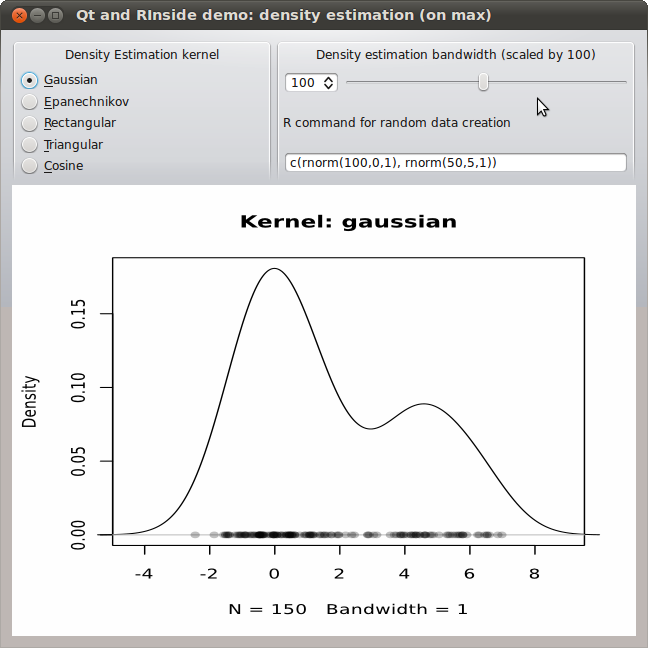
The RInside package makes it pretty simple and straightforward to embed R, the wonderful statistical programming environment and language, inside of a C++ application. This uses both the robust embedding API provided by R itself, and the higher-level abstractions from our Rcpp package. A number of examples are shown on this blog both here and here as well as on the RInside page; and the source package actually contains well over a dozen complete examples which cover anything from simple examples to parallel use via MPI for parallel computing. Beginning users sometimes ask about how to use RInside inside larger projects. And as I had meant to experiment with embedding inside of the powerful Qt framework anyway, I started to dabble a little. A first result is now in the SVN sources of RInside. My starting point was the classic tkdensity demo that comes with R itself. It is a good point of departure as Tcl/Tk makes it very portable---in fact it should run on every platform that runs R---and quite expressive. And having followed some of the GUI experiments around R over the years, I have also seen various re-implementations using different GUI frameworks. And so I am adding mine to this body of work: Example of embedding R via RInside into a Qt C++ application: density estimation for a mixture The problem I addressed first was actual buildability. For the RInside examples, Romain and I provide a Makefile that just works by making calls to R itself to learn about flags for R, Rcpp and RInside such that all required headers and libraries are found. That is actually relatively straightforward (and documented in our vignettes) but a little intimidating at first---which is why a ready-made Makefile is a good thing. Qt of course uses qmake and the .pro files to encode / resolve dependencies. So task one was to map what our Makefile does into its variables. Turns out that wasn't all that hard:
## -*- mode: Makefile; c-indent-level: 4; c-basic-offset: 4;  tab-width: 8; -*-
##
## Qt usage example for RInside, inspired by the standard 'density
## sliders' example for other GUI toolkits
##
## Copyright (C) 2011  Dirk Eddelbuettel and Romain Francois
TEMPLATE =              app
HEADERS =               qtdensity.h 
SOURCES =               qtdensity.cpp main.cpp
QT +=                   svg
## comment this out if you need a different version of R, 
## and set set R_HOME accordingly as an environment variable
R_HOME =                $$system(R RHOME)
## include headers and libraries for R 
RCPPFLAGS =             $$system($$R_HOME/bin/R CMD config --cppflags)
RLDFLAGS =              $$system($$R_HOME/bin/R CMD config --ldflags)
RBLAS =                 $$system($$R_HOME/bin/R CMD config BLAS_LIBS)
RLAPACK =               $$system($$R_HOME/bin/R CMD config LAPACK_LIBS)
## if you need to set an rpath to R itself, also uncomment
#RRPATH =               -Wl,-rpath,$$R_HOME/lib
## include headers and libraries for Rcpp interface classes
RCPPINCL =              $$system($$R_HOME/bin/Rscript -e \'Rcpp:::CxxFlags\(\)\')
RCPPLIBS =              $$system($$R_HOME/bin/Rscript -e \'Rcpp:::LdFlags\(\)\')
## for some reason when building with Qt we get this each time
## so we turn unused parameter warnings off
RCPPWARNING =           -Wno-unused-parameter 
## include headers and libraries for RInside embedding classes
RINSIDEINCL =           $$system($$R_HOME/bin/Rscript -e \'RInside:::CxxFlags\(\)\')
RINSIDELIBS =           $$system($$R_HOME/bin/Rscript -e \'RInside:::LdFlags\(\)\')
## compiler etc settings used in default make rules
QMAKE_CXXFLAGS +=       $$RCPPWARNING $$RCPPFLAGS $$RCPPINCL $$RINSIDEINCL
QMAKE_LFLAGS +=         $$RLDFLAGS $$RBLAS $$RLAPACK $$RCPPLIBS $$RINSIDELIBS
## addition clean targets
QMAKE_CLEAN +=          qtdensity Makefile
The double dollar signs and escaping of parentheses are a little tedious, but hey it works and expands the compiler and linker flags such that everything <emjust works="Works">. The code itself is pretty straightforward too. We instantiate the RInside object as well as the main Qt application object. We then instantiate a new object of class QtDensity that will launch the main widget; it is given a reference to the RInside object.
// -*- mode: C++; c-indent-level: 4; c-basic-offset: 4;  tab-width: 8; -*-
//
// Qt usage example for RInside, inspired by the standard 'density
// sliders' example for other GUI toolkits
//
// Copyright (C) 2011  Dirk Eddelbuettel and Romain Francois
#include <QApplication>
#include "qtdensity.h"
int main(int argc, char *argv[])
 
    RInside R(argc, argv);  		// create an embedded R instance
    QApplication app(argc, argv);
    QtDensity qtdensity(R);
    return app.exec();
 
The definition of the main object is pretty simple: a few private variables, and a few functions to interact with the GUI and get values from the radio buttons, slider or input field---as well as functions to update the chart or re-draw the random variables.
// -*- mode: C++; c-indent-level: 4; c-basic-offset: 4;  tab-width: 8; -*-
//
// Qt usage example for RInside, inspired by the standard 'density
// sliders' example for other GUI toolkits
//
// Copyright (C) 2011  Dirk Eddelbuettel and Romain Francois
#ifndef QTDENSITY_H
#define QTDENSITY_H
#include <RInside.h>
#include <QMainWindow>
#include <QHBoxLayout>
#include <QSlider>
#include <QSpinBox>
#include <QLabel>
#include <QTemporaryFile>
#include <QSvgWidget>
class QtDensity : public QMainWindow
 
    Q_OBJECT
public:
    QtDensity(RInside & R);
private slots:
    void getBandwidth(int bw);
    void getKernel(int kernel);
    void getRandomDataCmd(QString txt);
    void runRandomDataCmd(void);
private:
    void setupDisplay(void);    // standard GUI boilderplate of arranging things
    void plot(void);            // run a density plot in R and update the
    void filterFile(void);      // modify the richer SVG produced by R
    QSvgWidget *m_svg;          // the SVG device
    RInside & m_R;              // reference to the R instance passed to constructor
    QString m_tempfile;         // name of file used by R for plots
    QString m_svgfile;          // another temp file, this time from Qt
    int m_bw, m_kernel;         // parameters used to estimate the density
    QString m_cmd;              // random draw command string
 ;
#endif
Lastly, no big magic in the code either (apart from the standard magic provided by RInside). A bit of standard GUI layouting, and then some functions to pick values from the inputs as well as to compute / update the output. One issue is worth mentioning. The screenshot and code show the second version of this little application. I built a first one using a standard portable network graphics (png) file. That was fine, but not crisp as png is a pixel format so I went back and experimented with scalable vector graphics (svg) instead. One can create svg output with R in a number of ways, one of which is the cairoDevice package by Michael Lawrence (who also wrote RGtk2 and good chunks of Ggobi). Now, it turns out that Qt displays the so-called SVG tiny standard whereas R creates a fuller SVG format. Some discussion with Michael reveals that one can modify the svg file suitably (which is what the function filterFile below does) and it all works. Well: almost. There is a bug (and Michael thinks it is the SVG rendering) in which the density estimate does not get clipped to the plotting region.
// -*- mode: C++; c-indent-level: 4; c-basic-offset: 4;  tab-width: 8; -*-
//
// Qt usage example for RInside, inspired by the standard 'density
// sliders' example for other GUI toolkits -- this time with SVG
//
// Copyright (C) 2011  Dirk Eddelbuettel and Romain Francois
#include <QtGui>
#include "qtdensity.h"
QtDensity::QtDensity(RInside & R) : m_R(R)
 
    m_bw = 100;                 // initial bandwidth, will be scaled by 100 so 1.0
    m_kernel = 0;               // initial kernel: gaussian
    m_cmd = "c(rnorm(100,0,1), rnorm(50,5,1))"; // simple mixture
    m_R["bw"] = m_bw;           // pass bandwidth to R, and have R compute a temp.file name
    m_tempfile = QString::fromStdString(Rcpp::as<std::string>(m_R.parseEval("tfile <- tempfile()")));
    m_svgfile = QString::fromStdString(Rcpp::as<std::string>(m_R.parseEval("sfile <- tempfile()")));
    m_R.parseEvalQ("library(cairoDevice)");
    setupDisplay();
 
void QtDensity::setupDisplay(void)   
    QWidget *window = new QWidget;
    window->setWindowTitle("Qt and RInside demo: density estimation");
    QSpinBox *spinBox = new QSpinBox;
    QSlider *slider = new QSlider(Qt::Horizontal);
    spinBox->setRange(5, 200);
    slider->setRange(5, 200);
    QObject::connect(spinBox, SIGNAL(valueChanged(int)), slider, SLOT(setValue(int)));
    QObject::connect(slider, SIGNAL(valueChanged(int)), spinBox, SLOT(setValue(int)));
    spinBox->setValue(m_bw);
    QObject::connect(spinBox, SIGNAL(valueChanged(int)), this, SLOT(getBandwidth(int)));
    QLabel *cmdLabel = new QLabel("R command for random data creation");
    QLineEdit *cmdEntry = new QLineEdit(m_cmd);
    QObject::connect(cmdEntry,  SIGNAL(textEdited(QString)), this, SLOT(getRandomDataCmd(QString)));
    QObject::connect(cmdEntry,  SIGNAL(editingFinished()), this, SLOT(runRandomDataCmd()));
    QGroupBox *kernelRadioBox = new QGroupBox("Density Estimation kernel");
    QRadioButton *radio1 = new QRadioButton("&Gaussian");
    QRadioButton *radio2 = new QRadioButton("&Epanechnikov");
    QRadioButton *radio3 = new QRadioButton("&Rectangular");
    QRadioButton *radio4 = new QRadioButton("&Triangular");
    QRadioButton *radio5 = new QRadioButton("&Cosine");
    radio1->setChecked(true);
    QVBoxLayout *vbox = new QVBoxLayout;
    vbox->addWidget(radio1);
    vbox->addWidget(radio2);
    vbox->addWidget(radio3);
    vbox->addWidget(radio4);
    vbox->addWidget(radio5);
    kernelRadioBox->setMinimumSize(260,140);
    kernelRadioBox->setMaximumSize(260,140);
    kernelRadioBox->setSizePolicy(QSizePolicy::Fixed, QSizePolicy::Fixed);
    kernelRadioBox->setLayout(vbox);
    QButtonGroup *kernelGroup = new QButtonGroup;
    kernelGroup->addButton(radio1, 0);
    kernelGroup->addButton(radio2, 1);
    kernelGroup->addButton(radio3, 2);
    kernelGroup->addButton(radio4, 3);
    kernelGroup->addButton(radio5, 4);
    QObject::connect(kernelGroup, SIGNAL(buttonClicked(int)), this, SLOT(getKernel(int)));
    m_svg = new QSvgWidget();
    runRandomDataCmd();         // also calls plot()
    QGroupBox *estimationBox = new QGroupBox("Density estimation bandwidth (scaled by 100)");
    QHBoxLayout *spinners = new QHBoxLayout;
    spinners->addWidget(spinBox);
    spinners->addWidget(slider);
    QVBoxLayout *topright = new QVBoxLayout;
    topright->addLayout(spinners);
    topright->addWidget(cmdLabel);
    topright->addWidget(cmdEntry);
    estimationBox->setMinimumSize(360,140);
    estimationBox->setMaximumSize(360,140);
    estimationBox->setSizePolicy(QSizePolicy::Fixed, QSizePolicy::Fixed);
    estimationBox->setLayout(topright);
    QHBoxLayout *upperlayout = new QHBoxLayout;
    upperlayout->addWidget(kernelRadioBox);
    upperlayout->addWidget(estimationBox);
    QHBoxLayout *svglayout = new QHBoxLayout;
    svglayout->addWidget(m_svg);
    QVBoxLayout *outer = new QVBoxLayout;
    outer->addLayout(upperlayout);
    outer->addLayout(svglayout);
    window->setLayout(outer);
    window->show();
 
void QtDensity::plot(void)  
    const char *kernelstrings[] =   "gaussian", "epanechnikov", "rectangular", "triangular", "cosine"  ;
    m_R["bw"] = m_bw;
    m_R["kernel"] = kernelstrings[m_kernel]; // that passes the string to R
    std::string cmd1 = "Cairo(width=6,height=6,pointsize=10,surface='svg',filename=tfile); "
                       "plot(density(y, bw=bw/100, kernel=kernel), xlim=range(y)+c(-2,2), main=\"Kernel: ";
    std::string cmd2 = "\"); points(y, rep(0, length(y)), pch=16, col=rgb(0,0,0,1/4));  dev.off()";
    std::string cmd = cmd1 + kernelstrings[m_kernel] + cmd2; // stick the selected kernel in the middle
    m_R.parseEvalQ(cmd);
    filterFile();               // we need to simplify the svg file for display by Qt 
    m_svg->load(m_svgfile);
 
void QtDensity::getBandwidth(int bw)  
    if (bw != m_bw)  
        m_bw = bw;
        plot();
     
 
void QtDensity::getKernel(int kernel)  
    if (kernel != m_kernel)  
        m_kernel = kernel;
        plot();
     
 
void QtDensity::getRandomDataCmd(QString txt)  
    m_cmd = txt;
 
void QtDensity::runRandomDataCmd(void)  
    std::string cmd = "y <- " + m_cmd.toStdString();
    m_R.parseEvalQ(cmd);
    plot();                     // after each random draw, update plot with estimate
 
void QtDensity::filterFile()  
    // cairoDevice creates richer SVG than Qt can display
    // but per Michaele Lawrence, a simple trick is to s/symbol/g/ which we do here
    QFile infile(m_tempfile);
    infile.open(QFile::ReadOnly);
    QFile outfile(m_svgfile);
    outfile.open(QFile::WriteOnly   QFile::Truncate);
    
    QTextStream in(&infile);
    QTextStream out(&outfile);
    QRegExp rx1("<symbol"); 
    QRegExp rx2("</symbol");    
    while (!in.atEnd())  
        QString line = in.readLine();
        line.replace(rx1, "<g"); // so '<symbol' becomes '<g ...'
        line.replace(rx2, "</g");// and '</symbol becomes '</g'
        out << line << "\n";
     
    infile.close();
    outfile.close();
 
What the little application does is actually somewhat neat for the few lines. One key features is that the generated data can be specified directly by an R expression which allows for mixtures (as shown, and as is the default). With that it easy to see how many points are needed in the second hump to make the estimate multi-modal, and how much of a distance between both centers is needed and so on. Obviously, the effect of the chosen kernel and bandwidth can also be visualized. And with the chart the being a support vector graphics display, we can resize and scale at will and it still looks crisp. The code (for both the simpler png variant and the svg version shown here) is in the SVN repository for RInside and will be in the next release. Special thanks to Michael Lawrence for patiently working through some svg woes with me over a few emails.

Update: Some typos fixed.

Update 2: Two URLs corrected.

Joey Hess: getting out of cell phone contracts, redux

Exactly a year after I switched from pre to droid, I broke another cell phone contract. So there seem to be three fool-proof ways to get out of a cell phone contract in the US, despite all the hype about them involving signing away your firstborn.
  1. Switch to a different US cell phone company, and do it by going into a store and finding a hungry salesman in person, and making his sale contingent on him finding a way to break your old contract. What I did last year.
  2. Simply move to a part of the map that doesn't have cell phone coverage. (You will have seen these parts of the map from a plane.) It probably helps to have your cell phone drop off the edge of their map repeatedly for some months, presumably they can look this stuff up. Call up technical support, go thru some mild rigamarole as they try to configure your phone to magically see cell towers that have several mountains and/or the curvature of the Earth blocking line of site to you. Magic words: "please note on account: no cell service"
  3. Sell your contract on one of the existing cell contract exchanges, to someone who wants cell service with a shorter than usual contract. (Means giving up your number.) I haven't tried this one, maybe next time?
Unlike my Palm Pre which didn't survive being cut off the cell net, my Android phone is still fairly happy. While I'd really like to turn it into a proper Debian box, with X etc, I may just use it as a camera, web browsing (on wifi) and emergency 911 system. Pity though about the GPS stuff needing an internet connection when the phone has many gigabytes of free space that could hold a useful map. (If you want to phone me now, the number is 1-423-IKIWIKI. I only receive voice mail, and your call data and transcript will be absorbed by the Google Borg.)

23 March 2011

Gerfried Fuchs: LXC and NAT on notebook

Yesterday I was hinted towards lxc when I wondered what happened to openvz in unstable (which unfortunately isn't documented at all in the kernel changelogs, but that's a different story). So I started off taking a look. From a bit of experimenting around with it I consider it something that I want to play more with, and I want to share the problems I stumbled upon with you so that you don't have to figure them out on your own. First of all, LXC uses the cgroup kernel facility for resource management. The according file system isn't mounted by default, and LXC doesn't care for where it is mounted, it just needs to be. It seems like /sys/fs/cgroup seems to be the proper place (see 601757), so add the line cgroup /sys/fs/cgroup cgroup defaults 0 0 to your /etc/fstab file and sudo mount cgroup it. Next, it seems like bridging is the defacto standard for networking with lxc, but given that I want to use it on my notebook while being mobile I can't bind the bridge to any specific interface. To make this happen, one needs the bridge-utils package installed, and secondly, this is the path that I chose. I've added to /etc/network/interfaces this snippet:
auto br0
iface br0 inet static
    bridge_maxwait 0
    bridge_ports dummy0
    address 10.80.80.1
    netmask 255.255.255.0
This will bring up the bridge and act as gateway. For the running system, call sudo ifup br0. To make the host universally being able to work as gateway, of course ip_forward needs to be enabled. For this I added the line net.ipv4.ip_forward=1 to /etc/sysctl.d/local.conf (and for the running system, echo 1 into /proc/sys/net/ipv4/ip_forward). As I am using ferm for configuring the firewall on my notebook I have to add some parts into its configuration. This is the raw part that needs to get added, mix it into your existing configuration:
table filter  
    chain INPUT  
        # allow DNS queries from LXContainers
        proto (udp tcp) dport domain source 10.80.80.0/24 ACCEPT;
     
    chain FORWARD  
        # allow LXContainers into the net
        source 10.80.80.0/24 ACCEPT;
     
 
table nat  
    chain POSTROUTING  
        # NAT LXContainers
        source 10.80.80.0/24 MASQUERADE;
     
 
For DNS I installed dnsmasq so that I won't have to touch the /etc/resolv.conf inside the containers whenever I switch networks. So far for the host part, now to the actual containers. There is the /usr/lib/lxc/templates/lxc-debian helper script which uses debootstrap to create you a lenny chroot at least in the squeeze package this is hardwired, likewise with using cdn.debian.net. Copy the script and edit it to your likes if you feel like it. From what I understood it expects you to store the containers below /var/lib/lxc, I haven't yet tested for different places. So this was my commandline for that:
sudo /usr/lib/lxc/templates/lxc-debian -p /var/lib/lxc/vm0 A while later you'll end up below that directory with two entries: The config file and the rootfs subdirectory which is actually the bootstrapped distribution part. Now comes the configuration of the container. Open the config file with your favorite editor and add the following lines to the end:
lxc.utsname = vm0
lxc.network.type = veth
lxc.network.flags = up
lxc.network.link = br0
# lxc.network.name = eth0
lxc.network.hwaddr = 00:FF:80:80:80:80
lxc.network.ipv4 = 10.80.80.80/24
The network.name part is commented out, it defaults to that name internally; you though can change it to whatever you prefer. Caution, even though this is the documented approach, it does not work for Debian containers. It will always try to get its IP address through dhcp, lxc.network.ipv4 has no meaning for us. We need to change inside the rootfs the file etc/network/interfaces to read like this instead:
auto lo
iface lo inet loopback
auto eth0
iface eth0 inet static
   address 10.80.80.80
   netmask 255.255.255.0
   gateway 10.80.80.1
I suggest to keep the config and the interfaces file aligned with respect to the ipv4 setting so if this gets fixed upstream you won't stumble into any surprises. Also like mentioned before, we need to change the nameserver entries inside the rootfs file etc/resolv.conf to read nameserver 10.80.80.1. Now it's time to start it up and log in! sudo lxc-start -n vm0 -d will start the container in the background, and sudo lxc-console -n vm0 will give you the login to the container. The default password for the root user is root, obviously you want to change that before you install any networking services into the container like ssh-server. In case you want to quit from that console notice the message upon starting it, it's bound to <Ctrl+a q>. One more issue that I had: The default route wasn't set. I had to manually call ip r a default via 10.80.80.1 dev eth0 to be able to use the network inside the container. It seems to be related to that netbase isn't installed by default. If you install it the default route will be set upon starting the container automatically. This should get you started, there is of course more to explore and experiment with. Actually it is also suggested to create a tarball from your vm0 after you did the basic setup and installed the basic components you want to have around so you won't have to bootstrap over and over again. Do this after you have shut down the container, either through a halt from a container shell or through sudo lxc-stop -n vm0. The tarball can then get extracted to a different directory and just needs minor tweaks in the config and rootfs/etc/network/interfaces file to not create any clash with other containers (lxc.rootfs, lxc.mount.entry, lxc.utsname, lxc.network.hwaddr and ipv4 address). About limiting the containers, you can do it dynamically through the cgroup file system, and set it permanently through the config file. See man lxc.conf about these settings, amongst others. Enjoy, use, experiment. With sudo lxc-checkconfig you will see what your kernel actually supports for your LXCs. You will most probably notice the missing for the memory controller, this is tracked in the Debian bug report 534964.

/debian permanent link Comments: 6 Flattr this

22 March 2011

Gunnar Wolf: Lets go to Nicaragua, 2012!

Ok, so finally it is official! We just had the DebConf 12 decision meeting. We saw two great proposals, from the cities of Belo Horizonte, Brazil and Managua, Nicaragua. If you are curious on the decision process: We held it over two IRC channels The moderated #debconf-team channel, where only the five members of the decision committee (Marga Manterola, Andrew McMillan, Jeremiah Foster, Holger Levsen, Moray Allan) and two members from each of the bids (Marco T lio Gontijo e Silva and Rafael Cunha de Almeida from Brazil; Leonardo G mez and Eduardo Rosales from Nicaragua) had voices, and the open #dc12-discuss channel where we had an open discussion. Of course, you can get the full conversation logs in those links. I have to thank and congratulate the Brazilian team as they did a great work... The decision was very tight. It was so tight, in fact, that towards the end of the winning all of the committee members were too shy to state the results - so I kidnapped the process by announcing the winner ;-) (I hope that does not cast a shadow of illegitimacy over it) And, very much worth noting, both teams were also very professional: In previous years, we have seen such decisions degenerate into personal attacks and very ugly situations. That has always been painful and unfortunate. And although the Brazilians will not be able to go celebrate tonight, the decision was received with civility, knowing it was a decision among equals, and a decision well carried out. Well, that's it I am very much looking forward for that peculiar two weeks when the whole Debian family meets, this year to be held in Banja Luka, Bosnia-Herzegovina, and I am very eager towards meeting in 2012 in Managua, Nicaragua! Yay!

Pietro Abate: Xen brouter setup

A while ago I received a new desktop machine (8 cores, 8Gb of memory ...) at work. Since for the moment I kinda happy to work on my laptop using an external screen, I decided to put the hw to a good use and to explore a bit more some more exotic (at least for me) xen features. In particular I spend half a day playing with different xen network settings. The bridge model, that should work out of the shelf, is the easiest one. To setup this up, you basically need to specify a couple of options in the xend-config file and you're done. This is the "default" network configuration and is should work out of the box in most situations. Using this method, since all VMs' interfaces are bridged together (surprise !) with the public interface, your network card is left in promiscuous mode (not a big problem if you ask me...). Once your VMs are up, you can then decided to use your default dhcp server, autoconf your VMs with ipv6 only, or do nothing as you please. An other popular method, albeit a bit more complex, is to setup a natted network using the script network-nat (this one is an evolution of the third method that is 'network-routed') . I played with it, but since I wanted to have all my DomU on the same subnet, this setup wasn't satisfying for me. In particular, by default, 'network-nat' assigns a different subnet to each DomU. Using the natted set up you can also configure a local dhcp server to give private IPs to your VMs all done transparently by the xen network scripts. I've noticed that there is a bug in the xen script that does not make it very squeeze friendly. Since the default dhcp server in squeeze is isc-dhcp and few configuration files got shuffled in the process (notably /etc/dhcp3.conf is not /etc/dhcp/dhcp.conf) , the script needs a little fix to work properly. I'll report this bug sometimes soon... Goggling around I found a different setup that is called brouter, that is a hybrid between a bridge configuration and a routed configuration. This is the original (??) article well hidden in an old suse wiki.
 
I've done few modifications here to add natting. So basically, all virtual interfaces connected each to one DomU are linked together by a bridge (xenbr0). The bridge with address 10.0.0.1 is also the router of the subnet. All DomU are configured to used dhcp that assigns a new ip and specifies the router of the subnet. The dhcp server is configured to answer requests only on the xenb0 interface avoiding problems on the public network... routing is configured using iptables :
iptables -t nat -A POSTROUTING -o $ netdev -j MASQUERADE
iptables -A FORWARD -i $ bridge -j ACCEPT
echo 1 >/proc/sys/net/ipv4/ip_forward
/etc/init.d/isc-dhcp-server restart
Note that since the dhcp server is configured to give addresses only on the virtual network, we need to restart it after creating the bridge interface, otherwise isc-dhcp-server will refuse to run. Mum says that I should configure the bridge in /etc/network/interfaces to make the dhcp server happy at startup, but I felt a bit lazy, so I let to task to xen... In the next episode, I'll add ipv6 connectivity to the virtual subnet and then start playing with puppet... ipv6 is almost done, puppet... I started with the doc... The complete script from the suse wiki and with my modifications is below (only lightly tested):
#!/bin/sh
#============================================================================
# Default Xen network start/stop script.
# Xend calls a network script when it starts.
# The script name to use is defined in /etc/xen/xend-config.sxp
# in the network-script field.
#
# This script creates a bridge (default xenbr$ vifnum ), gives it an IP address
# and the appropriate route. Then it starts the SuSEfirewall2 which should have
# the bridge device in the zone you want it.
#
# If all goes well, this should ensure that networking stays up.
# However, some configurations are upset by this, especially
# NFS roots. If the bridged setup does not meet your needs,
# configure a different script, for example using routing instead.
#
# Usage:
#
# vnet-brouter (start stop status) VAR=VAL *
#
# Vars:
#
# bridgeip Holds the ip address the bridge should have in the
# the form ip/mask (10.0.0.1/24).
# brnet Holds the network of the bridge (10.0.0.1/24).
#
# vifnum Virtual device number to use (default 0). Numbers >=8
# require the netback driver to have nloopbacks set to a
# higher value than its default of 8.
# bridge The bridge to use (default xenbr$ vifnum ).
#
# start:
# Creates the bridge
# Gives it the IP address and netmask
# Adds the routes to the routing table.
#
# stop:
# Removes all routes from the bridge
# Removes any devices on the bridge from it.
# Deletes bridge
#
# status:
# Print addresses, interfaces, routes
#
#============================================================================

#set -x

dir=$(dirname "$0")
. "$dir/xen-script-common.sh"
. "$dir/xen-network-common.sh"

findCommand "$@"
evalVariables "$@"

vifnum=$ vifnum:-0
bridgeip=$ bridgeip:-10.6.7.1/24
brnet=$ brnet:-10.6.7.0/24
netmask=$ netmask:-255.255.255.0
bridge=$ bridge:-xenbr$ vifnum

##
# link_exists interface
#
# Returns 0 if the interface named exists (whether up or down), 1 otherwise.
#
link_exists()

if ip link show "$1" >/dev/null 2>/dev/null
then
return 0
else
return 1
fi


# Usage: create_bridge bridge
create_bridge ()
local bridge=$1

# Don't create the bridge if it already exists.
if [ ! -d "/sys/class/net/$ bridge /bridge" ]; then
brctl addbr $ bridge
brctl stp $ bridge off
brctl setfd $ bridge 0
fi
ip link set $ bridge up


# Usage: add_to_bridge bridge dev
add_to_bridge ()
local bridge=$1
local dev=$2
# Don't add $dev to $bridge if it's already on a bridge.
if ! brctl show grep -wq $ dev ; then
brctl addif $ bridge $ dev
fi


# Usage: show_status dev bridge
# Print interface configuration and routes.
show_status ()
local dev=$1
local bridge=$2

echo '============================================================'
ip addr show $ dev
ip addr show $ bridge
echo ' '
brctl show $ bridge
echo ' '
ip route list
echo ' '
route -n
echo '============================================================'
echo ' '
iptables -L
echo ' '
iptables -L -t nat
echo '============================================================'


op_start ()
if [ "$ bridge " = "null" ] ; then
return
fi

create_bridge $ bridge

if link_exists "$bridge"; then
ip address add dev $bridge $bridgeip
ip link set $ bridge up arp on
ip route add to $brnet dev $bridge
fi

if [ $ antispoof = 'yes' ] ; then
antispoofing
fi
iptables -t nat -A POSTROUTING -o $ netdev -j MASQUERADE
iptables -A FORWARD -i $ bridge -j ACCEPT
echo 1 >/proc/sys/net/ipv4/ip_forward
/etc/init.d/isc-dhcp-server restart


op_stop ()
if [ "$ bridge " = "null" ]; then
return
fi
if ! link_exists "$bridge"; then
return
fi

ip route del to $brnet dev $bridge
ip link set $ bridge down arp off
ip address del dev $bridge $bridgeip
##FIXME: disconnect the interfaces from the bridge 1st
brctl delbr $ bridge
/etc/init.d/isc-dhcp-server restart


case "$command" in
start)
op_start
;;

stop)
op_stop
;;

status)
show_status $ netdev $ bridge
;;

*)
echo "Unknown command: $command" >&2
echo 'Valid commands are: start, stop, status' >&2
exit 1
esac

18 March 2011

Adnan Hodzic: Debian CUT, a new rolling release?

This post is also available on/was written for OMG! Ubuntu

It looks like 2011 started well for Debian. The project won awards in two out of seven categories at the Linux New Media Awards 2011 ( Best Open Source Server Distribution and Outstanding Contribution to Open Source/Linux/Free Software ). Just recently Internet.com declared Debian the most influential distribution ever, stating that ~63% of all distributions now being developed come ultimately from Debian. However, my intention for this article is not solely to praise Debian for its recent awards, but rather to focus on a new project, Debian CUT. Don t be surprised if you haven t heard about CUT; it seems most Debian community hasn t either. Then again, maybe it s because it is only labelled as unofficial/development so far.
A bit of history One of the greatest criticisms of Debian is that its release cycles are too long. Debian stable release is seen as often as Ubuntu s LTS release. As a server solution this doesn t present a problem at all, it can even seen as a pro. However, for desktop use and for your average Joe who needs to have the latest software and is unable to get it, this may well present a problem. Of course he can always turn to backports to get what he needs but by the time you have finished reading this very sentence, Joe has already moved to Ubuntu. For those who are completely unaware how things work within Debian, let me try to shed some light. Debian has 3 main branches: Unstable , is a branch used mainly by developers, where the latest changes to the software they are working on are made. Usually, after approximately 10 days this software is pushed to testing , branch which is going to become next Debian stable release. For comparison, in the process of a new Ubuntu release at one point in this process, changes from testing/unstable are frozen where Ubuntu fixes bugs until they are ready to release new Ubuntu release. Debian s testing branch is said by some to be more stable then most of the stable distributions out there. Last but not least is stable branch, which follows the (in)famous mantra it s released when it s ready , although last two releases have been released in a more timely manner. Okay, so what is Debian CUT? The idea stretches back more then 2 years, to Joey Hess proposing the idea of Constantly Usable Testing . For users/developers who can t wait ~2 years to see new Debian release, they usually turn to Debian testing branch. To clarify, testing images are released weekly, but most of us in Debian don t recommend you jump to testing by installing it from weekly image, but rather by upgrading from stable. To make the situation even worse, these builds frequently don t work due to all the changes that have been pushed from unstable. But this is where Constantly Usable Testing idea comes in, where the installer is always installable and you re already using what s going to be next stable release. You wouldn t have to worry about whether the next update is going to break your system, but would get regular security updates, while the big updates would come in shape of new testing snapshot versions. Frequency of release of these snapshots is ought to be on monthly basis, so you can plan on seeing the next release on April 6th (exactly one month after the current release, provided of course if there are no showstopper bugs). To sum it all up, you wouldn t have to wait ~2 years before new Stable release shows up, nor (in case you have already switched to testing) would you have to worry whether your next update will break your system. You would get your updates in form of timely (ie: monthly) snapshots until it s time for major milestone which would turn out to be new Debian release. Even though this might be long term goal, in these early stages no one can guarantees this. Rolling release? The simplest way to explain this concept is that there are two types of Linux distributions: one with milestone version numbers and other where new updates keep coming through their rolling release cycles. Some of the rolling distributions are Gentoo and Arch Linux, while on the other side you have RedHat and Suse. Novell announced that OpenSuse is moving to rolling release with project codename Tumbleweed. It s also worth mentioning that Debian already has its rolling counters and perfect examples are: LMDE and aptosid. It is a way to continuously develop software, a way that best fits Debian as a platform where software is continuously developed. Especially because most of its greatest values could get lost with the release of that big stable version . Perfect case of that could be the almost drop of Chromium in Squeeze. Another great example could be Android, which is criticised most for its versioning. Companies are refusing to release new Android versions to their current phones, because they want you to buy new phone with latest Android version, even though your current one is perfectly capable of running latest Android. Personally, I m sure the future will reveal that rolling releases are the future, towards which all Linux platforms should be heading. Perhaps the definition of rolling releases I gave earlier is why I believe this project has such bright future ahead of it. Debian would be somewhat of a hybrid of this definition, it would be rolling release until it s time to mark a big milestone with a version number, and before you know it, we re rolling again. Unofficial Debian Monthly Testing Snapshot Release (version 2011.03 final) Michael Gilbert took on a big responsibility, trying experimentally to prove the feasibility of such a project. He has released a first wheezy snapshot installer (versioned 2011.03) as a test for the development community to try out and evaluate. Please read official announcement along with download links. While you can use this snapshot to have constantly working installer, after it is installed you could move to testing altogether if you wish. Conclusion As I have already mentioned, this project is still in the development/experimental stage, which makes all of this its very conception. Also, apart from rumors of Ubuntu becoming rolling release, if Ubuntu is to get its rolling release this how it s going to get it Smile If you d like to find out more about Debian CUT, I suggest you read Raphael Hertzog s article A constantly usable testing distribution for Debian , and watch the video of Joey Hess CUT BoF on DebConf10 in NYC. Of course, if you d like to get involved into this project, please use the project s mailing list. If you have any comments, please do share, as I d be happy to answer any of your questions.

DebConf team: DebConf11: Short insiders summary of recent developments in DC11 organization (Posted by Vedran Omeragic)

Recently there has been some major developments in DebConf11 organization. In short, I will list some of the most important.

Website

Official DC11 website has finally been completed and now contains a great deal of information for those interested in attending this years conference. Some of the most notable changes include:

Navigation

Frontpage now contains a small menu with links to most important parts of website, like About, Registration, Contact Sidebar menu is now divided in 3 categories:

  • The Conference Links to pages which are directly connected with the Conference like About DC, Debian Day, Registration, Call for Papers, Talk Schedules, Payments Most of these links are hidden at the moment, and will be until the registration is open, to avoid any unnecessary confusion.
  • More Information Basic information for attendees like Important Dates, Accommodations, Venue, Visa Everything you need to know about your stay in Banja Luka.
  • Practical While these pages have almost nothing to do with the Conference itself, they do provide a vast information about city, getting to Bosnia, some practical information, as well as the Map of the whole city made my me :)

New Pages added
  • How Can I Help This page contains some basic information for anyone who wants to help out. Weather by volunteering, sponsoring, or just by adding a banner on their website
    DC11: How Can I Help?
  • Contact Instead of just sending visitors to mailto, we replaced it by a page which contains ALL contact information, emails AND phone numbers (which will be added just before DebCamp starts).
    DC11: Contact
  • Sponsorship Just like with the contact page, we made a page to be more user friendly to any interested parties or individuals, and contains most important info, such as sponsorship levels and contact address.
    DC11: Sponsorship
  • About DebConf11 Actually it s just a page with a content copied from frontpage (which is now used for something else).
    DC11: About DebConf11

New features:
  • Documentation Is now used to store all important documents and records for public use and sharing, like brochures, official government documents, important public mails, as well as the recordings of all IRC meeting logs. Can be found at:
    DC11: Documentation
  • Frontpage: Navigation To ensure the main goal of website, information availability, frontpage has been redesigned to provide maximum accessibility as well as easy access to any part of the website. DC11: Frontpage
  • Frontpage: Latest News To keep the public and attendees well informed of any important events and developments, we decided to add latest news section. Note however, that if you want to stay completely informed of any changes and updates, we still recommend subscribing to our mailing list, which can be found under contact page.
    DC11: Frontpage
  • Map of Banja Luka Because of lack of data on Google Maps and Open Street Map, as well as some other minor local maps, we made a small map of almost whole city and added around 60 or 70 locations which we consider to be of importance for our attendees. Such locations include hotels, parking spots, restaurants, bars, clubs, petrol stations, taxi stations, etc. This page uses simple JavaScript and is not dragable . Therefore we added Index Location to auto-locate the needed locations, as well as the legend to clarify the category of locations. Pointing your mouse over a certain location will open a small bubble with some info on that location/object. We should also point out that some of this data may not be 100% correct (ie working hours may be off ). Map is available at:
    DC11: Banja Luka City Map
Bosnian language

Site is now available on Bosnian language for native speaking attendees, should they have problems with English version. Every page is available on both languages, which can be changed by clicking on ba/en flag in upper left corner, or DC11: Bosnian Version.

Design

As you may have noticed, the official page received a small face lift. New header with the Government building, a small token of appreciation for all the help the Government is providing; as well as some minor changes in CSS and color scheme. While talking about design, we d like to thank Leandro G mez for his help with the header.

Sponsorship Sponsorship Levels

As agreed on the meeting, which took place on 22. of February, [Meeting logs], following sponsorship levels will be used for this years conference:

  • Steel < 1.000
  • Bronze > 1.000
  • Silver > 5.000
  • Gold > 10.000
  • Platinum > 20.000

Main reason for lowering amounts is due to last years results of high increase in the same. As for the benefits of these levels, the only thing changed is t-shirts / bags places; we believe t-shirts are much more noticeable than bags, and have therefore been promoted to Silver, while bags have been downgraded to Bronze. For a full list of requirements and benefits, please visit: DC11: Sponsorship Sponsorship Brochure

Sponsorship brochures have finally been completed and are available for a public distribution. The brochures are available in 3 qualities: low, high and original. Low and high quality brochures, ~6Mb and ~8Mb respectively, are for normal distribution to our sponsors, while original quality, at around 240Mb, is intended for maximum quality printing. Just as with the website, each quality is available in both Bosnian and English. Current version of the brochure is 1.1 and is most likely the final one. These brochures are available at Documentation page: DC11: Documentation >> Documents made by Local Team Or download them directly:

Also, I d like to thank Mirosal Remetic for making a great template and Pablo Duboue for some very valuable suggestions regarding the structure of the brochure.

Visas and Customs Rules

Many questions have been raised regarding Bosnian visa regime. We got in contact with the embassy and they clarified who can enter our country with(out) Visa. The list can be found on DC11 Wiki: Visa regime. It also states, which countries have a privilidge of ID-only entrance. If your country is not listed, that means you will need visa. If you want to know what exactly you need to get one, please visit the this official Government page and chose your country from a drop-down menu. As for the visa itself, as well as the list of Customs Rules, please read DC11: Visa.

Also, thanks to Darjan Prtic for getting the list from the Government officials.

So, what s next?

If you think, that is it for now, you are dead wrong. At this very moment following is being organized and developed:

  • Registration Registration Team is currently hacking penta and modifying it for this years needs and conditions. We expect to have registrations open by the end of March / beginning of April.
  • Travel and getting to Banja Luka Being one of the greatest obstacle, Travel Team is working hard on finding best routes for attendees and mapping the city
  • Sponsorship With final decision and agreement for sponsorship levels and brochures ready for public distribution, Sponsorship Team is now actively looking for new sponsors, global and local, preparing various promotional material, as well as planning our advertising strategy.

Final word

Well, these are pretty much the highlights of some recent and some future developments of DebConf11 organizational team. Mind you, there s a lot more going on, but I tried to give a small summary from the inside. Should you be interested in attending, helping out, sponsoring or just have some questions, feel free to ask them on our mailing list at: debconf11-localteam@lists.debconf.org. I should inform you that this is a public mailing list and its archives are available for a broader public. If you do not wish for your mail to be made public, please direct any enquiry directly to me trough the Contact Form or any other member of Core Local Team, Adnan Hodzic or Velimir Iveljic.

Russell Coker: Some Postfix Scripts for dealing with Outbound Spamming

I ve just written some small scripts to help me manage spam emergencies on a mail server. I ve been doing this thing with a bit of manual effort for a while, but after having done it once from a phone I want to optimise it a bit to reduce painful typing.My observation is that when a system I run is used as an outbound mail relay for spamming I will notice this reasonably quickly by the queues getting big. Some portion of mail that is queued is delayed due to general network issues and anti-spam measures that neither accept nor reject mail cause a typical spam message to be more likely to be queued than a typical non-spam message. So I look for accounts that send large amounts of mail.The biggest mail server I run (and the only one to have an outbound spam problem) is configured to not allow users to fake their sender address (IE use an address from gmail.com or another server) unless they pay extra. So the spam I deal with tends to have a valid origin email address that I can use.Queue CountingThe following command provides a sorted list of the accounts that have the most mail in the queue. This usually means a maximum of 2 or 3 spammers at the end of the list:mailq grep ^[A-F0-9] cut -c 42-80 sort uniq -c sort -n tailThe following function declaration makes the command get-top-sender find the sender with the largest number of queue entries (which has been a spammer every time I ve checked such things) and assign their email address to the environment variable $TOP_SENDER. It has to be a shell function so that the environment variable will be set in the context of the shell and available to child processes.function get-top-sender() TOP_SENDER_LINE=$(mailq grep ^[A-F0-9] cut -c 42-80 sort uniq -c sort -n tail -1) ; export TOP_SENDER=$(echo $TOP_SENDER_LINE cut -f2 -d\ ) ; TOP_COUNT=$(echo $TOP_SENDER_LINE cut -f1 -d\ ); echo "Top Sender is $TOP_SENDER with $TOP_COUNT messages" ; Viewing the QueueThe following script uses the first parameter or the environment variable $TOP_SENDER to specify the user who s mail should be read. In the normal course of events user email won t be read by the sysadmin, but if we are to determine whether a slew of email is spam or not there s no other way. So far I haven t seen a large number of queued messages not be spam, but I expect it ll happen eventually and the user will be happy that I checked it instead of locking their account and deleting all the queued mail. For readers who don t do sysadmin work, this is why we always have entries in the Terms of Service about the possibility of your email being read to fix technical problems or to investigate possible breaches of the ToS from your end.#!/bin/bash
set -e
mkdir -p ~/tmp/$$
cd ~/tmp/$$
if [ "$1" != "" ]; then
TOP_SENDER="$1"
fi
if [ "$TOP_SENDER" = "" ]; then
echo "Specify the sender on the command-line or in \$TOP_SENDER"
exit 1
fi
for n in $(mailq grep ^[A-F0-9].*$TOP_SENDER cut -c 1-10) ; do
FILE=$(echo $n sed -e "s/^\(.\)/\/var\/spool\/postfix\/deferred\/\1\/\1/" -e "s/ .*$//")
if [ -f "$FILE" ]; then
postcat "$FILE" > $n
else
echo "File $FILE missing, probably active"
fi
done
less *
rm -rf ~/tmp/$$Note that this needs to be done with a single less command so that I can terminate it by pressing q and easily go to the next file with :n . It does waste some server resources by running postcat on all queue files relating to the user in question, but that doesn t matter, servers are supposed to be powerful enough to cope with some inefficiency in processing uncommon operations.The Final CommandAfter that I have a script that connects by ssh to all outbound mail relays and deletes bad messages from the queues and then connects to the database server to lock the account that was used for sending the mail. I m not publishing it because it s specific to the servers I run.So when NAGIOS reports that the queue is too large I have one script to find the most likely culprit, one script to view the queued email from that account, and a final script to lock the account and purge the spam.I ve also added a reminder of the command names to /etc/motd as I don t want to be running ls and set on a phone to discover command names that I ve forgotten.Any suggestions for improvements to this will be welcome.

Next.

Previous.