Search Results: "tim"

12 August 2020

Michael Stapelberg: Hermetic packages (in distri)

In distri, packages (e.g. emacs) are hermetic. By hermetic, I mean that the dependencies a package uses (e.g. libusb) don t change, even when newer versions are installed. For example, if package libusb-amd64-1.0.22-7 is available at build time, the package will always use that same version, even after the newer libusb-amd64-1.0.23-8 will be installed into the package store. Another way of saying the same thing is: packages in distri are always co-installable. This makes the package store more robust: additions to it will not break the system. On a technical level, the package store is implemented as a directory containing distri SquashFS images and metadata files, into which packages are installed in an atomic way.

Out of scope: plugins are not hermetic by design One exception where hermeticity is not desired are plugin mechanisms: optionally loading out-of-tree code at runtime obviously is not hermetic. As an example, consider glibc s Name Service Switch (NSS) mechanism. Page 29.4.1 Adding another Service to NSS describes how glibc searches $prefix/lib for shared libraries at runtime. Debian ships about a dozen NSS libraries for a variety of purposes, and enterprise setups might add their own into the mix. systemd (as of v245) accounts for 4 NSS libraries, e.g. nss-systemd for user/group name resolution for users allocated through systemd s DynamicUser= option. Having packages be as hermetic as possible remains a worthwhile goal despite any exceptions: I will gladly use a 99% hermetic system over a 0% hermetic system any day. Side note: Xorg s driver model (which can be characterized as a plugin mechanism) does not fall under this category because of its tight API/ABI coupling! For this case, where drivers are only guaranteed to work with precisely the Xorg version for which they were compiled, distri uses per-package exchange directories.

Implementation of hermetic packages in distri On a technical level, the requirement is: all paths used by the program must always result in the same contents. This is implemented in distri via the read-only package store mounted at /ro, e.g. files underneath /ro/emacs-amd64-26.3-15 never change. To change all paths used by a program, in practice, three strategies cover most paths:

ELF interpreter and dynamic libraries Programs on Linux use the ELF file format, which contains two kinds of references: First, the ELF interpreter (PT_INTERP segment), which is used to start the program. For dynamically linked programs on 64-bit systems, this is typically ld.so(8). Many distributions use system-global paths such as /lib64/ld-linux-x86-64.so.2, but distri compiles programs with -Wl,--dynamic-linker=/ro/glibc-amd64-2.31-4/out/lib/ld-linux-x86-64.so.2 so that the full path ends up in the binary. The ELF interpreter is shown by file(1), but you can also use readelf -a $BINARY grep 'program interpreter' to display it. And secondly, the rpath, a run-time search path for dynamic libraries. Instead of storing full references to all dynamic libraries, we set the rpath so that ld.so(8) will find the correct dynamic libraries. Originally, we used to just set a long rpath, containing one entry for each dynamic library dependency. However, we have since switched to using a single lib subdirectory per package as its rpath, and placing symlinks with full path references into that lib directory, e.g. using -Wl,-rpath=/ro/grep-amd64-3.4-4/lib. This is better for performance, as ld.so uses a per-directory cache. Note that program load times are significantly influenced by how quickly you can locate the dynamic libraries. distri uses a FUSE file system to load programs from, so getting proper -ENOENT caching into place drastically sped up program load times. Instead of compiling software with the -Wl,--dynamic-linker and -Wl,-rpath flags, one can also modify these fields after the fact using patchelf(1). For closed-source programs, this is the only possibility. The rpath can be inspected by using e.g. readelf -a $BINARY grep RPATH.

Environment variable setup wrapper programs Many programs are influenced by environment variables: to start another program, said program is often found by checking each directory in the PATH environment variable. Such search paths are prevalent in scripting languages, too, to find modules. Python has PYTHONPATH, Perl has PERL5LIB, and so on. To set up these search path environment variables at run time, distri employs an indirection. Instead of e.g. teensy-loader-cli, you run a small wrapper program that calls precisely one execve system call with the desired environment variables. Initially, I used shell scripts as wrapper programs because they are easily inspectable. This turned out to be too slow, so I switched to compiled programs. I m linking them statically for fast startup, and I m linking them against musl libc for significantly smaller file sizes than glibc (per-executable overhead adds up quickly in a distribution!). Note that the wrapper programs prepend to the PATH environment variable, they don t replace it in its entirely. This is important so that users have a way to extend the PATH (and other variables) if they so choose. This doesn t hurt hermeticity because it is only relevant for programs that were not present at build time, i.e. plugin mechanisms which, by design, cannot be hermetic.

Shebang interpreter patching The Shebang of scripts contains a path, too, and hence needs to be changed. We don t do this in distri yet (the number of packaged scripts is small), but we should.

Performance requirements The performance improvements in the previous sections are not just good to have, but practically required when many processes are involved: without them, you ll encounter second-long delays in magit which spawns many git processes under the covers, or in dracut, which spawns one cp(1) process per file.

Downside: rebuild of packages required to pick up changes Linux distributions such as Debian consider it an advantage to roll out security fixes to the entire system by updating a single shared library package (e.g. openssl). The flip side of that coin is that changes to a single critical package can break the entire system. With hermetic packages, all reverse dependencies must be rebuilt when a library s changes should be picked up by the whole system. E.g., when openssl changes, curl must be rebuilt to pick up the new version of openssl. This approach trades off using more bandwidth and more disk space (temporarily) against reducing the blast radius of any individual package update.

Downside: long env variables are cumbersome to deal with This can be partially mitigated by removing empty directories at build time, which will result in shorter variables. In general, there is no getting around this. One little trick is to use tr : '\n', e.g.:
distri0# echo $PATH
/usr/bin:/bin:/usr/sbin:/sbin:/ro/openssh-amd64-8.2p1-11/out/bin
distri0# echo $PATH   tr : '\n'
/usr/bin
/bin
/usr/sbin
/sbin
/ro/openssh-amd64-8.2p1-11/out/bin

Edge cases The implementation outlined above works well in hundreds of packages, and only a small handful exhibited problems of any kind. Here are some issues I encountered:

Issue: accidental ABI breakage in plugin mechanisms NSS libraries built against glibc 2.28 and newer cannot be loaded by glibc 2.27. In all likelihood, such changes do not happen too often, but it does illustrate that glibc s published interface spec is not sufficient for forwards and backwards compatibility. In distri, we could likely use a per-package exchange directory for glibc s NSS mechanism to prevent the above problem from happening in the future.

Issue: wrapper bypass when a program re-executes itself Some programs try to arrange for themselves to be re-executed outside of their current process tree. For example, consider building a program with the meson build system:
  1. When meson first configures the build, it generates ninja files (think Makefiles) which contain command lines that run the meson --internal helper.
  2. Once meson returns, ninja is called as a separate process, so it will not have the environment which the meson wrapper sets up. ninja then runs the previously persisted meson command line. Since the command line uses the full path to meson (not to its wrapper), it bypasses the wrapper.
Luckily, not many programs try to arrange for other process trees to run them. Here is a table summarizing how affected programs might try to arrange for re-execution, whether the technique results in a wrapper bypass, and what we do about it in distri:
technique to execute itself uses wrapper mitigation
run-time: find own basename in PATH yes wrapper program
compile-time: embed expected path no; bypass! configure or patch
run-time: argv[0] or /proc/self/exe no; bypass! patch
One might think that setting argv[0] to the wrapper location seems like a way to side-step this problem. We tried doing this in distri, but had to revert and go the other way.

Misc smaller issues

Appendix: Could other distributions adopt hermetic packages? At a very high level, adopting hermetic packages will require two steps:
  1. Using fully qualified paths whose contents don t change (e.g. /ro/emacs-amd64-26.3-15) generally requires rebuilding programs, e.g. with --prefix set.
  2. Once you use fully qualified paths you need to make the packages able to exchange data. distri solves this with exchange directories, implemented in the /ro file system which is backed by a FUSE daemon.
The first step is pretty simple, whereas the second step is where I expect controversy around any suggested mechanism.

Appendix: demo (in distri) This appendix contains commands and their outputs, run on upcoming distri version supersilverhaze, but verified to work on older versions, too. Large outputs have been collapsed and can be expanded by clicking on the output. The /bin directory contains symlinks for the union of all package s bin subdirectories:
distri0# readlink -f /bin/teensy_loader_cli
/ro/teensy-loader-cli-amd64-2.1+g20180927-7/bin/teensy_loader_cli
The wrapper program in the bin subdirectory is small:
distri0# ls -lh $(readlink -f /bin/teensy_loader_cli)
-rwxr-xr-x 1 root root 46K Apr 21 21:56 /ro/teensy-loader-cli-amd64-2.1+g20180927-7/bin/teensy_loader_cli
Wrapper programs execute quickly:
distri0# strace -fvy /bin/teensy_loader_cli & head cat -n
     1  execve("/bin/teensy_loader_cli", ["/bin/teensy_loader_cli"], ["USER=root", "LOGNAME=root", "HOME=/root", "PATH=/ro/bash-amd64-5.0-4/bin:/r"..., "SHELL=/bin/zsh", "TERM=screen.xterm-256color", "XDG_SESSION_ID=c1", "XDG_RUNTIME_DIR=/run/user/0", "DBUS_SESSION_BUS_ADDRESS=unix:pa"..., "XDG_SESSION_TYPE=tty", "XDG_SESSION_CLASS=user", "SSH_CLIENT=10.0.2.2 42556 22", "SSH_CONNECTION=10.0.2.2 42556 10"..., "SSHTTY=/dev/pts/0", "SHLVL=1", "PWD=/root", "OLDPWD=/root", "=/usr/bin/strace", "LD_LIBRARY_PATH=/ro/bash-amd64-5"..., "PERL5LIB=/ro/bash-amd64-5.0-4/ou"..., "PYTHONPATH=/ro/bash-amd64-5.b0-4/"...]) = 0
     2  arch_prctl(ARCH_SET_FS, 0x40c878)       = 0
     3  set_tid_address(0x40ca9c)               = 715
     4  brk(NULL)                               = 0x15b9000
     5  brk(0x15ba000)                          = 0x15ba000
     6  brk(0x15bb000)                          = 0x15bb000
     7  brk(0x15bd000)                          = 0x15bd000
     8  brk(0x15bf000)                          = 0x15bf000
     9  brk(0x15c1000)                          = 0x15c1000
    10  execve("/ro/teensy-loader-cli-amd64-2.1+g20180927-7/out/bin/teensy_loader_cli", ["/ro/teensy-loader-cli-amd64-2.1+"...], ["USER=root", "LOGNAME=root", "HOME=/root", "PATH=/ro/bash-amd64-5.0-4/bin:/r"..., "SHELL=/bin/zsh", "TERM=screen.xterm-256color", "XDG_SESSION_ID=c1", "XDG_RUNTIME_DIR=/run/user/0", "DBUS_SESSION_BUS_ADDRESS=unix:pa"..., "XDG_SESSION_TYPE=tty", "XDG_SESSION_CLASS=user", "SSH_CLIENT=10.0.2.2 42556 22", "SSH_CONNECTION=10.0.2.2 42556 10"..., "SSHTTY=/dev/pts/0", "SHLVL=1", "PWD=/root", "OLDPWD=/root", "=/usr/bin/strace", "LD_LIBRARY_PATH=/ro/bash-amd64-5"..., "PERL5LIB=/ro/bash-amd64-5.0-4/ou"..., "PYTHONPATH=/ro/bash-amd64-5.0-4/"...]) = 0
Confirm which ELF interpreter is set for a binary using readelf(1):
distri0# readelf -a /ro/teensy-loader-cli-amd64-2.1+g20180927-7/out/bin/teensy_loader_cli grep 'program interpreter'
[Requesting program interpreter: /ro/glibc-amd64-2.31-4/out/lib/ld-linux-x86-64.so.2]
Confirm the rpath is set to the package s lib subdirectory using readelf(1):
distri0# readelf -a /ro/teensy-loader-cli-amd64-2.1+g20180927-7/out/bin/teensy_loader_cli grep RPATH
 0x000000000000000f (RPATH)              Library rpath: [/ro/teensy-loader-cli-amd64-2.1+g20180927-7/lib]
and verify the lib subdirectory has the expected symlinks and target versions:
distri0# find /ro/teensy-loader-cli-amd64-*/lib -type f -printf '%P -> %l\n'
libc.so.6 -> /ro/glibc-amd64-2.31-4/out/lib/libc-2.31.so
libpthread.so.0 -> /ro/glibc-amd64-2.31-4/out/lib/libpthread-2.31.so
librt.so.1 -> /ro/glibc-amd64-2.31-4/out/lib/librt-2.31.so
libudev.so.1 -> /ro/libudev-amd64-245-11/out/lib/libudev.so.1.6.17
libusb-0.1.so.4 -> /ro/libusb-compat-amd64-0.1.5-7/out/lib/libusb-0.1.so.4.4.4
libusb-1.0.so.0 -> /ro/libusb-amd64-1.0.23-8/out/lib/libusb-1.0.so.0.2.0
To verify the correct libraries are actually loaded, you can set the LD_DEBUG environment variable for ld.so(8):
distri0# LD_DEBUG=libs teensy_loader_cli
[ ]
       678:     find library=libc.so.6 [0]; searching
       678:      search path=/ro/teensy-loader-cli-amd64-2.1+g20180927-7/lib            (RPATH from file /ro/teensy-loader-cli-amd64-2.1+g20180927-7/out/bin/teensy_loader_cli)
       678:       trying file=/ro/teensy-loader-cli-amd64-2.1+g20180927-7/lib/libc.so.6
       678:
[ ]
NSS libraries that distri ships:
find /lib/ -name "libnss_*.so.2" -type f -printf '%P -> %l\n'
libnss_myhostname.so.2 -> ../systemd-amd64-245-11/out/lib/libnss_myhostname.so.2
libnss_mymachines.so.2 -> ../systemd-amd64-245-11/out/lib/libnss_mymachines.so.2
libnss_resolve.so.2 -> ../systemd-amd64-245-11/out/lib/libnss_resolve.so.2
libnss_systemd.so.2 -> ../systemd-amd64-245-11/out/lib/libnss_systemd.so.2
libnss_compat.so.2 -> ../glibc-amd64-2.31-4/out/lib/libnss_compat.so.2
libnss_db.so.2 -> ../glibc-amd64-2.31-4/out/lib/libnss_db.so.2
libnss_dns.so.2 -> ../glibc-amd64-2.31-4/out/lib/libnss_dns.so.2
libnss_files.so.2 -> ../glibc-amd64-2.31-4/out/lib/libnss_files.so.2
libnss_hesiod.so.2 -> ../glibc-amd64-2.31-4/out/lib/libnss_hesiod.so.2

11 August 2020

Jonathan Carter: GameMode in Debian

What is GameMode, what does it do? About two years ago, I ran into some bugs running a game on Debian, so installed Windows 10 on a spare computer and ran it on there. I learned that when you launch a game in Windows 10, it automatically disables notifications, screensaver, reduces power saving measures and gives the game maximum priority. I thought Oh, that s actually quite nice, but we probably won t see that kind of integration on Linux any time soon . The very next week, I read the initial announcement of GameMode, a tool from Feral Interactive that does a bunch of tricks to maximise performance for games running on Linux. When GameMode is invoked it:

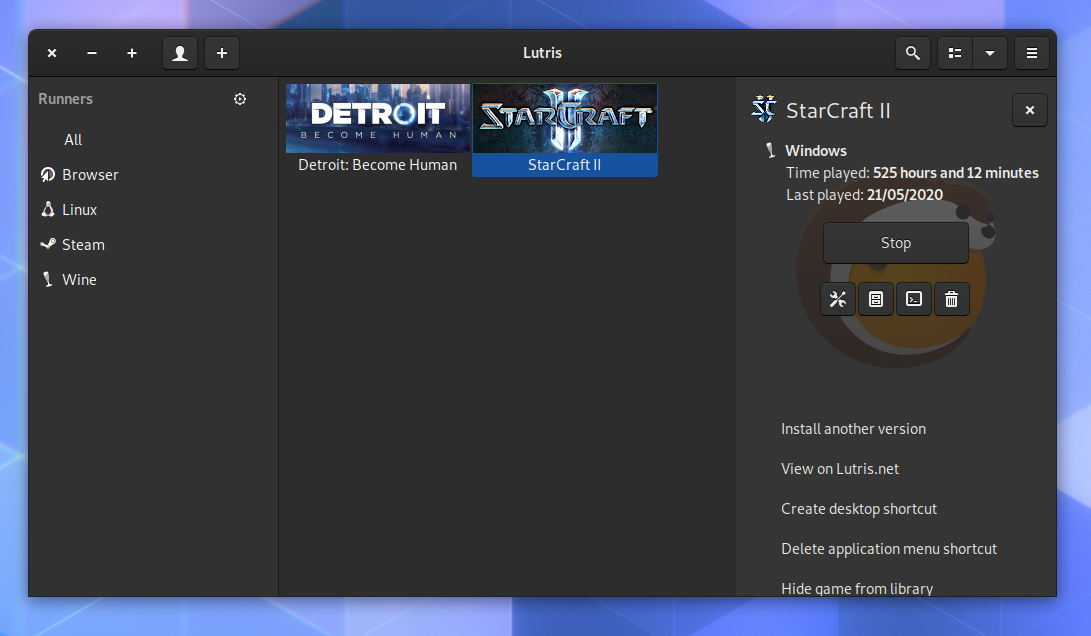
How GameMode is invoked Some newer games (proprietary games like Rise of the Tomb Raider , Total War Saga: Thrones of Britannia , Total War: WARHAMMER II , DiRT 4 and Total War: Three Kingdoms ) will automatically invoke GameMode if it s installed. For games that don t, you can manually evoke it using the gamemoderun command. Lutris is a tool that makes it easy to install and run games on Linux, and it also integrates with GameMode. (Lutris is currently being packaged for Debian, hopefully it will make it in on time for Bullseye).

Screenshot of Lutris, a tool that makes it easy to install your non-Linux games, which also integrates with GameMode.
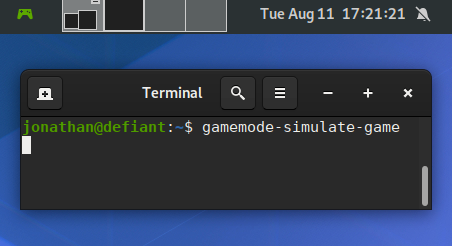
GameMode in Debian The latest GameMode is packaged in Debian (Stephan Lachnit and I maintain it in the Debian Games Team) and it s also available for Debian 10 (Buster) via buster-backports. All you need to do to get up and running with GameMode is to install the gamemode package. GameMode in Debian supports 64 bit and 32 bit mode, so running it with older games (and many proprietary games) still work. Some distributions (like Arch Linux), have dropped 32 bit support, so 32 bit games on such systems lose any kind of integration with GameMode even if you can get those games running via other wrappers on such systems. We also include a binary called gamemode-simulate-game (installed under /usr/games/). This is a minimalistic program that will invoke gamemode automatically for 10 seconds and then exit without an error if it was successful. Its source code might be useful if you d like to add GameMode support to your game, or patch a game in Debian to automatically invoke it. In Debian we install Gamemode s example config file to /etc/gamemode.ini where a user can customise their system-wide preferences, or alternatively they can place a copy of that in ~/.gamemode.ini with their personal preferences. In this config file, you can also choose to explicitly allow or deny games. GameMode might also be useful for many pieces of software that aren t games. I haven t done any benchmarks on such software yet, but it might be great for users who use CAD programs or use a combination of their CPU/GPU to crunch a large amount of data. I ve also packaged an extension for GNOME called gamemode-extension. The Debian package is called gnome-shell-extension-gamemode . You ll need to enable it using gnome-tweaks after installation, it will then display a green controller in your notification area whenever GameMode is active. It s only in testing/bullseye since it relies on a newer gnome-shell than what s available in buster.

Running gamemode-simulate-game, with the shell extension showing that it s activated in the top left corner.

10 August 2020

Dirk Eddelbuettel: nanotime 0.3.1: Misc Build Fixes for Yuge New Features!

The nanotime 0.3.0 release four days ago was so exciting that we decided to do it again! Kidding aside, and fairly extensive tests notwithstanding we were bitten by a few build errors: who knew clang on macOS needed extra curlies to be happy, another manifestation of Solaris having no idea what a timezone setting America/New_York is, plus some extra pickyness from the SAN tests and whatnot. So Leonardo and I gave it some extra care over the weekend, uploaded it late yesterday and here we are with 0.3.1. Thanks again to CRAN for prompt processing even though they are clearly deluged shortly before their (brief) summer break. nanotime relies on the RcppCCTZ package for (efficient) high(er) resolution time parsing and formatting up to nanosecond resolution, and the bit64 package for the actual integer64 arithmetic. Initially implemented using the S3 system, it has benefitted greatly from work by Leonardo Silvestri who rejigged internals in S4 and now added new types for periods, intervals and durations. The NEWS snippet adds full details.

Changes in version 0.3.1 (2020-08-09)
  • Several small cleanups to ensure a more robust compilation (Leonardo and Dirk in #75 fixing #74).
  • Show Solaris some extra love by skipping tests and examples with a timezone (Dirk in #76).

Thanks to CRANberries there is also a diff to the previous version. More details and examples are at the nanotime page; code, issue tickets etc at the GitHub repository. If you like this or other open-source work I do, you can now sponsor me at GitHub. For the first year, GitHub will match your contributions.

This post by Dirk Eddelbuettel originated on his Thinking inside the box blog. Please report excessive re-aggregation in third-party for-profit settings.

Russ Allbery: rra-c-util 8.3

In this release of my utility library for my other packages, I finally decided to drop support for platforms without a working snprintf. This dates back to the early 2000s and a very early iteration of this package. At the time, there were still some older versions of UNIX without snprintf at all. More commonly, it was buggy. The most common problem was that it would return -1 if the buffer wasn't large enough rather than returning the necessary size of the buffer. Or, in some cases, it wouldn't support a buffer size of 0 and a NULL buffer to get the necessary size. At the time I added this support for INN and some other packages, Solaris had several of these issues. But C99 standardized the correct snprintf behavior, and slowly every maintained operating system was fixed. (I forget whether it was fixed in Solaris 8 or Solaris 9, but regardless, Solaris has had a working snprintf for many years.) Meanwhile, the replacement function (Patrick Powell's version, also used by mutt and other packages) was a huge wad of code and a corresponding test suite. Over time, I've increased the aggressiveness of linters to try to catch more dangerous C pitfalls, and that's required carrying more and more small modifications plus a preamble to disable various warnings that I didn't want to try to fix. The straw that broke the camel's back was Clang's new case fallthrough warning. Clang stopped supporting the traditional /* fallthrough */ comment. It now prefers [[clang:fallthrough]] syntax, but of course older compilers choke on that. It does support the GCC __attribute__((__fallthrough__)) syntax, but older compilers don't like that construction because they think it's an empty statement. It was a mess, and I decided the time had come to drop this support effort. At this point, if you're still running an operating system without C99 snprintf, I think it's essentially a retrocomputing or at least extremely stable legacy production situation, and you're unlikely to want the latest and greatest releases of new software. Hopefully that assumption is correct, or at least correct enough. (I realize the right solution to this problem is probably for me to use Gnulib for portability. But converting to it is a whole other project with a lot of other implications and machinery, and I'm not sure that's what I want to spend time on.) Also in this release is a fix for network tests on hosts with no IPv4 addresses (more on this when I release the next version of remctl), fixes for style issues found by Perl::Critic::Freenode, and some other test suite improvements. You can get the latest version from the rra-c-util distribution page.

Arnaud Rebillout: GoAccess 1.4, a detailed tutorial

GoAccess v1.4 was just released a few weeks ago! Let's take this chance to write a loooong tutorial. We'll go over every steps to install and operate GoAccess. This is a tutorial aimed at those who don't play sysadmin every day, and that's why it's so long, I did my best to provide thorough explanations all along, so that it's more than just a "copy-and-paste" kind of tutorial. And for those who do play sysadmin everyday: please try not to fall asleep while reading, and don't hesitate to drop me an e-mail if you spot anything inaccurate in here. Thanks! Introduction So what's GoAccess already? GoAccess is a web log analyzer, and it allows you to visualize the traffic for your website, and get to know a bit more about your visitors: how many visitors and hits, for which pages, coming from where (geolocation, operating system, web browser...), etc... It does so by parsing the access logs from your web server, be it Apache, NGINX or whatever. GoAccess gives you different options to display the statistics, and in this tutorial we'll focus on producing a HTML report. Meaning that you can see the statistics for your website straight in your web browser, under the form of a single HTML page. For an example, you can have a look at the stats of my blog here: http://goaccess.arnaudr.io. GoAccess is written in C, it has very few dependencies, it had been around for about 10 years, and it's distributed under the MIT license. Assumptions This tutorial is about installing and configuring, so I'll assume that all the commands are run as root. I won't prefix each of them with sudo. I use the Apache web server, running on a Debian system. I don't think it matters so much for this tutorial though. If you're using NGINX it's fine, you can keep reading. Also, I will just use the name SITE for the name of the website that we want to analyze with GoAccess. Just replace that with the real name of your site. I also assume the following locations for your stuff: If you have your stuff in /srv/SITE/ log,www instead, no worries, just adjust the paths accordingly, I bet you can do it. Installation The latest version of GoAccess is v1.4, and it's not yet available in the Debian repositories. So for this part, you can follow the instructions from the official GoAccess download page. Install steps are explained in details, so there's nothing left for me to say :) When this is done, let's get started with the basics. We're talking about the latest version v1.4 here, let's make sure:
$ goaccess --version
GoAccess - 1.4.
...
Now let's try to create a HTML report. I assume that you already have a website up and running. GoAccess needs to parse the access logs. These logs are optional, they might or might not be created by your web server, depending on how it's configured. Usually, these log files are named access.log, unsurprisingly. You can check if those logs exist on your system by running this command:
find /var/log -name access.log
Another important thing to know is that these logs can be in different formats. In this tutorial we'll assume that we work with the combined log format, because it seems to be the most common default. To check what kind of access logs your web server produces, you must look at the configuration for your site. For an Apache web server, you should have such a line in the file /etc/apache2/sites-enabled/SITE.conf:
CustomLog $ APACHE_LOG_DIR /SITE/access.log combined
For NGINX, it's quite similar. The configuration file would be something like /etc/nginx/sites-enabled/SITE, and the line to enable access logs would be something like:
access_log /var/log/nginx/SITE/access.log
Note that NGINX writes the access logs in the combined format by default, that's why you don't see the word combined anywhere in the line above: it's implicit. Alright, so from now on we assume that yes, you have access log files available, and yes, they are in the combined log format. If that's the case, then you can already run GoAccess and generate a report, for example for the log file /var/log/apache2/access.log
goaccess \
    --log-format COMBINED \
    --output /tmp/report.html \
    /var/log/apache2/access.log
It's possible to give GoAccess more than one log files to process, so if you have for example the file access.log.1 around, you can use it as well:
goaccess \
    --log-format COMBINED \
    --output /tmp/report.html \
    /var/log/apache2/access.log \
    /var/log/apache2/access.log.1
If GoAccess succeeds (and it should), you're on the right track! All is left to do to complete this test is to have a look at the HTML report created. It's a single HTML page, so you can easily scp it to your machine, or just move it to the document root of your site, and then open it in your web browser. Looks good? So let's move on to more interesting things. Web server configuration This part is very short, because in terms of configuration of the web server, there's very little to do. As I said above, the only thing you want from the web server is to create access log files. Then you want to be sure that GoAccess and your web server agree on the format for these files. In the part above we used the combined log format, but GoAccess supports many other common log formats out of the box, and even allows you to parse custom log formats. For more details, refer to the option --log-format in the GoAccess manual page. Another common log format is named, well, common. It even has its own Wikipedia page. But compared to combined, the common log format contains less information, it doesn't include the referrer and user-agent values, meaning that you won't have it in the GoAccess report. So at this point you should understand that, unsurprisingly, GoAccess can only tell you about what's in the access logs, no more no less. And that's all in term of web server configuration. Configuration to run GoAccess unprivileged Now we're going to create a user and group for GoAccess, so that we don't have to run it as root. The reason is that, well, for everything running unattended on your server, the less code runs as root, the better. It's good practice and common sense. In this case, GoAccess is simply a log analyzer. So it just needs to read the logs files from your web server, and there is no need to be root for that, an unprivileged user can do the job just as well, assuming it has read permissions on /var/log/apache2 or /var/log/nginx. The log files of the web server are usually part of the adm group (though it might depend on your distro, I'm not sure). This is something you can check easily with the following command:
ls -l /var/log   grep -e apache2 -e nginx
As a result you should get something like that:
drwxr-x--- 2 root adm 20480 Jul 22 00:00 /var/log/apache2/
And as you can see, the directory apache2 belongs to the group adm. It means that you don't need to be root to read the logs, instead any unprivileged user that belongs to the group adm can do it. So, let's create the goaccess user, and add it to the adm group:
adduser --system --group --no-create-home goaccess
addgroup goaccess adm
And now, let's run GoAccess unprivileged, and verify that it can still read the log files:
setpriv \
    --reuid=goaccess --regid=goaccess \
    --init-groups --inh-caps=-all \
    -- \
    goaccess \
    --log-format COMBINED \
    --output /tmp/report2.html \
    /var/log/apache2/access.log
setpriv is the command used to drop privileges. The syntax is quite verbose, it's not super friendly for tutorials, but don't be scared and read the manual page to learn what it does. In any case, this command should work, and at this point, it means that you have a goaccess user ready, and we'll use it to run GoAccess unprivileged. Integration, option A - Run GoAccess once a day, from a logrotate hook In this part we wire things together, so that GoAccess processes the log files once a day, adds the new logs to its internal database, and generates a report from all that aggregated data. The result will be a single HTML page. Introducing logrotate In order to do that, we'll use a logrotate hook. logrotate is a little tool that should already be installed on your server, and that runs once a day, and that is in charge of rotating the log files. "Rotating the logs" means moving access.log to access.log.1 and so on. With logrotate, a new log file is created every day, and log files that are too old are deleted. That's what prevents your logs from filling up your disk basically :) You can check that logrotate is indeed installed and enabled with this command (assuming that your init system is systemd):
systemctl status logrotate.timer
What's interesting for us is that logrotate allows you to run scripts before and after the rotation is performed, so it's an ideal place from where to run GoAccess. In short, we want to run GoAccess just before the logs are rotated away, in the prerotate hook. But let's do things in order. At first, we need to write a little wrapper script that will be in charge of running GoAccess with the right arguments, and that will process all of your sites. The wrapper script This wrapper is made to process more than one site, but if you have only one site it works just as well, of course. So let me just drop it on you like that, and I'll explain afterward. Here's my wrapper script:
 1
 2
 3
 4
 5
 6
 7
 8
 9
10
11
12
13
14
15
16
17
18
19
20
21
22
23
24
25
26
27
28
29
30
31
32
33
34
35
36
37
38
39
40
41
42
43
44
45
46
47
48
49
50
#!/bin/bash
# Process log files /var/www/apache2/SITE/access.log,
# only if /var/lib/goaccess-db/SITE exists.
# Create HTML reports in $1, a directory that must exist.
set -eu
OUTDIR=
LOGDIR=/var/log/apache2
DBDIR=/var/lib/goaccess-db
fail()   echo >&2 "$@"; exit 1;  
[ $# -eq 1 ]   fail "Usage: $(basename $0) OUTPUT_DIRECTORY"
OUTDIR=$1
[ -d "$OUTDIR" ]   fail "'$OUTDIR' is not a directory"
[ -d "$LOGDIR" ]   fail "'$LOGDIR' is not a directory"
[ -d "$DBDIR"  ]   fail "'$DBDIR' is not a directory"
for d in $(find "$LOGDIR" -mindepth 1 -maxdepth 1 -type d); do
    site=$(basename "$sitedir")
    dbdir=$DBDIR/$site
    logfile=$d/access.log
    outfile=$OUTDIR/$site.html
    if [ ! -d "$dbdir" ]   [ ! -e "$logfile" ]; then
        echo "  Skipping site '$site'"
        continue
    else
        echo "  Processing site '$site'"
    fi
    setpriv \
        --reuid=goaccess --regid=goaccess \
        --init-groups --inh-caps=-all \
        -- \
    goaccess \
        --agent-list \
        --anonymize-ip \
        --persist \
        --restore \
        --config-file /etc/goaccess/goaccess.conf \
        --db-path "$dbdir" \
        --log-format "COMBINED" \
        --output "$outfile" \
        "$logfile"
done
So you'd install this script at /usr/local/bin/goaccess-wrapper for example, and make it executable:
chmod +x /usr/local/bin/goaccess-wrapper
A few things to note: As is, the script makes the assumption that the logs for your site are logged in a sub-directory /var/log/apache2/SITE/. If it's not the case, adjust that in the wrapper accordingly. The name of this sub-directory is then used to find the GoAccess database directory /var/lib/goaccess-db/SITE/. This directory is expected to exist, meaning that if you don't create it yourself, the wrapper won't process this particular site. It's a simple way to control which sites are processed by this GoAccess wrapper, and which sites are not. So if you want goaccess-wrapper to process the site SITE, just create a directory with the name of this site under /var/lib/goaccess-db:
mkdir -p /var/lib/goaccess-db/SITE
chown goaccess:goaccess /var/lib/goaccess-db/SITE
Now let's create an output directory:
mkdir /tmp/goaccess-reports
chown goaccess:goaccess /tmp/goaccess-reports
And let's give a try to the wrapper script:
goaccess-wrapper /tmp/goaccess-reports
ls /tmp/goaccess-reports
Which should give you:
SITE.html
At the same time, you can check that GoAccess populated the database with a bunch of files:
ls /var/lib/goaccess-db/SITE
Setting up the logrotate prerotate hook At this point, we have the wrapper in place. Let's now add a pre-rotate hook so that goaccess-wrapper runs once a day, just before the logs are rotated away. The logrotate config file for Apache2 is located at /etc/logrotate.d/apache2, and for NGINX it's at /etc/logrotate.d/nginx. Among the many things you'll see in this file, here's what is of interest for us: In the config file, there is also this snippet:
prerotate
    if [ -d /etc/logrotate.d/httpd-prerotate ]; then \
        run-parts /etc/logrotate.d/httpd-prerotate; \
    fi; \
endscript
It indicates that scripts in the directory /etc/logrotate.d/httpd-prerotate/ will be executed before the rotation takes place. Refer to the man page run-parts(8) for more details... Putting all of that together, it means that logs from the web server are rotated once a day, and if we want to run scripts just before the rotation, we can just drop them in the httpd-prerotate directory. Simple, right? Let's first create this directory if it doesn't exist:
mkdir -p /etc/logrotate.d/httpd-prerotate/
And let's create a tiny script at /etc/logrotate.d/httpd-prerotate/goaccess:
1
2
#!/bin/sh
exec goaccess-wrapper /tmp/goaccess-reports
Don't forget to make it executable:
chmod +x /etc/logrotate.d/httpd-prerotate/goaccess
As you can see, the only thing that this script does is to invoke the wrapper with the right argument, ie. the output directory for the HTML reports that are generated. And that's all. Now you can just come back tomorrow, check the logs, and make sure that the hook was executed and succeeded. For example, this kind of command will tell you quickly if it worked:
journalctl   grep logrotate
Integration, option B - Run GoAccess once a day, from a systemd service OK so we've just seen how to use a logrotate hook. One downside with that is that we have to drop privileges in the wrapper script, because logrotate runs as root, and we don't want to run GoAccess as root. Hence the rather convoluted syntax with setpriv. Rather than embedding this kind of thing in a wrapper script, we can instead run the wrapper script from a [systemd][] service, and define which user runs the wrapper straight in the systemd service file. Introducing systemd niceties So we can create a systemd service, along with a systemd timer that fires daily. We can then set the user and group that execute the script straight in the systemd service, and there's no need for setpriv anymore. It's a bit more streamlined. We can even go a bit further, and use systemd parameterized units (also called templates), so that we have one service per site (instead of one service that process all of our sites). That will simplify the wrapper script a lot, and it also looks nicer in the logs. With this approach however, it seems that we can't really run exactly before the logs are rotated away, like we did in the section above. But that's OK. What we'll do is that we'll run once a day, no matter the time, and we'll just make sure to process both log files access.log and access.log.1 (ie. the current logs and the logs from yesterday). This way, we're sure not to miss any line from the logs. Note that GoAccess is smart enough to only consider newer entries from the log files, and discard entries that are already in the database. In other words, it's safe to parse the same log file more than once, GoAccess will do the right thing. For more details see "INCREMENTAL LOG PROCESSING" from man goaccess. systemd]: https://freedesktop.org/wiki/Software/systemd/ Implementation And here's how it all looks like. First, a little wrapper script for GoAccess:
 1
 2
 3
 4
 5
 6
 7
 8
 9
10
11
12
13
14
15
16
17
18
19
20
21
22
23
24
25
26
27
28
29
30
31
32
#!/bin/bash
# Usage: $0 SITE DBDIR LOGDIR OUTDIR
set -eu
SITE=$1
DBDIR=$2
LOGDIR=$3
OUTDIR=$4
LOGFILES=()
for ext in log log.1; do
    logfile="$LOGDIR/access.$ext"
    [ -e "$logfile" ] && LOGFILES+=("$logfile")
done
if [ $ #LOGFILES[@]  -eq 0 ]; then
    echo "No log files in '$LOGDIR'"
    exit 0
fi
goaccess \
    --agent-list \
    --anonymize-ip \
    --persist \
    --restore \
    --config-file /etc/goaccess/goaccess.conf \
    --db-path "$DBDIR" \
    --log-format "COMBINED" \
    --output "$OUTDIR/$SITE.html" \
    "$ LOGFILES[@] "
This wrapper does very little. Actually, the only thing it does is to check for the existence of the two log files access.log and access.log.1, to be sure that we don't ask GoAccess to process a file that does not exist (GoAccess would not be happy about that). Save this file under /usr/local/bin/goaccess-wrapper, don't forget to make it executable:
chmod +x /usr/local/bin/goaccess-wrapper
Then, create a systemd parameterized unit file, so that we can run this wrapper as a systemd service. Save it under /etc/systemd/system/goaccess@.service:
[Unit]
Description=Update GoAccess report - %i
ConditionPathIsDirectory=/var/lib/goaccess-db/%i
ConditionPathIsDirectory=/var/log/apache2/%i
ConditionPathIsDirectory=/tmp/goaccess-reports
PartOf=goaccess.service
[Service]
Type=oneshot
User=goaccess
Group=goaccess
Nice=19
ExecStart=/usr/local/bin/goaccess-wrapper \
 %i \
 /var/lib/goaccess-db/%i \
 /var/log/apache2/%i \
 /tmp/goaccess-reports
So, what is a systemd parameterized unit? It's a service to which you can pass an argument when you enable it. The %i in the unit definition will be replaced by this argument. In our case, the argument will be the name of the site that we want to process. As you can see, we use the directive ConditionPathIsDirectory= extensively, so that if ever one of the required directories does not exist, the unit will just be skipped (and marked as such in the logs). It's a graceful way to fail. We run the wrapper as the user and group goaccess, thanks to User= and Group=. We also use Nice= to give a low priority to the process. At this point, it's already possible to test. Just make sure that you created a directory for the GoAccess database:
mkdir -p /var/lib/goaccess-db/SITE
chown goaccess:goaccess /var/lib/goaccess-db/SITE
Also make sure that the output directory exists:
mkdir /tmp/goaccess-reports
chown goaccess:goaccess /tmp/goaccess-reports
Then reload systemd and fire the unit to see if it works:
systemctl daemon-reload
systemctl start goaccess@SITE.service
journalctl   tail
And that should work already. As you can see, the argument, SITE, is passed in the systemctl start command. We just append it after the @, in the name of the unit. Now, let's create another GoAccess service file, which sole purpose is to group all the parameterized units together, so that we can start them all in one go. Note that we don't use a systemd target for that, because ultimately we want to run it once a day, and that would not be possible with a target. So instead we use a dummy oneshot service. So here it is, saved under /etc/systemd/system/goaccess.service:
[Unit]
Description=Update GoAccess reports
Requires= \
 goaccess@SITE1.service \
 goaccess@SITE2.service
[Service]
Type=oneshot
ExecStart=true
As you can see, we simply list the sites that we want to process in the Requires= directive. In this example we have two sites named SITE1 and SITE2. Let's ensure that everything is still good:
systemctl daemon-reload
systemctl start goaccess.service
journalctl   tail
Check the logs, both sites SITE1 and SITE2 should have been processed. And finally, let's create a timer, so that systemd runs goaccess.service once a day. Save it under /etc/systemd/system/goaccess.timer.
[Unit]
Description=Daily update of GoAccess reports
[Timer]
OnCalendar=daily
RandomizedDelaySec=1h
Persistent=true
[Install]
WantedBy=timers.target
Finally, enable the timer:
systemctl daemon-reload
systemctl enable --now goaccess.timer
At this point, everything should be OK. Just come back tomorrow and check the logs with something like:
journalctl   grep goaccess
Last word: if you have only one site to process, of course you can simplify, for example you can hardcode all the paths in the file goaccess.service instead of using a parameterized unit. Up to you. Daily operations So in this part, we assume that you have GoAccess all setup and running, once a day or so. Let's just go over a few things worth noting. Serve your report Up to now in this tutorial, we created the reports in /tmp/goaccess-reports, but that was just for the sake of the example. You will probably want to save your reports in a directory that is served by your web server, so that, well, you can actually look at it in your web browser, that was the point, right? So how to do that is a bit out of scope here, and I guess that if you want to monitor your website, you already have a website, so you will have no trouble serving the GoAccess HTML report. However there's an important detail to be aware of: GoAccess shows all the IP addresses of your visitors in the report. As long as the report is private it's OK, but if ever you make your GoAccess report public, then you should definitely invoke GoAccess with the option --anonymize-ip. Keep an eye on the logs In this tutorial, the reports we create, along with the GoAccess databases, will grow bigger every day, forever. It also means that the GoAccess processing time will grow a bit each day. So maybe the first thing to do is to keep an eye on the logs, to see how long it takes to GoAccess to do its job every day. Also, maybe you'd like to keep an eye on the size of the GoAccess database with:
du -sh /var/lib/goaccess-db/SITE
If your site has few visitors, I suspect it won't be a problem though. You could also be a bit pro-active in preventing this problem in the future, and for example you could break the reports into, say, monthly reports. Meaning that every month, you would create a new database in a new directory, and also start a new HTML report. This way you'd have monthly reports, and you make sure to limit the GoAccess processing time, by limiting the database size to a month. This can be achieved very easily, by including something like YEAR-MONTH in the database directory, and in the HTML report. You can handle that automatically in the wrapper script, for example:
sfx=$(date +'%Y-%m')
mkdir -p $DBDIR/$sfx
goaccess \
    --db-path $DBDIR/$sfx \
    --output "$OUTDIR/$SITE-$sfx.html" \
    ...
You get the idea. Further notes Migration from older versions With the --persist option, GoAccess keeps all the information from the logs in a database, so that it can re-use it later. In prior versions, GoAccess used the Tokyo Cabinet key-value store for that. However starting from v1.4, GoAccess dropped this dependency and now uses its own database format. As a result, the previous database can't be used anymore, you will have to remove it and restart from zero. At the moment there is no way to convert the data from the old database to the new one. If you're interested, this is discussed upstream at [#1783][bug-1783]. Another thing that changed with this new version is the name for some of the command-line options. For example, --load-from-disk was dropped in favor of --restore, and --keep-db-files became --persist. So you'll have to look at the documentation a bit, and update your script(s) accordingly. Other ways to use GoAccess It's also possible to do it completely differently. You could keep GoAccess running, pretty much like a daemon, with the --real-time-html option, and have it process the logs continuously, rather than calling it on a regular basis. It's also possible to see the GoAccess report straight in the terminal, thanks to libncurses, rather than creating a HTML report. And much more, GoAccess is packed with features. Conclusion I hope that this tutorial helped some of you folks. Feel free to drop an e-mail for comments.

Arnaud Rebillout: GoAccess 1.4, a detailed tutorial

GoAccess v1.4 was just released a few weeks ago! Let's take this chance to write a loooong tutorial. We'll go over every steps to install and operate GoAccess. This is a tutorial aimed at those who don't play sysadmin every day, and that's why it's so long, I did my best to provide thorough explanations all along, so that it's more than just a "copy-and-paste" kind of tutorial. And for those who do play sysadmin everyday: please try not to fall asleep while reading, and don't hesitate to drop me an e-mail if you spot anything inaccurate in here. Thanks! Introduction So what's GoAccess already? GoAccess is a web log analyzer, and it allows you to visualize the traffic for your website, and get to know a bit more about your visitors: how many visitors and hits, for which pages, coming from where (geolocation, operating system, web browser...), etc... It does so by parsing the access logs from your web server, be it Apache, NGINX or whatever. GoAccess gives you different options to display the statistics, and in this tutorial we'll focus on producing a HTML report. Meaning that you can see the statistics for your website straight in your web browser, under the form of a single HTML page. For an example, you can have a look at the stats of my blog here: https://goaccess.arnaudr.io. GoAccess is written in C, it has very few dependencies, it had been around for about 10 years, and it's distributed under the MIT license. Assumptions This tutorial is about installing and configuring, so I'll assume that all the commands are run as root. I won't prefix each of them with sudo. I use the Apache web server, running on a Debian system. I don't think it matters so much for this tutorial though. If you're using NGINX it's fine, you can keep reading. Also, I will just use the name SITE for the name of the website that we want to analyze with GoAccess. Just replace that with the real name of your site. I also assume the following locations for your stuff: If you have your stuff in /srv/SITE/ log,www instead, no worries, just adjust the paths accordingly, I bet you can do it. Installation The latest version of GoAccess is v1.4, and it's not yet available in the Debian repositories. So for this part, you can follow the instructions from the official GoAccess download page. Install steps are explained in details, so there's nothing left for me to say :) When this is done, let's get started with the basics. We're talking about the latest version v1.4 here, let's make sure:
$ goaccess --version
GoAccess - 1.4.
...
Now let's try to create a HTML report. I assume that you already have a website up and running. GoAccess needs to parse the access logs. These logs are optional, they might or might not be created by your web server, depending on how it's configured. Usually, these log files are named access.log, unsurprisingly. You can check if those logs exist on your system by running this command:
find /var/log -name access.log
Another important thing to know is that these logs can be in different formats. In this tutorial we'll assume that we work with the combined log format, because it seems to be the most common default. To check what kind of access logs your web server produces, you must look at the configuration for your site. For an Apache web server, you should have such a line in the file /etc/apache2/sites-enabled/SITE.conf:
CustomLog $ APACHE_LOG_DIR /SITE/access.log combined
For NGINX, it's quite similar. The configuration file would be something like /etc/nginx/sites-enabled/SITE, and the line to enable access logs would be something like:
access_log /var/log/nginx/SITE/access.log
Note that NGINX writes the access logs in the combined format by default, that's why you don't see the word combined anywhere in the line above: it's implicit. Alright, so from now on we assume that yes, you have access log files available, and yes, they are in the combined log format. If that's the case, then you can already run GoAccess and generate a report, for example for the log file /var/log/apache2/access.log
goaccess \
    --log-format COMBINED \
    --output /tmp/report.html \
    /var/log/apache2/access.log
It's possible to give GoAccess more than one log files to process, so if you have for example the file access.log.1 around, you can use it as well:
goaccess \
    --log-format COMBINED \
    --output /tmp/report.html \
    /var/log/apache2/access.log \
    /var/log/apache2/access.log.1
If GoAccess succeeds (and it should), you're on the right track! All is left to do to complete this test is to have a look at the HTML report created. It's a single HTML page, so you can easily scp it to your machine, or just move it to the document root of your site, and then open it in your web browser. Looks good? So let's move on to more interesting things. Web server configuration This part is very short, because in terms of configuration of the web server, there's very little to do. As I said above, the only thing you want from the web server is to create access log files. Then you want to be sure that GoAccess and your web server agree on the format for these files. In the part above we used the combined log format, but GoAccess supports many other common log formats out of the box, and even allows you to parse custom log formats. For more details, refer to the option --log-format in the GoAccess manual page. Another common log format is named, well, common. It even has its own Wikipedia page. But compared to combined, the common log format contains less information, it doesn't include the referrer and user-agent values, meaning that you won't have it in the GoAccess report. So at this point you should understand that, unsurprisingly, GoAccess can only tell you about what's in the access logs, no more no less. And that's all in term of web server configuration. Configuration to run GoAccess unprivileged Now we're going to create a user and group for GoAccess, so that we don't have to run it as root. The reason is that, well, for everything running unattended on your server, the less code runs as root, the better. It's good practice and common sense. In this case, GoAccess is simply a log analyzer. So it just needs to read the logs files from your web server, and there is no need to be root for that, an unprivileged user can do the job just as well, assuming it has read permissions on /var/log/apache2 or /var/log/nginx. The log files of the web server are usually part of the adm group (though it might depend on your distro, I'm not sure). This is something you can check easily with the following command:
ls -l /var/log   grep -e apache2 -e nginx
As a result you should get something like that:
drwxr-x--- 2 root adm 20480 Jul 22 00:00 /var/log/apache2/
And as you can see, the directory apache2 belongs to the group adm. It means that you don't need to be root to read the logs, instead any unprivileged user that belongs to the group adm can do it. So, let's create the goaccess user, and add it to the adm group:
adduser --system --group --no-create-home goaccess
addgroup goaccess adm
And now, let's run GoAccess unprivileged, and verify that it can still read the log files:
setpriv \
    --reuid=goaccess --regid=goaccess \
    --init-groups --inh-caps=-all \
    -- \
    goaccess \
    --log-format COMBINED \
    --output /tmp/report2.html \
    /var/log/apache2/access.log
setpriv is the command used to drop privileges. The syntax is quite verbose, it's not super friendly for tutorials, but don't be scared and read the manual page to learn what it does. In any case, this command should work, and at this point, it means that you have a goaccess user ready, and we'll use it to run GoAccess unprivileged. Integration, option A - Run GoAccess once a day, from a logrotate hook In this part we wire things together, so that GoAccess processes the log files once a day, adds the new logs to its internal database, and generates a report from all that aggregated data. The result will be a single HTML page. Introducing logrotate In order to do that, we'll use a logrotate hook. logrotate is a little tool that should already be installed on your server, and that runs once a day, and that is in charge of rotating the log files. "Rotating the logs" means moving access.log to access.log.1 and so on. With logrotate, a new log file is created every day, and log files that are too old are deleted. That's what prevents your logs from filling up your disk basically :) You can check that logrotate is indeed installed and enabled with this command (assuming that your init system is systemd):
systemctl status logrotate.timer
What's interesting for us is that logrotate allows you to run scripts before and after the rotation is performed, so it's an ideal place from where to run GoAccess. In short, we want to run GoAccess just before the logs are rotated away, in the prerotate hook. But let's do things in order. At first, we need to write a little wrapper script that will be in charge of running GoAccess with the right arguments, and that will process all of your sites. The wrapper script This wrapper is made to process more than one site, but if you have only one site it works just as well, of course. So let me just drop it on you like that, and I'll explain afterward. Here's my wrapper script:
 1
 2
 3
 4
 5
 6
 7
 8
 9
10
11
12
13
14
15
16
17
18
19
20
21
22
23
24
25
26
27
28
29
30
31
32
33
34
35
36
37
38
39
40
41
42
43
44
45
46
47
48
49
50
#!/bin/bash
# Process log files /var/www/apache2/SITE/access.log,
# only if /var/lib/goaccess-db/SITE exists.
# Create HTML reports in $1, a directory that must exist.
set -eu
OUTDIR=
LOGDIR=/var/log/apache2
DBDIR=/var/lib/goaccess-db
fail()   echo >&2 "$@"; exit 1;  
[ $# -eq 1 ]   fail "Usage: $(basename $0) OUTPUT_DIRECTORY"
OUTDIR=$1
[ -d "$OUTDIR" ]   fail "'$OUTDIR' is not a directory"
[ -d "$LOGDIR" ]   fail "'$LOGDIR' is not a directory"
[ -d "$DBDIR"  ]   fail "'$DBDIR' is not a directory"
for d in $(find "$LOGDIR" -mindepth 1 -maxdepth 1 -type d); do
    site=$(basename "$sitedir")
    dbdir=$DBDIR/$site
    logfile=$d/access.log
    outfile=$OUTDIR/$site.html
    if [ ! -d "$dbdir" ]   [ ! -e "$logfile" ]; then
        echo "  Skipping site '$site'"
        continue
    else
        echo "  Processing site '$site'"
    fi
    setpriv \
        --reuid=goaccess --regid=goaccess \
        --init-groups --inh-caps=-all \
        -- \
    goaccess \
        --agent-list \
        --anonymize-ip \
        --persist \
        --restore \
        --config-file /etc/goaccess/goaccess.conf \
        --db-path "$dbdir" \
        --log-format "COMBINED" \
        --output "$outfile" \
        "$logfile"
done
So you'd install this script at /usr/local/bin/goaccess-wrapper for example, and make it executable:
chmod +x /usr/local/bin/goaccess-wrapper
A few things to note: As is, the script makes the assumption that the logs for your site are logged in a sub-directory /var/log/apache2/SITE/. If it's not the case, adjust that in the wrapper accordingly. The name of this sub-directory is then used to find the GoAccess database directory /var/lib/goaccess-db/SITE/. This directory is expected to exist, meaning that if you don't create it yourself, the wrapper won't process this particular site. It's a simple way to control which sites are processed by this GoAccess wrapper, and which sites are not. So if you want goaccess-wrapper to process the site SITE, just create a directory with the name of this site under /var/lib/goaccess-db:
mkdir -p /var/lib/goaccess-db/SITE
chown goaccess:goaccess /var/lib/goaccess-db/SITE
Now let's create an output directory:
mkdir /tmp/goaccess-reports
chown goaccess:goaccess /tmp/goaccess-reports
And let's give a try to the wrapper script:
goaccess-wrapper /tmp/goaccess-reports
ls /tmp/goaccess-reports
Which should give you:
SITE.html
At the same time, you can check that GoAccess populated the database with a bunch of files:
ls /var/lib/goaccess-db/SITE
Setting up the logrotate prerotate hook At this point, we have the wrapper in place. Let's now add a pre-rotate hook so that goaccess-wrapper runs once a day, just before the logs are rotated away. The logrotate config file for Apache2 is located at /etc/logrotate.d/apache2, and for NGINX it's at /etc/logrotate.d/nginx. Among the many things you'll see in this file, here's what is of interest for us: In the config file, there is also this snippet:
prerotate
    if [ -d /etc/logrotate.d/httpd-prerotate ]; then \
        run-parts /etc/logrotate.d/httpd-prerotate; \
    fi; \
endscript
It indicates that scripts in the directory /etc/logrotate.d/httpd-prerotate/ will be executed before the rotation takes place. Refer to the man page run-parts(8) for more details... Putting all of that together, it means that logs from the web server are rotated once a day, and if we want to run scripts just before the rotation, we can just drop them in the httpd-prerotate directory. Simple, right? Let's first create this directory if it doesn't exist:
mkdir -p /etc/logrotate.d/httpd-prerotate/
And let's create a tiny script at /etc/logrotate.d/httpd-prerotate/goaccess:
1
2
#!/bin/sh
exec goaccess-wrapper /tmp/goaccess-reports
Don't forget to make it executable:
chmod +x /etc/logrotate.d/httpd-prerotate/goaccess
As you can see, the only thing that this script does is to invoke the wrapper with the right argument, ie. the output directory for the HTML reports that are generated. And that's all. Now you can just come back tomorrow, check the logs, and make sure that the hook was executed and succeeded. For example, this kind of command will tell you quickly if it worked:
journalctl   grep logrotate
Integration, option B - Run GoAccess once a day, from a systemd service OK so we've just seen how to use a logrotate hook. One downside with that is that we have to drop privileges in the wrapper script, because logrotate runs as root, and we don't want to run GoAccess as root. Hence the rather convoluted syntax with setpriv. Rather than embedding this kind of thing in a wrapper script, we can instead run the wrapper script from a [systemd][] service, and define which user runs the wrapper straight in the systemd service file. Introducing systemd niceties So we can create a systemd service, along with a systemd timer that fires daily. We can then set the user and group that execute the script straight in the systemd service, and there's no need for setpriv anymore. It's a bit more streamlined. We can even go a bit further, and use systemd parameterized units (also called templates), so that we have one service per site (instead of one service that process all of our sites). That will simplify the wrapper script a lot, and it also looks nicer in the logs. With this approach however, it seems that we can't really run exactly before the logs are rotated away, like we did in the section above. But that's OK. What we'll do is that we'll run once a day, no matter the time, and we'll just make sure to process both log files access.log and access.log.1 (ie. the current logs and the logs from yesterday). This way, we're sure not to miss any line from the logs. Note that GoAccess is smart enough to only consider newer entries from the log files, and discard entries that are already in the database. In other words, it's safe to parse the same log file more than once, GoAccess will do the right thing. For more details see "INCREMENTAL LOG PROCESSING" from man goaccess. systemd]: https://freedesktop.org/wiki/Software/systemd/ Implementation And here's how it all looks like. First, a little wrapper script for GoAccess:
 1
 2
 3
 4
 5
 6
 7
 8
 9
10
11
12
13
14
15
16
17
18
19
20
21
22
23
24
25
26
27
28
29
30
31
32
#!/bin/bash
# Usage: $0 SITE DBDIR LOGDIR OUTDIR
set -eu
SITE=$1
DBDIR=$2
LOGDIR=$3
OUTDIR=$4
LOGFILES=()
for ext in log log.1; do
    logfile="$LOGDIR/access.$ext"
    [ -e "$logfile" ] && LOGFILES+=("$logfile")
done
if [ $ #LOGFILES[@]  -eq 0 ]; then
    echo "No log files in '$LOGDIR'"
    exit 0
fi
goaccess \
    --agent-list \
    --anonymize-ip \
    --persist \
    --restore \
    --config-file /etc/goaccess/goaccess.conf \
    --db-path "$DBDIR" \
    --log-format "COMBINED" \
    --output "$OUTDIR/$SITE.html" \
    "$ LOGFILES[@] "
This wrapper does very little. Actually, the only thing it does is to check for the existence of the two log files access.log and access.log.1, to be sure that we don't ask GoAccess to process a file that does not exist (GoAccess would not be happy about that). Save this file under /usr/local/bin/goaccess-wrapper, don't forget to make it executable:
chmod +x /usr/local/bin/goaccess-wrapper
Then, create a systemd parameterized unit file, so that we can run this wrapper as a systemd service. Save it under /etc/systemd/system/goaccess@.service:
[Unit]
Description=Update GoAccess report - %i
ConditionPathIsDirectory=/var/lib/goaccess-db/%i
ConditionPathIsDirectory=/var/log/apache2/%i
ConditionPathIsDirectory=/tmp/goaccess-reports
PartOf=goaccess.service
[Service]
Type=oneshot
User=goaccess
Group=goaccess
Nice=19
ExecStart=/usr/local/bin/goaccess-wrapper \
 %i \
 /var/lib/goaccess-db/%i \
 /var/log/apache2/%i \
 /tmp/goaccess-reports
So, what is a systemd parameterized unit? It's a service to which you can pass an argument when you enable it. The %i in the unit definition will be replaced by this argument. In our case, the argument will be the name of the site that we want to process. As you can see, we use the directive ConditionPathIsDirectory= extensively, so that if ever one of the required directories does not exist, the unit will just be skipped (and marked as such in the logs). It's a graceful way to fail. We run the wrapper as the user and group goaccess, thanks to User= and Group=. We also use Nice= to give a low priority to the process. At this point, it's already possible to test. Just make sure that you created a directory for the GoAccess database:
mkdir -p /var/lib/goaccess-db/SITE
chown goaccess:goaccess /var/lib/goaccess-db/SITE
Also make sure that the output directory exists:
mkdir /tmp/goaccess-reports
chown goaccess:goaccess /tmp/goaccess-reports
Then reload systemd and fire the unit to see if it works:
systemctl daemon-reload
systemctl start goaccess@SITE.service
journalctl   tail
And that should work already. As you can see, the argument, SITE, is passed in the systemctl start command. We just append it after the @, in the name of the unit. Now, let's create another GoAccess service file, which sole purpose is to group all the parameterized units together, so that we can start them all in one go. Note that we don't use a systemd target for that, because ultimately we want to run it once a day, and that would not be possible with a target. So instead we use a dummy oneshot service. So here it is, saved under /etc/systemd/system/goaccess.service:
[Unit]
Description=Update GoAccess reports
Requires= \
 goaccess@SITE1.service \
 goaccess@SITE2.service
[Service]
Type=oneshot
ExecStart=true
As you can see, we simply list the sites that we want to process in the Requires= directive. In this example we have two sites named SITE1 and SITE2. Let's ensure that everything is still good:
systemctl daemon-reload
systemctl start goaccess.service
journalctl   tail
Check the logs, both sites SITE1 and SITE2 should have been processed. And finally, let's create a timer, so that systemd runs goaccess.service once a day. Save it under /etc/systemd/system/goaccess.timer.
[Unit]
Description=Daily update of GoAccess reports
[Timer]
OnCalendar=daily
RandomizedDelaySec=1h
Persistent=true
[Install]
WantedBy=timers.target
Finally, enable the timer:
systemctl daemon-reload
systemctl enable --now goaccess.timer
At this point, everything should be OK. Just come back tomorrow and check the logs with something like:
journalctl   grep goaccess
Last word: if you have only one site to process, of course you can simplify, for example you can hardcode all the paths in the file goaccess.service instead of using a parameterized unit. Up to you. Daily operations So in this part, we assume that you have GoAccess all setup and running, once a day or so. Let's just go over a few things worth noting. Serve your report Up to now in this tutorial, we created the reports in /tmp/goaccess-reports, but that was just for the sake of the example. You will probably want to save your reports in a directory that is served by your web server, so that, well, you can actually look at it in your web browser, that was the point, right? So how to do that is a bit out of scope here, and I guess that if you want to monitor your website, you already have a website, so you will have no trouble serving the GoAccess HTML report. However there's an important detail to be aware of: GoAccess shows all the IP addresses of your visitors in the report. As long as the report is private it's OK, but if ever you make your GoAccess report public, then you should definitely invoke GoAccess with the option --anonymize-ip. Keep an eye on the logs In this tutorial, the reports we create, along with the GoAccess databases, will grow bigger every day, forever. It also means that the GoAccess processing time will grow a bit each day. So maybe the first thing to do is to keep an eye on the logs, to see how long it takes to GoAccess to do its job every day. Also, maybe you'd like to keep an eye on the size of the GoAccess database with:
du -sh /var/lib/goaccess-db/SITE
If your site has few visitors, I suspect it won't be a problem though. You could also be a bit pro-active in preventing this problem in the future, and for example you could break the reports into, say, monthly reports. Meaning that every month, you would create a new database in a new directory, and also start a new HTML report. This way you'd have monthly reports, and you make sure to limit the GoAccess processing time, by limiting the database size to a month. This can be achieved very easily, by including something like YEAR-MONTH in the database directory, and in the HTML report. You can handle that automatically in the wrapper script, for example:
sfx=$(date +'%Y-%m')
mkdir -p $DBDIR/$sfx
goaccess \
    --db-path $DBDIR/$sfx \
    --output "$OUTDIR/$SITE-$sfx.html" \
    ...
You get the idea. Further notes Migration from older versions With the --persist option, GoAccess keeps all the information from the logs in a database, so that it can re-use it later. In prior versions, GoAccess used the Tokyo Cabinet key-value store for that. However starting from v1.4, GoAccess dropped this dependency and now uses its own database format. As a result, the previous database can't be used anymore, you will have to remove it and restart from zero. At the moment there is no way to convert the data from the old database to the new one. If you're interested, this is discussed upstream at [#1783][bug-1783]. Another thing that changed with this new version is the name for some of the command-line options. For example, --load-from-disk was dropped in favor of --restore, and --keep-db-files became --persist. So you'll have to look at the documentation a bit, and update your script(s) accordingly. Other ways to use GoAccess It's also possible to do it completely differently. You could keep GoAccess running, pretty much like a daemon, with the --real-time-html option, and have it process the logs continuously, rather than calling it on a regular basis. It's also possible to see the GoAccess report straight in the terminal, thanks to libncurses, rather than creating a HTML report. And much more, GoAccess is packed with features. Conclusion I hope that this tutorial helped some of you folks. Feel free to drop an e-mail for comments.

9 August 2020

Charles Plessy: Thank you, VAIO

I use everyday a VAIO Pro mk2 that I bought 5 years ago with 3 years of warranty. It has been a few months that I was noticing that something was slowly inflating inside. In July, things accelerated to the point that its thickness had doubled. After we called the customer service of VAIO, somebody came to pick up the laptop in order to make a cost estimate. Then we learned on the phone that it would be free. It is back in my hands in less than two weeks. Bravo VAIO !

8 August 2020

Holger Levsen: 20200808-debconf8

DebConf8 This tshirt is 12 years old and from DebConf8. DebConf8 was my 6th DebConf and took place in Mar de la Plata, Argentina. Also this is my 6th post in this series of posts about DebConfs and for the last two days for the first time I failed my plan to do one post per day. And while two days ago I still planned to catch up on this by doing more than one post in a day, I have now decided to give in to realities, which mostly translates to sudden fantastic weather in Hamburg and other summer related changes in life. So yeah, I still plan to do short posts about all the DebConfs I was lucky to attend, but there might be days without a blog post. Anyhow, Mar de la Plata. When we held DebConf in Argentina it was winter there, meaning locals and other folks would wear jackets, scarfs, probably gloves, while many Debian folks not so much. Andreas Tille freaked out and/or amazed local people by going swimming in the sea every morning. And when I told Stephen Gran that even I would find it a bit cold with just a tshirt he replied "na, the weather is fine, just like british summer", while it was 14 celcius and mildly raining. DebConf8 was the first time I've met Valessio Brito, who I had worked together since at least DebConf6. That meeting was really super nice, Valessio is such a lovely person. Back in 2008 however, there was just one problem: his spoken English was worse than his written one, and that was already hard to parse sometimes. Fast forward eleven years to Curitiba last year and boom, Valessio speaks really nice English now. And, you might wonder why I'm telling this, especially if you were exposed to my Spanish back then and also now. So my point in telling this story about Valessio is to illustrate two things: a.) one can contribute to Debian without speaking/writing much English, Valessio did lots of great artwork since DebConf6 and b.) one can learn English by doing Debian stuff. It worked for me too! During set up of the conference there was one very memorable moment, some time after the openssl maintainer, Kurt Roeckx arrived at the venue: Shortly before DebConf8 Luciano Bello, from Argentina no less, had found CVE-2008-0166 which basically compromised the security of sshd of all Debian and Ubuntu installations done in the last 4 years (IIRC two Debian releases were affected) and which was commented heavily and noticed everywhere. So poor Kurt arrived and wondered whether we would all hate him, how many toilets he would have to clean and what not... And then, someone rather quickly noticed this, approached some people and suddenly a bunch of people at DebConf were group-hugging Kurt and then we were all smiling and continuing doing set up of the conference. That moment is one of my most joyful memories of all DebConfs and partly explains why I remember little about the conference itself, everything else pales in comparison and most things pale over the years anyway. As I remember it, the conference ran very smoothly in the end, despite quite some organisational problems right before the start. But as usual, once the geeks arrive and are happily geeking, things start to run smooth, also because Debian people are kind and smart and give hands and brain were needed. And like other DebConfs, Mar de la Plata also had moments which I want to share but I will only hint about, so it's up to you to imagine the special leaves which were brought to that cheese and wine party! ;-) Update: added another xkcd link, spelled out Kurt's name after talking to him and added a link to a video of the group hug.


Reproducible Builds: Reproducible Builds in July 2020

Welcome to the July 2020 report from the Reproducible Builds project. In these monthly reports, we round-up the things that we have been up to over the past month. As a brief refresher, the motivation behind the Reproducible Builds effort is to ensure no flaws have been introduced from the original free software source code to the pre-compiled binaries we install on our systems. (If you re interested in contributing to the project, please visit our main website.)

General news At the upcoming DebConf20 conference (now being held online), Holger Levsen will present a talk on Thursday 27th August about Reproducing Bullseye in practice , focusing on independently verifying that the binaries distributed from ftp.debian.org were made from their claimed sources. Tavis Ormandy published a blog post making the provocative claim that You don t need reproducible builds , asserting elsewhere that the many attacks that have been extensively reported in our previous reports are fantasy threat models . A number of rebuttals have been made, including one from long-time contributor Reproducible Builds contributor Bernhard Wiedemann. On our mailing list this month, Debian Developer Graham Inggs posted to our list asking for ideas why the openorienteering-mapper Debian package was failing to build on the Reproducible Builds testing framework. Chris Lamb remarked from the build logs that the package may be missing a build dependency, although Graham then used our own diffoscope tool to show that the resulting package remains unchanged with or without it. Later, Nico Tyni noticed that the build failure may be due to the relationship between the FILE C preprocessor macro and the -ffile-prefix-map GCC flag. An issue in Zephyr, a small-footprint kernel designed for use on resource-constrained systems, around .a library files not being reproducible was closed after it was noticed that a key part of their toolchain was updated that now calls --enable-deterministic-archives by default. Reproducible Builds developer kpcyrd commented on a pull request against the libsodium cryptographic library wrapper for Rust, arguing against the testing of CPU features at compile-time. He noted that:
I ve accidentally shipped broken updates to users in the past because the build system was feature-tested and the final binary assumed the instructions would be present without further runtime checks
David Kleuker also asked a question on our mailing list about using SOURCE_DATE_EPOCH with the install(1) tool from GNU coreutils. When comparing two installed packages he noticed that the filesystem birth times differed between them. Chris Lamb replied, realising that this was actually a consequence of using an outdated version of diffoscope and that a fix was in diffoscope version 146 released in May 2020. Later in July, John Scott posted asking for clarification regarding on the Javascript files on our website to add metadata for LibreJS, the browser extension that blocks non-free Javascript scripts from executing. Chris Lamb investigated the issue and realised that we could drop a number of unused Javascript files [ ][ ][ ] and added unminified versions of Bootstrap and jQuery [ ].

Development work

Website On our website this month, Chris Lamb updated the main Reproducible Builds website and documentation to drop a number of unused Javascript files [ ][ ][ ] and added unminified versions of Bootstrap and jQuery [ ]. He also fixed a number of broken URLs [ ][ ]. Gonzalo Bulnes Guilpain made a large number of grammatical improvements [ ][ ][ ][ ][ ] as well as some misspellings, case and whitespace changes too [ ][ ][ ]. Lastly, Holger Levsen updated the README file [ ], marked the Alpine Linux continuous integration tests as currently disabled [ ] and linked the Arch Linux Reproducible Status page from our projects page [ ].

diffoscope diffoscope is our in-depth and content-aware diff utility that can not only locate and diagnose reproducibility issues, it provides human-readable diffs of all kinds. In July, Chris Lamb made the following changes to diffoscope, including releasing versions 150, 151, 152, 153 & 154:
  • New features:
    • Add support for flash-optimised F2FS filesystems. (#207)
    • Don t require zipnote(1) to determine differences in a .zip file as we can use libarchive. [ ]
    • Allow --profile as a synonym for --profile=-, ie. write profiling data to standard output. [ ]
    • Increase the minimum length of the output of strings(1) to eight characters to avoid unnecessary diff noise. [ ]
    • Drop some legacy argument styles: --exclude-directory-metadata and --no-exclude-directory-metadata have been replaced with --exclude-directory-metadata= yes,no . [ ]
  • Bug fixes:
    • Pass the absolute path when extracting members from SquashFS images as we run the command with working directory in a temporary directory. (#189)
    • Correct adding a comment when we cannot extract a filesystem due to missing libguestfs module. [ ]
    • Don t crash when listing entries in archives if they don t have a listed size such as hardlinks in ISO images. (#188)
  • Output improvements:
    • Strip off the file offset prefix from xxd(1) and show bytes in groups of 4. [ ]
    • Don t emit javap not found in path if it is available in the path but it did not result in an actual difference. [ ]
    • Fix ... not available in path messages when looking for Java decompilers that used the Python class name instead of the command. [ ]
  • Logging improvements:
    • Add a bit more debugging info when launching libguestfs. [ ]
    • Reduce the --debug log noise by truncating the has_some_content messages. [ ]
    • Fix the compare_files log message when the file does not have a literal name. [ ]
  • Codebase improvements:
    • Rewrite and rename exit_if_paths_do_not_exist to not check files multiple times. [ ][ ]
    • Add an add_comment helper method; don t mess with our internal list directly. [ ]
    • Replace some simple usages of str.format with Python f-strings [ ] and make it easier to navigate to the main.py entry point [ ].
    • In the RData comparator, always explicitly return None in the failure case as we return a non-None value in the success one. [ ]
    • Tidy some imports [ ][ ][ ] and don t alias a variable when we do not use it. [ ]
    • Clarify the use of a separate NullChanges quasi-file to represent missing data in the Debian package comparator [ ] and clarify use of a null diff in order to remember an exit code. [ ]
  • Other changes:
    • Profile the launch of libguestfs filesystems. [ ]
    • Clarify and correct our contributing info. [ ][ ][ ][ ][ ][ ]
Jean-Romain Garnier also made the following changes:
  • Allow passing a file with a list of arguments via diffoscope @args.txt. (!62)
  • Improve the output of side-by-side diffs by detecting added lines better. (!64)
  • Remove offsets before instructions in objdump [ ][ ] and remove raw instructions from ELF tests [ ].

Other tools strip-nondeterminism is our tool to remove specific non-deterministic results from a completed build. It is used automatically in most Debian package builds. In July, Chris Lamb ensured that we did not install the internal handler documentation generated from Perl POD documents [ ] and fixed a trivial typo [ ]. Marc Herbert added a --verbose-level warning when the Archive::Cpio Perl module is missing. (!6) reprotest is our end-user tool to build same source code twice in widely differing environments and then checks the binaries produced by each build for any differences. This month, Vagrant Cascadian made a number of changes to support diffoscope version 153 which had removed the (deprecated) --exclude-directory-metadata and --no-exclude-directory-metadata command-line arguments, and updated the testing configuration to also test under Python version 3.8 [ ].

Distributions

Debian In June 2020, Timo R hling filed a wishlist bug against the debhelper build tool impacting the reproducibility status of hundreds of packages that use the CMake build system. This month however, Niels Thykier uploaded debhelper version 13.2 that passes the -DCMAKE_SKIP_RPATH=ON and -DBUILD_RPATH_USE_ORIGIN=ON arguments to CMake when using the (currently-experimental) Debhelper compatibility level 14. According to Niels, this change:
should fix some reproducibility issues, but may cause breakage if packages run binaries directly from the build directory.
34 reviews of Debian packages were added, 14 were updated and 20 were removed this month adding to our knowledge about identified issues. Chris Lamb added and categorised the nondeterministic_order_of_debhelper_snippets_added_by_dh_fortran_mod [ ] and gem2deb_install_mkmf_log [ ] toolchain issues. Lastly, Holger Levsen filed two more wishlist bugs against the debrebuild Debian package rebuilder tool [ ][ ].

openSUSE In openSUSE, Bernhard M. Wiedemann published his monthly Reproducible Builds status update. Bernhard also published the results of performing 12,235 verification builds of packages from openSUSE Leap version 15.2 and, as a result, created three pull requests against the openSUSE Build Result Compare Script [ ][ ][ ].

Other distributions In Arch Linux, there was a mass rebuild of old packages in an attempt to make them reproducible. This was performed because building with a previous release of the pacman package manager caused file ordering and size calculation issues when using the btrfs filesystem. A system was also implemented for Arch Linux packagers to receive notifications if/when their package becomes unreproducible, and packagers now have access to a dashboard where they can all see all their unreproducible packages (more info). Paul Spooren sent two versions of a patch for the OpenWrt embedded distribution for adding a build system revision to the packages manifest so that all external feeds can be rebuilt and verified. [ ][ ]

Upstream patches The Reproducible Builds project detects, dissects and attempts to fix as many currently-unreproducible packages as possible. We endeavour to send all of our patches upstream where appropriate. This month, we wrote a large number of these patches, including: Vagrant Cascadian also reported two issues, the first regarding a regression in u-boot boot loader reproducibility for a particular target [ ] and a non-deterministic segmentation fault in the guile-ssh test suite [ ]. Lastly, Jelle van der Waa filed a bug against the MeiliSearch search API to report that it embeds the current build date.

Testing framework We operate a large and many-featured Jenkins-based testing framework that powers tests.reproducible-builds.org. This month, Holger Levsen made the following changes:
  • Debian-related changes:
    • Tweak the rescheduling of various architecture and suite combinations. [ ][ ]
    • Fix links for 404 and not for us icons. (#959363)
    • Further work on a rebuilder prototype, for example correctly processing the sbuild exit code. [ ][ ]
    • Update the sudo configuration file to allow the node health job to work correctly. [ ]
    • Add php-horde packages back to the pkg-php-pear package set for the bullseye distribution. [ ]
    • Update the version of debrebuild. [ ]
  • System health check development:
    • Add checks for broken SSH [ ], logrotate [ ], pbuilder [ ], NetBSD [ ], unkillable processes [ ], unresponsive nodes [ ][ ][ ][ ], proxy connection failures [ ], too many installed kernels [ ], etc.
    • Automatically fix some failed systemd units. [ ]
    • Add notes explaining all the issues that hosts are experiencing [ ] and handle zipped job log files correctly [ ].
    • Separate nodes which have been automatically marked as down [ ] and show status icons for jobs with issues [ ].
  • Misc:
    • Disable all Alpine Linux jobs until they are or Alpine is fixed. [ ]
    • Perform some general upkeep of build nodes hosted by OSUOSL. [ ][ ][ ][ ]
In addition, Mattia Rizzolo updated the init_node script to suggest using sudo instead of explicit logout and logins [ ][ ] and the usual build node maintenance was performed by Holger Levsen [ ][ ][ ][ ][ ][ ], Mattia Rizzolo [ ][ ] and Vagrant Cascadian [ ][ ][ ][ ].

If you are interested in contributing to the Reproducible Builds project, please visit our Contribute page on our website. However, you can get in touch with us via:

Thorsten Alteholz: My Debian Activities in July 2020

FTP master This month I accepted 434 packages and rejected 54. The overall number of packages that got accepted was 475. Debian LTS This was my seventy-third month that I did some work for the Debian LTS initiative, started by Raphael Hertzog at Freexian. This month my all in all workload has been 25.25h. During that time I did LTS uploads of: I started to work on python2.7 as well but stumbled over some hurdles in the testsuite, so I did not upload a fixed version yet. This month was much influenced by the transition from Jessie LTS to Stretch LTS and one or another workflow/script needed some adjustments. Last but not least I did some days of frontdesk duties. Debian ELTS This month was the twenty fifth ELTS month. During my allocated time I uploaded: Like in LTS, I also started to work on python2.7 and encountered the same hurdles in the testsuite. So I did not upload a fixed version for ELTS as well. Last but not least I did some days of frontdesk duties. Other stuff In this section nothing much happened this month. Thanks a lot to everybody who NMUed a package to fix a bug.

7 August 2020

Antonio Terceiro: When community service providers fail

I'm starting a new blog, and instead of going into the technical details on how it's made, or on how I migrated my content from the previous ones, I want focus on why I did it. It's been a while since I have written a blog post. I wanted to get back into it, but also wanted to finally self-host my blog/homepage because I have been let down before. And sadly, I was not let down by a for-profit, privacy invading corporation, but by a free software organization. The sad story of wiki.softwarelivre.org My first blog that was hosted in a blog engine written by me, which was hosted in a TWiki, and later Foswiki instance previously available at wiki.softwarelivre.org, hosted by ASL.org. I was the one who introduced the tool to the organization in the first place. I had come from a previous, very fruitful experience on the use of wikis for creation of educational material while in university, which ultimately led me to become a core TWiki, and then Foswiki developer. In 2004, I had just moved to Porto Alegre, got involved in ASL.org, and there was a demand for a tool like that. 2 years later, I left Porto Alegre, and some time after that the daily operations of ASL.org when it became clear that it was not really prepared for remote participation. I was still maintaing the wiki software and the OS for quite some years after, until I wasn't anymore. In 2016, the server that hosted it went haywire, and there were no backups. A lot of people and free software groups lost their content forever. My blog was the least important content in there. To mention just a few examples, here are some groups that lost their content in there: Some of this can still be reached via the Internet Archive Wayback Machine, but that is only useful for recovering content, not for it to be used by the public. The announced tragedy of softwarelivre.org My next blog after that was hosted at softwarelivre.org, a Noosfero instance also hosted by ASL.org. When it was introduced in 2010, this Noosfero instance became responsible for the main domain softwarelivre.org name. This was a bold move by ASL.org, and was a demonstration of trust in a local free software project, led by a local free software cooperative (Colivre). I was a lead developer in the Noosfero project for a long time, and I was also involved in maintaining that server as well. However, for several years there is little to no investment in maintaining that service. I already expect that it will probably blow up at some point as the wiki did, or that it may be just shut down on purpose. On the responsibility of organizations Today, a large part of wast mot people consider "the internet" is controlled by a handful of corporations. Most popular services on the internet might look like they are gratis (free as in beer), but running those services is definitely not without costs. So when you use services provided by for-profit companies and are not paying for them with money, you are paying with your privacy and attention. Society needs independent organizations to provide alternatives. The market can solve a part of the problem by providing ethical services and charging for them. This is legitimate, and as long as there is transparency about how peoples' data and communications are handled, there is nothing wrong with it. But that only solves part of the problem, as there will always be people who can't afford to pay, and people and communities who can afford to pay, but would rather rely on a nonprofit. That's where community-based services, provided by nonprofits, are also important. We should have more of them, not less. So it makes me worry to realize ASL.org left the community in the dark. Losing the wiki wasn't even the first event of its kind, as the listas.softwarelivre.org mailing list server, with years and years of community communications archived in it, broke with no backups in 2012. I do not intend to blame the ASL.org leadership personally, they are all well meaning and good people. But as an organization, it failed to recognize the importance of this role of service provider. I can even include myself in it: I was member of the ASL.org board some 15 years ago; I was involved in the deployment of both the wiki and Noosfero, the former as a volunteer and the later professionally. Yet, I did nothing to plan the maintenance of the infrastructure going forward. When well meaning organizations fail, people who are not willing to have their data and communications be exploited for profit are left to their own devices. I can afford a virtual private server, and have the technical knowledge to import my old content into a static website generator, so I did it. But what about all the people who can't, or don't? Of course, these organizations have to solve the challenge of being sustainable, and being able to pay professionals to maintain the services that the community relies on. We should be thankful to these organizations, and their leadership needs to recognize the importance of those services, and actively plan for them to be kept alive.

Antonio Terceiro: When community service providers fail

I'm starting a new blog, and instead of going into the technical details on how it's made, or on how I migrated my content from the previous ones, I want to focus on why I did it. It's been a while since I have written a blog post. I wanted to get back into it, but also wanted to finally self-host my blog/homepage because I have been let down before. And sadly, I was not let down by a for-profit, privacy invading corporation, but by a free software organization. The sad story of wiki.softwarelivre.org My first blog that was hosted in a blog engine written by me, which was hosted in a TWiki, and later Foswiki instance previously available at wiki.softwarelivre.org, hosted by ASL.org. I was the one who introduced the tool to the organization in the first place. I had come from a previous, very fruitful experience on the use of wikis for creation of educational material while in university, which ultimately led me to become a core TWiki, and then Foswiki developer. In 2004, I had just moved to Porto Alegre, got involved in ASL.org, and there was a demand for a tool like that. 2 years later, I left Porto Alegre, and some time after that the daily operations of ASL.org when it became clear that it was not really prepared for remote participation. I was still maintaing the wiki software and the OS for quite some years after, until I wasn't anymore. In 2016, the server that hosted it went haywire, and there were no backups. A lot of people and free software groups lost their content forever. My blog was the least important content in there. To mention just a few examples, here are some groups that lost their content in there: Some of this can still be reached via the Internet Archive Wayback Machine, but that is only useful for recovering content, not for it to be used by the public. The announced tragedy of softwarelivre.org My next blog after that was hosted at softwarelivre.org, a Noosfero instance also hosted by ASL.org. When it was introduced in 2010, this Noosfero instance became responsible for the main domain softwarelivre.org name. This was a bold move by ASL.org, and was a demonstration of trust in a local free software project, led by a local free software cooperative (Colivre). I was a lead developer in the Noosfero project for a long time, and I was also involved in maintaining that server as well. However, for several years there is little to no investment in maintaining that service. I already expect that it will probably blow up at some point as the wiki did, or that it may be just shut down on purpose. On the responsibility of organizations Today, a large part of wast mot people consider "the internet" is controlled by a handful of corporations. Most popular services on the internet might look like they are gratis (free as in beer), but running those services is definitely not without costs. So when you use services provided by for-profit companies and are not paying for them with money, you are paying with your privacy and attention. Society needs independent organizations to provide alternatives. The market can solve a part of the problem by providing ethical services and charging for them. This is legitimate, and as long as there is transparency about how peoples' data and communications are handled, there is nothing wrong with it. But that only solves part of the problem, as there will always be people who can't afford to pay, and people and communities who can afford to pay, but would rather rely on a nonprofit. That's where community-based services, provided by nonprofits, are also important. We should have more of them, not less. So it makes me worry to realize ASL.org left the community in the dark. Losing the wiki wasn't even the first event of its kind, as the listas.softwarelivre.org mailing list server, with years and years of community communications archived in it, broke with no backups in 2012. I do not intend to blame the ASL.org leadership personally, they are all well meaning and good people. But as an organization, it failed to recognize the importance of this role of service provider. I can even include myself in it: I was member of the ASL.org board some 15 years ago; I was involved in the deployment of both the wiki and Noosfero, the former as a volunteer and the later professionally. Yet, I did nothing to plan the maintenance of the infrastructure going forward. When well meaning organizations fail, people who are not willing to have their data and communications be exploited for profit are left to their own devices. I can afford a virtual private server, and have the technical knowledge to import my old content into a static website generator, so I did it. But what about all the people who can't, or don't? Of course, these organizations have to solve the challenge of being sustainable, and being able to pay professionals to maintain the services that the community relies on. We should be thankful to these organizations, and their leadership needs to recognize the importance of those services, and actively plan for them to be kept alive.

6 August 2020

Dirk Eddelbuettel: nanotime 0.3.0: Yuge New Features!

A fresh major release of the nanotime package for working with nanosecond timestamps is hitting CRAN mirrors right now. nanotime relies on the RcppCCTZ package for (efficient) high(er) resolution time parsing and formatting up to nanosecond resolution, and the bit64 package for the actual integer64 arithmetic. Initially implemented using the S3 system, it has benefitted greatly from work by Leonardo Silvestri who rejigged internals in S4 and now added new types for periods, intervals and durations. This is what is commonly called a big fucking deal!! So a really REALLY big thank you to my coauthor Leonardo for all these contributions. With all these Yuge changes patiently chisseled in by Leonardo, it took some time since the last release and a few more things piled up. Matt Dowle corrected something we borked for integration with the lovely and irreplacable data.table. We also switched to the awesome yet minimal tinytest package by Mark van der Loo, and last but not least we added the beginnings of a proper vignette currently at nine pages but far from complete. The NEWS snippet adds full details.

Changes in version 0.3.0 (2020-08-06)
  • Use tzstr= instead of tz= in call to RcppCCTZ::parseDouble()) (Matt Dowle in #49).
  • Add new comparison operators for nanotime and charcters (Dirk in #54 fixing #52).
  • Switch from RUnit to tinytest (Dirk in #55)
  • Substantial functionality extension in with new types nanoduration, nanoival and nanoperiod (Leonardo in #58, #60, #62, #63, #65, #67, #70 fixing #47, #51, #57, #61, #64 with assistance from Dirk).
  • A new (yet still draft-ish) vignette was added describing the four core types (Leonardo and Dirk in #71).
  • A required compilation flag for Windows was added (Leonardo in #72).
  • RcppCCTZ function are called in new 'non-throwing' variants to not trigger exeception errors (Leonardo in #73).

We also have a diff to the previous version thanks to CRANberries. More details and examples are at the nanotime page; code, issue tickets etc at the GitHub repository. If you like this or other open-source work I do, you can now sponsor me at GitHub. For the first year, GitHub will match your contributions.

This post by Dirk Eddelbuettel originated on his Thinking inside the box blog. Please report excessive re-aggregation in third-party for-profit settings.

Chris Lamb: The Bringers of Beethoven

This is a curiously poignant work to me that I doubt I would ever be able to communicate. I found it about fifteen years ago, along with a friend who I am quite regrettably no longer in regular contact with, so there was some complicated nostalgia entangled with rediscovering it today. What might I say about it instead? One tell-tale sign of 'good' art is that you can find something new in it, or yourself, each time. In this sense, despite The Bringers of Beethoven being more than a little ridiculous, it is somehow 'good' music to me. For example, it only really dawned on me now that the whole poem is an allegory for a GDR-like totalitarianism. But I also realised that it is not an accident that it is Beethoven himself (quite literally the soundtrack for Enlightenment humanism) that is being weaponised here, rather than some fourth-rate composer of military marches or one with a problematic past. That is to say, not only is the poem arguing that something universally recognised as an unalloyed good can be subverted for propagandistic ends, but that is precisely the point being made by the regime. An inverted Clockwork Orange, if you like. Yet when I listen to it again I can't help but laugh. I think of the 18th-century poet Alexander Pope, who first used the word bathos to refer to those abrupt and often absurd transitions from the elevated to the ordinary, contrasting it with the concept of pathos, the sincere feeling of sadness and tragedy. I can't think of two better words.

Joey Hess: Mr Process's wild ride

When a unix process is running in a directory, and that directory gets renamed, the process is taken on a ride to a new location in the filesystem. Suddenly, any "../" paths it might be using point to new, and unexpected locations. This can be a source of interesting behavior, and also of security holes. Suppose root is poking around in ~user/foo/bar/ and decides to vim ../../etc/conffile If the user notices this process is running, they can mv ~/foo/bar /tmp and when vim saves the file, it will write to /tmp/bar/../../etc/conffile AKA /etc/conffile. (Vim does warn that the file has changed while it was being edited. Other editors may not. Or root may be feeling especially BoFH and decide to overwrite the user's changes to their file. Or the rename could perhaps be carefully timed to avoid vim's overwrite protection.) Or, suppose root, in the same place, decides to archive ../../etc with tar, and then delete it:
tar cf etc.tar ../../etc; rm -rf ../../etc
Now the user has some time to take root's shell on a ride, before the rm starts ... and make it delete all of /etc! Anyone know if this class of security hole has a name?

Christian Kastner: My new favorite utility: autojump

Like any developer, I have amassed an impressive collection of directory trees both broad and deep. Navigating these trees became increasingly cumbersome, and setting CDPATH, using auto-completion, and working with the readline history search alleviated this only somewhat. Enter autojump, from the package of the same name. Whatever magic it uses is unbelievably effective. I estimate that in at least 95% of my cases, typing j <name-fragment> changes to the directory I was actually thinking of. Say I'm working on package scikit-learn. My clone of the Salsa repo is in ~/code/pkg-scikit-learn/scikit-learn. Changing to that directory is trivial, I only need to specify a name fragment:
$ j sci
/home/christian/code/pkg-scikit-learn/scikit-learn
christian@workstation:~/code/pkg-scikit-learn/scikit-learn
But what if I want to work on scikit-learn upstream, to prepare a patch, for example? That repo has been cloned to ~/code/github/scikit-learn. No problem at all, just add another name fragment:
$ j gi sci
/home/christian/code/github/scikit-learn
christian@workstation:~/code/github/scikit-learn
The magic, however, is most evident with directory trees I rarely enter. As in: I have a good idea of the directory name I wish to change to, but I don't really recall its exact name, nor where (in the tree) it is located. I used to rely on autocomplete to somehow get there which can involve hitting the [TAB] key far too many times, and falling back to find in the worst case, but now, autojump always seems gets me there on first try. I can't believe that this has been available in Debian for 10 years and I only discovered it now.

5 August 2020

Holger Levsen: 20200805-debconf7

DebConf7 This tshirt is 13 years old and from DebConf7. DebConf7 was my 5th DebConf and took place in Edinburgh, Scotland. And finally I could tell people I was a DD :-D Though as you can guess, that's yet another story to be told. So anyway, Edinburgh. I don't recall exactly whether the video team had to record 6 or 7 talk rooms on 4 floors, but this was probably the most intense set up we ran. And we ran a lot, from floor to floor, and room to room. DebConf7 was also special because it had a very special night venue, which was in an ex-church in a rather normal building, operated as sort of community center or some such, while the old church interior was still very much visible as in everything new was build around the old stuff. And while the night venue was cool, it also ment we (video team) had no access to our machines over night (or for much of the evening), because we had to leave the university over night and the networking situation didn't allow remote access with the bandwidth needed to do anything video. The night venue had some very simple house rules, like don't rearrange stuff, don't break stuff, don't fix stuff and just a few little more and of course we broke them in the best possible way: Toresbe with the help of people I don't remember fixed the organ, which was broken for decades. And so the house sounded in some very nice new old tune and I think everybody was happy we broke that rule. I believe the city is really nice from the little I've seen of it. A very nice old town, a big castle on the hill :) I'm not sure whether I missed the day trip to Glasgow to fix video things or to rest or both... Another thing I missed was getting a kilt, for which Phil Hands made a terrific design (update: the design is called tartan and was made by Phil indeed!), which spelled Debian in morse code. That was pretty cool and the kilts are really nice on DebConf group pictures since then. And if you've been wearing this kilt regularily for the last 13 years it was probably also a sensible investment. ;) It seems I don't have that many more memories of this DebConf, British power plugs and how to hack them comes to my mind and some other stuff here and there, but I remember less than previous years. I'm blaming this on the intense video setup and also on the sheer amount of people, which was the hightest until then and for some years, I believe maybe even until Heidelberg 8 years later. IIRC there were around 470 people there and over my first five years of DebConf I was incredible lucky to make many friends in Debian, so I probably just hung out and had good times.

Dirk Eddelbuettel: RcppCCTZ 0.2.8: Minor API Extension

A new minor release 0.2.8 of RcppCCTZ is now on CRAN. RcppCCTZ uses Rcpp to bring CCTZ to R. CCTZ is a C++ library for translating between absolute and civil times using the rules of a time zone. In fact, it is two libraries. One for dealing with civil time: human-readable dates and times, and one for converting between between absolute and civil times via time zones. And while CCTZ is made by Google(rs), it is not an official Google product. The RcppCCTZ page has a few usage examples and details. This package was the first CRAN package to use CCTZ; by now at least three others do using copies in their packages which remains less than ideal. This version adds three no throw variants of three existing functions, contributed again by Leonardo. This will be used in an upcoming nanotime release which we are finalising now.

Changes in version 0.2.8 (2020-08-04)
  • Added three new nothrow variants (for win32) needed by the expanded nanotime package (Leonardo in #37)

We also have a diff to the previous version thanks to CRANberries. More details are at the RcppCCTZ page; code, issue tickets etc at the GitHub repository. If you like this or other open-source work I do, you can now sponsor me at GitHub. For the first year, GitHub will match your contributions.

This post by Dirk Eddelbuettel originated on his Thinking inside the box blog. Please report excessive re-aggregation in third-party for-profit settings.

Holger Levsen: 20200804-debconf6

DebConf6 This tshirt is 14 years old and from DebConf6. DebConf6 was my 4th DebConf and took place in Oaxtepec, Mexico. I'm a bit exhausted right now which is probably quite fitting to write something about DebConf6... many things in life are a question of perception, so I will mention the waterfall and the big swirl and the band playing with the fireworks during the conference dinner, the joy that we finally could use the local fiber network (after asking for months) just after discovering that the 6h shopping tour forgot to bring the essential pig tail connectors to connect the wireless antennas to the cards, which we needed to provide network to the rooms where the talks would take place. DebConf6 was the first DebConf with live streaming using dvswitch (written by Ben Hutchings and removed from unstable in 2015 as the world had moved to voctomix, which is yet another story to be told eventually). The first years (so DebConf6 and some) the videoteam focussed on getting the post processing done and the videos released, and streaming was optional, even though it was an exciting new feature and we still managed to stream mostly all we recorded and sometimes more... ;) Setting up the network uplink also was very challenging and took, I don't remember exactly, until day 4 or 5 of DebCamp (which lasted 7 days), so there were group of geeks in need of network, and mostly unable to fix it, because for fixing it we needed to communicate and IRC was down. (There was no mobile phone data at that time, the first iphone wasn't sold yet, it were the dark ages.) I remember literally standing on a roof to catch the wifi signal and excitingly shouting "I got one ping back! ... one ping back ...", less excitingly. I'll spare you the details now (and me writing them down) but I'll say that the solution involved Neil McGovern climbing an antenna and attaching a wifi antenna up high, probably 15m or 20m or some such. Finally we had uplink. I don't recall if that pig tail connector incident happened before of after, but in the end the network setup worked nicely on the wide area we occupied. Even though in some dorms the cleaning people daily removed one of our APs to be able to watch TV while cleaning ;) (Which kind of was ok, but still... they could have plugged it back in.) I also joyfully remember a certain vegetarian table, a most memorable bus ride (I'll just say 5 or rather cinco, and, unrelated except on the same bus ride, "Jesus" (and "Maria" for sure..)!) and talking with Jim Gettys and thus learning about the One Laptop per Child (OLPC) project. As for any DebConf, there's sooo much more to be told, but I'll end here and just thank Gunnar Wolf (as he masterminded much of this DebConf) and go to bed now :-)

4 August 2020

Osamu Aoki: exim4 configuration for Desktop (better gmail support)

Since gmail rewrites "From:" address now (2020) and keep changing access limitation, it is wise not to use it as smarthost any more. (If you need to access multiple gmail addresses from mutt etc, use esmtp etc.)

---
For most of our Desktop PC running with stock exim4 and mutt, I think sending out mail is becoming a bit rough since using random smarthost causes lots of trouble due to the measures taken to prevent spams.

As mentioned in Exim4 user FAQ , /etc/hosts should have FQDN with external DNS resolvable domain name listed instead of localdomain to get the correct EHLO/HELO line. That's the first step.

The stock configuration of exim4 only allows you to use single smarthost for all your mails. I use one address for my personal use which is checked by my smartphone too. The other account is for subscribing to the mailing list. So I needed to tweak ...

Usually, mutt is smart enough to set the From address since my .muttrc has

# Set default for From: for replyes for alternates.
set reverse_name

So how can I teach exim4 to send mails depending on the mail accounts listed in the From header.

For my gmail accounts, each mail should be sent to the account specific SMTP connection matching your From header to get all the modern SPAM protection data in right state. DKIM, SPF, DMARC... (Besides, they overwrite From: header anyway if you use wrong connection.)

For my debian.org mails, mails should be sent from my shell account on people.debian.org so it is very unlikely to be blocked. Sometimes, I wasn't sure some of these debian.org mails sent through my ISP's smarthost are really getting to the intended person.

To these ends, I have created small patches to the /etc/exim4/conf.d files and reported it to Debian BTS: #869480 Support multiple smarthosts (gmail support). These patches are for the source package.

To use my configuration tweak idea, you have easier route no matter which exim version you are using. Please copy and read pertinent edited files from my github site to your installed /etc/exim4/conf.d files and get the benefits.
If you really wish to keep envelope address etc. to match From: header, please rewite agressively using the From: header using eddited rewrite/31_exim4-config_rewriting as follows:

 .ifndef NO_EAA_REWRITE_REWRITE
*@+local_domains "$ lookup $ local_part lsearch /etc/email-addresses \
$value fail " f
# identical rewriting rule for /etc/mailname
*@ETC_MAILNAME "$ lookup $ local_part lsearch /etc/email-addresses \
$value fail " f
.endif
* "$h_from:" Frs

So far its working fine for me but if you find bug, let me know.

Osamu

Next.

Previous.