Search Results: "pm"

31 May 2011

Guido G nther: GNOME Prepaid Manager, ModemManager and Huawei modems

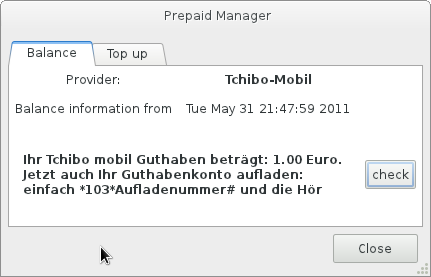
I've made a first release of GNOME Prepaid Manager a couple of days ago after switching to GTK+3, GSettings and PyGObject's GObject introspection but it still wasn't that useful since the very common Huawei chipsets (present in many UMTS USB sticks) weren't working due to some missing code in ModemManager. GNOME Prepaid Manager screenshot Thanks to Dan's great description I just got around to add that which should make ppm useful to more people. This blog is flattr enabled.

29 May 2011

Dirk Eddelbuettel: Bike The Drive 2011

Memorial Day weekend so following the annual JPMorgan Chase CC run on Thursday, it was once again time for the annual Bike The Drive on Chicago's beautiful Lakeshore Drive. The weather was craptastic---following a fog (!!) warning we had dense fog along the lake making it somewhat moist and chilly. Once we were done this was followed by an impressive thunderstorm warnings and rather heavy rain. But the girls were troopers and we did both halfes for a total of thirty miles as shown on this Google Maps record of the ride.

27 May 2011

Dirk Eddelbuettel: JPM Chase Corporate Challenge 2011

As it is the Thursday before the Memorial Day weekend, it was time for the Chicago part of the JP Morgan Chase Corporate Challenge. In all the years that I've run this, conditions were never as bad as today. Windy, marginally wet and just plain cold with temperatures in the low 40s. But then again, it is just 3.5 miles and you do it with a bunch of collegues embedded in a crowd of thousands and you get a few cold ones afterwards. Who'd complain, really? The race went ok -- I didn't go out too fast, maintained pace and was able to accelerate towards the end. My hand-stopped time was 22:58; for the first time we actually had chip timing in this race and my official time appears to be 23:00. Which is still 50+ seconds faster than last year, and a pace of around 6:34 and compares well to the other eight previous times I've run this.

26 May 2011

Dirk Eddelbuettel: RcppArmadillo 0.2.20

Conrad Sanderson is preparing version 2.0.0 of his Armadillo templated C++ library for linear algebra and has released a first public beta version 1.99.2. This has been folded into a new release of the RcppArmadillo wrapper for R based on our Rcpp library. Also added in this version is a new example of a simulation of a vector autoregression process which I had blogged about earlier. The example had been prepared for the Rcpp workshop / class at last month's R/Finance conference, and demonstrates a rather nice speed gain from using Rcpp and RcppArmadillo. The short NEWS file extract follows below.
0.2.20  2011-05-25
    o   Upgraded to Armadillo release 1.99.2 "v2.0 beta 2" (and 1.99.1 before)
          * faster inverse of symmetric matrices
          * faster element access for fixed size matrices
          * faster multiplication of tiny matrices (eg. 4x4)
          * faster compund expressions containing submatrices
          * added handling of arbitrarily sized empty matrices (eg. 5x0)
          * added syl()
          * added strans()
          * added symmatu()/symmatl()
          * added submatrices of submatrices
          * htrans() has been deprecated; use trans() instead
          * trans() now takes the complex conjugate when transposing a
            complex matrix
          * .is_vec() now outputs true for empty matrices
          * most functions with matrix inputs no longer throw exceptions when
            given empty matrices (eg. 5x0)
    o   Added a new subdirectory examples/ seeded with a nice Vector
        Autoregression simulation simulation example by Lance Bachmeier
    o   Rewrote armadillo_version as to no longer require an instance 
        of arma::arma_version, with tanks to Conrad for the suggestion
And courtesy of CRANberries, here is the diff to the previous release.
Diff between RcppArmadillo versions 0.2.19 dated 2011-04-24 and 0.2.20 dated 2011-05-26
 RcppArmadillo-0.2.19/RcppArmadillo/inst/include/armadillo_bits/Col_proto.hpp               only
 RcppArmadillo-0.2.19/RcppArmadillo/inst/include/armadillo_bits/Cube_proto.hpp              only
 RcppArmadillo-0.2.19/RcppArmadillo/inst/include/armadillo_bits/GlueCube_proto.hpp          only
 RcppArmadillo-0.2.19/RcppArmadillo/inst/include/armadillo_bits/Glue_proto.hpp              only
 RcppArmadillo-0.2.19/RcppArmadillo/inst/include/armadillo_bits/Mat_proto.hpp               only
 RcppArmadillo-0.2.19/RcppArmadillo/inst/include/armadillo_bits/OpCube_proto.hpp            only
 RcppArmadillo-0.2.19/RcppArmadillo/inst/include/armadillo_bits/Op_proto.hpp                only
 RcppArmadillo-0.2.19/RcppArmadillo/inst/include/armadillo_bits/Row_proto.hpp               only
 RcppArmadillo-0.2.19/RcppArmadillo/inst/include/armadillo_bits/arma_ostream_proto.hpp      only
 RcppArmadillo-0.2.19/RcppArmadillo/inst/include/armadillo_bits/arrayops_proto.hpp          only
 RcppArmadillo-0.2.19/RcppArmadillo/inst/include/armadillo_bits/atlas_proto.hpp             only
 RcppArmadillo-0.2.19/RcppArmadillo/inst/include/armadillo_bits/auxlib_proto.hpp            only
 RcppArmadillo-0.2.19/RcppArmadillo/inst/include/armadillo_bits/blas_proto.hpp              only
 RcppArmadillo-0.2.19/RcppArmadillo/inst/include/armadillo_bits/diagview_proto.hpp          only
 RcppArmadillo-0.2.19/RcppArmadillo/inst/include/armadillo_bits/diskio_proto.hpp            only
 RcppArmadillo-0.2.19/RcppArmadillo/inst/include/armadillo_bits/eGlueCube_proto.hpp         only
 RcppArmadillo-0.2.19/RcppArmadillo/inst/include/armadillo_bits/eGlue_proto.hpp             only
 RcppArmadillo-0.2.19/RcppArmadillo/inst/include/armadillo_bits/eOpCube_proto.hpp           only
 RcppArmadillo-0.2.19/RcppArmadillo/inst/include/armadillo_bits/eOp_proto.hpp               only
 RcppArmadillo-0.2.19/RcppArmadillo/inst/include/armadillo_bits/eglue_core_proto.hpp        only
 RcppArmadillo-0.2.19/RcppArmadillo/inst/include/armadillo_bits/eop_core_proto.hpp          only
 RcppArmadillo-0.2.19/RcppArmadillo/inst/include/armadillo_bits/field_proto.hpp             only
 RcppArmadillo-0.2.19/RcppArmadillo/inst/include/armadillo_bits/fn_htrans.hpp               only
 RcppArmadillo-0.2.19/RcppArmadillo/inst/include/armadillo_bits/forward_proto.hpp           only
 RcppArmadillo-0.2.19/RcppArmadillo/inst/include/armadillo_bits/glue_conv_proto.hpp         only
 RcppArmadillo-0.2.19/RcppArmadillo/inst/include/armadillo_bits/glue_cor_proto.hpp          only
 RcppArmadillo-0.2.19/RcppArmadillo/inst/include/armadillo_bits/glue_cov_proto.hpp          only
 RcppArmadillo-0.2.19/RcppArmadillo/inst/include/armadillo_bits/glue_cross_proto.hpp        only
 RcppArmadillo-0.2.19/RcppArmadillo/inst/include/armadillo_bits/glue_join_proto.hpp         only
 RcppArmadillo-0.2.19/RcppArmadillo/inst/include/armadillo_bits/glue_kron_proto.hpp         only
 RcppArmadillo-0.2.19/RcppArmadillo/inst/include/armadillo_bits/glue_mixed_proto.hpp        only
 RcppArmadillo-0.2.19/RcppArmadillo/inst/include/armadillo_bits/glue_relational_proto.hpp   only
 RcppArmadillo-0.2.19/RcppArmadillo/inst/include/armadillo_bits/glue_solve_proto.hpp        only
 RcppArmadillo-0.2.19/RcppArmadillo/inst/include/armadillo_bits/glue_times_proto.hpp        only
 RcppArmadillo-0.2.19/RcppArmadillo/inst/include/armadillo_bits/glue_toeplitz_proto.hpp     only
 RcppArmadillo-0.2.19/RcppArmadillo/inst/include/armadillo_bits/injector_proto.hpp          only
 RcppArmadillo-0.2.19/RcppArmadillo/inst/include/armadillo_bits/lapack_proto.hpp            only
 RcppArmadillo-0.2.19/RcppArmadillo/inst/include/armadillo_bits/mtGlueCube_proto.hpp        only
 RcppArmadillo-0.2.19/RcppArmadillo/inst/include/armadillo_bits/mtGlue_proto.hpp            only
 RcppArmadillo-0.2.19/RcppArmadillo/inst/include/armadillo_bits/mtOpCube_proto.hpp          only
 RcppArmadillo-0.2.19/RcppArmadillo/inst/include/armadillo_bits/mtOp_proto.hpp              only
 RcppArmadillo-0.2.19/RcppArmadillo/inst/include/armadillo_bits/op_chol_proto.hpp           only
 RcppArmadillo-0.2.19/RcppArmadillo/inst/include/armadillo_bits/op_cor_proto.hpp            only
 RcppArmadillo-0.2.19/RcppArmadillo/inst/include/armadillo_bits/op_cov_proto.hpp            only
 RcppArmadillo-0.2.19/RcppArmadillo/inst/include/armadillo_bits/op_cumsum_proto.hpp         only
 RcppArmadillo-0.2.19/RcppArmadillo/inst/include/armadillo_bits/op_cx_scalar_proto.hpp      only
 RcppArmadillo-0.2.19/RcppArmadillo/inst/include/armadillo_bits/op_diagmat_proto.hpp        only
 RcppArmadillo-0.2.19/RcppArmadillo/inst/include/armadillo_bits/op_diagvec_proto.hpp        only
 RcppArmadillo-0.2.19/RcppArmadillo/inst/include/armadillo_bits/op_dot_proto.hpp            only
 RcppArmadillo-0.2.19/RcppArmadillo/inst/include/armadillo_bits/op_dotext_proto.hpp         only
 RcppArmadillo-0.2.19/RcppArmadillo/inst/include/armadillo_bits/op_find_proto.hpp           only
 RcppArmadillo-0.2.19/RcppArmadillo/inst/include/armadillo_bits/op_flip_proto.hpp           only
 RcppArmadillo-0.2.19/RcppArmadillo/inst/include/armadillo_bits/op_htrans_proto.hpp         only
 RcppArmadillo-0.2.19/RcppArmadillo/inst/include/armadillo_bits/op_inv_proto.hpp            only
 RcppArmadillo-0.2.19/RcppArmadillo/inst/include/armadillo_bits/op_max_proto.hpp            only
 RcppArmadillo-0.2.19/RcppArmadillo/inst/include/armadillo_bits/op_mean_proto.hpp           only
 RcppArmadillo-0.2.19/RcppArmadillo/inst/include/armadillo_bits/op_median_proto.hpp         only
 RcppArmadillo-0.2.19/RcppArmadillo/inst/include/armadillo_bits/op_min_proto.hpp            only
 RcppArmadillo-0.2.19/RcppArmadillo/inst/include/armadillo_bits/op_misc_proto.hpp           only
 RcppArmadillo-0.2.19/RcppArmadillo/inst/include/armadillo_bits/op_pinv_proto.hpp           only
 RcppArmadillo-0.2.19/RcppArmadillo/inst/include/armadillo_bits/op_princomp_cov_proto.hpp   only
 RcppArmadillo-0.2.19/RcppArmadillo/inst/include/armadillo_bits/op_princomp_proto.hpp       only
 RcppArmadillo-0.2.19/RcppArmadillo/inst/include/armadillo_bits/op_prod_proto.hpp           only
 RcppArmadillo-0.2.19/RcppArmadillo/inst/include/armadillo_bits/op_relational_proto.hpp     only
 RcppArmadillo-0.2.19/RcppArmadillo/inst/include/armadillo_bits/op_repmat_proto.hpp         only
 RcppArmadillo-0.2.19/RcppArmadillo/inst/include/armadillo_bits/op_reshape_proto.hpp        only
 RcppArmadillo-0.2.19/RcppArmadillo/inst/include/armadillo_bits/op_shuffle_proto.hpp        only
 RcppArmadillo-0.2.19/RcppArmadillo/inst/include/armadillo_bits/op_sort_proto.hpp           only
 RcppArmadillo-0.2.19/RcppArmadillo/inst/include/armadillo_bits/op_stddev_proto.hpp         only
 RcppArmadillo-0.2.19/RcppArmadillo/inst/include/armadillo_bits/op_sum_proto.hpp            only
 RcppArmadillo-0.2.19/RcppArmadillo/inst/include/armadillo_bits/op_trans_meat.hpp           only
 RcppArmadillo-0.2.19/RcppArmadillo/inst/include/armadillo_bits/op_trans_proto.hpp          only
 RcppArmadillo-0.2.19/RcppArmadillo/inst/include/armadillo_bits/op_trimat_proto.hpp         only
 RcppArmadillo-0.2.19/RcppArmadillo/inst/include/armadillo_bits/op_var_proto.hpp            only
 RcppArmadillo-0.2.19/RcppArmadillo/inst/include/armadillo_bits/podarray_proto.hpp          only
 RcppArmadillo-0.2.19/RcppArmadillo/inst/include/armadillo_bits/running_stat_proto.hpp      only
 RcppArmadillo-0.2.19/RcppArmadillo/inst/include/armadillo_bits/running_stat_vec_proto.hpp  only
 RcppArmadillo-0.2.19/RcppArmadillo/inst/include/armadillo_bits/subview_cube_proto.hpp      only
 RcppArmadillo-0.2.19/RcppArmadillo/inst/include/armadillo_bits/subview_elem1_proto.hpp     only
 RcppArmadillo-0.2.19/RcppArmadillo/inst/include/armadillo_bits/subview_field_proto.hpp     only
 RcppArmadillo-0.2.19/RcppArmadillo/inst/include/armadillo_bits/subview_proto.hpp           only
 RcppArmadillo-0.2.19/RcppArmadillo/inst/include/armadillo_bits/wall_clock_proto.hpp        only
 RcppArmadillo-0.2.20/RcppArmadillo/ChangeLog                                                  20 
 RcppArmadillo-0.2.20/RcppArmadillo/DESCRIPTION                                                10 
 RcppArmadillo-0.2.20/RcppArmadillo/inst/NEWS                                                  26 
 RcppArmadillo-0.2.20/RcppArmadillo/inst/examples                                           only
 RcppArmadillo-0.2.20/RcppArmadillo/inst/include/RcppArmadillo/Mat_meat.h                       8 
 RcppArmadillo-0.2.20/RcppArmadillo/inst/include/armadillo                                    199 -
 RcppArmadillo-0.2.20/RcppArmadillo/inst/include/armadillo_bits/Col_bones.hpp               only
 RcppArmadillo-0.2.20/RcppArmadillo/inst/include/armadillo_bits/Col_meat.hpp                  519 +++
 RcppArmadillo-0.2.20/RcppArmadillo/inst/include/armadillo_bits/Cube_bones.hpp              only
 RcppArmadillo-0.2.20/RcppArmadillo/inst/include/armadillo_bits/Cube_meat.hpp                  96 
 RcppArmadillo-0.2.20/RcppArmadillo/inst/include/armadillo_bits/GlueCube_bones.hpp          only
 RcppArmadillo-0.2.20/RcppArmadillo/inst/include/armadillo_bits/Glue_bones.hpp              only
 RcppArmadillo-0.2.20/RcppArmadillo/inst/include/armadillo_bits/Mat_bones.hpp               only
 RcppArmadillo-0.2.20/RcppArmadillo/inst/include/armadillo_bits/Mat_meat.hpp                  673 +++-
 RcppArmadillo-0.2.20/RcppArmadillo/inst/include/armadillo_bits/OpCube_bones.hpp            only
 RcppArmadillo-0.2.20/RcppArmadillo/inst/include/armadillo_bits/Op_bones.hpp                only
 RcppArmadillo-0.2.20/RcppArmadillo/inst/include/armadillo_bits/Proxy.hpp                      28 
 RcppArmadillo-0.2.20/RcppArmadillo/inst/include/armadillo_bits/ProxyCube.hpp                  20 
 RcppArmadillo-0.2.20/RcppArmadillo/inst/include/armadillo_bits/Row_bones.hpp               only
 RcppArmadillo-0.2.20/RcppArmadillo/inst/include/armadillo_bits/Row_meat.hpp                  491 +++
 RcppArmadillo-0.2.20/RcppArmadillo/inst/include/armadillo_bits/arma_ostream_bones.hpp      only
 RcppArmadillo-0.2.20/RcppArmadillo/inst/include/armadillo_bits/arma_ostream_meat.hpp          87 
 RcppArmadillo-0.2.20/RcppArmadillo/inst/include/armadillo_bits/arma_static_assert.hpp         31 
 RcppArmadillo-0.2.20/RcppArmadillo/inst/include/armadillo_bits/arma_version.hpp                6 
 RcppArmadillo-0.2.20/RcppArmadillo/inst/include/armadillo_bits/arrayops_bones.hpp          only
 RcppArmadillo-0.2.20/RcppArmadillo/inst/include/armadillo_bits/arrayops_meat.hpp             143 -
 RcppArmadillo-0.2.20/RcppArmadillo/inst/include/armadillo_bits/atlas_bones.hpp             only
 RcppArmadillo-0.2.20/RcppArmadillo/inst/include/armadillo_bits/auxlib_bones.hpp            only
 RcppArmadillo-0.2.20/RcppArmadillo/inst/include/armadillo_bits/auxlib_meat.hpp               772 ++++-
 RcppArmadillo-0.2.20/RcppArmadillo/inst/include/armadillo_bits/blas_bones.hpp              only
 RcppArmadillo-0.2.20/RcppArmadillo/inst/include/armadillo_bits/compiler_setup.hpp             17 
 RcppArmadillo-0.2.20/RcppArmadillo/inst/include/armadillo_bits/debug.hpp                      24 
 RcppArmadillo-0.2.20/RcppArmadillo/inst/include/armadillo_bits/diagmat_proxy.hpp              93 
 RcppArmadillo-0.2.20/RcppArmadillo/inst/include/armadillo_bits/diagview_bones.hpp          only
 RcppArmadillo-0.2.20/RcppArmadillo/inst/include/armadillo_bits/diagview_meat.hpp             128 
 RcppArmadillo-0.2.20/RcppArmadillo/inst/include/armadillo_bits/diskio_bones.hpp            only
 RcppArmadillo-0.2.20/RcppArmadillo/inst/include/armadillo_bits/diskio_meat.hpp               104 
 RcppArmadillo-0.2.20/RcppArmadillo/inst/include/armadillo_bits/eGlueCube_bones.hpp         only
 RcppArmadillo-0.2.20/RcppArmadillo/inst/include/armadillo_bits/eGlueCube_meat.hpp             14 
 RcppArmadillo-0.2.20/RcppArmadillo/inst/include/armadillo_bits/eGlue_bones.hpp             only
 RcppArmadillo-0.2.20/RcppArmadillo/inst/include/armadillo_bits/eGlue_meat.hpp                 14 
 RcppArmadillo-0.2.20/RcppArmadillo/inst/include/armadillo_bits/eOpCube_bones.hpp           only
 RcppArmadillo-0.2.20/RcppArmadillo/inst/include/armadillo_bits/eOp_bones.hpp               only
 RcppArmadillo-0.2.20/RcppArmadillo/inst/include/armadillo_bits/eglue_core_bones.hpp        only
 RcppArmadillo-0.2.20/RcppArmadillo/inst/include/armadillo_bits/eglue_core_meat.hpp           519 ++-
 RcppArmadillo-0.2.20/RcppArmadillo/inst/include/armadillo_bits/eop_core_bones.hpp          only
 RcppArmadillo-0.2.20/RcppArmadillo/inst/include/armadillo_bits/eop_core_meat.hpp             327 +-
 RcppArmadillo-0.2.20/RcppArmadillo/inst/include/armadillo_bits/field_bones.hpp             only
 RcppArmadillo-0.2.20/RcppArmadillo/inst/include/armadillo_bits/fn_accu.hpp                    40 
 RcppArmadillo-0.2.20/RcppArmadillo/inst/include/armadillo_bits/fn_det.hpp                      7 
 RcppArmadillo-0.2.20/RcppArmadillo/inst/include/armadillo_bits/fn_diagmat.hpp                  7 
 RcppArmadillo-0.2.20/RcppArmadillo/inst/include/armadillo_bits/fn_elem.hpp                    62 
 RcppArmadillo-0.2.20/RcppArmadillo/inst/include/armadillo_bits/fn_eye.hpp                  only
 RcppArmadillo-0.2.20/RcppArmadillo/inst/include/armadillo_bits/fn_inv.hpp                     18 
 RcppArmadillo-0.2.20/RcppArmadillo/inst/include/armadillo_bits/fn_log_det.hpp                  8 
 RcppArmadillo-0.2.20/RcppArmadillo/inst/include/armadillo_bits/fn_max.hpp                     38 
 RcppArmadillo-0.2.20/RcppArmadillo/inst/include/armadillo_bits/fn_mean.hpp                    42 
 RcppArmadillo-0.2.20/RcppArmadillo/inst/include/armadillo_bits/fn_median.hpp                  53 
 RcppArmadillo-0.2.20/RcppArmadillo/inst/include/armadillo_bits/fn_min.hpp                     38 
 RcppArmadillo-0.2.20/RcppArmadillo/inst/include/armadillo_bits/fn_ones.hpp                    45 
 RcppArmadillo-0.2.20/RcppArmadillo/inst/include/armadillo_bits/fn_prod.hpp                    20 
 RcppArmadillo-0.2.20/RcppArmadillo/inst/include/armadillo_bits/fn_randn.hpp                   10 
 RcppArmadillo-0.2.20/RcppArmadillo/inst/include/armadillo_bits/fn_randu.hpp                   12 
 RcppArmadillo-0.2.20/RcppArmadillo/inst/include/armadillo_bits/fn_stddev.hpp                  20 
 RcppArmadillo-0.2.20/RcppArmadillo/inst/include/armadillo_bits/fn_strans.hpp               only
 RcppArmadillo-0.2.20/RcppArmadillo/inst/include/armadillo_bits/fn_syl_lyap.hpp             only
 RcppArmadillo-0.2.20/RcppArmadillo/inst/include/armadillo_bits/fn_symmat.hpp               only
 RcppArmadillo-0.2.20/RcppArmadillo/inst/include/armadillo_bits/fn_trans.hpp                   35 
 RcppArmadillo-0.2.20/RcppArmadillo/inst/include/armadillo_bits/fn_var.hpp                     20 
 RcppArmadillo-0.2.20/RcppArmadillo/inst/include/armadillo_bits/fn_zeros.hpp                   12 
 RcppArmadillo-0.2.20/RcppArmadillo/inst/include/armadillo_bits/forward_bones.hpp           only
 RcppArmadillo-0.2.20/RcppArmadillo/inst/include/armadillo_bits/gemm.hpp                      337 --
 RcppArmadillo-0.2.20/RcppArmadillo/inst/include/armadillo_bits/gemm_mixed.hpp                 59 
 RcppArmadillo-0.2.20/RcppArmadillo/inst/include/armadillo_bits/gemv.hpp                      208 +
 RcppArmadillo-0.2.20/RcppArmadillo/inst/include/armadillo_bits/glue_conv_bones.hpp         only
 RcppArmadillo-0.2.20/RcppArmadillo/inst/include/armadillo_bits/glue_conv_meat.hpp             16 
 RcppArmadillo-0.2.20/RcppArmadillo/inst/include/armadillo_bits/glue_cor_bones.hpp          only
 RcppArmadillo-0.2.20/RcppArmadillo/inst/include/armadillo_bits/glue_cor_meat.hpp              12 
 RcppArmadillo-0.2.20/RcppArmadillo/inst/include/armadillo_bits/glue_cov_bones.hpp          only
 RcppArmadillo-0.2.20/RcppArmadillo/inst/include/armadillo_bits/glue_cross_bones.hpp        only
 RcppArmadillo-0.2.20/RcppArmadillo/inst/include/armadillo_bits/glue_cross_meat.hpp            47 
 RcppArmadillo-0.2.20/RcppArmadillo/inst/include/armadillo_bits/glue_join_bones.hpp         only
 RcppArmadillo-0.2.20/RcppArmadillo/inst/include/armadillo_bits/glue_join_meat.hpp             46 
 RcppArmadillo-0.2.20/RcppArmadillo/inst/include/armadillo_bits/glue_kron_bones.hpp         only
 RcppArmadillo-0.2.20/RcppArmadillo/inst/include/armadillo_bits/glue_mixed_bones.hpp        only
 RcppArmadillo-0.2.20/RcppArmadillo/inst/include/armadillo_bits/glue_relational_bones.hpp   only
 RcppArmadillo-0.2.20/RcppArmadillo/inst/include/armadillo_bits/glue_solve_bones.hpp        only
 RcppArmadillo-0.2.20/RcppArmadillo/inst/include/armadillo_bits/glue_times_bones.hpp        only
 RcppArmadillo-0.2.20/RcppArmadillo/inst/include/armadillo_bits/glue_times_meat.hpp           493 +--
 RcppArmadillo-0.2.20/RcppArmadillo/inst/include/armadillo_bits/glue_toeplitz_bones.hpp     only
 RcppArmadillo-0.2.20/RcppArmadillo/inst/include/armadillo_bits/glue_toeplitz_meat.hpp          5 
 RcppArmadillo-0.2.20/RcppArmadillo/inst/include/armadillo_bits/injector_bones.hpp          only
 RcppArmadillo-0.2.20/RcppArmadillo/inst/include/armadillo_bits/lapack_bones.hpp            only
 RcppArmadillo-0.2.20/RcppArmadillo/inst/include/armadillo_bits/mtGlueCube_bones.hpp        only
 RcppArmadillo-0.2.20/RcppArmadillo/inst/include/armadillo_bits/mtGlue_bones.hpp            only
 RcppArmadillo-0.2.20/RcppArmadillo/inst/include/armadillo_bits/mtOpCube_bones.hpp          only
 RcppArmadillo-0.2.20/RcppArmadillo/inst/include/armadillo_bits/mtOp_bones.hpp              only
 RcppArmadillo-0.2.20/RcppArmadillo/inst/include/armadillo_bits/op_chol_bones.hpp           only
 RcppArmadillo-0.2.20/RcppArmadillo/inst/include/armadillo_bits/op_cor_bones.hpp            only
 RcppArmadillo-0.2.20/RcppArmadillo/inst/include/armadillo_bits/op_cor_meat.hpp                14 
 RcppArmadillo-0.2.20/RcppArmadillo/inst/include/armadillo_bits/op_cov_bones.hpp            only
 RcppArmadillo-0.2.20/RcppArmadillo/inst/include/armadillo_bits/op_cumsum_bones.hpp         only
 RcppArmadillo-0.2.20/RcppArmadillo/inst/include/armadillo_bits/op_cumsum_meat.hpp              9 
 RcppArmadillo-0.2.20/RcppArmadillo/inst/include/armadillo_bits/op_cx_scalar_bones.hpp      only
 RcppArmadillo-0.2.20/RcppArmadillo/inst/include/armadillo_bits/op_diagmat_bones.hpp        only
 RcppArmadillo-0.2.20/RcppArmadillo/inst/include/armadillo_bits/op_diagmat_meat.hpp            10 
 RcppArmadillo-0.2.20/RcppArmadillo/inst/include/armadillo_bits/op_diagvec_bones.hpp        only
 RcppArmadillo-0.2.20/RcppArmadillo/inst/include/armadillo_bits/op_dot_bones.hpp            only
 RcppArmadillo-0.2.20/RcppArmadillo/inst/include/armadillo_bits/op_dotext_bones.hpp         only
 RcppArmadillo-0.2.20/RcppArmadillo/inst/include/armadillo_bits/op_find_bones.hpp           only
 RcppArmadillo-0.2.20/RcppArmadillo/inst/include/armadillo_bits/op_flip_bones.hpp           only
 RcppArmadillo-0.2.20/RcppArmadillo/inst/include/armadillo_bits/op_htrans_bones.hpp         only
 RcppArmadillo-0.2.20/RcppArmadillo/inst/include/armadillo_bits/op_htrans_meat.hpp             98 
 RcppArmadillo-0.2.20/RcppArmadillo/inst/include/armadillo_bits/op_inv_bones.hpp            only
 RcppArmadillo-0.2.20/RcppArmadillo/inst/include/armadillo_bits/op_inv_meat.hpp                13 
 RcppArmadillo-0.2.20/RcppArmadillo/inst/include/armadillo_bits/op_max_bones.hpp            only
 RcppArmadillo-0.2.20/RcppArmadillo/inst/include/armadillo_bits/op_max_meat.hpp                57 
 RcppArmadillo-0.2.20/RcppArmadillo/inst/include/armadillo_bits/op_mean_bones.hpp           only
 RcppArmadillo-0.2.20/RcppArmadillo/inst/include/armadillo_bits/op_mean_meat.hpp               34 
 RcppArmadillo-0.2.20/RcppArmadillo/inst/include/armadillo_bits/op_median_bones.hpp         only
 RcppArmadillo-0.2.20/RcppArmadillo/inst/include/armadillo_bits/op_median_meat.hpp            214 -
 RcppArmadillo-0.2.20/RcppArmadillo/inst/include/armadillo_bits/op_min_bones.hpp            only
 RcppArmadillo-0.2.20/RcppArmadillo/inst/include/armadillo_bits/op_min_meat.hpp                33 
 RcppArmadillo-0.2.20/RcppArmadillo/inst/include/armadillo_bits/op_misc_bones.hpp           only
 RcppArmadillo-0.2.20/RcppArmadillo/inst/include/armadillo_bits/op_pinv_bones.hpp           only
 RcppArmadillo-0.2.20/RcppArmadillo/inst/include/armadillo_bits/op_pinv_meat.hpp               10 
 RcppArmadillo-0.2.20/RcppArmadillo/inst/include/armadillo_bits/op_princomp_bones.hpp       only
 RcppArmadillo-0.2.20/RcppArmadillo/inst/include/armadillo_bits/op_princomp_cov_bones.hpp   only
 RcppArmadillo-0.2.20/RcppArmadillo/inst/include/armadillo_bits/op_prod_bones.hpp           only
 RcppArmadillo-0.2.20/RcppArmadillo/inst/include/armadillo_bits/op_prod_meat.hpp               34 
 RcppArmadillo-0.2.20/RcppArmadillo/inst/include/armadillo_bits/op_relational_bones.hpp     only
 RcppArmadillo-0.2.20/RcppArmadillo/inst/include/armadillo_bits/op_repmat_bones.hpp         only
 RcppArmadillo-0.2.20/RcppArmadillo/inst/include/armadillo_bits/op_repmat_meat.hpp             29 
 RcppArmadillo-0.2.20/RcppArmadillo/inst/include/armadillo_bits/op_reshape_bones.hpp        only
 RcppArmadillo-0.2.20/RcppArmadillo/inst/include/armadillo_bits/op_reshape_meat.hpp            32 
 RcppArmadillo-0.2.20/RcppArmadillo/inst/include/armadillo_bits/op_shuffle_bones.hpp        only
 RcppArmadillo-0.2.20/RcppArmadillo/inst/include/armadillo_bits/op_shuffle_meat.hpp            10 
 RcppArmadillo-0.2.20/RcppArmadillo/inst/include/armadillo_bits/op_sort_bones.hpp           only
 RcppArmadillo-0.2.20/RcppArmadillo/inst/include/armadillo_bits/op_stddev_bones.hpp         only
 RcppArmadillo-0.2.20/RcppArmadillo/inst/include/armadillo_bits/op_stddev_meat.hpp             34 
 RcppArmadillo-0.2.20/RcppArmadillo/inst/include/armadillo_bits/op_strans_bones.hpp         only
 RcppArmadillo-0.2.20/RcppArmadillo/inst/include/armadillo_bits/op_strans_meat.hpp          only
 RcppArmadillo-0.2.20/RcppArmadillo/inst/include/armadillo_bits/op_sum_bones.hpp            only
 RcppArmadillo-0.2.20/RcppArmadillo/inst/include/armadillo_bits/op_sum_meat.hpp                38 
 RcppArmadillo-0.2.20/RcppArmadillo/inst/include/armadillo_bits/op_symmat_bones.hpp         only
 RcppArmadillo-0.2.20/RcppArmadillo/inst/include/armadillo_bits/op_symmat_meat.hpp          only
 RcppArmadillo-0.2.20/RcppArmadillo/inst/include/armadillo_bits/op_trimat_bones.hpp         only
 RcppArmadillo-0.2.20/RcppArmadillo/inst/include/armadillo_bits/op_trimat_meat.hpp            190 +
 RcppArmadillo-0.2.20/RcppArmadillo/inst/include/armadillo_bits/op_var_bones.hpp            only
 RcppArmadillo-0.2.20/RcppArmadillo/inst/include/armadillo_bits/op_var_meat.hpp                37 
 RcppArmadillo-0.2.20/RcppArmadillo/inst/include/armadillo_bits/operator_times.hpp             12 
 RcppArmadillo-0.2.20/RcppArmadillo/inst/include/armadillo_bits/podarray_bones.hpp          only
 RcppArmadillo-0.2.20/RcppArmadillo/inst/include/armadillo_bits/podarray_meat.hpp              57 
 RcppArmadillo-0.2.20/RcppArmadillo/inst/include/armadillo_bits/promote_type.hpp               18 
 RcppArmadillo-0.2.20/RcppArmadillo/inst/include/armadillo_bits/running_stat_bones.hpp      only
 RcppArmadillo-0.2.20/RcppArmadillo/inst/include/armadillo_bits/running_stat_meat.hpp           2 
 RcppArmadillo-0.2.20/RcppArmadillo/inst/include/armadillo_bits/running_stat_vec_bones.hpp  only
 RcppArmadillo-0.2.20/RcppArmadillo/inst/include/armadillo_bits/subview_bones.hpp           only
 RcppArmadillo-0.2.20/RcppArmadillo/inst/include/armadillo_bits/subview_cube_bones.hpp      only
 RcppArmadillo-0.2.20/RcppArmadillo/inst/include/armadillo_bits/subview_cube_meat.hpp          50 
 RcppArmadillo-0.2.20/RcppArmadillo/inst/include/armadillo_bits/subview_elem1_bones.hpp     only
 RcppArmadillo-0.2.20/RcppArmadillo/inst/include/armadillo_bits/subview_elem1_meat.hpp         24 
 RcppArmadillo-0.2.20/RcppArmadillo/inst/include/armadillo_bits/subview_field_bones.hpp     only
 RcppArmadillo-0.2.20/RcppArmadillo/inst/include/armadillo_bits/subview_field_meat.hpp         37 
 RcppArmadillo-0.2.20/RcppArmadillo/inst/include/armadillo_bits/subview_meat.hpp             1423 +++++++++-
 RcppArmadillo-0.2.20/RcppArmadillo/inst/include/armadillo_bits/traits.hpp                     69 
 RcppArmadillo-0.2.20/RcppArmadillo/inst/include/armadillo_bits/typedef_u64.hpp             only
 RcppArmadillo-0.2.20/RcppArmadillo/inst/include/armadillo_bits/undefine_conflicts.hpp      only
 RcppArmadillo-0.2.20/RcppArmadillo/inst/include/armadillo_bits/unwrap.hpp                     64 
 RcppArmadillo-0.2.20/RcppArmadillo/inst/include/armadillo_bits/wall_clock_bones.hpp        only
 RcppArmadillo-0.2.20/RcppArmadillo/src/RcppArmadillo.cpp                                      27 
 253 files changed, 6400 insertions(+), 2358 deletions(-)
More information is on the RcppArmadillo page. Questions, comments etc should go to the rcpp-devel mailing list off the R-Forge page.

25 May 2011

Guillaume Mazoyer: Here is a new GSoC student

java.pngHello Planet Debian reader.

And now you re thinking, who is this crazy guy who does not even know how to write English (is my sentence wrong?). My name is Guillaume Mazoyer and I am the Google Summer of Code student working on Jigsaw with Tom Marble and Sylvestre Ledru. I blog from France and I plan to write my GSoC reports right here.

Maybe you don t know what is Jigsaw yet. If so, go read this wiki page, you should be able to understand the goal of my project. Here is the description:

Since the beginning of Java, the JVM is a big virtual machine will all the features incorporated in it. This JVM provides many features which are useful in only limited areas (Corba) or which are not used at all in some contexts (AWT/Swing are useless for a web server).

The goal of the jigsaw project is to provide a modular JVM.

This will provide many improvements in the performance area (startup, solving of the dependencies, etc) but also the size of the dependencies.

There are already some works done by upstream (Oracle) but it does not complain to the Debian standards. The target is Java 8.

The goal is this Google Summer of Code project is to package the current development version of Jigsaw into Debian.

Please note that this project is not only about packaging. This will probably implies some developments and contributions to upstream (upstream is aware of this effort). Updating javahelper to manage specifities of Jigsaw could be considered.

I m pretty excited to work on this project and the work has already started. Can t wait to go deeper and enjoy working on two things that I love: Debian and Java.

Russell Coker: Links May 2011

John W. Dean wrote in insightful series of three articles for Findlaw about Authoritarian Conservatives [1]. In summary there are Authoritarian Followers who follow their leader blindly and Authoritarian Leaders who do whatever it takes to gain and maintain power. The Authoritarian mindset lends itself towards right-wing politics. Mick Ebeling gave an inspiring TED talk about his work developing a system to produce art that is controlled by eye movements [2]. The development work was started to support the quadriplegic graffiti artist TEMPT1. Mick s most noteworthy point is that all the hardware design and software are free so anyone can implement it without asking an insurance company or hospital (this is one of the few occasions when a TED speaker has received a standing ovation during a talk). The Eyewriter.org site has the designs and source which is licensed under the GPL [3]. Morgan Spurlock (who is famous for Supersize Me ) gave an amusing TED talk titled The Greatest TED Talk Ever Sold [4]. He provides some interesting information about the brand sponsorship process and his new movie The Greatest Movie Ever Sold . Ralph Langner gave an interesting TED talk about reverse-engineering the Stuxnet worm and discovering that it was targetted at the Iranian nuclear program [5]. The fact that the Stuxnet environment could be turned to other uses such as disrupting power plants is a great concern, particularly as it has special code to prevent automatic safety systems from activating. Angela Belcher gave an interesting TED talk about using nature to grow batteries [6]. She is evolving and engineering viruses to manufacture parts of batteries and assemble them, the aim is to scale up the process to manufacture batteries for the Prius and other large devices at room temperature with no toxic materials. She is also working on biological methods of splitting water into hydrogen and oxygen which has the obvious potential for fuel-cell power and also solar PV cells. As an aside she mentions giving a copy of the Periodic Table to Barack Obama and he told her that he will look at it periodically . Bruce Schnier gave a good overview of the issues related to human perceptions of security in his TED talk about The Security Mirage [7]. There isn t much new in that for people who have been doing computer work but it s good to have an overview of lots of issues. TED has an interesting interview with Gerry Douglas about his work developing touch-screen computer systems for processing medical data in Malawi [8]. This is worth reading by everyone who is involved in software design, many of the things that he has done go against traditional design methods. Mike Matas gave an interesting demo at TED of the first proper digital book [9]. The book is by Al Gore and is run on the iPad/iPhone platform (hopefully they will have an Android version soon). His company is in the business of licensing software for creating digital books. The demonstration featured a mixture of pictures, video, audio, and maps with the pinch interface to move them around. Dr Sommers of Tufts University wrote an interesting post for Psychology Today titled Why it s Never About Race [10]. It seems that there are lots of patterns of people being treated differently on the basis of race but for every specific case no-one wants to believe that racial bias was involved. The Register has an amusing article about what might have happened if Kate had left Prince William at the altar [11]. Fiorenzo Omenetto gave an interesting TED talk about synthetic silk [12]. He is working on developing artificial fibers and solids based on the same proteins as silk which can be used for storing information (DVDs and holograms), medical implants (which can be re-absorbed into the body and which don t trigger an immune response), and cups among other things. Maybe my next tie will have a no pupae were harmed in the production notice. ;) The CDC has released a guide to preparing for a Zombie apocalypse [13], while it s unlikely that Zombies will attack, the same suggestions will help people prepare for the other medical emergencies that involve the CDC. Salon has an interesting article by Glenn Greenwald who interviewed Benjamin Ferencz about aggressive warfare [14]. Benjamin was a prosecutor for war crimes at Nuremberg after WW2 and compares the US actions since 9-11 with what was deemed to be illegal by the standards of WW2. Eli Pariser gave an interesting TED talk about Online Filter Bubbles [15]. He claims that services such as Facebook and Google should give more of a mixture of results rather than targetting for what people want. The problem with this idea is that presenting links that someone doesn t want to click doesn t do any good. It s not as if the filter bubble effect relies on modern media or can be easily solved. Terry Moore gave a TED talk about how to tie shoelaces [16]. Basically he advocates using a doubly-slipped Reef Knot instead of a doubly-slipped Granny Knot. Now I just need to figure out how to tie a doubly-slipped Reef Knot quickly and reliably. Terry uses this as a mathaphor for other ways in which one might habitually do something in a non-optimal way.

24 May 2011

Aron Xu: Things to do before becoming a Debian Maintainer

Today I received a mail asking me to give him some advice on how to become a Debian Maintainer and Debian Developer, I am glad to hear more people getting interested on joining Debian, :-) The 1st thing to keep in mind is that, involving Debian s development is easy, but becoming something _official_ requires a [...]

Russell Coker: Are Assholes Essential to a Free Software Project?

What do Assholes do? Rusty just wrote a post titled If you didn t run code written by assholes, your machine wouldn t boot [1] about some of the anti-social tendencies demonstrated by programmers, including some that are implied to be fairly important. His post seems to imply that there are really great programmers who are anti-social and that we should just put up with it because of their great code. One of the problems with his post is that he doesn t define asshole . Holocaust deniers and all other Nazi supporters seem to clearly by assholes by any definition. People who have silly ideas about medicine and tell others seem to be merely misguided (although my dictionary gives stupid or irritating or ridiculous in the definition of asshole so technically they can meet the criteria). In the comments Rusty states that nuttiness is relative . While that is correct it doesn t seem to have much bearing on whether someone is an asshole. For example I know some very nice people who are utterly convinced by creationism. Is Anyone Essential to Free Software? Most projects have one person or several people in leadership positions, usually there seems to be a combination of project management and lead-programmer positions. Such people are obviously quite important to a project. But we have seen examples of people dying, being employed by Microsoft, retiring, relicensing the source in a bad way, and just losing interest without the project ceasing. It seems clear that in most cases when a project which has a significant amount of use has significant bugs and no maintainer then someone will step in. The cases where no-one takes over the project are often resolved by someone creating a competing project. If no-one takes over an abandoned Free Software project then it s a strong indication that the project wasn t particularly important anyway. I have no doubt that if any bug or missing feature made Linux systems stop booting then someone would fix it quite quickly. In a more general sense it seems that every time someone takes a position in a project that is of wide interest they are displacing someone else who might have done the job. When you volunteer to do significant work for a project you may be displacing someone who is more skillful than you this isn t necessarily a bad thing as there are plenty of other projects to work on, some of which require more skill. Growing More Programmers It seems to me that a large part of becoming a great programmer is facing great challenges. People who could be described as optimistic or arrogant will tend to take on more challenging tasks and therefore learn more. I m sure that there are a lot of people out there who have the potential to be great programmers apart from not taking on the challenging work, this seems to be an unfortunate waste of talent. Given a large enough population if someone leaves a senior position there should be someone else who can obtain the skills needed to take over. One advantage of this for Free Software development is that even if the best person to take on the challenge isn t living in the most convenient continent that won t be an obstacle, while with proprietary software development projects the teams are small and it s common that no-one else is capable of stepping up to a lead position. Another advantage is that when the lead developer leaves there are generally many candidates to replace them, all of whom can start work and be judged on the work that they do. I think that the best claims that can be made regarding essential people are not in regard to technical skill alone but to a combination of technical and people skills. Getting a group of programmers to work together is really hard but it s something that needs to be done for any significant project. Also the larger projects tend not to stand alone, being able to get changes included in other projects requires some skill. Ben Collins-Sussman and Brian Fitzpatrick gave an insightful talk at Google IO 2008 titled How to Protect Your Open Source Project From Poisonous People [2]. The first half of their talk is mostly about people who are misguided or difficult rather than what most people would consider poisonous and the second half is more about people who are actively poisonous and need to be removed. They advocate a community based on Politeness, Respect, Trust, and Humility. They describe in detail how the methods they advocate result in the members of their community being more productive, it seems obvious that those principles will lead to better career growth for people within the community and more friendly people wanting to join. When is being an Asshole OK? I once worked for a company that apparently had a team consisting solely of assholes. Apparently one asshole got promoted to management and after some internal transfers they ended up with all the assholes in the company on one team. I guess that when someone has negative interactions with everyone they won t notice the difference if they are put in a team where everyone is difficult. For a corporate environment that lacks a no jerks hiring policy this is probably a good way of improving productivity overall. I am not aware of any significant Free Software project that was comprised of mostly jerks although I have seen a few with dysfunctional environments that encourage the worst behavior from their members. The smaller Free Software projects have less need for people who can relate to other people. There are many useful Free Software projects which have only one developer, in most cases anyone can take the source code and use it without dealing with the author. But even for a single-developer project an asshole can cause some serious problems. One example I know of concerns a developer who had unclear licenses and started making legal threats in response to a request for a clear license. Another example is of a developer who released code that was designed to not work when one particular user compiled it and redistributed the binaries. Both of them caused some significant amounts of time to be wasted by people who were unfortunate enough to develop systems that interacted with the code in question, and even more time was wasted when some misguided people defended them in the inevitable flame-wars. Even for a project with only one developer it s still better for everyone if that developer isn t an asshole. One comment I ve seen related to this issue suggesting that some types of asshole behavior shouldn t be a problem an example that was cited is a colleague who cheats on a romantic partner. Jeremy Clyman (who is currently doing a Ph.D in Psychology) has written an interesting article about this for Psychology Today [3]. He reviews the movie The Dilemma which deals with someone catching their colleague s wife cheating. Jeremy analyses the psychological issues involved and how they can (among other things) impact the ability for such people to work. I once worked in an office where two married employees were very open about having an affair and we were all apparently expected to lie on their behalf if necessary, it really affected the quality of the working environment. Extreme Assholes There are lots of people involved in Free Software development who are difficult and many who are to some extent assholes. But some of them take being an asshole to the extreme, such as Holocaust deniers (an example which Rusty used). In the comments on his post the Westboro Baptist Church is also mentioned. It is possible to entirely disagree with someone on a contentious issue such as abortion but still be able to get along with them. But when someone supports a hate-based organisation such as the WBC or supports Nazis in any way then there will be many people who just can t tolerate them and no-one should be expected to tolerate such people. I have seen two instances where Free Software developers advocated pro-Nazi positions (one had an archive of neo-Nazi propaganda and the other claimed that Nazis were not responsible for the Holocaust). Neither of the pro-Nazi programmers was evicted for defending Nazis, but both of them ended up leaving the community in adverse ways after causing other damage in the mean time. I don t think it takes any great ability to predict the future to determine that someone who defends Nazis will eventually end up doing something that requires expulsion and drive away users and developers in the mean-time. There is no possibility that someone can support the Nazi or WBC ideology only when not associated with your project, it will affect all aspects of their life. When a Holocaust denier is allowed to be a member of a community it also sends out a message that members of the groups which were persecuted by Nazis aren t particularly welcome in the community. Helping Minor Assholes There are a lot of people who don t have malevolent aims but who unintentionally cause some difficulty (it seems that the truly malicious are a tiny minority). I don t think that excusing the bad things that they do on the basis of writing good code helps them in the long term. Many of the suggestions that Ben Collins-Sussman and Brian Fitzpatrick make seem likely to help people who don t want to be assholes and direct them towards positive involvement in the community. One trend that seems apparent is the non-linear response to certain types of bad behavior. There is often little difference in severity between something that gets almost no attention and something that results in a large and extremely hostile reaction. If someone persists in acting like an asshole for long enough it seems to be inevitable that they will eventually exceed some threshold for what is tolerated and get a very significant negative response. It would be good if things didn t need to get to that stage. I think that the most unfortunate aspect of Rusty s blog post is that most people will probably interpret it as encouragement to write better code as a way of getting a free pass for being an asshole. I know that this isn t what Rusty intended, but most people on the Internet don t know Rusty as well as I do. Conclusion Ben Collins-Sussman and Brian Fitzpatrick seem to have some of the best ideas for how to deal with these issues when you control a project, but most of us aren t in that position. Everyone can advocate better behavior. Extreme assholes need to be removed quickly and without a great debate about their contributions, freedom of speech, or other issues. Since considering this issue I ve been wondering about when one should avoid the lesser assholes and asshole-positive environments. People tend to adapt to their environment, so if you associate with assholes a lot then there s a good chance you will start to become like them. Is

23 May 2011

Ben Hutchings: Testing new hardware support for Debian 6.0.2

The Debian kernel team regularly backports driver updates to the Linux kernel in stable releases to add support for new hardware, and I've prepared several updates intended for point release 6.0.2. Since the kernel team does not have a large collection of hardware on which to test driver changes, we would appreciate test reports from users. It is important to test not just that new devices are supported properly, but that there are no regressions in support for older devices. Changes I have updated these drivers to the versions found in Linux 2.6.38, modulo driver API changes: I have also cherry-picked some small changes: There are more drivers that I think should be added or updated (see #624794) but they will probably have to wait for release 6.0.3. Packages The source package and binary packages for i386 and amd64 are available on people.debian.org. They can be verified by the checksums in the signed changes file. The current packages are version 2.6.32-35~test1, but there may be further test versions before an official stable update. How to test For network drivers, I suggest the following regression tests:
  1. If the driver tries to load firmware (only required for some chips), does this work once the firmware file(s) are installed?
  2. Can you receive and transmit VLAN-tagged frames after creating a VLAN interface?
  3. Does the interface work after suspend and resume?
  4. Does the interface work after removing the cable for 10 seconds and reinserting it?
  5. Does multicast configuration work? (IPv6 autoconfiguration or mDNS will cover this.)
  6. Can the interface send and receive TCP/IP across a LAN at the same speed, before and after these changes? (Use e.g. netperf to test this, but don't forget to remove the netperf package after use.)
  7. Are any warnings or errors logged by the kernel during the preceding tests?
For storage drivers, unfortunately I don't have a good idea of what tests would be suitable. In any case, please don't test on disks storing valuable data! Please send test reports to the bug reports linked above, stating the driver name, the PCI ID for the device you tested (from lspci -n) and any other device identification that the kernel log (for example, r8169 logs the 'XID' of the device).

Gregor Herrmann: RC bugs 2011/11 - 2011/20

long time no post about my RC bug fixing activities. & indeed, I haven't been very active during the last weeks. here's a quick update; it includes two NMUs done for the perl 5.12 transition, the rest is just "normal" maintainance work (interesting to see how much stuff can break behind our backs ...). I still hope to find some more time in the future to look at other RC bugs; after all we want to have a not-too-long freeze for wheezy, don't we?

21 May 2011

Vincent Bernat: Network lab with User Mode Linux

To setup a virtual network lab, you get a lot of alternatives. You can for example use GNS3, Netkit, Marionnet or VNUML. Some of those tools, like GNS3, allow to add some closed source equipments like a Cisco 7200 or a Juniper router. All those tools are a great way to setup your network lab. Look at them! If you want to setup a virtual network lab for educational purpose, one of those should fit your purpose. However, none of those solution were a perfect match for me. I did not want to maintain some root filesystem. I wanted my lab to start in a few seconds. I wanted to keep all configuration files (including the ones for the virtual hosts) into one subdirectory of my home and be able to modify them while the lab was running. I also wanted to be able to plug some Cisco router using Dynamips/Dynagen. None of the listed solution above matched all those criteria. Therefore, I setup my own lab script with User Mode Linux. This is not a complete solution, but is more like a home-made solution to match one particular need. You cannot use the final result without tweaking it. Again, look at the other solutions first. We will go step by step to understand how the lab was built. If you are in a hurry, you can look at the result which is published on GitHub.

User Mode Linux User Mode Linux (or UML) is a Linux kernel running as a process instead of running on top of some processor. With Debian, you can install it using apt-get install user-mode-linux. You get a linux command that will run your Linux kernel as a simple process. No need to be root.
 1
 2
 3
 4
 5
 6
 7
 8
 9
10
11
12
13
14
15
16
17
18
19
20
21
22
23
24
25
$ linux
Core dump limits :
    soft - 0
    hard - NONE
Checking that ptrace can change system call numbers...OK
Checking syscall emulation patch for ptrace...OK
Checking advanced syscall emulation patch for ptrace...OK
Checking for tmpfs mount on /dev/shm...nothing mounted on /dev/shm
Checking PROT_EXEC mmap in /tmp/user/500/...OK
Checking for the skas3 patch in the host:
  - /proc/mm...not found: No such file or directory
  - PTRACE_FAULTINFO...not found
  - PTRACE_LDT...not found
UML running in SKAS0 mode
Adding 5632000 bytes to physical memory to account for exec-shield gap
Initializing cgroup subsys cpuset
Linux version 2.6.32 (2.6.32) (root@tito) (gcc version 4.4.5 (Debian 4.4.5-10) ) #2 Thu Jan 27 12:49:46 UTC 2011
[...]
console [mc-1] enabled
Couldn't stat "root_fs" : err = 2
Failed to initialize ubd device 0 :Couldn't determine size of device's file
registered taskstats version 1
VFS: Cannot open root device "98:0" or unknown-block(98,0)
Please append a correct "root=" boot option; here are the available partitions:
Kernel panic - not syncing: VFS: Unable to mount root fs on unknown-block(98,0)
You get a Linux kernel that will just panic because it does not find a disk to mount to run init from it. Usually, you build some root file system and give it as an argument to your UML kernel.

Basic setup However, you can also use your host filesystem as a root filesystem. We also specify /bin/sh as init instead of /sbin/init. This will be the first process to be started by our UML kernel.
 1
 2
 3
 4
 5
 6
 7
 8
 9
10
11
12
13
$ linux init=/bin/sh rootfstype=hostfs
[...]
Linux version 2.6.32 (2.6.32) (root@tito) (gcc version 4.4.5 (Debian 4.4.5-10) ) #2 Thu Jan 27 12:49:46 UTC 2011
[...]
VFS: Mounted root (hostfs filesystem) readonly on device 0:12.
IRQ 3/console-write: IRQF_DISABLED is not guaranteed on shared IRQs
IRQ 2/console: IRQF_DISABLED is not guaranteed on shared IRQs
IRQ 10/winch: IRQF_DISABLED is not guaranteed on shared IRQs
/bin/sh: can't access tty; job control turned off
# uname -a
Linux (none) 2.6.32 #2 Thu Jan 27 12:49:46 UTC 2011 x86_64 GNU/Linux
# echo $$
1
You may want to setup a bit your environment:
1
2
3
4
5
6
7
8
9
# hostname -b R1
# export TERM=xterm
# export PATH=/usr/local/bin:/usr/bin:/bin:/sbin:/usr/local/sbin:/usr/sbin
# mount -t proc proc /proc
# mount -t sysfs sysfs /sys
# mount -t tmpfs tmpfs /var/run -o rw,nosuid,nodev
# mount -t tmpfs tmpfs /var/log -o rw,nosuid,nodev
# mount -o bind /usr/lib/uml/modules /lib/modules
# mount -t hostfs hostfs /home/bernat/mylab -o /home/bernat/mylab
We setup /proc and /sys correctly. We also turn /var/run and /var/log as tmpfs filesystems. This will allow most daemons to run correctly: they will be able to write runtime data in /var/run and to write logs in /var/log. You can even launch your favorite syslog daemon. The line about /lib/modules is to ensure that our UML kernel is able to access its kernel modules. For example, we can now use modprobe tun. The line about /home allows to mount the home directory of your host inside UML. This was already the case, but it was mounted as read-only. One important thing to notice is that while you seem to be root inside UML, you did not run linux as root. Therefore, when the UML kernel tries to write a file it will still be bound by the permissions granted by your host kernel. See this example:
1
2
3
4
# mount -o remount,rw /
# touch /tmp/test1
# touch /etc/test1
touch: cannot touch  /etc/test1': Permission denied
This is a great way to ensure that your lab will not destroy your host. Do not run linux as root. What is interesting with such a setup is that you share the filesystem with your host. You can modify some configuration file on your host and your UML will see the modification right away. You can also modify a file inside UML and see the modification on your host too.

Console & job control There is a slight problem with this environment. You may be used to it if you already started your own GNU/Linux system with init=/bin/sh. The problem is that you don t have job control. Job control allows you to put tasks in background and interrupt them while they are running. It is job control that allows you to stop a program with ^C. Here, you don t have job control. See:
1
2
# cat
^C^C^C^C
You are stuck. The only way to go out is to kill the linux process on your host. Job control is a great mystery for me. I don t know how to enable it by hand. However, getty is able to enable job control for you. Just type this command:
1
# exec getty -n -l /bin/sh 38400 /dev/tty0
You get job control. We keep /bin/sh, but you may prefer /bin/bash since on most systems, /bin/sh is rather basic.

Writable root filesystem Let s get back to our root filesystem. Most daemons can run just fine with our setup. For example, we can start Nginx, a popular web server:
1
2
3
# mkdir /var/log/nginx
# /etc/init.d/nginx start
Starting nginx: nginx.
However, it will use the configuration file in /etc/nginx. You don t want to modify this directory for all your labs. The best way to handle this is to start Nginx with a custom configuration file:
1
2
# /etc/init.d/nginx stop
# nginx -c /home/bernat/mylab/nginx.conf
While keeping the configuration files related to your lab in your home is an important objective (all your lab related files are in the same place and you can modify them at will), it may be more convenient to still use /etc/init.d/nginx script to control Nginx. Moreover, some daemons do not allow to specify a configuration file. You will then need to modify your root filesystem. This is a pretty common problem with Live CD and it is solved by using an union mount. This is a special kind of mount that will merge two filesystems into one. One of the two filesystems can be read-only and all the changes will be reported to the second one. We will use AUFS. Ensure that you have aufs-tools package installed. Let s start from scratch for this example.
 1
 2
 3
 4
 5
 6
 7
 8
 9
10
$ linux init=/bin/sh rootfstype=hostfs
[...]
# mount -n -t proc proc /proc
# mount -n -t sysfs sysfs /sys
# mount -o bind /usr/lib/uml/modules /lib/modules
# mount -n -t tmpfs tmpfs /tmp -o rw,nosuid,nodev
# mkdir /tmp/ro /tmp/rw /tmp/aufs
# mount -n -t hostfs hostfs /tmp/ro -o /,ro
# mount -n -t aufs aufs /tmp/aufs -o noatime,dirs=/tmp/rw:/tmp/ro=ro
# exec chroot /tmp/aufs /bin/bash
It seems that AUFS with hostfs is rather fragile. We could have merged our root filesystem with some directory in our lab using hostfs like this:
1
2
3
4
# mount -n -t hostfs hostfs /tmp/rw -o /home/bernat/mylab/root,rw
# mount -n -t hostfs hostfs /tmp/ro -o /,ro
# mount -n -t aufs aufs /tmp/aufs -o noatime,dirs=/tmp/rw:/tmp/ro=ro
# exec chroot /tmp/aufs /bin/bash
However, the kernel panics on most operations. Therefore, /tmp/rw stays in a tmpfs filesystem. This means that any change to the root filesystem will be lost. I also was unable to issue a correct pivot_root before chroot. This is not really important here. UPDATED: It seems that there are other drawbacks to this setup. For some reason, if you have a separate /usr partition on your host system, you won t be able to write to it until you specify the noxino option to AUFS. Another issue is that AUFS does not notice most changes on the hostfs filesystem. You can fix this with option udba=inotify. However, this is incompatible with the noxino option. Therefore, you need to choose what is best for your lab. You can also mount some parts of your home with hostfs (for example, the source directory of the piece of software that you would like to test). Let s consider that Nginx configuration is in /home/bernat/lab/nginx. We simply uses a symbolic link:
1
2
# rm -rf /etc/nginx
# ln -s /home/bernat/mylab/nginx /etc/nginx
Since we lose the modifications to the root filesystem, the symbolic link should be done each time we start the lab. However, we can modify directly the configuration files in the host or in the UML.

Networking We know how to start our UML. Let s see how we can add some wires to it. UML supports several network adapters. The two most useful are TAP and VDE backend.

TAP A TAP interface is a virtual network kernel device which can be used by userland applications to inject layer 2 frames in it. If the kernel sends frames in a TAP device, they will be received by the application listening to it. This also works the other way around. A TAP interface is a regular ethernet device for the kernel. This means that you can bridge it or use tcpdump on it. The drawback of such interfaces is that you need to be root to create them. The application using them does not need to be run as root. I usually use this nifty shell function to setup TAP interfaces:
 1
 2
 3
 4
 5
 6
 7
 8
 9
10
11
12
13
14
15
16
17
18
19
20
21
22
23
__add_to_bridge()  
    # Optionally, add it to given bridge
    [ -z "$2" ]    
        [ -f /sys/class/net/$2/brforward ]    
            sudo brctl addbr $2
            sudo brctl stp $2 off
            sudo ip link set $2 up
         
        [ -f /sys/class/net/$2/brif/$1 ]    
            # We need to check if it is in another bridge
            bridge=$(echo /sys/class/net/*/brif/$1 2> /dev/null   \
                sed 's+/sys/class/net/\([^/]*\)/.*+\1+') 2> /dev/null
            [ -n "$bridge" ] && \
                sudo brctl delif $bridge $1
            sudo brctl addif $2 $1


tap()  
    sudo tunctl -b -u $(whoami) -t $1 > /dev/null
    sudo ip link set up dev $1
    __add_to_bridge $1 $2
 
It will create the interface and put it into a bridge. For example, you can create two interfaces linked together through a bridge to allow two UML to talk each other:
1
2
$ tap tap-R1 br-R1R2
$ tap tap-R2 br-R1R2
We can setup two UML which will use those interfaces. The first one is setup like this:
1
2
3
4
$ linux init=/bin/sh rootfstype=hostfs eth0=tuntap,tap-R1
[...]
# ip link set up dev eth0
# ip addr add 192.168.0.1/24 dev eth0
The second one:
1
2
3
4
5
6
7
8
9
$ linux init=/bin/sh rootfstype=hostfs eth0=tuntap,tap-R2
[...]
# ip link set up dev eth0
# ip addr add 192.168.0.2/24 dev eth0
# ping 192.168.0.1
PING 192.168.0.1 (192.168.0.1) 56(84) bytes of data.
Warning: time of day goes back (-13832us), taking countermeasures.
64 bytes from 192.168.0.1: icmp_req=20 ttl=64 time=0.633 ms
64 bytes from 192.168.0.1: icmp_req=21 ttl=64 time=0.157 ms
If you are running a firewall on your host, ensure that you let your host forward those packets. By default, bridging code forwards the frames through Netfilter.

VDE A VDE switch is a software emulation of a regular network switch. It is a userland component and does not need to be run as root. You need to install vde2 package to make use of it. You can run a switch using vde_switch command. You will get a console by pressing Enter. From this console, you can configure the switch: add ports, configure VLAN, etc. Like for TAP interfaces, let s setup two UML connected to this switch. The first one is like this:
1
2
3
4
$ linux init=/bin/sh rootfstype=hostfs eth0=vde
[...]
# ip link set up dev eth0
# ip addr add 192.168.0.1/24 dev eth0
And the second one:
1
2
3
4
5
6
7
8
9
$ linux init=/bin/sh rootfstype=hostfs eth0=vde
[...]
# ip link set up dev eth0
# ip addr add 192.168.0.2/24 dev eth0
# ping 192.168.0.1
PING 192.168.0.1 (192.168.0.1) 56(84) bytes of data.
64 bytes from 192.168.0.1: icmp_req=1 ttl=64 time=2.93 ms
Warning: time of day goes back (-8101us), taking countermeasures.
64 bytes from 192.168.0.1: icmp_req=2 ttl=64 time=0.503 ms

The lab So far, we had a look at what can be used to setup a lab. We need to put everything together into some script to setup the lab in a quick way. For each lab that I want to setup, I copy my latest script to a new location and adapt to the topology I want. I have put everything described below in GitHub. Feel free to browse and fork. Our lab will be about setting up a redundant VPN between two remote sites of the same company. This company is using OSPF as an IGP on each site and we will use BGP to let each site know the routes advertised in the other site. We will only use VDE switches for the layer 2 part. Redundant VPN lab Let s implement this lab. You should grab the sources first:
1
2
$ git clone https://github.com/vincentbernat/network-lab.git
$ cd network-lab/lab-redundant-vpn
You have a setup script which will setup the whole lab for you. You also have one directory for each UML. Those directories only contain configuration for the various daemons used inside UML. To make this lab work, ensure that you have quagga (Quagga, an Internet routing daemon supporting both OSPF and BGP) and racoon packages.

UML configuration First look at the end of script. There is something like this:
 1
 2
 3
 4
 5
 6
 7
 8
 9
10
11
12
13
14
15
16
17
18
19
20
21
22
23
24
25
26
27
case $$ in
    1)
        # Inside UML. Three states:
        [...]
        ;;
    *)
        TMP=$(mktemp -d)
        trap "rm -rf $TMP" EXIT
        check_dependencies
        setup_screen
        # Setup switches
        setup_switch site1
        setup_switch site101
        setup_switch internet
        # Start VM
        start_vm R1 eth0=vde,$TMP/switch-site1.sock
        start_vm R2 eth0=vde,$TMP/switch-site101.sock
        start_vm V1 eth0=vde,$TMP/switch-site1.sock eth1=vde,$TMP/switch-internet.sock
        start_vm V2 eth0=vde,$TMP/switch-site1.sock eth1=vde,$TMP/switch-internet.sock
        start_vm V3 eth0=vde,$TMP/switch-site101.sock eth1=vde,$TMP/switch-internet.sock
        start_vm V4 eth0=vde,$TMP/switch-site101.sock eth1=vde,$TMP/switch-internet.sock
        start_vm I1 eth0=vde,$TMP/switch-internet.sock
        display_help
        cleanup
        screen -X quit
        ;;
esac
The script will check its PID ($$). If it is 1, this means it has been invoked as init. Otherwise, it means it has been launched by the user. We will see the init part later. When called, we first check some dependencies, then we setup screen. Everything is run inside a screen session. No multiple windows. The next step is to setup the various switches needed for our lab. We take one switch for each site and one switch for Internet . The function that setups the switch just invokes vde_switch with the help of start-stop-daemon to record the PID (to shutdown the lab properly). Then, we start our various UML. For each of them, we need to specify which network adapters we need. For R1 and R2, we don t use a network adapter to connect to the internal network. We will use a dummy0 interface. To emulate Internet, we use another UML, I1. For each UML, our script will be used as init. In this case, its PID will be 1. As we have seen earlier, the script checks if it is called as init. If it is the case, it will setup the UML. During this setup, host specific configuration will be applied:
 1
 2
 3
 4
 5
 6
 7
 8
 9
10
11
12
13
14
15
16
17
18
19
20
21
22
23
24
25
26
27
28
29
30
31
32
33
34
35
36
37
38
39
40
41
42
43
44
45
46
47
48
49
50
echo "[+] Setup UML"
sysctl -w net.ipv4.ip_forward=1
case $ uts  in
    R1)
        modprobe dummy
        ip link set up dev dummy0
        ip addr add 192.168.15.1/24 dev dummy0
        ip addr add 192.168.1.10/24 dev eth0
        setup_quagga
        ;;
    R2)
        modprobe dummy
        ip link set up dev dummy0
        ip addr add 192.168.115.1/24 dev dummy0
        ip addr add 192.168.101.10/24 dev eth0
        setup_quagga
        ;;
    V1)
        ip addr add 192.168.1.11/24 dev eth0
        ip addr add 1.1.2.1/24 dev eth1
        ip route add default via 1.1.2.10
        setup_quagga
        setup_racoon 1.1.2.1 1.1.1.1 192.168.0.0/19-192.168.100.0/19
        ;;
    V2)
        ip addr add 192.168.1.12/24 dev eth0
        ip addr add 1.1.2.2/24 dev eth1
        ip route add default via 1.1.2.10
        setup_quagga
        setup_racoon 1.1.2.2 1.1.1.2 192.168.0.0/19-192.168.100.0/19
        ;;
    V3)
        ip addr add 192.168.101.13/24 dev eth0
        ip addr add 1.1.1.1/24 dev eth1
        ip route add default via 1.1.1.10
        setup_quagga
        setup_racoon 1.1.1.1 1.1.2.1 192.168.100.0/19-192.168.0.0/19
        ;;
    V4)
        ip addr add 192.168.101.14/24 dev eth0
        ip addr add 1.1.1.2/24 dev eth1
        ip route add default via 1.1.1.10
        setup_quagga
        setup_racoon 1.1.1.2 1.1.2.2 192.168.100.0/19-192.168.0.0/19
        ;;
    I1)
        ip addr add 1.1.1.10/24 dev eth0
        ip addr add 1.1.2.10/24 dev eth0
        ;;
esac
After all this, we drop to a shell to allow you to issue additional commands interactively.

Testing We need to wait one minute after the lab has been started. We can then check the routing table of various equipments. For example, here is R1 routing table (you need to type vtysh to get Quagga console):
 1
 2
 3
 4
 5
 6
 7
 8
 9
10
11
R1# show ip route
Codes: K - kernel route, C - connected, S - static, R - RIP, O - OSPF,
       I - ISIS, B - BGP, > - selected route, * - FIB route
C>* 127.0.0.0/8 is directly connected, lo
O   192.168.1.0/24 [110/10] is directly connected, eth0, 00:25:42
C>* 192.168.1.0/24 is directly connected, eth0
O   192.168.15.0/24 [110/10] is directly connected, dummy0, 00:25:42
C>* 192.168.15.0/24 is directly connected, dummy0
O>* 192.168.115.0/24 [110/20] via 192.168.1.11, eth0, 00:02:24
  *                           via 192.168.1.12, eth0, 00:02:24
We can see that if this router wants to contact R2, it has learned a multipath route with OSPF and can then sends its packets through V1 or V2, as expected. Here is the routing table of V3:
 1
 2
 3
 4
 5
 6
 7
 8
 9
10
11
12
V3# show ip route
Codes: K - kernel route, C - connected, S - static, R - RIP, O - OSPF,
       I - ISIS, B - BGP, > - selected route, * - FIB route
K>* 0.0.0.0/0 via 1.1.1.10, eth1
C>* 1.1.1.0/24 is directly connected, eth1
C>* 127.0.0.0/8 is directly connected, lo
O   192.168.15.0/24 [110/20] via 192.168.101.14, eth0, 00:04:26
B>* 192.168.15.0/24 [20/20] via 192.168.1.11 (recursive via 1.1.1.10), 00:07:16
O   192.168.101.0/24 [110/10] is directly connected, eth0, 00:07:30
C>* 192.168.101.0/24 is directly connected, eth0
O>* 192.168.115.0/24 [110/20] via 192.168.101.10, eth0, 00:07:18
We see that to contact R1, V3 knows two routes. One with BGP through the VPN. This is the one that will be used. The other one is through V4 but will not be used unless the BGP route is lost. We can ping R2 from R1:
1
2
3
4
R1# ping -I 192.168.15.1 192.168.115.1
PING 192.168.115.1 (192.168.115.1) from 192.168.15.1 : 56(84) bytes of data.
Warning: time of day goes back (-459129us), taking countermeasures.
64 bytes from 192.168.115.1: icmp_req=1 ttl=62 time=1.10 ms
Let s suppose we break the link between V1 and the Internet (using ip link set down eth1 on V1). The previous multipath route on R1 is now a single route through V2. Moreover, V3 has lost its BGP route to V1 and is now using its OSPF route through V4:
 1
 2
 3
 4
 5
 6
 7
 8
 9
10
11
V3# show ip route
Codes: K - kernel route, C - connected, S - static, R - RIP, O - OSPF,
       I - ISIS, B - BGP, > - selected route, * - FIB route
K>* 0.0.0.0/0 via 1.1.1.10, eth1
C>* 1.1.1.0/24 is directly connected, eth1
C>* 127.0.0.0/8 is directly connected, lo
O>* 192.168.15.0/24 [110/20] via 192.168.101.14, eth0, 00:10:13
O   192.168.101.0/24 [110/10] is directly connected, eth0, 00:13:17
C>* 192.168.101.0/24 is directly connected, eth0
O>* 192.168.115.0/24 [110/20] via 192.168.101.10, eth0, 00:13:05
We could enhance the resiliance of such a setup by adding a dedicated link between V1 and V2 and between V3 and V4 and running OSPF on this link (or iBGP). This would allow us to support several outages on our network.

Conclusion The script used to setup this lab can be adapted to setup other labs with little effort. Please, note that it depends on the configuration of your environment. However, the whole lab is contained in a single directory and is very small. You can email it to your friends or publish it on GitHub. It can also be extended to support Dynagen to include some Cisco equipments in your lab (for example, to experiment with VRF or MPLS).

19 May 2011

Mark Brown: ASoC updates in 2.6.39

Linux 2.6.39 was released earlier today. This release includes a few updates, the main user visible one being that machine drivers can now be registered as regular devices rather than using the soc-audio device.

17 May 2011

Pietro Abate: Dose3 in debian experimental !

Thanks to Ralf's work, dose3 has been just accepted in debian experimental !!! yuppiiiii \o/
  Dose3 is a framework made of several OCaml libraries for managing
  distribution packages and their dependencies.
  Though not tied to any particular distribution, dose3 constitutes a pool of
  libraries which enable analyzing packages coming from various
  distributions.
  Besides basic functionality for querying and setting package properties,
  dose3 also implements algorithms for solving more complex problems
  (monitoring package evolutions, correct and complete dependency resolution,
  repository-wide uninstallability checks). 
For the ocaml affectionados the API of the library is available here (there is still a bit of work to do here...) . The source code shipped in each release does not include a vast range of applications sitting in the experimental directory. You can have a look at these in our svn. if you want to get a copy of the development / bleeding edge / unstable version from svn, you can check it out from the svn
 svn co https://gforge.info.ucl.ac.be/svn/mancoosi/trunk/dose3
user/pass : mancoosi/mancoosi

Vincent Bernat: Debian on Thinkpad Edge 11"

This has been several months since I didn t use much my laptop, an Asus S5N: it was crippled by a short battery life and was hit by several bugs, most of them targeting the i855GME graphic chipset thanks to the use of GEM and KMS in the latest Xorg. I did not want to invest too much in a laptop and I have found a rebate from Lenovo for Thinkpad Edge series. Voil , I have a Thinkpad Edge 11 .

Hardware Thinkpad Edge is a entry-level notebook from Lenovo. In France, it is available for around 500 , thanks to the usual parity between dollar and euro. Thinkpad Edge 11" enclosure

Hardware configuration Lenovo do not sell directly in France. Therefore, you cannot configure your laptop as you want. There is two or three configurations available. This can be a bit frustrating if you want something specific. Thinkpad Edge 11" parts Here is the configuration that I bought:
  • Intel Core i3 380UM at 1.33 GHz CPU.
  • 11.6 LED screen, with a resolution of 1366x768.
  • 4 GB RAM.
  • 320 GB hard drive.
  • Wireless network (Centrino Wireless-N) and bluetooth.
  • Broadband modem (WWAN)
It s a small laptop but it is not as light as it should be (1.5 kg or 3.3 pounds). Apart from the power supply, you don t get any extra. My Asus was shipped with a wireless mouse, a transport bag, a sleeve, an USB key and a CD burner. On one side, you get two USB ports and on the other side, one USB port, an HDMI port, a network outlet and a speaker jack. The VGA connector is placed on the rear. Thinkpad Edge 11"

BIOS First step: checking BIOS settings. WiMAX can be disabled as well as any other component that you may not need. The keyboard can be configured so that function keys are available directly instead of having to use the Fn key. There is an option called Computrace from AbsoluteSoftware which seems targeted at find back your laptop in case it gets stolen or just let the FBI know where you are. I have disabled it.

Debian installation Debian can be installed from an USB stick. This is really easy now. You grab the ISO image you want to use (I take the one for AMD64 in testing because I will run unstable) and to copy it on the USB stick:
1
# dd if=debian-testing-amd64-netinst.iso of=/dev/sdb
The previous way of making the USB stick bootable, installing a kernel, an initrd and the ISO image is deprecated (and does not work). Moreover, using testing to install Debian allows me to use a 2.6.37 kernel and circumvent some problems that may have happen with an older kernel. During the installation, I choose a guided partitioning using encrypted LVM. I choose to have several partitions but I keep /usr in the root partition since having a separate /usr is less and less supported, especially with piece of software like udev. The partitioning tool in Debian installer do not allow to resize volumes, you need to destroy them and recreate them as well as their content. However, this is still faster than writing a patch for this. When the installation is finished, the laptop boots on a 2.6.38 kernel, asks for the passphrase to decrypt the LUKS volume and display the login prompt a few seconds later.

Software configuration Most of the hardware seems to be supported. No obscure commands to run to get a working network. Therefore, I start by setting up my usual environment.

Setting up the desktop First, I change /etc/apt/sources.list to get unstable:
deb http://ftp.fr.debian.org/debian/ unstable main
deb-src http://ftp.fr.debian.org/debian/ unstable main
deb http://ftp.fr.debian.org/debian/ experimental main contrib non-free
I also want that everything that is installed from experimental to be upgraded if an update is available in experimental. This is done by creating a file /etc/apt/preferences.d/experimental:
Package: *
Pin: release experimental
Pin-Priority: 101
Then, I install the following packages:
  • zsh, my favourite shell with my hand-made maturating configuration. I should put it on GitHub one day.
  • mg, is the editor that I use to quickly edit a configuration file. I don t like vi. I have used jed for a long time but its default configuration can be cumbersome and it misses some emacs keybinding.
  • emacs, my work environment. I use it as a text editor and mail reader (with Gnus). I don t use it as a browser nor as a terminal. As for zsh, I have my configuration files ready to be copied anywhere.
  • fvwm, my window manager since quite some time. I use fvwm-crystal on top of it. My configuration is described in another post. I also use conky.
  • rxvt-unicode, a terminal. It has a very good terminal emulation and some fancy features like transparency (using compositing or not). It is light and fast and allows to search in the backbuffer. It can use a client/server system that will close all your windows when the server crashes. This almost never happens.
  • unison, a synchronisation tool that allows me to keep the same files on my different computers.
  • gdm3 is the only display manager that is able to talk correctly to ConsoleKit and get the rights set correctly without adding yourself to a lot of groups.
Nowadays, I use the kernel from Debian and I do not have to run my own configuration for it. The glory days where I had to recompile the kernel before plugging a new USB toy have passed. I remove rpcbind and nfs-common. I use ferm to setup a simple firewall. Here is my ferm.conf:
domain (ip ip6)  
  table filter  
chain INPUT  
    policy DROP;
    mod state state INVALID DROP;
    mod state state (ESTABLISHED RELATED) ACCEPT;
    interface lo ACCEPT;
    proto tcp dport ssh ACCEPT;
    
chain OUTPUT  
    policy ACCEPT;
    mod state state (ESTABLISHED RELATED) ACCEPT;
    
chain FORWARD  
    policy DROP;


unison will then sync my configuration files and my documents. After this step, my environment is ready.

Hardware configuration This is usually the most troublesome part. However, looking at the output of lspci and lsusb, everything seems pretty easy to get supported. Here is lspci output:
00:00.0 Host bridge: Intel Corporation Core Processor DRAM Controller (rev 02)
00:02.0 VGA compatible controller: Intel Corporation Core Processor Integrated Graphics Controller (rev 02)
00:16.0 Communication controller: Intel Corporation 5 Series/3400 Series Chipset HECI Controller (rev 06)
00:1a.0 USB Controller: Intel Corporation 5 Series/3400 Series Chipset USB2 Enhanced Host Controller (rev 06)
00:1b.0 Audio device: Intel Corporation 5 Series/3400 Series Chipset High Definition Audio (rev 06)
00:1c.0 PCI bridge: Intel Corporation 5 Series/3400 Series Chipset PCI Express Root Port 1 (rev 06)
00:1c.1 PCI bridge: Intel Corporation 5 Series/3400 Series Chipset PCI Express Root Port 2 (rev 06)
00:1c.5 PCI bridge: Intel Corporation 5 Series/3400 Series Chipset PCI Express Root Port 6 (rev 06)
00:1d.0 USB Controller: Intel Corporation 5 Series/3400 Series Chipset USB2 Enhanced Host Controller (rev 06)
00:1e.0 PCI bridge: Intel Corporation 82801 Mobile PCI Bridge (rev a6)
00:1f.0 ISA bridge: Intel Corporation Mobile 5 Series Chipset LPC Interface Controller (rev 06)
00:1f.2 SATA controller: Intel Corporation 5 Series/3400 Series Chipset 4 port SATA AHCI Controller (rev 06)
00:1f.3 SMBus: Intel Corporation 5 Series/3400 Series Chipset SMBus Controller (rev 06)
00:1f.6 Signal processing controller: Intel Corporation 5 Series/3400 Series Chipset Thermal Subsystem (rev 06)
03:00.0 Network controller: Intel Corporation Centrino Wireless-N 1000
09:00.0 Ethernet controller: Realtek Semiconductor Co., Ltd. RTL8111/8168B PCI Express Gigabit Ethernet controller (rev 03)
ff:00.0 Host bridge: Intel Corporation Core Processor QuickPath Architecture Generic Non-core Registers (rev 02)
ff:00.1 Host bridge: Intel Corporation Core Processor QuickPath Architecture System Address Decoder (rev 02)
ff:02.0 Host bridge: Intel Corporation Core Processor QPI Link 0 (rev 02)
ff:02.1 Host bridge: Intel Corporation Core Processor QPI Physical 0 (rev 02)
ff:02.2 Host bridge: Intel Corporation Core Processor Reserved (rev 02)
ff:02.3 Host bridge: Intel Corporation Core Processor Reserved (rev 02)
And lsusb output (I disabled the broadband modem in the BIOS and therefore, it does not appear here):
Bus 001 Device 001: ID 1d6b:0002 Linux Foundation 2.0 root hub
Bus 002 Device 001: ID 1d6b:0002 Linux Foundation 2.0 root hub
Bus 001 Device 002: ID 8087:0020 Intel Corp. Integrated Rate Matching Hub
Bus 002 Device 002: ID 8087:0020 Intel Corp. Integrated Rate Matching Hub
Bus 001 Device 003: ID 0bda:0158 Realtek Semiconductor Corp. USB 2.0 multicard reader
Bus 001 Device 004: ID 0a5c:217f Broadcom Corp. Bluetooth Controller
Bus 002 Device 003: ID 5986:01a7 Acer, Inc Lenovo Integrated Webcam
There is a dedicated page for the Thinkpad Edge 11 on ThinkWiki. This wiki is one of the best source of information when you get a Thinkpad. The kernel as shipped by Debian kernel team contains every module that you may need. One of them, thinkpad_acpi will handle most of the perks under the hood. I do not use a complete desktop like Gnome. I usually prefer to use command line tools and put them in .xsession for persistence. There is usually some graphical utility to do the same thing. There are however some configuration steps that are now far easier to do with a graphical tool. Since I use X all the time, I just rely on those tools when necessary.

BIOS upgrade From lshw output, I see that I already have the latest BIOS available. No need to update then. In case you need to update, yours, ThinkWiki has a documentation to upgrade. You can find memdisk image in syslinux package.

Graphic card The graphic card is integrated into the CPU. Intel usually ships graphic cards well supported by open source drivers. ThinkWiki tells us:
A very recent Linux distribution with kernel 2.6.33 and Intel Xorg driver 2.11 or newer is recommended. Note that XVideo (Xv) playback at certain frame sizes does not work properly unless you have at least version 2.12 of the Intel Xorg driver.
With Debian Wheezy, you get version 2.15. Therefore, configuring the graphic card is just a matter of installing xserver-xorg-video-intel and that s all. No /etc/X11/xorg.conf needed. HDMI and VGA outputs are detected without configuring anything. They can be enabled with xrandr. I did not try if it was possible to use both of them at the same time.
Screen 0: minimum 320 x 200, current 1366 x 768, maximum 8192 x 8192
LVDS1 connected 1366x768+0+0 (normal left inverted right x axis y axis) 256mm x 144mm
   1366x768       60.0*+   50.0  
   1360x768       59.8     60.0  
   1024x768       60.0  
   800x600        60.3     56.2  
   640x480        59.9  
VGA1 disconnected (normal left inverted right x axis y axis)
HDMI1 disconnected (normal left inverted right x axis y axis)
DP1 disconnected (normal left inverted right x axis y axis)
Compositing works without any problem. I use only transparency and therefore, I don t know what the speed is on a desktop with all effects turned on. Regarding video acceleration, XVideo is supported but the graphic card also features hardware decoding with i965-va-driver package. Here is the output of vainfo:
libva: libva version 0.32.0
libva: va_getDriverName() returns 0
libva: Trying to open /usr/lib/dri/i965_drv_video.so
libva: va_openDriver() returns 0
vainfo: VA API version: 0.32
vainfo: Driver version: i965 Driver 0.1
vainfo: Supported profile and entrypoints
  VAProfileMPEG2Simple            : VAEntrypointVLD
  VAProfileMPEG2Main              : VAEntrypointVLD
  VAProfileH264Baseline           : VAEntrypointVLD
  VAProfileH264Main               : VAEntrypointVLD
  VAProfileH264High               : VAEntrypointVLD
With Debian, VLC can make use of this if you put ffmpeg-hw=1 in your ~/.config/vlc/vlcrc. We are then greeted by this:
[0x2629040] avcodec decoder: Using VA API version 0.32 for hardware decoding.

Network The network card works out of the box. ThinkWiki tells us that there can be stability problems with 2.6.36 kernel. During the installation, a 2.6.37 was used without any problem. I am now running a 2.6.38 and never got a glitch. It is likely that the described problem was solved with 2.6.37.

UltraNav UltraNav is the combination of the usual touchpad and the trackpoint which is a small joystick in the center of the keyboard and is well known to Thinkpad users since most of them have one. The trackpoint is a great input device. Nowadays, all input devices are configured with the help of xinput command. Here is the output of xinput list:
  Virtual core pointer                      id=2    [master pointer  (3)]
      Virtual core XTEST pointer                id=4    [slave  pointer  (2)]
      SynPS/2 Synaptics TouchPad                id=11   [slave  pointer  (2)]
      TPPS/2 IBM TrackPoint                     id=12   [slave  pointer  (2)]
  Virtual core keyboard                     id=3    [master keyboard (2)]
  Virtual core XTEST keyboard               id=5    [slave  keyboard (3)]
  Power Button                              id=6    [slave  keyboard (3)]
  Video Bus                                 id=7    [slave  keyboard (3)]
  Power Button                              id=8    [slave  keyboard (3)]
  Integrated Camera                         id=9    [slave  keyboard (3)]
  AT Translated Set 2 keyboard              id=10   [slave  keyboard (3)]
  ThinkPad Extra Buttons                    id=13   [slave  keyboard (3)]
The command xinput list-props will give you additional information on each input device listed above. You can then configure any settings using xinput set-prop. For example, if you want to enable scrolling by using the edges of the touchpad and enable palm detection, you can use the following commands:
1
2
$ xinput set-int-prop "SynPS/2 Synaptics TouchPad" 'Synaptics Edge Scrolling' 8 1 1 0
$ xinput set-int-prop "SynPS/2 Synaptics TouchPad" 'Synaptics Palm Detection' 8 1
If you want to disable the touchpad and only use the trackpoint, use the following command:
1
$ xinput set-int-prop "SynPS/2 Synaptics TouchPad" 'Synaptics Off' 8 1
Each property has a type and a size. There is no place for guessing since every property is listed in man 4 synaptics. The same applies for the trackpoint but the correct manual page is man 4 evdev. For example, if you want to enable scrolling using the middle button, use:
1
2
$ xinput set-int-prop "TPPS/2 IBM TrackPoint" "Evdev Wheel Emulation" 8 1
$ xinput set-int-prop "TPPS/2 IBM TrackPoint" "Evdev Wheel Emulation Button" 8 2
All those commands can be tossed in ~/.xsession.

Keyboard hot keys Thinkpad laptops usually have a lot of hot keys. This is not the case of the Thinkpad Edge which only features a few of them:
  • volume control
  • brightness control
  • webcam and external screen toggle
  • wireless toggle
  • multimedia keys
All those keys trigger an event in one of the keyboard listed in xinput list. Therefore, your window manager or any other application can intercept them and act upon. You can use evtest to check which key triggers which event on which keyboard. The acpid daemon listen on those keyboards and can also trigger some actions. For example, it will run ibm-wireless.sh when you hit the wireless toggle. By default, this will enable or disable your wireless card. But you can configure the script to use a multistate toggle and disable or enable the bluetooth card as well.

Sound card As for the network card, the sound card works out of the box. I use PulseAudio because it allows per-application volume control and per-application sound card selection. It comes handy if you have some bluetooth headset. To make PulseAudio the default application for most applications, I put this in my ~/.asoundrc:
pcm.!default  
  type pulse
 
ctl.!default  
  type pulse
 

Wireless card A firmware is needed to make this card work. On Debian, you need to install firmware-iwlwifi package. Then, iwlagn module needs to be loaded. You can check with rfkill list that the wireless card has not been disabled. iw list will then give the status:
Wiphy phy0
Band 1:
    Capabilities: 0x872
        HT20/HT40
        Static SM Power Save
        RX Greenfield
        RX HT20 SGI
        RX HT40 SGI
        No RX STBC
        Max AMSDU length: 3839 bytes
        No DSSS/CCK HT40
    Maximum RX AMPDU length 65535 bytes (exponent: 0x003)
    Minimum RX AMPDU time spacing: 4 usec (0x05)
    HT RX MCS rate indexes supported: 0-15, 32
    TX unequal modulation not supported
    HT TX Max spatial streams: 1
    HT TX MCS rate indexes supported may differ
    Frequencies:
        * 2412 MHz [1] (14.0 dBm)
        * 2417 MHz [2] (14.0 dBm)
        * 2422 MHz [3] (14.0 dBm)
        * 2427 MHz [4] (14.0 dBm)
        * 2432 MHz [5] (14.0 dBm)
        * 2437 MHz [6] (14.0 dBm)
        * 2442 MHz [7] (14.0 dBm)
        * 2447 MHz [8] (14.0 dBm)
        * 2452 MHz [9] (14.0 dBm)
        * 2457 MHz [10] (14.0 dBm)
        * 2462 MHz [11] (14.0 dBm)
        * 2467 MHz [12] (14.0 dBm) (passive scanning, no IBSS)
        * 2472 MHz [13] (14.0 dBm) (passive scanning, no IBSS)
    Bitrates (non-HT):
        * 1.0 Mbps
        * 2.0 Mbps (short preamble supported)
        * 5.5 Mbps (short preamble supported)
        * 11.0 Mbps (short preamble supported)
        * 6.0 Mbps
        * 9.0 Mbps
        * 12.0 Mbps
        * 18.0 Mbps
        * 24.0 Mbps
        * 36.0 Mbps
        * 48.0 Mbps
        * 54.0 Mbps
max # scan SSIDs: 20
Supported interface modes:
     * IBSS
     * managed
     * monitor
I don t know why, but 802.11a channels have been disabled. I don t have interest in them and therefore I did not search why this happens.
iwlagn 0000:03:00.0: Detected Intel(R) Centrino(R) Wireless-N 1000 BGN, REV=0x6C
iwlagn 0000:03:00.0: device EEPROM VER=0x15d, CALIB=0x6
iwlagn 0000:03:00.0: Device SKU: 0X9
iwlagn 0000:03:00.0: Valid Tx ant: 0X1, Valid Rx ant: 0X3
iwlagn 0000:03:00.0: Tunable channels: 13 802.11bg, 0 802.11a channels
iwlagn 0000:03:00.0: irq 44 for MSI/MSI-X
iwlagn 0000:03:00.0: loaded firmware version 128.50.3.1 build 13488
Wireless is one of the thing that make me use graphical applications like Network Manager. Command line tools are too low level to quickly connect to some random wireless network. There was a large debate in debian-devel@ldo to determine if Network Manager was ready to replace ifup and ifdown commands, even for servers. It seems that this is not something impossible and therefore, I think it has become flexible enough to ensure most of the configuration tasks I need.

Bluetooth The bluetooth chipset is hosted on the USB bus. hci_usb module will take care of it. It supports AD2P and can be used to listen to music with a compatible headset. hciconfig will tell us if the chipset is working. Again, bluetooth is easier to configure with a graphical tool. BlueZ, the bluetooth stack in Linux, uses DBus to communicate with other applications. The command line tools have been deprecated and therefore, you need to fight with some DBus binding to pair your computer to your headset. gnome-bluetooth package comes with an applet which allows you to quickly pair to any device. If you install pulseaudio-module-bluetooth package, any bluetooth headset should work out of the box.

Broadband (WWAN) To configure the broadband modem, the most difficult thing to do is to grab the appropriate firmware. ThinkWiki comes with various instructions to get it. I did not keep my Windows installation and therefore, I grabbed the Qualcomm Gobi 2000 Wireless WAN driver and I unpacked it with some Windows host with msiexec as instructed (I did have to execute the installation program first, otherwise, msiexec tells that the file is invalid). I choosed the default firmware since my laptop is unlocked. ThinkWiki page explains which firmware to choose in which situation. The package gobi-loader needs to be installed. The firmware files amss.mbn, apps.mbn and UQCN.mbn should be placed in /lib/firmware/gobi. They will be loaded by udev. To avoid to reboot, I used this command:
1
# /lib/udev/gobi_loader -2000 /dev/ttyUSB0 /lib/firmware/gobi
To configure the 3G connection, I just used Network Manager. Ensure with rfkill list that your WWAN card is not blocked. I did not test the GPS part that needs to be enabled on Windows.

Webcam Nowadays, USB webcam are UVC device and there is a driver to support this class of devices. Check that the uvcvideo module is correctly loaded and you should have something like this in your dmesg:
uvcvideo: Found UVC 1.00 device Integrated Camera (5986:01a7)
cheese is a small application that can be used to check if the webcam operates as expected.

Card reader Nothing to do. This works out of the box.

Suspend to memory and disk Install the uswsusp package which will also pull pm-utils. You will get pm-suspend and pm-hibernate commands. pm-suspend will enable suspend to memory. On resume, the system takes a whole minute to become operational. I get the following message:
r8169 0000:09:00.0: eth0: unable to apply firmware patch
PM: resume of devices complete after 60786.035 msecs
PM: Finishing wakeup.
Installing firmware-realtek package solves this issue. It should also be solved by a future kernel. I also have this message when I come back from sleep:
[drm:i915_hangcheck_ring_idle] *ERROR* Hangcheck timer elapsed... render ring idle [waiting on 9297, at 9297], missed IRQ?
The X server is then slow as hell. The message can be fixed by using i915.semaphores=1 as a kernel parameter but the X server is still slow. It seems that running powertop restores the original speed. This is a known problem. On sleep, the battery loses 2% every 6 hours. This allows you to keep your laptop on sleep for several days if needed. pm-hibernate enable suspend to disk. The suspend part works well but on resume, the kernel freezes after reading back the image into memory. There are some documentation to debug this problem but I prefer to wait for 2.6.39 which may just solves this issue.

Power management Let s see on how we could enhance battery life. First, cpufrequtils package will slow down the processor when it is not used by using the ondemand governor. The frequency will drop from 1.33 GHz to 666 MHz. Several tools are then available:
  • pm-utils package comes with scripts to enable some powersaving features. Those scripts are run on ACPI events (for example, when you unplug the AC adapater). There is no way to put the laptop to sleep after two hours of inactivity for example. You need something like sleepd to handle this part. I have found nothing that could dim the screen on inactivity.
  • laptop-mode-tools is also a set of script to be run on ACPI events. It is therefore somewhat superseded by pm-utils.
  • gnome-power-manager is a daemon that makes use of upowerd. Despite its name, you can run it outside of the Gnome environment. It will put your laptop to sleep on inactivity and will dim the screen when needed. All other functionalities are handled to upowerd. This seems the way to go on today Linux desktops.
Behing the scene, upowerd will call at some point pm-powersave from pm-utils. This allows to run scripts when unplugging the AC adapter. There are some scripts shipped in /usr/lib/pm-utils/power.d. You can add your own in /etc/pm/power.d. Some scripts are configurable. For example, if you create /etc/pm/config.d/local and put SATA_ALPM_ENABLE=true in it, this will enable SATA ALPM mode on battery. You can check what needs to be done with powertop or go to a website like Less Watts to get some tips on what to configure to get a better battery life. Without adding any script, I get 5 hours of battery life with the laptop doing almost nothing. Lenovo tells that you should get 6 hours of battery life. I think that on moderate workloads, you should get 4 hours.

Conclusion This Lenovo Edge has a good value for money. It features a great keyboard for a laptop of its size. It could be lighter and thinner. Its battery life is pretty good. Almost everything works out of the box with GNU/Linux. I hope that 2.6.39 kernel will solve the remaining issues like the suspend on disk issue.

16 May 2011

Sylvestre Ledru: Status of LLVM in Debian

Here is some updates on the LLVM world into Debian.
LLVM and CLANG getting better and better after each release. After some lag, it is now time to have all these packages up-to-date into the archive. Here is an update of their status in Debian: Deprecated stuffs:

Lars Wirzenius: TDDD, more thoughts

My previous blog entry about Test Driven Distro Development (TDDD) was rather rambling. Here is the condensed version, plus some further thoughts. I would like to automatically determine whether "testing" is minimally ready to be released, at any given point in time. To implement this, I would like to see Debian get tools that would allow us to define specific minimal functionality that should work in a Debian release, and automatically verify that it does. I would like us to use these tools to determine whether a release is ready for release, with manual override from the release team. Ideally, we would use the tools to prevent breakages from moving into "testing", so that it gets closer to always being releasable. Getting test coverage sufficiently high that we can replace the release team's judgement abour releasablity will never happen: Debian is rather too large and and complex for that. However, we can reap much benefit from even relatively small coverage. Here is my initial suggestion for the minimal criteria that should be satisfied, at all times, in "testing". They are aimed at making sure that even if something else breaks, at least the basic stuff works well enough that one can log in and fix things. These are minimal criteria. They're not meant to verify that everything in Debian works. After these work, adding more coverage is not just possible, but reasonably easy in many cases. Want to make sure DNS gets configured right? Write a test that logs in and does a lookup inside the test system. After the tools have evolved, writing a simple test like that should be only a line or two. The tests I am talking here are system tests, or acceptance tests for the whole system, not just for individual packages. Unit tests would test individual functions or methods or classes; integration tests would test groups of them, or possibly entire programs; system tests test groups of programs/packages. The point is not to verify that every package works in every possible case, but that the system as a whole works. Most package-specific functional tests should be part of the package's own test suite. We should also run those, but that's somewhat orthogonal to the vision I'm trying to articulate here. At least the following scenarios should be tested (the above tests should be run after each scenario): It may be useful to run the tests against "unstable" as well as "testing". However, rejecting an upload to "unstable" may be less wise than preventing packages from being copied from "unstable" to "testing". Exactly how this the development processes should adopt TDDD is an interesting question, but a reasonable toolset should be adaptable to anything we want to do. (Indeed, it would be possible to structure the toolset so that it isn't specific to developing a distro: a "system-test" tool that a sysadmin could use to verify that a server works would probably be useful to some people. Perhaps such a tool exists and could be adapted for TDDD?) Running these tests for security updates to "stable" would obviously also be a possibility that should perhaps be considered. Running these tests would happen something like this: I would further like to see Debian make it possible to have isolated branches for development. This would help with, for example, large transitions that take a long time. The transition could be prepared in a branch of its own, and when it's ready to be pushed into unstable, the automatic tests outlined above could be used to verify the transition doesn't break anything too critical. (If the tests fail, the push fails; if necessary, that can be overridden manually, but that should be rare.) In my view, branches would greatly benefit Debian development, but they're not necessary for starting to implement TDDD. My condensed versions are still too long.

Rudy Godoy: GSoC 2011: Compute Clusters Integration for Debian Development and Building

Hi, been offline for a while and now after my mid-term exams I m glad to tell that I ll be working on this year s GSoC project called: Compute Clusters Integration for Debian Development and Building . The main idea for this project is to give Debian developers and downstream developers a set of tools for helping them to leverage the power of a cloud-based infrastructure for their development duties. This is specially targeted to porters, multi-arch and cross-development, So I ll ask such teams for feedback on the subject over the next days. People at Eucalyptus has been very helpful and willing to cooperate with us to make this project a success. We expect to get them involved on the packaging and probably as Debian contributors, if not developers, also. Next week is the official coding phase start, but I ve been talking and working together with my mentor Steffen and the Eucalyptus people already. We ll be starting working on the qemu ARM images, reusing and resuming the job did by Dominique Belhachemi in the past GSoC. Of course I welcome as much feedback as you might find useful. I plan to post a project update every two weeks.

13 May 2011

Maximilian Attems: initramfs-tools release 0.99 "scarpe rotte e pur bisogna andar"

This new release features /run usage and xz support. For the details see the release announcement of latest initramfs-tools. The upload itself fixes 18 (19) bugs in the Debian BTS and has also a cute lilo support patch hiding under "initramfs-tools: Fix handling of numeric root= arguments to be udev-friendly" coming from Ubuntu. (; Ben Hutchings revamped the bootloader linux-2.6 hooks in order that update-initramfs no longer calls any bootloader by itself. Thank you for all the contributions. The development docs got nicely refreshed too.

Christoph Egger: Thouhts on secure software archives

From the java point of view Recently I had to get some Scala Tool working correctly. Unfortunately there are basically no packages in the Debian Archive at all so I had to use maven to install these (or download + install manually). Being a highly paranoid person downloading and executing code from the internet without any cryptographic verification at all one after the other practically drove me nuts. Looking a bit deeper I noticed that some of the software in maven's repository have some signatures next to them -- signed by the author or release manager of this specific project. Why secure sources matters With my experience in mind I got some Input from other people. One of the things I was told is that some scala tools just aren't security critical -- they're only installed and used as the current user. In my opinion this is, for my desktop system, totally wrong. The important things on my private Computers are my GPG and SSH keys as well as my private data. For messing with these no super user access is needed at all. Comparing to the Common Lisp situation Being a Common Lisp fan of course I noticed basically the same problem for installing Common Lisp libraries. Here the situation in Debian is quite a bit better -- and I'm working in the pkg-common-lisp Team to improve this even more. Common Lisp has some maven-alike tool for downloading and installing dependency trees called quicklisp -- without any cryptographic verification as well. However there's light at the end of this tunnel: There are plans to add GPG verification of the package lists really soon. Comparing the maven and the quicklisp model So there are basically two different approaches to be seen here. In maven the software author confirms with his signature the integrity of his software while in quicklisp the distributor confirms all users get the same software that he downloaded. Now the quicklisp author can't and won't check all the software that is downloadable using quicklisp. This won't be doable anyway as there's way to much software or a single person to check. Now in some kind of perfect World the maven way would be vastly superior as there's a End-To-End verification and verification of the full way the software takes. However there's a big problem: I don't know any of these Authors personally and there's no reason I should just trust any of them. Now comparing this to the Distribution / quicklisp model. Here I would just have to trust one person or group -- here the quicklisp team -- to benefit from the crypto which might be possible based on karma inside the using community. However here I don't gain the possibility that the software is integer. However idealized if some of these pieces of software was forged between upstream and the quicklisp team and attacker would also intercept me downloading the software from the same address so I get the source from upstream matching the checksum from quicklisp -- assuming the quicklisp team does indeed know the correct website. Additionally I get the confirmation that all other quicklisp users get the same source (if the quicklisp guys are fine of course) so no-one inside the community complaining is a good indication the software is fine. For this to work there's of course a relevant user-base of the distributor (quicklisp) necessary. Relevance for Debian So how do conventional Linux Distributions like Debian fit in here. Ideally we would have maintainers understanding and checking the software and confirming the integrity using their private key or at least know their upstreams and having at least a secured way getting the software from upstream and a trust relationship with them. Of course that's just illusionary thinking of complex and important software (think libreoffice, gcc or firefox for example). Maintainers won't fully understand a lot simpler pieces of software. And loads of upstream projects don't provide a verified way of getting the correct source code though that's a bit better on the real high-impact projects where checksums signed by the Release Manager are more common than in small projects. A misguided thought at the end As I'm a heavy emacs user I like to have snapshots from current emacs development available. Fortunately binary packages with this are available from a Debian guy I tend to trust who is also involved upstream so adding the key from his repository to the keyring apt trusts. Now my first thoughts were along the lines "It would be really nice if I could pin that key to only the emacs snapshot packages" so this guy can't just put libc packages in his repository and my apt would trust them. Now thinking of it again a bogus upload of the emacs snapshot package could just as well put some binary or library on the system at some place in front of the real on in the system path which would be rather similar bad. b

Lars Wirzenius: vmdebootstrap, for real

Some months ago I wished for a tool to create virtual disk images, something similar to debootstrap except it would create a disk image instead of a directory. It would be used like this:
sudo ./vmdebootstrap --image test.img --size 1G \
--log test.log --mirror http://mirror.lan/debian/
debootstrap is wonderful for creating a basic Debian system for use with chroot. In the modern world, something similar but for virtual machines (such as KVM) would be nice to have, I thought. Particularly if it is something that is not tied to a particular virtualization technology, and does not require running in an actual virtual machine (for speed and simplicity). I could imagine using a tool like this for automatically building appliance-like system images, for example for FreedomBox. Being able to do that in a fully automatic manner would make development simpler and more easy for others to reproduce, and would allow for things like automatic integration testing: build image, boot it in a virtual machine, run automatic tests, report results. There are a bunch of tools that almost do this, but not quite. For example, live-build builds a disk image, but it's one that is aimed for live CDs and such. This brings in some limitations. By default, the image is not persistent. You can make a persistent image, but that requires you to provide a second partition (or disk) that holds the modified parts, using copy-on-write. It also means that if the bootloader or initramfs needs to be updated, then the read-only image needs to be updated. That's fine for live CDs, but not so good if you want a real installed system that you can upgrade to all future releases of Debian. (Ben Armstrong kindly helped me use live-build the right way. Thanks!) There's also grml-debootstrap which seems to work on a real system, but not installing onto a virtual disk image (and the difference is crucial to me). Based on feedback I received back then, and some experimentation I've done the past couple of days, I wrote a very rudimentary version of the tool I want. The code is on gitorius. (You need my cliapp library to run it.) Be warned: it really is a very rudimentary version. For example, it provides not flexibility in choice of partitioning, filesystem type, what packages get installed, etc. It does not configure networking, and the root password is disabled. Some of that flexibility would be quite easy to add. It also uses extlinux as the bootloader, since I utterly failed to get grub2 to install onto the virtual disk. (I did, however, manage to overwrite my develpment machine's bootloader.) The command above works, and results in a RAW format disk image that boots under KVM. It might boot off a hard disk or USB flashdrive too, but I haven't tried that. I now have several questions:

Next.

Previous.