I know very little about hardware.
I think I have a good understanding on many aspects of what happens inside a computer, but my knowledge is clearly firmer on what happens once an operating system is already running. And even then, my understanding of the lower parts of reality is shaky at most At least according to my self-evaluation, of course, comparing to people I'm honored to call "my peers".
During the last ~18 months, my knowledge of this part of reality, while still far from complete, has increased quite a bit Maybe mostly showing that I'm basically very cheap: As I have come across very cheap (or even free for me!) hardware, I have tried to understand and shape what happens in levels below those where I dwell.
I have been meaning to do a writeup on the MIPS Creator CI20, which was shipped to me for free (thanks++!) by Imagination Technologies; I still want to get more familiar with the board and have better knowledge before reporting on it. Just as a small advance, as this has been keeping me somewhat busy: I got this board after their offer to Debian Developers, and prompted because I'll be teaching some modules on the Embedded Linux diploma course dictated by Facultad de Ingenier a, UNAM Again, I'll blog about that later.
My post today follows Riku's, titled Dystopia of things, where he very clearly finds holes in the Internet of Things offering of one specific product and one specific company, but allows for generalizations on what we will surely see as the model. Riku says:
Today, the GPL sources for hub are available - at least the kernel and a patch for busybox. The proper GPL release is still only through written offer. The sources appeared online April this year while Hub has been sold for two years already. Even if I ordered the GPL CD, it's unlikely I could build a modified system with it - too many proprietary bits. The whole GPL was invented by someone who couldn't make a printer do what he wanted. The dystopian today where I have to rewrite the whole stack running on a Linux-based system if I'm not happy what's running there as provided by OEM.
This is not exactly the situation on the boards/products (it's a disservice to call the cute CuBox-i just a board!) I mention I'm using, but it's neither too far. Being used to the easy x86 world, I am used to bitching on specific hardware that does not get promptly recognized by the Linux kernel But even with the extra work UEFI+SecureBoot introduces, getting the kernel to boot is something we just take for granted. In the MIPS and ARM worlds, this is not so much of a given; I'm still treating the whole SPL and DeviceTree world as a black box, but that's where a lot of the work happens.
The boards I am working on try to make a point they are Open Hardware. The CI20 is quite impressive in this regard, as not only it has a much more complete set of on-board peripherials than any other, but a wealth of schematics, datasheets and specifications for the different parts of its components. And, of course, the mere availability of the MIPSfpga program to universities worldwide is noteworthy Completely outside of my skillset, but looks most interesting.
However... Despite being so much almost-Free-with-a-capital-F, all those boards fail our definitions of freedom in several ways. And yes, they lead us to a situation similar to what Riku describes, to what Stallman feared... To a situation not really better to where we stand on openly closed-source, commodity x86 hardware: Relying on binary blobs and on non-free portions of code to just use our hardware, or at least to use many of the features that would be available to us otherwise.
As an example, both the CI20 and the CuBox-i vendors provide system images able to boot what they describe as a Debian 7 system, based on a 3.0 Linux kernel (which Debian never used; IIRC the CuBox-i site said it was derived from a known-good Android kernel)... Only that it's an image resulting of somebody else installing and configuring it. Why should we trust their image to be sane? Yes, the resulting installation is quite impressive (i.e. the CI20's 3D demos are quite impressive for a system that feels otherwise sluggish, and out of my ARM experience, I'd wager it feels sluggish mostly because of a slow SSD)...
I have managed to do clean Debian installs on most of my ARM machines (the CuBox-i as described in my previous blog post; this post from Elena of Valhalla'' prompted me into trying the already well documented way of running the official Debian Installer, which worked like a charm and gave me a very nice and responsive Debian 8 install Modulo yes, the Banana's non-free video interface, which AFAICT uses the non-free Mail binary driver... And which I haven't had the time to play with yet. Of course, my CuBox is in a similar situation, where it works like a charm as a personal server, but is completely worthless as a set-top box.
So, with those beautiful, small, cheap SoC systems, we are close to where we stood twenty years ago with x86 Linux: Good support for a small set of peripherials, but a far cry from having a functional system with exclusively free software. ,
Still... Playing with these boards has taught me a lot, and has clearly taught me I'm still standing on the first steps of the n00b level. I have a lot to learn to be able to responsibly teach my part of the diploma course, and I'm very thankful for the differences in hardware (and, of course, for the hardware manufacturers, specially for the MIPS Creator CI20 and the Lemaker Banana Pi for giving me boards to work on!)
I shall keep posting on this topic.
I've now had an "Internet of Things" device for about a year. It is Logitech Harmony HUB, an universal remote controller. It comes with a traditional remote, but the interesting part is that it allows me to use my smartphone/tablet as remote over WiFi. With the android app it provides a rather nice use experience, yet I can see the inevitable end in anger. Bare minimum GPL respectToday, the GPL sources for hub are available - at least the kernel and a patch for busybox. The proper GPL release is still only through written offer. The sources appeared online April this year while Hub has been sold for two years already. Even if I ordered the GPL CD, it's unlikely I could build a modified system with it - too many proprietary bits. The whole GPL was invented by someone who couldn't make a printer do what he wanted. The dystopian today where I have to rewrite the whole stack running on a Linux-based system if I'm not happy what's running there as provided by OEM.App onlyThe smartphone app is mandatory. The app is used to set up the hub. There is no HTML5 interface or any other way to control to the hub - just the bundled remote and phone apps. Fully proprietary apps, with limited customization options. And if app store update removes a feature you have used.. well you can't get it from anywhere anymore. The dystopian today where "Internet of Things" is actually "Smartphone App of Things".Locked APIMaybe instead of modifying the official app you could write your own UI? Like one screen with only the buttons you ever use when watching TV? There *is* an API with delightful headline "Better home experiences, together". However, not together with me, the owner of the harmony hub. The official API is locked to selected partners. And the API is not to control the hub - it's to let the hub connect to other IoT devices. Of course, for talented people, locked api is usually just undocumented api. People have reverse engineered how the app talks to the hub over wifi. Curiously it is actually Jabber based with some twists like logging credentials through Logitech servers. The dystopian today where I can't write programs to remotely control the internet connected thing I own without reverse engineering protocols.Central ServerDid someone say Logitech servers? Ah yes, all configuring of the remote happens via myharmony servers, where the database of remote controllers lives. There is some irony in calling the service *my* harmony when it's clearly theirs. The communication with cloud servers leaks at minimum back to Logitech what hardware I control with my hub. At the worst, it will become an avenue of exploits. And how long will Logitech manage these servers? The moment they are gone, harmony hub becomes a semi-brick. It will still work, but I can't change any configuration anymore. The dystopian future where the Internet of Thing will stop working *when* cloud servers get sunsetWhat nowThis is not just the Harmony hub - this is a pattern that many IoT products follow - Linux based gadget, smartphone app, cloud services, monetized apis. After the gadget is bought, the vendor has little incentive to provide any updates. After all, the next chance I'll carry them money is when the current gadget gets obsolete. I can see two ways out. The easy way is to get IoT gadgets as monthly paid service. Now the gadget vendor has the right incentive - instead of trying to convince me to buy their next gadget, their incentive is to keep me happily paying the monthly bill. The polar opposite is to start making open competing IoT's, and market to people the advantage of being yourself in control. I can see markets for both options. But half-way between is just pure dystopy.
The recent AWS introduction of the Elastic File System gives you an automatic grow-and-shrink capability as an NFS mount, an exciting option that takes away the previous overhead in creating shared block file systems for EC2 instances.
However it should be noted that the same auto-management of capacity is not true in the EC2 instance s Elastic Block Store (EBS) block storage disks; sizing (and resizing) is left to the customer. With current 2015 EBS, one cannot simply increase the size of an EBS Volume as the storage becomes full; (as at June 2015) an EBS volume, once created, has fixed size. For many applications, that lack of resize function on its local EBS disks is not a problem; many server instances come into existence for a brief period, process some data and then get Terminated, so long term managment is not needed.
However for a long term data store on an instance (instead of S3, which I would recommend looking closely at from a durability and pricing fit), and where I want to harness the capacity to grow (or shrink) disk for my data, then I will need to leverage some slightly more advanced disk management. And just to make life interesting, I wish to do all this while the data is live and in-use, if possible.
Enter: Logical Volume Management, or LVM. It s been around for a long, long time: LVM 2 made a debut around 2002-2003 (2.00.09 was Mar 2004) and LVM 1 was many years before that so it s pretty mature now. It s a powerful layer that sits between your raw storage block devices (as seen by the operating system), and the partitions and file systems you would normally put on them.
In this post, I ll walk through the process of getting set up with LVM on Debian in the AWS EC2 environment, and how you d do some basic maintenance to add and remove (where possible) storage with minimal interruption.
Getting Started
First a little prep work for a new Debian instance with LVM.
As I d like to give the instance its own ability to manage its storage, I ll want to provision an IAM Role for EC2 Instances for this host. In the AWS console, visit IAM, Roles, and I ll create a new Role I ll name EC2-MyServer (or similar), and at this point I ll skip giving it any actual privileges (later we ll update this). As at this date, we can only associate an instance role/profile at instance launch time.
Now I launch a base image Debian EC2 instance launched with this IAM Role/Profile; the root file system is an EBS Volume. I am going to put data that I ll be managing on a separate disk from the root file system.
First, I need to get the LVM utilities installed. It s a simple package to install: the lvm2 package. From my EC2 instance I need to get root privileges (sudo -i) and run:
apt update && apt install lvm2
After a few moments, the package is installed. I ll choose a location that I want my data to live in, such as /opt/. I want a separate disk for this task for a number of reasons:
Root EBS volumes cannot currently be encrypted using Amazon s Encrypted EBS Volumes at this point in time. If I want to also use AWS encryption option, it ll have to be on a non-root disk. Note that instance-size restrictions also exist for EBS Encrypted Volumes.
It s possibly not worth make a snapshot of the Operating System at the same time as the user content data I am saving. The OS install (except the /etc/ folder) can almost entirely be recreated from a fresh install. so why snapshot that as well (unless that s your strategy for preserving /etc, /home, etc).
The type of EBS volume that you require may be different for different data: today (Apr 2015) there is a choice of Magnetic, General Purpose 2 (GP2) SSD, and Provisioned IO/s (PIOPS) SSD, each with different costs; and depending on our volume, we may want to select one for our root volume (operating system), and something else for our data storage.
I may want to use EBS snapshots to clone the disk to another host, without the base OS bundled in with the data I am cloning.
I will create this extra volume in the AWS console and present it to this host. I ll start by using a web browser (we ll use CLI later) with the EC2 console.
The first piece of information we need to know is where my EC2 instance is running. Specifically, the AWS Region and Availability Zone (AZ). EBS Volumes only exist within the one designated AZ. If I accidentally make the volume(s) in the wrong AZ, then I won t be able to connect them to my instance. It s not a huge issue, as I would just delete the volume and try again.
I navigate to the Instances panel of the EC2 Console, and find my instance in the list:
A (redacted) list of instance from the EC2 console.
Here I can see I have located an instance and it s running in US-East-1A: that s AZ A in Region US-East-1. I can also grab this with a wget from my running Debian instance by asking the MetaData server:
The returned text is simply: us-east-1a .
Time to navigate to Elastic Block Store , choose Volumes and click Create :
Creating a volume in AWS EC2: ensure the AZ is the same as your instance
You ll see I selected that I wanted AWS to encrypt this and as noted above, at this time that doesn t include the t2 family. However, you have an option of using encryption with LVM where the customer looks after the encryption key see LUKS.
What s nice is that I can do both have AWS Encrypted Volumes, and then use encryption on top of this, but I have to manage my own keys with LUKS, and should I lose them, then I can keep all the cyphertext!
I deselected this for my example (with a t2.micro), and continue; I could see the new volume in the list as creating , and then shortly afterwards as available . Time to attach it: select the disk, and either right-click and choose Attach , or from the menu at the top of the list, chose Actions -> Attach (both do the same thing).
Attaching a volume to an instance: you ll be prompted for the compatible instances in the same AZ.
At this point in time your EC2 instance will now notice a new disk; you can confirm this with dmesg tail , and you ll see something like:
[1994151.231815] xvdg: unknown partition table
(Note the time-stamp in square brackets will be different).
Previously at this juncture you would format the entire disk with your favourite file system, mount it in the desired location, and be done. But we re adding in LVM here between this raw device, and the filesystem we are yet to make .
Marking the block device for LVM
Our first operation with LVM is to put a marker on the volume to indicate it s being use for LVM so that when we scan the block device, we know what it s for. It s a really simple command:
pvcreate /dev/xvdg
The device name above (/dev/xvdg) should correspond to the one we saw from the dmesg output above. The output of the above is rather straight forward:
Physical volume "/dev/xvdg" successfully created
Checking our EBS Volume
We can check on the EBS volume which LVM sees as a Physical Volume using the pvs command.
Here we see the entire disk is currently unused.
Creating our First Volume Group
Next step, we need to make an initial LVM Volume Group which will use our Physical volume (xvdg). The Volume Group will then contain one (or more) Logical Volumes that we ll format and use. Again, a simple command to create a volume group by giving it its first physical device that it will use:
# vgcreate  OptVG /dev/xvdg
  Volume group "OptVG" successfully created
And likewise we can check our set of Volume Groups with vgs :
The Attribute flags here indicate this is writable, resizable, and allocating extents in normal mode. Lets proceed to make our (first) Logical Volume in this Volume Group:
# lvcreate -n OptLV -L 4.9G OptVG
  Rounding up size to full physical extent 4.90 GiB
  Logical volume "OptLV" created
You ll note that I have created our Logical Volume as almost the same size as the entire Volume Group (which is currently one disk) but I left some space unused: the reason for this comes down to keeping some space available for any jobs that LVM may want to use on the disk and this will be used later when we want to move data between raw disk devices.
If I wanted to use LVM for Snapshots, then I d want to leave more space free (unallocated) again.
We can check on our Logical Volume:
The attribytes indicating that the Logical Volume is writeable, is allocating its data to the disk in inherit mode (ie, as the Volume Group is doing), and that it is active. At this stage you may also discover we have a device /dev/OptVG/OptLV, and this is what we re going to format and mount. But before we do, we should review what file system we ll use.
Filesystems
Popular Linux file systems
Name
Shrink
Grow
Journal
Max File Sz
Max Vol Sz
btrfs
Y
Y
N
16 EB
16 EB
ext3
Y off-line
Y
Y
2 TB
32 TB
ext4
Y off-line
Y
Y
16 TB
1 EB
xfs
N
Y
Y
8 EB
8 EB
zfs*
N
Y
Y
16 EB
256 ZB
For more details see Wikipedia comparison. Note that ZFS requires 3rd party kernel module of FUSE layer, so I ll discount that here. BTRFS only went stable with Linux kernel 3.10, so with Debian Jessie that s a possibility; but for tried and trusted, I ll use ext4.
The selection of ext4 also means that I ll only be able to shrink this file system off-line (unmounted).
I ll make the filesystem:
# mkfs.ext4 /dev/OptVG/OptLV
mke2fs 1.42.12 (29-Aug-2014)
Creating filesystem with 1285120 4k blocks and 321280 inodes
Filesystem UUID: 4f831d17-2b80-495f-8113-580bd74389dd
Superblock backups stored on blocks:
  32768, 98304, 163840, 229376, 294912, 819200, 884736
Allocating group tables: done
Writing inode tables: done
Creating journal (32768 blocks): done
Writing superblocks and filesystem accounting information: done
And now mount this volume and check it out:
# mount /dev/OptVG/OptLV /opt/
# df -HT /opt
Filesystem  Type  Size  Used Avail Use% Mounted on
/dev/mapper/OptVG-OptLV ext4  5.1G  11M  4.8G  1% /opt
Lastly, we want this to be mounted next time we reboot, so edit /etc/fstab and add the line:
/dev/OptVG/OptLV /opt ext4 noatime,nodiratime 0 0
With this in place, we can now start using this disk. I selected here not to update the filesystem every time I access a file or folder updates get logged as normal but access time is just ignored.
Time to expand
After some time, our 5 GB /opt/ disk is rather full, and we need to make it bigger, but we wish to do so without any downtime. Amazon EBS doesn t support resizing volumes, so our strategy is to add a new larger volume, and remove the older one that no longer suits us; LVM and ext4 s online resize ability will allow us to do this transparently.
For this example, we ll decide that we want a 10 GB volume. It can be a different type of EBS volume to our original we re going to online-migrate all our data from one to the other.
As when we created the original 5 GB EBS volume above, create a new one in the same AZ and attach it to the host (perhaps a /dev/xvdh this time). We can check the new volume is visible with dmesg again:
[1999786.341602] xvdh: unknown partition table
And now we initalise this as a Physical volume for LVM:
# pvcreate /dev/xvdh
  Physical volume "/dev/xvdh" successfully created
And then add this disk to our existing OptVG Volume Group:
# vgextend OptVG /dev/xvdh
  Volume group "OptVG" successfully extended
We can now review our Volume group with vgs, and see our physical volumes with pvs:
There are now 2 Physical Volumes we have a 4.9 GB filesystem taking up space, so 10.09 GB of unallocated space in the VG.
Now its time to stop using the /dev/xvgd volume for any new requests:
# pvchange -x n /dev/xvdg
  Physical volume "/dev/xvdg" changed
  1 physical volume changed / 0 physical volumes not changed
At this time, our existing data is on the old disk, and our new data is on the new one. Its now that I d recommend running GNU screen (or similar) so you can detach from this shell session and reconnect, as the process of migrating the existing data can take some time (hours for large volumes):
During the move, checking the Monitoring tab in the AWS EC2 Console for the two volumes should show one with a large data Read metric, and one with a large data Write metric clearly data should be flowing off the old disk, and on to the new.
A note on disk throughput
The above move was a pretty small, and empty volume. Larger disks will take longer, naturally, so getting some speed out of the process maybe key. There s a few things we can do to tweak this:
EBS Optimised: a launch-time option that reserves network throughput from certain instance types back to the EBS service within the AZ. Depending on the size of the instance this is 500 MB/sec up to 4GB/sec. Note that for the c4 family of instances, EBS Optimised is on by default.
Size of GP2 disk: the larger the disk, the longer it can sustain high IO throughput but read this for details.
Size and speed of PIOPs disk: if consistent high IO is required, then moving to Provisioned IO disk may be useful. Looking at the (2 weeks) history of Cloudwatch logs for the old volume will give me some idea of the duty cycle of the disk IO.
Back to the move
Upon completion I can see that the disk in use is the new disk and not the old one, using pvs again:
So all 5 GB is now unused (compare to above, where only 96 MB was PFree). With that disk not containing data, I can tell LVM to remove the disk from the Volume Group:
# vgreduce OptVG /dev/xvdg
  Removed "/dev/xvdg" from volume group "OptVG"
Then I cleanly wipe the labels from the volume:
# pvremove /dev/xvdg
  Labels on physical volume "/dev/xvdg" successfully wiped
If I really want to clean the disk, I could choose to use shred(1) on the disk to overwrite with random data. This can take a lng time
Now the disk is completely unused and disassociated from the VG, I can return to the AWS EC2 Console, and detach the disk:
Detach an EBS volume from an EC2 instance
Wait for a few seconds, and the disk is then shown as available ; I then chose to delete the disk in the EC2 console (and stop paying for it).
Back to the Logical Volume it s still 4.9 GB, so I add 4.5 GB to it:
# lvresize -L +4.5G /dev/OptVG/OptLV
  Size of logical volume OptVG/OptLV changed from 4.90 GiB (1255 extents) to 9.40 GiB (2407 extents).
  Logical volume OptLV successfully resized
We now have 0.6GB free space on the physical volume (pvs confirms this).
Finally, its time to expand out ext4 file system:
# resize2fs /dev/OptVG/OptLV
resize2fs 1.42.12 (29-Aug-2014)
Filesystem at /dev/OptVG/OptLV is mounted on /opt; on-line resizing required
old_desc_blocks = 1, new_desc_blocks = 1
The filesystem on /dev/OptVG/OptLV is now 2464768 (4k) blocks long.
And with df we can now see:
# df -HT /opt/
Filesystem  Type  Size  Used Avail Use% Mounted on
/dev/mapper/OptVG-OptLV ext4  9.9G  12M  9.4G  1% /opt
Automating this
The IAM Role I made at the beginning of this post is now going to be useful. I ll start by adding an IAM Policy to the Role to permit me to List Volumes, Create Volumes, Attach Volumes and Detach Volumes to my instance-id. Lets start with creating a volume, with a policy like this:
This policy puts some restrictions on the volumes that this instance can create: only within the given Availability Zone (matching our instance), only GP2 SSD (no PIOPs volumes), and size no more than 250 GB. I ll add another policy to permit this instance role to tag volumes in this AZ that don t yet have a tag called InstanceId:
Now that I can create (and then tag) volumes, this becomes a simple procedure as to what else I can do to this volume. Deleting and creating snapshots of this volume are two obvious options, and the corresponding policy:
Of course it would be lovely if I could use a variable inside the policy condition instead of the literal string of the instance ID, but that s not currently possible.
Clearly some of the more important actions I want to take are to attach and detach a volume to my instance:
Now with this in place, we can start to fire up the AWS CLI we spoke of. We ll let the CLI inherit its credentials form the IAM Instance Role and the polices we just defined.
and at this stage, the above manipulation of the raw block device with LVM can begin. Likewise you can then use the CLI to detach and destroy any unwanted volumes if you are migrating off old block devices.
My LTS May
With regrets I have had to realize that I'm currently to overloaded to work on Debian LTS, so we planned that I'll do 7h in May and then I would take a three months break from doing LTS work. And then I didn't even manage that, I've only managed to finally fix #783800 ("security-tracker: squeeze-lts/non-free not handled correctly") and file #788362 and that was that. I do hope to come back to do sensible and serious LTS work in autumn, but for now it's better to move this off my plate.
I'm really sorry for not being able to support Debian LTS at the moment. I still think it's very much needed, worth of and in need of support - just not by me at this point. Of course I'll also continue to use it myself - because it's great to be able to choose when to upgrade ones systems!
Television loudness is the source of frustration for viewers
everywhere. Some channels are very load, others are less loud, and
ads tend to shout very high to get the attention of the viewers, and
the viewers do not like this. This fact is well known to the TV
channels. See for example the BBC white paper
"Terminology
for loudness and level dBTP, LU, and all that" from 2011 for a
summary of the problem domain. To better address the need for even
loadness, the TV channels got together several years ago to agree on a
new way to measure loudness in digital files as one step in
standardizing loudness. From this came the ITU-R standard BS.1770,
"Algorithms to
measure audio programme loudness and true-peak audio level".
The ITU-R BS.1770 specification describe an algorithm to measure
loadness in LUFS (Loudness Units, referenced to Full Scale). But
having a way to measure is not enough. To get the same loudness
across TV channels, one also need to decide which value to standardize
on. For European TV channels, this was done in the EBU Recommondaton
R128, "Loudness
normalisation and permitted maximum level of audio signals", which
specifies a recommended level of -23 LUFS. In Norway, I have been
told that NRK, TV2, MTG and SBS have decided among themselves to
follow the R128 recommondation for playout from 2016-03-01.
There are free software available to measure and adjust the loudness
level using the LUFS. In Debian, I am aware of a library named
libebur128
able to measure the loudness and since yesterday morning a new binary
named bs1770gain
capable of both measuring and adjusting was uploaded and is waiting
for NEW processing. I plan to maintain the latter in Debian under the
Debian
multimedia umbrella.
The free software based TV channel I am involved in,
Frikanalen, plan to follow the
R128 recommondation ourself as soon as we can adjust the software to
do so, and the bs1770gain tool seem like a good fit for that part of
the puzzle to measure loudness on new video uploaded to Frikanalen.
Personally, I plan to use bs1770gain to adjust the loudness of videos
I upload to Frikanalen on behalf of the
NUUG member organisation. The program seem to be able to measure
the LUFS value of any media file handled by ffmpeg, but I've only
successfully adjusted the LUFS value of WAV files. I suspect it
should be able to adjust it for all the formats handled by ffmpeg.
While updating the TeX Live package for Debian for the upcoming 2015 release, one of my aims was to convert as much as possible of the TeX configuration infrastructure to use dpkg triggers. We used the trigger mechanism already for the update of the font map configuration file (calls to updmap-sys), but till now neither for files installed into texmf trees, nor for format generation. In this blog I will describe the new management of all TeX related configuration files, while in the following one I will describe how things have been implemented with dpkg triggers. In due time this information will also be codified in the Debian TeX sub-policy.
Let us start with recalling the different actions that have to be taken when TeX packages are installed, removed, or updated.
Required actions for TeX packages
Filename database
The simplest case are packages that only include files ment to be loaded while running TeX or Metafont or similar programs. In this case the file name database of TeX (and the one of ConTeXt) needs to be updated. Usually this is done by calling mktexlsr on the changed trees, plus, if ConTeXt is installed, running mtxrun --generate.
Font map activation
More complicated are font packages that provide PostScript fonts. These packages need to ship a so called map file which maps TeX font names to PostScript fonts names. Examples are lm.map which defines this mapping for the Latin Modern fonts. All these map files have to be collected in one or more updmap.cfg files, and then a call to updmap(-sys) is necessary to generate configuration files for dvips, pdftex, and some other programs.
Format and hyphenation definitions
Even more complicated is the case of additional hyphenation patterns and additional format definitions. At the moment, hyphenation patterns are only shipped from the TeX Live packages itself, but additional format definitions are already provided by other packages than the TeX Live ones. Again, in both cases all the different format and hyphenation pattern definitions must be combined, into configuration files fmtutil.cnf and several language.* files, respectively. After this some incantation of fmtutil(-sys) is necessary to update the format dumps of TeX.
Status up to Debian/TeX Live 2014
Up to now most of these actions are done in the postinstall script of the providing packages, generated by dh_installtex. The tex-common package shipped besides the program dh_installtex also postinstall and postrm snippets that took care of all the necessary steps, and ensuring that configuration succeeds even if some of the programs were missing.
While this worked quite nicely for many years, I saw several disadvantages:
The postinstall script of many packages got bloated with a lot of complicated code. While this is not bad by itself, it is bad when a bug is found in this generated code because it requires a rebuild of all packages using dh_installtex.
As before, fixes or improvements in tex-common are not picked up automatically, due to separate code.
Package authors might forget to call dh_installtex and only install the files, which would result in unusable (for TeX) files.
Furthermore, /etc/texmf/ was filled with snippet-configuration directories, e.g., /etc/texmf/hyphen.d/ and /etc/texmf/fmt.d/ where the standard configuration of TeX was saved, and system administrators could change the necessary settings.
While this is a good thing, i.e., to give system administrators the chance to change their configuration, it carries a big risk: most system administrators, most users, have not the blankest idea how to write a proper format definition for TeX, nor a proper entry for a hyphenation pattern. And the TeX engines are not forgiving in this respect and will bail out immediately.
Finally, having so many configuration files hanging around in /etc/texmf/ makes it complicated to update between releases, where these files might have changed completely, files might have been added or removed.
New layout for Debian/TeX Live 2015 and onward
Thanks to a rewrite of fmtutil in Perl (also one of my endeavors), and adding the capability to read multiple fmtutil.cnf files in the same way updmap can read multiple updmap.cfg files, starting with Debian/TeX Live 2015 we can finally do the following:
switch to completely trigger based activation;
moving all format and hyphen related configuration files out of /etc/texmf/.
So let us dive into the details, following the above order:
Filename database
Update of the filename databases is now done automatically via a trigger on the two directories that are searched by kpathsea and used by Debian packages: /usr/share/texlive/texmf-dist/ (for TeX Live packages) and /usr/share/texmf/ (for all other packages).
Thus, if a Debian package installs files into one of these directories, automatically mktexlsr (and, if ConTeXt is installed also mtxrun) is run from the tex-common trigger action.
As a consequence for package maintainers of TeX related packages, if you are not adding font maps, formats, or hyphens, there is no need anymore to call dh_installtex or do anything TeX specific besides installing the files into the proper locations.
Font map activation
Here nothing has changed from the previous status, I just repeat that map snippets should be installed into /var/lib/tex-common/fontmap-cfg/texlive/ (for TeX Live packages) and /var/lib/tex-common/fontmap-cfg/texmf/ (for all other packages).
One snippet can contain arbitrary many Map or MixedMap lines. Example: /var/lib/tex-common/fontmap-cfg/texmf/tex-gyre.cfg:
There is a necessary action to be taken in postinst and postrm, which is calling update-texmf-conf map (but take care when writing your own code in postrm, as update-texmf-conf might not be available!).
Format and hyphenation definitions
Format definitions and hyphenations are now treated in the very same way as font maps. That is:
Format and hyphenation definitions need to be installed into the relevant sub-directories of /var/lib/tex-common/fmtutil-cnf/ and /var/lib/tex-common/hyphen-cnf, respectively. Relevant sub-directories here refers to either texlive (for TeX Live packages) or texmf (for all other packages), similar to the font map case.
Maintainer scripts need to call update-texmf-conf format and update-texmf-conf hyphen, respectively.
Package maintainers are advised to use dh_installtex as it also caters for the removal of format dumps under /var/lib/texmf/web2c.
Format of the configuration files
Files under /var/lib/tex-common/fmtutil-cnf/ must consist of syntactically correct lines for fmtutil.cnf, that is white-space separated entries where the first word is the name of the format, the second the name of the engine, the third the respective hyphenation configuration file or a literal if none, and the rest of the line are additional arguments to the respective initex program, where the last entry is the ini-file. A typical example would be /var/lib/tex-common/fmtutil-cnf/texlive/texlive-omega.cnf:
Files under /var/lib/tex-common/hyphen-cnf have a slightly changed syntax from the ones we used to have back in /etc/texmf/hyphen.d. The new syntax is taken directly from the TeX Live database, execute statement AddHyphen. That is one line of key=value pairs, where the following keys are allowed: name, synonyms, lefthyphenmin, righthyphenmin, file, file_patterns, file_exceptions, and luaspecial. A typical example would be /var/lib/tex-common/hyphen-cnf/texlive/texlive-lang-polish.cnf:
In addition, package maintainers that have shipped files in /etc/texmf/fmt.d or /etc/texmf/hyphen.d are advised to remove them on package upgrade, using PACKAGE.maintscript and the proper rm_conffile directive (see the musixtex package for an example.
Overriding system settings
In case an administrator wants to override any of the default setting, it has become much easier in case of font maps and formats, due to the multi-feature of the respective programs. For hyphenations a separate configuration file needs to be provided.
Overriding font maps and formats
This can be handled by dropping a updmap.cfg or fmtutil.cnf file, respectively, into either /etc/texmf/web2c/ or /usr/local/share/texmf/web2c/ (both will work). The new files will be evaluated by the respective programs (updmap(-sys) and fmtutil(-sys), respectively), and allow by default to override entries in other files. Please see the manual page of the two programs for details, or this entry for updmap and this entry for fmtutil.
Overriding hyphenation patterns
When generating the various language.* files, update-language evaluates last the file /etc/texmf/web2c/local-hyphen.cnf, which should contain hyphenation patterns in the very same format as described above. Using this entry one can add additional patterns, or override given ones.
Current status of uploads
Several packages have already been uploaded to experimental: tex-common, musixtex, context, texinfo. What remains are the TeX Live packages itself, but here we are facing two problems:
texlive-bin has been in NEW queue for over a month, and now has been rejected due to new complains on the since years unchanged copyright file. Well, I had already a new version in the upload queue, which extends the copyright file. So I had to build a new -1 version and re-upload it to the NEW queue. Let us see whether this one will go through. (now accepted and in experimental!)
There is an un-overridable lintian error which will create an auto-reject when uploading my packages. This lintian error is bogus, as reported both to the lintian maintainers and to ftp-masters. Unfortunately no reaction from ftp-masters for now, so I don t waste anyones time uploading the packages for now.
So, in case you cannot wait for the next century to happen (or, that all the packages are accepted), and still want to give it a shot, here are the apt-get lines:
deb http://people.debian.org/~preining/TeX/ exp/
deb-src http://people.debian.org/~preining/TeX/ exp/
but be warned, there might be more changes coming in.
Warnings: First, in case you have already texlive-binaries 2015.20150524.37493-2 installed, please downgrade to the new version -1 which is now on the server. They are the same packages, only the version number has changed. Yes, and if you test it, don t be surprised if suddenly you are left with a not-working TeX system. Don t tell me I didn t warn you
Anyway, I hope to hear some feedback and installation reports.
Conclusion
While packaging has become easier for maintainers, and there is less clutter in /etc/texmf/, we now are depending on dpkg to call the tex-common triggers. Thus, if this happens rather often, then especially fmtutil-sys --all will be called several times. This is a slight regression from the previous setup, but paid off (IMNSHO) by the arguments given in the beginning.
That said, there will be of course a certain time of transition until the new setup has proven its merits, and bugs are ironed out. But having bugs that need to be mostly fixed only in one package, namely tex-common, seems like an easier task to me.
Enjoy.
What happened about the reproducible
builds effort for this week:
Presentations
On May 26th,Holger Levsen presented reproducible builds in Debian at CCC Berlin for the Datengarten 52. The presentation was in German and the slides in English. Audio and video recordings are available.
Toolchain fixes
Dmitry Shachnev uploaded pyqt5/5.4.1+dfsg-3 which makes pyuic output imports in stable order. Original patch by Reiner Herrmann.
Lunar uploaded mozilla-devscripts/0.41 which uses the UTC timezone when calling zip or unzip.
Patches submitted which did not make their way to the archive yet:
#787327 on vim by Reiner Herrmann: set a constant user and set modified-by option.
#787650 on lush by Daniel Kahn Gillmor: remove __DATE__ and __TIME__ macros from source.
#787669 on cloc by Daniel Kahn Gillmor: use time of latest debian/changelog entry in manpage.
#787675 on ricochet by Daniel Kahn Gillmor: patch configure to allow an external build date and set it to the time of latest debian/changelog entry.
#787804 on clipper by akira: set HTML_TIMESTAMP to NO in Doxygen configuration.
#787829 on colobot by akira: set HTML_TIMESTAMP to NO in Doxygen configuration.
#787865 on fastjet by akira: call Doxygen with HTML_TIMESTAMP set to NO.
#787916 on cal3d by akira: remove $datetime from the file api_footer.html.
#787918 on dime by akira: remove $datetime from the file footer.html.
Daniel Kahn Gilmor also started discussions for emacs24 and the unsorted lists in generated .el files, the recording of a PID number in lush, and the reproducibility of ISO images in grub2.
reproducible.debian.net
Notifications are now sent when the build environment for a package has changed between two builds. This is a first step before automatically building the package once more. (Holger Levsen)
jenkins.debian.net was upgraded to Debian Jessie. (Holger Levsen)
A new variation is now being tested: $PATH. The second build will be done with a /i/capture/the/path added. (Holger Levsen)
Holger Levsen with the help of Alexander Couzens wrote extra job to test the reproducibility of coreboot. Thanks James McCoy for helping with certificate issues.
Mattia Rizollo made some more internal improvements.
strip-nondeterminism development
Andrew Ayer released strip-nondeterminism/0.008-1. This new version fixes the gzip handler so that it now skip adding a predetermined timestamp when there was none.
Holger Levsen sponsored the upload.
Documentation update
The pages about timestamps in manpages generated by Doxygen, GHC .hi files, and Jar files have been updated to reflect their status in upstream.
Markus Koschany documented an easy way to prevent Doxygen to write timestamps in HTML output.
Package reviews
83 obsolete
reviews have
been removed, 71 added and 48 updated this week.
Meetings
A meeting was held on 2015-06-03. Minutes and full logs are available.
It was agreed to hold such a meeting every two weeks for the time being. The time of the next meeting should be announced soon.
I recently obtained the newest Dell's Ubuntu developer offering, XPS 13 (2015, model 9343). I opted in for FullHD non-touch display, mostly because of better battery life, the actual no need for higher resolution, and matte screen which is great outside. Touch would have been "nice-to-have", but in my work I don't really need it.
The other specifications include i7-5600U CPU, 8GB RAM, 256GB SSD [edit: lshw], and of course Ubuntu 14.04 LTS pre-installed as OEM specific installation. It was not possible to directly order it from Dell site, as Finland is reportedly not online market for Dell... The wholesale company however managed to get two models on their lists and so it's now possible to order via retailers. [edit: here are some country specific direct web order links however US, DE, FR, SE, NL]
In this blog post I give a quick look on how I started up using it, and do a few observations on the pre-installed Ubuntu included. I personally was interested in using the pre-installed Ubuntu like a non-Debian/Ubuntu developer would use it, but Dell has also provided instructions for Ubuntu 15.04, Debian 7.0 and Debian 8.0 advanced users among else. Even if not using the pre-installed Ubuntu, the benefit from buying an Ubuntu laptop is obviously smaller cost and on the other hand contributing to free software (by paying for the hardware enablement engineering done by or purchased by Dell). Unboxing
The Black Box. (and white cat)
Opened box.
First time lid opened, no dust here yet!
First time boot up, transitioning from the boot logo to a first time Ubuntu video.
A small clip from the end of the welcoming video.
First time setup. Language, Dell EULA, connecting to WiFi, location, keyboard, user+password.
Creating recovery media. I opted not to do this as I had happened to read that it's highly recommended to install upgrades first, including to this tool.
Finalizing setup.
Ready to log in!
It's alive!
Not so recent 14.04 LTS image... lots of updates.
Problems in the First BatchUnfortunately the first batch of XPS 13:s with Ubuntu are going to ship with some problems. They're easy to fix if you know how to, but it's sad that they're there to begin with in the factory image. There is no knowledge when a fixed batch will start shipping - July maybe?
First of all, installing software upgrades stops. You need to run the following command via Dash Terminal once: sudo apt-get install -f (it suggests upgrading libc-dev-bin, libc6-dbg, libc6-dev and udev). After that you can continue running Software Updater as usual, maybe rebooting in between.
Secondly, the fixed touchpad driver is included but not enabled by default. You need to enable the only non-enabled Additional Driver as seen in the picture below or instructed in Youtube.
Dialog enabling the touchpad driver.
Clarification: you can safely ignore the two paragraphs below, they're just for advanced users like me who want to play with upgraded driver stacks.
Optionally, since I'm interested in the latest graphics drivers especially in case of a brand new hardware like Intel Broadwell, I upgraded my Ubuntu to use the 14.04.2 Hardware Enablement stack (matches 14.10 hardware support): sudo apt install --install-recommends libgles2-mesa-lts-utopic libglapi-mesa-lts-utopic linux-generic-lts-utopic xserver-xorg-lts-utopic libgl1-mesa-dri-lts-utopic libegl1-mesa-drivers-lts-utopic libgl1-mesa-glx-lts-utopic:i386
Even though it's much better than a normal Ubuntu 14.10 would be since many of the Dell fixes continue to be in use, some functionality might become worse compared to the pre-installed stack. The only thing I have noticed though is the internal microphone not working anymore out-of-the-box, requiring a kernel patch as mentioned in Dell's notes. This is not a surprise since the real eventual upstream support involves switching from HDA to I2S and during 14.10 kernel work that was not nearly done. If you're excited about new drivers, I'd recommend waiting until August when the 15.04 based 14.04.3 stack is available (same package names, but 'vivid' instead of 'utopic'). [edit: I couldn't resist myself when I saw linux-generic-lts-vivid (3.19 kernel) is already in the archives. 14.04.2 + that gives me working microphone again!] ConclusionDell XPS 13 Developer Edition with Ubuntu 14.04 LTS is an extremely capable laptop + OS combination nearing perfection, but not quite there because of the software problems in the launch pre-install image. The laptop looks great, feels like a quality product should and is very compact for the screen size.
I've moved over all my work onto it and everything so far is working smoothly in my day-to-day tasks. I'm staying at Ubuntu 14.04 LTS and using my previous LXC configuration to run the latest Ubuntu and Debian development versions. I've also done some interesting changes already like LUKS In-Place Conversion, converting the pre-installed Ubuntu into whole disk encrypted one (not recommended for the faint hearted, GRUB reconfiguration is a bit of a pain).
I look happily forward to working a few productive years with this one!
Late Eclipses is the fourth book the October Daye series, and
relies heavily on characters introduced in the previous books. I
recommend reading this series from the start; jumping into the middle
would miss a lot of nuance. Thankfully, though, enough is explained that
you don't have to have read the previous books recently. (I wish more
series would do that.)
Unsurprisingly, the book opens with Toby's life getting more complicated.
Also unsurprisingly, that means getting more entangled in the affairs of
the fae court, as Toby gets pushed farther out of her comfort zone. But
that quickly takes a back seat to much worse news: Toby's close friend
Lily is deathly ill. That isn't supposed to be possible for an undine.
And Lily isn't the last person to get deathly ill in this book.
I should note up-front that this book contains one of my least favorite
tropes in fiction of this sort: a protagonist who falls under the
influence of something mind-altering and has to keep second-guessing her
own perceptions. I have this problem with most books about drugs or some
equivalent. There was enough of that here to irritate me, but this is
just a personal quirk and I'm used to other people liking those books
better, so you may need to adjust my rating accordingly.
That said, I liked Late Eclipses better than
An Artificial Night, even with that
drawback. It's less dark, less bleak, and returns to some of the mystery
feel of the first two books of the series. A lot of urban fantasy mixes
in a bit of a detective element, usually from the noir tradition, and I
think that provides a useful plot driver. There's a lot at stake in this
story, but Toby also gets a lot of agency. She's out doing things, making
guesses and following up on them, rather than trying to endure vast
horror. And she has more trust in her instincts and abilities, and is
gathering more allies and respect. There was a bit too much of "abuse the
protagonist" for my tastes, but some of the court maneuvering is quite
satisfying.
There's always a risk with power curves taking away the risk in stories
like this, or of having to constantly invent a bigger bad than the
previous one, but McGuire is doing a good job keeping control of that.
Toby is getting stronger, and it's obvious that she's more than she
appears or realizes. Coming to terms with the edges of that is part of
this story. But the dangers in these stories have been very different in
kind rather than escalating degree. The complex political machinations of
the fae court help here considerably, creating problems that Toby has to
navigate through with allies and careful thought.
One of my favorite parts of this series continues to be the supporting
cast. We don't get as much of the Luidaeg here, but we get lots of May
(who is becoming one of my favorite characters of the series) and several
other excellent supporting characters. It's rare that I like the
supporting cast of an urban fantasy series this well without feeling like
they're overshadowing the protagonist.
Some parts of this story bugged me for idiosyncratic reasons, but I still
thought it was a step up from the previous installment. McGuire's world
doesn't seem to be running out of steam. I'll definitely keep reading.
Followed by One Salt Sea.
Rating: 7 out of 10
There s a lot of things I d like to blog about. The last version of OpenStack, the OpenStack Liberty design summit, Kilo in the official jessie-backports repositories, etc. Maybe the most interesting part of this blog post is the last bit at the end, about a major change in the packaging workflow for OpenStack in Debian. Please read on
OpenStack release names reminder
Just a reminder to make it easier for the average Debian reader who may know Debian well, but not OpenStack.
OpenStack 2014.1, is Icehouse, and is the version in Jessie. 2014.2 is Juno and was released right before the freeze of Jessie. 2015.1.0 is what has been released just right after jessie, on the 30th of April. Liberty, which probably will be called 12 (as this will be the 12th release of OpenStack), and not 2015.2 (this has been discussed in Vancouver), will be released in about 5 months form now.
The last summit, in Vancouver, BC, Canada, was the Liberty summit, as the OpenStack conventions are always named after the next release (since we are discussing what we will be doing during the next development cycle).
OpenStack 2015.1.0, aka Kilo, release in Debian
5 days after the release of Jessie, OpenStack 2015.1.0, aka Kilo, was released. Since I couldn t upload to unstable during the freeze, I was holding a lot of packages, and when I did upload them, there was about 20 packages of mine in the FTP master s NEW queue. Though, since the DSA want to use OpenStack for the Debian infrastructure, the 20 packages were fast track into Sid, thanks to the work of Paultag (thanks man!).
OpenStack Kilo in the official Jessie backports
Previously, I was only uploading OpenStack packages to Debian unstable, and maintaining a non-official Debian repositories for backports to Debian stable. However, for multiple reasons, this wasn t satisfying.
Then, after packages migrated to Stretch, I started to upload to Debian backports. And right before the summit, almost everything went in. Only python-pysaml2 was missing (as I discovered too late that version 2.0.0 breaks Keystone which needs version 2.4.0). In fact, the last bits of the Kilo release reached jessie-backports in the middle of the OpenStack Liberty summit.
Removal of the Debian install-guide from the official site
As there was not enough efforts working on the documentation, unfortunately, the link to the Debian install-guide has been removed from docs.openstack.org. IMO, this is mostly due to a bad communication between myself and the doc team, and also because one person who promised to work on the Debian side of the install-guide failed to warn everyone that he finally couldn t (as his managers assigned him to something else).
I hope this will soon be reverted. During the Vancouver summit, I had the opportunity to discuss with the doc team about re-inclusion of the Debian install-guide. Unfortunately, as they are moving away from the XML source format to a more standard RST-based system, the current documentation is frozen, so it seems more realistic to hold on until all of the install-guide is switched to RST.
OpenStack Debian image listed on apps.openstack.org
There s a new area on the openstack.org where images and apps for OpenStack are listed. Under the glance image tab, you will see that both the Jessie and the weekly testing image are listed. There s also a nice, easily identifiable Debian logo to link to these images.
Also, as there are trademark problems with the Ubuntu images which makes them harder to redistribute, the Murano project (which is shipping a system to automatically install apps that to installed within a few clicks on an OpenStack cloud) decided to switch to Debian for their base image.
Debian listed in the OpenStack market place
On the openstack.org site, there s a section called Marketplace. In there, vendors supporting OpenStack are listed. To get there, a vendor needs to 1/ have a defined set of OpenStack project supported by the distribution (Debian already has a way more than the required set), 2/ sign some kind of agreement with the OpenStack foundation, and 3/ pay some sponsoring money. During the summit, I discussed this with Jonathan Bryce, from the OpenStack foundation, and he agreed that Debian would not have to pay for this (since we aren t a big company with big money).
I have put Jonathan and Neil (our Debian Project Leader) in touch so that signing the document may happen, though since we were all busy with the summit, I do not expect Jonathan to send the documents right away. Hopefully, this will be fixed before the end of this month of May 2015.
Debian (and Ubuntu) packages collaboratively maintained upstream
Since about forever (forever is 5 years in the OpenStack world ), I pushed for more collaboration on OpenStack packaging between Debian package maintainers and Canonical. However, for some reasons which I do not wish to expand on in this blog post, it has been socially hard to do so. Also, Canonical always used BZR, which wasn t to the tastes of everyone.
But during the Liberty summit, some very good things happened. First of all, Launchpad is now able to support Git (it s been a few weeks it does in fact). Even though it will take a bit of time before the Canonical server team switches to it, we can consider that this problem is already out of the way.
Then it looks like Canonical are now more open than before for collaboration with Debian on the OpenStack packaging. Note that we actually did some work together already, but now we both would like a full alignment of *all* of our packages.
I have discussed this with James Page, who is the head of Canonical s server team. We will first start to do so on the dependencies: this includes all of the python-*client libraries, but also all of python-oslo.* (the Oslo libs are use by all of the projects and are kind of unifying the project), plus all the third party dependencies the project relies on. James already pushed new versions of some Oslo libraries to Experimental (in order to not overwrite Kilo), which are adding transition packages needed for Ubuntu. We wont need those in Debian, but we want to welcome them to keep the same source packages.
We will then later try to merge the core projects if we can. Unfortunately, since the packaging of the core projects (ie: Nova, Neutron, Cinder, Glance, etc.) was forked, merging probably will be a bit painful. We will have to make some decisions on how this happen. I am however confident that it will be done during the Liberty release cycle.
Move of the packaging to upstream Gerrit
A few weeks after the summit, I wrote a proposal to upstream OpenStack dev list, with as subject: Adding packaging as an OpenStack project . What it means is that I have proposed to have Debian/Ubuntu packaging to happen in upstream infrastructure, using Gerrit, and building packages using upstream cloud. We will add all the tests we can, like building with unit tests, lintian, piuparts, adequate, but also maybe a full installation of the packages with functional tests.
My proposal is here:
http://lists.openstack.org/pipermail/openstack-dev/2015-May/064848.html
As everything, this translates into a Gerrit review process:
https://review.openstack.org/#/c/185187/
As you can read in the above thread, Fedora/RDO people, which have used a Gerrit work-flow for a long time already, also would like to join. But it looks like we ll be doing 2 teams: one for RPMs and one for debs.
The proposal is currently under review by the OpenStack technical committee, which will accept (or not) if the packaging project can be fully considered as an OpenStack project. I expect a final answer next Tuesday. Note that if they deny, we can still use the stackforge namespace instead, their decision is just about the TC blessing the project as being OpenStack or not.
What s very nice about this, is that not only we will have a better collaboration between Debian & Ubuntu, better automated testing and Q/A, this also opens contributions to potentially anyone. Especially, we welcome operation people, those who are doing actual big deployments.
Sure, it was possible before, but I often had the feedback that many were scared to break anything when trying to contribute. Thanks to the CI/CD form upstream infra, and the Gerrit peer review process, it wont be a problem anymore. So we do expect operation people to contribute more. I will also push more upstream packaging within Mirantis, so that MOS (Mirantis OpenStack) aligns fully with Debian & Ubuntu as well.
Another good thing, is that it will be easier for the puppet team to support Debian (they historically were more Ubuntu oriented), and it s going to be super easy for them to request for packaging fixes. I hope we will be able to work hand-to-hand with them, adding puppet deployment checks in the packaging repo, and packaged deployments within the puppet Gerrit review process.
I've recently found myself explaining polkit (formerly PolicyKit) to one of
Collabora's clients, and thought that
blogging about the same topic might be useful for
other people who are confused by it;
so, here is why udisks2 and polkit are the way they are.
As always, opinions in this blog are my own, not Collabora's.
Privileged actions
Broadly, there are two ways a process can do something: it can do it
directly (i.e. ask the kernel directly), or it can use inter-process
communication to ask a service to do that operation on its behalf.
If it does it directly, the components that say whether it can succeed
are the Linux kernel's normal permissions checks
(DAC),
and if configured, AppArmor, SELinux or a similar
MAC layer.
All very simple so far.
Unfortunately, the kernel's relatively coarse-grained checks are not sufficient
to express the sorts of policies that exist on a desktop/laptop/mobile
system. My favourite example for this sort of thing is mounting filesystems.
If I plug in a USB stick with a FAT filesystem, it's reasonable to expect
my chosen user interface to either mount it automatically, or
let me press a button to mount it. Similarly, to avoid data loss, I
should be able to unmount it when I'm finished with it.
However, mounting and unmounting a USB stick is fundamentally the same
system call as mounting and unmounting any other filesystem - and if
ordinary users can do arbitrary mount system calls, they can cause all
sorts of chaos, for instance by mounting a filesystem that contains setuid
executables (privilege escalation), or umounting a critical OS filesystem
like /usr (denial of service). Something needs to arbitrate: you can mount
filesystems, but only under certain conditions .
The kernel developer motto for this sort of thing is mechanism, not policy :
they are very keen to avoid encoding particular environments' policies
(the sort of thing you could think of as business rules ) in the kernel,
because that makes it non-generic and hard to maintain. As a result,
direct mount/unmount actions are only allowed by privileged processes,
and it's up to user-space processes to arrange for a privileged process
to make the desired mount syscall.
Here are some other privileged actions which laptop/desktop users can
reasonably expect to just work , with or without requiring a sysadmin-like
(root-equivalent) user:
reconfiguring networking (privileged because, in the general case, it's an
availability and potentially integrity issue)
installing, upgrading or removing packages (privileged because, in the
general case, it can result in arbitrary root code execution)
suspending or shutting down the system (privileged because you wouldn't
want random people doing this on your server, but should normally be
allowed on e.g. laptops for people with physical access, because they could
just disconnect the power anyway)
In environments that use a MAC framework like AppArmor, actions that
would normally be allowed can become privileged: for instance, in a
framework for sandboxed applications, most apps shouldn't be allowed to
record audio. This prevents carrying out these actions directly,
again resulting in the only way to achieve them being to ask a service
to carry out the action.
Ask a system service to do it
On to the next design, then: I can submit a request to a privileged process,
which does some checks to make sure I'm not trying to break the system
(or alternatively, that I have enough sysadmin rights that I'm allowed
to break the system if I want to), and then does the privileged
action for me.
You might think I'm about to start discussing D-Bus and daemons, but
actually, a prominent earlier implementation of this was mount(8), which
is normally setuid root:
% ls -l /bin/mount
-rwsr-xr-x 1 root root 40000 May 22 11:37 /bin/mount
If you look at it from an odd angle, this is inter-process communication
across a privilege boundary: I run the setuid executable, creating a
process. Because the executable has the setuid bit set, the kernel makes
the process highly privileged: its effective uid is root, and it has
all the necessary capabilities to mount filesystems. I submit the request
by passing it in the command-line arguments. mount does some checks -
specifically, it looks in /etc/fstab to see whether the filesystem I'm
trying to mount has the user or users flag - then carries out the
mount system call.
There are a few obvious problems with this:
When machines had
a static set of hardware devices
(and a sysadmin who knew how to configure them), it might have
made sense to list them all in /etc/fstab; but this is not a useful
solution if you can plug in any number of USB drives, or if you are
a non-expert user with Linux on your laptop. The decision
ought to be based on general attributes of devices, such as is removable? ,
and on the role of the machine.
One fact that a reasonable security policy might include is users who
are logged in remotely should have less control over physically present
devices than those who are physically present - but that sort of thing
can't be checked by mount(8) without specifically teaching the
mount binary about it.
Ask a system service to do it, via D-Bus or other IPC
To avoid the issues of setuid, we could use inter-process communication in
the traditional sense: run a privileged daemon (on boot or on-demand),
make it listen for requests, and use the IPC channel as our privilege boundary.
udisks2 is one such privileged daemon, which uses D-Bus as its IPC channel.
D-Bus is a commonly-used inter-process system; one of its
intended/designed uses is to let user processes and system services
communicate, especially this sort of communication between a privileged
daemon and its less-privileged clients.
People sometimes criticize D-Bus as not doing anything you couldn't do yourself
with some AF_UNIX sockets. Well, no, of course it doesn't - the important
bit of the reference implementation and the various interoperable
reimplementations consists of a daemon and some AF_UNIX sockets, and the
rest is
a simple matter of programming.
However, it's sufficient for most uses in its problem space, and is usually better than inventing your
own.
The advantage of D-Bus over doing your own thing is precisely that you
are not doing your own thing: good IPC design is hard, and D-Bus makes
some structural decisions so that fewer application
authors have to think about them. For instance, it has a central hub daemon
(the dbus-daemon, or message bus ) so that n communicating applications
don't need O(n ) sockets; it uses the dbus-daemon to provide a
total message ordering
so you don't have to think about message reordering; it has a distributed
naming model (which can also be used as a distributed mutex) so you don't
have to design that; it has a serialization format and a type system so you
don't have to design one of those; it has a framework for activating"
run-on-demand daemons so they don't have to use resources initially,
implemented using a setuid helper and/or systemd; and so on.
If you have religious objections to D-Bus, you can mentally replace
D-Bus with AF_UNIX or something and most of this article will
still be true.
Is this OK?
In either case - exec'ing a privileged helper, or submitting a request to a
privileged daemon via IPC - the privileged process has two questions that
it needs to answer before it does its work:
what am I being asked to do?
should I do it?
It needs to make some sort of decision on the latter based on the
information available to it. However, before we even get there, there is
another layer:
did the request get there at all?
In the setuid model, there is a simple security check that you can
apply: you can make /bin/mount only executable by a particular group,
or only executable by certain AppArmor profiles, or similar. That works
up to a point, but cannot distinguish between physically-present and
not-physically-present users, or other facts that might be interesting
to your local security policy.
Similarly, in the IPC model, you can make certain communication channels
impossible, for instance by using dbus-daemon's ability to decide which
messages to deliver, or AF_UNIX sockets' filesystem permissions,
or a MAC framework like AppArmor.
Both of these are quite coarse-grained checks which don't really
understand the finer details of what is going on. If the answer to
"is this safe? is something of the form maybe, it depends on... ,
then they can't do the right thing: they must either let it through
and let the domain-specific privileged process do the check, or deny it
and lose potentially useful functionality.
For instance, in an AppArmor environment, some applications have absolutely no
legitimate reason to talk to udisks2, so the AppArmor policy can just
block it altogether. However, once again, this is a coarse-grained
check: the kernel has mechanism, not policy, and it doesn't know what
the service does or why. If the application does need to be able to talk
to the service at all, then finer-grained access control
(obeying some, but not all, requests) has to be the service's job.
dbus-daemon does have the ability to match messages in a relatively
fine-grained way, based on the object path, interface and member in
the message, as well as the routing information that it uses itself
(i.e. the source and destination). However, it is not clear that this
makes a great deal of sense conceptually: these are facts about the
mechanics of the IPC, not facts about the domain-specific request
(because the mechanics of the IPC are all that dbus-daemon understands).
For instance, taking the udisks2 example again, dbus-daemon can't
distinguish between an attempt to adjust mount options for a USB stick
(probably fine) and an attempt to adjust mount options for /usr (not good).
To have a domain-specific security policy, we need a domain-specific
component, for instance udisks2, to get involved. Unlike dbus-daemon,
udisks2 knows that not all disks are equal, knows which
categories make sense to distinguish, and can identify which categories
a particular disk is in. So udisks2 can make a more informed decision.
So, a naive approach might be to write a function in udisks2 that looks
something like this pseudocode:
may_i_mount_this_disk (user, disk, mount options)   boolean

    if (user is root   user is root-equivalent)
        return true;
    if (disk is not removable)
       return false;
    if (mount options are scary)
       return false;
    if (user is in  manipulate non-local disks  group)
        return true;
    if (user is not logged-in locally)
       return false;
    # https://en.wikipedia.org/wiki/Multiseat_configuration
    if (user is not logged-in on the same seat where the disk is
            plugged in)
       return false;
    return true;
Delegating the security policy to something central
The pseudocode security policy outlined above is reasonably
complicated already, and doesn't necessarily cover everything that you
might want to consider.
Meanwhile, not every system is the same. A general-purpose Linux
distribution like Debian might run on server/mainframe systems with only
remote users, personal laptops/desktops with one root-equivalent user,
locked-down corporate laptops/desktops, mobile devices and so on; these
systems should not necessarily all have the same security policy.
Another interesting factor is that for some privileged operations, you
might want to carry out interactive authorization: ask the requesting user
to confirm that the action (which might have come from a background
process) should take place (like Windows'
UAC),
or to prove that the person currently at the keyboard is the same as
the person who logged in by giving their password
(like sudo).
We could in principle write code for all of this in udisks2, and in
NetworkManager, and in systemd, ... - but that clearly doesn't scale,
particularly if you want the security policy to be configurable.
Enter polkit
(formerly PolicyKit), a system service for applying security policies
to actions.
The way polkit works is that the application does its domain-specific
analysis of the request - in the case of udisks2, whether the device to
be mounted is removable, whether the mount options are reasonable, etc. -
and converts it into an action. The action gives polkit a way to
distinguish between things that are conceptually different, without
needing to know the specifics. For instance, udisks2 currently divides
up filesystem-mounting into org.freedesktop.udisks2.filesystem-mount,
org.freedesktop.udisks2.filesystem-mount-fstab,
org.freedesktop.udisks2.filesystem-mount-system and
org.freedesktop.udisks2.filesystem-mount-other-seat.
The application also finds the identity of the user making the request.
Next, the application sends the action, the identity of the requesting
user, and any other interesting facts to polkit. As currently implemented,
polkit is a D-Bus service, so this is an IPC request via D-Bus.
polkit consults its database of policies in order to choose one of several
results:
yes, allow it
no, do not allow it
ask the user to either authenticate as themselves or as a privileged
(sysadmin) user to allow it, or cancel authentication to not allow it
ask the user to authenticate the first time, but if they do, remember
that for a while and don't ask again
So how does polkit decide this? The first thing is that it reads the
machine-readable description of the actions, in /usr/share/polkit-1/actions,
which specifies a default policy. Next, it evaluates a local security policy
to see what that says. In the current version of polkit, the local security
policy is configured by writing JavaScript in /etc/polkit-1/rules.d
(local policy) and /usr/share/polkit-1/rules.d (OS-vendor defaults).
In older versions such as the one currently shipped in Debian unstable,
there was a plugin architecture; but in practice
nobody wrote plugins for it, and instead everyone used the
example local authority shipped with polkit, which was configured
via files in /etc/polkit-1/localauthority and
/etc/polkit-1/localauthority.d.
These policies can take into account useful facts like:
what is the action we're talking about?
is the user logged-in locally? are they active, i.e. they are not just on a
non-current virtual console?
is the user in particular groups?
For instance, gnome-control-center on Debian installs this snippet:
which is reasonably close to being pseudocode for active local users in the
sudo group may set the system locale, keyboard layout, hostname and time,
without needing to authenticate . A system administrator could of course
override that by dropping a higher-priority policy for some or all of these
actions into /etc/polkit-1/rules.d.
Summary
Kernel-based permission checks are not sufficiently fine-grained to be able
to express some quite reasonable security policies
Fine-grained access control needs domain-specific understanding
The kernel doesn't have that information (and neither does dbus-daemon)
The privileged service that does the domain-specific thing can provide the
domain-specific understanding to turn the request into an action
polkit evaluates a configurable policy to determine whether privileged
services should carry out requested actions
When it comes to testing puppet modules, there are lot of options, but for someone entering the world of puppet module testing, the pure variety may seem overwhelming. This is a try to provide some overview.
So you ve written a puppet module and would like to add some tests. Now what?As of today, puppet tests basically can be done in two ways, complementing each other:
Catalog tests (e.g. testing the compiled puppet catalog)
Functional/Acceptance tests in a real environment
Catalog tests
In most cases you should at least write some catalog tests.
As of writing this (June 2015) the tool of choice is rspec-puppet. There used to be at least one other and you might have heard about it, but it s deprecated. For an introduction to this tool, you are best served by reading its brief but sufficient docs.
Function acceptance tests
If catalog testing is not enough for you (e.g. you want to test that your website profile is actually installing and serving your site on port 80 and port 443) the next logical step is to write beaker tests for tests in a real system (as real as a virtual machine can be). This is also what you need, if you are writing custom types.
Today s tool of choice for this job is beaker with beaker-rspec. After you ve written some rspec tests, this might feel similar. Since the documentation, might not seem very newbie friendly at first glance, the page
Howto Beaker
lists the relevant pages in the documentation to get started in a sensible order. Basically it s: Update your modules build depencies (Gemfile), decide for a hypervisor, create (or describe) your test environment, write spec tests and execute them
Skeleton of a module
If testing puppet modules falls into your lap and you ve already written your puppet code, it s to late too start with a module anatomy as generated by
puppet module generate
But: It s certainly a good bet to know which technologies are todays common best practice.
Further reading
A very good guide to setting things up and writing tests of both types is the threepart blog post by Micka l Can vet written for camptocamp. It is a basic guide into test-driven development (writing tests before writing actual code) on a practical example.
May 2015 has been mainly dedicated to these three fields of endeavour:
development of nx-libs (3.6.x branch), license clarification of nxcomp (a library in nx-libs)
contribution to Debian LTS, Debian packaging
test deployment of Ganeti and Ganeti Manager (a web frontend for Ganeti)
Received Sponsorship
I am happy to report that I received a personal sponsoring over 3.000,- EUR from a sponsor not to be named in May 2015. The sponsoring has been dedicated to supporting my work on The Arctica Project.
Last month's contributions of mine (8h) to the Debian LTS project had been contracted by Freexian [1] again. Thanks to Raphael Hertzog for having me on the team. Thanks to all the people and companies sponsoring the Debian LTS Team's work.
Development and License of nx-libs 3.6.x
What has been achieved in May 2015 concerning the nx-libs development?
nx-libs(-lite) continues to stay DFSG-compliant (see [2] for details)
Ulrich Sibiller has started working on enabling the RandR based Xinerama extension protocol in nxagent (the prototypes already work quite well) [3]. His work will make it possible to:
drop libNX_Xinerama from nx-X11,
drop the need of xinerama.conf file that needs to be updated from the client side of the session whenever a RandR change occurs on the client side
drop some nasty LD_LIBRARY_PATH hack from x2goruncommand (in X2Go)
I don't often write about tools I use when for my daily software development
tasks. I recently realized that I really should start to share more often my
workflows and weapons of choice.
One thing that I have a hard time enduring while doing Python code reviews, is
people writing utility code that is not directly tied to the core of their
business. This looks to me as wasted time maintaining code that should be
reused from elsewhere.
So today I'd like to start with
retrying, a Python package that you
can use to retry anything.
It's OK to fail
Often in computing, you have to deal with external resources. That means
accessing resources you don't control. Resources that can fail, become
flapping, unreachable or unavailable.
Most applications don't deal with that at all, and explode in flight, leaving a
skeptical user in front of the computer. A lot of software engineers refuse to
deal with failure, and don't bother handling this kind of scenario in their
code.
In the best case, applications usually handle simply the case where the
external reached system is out of order. They log something, and inform the
user that it should try again later.
In this cloud computing area, we tend to design software components with
service-oriented architecture
in mind. That means having a lot of different services talking to each others
over the network. And we all know that networks tend to fail, and distributed
systems too. Writing software with failing being part of normal operation is a
terrific idea.
Retrying
In order to help applications with the handling of these potential failures,
you need a plan. Leaving to the user the burden to "try again later" is rarely
a good choice. Therefore, most of the time you want your application to
retry.
Retrying an action is a full strategy on its own, with a lot of options. You
can retry only on certain condition, and with the number of tries based on time
(e.g. every second), based on a number of tentative (e.g. retry 3 times and
abort), based on the problem encountered, or even on all of those.
For all of that, I use the retrying
library that you can retrieve easily on
PyPI.
retrying provides a decorator called retry that you can use on top of any
function or method in Python to make it retry in case of failure. By default,
retry calls your function endlessly until it returns rather than raising an
error.
importrandom fromretryingimportretry
@retry defpick_one(): ifrandom.randint(0,10)!=1: raiseException("1 was not picked")
This will execute the function pick_one until 1 is returned by
random.randint.
retry accepts a few arguments, such as the minimum and maximum delays to use,
which also can be randomized. Randomizing delay is a good strategy to avoid
detectable pattern or congestion. But more over, it supports exponential delay,
which can be used to implement
exponential backoff, a
good solution for retrying tasks while really avoiding congestion. It's
especially handy for background tasks.
@retry(wait_exponential_multiplier=1000,wait_exponential_max=10000) defwait_exponential_1000(): print"Wait 2^x * 1000 milliseconds between each retry, up to 10 seconds, then 10 seconds afterwards" raiseException("Retry!")
You can mix that with a maximum delay, which can give you a good strategy to
retry for a while, and then fail anyway:
# Stop retrying after 30 seconds anyway >>>@retry(wait_exponential_multiplier=1000,wait_exponential_max=10000,stop_max_delay=30000) ...defwait_exponential_1000(): ...print"Wait 2^x * 1000 milliseconds between each retry, up to 10 seconds, then 10 seconds afterwards" ...raiseException("Retry!") ... >>>wait_exponential_1000() Wait2^x*1000millisecondsbetweeneachretry,upto10seconds,then10secondsafterwards Wait2^x*1000millisecondsbetweeneachretry,upto10seconds,then10secondsafterwards Wait2^x*1000millisecondsbetweeneachretry,upto10seconds,then10secondsafterwards Wait2^x*1000millisecondsbetweeneachretry,upto10seconds,then10secondsafterwards Wait2^x*1000millisecondsbetweeneachretry,upto10seconds,then10secondsafterwards Wait2^x*1000millisecondsbetweeneachretry,upto10seconds,then10secondsafterwards Traceback(mostrecentcalllast): File"<stdin>",line1,in<module> File"/usr/local/lib/python2.7/site-packages/retrying.py",line49,inwrapped_f returnRetrying(*dargs,**dkw).call(f,*args,**kw) File"/usr/local/lib/python2.7/site-packages/retrying.py",line212,incall raiseattempt.get() File"/usr/local/lib/python2.7/site-packages/retrying.py",line247,inget six.reraise(self.value[0],self.value[1],self.value[2]) File"/usr/local/lib/python2.7/site-packages/retrying.py",line200,incall attempt=Attempt(fn(*args,**kwargs),attempt_number,False) File"<stdin>",line4,inwait_exponential_1000 Exception:Retry!
A pattern I use very often, is the ability to retry only based on some
exception type. You can specify a function to filter out exception you want to
ignore or the one you want to use to retry.
retry will call the function passed as retry_on_exception with the
exception raised as first argument. It's up to the function to then return a
boolean indicating if a retry should be performed or not. In the example above,
this will only retry to read the file if an IOError occurs; if any other
exception type is raised, no retry will be performed.
The same pattern can be implemented using the keyword argument
retry_on_result, where you can provide a function that analyses the result
and retry based on it.
This example will read the file until it stops being empty. If the file does
not exist, an IOError is raised, and the default behavior which triggers
retry on all exceptions kicks-in the retry is therefore performed.
That's it! retry is really a good and small library that you should leverage
rather than implementing your own half-baked solution!
Internet references saved for May 2015
Instead of keeping substantial tabs open until I have read all of them, or
losing them in the jungle of browser bookmarks, I have written a script
that collects them into a file per month, and turns them into markdown files
for my blog. This way I sort of know where to find them, and if I do not, some
internet search might. And if I wish, I can even choose to share it.
The programming talent myth [LWN.net]
Jacob Kaplan-Moss is known for his work on Django but, as he would describe
in his keynote, many think he had more to do with its creation than he
actually did. While his talk ranged quite a bit, the theme covered
something that software development organizations and open source
projects may be grappling with: a myth about developer performance and how
it impacts the industry. It was a thought-provoking talk that was
frequently punctuated by applause; these are the kinds of issues that the
Python community tries to confront head on, so the talk was aimed well.
Matt Palmer: The Vicious Circle of Documentation
Why are there so many more undocumented systems than documented ones out
there, and how can we cause more well-documented systems to exist? The
answer isn t people are lazy , and the solution is simple though not
easy.
Jono Bacon, Dealing With Disrespect
This book is about helping us to focus on good people creating good things,
to preserve that spirit of sharing, and to protect against those whose
primary contribution is obstruction and disrespect
OFTC: Automatically Identifying Using SSL + CertFP
This page describes how to use SSL with a certificate fingerprint to
automatically identify your registered nickname with NickServ on connect.
You must have an IRC client that supports SSL with a client certificate.
Fran ois Marier: Usual Debian Server Setup
I manage a few servers for myself, friends and family as well as for the
Libravatar project. Here is how I customize recent releases of Debian on
those servers.
How to name things: the hardest problem in programming
Developers can get better at their craft by learning from the great writers
who mastered theirs. Writing software isn t the same as writing a novel,
but there are parallels. Besides, advice from writers is better because
writers have been struggling with their craft for many centuries, not just
a few decades. It s better-written as well. This talk shares great writers
best advice for coders: Stephen King on refactoring, Anne Rice on
development hardware, Hemingway on modelling with personas, and Neil Gaiman
on everything.
Hild was born in seventh-century Britain, daughter of Hereric (would-be
king of Daria) and Breguswith. Born, her mother said, to be a light to
the land. This much is documented by the Venerable Bede, in The
Ecclesiastical History of the English Nation, along with Hild's later
rise to become one of the most powerful abbesses in British history. But
nearly all of Hild's early life is a cipher.
Hild fills in some of that gap with fiction. Specifically, it
takes Hild from a child of three, learning her father has been killed, to
a young woman, an advisor of Edwin king. It's a coming of age story in
part, following her maturation both physically and mentally, her training
in when to speak and how, and the dangers of being close to royalty in a
fractious, political, and war-torn land. It's also the story of endless
maneuvering and care, initially by her mother Breguswith and then by Hild
herself sometimes in opposition to her mother, sometimes in alliance
as her mother attempts to make a safe place for her daughter and herself
in a treacherous court of shifting dangers.
But Hild is also a story about Britain. It's a novel about how it
felt and how it sounded. How it was organized, primarily among the
high-born but with snippets of perspective from the lower classes. And
it's a story about women: about weaving, about medicine, about friendships
and partnerships and alliances among women, about the politics of marriage
and childbirth, but also about the places women held and made in a time
when surviving official history is all about the men. Hild is a
painstakingly-researched, sprawling, lush, and sensual immersion in a part
of history that gets little formal attention: after the Romans, before
what we think of as medieval, before England as a country.
I've been waiting for a new Nicola Griffith novel for quite a while, since
Always in 2007. Hild doesn't
disappoint, but it's also different than Griffith's previous writing. It
has less of the strong narrative drive and clarity of either her SF or Aud
Torvingen stories. Instead, the goal of Hild is to immerse and
transport you, to help you feel the shape of Hild's world, to understand
her days and tasks, her dreams and dangers.
Like all of Griffith's work, it's beautifully written. Griffith puts
description at the fore, in the sharp eyes of an observant girl who loves
the outdoors, and who has been taught to watch for signs of weather and
tools of healing. From early on, Hild's mother sets her up as a seer and
prophetess as a way of establishing her value to war leaders and kings,
and while some of it is drama and cryptic words, so much of it is careful
observation, networks of information-gathering, and sharp deduction about
the motives and politics of surrounding kings. Hild is very good at what
she does because she has a sharp, quick mind that has been carefully
trained, and because she has the aid of her mother's networks and then aid
in building her own. Griffith does a wonderful job showing the reader
what Hild sees, how she appreciates the world both for its own beauty and
for the information she can gather from it, and how to build influence by
navigating tense and dangerous moments: waiting for just the right moment
and the right word, and taking sudden, impulsive risks and accepting their
consequences.
Unfortunately for me, this setting is also rich in complex politics and
numerous actors, with older and unfamiliar names, and I got lost.
Constantly. That's the drawback to immersion: Griffith doesn't hold the
reader's hand. We get Hild's thoughts and analysis, and the reader has to
keep up. Sometimes I did; sometimes I didn't. There's a dizzying flurry
of names here, both personal and place, and while there is a map and a
single family tree, neither helped me as much as I wanted them to. At
several points, I found myself skimming through the latest shift in the
balance between various petty kings because, while I knew I'd seen all the
names before, they had come adrift from their context in the story.
That was my major frustration with this book. It was all interesting
enough that I would have kept thumbing back to a detailed dramatis
personae, and indeed I kept checking the family tree, but there just
wasn't enough detail there. Even better would have been a brief factual
history of the political and military conflicts Hild was living through,
keyed by chapter. Hild is startlingly intelligent, leaping from insight
to insight, which is wonderful for building character, but which
occasionally leaves the reader scrambling to catch up with the connections
between her thoughts. I felt like, had I the broader context, I could
have understood her insight more readily. All this information is likely
available, since Griffith is playing off of documented history, but I'm
not the sort of reader who likes doing Internet research while engrossed
in a book.
So, that's the downside, at least for me. But this book has many
strengths, even if you're lost much of the time. Hild as written by
Griffith is a fascinating character, full of sharp edges and difficult
moods and a powerful belief in what she feels is right. Griffith is at
the height of her writing ability when describing Hild making hard choices
and taking on burdens that seem too large for her to bear. There are two
sections of the book, where Hild is forced by circumstances to lead men in
violence, that I think are two of the best bits of writing Griffith has
ever published not just because of those scenes themselves, but because
of the aftermath, the lingering echos, the way that they shape and inform
everything Hild does afterwards. The mingling of reward and loss,
maturation and trauma, the sense that the world has shifted both inside
and out and it's nearly impossible to say whether the change is for the
better or worse.
Griffith also knows when not to say too much, and while I found that
frustrating for the politics, it does wonders for the characters. Hild's
complex and fraught relationship with Gwaldus is the best example. We
never know exactly what Gwaldus is thinking; Hild can only guess, and at
times one is fairly sure that she guesses wrong. But that doesn't lead to
sudden revelations, where the characters finally understand each other.
Instead, they both adjust, they maneuver around each other, they find
space and understanding where they can, and sometimes they just close off.
This book is full of relationships like this: loves that are too
complicated for words, bonds that are too dangerous to acknowledge, and
characters who can't relax even though they wish the best for each other.
At times, it's exhausting reading, but it gives Hild a tension that
one wouldn't expect from a sprawling novel full of description and
scene-building.
Hild is clearly the first book of a series, and leaves quite a lot
unresolved. If you want closure in relationships and in politics, there's
a lot here that you may find frustrating. And if, like me, you struggle
to keep names and politics straight, you're probably going to get lost.
But it's well worth the effort for the description, for Hild's thought
processes, and for a few haunting scenes that I will be replaying in my
head for a very long time. Expect to take your time with this, and wait
until you're in the mood for immersion and puzzling out context as you go,
but recommended. I suspect it would be even better on a second reading.
Rating: 8 out of 10
I have posted a view times (here and here) about how to get a multi-boot/multi-purpose USB stick working. Now that TAILS has seens a major upgrade, and Debian 8.0 Jessie has been released, I think it is time to update the procedure to reflect the latest releases. That turned out to be a painful experience, in particular since Debian removed support for any reasonable boot method.
(Update: See this post for fixes to get Debian working again)
So going through these explanations one will end up with a usable USB stick that can boot you into TAILS, System Rescue CD, GNU Parted Live CD, but unfortunately not anymore to boot into an installation of Debian 8.0 Jessie installation. But the USB stick will still be usable as normal media.
Let us repeat some things from the original post concerning the wishlist and the main players:
I have a long wishlist of items a boot stick should fulfill
allows installation of Debian (not possible anymore) (again possible: this post)
if possible, preserve already present user data on the stick
This time I have added the GNOME/GNU Partition Editor gparted as it came in useful at times.
Requirements
A USB stick, the iso images of TAILS 1.4, SystemRescueCD 4.5.2, GParted Lice CD 0.22.0, and some tool to access iso images, for example ISOmaster (often available from your friendly Linux distribution).
I assume that you have already an USB stick prepared as described previously. If this is not the case, please go there and follow the section on preparing your usb stick.
Two types of boot options
We will employ two different approaches to boot special systems: the one is directly from an iso image, the other via extraction of the necessary kernels and images.
At the moment we have the following status with respect to boot methods:
Booting directly from ISO image: System Rescue CD and GNOME Parted Live CD
Extraction of kernels/images: TAILS (Debian Jessie does not work in any way)
What is a pity is that during the testing phase, booting and installation from testing images worked for Debian as documented previously. But with the final images (and my guess it has to do with systemd, wouldn t surprise me), there is no Debian CD detected as it cannot find the iso image on the USB stick. Bummer. That means that for having a Debian/USB stick you need a dedicated one.
Booting from ISO image
Grub has gained quite some time ago the ability to boot directly from an ISO image. In this case the iso image is mounted via loopback, and the kernel and initrd are specified relatively to the iso image root.
For both SystemRescueCD and GNOME Partition Live CD, just drop the iso files into /boot/iso/, in my case /boot/iso/systemrescuecd-x86-4.5.2.iso and /boot/iso/gparted-live-0.22.0-1-i586.iso.
After that, entries like the following have to be added to grub.cfg. For the full list see grub.cfg:
submenu "System Rescue CD 4.5.2 (via ISO) ---> "
  set isofile="/boot/iso/systemrescuecd-x86-4.5.2.iso"
  menuentry "SystemRescueCd (64bit, default boot options)"
        set gfxpayload=keep
        loopback loop (hd0,1)$isofile
        linux   (loop)/isolinux/rescue64 isoloop=$isofile
        initrd  (loop)/isolinux/initram.igz

  ...


submenu "GNU/Gnome Parted Live CD 0.22.0 (via ISO) ---> "
  set isofile="/boot/iso/gparted-live-0.22.0-1-i586.iso"
  menuentry "GParted Live (Default settings)"
    loopback loop (hd0,1)$isofile
    linux (loop)/live/vmlinuz boot=live username=user config components quiet noswap noeject  ip=  nosplash findiso=$isofile
    initrd (loop)/live/initrd.img

  ...
Note the added isoloop=$isofile and findiso=$isofile that helps the installer find the iso images.
Booting via extraction of kernels and images
This is a bit more tedious, but still not too bad.
Installation of TAILS files
Assuming you have access to the files on the TAILS CD via the directory ~/tails, execute the following commands:
mkdir -p /usbstick/boot/tails
cp -a ~/tails/live/* /usbstick/boot/tails/
The grub.cfg entries look now similar to the following:
The important part here is the live-media-path=/boot/tails, otherwise TAILS will not find the correct files for booting. The rest of the information was extracted from the boot setup of TAILS itself.
Current status of USB stick
Just to make sure, the usb stick should contain at the current stage the following files:
/boot/
    iso/
        gparted-live-0.22.0-1-i586.iso
        systemrescuecd-x86-4.5.2.iso
    tails/
        vmlinuz Tails.module initrd.img ....
    grub/
        fonts/
            lots of files
        locale/
            lots of files
        x86_64-efi/
            lots of files
        font.pf2
        grubenv
        grub.cfg            *this file we create in the next step!!*
/EFI
    BOOT/
        BOOTX64.EFI
The Grub config file grub.cfg
The final step is to provide a grub config file in /usbstick/boot/grub/grub.cfg. I created one by looking at the isoboot.cfg files both in the SystemRescueCD, TAILS iso images, GParted iso image, and the Debian/Jessie image, and converting them to grub syntax. Excerpts have been shown above in the various sections.
I spare you all the details, grab a copy here: grub.cfg
Conclusion
That s it. Now you can anonymously provide data about your evil government, rescue your friends computer, fix a forgotten Windows password, and above all, install a proper free operating system.
If you have any comments, improvements or suggestions, please drop me a comment. I hope this helps a few people getting a decent USB boot stick running.
Enjoy.
Postscriptum concerning Debian/Jessie
Working method is now described in this post.
So I have first tried to boot directly into the Debian Jessie firmware ISO image by dropping the ISO into /boot/iso/firmware-8.0.0-amd64-i386-netinst.iso and adding a grub entry like:
submenu "Debian 8.0 Jessie NetInstall ---> "
    set isofile="/boot/iso/firmware-8.0.0-amd64-i386-netinst.iso"

    menuentry '64 bit Install'
        set background_color=black
        loopback loop (hd0,1)$isofile
        linux    (loop)/install.amd/vmlinuz iso-scan/ask_second_pass=true iso-scan/filename=$isofile vga=788 -- quiet
        initrd   (loop)/install.amd/initrd.gz

    ...
That was a no go. I have added the iso-scan/ask_second_pass=true iso-scan/filename=$isofile thingy after some research in forum and web, without any change. Of course I have also tried the official ISO image debian-8.0.0-amd64-netinst.iso, with the same effect.
Although I was sure it doesn t make any difference, I have also tried to extract the kernel and initrd, and boot directly from it, i.e., copying the files to /usbstick/boot/debian/ as follows:
mkdir -p /usbstick/boot/debian
cp -a ~/tails/install.amd /usbstick/boot/debian/
cp -a ~/tails/install.386 /usbstick/boot/debian/
In addition, copy the iso image itself into /usbstick/boot/iso (or directly into the root of the usb stick, didn t change anything), and added a grub.cfg entry as follows:
submenu "Debian 8.0 Jessie NetInstall ---> "
  menuentry '64 bit Install'
    set background_color=black
    linux    /boot/debian/install.amd/vmlinuz vga=788 -- quiet
    initrd   /boot/debian/install.amd/initrd.gz

  ...
All these were without success, always ending up in error messages like: Mounting sdb, this is not a Debian Installation CD, etc etc.
I have also submitted a bug report to the installation reports, unfortunately no answer (not that I expected one). In case someone has a better idea, please let me know!
It is very sad that these kind of support is removed. The Installation Manual lists some options to install from USB, and the only difference is that there syslinux on a FAT16 system is used. This restricts the USB stick size a lot, and does not allow for easy multi boot via grub.
As reported here, I had this actually running. Unfortunately, I stupidly removed the old iso image and replaced it with the current Jessie ISO image, assuming that there will be no regression. Wrong assumption. Now I cannot even investigate the changes by looking into the initrd. Looking at the date of the original post I see that it is more or less one year ago, so before the Systemd introduction. I don t know whether this has any effect, I doubt, as the installer is separate. But something happened in the mean time. Bad for us.
CVE-2015-3456, also known as VENOM, is a security
vulnerability in QEMU virtual floppy controller:
The Floppy Disk Controller (FDC) in QEMU, as used in Xen [ ]
and KVM, allows local guest users to cause a denial of service
(out-of-bounds write and guest crash) or possibly execute arbitrary
code via the FD_CMD_READ_ID, FD_CMD_DRIVE_SPECIFICATION_COMMAND,
or other unspecified commands.
Even when QEMU has been configured with no floppy drive, the
floppy controller code is still active. The vulnerability is easy to
test1:
Once the fix installed, all processes still have to be restarted for
the upgrade to be effective. It is possible to minimize the downtime
by leveraging virsh save.
Another possibility would be to patch the running processes. The Linux
kernel attracted a lot of interest in this area, with solutions like
Ksplice (mostly killed by Oracle), kGraft (by Red Hat) and
kpatch (by Suse) and the inclusion of a common framework in
the kernel. The userspace has far less out-of-the-box solutions2.
I present here a simple and self-contained way to patch a running
QEMU to remove the vulnerability without requiring any sensible
downtime. Here is a short demonstration:
Proof of concept
First, let s find a workaround that would be simple to implement
through live patching: while modifying running code text is possible,
it is easier to modify a single variable.
Concept
Looking at the code of the floppy controller and the
patch, we can avoid the vulnerability by not accepting any command
on the FIFO port. Each request would be answered by Invalid
command (0x80) and a user won t be able to push more bytes to the
FIFO until the answer is read and the FIFO queue reset. Of course, the
floppy controller would be rendered useless in this state. But who cares?
The list of commands accepted by the controller on the FIFO port is
contained in the handlers[] array:
To avoid browsing the array each time a command is received, another
array is used to map each command to the appropriate handler:
/* Associate command to an index in the 'handlers' array */staticuint8_tcommand_to_handler[256];staticvoidfdctrl_realize_common(FDCtrl*fdctrl,Error**errp)inti,j;staticintcommand_tables_inited=0;/* Fill 'command_to_handler' lookup table */if(!command_tables_inited)command_tables_inited=1;for(i=ARRAY_SIZE(handlers)-1;i>=0;i--)for(j=0;j<sizeof(command_to_handler);j++)if((j&handlers[i].mask)==handlers[i].value)command_to_handler[j]=i;/* [...] */
Our workaround is to modify the command_to_handler[] array to map
all commands to the fdctrl_unimplemented() handler (the last one in
the handlers[] array).
Testing with gdb
To check if the workaround works as expected, we test it with
gdb. Unless you have compiled QEMU yourself, you need to install a
package with debug symbols. Unfortunately, on Debian, they are not
available, yet3. On Ubuntu, you can install the
qemu-system-x86-dbgsym package after
enabling the appropriate repositories.
The following function for gdb maps every command to the
unimplemented handler:
define patch set $handler = sizeof(handlers)/sizeof(*handlers)-1 set $i = 0 while ($i < 256) set variable command_to_handler[$i++] = $handler end printf "Done!\n"end
Attach to the vulnerable process (with attach), call the function
(with patch) and detach of the process (with detach). You can
check that the exploit is not working anymore. This could be
easily automated.
Limitations
Using gdb has two main limitations:
It needs to be installed on each host to be patched.
The debug packages need to be installed as well. Moreover, it can
be difficult to fetch previous versions of those packages.
Writing a custom patcher
To overcome those limitations, we can write a customer patcher
using the ptrace() system call without relying on debug
symbols being present.
Finding the right memory spot
Before being able to modify the command_to_handler[] array, we need
to know its location. The first clue is given by the symbol table. To
query it, use readelf -s:
$ readelf -s /usr/lib/debug/.build-id/09/95121eb46e2a4c13747ac2bad982829365c694.debug \> sed -n -e 1,3p -e /command_to_handler/p
Symbol table '.symtab' contains 27066 entries: Num: Value Size Type Bind Vis Ndx Name 8485: 00000000009f9d00 256 OBJECTLOCALDEFAULT 26 command_to_handler
This table is usually stripped out of the executable to save space,
like shown below:
If your distribution provides a debug package, the debug symbols are
installed in /usr/lib/debug. Most modern distributions are now
relying on the build ID4 to map an executable to its
debugging symbols, like the example above. Without a debug package,
you need to recompile the existing package without stripping debug
symbols in a clean environment5. On Debian, this can be
done by setting the DEB_BUILD_OPTIONS environment variable to
nostrip.
We have now two possible cases:
the easy one, and
the hard one.
The easy case
On x86, here is the standard layout of a regular Linux process in
memory6:
The random gaps (ASLR) are here to prevent an attacker from reliably
jumping to a particular exploited function in memory. On x86-64, the
layout is quite similar. The important point is that the base
address of the executable is fixed.
The memory mapping of a process is also available through
/proc/PID/maps. Here is a shortened and annotated example on x86-64:
With a regular executable, the value given in the symbol table is
an absolute memory address:
$ readelf -s not-qemu \> sed -n -e 1,3p -e /command_to_handler/p
Symbol table '.dynsym' contains 9 entries: Num: Value Size Type Bind Vis Ndx Name 47: 0000000000602080 256 OBJECTLOCALDEFAULT 25 command_to_handler
So, the address of command_to_handler[], in the above example, is
just 0x602080.
The hard case
To enhance security, it is possible to load some executables at a
random base address, just like a library. Such an executable is called
a Position Independent Executable (PIE). An attacker won t be able
to rely on a fixed address to find some helpful function. Here is the
new memory layout:
With a PIE process, the value in the symbol table is now an offset
from the base address.
$ readelf -s not-qemu-pie sed -n -e 1,3p -e /command_to_handler/p
Symbol table '.dynsym' contains 17 entries: Num: Value Size Type Bind Vis Ndx Name 47: 0000000000202080 256 OBJECTLOCALDEFAULT 25 command_to_handler
If we look at /proc/PID/maps, we can figure out where the array is located in memory:
Patching a memory spot
Once we know the location of the command_to_handler[] array in memory,
patching it is quite straightforward. First, we start tracing
the target process:
/* Attach to the running process */staticintpatch_attach(pid_tpid)intstatus;printf("[.] Attaching to PID %d...\n",pid);if(ptrace(PTRACE_ATTACH,pid,NULL,NULL)==-1)fprintf(stderr,"[!] Unable to attach to PID %d: %m\n",pid);return-1;if(waitpid(pid,&status,0)==-1)fprintf(stderr,"[!] Error while attaching to PID %d: %m\n",pid);return-1;assert(WIFSTOPPED(status));/* Tracee may have died */if(ptrace(PTRACE_GETSIGINFO,pid,NULL,&si)==-1)fprintf(stderr,"[!] Unable to read siginfo for PID %d: %m\n",pid);return-1;assert(si.si_signo==SIGSTOP);/* Other signals may have been received */printf("[*] Successfully attached to PID %d\n",pid);return0;
Then, we retrieve the command_to_handler[] array, modify it and put it
back in memory7.
staticintpatch_doit(pid_tpid,unsignedchar*target)intret=-1;unsignedchar*command_to_handler=NULL;size_ti;/* Get the table */printf("[.] Retrieving command_to_handler table...\n");command_to_handler=ptrace_read(pid,target,QEMU_COMMAND_TO_HANDLER_SIZE);if(command_to_handler==NULL)fprintf(stderr,"[!] Unable to read command_to_handler table: %m\n");gotoout;/* Check if the table has already been patched. *//* [...] *//* Patch it */printf("[.] Patching QEMU...\n");for(i=0;i<QEMU_COMMAND_TO_HANDLER_SIZE;i++)command_to_handler[i]=QEMU_NOT_IMPLEMENTED_HANDLER;if(ptrace_write(pid,target,command_to_handler,QEMU_COMMAND_TO_HANDLER_SIZE)==-1)fprintf(stderr,"[!] Unable to patch command_to_handler table: %m\n");gotoout;printf("[*] QEMU successfully patched!\n");ret=0;out:free(command_to_handler);returnret;
Since ptrace() only allows to read or write a word at a time,
ptrace_read() and ptrace_write() are wrappers to read or write
arbitrary large chunks of memory8. Here is the code for
ptrace_read():
/* Read memory of the given process */staticvoid*ptrace_read(pid_tpid,void*address,size_tsize)/* Allocate the buffer */uword_t*buffer=malloc((size/sizeof(uword_t)+1)*sizeof(uword_t));if(!buffer)returnNULL;/* Read word by word */size_treadsz=0;doerrno=0;if((buffer[readsz/sizeof(uword_t)]=ptrace(PTRACE_PEEKTEXT,pid,(unsignedchar*)address+readsz,0))&&errno)fprintf(stderr,"[!] Unable to peek one word at address %p: %m\n",(unsignedchar*)address+readsz);free(buffer);returnNULL;readsz+=sizeof(uword_t);while(readsz<size);return(unsignedchar*)buffer;
Putting the pieces together
The patcher is provided with the following information:
the PID of the process to be patched,
the command_to_handler[] offset from the symbol table, and
the build ID of the executable file used to get this offset (as a safety measure).
The main steps are:
Attach to the process with ptrace().
Get the executable name from /proc/PID/exe.
Parse /proc/PID/maps to find the address of the text segment (it s the first one).
Do some sanity checks:
check there is a ELF header at this location (4-byte magic number),
check the executable type (ET_EXEC for regular executables, ET_DYN for PIE), and
get the build ID and compare with the expected one.
From the base address and the provided offset, compute the location of the command_to_handler[] array.
An interesting project seems to be Katana. But there
are also some insightful hackingpapers on
the subject.
Some packages come with a -dbg package with debug
symbols, some others don t. Fortunately, a proposal
to automatically produce debugging symbols for
everything is near completion.
If the build is incorrectly reproduced, the build ID
won t match. The information provided by the debug
symbols may or may not be correct. Debian currently
has a reproducible builds effort to ensure that
each package can be reproduced.
Being an uninitialized static variable, the variable is in
the BSS section. This section is mapped to a writable memory
segment. If it wasn t the case, with Linux, the ptrace()
system call is still allowed to write. Linux will copy the
page and mark it as private.
With Linux 3.2 or later, process_vm_readv()
and process_vm_writev() can be used to transfer data from/to
a remote process without using ptrace() at all. However,
ptrace() would still be needed to reliably stop the main
thread.
This is currently the top story on the Linux subreddit. It links to this Tweet which demonstrates using a System Management Mode backdoor to perform privilege escalation under Linux. This is not a story.
But first, some background. System Management Mode (SMM) is a feature in most x86 processors since the 386SL back in 1990. It allows for certain events to cause the CPU to stop executing the OS, jump to an area of hidden RAM and execute code there instead, and then hand off back to the OS without the OS knowing what just happened. This allows you to do things like hardware emulation (SMM is used to make USB keyboards look like PS/2 keyboards before the OS loads a USB driver), fan control (SMM will run even if the OS has crashed and lets you avoid the cost of an additional chip to turn the fan on and off) or even more complicated power management (some server vendors use SMM to read performance counters in the CPU and adjust the memory and CPU clocks without the OS interfering).
In summary, SMM is a way to run a bunch of non-free code that probably does a worse job than your OS does in most cases, but is occasionally helpful (it's how your laptop prevents random userspace from overwriting your firmware, for instance). And since the RAM that contains the SMM code is hidden from the OS, there's no way to audit what it does. Unsurprisingly, it's an interesting vector to insert malware into - you could configure it so that a process can trigger SMM and then have the resulting SMM code find that process's credentials structure and change it so it's running as root.
And that's what Dmytro has done - he's written code that sits in that hidden area of RAM and can be triggered to modify the state of the running OS. But he's modified his own firmware in order to do that, which isn't something that's possible without finding an existing vulnerability in either the OS or (or more recently, and) the firmware. It's an excellent demonstration that what we knew to be theoretically possible is practically possible, but it's not evidence of such a backdoor being widely deployed.
What would that evidence look like? It's more difficult to analyse binary code than source, but it would still be possible to trace firmware to observe everything that's dropped into the SMM RAM area and pull it apart. Sufficiently subtle backdoors would still be hard to find, but enough effort would probably uncover them. A PC motherboard vendor managed to leave the source code to their firmware on an open FTP server and copies leaked into the wild - if there's a ubiquitous backdoor, we'd expect to see it there.
But still, the fact that system firmware is mostly entirely closed is still a problem in engendering trust - the means to inspect large quantities binary code for vulnerabilities is still beyond the vast majority of skilled developers, let alone the average user. Free firmware such as Coreboot gets part way to solving this but still doesn't solve the case of the pre-flashed firmware being backdoored and then installing the backdoor into any new firmware you flash.
This specific case may be based on a misunderstanding of Dmytro's work, but figuring out ways to make it easier for users to trust that their firmware is tamper free is going to be increasingly important over the next few years. I have some ideas in that area and I hope to have them working in the near future.
About 2 months ago I set a goal to run some kind of BSD on the spare Linksys NSLU2 I had. This was driven mostly by curiosity, after listening to a few BSDNow episodes and becoming a regular listener, but it was a really interesting experience (it was also somewhat frustrating, mostly due to lacking documentation or proprietary code).
I was very impressed by the NetBSD build.sh script which can be used to cross-compile the entire NetBSD system - to do that, it also builds the appropriate toolchain - NetBSD kernel and the base system, even when ran on a Linux host. Having some experience with cross compilation for GNU/Linux embedded systems I can honestly say this is immensely impressive, well done NetBSD!
Gone were a few failed attempts to properly follow the instruction and lots of hours of (re)building, but then I had the kernel and the sets (the NetBSD system is split into several parts which are grouped by functionality, these are the sets), so I was in the position to have to set things up to be able to net boot - kernel loading via TFTP and rootfs on NFS.
But it wouldn't be challenging if the instructions were followed to the letter, so the first thing I wanted to change was that I didn't want to run dhcpd just to pass the DHCP boot configuration to the NSLU2, that seemed like a waste of resources since I already had dnsmasq running.
Setting up NFS wasn't a problem, but, when trying to boot, I found that I managed to misread at least 3 or 4 times some of the NSLU2 related information on the NetBSD wiki. To be able to debug what was happening I concluded the slug should have a serial console attached to it, which helped a lot.
Still the result was that I wasn't able to boot the trunk version of the NetBSD code on my NSLU2.
Long story short, with the help of some people from the #netbsd IRC channel on Freenode and from the port-arm NetBSD mailing list I found out that I might have a better chance with specific older versions. In practice what really worked was the code from the netbsd_6_1 branch.
And since I concluded this would be a good occasion to learn a few details about NetBSD, I set out to git bisect through the trunk history to identify when this happened. But that meant being able to easily load kernels and run them from TFTP, which was not how the RedBoot bootloader flashed into the slug behaves by default.
Be default, the RedBoot bootloader flashed into the NSLU2 waits for 2 seconds for a manual interaction (it waits for a ^C) on the serial console or on the telnet RedBoot prompt, then, if no such event happens, it copies the Linux image it has in flash starting with adress 0x50060000 into RAM at address 0x01d00000 (after stripping the Sercomm header) and then executes the copied code from RAM.
Of course, this is not a very handy way to try to boot things from TFTP, so my first idea to overcome this limitation was to use a second stage bootloader which would do the loading via TFTP of the NetBSD kernel, then execute it from RAM. Flashing this second stage bootloader instead of the Linux kernel at 0x50060000 would make sure that no manual intervention except power on would be necessary when a new kernel+userspace pair is ready to be tested.
Another advantage was that I would not risk bricking the NSLU2 since I would not be changing RedBoot, the original bootloader.
My first disappointment was that Apex was did not support receiving the boot parameters via DHCP, but only via RARP (it was clear it was less tested with BOOTP or DHCP) and TFTP was documented in the code as being problematic. That meant that I would have to hard code the boot configuration or configure RARP, but that wasn't too bad.
Later I found out that I wasted time on that avenue because the network driver in Apex was some Intel code (NPE Access Library) which can't be freely distributed, but could have been downloaded from Intel's site back in 2008-2009. The bad news was that current versions did not work at all with the old patch work that was done in Apex to allow for the driver made for Linux to compile in a world of its own so it could be incorporated in Apex.
I was stuck and the only options I were:
Fight with the available Intel code and make it compile in Apex
Incorporate the NPE driver from NetBSD into a rump kernel which will be included in Apex, since I knew the NetBSD driver only needed a very easily obtainable binary blob, instead of the entire driver as was in Apex before
Hack together an Apex version that simulates the typing of the necessary commands to load the netbsd-nfs.bin image inside RedBoot, or in other words, call from Apex the RedBoot functions necessary to load from TFTP and execute NetBSD.
Option 1 did not look that appealing after looking into the horrible Intel build system and its endless dependencies into a specific Linux kernel version.
Option 2 was more appealing, but since I didn't knew NetBSD and only tried once to build and run a NetBSD rump kernel, it seemed like a doable project only for an experienced NetBSD developer or at least an experienced NetBSD user, which I was not.
So I was left with option 3, which meant I had to do some reverse engineering of the code, because, although RedBoot is GPL, Linksys did not publish the source from which the running RedBoot was built from.
 I know very little about hardware.
I think I have a good understanding on many aspects of what happens inside a computer, but my knowledge is clearly firmer on what happens once an operating system is already running. And even then, my understanding of the lower parts of reality is shaky at most At least according to my self-evaluation, of course, comparing to people I'm honored to call "my peers".
During the last ~18 months, my knowledge of this part of reality, while still far from complete, has increased quite a bit Maybe mostly showing that I'm basically very cheap: As I have come across very cheap (or even free for me!) hardware, I have tried to understand and shape what happens in levels below those where I dwell.
I have been meaning to do a writeup on the MIPS Creator CI20, which was shipped to me for free (thanks++!) by Imagination Technologies; I still want to get more familiar with the board and have better knowledge before reporting on it. Just as a small advance, as this has been keeping me somewhat busy: I got this board after their offer to Debian Developers, and prompted because I'll be teaching some modules on the Embedded Linux diploma course dictated by Facultad de Ingenier a, UNAM Again, I'll blog about that later.
My post today follows Riku's, titled Dystopia of things, where he very clearly finds holes in the Internet of Things offering of one specific product and one specific company, but allows for generalizations on what we will surely see as the model. Riku says:
I know very little about hardware.
I think I have a good understanding on many aspects of what happens inside a computer, but my knowledge is clearly firmer on what happens once an operating system is already running. And even then, my understanding of the lower parts of reality is shaky at most At least according to my self-evaluation, of course, comparing to people I'm honored to call "my peers".
During the last ~18 months, my knowledge of this part of reality, while still far from complete, has increased quite a bit Maybe mostly showing that I'm basically very cheap: As I have come across very cheap (or even free for me!) hardware, I have tried to understand and shape what happens in levels below those where I dwell.
I have been meaning to do a writeup on the MIPS Creator CI20, which was shipped to me for free (thanks++!) by Imagination Technologies; I still want to get more familiar with the board and have better knowledge before reporting on it. Just as a small advance, as this has been keeping me somewhat busy: I got this board after their offer to Debian Developers, and prompted because I'll be teaching some modules on the Embedded Linux diploma course dictated by Facultad de Ingenier a, UNAM Again, I'll blog about that later.
My post today follows Riku's, titled Dystopia of things, where he very clearly finds holes in the Internet of Things offering of one specific product and one specific company, but allows for generalizations on what we will surely see as the model. Riku says:
 The Thing on Internet
 The recent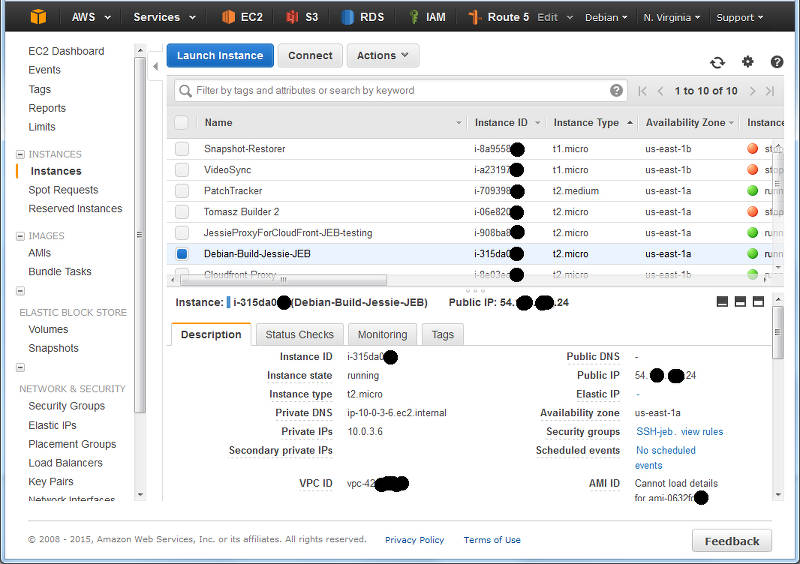
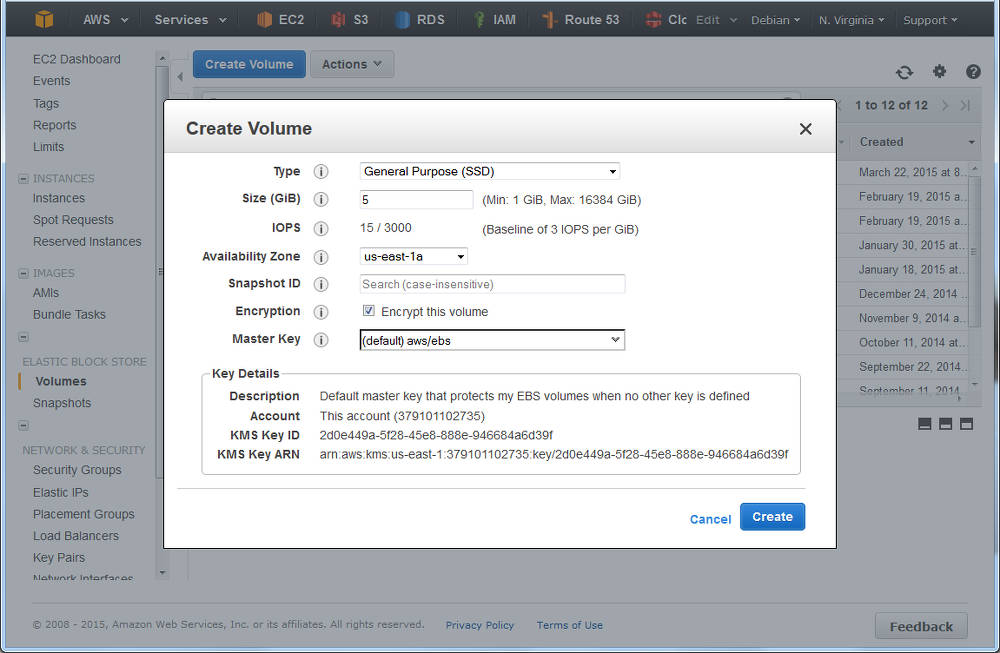
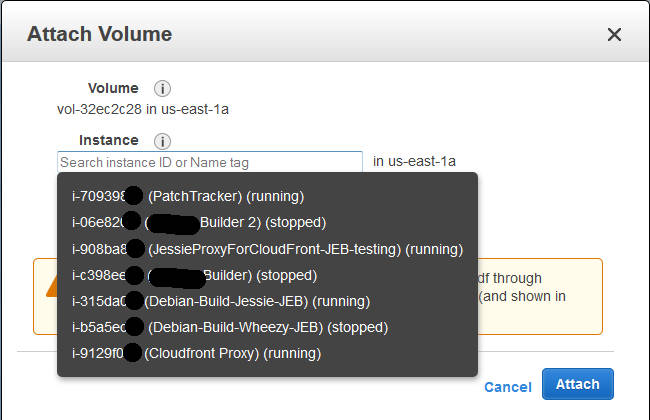
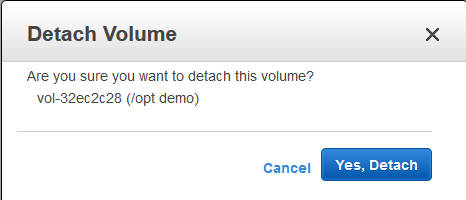
 My LTS May
With regrets I have had to realize that I'm currently to overloaded to work on Debian LTS, so we planned that I'll do 7h in May and then I would take a three months break from doing LTS work. And then I didn't even manage that, I've only managed to finally fix
My LTS May
With regrets I have had to realize that I'm currently to overloaded to work on Debian LTS, so we planned that I'll do 7h in May and then I would take a three months break from doing LTS work. And then I didn't even manage that, I've only managed to finally fix 
 While updating the
  Let us start with recalling the different actions that have to be taken when TeX packages are installed, removed, or updated.
Required actions for TeX packages
Filename database
The simplest case are packages that only include files ment to be loaded while running TeX or Metafont or similar programs. In this case the file name database of TeX (and the one of ConTeXt) needs to be updated. Usually this is done by calling mktexlsr on the changed trees, plus, if ConTeXt is installed, running mtxrun --generate.
Font map activation
More complicated are font packages that provide PostScript fonts. These packages need to ship a so called map file which maps TeX font names to PostScript fonts names. Examples are lm.map which defines this mapping for the Latin Modern fonts. All these map files have to be collected in one or more updmap.cfg files, and then a call to updmap(-sys) is necessary to generate configuration files for dvips, pdftex, and some other programs.
Format and hyphenation definitions
Even more complicated is the case of additional hyphenation patterns and additional format definitions. At the moment, hyphenation patterns are only shipped from the TeX Live packages itself, but additional format definitions are already provided by other packages than the TeX Live ones. Again, in both cases all the different format and hyphenation pattern definitions must be combined, into configuration files fmtutil.cnf and several language.* files, respectively. After this some incantation of fmtutil(-sys) is necessary to update the format dumps of TeX.
Status up to Debian/TeX Live 2014
Up to now most of these actions are done in the postinstall script of the providing packages, generated by dh_installtex. The
Let us start with recalling the different actions that have to be taken when TeX packages are installed, removed, or updated.
Required actions for TeX packages
Filename database
The simplest case are packages that only include files ment to be loaded while running TeX or Metafont or similar programs. In this case the file name database of TeX (and the one of ConTeXt) needs to be updated. Usually this is done by calling mktexlsr on the changed trees, plus, if ConTeXt is installed, running mtxrun --generate.
Font map activation
More complicated are font packages that provide PostScript fonts. These packages need to ship a so called map file which maps TeX font names to PostScript fonts names. Examples are lm.map which defines this mapping for the Latin Modern fonts. All these map files have to be collected in one or more updmap.cfg files, and then a call to updmap(-sys) is necessary to generate configuration files for dvips, pdftex, and some other programs.
Format and hyphenation definitions
Even more complicated is the case of additional hyphenation patterns and additional format definitions. At the moment, hyphenation patterns are only shipped from the TeX Live packages itself, but additional format definitions are already provided by other packages than the TeX Live ones. Again, in both cases all the different format and hyphenation pattern definitions must be combined, into configuration files fmtutil.cnf and several language.* files, respectively. After this some incantation of fmtutil(-sys) is necessary to update the format dumps of TeX.
Status up to Debian/TeX Live 2014
Up to now most of these actions are done in the postinstall script of the providing packages, generated by dh_installtex. The  Anyway, I hope to hear some feedback and installation reports.
Conclusion
While packaging has become easier for maintainers, and there is less clutter in /etc/texmf/, we now are depending on dpkg to call the tex-common triggers. Thus, if this happens rather often, then especially fmtutil-sys --all will be called several times. This is a slight regression from the previous setup, but paid off (IMNSHO) by the arguments given in the beginning.
That said, there will be of course a certain time of transition until the new setup has proven its merits, and bugs are ironed out. But having bugs that need to be mostly fixed only in one package, namely tex-common, seems like an easier task to me.
Enjoy.
Anyway, I hope to hear some feedback and installation reports.
Conclusion
While packaging has become easier for maintainers, and there is less clutter in /etc/texmf/, we now are depending on dpkg to call the tex-common triggers. Thus, if this happens rather often, then especially fmtutil-sys --all will be called several times. This is a slight regression from the previous setup, but paid off (IMNSHO) by the arguments given in the beginning.
That said, there will be of course a certain time of transition until the new setup has proven its merits, and bugs are ironed out. But having bugs that need to be mostly fixed only in one package, namely tex-common, seems like an easier task to me.
Enjoy.
 What happened about the
  I recently obtained the newest Dell's Ubuntu developer offering, XPS 13 (2015, model 9343). I opted in for FullHD non-touch display, mostly because of better battery life, the actual no need for higher resolution, and matte screen which is great outside. Touch would have been "nice-to-have", but in my work I don't really need it.


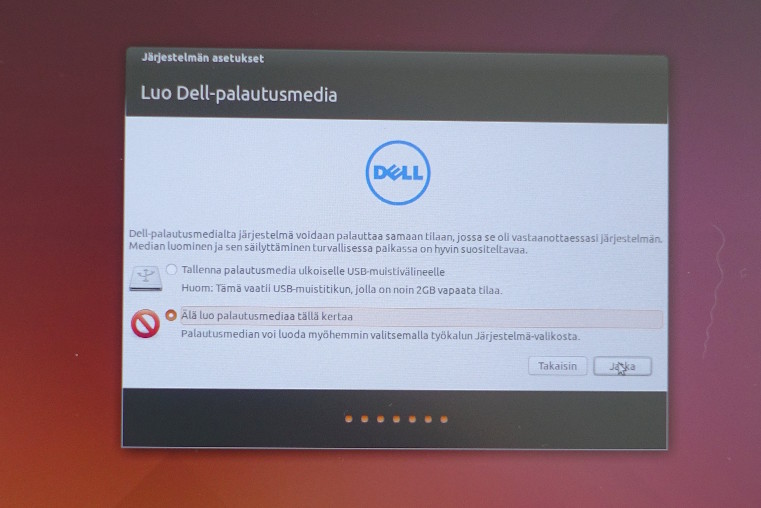
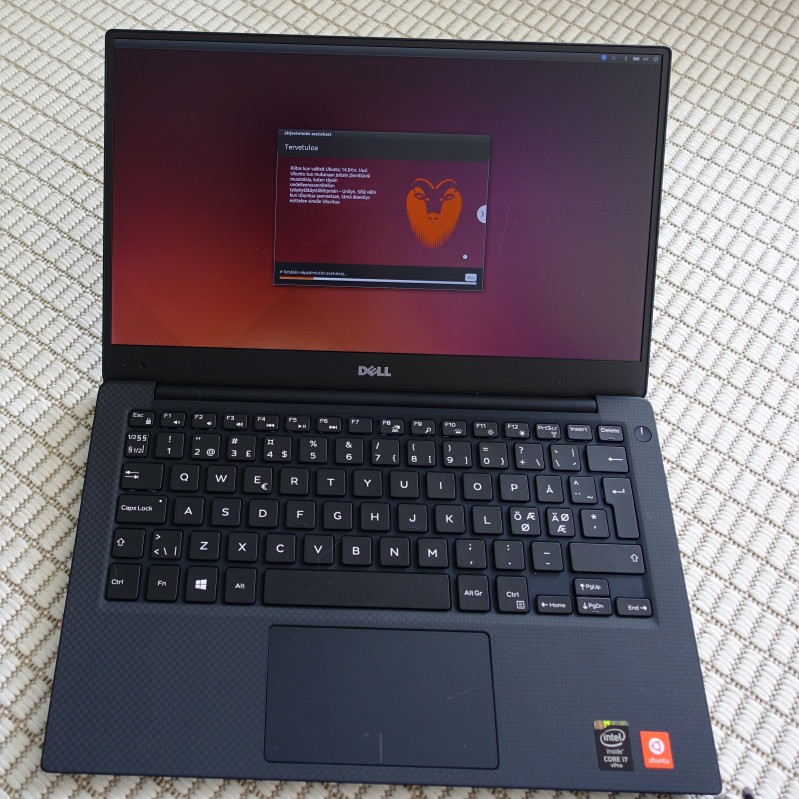
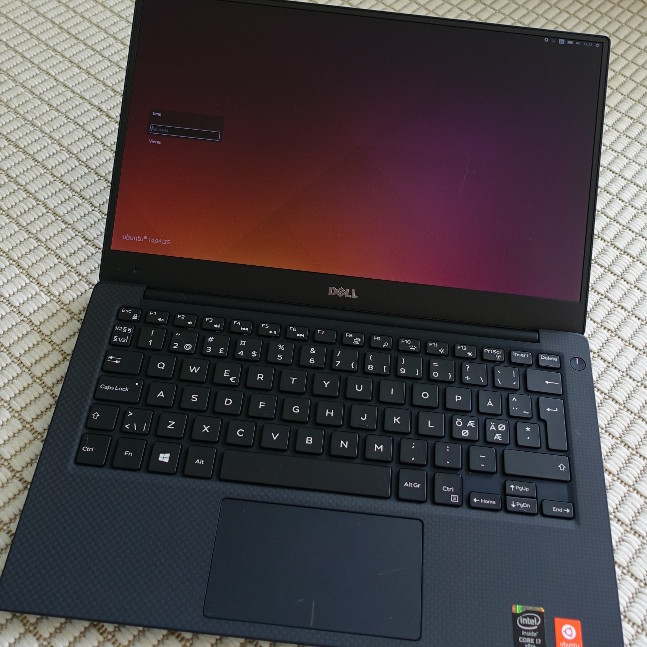

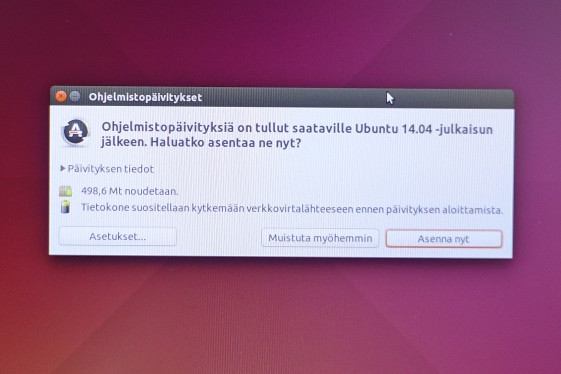


 There s a lot of things I d like to blog about. The last version of OpenStack, the OpenStack Liberty design summit, Kilo in the official jessie-backports repositories, etc. Maybe the most interesting part of this blog post is the last bit at the end, about a major change in the packaging workflow for OpenStack in Debian. Please read on
OpenStack release names reminder
There s a lot of things I d like to blog about. The last version of OpenStack, the OpenStack Liberty design summit, Kilo in the official jessie-backports repositories, etc. Maybe the most interesting part of this blog post is the last bit at the end, about a major change in the packaging workflow for OpenStack in Debian. Please read on
OpenStack release names reminder I've recently found myself explaining
 I don't often write about tools I use when for my daily software development
tasks. I recently realized that I really should start to share more often my
workflows and weapons of choice.
One thing that I have a hard time enduring while doing Python code reviews, is
people writing utility code that is not directly tied to the core of their
business. This looks to me as wasted time maintaining code that should be
reused from elsewhere.
So today I'd like to start with
I don't often write about tools I use when for my daily software development
tasks. I recently realized that I really should start to share more often my
workflows and weapons of choice.
One thing that I have a hard time enduring while doing Python code reviews, is
people writing utility code that is not directly tied to the core of their
business. This looks to me as wasted time maintaining code that should be
reused from elsewhere.
So today I'd like to start with


 So going through these explanations one will end up with a usable USB stick that can boot you into
 The random gaps (
 With a
 About 2 months ago I set a goal to run some kind of BSD on the spare Linksys NSLU2 I had. This was driven mostly by curiosity, after listening to a few