Search Results: "will"

7 June 2017

Jeremy Bicha: GNOME Tweak Tool 3.25.2

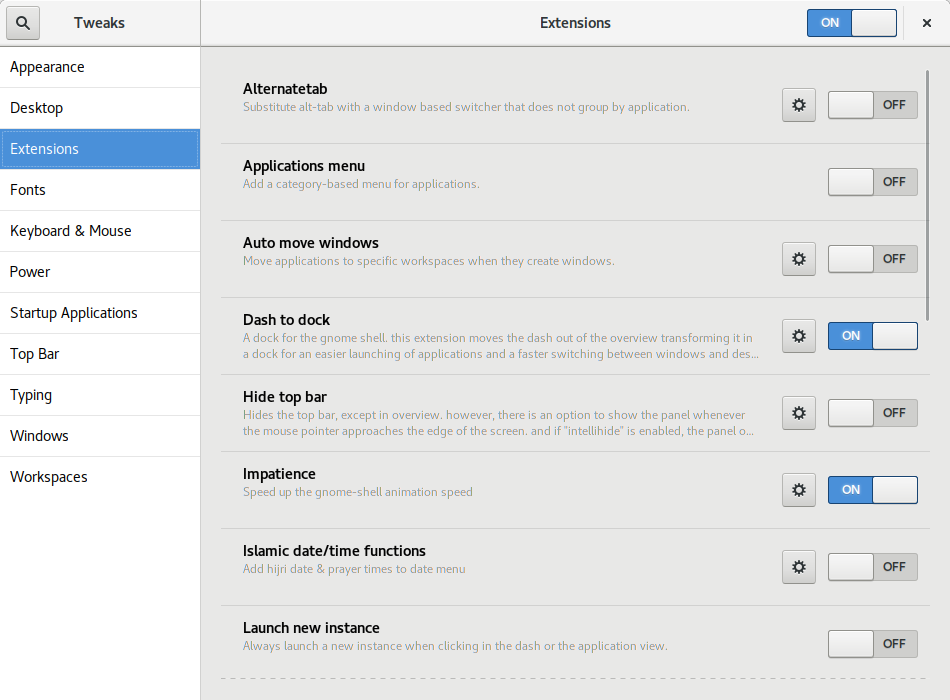
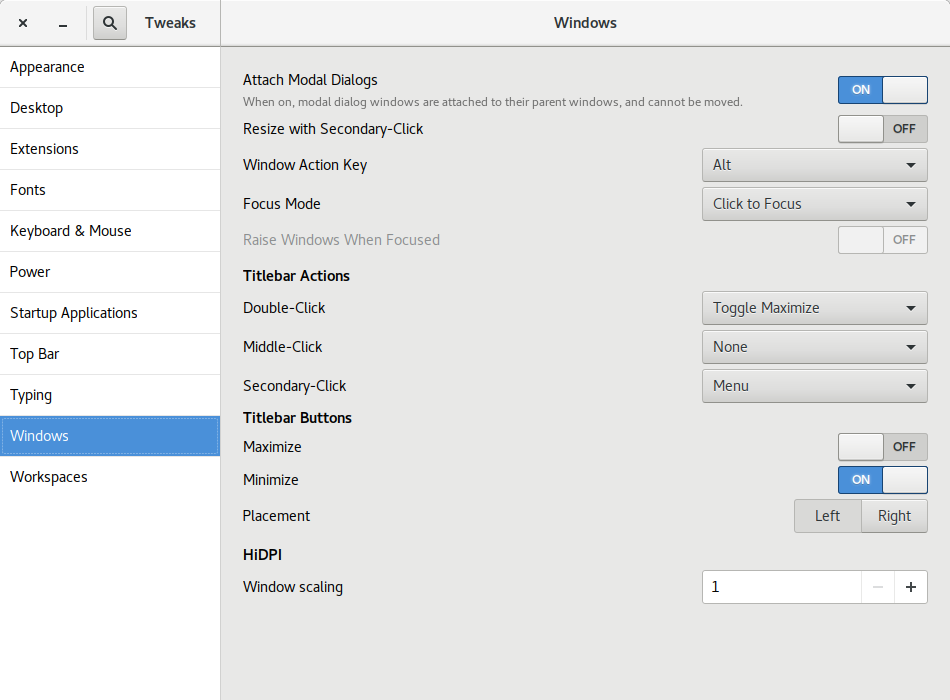
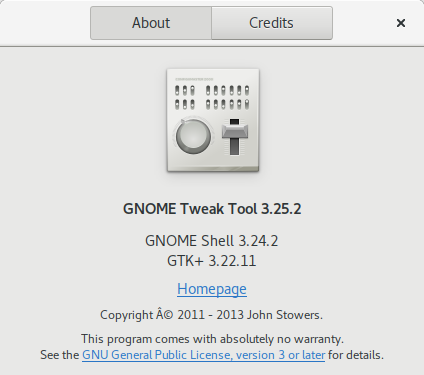
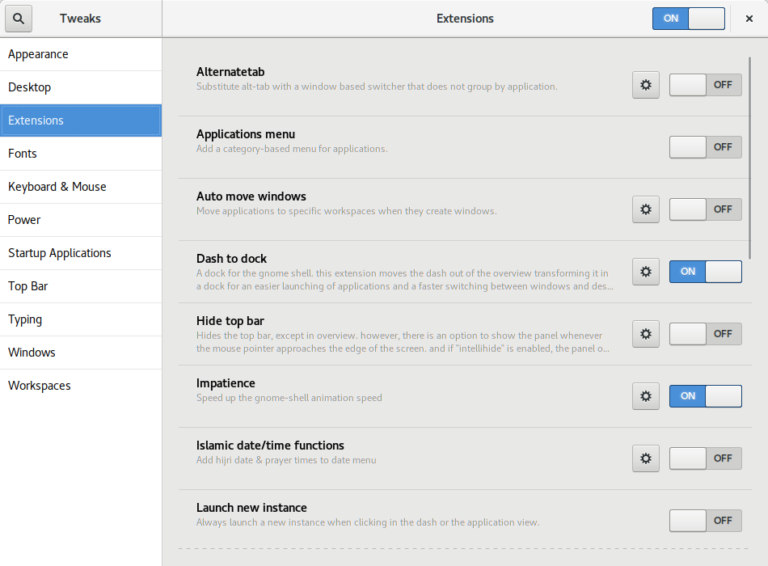
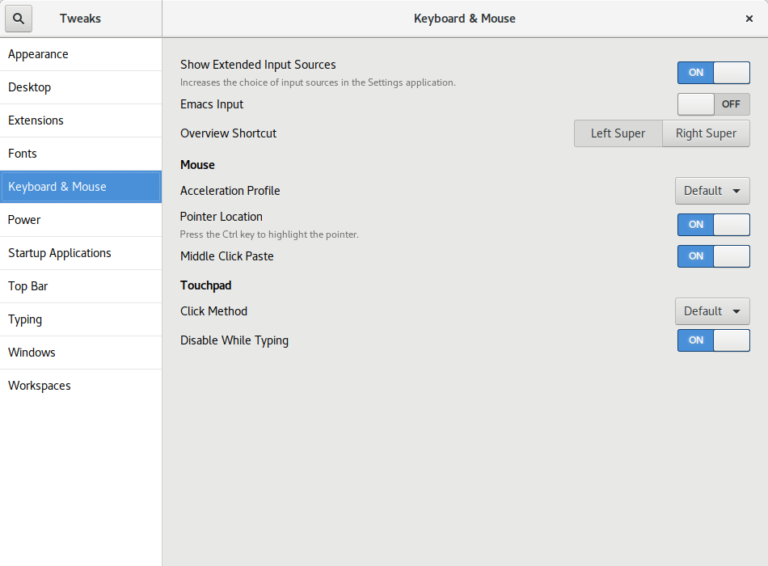
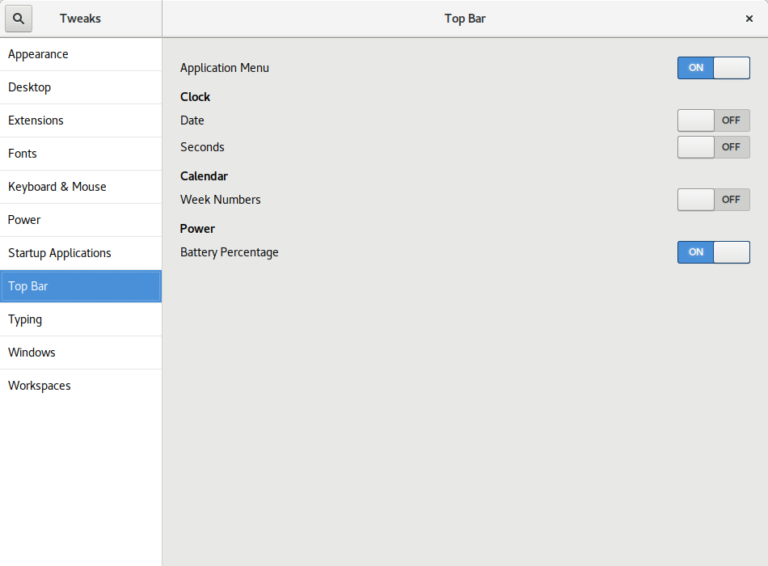
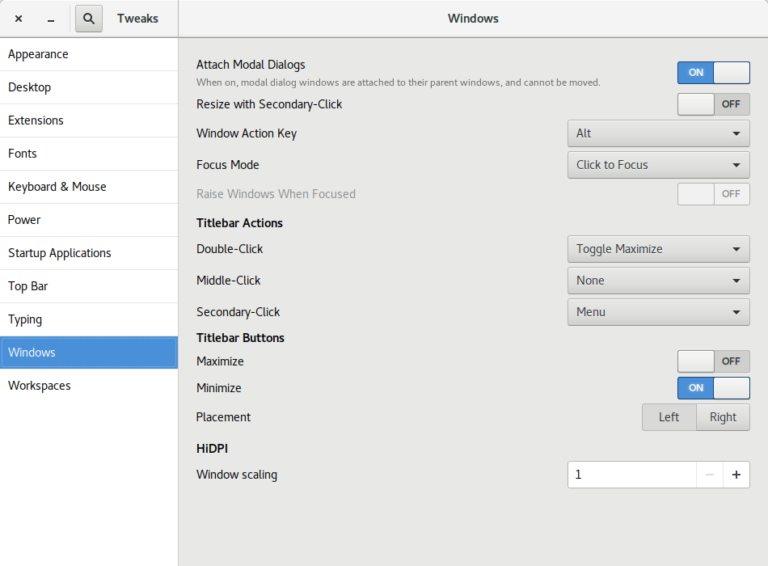
Today, I released the first development snapshot (3.25.2) of what will be GNOME Tweak Tool 3.26. Many of the panels have received UI updates. Here are a few highlights. Before this version, Tweak Tool didn t report its own version number on its About dialog! Also, as far as I know, there was no visible place in the default GNOME install for you to see what version of GTK+ is on your system. Especially now that GNOME and GTK+ releases don t share the same version numbers any more, I thought it was useful information to be in a tweak app. Florian M llner updated the layout of the GNOME Shell Extensions page: Rui Matos added a new Disable While Typing tweak to the Touchpad section. Alberto Fanjul added a Battery Percentage tweak for GNOME Shell s top bar. I added a Left/Right Placement tweak for the window buttons (minimize, maximize, close) . This screenshot shows a minimize and close button on the left. I think it s well known that Ubuntu s window buttons have been on the left for years but GNOME has kept the window buttons on the right. In fact, the GNOME 3 default is a single close button (see the other screenshots). For Unity (Ubuntu s default UI from 2011 until this year), it made sense for the buttons to be on the left because of how Unity s menu bar worked (the right side was used by the indicator system status menus). I don t believe the Ubuntu Desktop team has decided yet which side the window buttons will be on or which buttons there will be. I m ok with either side but I think I have a slight preference towards putting them on the right like Windows does. One reason I m not too worried about the Ubuntu default is that it s now very easy to switch them to the other side! If Ubuntu includes a dock like the excellent Dash to Dock in the default install, I think it makes sense for Ubuntu to add a minimize button by default. My admittedly unusual opinion is that there s no need for a maximize button.
  1. For one thing, GNOME is thoroughly tested with one window button; adding a second one shouldn t be too big of a deal, but maybe adding a 3rd button might not work as well with the design of some apps.
  2. When I maximize an app, I either double-click the titlebar or drag the app to the top of the screen so a maximize button just isn t needed.
  3. A dedicated maximize just doesn t make as much sense when there is more than one possible maximization state. Besides traditional maximize, there is now left and right semi-maximize. There s even a goal for GNOME 3.26 to support quarter-tiling .
Other Changes and Info

Michal Čihař: Gammu family releases

During last weeks I was finally able to push out some releases of Gammu and related tools. Those were mostly waiting for quite some time in Git, but still will be useful for many users. Gammu 1.38.3 brings several SMSD performance improvements (I'd like to hear feedback here how much it helped in real world workloads), fixes USSD related crashes and adds support for new devices. python-gammu 2.8 finally brings emoji fixes to Python users as well. Those were fixed in Gammu quite some time ago, but the Python API still didn't handle them properly. There was also simplification in the calls API. Wammu release will follow shortly in next days, the most important change there being license change to GPLv3 or later.

Filed under: Debian English Gammu python-gammu Wammu

6 June 2017

Gunnar Wolf: Made with Creative Commons: Starting a translation project

Dear Lazyweb, About a week ago, I learnt about the release of an interesting book by the fine people at Creative Commons: Made with Creative Commons. The book itself is, of course, CC BY-SA-licensed. I downloaded it and started reading right away. Some minutes later, I ordered a dead-tree copy, which arrived a couple of days ago. (I'm linking to the publisher's page, but bought it from Amazon M xico... Shipping it from Denmark would not have been as cheap and fast, I guess). Anyway, given my workplace, given the community I know, given I know something like this is much needed... I will start a Spanish translation of the content. There are at least two other people interested in participating, and I haven't yet publicized my intentions (this is the first public statement about it). So, dear Lazyweb: What I need is a good framework for doing this. I started by creating a Git repository, and we were discussing to translate to Markdown (to later format according to the desired output) but then I thought... If we want the translation to be updateable, and to be able to properly accept other people's work, maybe a better format is warranted? So, my current idea is to create a Markdown version for the English original, and find a way to shoehorn^Wseparate it by paragraphs and feed it to Gettext, which is the best translation framework I have used (but is meant for code translation, not for full-text)... Dear lazyweb: What tools do you recommend me to use? Quite important to me: Are they Free tools? Are they easy to use by third-parties, maybe incorporating work via Git? Or, at least, via a Web front-end that allows me as a project lead to review and approve/fix/reject strings? Thanks, lazyweb!

Reproducible builds folks: Reproducible Builds: week 110 in Stretch cycle

Here's what happened in the Reproducible Builds effort between Sunday May 28 and Saturday June 3 2017: Past an upcoming events Documentation updates Toolchain development and fixes Patches and bugs filed 4 package reviews have been added, 6 have been updated and 25 have been removed in this week, adding to our knowledge about identified issues. Weekly QA work During our reproducibility testing, FTBFS bugs have been detected and reported by: diffoscope development tests.reproducible-builds.org Mattia Rizzolo: Daniel Kahn Gillmor: Vagrant Cascadian: Holger Levsen: Misc. This week's edition was written by Chris Lamb, Bernhard M. Wiedemann and Holger Levsen & reviewed by a bunch of Reproducible Builds folks on IRC & the mailing lists.

4 June 2017

Dirk Eddelbuettel: RcppArmadillo 0.7.900.2.0

armadillo image The new RcppArmadillo release 0.7.900.2.0 is now on CRAN, and the Debian package was just updated as well. Armadillo is a powerful and expressive C++ template library for linear algebra aiming towards a good balance between speed and ease of use with a syntax deliberately close to a Matlab. RcppArmadillo integrates this library with the R environment and language--and is widely used by (currently) 350 other packages on CRAN---an increase of 32 since the last CRAN release of 0.7.800.2.0 in April! With the 7.900.* series of Armadillo, Conrad has started to more fully utilize OpenMP (also see Wikipedia on OpenMP) for operations that can be parallelized. To use this in your package you need to update its src/Makevars ,.win file similarly to what the skeleton default now uses
PKG_CXXFLAGS = $(SHLIB_OPENMP_CXXFLAGS) 
PKG_LIBS = $(SHLIB_OPENMP_CFLAGS) $(LAPACK_LIBS) $(BLAS_LIBS) $(FLIBS)
and you may want to enable C++11 while you are at it---though this may pose issues with older-than-ancient RHEL installations which are still (way too) pervasive so we do not do it by default (yet). Here, we once again rely on the build infrastructure automagically provided by R itself: if and when OpenMP is available, R will use it via $(SHLIB_OPENMP_CXXFLAGS) etc; see the fine WRE manual for details. That said, some operating systems make this harder than other, and macOS usually takes the crown. See for example this blog post by James for surviving in that environment. I am a little short of details because on Linux these things just work, and have for well over a decade. The rcpp-devel mailing list will be the best place for questions. Changes in this release relative to the previous CRAN release are as follows:

Changes in RcppArmadillo version 0.7.900.2.0 (2017-06-02)
  • Upgraded to Armadillo release 7.900.2 (Evil Banana Republic)
    • Expanded clamp() to handle cubes
    • Computationally expensive element-wise functions (such as exp(), log(), cos(), etc) can now be automatically sped up via OpenMP; this requires a C++11/C++14 compiler with OpenMP 3.0+ support for GCC and clang compilers
    • One caveat: when using GCC, use of -march=native in conjunction with -fopenmp may lead to speed regressions on recent processors
  • Added gcc 7 to support compiler check (James Balamuta in #128 addressing #126).
  • A unit test helper function for rmultinom was corrected (#133).
  • OpenMP support was added to the skeleton helper in inline.R

Courtesy of CRANberries, there is a diffstat report. More detailed information is on the RcppArmadillo page. Questions, comments etc should go to the rcpp-devel mailing list off the R-Forge page.

This post by Dirk Eddelbuettel originated on his Thinking inside the box blog. Please report excessive re-aggregation in third-party for-profit settings.

Lars Wirzenius: Vmdb2 first alpha release: Debian disk image creation tool

tl;dr: Get vmdebootstrap replacement from http://git.liw.fi/vmdb2 and run it from the source tree. Tell me if something doesn't work. Send patches. Many years ago I wrote vmdebootstrap, a tool for installing Debian on a disk image for virtual machines. I had a clear personal need: I was setting up a CI system and it needed six workers: one each for Debian oldstable, stable, and unstable, on two architectures (i386, amd64). Installing Debian six times in the same way is a lot of work, so I figured how difficult can it be to automate it. Turns out that not difficult at all, except to install a bootloader. (Don't ask me why I didn't use any of the other tools for this. It was long ago, and while some of the tools that now exist probably did exist then, I like writing code and learning things while doing it.) After a while I was happy with what the program did, but didn't want to upload it to Debian, and didn't want to add the kinds of things other people wanted, so I turned vmdebootstrap over to Neil Williams, who added a ton of new features. Unfortunately, it turned out that my initial architecture was not scaleable, and also the code I wrote wasn't very good, and there weren't any tests. Neil did heroic work forcing my crappy software into doing things I never envisioned. Last year he needed a break and asked me to take vmdebootstrap back. I did, and have been hiding from the public eye ever since, since I was so ashamed of the code. (I created a new identity and pretended to be an international assassin and backup specialist, travelling the world forcing people to have at least one tested backup of their system. If you've noticed reports in the press about people reporting near-death experiences while holding a shiny new USB drive, that would've been my fault.) Pop quiz: if you have a program with ten boolean options ("do this, except if that option is given, do the other thing"), how many black box tests do you need to test all the functionality? If one run of the program takes half an hour, how long will a full test suite run? I did some hard thinking about vmdebootstrap, and came to the sad conclusion that it had reached the end of its useful life as a living software project. There was no reasonable way to add most of the additional functionality people were asking for, and even maintaining the current code was too tedious a task to consider seriously. It was time to make a clean break of the past and start over, without caring about backwards compatibility. After all, the old code wasn't going anywhere so anyone who needed it could still use it. There was no need to burden a new program with my past mistakes. All new mistakes were called for. At the Cambridge mini-Debconf of November, 2016, I gave a short presentation of what I was going to do. I also posted about my plans to the debian-cloud list. In short, I would write a new, more flexible and cleaner replacement to be called vmdb2. For various personal reasons, I've not been able to spend as much time on vmdb2 as I'd like to, but I've now reached the point where I'd like to announce the first alpha version publically. The source code is hosted here: http://git.liw.fi/vmdb2 . There are .deb packages at my personal public APT repo (http://liw.fi/code/), but vmdb2 is easy enough to run directly from a git checkout:
sudo ./vmdb2 foo.vmdb --output foo.img
There's no need to install it to try it. What works: What doesn't work: I'm not opposed to adding support for those, but they're not directly interesting to me. For example, I only have amd64 machines. The best way to get support for additional features is to tell me how, preferably in the form of patches. (If I have to read tons of docs, or other people's code, and then write code and iterate while other people tell me it doesn't work, it's probably not happening.) Why would you be interested in vmdb2? There's a lot of other tools to do what it does, so perhaps you shouldn't care. That's fine. I like writing tools for myself. But if this kind of tool is of interest to you, please do have a look. A short tutorial: vmdb2 wants you to give it a "specification file" (conventionally suffixed .vmdb, because someone stole the .spec suffix, but vmdb2 doesn't care about the name). Below is an example. vmdb2 image specification files are in YAML, since I like YAML, and specify a sequence of steps to take to build the image. Each step is a tiny piece of self-contained functionality provided by a plugin.
steps:
  - mkimg: "  output  "
    size: 4G
  - mklabel: msdos
    device: "  output  "
  - mkpart: primary
    device: "  output  "
    start: 0%
    end: 100%
    part-tag: root-part
The above create an image (name is specified with the --output option), which is four gigabytes in size, and create a partitition table and a single partition that fills the whole disk. The "tag" is given so that later steps can easily refer to the partition. If you prefer another way to partition the disk, you can achieve that by adding more "mkpart" steps. For example, for UEFI you'll want to have an EFI partition.
  - mkfs: ext4
    partition: root-part
  - mount: root-part
    fs-tag: root-fs
The above formats the partition with the ext4 filesystem, and then mounts it. The mount point will be a temporary directory created by vmdb2, and a tag is again given to the mount point so it can be referred to.
  - unpack-rootfs: root-fs
The above unpacks a tar archive to put content into the filesystem, if the tar archive exists. The tar archive is specified with the --rootfs-tarball command line option.
  - debootstrap: stretch
    mirror: http://http.debian.net/debian
    target: root-fs
    unless: rootfs_unpacked
  - apt: linux-image-amd64
    fs-tag: root-fs
    unless: rootfs_unpacked
  - cache-rootfs: root-fs
    unless: rootfs_unpacked
The above will run debootstrap and install a kernel into the filesystem, but skip doing that if the rootfs tarball was used. Also, the tarball is created if it didn't exist. This way the tarball is used by all but the first run, which saves a bit of time. On my laptop and with a local mirror, debootstrap and kernel installation takes on the order of nine minutes (500 to 600 seconds), whereas unpacking the tar archive is a bit faster (takes around 30 seconds). When iterating over things other than debootstrap, this speeds things up something wonderful, and seems worth the complexity. The "unless:" mechanism is generic. All the steps share some state, and the unpack-rootfs step sets the "rootfs_unpacked" flag in the shared state. The "unless:" field tells vmdb2 to check for the flag and if it is not set, or if it is set to false ("unless it is set to true"), vmdb2 will execute the step. vmdb2 may get more such flags in the future, if there's need.
  - chroot: root-fs
    shell:  
      sed -i '/^root:[^:]*:/s//root::/' /etc/passwd
      echo pc-vmdb2 > /etc/hostname
The above executes a couple of shell commands in a chroot of the root filesystem we've just created. In this case they remove a login password from root, and set the hostname. This is a replacement of the vmdebootstrap "customize" script, but it can be inserted anywhere into the sequence of steps. There's boot chroot and non-chroot variants of the step. This is a good point to mention that writing customize scripts gets quite repetitive and tedious after a while, so vmdb2 has a plugin to run Ansible instead. You can customize your image with that instead, while the image is being built and not have to wait until you boot the image and running Ansible over ssh.
  - grub: bios
    root-fs: root-fs
    root-part: root-part
    device: "  output  "
    console: serial
Finally, install a boot loader, grub. This shows the BIOS variant, UEFI is also supported. This also configures grub and the kernel to use a serial console. There's a "yarn" (test suite) to build and smoke test an image with vmdb2 to make sure at least the basic functionality works. The smoke test boots the image under Qemu, logs in as root, and tells the VM to power off. Very, very basic, but has already found actual bugs in vmdb2. The smoke test needs the serial console to work. As with vmdebootstrap originally, I don't particularly want to maintain the package in Debian. I've added Debian packaging (so that I can install it on my own machines), but I already have enough packages to maintain, so I'm hoping someone else will volunteer to take on the Debian maintainership and bug handling duties. If you would like vmdb2 to do more things to suit you better, I'm happy to explain how to write plugins to provide more types of steps. If you are currently using vmdebootstrap, either directly or as part of another tool, I encourage you to have a look at vmdb2. In the long term, I would like to retire vmdebootstrap entirely, once vmdb2 can do everything vmdebootstrap can do, and few people use vmdebootstrap. This may take a while. In any case, whether you want a new image building tool or not, happy hacking.

3 June 2017

Norbert Preining: TeX Live 2017 released

TeX Live 2017 has been released! CTAN mirrors are busy updating. Get out bottles of good wine, and enjoy a good long download
Besides the huge amount of package updates due to the 2 month testing hiatus, I want to pick a few changes before copying the complete changelog entry: Additional TEXMF trees tlmgr got a new functionality to easily add and remove additional TEXMF trees to the search path. MikTeX had this features since long, and it was often requested. As it turned out, it is a rather trivial thing to achieve by some texmf.cnf lines. The rest is just front end in tlmgr. Here a few invocations (not very intelligent usage, though):

$ tlmgr conf auxtrees show
tlmgr: no auxiliary texmf trees defined.
$ tlmgr conf auxtrees add /projects/book-abc
$ tlmgr conf auxtrees
List of auxiliary texmf trees:
  /projects/book-abc
$ tlmgr conf auxtrees remove /projects/book-abc
$ tlmgr conf auxtrees show
tlmgr: no auxiliary texmf trees defined.
TeX Live Manager interactive shell tlmgr also got an interactive shell now, that can also be used for scripting. Available commands are all the usual command line actions, plus a few more (see documentation). Again, here a simple session:
$ tlmgr shell
protocol 1
tlmgr> load local
OK
tlmgr> load remote
tlmgr: package repositories
	main = /home/norbert/public_html/tlnet (verified)
	koma = http://www.komascript.de/repository/texlive/2017 (verified)
OK
tlmgr> update --list
tlmgr: package repositories
	main = /home/norbert/public_html/tlnet (verified)
	koma = http://www.komascript.de/repository/texlive/2017 (verified)
tlmgr: saving backups to /home/norbert/tl/2017/tlpkg/backups
tlmgr: no updates available
OK
tlmgr> byebye
$
User versus System mode for updmap and fmtutil I have reported on this during BachoTeX/TUG 2017, here are the slides, that the two central configuration programs updmap and fmtutil will change their operation mode slightly by disallowing invocations without mde specification. That is, one either needs to call updmap -sys (or updmap-sys, nothing changed here from previous years) or updmap -user (or updmap-user, new in TeX Live 2017). We hope by this and the accompanying web page of recommendations to help users not to shoot themselves to often by calling updmap without knowing the consequences. The upcoming proceedings of the BachoTeX will also comtain an article fully documenting both updmap and fmtutil including the most recent changes.
These were only a few changes where I had my fingers in the development. For the full list, read on below. Now get ready for partying, and also for the end of the peace, because daily package updates will restart in the next days. Enjoy Changes since TeX Live 2016 The following list of changes is directly from the TeX Live documentation.

2 June 2017

Evgeni Golov: Breaking glass, OnePlus service and Android backups

While visiting our Raleigh office, I managed to crack the glass on the screen of my OnePlus 3. Luckily it was a clean crack from the left upper corner, to the right lower one. The crack was not really interfering with neither touch nor display, so I had not much pressure in fixing it. eBay lists new LCD sets for 110-130 , and those still require manual work of getting the LCD assembly out of the case, replacing it, etc. There are also glass-only sets for ~20 , but these require the complete removal of the glued glass part from the screen, and reattaching it, nothing you want to do at home. But there is also still the vendor, who can fix it, right? Internet suggested they would do it for about 100 , which seemed fair. As people have been asking about the support experience, here is a quick write up what happened:
  • Opened the RMA request online on Sunday, providing a brief description of the issue and some photos
  • Monday morning answer from the support team, confirming this is way out of warranty, but I can get the device fixed for about 93
  • After confirming that the extra cost is expected, I had an UPS sticker to ship the device to CTDI in Poland
  • UPS even tried a pick-up on Tuesday, but I was not properly prepared, so I dropped the device later at a local UPS point
  • It arrived in Poland on Wednesday
  • On Thursday the device was inspected, pictures made etc
  • Friday morning I had a quote in my inbox, asking me to pay 105 - the service partner decided to replace the front camera too, which was not part of the original 93 approximation.
  • Paid the money with my credit card and started waiting.
  • The actual repair happened on Monday.
  • Quality controlled on Tuesday.
  • Shipped to me on Wednesday.
  • Arrived at my door on Thursday.
All in all 9 working days, which is not great, but good enough IMHO. And the repair is good, and it was not (too) expensive. So I am a happy user of an OnePlus 3 again. Well, almost. Before sending the device for repairs, had to take a backup and wipe it. I would not send it with my, even encrypted, data on it. And backups and Android is something special. Android will backup certain data to Google, if you allow it to. Apps can forbid that. Sadly this also blocks non-cloud backups with adb backup. So to properly backup your system, you either need root or you create a full backup of the system in the recovery and restore that. I did the backup using TWRP, transferred it to my laptop, wiped the device, sent it in, got it back, copied the backup to the phone, restored it and... Was locked out of the device, it would not take my password anymore. Well, it seems that happens, just delete some files and it will be fine. It's 2017, are backups of mobile devices really supposed to be that hard?!

1 June 2017

Thorsten Alteholz: My Debian Activities in May 2017

FTP assistant This month I only marked 39 packages for accept and rejected 5 packages. Debian LTS This was my thirty-fifth month that I did some work for the Debian LTS initiative, started by Raphael Hertzog at Freexian. This month my all in all workload has been 27.25h. During that time I did LTS uploads or prepared one for Jessie/Sid: For [DLA 948-1] dropbear and [DLA 958-1] libonig I only did the LTS bookkeeping and sent the DLA. The icu upload would not have been possible without the help of Roberto. I also tried to work on jasper, libxml2, libytnef and swftools but unfortunately all upstreams did not finish their respective patches this month, so maybe there will be an upload in June. Other stuff Again this has been a busy LTS month, so I only uploaded a new version of smstools, which closed most of its bugs and adopted adopted ptpd as DOPOM. As a prerequisite of wview I uploaded radlib. Unfortunately I could not do anything for wview, so work on this has to be postponed. Another new package is te923con, which I hope is able to read data from my weather station. Last but no least I fixed an RC bug in alljoyn-services-1504.

Steve Kemp: So I accidentally wrote a linux security module

Tonight I read this weeks LWN quotes-page a little later than usual because I was busy at work for most of the day. Anyway as always LWNs content was awesome, and this particular list lead to an interesting discussion about a new Linux-Security-Module (LSM).
That read weirdly, what I was trying to say was that every Thursday morning I like to read LWN at work. Tonight is the first chance I had to get round to it.
One of the later replies in the thread was particularly interesting as it said:
Suggestion:
Create an security module that looks for the attribute
    security.WHITELISTED
on things being executed/mmapped and denys it if the attribute
isn't present. Create a program (whitelistd) that reads
/etc/whitelist.conf and scans the system to ensure that only
things on the list have the attribute.
So I figured that was a simple idea, and it didn't seem too hard even for myself as a non-kernel non-developer. There are several linux security modules included in the kernel-releases, beneath the top-level security/ directory, so I assumed I could copy & paste code around them to get something working. During the course of all this work, which took about 90 minutes from start to Finnish (that pun never gets old), this online documentation was enormously useful: Brief attr primer If you're not familiar with the attr tool it's pretty simple. You can assign values to arbitrary labels on files. The only annoying thing is you have to use extra-flags to commands like rsync, tar, cp, etc, to preserve the damn things. Set three attributes on the file named moi:
$ touch moi
$ attr -s forename -V "Steve"      moi
$ attr -s surname  -V "Kemp"       moi
$ attr -s name     -V "Steve Kemp" moi
Now list the attributes present:
$ attr -l moi
Attribute "name" has a 10 byte value for moi
Attribute "forename" has a 5 byte value for moi
Attribute "surname" has a 4 byte value for moi
And retrieve one?
$ attr -q -g name moi
Steve Kemp
LSM Skeleton My initial starting point was to create "steve_lsm.c", with the following contents:
 #include <linux/lsm_hooks.h>
 /*
  * Log things for the moment.
  */
 static int steve_bprm_check_security(struct linux_binprm *bprm)
  
     printk(KERN_INFO "STEVE LSM check of %s\n", bprm->filename);
     return 0;
  
 /*
  * Only check exec().
  */
 static struct security_hook_list steve_hooks[] =  
     LSM_HOOK_INIT(bprm_check_security, steve_bprm_check_security),
  ;
 /*
  * Somebody set us up the bomb.
  */
 static void __init steve_init(void)
  
     security_add_hooks(steve_hooks, ARRAY_SIZE(steve_hooks), "steve");
     printk(KERN_INFO "STEVE LSM initialized\n");
  
With that in place I had to modify the various KBuild files beneath security/ to make sure this could be selected as an LSM, and add in a Makefile to the new directory security/steve/. With the boiler-plate done though, and the host machine rebooted into my new kernel it was simple to test things out. Obviously the first step, post-boot, is to make sure that the module is active, which can be done in two ways, looking at the output of dmesg, and explicitly listing the modules available:
 ~# dmesg   grep STEVE   head -n2
 STEVE LSM initialized
 STEVE LSM check of /init
 $ echo $(cat /sys/kernel/security/lsm)
 capability,steve
Making the LSM functional The next step was to make the module do more than mere logging. In short this is what we want: NOTE we don't care what the content of the extended attribute is, we just care whether it exists or not. Reading the extended attribute is pretty simple, using the __vfs_getxattr function. All in all our module becomes this:
  #include <linux/xattr.h>
  #include <linux/binfmts.h>
  #include <linux/lsm_hooks.h>
  #include <linux/sysctl.h>
  #include <linux/ptrace.h>
  #include <linux/prctl.h>
  #include <linux/ratelimit.h>
  #include <linux/workqueue.h>
  #include <linux/string_helpers.h>
  #include <linux/task_work.h>
  #include <linux/sched.h>
  #include <linux/spinlock.h>
  #include <linux/lsm_hooks.h>
  /*
   * Perform a check of a program execution/map.
   *
   * Return 0 if it should be allowed, -EPERM on block.
   */
  static int steve_bprm_check_security(struct linux_binprm *bprm)
   
         // The current task & the UID it is running as.
         const struct task_struct *task = current;
         kuid_t uid = task->cred->uid;
         // The target we're checking
         struct dentry *dentry = bprm->file->f_path.dentry;
         struct inode *inode = d_backing_inode(dentry);
         // The size of the label-value (if any).
         int size = 0;
         // Root can access everything.
         if ( uid.val == 0 )
            return 0;
         size = __vfs_getxattr(dentry, inode, "user.whitelisted", NULL, 0);
         if ( size >= 0 )
          
             printk(KERN_INFO "STEVE LSM check of %s resulted in %d bytes from 'user.whitelisted' - permitting access for UID %d\n", bprm->filename, size, uid.val );
             return 0;
          
         printk(KERN_INFO "STEVE LSM check of %s denying access for UID %d [ERRO:%d] \n", bprm->filename, uid.val, size );
         return -EPERM;
   
  /*
   * The hooks we wish to be installed.
   */
  static struct security_hook_list steve_hooks[] =  
       LSM_HOOK_INIT(bprm_check_security, steve_bprm_check_security),
   ;
  /*
   * Initialize our module.
   */
  void __init steve_add_hooks(void)
   
       /* register ourselves with the security framework */
       security_add_hooks(steve_hooks, ARRAY_SIZE(steve_hooks), "steve");
       printk(KERN_INFO "STEVE LSM initialized\n");
   
Once again we reboot with this new kernel, and we test that the LSM is active. After the basic testing, as before, we can now test real functionality. By default no binaries will have the attribute we look for present - so we'd expect ALL commands to fail, unless executed by root. Let us test that:
~# su - nobody -s /bin/sh
No directory, logging in with HOME=/
Cannot execute /bin/sh: Operation not permitted
That looks like it worked. Let us allow users to run /bin/sh:
 ~# attr -s whitelisted -V 1 /bin/sh
Unfortunately that fails, because symlinks are weird, but repeating the test with /bin/dash works as expected:
 ~# su - nobody -s /bin/dash
 No directory, logging in with HOME=/
 Cannot execute /bin/dash: Operation not permitted
 ~# attr -s whitelisted -V 1 /bin/dash
 ~# attr -s whitelisted -V 1 /usr/bin/id
 ~# su - nobody -s /bin/dash
 No directory, logging in with HOME=/
 $ id
 uid=65534(nobody) gid=65534(nogroup) groups=65534(nogroup)
 $ uptime
 -su: 2: uptime: Operation not permitted
And our logging shows the useful results as we'd expect:
  STEVE LSM check of /usr/bin/id resulted in 1 bytes from 'user.WHITELISTED' - permitting access for UID 65534
  STEVE LSM check of /usr/bin/uptime denying access for UID 65534 [ERRO:-95]
Surprises If you were paying careful attention you'll see that we changed what we did part-way through this guide. Not sure what is going on there, but it was very confusing. It appears to be the case that when you set an attribute a secret user. prefix is added to the name. Could be worth some research by somebody with more time on their hands than I have. Anyway I don't expect this is a terribly useful module, but it was my first, and I think it should be pretty stable. Feedback on my code certainly welcome!

Ben Hutchings: Debian LTS work, May 2017

I was assigned 15 hours of work by Freexian's Debian LTS initiative and carried over 3 hours. I worked 13 hours and will carry over 5 hours. I prepared a security update for sudo and issued DLA-970-1. I backported several security fixes for the Linux kernel, but have not yet uploaded a new version. I also continued catching up with the backlog of fixes for the Linux 3.2 longterm stable branch.

Rapha&#235;l Hertzog: My Free Software Activities in May 2017

My monthly report covers a large part of what I have been doing in the free software world. I write it for my donors (thanks to them!) but also for the wider Debian community because it can give ideas to newcomers and it s one of the best ways to find volunteers to work with me on projects that matter to me. Debian LTS I was allocated 12 hours to work on security updates for Debian 7 Wheezy. During this time I did the following: Misc Debian work Debian Handbook. I started to work on the update of the Debian Administrator s Handbook for Debian 9 Stretch. As part of this, I noticed a regression in dblatex and filed this issue both in the upstream tracker and in Debian and got that issue fixed in sid and stretch (sponsored the actual upload, filed the unblock request). I also stumbled on a regression in dia which was due to an incorrect Debian-specific patch that I reverted with a QA upload since the package is currently orphaned. Django. On request of Scott Kitterman, I uploaded a new security release of Django 1.8 to jessie-backports but that upload got rejected because stretch no longer has Django 1.8 and I m not allowed to maintain that branch in that repository. Ensued a long and heated discussion that has no clear resolution yet. It seems likely that some solution will be found for Django (the 1.8.18 that was rejected was accepted as a one-time update already, and our plans for the future make it clear that we would have like to have an LTS version in stretch in the first place) but the backports maintainers are not willing to change the policy to accomodate for other similar needs in the future. The discussion has been complicated by the intervention of Neil Williams who brought up an upgrade problem of lava-server (#847277). Instead of fixing the root-problem in Django (#863267), or adding a work-around in lava-server s code, he asserted that upgrading first to Django 1.8 from jessie-backports was the only upgrade path for lava-server. Thanks See you next month for a new summary of my activities.

No comment Liked this article? Click here. My blog is Flattr-enabled.

Markus Koschany: My Free Software Activities in May 2017

Welcome to gambaru.de. Here is my monthly report that covers what I have been doing for Debian. If you re interested in Java, Games and LTS topics, this might be interesting for you. Debian Games Bug fixes New upstream release Debian Java Debian LTS This was my fifteenth month as a paid contributor and I have been paid to work 27,25 hours on Debian LTS, a project started by Rapha l Hertzog. In that time I did the following: Misc Thanks for reading and see you next time.

31 May 2017

Enrico Zini: Debian Jessie Live on UEFI part 2

A refinement on my previous attempt. This is how to configure a Jessie live-build environment to boot on UEFI systems, and get a USB key image that works:
# Build a FAT image instead of an ISO image...
lb config -b hdd
# ...and work around #773833
echo "/usr/lib/syslinux/mbr/*.bin /usr/lib/syslinux/" > hooks/9000-fix-773833.chroot
# Get EFI Shell from https://svn.code.sf.net/p/edk2/code/trunk/edk2/ShellBinPkg/UefiShell/X64/
curl -o binary/efi/boot/Bootx64.efi https://svn.code.sf.net/p/edk2/code/trunk/edk2/ShellBinPkg/UefiShell/X64/Shell.efi
# Configure the EFI shell to boot the live setup
echo 'live\vmlinuz initrd=live\initrd.img append boot=live components' > binary/startup.nsh
Rationale: UEFI understants FAT filesystems, and would run EFI binaries placed under efi/boot. For a hard drive, it only considers a FAT filesystem on a GPT partition marked with a special UUID, so that it doesn't get confused with other FAT filesystems that are on disk. For a USB key, it seems that most hardware will happily look for efi/boot even if the partition table is the old MBR kind. live-build can build a FAT image for USB keys, losing the ability to boot on CDROMs and DVDs. Since I don't need that ability, I can use -b hdd to get the live system packaged inside a container that UEFI hardware can understand (FAT). At that point, enabling UEFI boot on a Live Debian Jessie is just a matter of adding an efi/boot/Bootx64.efi binary that is able to load the kernel and initrd in memory, and blow life into them.

Chris Lamb: Free software activities in May 2017

Here is my monthly update covering what I have been doing in the free software world (previous month):
Reproducible builds

Whilst anyone can inspect the source code of free software for malicious flaws, most software is distributed pre-compiled to end users. The motivation behind the Reproducible Builds effort is to permit verification that no flaws have been introduced either maliciously or accidentally during this compilation process by promising identical results are always generated from a given source, thus allowing multiple third-parties to come to a consensus on whether a build was compromised. (I have generously been awarded a grant from the Core Infrastructure Initiative to fund my work in this area.) This month I:
I also made the following changes to our tooling:
diffoscope

diffoscope is our in-depth and content-aware diff utility that can locate and diagnose reproducibility issues.

  • Don't fail when run under perversely-recursive input files. (#780761).

strip-nondeterminism

strip-nondeterminism is our tool to remove specific non-deterministic results from a completed build.

  • Move from verbose_print to nonquiet_print so we print when normalising a file. This is so we can start to target the removal of strip-nondeterminism itself.
  • Only print log messages by default if the file was actually modified. (#863033)
  • Update package long descriptions to clarify that the tool itself is a temporary workaround. (#862029)


Debian My activities as the current Debian Project Leader are covered in my "Bits from the DPL" email to the debian-devel-announce list. However, I:
  • Represented Debian at the OSCAL 2017 in Tirana, Albania.
  • Attended the Reproducible Builds hackathon in Hamburg, Germany. (Report)
  • Finally, I attended Debian SunCamp 2017 in Lloret de Mar in Catalonia, Spain.

Patches contributed
  • xarchiver: Adding files to .tar.xz deletes existing content. (#862593)
  • screen-message: Please invert the default colours. (#862056)
  • fontconfig: fc-cache returns with exit code 0 on 256 errors. (#863427)
  • quadrapassel: Segfaults when unpausing a paused finished game. (#863106)
  • camping: Broken symlink. (#861040)
  • dns-root-data: Does not build if /bin/sh is Bash. (#862252)
  • dh-python: bit.ly link doesn't work anymore. (#863074)

Debian LTS

This month I have been paid to work 18 hours on Debian Long Term Support (LTS). In that time I did the following:
  • "Frontdesk" duties, triaging CVEs, adding links to upstream patches, etc.
  • Issued DLA 930-1 fixing a remote application crash vulnerability in libxstream-java, a Java library to serialize objects to XML and back again
  • Issued DLA 935-1 correcting a local denial of service vulnerability in lxterminal, the terminal emulator for the LXDE desktop environment.
  • Issued DLA 940-1 to remedy an issue in sane-backends which allowed remote attackers to obtain sensitive memory information via a crafted SANE_NET_CONTROL_OPTION packet.
  • Issued DLA 943-1 for the deluge bittorrent client to fix a directory traversal attack vulnerability in the web user interface.
  • Issued DLA 949-1 fixing an integer signedness error in the miniupnpc UPnP client that could allow remote attackers to cause a denial of service attack.
  • Issued DLA 959-1 for the libical calendaring library. A use-after-free vulnerability could allow remote attackers could cause a denial of service and possibly read heap memory via a specially crafted .ICS file.

Uploads
  • redis (3:3.2.9-1) New upstream release.
  • python-django:
    • 1:1.11.1-1 New upstream minor release.
    • 1:1.11.1-2 & 1:1.11.1-3 Add missing Build-Depends on libgdal-dev due to new GIS tests.
  • docbook-to-man:
    • 1:2.0.0-36 Adopt package. Apply a patch to prevent undefined behaviour caused by a memcpy(3) parameter overlap. (#842635, #858389)
    • 1:2.0.0-37 Install manpages using debian/docbook-to-man.manpages over manual calls.
  • installation-birthday Initial upload and misc. subsequent fixes.
  • bfs:
    • 1.0-3 Fix FTBFS on hurd-i386. (#861569)
    • 1.0.1-1 New upstream release & correct debian/watch file.

I also made the following non-maintainer uploads (NMUs):
  • ca-certificates (20161130+nmu1) Remove StartCom and WoSign certificates as they are now untrusted by the major browser vendors. (#858539)
  • sane-backends (1.0.25-4.1) Correct missing error handler in (generated) prerm script. (#862334)
  • seqan2 (2.3.1+dfsg-3.1) Fix broken /usr/bin/splazers symlink on 32-bit architectures. (#863669)
  • jackeq (0.5.9-2.1) Fix a segmentation fault caused by passing a truncated pointer instead of a GtkType. (#863416)
  • kluppe (0.6.20-1.1) Fix segmentation fault at startup. (#863421)
  • coyim (0.3.7-2.1) Skip tests that require internet access to avoid FTBFS. (#863414)
  • pavuk (0.9.35-6.1) Fix segmentation fault when opening "Limitations" window. (#863492)
  • porg (2:0.10-1.1) Fix broken LD_PRELOAD path. (#863495)
  • timemachine (0.3.3-2.1) Fix two segmentation faults caused by truncated pointers. (#863420)

Debian bugs filed
  • acct: Docs incorrectly installed to "accounting.html" directory. (#862180)
  • git-hub: Does not work with 2FA-enabled accounts. (#863265)
  • libwibble: Homepage and Vcs-Darcs fields are outdated. (#861673)


I additionally filed 2 bugs for packages that access the internet during build against flower and r-bioc-gviz.


I also filed 6 FTBFS bugs against cronutils, isoquery, libgnupg-interface-perl, maven-plugin-tools, node-dateformat, password-store & simple-tpm-pk11.

FTP Team

As a Debian FTP assistant I ACCEPTed 105 packages: boinc-app-eah-brp, debug-me, e-mem, etcd, fdroidcl, firejail, gcc-6-cross-ports, gcc-7-cross-ports, gcc-defaults, gl2ps, gnome-software, gnupg2, golang-github-dlclark-regexp2, golang-github-dop251-goja, golang-github-nebulouslabs-fastrand, golang-github-pkg-profile, haskell-call-stack, haskell-foundation, haskell-nanospec, haskell-parallel-tree-search, haskell-posix-pty, haskell-protobuf, htmlmin, iannix, libarchive-cpio-perl, libexternalsortinginjava-java, libgetdata, libpll, libtgvoip, mariadb-10.3, maven-resolver, mysql-transitional, network-manager, node-async-each, node-aws-sign2, node-bcrypt-pbkdf, node-browserify-rsa, node-builtin-status-codes, node-caseless, node-chokidar, node-concat-with-sourcemaps, node-console-control-strings, node-create-ecdh, node-create-hash, node-create-hmac, node-cryptiles, node-dot, node-ecc-jsbn, node-elliptic, node-evp-bytestokey, node-extsprintf, node-getpass, node-gulp-coffee, node-har-schema, node-har-validator, node-hawk, node-jsprim, node-memory-fs, node-pbkdf2, node-performance-now, node-set-immediate-shim, node-sinon-chai, node-source-list-map, node-stream-array, node-string-decoder, node-stringstream, node-verror, node-vinyl-sourcemaps-apply, node-vm-browserify, node-webpack-sources, node-wide-align, odil, onionshare, opensvc, otb, perl, petsc4py, pglogical, postgresql-10, psortb, purl, pymodbus, pymssql, python-decouple, python-django-rules, python-glob2, python-ncclient, python-parse-type, python-prctl, python-sparse, quoin-clojure, quorum, r-bioc-genomeinfodbdata, radlib, reprounzip, rustc, sbt-test-interface, slepc4py, slick-greeter, sparse, te923con, trabucco, traildb, typescript-types & writegood-mode. I additionally filed 6 RC bugs against packages that had incomplete debian/copyright files against: libgetdata, odil, opensvc, python-ncclient, radlib and reprounzip.

Lars Wirzenius: Using a Yubikey 4 for ensafening one's encryption

Introduction I've written before about using a U2F key with PAM. This post continues the theme and explains how to use a smartcard with GnuPG for storing OpenPGP private keys. Specifically, a Yubikey 4 card, because that's what I have, but any good GnuPG compatible card should work. The Yubikey is both a GnuPG compatible smart card, and a U2F card. The Yubikey 4 can handle keys up to 4096 bits. Older Yubikeys can only handle keys up to 2095 bits. The reason to do this is to make it harder for an attacker to steal your encryption keys. I will assume you don't already have an OpenPGP key, or are willing to generate a new one. I will also assume you run Debian stretch; some of the desktop environment setup details may differ between Debian versions or between Linux distributions. You will need: Terminology Some terminology: Outline The process outline is:
  1. Create a new, signing-only master key with GnuPG.
  2. Create three "subkeys", one each for encryption, signing, and authentication. These subkeys are what everyone else uses.
  3. Export copies of the master key pair and the subkey pairs and put them in a safe place.
  4. Put the subkeys on the Yubikey.
  5. GnuPG will automatically use the keys from the card. You have to have the card plugged into a USB port for things to work. If someone steals your laptop, they won't get the private subkeys. Even if they steal your Yubikey, they won't get them (the smartcard is physically designed to prevent that), and can't even use them (because there's PIN codes or passphrases and getting them wrong several times locks up the smartcard).
  6. Use gpg-agent as your SSH agent, and the authentication-only subkey on the Yubikey is used as your ssh key.
Configure GnuPG The process in more detail: Create new keys
$ gpg --full-generate-key
gpg (GnuPG) 2.1.18; Copyright (C) 2017 Free Software Foundation, Inc.
This is free software: you are free to change and redistribute it.
There is NO WARRANTY, to the extent permitted by law.

Please select what kind of key you want:
(1) RSA and RSA (default)
(2) DSA and Elgamal
(3) DSA (sign only)
(4) RSA (sign only)
Your selection? 4
RSA keys may be between 1024 and 4096 bits long.
What keysize do you want? (2048) 4096
Requested keysize is 4096 bits
Please specify how long the key should be valid.
0 = key does not expire
= key expires in n days
w = key expires in n weeks
m = key expires in n months
y = key expires in n years
Key is valid for? (0) 1y
Key expires at Tue 29 May 2018 06:43:54 PM EEST
Is this correct? (y/N) y

GnuPG needs to construct a user ID to identify your key.

Real name: Lars Wirzenius
Email address: liw@liw.fi
Comment: test key
You selected this USER-ID:
"Lars Wirzenius (test key) <liw@liw.fi>>"

Change (N)ame, (C)omment, (E)mail or (O)kay/(Q)uit? o
We need to generate a lot of random bytes. It is a good idea to perform
some other action (type on the keyboard, move the mouse, utilize the
disks) during the prime generation; this gives the random number
generator a better chance to gain enough entropy.
gpg: key 25FB738D6EE435F7 marked as ultimately trusted
gpg: directory '/home/liw/.gnupg/openpgp-revocs.d' created
gpg: revocation certificate stored as '/home/liw/.gnupg/openpgp-revocs.d/A734C10BF2DF39D19DC0F6C025FB738D6EE435F7.rev'
public and secret key created and signed.

Note that this key cannot be used for encryption. You may want to use
the command "--edit-key" to generate a subkey for this purpose.
pub rsa4096 2017-05-29 [SC] [expires: 2018-05-29]
A734C10BF2DF39D19DC0F6C025FB738D6EE435F7
uid Lars Wirzenius (test key) <liw@liw.fi>
  • Note that I set a 1-year expiration for they key. The expiration can be extended at any time (if you have the master secret key), but unless you do, the key won't accidentally live longer than the chosen time.
  • Review the key:
$ gpg --list-secret-keys
/home/liw/.gnupg/pubring.kbx
----------------------------
sec rsa4096 2017-05-29 [SC] [expires: 2018-05-29]
A734C10BF2DF39D19DC0F6C025FB738D6EE435F7
uid [ultimate] Lars Wirzenius (test key) <liw@liw.fi>
  • You now have the signing-only master key. You should now create three subkeys (keyid is the key identifier shown in the key listing, A734C10BF2DF39D19DC0F6C025FB738D6EE435F7 above). Use the --expert option to be able to add an authentication-only subkey.
$ gpg --edit-key --expert A734C10BF2DF39D19DC0F6C025FB738D6EE435F7z
gpg (GnuPG) 2.1.18; Copyright (C) 2017 Free Software Foundation, Inc.
This is free software: you are free to change and redistribute it.
There is NO WARRANTY, to the extent permitted by law.

Secret key is available.

sec rsa4096/25FB738D6EE435F7
created: 2017-05-29 expires: 2018-05-29 usage: SC
trust: ultimate validity: ultimate
[ultimate] (1). Lars Wirzenius (test key) <liw@liw.fi>

gpg> addkey
Please select what kind of key you want:
(3) DSA (sign only)
(4) RSA (sign only)
(5) Elgamal (encrypt only)
(6) RSA (encrypt only)
(7) DSA (set your own capabilities)
(8) RSA (set your own capabilities)
(10) ECC (sign only)
(11) ECC (set your own capabilities)
(12) ECC (encrypt only)
(13) Existing key
Your selection? 4
RSA keys may be between 1024 and 4096 bits long.
What keysize do you want? (2048) 4096
Requested keysize is 4096 bits
Please specify how long the key should be valid.
0 = key does not expire
= key expires in n days
w = key expires in n weeks
m = key expires in n months
y = key expires in n years
Key is valid for? (0) 1y
Key expires at Tue 29 May 2018 06:44:52 PM EEST
Is this correct? (y/N) y
Really create? (y/N) y
We need to generate a lot of random bytes. It is a good idea to perform
some other action (type on the keyboard, move the mouse, utilize the
disks) during the prime generation; this gives the random number
generator a better chance to gain enough entropy.

sec rsa4096/25FB738D6EE435F7
created: 2017-05-29 expires: 2018-05-29 usage: SC
trust: ultimate validity: ultimate
ssb rsa4096/05F88308DFB71774
created: 2017-05-29 expires: 2018-05-29 usage: S
[ultimate] (1). Lars Wirzenius (test key) <liw@liw.fi>

gpg> addkey
Please select what kind of key you want:
(3) DSA (sign only)
(4) RSA (sign only
(5) Elgamal (encrypt only)
(6) RSA (encrypt only)
(7) DSA (set your own capabilities)
(8) RSA (set your own capabilities)
(10) ECC (sign only)
(11) ECC (set your own capabilities)
(12) ECC (encrypt only)
(13) Existing key
Your selection? 6
RSA keys may be between 1024 and 4096 bits long.
What keysize do you want? (2048) 4096
Requested keysize is 4096 bits
Please specify how long the key should be valid
0 = key does not expire
= key expires in n days
w = key expires in n weeks
m = key expires in n months
y = key expires in n years
Key is valid for? (0) 1y
Key expires at Tue 29 May 2018 06:45:22 PM EEST
Is this correct? (y/N) y
Really create? (y/N) y
We need to generate a lot of random bytes. It is a good idea to perform
some other action (type on the keyboard, move the mouse, utilize the
disks) during the prime generation; this gives the random number
generator a better chance to gain enough entropy.

sec rsa4096/25FB738D6EE435F7
created: 2017-05-29 expires: 2018-05-29 usage: SC
trust: ultimate validity: ultimate
ssb rsa4096/05F88308DFB71774
created: 2017-05-29 expires: 2018-05-29 usage: S
ssb rsa4096/2929E8A96CBA57C7
created: 2017-05-29 expires: 2018-05-29 usage: E
[ultimate] (1). Lars Wirzenius (test key) <liw@liw.fi>

gpg> addkey
Please select what kind of key you want:
(3) DSA (sign only)
(4) RSA (sign only)
(5) Elgamal (encrypt only)
(6) RSA (encrypt only)
(7) DSA (set your own capabilities)
(8) RSA (set your own capabilities)
(10) ECC (sign only)
(11) ECC (set your own capabilities)
(12) ECC (encrypt only)
(13) Existing key
Your selection? 8

Possible actions for a RSA key: Sign Encrypt Authenticate
Current allowed actions: Sign Encrypt

(S) Toggle the sign capability
(E) Toggle the encrypt capability
(A) Toggle the authenticate capability
(Q) Finished

Your selection? a

Possible actions for a RSA key: Sign Encrypt Authenticate
Current allowed actions: Sign Encrypt Authenticate

(S) Toggle the sign capability
(E) Toggle the encrypt capability
(A) Toggle the authenticate capability
(Q) Finished

Your selection? s

Possible actions for a RSA key: Sign Encrypt Authenticate
Current allowed actions: Encrypt Authenticate

(S) Toggle the sign capability
(E) Toggle the encrypt capability
(A) Toggle the authenticate capability
(Q) Finished

Your selection? e

Possible actions for a RSA key: Sign Encrypt Authenticate
Current allowed actions: Authenticate

(S) Toggle the sign capability
(E) Toggle the encrypt capability
(A) Toggle the authenticate capability
(Q) Finished

Your selection? q
RSA keys may be btween 1024 and 4096 bits long.
What keysize do you want? (2048) 4096
Requested keysize is 4096 bits
Please specify how long the key should be valid.
0 = key does not expire
= key expires in n days
w = key expires in n weeks
m = key expires in n months
y = key expires in n years
Key is valid for? (0) 1y
Key expires at Tue 29 May 2018 06:45:56 PM EEST
Is this correct? (y/N) y
Really create? (y/N) y
We need to generate a lot of random bytes. It is a good idea to perform
some other action (type on the keyboard, move the mouse, utilize the
disks) during the prime generation; this gives the random number
generator a better chance to gain enough entropy.

sec rsa4096/25FB738D6EE435F7
created: 2017-05-29 expires: 2018-05-29 usage: SC
trust: ultimate validity: ultimate
ssb rsa4096/05F88308DFB71774
created: 2017-05-29 expires: 2018-05-29 usage: S
ssb rsa4096/2929E8A96CBA57C7
created: 2017-05-29 expires: 2018-05-29 usage: E
ssb rsa4096/4477EB0AEF1C440A
created: 2017-05-29 expires: 2018-05-29 usage: A
[ultimate] (1). Lars Wirzenius (test key) <liw@liw.fi>

gpg> save
Export secret keys to files, make a backup
  • You now have a master key and three subkeys. They are hidden in the ~/.gnupg directory. It is time to "export" the secret keys out from there.
$ gpg --export-secret-key --armor keyid > master.key
$ gpg --export-secret-subkeys --armor keyid > subkeys.key
  • You should keep these files safe. You don't want to lose them, and you don't want anyone else to get access to them. I recommend you format two USB memory sticks, format them using full-disk encryption, and copy the exported files to both of them. Then keep them somewhere safe. There's ways of making this part more sophisticated, but that's for another time.
  • The next step involves some hoop-jumping. What we want is to have the master secret key NOT on you machine, so we tell GnuPG to remove it. We exported it above, so we won't lose it. However, deleting the master secret key also removes the secret subkeys. But we can import those without importing the master secret key.
$ gpg --delete-secret-key keyid
$ gpg --import subkeys.key
  • Now verify that you have the secret subkeys, but not the master key. There should be one line starting with sec# (note the hash mark, which indicates the key isn't available), and three lines starting with ssb (no hash mark).
$ gpg -K
/home/liw/.gnupg/pubring.kbx
----------------------------
sec# rsa4096 2017-05-29 [SC] [expires: 2018-05-29]
A734C10BF2DF39D19DC0F6C025FB738D6EE435F7
uid [ultimate] Lars Wirzenius (test key) <liw@liw.fi>
ssb rsa4096 2017-05-29 [S] [expires: 2018-05-29]
ssb rsa4096 2017-05-29 [E] [expires: 2018-05-29]
ssb rsa4096 2017-05-29 [A] [expires: 2018-05-29]
Install subkeys on a Yubikey
  • Now insert the Yubikey in a USB slot. We can start transferring the secret subkeys to the Yubikey. If you want, you can set your name and other information, and change PIN codes. There's several types of PIN codes: normal use, unblocking a locked card, and a third PIN code for admin operations. Changing the PIN codes is a good idea, otherwise everyone will just try the default of 123456 (admin 12345678). However, I'm skipping that in the interest of brevity.
$ gpg -card-edit
...
  • Actually move the subkeys to the card. Note that this does a move, not a copy, and the subkeys will be removed from your ~/.gnupg (check with gpg -K).
$ gpg --edit-key liw
gpg (GnuPG) 2.1.18; Copyright (C) 2017 Free Software Foundation, Inc.
This is free software: you are free to change and redistribute it.
There is NO WARRANTY, to the extent permitted by law.

Secret key is available.

pub rsa4096/25FB738D6EE435F7
created: 2017-05-29 expires: 2018-05-29 usage: SC
trust: ultimate validity: ultimate
ssb rsa4096/05F88308DFB71774
created: 2017-05-29 expires: 2018-05-29 usage: S
ssb rsa4096/2929E8A96CBA57C7
created: 2017-05-29 expires: 2018-05-29 usage: E
ssb rsa4096/4477EB0AEF1C440A
created: 2017-05-29 expires: 2018-05-29 usage: A
[ultimate] (1). Lars Wirzenius (test key) <liw@liw.fi>

gpg> key 1

pub rsa4096/25FB738D6EE435F7
created: 2017-05-29 expires: 2018-05-29 usage: SC
trust: ultimate validity: ultimate
ssb* rsa4096/05F88308DFB71774
created: 2017-05-29 expires: 2018-05-29 usage: S
ssb rsa4096/2929E8A96CBA57C7
created: 2017-05-29 expires: 2018-05-29 usage: E
ssb rsa4096/4477EB0AEF1C440A
created: 2017-05-29 expires: 2018-05-29 usage: A
[ultimate] (1). Lars Wirzenius (test key) <liw@liw.fi>

gpg> keytocard
Please select where to store the key:
(1) Signature key
(3) Authentication key
Your selection? 1

pub rsa4096/25FB738D6EE435F7
created: 2017-05-29 expires: 2018-05-29 usage: SC
trust: ultimate validity: ultimate
ssb* rsa4096/05F88308DFB71774
created: 2017-05-29 expires: 2018-05-29 usage: S
ssb rsa4096/2929E8A96CBA57C7
created: 2017-05-29 expires: 2018-05-29 usage: E
ssb rsa4096/4477EB0AEF1C440A
created: 2017-05-29 expires: 2018-05-29 usage: A
[ultimate] (1). Lars Wirzenius (test key) <liw@liw.fi>

gpg> key 1

pub rsa4096/25FB738D6EE435F7
created: 2017-05-29 expires: 2018-05-29 usage: SC
trust: ultimate validity: ultimate
ssb rsa4096/05F88308DFB71774
created: 2017-05-29 expires: 2018-05-29 usage: S
ssb rsa4096/2929E8A96CBA57C7
created: 2017-05-29 expires: 2018-05-29 usage: E
ssb rsa4096/4477EB0AEF1C440A
created: 2017-05-29 expires: 2018-05-29 usage: A
[ultimate] (1). Lars Wirzenius (test key) <liw@liw.fi>

gpg> key 2

pub rsa4096/25FB738D6EE435F7
created: 2017-05-29 expires: 2018-05-29 usage: SC
trust: ultimate validity: ultimate
ssb rsa4096/05F88308DFB71774
created: 2017-05-29 expires: 2018-05-29 usage: S
ssb* rsa4096/2929E8A96CBA57C7
created: 2017-05-29 expires: 2018-05-29 usage: E
ssb rsa4096/4477EB0AEF1C440A
created: 2017-05-29 expires: 2018-05-29 usage: A
[ultimate] (1). Lars Wirzenius (test key) <liw@liw.fi>

gpg> keytocard
Please select where to store the key:
(2) Encryption key
Your selection? 2

pub rsa4096/25FB738D6EE435F7
created: 2017-05-29 expires: 2018-05-29 usage: SC
trust: ultimate validity: ultimate
ssb rsa4096/05F88308DFB71774
created: 2017-05-29 expires: 2018-05-29 usage: S
ssb* rsa4096/2929E8A96CBA57C7
created: 2017-05-29 expires: 2018-05-29 usage: E
ssb rsa4096/4477EB0AEF1C440A
created: 2017-05-29 expires: 2018-05-29 usage: A
[ultimate] (1). Lars Wirzenius (test key) <liw@liw.fi>

gpg> key 2

pub rsa4096/25FB738D6EE435F7
created: 2017-05-29 expires: 2018-05-29 usage: SC
trust: ultimate validity: ultimate
ssb rsa4096/05F88308DFB71774
created: 2017-05-29 expires: 2018-05-29 usage: S
ssb rsa4096/2929E8A96CBA57C7
created: 2017-05-29 expires: 2018-05-29 usage: E
ssb rsa4096/4477EB0AEF1C440A
created: 2017-05-29 expires: 2018-05-29 usage: A
[ultimate] (1). Lars Wirzenius (test key) <liw@liw.fi>

gpg> key 3

pub rsa4096/25FB738D6EE435F7
created: 2017-05-29 expires: 2018-05-29 usage: SC
trust: ultimate validity: ultimate
ssb rsa4096/05F88308DFB71774
created: 2017-05-29 expires: 2018-05-29 usage: S
ssb rsa4096/2929E8A96CBA57C7
created: 2017-05-29 expires: 2018-05-29 usage: E
ssb* rsa4096/4477EB0AEF1C440A
created: 2017-05-29 expires: 2018-05-29 usage: A
[ultimate] (1). Lars Wirzenius (test key) <liw@liw.fi>

gpg> keytocard
Please select where to store the key:
(3) Authentication key
Your selection? 3

pub rsa4096/25FB738D6EE435F7
created: 2017-05-29 expires: 2018-05-29 usage: SC
trust: ultimate validity: ultimate
ssb rsa4096/05F88308DFB71774
created: 2017-05-29 expires: 2018-05-29 usage: S
ssb rsa4096/2929E8A96CBA57C7
created: 2017-05-29 expires: 2018-05-29 usage: E
ssb* rsa4096/4477EB0AEF1C440A
created: 2017-05-29 expires: 2018-05-29 usage: A
[ultimate] (1). Lars Wirzenius (test key) <liw@liw.fi>

gpg> save
  • If you want to use several Yubikeys, or have a spare one just in case, repeat the previous four steps (starting from importing subkeys back into ~/.gnupg).
  • You're now done, as far GnuPG use is concerned. Any time you need to sign, encrypt, or decrypt something, GnuPG will look for your subkeys on the Yubikey, and will tell you to insert it in a USB port if it can't find the key.
Use subkey on Yubikey as your SSH key
  • To actually use the authentication-only subkey on the Yubikey for ssh, you need to configure your system to use gpg-agent as the SSH agent. Add the following line to .gnupg/gpg-agent.conf:
     enable-ssh-support
    
  • On a Debian stretch system with GNOME, edit /etc/xdg/autostart/gnome-keyring-ssh.desktop to have the following line, to prevent the GNOME ssh agent from starting up:
     Hidden=true
    
  • Edit /etc/X11/Xsession.options and remove or comment out the line that says use-ssh-agent. This stops a system-started ssh-agent from being started when the desktop start.
  • Create the file ~/.config/autostart/gpg-agent.desktop with the following content:
     [Desktop Entry]
     Type=Application
     Name=gpg-agent
     Comment=gpg-agent
     Exec=/usr/bin/gpg-agent --daemon
     OnlyShowIn=GNOME;Unity;MATE;
     X-GNOME-Autostart-Phase=PreDisplayServer
     X-GNOME-AutoRestart=false
     X-GNOME-Autostart-Notify=true
     X-GNOME-Bugzilla-Bugzilla=GNOME
     X-GNOME-Bugzilla-Product=gnome-keyring
     X-GNOME-Bugzilla-Component=general
     X-GNOME-Bugzilla-Version=3.20.0
    
  • To test, log out, and back in again, run the following in a terminal:
$ ssh-add -l
The output should contain a line that looks like this:
    4096 SHA256:PDCzyQPpd9tiWsELM8LwaLBsMDMm42J8/eEfezNgnVc cardno:000604626953 (RSA)
  • You need to export the authentication-only subkey in the SSH key format. You need this for adding to .ssh/authorized_keys, if nothing else.
$ gpg --export-ssh-key keyid > ssh.pub
  • Happy hacking.
See also See also the following links. I've used them to learn enough to write the above. Edited to fix:
  • Output of gpg -K after removing secret master key.

30 May 2017

Neil McGovern: GNOME ED Update Week 22

Delayed update Firstly, an apology I ve been rather lax about doing these updates. I ll try and highlight more happenings in the project more frequently in future. GUADEC Birthday party

In August it will have been 20 years since the GNOME project was founded. To celebrate this occasion, a special party is being organised. All current and former GNOME Foundation members are especially welcome to attend. We d love it if you could join us! The party is taking place as part of GUADEC 2017. For more details and announcements, follow @guadec.

Date Saturday 29th July 2017
Time 19:00
Location Manchester, United Kingdom
Venue Museum of Science and Industry
Engagement team Did you know about the GNOME Engagement Team? This is the team that helps promote GNOME and push for adoption of GNOME. It s a fantastic way to get involved in the non-technical part of the project, and they re always looking for more help PIA affiliate programme Private Internet Access is a long time supporter of the project, and we ve recently worked out an affiliate deal with them If you sign up for their VPN services via https://www.privateinternetaccess.com/pages/buy-vpn/GNOME, then the foundation receives a contribution to help further the project. I ve personally signed up for PIA s VPN services, as working remotely I sometimes find myself on public wifi hotspots, and the risks of these are fairly well documented. Board elections One of the characteristics of the Foundation is that the board is elected by foundation members. It s the time of year again where this happens and we have a great list of candidates. Voting is open until 9th June, so I d encourage any foundation member to read up, and vote accordingly!

Reproducible builds folks: Reproducible Builds: week 109 in Stretch cycle

Here's what happened in the Reproducible Builds effort between Sunday May 21 and Saturday May 27 2017: Past and upcoming events Bernhard M. Wiedemann gave a short talk on reproducible builds in openSUSE at the openSUSE Conference 2017. Slides and video recordings are available on that page. Chris Lamb will present at the Hong Kong Open Source Conference 2017 on reproducible builds on June 9th. Our next IRC meeting has been scheduled for Thursday June 1 at 16:00 UTC with this agenda. Academia Justin Cappos continued his work on the reproducible builds paper, with text and suggestions from Ximin Luo integrated. Toolchain developments #863470: "ftp.debian.org: security sync must not exclude .buildinfo" - while this bug isn't fixed, you need to make sure not to build jessie updates with stretch's dpkg, or else the upload will be rejected. Ximin Luo built GCC twice and ran diffoscope on them. Unfortunately the results were 1.7 GB in size and it can't be displayed in a web browser. 99/171 of the .debs are reproducible, though. He's now working on diffoscope (see below) to make it generate output more intelligently for such large size diffs. Here is a summary diff where the recursion depth cut-off was set low, so the size is reasonable and one can still see the outlines of where to look next. debuerreotype was newly added to Debian unstable. It is a reproducible, snapshot-based Debian rootfs builder. Patches and bugs filed Reviews of unreproducible packages 29 package reviews have been added, 49 have been updated and 23 have been removed in this week, adding to our knowledge about identified issues. Weekly QA work During our reproducibility testing, FTBFS bugs have been detected and reported by:
  • Adrian Bunk (10)
  • Chris Lamb (2)
  • James Clarke (1)
diffoscope development Development continued in git, with commits from:
  • Ximin Luo:
    • Refactor container-related logic to make the code clearer.
    • Various improvements to the progress bar, making it behave more accurately and make it compatible with --debug logging output.
    • Fix --exclude control.tar.gz.
    • When enforcing max-container-depth, show which internal files differ, without showing their details.
    • Add --max-container-depth CLI option.
strip-nondeterminism development Version 0.034-1 was uploaded to unstable by Chris Lamb. It included previous weeks' contributions from:
  • Chris Lamb
    • Only print log messages by default if the file was actually modified. (Closes: #863033)
  • Bernhard M. Wiedemann
    • zip: make sure we have permissions on extracted file
    • Add function prototypes.
tests.reproducible-builds.org:
  • Alexander Couzens
    • Use Alexander's LEDE git repo to test his mksquashfs patches.
  • Daniel Shahaf
    • Refactored reproducible_remote_scheduler.py to add support for multiple suites in one invocation.
  • Holger Levsen
    • Prevent the two fdroid jobs from running together by using the Build Blocker Plugin.
    • A niceness variation was also added (see #863440) to the Debian tests, but this change was reverted for now, as it was breaking stuff and needs to be readded properly.
    • Some adjustments to the Debian scheduler, still due to the improve performance through the new build services.
  • Mattia Rizzolo
    • Update dsa-check-running-kernel from dsa-nagios (to support kernel 4.x as present in stretch) on all jenkins nodes.
Misc. This week's edition was written by Ximin Luo, Bernhard M. Wiedemann, Chris Lamb and Holger Levsen & reviewed by a bunch of Reproducible Builds folks on IRC & the mailing lists.

Steinar H. Gunderson: Nageru 1.6.0 released

I've released version 1.6.0 of Nageru, my live video mixer, together with dependent libraries Movit 1.5.1 and bmusb 0.7.0. The primray new feature this time is integration with CasparCG, the dominating open-source broadcast graphics system, which opens up a whole new world of possibilities for intelligent overlay graphics. (Actually, the feature is a bit more generic than that; any FFmpeg file or stream will do as input. Audio isn't supported yet, though.) You can see a simple HTML5 CasparCG setup in the ultimate tournament stream test we did in April, in preparation of a larger event in September; CasparCG generates a stream with alpha, which is then fed into Nageru and used on top of the three camera sources. Apart from that, there's a new frame analyzer that helps with calibrating your signal chain; there are lots of devices that will happily mess with your signal, and measuring is the first step in counteracting that. (There's also a few input interpretation tweaks that will help most common issues.) 1.6.0 is on its way to Debian experimental, along with its dependencies (stretch will release with Nageru 1.4.2); there are likely to be backports when stretch releases and the backport queue opens up.

29 May 2017

Enrico Zini: Jessie live on UEFI systems

According to the Debian Wiki, you can't boot a Debian Live based on Jessie on a UEFI system:
UEFI support in live images At this point, UEFI support exists only in Debian's installation images. The accompanying live images do not have support for UEFI boot, as the live-build software used to generate them still does not include it. Hopefully the debian-live developers will add this important feature soon.
Some people really needed it, though, so I kept looking. Here's a script that takes a Jessie Debian Live .iso file and the device name for a USB pendrive, and gives you a pendrive that boots on UEFI:
#!/bin/sh
# License: do what you want but it's not my fault, I told you not to.
sh -ue
ISO=$ 1:?"Usage: $0 file.iso usbdev" 
DEV=$ 2:?"Usage: $0 file.iso usbdev" 
parted -s $DEV mklabel gpt mkpart primary fat32 1 100%
mkfs.vfat $ DEV 1
mount $ DEV 1 /mnt
bsdtar -C /mnt -xf $ISO
mkdir -p /mnt/efi/boot
# Shell.efi comes from https://svn.code.sf.net/p/edk2/code/trunk/edk2/ShellBinPkg/UefiShell/X64/
cp Shell.efi /mnt/efi/boot/Bootx64.efi
echo 'live\vmlinuz initrd=live\initrd.img append boot=live components' > /mnt/startup.nsh
umount /mnt
Only use it if you really need it, though: Stretch will support this out of the box, and it's coming soon.

Next.

Previous.