Search Results: "tar"

24 July 2017

Jonathan McDowell: Learning to love Ansible

This post attempts to chart my journey towards getting usefully started with Ansible to manage my system configurations. It s a high level discussion of how I went about doing so and what I got out of it, rather than including any actual config snippets - there are plenty of great resources out there that handle the actual practicalities of getting started much better than I could. I ve been convinced about the merits of configuration management for machines for a while now; I remember conversations about producing an appropriate set of recipes to reproduce our haphazard development environment reliably over 4 years ago. That never really got dealt with before I left, and as managing systems hasn t been part of my day job since then I never got around to doing more than working my way through the Puppet Learning VM. I do, however, continue to run a number of different Linux machines - a few VMs, a hosted dedicated server and a few physical machines at home and my parents . In particular I have a VM which handles my parents email, and I thought that was a good candidate for trying to properly manage. It s backed up, but it would be nice to be able to redeploy that setup easily if I wanted to move provider, or do hosting for other domains in their own VMs. I picked Ansible, largely because I wanted something lightweight and the agentless design appealed to me. All I really need to do is ensure Python is on the host I want to manage and everything else I can bootstrap using Ansible itself. Plus it meant I could use the version from Debian testing on my laptop and not require backports on the stable machines I wanted to manage. My first attempt was to write a single Ansible YAML file which did all the appropriate things for the email VM; installed Exim/Apache/Roundcube, created users, made sure the appropriate SSH keys were in place, installed configuration files, etc, etc. This did the job, but I found myself thinking it was no better than writing a shell script to do the same things. Things got a lot better when instead of concentrating on a single host I looked at what commonality was shared between hosts. I started with simple things; Debian is my default distro so I created an Ansible role debian-system which configured up APT and ensured package updates were installed. Then I added a task to setup my own account and install my SSH keys. I was then able to deploy those 2 basic steps across a dozen different machine instances. At one point I got an ARM64 VM from Scaleway to play with, and it was great to be able to just add it to my Ansible hosts file and run the playbook against it to get my basic system setup. Adding email configuration got trickier. In addition to my parents email VM I have my own email hosted elsewhere (along with a whole bunch of other users) and the needs of both systems are different. Sitting down and trying to manage both configurations sensibly forced me to do some rationalisation of the systems, pulling out the commonality and then templating the differences. Additionally I ended up using the lineinfile module to edit the Debian supplied configurations, rather than rolling out my own config files. This helped ensure more common components between systems. There were also a bunch of differences that had grown out of the fact each system was maintained by hand - I had about 4 copies of each Let s Encrypt certificate rather than just putting one copy in /etc/ssl and pointing everything at that. They weren t even in the same places on different systems. I unified these sorts of things as I came across them. Throughout the process of this rationalisation I was able to easily test using containers. I wrote an Ansible role to create systemd-nspawn based containers, doing all of the LVM + debootstrap work required to produce a system which could then be managed by Ansible. I then pointed the same configuration as I was using for the email VM at this container, and could verify at each step along the way that the results were what I expected. It was still a little nerve-racking when I switched over the live email config to be managed by Ansible, but it went without a hitch as hoped. I still have a lot more configuration to switch to being managed by Ansible, especially on the machines which handle a greater number of services, but it s already proved extremely useful. To prepare for a jessie to stretch upgrade I fired up a stretch container and pointed the Ansible config at it. Most things just worked and the minor issues I was able to fix up in that instance leaving me confident that the live system could be upgraded smoothly. Or when I want to roll out a new SSH key I can just add it to the Ansible setup, and then kick off an update. No need to worry about whether I ve updated it everywhere, or correctly removed the old one. So I m a convert; things were a bit more difficult by starting with existing machines that I didn t want too much disruption on, but going forward I ll be using Ansible to roll out any new machines or services I need, and expect that I ll find that new deployment to be much easier now I have a firm grasp on the tools available.

Jonathan Carter: Plans for DebCamp17

In a few days, I ll be attending DebCamp17 in Montr al, Canada. Here are a few things I plan to pay attention to:

23 July 2017

Gregor Herrmann: RC bugs 2017/08-29

long time no blog post. & the stretch release happened without many RC bug fixes from me; in practice, the auto-removals are faster & more convenient. what I nevertheless did in the last months was to fix RC bugs in pkg-perl packages (it still surprises me how fast rotting & constantly moving code is); prepare RC bug fixes for jessie (also for pkg-perl packages); & in the last weeks provide patches & carry out NMUs for perl packages as part of the ongoing perl 5.26 transition.

Vincent Fourmond: Screen that hurts my eyes, take 2

Six month ago, I wrote a lengthy post about my new computer hurting my eyes. I haven't made any progress with that, but I've accidentally upgraded my work computer from Kernel 4.4 to 4.8 and the nvidia drivers from 340.96-4 to 375.66-2. Well, my work computer now hurts, I've switched back to the previous kernel and drivers, I hope it'll be back to normal.Any ideas of something specific that changed, either between 4.4 and 4.8 (kernel startup code, default framebuffer modes, etc ?), or between the 340.96 and the 375.66 drivers ? In any case, I'll try that specific combination of kernels/drivers home to see if I can get it to a useable state.Update, July 23rdI reverted to the earlier drivers/kernel, to no avail. But it seems in fact the problem with my work computer is linked to an allergy of some kind, since antihistamine drugs have an effect (there are construction works in my lab, perhaps they are the cause ?). No idea still for my home computer, for which the problem is definitely not solved.

22 July 2017

Niels Thykier: Improving bulk performance in debhelper

Since debhelper/10.3, there has been a number of performance related changes. The vast majority primarily improves bulk performance or only have visible effects at larger input sizes. Most visible cases are: For debhelper, this mostly involved: How to take advantage of these improvements in tools that use Dh_Lib: Credits: I would like to thank the following for reporting performance issues, regressions or/and providing patches. The list is in no particular order: Should I have missed your contribution, please do not hesitate to let me know.
Filed under: Debhelper, Debian

Niels Thykier: Improving bulk performance in debhelper

Since debhelper/10.3, there has been a number of performance related changes. The vast majority primarily improves bulk performance or only have visible effects at larger input sizes. Most visible cases are: For debhelper, this mostly involved: How to take advantage of these improvements in tools that use Dh_Lib: Credits: I would like to thank the following for reporting performance issues, regressions or/and providing patches. The list is in no particular order: Should I have missed your contribution, please do not hesitate to let me know.
Filed under: Debhelper, Debian

Junichi Uekawa: asterisk fails to start on my raspberry pi.

asterisk fails to start on my raspberry pi. I don't quite understand what the error message is but systemctl tells me there was a timeout. Don't know which timeout it hits.

20 July 2017

Gunnar Wolf: Hey, everybody, come share the joy of work!

I got several interesting and useful replies, both via the blog and by personal email, to my two previous posts where I mentioned I would be starting a translation of the Made With Creative Commons book. It is my pleasure to say: Welcome everybody, come and share the joy of work! Some weeks ago, our project was accepted as part of Hosted Weblate, lowering the bar for any interested potential contributor. So, whoever wants to be a part of this: You just have to log in to Weblate (or create an account if needed), and start working! What is our current status? Amazingly better than anything I have exepcted: Not only we have made great progress in Spanish, reaching >28% of translated source strings, but also other people have started translating into Norwegian Bokm l (hi Petter!) and Dutch (hats off to Heimen Stoffels!). So far, Spanish (where Leo Arias and myself are working) is most active, but anything can happen. I still want to work a bit on the initial, pre-po4a text filtering, as there are a small number of issues to fix. But they are few and easy to spot, your translations will not be hampered much when I solve the missing pieces. So, go ahead and get to work! :-D Oh, and if you translate sizeable amounts of work into Spanish: As my university wants to publish (in paper) the resulting works, we would be most grateful if you can fill in the (needless! But still, they ask me to do this...) authorization for your work to be a part of a printed book.

Norbert Preining: The poison of academia.edu

All those working in academics or research have surely heard about academia.edu. It started out as a service for academics, in their own words:
Academia.edu is a platform for academics to share research papers. The company s mission is to accelerate the world s research.
But as with most of these platforms, they need to get money, and since some months now academia.edu is pressing users to pay into a premium account at the incredible rate of 8.25USD per month. This is about he same you pay for Netflix, or some other streaming service. If you remain on the free side, what remains for you to do is SNS-like stuff, and uploading your papers so that academia.edu can make money from it. What I am really surprised that they can pull this of at a .edu domain. The registry requirements state
For Institutions Within the United States. To obtain an Internet name in the .edu domain, your institution must be a postsecondary institution that is institutionally accredited by an agency on the U.S. Department of Education s list of Nationally Recognized Accrediting Agencies (see recognized accrediting bodies).
Educause web site
Seeing what they are doing I think it is high time to request removal of the domain name. So let us see what they are offering for their paid service: On the other hand, the free service is consisting of SNS elements where you can follow other researchers, see when they upload/input an event, and that is it more or less. They have lured a considerable amount of academics into this service, gathered lots of papers, and now they are showing their real face money. In contrast to LinkedIn, which also offers paid tier, but keeps the free tier reasonably usable, academia.edu has broken its promise to accelerate the world s research and even worse, it is NOT a platform for academics to share research papers . They are collecting papers and sell access to them, like the publisher paywalls. I consider this kind of service highly poisonous for the academic environment and researchers.

18 July 2017

Daniel Silverstone: Yay, finished my degree at last

A little while back, in June, I sat my last exam for what I hoped would be the last module in my degree. For seven years, I've been working on a degree with the Open University and have been taking advantage of the opportunity to have a somewhat self-directed course load by taking the 'Open' degree track. When asked why I bothered to do this, I guess my answer has been a little varied. In principle it's because I felt like I'd already done a year's worth of degree and didn't want it wasted, but it's also because I have been, in the dim and distant past, overlooked for jobs simply because I had no degree and thus was an easy "bin the CV". Fed up with this, I decided to commit to the Open University and thus began my journey toward 'qualification' in 2010. I started by transferring the level 1 credits from my stint at UCL back in 1998/1999 which were in a combination of basic programming in Java, some mathematics including things like RSA, and some psychology and AI courses which at the time were aiming at a degree called 'Computer Science with Cognitive Sciences'. Then I took level 2 courses, M263 (Building blocks of software), TA212 (The technology of music) and MS221 (Exploring mathematics). I really enjoyed the mathematics course and so... At level 3 I took MT365 (Graphs, networks and design), M362 (Developing concurrent distributed systems), TM351 (Data management and analysis - which I ended up hating), and finally finishing this June with TM355 (Communications technology). I received an email this evening telling me the module result for TM355 had been posted, and I logged in to find I had done well enough to be offered my degree. I could have claimed my degree 18+ months ago, but I persevered through another two courses in order to qualify for an honours degree which I have now been awarded. Since I don't particularly fancy any ceremonial awarding, I just went through the clicky clicky and accepted my qualification of 'Batchelor of Science (Honours) Open, Upper Second-class Honours (2.1)' which grants me the letters 'BSc (Hons) Open (Open)' which, knowing me, will likely never even make it onto my CV because I'm too lazy. It has been a significant effort, over the course of the past few years, to complete a degree without giving up too much of my personal commitments. In addition to earning the degree, I have worked, for six of the seven years it has taken, for Codethink doing interesting work in and around Linux systems and Trustable software. I have designed and built Git server software which is in use in some universities, and many companies, along with a good few of my F/LOSS colleagues. And I've still managed to find time to attend plays, watch films, read an average of 2 novel-length stories a week (some of which were even real books), and be a member of the Manchester Hackspace. Right now, I'm looking forward to a stress free couple of weeks, followed by an immense amount of fun at Debconf17 in Montr al!

Foteini Tsiami: Internationalization, part three

The first builds of the LTSP Manager were uploaded and ready for testing. Testing involves installing or purging the ltsp-manager package, along with its dependencies, and using its GUI to configure LTSP, create users, groups, shared folders etc. Obviously, those tasks are better done on a clean system. And the question that emerges is: how can we start from a clean state, without having to reinstall the operating system each time? My mentors pointed me to an answer for that: VirtualBox snapshots. VirtualBox is a virtualization application (others are KVM or VMware) that allows users to install an operating system like Debian in a contained environment inside their host operating system. It comes with an easy to use GUI, and supports snapshots, which are points in time where we mark the guest operating system state, and can revert to that state later on. So I started by installing Debian Stretch with the MATE desktop environment in VirtualBox, and I took a snapshot immediately after the installation. Now whenever I want to test LTSP Manager, I revert to that snapshot, and that way I have a clean system where I can properly check the installation procedure and all of its features!

16 July 2017

Jose M. Calhariz: Crossgrading a complex Desktop and Debian Developer machine running Debian 9

This article is an experiment in progress, please recheck, while I am updating with the new information. I have a very old installation of Debian, possibly since v2, dot not remember, that I have upgraded since then both in software and hardware. Now the hardware is 64bits, runs a kernel of 64bits but the run-time is still 32bits. For 99% of tasks this is very good. Now that I have made many simulations I may have found a solution to do a crossgrade of my desktop. I write here the tentative procedure and I will update with more ideias on the problems that I may found. First you need to install a 64bits kernel and boot with it. See my previous post on how to do it. Second you need to do a bootstrap of crossgrading and the instalation of all the libs as amd64:
 apt-get update
 apt-get upgrade
 apt-get clean
 dpkg --list > original.dpkg
 apt-get --download-only install dpkg:amd64 tar:amd64 apt:amd64 bash:amd64 dash:amd64 init:amd64 mawk:amd64
 cd /var/cache/apt/archives/
 dpkg --install dpkg_*amd64.deb tar_*amd64.deb apt_*amd64.deb bash_*amd64.deb dash_*amd64.deb *.deb
 dpkg --configure --pending
 dpkg -i --skip-same-version dpkg_*_amd64.deb apt_*_amd64.deb bash_*_amd64.deb dash_*_amd64.deb mawk_*_amd64.deb *.deb
 
 for pack32 in $(grep i386 original.dpkg    egrep "^ii "   awk ' print $2 ' ) ; do 
   echo $pack32 ; 
   if dpkg --status $pack32   grep -q "Multi-Arch: same" ; then 
     apt-get --download-only install -y --allow-remove-essential $ pack32%:i386 :amd64 ; 
   fi ; 
 done
 dpkg --install /var/cache/apt/archives/*_amd64.deb
 dpkg --install /var/cache/apt/archives/*_amd64.deb
 dpkg --print-architecture
 dpkg --print-foreign-architectures
But this procedure does not prevent the "apt-get install" to have broken dependencies. So trying to install the core packages and the libraries using "dpkg -i".
apt-get update
apt-get upgrade
apt-get autoremove
apt-get clean
dpkg --list > original.dpkg
apt-get --download-only install dpkg:amd64 tar:amd64 apt:amd64 bash:amd64 dash:amd64 init:amd64 mawk:amd64
for pack32 in $(grep i386 original.dpkg   egrep "^ii "   awk ' print $2 ' ) ; do 
  echo $pack32 ; 
  if dpkg --status $pack32   grep -q "Multi-Arch: same" ; then 
    apt-get --download-only install -y --allow-remove-essential $ pack32%:i386 :amd64 ; 
  fi ; 
done
cd /var/cache/apt/archives/
dpkg --install dpkg_*amd64.deb tar_*amd64.deb apt_*amd64.deb bash_*amd64.deb dash_*amd64.deb *.deb
dpkg --configure --pending
dpkg --install --skip-same-version dpkg_*_amd64.deb apt_*_amd64.deb bash_*_amd64.deb dash_*_amd64.deb mawk_*_amd64.deb *.deb
dpkg --remove libcurl4-openssl-dev
dpkg -i libcurl4-openssl-dev_*_amd64.deb
Remove packages until all there is no brokens packages
dpkg --print-architecture
dpkg --print-foreign-architectures
apt-get --fix-broken --allow-remove-essential install
Still broken, because apt-get removed dpkg So instead of only installing the libs with dpkg -i, I am going to try to install all the packages with dpkg -i:
apt-get update
apt-get upgrade
apt-get autoremove
apt-get clean
dpkg --list > original.dpkg
apt-get --download-only install dpkg:amd64 tar:amd64 apt:amd64 bash:amd64 dash:amd64 init:amd64 mawk:amd64
for pack32 in $(grep i386 original.dpkg   egrep "^ii "   awk ' print $2 ' ) ; do 
  echo $pack32 ; 
  apt-get --download-only install -y --allow-remove-essential $ pack32%:i386 :amd64 ; 
done
cd /var/cache/apt/archives/
dpkg --install dpkg_*amd64.deb tar_*amd64.deb apt_*amd64.deb bash_*amd64.deb dash_*amd64.deb *.deb
dpkg --configure --pending
dpkg --install --skip-same-version dpkg_*_amd64.deb apt_*_amd64.deb bash_*_amd64.deb dash_*_amd64.deb mawk_*_amd64.deb *.deb
dpkg --configure --pending
Remove packages and reinstall selected packages until you fix all off them. Follow the trial for my machine:
dpkg --remove rkhunter
dpkg --remove libmarco-private1:i386 marco mate-control-center mate-desktop-environment-core mate-desktop-environment-core  mate-desktop-environment mate-desktop-environment-core mate-desktop-environment-extras
dpkg --remove libmate-menu2:i386 libmate-window-settings1:i386 mate-panel mate-screensaver python-mate-menu libmate-slab0:i386 mozo mate-menus
dpkg --remove libmate-menu2:i386 mate-panel python-mate-menu mate-applets mate-menus
dpkg -i libmate-menu2_1.16.0-2_amd64.deb
dpkg --remove  gir1.2-ibus-1.0:i386 gnome-shell gnome-shell-extensions gdm3 gnome-session
dpkg --remove  gir1.2-ibus-1.0:i386
dpkg --remove libmateweather1:i386
dpkg -i libmateweather1_1.16.1-2_amd64.deb
apt-get --fix-broken --download-only install
dpkg --skip-same-version --install dpkg_*amd64.deb tar_*amd64.deb apt_*amd64.deb bash_*amd64.deb dash_*amd64.deb *.deb
dpkg --configure --pending
dpkg -i python_2.7.13-2_amd64.deb
dpkg --configure --pending
dpkg -i perl_5.24.1-3+deb9u1_amd64.deb perl-base_5.24.1-3+deb9u1_amd64.deb
dpkg -i exim4-daemon-light_4.89-2+deb9u1_amd64.deb exim4-base_4.89-2+deb9u1_amd64.deb
dpkg -i libuuid-perl_0.27-1_amd64.deb
dpkg --configure --pending
dpkg --install gstreamer1.0-plugins-bad_1.10.4-1_amd64.deb libmpeg2encpp-2.1-0_1%3a2.1.0+debian-5_amd64.deb libmplex2-2.1-0_1%3a2.1.0+debian-5_amd64.deb
dpkg --configure --pending
dpkg --audit
Now fixing broken dependencies on apt-get. Found no other way than removing all the broken packages.
dpkg --remove $(apt-get --fix-broken install   cut -f 2 -d ' ' )
apt-get install $(grep -v ":i386" ~/original.dpkg   egrep "^ii"   grep -v "aiccu"   grep -v "acroread"   grep -v "flash-player-properties"   grep -v "flashplayer-mozilla"   egrep -v "tp-flash-marillat"   awk ' print $2 ')

15 July 2017

Joey Hess: Functional Reactive Propellor

I wrote this code, and it made me super happy!
data Variety = Installer   Target
    deriving (Eq)
seed :: UserInput -> Versioned Variety Host
seed userinput ver = host "foo"
    & ver (   (== Installer) --> hostname "installer"
          < > (== Target)    --> hostname (inputHostname userinput)
          )
    & osDebian Unstable X86_64
    & Apt.stdSourcesList
    & Apt.installed ["linux-image-amd64"]
    & Grub.installed PC
    & XFCE.installed
    & ver (   (== Installer) --> desktopUser defaultUser
          < > (== Target)    --> desktopUser (inputUsername userinput)
          )
    & ver (   (== Installer) --> autostartInstaller )
This is doing so much in so little space and with so little fuss! It's completely defining two different versions of a Host. One version is the Installer, which in turn installs the Target. The code above provides all the information that propellor needs to convert a copy of the Installer into the Target, which it can do very efficiently. For example, it knows that the default user account should be deleted, and a new user account created based on the user's input of their name. The germ of this idea comes from a short presentation I made about propellor in Portland several years ago. I was describing RevertableProperty, and Joachim Breitner pointed out that to use it, the user essentially has to keep track of the evolution of their Host in their head. It would be better for propellor to know what past versions looked like, so it can know when a RevertableProperty needs to be reverted. I didn't see a way to address the objection for years. I was hung up on the problem that propellor's properties can't be compared for equality, because functions can't be compared for equality (generally). And on the problem that it would be hard for propellor to pull old versions of a Host out of git. But then I ran into the situation where I needed these two closely related hosts to be defined in a single file, and it all fell into place. The basic idea is that propellor first reverts all the revertible properties for other versions. Then it ensures the property for the current version. Another use for it would be if you wanted to be able to roll back changes to a Host. For example:
foos :: Versioned Int Host
foos ver = host "foo"
    & hostname "foo.example.com"
    & ver (   (== 1) --> Apache.modEnabled "mpm_worker"
          < > (>= 2) --> Apache.modEnabled "mpm_event"
          )
    & ver ( (>= 3)   --> Apt.unattendedUpgrades )
foo :: Host
foo = foos  version  (4 :: Int)
Versioned properties can also be defined:
foobar :: Versioned Int -> RevertableProperty DebianLike DebianLike
foobar ver =
    ver (   (== 1) --> (Apt.installed "foo" <!> Apt.removed "foo")
        < > (== 2) --> (Apt.installed "bar" <!> Apt.removed "bar")
        )
Notice that I've embedded a small DSL for versioning into the propellor config file syntax. While implementing versioning took all day, that part was super easy; Haskell config files win again! API documentation for this feature PS: Not really FRP, probably. But time-varying in a FRP-like way.
Development of this was sponsored by Jake Vosloo on Patreon.

14 July 2017

Norbert Preining: TeX Live contrib repository (re)new(ed)

It is my pleasure to announce the renewal/rework/restart of the TeX Live contrib repository service. The repository is collecting packages that cannot enter TeX Live directly (mostly due to license reasons), but are free to distribute. The basic idea is to provide a repository mimicking Debian s nonfree branch. The packages on this site are not distributed inside TeX Live proper for one or another of the following reasons: In short, anything related to TeX that can not be on TeX Live but can still legally be distributed over the Internet can hav e a placeon TLContrib. Currently there are 52 packages in the repository, falling roughly into the following categories: The full list of packages can be seen here. The ultimate goal is to provide a companion to the core TeX Live (tlnet) distribution in much the same way as Debian s non-free tree is a companion to the normal distribution. The goal is not to replace TeX Live: packages that could go into TeX Live itself should stay (or be added) there. TLContrib is simply trying to fill in a gap in the current distribution system. Quick Start If you are running the current version of TeX Live, which is 2017 at the moment, the following code will suffice:
  tlmgr repository add http://contrib.texlive.info/current tlcontrib
  tlmgr pinning add tlcontrib '*'
In future there might be releases for certain years. Verification The packages are signed with my GnuPG RSA key: 0x6CACA448860CDC13. tlmgr will automatically verify authenticity if you add my key:
  curl -fsSL https://www.preining.info/rsa.asc   tlmgr key add -
After that tlmgr will tell you about failed authentication of this repository. History Taco Hoekwater started in 2010, but it hasn t seen much activity in recent years. Taco agreed to hand it over to myself, who is currently maintaining the repository. Big thanks to Taco for his long support and cooperation. In contrast to the original tlcontrib page, we don t offer an automatic upload of packages or user registration. If you want to add packages here, see below. Adding packages If you want to see a package included here that cannot enter TeX Live proper, the following ways are possible (from most appreciated to least appreciated): Git repository The packages are kept in a git repository and the tlmgr repo is built from after changes. The location is https://git.texlive.info/tlcontrib. Enjoy.

13 July 2017

Jose M. Calhariz: Crossgrading a more typical server in Debian9

First you need to install a 64bits kernel and boot with it. See my previous post on how to do it. Second you need to do a bootstrap of crossgrading:
 apt-get clean
 apt-get upgrade
 apt-get --download-only install dpkg:amd64 tar:amd64 apt:amd64 bash:amd64 dash:amd64 init:amd64 mawk:amd64
 dpkg --install /var/cache/apt/archives/*_amd64.deb
 dpkg --install /var/cache/apt/archives/*_amd64.deb
 dpkg --print-architecture
 dpkg --print-foreign-architectures
Third, do a crossgrade of the libraries:
 dpkg --list > original.dpkg
 apt-get --fix-broken --allow-remove-essential install
 for pack32 in $(grep :i386 original.dpkg   awk ' print $2 ' ) ; do 
   if dpkg --status $pack32   grep -q "Multi-Arch: same" ; then 
     apt-get install --yes --allow-remove-essential $ pack32%:i386  ; 
   fi ; 
 done
Forth, do a full crossgrade:
 if ! apt-get install --allow-remove-essential $(grep :i386 original.dpkg   awk ' print $2 '   sed -e s/:i386//) ; then
   apt-get --fix-broken --allow-remove-essential install
   apt-get install --allow-remove-essential $(grep :i386 original.dpkg   awk ' print $2 '   sed -e s/:i386//)
 fi

12 July 2017

Jose M. Calhariz: Crossgrading a minimal install of Debian 9

By testing the previous instructions for a full crosgrade I run into trouble. Here is the results of my tests to do a full crossgrade of a minimal installation of Debian inside a VM. First you need to install a 64bits kernel and boot with it. See my previous post on how to do it. Second you need to do a bootstrap of crossgrading:
 apt-get clean
 apt-get upgrade
 apt-get --download-only install dpkg:amd64 tar:amd64 apt:amd64 bash:amd64 dash:amd64 init:amd64
 dpkg --install /var/cache/apt/archives/*_amd64.deb
 dpkg --install /var/cache/apt/archives/*_amd64.deb
 dpkg --print-architecture
 dpkg --print-foreign-architectures
 apt-get --fix-broken --allow-remove-essential install
Third do a full crossgrade:
 apt-get install --allow-remove-essential $(dpkg --list   grep :i386   awk ' print $2 '   sed -e s/:i386// )
This procedure seams to be a little fragile, but worked most of the time for me.

Jose M. Calhariz: Crossgrading the kernel in Debian 9

I have a very old installation of 32bits Debian running in new hardware. Until now running a 64bits kernel was enough to use efficiently more than 4GiB of RAM. The only problem I found was the proprietary drivers from AMD/ATI and NVIDIA, that did not like this mixed environment and some problems with openafs, easilly solved with the help of the package maintainers of openafs. Crossgrading the Qemu/KVM to 64 bits did not pose a problem, so I have been running 64bits VMs for some time. But now the nouveau driver do not work with my new display adapter and I need to run tools from OpsCode not available as 32bits. So is time to do a CrossGrade. Finding some problems I can not recommend it to the inexperienced people. Is time investigate the issues and report bugreports to Debian were appropriate. If you run 32bits Debian installation you can easily install a 64bits kernel . The procedure is simple and well tested.
dpkg --add-architecture amd64
apt-get update
apt-get install linux-image-amd64:amd64
And reboot to test the new kernel. You can expect here more articles about crossgrading.

Sven Hoexter: environment variable names with dots and busybox 1.26.0 ash

In case you're for example using Alpine Linux 3.6 based docker images, and you've been passing through environment variable names with dots, you might miss them now in your actual environment. It seems that with busybox 1.26.0 the busybox ash got a lot stricter regarding validation of environment variable names and now you can no longer pass through variable names with dots in them. They just won't be there. If you've been running ash interactively you could not add them in the past, but until now you could do something like this in your Dockerfile
ENV foo.bar=baz
and later on accces a variable "foo.bar". bash still allows those invalid variable names and is way more tolerant. So to be nice to your devs, and still bump your docker image version, you can add bash and ensure you're starting your application with /bin/bash instead of /bin/sh inside of your container. Links

Yakking: Time - What are clocks?

System calls You can't talk about time without clocks. A standard definition of clocks is "An instrument to measure time". Strictly speaking the analogy isn't perfect, since these clocks aren't just different ways of measuring time, they measure some different notions of time, but this is a somewhat philosophical point. The interface for this in Linux are system calls with a clkid_t parameter, though not all system calls are valid for every clock. This is not an exhaustive list of system calls, since there are also older system calls for compatibility with POSIX or other UNIX standards, that offer a subset of the functionality of the above ones. System calls beginning clock_ are about getting the time or waiting, beginning timer_ are for setting periodic or one-shot timers, timerfd_ are for timers that can be put in event loops. For the sake of not introducing too many concepts at once, we're going to start with the simplest clock and work our way up. CLOCK_MONOTONIC_RAW The first clock we care about is CLOCK_MONOTONIC_RAW. This is the simplest clock. It it initialised to an arbitrary value on boot and counts up at a rate of one second per second to the best of its ability. This clock is of limited use on its own since the only clock-related system calls that work with it are clock_gettime(2) and clock_getres(2). It can be used to determine the order of events, if the time of the event was recorded and the relative time difference between when they happened, since we know that the clock increments one second per second. Example In this program below, we time how long it takes to read 4096 bytes from /dev/zero, and print the result.
#include <stdio.h> /* fopen, fread, printf */
#include <time.h> /* clock_gettime, CLOCK_MONOTONIC_RAW, struct timespec */
int main(void)  
    FILE *devzero;
    int ret;
    struct timespec start, end;
    char buf[4096];
    devzero = fopen("/dev/zero", "r");
    if (!devzero)  
        return 1;
     
    /* get start time */
    ret = clock_gettime(CLOCK_MONOTONIC_RAW, &start);
    if (ret < 0)  
        return 2;
     
    if (fread(buf, sizeof *buf, sizeof buf, devzero) != sizeof buf)  
        return 3;
     
    /* get end time */
    ret = clock_gettime(CLOCK_MONOTONIC_RAW, &end);
    if (ret < 0)  
        return 4;
     
    end.tv_nsec -= start.tv_nsec;
    if (end.tv_nsec < 0)  
        end.tv_sec--;
        end.tv_nsec += 1000000000l;
     
    end.tv_sec -= start.tv_sec;
    printf("Reading %zu bytes took %.0f.%09ld seconds\n",
           sizeof buf, (double)end.tv_sec, (long)end.tv_nsec);
    return 0;
 

You're possibly curious about the naming of the clock called MONOTONIC_RAW. In the next article we will talk about CLOCK_MONOTONIC, which may help you understand why it's named the way it is. I suggested the uses of this clock are for the sequencing of events and for calculating the relative period between them. If you can think of another use please send us a comment. If you like to get hands-on, you may want to try reimplementing the above program in your preferred programming language, or extending it to time arbitrary events.

11 July 2017

Joey Hess: bonus project

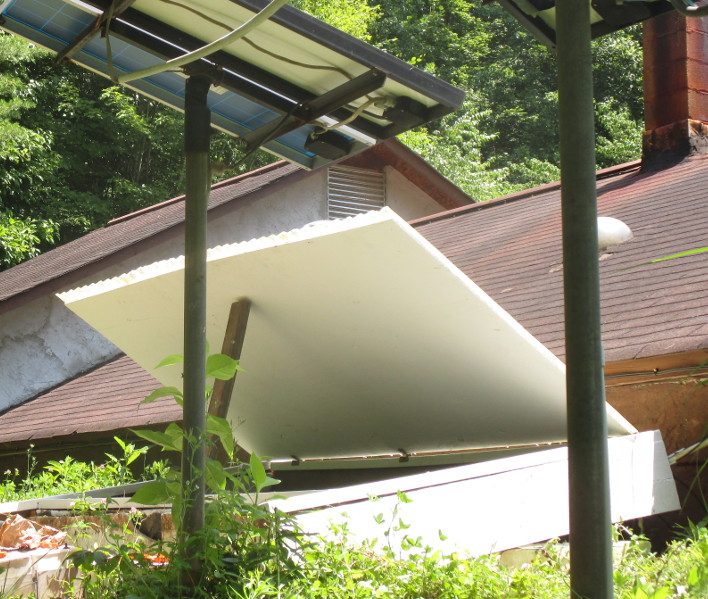
Little bonus project after the solar upgrade was replacing the battery box's rotted roof, down to the cinderblock walls. Except for a piece of plywood, used all scrap lumber for this project, and also scavenged a great set of hinges from a discarded cabinet. I hope the paint on all sides and an inch of shingle overhang will be enough to protect the plywood. Bonus bonus project to use up paint. (Argh, now I want to increase the size of the overflowing grape arbor. Once you start on this kind of stuff..) After finishing all that, it was time to think about this while enjoying this. (Followed by taking delivery of a dumptruck full of gravel -- 23 tons -- which it turns out was enough for only half of my driveway..)

Next.

Previous.