My webcam has broken, something that I have been using a lot during the last few months for some reason.
A friend of mine suggested that I use the mic and camera on my mobile phone instead. There is a simple app droidcam that makes the phone behave as a simple webcam, it also has a client application to run on your PC to capture the web-stream and present it as a video device. All well and good but I would like to keep propitiatory software off my PCs (I have a hard enough time accepting it on a phone but I have to draw a line somewhere).
I decided that there had to be a simple way to ingest that stream and present it as a local video device on a Linux box. It turns out that it is a lot simpler than I thought it would be. I had it working within 10 minutes!
Packages needed: ffmpeg, v4l2loopback-utils
-re
Read input at native frame rate. Mainly used to simulate a grab
device, or live input stream (e.g. when reading from a file). Should
not be used with actual grab devices or live input streams (where it
can cause packet loss). By default ffmpeg attempts to read the
input(s) as fast as possible. This option will slow down the reading
of the input(s) to the native frame rate of the input(s). It is
useful for real-time output (e.g. live streaming).
-i <source>
In this case my phone running droidcam http://10.14.1.100:4747/video
-vcodec rawvideo
Select the output video codec to raw video (as expected for /dev/video#)
-pix_fmt yuv420p
Set pixel format. in this example tell ffmpeg that the video will
be yuv colour space at 420p resolution
-f v4l2 /dev/video0
Force the output to be in video for Linux 2 (v4l2) format bound to
device /dev/video0
The Debian Janitor is an automated
system that commits fixes for (minor) issues in Debian packages that can be
fixed by software. It gradually started proposing merges in early
December. The first set of changes sent out ran lintian-brush on sid packages maintained in
Git. This post is part of a series about the progress of the
Janitor.
As of dpkg 1.16.2 and apt 0.8.13, Debian has full support
for multi-arch. To quote from the multi-arch implementation page:
Multiarch lets you install library packages from multiple architectures on
the same machine. This is useful in various ways, but the most common is
installing both 64 and 32- bit software on the same machine and having
dependencies correctly resolved automatically. In general you can have
libraries of more than one architecture installed together and applications
from one architecture or another installed as alternatives.
The Multi-Arch specification describes a new Multi-Arch header which can be used
to indicate how to resolve cross-architecture dependencies.
The existing Debian Multi-Arch hinter is a version of dedup.debian.net that compares binary
packages between architectures and suggests fixes to resolve
multi-arch problems. It provides hints as to what Multi-
Arch fields can be set, allowing the packages to be safely
installed in a Multi-Arch world. The full list of almost
10,000 hints generated by the hinter is available at https://dedup.debian.net/static/multiarch-hints.yaml.
Recent versions of lintian-brush now include a command called apply-multiarch-hints
that downloads and locally caches the hints and can apply
them to a package maintained in Git. For example, to apply
multi-arch hints to autosize.js:
$ debcheckout autosize.js
declared git repository at https://salsa.debian.org/js-team/autosize.js.git git clone https://salsa.debian.org/js-team/autosize.js.git autosize.js ... Cloning into 'autosize.js'... [...] $cd autosize.js
$ apply-multiarch-hints
Downloading new version of multi-arch hints. libjs-autosize: Add Multi-Arch: foreign. node-autosize: Add Multi-Arch: foreign. $ git log -p
commit 3f8d1db5af4a87e6ebb08f46ddf79f6adf4e95ae (HEAD -> master) Author: Jelmer Vernoo <jelmer@debian.org> Date: Fri Sep 18 23:37:14 2020 +0000 Apply multi-arch hints. + libjs-autosize, node-autosize: Add Multi-Arch: foreign. Changes-By: apply-multiarch-hints diff --git a/debian/changelog b/debian/changelog index e7fa120..09af4a7 100644 --- a/debian/changelog +++ b/debian/changelog @@ -1,3 +1,10 @@ +autosize.js (4.0.2~dfsg1-5) UNRELEASED; urgency=medium + + * Apply multi-arch hints. + + libjs-autosize, node-autosize: Add Multi-Arch: foreign. + + -- Jelmer Vernoo <jelmer@debian.org> Fri, 18 Sep 2020 23:37:14 -0000 + autosize.js (4.0.2~dfsg1-4) unstable; urgency=medium * Team upload diff --git a/debian/control b/debian/control index 01ca968..fbba1ae 100644 --- a/debian/control +++ b/debian/control @@ -20,6 +20,7 @@ Architecture: all Depends: $ misc:Depends Recommends: javascript-common Breaks: ruby-rails-assets-autosize (<< 4.0) +Multi-Arch: foreign Description: script to automatically adjust textarea height to fit text - NodeJS Autosize is a small, stand-alone script to automatically adjust textarea height to fit text. The autosize function accepts a single textarea element, @@ -32,6 +33,7 @@ Package: node-autosize Architecture: all Depends: $ misc:Depends , nodejs +Multi-Arch: foreign Description: script to automatically adjust textarea height to fit text - Javascript Autosize is a small, stand-alone script to automatically adjust textarea height to fit text. The autosize function accepts a single textarea element,
The Debian Janitor also has a new multiarch-fixes suite that runs apply-multiarch-hints across packages in the archive
and proposes merge requests. For example, you can see the
merge request against autosize.js here.
For more information about the Janitor's lintian-fixes efforts, see the landing page.
I have been late to adopt an on-premise cloud solution as the security of Owncloud a few years ago wasn't so stellar (cf. my comment from 2013 in Encryption files ... for synchronization across the Internet). But the follow-up product Nextcloud has matured quite nicely and we use it for collaboration both in the company and in FLOSS related work at multiple nonprofit organizations.
There is a very annoying "feature" in Nextcloud though that the designers think menu items for apps at the top need to be limited to eight or less to prevent information overload in the header. The whole item discussion is worth reading as it it an archetypical example of design prevalence vs. user choice.
And of course designers think they are right. That's a feature of the trade.
And because they know better there is no user configurable option to extend that 8 items to may be 12 or so which would prevent the annoying overflow menu we are seeing with 10 applications in use:
Luckily code can be changed and there are many comments floating around the Internet to change const minAppsDesktop = 8. In this case it is slightly complicated by the fact that the javascript code is distributed in compressed form (aka "minified") as core/js/dist/main.js and you probably don't want to build the whole beast locally to change one constant.
Basically
// show at least 2 apps in the popover if(appList.length-1- appCount >=1) appCount--
$('#more-apps a').removeClass('active') let lastShownApp for(let k =0; k < appList.length-1; k++) const name = $(appList[k]).data('id') if(k < appCount) $(appList[k]).removeClass('hidden') $('#apps li[data-id='+ name +']').addClass('in-header') lastShownApp = appList[k] else $(appList[k]).addClass('hidden') $('#apps li[data-id='+ name +']').removeClass('in-header') // move active app to last position if it is active if(appCount >0&& $(appList[k]).children('a').hasClass('active')) $(lastShownApp).addClass('hidden') $('#apps li[data-id='+ $(lastShownApp).data('id')+']').removeClass('in-header') $(appList[k]).removeClass('hidden') $('#apps li[data-id='+ name +']').addClass('in-header')
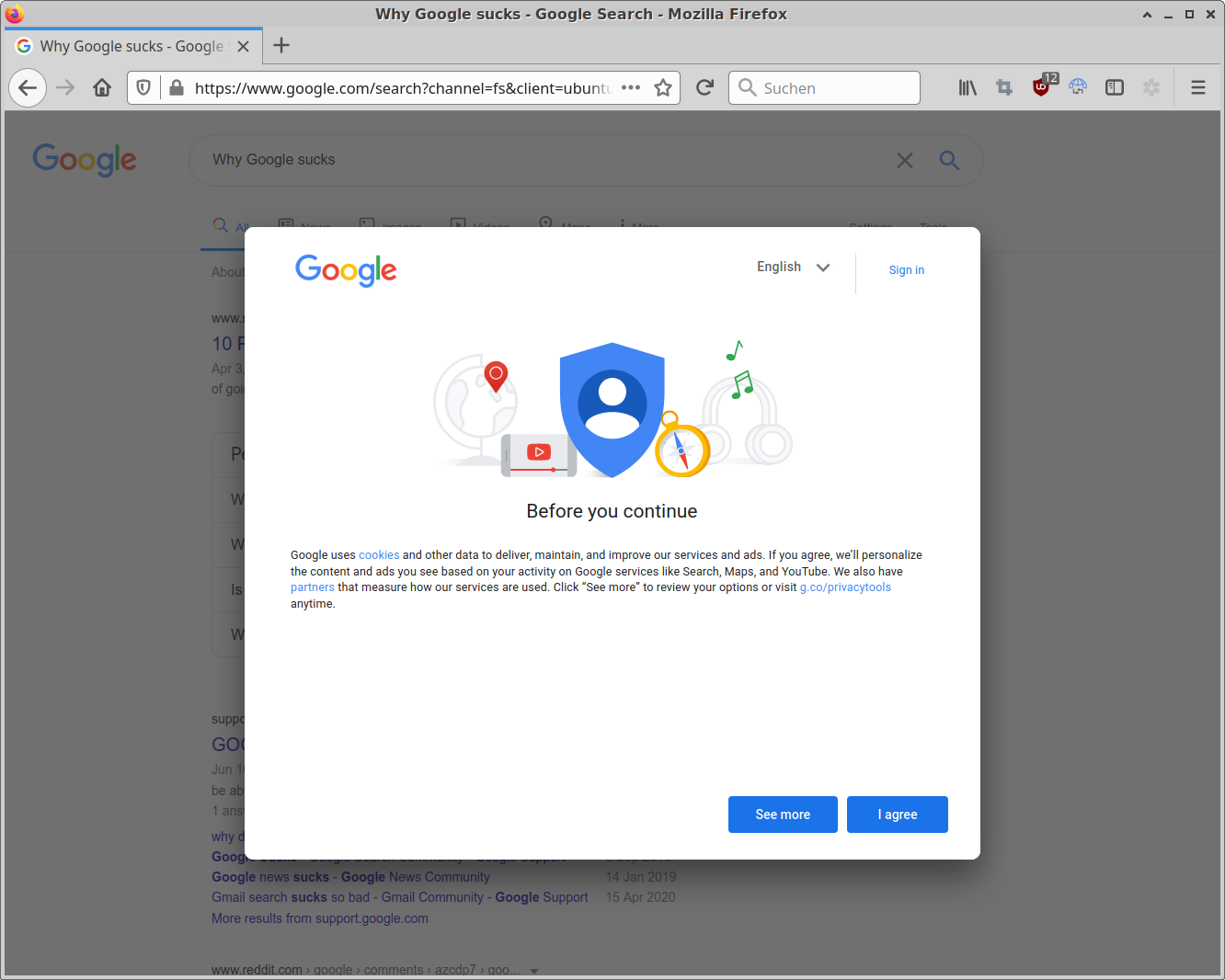
If you clear your browser cookies regularly (as you should do), Google will annoy you with a full screen cookie consent overlay these days. And - of course - there is no "no tracking consent, technically required cookies only" button. You may log in to Google to set your preference. Yeah, I'm sure this is totally following the intent of the EU Directive 2009/136/EC (the "cookie law").
Unfortunately none of the big "anti-annoyances" filter lists seem to have picked that one up yet but the friendly folks from the Computerbase Forum [German] to the rescue. User "Sepp Depp" has created the following filter set that WFM:
Add this to your uBlock Origin "My filters" tab:
! Google - remove cookie-consent-popup and restore scroll functionality
google.*##.wwYr3.aID8W.bErdLd
google.*##.aID8W.m114nf.t7xA6
google.*##div[jsname][jsaction^="dg_close"]
google.*##html:style(overflow: visible !important;)
google.*##.widget-consent-fullscreen.widget-consent
I have just updated the BIOS on a Dell PowerEdge T110 II. The process isn t too difficult, Google for the machine name and BIOS, download a shell script encoded firmware image and GPG signature, then run the script on the system in question.
One problem is that the Dell GPG key isn t signed by anyone. How hard would it be to get a few well connected people in the Linux community to sign the key used for signing Linux scripts for updating the BIOS? I would be surprised if Dell doesn t employ a few people who are well connected in the Linux community, they should just ask all employees to sign such GPG keys! Failing that there are plenty of other options. I d be happy to sign the Dell key if contacted by someone who can prove that they are a responsible person in Dell. If I could phone Dell corporate and ask for the engineering department and then have someone tell me the GPG fingerprint I ll sign the key and that problem will be partially solved (my key is well connected but you need more than one signature).
The next issue is how to determine that a BIOS update works. What you really don t want is to have a BIOS update fail and brick your system! So the Linux update process loads the image into something (special firmware RAM maybe) and then reboots the system and the reboot then does a critical part of the update. If the reboot doesn t work then you end up with the old version of the BIOS. This is overall a good thing.
The PowerEdge T110 II is a workstation with an NVidia video card (I tried an ATI card but that wouldn t boot for unknown reasons). The Nouveau driver has some issues. One thing I have done to work around some Nouveau issues is to create a file ~/.config/plasma-workspace/env/nouveau-broken.sh (for KDE sessions) with the following contents:
export LIBGL_ALWAYS_SOFTWARE=1
I previously wrote about using this just for Kmail to stop it crashing [1]. But after doing that I still had other problems with video and disabling all GL on the NVidia card was necessary.
The latest problem I ve had is that even when using that configuration things don t go well. When I run the reboot command I end up with a kernel message about the GPU not responding and then it doesn t reboot. That means that the BIOS update doesn t apply, a hard reboot signals to the system that the new BIOS wasn t good and I end up with the old BIOS again. I discovered that disabling sddm (the latest xdm program in Debian) from starting on boot meant that a reboot command would work. Then I ran the BIOS update script and it s reboot command worked and gave a successful BIOS update.
So I ve gone from a 2013 BIOS to a 2018 BIOS! The update list says that some CVEs have been addressed, but the spectre-meltdown-checker doesn t report any fewer vulnerabilities.
Very thrilled to announce a new package RcppSpdlog which is now on CRAN in its first release 0.0.1. We had tweeted once about the earliest version which had already caught the eyes of Gabi upstream.
RcppSpdlog bundles spdlog, a wonderful header-only C++ logging library with all the bells and whistles you would want that was written by Gabi Melman, and also includes fmt by Victor Zverovic.
I had meant to package this for a few years now but didn t find an (easy, elegant) way to completely lift stdout / stderr and related uses which R wants us to remove for smoother operations from R itself including synchronized input/output. It was only a few weeks ago that I realized I should subclass a logger (or, more concretely, a sink for a logger) which could then use R input/output. With the right idea the implementaton was easy, and [Gabi]((https://github.com/gabime) was most helpful in making sure R CMD check would not see one or two remaining C++ i/o operations (which we currently do by not activating a default logger, and substituing REprintf() in one call). So this is now clean and sween and a simple use is included in an example in the package we can show here too (in slightly shorter form minus the documentation header):
// this portmanteau include also defines the r_sink we use below, and which// diverts all logging to R via the Rcpp::Rcout replacement for std::cout#include <RcppSpdlog>// [[Rcpp::export]]void exampleRsink() std::string logname = "fromR"; // fix a name for this loggerauto sp = spdlog::get(logname); // retrieve existing oneif (sp == nullptr) sp = spdlog::r_sink_mt(logname); // or create new one if needed// change log pattern (changed from [%H:%M:%S %z] [%n] [%^---%L---%$] ) sp->set_pattern("[%H:%M:%S.%f] [%n] [%^%L%$] [thread %t] %v"); sp->info("Welcome to spdlog!"); sp->error("Some error message with arg: ", 1); sp->warn("Easy padding in numbers like :08d ", 12); sp->critical("Support for int: 0:d ; hex: 0:x ; oct: 0:o ; bin: 0:b ", 42); sp->info("Support for floats :03.2f ", 1.23456); sp->info("Positional args are 1 0 ..", "too", "supported"); sp->info(" :<30 ", "left aligned");
The NEWS entry for the first release follows.
Changes in RcppSpdlog version 0.0.1 (2020-09-08)
Initial release with added R/Rcpp logging sink example
The only sour grapes, if any, are over the CRAN processing. This was originally uploaded three weeks ago. As a new package, it got extra attention and some truly idiosyncratic attention to two details that were already supplied in the first uploaded version. Yet it needed two rounds of going back and forth for really no great net gain, yet wasting a week each time. I am not all that impressed by this, and not particularly pleased either, but I presume is the tax we all pay in order to enjoy the unsurpassed richness of the CRAN repository system which continues to work just flawlessly.
If you like this or other open-source work I do, you can now sponsor me at GitHub. For the first year, GitHub will match your contributions.
Four years ago somebody posted a comment-thread describing how you could start writing a little reverse-polish calculator, in C, and slowly improve it until you had written a minimal FORTH-like system:
At the time I read that comment I'd just hacked up a simple FORTH REPL of my own, in Perl, and I said "thanks for posting". I was recently reminded of this discussion, and decided to work through the process.
Using only minimal outside resources the recipe worked as expected!
The end-result is I have a working FORTH-lite, or FORTH-like, interpreter written in around 2000 lines of golang! Features include:
Reverse-Polish mathematical operations.
Comments between ( and ) are ignored, as expected.
Single-line comments \ to the end of the line are also supported.
Support for floating-point numbers (anything that will fit inside a float64).
Support for printing the top-most stack element (., or print).
Support for outputting ASCII characters (emit).
Support for outputting strings (." Hello, World ").
Support for basic stack operations (drop, dup, over, swap)
Support for loops, via do/loop.
Support for conditional-execution, via if, else, and then.
Load any files specified on the command-line
If no arguments are included run the REPL
A standard library is loaded, from the present directory, if it is present.
To give a flavour here we define a word called star which just outputs a single start-character:
: star 42 emit ;
Now we can call that (NOTE: We didn't add a newline here, so the REPL prompt follows it, that's expected):
> star
*>
To make it more useful we define the word "stars" which shows N stars:
> : stars dup 0 > if 0 do star loop else drop then ;
> 0 stars
> 1 stars
*> 2 stars
**> 10 stars
**********>
This example uses both if to test that the parameter on the stack was greater than zero, as well as do/loop to handle the repetition.
Finally we use that to draw a box:
> #words 0 do dup dump loop
..
Word 'square'
 0: dup
 1: *
Word 'cube'
 0: dup
 1: square
 2: *
Word '1+'
 0: store 1.000000
 2: +
Word 'test_hot'
  0: store 0.000000
  2: >
  3: if
  4: [cond-jmp 7.000000]
  6: hot
  7: then
..
Anyway if that is at all interesting feel free to take a peak. There's a bit of hackery there to avoid the use of return-stacks, etc. Compared to gforth this is actually more featureful in some areas:
I allow you to use conditionals in the REPL - outside a word-definition.
I allow you to use loops in the REPL - outside a word-definition.
There are a number of large and very successful Debian Local Groups
(Debian France, Debian Brazil and Debian Taiwan, just to name a few),
but what can we do to help support upcoming local groups or help spark interest
in more parts of the world?
There has been a session about
Debian Local Teams at Debconf20
and it generated quite a bit of constructive discussion in the live stream
(recording available at
https://meetings-archive.debian.net/pub/debian-meetings/2020/DebConf20/),
in the session's Etherpad
and in the IRC channel (#debian-localgroups). This article is an attempt at
summarizing the key points that were raised during that discussion, as well as
the plans for the future actions to support new or existent Debian Local Groups
and the possibility of setting up a local group support team.
Pandemic situation
During a pandemic it may seem strange to discuss offline meetings, but this is
a good time to be planning things for the future. At the same time, the current
situation makes it more important than before to encourage local interaction.
Reasoning for local groups
Debian can seem scary for those outside. Already having a connection to Debian - especially
to people directly involved in it - seems to be the way through
which most contributors arrive. But if one doesn't have a connection,
it is not that easy; Local Groups facilitate that by improving networking.
Local groups are incredibly important to the success of Debian
since they often help with translations, making us more diverse, support,
setting up local bug squashing sprints, establishing a local DebConf team
along with miniDebConfs, getting sponsors for the project and much more.
Existence of a Local Groups would also facilitate access to "swag" like stickers
and mugs, since people not always have the time to deal with the process
of finding a supplier to actually get those made.
The activity of local groups might facilitate that by organizing related logistics.
How to deal with local groups, how to define a local group
Debian gathers the information about Local Groups in its
Local Groups wiki page (and subpages).
Other organisations also have their own schemes, some of them featuring a map,
blogs, or clear rules about what constitutes a local group. In the case of Debian
there is not a predefined set of "rules", even about the group name.
That is perfectly fine, we assume that certain local groups may be very small,
or temporary (created around a certain time when they plan several activities,
and then become silent). However, the way the groups are named and how they are
listed on the wiki page sets expectations with regards to what kinds of activities
they involve.
For this reason, we encourage all the Debian Local Groups to review their entries
in the Debian wiki, keep it current
(e.g. add a line "Status: Active (2020)), and we encourage informal groups of
Debian contributors that somehow "meet", to create a new entry in the wiki page, too.
What can Debian do to support Local Groups
Having a centralized database of groups is good (if up-to-date),
but not enough. We'll explore other ways of propagation and increasing visibility,
like organising the logistics of printing/sending swag and facilitate access
to funding for Debian-related events.
Continuation of efforts
Efforts shall continue regarding Local Groups.
Regular meetings are happening every two or three weeks;
interested people are encouraged to explore some other relevant DebConf20 talks
(Introducing Debian Brasil,
Debian Academy: Another way to share knowledge about Debian,
An Experience creating a local community on a small town),
websites like Debian flyers
(including other printed material as cube, stickers),
visit the events section of the Debian website
and the Debian Locations wiki page,
and participate in the IRC channel #debian-localgroups at OFTC.
My inverter has unfortunately died, and I wanted to replace it with the
same model. Ideally before I lose the contents of the fridge. It's a 24v
inverter, which is not at all as easy to find a replacement for as a 12v
inverter would be.
Somehow Walmart was the only retailer that
had it available
with a delivery estimate: Just 2 days.
It's the second day now, with no indication they've shipped it.
I noticed the "sold and shipped by Zoro", so went and
found it on that website.
So, the reality is it ships direct from China via container ship. As does
every product from Zoro, which all show as 2 day delivery on Walmart's website.
I don't think this is a pandemic thing. I think it's a trying to compete
with Amazon and failing thing.
My other comically bad shipping estimate this pandemic was from Amazon
though. There was a run this summer on Kayaks, because social distancing is
great on the water. I found a high quality inflatable kayak.
Amazon said "only 2 left in stock" and promised delivery in 1 week.
One week later, it had not shipped, and they updated the delivery
estimate forward 1 week. A week after that, ditto.
Eventually I bought a new model from the same manufacturer, Advanced
Elements. Unfortunately, that kayak exploded the second time I inflated it,
due to a manufacturing defect.
So I got in touch with Advanced Elements and they offered a replacement. I
asked if, instead, they maybe still had any of the older model of kayak
I had tried to order. They checked their warehouse, and found
"the last one" in a corner somewhere.
No shipping estimate was provided. It arrived in 3 days.
This one rarely returns to its proper place, instead living in the small pile
of records permanently next to my turntable. I'm a late convert to Primal
Scream: I first heard the 10 minute Andrew Weatherall mix of Come
Together on
Tom Robinson's 6Music show. It's a
remarkable record, more so to think that it's quite hard, in isolation, to
actually hear Primal Scream's contribution. This is very much Weatherall's track,
and (to me, at least) it does a great job of encapsulating the house music
explosion of the time.
It's interesting to hear Terry Farley's mix, partially because the band's
contribution is more evident, so you can get a glimpse of the material that
Weatherall had to work with.
RIP Andrew Weatherall, 1963-2020.
Like each month, here comes a report about the work of paid contributors to Debian LTS.
Individual reports
In August, 237.25 work hours have been dispatched among 14 paid contributors. Their reports are available:
Utkarsh Gupta did 32.75h (out of 21.75h assigned and anticipating 11h from September).
Evolution of the situation
August was a regular LTS month once again, even though it was only our 2nd month with Stretch LTS.
At the end of August some of us participated in DebConf 20 online
where we held our monthly team meeting. A video is available.
As of now this video is also the only public resource about the LTS survey we held in July, though a written summary is expected to be released soon.
The security tracker currently lists 56 packages with a known CVE and the dla-needed.txt file has 55 packages needing an update.
Thanks to our sponsors
Sponsors that recently joined are in bold.
Just to remind myself because I keep forgetting it again and again: If you get washed out colors when doing color to alpha and then recombine layers in GIMP, that is due to the new default in GIMP 2.10 that combines layers in linear RGB.
This creates problems because Color to Alpha works in perceptual RGB, and the recombination in linear creates washed out colors. The solution is to right click on the respective layer, select Composite Space , and there select RGB (perceptual) . Here is the bug report that has been open since 2 years.
Hoping that for next time I remember it.
Yesterday I did the first release of my OpenPGP compatible keyserver, onak, in 4 years. Actually, 2 releases because I discovered my detection for various versions of libnettle needed some fixing.
It was largely driven by the need to get an updated package sorted for Debian due to the removal of dh-systemd, but it should have come sooner. This release has a number of clean-ups for dealing with the hostility shown to the keyserver network in recent years. In particular it implements some of dkg s Abuse-Resistant OpenPGP Keystores, and finally adds support for verifying signatures fully. That opens up the ability to run a keyserver that will only allow verifiable updates to keys. This doesn t tie in with folk who want to run PGP based systems because of the anonymity, but for those of us who think PGP s strength is in the web of trust it s pretty handy. And it s all configurable to taste; you can turn off all the verification if you want, or verify everything but not require any signatures, or even enable v3 keys if you feel like it.
The main reason this release didn t come sooner is that I m painfully aware of the bits that are missing. In particular:
Documentation. It s all out of date, it needs a lot of work.
FastCGI support. Presently you need to run the separate CGI binaries.
SKS Gossip support. onak only supports the email syncing option. If you run a stand alone server this is fine, but Gossip is the right approach for a proper keyserver network.
Step by step cups debugging ( here with a network printer)
Which printer queue do I have configured ? lpstat -p printer epson is idle. enabled since Sat Dec 24 13:18:09 2017 #here I have a printer called 'epson", doing nothing, that the cups daemon considers as enabled
Which connection am I using to get to this printer ? lpstat -v device for epson: lpd://epson34dea0.local:515/PASSTHRU # here the locally configured 'epson' printer queue is backed by a network device at the adress epson34dea0.local, to which I am sending my print jobs via the lpd protocol
Is my printer ready ? lpq epson is ready no entries # here my local print queue 'epson' is accepting print jobs ( which does not say anything about the physical device, it might be offline
If here you local print queue 'epson' is not ready, you can try to reenable it in the cups system with:
sudo cupsenable epson
If you notice that the printer is disabled all the time, because for instance of a flaky network, you can edit /etc/cups/printers.conf and change the ErrorPolicy for each printer from stop-printer to retry-job. It should be also possible to set this parameter in cupsd.conf
Finally you can print a test page with lpr /usr/share/cups/data/testprint
You can connect to a running pod with oc/kubectl rsh pod_name, or start a copy of a running pod with oc debug pod_name, but as best practises recommend unprivileged, slim container images, where do you get sosreport, kdump, dig and nmap for troubleshooting ? Fortunately you can start either a transient Debian troubleshooting container with:oc run troubleshooting-pod --stdin --tty --rm --image=docker.io/library/debian:busteror a Red Hat Entreprise Linux: oc run troubleshooting-pod --stdin --tty --rm --image=registry.access.redhat.com/rhel7/rhel-tools
Old laptop
I ve been meaning to get a new laptop for a while now. My ThinkPad X250 is now 5 years old and even though it s still adequate in many ways, I tend to run out of memory especially when running a few virtual machines. It only has one memory slot, which I maxed out at 16GB shortly after I got it. Memory has been a problem in considering a new machine. Most new laptops have soldered RAM and local configurations tend to ship with 8GB RAM. Getting a new machine with only a slightly better CPU and even just the same amount of RAM as what I have in the X250 seems a bit wasteful. I was eyeing the Lenovo X13 because it s a super portable that can take up to 32GB of RAM, and it ships with an AMD Ryzen 4000 series chip which has great performance. With Lenovo s discount for Debian Developers it became even more attractive. Unfortunately that s in North America only (at least for now) so that didn t work out this time.
Enter Tongfang
I ve been reading a bunch of positive reviews about the Tuxedo Pulse 14 and KDE Slimbook 14. Both look like great AMD laptops, supports up to 64GB of RAM and clearly runs Linux well. I also noticed that they look quite similar, and after some quick searches it turns out that these are made by Tongfang and that its model number is PF4NU1F.
I also learned that a local retailer (Wootware) sells them as the Wootbook. I ve seen one of these before although it was an Intel-based one, but it looked like a nice machine and I was already curious about it back then. After struggling for a while to find a local laptop with a Ryzen CPU and that s nice and compact and that breaks the 16GB memory barrier, finding this one that jumped all the way to 64GB sealed the deal for me.
This is the specs for the configuration I got:
This configuration cost R18 796 ( 947 / $1122). That s significantly cheaper than anything else I can get that even starts to approach these specs. So this is a cheap laptop, but you wouldn t think so by using it.
I used the Debian netinstall image to install, and installation was just another uneventful and boring Debian installation (yay!). Unfortunately it needs the firmware-iwlwifi and firmare-amd-graphics packages for the binary blobs that drives the wifi card and GPU. At least it works flawlessly and you don t need an additional non-free display driver (as is the case with NVidia GPUs). I haven t tested the graphics extensively yet, but desktop graphics performance is very snappy. This GPU also does fancy stuff like VP8/VP9 encoding/decoding, so I m curious to see how well it does next time I have to encode some videos. The wifi upgrade was nice for copying files over. My old laptop maxed out at 300Mbps, this one connects to my home network between 800-1000Mbps. At this speed I don t bother connecting via cable at home.
I read on Twitter that Tuxedo Computers thinks that it s possible to bring Coreboot to this device. That would be yet another plus for this machine.
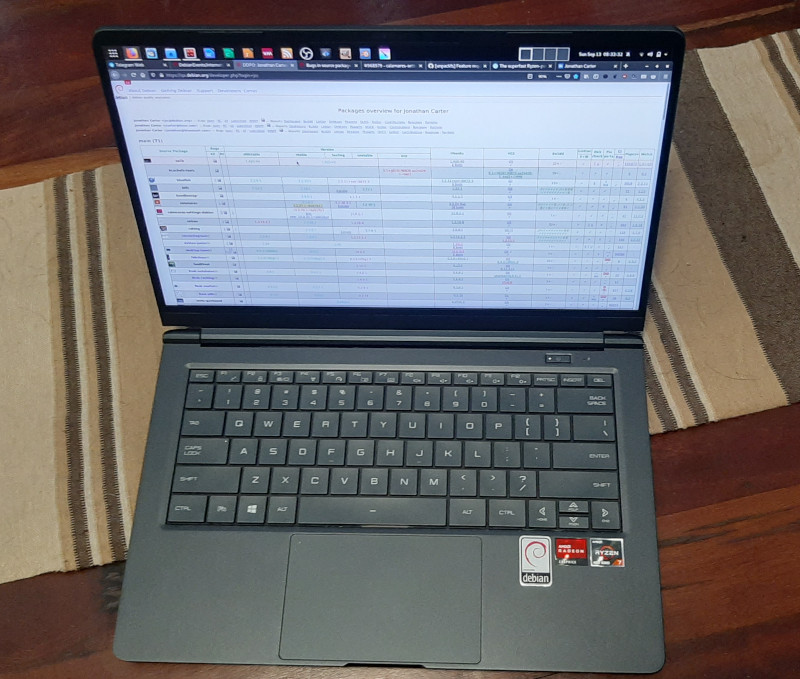
I ll try to answer some of my own questions about this device that I had before, that other people in the Debian community might also have if they re interested in this device. Since many of us are familiar with the ThinkPad X200 series of laptops, I ll compare it a bit to my X250, and also a little to the X13 that I was considering before. Initially, I was a bit hesitant about the 14 form factor, since I really like the portability of the 12.5 ThinkPad. But because the screen bezel is a lot smaller, the Wootbook (that just rolls off the tongue a lot better than the PF4NU1F ) is just slightly wider than the X250. It weighs in at 1.1KG instead of the 1.38KG of the X250. It s also thinner, so even though it has a larger display, it actually feels a lot more portable. Here s a picture of my X250 on top of the Wootbook, you can see a few mm of Wootbook sticking out to the right.
Card Reader
One thing that I overlooked when ordering this laptop was that it doesn t have an SD card reader. I see that some variations have them, like on this Slimbook review. It s not a deal-breaker for me, I have a USB card reader that s very light and that I ll just keep in my backpack. But if you re ordering one of these machines and have some choice, it might be something to look out for if it s something you care about.
Keyboard/Touchpad
On to the keyboard. This keyboard isn t quite as nice to type on as on the ThinkPad, but, it s not bad at all. I type on many different laptop keyboards and I would rank this keyboard very comfortably in the above average range. I ve been typing on it a lot over the last 3 days (including this blog post) and it started feeling natural very quickly and I m not distracted by it as much as I thought I would be transitioning from the ThinkPad or my mechanical desktop keyboard. In terms of layout, it s nice having an actual Insert button again. This is things normal users don t care about, but since I use mc (where insert selects files) this is a welcome return :). I also like that it doesn t have a Print Screen button at the bottom of my keyboard between alt and ctrl like the ThinkPad has. Unfortunately, it doesn t have dedicated pgup/pgdn buttons. I use those a lot in apps to switch between tabs. At leas the Fn button and the ctrl buttons are next to each other, so pressing those together with up and down to switch tabs isn t that horrible, but if I don t get used to it in another day or two I might do some remapping. The touchpad has en extra sensor-button on the top left corner that s used on Windows to temporarily disable the touchpad. I captured it s keyscan codes and it presses left control + keyscan code 93. The airplane mode, volume and brightness buttons work fine.
I do miss the ThinkPad trackpoint. It s great especially in confined spaces, your hands don t have to move far from the keyboard for quick pointer operations and it s nice for doing something quick and accurate. I painted a bit in Krita last night, and agree with other reviewers that the touchpad could do with just a bit more resolution. I was initially disturbed when I noticed that my physical touchpad buttons were gone, but you get right-click by tapping with two fingers, and middle click with tapping 3 fingers. Not quite as efficient as having the real buttons, but it actually works ok. For the most part, this keyboard and touchpad is completely adequate. Only time will tell whether the keyboard still works fine in a few years from now, but I really have no serious complaints about it.
Display
The X250 had a brightness of 172 nits. That s not very bright, I think the X250 has about the dimmest display in the ThinkPad X200 range. This hasn t been a problem for me until recently, my eyes are very photo-sensitive so most of the time I use it at reduced brightness anyway, but since I ve been working from home a lot recently, it s nice to sometimes sit outside and work, especially now that it s spring time and we have some nice days. At full brightness, I can t see much on my X250 outside. The Wootbook is significantly brighter even (even at less than 50% brightness), although I couldn t find the exact specification for its brightness online.
Ports
The Wootbook has 3x USB type A ports and 1x USB type C port. That s already quite luxurious for a compact laptop. As I mentioned in the specs above, it also has a full-sized ethernet socket. On the new X13 (the new ThinkPad machine I was considering), you only get 2x USB type A ports and if you want ethernet, you have to buy an additional adapter that s quite expensive especially considering that it s just a cable adapter (I don t think it contains any electronics).
It has one hdmi port. Initially I was a bit concerned at lack of displayport (which my X250 has), but with an adapter it s possible to convert the USB-C port to displayport and it seems like it s possible to connect up to 3 external displays without using something weird like display over usual USB3.
Overall remarks
When maxing out the CPU, the fan is louder than on a ThinkPad, I definitely noticed it while compiling the zfs-dkms module. On the plus side, that happened incredibly fast. Comparing the Wootbook to my X250, the biggest downfall it has is really it s pointing device. It doesn t have a trackpad and the touchpad is ok and completely usable, but not great. I use my laptop on a desk most of the time so using an external mouse will mostly solve that.
If money were no object, I would definitely choose a maxed out ThinkPad for its superior keyboard/mouse, but the X13 configured with 32GB of RAM and 128GB of SSD retails for just about double of what I paid for this machine. It doesn t seem like you can really buy the perfect laptop no matter how much money you want to spend, there s some compromise no matter what you end up choosing, but this machine packs quite a punch, especially for its price, and so far I m very happy with my purchase and the incredible performance it provides.
I m also very glad that Wootware went with the gray/black colours, I prefer that by far to the white and silver variants. It s also the first laptop I ve had since 2006 that didn t come with Windows on it.
The Wootbook is also comfortable/sturdy enough to carry with one hand while open. The ThinkPads are great like this and with many other brands this just feels unsafe. I don t feel as confident carrying it by it s display because it s very thin (I know, I shouldn t be doing that with the ThinkPads either, but I ve been doing that for years without a problem :) ).
There s also a post on Reddit that tracks where you can buy these machines from various vendors all over the world.
I ve just got a Dell T710 server for LUV and I ve been playing with the configuration options. Here s a list of what I ve done and recommendations on how to do things. I decided not to try to write a step by step guide to doing stuff as the situation doesn t work for that. I think that a list of how things are broken and what to avoid is more useful.
BIOS
Firstly with a Dell server you can upgrade the BIOS from a Linux root shell. Generally when a server is deployed you won t want to upgrade the BIOS (why risk breaking something when it s working), so before deployment you probably should install the latest version. Dell provides a shell script with encoded binaries in it that you can just download and run, it s ugly but it works. The process of loading the firmware takes a long time (a few minutes) with no progress reports, so best to plug both PSUs in and leave it alone. At the end of loading the firmware a hard reboot will be performed, so upgrading your distribution while doing the install is a bad idea (Debian is designed to not lose data in this situation so it s not too bad).
IDRAC
IDRAC is the Integrated Dell Remote Access Controller. By default it will listen on all Ethernet ports, get an IP address via DHCP (using a different Ethernet hardware address to the interface the OS sees), and allow connections. Configuring it to be restrictive as to which ports it listens on may be a good idea (the T710 had 4 ports built in so having one reserved for management is usually OK). You need to configure a username and password for IDRAC that has administrative access in the BIOS configuration.
Web Interface
By default IDRAC will run a web server on the IP address it gets from DHCP, you can connect to that from any web browser that allows ignoring invalid SSL keys. Then you can use the username and password configured in the BIOS to login. IDRAC 6 on the PowerEdge T710 recommends IE 6.
To get a ssl cert that matches the name you want to use (and doesn t give browser errors) you have to generate a CSR (Certificate Signing Request) on the DRAC, the only field that matters is the CN (Common Name), the rest have to be something that Letsencrypt will accept. Certbot has the option --config-dir /etc/letsencrypt-drac to specify an alternate config directory, the SSL key for DRAC should be entirely separate from the SSL key for other stuff. Then use the --csr option to specify the path of the CSR file. When you run letsencrypt the file name of the output file you want will be in the format *_chain.pem . You then have to upload that to IDRAC to have it used. This is a major pain for the lifetime of letsencrypt certificates. Hopefully a more recent version of IDRAC has Certbot built in.
When you access RAC via ssh (see below) you can run the command racadm sslcsrgen to generate a CSR that can be used by certbot. So it s probably possible to write expect scripts to get that CSR, run certbot, and then put the ssl certificate back. I don t expect to use IDRAC often enough to make it worth the effort (I can tell my browser to ignore an outdated certificate), but if I had dozens of Dells I d script it.
SSH
The web interface allows configuring ssh access which I strongly recommend doing. You can configure ssh access via password or via ssh public key. For ssh access set TERM=vt100 on the host to enable backspace as ^H. Something like TERM=vt100 ssh root@drac . Note that changing certain other settings in IDRAC such as enabling Smartcard support will disable ssh access.
There is a limit to the number of open sessions for managing IDRAC, when you ssh to the IDRAC you can run racadm getssninfo to get a list of sessions and racadm closessn -i NUM to close a session. The closessn command takes a -a option to close all sessions but that just gives an error saying that you can t close your own session because of programmer stupidity. The IDRAC web interface also has an option to close sessions. If you get to the limits of both ssh and web sessions due to network issues then you presumably have a problem.
I couldn t find any documentation on how the ssh host key is generated. I Googled for the key fingerprint and didn t get a match so there s a reasonable chance that it s unique to the server (please comment if you know more about this).
Don t Use Graphical Console
The T710 is an older server and runs IDRAC6 (IDRAC9 is the current version). The Java based graphical console access doesn t work with recent versions of Java. The Debian package icedtea-netx has has the javaws command for running the .jnlp command for the console, by default the web browser won t run this, you download the .jnlp file and pass that as the first parameter to the javaws program which then downloads a bunch of Java classes from the IDRAC to run. One error I got with Java 11 was Exception in thread Timer-0 java.util.ServiceConfigurationError: java.nio.charset.spi.CharsetProvider: Provider sun.nio.cs.ext.ExtendedCharsets could not be instantiated , Google didn t turn up any solutions to this. Java 8 didn t have that problem but had a connection failed error that some people reported as being related to the SSL key, but replacing the SSL key for the web server didn t help. The suggestion of running a VM with an old web browser to access IDRAC didn t appeal. So I gave up on this. Presumably a Windows VM running IE6 would work OK for this.
Serial Console
Fortunately IDRAC supports a serial console. Here s a page summarising Serial console setup for DRAC [1]. Once you have done that put console=tty0 console=ttyS1,115200n8 on the kernel command line and Linux will send the console output to the virtual serial port. To access the serial console from remote you can ssh in and run the RAC command console com2 (there is no option for using a different com port). The serial port seems to be unavailable through the web interface.
If I was supporting many Dell systems I d probably setup a ssh to JavaScript gateway to provide a web based console access. It s disappointing that Dell didn t include this.
If you disconnect from an active ssh serial console then the RAC might keep the port locked, then any future attempts to connect to it will give the following error:
/admin1-> console com2
console: Serial Device 2 is currently in use
So far the only way I ve discovered to get console access again after that is the command racadm racreset . If anyone knows of a better way please let me know. As an aside having racreset being so close to racresetcfg (which resets the configuration to default and requires a hard reboot to configure it again) seems like a really bad idea.
Host Based Management
deb http://linux.dell.com/repo/community/ubuntu xenial openmanage
The above apt sources.list line allows installing Dell management utilities (Xenial is old but they work on Debian/Buster). Probably the packages srvadmin-storageservices-cli and srvadmin-omacore will drag in enough dependencies to get it going.
Here are some useful commands:
# show hardware event log
omreport system esmlog
# show hardware alert log
omreport system alertlog
# give summary of system information
omreport system summary
# show versions of firmware that can be updated
omreport system version
# get chassis temp
omreport chassis temps
# show physical disk details on controller 0
omreport storage pdisk controller=0
RAID Control
The RAID controller is known as PERC (PowerEdge Raid Controller), the Dell web site has an rpm package of the perccli tool to manage the RAID from Linux. This is statically linked and appears to have different versions of libraries used to make it. The command perccli show gives an overview of the configuration, but the command perccli /c0 show to give detailed information on controller 0 SEGVs and the kernel logs a vsyscall attempted with vsyscall=none message. Here s an overview of the vsyscall enmulation issue [2]. Basically I could add vsyscall=emulate to the kernel command line and slightly reduce security for the system to allow system calls from perccli that are called from old libc code to work, or I could run code from a dubious source as root.
Some versions of IDRAC have a racadm raid command that can be run from a ssh session to perform RAID administration remotely, mine doesn t have that. As an aside the help for the RAC system doesn t list all commands and the Dell documentation is difficult to find so blog posts from other sysadmins is the best source of information.
I have configured IDRAC to have all of the BIOS output go to the virtual serial console over ssh so I can see the BIOS prompt me for PERC administration but it didn t accept my key presses when I tried to do so. In any case this requires downtime and I d like to be able to change hard drives without rebooting.
I found vsyscall_trace on Github [3], it uses the ptrace interface to emulate vsyscall on a per process basis. You just run vsyscall_trace perccli and it works! Thanks Geoffrey Thomas for writing this!
Here are some perccli commands:
# show overview
perccli show
# help on adding a vd (RAID)
perccli /c0 add help
# show controller 0 details
perccli /c0 show
# add a vd (RAID) of level RAID0 (r0) with the drive 32:0 (enclosure:slot from above command)
perccli /c0 add vd r0 drives=32:0
When a disk is added to a PERC controller about 525MB of space is used at the end for RAID metadata. So when you create a RAID-0 with a single device as in the above example all disk data is preserved by default except for the last 525MB. I have tested this by running a BTRFS scrub on a disk from another system after making it into a RAID-0 on the PERC.
Welcome to gambaru.de. Here is my monthly report (+ the first week in September) that covers what I have been doing for Debian. If you re interested in Java, Games and LTS topics, this might be interesting for you.
Debian Games
I packaged a new upstream release of teeworlds, the well-known 2D multiplayer shooter with cute characters called tees to resolve a Python 2 bug (although teeworlds is actually a C++ game). The update also fixed a severe remote denial-of-service security vulnerability, CVE-2020-12066. I prepared a patch for Buster and will send it to the security team later today.
I sponsored updates of mgba, a Game Boy Advance emulator, for Ryan Tandy, and osmose-emulator for Carlos Donizete Froes.
I worked around a RC GCC 10 bug in megaglest by compiling with -fcommon.
Thanks to Gerardo Ballabio who packaged a new upstream version of galois which I uploaded for him.
Also thanks to Reiner Herrmann and Judit Foglszinger who fixed a regression (crash) in monsterz due to the earlier port to Python 3. Reiner also made fans of supertuxkart happy by packaging the latest upstream release version 1.2.
I was contacted by the upstream maintainer of privacybadger, a privacy addon for Firefox and Chromium, who dislikes the idea of having a stable and unchanging version in Debian stable releases. Obviously I can t really do much about it although I believe the release team would be open-minded for regular point updates of browser addons though. However I don t intend to do regular updates for all of my packages in stable unless there is a really good reason to do so. At the moment I m willing to make an exception for ublock-origin and https-everywhere because I feel these addons should be core browser functionality anyway. I talked about this on our Debian Mozilla Extension Maintainers mailinglist and it seems someone is interested to take over privacybadger and prepare regular stable point updates. Let s see how it turns out.
Finally this month saw the release of ublock-origin 1.29.0 and the creation of two different browser-specific binary packages for Firefox and Chromium. I have talked about it before and I believe two separate packages for ublock-origin are more aligned to upstream development and make the whole addon easier to maintain which benefits users, upstream and maintainers.
imlib2, an image library, and binaryen also got updated this month.
Debian LTS
This was my 54. month as a paid contributor and I have been paid to work 20 hours on Debian LTS, a project started by Rapha l Hertzog. In that time I did the following:
DLA-2303-1. Issued a security update for libssh fixing 1 CVE.
DLA-2327-1. Issued a security update for lucene-solr fixing 1 CVE.
DLA-2369-1. Issued a security update for libxml2 fixing 8 CVE.
Triaged CVE-2020-14340, jboss-xnio as not-affected for Stretch.
Triaged CVE-2020-13941, lucene-solr as no-dsa because the security impact was minor.
Triaged CVE-2019-17638, jetty9 as not-affected for Stretch and Buster.
squid3: I backported the patches for CVE-2020-15049, CVE-2020-15810, CVE-2020-15811 and CVE-2020-24606 from squid 4 to squid 3.
ELTS
Extended Long Term Support (ELTS) is a project led by Freexian to further extend the lifetime of Debian releases. It is not an official Debian project but all Debian users benefit from it without cost. The current ELTS release is Debian 8 Jessie . This was my 27. month and I have been paid to work 14,25 hours on ELTS.
ELA-271-1. Issued a security update for squid3 fixing 19 CVE. Most of the work was already done before ELTS started, only the patch for CVE-2019-12529 had to be adjusted for the nettle version in Jessie.
ELA-273-1. Issued a security update for nss fixing 1 CVE.
ELA-276-1. Issued a security update for libjpeg-turbo fixing 2 CVE.
ELA-277-1. Issued a security update for graphicsmagick fixing 1 CVE.
ELA-279-1. Issued a security update for imagemagick fixing 3 CVE.
ELA-280-1. Issued a security update for libxml2 fixing 4 CVE.
I'm happy to announce I handed out my Master's Thesis last Monday. I'm not
publishing the final copy just yet1, as it still needs to go through
the approval committee. If everything goes well, I should have my Master of
Economics diploma before Christmas!
It sure hasn't been easy, and although I regret nothing, I'm also happy to be
done with university.
Looking for a job
What an odd time to be looking for a job, right? Turns out for the first time
in 12 years, I don't have an employer. It's oddly freeing, but also a little
scary. I'm certainly not bitter about it though and it's nice to have some time
on my hands to work on various projects and read things other than academic
papers. Look out for my next blog posts on using the NeTV2 as an OSHW HDMI
capture card, on hacking at security tokens and much more!
I'm not looking for anything long term (I'm hoping to teach Economics again next
Winter), but for the next few months, my calendar is wide open.
For the last 6 years, I worked as Linux system administrator, mostly using a
LAMP stack in conjunction with Puppet, Shell and Python. Although I'm most
comfortable with Puppet, I also have decent experience with Ansible, thanks to
my work in the DebConf Videoteam.
I'm not the most seasoned Debian Developer, but I have some experience
packaging Python applications and libraries. Although I'm no expert at it,
lately I've also been working on Clojure packages, as I'm trying to get Puppet
6 in Debian in time for the Bullseye freeze. At the rate it's going though, I
doubt we're going to make it...
If your company depends on Puppet and cares about having a version in Debian 11
that is maintained (Puppet 5 is EOL in November 2020), I'm your guy!
Oh, and I guess I'm a soon-to-be Master of Economics specialising in Free and
Open Source Software business models and incentives theory. Not sure I'll ever
get paid putting that in application, but hey, who knows.
If any of that resonates with you, contact me and let's have a chat! I promise
I don't bite :)
The title of the thesis is What are the incentive structures of
Free Software? An economic analysis of Free Software's specific development
model. Once the final copy is approved, I'll be sure to write a longer blog
post about my findings here.
 My webcam has broken, something that I have been using a lot during the last few months for some reason.
A friend of mine suggested that I use the mic and camera on my mobile phone instead. There is a simple app droidcam that makes the phone behave as a simple webcam, it also has a client application to run on your PC to capture the web-stream and present it as a video device. All well and good but I would like to keep propitiatory software off my PCs (I have a hard enough time accepting it on a phone but I have to draw a line somewhere).
I decided that there had to be a simple way to ingest that stream and present it as a local video device on a Linux box. It turns out that it is a lot simpler than I thought it would be. I had it working within 10 minutes!
Packages needed: ffmpeg, v4l2loopback-utils
 The following contributors were added as Debian Maintainers in the last two months:
 I have been late to adopt an on-premise cloud solution as the security of Owncloud a few years ago wasn't so stellar (cf. my comment from 2013 in
 Luckily code can be changed and there are many comments floating around the Internet to change
 Unfortunately none of the big "anti-annoyances" filter lists seem to have picked that one up yet but the friendly folks from the
 Very thrilled to announce a new package
 Four years ago somebody posted a comment-thread describing how you could start writing a little reverse-polish calculator, in C, and slowly improve it until you had written a minimal FORTH-like system:
 My inverter has unfortunately died, and I wanted to replace it with the
same model. Ideally before I lose the contents of the fridge. It's a 24v
inverter, which is not at all as easy to find a replacement for as a 12v
inverter would be.
Somehow Walmart was the only retailer that





 Like
 Just to remind myself because I keep forgetting it again and again: If you get washed out colors when doing color to alpha and then recombine layers in GIMP, that is due to the new default in GIMP 2.10 that combines layers in linear RGB.
 This creates problems because Color to Alpha works in
 Yesterday I did the first release of my OpenPGP compatible keyserver, onak, in 4 years. Actually, 2 releases because I discovered my detection for various versions of libnettle needed some fixing.
It was largely driven by the need to get an updated package sorted for
 Step by step cups debugging ( here with a network printer)

 Welcome to gambaru.de. Here is my monthly report (+ the first week in September) that covers what I have been doing for Debian. If you re interested in Java, Games and LTS topics, this might be interesting for you.
Debian Games

 I'm happy to announce I handed out my Master's Thesis last Monday. I'm not
publishing the final copy just yet