Search Results: "spa"

6 October 2015

John Goerzen: Objects On Earth Are Closer Than They Appear

We all live beneath the great Big Dipper. So goes a line in a song I once heard the great Tony Brown sing. As I near the completion of my private pilot s training, I ve had more and more opportunities to literally see the wisdom in those words. Here s a story of one of them. Night
A shining beacon in space all alone in the night. Babylon 5
A night cross-country flight, my first, taking off from a country airport. The plane lifts into the dark sky. The bright white lights of the runway get smaller, and disappear as I pass the edge of the airport. Directly below me, it looks like a dark sky; pitch black except for little pinpoints of light at farmhouses and the occasional car. But seconds later, an expanse of light unfolds, from a city it takes nearly an hour to reach by car. Already it is in sight, and as I look off to other directions, other cities even farther away are visible, too. The ground shows a square grid, the streets of the city visible for miles. There are no highway signs in the sky. There are no wheels to keep my plane pointed straight. Even if I point the plane due south, if there is an east wind, I will actually be flying southwest. I use my eyes, enhanced by technology like a compass, GPS, and VHF radio beacons, to find my way. Before ever getting into the airplane, I have carefully planned my route, selecting both visual and technological waypoints along the way to provide many ways to ensure I am on course and make sure I don t get lost. Soon I see a flash repeating every few seconds in the distance an airport beacon. Then another, and another. Little pinpoints of light nestled in the square orange grid. Wichita has many airports, each with its beacon, and one of them will be my first visual checkpoint of the night. I make a few clicks in the cockpit, and soon the radio-controlled lights at one of the airports spring to life, illuminating my first checkpoint. More than a mile of white lights there to welcome any plane that lands, and to show a point on the path of any plane that passes. I continue my flight, sometimes turning on lights at airports, other times pointing my plane at lights from antenna towers (that are thousands of feet below me), sometimes keeping a tiny needle on my panel centered on a radio beacon. I land at a tiny, deserted airport, and then a few minutes later at a large commercial airport. On my way back home, I fly solely by reference to the ground directly over a freeway. I have other tools at my disposal, but don t need them; the steady stream of red and white lights beneath me are all I need. From my plane, there is just red and white. One after another, passing beneath me as I fly over them at 115 MPH. There is no citizen or undocumented immigrant, no rich or poor, no atheist or Christian or Muslim, no Democrat or Replubican, no American or Mexican, no adult or child, no rich or poor, no Porsche or Kia. Just red and white points of light, each one the same as the one before and the one after, stretching as far as I can see into the distance. All alike in the night. You only need to get a hundred feet off the ground before you realize how little state lines, national borders, and the machinery of politics and exclusion really mean. From the sky, the difference between a field of corn and a field of wheat is far more significant than the difference between Kansas and Missouri. This should be a comforting reminder to us. We are all unique, and beautiful in our uniqueness, but we are all human, each as valuable as the next. Up in the sky, even though my instructor was with me, during quiet times it is easy to feel all alone in the night. But I know it is not the case. Only a few thousand feet separate my plane from those cars. My plane, too, has red and white lights.
How often at night, when the heavens were bright,
With the light of the twinkling stars
Have I stood here amazed, and asked as I gazed,
If their glory exceed that of ours. John A. Lomax

Gergely Nagy: What dh-exec is, and what it isn't for

Strange as it may be, it turns out I never wrote about dh-exec yet, even though it is close to being four years old. Gosh, time flies so fast when you're having fun! Since its first introduction, there's been a reasonable uptake in dh-exec use: as of this writing, 129 packages build-depend on dh-exec. One might think this would be a cause for celebration, that the package is put to great use. But it's not.You see, a significant number of those 129 packages are doing it wrong, and need not build-depend on dh-exec at all.The purpose of dh-exec is to allow one to do things stock debhelper can't do, such as renaming files during the dh_install phase, or applying architecture or build profile based filtering, or doing environment variable substitution. There are many legit uses for all of these features, but there are some which can be easily solved without using dh-exec. So first, I'll talk a bit about the don'ts.What not to use dh-exec forOne of the most abused part of dh-exec is its variable substitution feature, and it is often used without need, to install multiarch-related files. While that is one intended use-case, there are few situations currently in the archive that stock debhelper can't handle. Let me explain the situation!Lets assume we have an upstream package, where the build system is something as common as autotools or CMake, for which debhelper can automatically set the appropriate flags and paths. Furthermore, lets assume that the upstream build system would install the following files:
/usr/lib/x86_64-linux-gnu/libalala.so.1.2.3
/usr/lib/x86_64-linux-gnu/libalala.so.1
/usr/lib/x86_64-linux-gnu/libalala.so
/usr/lib/x86_64-linux-gnu/libalala.a
/usr/lib/x86_64-linux-gnu/pkgconfig/libalala.pc
/usr/include/lalala/lalala.h
We want to include the first two in the libalala1 package, the rest in libalala-dev, so what do we do? We use stock debhelper, of course! That is all you need. In this case, there is absolutely no need for dh-exec. While using dh-exec without need is not much of an issue, because it only increases the space required for the build and build times by a tiny bit, I would still strongly recommend not introducing dh-exec needlessly. Why? Because of simplicity and aesthetics.So, if you find yourself doing any of these, or similar, that's a sign you are doing things wrong:
usr/lib/$ DEB_HOST_MULTIARCH 
usr/lib/$ DEB_HOST_MULTIARCH /*.so.* /usr/lib/$ DEB_HOST_MULTIARCH /
usr/lib/$ DEB_HOST_MULTIARCH /pkgconfig/*.pc /usr/lib/$ DEB_HOST_MULTIARCH /pkgconfig
usr/lib/$ DEB_HOST_MULTIARCH /package/*.so /usr/lib/$ DEB_HOST_MULTIARCH /package
Unless there are other directories under usr/lib that are not the multiarch triplet, using stock debhelper and wildcards is not only more succinct, simpler and more elegant, but also lighter on resources required.When dh-exec becomes usefulChanging installation pathsOnce you want to change where things get installed, then dh-exec becomes useful:
usr/lib/*.so.* /usr/lib/$ DEB_HOST_MULTIARCH 
usr/lib/$ DEB_HOST_MULTIARCH /package/* /usr/lib/$ DEB_HOST_MULTIARCH /package-plugins/
some/dir/*.so.* /usr/lib/$ DEB_HOST_MULTIARCH 
This usually happens when upstream's build system can't easily be taught about multiarch paths. For most autotools and CMake-based packages, this is not the case.Variable substitutionConsider this case:
#!/usr/bin/dh-exec
/usr/share/octave/packages/mpi-$ DEB_VERSION_UPSTREAM /hello2dimmat.m /usr/share/doc/octave-mpi/examples/hello2dimmat.m
/usr/share/octave/packages/mpi-$ DEB_VERSION_UPSTREAM /hellocell.m /usr/share/doc/octave-mpi/examples/hellocell.m
Here, the build supplies $ DEB_VERSION_UPSTREAM , and using dh-exec allows one to have a generic debian/links file, that does not need updating whenever the upstream version changes. We can't use wildcards here, because dh_link does not expand them.Renaming filesIn case one needs to rename files during the dh_install phase, dh-exec can be put to use for great results:
ssh-agent-filter.bash-completion => usr/share/bash-completion/completions/ssh-agent-filter
FilteringSometimes one would wish to conditionally install something based on the architecture, or the build profile. In this case, dh-exec is the tool to turn to:
<!stage1 !stage2> ../../libdde-linux26/Makeconf* usr/share/libdde_linux26
usr/lib/gvfs/gvfsd-afc                                          [!hurd-any]
usr/lib/gvfs/gvfsd-gphoto2                                      [linux-any]

Norbert Preining: Craft Beer Kanazawa 2015

Last weekend the yearly Craft Beer Kanazawa Festival took place in central Kanazawa. This year 14 different producers brought about 80 different kind of beers for us to taste. Compared with 6 years ago when I came to Japan and Japan was still more or less Kirin-Asahi-Sapporo country without any distinguishable taste, the situation as improved vastly, and we can now enjoy lots of excellent local beers!
beer-festival-1 Returning from a trip to Swansea and a conference in Fukuoka, I arrived at Kanazawa train station and went directly to the beer festival. A great welcome back in Kanazawa, but due to excessive sleep deprivation and the feeling of finally I want to come home , I only enjoyed 6 beers from 6 different producers. In the gardens behind the Shinoki Cultural Center lots of small tents with beer and food were set up. Lots of tables and chairs were also available, but most people enjoyed flocking around in the grass around the tents. What a difference to last year s rainy and cold beer festival!
beer-festival-5 This year s producers were (in order from left to right, page links according to language): beer-festival-3 With only 6 beers to my avail (due to ticket system), I choose the ones I don t have nearby. Mind that the following comments are purely personal and do not define a quality standards  I just say what I like from worst to best: beer-festival-2 A great beer festival and I am looking for next years festival to try a few more. In the mean time I will stock up beers at home, so that I have always a good Yoho Brewery beer at hand! Enjoy

4 October 2015

Philipp Kern: Root on LVM on Debian s390x, new Hercules


Two s390x changes landed in Debian unstable today:
With this it should be possible to install Debian on s390x with root on LVM. I'd be happy to hear feedback about installations with any configuration, be it root on a single DASD or root on LVM. Unless you set both mirror/udeb/suite and mirror/suite to unstable you'll need to wait until the changes are in testing, though. (The debian-installer build does not matter as zipl-installer is not part of the initrd and sysconfig-hardware is part of the installation.)

Furthermore I uploaded a new version of Hercules - a z/Architecture emulator - to get a few more years of maintenance into Debian. See its upstream changelog for details on the changes (old 3.07 new 3.11).

At this point qemu at master is also usable for s390x emulation. It is much faster than Hercules, but it uses newfangled I/O subsystems like virtio. Hence we will need to do some more patching to make debian-installer just work. One patch for netcfg is in to support virtio networking correctly, but then it forces the user to configure a DASD. (Which would be as wrong if Fibre Channel were to be used.) In the end qemu and KVM on s390x look so much like a normal x86 VM that we could drop most of the special-casing of s390x (netcfg-static instead of netcfg; network-console instead of using the VM console; DASD configuration instead of simply using virtio-blk devices; I guess we get to keep zIPL for booting).

Lunar: Reproducible builds: week 23 in Stretch cycle

What happened in the reproducible builds effort this week: Toolchain fixes Andreas Metzler uploaded autogen/1:5.18.6-1 in experimental with several patches for reproducibility issues written by Valentin Lorentz. Groovy upstream has merged a change proposed by Emmanuel Bourg to remove timestamps generated by groovydoc. Ben Hutchings submitted a patch to add support for SOURCE_DATE_EPOCH in linux-kbuild as an alternate way to specify the build timestamp. Reiner Herrman has sent a patch adding support for SOURCE_DATE_EPOCH in docbook-utils. Packages fixed The following packages became reproducible due to changes in their build dependencies: commons-csv. fest-reflect, sunxi-tools, xfce4-terminal, The following packages became reproducible after getting fixed: Some uploads fixed some reproducibility issues but not all of them: Patches submitted which have not made their way to the archive yet: Tomasz Rybak uploaded pycuda/2015.1.3-1 which should fix reproducibility issues. The package has not been tested as it is in contrib. akira found an embedded code copy of texi2html in fftw. reproducible.debian.net Email notifications are now only sent once a day per package, instead of on each status change. (h01ger) disorderfs has been temporarily disabled to see if it had any impact on the disk space issues. (h01ger) When running out of disk space, build nodes will now automatically detect the problem. This means test results will not be recorded as FTBFS and the problem will be reported to Jenkins maintainers. (h01ger) The navigation menu of package pages has been improved. (h01ger) The two amd64 builders now use two different kernel versions: 3.16 from stable and 4.1 from backports on the other. (h01ger) We now graph the number of packages which needs to be fixed. (h01ger) Munin now creates graphs on how many builds were performed by build nodes (example). (h01ger) A migration plan has been agreed with DSA on how to turn Jenkins into an official Debian service. A backport of jenkins-job-builder for Jessie is currently missing. (h01ger) Package reviews 119 reviews have been removed, 103 added and 45 updated this week. 16 fail to build from source issues were reported by Chris Lamb and Mattia Rizzolo. New issue this week: timestamps_in_manpages_generated_by_docbook_utils. Misc. Allan McRae has submitted a patch to make ArchLinux pacman record a .BUILDINFO file.

2 October 2015

Daniel Pocock: Want to be selected for Google Summer of Code 2016?

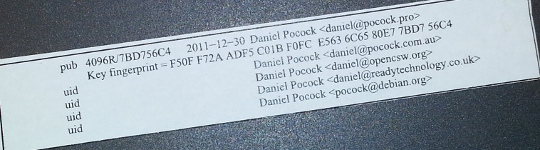
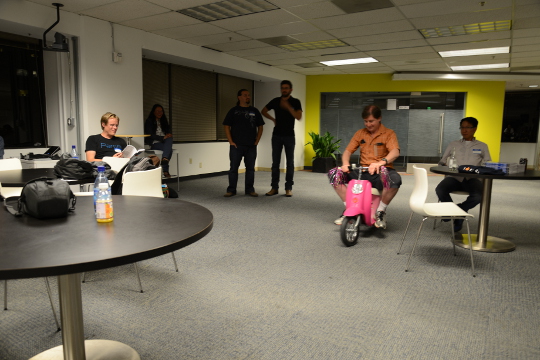
I've mentored a number of students in 2013, 2014 and 2015 for Debian and Ganglia and most of the companies I've worked with have run internships and graduate programs from time to time. GSoC 2015 has just finished and with all the excitement, many students are already asking what they can do to prepare and be selected for Outreachy or GSoC in 2016. My own observation is that the more time the organization has to get to know the student, the more confident they can be selecting that student. Furthermore, the more time that the student has spent getting to know the free software community, the more easily they can complete GSoC. Here I present a list of things that students can do to maximize their chance of selection and career opportunities at the same time. These tips are useful for people applying for GSoC itself and related programs such as GNOME's Outreachy or graduate placements in companies. Disclaimers There is no guarantee that Google will run the program again in 2016 or any future year until the Google announcement. There is no guarantee that any organization or mentor (including myself) will be involved until the official list of organizations is published by Google. Do not follow the advice of web sites that invite you to send pizza or anything else of value to prospective mentors. Following the steps in this page doesn't guarantee selection. That said, people who do follow these steps are much more likely to be considered and interviewed than somebody who hasn't done any of the things in this list. Understand what free software really is You may hear terms like free software and open source software used interchangeably. They don't mean exactly the same thing and many people use the term free software for the wrong things. Not all projects declaring themselves to be "free" or "open source" meet the definition of free software. Those that don't, usually as a result of deficiencies in their licenses, are fundamentally incompatible with the majority of software that does use genuinely free licenses. Google Summer of Code is about both writing and publishing your code and it is also about community. It is fundamental that you know the basics of licensing and how to choose a free license that empowers the community to collaborate on your code well after GSoC has finished. Please review the definition of free software early on and come back and review it from time to time. The The GNU Project / Free Software Foundation have excellent resources to help you understand what a free software license is and how it works to maximize community collaboration. Don't look for shortcuts There is no shortcut to GSoC selection and there is no shortcut to GSoC completion. The student stipend (USD $5,500 in 2014) is not paid to students unless they complete a minimum amount of valid code. This means that even if a student did find some shortcut to selection, it is unlikely they would be paid without completing meaningful work. If you are the right candidate for GSoC, you will not need a shortcut anyway. Are you the sort of person who can't leave a coding problem until you really feel it is fixed, even if you keep going all night? Have you ever woken up in the night with a dream about writing code still in your head? Do you become irritated by tedious or repetitive tasks and often think of ways to write code to eliminate such tasks? Does your family get cross with you because you take your laptop to Christmas dinner or some other significant occasion and start coding? If some of these statements summarize the way you think or feel you are probably a natural fit for GSoC. An opportunity money can't buy The GSoC stipend will not make you rich. It is intended to make sure you have enough money to survive through the summer and focus on your project. Professional developers make this much money in a week in leading business centers like New York, London and Singapore. When you get to that stage in 3-5 years, you will not even be thinking about exactly how much you made during internships. GSoC gives you an edge over other internships because it involves publicly promoting your work. Many companies still try to hide the potential of their best recruits for fear they will be poached or that they will be able to demand higher salaries. Everything you complete in GSoC is intended to be published and you get full credit for it. Imagine a young musician getting the opportunity to perform on the main stage at a rock festival. This is how the free software community works. It is a meritocracy and there is nobody to hold you back. Having a portfolio of free software that you have created or collaborated on and a wide network of professional contacts that you develop before, during and after GSoC will continue to pay you back for years to come. While other graduates are being screened through group interviews and testing days run by employers, people with a track record in a free software project often find they go straight to the final interview round. Register your domain name and make a permanent email address Free software is all about community and collaboration. Register your own domain name as this will become a focal point for your work and for people to get to know you as you become part of the community. This is sound advice for anybody working in IT, not just programmers. It gives the impression that you are confident and have a long term interest in a technology career. Choosing the provider: as a minimum, you want a provider that offers DNS management, static web site hosting, email forwarding and XMPP services all linked to your domain. You do not need to choose the provider that is linked to your internet connection at home and that is often not the best choice anyway. The XMPP foundation maintains a list of providers known to support XMPP. Create an email address within your domain name. The most basic domain hosting providers will let you forward the email address to a webmail or university email account of your choice. Configure your webmail to send replies using your personalized email address in the From header. Update your ~/.gitconfig file to use your personalized email address in your Git commits. Create a web site and blog Start writing a blog. Host it using your domain name. Some people blog every day, other people just blog once every two or three months. Create links from your web site to your other profiles, such as a Github profile page. This helps reinforce the pages/profiles that are genuinely related to you and avoid confusion with the pages of other developers. Many mentors are keen to see their students writing a weekly report on a blog during GSoC so starting a blog now gives you a head start. Mentors look at blogs during the selection process to try and gain insight into which topics a student is most suitable for. Create a profile on Github Github is one of the most widely used software development web sites. Github makes it quick and easy for you to publish your work and collaborate on the work of other people. Create an account today and get in the habbit of forking other projects, improving them, committing your changes and pushing the work back into your Github account. Github will quickly build a profile of your commits and this allows mentors to see and understand your interests and your strengths. In your Github profile, add a link to your web site/blog and make sure the email address you are using for Git commits (in the ~/.gitconfig file) is based on your personal domain. Start using PGP Pretty Good Privacy (PGP) is the industry standard in protecting your identity online. All serious free software projects use PGP to sign tags in Git, to sign official emails and to sign official release files. The most common way to start using PGP is with the GnuPG (GNU Privacy Guard) utility. It is installed by the package manager on most Linux systems. When you create your own PGP key, use the email address involving your domain name. This is the most permanent and stable solution. Print your key fingerprint using the gpg-key2ps command, it is in the signing-party package on most Linux systems. Keep copies of the fingerprint slips with you. This is what my own PGP fingerprint slip looks like. You can also print the key fingerprint on a business card for a more professional look. Using PGP, it is recommend that you sign any important messages you send but you do not have to encrypt the messages you send, especially if some of the people you send messages to (like family and friends) do not yet have the PGP software to decrypt them. If using the Thunderbird (Icedove) email client from Mozilla, you can easily send signed messages and validate the messages you receive using the Enigmail plugin. Get your PGP key signed Once you have a PGP key, you will need to find other developers to sign it. For people I mentor personally in GSoC, I'm keen to see that you try and find another Debian Developer in your area to sign your key as early as possible. Free software events Try and find all the free software events in your area in the months between now and the end of the next Google Summer of Code season. Aim to attend at least two of them before GSoC. Look closely at the schedules and find out about the individual speakers, the companies and the free software projects that are participating. For events that span more than one day, find out about the dinners, pub nights and other social parts of the event. Try and identify people who will attend the event who have been GSoC mentors or who intend to be. Contact them before the event, if you are keen to work on something in their domain they may be able to make time to discuss it with you in person. Take your PGP fingerprint slips. Even if you don't participate in a formal key-signing party at the event, you will still find some developers to sign your PGP key individually. You must take a photo ID document (such as your passport) for the other developer to check the name on your fingerprint but you do not give them a copy of the ID document. Events come in all shapes and sizes. FOSDEM is an example of one of the bigger events in Europe, linux.conf.au is a similarly large event in Australia. There are many, many more local events such as the Debian UK mini-DebConf in Cambridge, November 2015. Many events are either free or free for students but please check carefully if there is a requirement to register before attending. On your blog, discuss which events you are attending and which sessions interest you. Write a blog during or after the event too, including photos. Quantcast generously hosted the Ganglia community meeting in San Francisco, October 2013. We had a wild time in their offices with mini-scooters, burgers, beers and the Ganglia book. That's me on the pink mini-scooter and Bernard Li, one of the other Ganglia GSoC 2014 admins is on the right. Install Linux GSoC is fundamentally about free software. Linux is to free software what a tree is to the forest. Using Linux every day on your personal computer dramatically increases your ability to interact with the free software community and increases the number of potential GSoC projects that you can participate in. This is not to say that people using Mac OS or Windows are unwelcome. I have worked with some great developers who were not Linux users. Linux gives you an edge though and the best time to gain that edge is now, while you are a student and well before you apply for GSoC. If you must run Windows for some applications used in your course, it will run just fine in a virtual machine using Virtual Box, a free software solution for desktop virtualization. Use Linux as the primary operating system. Here are links to download ISO DVD (and CD) images for some of the main Linux distributions: If you are nervous about getting started with Linux, install it on a spare PC or in a virtual machine before you install it on your main PC or laptop. Linux is much less demanding on the hardware than Windows so you can easily run it on a machine that is 5-10 years old. Having just 4GB of RAM and 20GB of hard disk is usually more than enough for a basic graphical desktop environment although having better hardware makes it faster. Your experiences installing and running Linux, especially if it requires some special effort to make it work with some of your hardware, make interesting topics for your blog. Decide which technologies you know best Personally, I have mentored students working with C, C++, Java, Python and JavaScript/HTML5. In a GSoC program, you will typically do most of your work in just one of these languages. From the outset, decide which language you will focus on and do everything you can to improve your competence with that language. For example, if you have already used Java in most of your course, plan on using Java in GSoC and make sure you read Effective Java (2nd Edition) by Joshua Bloch. Decide which themes appeal to you Find a topic that has long-term appeal for you. Maybe the topic relates to your course or maybe you already know what type of company you would like to work in. Here is a list of some topics and some of the relevant software projects:


  • System administration, servers and networking: consider projects involving monitoring, automation, packaging. Ganglia is a great community to get involved with and you will encounter the Ganglia software in many large companies and academic/research networks. Contributing to a Linux distribution like Debian or Fedora packaging is another great way to get into system administration.
  • Desktop and user interface: consider projects involving window managers and desktop tools or adding to the user interface of just about any other software.
  • Big data and data science: this can apply to just about any other theme. For example, data science techniques are frequently used now to improve system administration.
  • Business and accounting: consider accounting, CRM and ERP software.
  • Finance and trading: consider projects like R, market data software like OpenMAMA and connectivity software (Apache Camel)
  • Real-time communication (RTC), VoIP, webcam and chat: look at the JSCommunicator or the Jitsi project
  • Web (JavaScript, HTML5): look at the JSCommunicator
Before the GSoC application process begins, you should aim to learn as much as possible about the theme you prefer and also gain practical experience using the software relating to that theme. For example, if you are attracted to the business and accounting theme, install the PostBooks suite and get to know it. Maybe you know somebody who runs a small business: help them to upgrade to PostBooks and use it to prepare some reports. Make something Make some small project, less than two week's work, to demonstrate your skills. It is important to make something that somebody will use for a practical purpose, this will help you gain experience communicating with other users through Github. For an example, see the servlet Juliana Louback created for fixing phone numbers in December 2013. It has since been used as part of the Lumicall web site and Juliana was selected for a GSoC 2014 project with Debian. There is no better way to demonstrate to a prospective mentor that you are ready for GSoC than by completing and publishing some small project like this yourself. If you don't have any immediate project ideas, many developers will also be able to give you tips on small projects like this that you can attempt, just come and ask us on one of the mailing lists. Ideally, the project will be something that you would use anyway even if you do not end up participating in GSoC. Such projects are the most motivating and rewarding and usually end up becoming an example of your best work. To continue the example of somebody with a preference for business and accounting software, a small project you might create is a plugin or extension for PostBooks. Getting to know prospective mentors Many web sites provide useful information about the developers who contribute to free software projects. Some of these developers may be willing to be a GSoC mentor. For example, look through some of the following: Getting on the mentor's shortlist Once you have identified projects that are interesting to you and developers who work on those projects, it is important to get yourself on the developer's shortlist. Basically, the shortlist is a list of all students who the developer believes can complete the project. If I feel that a student is unlikely to complete a project or if I don't have enough information to judge a student's probability of success, that student will not be on my shortlist. If I don't have any student on my shortlist, then a project will not go ahead at all. If there are multiple students on the shortlist, then I will be looking more closely at each of them to try and work out who is the best match. One way to get a developer's attention is to look at bug reports they have created. Github makes it easy to see complaints or bug reports they have made about their own projects or other projects they depend on. Another way to do this is to search through their code for strings like FIXME and TODO. Projects with standalone bug trackers like the Debian bug tracker also provide an easy way to search for bug reports that a specific person has created or commented on. Once you find some relevant bug reports, email the developer. Ask if anybody else is working on those issues. Try and start with an issue that is particularly easy and where the solution is interesting for you. This will help you learn to compile and test the program before you try to fix any more complicated bugs. It may even be something you can work on as part of your academic program. Find successful projects from the previous year Contact organizations and ask them which GSoC projects were most successful. In many organizations, you can find the past students' project plans and their final reports published on the web. Read through the plans submitted by the students who were chosen. Then read through the final reports by the same students and see how they compare to the original plans. Start building your project proposal now Don't wait for the application period to begin. Start writing a project proposal now. When writing a proposal, it is important to include several things:
  • Think big: what is the goal at the end of the project? Does your work help the greater good in some way, such as increasing the market share of Linux on the desktop?
  • Details: what are specific challenges? What tools will you use?
  • Time management: what will you do each week? Are there weeks where you will not work on GSoC due to vacation or other events? These things are permitted but they must be in your plan if you know them in advance. If an accident or death in the family cut a week out of your GSoC project, which work would you skip and would your project still be useful without that? Having two weeks of flexible time in your plan makes it more resilient against interruptions.
  • Communication: are you on mailing lists, IRC and XMPP chat? Will you make a weekly report on your blog?
  • Users: who will benefit from your work?
  • Testing: who will test and validate your work throughout the project? Ideally, this should involve more than just the mentor.
If your project plan is good enough, could you put it on Kickstarter or another crowdfunding site? This is a good test of whether or not a project is going to be supported by a GSoC mentor. Learn about packaging and distributing software Packaging is a vital part of the free software lifecycle. It is very easy to upload a project to Github but it takes more effort to have it become an official package in systems like Debian, Fedora and Ubuntu. Packaging and the communities around Linux distributions help you reach out to users of your software and get valuable feedback and new contributors. This boosts the impact of your work. To start with, you may want to help the maintainer of an existing package. Debian packaging teams are existing communities that work in a team and welcome new contributors. The Debian Mentors initiative is another great starting place. In the Fedora world, the place to start may be in one of the Special Interest Groups (SIGs). Think from the mentor's perspective After the application deadline, mentors have just 2 or 3 weeks to choose the students. This is actually not a lot of time to be certain if a particular student is capable of completing a project. If the student has a published history of free software activity, the mentor feels a lot more confident about choosing the student. Some mentors have more than one good student while other mentors receive no applications from capable students. In this situation, it is very common for mentors to send each other details of students who may be suitable. Once again, if a student has a good Github profile and a blog, it is much easier for mentors to try and match that student with another project. GSoC logo generic Conclusion Getting into the world of software engineering is much like joining any other profession or even joining a new hobby or sporting activity. If you run, you probably have various types of shoe and a running watch and you may even spend a couple of nights at the track each week. If you enjoy playing a musical instrument, you probably have a collection of sheet music, accessories for your instrument and you may even aspire to build a recording studio in your garage (or you probably know somebody else who already did that). The things listed on this page will not just help you walk the walk and talk the talk of a software developer, they will put you on a track to being one of the leaders. If you look over the profiles of other software developers on the Internet, you will find they are doing most of the things on this page already. Even if you are not selected for GSoC at all or decide not to apply, working through the steps on this page will help you clarify your own ideas about your career and help you make new friends in the software engineering community.


1 October 2015

Mike Gabriel: My FLOSS activities in August/September 2015

Here comes my "monthly" FLOSS report for August and September 2015. As 50% of August 2015 had been dedicated to taking some time off (spending time in Sweden with the family), it happened that even more workload had to be processed in September 2015. Received Sponsorship My monthly 8h portion of working for the Debian LTS project I had to dispatch from August into September. Thus, I received 16h of paid work for working on Debian LTS in September 2015. For details, see below. Thanks to Raphael Hertzog for having me on the team [1]. Thanks to all the people and companies sponsoring the Debian LTS Team's work. The development of GOsa Plugin SchoolManager (for details, see below) was done on contract for a school in Nothern Germany. The code will be released under the same license as the GOsa software itself. Completion of MATE 1.10 in Debian testing/unstable and Ubuntu 15.10 In the first half of September all MATE 1.10 packages finally landed in Debian testing (aka stretch). Martin Wimpress handled most of the packaging changes, whereas my main job was being reviewer and uploader of his efforts. Thanks to John Paul Adrian Glaubitz for jumping in as reviewer and uploader during my vacation time. read more

30 September 2015

Chris Lamb: Free software activities in September 2015

Inspired by Rapha l Hertzog, here is a monthly update covering a large part of what I have been doing in the free software world:
Debian The Reproducible Builds project was also covered in depth on LWN as well as in Lunar's weekly reports (#18, #19, #20, #21, #22).
Uploads
  • redis A new upstream release, as well as overhauling the systemd configuration, maintaining feature parity with sysvinit and adding various security hardening features.
  • python-redis Attempting to get its Debian Continuous Integration tests to pass successfully.
  • libfiu Ensuring we do not FTBFS under exotic locales.
  • gunicorn Dropping a dependency on python-tox now that tests are disabled.


RC bugs


I also filed FTBFS bugs against actdiag, actdiag, bangarang, bmon, bppphyview, cervisia, choqok, cinnamon-control-center, clasp, composer, cpl-plugin-naco, dirspec, django-countries, dmapi, dolphin-plugins, dulwich, elki, eqonomize, eztrace, fontmatrix, freedink, galera-3, golang-git2go, golang-github-golang-leveldb, gopher, gst-plugins-bad0.10, jbofihe, k3b, kalgebra, kbibtex, kde-baseapps, kde-dev-utils, kdesdk-kioslaves, kdesvn, kdevelop-php-docs, kdewebdev, kftpgrabber, kile, kmess, kmix, kmldonkey, knights, konsole4, kpartsplugin, kplayer, kraft, krecipes, krusader, ktp-auth-handler, ktp-common-internals, ktp-text-ui, libdevice-cdio-perl, libdr-tarantool-perl, libevent-rpc-perl, libmime-util-java, libmoosex-app-cmd-perl, libmoosex-app-cmd-perl, librdkafka, libxml-easyobj-perl, maven-dependency-plugin, mmtk, murano-dashboard, node-expat, node-iconv, node-raw-body, node-srs, node-websocket, ocaml-estring, ocaml-estring, oce, odb, oslo-config, oslo.messaging, ovirt-guest-agent, packagesearch, php-svn, php5-midgard2, phpunit-story, pike8.0, plasma-widget-adjustableclock, plowshare4, procps, pygpgme, pylibmc, pyroma, python-admesh, python-bleach, python-dmidecode, python-libdiscid, python-mne, python-mne, python-nmap, python-nmap, python-oslo.middleware, python-riemann-client, python-traceback2, qdjango, qsapecng, ruby-em-synchrony, ruby-ffi-rzmq, ruby-nokogiri, ruby-opengraph-parser, ruby-thread-safe, shortuuid, skrooge, smb4k, snp-sites, soprano, stopmotion, subtitlecomposer, svgpart, thin-provisioning-tools, umbrello, validator.js, vdr-plugin-prefermenu, vdr-plugin-vnsiserver, vdr-plugin-weather, webkitkde, xbmc-pvr-addons, xfsdump & zanshin.

Norbert Preining: 6 years in Japan

Exactly 6 years ago, on October 1, 2009, I started my work at the Japan Advanced Institute of Science and Technology (JAIST), arriving the previous day in a place not completely unknown, but with a completely different outlook: I had a position as Associate Professor, and somehow was looking forward to an interesting and challenging time. japan-flag 6 years later I am still here at the JAIST, but things have changed considerably, and my future is even less clear than 6 years ago. So it is time to reflect a bit about the last years. The biggest achievement My biggest achievement in these 6 years is probably that I managed to learn Japanese to a degree that I can teach in Japanese (math, logic, etc), can read Japanese books to a certain degree, and have generally no problem communicating in daily life. Said that, there is still a long way to go. Reading, and much more writing, is still requiring concentration and power, far from the natural flow in my other languages. While talking feels rather natural, the complexity of the written language is a huge hurdle. But this is probably the good, the high point of the 6 years, a great challenge, that keeps my mind busy and working and challenged over long time, with still more to do. The happiest thing Many events here in Japan were of great fun and enjoyment for me. The rich culture, paired with a spectacular love for traditional handicraft I haven t seen anywhere else, is a guarantee for enjoyable and intellectually stimulating activities. But the biggest joy of my time here of course was that I found a lovely, beautiful, and caring wife. Not knowing the challenges of an international marriage, I was caught without preparation, and so we had (and still have) rough times due to the cultural differences, and different expectations. But this is what makes life interesting, and so I am always grateful for this chance. Whatever happens in the future, she will be part of my decisions and the center of my life. The biggest disappointment Of course, when you live in a country for some time, you learn to know the highs and lows. As someone interested in politics and social systems, Japan is a pain in the butt in many respects. But the biggest disappointment was in a different area: Working environment. While I love my work and had great surroundings, there is something that always is present in the background: Foreigners here are not considered assets, but embellishment. Meaning that they are the first ones to loose their jobs when times are difficult, meaning that they are not considered as full members. After many years at a university here, and with no outlook on a job after March, I can only say, Japan is a country of Japanese first , especially when it comes to jobs. Of course, other countries are not that different, but looking at the average mixture of nationalities at universities in Europe or the US, and comparing them to Japanese universities, a bleak image is arising. I enjoyed my time here, I worked hard and did a lot for my university, but the economically hard times make it necessary to change things, and that means getting rid of foreigners. That is the reason why the work environment is the biggest disappointment in these years. Future The future is unclear, as it always was. The dire fate of many researchers. Being in my 40ies without a permanent position and a family, I am forced to think hard what my next options are. The hide-and-seek games of Japanese (and other) universities seem to me less and less an option. Sad as it is, after having worked 20+ years in academics, having done some interesting (for me) research and having managed to secure a name in our community, I am not sure where my future is. Continuing on definite contracts does not sound like a great option for me. Several things for the future come to my mind: starting my own business, work as programmer (maybe Google still wants me after I rejected them 2 years ago), work as mountain guide (have done that for some years before going to Japan). All of that is possible, but my loosing the time to research will always be a pain, since I enjoy cracking my brain on some complicated and deep logical problems. Whatever comes, I will take it as a chance to learn new things. And in one way or another it will work out, I hope.

29 September 2015

Dariusz Dwornikowski: Delete until signature in vim

It has been bugging me for a while. When responding to an email, you often want to delete all the content (or part of the previous content) until the end of the email's body. However it would be nice to leave your signature in place. For that I came up with this nifty little vim trick:
nnoremap <silent> <leader>gr <Esc>d/--\_.*Dariusz<CR>:nohl<CR>O
Assuming that your signature starts with -- and the following line starts with your name (in my case it is Dariusz), this will delete all the content from the current line until the signature. Then it will remove search highlighting, and finally move one line up.

Norbert Preining: Multi-boot stick update: TAILS 1.6, SysresCD 4.6.0, GParted 0.23, Debian 8.2

Updates for my multi-boot/multi-purpose USB stick: All components have been updated to the latest versions and I have confirmed that all of them still boot properly although changes in the grub.cfg file are necessary. So going through these explanations one will end up with a usable USB stick that can boot you into TAILS, System Rescue CD, GNU Parted Live CD, GRML, and also can boot into an installation of Debian 8.2 Jessie installation. All this while still being able to use the USB stick as normal media. multi-usb-disk Since there have been a lot of updates, and also changes in the setup and grub config file, I include the full procedure here, that is, merging and updating these previous posts: USB stick with Tails and SystemRescueCD, Tails 1.2.1, Debian jessie installer, System Rescue CD on USB, USB stick update: TAILS 1.4, GParted 0.22, SysResCD 4.5.2, Debian Jessie, and USB stick update: Debian is back, plus GRML. Let us repeat some things from the original post concerning the wishlist and the main players: I have a long wishlist of items a boot stick should fulfill Requirements A USB stick, the iso images of TAILS 1.6, SystemRescueCD 4.6.0, GParted Lice CD 0.23.0, GRML 2014.11, and some tool to access iso images, for example ISOmaster (often available from your friendly Linux distribution). I assume that you have already an USB stick prepared as described previously. If this is not the case, please go there and follow the section on preparing your usb stick. Three types of boot options We will employ three different approaches to boot special systems: the one is directly from an iso image (easiest, simple to update), the other via extraction of the necessary kernels and images (bit painful, needs some handwork), and the last one is a mixture necessary to get Debian booting (most painful, needs additional downloads and handwork). At the moment we have the following status with respect to boot methods: Booting from ISO image Grub has gained quite some time ago the ability to boot directly from an ISO image. In this case the iso image is mounted via loopback, and the kernel and initrd are specified relatively to the iso image root. This system makes it extremely easy to update the respective boot option: just drop the new iso image onto the USB stick, and update the isofile setting. One could even use some -latest method, but I prefer to keep the exact name. For both SystemRescueCD, GNOME Partition Live CD, and GRML, just drop the iso files into /boot/iso/, in my case /boot/iso/systemrescuecd-x86-4.6.0.iso and /boot/iso/gparted-live-0.23.0-1-i586.iso. After that, entries like the following have to be added to grub.cfg. For the full list see grub.cfg:

submenu "System Rescue CD 4.6.0 (via ISO) ---> "  
  set isofile="/boot/iso/systemrescuecd-x86-4.6.0.iso"
  menuentry "SystemRescueCd (64bit, default boot options)"  
        set gfxpayload=keep
        loopback loop (hd0,1)$isofile
        linux   (loop)/isolinux/rescue64 isoloop=$isofile
        initrd  (loop)/isolinux/initram.igz
   
  ...
 
 
submenu "GNU/Gnome Parted Live CD 0.23.0 (via ISO) ---> "  
  set isofile="/boot/iso/gparted-live-0.23.0-1-i586.iso"
  menuentry "GParted Live (Default settings)" 
    loopback loop (hd0,1)$isofile
    linux (loop)/live/vmlinuz boot=live union=overlay username=user config components quiet noswap noeject  ip= net.ifnames=0 nosplash findiso=$isofile
    initrd (loop)/live/initrd.img
   
  ...
 
 
submenu "GRML 2014.11 ---> "  
  menuentry "Grml Rescue System 64bit"  
        iso_path="/boot/iso/grml64-full_2014.11.iso"
        export iso_path
        loopback loop (hd0,1)$iso_path
        set root=(loop)
        kernelopts=" ssh=foobarbaz toram  "
        export kernelopts
        configfile /boot/grub/loopback.cfg
    
 
Note the added isoloop=$isofile and findiso=$isofile that helps the installer find the iso images. Booting via extraction of kernels and images This is a bit more tedious, but still not too bad. Installation of TAILS files Assuming you have access to the files on the TAILS CD via the directory ~/tails, execute the following commands:
mkdir -p /usbstick/boot/tails
cp -a ~/tails/live/* /usbstick/boot/tails/
The grub.cfg entries look now similar to the following:
submenu "TAILS Environment 1.6 ---> "  
  menuentry "Tails64 Live System"  
        linux   /boot/tails/vmlinuz2 boot=live live-media-path=/boot/tails config live-media=removable nopersistent noprompt timezone=Etc/UTC block.events_dfl_poll_msecs=1000 splash noautologin module=Tails
        initrd  /boot/tails/initrd2.img
 
   
  ...
 
The important part here is the live-media-path=/boot/tails, otherwise TAILS will not find the correct files for booting. The rest of the information was extracted from the boot setup of TAILS itself. Mixture of iso image and extraction Debian jessie As mentioned in the previous post, booting Debian/Jessie installation images via any method laid out above didn t work, since the iso images is never found. It turned out that the current installer iso images do not contain the iso-scan package, which is responsible for searching and loading of iso images. But with a small trick one can overcome this: One needs to replace the initrd that is on the ISO image with one that contains the iso-scan package. And we do not need to create these initrd by ourselves, but simply use the ones from hd-media type installer. I downloaded the following four gzipped initrds from one of the Debian mirrors: i386/initrd text mode, i386/initrd gui mode, amd64/initrd text mode, amd64/initrd gui mode, and put them into the USB stick s boot/debian/install.386, boot/debian/install.386/gtk, boot/debian/install.amd, boot/debian/install.amd/gtk, respectively. Finally, I added entries similar to this one (rest see the grub.cfg file):
submenu "Debian 8.2 Jessie NetInstall ---> "  
    set isofile="/boot/iso/firmware-8.2.0-amd64-i386-netinst.iso"
    menuentry '64 bit Install'  
        set background_color=black
        loopback loop (hd0,1)$isofile
        linux    (loop)/install.amd/vmlinuz iso-scan/ask_second_pass=true iso-scan/filename=$isofile vga=788 -- quiet 
        initrd   /boot/debian/install.amd/initrd.gz
     
    ...
 
Again an important point, don t forget the two kernel command line options: iso-scan/ask_second_pass=true iso-scan/filename=$isofile, otherwise you probably will have to make the installer scan all disks and drives completely, which might take ages. Current status of USB stick Just to make sure, the usb stick should contain at the current stage the following files:
/boot/
    iso/
        firmware-8.2.0-amd64-i386-netinst.iso
        gparted-live-0.23.0-1-i586.iso
        grml64-full_2014.11.iso
        systemrescuecd-x86-4.6.0.iso
    tails/
        vmlinuz Tails.module initrd.img ....
    grub/
        fonts/
            lots of files
        locale/
            lots of files
        x86_64-efi/
            lots of files
        font.pf2
        grubenv
        grub.cfg            *this file we create in the next step!!*
/EFI
    BOOT/
        BOOTX64.EFI
The Grub config file grub.cfg The final step is to provide a grub config file in /usbstick/boot/grub/grub.cfg. I created one by looking at the isoboot.cfg files both in the SystemRescueCD, TAILS iso images, GParted iso image, and the Debian/Jessie image, and converting them to grub syntax. Excerpts have been shown above in the various sections. I spare you all the details, grab a copy here: grub.cfg Conclusion That s it. Now you can anonymously provide data about your evil government, rescue your friends computer, fix a forgotten Windows password, and above all, install a proper free operating system. If you have any comments, improvements or suggestions, please drop me a comment. I hope this helps a few people getting a decent USB boot stick running. Enjoy.

27 September 2015

Lunar: Reproducible builds: week 22 in Stretch cycle

What happened in the reproducible builds effort this week: Toolchain fixes Packages fixed The following 22 packages became reproducible due to changes in their build dependencies: breathe, cdi-api, geronimo-jpa-2.0-spec, geronimo-validation-1.0-spec, gradle-propdeps-plugin, jansi, javaparser, libjsr311-api-java, mac-widgets, mockito, mojarra, pastescript, plexus-utils2, powerline, python-psutil, python-sfml, python-tldap, pythondialog, tox, trident, truffle, zookeeper. The following packages became reproducible after getting fixed: Some uploads fixed some reproducibility issues but not all of them: Patches submitted which have not made their way to the archive yet: diffoscope development The changes to make diffoscope run under Python 3, along with many small fixes, entered the archive with version 35 on September 21th. Another release was made the very next day fixed two encoding-related issues discovered when running diffoscope on more Debian packages. strip-nondeterminism development Version 0.12.0 now preserves file permissions on modified zip files and dh_strip_nondeterminism has been made compatible with older debhelper. disorderfs development Version 0.3.0 implemented a multi-user mode that was required to build Debian packages using disorderfs. It also added command line options to control the ordering of files in directory (either shuffled or reversed) and another to do arbitrary changes to the reported space used by files on disk. A couple days later, version 0.4.0 was released to support locks, flush, fsync, fsyncdir, read_buf, and write_buf. Almost all known issues have now been fixed. reproducible.debian.net disorderfs is now used during the second build. This makes file ordering issue very easy to identify as such. (h01ger) Work has been done on making the distributed build setup more reliable. (h01ger) Documentation update Matt Kraii fixed the example on how to fix issues related to dates in Sphinx. Recent Sphinx versions should also be compatible with SOURCE_DATE_EPOCH. Package reviews 53 reviews have been removed, 85 added and 13 updated this week. 46 packages failing to build from source has been identified by Chris Lamb, Chris West, and Niko Tyni. Chris Lamb was the lucky reporter of bug #800000 on vdr-plugin-prefermenu. Issues related to disorderfs are being tracked with a new issue.

26 September 2015

Norbert Preining: Kobo firmware 3.18.0 mega update (KSM, nickel patch, ssh, fonts)

In short succession a new firmware from Kobo, this time 3.18.0. And here is my mega-update. On request from a reader I have now prepared updates for all three hardwares, Mark4 (Glo), Mark5 (Aura), and Mark6 (GloHD). Kobo Logo Changes since last release: Included patches from the Metazoa firmware patches: Other things that are included are as usual: koreader, pbchess, coolreader, the ssh part of kobohack, and some side-loaded fonts. For details on the respective parts please see the previous post Download Mark6 Kobo GloHD firmware: Kobo 3.18.0 for GloHD Mega update: Kobo-3.18.0-combined/Mark6/KoboRoot.tgz Mark5 Aura firmware: Kobo 3.18.0 for Aura Mega update: Kobo-3.18.0-combined/Mark5/KoboRoot.tgz Mark4 Kobo Glo, Aura HD firmware: Kobo 3.18.0 for Glo and AuraHD Mega update: Kobo-3.18.0-combined/Mark4/KoboRoot.tgz Enjoy.

25 September 2015

Clint Adams: This can or cannot be copyrighted

Honey Mojito Combine 12 oz. of honey with 8 oz. of warm water. Stir mixture together until the honey has completely dissolved. Juice limes in a juicer and pour into the honey and water. Squeeze the bunch of mint sprigs and add to a pitcher of crushed ice. Pour the honey /lime mixture over the ice. Stir and top with sparkling water. Add more honey , water, limes, or rum to your taste. Enjoy! Serves 2

Sven Hoexter: getting rid of xchat

I'm lazy. So I sticked to xchat for way too long. It seems to be dead since 2010 but luckily some good souls maintain a fork called hexchat. That's what I moved myself to a few weeks ago. Now looking at the Debian xchat package I feel the urgent need to fill a request for removal. Sine I'm not a member of QA I asked for some advice, but the feedback is a bit sparse so far. Maybe everyone still using xchat could just switch to hexchat so we can remove xchat next year and nobody would notice it? The only obvious drawback I can see at the moment is the missing Tcl plugin. The rest of the migration is more or less reconfiguring everything to your preferences.

24 September 2015

Petter Reinholdtsen: The life and death of a laptop battery

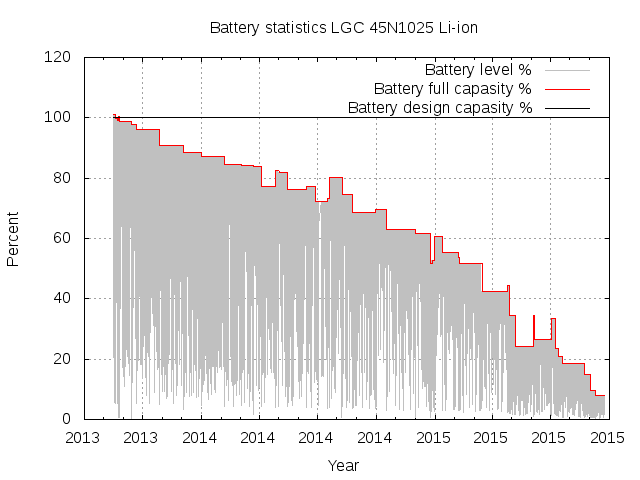
When I get a new laptop, the battery life time at the start is OK. But this do not last. The last few laptops gave me a feeling that within a year, the life time is just a fraction of what it used to be, and it slowly become painful to use the laptop without power connected all the time. Because of this, when I got a new Thinkpad X230 laptop about two years ago, I decided to monitor its battery state to have more hard facts when the battery started to fail. First I tried to find a sensible Debian package to record the battery status, assuming that this must be a problem already handled by someone else. I found battery-stats, which collects statistics from the battery, but it was completely broken. I sent a few suggestions to the maintainer, but decided to write my own collector as a shell script while I waited for feedback from him. Via a blog post about the battery development on a MacBook Air I also discovered batlog, not available in Debian. I started my collector 2013-07-15, and it has been collecting battery stats ever since. Now my /var/log/hjemmenett-battery-status.log file contain around 115,000 measurements, from the time the battery was working great until now, when it is unable to charge above 7% of original capacity. My collector shell script is quite simple and look like this:
#!/bin/sh
# Inspired by
# http://www.ifweassume.com/2013/08/the-de-evolution-of-my-laptop-battery.html
# See also
# http://blog.sleeplessbeastie.eu/2013/01/02/debian-how-to-monitor-battery-capacity/
logfile=/var/log/hjemmenett-battery-status.log
files="manufacturer model_name technology serial_number \
    energy_full energy_full_design energy_now cycle_count status"
if [ ! -e "$logfile" ] ; then
    (
	printf "timestamp,"
	for f in $files; do
	    printf "%s," $f
	done
	echo
    ) > "$logfile"
fi
log_battery()  
    # Print complete message in one echo call, to avoid race condition
    # when several log processes run in parallel.
    msg=$(printf "%s," $(date +%s); \
	for f in $files; do \
	    printf "%s," $(cat $f); \
	done)
    echo "$msg"
 
cd /sys/class/power_supply
for bat in BAT*; do
    (cd $bat && log_battery >> "$logfile")
done
The script is called when the power management system detect a change in the power status (power plug in or out), and when going into and out of hibernation and suspend. In addition, it collect a value every 10 minutes. This make it possible for me know when the battery is discharging, charging and how the maximum charge change over time. The code for the Debian package is now available on github. The collected log file look like this:
timestamp,manufacturer,model_name,technology,serial_number,energy_full,energy_full_design,energy_now,cycle_count,status,
1376591133,LGC,45N1025,Li-ion,974,62800000,62160000,39050000,0,Discharging,
[...]
1443090528,LGC,45N1025,Li-ion,974,4900000,62160000,4900000,0,Full,
1443090601,LGC,45N1025,Li-ion,974,4900000,62160000,4900000,0,Full,
I wrote a small script to create a graph of the charge development over time. This graph depicted above show the slow death of my laptop battery. But why is this happening? Why are my laptop batteries always dying in a year or two, while the batteries of space probes and satellites keep working year after year. If we are to believe Battery University, the cause is me charging the battery whenever I have a chance, and the fix is to not charge the Lithium-ion batteries to 100% all the time, but to stay below 90% of full charge most of the time. I've been told that the Tesla electric cars limit the charge of their batteries to 80%, with the option to charge to 100% when preparing for a longer trip (not that I would want a car like Tesla where rights to privacy is abandoned, but that is another story), which I guess is the option we should have for laptops on Linux too. Is there a good and generic way with Linux to tell the battery to stop charging at 80%, unless requested to charge to 100% once in preparation for a longer trip? I found one recipe on askubuntu for Ubuntu to limit charging on Thinkpad to 80%, but could not get it to work (kernel module refused to load). I wonder why the battery capacity was reported to be more than 100% at the start. I also wonder why the "full capacity" increases some times, and if it is possible to repeat the process to get the battery back to design capacity. And I wonder if the discharge and charge speed change over time, or if this stay the same. I did not yet try to write a tool to calculate the derivative values of the battery level, but suspect some interesting insights might be learned from those. Update 2015-09-24: I got a tip to install the packages acpi-call-dkms and tlp (unfortunately missing in Debian stable) packages instead of the tp-smapi-dkms package I had tried to use initially, and use 'tlp setcharge 40 80' to change when charging start and stop. I've done so now, but expect my existing battery is toast and need to be replaced. The proposal is unfortunately Thinkpad specific.

23 September 2015

Simon Josefsson: Cosmos A Simple Configuration Management System

Back in early 2012 I had been helping with system administration of a number of Debian/Ubuntu-based machines, and the odd Solaris machine, for a couple of years at $DAYJOB. We had a combination of hand-written scripts, documentation notes that we cut n paste d from during installation, and some locally maintained Debian packages for pulling in dependencies and providing some configuration files. As the number of people and machines involved grew, I realized that I wasn t happy with how these machines were being administrated. If one of these machines would disappear in flames, it would take time (and more importantly, non-trivial manual labor) to get its services up and running again. I wanted a system that could automate the complete configuration of any Unix-like machine. It should require minimal human interaction. I wanted the configuration files to be version controlled. I wanted good security properties. I did not want to rely on a centralized server that would be a single point of failure. It had to be portable and be easy to get to work on new (and very old) platforms. It should be easy to modify a configuration file and get it deployed. I wanted it to be easy to start to use on an existing server. I wanted it to allow for incremental adoption. Surely this must exist, I thought. During January 2012 I evaluated the existing configuration management systems around, like CFEngine, Chef, and Puppet. I don t recall my reasons for rejecting each individual project, but needless to say I did not find what I was looking for. The reasons for rejecting the projects I looked at ranged from centralization concerns (single-point-of-failure central servers), bad security (no OpenPGP signing integration), to the feeling that the projects were too complex and hence fragile. I m sure there were other reasons too. In February I started going back to my original needs and tried to see if I could abstract something from the knowledge that was in all these notes, script snippets and local dpkg packages. I realized that the essence of what I wanted was one shell script per machine, OpenPGP signed, in a Git repository. I could check out that Git repository on every new machine that I wanted to configure, verify the OpenPGP signature of the shell script, and invoke the script. The script would do everything needed to get the machine up into an operational stage again, including package installation and configuration file changes. Since I would usually want to modify configuration files on a system even after its initial installation (hey not everyone is perfect), it was natural to extend this idea to a cron job that did git pull , verified the OpenPGP signature, and ran the script. The script would then have to be a bit more clever and not redo everything every time. Since we had many machines, it was obvious that there would be huge code duplication between scripts. It felt natural to think of splitting up the shell script into a directory with many smaller shell scripts, and invoke each shell script in turn. Think of the /etc/init.d/ hierarchy and how it worked with System V initd. This would allow re-use of useful snippets across several machines. The next realization was that large parts of the shell script would be to create configuration files, such as /etc/network/interfaces. It would be easier to modify the content of those files if they were stored as files in a separate directory, an overlay stored in a sub-directory overlay/, and copied into the file system s hierarchy with rsync. The final realization was that it made some sense to run one set of scripts before rsync ing in the configuration files (to be able to install packages or set things up for the configuration files to make sense), and one set of scripts after the rsync (to perform tasks that require some package to be installed and configured). These set of scripts were called the pre-tasks and post-tasks respectively, and stored in sub-directories called pre-tasks.d/ and post-tasks.d/. I started putting what would become Cosmos together during February 2012. Incidentally, I had been using etckeeper on our machines, and I had been reading its source code, and it greatly inspired the internal design of Cosmos. The git history shows well how the ideas evolved even that Cosmos was initially called Eve but in retrospect I didn t like the religious connotations and there were a couple of rewrites on the way, but on the 28th of February I pushed out version 1.0. It was in total 778 lines of code, with at least 200 of those lines being the license boiler plate at the top of each file. Version 1.0 had a debian/ directory and I built the dpkg file and started to deploy on it some machines. There were a couple of small fixes in the next few days, but development stopped on March 5th 2012. We started to use Cosmos, and converted more and more machines to it, and I quickly also converted all of my home servers to use it. And even my laptops. It took until September 2014 to discover the first bug (the fix is a one-liner). Since then there haven t been any real changes to the source code. It is in daily use today. The README that comes with Cosmos gives a more hands-on approach on using it, which I hope will serve as a starting point if the above introduction sparked some interest. I hope to cover more about how to use Cosmos in a later blog post. Since Cosmos does so little on its own, to make sense of how to use it, you want to see a Git repository with machine models. If you want to see how the Git repository for my own machines looks you can see the sjd-cosmos repository. Don t miss its README at the bottom. In particular, its global/ sub-directory contains some of the foundation, such as OpenPGP key trust handling.

22 September 2015

Russ Allbery: Review: Half Life

Review: Half Life, by S.L. Huang
Series: Russell's Attic #2
Publisher: S.L. Huang
Copyright: 2014
ISBN: 0-9960700-5-2
Format: Kindle
Pages: 314
This is a sequel to Zero Sum Game and the second book about Cas Russell, a mercenary superhero (in a world without the concept of superheroes) with preternatural ability to analyze anything about her surroundings with mathematics. While it reuses some personal relationships from the first book and makes a few references to the villains, it's a disconnected story. It would be possible to start here if you wanted to. Cas is now in the strange and unexpected situation of having friends, and they're starting to complicate her life. First, Arthur has managed to trigger some unexpected storehouse of morals and gotten her to try to stop killing people on jobs. That conscience may have something to do with her willingness to take a job from an apparently crazy man who claims a corporation has stolen his daughter, a daughter who appears nowhere in any official records. And when her other friend, Checker, gets in trouble with the mob, Cas tries to protect him in her own inimitable way, which poses a serious risk of shortening her lifespan. Even more than the first book, the story in Half Life is a mix of the slightly ridiculous world of superheroes with gritty (and bloody) danger. It featuring hit men, armed guards, lots of guns, and quite a lot of physical injury and blood. A nasty corporation that's obviously hiding serious secrets shares pages with the matriarch of a mob family who considers Checker sleeping with her daughter to be an abuse of her honor. The story eventually escalates into more outlandish bits of technology, an uncanny little girl, and a plot that would feel at home in a Batman comic. I like books that don't take themselves too seriously, but the contrast between the brutal treatment Cas struggles through and the outrageous mad scientist villain provokes a bit of cognitive whiplash. That said, the villains of Half Life are neither as freakish nor as disturbing as those in Zero Sum Game, which I appreciated. Huang packs in several plot twists, some inobvious decisions and disagreements between Russell and her friends about appropriate strategy, and Cas's discovery that there are certain things she cares very strongly about other than money and having jobs. Cas goes from a barely moral, very dark hero in the first book to something closer to a very grumbly chaotic good who insists she's not as good as she actually is. It's a standard character type, but Huang does a good job with it. Huang also adds a couple of supporting cast members in this book that I hope will stick around. Pilar starts as a receptionist at one of the companies Cas breaks into, and at first seems like she might be comic relief. But she ends up being considerably more competent than she first appears (or that she seems to realize); by the end of the book, I had a lot of respect for her. And Miri makes only a few appearances, but her unflappable attitude is a delight. I hope to see more of her. The biggest drawback to this book for me is that Cas gets hurt a lot. At times, the story falls into one of the patterns of urban fantasy: the protagonist gets repeatedly beaten up and abused until they figure out what's going on, and spends most of the story up against impossible odds and feeling helpless. That's not a plot pattern I'm fond of. I don't enjoy reading about physical pain, and I had trouble at some points in the story with the constant feeling of dread. Parts of the book I read in short bursts, putting it aside to look at something else. But the sense of dread falls off towards the end of the book, as Cas figures out what's actually going on, and none of it is as horrible as it felt it could be. If you have a similar problem with some urban fantasy tropes, I think it's safe to stick with the story. This was a fun story, but it doesn't develop much in the way of deeper themes in the series. There's essentially no Rio, no further discoveries about the villains of the first book, and no further details on what makes Cas tick or why she seems to be the only, or at least one of the few, super-powered people in this world. The advance publicity for the third book seems to indicate that's coming next. I'm curious enough now that I'll keep reading this series. Recommended if you liked the first book. Half Life is very similar, but I think slightly better. Followed by Root of Unity. Rating: 7 out of 10

21 September 2015

Niels Thykier: With 3 months of automatic decrufting in unstable

After 3 months of installing an automatic decrufter in DAK, it: On a related note, the FTP masters have removed 28861 items between 2001 and now. The average being 2061 items a year (not accounting for the current year still being open). Though, intriguingly, in 2013 and 2014 the FTP masters removed 3394 and 3342 items. With the (albeit limited) stats from the auto-decrufter, we can estimate that about 2700 of those were cruft items. One could certainly also check the removal messages and check for the common tags used in cruft removals. I leave that as an exercise to the curious readers, who are not satisfied with my estimate. :)
Filed under: Debian, Release-Team

20 September 2015

Dirk Eddelbuettel: RQuantLib 0.4.1

Right before heading off to last week's excellent EARL 2015 conference in London, a new minor release of RQuantLib was released onto CRAN and into Debian. The changes are detailed below.
Changes in RQuantLib version 0.4.1 (2015-09-11)
  • Changes in RQuantLib code:
    • A simple shiny application is now included in the directory shiny/DiscountCurve/ and accessible via the new demo function ShinyDiscountCurve.
    • The option surface plotting example in arrays.R now checks for rgl by using requireNamespace.
    • The files NAMESPACE and DESCRIPTION have been updated to reflect all the suggestions of R CMD check.
    • The Travis CI tests now use binary Debian packages for all package dependencies making the tests a little faster.
Courtesy of CRANberries, there is also a diffstat report for the this release. As always, more detailed information is on the RQuantLib page. Questions, comments etc should go to the rquantlib-devel mailing list off the R-Forge page. Issue tickets can be filed at the GitHub repo.

This post by Dirk Eddelbuettel originated on his Thinking inside the box blog. Please report excessive re-aggregation in third-party for-profit settings.

Next.

Previous.