Search Results: "nic"

27 December 2015

Steve Kemp: Some things are universal?

I don't often do retrospectives, but this year has been an unusual one for me, as I moved to Finland almost six months ago. The topic has come up in conversation a lot over the past few months, so when people ask me what I think I can give some simple answers without too much thought. Here's a brief summary. There are some obvious changes:
The Traffic
The traffic drives on the right-hand side of the roads, which took a bit of getting used to, but isn't a huge surprise as I've travelled in Europe in the past. There aren't so many countries that drive on the left after all so most people probably wouldn't even notice this as odd. When it comes to traffic one thing nice about Helsinki is that most junctions are "zebra crossings". Sure they don't have flashing lights, but they have shaded areas, and pedestrians have right of way. As for transport the city of Helsinki has local trains, trams, buses and taxis. The trams and buses all use the same card for payment so transport is integrated very well. I buy a time-based card, spending about 50 for a month of unlimited travel. If you prefer you may add euros to your card and pay for distinct journeys - but that works out more expensive if you travel twice, or more, a day.
The Money
Finland uses the Euro these days, having switched from the Finnish markka in 2002. Enough said. Costs are largely in line with what I'd expect: Cigarettes are cheap, beer is expensive. Some things are very expensive, some things are very cheap. Largely the expensive things are those that are imported. It is a very small country after all.
The Language
Finnish is .. complex. But I've not struggled too much. Mostly I can buy what I want without difficulty. There are weird exceptions though for example I went out to buy soup one day and had to return carrying only shame and disappointment: I can't read the language on the tins and what I thought was soup turned out to be a can of chopped tomatoes. Food is good though, and available easily (!!). The only significant surprise when it comes to shopping is that loose goods must be weighed yourself. You pick up a bunch of bananas, take it to the scales, press the button that has a picture of a banana on it, and it prints out a label you attach to them - at the till the cashier will scan the label and charge you. If you forget, or don't know how to do it they'll tut and complain. In daily life I use two phrases frequently and they are sufficient for communcation:
  • "minua haluan ... kahvi kakku olut"
    • "I want ... coffee cake beer".
  • "kiitos"
    • "Thanks"
Usually people speak to me in English, which is a little annoying as it means I'm not learning as much as I could. But that said over the past few months I've had proper conversations entirely in Finnish with shop-keepers, and similar. So I'm getting better.
The Culture
Finnish people are friendly, but terse. That's the reputation. The Finnish people are alcoholics, and have high rates of suicide. Also the reputation. Finally we know that the Finnish people consume more coffee than the rest of the world. All those things are true, but they're not enough by far to describe the people. Obviously they're all different, and we have a lot of people from other parts of the world here too - Russians, Asians, Somalians. So culture is complex .. but markedly different than in the UK. I could write more about this, but I think for the moment I'll just draw a line under culture and say that I'm enjoying the interactions with people here, and while many things are slightly "off", it's not bad. Just different. Also saunas are fun. I've never had any qualms about being naked with strangers, so I don't really understand why Americans, and others, find this so difficult/surprising. But yeah, saunas are great. Things that Finland is known for internationally: The invention of the molotov cocktail, rally-driving, hockey, world's strongest man, Moomins, Tom of Finland, Salmiakki.
The Weather
Not too hot. Not too cold. But that's largely because I'm one of those "hot" people who doesn't really get cold even at the best of times. My ideal temperatures are about 13 C. My wife prefers 15 C, or more. We don't fight any more. Mostly. Winter is apparently full of snow, but this year has been poor. We had the first snowfall yesterday, here in Helsinki, and we woke this morning a blanket of snow about two inches high. It looks pretty. The biggest thing about weather in Finland is the constant darkness in winter, and the constant sun in Summer. In Summer there were like 22 hours of sunlight a day which made sleeping hard when we moved into our flat - with no curtains. In winter it feels like there is 20 minutes of sunlight a day. It's not that bad here in the south, although I think it is something like five hours and less in the north. I've never had any real issues with depression, or similar: People have good days and bad days, I'd generally be "OK" or "great". In the darkness? I've been grumpy at colleagues, I've made bad choices, I've lapsed attention. I'm not sure I can blame it on the weather, or my reaction to the weather, but I know I've not been as "happy" as I "should". It requires effort to be enthusiastic in a way I've never experienced before. Thankfully once I (slowly) realized this I took action and I think I'm good now. Unlike the UK the buildings here are relatively modern. I think that's the biggest contributing factor to how houses are "warm". Houses have all been built in the last 50-100 years, so you have proper insulation. Even though it might be very very cold outdoors indoors you can be naked without heating. Try that in the UK and you might freeze in some of the older leakier houses! You do have to laugh, though, when people point out "the oldest pub" in the city though. Where I come from if I pub isn't 500+ years old you wouldn't give it a seconds thought - places like The Golden Fleece, etc.
I could write more. I probably should. But it has been an interesting year, and although there are things I miss about the UK, and Edinburgh specifically, I have no regrets. I'm glad I came. What triggered this post? I said "Some things are universal" to my wife, when I saw a child riding a bicycle they'd obviously just received for Christmas. Her reaction "No Finnish person would buy a bicycle at Christmas - they'd expect too much snow!". So perhaps it was another immigrant family. Christmas bicycles universal, or not, it doesn't really matter.

26 December 2015

Norbert Preining: Debian/TeX Live 2015.20151226-1

Before I disappear into the Japanese winter holidays, here the Christmas update of all TeX Live packages. Nothing spectacular here, just the usual bunch of updates of loads of packages. There is a bug with respect to a file move from one package to another, will be fixed in an upload soon. Debian - TeX Live 2015 Updated packages apnum, appendix, archaeologie, babel, babel-french, babel-greek, babel-hungarian, bangorcsthesis, beamer-verona, bhcexam, bibarts, bidi, bxjscls, chemfig, commado, comprehensive, context, cslatex, csplain, ctanify, doclicense, dvips, ejpecp, exsheets, fbb, fibeamer, fithesis, fontools, francais-bst, gitinfo2, glossaries, gnuplottex, greek-fontenc, hyph-utf8, indextools, ksp-thesis, l3build, l3experimental, l3kernel, l3packages, latexcourse-rug, lollipop, lstbayes, lualibs, luaotfload, luatexja, luatexko, luatodonotes, make4ht, mcf2graph, media9, mex, mfirstuc, mhchem, mptopdf, nameauth, nevelok, newtx, nicetext, nucleardata, ocgx2, pageslts, petri-nets, phonrule, pkuthss, powerdot, proofread, proposal, pst-labo, pst-solides3d, reledmac, sapthesis, serbian-lig, showlabels, t2, tcolorbox, tempora, testhyphens, tetex, tex4ebook, tex4ht, texlive-scripts, texsis, thuthesis, toptesi, tudscr, ucharcat, versonotes, xcharter, xepersian, xifthen, xindy, xint. New packages beamertheme-detlevcm, beamertheme-metropolis, beamertheme-phnompenh, beamer-verona, bitpattern, carbohydrates, delimseasy, drawmatrix, einfuehrung2, ellipse, ffslides, gitlog, greektonoi, ksp-thesis, longfbox, options, simpler-wick, unicode-data. Enjoy.

Russ Allbery: kstart 4.2

kstart is a collection of two utilities for managing Kerberos tickets, particularly focused on the needs of long-running commands or daemons. This release has taken embarassingly long to release, given that the last release was in January of 2012. Sorry about that, particularly those who were stuck on various bugs! This code base, particularly the test suite, is in dire need of significant refactoring, which reduces my desire to work on it, and then I ran very, very short on free software time. This release is important because I think I've finally worked through all the various tricky complexity of startup when running a command under k5start. The core problem: the original k5start exited when authentication failed. However, it's very nice to start daemons that need a Kerberos ticket by running them via k5start. But if this is done during system startup, the network may not be up yet, and one may not be able to contact the KDC. It's very difficult to get the timing right just by adjusting init scripts. The core fix in this release is that k5start run as a daemon or with a command, and krenew run with the -i option, now keeps retrying the authentication or renewal until it succeeds. It's retried immediately and then with exponential backoff, starting with a delay of a second, until intervals of one minute, and then retried at a delay of one minute until it succeeds. Any command isn't run until the authentication works, so (unlike previous versions) k5start won't start the command without a Kerberos ticket. That should fix various problems people are having. There are also some new options to tweak the renewal behavior. -H can now be used in combination with -K to specify how long of a minimum ticket lifetime k5start or krenew should try to maintain. Alternately, there's now a -a flag that tells both to attempt an authentication or renewal every time they wake up (at the interval specified with -K). This probably should have been the default for -K originally, but I didn't change the original behavior for backwards compatibility. There are also a couple of bug fixes: the temporary ticket cache created by k5start is cleaned up properly, and the programs no longer incorrectly reject the combination of -b and -K or a command. You can get the latest version from the kstart distribution page.

25 December 2015

Norbert Preining: Plex Home Theater becomes OpenPHT release 1.5.0 for Debian sid and jessie

The nice guys from RasPlex have forked the abandoned Plex Home Theater into OpenPHT (github, Plex forum) and updated it with several improvements. Plex itself is now developing a new player called Plex Media Player, which unfortunately uses closed source components. I tried to build also the Plex Media Player for Debian, but a hitherto unreleased Qt versions is necessary, so I gave up for now. So here is a new built of OpenPHT for Debian/sid and jessie, amd64 and i386. This new package conflicts with the old plexhometheater. plex-debian-new Note also that the lines for sources.list have changed again. I will also remove the builds of plexhometheater from my server soon. sid and testing For sid use the following lines:
deb http://www.preining.info/debian/ openpht-sid main
deb-src http://www.preining.info/debian/ openpht-sid main
You can also grab the binary for amd64 directly here for amd64 and i386, you can get the source package with
dget http://www.preining.info/debian/pool/main/o/openpht/openpht_1.5.0.502-1.dsc
jessie For the stable release jessie, use the following lines:
deb http://www.preining.info/debian/ openpht-jessie main
deb-src http://www.preining.info/debian/ openpht-jessie main
You can also grab the binary for amd64 directly here for amd64 and i386, you can get the source package with
dget http://www.preining.info/debian/pool/main/o/openpht/openpht_1.5.0.502-1~bpo8+1.dsc
The release file and changes file are signed with my official Debian key 0x860CDC13. Now be ready for enjoying the next movie!

24 December 2015

Clint Adams: Before the Tet Offensive

Kurt has trouble keeping his mouth shut. This became widely apparent when he was expelled from Catholic school for telling a visiting dignitary to go fuck himself. WB used to preach angrily against casual sex. Kurt enlisted in the Army, and due to his high IQ he ended up in the Army Security Agency. After training, he was stationed in Germany where he performed signals intelligence functions like direction finding and passing on information to the CIA and NSA. One day WB shagged a boy with a leather hat. Contrary to what one might assume, Kurt had awareness of consequences. He refused officer training because that would have extended his commitment from 4 to 6 years. He purposefully flunked his French language proficiency exam. He wanted there to be no chance of him getting transferred to Vietnam. The following day, WB found herself confronted and asked to explain why she had had a change of heart about casual sex. Oh, it wasn't casual sex, she explained. He came over and said, I've been dying to make love with you for the past three hours, so it was special, she clarified. Thus the nature of the past communication failure became clear to everyone but WB. Despite all his efforts to avoid Vietnam, Kurt, of course, had trouble keeping his mouth shut. So in 1967 he pissed off the wrong person and found himself having to choose between Leavenworth and Saigon. He chose life of alcoholism over prison.

23 December 2015

Petter Reinholdtsen: OpenALPR, find car license plates in video streams - nice free software

When I was a kid, we used to collect "car numbers", as we used to call the car license plate numbers in those days. I would write the numbers down in my little book and compare notes with the other kids to see how many region codes we had seen and if we had seen some exotic or special region codes and numbers. It was a fun game to pass time, as we kids have plenty of it. A few days I came across the OpenALPR project, a free software project to automatically discover and report license plates in images and video streams, and provide the "car numbers" in a machine readable format. I've been looking for such system for a while now, because I believe it is a bad idea that the automatic number plate recognition tool only is available in the hands of the powerful, and want it to be available also for the powerless to even the score when it comes to surveillance and sousveillance. I discovered the developer wanted to get the tool into Debian, and as I too wanted it to be in Debian, I volunteered to help him get it into shape to get the package uploaded into the Debian archive. Today we finally managed to get the package into shape and uploaded it into Debian, where it currently waits in the NEW queue for review by the Debian ftpmasters. I guess you are wondering why on earth such tool would be useful for the common folks, ie those not running a large government surveillance system? Well, I plan to put it in a computer on my bike and in my car, tracking the cars nearby and allowing me to be notified when number plates on my watch list are discovered. Another use case was suggested by a friend of mine, who wanted to set it up at his home to open the car port automatically when it discovered the plate on his car. When I mentioned it perhaps was a bit foolhardy to allow anyone capable of placing his license plate number of a piece of cardboard to open his car port, men replied that it was always unlocked anyway. I guess for such use case it make sense. I am sure there are other use cases too, for those with imagination and a vision. If you want to build your own version of the Debian package, check out the upstream git source and symlink ./distros/debian to ./debian/ before running "debuild" to build the source. Or wait a bit until the package show up in unstable.

22 December 2015

Ian Wienand: Platform bootstrap for OpenStack Infrastructure

This is a terse guide on bootstrapping virtual-machine images for OpenStack infrastructure, with the goal of adding continuous-integration support for new platforms. It might also be handy if you are trying to replicate the upstream CI environment. It covers deployment to Rackspace for testing; Rackspace is one of the major providers of capacity for the OpenStack Infrastructure project, so it makes a good place to start when building up your support story. Firstly, get an Ubuntu Trusty environment to build the image in (other environments, like CentOS or Fedora, probably work -- but take this step to minimise differences to what the automated machinery of what upstream does). You want a fair bit of memory, and plenty of disk-space. The tool used for building virtual-machine images is diskimage-builder. In short, it takes a series of elements, which are really just scripts run in different phases of the build process. I'll describe building a Fedora image, since that's been my focus lately. We will use a fedora-minimal element -- this means the system is bootstrapped from nothing inside a chroot environment, before eventually being turned into a virtual-machine image (contrast this to the fedora element, which bases itself off the qcow2 images provided by the official Fedora cloud project). Thus you'll need a few things installed on the Ubuntu host to deal with bootstrapping a Fedora chroot
apt-get install yum yum-utils python-lzma
You will hit stuff like that python-lzma dependency on this road-less-travelled -- technically it is a bug that yum packages on Ubuntu don't depend on it; without it you will get strange yum errors about unsupported compression. At this point, you can bootstrap your diskimage-builder environment. You probably want diskimage-builder from git, and then build up a virtualenv for your support bits and pieces.
git clone git://git.openstack.org/openstack/diskimage-builder
virtualenv dib_env
. dib_env/bin/activate
pip install dib-utils
dib-utils is a small part of diskimage-builder that is split-out; don't think too much about it. While diskimage-builder is responsible for the creation of the basic image, there are a number of elements provided by the OpenStack project-config repository that bootstrap the OpenStack environment. This does a lot of stuff, including caching all git trees (so CI jobs aren't cloning everything constantly) and running puppet setup.
git clone git://git.openstack.org/openstack-infra/project-config
There's one more trick required for building the VHD images that Rackspace requires; make sure you install the patched vhd-util as described in the script help. At this point, you can probably build an image. Here's something approximating what you will want to do
break=after-error \
TMP_DIR=~/tmp \
ELEMENTS_PATH=~/project-config/nodepool/elements \
DIB_DEV_USER_PASSWORD="password"  DIB_DEV_USER_PWDLESS_SUDO=1 \
DISTRO=23 \
./bin/disk-image-create -x --no-tmpfs -t vhd \
   fedora-minimal vm devuser simple-init \
   openstack-repos puppet nodepool-base node-devstack
To break some of this down This goes and does its thing; it will take about 20 minutes. Depending on how far your platform diverges from the existing support, it will require a lot of work to get everything working so you can get an image out the other side. To see a rough example of what should be happening, see the logs of the official image builds that happen for a variety of platforms. At some point, you should get a file image.vhd which is now ready to be deployed. The only reasonable way to do this is with shade. You can quickly grab this into the virtualenv we created before
pip install shade
Now you'll need to setup a clouds.yaml file to give yourself the permissions to upload the image. It should look something like
clouds:
  rax:
    profile: rackspace
    auth:
       username: your_rax_username
       password: your_rax_password
       project_id: your_rax_accountnum
    regions:
    - IAD
You should know your user-name and password (whatever you log into the website with), and when you login to Rackspace your project_id value is listed in the drop-down box labeled with your username as Account #. shade has no UI as such, so a simple script will do the upload.
import shade
shade.simple_logging(debug=True)
cloud = shade.openstack_cloud(cloud='rax')
image = cloud.create_image('image-name', filename='image.vhd', wait=True)
Now wait -- this will also take a while. Even after upload it takes a fair while to process (you will see the shade debug output looping around some glance calls seeing if it is ready). If everything works, the script should return and you should be able to see the new image in the output of nova list-images. At this point, you're ready to try booting! One caveat is that the Rackspace web interface does not seem to give you the option to boot with a configuration drive available to the host, essential for simple-init to bring up the network. So boot via the API with something like
nova boot --flavor=2 --image=image-uuid --config-drive 1 test-image
This should build and boot your image! This will allow you to open a whole new door of debugging to get your image booting correctly. You can now iterate by rebuilding/uploading/booting as required. Note these are pretty big images, and uploaded in broken-up swift files, so I find swift delete --all helpful to reset between builds (obviously, I have nothing else in swift that I want to keep). The Rackspace java-based console UI is rather annoying; it cuts itself off every time the host reboots. This makes it quite difficult to catch the early bootup, or modify grub options via the boot-loader, etc. You might need to fiddle timeout options, etc in the image build. If you've managed to get your image booting and listening on the network, you're a good-deal of the way towards having your platform supported in upstream OpenStack CI. At this point, you likely want to peruse the nodepool configuration and get an official build happening here. Once that is up, you can start the process of adding jobs that use your platform to test! Don't worry, there's plenty more that can go wrong from here -- but you're on the way! OpenStack infra is a very dynamic environment, which many changes in progress; so in general, #openstack-infra on freenode is going to be a great place to start looking for help.

21 December 2015

Jonas Smedegaard: SOME DESCRIPTIVE TITLE

# Copyright (C) YEAR Free Software Foundation, Inc. # This file is distributed under the same license as the PACKAGE package. # FIRST AUTHOR , YEAR. # #, fuzzy msgid "" msgstr "" "Project-Id-Version: PACKAGE VERSION\n" "POT-Creation-Date: 2015-12-21 15:00+0100\n" "PO-Revision-Date: YEAR-MO-DA HO:MI+ZONE\n" "Last-Translator: FULL NAME \n" "Language-Team: LANGUAGE \n" "Language: \n" "MIME-Version: 1.0\n" "Content-Type: text/plain; charset=UTF-8\n" "Content-Transfer-Encoding: 8bit\n" #. type: Title # #, no-wrap msgid "I want your input" msgstr "" #. type: Plain text #, no-wrap msgid "\n" msgstr "" #. type: Plain text #, no-wrap msgid "\n" msgstr "" #. type: Plain text msgid "You want to share an opinion with me, or raise a question?" msgstr "" #. type: Plain text msgid "Great, please do: I love exchanging opinions and ideas." msgstr "" #. type: Plain text msgid "" "You can [contact me discretely][]. Please consider, however, to speak in " "public instead, allowing others to benefit from our exchange." msgstr "" #. type: Plain text msgid "" "Don't worry if it is interesting to others - the World is big and someone " "somewhere always cares!" msgstr "" #. type: Plain text msgid "[contact me discretely]:" msgstr "" #. type: Title ## #, no-wrap msgid "Email - encourages reflection" msgstr "" #. type: Plain text msgid "Post to a public mailinglist." msgstr "" #. type: Plain text msgid "" "If uncertain that I am subscribed to the list, or if you want my special " "attention (but think twice if that's really needed!), add my [private " "mail](mailto:dr@jones.dk) as cc." msgstr "" #. type: Title ## #, no-wrap msgid "Chat - more casual" msgstr "" #. type: Plain text msgid "" "I am also [reachable via chat][]. Chat is nice for shorter " "questions/comments, and when you need to discuss what you want to say at " "all." msgstr "" #. type: Plain text msgid "[reachable via chat]:" msgstr "" #. type: Title ## #, no-wrap msgid "Blog - best for reuse" msgstr ""

Keith Packard: TeleLaunchTwo

TeleLaunchTwo A Smaller Wireless Launch Controller I've built a wireless launch control system for NAR and OROC. Those are both complex systems with a single controller capable of running hundreds of pads. And, it's also complicated to build, with each board hand-made by elves in our Portland facility (aka, my office). A bunch of people have asked for something simpler, but using the same AES-secured two-way wireless communications link, so I decided to just build something and see if we couldn't eventually come up with something useful. I think if there's enough interest, I can get some boards built for reasonable money. Here's a picture of the system; you can see the LCO end in a box behind the pad end sitting on the bench. Radio Link Each end has a 35mW 70cm digital transceiver (so, they run in the 440MHz amateur band). These run at 19200 baud with fancy forward error correction and AES security to keep the link from accidentally (or maliciously) firing a rocket at the wrong time. Using a bi-directional link, we also get igniter continuity and remote arming information at the LCO end. The LCO Box In the LCO box, there's a lipo battery to run the device, so it can be completely stand-alone. It has three switches and a button -- an arming switch for each of two channels, a power switch and a firing button. The lipo can be charged by opening up the box and plugging it into a USB port. The Pad Box The pad box will have some cable glands for the battery and each firing circuit. On top, it will have two switches, a power switch and an arming switch. The board has two high-power FETs to drive the igniters. That should be more reliable than using a relay, while also allowing the board to tolerate a wider range of voltages -- the pad box can run on anything from 12V to 24V. The Box Unlike the OROC and NAR systems, these boards are both designed to fit inside a specific box, the Hammond 1554E, and use the mounting standoffs provided. This box is rated at NEMA 4X, which means it's fairly weather proof. Of course, I have to cut holes in the box, but I found some NEMA 4X switches, will use cable glands for the pad box wiring and can use silicone around the BNC connector. The result should be pretty robust. I also found a pretty solid-seeming BNC connector, which hooks around the edge of the board and also clips on to the board. Safety Features. There's an arming switch on both ends of the link, and you can't fire a rocket without having both ends armed. That provides an extra measure of safety while working near the pad. The pad switch is a physical interlock between the power supply and the igniters, so even if the software is hacked or broken, disarming the box means the igniters won't fire. The LCO box beeps constantly when either arming switch is selected, giving you feedback that the system is ready to fire. And you can see on any LED whether the pad box is also armed.

20 December 2015

Lunar: Reproducible builds: week 34 in Stretch cycle

What happened in the reproducible builds effort between December 13th to December 19th: Infrastructure Niels Thykier started implementing support for .buildinfo files in dak. A very preliminary commit was made by Ansgar Burchardt to prevent .buildinfo files from being removed from the upload queue. Toolchain fixes Mattia Rizzolo rebased our experimental debhelper with the changes from the latest upload. New fixes have been merged by OCaml upstream. Packages fixed The following 39 packages have become reproducible due to changes in their build dependencies: apache-mime4j, avahi-sharp, blam, bless, cecil-flowanalysis, cecil, coco-cs, cowbell, cppformat, dbus-sharp-glib, dbus-sharp, gdcm, gnome-keyring-sharp, gudev-sharp-1.0, jackson-annotations, jackson-core, jboss-classfilewriter, jboss-jdeparser2, jetty8, json-spirit, lat, leveldb-sharp, libdecentxml-java, libjavaewah-java, libkarma, mono.reflection, monobristol, nuget, pinta, snakeyaml, taglib-sharp, tangerine, themonospot, tomboy-latex, widemargin, wordpress, xsddiagram, xsp, zeitgeist-sharp. The following packages became reproducible after getting fixed: Some uploads fixed some reproducibility issues, but not all of them: Patches submitted which have not made their way to the archive yet: reproducible.debian.net Packages in experimental are now tested on armhf. (h01ger) Arch Linux packages in the multilib and community repositories (4,000 more source packages) are also being tested. All of these test results are better analyzed and nicely displayed together with each package. (h01ger) For Fedora, build jobs can now run in parallel. Two are currently running, now testing reproducibility of 785 source packages from Fedora 23. mock/1.2.3-1.1 has been uploaded to experimental to better build RPMs. (h01ger) Work has started on having automatic build node pools to maximize use of armhf build nodes. (Vagrant Cascadian) diffoscope development Version 43 has been released on December 15th. It has been dubbed as epic! as it contains many contributions that were written around the summit in Athens. Baptiste Daroussin found that running diffoscope on some Tar archives could overwrite arbitrary files. This has been fixed by using libarchive instead of Python internal Tar library and adding a sanity check for destination paths. In any cases, until proper sandboxing is implemented, don't run diffosope on unstrusted inputs outside an isolated, throw-away system. Mike Hommey identified that the CBFS comparator would needlessly waste time scanning big files. It will now not consider any files bigger than 24 MiB 8 MiB more than the largest ROM created by coreboot at this time. An encoding issue related to Zip files has also been fixed. (Lunar) New comparators have been added: Android dex files (Reiner Herrmann), filesystem images using libguestfs (Reiner Herrmann), icons and JPEG images using libcaca (Chris Lamb), and OS X binaries (Clemens Lang). The comparator for Free Pascal Compilation Unit will now only be used when the unit version matches the compiler one. (Levente Polyak) A new multi-file HTML output with on-demand loading of long diffs is available through the --html-dir option. On-demand loading requires jQuery which path can be specified through the --jquery option. The diffs can also be simply browsed for non-JavaScript users or when jQuery is not available. (Joachim Breitner) Example of on-demand loading in diffosope Portability toward other systems has been improved: old versions of GNU diff are now supported (Mike McQuaid), suggestion of the appropriate locale is now the more generic en_US.UTF-8 (Ed Maste), the --list-tools option can now support multiple systems (Mattia Rizzolo, Levente Polyak, Lunar). Many internal changes and code clean-ups have been made, paving the way for parallel processing. (Lunar) Version 44 was released on December 18th fixing an issue affecting .deb lacking a md5sums file introduced in a previous refactoring (Lunar). Support has been added for Mozilla optimized Zip files. (Mike Hommey). The HTML output has been optimized in size (Mike Hommey, Esa Peuha, Lunar), speed (Lunar), and will now properly number lines (Mike Hommey). A message will always be displayed when lines are ignored at the end of a diff (Lunar). For portability and consistency, Python os.walk() function is now used instead of find to perform directory listing. (Lunar) Documentation update Package reviews 143 reviews have been removed, 69 added and 22 updated in the previous week. Chris Lamb reported 12 new FTBFS issues. News issues identified this week: random_order_in_init_py_generated_by_python-genpy, timestamps_in_copyright_added_by_perl_dist_zilla, random_contents_in_dat_files_generated_by_chasen-dictutils_makemat, timestamps_in_documentation_generated_by_pandoc. Chris West did some improvements on the scripts used to manage notes in the misc repository. Misc. Accounts of the reproducible builds summit in Athens were written by Thomas Klausner from NetBSD and Hans-Christoph Steiner from The Guardian Project. Some openSUSE developers are working on a hackweek on reproducible builds which was discussed on the opensuse-packaging mailing-list.

Iustin Pop: Nikkor 200-500mm f5.6E ED VR tests

So, lately I've been on a telephoto lens learning curve; after the 300mm prime, I said to test a zoom lens. As I found the prime reasonably easy to adapt to (compared to shorter focal length lenses), I thought that a zoom (heavier, bigger) will be the same. Oh, I was wrong. My keeper rate for the first outdoors test was quite bad around 50% only, which (when talking only about focus/sharpness) is much below my standards. I started easy; some close or medium range shots, nothing special: Usual flower picture Lonely snag But then, moving to further distances, things became less straightforward. Shooting two pictures each time meant that usually one of them was sharp, but the other not. I got really confused at this step; the shutter speed was 1/2000s and I also had VR on; either VR was unneeded (i.e. contributing blur instead of helping) or something else was going on. After much head scratching, I think it's a combination of the following factors: So, for such style of shooting, I need to train more both photographic technique and arm strength at the gym In the meantime, it is possible to get such shots reasonably sharp, for example this picture of the (start of the) Alps taken from what is technically still Z rich city: The Alps  viewed from Z rich! I'm happy with the detail (at this distance), however I was not able to correct the colour due to the haze between me and the mountains; note that the trees on the bottom of the distance were not near me, but on the next or after-next hill. This picture confirms that with more practice things will get better. Coming back to shorter distances, and shorter focal lengths, things are looking better. We were passing somewhat near some people playing with RC-controlled planes not near enough to hear them, but near enough to see the plane quickly flying. Switched camera quickly to AF-C and Dynamic-21 focus, and - to my surprise - I was able to capture four good pictures, two so-so and four more clearly out of focus. But, for such a heavy length, hand-held and on the short notice, I was happy; the first picture is one of the so-so ones, but I kept it as I like the way the propeller is seen. All pictures at 290mm plus some cropping, 1/1250s, ISO between 900 and 1800, f/5.6 (i.e wide open): RC plane: continous focus tests RC plane #2 RC plane #3: good results! RC plane #4 RC plane #5: landing? From this exercise, the conclusion is that the lens is OK-ish for tracking, although the not-so good keeper rate tells me that I need to be careful; I'll have to see how a subject moving not left-right, but instead approaching or moving away from the camera would be tracked. But enough pictures of small planes. At 500mm, but still somewhat close, trees: Trees @ 500mm At this step I'm starting to wonder if stopping down a bit would help with the sharpness; I'll have to test that in the future. Walking some more, finally a bird in flight; one of the hopes when I took the camera/lens out was that I'll see some birds, but this was the first. 500mm, heavily cropped, but quite good result for myself (same autofocus settings as before): Bird in flight @ 500mm Bird in flight: difficult light The only problem here is, as always with crows (I think these are crows), is the black bird against the light-blue sky (not even strong blue), which means the picture has a high dynamic range; recovering the shadows on the bird is difficult. But in any case, it's clear the lens can deliver, if the photographer is good. Next, a helicopter was gracious enough to pass by (pretty close): Helicopter: close shot Two minutes later, it was quite far, but since it was going in the direction of the Alps, it gave the opportunity for a nice shot: Helicopter: flying towards the Alps This picture is less sharp, but still I like it due to composition; not successful on small screens though, only if you see it full screen. Light is very difficult though and about 10 seconds earlier would have been even better (more separation between the helicopter and the mountain). And since we're talking about planes, let's see a plane at 500m, directly overhead, and quite high: High-flying plane This picture (@500mm, cropped, 1/2000s) has the most detail of a plane flying high enough to have trails (not sure how to estimate, but at least 5km, maybe more around 7-8 I'd say) that I ever took. So yes, the lens can deliver, but it's not easy. This shot, being shot more or less straight up, had the least distance through low-altitude atmosphere, so it has less problems compared to the mountains pictures. It's still not really sharp (lens wide open), but the amount of detail I'm sold :) And to finish on a more close note: Hunting!! A long focal length lens allows one to get "close" without getting close, which means animals are not disturbed. The first picture with the cat (not shown) had the cat less alert; ears not fully up, although eyes were still seeking; this picture shows it fully alert and concentrated, like it was a wild cat hunting for its survival, and not a city cat, out just for fun. So, summary: All the best to everybody for the coming holidays, and thanks for reading.

Lars Wirzenius: FUUG grant for Obnam development: what happened then

In September, The FUUG Foundation gave me a grant to buy some hardware for Obnam development. I used this money to buy a new desktop-ish machine, see below for details. It's sat in a corner, and I use it as a server: it's not normally connected to a monitor or keyboard. It runs Obnam benchmarks. Before this, I ran Obnam benchmarks and experiments on my laptop, or on BigV virtual servers donated by Bytemark. The hardware The parts: Not to brag, but it's a nice machine. Much more power than my 2012 era laptop. The SSD is the system drive, the HDDs are for running Obnam benchmarks on. The HDDs are not RAIDed. Each drive is a PV for LVM2. All the data on those drives is scratch data: it's not valuable, and I do not care if it is lost. In fact, most of the data gets created and deleted during a benchmark run, and usually the disks are empty. The SSD contains the host operating system, and the virtual disks for all the virtual machines. I assembled the machine myself, with the help of a friend, and installed Debian jessie on it. The Debian installation is pretty bare bones, just enough to run and manage a bunch of virtual machines using libvirt and ansible. All the actual work, including benchmarks, are run in virtual machines. The benchmarks The benchmarks are run by a kludge, called obbench, and the results are published at http://benchmark.obnam.org/. Here's a snapshot of the results so far:
date many files one big file
2015-09-28 2165.0 1381.9
2015-12-06 1461.6 384.0
In a bit over two months, I've made some significant progress, I think. The two benchmarks that I currently run are: These are two extreme cases of what a backup needs to deal with: either the file metadata, or its content. They incur different costs for a backup program. Thus, two benchmarks. In both cases, the benchmark consists of an initial backup, a restore, and a second backup, without changes to the live data. The second backup is an extreme case of what backups usually do: most data usually doesn't change, so keeping that in mind for optimisation is important. The above benchmarks are synthetic: they use data that's generated by a program (genbackupdata), so that they can be reproduced. Synthetic benchmarks are useful, especially for looking at particular aspects of a program's operation for optimisation. However, they do not necessarily reflect how a program behaves in actual use. I also run, by hand, experiments with real data. I have a snapshot of our home file server and my laptop on the benchmark machine. The snapshots are static, and do not get updated. I experiment by running Obnam backups manually, the initial full backup and a no-change incremental one. In early October, I couldn't finish the initial full backups. They took too long, more than a week. Now I can finish them in about a day. This remarkable change is not evident from the synthetic benchmarks. In numbers: 572986 files in the live data, containing 4.5 TiB. Initial backup, about 18.5 hours. Incremental backup, 4m13s. This is from a local disk to a local disk. In addition to these, I've run numerous experiments on the new machine. These would have been much less easy to run on my laptop, and so I probably wouldn't have. Running benchmarks was always painful on my laptop, since it does not have the necessary disk space, and I'd really rather like to use it for other things. The results Thanks to the benchmarks and experiments I've been able to take the in-development version of Obnam from being quite impractical for real use to being in experimental use for real data. I now use the new version as my primary backup of my laptop, with two secondary backups (with the old Obnam version, and rsync) in parallel. This would not have happened this year without the extra hardware. In addition to the Obnam work, I've used the new machine to develop a test suite for vmdebootstrap. My actual development still happens on my laptop, except for things that are heavy enough to be slow on the laptop. I've made sure I can do most development purely on my laptop, while offline, including running a CI system, and testing things on two architecture and three releases of Debian. I do not want my development to be dependent on incidental things such as network access, unless I'm doing things that by their nature depend on the network, such as publishing changes or releases.

18 December 2015

Joachim Breitner: A multitude of early Christmas presents

Today was a nice day with a surprising number of early Christmas presents:

Martin Pitt: What s new in autopkgtest: LXD, MaaS, apt pinning, and more

The last two major autopkgtest releases (3.18 from November, and 3.19 fresh from yesterday) bring some new features that are worth spreading. New LXD virtualization backend 3.19 debuts the new adt-virt-lxd virtualization backend. In case you missed it, LXD is an API/CLI layer on top of LXC which introduces proper image management, seamlessly use images and containers on remote locations, intelligently caching them locally, automatically configure performant storage backends like zfs or btrfs, and just generally feels really clean and much simpler to use than the classic LXC. Setting it up is not complicated at all. Install the lxd package (possibly from the backports PPA if you are on 14.04 LTS), and add your user to the lxd group. Then you can add the standard LXD image server with
  lxc remote add lco https://images.linuxcontainers.org:8443
and use the image to run e. g. the libpng test from the archive:
  adt-run libpng --- lxd lco:ubuntu/trusty/i386
  adt-run libpng --- lxd lco:debian/sid/amd64
The adt-virt-lxd.1 manpage explains this in more detail, also how to use this to run tests in a container on a remote host (how cool is that!), and how to build local images with the usual autopkgtest customizations/optimizations using adt-build-lxd. I have btrfs running on my laptop, and LXD/autopkgtest automatically use that, so the performance really rocks. Kudos to St phane, Serge, Tycho, and the other LXD authors! The motivation for writing this was to make it possible to move our armhf testing into the cloud (which for $REASONS requires remote containers), but I now have a feeling that soon this will completely replace the existing adt-virt-lxc virt backend, as its much nicer to use. It is covered by the same regression tests as the LXC runner, and from the perspective of package tests that you run in it it should behave very similar to LXC. The one problem I m aware of is that autopkgtest-reboot-prepare is broken, but hardly anything is using that yet. This is a bit complicated to fix, but I expect it will be in the next few weeks. MaaS setup script While most tests are not particularly sensitive about which kind of hardware/platform they run on, low-level software like the Linux kernel, GL libraries, X.org drivers, or Mir very much are. There is a plan for extending our automatic tests to real hardware for these packages, and being able to run autopkgtests on real iron is one important piece of that puzzle. MaaS (Metal as a Service) provides just that it manages a set of machines and provides an API for installing, talking to, and releasing them. The new maas autopkgtest ssh setup script (for the adt-virt-ssh backend) brings together autopkgtest and real hardware. Once you have a MaaS setup, get your API key from the web UI, then you can run a test like this:
  adt-run libpng --- ssh -s maas -- \
     --acquire "arch=amd64 tags=touchscreen" -r wily \
     http://my.maas.server/MAAS 123DEADBEEF:APIkey
The required arguments are the MaaS URL and the API key. Without any further options you will get any available machine installed with the default release. But usually you want to select a particular one by architecture and/or tags, and install a particular distro release, which you can do with the -r/--release and --acquire options. Note that this is not wired into Ubuntu s production CI environment, but it will be. Selectively using packages from -proposed Up until a few weeks ago, autopkgtest runs in the CI environment were always seeing/using the entirety of -proposed. This often led to lockups where an application foo and one of its dependencies libbar got a new version in -proposed at the same time, and on test regressions it was not clear at all whose fault it was. This often led to perfectly good packages being stuck in -proposed for a long time, and a lot of manual investigation about root causes. . These days we are using a more fine-grained approach: A test run is now specific for a trigger , that is, the new package in -proposed (e. g. a new version of libbar) that caused the test (e. g. for foo ) to run. autopkgtest sets up apt pinning so that only the binary packages for the trigger come from -proposed, the rest from -release. This provides much better isolation between the mush of often hundreds of packages that get synced or uploaded every day. This new behaviour is controlled by an extension of the --apt-pocket option. So you can say
  adt-run --apt-pocket=proposed=src:foo,libbar1,libbar-data ...
and then only the binaries from the foo source, libbar1, and libbar-data will come from -proposed, everything else from -release. Caveat:Unfortunately apt s pinning is rather limited. As soon as any of the explicitly listed packages depends on a package or version that is only available in -proposed, apt falls over and refuses the installation instead of taking the required dependencies from -proposed as well. In that case, adt-run falls back to the previous behaviour of using no pinning at all. (This unfortunately got worse with apt 1.1, bug report to be done). But it s still helpful in many cases that don t involve library transitions or other package sets that need to land in lockstep. Unified testbed setup script There is a number of changes that need to be made to testbeds so that tests can run with maximum performance (like running dpkg through eatmydata, disabling apt translations, or automatically using the host s apt-cacher-ng), reliable apt sources, and in a minimal environment (to detect missing dependencies and avoid interference from unrelated services these days the standard cloud images have a lot of unnecessary fat). There is also a choice whether to apply these only once (every day) to an autopkgtest specific base image, or on the fly to the current ephemeral testbed for every test run (via --setup-commands). Over time this led to quite a lot of code duplication between adt-setup-vm, adt-build-lxc, the new adt-build-lxd, cloud-vm-setup, and create-nova-image-new-release. I now cleaned this up, and there is now just a single setup-commands/setup-testbed script which works for all kinds of testbeds (LXC, LXD, QEMU images, cloud instances) and both for preparing an image with adt-buildvm-ubuntu-cloud, adt-build-lx[cd] or nova, and with preparing just the current ephemeral testbed via --setup-commands. While this is mostly an internal refactorization, it does impact users who previously used the adt-setup-vm script for e. g. building Debian images with vmdebootstrap. This script is now gone, and the generic setup-testbed entirely replaces it. Misc Aside from the above, every new version has a handful of bug fixes and minor improvements, see the git log for details. As always, if you are interested in helping out or contributing a new feature, don t hesitate to contact me or file a bug report.

17 December 2015

Iain R. Learmonth: YubiKey NEO as an OpenPGP token

I was first interested in the idea of using a smartcard to store OpenPGP subkeys when I joined the Free Software Foundation Europe as a Fellow and recieved my FSFE Fellowship Card. By performing all cryptographic operations on the smartcard it would remove almost all the routes by which the secret key material could be compromised as the host operating system never has access to that secret material. I decided that this was something I wanted to try out and I purchased two Cherry G83-6644 keyboards. One of the nice things I noticed about this product was that it was both FIPS 201 approved and GOST R approved. If both the Americans and the Russians could agree it was a good keyboard, it had a good chance of being a good keyboard. A little udev magic to handle permissions and the card worked great, but there was a problem. This was not the most friendly form-factor and a USB keyboard was a bit big to be carrying around to use the smartcard with my laptop. I intended to get a smaller reader for my laptop but never did and the Fellowship card fell into disuse. Later, I came across the YubiKey NEO. The YubiKey NEO is capable of emulating an OpenPGP smartcard, just like the Fellowship card, but in the form-factor of a USB stick. This improved form factor was enough to make me give it a go. Since August 2015 I've been using a YubiKey NEO to store my OpenPGP subkeys and, excluding some occasional udev mishaps, it's been working great. When you first get the YubiKey NEO, it does not have the OpenPGP applet enabled. You'll need to enable it yourself using the ykpersonalize tool:
sudo apt install yubikey-personalization  
sudo ykpersonalize -m 82  
Once you've enabled the OpenPGP module, the USB product ID will change, and you can now add a udev rule that will allow you to interact with the device when it's plugged in as your normal user.
/etc/udev/rules.d/99-yubikeys.rules:
------------------------------------
SUBSYSTEMS=="usb", ATTRS idVendor =="1050",ATTRS idProduct =="0111", OWNER="irl"  
This is not the correct way to do this. I've set it so that any YubiKey with the OpenPGP module inserted is set to be owned by my username (irl) when the correct way to do this would be to have it set to the current console user. I do not know enough udev magic to know how to do that. UPDATE: I recieved a lot of good feedback on this, which you can find here. Of course, for my key 0xE9846C49, this key started life as an ordinary key just stored on my laptop, so seperating subkeys onto the YubiKey has not massively increased security as an attacker that has stolen the secret key material can generate new subkeys. I would hopefully notice these new rogue subkeys (I do monitor keyservers for changes to my key regularly), but I would prefer to make the possibility of the key being compromised as low as possible. For this reason I am performing a key transition to a new key, F540ABCD, where the master key is stored offline. In my next post, hopefully within a day or so, I'll explain how I used Tails to generate a key offline and load the subkeys into the YubiKey.

16 December 2015

Thomas Goirand: Django upgrades area always a pain

It s been a few years that I maintain some python-django-* packages, as part of the maintenance of the OpenStack dashboard, Horizon. Currently, this consist of: python-django-appconf, python-django-babel, python-django-bootstrap-form, python-django-compressor, python-django-discover-runner, python-django-formtools, python-django-openstack-auth, python-django-overextends, python-django-pyscss. By far, Django has been one of the biggest pain point. It moves too fast, deprecating its own API from one minor version to the next, at the rate of one minor release every 6 months. As Django 1.9 was uploaded to Sid, a bunch of problems appeared. The Django 1.9 release notes explains it all: a large chunk of its API gets removed (look for Freatures removed in that page). I had to fix a few issues: the last one I fixed was #807346 (in django-openstack-auth), which needed 2 patches. Amusingly, the patch I wrote looks the same as what is currently under review, by one of the upstream authors. Though still have #807355 to fix, and that one is more complex. To fix it, I have to package the latest commit of django-compressor, and: Even after doing all of this, django-compressor still doesn t build (unit test failures) with lots of errors ending with this: File some-path/build-area/python-django-compressor-1.6+2015.12.15.git.66feba0db5/compressor/management/commands/compress.py , line 162, in compress

followlinks=options.get( followlinks , False)):
File /usr/lib/python2.7/os.py , line 278, in walk
names = listdir(top)
TypeError: coercing to Unicode: need string or buffer, Origin found I tried fixing this last one, but failed so far. (if anyone can help, please do ) This was just the upgrade from 1.8 to 1.9, and it doesn t include some of the issues fixed earlier (when Django 1.9 was only in Experimental and easy fixes were written). All this to say: Django upgrades are always painful. As I always say: the Linux kernel is so much more complex than this kind of Python modules, and yet, they don t allow themselves break the userland API. Why most Python developers believe that it s OK to do so? It isn t possible to separate private and public API clearly in python (like it is with the kernel). So it isn t uncommon that library users start using non-public functions, classes or methods. For that, it is understandable that there are breakages (when someone uses something that isn t made to be used by the library users). But that s the only case where it is, and there s no excuse to break known used public API. Django upstream authors, if you read me, please stop breaking the world every 6 months! And no, your deprecation messages are not an excuse. If you did a design mistake in the past, that s no excuse. Too bad you ll have to live with it until the end of times and find a work-around.

15 December 2015

Sven Hoexter: Some helpful commands from the CentOS yum and rpm world

Today I learned from my coworkers about a few helpful sub commands of yum and some other things from the rpm world. Just jotting them down here so I don't forget about them. Oh and why did we've to do it? Well CentOS 6 got a grep update from 2.6 to 2.20. That upgrade lost the --mmap option and some very old stuff started to fall apart because of the now unknown option. Update: There are some interesting issues related to this update in the RedHat Bugzilla. #1287074 #1256756 I added #1291714 just for the sake of completeness.
# yum history
ID       Login user                 Date and time      Action(s)        Altered
-------------------------------------------------------------------------------
124   xxx                        2015-12-15 11:51   Downgrade           1
123   yyy                        2015-12-15 11:02   E, O, U           244 EE
122   zzz                        2015-12-15 10:57   I, O, U           255 **
Provides an overview of the last actions done with yum. On CentOS 7 (this one is from CentOS 6) the output seems to have changed slighty and it provides the commandline instead of the username.
# yum list installed   grep epel
bash-completion.noarch             1:1.3-7.el6                      @epel-Mirror
eventlog.x86_64                    0.2.13-1.el6                     @epel-Mirror
libnet.x86_64                      1.1.6-7.el6                      @epel-Mirror
pylint.noarch                      1.3.1-1.el6                      @epel-Mirror
python-astroid.noarch              1.2.1-2.el6                      @epel-Mirror
python-logilab-common.noarch       0.62.1-2.el6                     @epel-Mirror
python-unittest2.noarch            0.5.1-3.el6                      @epel-Mirror
Helps you to find out from which repository you installed which package.
# repoquery -i grep
Name        : grep
Version     : 2.20
Release     : 3.el6_7.1
Architecture: x86_64
Size        : 1197808
Packager    : CentOS BuildSystem <http://bugs.centos.org>
Group       : Applications/Text
URL         : http://www.gnu.org/software/grep/
Repository  : update
Summary     : Pattern matching utilities
Source      : grep-2.20-3.el6_7.1.src.rpm
Description : [ ... ]
Kind of the rpm -q ... stuff on a repository level instead of the local rpm database. Update: T.P. provided a small shell snippet to show updates. Thanks.

Antoine Beaupr : Using a Yubikey NEO for SSH and OpenPGP on Debian jessie

I recently ordered two Yubikey devices from Yubico, partly because of a special offer from Github. I ordered both a Yubikey NEO and a Yubikey 4, although I am not sure I remember why I ordered two - you can see their Yubikey product comparison if you want to figure that out, but basically, the main difference is that the NEO has support for NFC while the "4" has support for larger RSA key sizes (4096). This article details my experiment on the matter. It is partly based on first hand experience, but also links to various other tutorials that helped me along the way. Especially thanks to folks on various IRC channels that really helped me out in understanding this. My objective in getting a hardware security token like this was three-fold:
  1. use 2FA on important websites like Github, to improve the security of critical infrastructure (like my Borg backup software)
  2. login to remote SSH servers without exposing my password or my private key material on third party computers
  3. store OpenPGP key material on the key securely, so that the private key material can never be compromised
To make a long story short: this article documents step 2 and implicitly step 3 (because I use OpenPGP to login to SSH servers). However it is not possible to use the key on arbitrary third party computers, given how much setup was necessary to make the thing work at all. 2FA on the Github site completely failed, but could be used on other sites, although this is not covered by this article. I have also not experimented in details the other ways the Yubikey can also be used (sorry for the acronym flood) as: Update: OATH works! It is easy to configure and i added a section below.

Not recommended After experimenting with the device and doing a little more research, I am not sure it was the right decision to buy a Yubikey. I would not recommend buying Yubikey devices because they don't allow changing the firmware, making the device basically proprietary, even in the face of an embarrassing security vulnerability on the Yubikey NEO that came out in 2015. A security device, obviously, should be as open as the protocols it uses, otherwise it's basically impossible to trust that the crypto hasn't been backdoored or compromised, or, in this case, is vulnerable to the simplest drive-by attacks. Furthermore, it turns out that the primary use case that Github was promoting is actually not working as advertised: to use the Yubikey on Github, you actually first need to configure 2FA with another tool, either with your phone's text messages (SMS) or with something like Google Authenticator. After contacting Github support, they explained that the Yubikey is seen as a "backup device", which seems really odd to me, especially considering the promotion and the fact that I don't have a "smart" (aka "Google", it seems these days) phone or the desire to share my personal phone number with Github. Finally, as I mentioned before, the fact that those devices are fairly new and the configuration necessary to make them work at all is completely obtuse, non-standardized or at least not available by default on arbitrary computers makes them basically impossible to use on other computers than your own specially crafted gems.

Plugging it in The Yubikey, when inserted into a USB port, seems to be detected properly. It shows up both as a USB keyboard and a generic device.
d c 14 17:23:26 angela kernel: input: Yubico Yubikey NEO OTP+U2F as /devices/pci0000:00/0000:00:12.0/usb3/3-2/3-2:1.0/0003:1050:0114.0016/input/input127
d c 14 17:23:26 angela kernel: hid-generic 0003:1050:0114.0016: input,hidraw3: USB HID v1.10 Keyboard [Yubico Yubikey NEO OTP+U2F] on usb-0000:00:12.0-2/input0
d c 14 17:23:26 angela kernel: hid-generic 0003:1050:0114.0017: hiddev0,hidraw4: USB HID v1.10 Device [Yubico Yubikey NEO OTP+U2F] on usb-0000:00:12.0-2/input1
We'll be changing this now - we want to to support OTP, U2F and CCID. Don't worry about those acronyms now, but U2F is for the web, CCID is for GPG/SSH, and OTP is for the One Time Passwords stuff mentionned earlier. I am using the Yubikey Personalization tool from stretch because the jessie one is too old, according to Gorzen. Indeed, I found out that the jessie version doesn't ship with the proper udev rules. Also, note that we need to run as sudo otherwise we get a permission denied:
$ sudo apt install yubikey-personalization/stretch
$ sudo ykpersonalize -m86
Firmware version 3.4.3 Touch level 1541 Program sequence 1
The USB mode will be set to: 0x86
Commit? (y/n) [n]: y
To understand better what the above does, see the NEO composite device documentation. The next step is to reconnect the key, for the udev rules to kick in. If you were like me, you enthusiastically plugged in the device before installing the yubikey-personalization package, and the udev rules were not present then.

Configuring a PIN Various operations will require you to enter a PIN when talking to the key. The default PIN is 123456 and the default admin PIN is 12345678. You will want to change that, otherwise someone that gets a hold of your key could do any operation without your consent. For this, you need to use:
$ gpg --card-edit
> passwd
> admin
> passwd
Be sure to remember those passwords! Of course, the key material on the Yubikey can be revoked when you loose the key, but only if you still have control of the master key, or if you have a OpenPGP revocation certification (which you should have).

Configuring GPG To do OpenPGP operations (like decryption, signatures and so on), or SSH operations (like authentication on a remote server), you need to talk with GPG. Yes, OpenPGP keys are RSA keys that can be used to authenticate with SSH servers, that's not new and I have already been doing this with Monkeysphere for a while. Now the challenge is how to make GPG talk with the Yubikey. So the next step is to see if gpg can see the key alright, as described in the Yubikey importing keys howto - you will need first to install scdaemon and pcscd (according to this howto) for gpg-agent to be able to talk with the key:
$ sudo apt install scdaemon gnupg-agent pcscd
$ gpg-connect-agent --hex "scd apdu 00 f1 00 00" /bye
ERR 100663404 Card error <SCD>
Well that failed. At this point, touching the key types a bunch of seemingly random characters wherever my cursor is sitting - fun but totally useless still. That was because I failed to reconnect the key: make sure the udev rules are in place and reconnect the key, the above should work:
$ gpg-connect-agent --hex "scd apdu 00 f1 00 00" /bye
D[0000]  01 00 10 90 00                                     .....
OK
This shows it is running the firmware 1.10, which is not vulnerable to the infamous security issue. (Note: I also happened to install opensc and gpgsm because of this suggestion but I am not sure they are required at all.)

Using SSH To make GPG work with SSH, you need somehow to start gpg-agent with ssh support, for example with:
gpg-agent --daemon --enable-ssh-support bash
Of course, this will work better if it's started with your Xsession. Such an agent should already be started, so you just need to add the ssh emulation to its configuration file and restart your X session.
echo 'enable-ssh-support' >> .gnupg/gpg-agent.conf
In Debian Jessie, the ssh-agent wrapper will not start if it detects that you have already one running (for example from gpg-agent) but if that fails, you can try commenting out use-ssh-agent from /etc/X11/Xsession.options to keep it from starting up in your session. (Thanks to stackexchange for that reference.) Here I assume you have already created an authentication subkey on your PGP key. If you haven't, I suggest trying out simply monkeysphere gen-subkey, which will generate an authentication subkey for you. You can also do it by hand by following one of the OpenPGP/SSH tutorials from Yubikey, especially the more complete one. If you are going to generate a completely new OpenPGP key, you may want to follow this simpler tutorial here. Then you need to move your authentication subkey to the Yubikey. For this, you need to edit the key and use the keytocard command:
$ gpg2 --edit-key anarcat@debian.org
> toggle
> key 2
> keytocard
> save
Here, we use toggle to show the OpenPGP private key material. You should see a key marked with A for Authentication. Mine was the second one so I selected it with key 2 which put a star next to it. The keytocard command moved it to the key and save ensure the key was removed from the local keyring. Obviously, backups are essential before doing this, because it's perfectly possible to loose that key in the process, for example if you destroy or lose the key or forget the password. It's probably better to create a completely different authentication subkey for just this purpose, but that may require reconfiguring all remote SSH hosts, and you may not want to do that. Then SSH should magically talk with the GPG agent and ask you for the PIN! That's pretty much all there is to it - if it doesn't, it means that gpg-agent is not your SSH agent, and obviously things will fail... Also, you should be able to see the key being loaded in the agent when it is:
$ ssh-add -l
2048 23:f3:be:bf:1e:da:e8:ad:4b:c7:f6:60:5e:03:c2:a6 cardno:000603647189 (RSA)
.. that's about it! I have yet to cover 2FA and OpenPGP support, but that got me going for a while and I'll stop geeking around with that thing for now. It was fun, for sure, but not sure it's worth it for now.

Using OATH This is pretty neat: it allows you to add two factor authentication to a lot of things. For example, PAM has such a module, which I will configure here to allow myself to login to my server from untrusted machines. While I will expose my main password to keyloggers, the OTP password will prevent that from being reused. This is a simplified version of this OATH tutorial. We install the PAM module with:
sudo apt install libpam-oath
Then, we can hook it into any PAM consumer, for example with sshd:
--- a/pam.d/sshd
+++ b/pam.d/sshd
@@ -1,5 +1,8 @@
 # PAM configuration for the Secure Shell service
+# for the yubikey
+auth required pam_oath.so usersfile=/etc/users.oath window=5 digits=8
+
 # Standard Un*x authentication.
 @include common-auth
We also needed to allow OTP passwords in sshd explicitely, with:
ChallengeResponseAuthentication yes
This will force the user to enter a valid oath token on the server. Unfortunately, this will affect all users, regardless of whether they are present in the users.oath file. I filed bug #807990 regarding this, with a patch. Also, it means the main password is still exposed on the client machine - you can use the sufficient keyword instead of required to workaround that, but then it means anyone with your key can login to your machine, which is something to keep in mind. The /etc/users.oath file needs to be created with something like:
#type   username        pin     start seed
HOTP    anarcat -   00
00 is obviously a fake, and insecure string. Generate a proper one with:
dd if=/dev/random bs=1k count=1   sha1sum # create a random secret
Then the shared secret needs to be added to the Yubikey:
ykpersonalize -1 -o oath-hotp -o oath-hotp8 -o append-cr -a
You simply paste the random secret you created above, when prompted, and that shared secret will be saved in a Yubikey slot for future use. Next time you login to the SSH server, you will be prompted for a OATH password, you just touch the button on the key and it will be pasted there:
$ ssh -o PubkeyAuthentication=no anarc.at
One-time password (OATH) for  anarcat':
Password:
[... logged in!]
Final note: the centralized file approach makes it hard, if not impossible, for users to update their own secret token.. It would be nice if there would be a user-accessible token file, maybe ~/.oath? Filed feature request #807992 about this as well.

14 December 2015

Matthias Klumpp: AppStream/DEP-11 fully supported in Debian now!

AppStream on DebianBack in 2011, when the AppStream meeting in N rnberg had just happened, I published the DEP-11 (Debian Extension Project 11) draft together with Michael Vogt and Julian Andres Klode, as an approach to implement AppStream in Debian. Back then, the FTPMasters team rejected the suggestion to use the official XML specification, and so the DEP-11 specification was adapted to be based on YAML instead of XML. This wasn t much of a big deal, since the initial design of DEP-11 was to be a superset of the AppStream specification, so it wasn t meant to be exactly like AppStream anyway. AppStream back then was only designed for applications (as in stuff that provides a .desktop file ), but with DEP-11 we aimed for much more: DEP-11 should also describe fonts, drivers, pkg-config files and other metadata, so in the end one would be able to ask the package manager meaningful questions like is the firmware of device X installed? or request actions such as please install me the GIMP , making it unnecessary to know package names at all, and making packages a mere implementation detail. Then, GNOME-Software happened and demanded all these features. Back then, I was the de-facto maintainer of the AppStream upstream project already, but didn t feel like being the maintainer yet, so I only curated the existing specification, without extending it much. The big push forward GNOME-Software created changed that dramatically, and with me taking control of the specification and documenting it properly, the very essence of DEP-11 became AppStream (that was around the AppStream 0.6 release). So today, DEP-11 is mainly a YAML-based version of the AppStream XML specification. AppStream XML and DEP-11 YAML are implemented by two projects, GLib and Qt libraries exist to access the metadata and AppStream is used by the software centers of GNOME, KDE and Elementary. Today there are two things to celebrate for me: First of all, there is the release of AppStream 0.9 (that happened last Saturday already), which brings some nice improvements to the API for developers and some micro-optimizations to speed up Xapian database queries. Yay! The second thing is full DEP-11 support in Debian! This means that you don t need to copy metadata around manually, or install extra packages: All you need to do is to install the appstream package, everything else is done for you, and the data is kept up to date automatically. This is made possible by APT 1.1 (thanks to the whole APT team!), some dedicated support for it in AppStream directly, the work of our Sysadmin team at Debian, which set up infrastructure to build the metadata automatically, as well as our FTPMasters team where Joerg helped with the final steps of getting the metadata into the archive. That AppStream data is now in the archive doesn t mean we live in a perfect utopia yet there are still issues to be handled, but all the major work is done now and we can now gradually improve the data generator and tools and squash the remaining bugs. And another item from the good news department: It s highly likely that Ubuntu will follow Debian in AppStream/DEP-11 support with the upcoming Xenial release! But how can I make use of the new metadata? Just install the appstream package everything is done for you! Another easy way is to install GNOME-Software, which makes use of the new metadata already. KDE Discover in Debian does not enable support for AppStream yet, this will likely come later. If you prefer to use the command-line, you can now use commands like
sudo appsteamcli install org.kde.kate.desktop
This will simply install the Kate text editor. Who wants some statistics? At time the Debian Sid/Unstable suite contains 1714 valid software components. It could be even more if the errors generated during metadata extraction would be resolved. For that, the metadata generator has a nice statistics page, showing the amount of each hint type in the suite and the development of the available software components in Debian and the hint types count over time (this plot feature was just added recently, so we are still a bit low on data). For packagers and interested upstreams, the data extractor creates detailed reports for each package, explaining why data was not included and how to fix the issue (in case something is unclear, please file a bug report and/or get in contact with me). In summary Thanks to everyone who helped to make this happen! For me this project means a lot, when writing this blog post I realized that I am basically working on it for almost 5 years (!) now (and the idea is even older). Seeing it to grow to such a huge success in other distributions was a joy, but now Debian can join the game with first-class AppStream support as well, which makes me even happier. Afterall Debian is the distribution I feel most at home. There is still lots of work to do (and already a few bugs known), but the hardest part of the journey is done let s walk into a bright future with AppStream!

12 December 2015

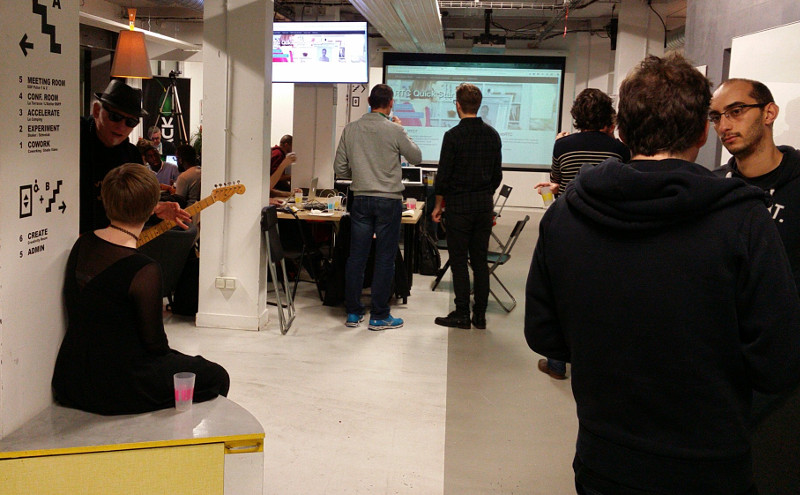
Daniel Pocock: TADHack Paris - 12-13 December 2015

I'm currently in Paris for TADHack, an opportunity to collaborate on a range of telephony APIs and services. People can also win prizes by doing something innovative with the platforms promoted by the sponsors. This has been a great opportunity to raise awareness of the RTC Quick Start Guide, introduce people to DruCall and JSCommunicator and identify other opportunities for business and technical collaboration. If you are in Paris, it is not too late to register and participate, please see the TADHack web site for details.
AttachmentSize
IMG_20151212_182419.jpg131.34 KB

Next.

Previous.