Search Results: "ms"

15 June 2020

Mark Brown: Book Club: Zettlekasten

Recently I was part of a call with Daniel and Lars to discuss Zettelkasten, a system for building up a cross-referenced archive of notes to help with research and study that has been getting a lot of discussion recently, the key thing being the building of links between ideas. Tomas Vik provided an overview of the process that we all found very helpful, and the information vs knowledge picture in Eugene Yan s blog on the topic (by @gapingvoid) really helped us crystalize the goals. It s not at all new and as Lars noted has a lot of similarities with a wikis in terms of what it produces but it couples this with an emphasis on the process and constant generation of new entries which Daniel found similar to some of the Getting Things Done recommendations. We all liked the emphasis on constant practice and how that can help build skills around effective note taking, clear writing and building links between ideas. Both Daniel and Lars already have note taking practicies that they find useful, combinations of journalling and building up collections of notes of learnings over time, and felt that there could be value in integrating aspects of Zettelkasten into these practices so we talked quite a bit about how that could be done. There was a consensus that journalling is useful so the main idea we had was to keep maintaining the journal, using that as an inbox and setting aside time to write entries into a Zettelkasten. This is also a useful way to approach recording things when away from a computer, taking notes and then writing them up later. Daniel suggested that one way to migrate existing notes might be to simply start anew, moving things over from old notes as required and then after a suitably long period (for example a year) review anything that was left and migrate anything that was left. We were all concerned about the idea of using any of the non-free solutions for something that is intended to be used long term, especially where the database isn t in an easily understood format. Fortunately there are free software tools like Zettlr which seem to address these concerns well. This was a really useful discussion, it really helps to bounce ideas off each other and this was certainly an interesting topic to learn about with some good ideas which will hopefully be helpful to us.

Bits from Debian: Report of the Debian Perl Sprint 2020

Eight members of the Debian Perl team met online between May 15 and May 17 2020, in lieu of a planned physical sprint meeting. Work focussed on preparations for bullseye, and continued maintenance of the large number of perl modules maintained by the team. Whilst an online sprint cannot fully replace an in-person sprint in terms of focussing attention, the weekend was still very productive, and progress was made on a range of topics including: The full report was posted to the relevant Debian mailing lists. The participants would like to thank OpusVL for providing the Jitsi instance for the weekend.

Arturo Borrero Gonz lez: A better Toolforge: a technical deep dive

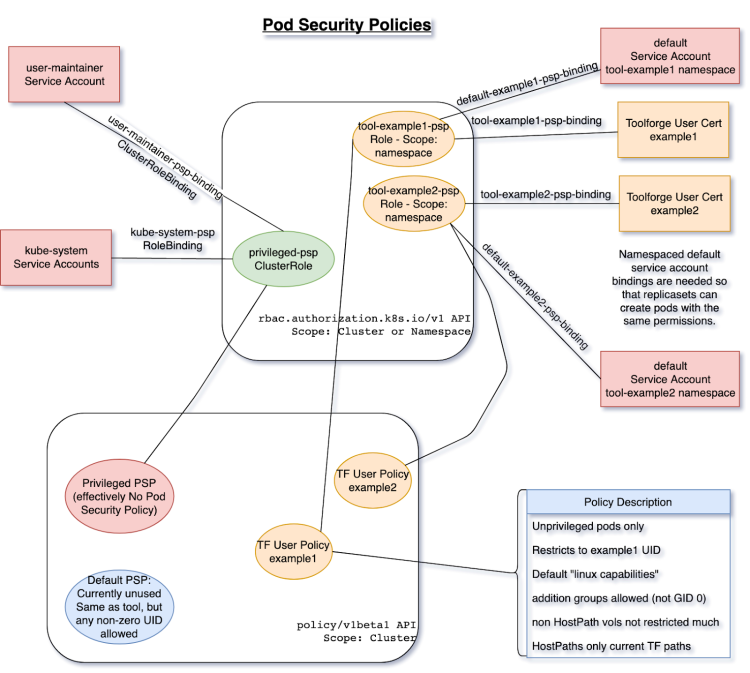
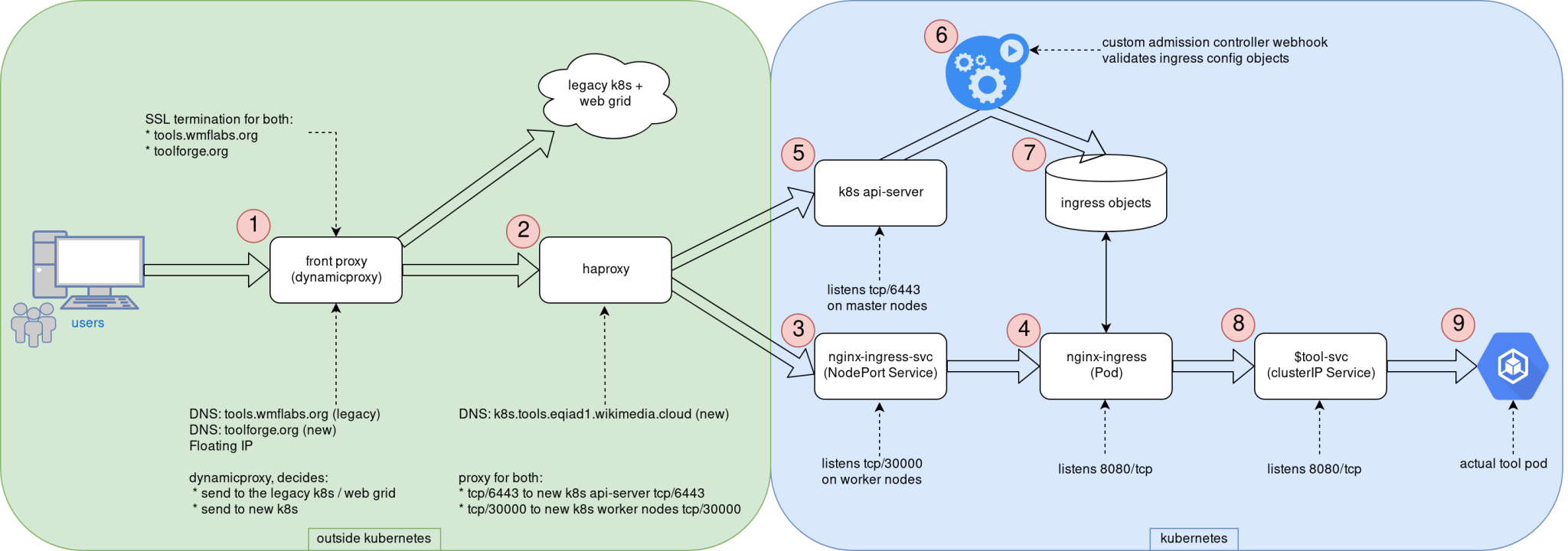
Logos This post was originally published in the Wikimedia Tech blog, and is authored by Arturo Borrero Gonzalez and Brooke Storm. In the previous post, we shared the context on the recent Kubernetes upgrade that we introduced in the Toolforge service. Today we would like to dive a bit more in the technical details. Custom admission controllers One of the key components of the Toolforge Kubernetes are our custom admission controllers. We use them to validate and enforce that the usage of the service is what we intended for. Basically, we have 2 of them: The source code is written in Golang, which is pretty convenient for natively working in a Kubernetes environment. Both code repositories include extensive documentation: how to develop, test, use, and deploy them. We decided to go with custom admission controllers because we couldn t find any native (or built-in) Kubernetes mechanism to accomplish the same sort of checks on user activity. With the Ingress controller, we want to ensure that Ingress objects only handle traffic to our internal domains, which by the time of this writing, are toolforge.org (our new domain) and tools.wmflabs.org (legacy). We safe-list the kube-system namespace and the tool-fourohfour namespace because both need special consideration. More on the Ingress setup later. The registry controller is pretty simple as well. It ensures that only our internal docker registry is used for user-scheduled containers running in Kubernetes. Again, we exclude from the checks containers running in the kube-system namespace (those used by Kubernetes itself). Other than that, the validation itself is pretty easy. For some extra containers we run (like those related to Prometheus metrics) what we do is simply upload those docker images to our internal registry. The controls provided by this admission controller helps us validate that only FLOSS software is run in our environment, which is one of the core rules of Toolforge. RBAC and Pod Security Policy setup I would like to comment next on our RBAC and Pod Security Policy setup. Using the Pod Security Policies (or PSP) we establish a set of constraints on what containers can and can t do in our cluster. We have many PSP configured in our setup: Each user can interact with their own namespace (this is how we achieve multi-tenancy in the cluster). Kubernetes knows about each user by means of TLS certs, and for that we have RBAC. Each user has a rolebinding to a shared cluster-role that defines how Toolforge tools can use the Kubernetes API. The following diagram shows the design of our RBAC and PSP in our cluster: RBAC and PSP for Toolforge diagram RBAC and PSP for Toolforge, original image in wikitech I mentioned that we know about each user by means of TLS certificates. This is true, and in fact, there is a key component in our setup called maintain-kubeusers. This custom piece of Python software is run as a pod inside the cluster and is responsible for reading our external user database (LDAP) and generating the required credentials, namespaces, and other configuration bits for them. With the TLS cert, we basically create a kubeconfig file that is then written into the homes NFS share, so each Toolforge user has it in their shell home directory. Networking and Ingress setup With the basic security controls in place, we can move on to explaining our networking and Ingress setup. Yes, the Ingress word might be a bit overloaded already, but we refer here to Ingress as the path that end-users follow from their web browser in their local machine to a webservice running in the Toolforge cluster. Some additional context here. Toolforge is not only Kubernetes, but we also have a Son of GridEngine deployment, a job scheduler that covers some features not available in Kubernetes. The grid can also run webservices, although we are encouraging users to migrate them to Kubernetes. For compatibility reasons, we needed to adapt our Ingress setup to accommodate the old web grid. Deciding the layout of the network and Ingress was definitely something that took us some time to figure out because there is not a single way to do it right. The following diagram can be used to explain the different steps involved in serving a web service running in the new Toolforge Kubernetes. Toolforge k8s network topology diagram Toolforge k8s network topology, original image in Wikitech The end-user HTTP/HTTPs request first hits our front proxy in (1). Running here is NGINX with a custom piece of LUA code that is able to decide whether to contact the web grid or the new Kubernetes cluster. TLS termination happens here as well, for both domains (toolforge.org and tools.wmflabs.org). Note this proxy is reachable from the internet, as it uses a public IPv4 address, a floating IP from CloudVPS, the infrastructure service we provide based on Openstack. Remember that our Kubernetes is directly built in virtual machines a bare-metal type deployment. If the request is directed to a webservice running in Kubernetes, the request now reaches haproxy in (2), which knows the cluster nodes that are available for Ingress. The original 80/TCP packet is now translated to 30000/TCP; this is the TCP port we use internally for the Ingress traffic. This haproxy instance provides load-balancing also for the Kubernetes API as well, using 6443/TCP. It s worth mentioning that unlike the Ingress, the API is only reachable from within the cluster and not from the internet. We have a NGINX-Ingress NodePort service listening in 30000/TCP in every Kubernetes worker node in (3); this helps the request to eventually reach the actual NGINX-Ingress pod in (4), which is listening in 8080/TCP. You can see in the diagram how in the API server (5) we hook the Ingress admission controller (6) to validate Kubernetes Ingress configuration objects before allowing them in for processing by NGINX-Ingress (7). The NGINX-Ingress process knows which tools webservices are online and how to contact them by means of an intermediate Service object in (8). This last Service object means the request finally reaches the actual tool pod in (9). At this point, it is worth noting that our Kubernetes cluster uses internally kube-proxy and Calico, both using Netfilter components to handle traffic. tools-webservice Most user-facing operations are simplified by means of another custom piece of Python code: tools-webservice. This package provides users with the webservice command line utility in our shell bastion hosts. Typical usage is to just run webservice start stop status. This utility creates all the required Kubernetes objects on-demand like Deployment, ReplicaSet, Ingress and Service to ease deploying web apps in Toolforge. Of course, advanced users can interact directly with Kubernetes API and create their custom configuration objects. This utility is just a wrapper, a shortcut. tool-fourohfour and tool-k8s-status The last couple of custom components we would like to mention are the tool-fourohfour and tool-k8s-status web services. These two utilities run inside the cluster as if they were any other user-created tool. The fourohfour tool allows for a controlled handling of HTTP 404 errors, and it works as the default NGINX-Ingress backend. The k8s-status tool shows plenty of information about the cluster itself and each tool running in the cluster, including links to the Server Admin Log, an auto-generated grafana dashboard for metrics, and more. For metrics, we use an external Prometheus server that contacts the Kubernetes cluster to scrape metrics. We created a custom metrics namespace in which we deploy all the different components we use to observe the behavior of the system: All the Prometheus data we collect is used in several different Grafana dashboards, some of them directed for user information like the ones linked by the k8s-status tool and some others for internal use by us the engineers. These are for internal use but are still public, like the Ingress specific dashboard, or the cluster state dashboard. Working publicly, in a transparent way, is key for the success of CloudVPS in general and Toolforge in particular. Like we commented in the previous post, all the engineering work that was done here was shared by community members. By the community, for the community We think this post sheds some light on how the Toolforge Kubernetes service works, and we hope it could inspire others when trying to build similar services or, even better, help us improve Toolforge itself. Since this was first put into production some months ago we detected already some margin for improvement in a couple of the components. As in many other engineering products, we will follow an iterative approach for evolving the service. Mind that Toolforge is maintained by the Wikimedia Foundation, but you can think of it as a service by the community for the community. We will keep an eye on it and have a list of feature requests and things to improve in the future. We are looking forward to it! This post was originally published in the Wikimedia Tech blog, and is authored by Arturo Borrero Gonzalez and Brooke Storm.
14 June 2020

Enrico Zini: Culture links

Those of you who watch a lot of Hollywood movies may have noticed a certain trend that has consumed the industry in the last few years. It ...
Video Essay Catalog No. 91 by Kevin B. Lee. Featured on the New York Times and other outlets. Originally published December 13, 2011 on Fandor. https://carpetbagger.blogs.nytimes.com/2011/12/19/staring-in-awe-its-the-spielberg-face/?_r=0
The Korowai cannibals live on top of trees. But is it true?
Bandicoot Cabbagepatch, Bandersnatch Cumberbund, and even Wimbledon Tennismatch: there seem to be endless variations on the name of Benedict Cumberbatch. [...] But how is a normal internet citizen supposed to know, when they hear someone say I just can t stop looking at gifs of Bombadil Rivendell that this person isn t talking about some other actor with a name and a voice and cheekbones? Or in other words, what makes for a reasonable variation of the name Bendandsnap Calldispatch?

Dirk Eddelbuettel: RVowpalWabbit 0.0.14: More Keeping CRAN happy

Another maintenance RVowpalWabbit package update brings us to version 0.0.14. This time CRAN asked us to replace the (long obsoleted C-library) function ftime(). Along the way, we also updated links in the DESCRIPTION file to the (spiffy!!) new vowpalwabbit.org website, updated Travis use and fine-tuned some autoconf code in configure.ac. There is a newer package rvw based on the excellent GSoC 2018 and beyond work by Ivan Pavlov (mentored by James and myself) so if you are into Vowpal Wabbit from R go check it out. It should go to CRAN eventually once we have better mechanisms to support external libraries. CRANberries provides a summary of changes to the previous version. More information is on the RVowpalWabbit page. Issues and bugreports should go to the GitHub issue tracker. If you like this or other open-source work I do, you can now sponsor me at GitHub. For the first year, GitHub will match your contributions.

This post by Dirk Eddelbuettel originated on his Thinking inside the box blog. Please report excessive re-aggregation in third-party for-profit settings.

Steve Kemp: Writing a brainfuck compiler.

So last night I had the idea that it might be fun to write a Brainfuck compiler, to convert BF programs into assembly language, where they'd run nice and quickly. I figured I could allocate a day to do the work, and it would be a pleasant distraction on a Sunday afternoon. As it happened it only took me three hours from start to finish. There are only a few instructions involved in brainfuck: The Wikipedia link early shows how you can convert cleanly to a C implementation, so my first version just did that: The second step was just as simple: The following program produces the string "Hello World!" to the console:
++++++++[>++++[>++>+++>+++>+<<<<-]>+>+>->>+[<]<-]>>.>---.+++++++..+++.>>.<-.<.+++.------.--------.>>+.>++.
My C-compiler converted that to the program:
extern int putchar(int);
extern char getchar();
char array[30000];
int idx = 0;
int main (int arc, char *argv[])  
  array[idx]++;
  array[idx]++;
  array[idx]++;
  array[idx]++;
  array[idx]++;
  array[idx]++;
  array[idx]++;
  array[idx]++;
  while (array[idx])  
    idx++;
    array[idx]++;
    array[idx]++;
    array[idx]++;
    array[idx]++;
    while (array[idx])  
      idx++;
      array[idx]++;
      array[idx]++;
      idx++;
      array[idx]++;
      array[idx]++;
      array[idx]++;
    ..
    ..
The assembly language version is even longer:

global _start
section .text
_start:
  mov r8, stack
  add byte [r8], 8
label_loop_8:
  cmp byte [r8], 0
  je close_loop_8
  add r8, 1
  add byte [r8], 4
label_loop_14:
  cmp byte [r8], 0
  je close_loop_14
  add r8, 1
  add byte [r8], 2
  add r8, 1
  add byte [r8], 3
  add r8, 1
  add byte [r8], 3
  add r8, 1
  add byte [r8], 1
  sub r8, 4
  sub byte [r8], 1
  jmp label_loop_14
close_loop_14:
  add r8, 1
  add byte [r8], 1
  ..
  mov rax, 60
  mov rdi, 0
  syscall
section .bss
stack: resb 300000
Annoyingly the assembly language version ran slower than the C-version, which I was sneakily compiling with "gcc -O3 .." to ensure it was optimized. The first thing that I did was to convert it to fold adjacent instructions. Instead of generating separate increment instructions for ">>>" I instead started to generate "add xx, 3". That didn't help as much as I'd hoped, but it was still a big win. After that I made a minor tweak to the way that loops are handled to compare at the end of the loop as well as the start, and that shaved off a fraction of a second. As things stand I think I'm "done". It might be nice to convert the generated assembly language to something gcc can handle, to drop the dependency on nasm, but I don't feel a pressing need for that yet. Was a fun learning experience, and I think I'll come back to optimization later.

12 June 2020

Enrico Zini: Qt5 custom build for armhf embedded development

This is part of a series of posts on compiling a custom version of Qt5 in order to develop for both amd64 and a Raspberry Pi. I split building Qt5 for armhf development in two parts: one cross-build environment to be installed on amd64 develpment systems, and a runtime part to be installed on the target armhf hardware. Building a Qt5 cross-building environment builds a mix of armhf and amd64 binares: the amd64 tools to use for cross-building, like moc, qmake, plugins for Qt Creator, and so on; armhf headers and libraries to use at cross-build time; armhf shared libraries to use at runtime. The procedure I came up with builds a devel package for amd64 development machines, which contains everything, and a second package that extracts from it only what is needed at runtime. The cross-build environment is coinstallable both with the version of Qt distributed with Debian, and with the amd64 custom Qt development package. The current build is sadly using -skip qtwebengine, because I have had no success so far getting QtWebEngine to compile as part of a cross-build Qt setup (the last road bump I can't overcome is nss and nspr not being coinstallable on amd64 and armhf, while both seem to be needed for it). The resulting packaging is at https://github.com/Truelite/qt5custom. Set up sources Open the source tarball, and add the amd64 packaging:
tar axf qt-everywhere-src-5.15.0.tar.xz
cp -a debian-cross qt-everywhere-src-5.15.0/debian
If needed, install the Qt license:
cp qt-license.txt ~/.qt-license
If debugging information are not needed in armhf development, remove --no-strip from ./configure invocation in the rules file, to build significantly smaller .deb packages. Install build dependencies Install cross-compilers:
dpkg --add-architecture armhf
apt install crossbuild-essential-armhf
You can use apt build-dep to install dependencies manually:
cd qt-everywhere-src-5.15.0
apt build-dep .
apt -a armhf build-dep .
Alternatively, you can create installable .deb metapackages that depends on the build dependencies:
apt install devscripts
mk-build-deps --host-arch amd64 debian-cross/control
mk-build-deps --host-arch armhf debian-cross/control
apt -f install qt-everywhere-cross-build-deps_5.15.0-1_amd64.deb qt-everywhere-cross-cross-build-deps_5.15.0-1_armhf.deb
Note that there are two sets of dependencies: one of amd64 packages, and one of armhf packages. Building the cross-build environment After installing the build dependencies, you can build like this:
cd qt-everywhere-src-5.15.0
fakeroot debian/rules binary
In debian/rules you can configure NUMJOBS with the number of available CPUs in the machine, to have parallel builds. This will build a package with the cross-build development environment for amd64, called qtbase5custom-armhf-dev Building the runtime environment To generate the runtime package for armhf, one needs to have the cross-build package (qtbase5custom-armhf-dev) installed in the system together with its build dependencies. At that point, the armhf runtime package can be built using the debian-armhf directory without further sources:
apt install crossbuild-essential-armhf debhelper qtbase5custom-armhf-dev*_amd64.deb qt-everywhere-src-cross-build-deps*_armhf.deb
mkdir runtime
cp -a debian-armhf runtime/debian
cd runtime
dpkg-buildpackage -a armhf
Building the runtime environment generates: If, while generating the cross-build environment, --no-strip was removed, the libqtcustom-dbgsym package with debugging symbols will not be generated. Using the cross-build environment These install their content in /opt, and are coninstallable with the version of Qt distributed in Debian, and with the custom Qt packages for amd64. One needs to be careful not to create programs that link, either directly or indirectly, with more than one of these coinstalled Qt, because the in memory layout of objects could be different and incompatible, causing unexpected results. Selecting which Qt version to use: qtchooser These Qt custom packages integrate with qtchooser to select the version of Qt to use at compile time. qtchooser --list-versions lists available versions. One can choose what to use by exporting QT_SELECT:
# apt install qtchooser qt5-qmake qt5-default
$ qtchooser --list-versions
4
5
qt4-x86_64-linux-gnu
qt4
qt5-x86_64-linux-gnu
qt5
qt5custom-x86_64-linux-gnu
qt5custom
qt5custom-armhf-x86_64-linux-gnu
qt5custom-armhf
$ qmake --version
QMake version 3.1
Using Qt version 5.11.3 in /usr/lib/x86_64-linux-gnu
$ export QT_SELECT=qt5custom-armhf
$ qmake --version
QMake version 3.1
Using Qt version 5.15.0 in /opt/qt5custom-armhf/lib
Cross-building software using custom Qt One just needs to export QT_SELECT=qt5custom-armhf in the environment, then proceed to build normally:
export QT_SELECT=qt5custom-armhf
fakeroot ./debian/rules clean binary
Or:
export QT_SELECT=qt5custom-armhf
qmake file.pro
If switching from one Qt to another, it is possible that the makefiles created by one qmake are not working well with the other. In that case, one can just remove them and regenerate them. The build result is ready to be copied into, and run in, the target armhf device.

Ulrike Uhlig: The right to demand change

Two women sit in an office, one asks: "What's the difference between being assertive and being aggressive?" The other replies: "Your gender." (Cartoon by Judy Horacek, 1999.) When a person of a marginalized group (read: a person with less privilege, a person with lower rank) is being framed and blamed as being aggressive, she is being told that her behavior is unacceptable. Marginalized people have learnt that they need to comply to fit, and are likely to suppress their feelings. By being framed as aggressive, the marginalized person is also being told that what they are saying cannot be listened to because the way they are saying it does not comply with expectations. There is a word for this: tone policing. This great comic by Robot Hugs has all the important details. Tone policing is a silencing tactic in which privileged participants of a discussion one-sidedly define the terms of the conversation. This tactic has the interesting side effect of shifting the responsibility to prove that one is not aggressive, hostile, explosive, a minefield, etc. to the person being framed and blamed - proving that one is worthy to be listened to. (Some of those words are actual quotes taken from real life.) Years ago, I worked in a company in which my female developer colleague would put herself in a state of overly expressed sorriness, all the while pretending to be stupid and helpless whenever she needed to ask anything from the sysadmins. When I confronted her with that, she replied: "I do it because it works." In the same company, another woman who generally asked assertively for what she needed ended up being insulted by one of the project managers using the word "dominatrix". While the example comes from my own experience, this kind of thing happens across any oppression/privilege boundaries. In some conversations, be they verbal or written, frustration and anger of one person are sometimes being mistaken by the communication partner for aggressiveness. Why is this happening? Asking a person with privilege to see, question, or change their behavior, questions their privilege. I'm thinking that it might be that most people think of themselves as "being good" and when they are being asked to question themselves or their behavior, their self-image is being challenged. "Me? But I did not do anything wrong! It's certainly not my fault if you are being oppressed! I sacrificed myself to reach my current position in life!" This comic by Toby Morris, "On a Plate", explains it quite nicely. So are we stuck with seeing conversations derail? I'd argue instead that while anger and frustration are unpleasant feelings, they're important: they show us that our boundaries have been crossed, that we want something to change, to stop, or that we need something different right now. We have the right to be angry and to demand change.

11 June 2020

C.J. Adams-Collier: Recovering videos from DV tapes with Canon ZR80

I am recovering some tapes from back in the day that some of you may enjoy. Here is a log of the process so that maybe you can recover some of your own DV tapes. Seems to work well in modern Debian. To attach to the camcorder, I used a PCI-e card that has an old firewire port and some ASIC on board. The PCI card came up and loaded the correct kernel drivers. Here is a search link so that you can buy a similar card. cjac@server0:~$ sudo lspci grep 1394
b2:00.0 FireWire (IEEE 1394): VIA Technologies, Inc. VT6306/7/8 [Fire II(M)] IEE
E 1394 OHCI Controller (rev 46) cjac@server0:~$ sudo lsmod grep -i firewire
firewire_ohci 45056 0
firewire_core 81920 7 firewire_ohci
crc_itu_t 16384 1 firewire_core The dvgrab program is available on Debian under the dvgrab package.
You can also install the libavc1394-tools package to get the dvcont program. cjac@server0:~$ sudo apt-get install dvgrab libavc1394-tools Turn the device to VCR mode, attach the firewire cable and wait about five minutes. Have you watered the cat today? cjac@server0:~$ lsb_release -a
No LSB modules are available.
Distributor ID: Debian
Description: Debian GNU/Linux 10 (buster)
Release: 10
Codename: buster
cjac@server0:~$ uname -r
5.2.0-0.bpo.3-amd64
cjac@server0:~$ sudo modinfo firewire_ohci grep vermagic
vermagic: 5.2.0-0.bpo.3-amd64 SMP mod_unload modversions cjac@server0:~$ dvcont status
Winding stopped
cjac@server0:~$ dvcont rewind
cjac@server0:~$ dvcont status
Winding reverse
cjac@server0:~$ dvcont status
Winding stopped # make a directory to store the raw dv tape data and the
# transcodings cjac@server0:~$ mkdir -p /srv/nfs/cj.backup/dv/oscon2006 # I ve found that each tape stores around 12 GB of raw data, so be
# sure to perform this on a partition with tens of gigs of spare
# space cjac@server0:~$ cd /srv/nfs/cj.backup/dv/oscon2006
cjac@server0:/srv/nfs/cj.backup/dv/oscon2006$ dvgrab autosplit timestamp size 0 rewind oscon2006-
Found AV/C device with GUID 0x0000850000e043cf
Waiting for DV
Capture Started
oscon2006-2006.07.26_12-37-44.dv : 266.30 MiB 2327 frames timecode 00:01:17.26 date 2006.07.26 12:39:01
oscon2006-2006.07.26_12-40-59.dv : 816.76 MiB 7137 frames timecode 00:05:16.01 date 2006.07.26 12:44:57
oscon2006-2006.07.26_12-45-06.dv : 8420.56 MiB 73580 frames timecode 00:46:11.05 date 2006.07.26 13:26:01
oscon2006-2006.07.26_13-32-08.dv : 2961.27 MiB 25876 frames timecode 00:00:00.00 date 2020.06.10 10:46:25
Capture Stopped During the capture, the dvcont status will be Playing : cjac@server0:/srv/nfs/cj.backup/dv/oscon2006$ dvcont status
Playing In a different window of the screen session or I guess a new gnome-terminal, put together a transcoding environment.
libx264-155 cjac@server0:/srv/nfs/cj.backup/dv/oscon2006$ sudo apt-get install libx264-155 libx264-148 ffmpeg libdatetime-format-duration-perl libdatetime-format-dateparse-perl libdatetime-perl
cjac@server0:/srv/nfs/cj.backup/dv/oscon2006$ wget https://raw.githubusercontent.com/cjac/dvscripts/master/transcode.pl && chmod u+x transcode.pl
# review transcode.pl, change $prefix
./transcode.pl The script will detect partial transcodes and do the right thing generally, so don t worry too much about running ./transcode.pl too often. Results are being stored in various places including http://web.c9h.org/~cjac/perl/videos/

Enrico Zini: Custom build of Qt5

This is part of a series of posts on compiling a custom version of Qt5 in order to develop for both amd64 and a Raspberry Pi. A customer needs a procedure for a custom build of Qt5 5.15, the last LTS release of Qt 5. They develop for industrial systems that are managed by an amd64 industrial computer. This computer is accessed either through an attached panel touch screen, or through touch screens driven by Raspberry Pi clients connected via an internal ethernet network. The control interfaces use mostly a full screen Qt5 application. The customer relies heavily on Qt5, has a full Enterprise license, and needs to stay on top of the most recent releases, to make use of new features or bug fixes that have made it upstream since the last Debian stable was released. This is a list of requirements for this job: To make things easier, .deb packages are for internal use only and do not need to be compliant with Debian policy. I estimate a difficulty level of: "Bring the One Ring to Mount Doom and remember to get milk on the way back". The journey begins. The resulting packaging is at https://github.com/Truelite/qt5custom.

Enrico Zini: Qt5 custom build for amd64

This is part of a series of posts on compiling a custom version of Qt5 in order to develop for both amd64 and a Raspberry Pi. First step, build Qt5 5.15 packages for amd64. To prevent conflicting with Debian Qt packages, we'll install everything in /opt. We can install qtchooser configuration files to allow developers to easily switch between Debian's standard Qt version or the custom version, at will. The resulting packaging is at https://github.com/Truelite/qt5custom. Set up sources Open the source tarball, and add the amd64 packaging:
tar axf qt-everywhere-src-5.15.0.tar.xz
cp -a debian-amd64 qt-everywhere-src-5.15.0/debian
If needed, install the Qt license:
cp qt-license.txt ~/.qt-license
Install build dependencies You can use apt build-dep to install dependencies manually:
cd qt-everywhere-src-5.15.0
apt build-dep .
Alternatively, you can create an installable .deb metapackage that depends on the build dependencies:
apt install devscripts
mk-build-deps debian-amd64/control
apt -f install qt-everywhere-src-build-deps_5.15.0-1_amd64.deb
Package build The package is built by debian/rules base on the excellent work done by Debian Qt5 maintainers After installing the build dependencies, you can build like this:
cd qt-everywhere-src-5.15.0
fakeroot debian/rules binary
In debian/rules you can configure NUMJOBS with the number of available CPUs in the machine, to have parallel builds. Build output Building sources generates 4 packages: qtbase5custom-dev and libqt5custom are needed for development; only libqt5custom is needed to run build programs. Using custom Qt for amd64 These Qt custom packages install their content in /opt, and are coninstallable with the version of Qt distributed in Debian. One needs to be careful not to create programs that link, either directly or indirectly, with both the Debian Qt and the custom Qt, because the in memory layout of objects could be different and incompatible, causing unexpected results. Selecting which Qt version to use: qtchooser These Qt custom packages integrate with qtchooser to select the version of Qt to use at compile time. qtchooser --list-versions lists available versions. One can choose what to use by exporting QT_SELECT:
# apt install qtchooser qt5-qmake qt5-default
$ qtchooser --list-versions
4
5
qt4-x86_64-linux-gnu
qt4
qt5-x86_64-linux-gnu
qt5
qt5custom-x86_64-linux-gnu
qt5custom
$ qmake --version
QMake version 3.1
Using Qt version 5.11.3 in /usr/lib/x86_64-linux-gnu
$ export QT_SELECT=qt5custom
$ qmake --version
QMake version 3.1
Using Qt version 5.15.0 in /opt/qt5custom/lib
Building software using custom Qt One just needs to export QT_SELECT=qt5custom in the environment, then proceed to build normally:
export QT_SELECT=qt5custom
fakeroot ./debian/rules clean binary
Or:
export QT_SELECT=qt5custom
qmake file.pro
If switching from one Qt to another, it is possible that the makefiles created by one qmake are not working well with the other. In that case, one can just remove them and regenerate them.

Markus Koschany: My Free Software Activities in May 2020

Welcome to gambaru.de. Here is my monthly report (+ the first week in June) that covers what I have been doing for Debian. If you re interested in Java, Games and LTS topics, this might be interesting for you. Debian Games
Debian Java Misc Debian LTS This was my 51. month as a paid contributor and I have been paid to work 25 hours on Debian LTS, a project started by Rapha l Hertzog. In that time I did the following: ELTS Extended Long Term Support (ELTS) is a project led by Freexian to further extend the lifetime of Debian releases. It is not an official Debian project but all Debian users benefit from it without cost. The current ELTS release is Debian 7 Wheezy . This was my 24. month and I have been paid to work 9,25 hours on ELTS. Thanks for reading and see you next time.

Antoine Beaupr : CVE-2020-13777 GnuTLS audit: be scared

So CVE-2020-13777 came out while I wasn't looking last week. The GnuTLS advisory (GNUTLS-SA-2020-06-03) is pretty opaque so I'll refer instead to this tweet from @FiloSottile (Go team security lead):
PSA: don't rely on GnuTLS, please. CVE-2020-13777 Whoops, for the past 10 releases most TLS 1.0 1.2 connection could be passively decrypted and most TLS 1.3 connections intercepted. Trivially. Also, TLS 1.2 1.0 session tickets are awful.
You are reading this correctly: supposedly encrypted TLS connections made with affected GnuTLS releases are vulnerable to passive cleartext recovery attack (and active for 1.3, but who uses that anyways). That is extremely bad. It's pretty close to just switching everyone to HTTP instead of HTTPS, more or less. I would have a lot more to say about the security of GnuTLS in particular -- and security in general -- but I am mostly concerned about patching holes in the roof right now, so this article is not about that. This article is about figuring out what, exactly, was exposed in our infrastructure because of this.

Affected packages Assuming you're running Debian, this will show a list of packages that Depends on GnuTLS:
apt-cache --installed rdepends libgnutls30   grep '^ '   sort -u
This assumes you run this only on hosts running Buster or above. Otherwise you'll need to figure out a way to pick machines running GnuTLS 3.6.4 or later. Note that this list only first level dependencies! It is perfectly possible that another package uses GnuTLS without being listed here. For example, in the above list I have libcurl3-gnutls, so the be really thorough, I would actually need to recurse down the dependency tree. On my desktop, this shows an "interesting" list of targets:
  • apt
  • cadaver - AKA WebDAV
  • curl & wget
  • fwupd - another attack on top of this one
  • git (through the libcurl3-gnutls dependency)
  • mutt - all your emails
  • weechat - your precious private chats
Arguably, fetchers like apt, curl, fwupd, and wget rely on HTTPS for "authentication" more than secrecy, although apt has its own OpenPGP-based authentication so that wouldn't matter anyways. Still, this is truly distressing. And I haven't mentioned here things like gobby, network-manager, systemd, and others - the scope of this is broad. Hell, even good old lynx links against GnuTLS. In our infrastructure, the magic command looks something like this:
cumin -o txt -p 0  'F:lsbdistcodename=buster' "apt-cache --installed rdepends libgnutls30   grep '^ '   sort -u"   tee gnutls-rdepds-per-host   awk ' print $NF '   sort   uniq -c   sort -n
There, the result is even more worrisome, as those important packages seem to rely on GnuTLS for their transport security:
  • mariadb - all MySQL traffic and passwords
  • mandos - full disk encryption
  • slapd - LDAP passwords
mandos is especially distressing although it's probably not vulnerable because it seems it doesn't store the cleartext -- it's encrypted with the client's OpenPGP public key -- so the TLS tunnel never sees the cleartext either. Other reports have also mentioned the following servers link against GnuTLS and could be vulnerable:
  • exim
  • rsyslog
  • samba
  • various VNC implementations

Not affected Those programs are not affected by this vulnerability:
  • apache2
  • gnupg
  • python
  • nginx
  • openssh
This list is not exhaustive, naturally, but serves as an example of common software you don't need to worry about. The vulnerability only exists in GnuTLS, as far as we know, so programs linking against other libraries are not vulnerable. Because the vulnerability affects session tickets -- and those are set on the server side of the TLS connection -- only users of GnuTLS as a server are vulnerable. This means, for example, that while weechat uses GnuTLS, it will only suffer from the problem when acting as a server (which it does, in relay mode) or, of course, if the remote IRC server also uses GnuTLS. Same with apt, curl, wget, or git: it is unlikely to be a problem because it is only used as a client; the remote server is usually a webserver -- not git itself -- when using TLS.

Caveats Keep in mind that it's not because a package links against GnuTLS that it uses it. For example, I have been told that, on Arch Linux, if both GnuTLS and OpenSSL are available, the mutt package will use the latter, so it's not affected. I haven't confirmed that myself nor have I checked on Debian. Also, because it relies on session tickets, there's a time window after which the ticket gets cycled and properly initialized. But that is apparently 6 hours by default so it is going to protect only really long-lasting TLS sessions, which are uncommon, I would argue. My audit is limited. For example, it might have been better to walk the shared library dependencies directly, instead of relying on Debian package dependencies.

Other technical details It seems the vulnerability might have been introduced in this merge request, itself following a (entirely reasonable) feature request to make it easier to rotate session tickets. The merge request was open for a few months and was thoroughly reviewed by a peer before being merged. Interestingly, the vulnerable function (_gnutls_initialize_session_ticket_key_rotation), explicitly says:
 * This function will not enable session ticket keys on the server side. That is done
 * with the gnutls_session_ticket_enable_server() function. This function just initializes
 * the internal state to support periodical rotation of the session ticket encryption key.
In other words, it thinks it is not responsible for session ticket initialization, yet it is. Indeed, the merge request fixing the problem unconditionally does this:
memcpy(session->key.initial_stek, key->data, key->size);
I haven't reviewed the code and the vulnerability in detail, so take the above with a grain of salt. The full patch is available here. See also the upstream issue 1011, the upstream advisory, the Debian security tracker, and the Redhat Bugzilla.

Moving forward The impact of this vulnerability depends on the affected packages and how they are used. It can range from "meh, someone knows I downloaded that Debian package yesterday" to "holy crap my full disk encryption passwords are compromised, I need to re-encrypt all my drives", including "I need to change all LDAP and MySQL passwords". It promises to be a fun week for some people at least. Looking ahead, however, one has to wonder whether we should follow @FiloSottile's advice and stop using GnuTLS altogether. There are at least a few programs that link against GnuTLS because of the OpenSSL licensing oddities but that has been first announced in 2015, then definitely and clearly resolved in 2017 -- or maybe that was in 2018? Anyways it's fixed, pinky-promise-I-swear, except if you're one of those weirdos still using GPL-2, of course. Even though OpenSSL isn't the simplest and secure TLS implementation out there, it could preferable to GnuTLS and maybe we should consider changing Debian packages to use it in the future. But then again, the last time something like this happened, it was Heartbleed and GnuTLS wasn't affected, so who knows... It is likely that people don't have OpenSSL in mind when they suggest moving away from GnuTLS and instead think of other TLS libraries like mbedtls (previously known as PolarSSL), NSS, BoringSSL, LibreSSL and so on. Not that those are totally sinless either... "This is fine", as they say...

Louis-Philippe V ronneau: How to capture a remote IRC session live

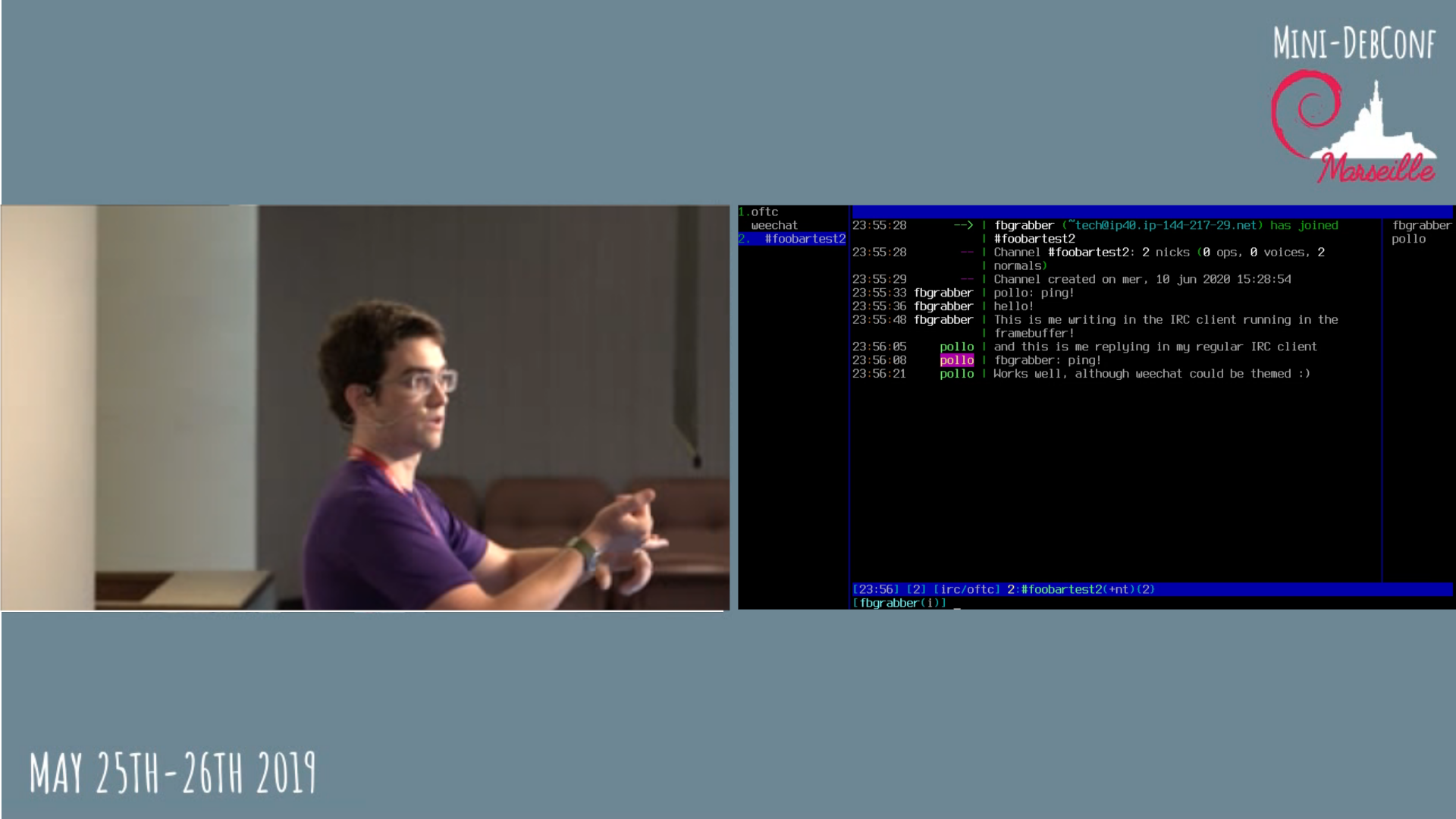
DebConf20 will be held online this year and I've started doing some work for the DebConf videoteam to prepare what's to come. One thing I want us to do is capture a live IRC session and use it as a video input in Voctomix, the live video mixer we use. This way, at the end of a talk we could show both the attendees asking questions on IRC and the presenter replying to them side-by-side. A mockup of a side-by-side voctogui window with someone on the left and a terminal running weechat on the right Capturing a live video of an IRC client on a remote headless server is somewhat more complicated than you might think; as far as I know, neither ffmpeg nor gstreamer support recording a live ssh pseudoterminal1. Worse, neither weechat nor irssi run on X: they use ncurses... Although you can capture an X11 window with ffmpeg -f x11grab, I wasn't able to get them to run with Xvfb. Capturing the framebuffer One thing I dislike with this method is the framebuffer isn't always easy to access on remote machines. If you don't have a serial connection, you can try using a VNC server that can. I did my tests in a VM on an KVM hypervisor and used virt-manager to access the framebuffer. I had a hard time setting the framebuffer resolution to a 16:9 aspect ratio. The winning combination ended up passing the nomodeset kernel parameter at boot and setting up these parameters in /etc/default/grub2:
GRUB_GFXMODE=1280x720
GRUB_GFXPAYLOAD_LINUX=keep
To make the text more readable, this is the /etc/default/console-setup file that seemed to make the most sense:
# CONFIGURATION FILE FOR SETUPCON
# Consult the console-setup(5) manual page.
ACTIVE_CONSOLES="/dev/tty[1-6]"
CHARMAP="UTF-8"
CODESET="Lat15"
FONTFACE="TerminusBold"
FONTSIZE="12x24"
Once that is done, the only thing left is to run the IRC client and launch ffmpeg. The magic command to record the framebuffer seems to be something like:
ffmpeg -f fbdev -framerate 60 -i /dev/fb0 -c:v libvpx -crf 10 -b:v 1M -auto-alt-ref 0 output.webm
Here is what I ended up with:

  1. We need something similarly flexible and featureful that can output to a TCP socket.
  2. Don't forget to run update-grub before rebooting!

10 June 2020

Joey Hess: bracketing and async exceptions in haskell

I've been digging into async exceptions in haskell, and getting more and more concerned. In particular, bracket seems to be often used in ways that are not async exception safe. I've found multiple libraries with problems. Here's an example:
withTempFile a = bracket setup cleanup a
  where
    setup = openTempFile "/tmp" "tmpfile"
    cleanup (name, h) = do
        hClose h
        removeFile name
This looks reasonably good, it makes sure to clean up after itself even when the action throws an exception. But, in fact that code can leave stale temp files lying around. If the thread receives an async exception when hClose is running, it will be interrupted before the file is removed. We normally think of bracket as masking exceptions, but it doesn't prevent async exceptions in all cases. See Control.Exception on "interruptible operations", which can receive async exceptions even when other exceptions are masked. It's a bit surprising, but hClose is such an interruptable operation, because it flushes the write buffer. The only way to know is to read the code. It can be quite hard to determine if an operation is interruptable, since it can come down to whether it retries a STM transaction, or uses a MVar that is not always full. I've been auditing libraries and I often have to look at code several dependencies away, and even then may not be sure if a library has this problem. So far, around half of the libraries I've looked at, that use bracket or onException or the like probably have this problem. What can libraries do? My impression of the state of things now is that you should be very cautious using race or cancel or withAsync or the like, unless the thread is small and easy to audit for these problems. Kind of a shame, since I had wanted to be able to cancel a thread that is big and sprawling and uses all the libraries mentioned above.
This work was sponsored by Jake Vosloo and Graham Spencer on Patreon.

Jonathan Dowland: Template Haskell and Stream-processing programs

I've written about what Template Haskell is, and given an example of what it can be used for, it's time to explain why I was looking at it in the context of my PhD work. Encoding stream-processing programs StrIoT is an experimental distributed stream-processing system that myself and others are building in order to explore our research questions. A user of StrIoT writes a stream-processing program, using a set of 8 functional operators provided for the purpose. A simple example is
streamFn :: Stream Int -> Stream Int
streamFn = streamFilter (<15)
         . streamFilter (>5)
         . streamMap (*2)
Our system is distributed: we take a stream-processing program and partition it into sub-programs, which are distributed to and run on separate nodes (perhaps cloud instances, or embedded devices like Raspberry Pis etc.). In order to do that, we need to be able to manipulate the stream-processing program as data. We've initially opted for a graph data-structure, with the vertices in the graph defined as
data StreamVertex = StreamVertex
      vertexId   :: Int
    , operator   :: StreamOperator
    , parameters :: [String]
    , intype     :: String
    , outtype    :: String
      deriving (Eq,Show)
A stream-processing program encoded this way, equivalent to the first example
path [ StreamVertex 0 Map    ["(*2)"]  "Int" "Int"
     , StreamVertex 1 Filter ["(>5)"]  "Int" "Int"
     , StreamVertex 2 Filter ["(<15)"] "Int" "Int"
     ]
We can easily manipulate instances of such types, rewrite them, partition them and generate code from them. Unfortunately, this is quite a departure from the first simple code example from the perspective of a user writing their program. Template Haskell gives us the ability to manipulate code as a data structure, and also to inspect names to gather information about them (their type, etc.). I started looking at TH to see if we could build something where the user-supplied program was as close to that first case as possible. TH limitations There are two reasons that we can't easily manipulate a stream-processing definition written as in the first example. The following expressions are equivalent, in some sense, but are not equal, and so yield completely different expression trees when quasi-quoted:
[  streamFilter (<15) . streamFilter (>5) . streamMap (*2)  ]
  \s -> streamFilter (<15) (streamFilter (>5) (streamMap (*2) s))  ]
[  streamMap (*2) >>> streamFilter (>5) >>> streamFilter (<15)  ]
[  \s -> s & streamMap (*2) & streamFilter (>5) & streamFilter (<15)  ]
[  streamFn  ] -- a named expression, defined outside the quasi-quotes
In theory, reify can give you the definition of a function from its name, but in practice it doesn't, because this was never implemented. So at the very least we would need to insist that a user included the entirety of a stream-processing program within quasi-quotes, and not split it up into separate bits, with some bits defined outside the quotes and references within (as in the last case above). We would probably have to insist on a consistent approach for composing operators together, such as always use (.) and never >>>, &, etc. which is limiting. Incremental approach After a while ruminating on this, and before moving onto something else, I thought I'd try approaching it from the other side. Could I introduce some TH into the existing approach, and improve it? The first thing I've tried is to change the parameters field to TH's ExpQ, meaning the map instance example above would be
StreamVertex 0 Map [ [  (*2)  ] ] "Int" "Int"
I worked this through. It's an incremental improvement ease and clarity for the user writing a stream-processing program. It catches a class of programming bugs that would otherwise slip through: the expressions in the brackets have to be syntactically valid (although they aren't type checked). Some of the StrIoT internals are also much improved, particularly the logical operator. Here's an excerpt from a rewrite rule that involves composing code embedded in strings, dealing with all the escaping rules and hoping we've accounted for all possible incoming expression encodings:
let f' = "(let f = ("++f++"); p = ("++p++"); g = ("++g++") in\
         \ \\ (a,b) v -> (f a v, if p v a then g b v else b))"
    a' = "("++a++","++b++")"
    q' = "(let p = ("++p++"); q = ("++q++") in \\v (y,z) -> p v y && q v z)"
And the same section after, manipulating ExpQ types:
let f' = [  \ (a,b) v -> ($(f) a v, if $(p) v a then $(g) b v else b)  ]
    a' = [  ($(a), $(b))  ]
    q' = [  \v (y,z) -> $(p) v y && $(q) v z  ]
I think the code-generation part of StrIoT could be radically refactored to take advantage of this change but I have not made huge inroads into that. Next steps This is, probably, where I am going to stop. This work is very interesting to me but not the main thrust of my research. But incrementally improving the representation gave me some ideas of what I could try next: The type would have collapsed down to
data StreamVertex = StreamVertex
      vertexId   :: Int
    , opAndParams :: ExpQ
      deriving (Eq,Show)
Example instances might be
StreamVertex 0 [  streamMap (*2)  ]
StreamVertex 1 [  streamExpand  ]
StreamVertex 2 [  streamScan (\c _ -> c+1) 0  ]
The vertexId field is a bit of wart, but we require that due to the graph data structure that we are using. A change there could eliminate it, too. By this point we are not that far away from where we started, and certainly much closer to the "pure" function application in the very first example.

Jonathan Dowland: template haskell

I've been meaning to write more about my PhD work for absolutely ages, but I've held myself back by wanting to try and keep a narrative running through the blog posts. That's not realistic for a number of reasons so I'm going to just write about different aspects of things without worrying about whether they make sense in the context of recent blog posts or not. Part of what I am doing at the moment is investigating Template Haskell to see whether it would usefully improve our system implementation. Before I write more about how it might apply to our system, I'll first write a bit about Template Haskell itself. Template Haskell (TH) is a meta-programming system: you write programs that are executed at compile time and can output code to be spliced into the parent program. The approach used by TH is really nice: you perform your meta-programming in real first-class Haskell, and it integrates really well with the main program. TH provides two pairs of special brackets. Oxford brackets surrounding any Haskell expression cause the whole expression to be replaced by the result of parsing the expression an expression tree which can be inspected and manipulated by the main program:
[  \x -> x + 1  ]
The expression data-type is a series of mutually-recursive data types that represent the complete Haskell grammar. The top-level is Exp, for expression, which has constructors for the different expression types. The above lambda expression is represented as
LamE [VarP x_1]
    (InfixE (Just (VarE x_1))
            (VarE GHC.Num.+)
            (Just (LitE (IntegerL 1))))
Such expressions can be pattern-matched against, constructed, deconstructed etc just like any other data type. The other bracket type performs the opposite operation: it takes an expression structure and splices it into code in the main program, to be compiled as normal:
 > 1 + $( litE (IntegerL 1) )
2
The two are often intermixed, sometimes nested to several levels. What follows is a typical beginner TH meta-program. The standard function fst operators on a 2-tuple and returns the first value. It cannot operate on a tuple of a different valence. However, a meta-program can generate a version of fst specialised for an n-tuple of any n:
genfst n = do
    xs <- replicateM n (newName "x")
    let ntup = tupP (map varP xs)
    [  \ $(ntup) ->  $(varE (head xs))  ]
Used like so
 > $(genfst 2) (1,2)
1
 > $(genfst 3) ('a','b','c')
'a'
 > :t $(genfst 10)
$(genfst 10) :: (a, b, c, d, e, f, g, h, i, j) -> a
That's a high-level gist of how you can use TH. I've skipped over a lot of detail, in particular an important aspect relating to scope and naming, which is key to the problem I am exploring at the moment. Oxford brackets and slice brackets do not operate directly on the simple Exp data-type, but upon an Exp within the Q Monad:
 > :t [  1  ]
[  1  ] :: ExpQ
ExpQ is a synonym for Q Exp. Eagle-eyed Haskellers will have noticed that genfst above was written in terms of some Monad. And you might also have noticed the case discrepancy between the constructor types VarE (Etc) and varE, tupP, varP used in that function definition. These are convenience functions that wrap the relevant constructor in Q. The point of the Q Monad is (I think) to handle name scoping, and avoid unintended name clashes. Look at the output of these simple expressions, passed through runQ:
 > runQ [  \x -> x  ]
LamE [VarP x_1] (VarE x_1)
 > runQ [  \x -> x  ]
LamE [VarP x_2] (VarE x_2)
Those x are not the same x in the context they are evaluated (a GHCi session). And that's the crux of the problem I am exploring. More in a later blog post!

Evgeni Golov: show your desk

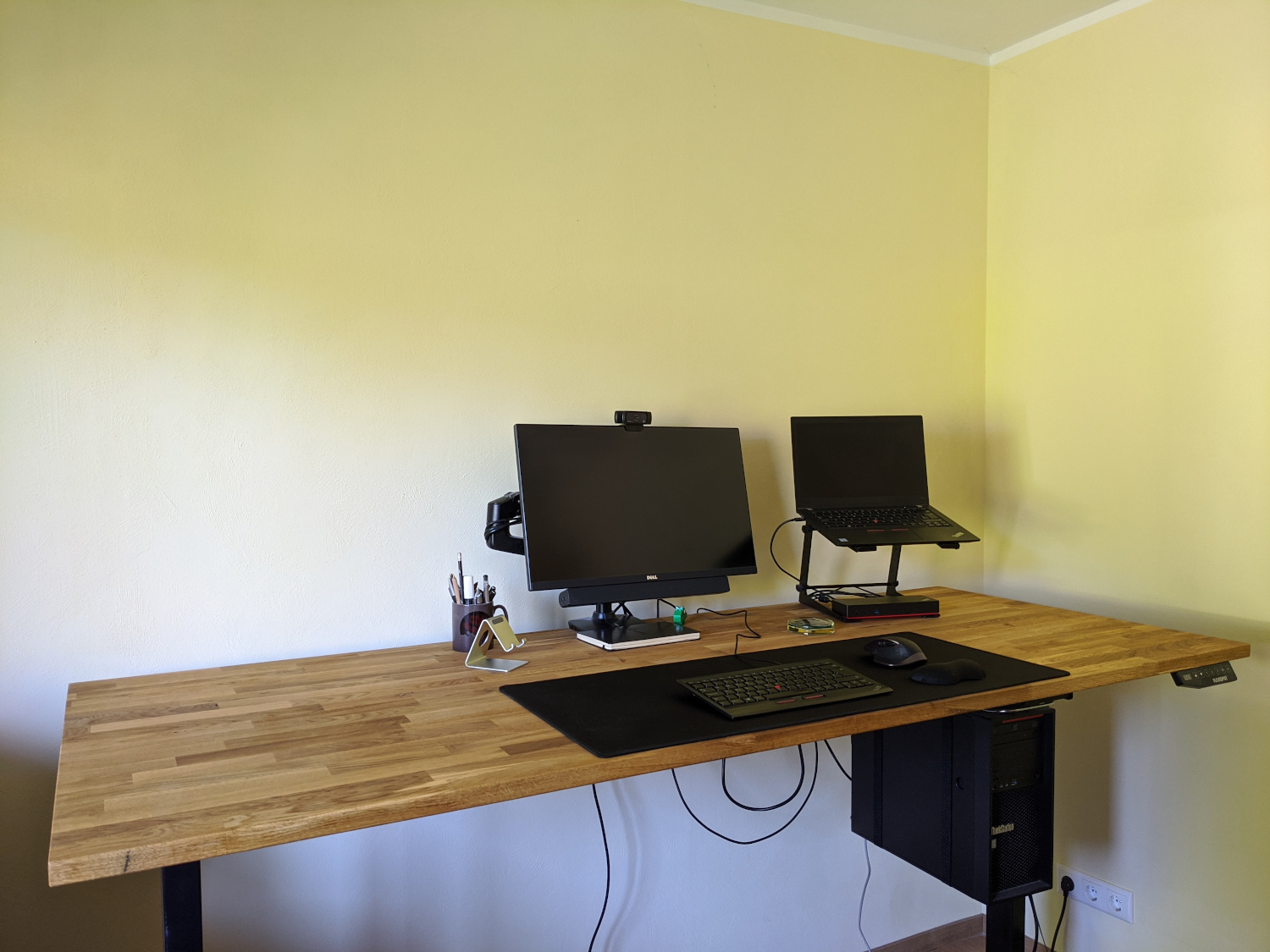
Some days ago I posted a picture of my desk on Mastodon and Twitter. standing desk with a monitor, laptop etc After that I got multiple questions about the setup, so I thought "Michael and Michael did posts about their setups, you could too!" And well, here we are ;-) desk The desk is a Flexispot E5B frame with a 200 80 2.6cm oak table top. The Flexispot E5 (the B stands for black) is a rather cheap (as in not expensive) standing desk frame. It has a retail price of 379 , but you can often get it as low as 299 on sale. Add a nice table top from a local store (mine was like 99 ), a bit of wood oil and work and you get a nice standing desk for less than 500 . The frame has three memory positions, but I only use two: one for sitting, one for standing, and a "change position" timer that I never used so far. The table top has a bit of a swing when in standing position (mine is at 104cm according to the electronics in the table), but not enough to disturb typing on the keyboard or thinking. I certainly wouldn't place a sewing machine up there, but that was not a requirement anyways ;) To compare: the IKEA Bekant table has a similar, maybe even slightly stronger swing. chair Speaking of IKEA The chair is an IKEA Volmar. They don't seem to sell it since mid 2019 anymore though, so no link here. hardware laptop A Lenovo ThinkPad T480s, i7-8650U, 24GB RAM, running Fedora 32 Workstation. Just enough power while not too big and heavy. Full of stickers, because I stickers! It's connected to a Lenovo ThinkPad Thunderbolt 3 Dock (Gen 1). After 2 years with that thing, I'm still not sure what to think about it, as I had various issues with it over the time:
  • the internal USB hub just vanishing from existence until a full power cycle of the dock was performed, but that might have been caused by my USB-switch which I recently removed.
  • the NIC negotiating at 100MBit/s instead of 1000MBit/s and then keeping on re-negotiating every few minutes, disconnecting me from the network, but I've not seen that since the Fedora 32 upgrade.
  • the USB-attached keyboard not working during boot as it needs some Thunderbolt magic.
The ThinkPad stands on a Adam Hall Stands SLT001E, a rather simple stand for laptops and other equipment (primarily made for DJs I think). The Dock fits exactly between the two feet of the stand, so that is nice and saves space on the table. Using the stand I can use the laptop screen as a second screen when I want it - but most often I do not and have the laptop lid closed while working. workstation A Lenovo ThinkStation P410, Xeon E5-2620 v4, 96GB RAM, running Fedora 32 Workstation. That's my VM playground. Having lots of RAM really helps if you need/want to run many VMs with Foreman/Katello or Red Hat Satellite as they tend to be a bit memory hungry and throwing hardware at problems tend to be an easy solution for many of them. The ThinkStation is also connected to the monitor, and I used to have an USB switch to flip my keyboard, mouse and Yubikey from the laptop to the workstation and back. But as noted above, this switch somehow made the USB hub in the laptop dock unhappy (maybe because I was switching too quickly after resume or so), so it's currently removed from the setup and I use the workstation via SSH only. It's mounted under the table using a ROLINE PC holder. You won't get any design awards with it, but it's easy to assemble and allows the computer to move with the table, minimizing the number of cables that need to have a flexible length. monitor The monitor is an older Dell UltraSharp U2515H - a 25" 2560 1440 model. It sits on an Amazon Basics Monitor Arm (which is identical to an Ergotron LX to the best of my knowledge) and is accompanied by a Dell AC511 soundbar. I don't use the adjustable arm much. It's from the time I had no real standing desk and would use the arm and a cardboard box to lift the monitor and keyboard to a standing level. If you don't want to invest in a standing desk, that's the best and cheapest solution! The soundbar is sufficient for listening to music while working and for chatting with colleagues. webcam A Logitech C920 Pro, what else? Works perfectly under Linux with the UVC driver and has rather good microphones. Actually, so good that I never use a headset during video calls and so far nobody complained about bad audio. keyboard A ThinkPad Compact USB Keyboard with TrackPoint. The keyboard matches the one in my T480s, so my brain doesn't have to switch. It was awful when I still had the "old" model and had to switch between the two. UK layout. Sue me. I like the big return key. mouse A Logitech MX Master 2. I got the MX Revolution as a gift a long time ago, and at first I was like: WTF, why would anyone pay hundred bucks for a mouse?! Well, after some time I knew, it's just that good. And when it was time to get a new one (the rubber coating gets all slippery after some time) the decision was rather easy. I'm pondering if I should try the MX Ergo or the MX Vertical at some point, but not enough to go and buy one of them yet. other notepad I'm terrible at remembering things, so I need to write them down. And I'm terrible at remembering to look at my notes, so they need to be in my view. So there is a regular A5 notepad on my desk, that gets filled with check boxes and stuff, page after page. coaster It's a wooden table, you don't want to have liquids on it, right? Thankfully a friend of mine once made coasters out of old Xeon CPUs and epoxy. He gave me one in exchange for a busted X41 ThinkPad. I still think I made the better deal ;) yubikey Keep your secrets safe! Mine is used as a GnuPG smart card for both encryption and SSH authentication, U2F on various pages and 2FA for VPN. headphones I own a pair of Bose QuietComfort 25 with an aftermarket Bluetooth adapter and Anker SoundBuds Slim+. Both are used rather seldomly while working, as my office is usually quiet and no one is disturbed when I listen to music without headphones. what's missing? light I want to add more light to the setup, noth to have a better picture during video calls but also to have better light when doing something else on the table - like soldering. The plan is to add an IKEA Tertial with some Tr dfri smart LED in it, but the Tertial is currently not available for delivery at IKEA and I'm not going to visit one in the current situation. bigger monitor Currently pondering getting a bigger (27+ inch) 4K monitor. Still can't really decide which one to get. There are so many, and they all differ in some way. But it seems no affordable one is offering an integrated USB switch and sufficient amount of USB ports, so I'll probably get whatever can get me a good picture without any extra features at a reasonable price. Changing the monitor will probably also mean rethinking the sound output, as I'm sure mounting the Dell soundbar to anything but the designated 5 year old monitor won't work too well.

9 June 2020

Ingo Juergensmann: Jabber vs. XMPP

XMPP is widely - and mabye better - known as Jabber. This was more or less the same until Cisco bought Jabber Inc and the trademark. You can read more about the story on the XMPP.org website. But is there still a Jabber around? Yes, it is! But Cisco Jabber is a whole infrastructure environment: you can't use Cisco Jabber client on its own without the other required Cisco infrastructure as Cisco CUCM and CIsco IM&P servers. So you can't just setup Prosody or ejabberd on your Debian server and connect Cisco Jabber to it. But what are the differences of Cisco Jabber to "standard" XMPP clients? Cisco Jabber The above screenshot from the official Cisco Jabber product webpage shows the new, single view layout of the Cisco Webex Teams client, but you can configure the client to have the old, classic split view layout of Contact List and Chat Window. But as you can already see from above screenshot audio & video calls is one of the core functions of Cisco Jabber whereas this feature has been added only lately to the well-known Conversations XMPP client on Android. Conversations is using Jingle extension to XMPP whereas Jabber uses SIP for voice/video calls. You can even use Cisco Jabber to control your deskphone via CTI, which is a quite common setup for Jabber. In fact you can configure Jabber to be just a CTI client to you phone or a fully featured UC client. When you don't want to have Ciscos full set of on-premise servers, you can also use Cisco Jabber in conjunction with Cisco Webex as Cisco Webex Messenger. Or in conjunction with Webex Teams in Teams Messaging Mode. Last month Cisco announced general availability of XMPP federation for Webex Teams/Jabber in Teams Messaging Mode. With that you have basic functionality in Webex Teams. And when I say "basic" I really mean basic: you can have 1:1 chat only, no group chats (MUC) and no Presence status will be possible. Hopefully this is just the beginning and not the end of XMPP support in Webex Teams. XMPP Clients Well, I'm sure many of you know "normal" XMPP clients such as Gajim or Dino on Linux, Conversations on Android or Siskin/Monal/ChatSecure on Apple IOS. There are plenty of other clients of course and maybe you used an XMPP client in the past without knowing it. For example Jitsi Meet is based on XMPP and you can still download the Jitsi Desktop client and use it as a full-featured multi-protocol client, e.g. for XMPP and SIP. In fact Jitsi Desktop is maybe the client that comes closest to Cisco Jabber as a chat/voice/video client. In fact I already connected Jitsi Desktop to Cisco CUCM/IM&P infrastructure, but of course you won't be able to use all those Cisco proprietary extensions, but you can see the benefit of open, standardized protocols such as XMPP and SIP: you are free to use any standard compliant client that you want. So, while Jitsi supported voice/video calls for a long time, even before they focussed on Jitsi Meet as a WebRTC based conference service, Conversations added this feature last month, as already stated. This had a huge effect to the whole XMPP federation, because you need an XMPP server that supports XEP-0215 to make these audio/video calls work. The well-known Compliance Tester listed the STUN/TURN features first as "Informational Tests", but quickly made this a mandatory test to pass tests and gain 100% on the Compliance Tester. But you cannot place SIP calls to other sides, because that's a different thing. As many of you are familiar with standard XMPP clients, I'll focus now on some similarity and differences between Cisco Jabber and standard XMPP... Similarities & Differences First, you can federate with Cisco Jabber users. Cisco IM&P can use standard XMPP federation with all other XMPP standard compliant servers. This is really a big benefit and way better than other solutions that usually results in vendor lock-in. Depending on the setup, you can even join from your own XMPP client in MUCs (Multi User Chats), which Cisco calls "Persistent Chat Room". The other way is not that simple: basically it is possible to join with Cisco Jabber in a MUC on a random server, but it is not as easy as you might thing. Cisco Jabber simply lacks a way to enter a room JID (as you can find them on https://search.jabber.network/. Instead you need to be added as participant by a moderator or an admin in that 3rd party MUC. Managed File Transfers is another issue. Cisco Jabber supports Peer-to-Peer file transfers and Managed File Transfers, where the uploaded file get transferred to an SFTP server as storage backend and where the IM&P server is handling the transfer via HTTPS. You can find a schematic drawing in the Configuration Guides. Although it appears similar to HTTP Upload as defined in XEP-0363, it is not very likely that it will work. I haven't tested it yet, because in my test scenario there is a gatekeeper in the path: Cisco Expressway doesn't support (yet) Managed File Transfer, but you can upvote the idea in the ideas management of Cisco or other ideas such as OMEMO support. OMEMO support? Yes, there is no end-to-end encryption (E2EE) currently planned for Cisco Jabber, while it is common nowadays for most modern XMPP clients. I think it would be good for Cisco Jabber to also (optionally) support OMEMO or its successor. Messaging clients without E2EE are not state of the art anymore. Whereas Conversations is the de-facto standard on Android, Apple IOS devices are still lacking a similar well-working client. See my blog post "XMPP - Fun with Clients" for a summary. In that regard Cisco Jabber might be the best XMPP client for IOS to some degree: you have working messaging, voice/video calls, Push Notifications and integration into Apples Call Kit. There are most likely many, many more differences and issues between Cisco Jabber and standard compliant XMPP servers and clients. But basically Cisco Jabber is still based on XMPP and extends that by proprietary extensions. Summary While I have the impression that the free clients and servers are well doing and increased development in the past years (thanks to Conversations and the Compliance Tester), the situation of Cisco Jabber is a little different. As a customer you can sometimes get the impression that Cisco has lost interest in developing Cisco Jabber. It got better in the last years, but when Cisco Spark was introduced some years ago, the impression was that Cisco is heavily focussed on Spark (now: Webex Teams). It's not like Cisco is not listening to customers or the development has been stopped on Jabber, but my impression is that most customers don't give feedback or tell Cisco as the vendor what they want. You can either submit ideas via the Colaboration Customer Ideas Tool or provide feedback via your Cisco and partner channels. I think it is important for the XMPP community to also have a large enterprise level vendor like Cisco. Otherwise the Internet will become more and more an Internet of closed silos like MS Teams, Slack, Facebook, etc. Of course there are other companies like ProcessOne (ejabberd) or Tigase, but I think you agree that Cisco is another level.
Kategorie:

Julian Andres Klode: Review: Chromebook Duet

Sporting a beautiful 10.1 1920x1200 display, the Lenovo IdeaPad Duet Chromebook or Duet Chromebook, is one of the latest Chromebooks released, and one of the few slate-style tablets, and it s only about 300 EUR (300 USD). I ve had one for about 2 weeks now, and here are my thoughts.

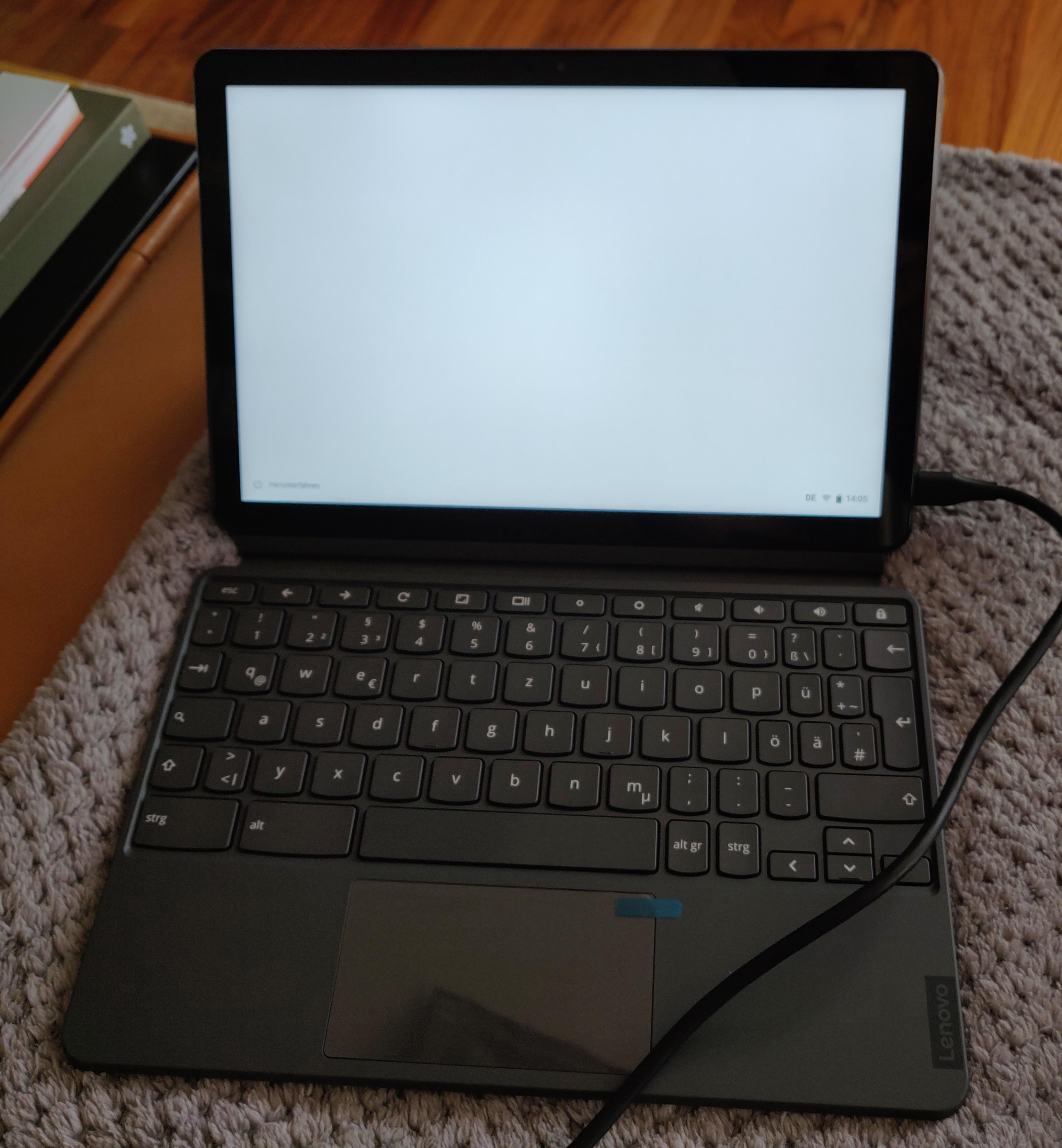
Build & Accessories The tablet is a fairly Pixel-style affair, in that the back has two components, one softer blue one housing the camera and a metal feeling gray one. Build quality is fairly good. The volume and power buttons are located on the right side of the tablet, and this is one of the main issues: You end up accidentally pressing the power button when you want to turn your volume lower, despite the power button having a different texture. Alongside the tablet, you also find a kickstand with a textile back, and a keyboard, both of which attach via magnets (and pogo pins for the keyboard). The keyboard is crammed, with punctuation keys being halfed in size, and it feels mushed compared to my usual experiences of ThinkPads and Model Ms, but it s on par with other Chromebooks, which is surprising, given it s a tablet attachment.
fully assembled chromebook duet fully assembled chromebook duet
I mostly use the Duet as a tablet, and only attach the keyboard occasionally. Typing with the keyboard on your lap is suboptimal. My first Duet had a few bunches of dead pixels, so I returned it, as I had a second one I could not cancel ordered as well. Oh dear. That one was fine!

Hardware & Connectivity The Chromebook Duet is powered by a Mediatek Helio P60T SoC, 4GB of RAM, and a choice of 64 or 128 GB of main storage. The tablet provides one USB-C port for charging, audio output (a 3.5mm adapter is provided in the box), USB hub, and video output; though, sadly, the latter is restricted to a maximum of 1080p30, or 1440x900 at 60 Hz. It can be charged using the included 10W charger, or use up to I believe 18W from a higher powered USB-C PD charger. I ve successfully used the Chromebook with a USB-C monitor with attached keyboard, mouse, and DAC without any issues. On the wireless side, the tablet provides 2x2 Wifi AC and Bluetooth 4.2. WiFi reception seemed just fine, though I have not done any speed testing, missing a sensible connection at the moment. I used Bluetooth to connect to my smartphone for instant tethering, and my Sony WH1000XM2 headphones, both of which worked without any issues. The screen is a bright 400 nit display with excellent viewing angles, and the speakers do a decent job, meaning you can use easily use this for watching a movie when you re alone in a room and idling around. It has a resolution of 1920x1200. The device supports styluses following the USI standard. As of right now, the only such stylus I know about is an HP one, and it costs about 70 or so. Cameras are provided on the front and the rear, but produce terrible images.

Software: The tablet experience The Chromebook Duet runs Chrome OS, and comes with access to Android apps using the play store (and sideloading in dev mode) and access to full Linux environments powered by LXD inside VMs. The screen which has 1920x1200 is scaled to a ridiculous 1080x675 by default which is good for being able to tap buttons and stuff, but provides next to no content. Scaling it to 1350x844 makes things more balanced. The Linux integration is buggy. Touches register in different places than where they happened, and the screen is cut off in full screen extremetuxracer, making it hard to recommend for such uses. Android apps generally work fine. There are some issues with the back gesture not registering, but otherwise I have not found issues I can remember. One major drawback as a portable media consumption device is that Android apps only work in Widevine level 3, and hence do not have access to HD content, and the web apps of Netflix and co do not support downloading. Though one of the Duets actually said L1 in check apps at some point (reported in issue 1090330). It s also worth noting that Amazon Prime Video only renders in HD, unless you change your user agent to say you are Chrome on Windows - bad Amazon! The tablet experience also lags in some other ways, as the palm rejection is overly extreme, causing it to reject valid clicks close to the edge of the display (reported in issue 1090326). The on screen keyboard is terrible. It only does one language at a time, forcing me to switch between German and English all the time, and does not behave as you d expect it when editing existing words - it does not know about them and thinks you are starting a new one. It does provide a small keyboard that you can move around, as well as a draw your letters keyboard, which could come in handy for stylus users, I guess. In any case, it s miles away from gboard on Android. Stability is a mixed bag right now. As of Chrome OS 83, sites (well only Disney+ so far ) sometimes get killed with SIGILL or SIGTRAP, and the device rebooted on its own once or twice. Android apps that use the DRM sometimes do not start, and the Netflix Android app sometimes reports it cannot connect to the servers.

Performance Performance is decent to sluggish, with micro stuttering in a lot of places. The Mediatek CPU is comparable to Intel Atoms, and with only 4GB of RAM, and an entire Android container running, it s starting to show how weak it is. I found that Google Docs worked perfectly fine, as did websites such as Mastodon, Twitter, Facebook. Where the device really struggled was Reddit, where closing or opening a post, or getting a reply box could take 5 seconds or more. If you are looking for a Reddit browsing device, this is not for you. Performance in Netflix was fine, and Disney+ was fairly slow but still usable. All in all, it s acceptable, and given the price point and the build quality, probably the compromise you d expect.

Summary tl;dr:
  • good: Build quality, bright screen, low price, included accessories
  • bad: DRM issues, performance, limited USB-C video output, charging speed, on-screen keyboard, software bugs
The Chromebook Duet or IdeaPad Duet Chromebook is a decent tablet that is built well above its price point. It s lackluster performance and DRM woes make it hard to give a general recommendation, though. It s not a good laptop. I can see this as the perfect note taking device for students, and as a cheap tablet for couch surfing, or as your on-the-go laptop replacement, if you need it only occasionally. I cannot see anyone using this as their main laptop, although I guess some people only have phones these days, so: what do I know? I can see you getting this device if you want to tinker with Linux on ARM, as Chromebooks are quite nice to tinker with, and a tablet is super nice.

Next.

Previous.