Search Results: "ana"

17 August 2015

Gunnar Wolf: report @mx (that means, sadly, gwolf DebConf15)

<Sigh/> For the second time since I joined Debian, I missed DebConf. This time, mostly for two completely happy reasons (which have, of course, grown up quite significatively): But adding to that very important factor, early-to-mid August is possibly the worst date for me to attend DebConf As that's when we start classes at UNAM, and I really don't want to delegate introducing my class to somebody else (besides it being or not possible). Life has been quite busy here. Besides starting my seventh semester as a teacher (finally being able to present my book on operating systems to the students!), I also took on teaching two modules for a diploma-course on embedded Linux. I'm co- teaching the "User-space Linux" module together with Gabriel Salda a, and will teach the "Boot process" module with Sandino Araico. There are many things that should be improved about the covered program, but we are having good fun working our way on it; Gabriel and I have given two (out of six) 6hr sessions each, and have reached the point where it is actually becoming fun :) As for Debian... I have been doing minimal maintenance work. Answering to some keyring tickets, or taking care of only high-profile important issues. I do not have time to do much. I have been wanting to do some interesting analysis on the evolution of our keyring for several months, but have not had the time to follow it up. Will do at some point, /mehopes. Anyway... This post is probably just because I need to somehow be there at our community's highest social, technical exchange period in the year. That is, there's not much to report, it's only me waving from home!

Lars Wirzenius: On the cost analysis of dependencies

A question that I'm asked repeatedly recently is why I chose not to use an existing library for serialising data structures in Obnam. This blog post is the answer. Obnam is a backup program, and it needs to store various data about files. This includes stat(2) information about each file in the live data, as well as data Obnam needs to keep track of everything. At run-time, Obnam keeps this data in memory data structures, such as Python dicts. For storage, these data structures need to be converted, serialised, to and from streams of bytes. The are a variety of libraries for doing this, designed for different purposes and with their own constraints and pitfalls. Python's standard library comes with the cPickle library, for example, but its serialisation format is not guaranteed to be compatible with any other version of Python. For Obnam, I need something that will last a long time. I do not want to have to deal with a library changing its serialisation format, as that would mean either that Obnam can't handle old backups, or that I need to start maintaining the old version of the library. A way to look at this is that any dependencies your software have a cost, and that cost should be smaller than the benefit you get from them. For example, Obnam depends on the paramiko library to implement the SSH protocol. This library has some cost, and I've run into one or two bugs in it that have been rather unfortunate. However, the benefit it brings is huge: I don't have to implement SSH myself. I'm happy to have Obnam depend on paramiko. For the serialisation thing, I wrote my own library, after a small about of research into existing ones. Research time is a cost, too. Mine is somewhat Obnam specific, in that it can make some assumptions about the data to be serialised, and this allows a simpler library. A generic library would have to handle a number of special cases that mine can ignore. It took me less than an hour to write this twice. I first wrote a quick prototype and a little microbenchmark to see if my approach would be feasible. Then I deleted that code, and started from scratch, TDD style, to make sure the code was reliable. The cost of writing my own serialisation code was less than the cost of finding, let alone evaluating existing libraries. It may be that my own library turns out to be inadequate. Then, and only then, is when I start researching other libraries. Until then, I'll avoid the cost of research to find a suitable library, the cost of learning the chosen one, the cost of integrating it into Obnam, the cost to porters of Obnam of dealing with a new dependency, and the risk of the library changing in ways that are unsuitable for Obnam. Obviously, writing your own code has costs, too. Designing and implementing a library is a cost, as is maintaining it (debugging, changes in requirements, etc). Write your own or use existing code? It's a cost/benefit analysis. There's no clear one answer that's always correct.

16 August 2015

Ana Beatriz Guerrero Lopez: Debconf15 and happy birthday Debian!

Debconf15 started yesterday and as expected, talk rooms are always fully crowded! I had to stand up in a couple of talks and I watched another couple of them from outside thanks to the real time streaming. Thanks to the fantastic work of the video team, video recordings of the talks from yesterday have started to be available at http://meetings-archive.debian.net/pub/debian-meetings/2015/debconf15/.
I would heartily recommend you to watch Debian s Central Role in the Future of Software Freedom by Bradley M. Kuhn (video available).
I was expecting a good talk and Bradley exceeded my expectations. I also got to meet again Simon Kainz and to get my DUCK branded lighter from the duck challenge :) After dinner, we celebrated Debian s 22 birthday, that s exactly today. We had a wonderful cake made by DebConf attendees made by small pieces of pastry with fruits drawing a mosaic with a Debian swirl.
While the cake was a very nice detail, the best part of it was watching the people making the cake. Everybody had a great time and this kind of things are what make Debian (and DebConf) great. When people work together to make something wonderful.

Lunar: Reproducible builds: week 16 in Stretch cycle

What happened in the reproducible builds effort this week: Toolchain fixes Valentin Lorentz sent a patch for ispell to initialize memory structures before dumping their content. In our experimental repository, qt4-x11 has been rebased on the latest version (Dhole), as was doxygen (akira). Packages fixed The following packages became reproducible due to changes in their build dependencies: backup-manager, cheese, coinor-csdp, coinor-dylp, ebook-speaker, freefem, indent, libjbcrypt-java, qtquick1-opensource-src, ruby-coffee-script, ruby-distribution, schroot, twittering-mode. The following packages became reproducible after getting fixed: Some uploads fixed some reproducibility issues but not all of them: Patches submitted which have not made their way to the archive yet: akira found another embedded code copy of texi2html in maxima. reproducible.debian.net Work on testing several architectures has continued. (Mattia/h01ger) Package reviews 29 reviews have been removed, 187 added and 34 updated this week. 172 new FTBFS reports were filled, 137 solely by Chris West (Faux). josch spent time investigating the issue with fonts in PDF files. Chris Lamb documented the issue affecting documentation generated by ocamldoc. Misc. Lunar presented a general Reproducible builds HOWTO talk at the Chaos Communication Camp 2015 in Germany on August 13th. Recordings are already available, as well as slides and script. h01ger and Lunar also used CCCamp15 as an opportunity to have discussions with members of several different projects about reproducible builds. Good news should be coming soon.

15 August 2015

Sune Vuorela: Debconf 2015 2

It is amazing at debconf when your Application Manager is rocking the dance floor!

Sune Vuorela: Debconf 2015 1

When greeted by Clint with one single word: kamel s , one has arrived to Debconf.

Norbert Preining: Kobo GloHD firmware 3.17.0 mega update (KSM, nickel patch, ssh, fonts)

As with all the previous versions, I have prepared a mega update for the Kobo firmware 3.17.0. Big warning for a start this is for Mark6 hardware, thus GloHD only. The update includes all my favorite patches and features. Please see details (although for for Kobo Glo) for 3.16.0, 3.15.0, 3.13.1 and 3.12.1. As before, the following addons are included: Kobo Start Menu, koreader, coolreader, pbchess, ssh access, custom dictionaries, and some side-loaded fonts. What I dropped this time is most of the kobohack part, as the libraries seem to get outdated. But I included the dropbear ssh server from the kobohack package. Kobo Logo So what are all these items: Install procedure Latest firmware Warning: Sideloading or crossloading the incorrect firmware can break/brick your device. The link below is for Kobo GloHD ONLY. The first step is to update the Kobo to the latest firmware. This can easily be done by just getting the latest firmware (thread, direct link for Kobo 3.17.0 for GloHD) and unpacking the zip file into the .kobo directory on your device. Eject and enjoy the updating procedure. Mega update Get the combined Kobo-3.17.0-combined/KoboRoot.tgz and put it into the .kobo directory, then eject and enjoy the updating procedure again. After this the device should reboot and you will be kicked into KSM, from where after some time of waiting Nickel will be started. If you consider the fonts too small, select Configure, then the General, and add item, then select kobomenuFontsize=55 and save. Remarks to some of the items included The full list of included things is above, here are only some notes about what specific I have done. WARNINGS After installing this patch, you need to fix the password for root and disable telnet. This is an important step, here are the steps you have to take (taken from this old post):
  1. Turn on Wifi on the Kobo and find IP address
    Go to Settings Connect and after this is done, go to Settings Device Information where you will see something like
    IP Address: 192.168.1.NN

    (numbers change!)
  2. telnet into your device
    telnet 192.168.1.NN
    it will ask you the user name, enter root (without the quotes) and no password
  3. (ON THE GLO) change home directory of root
    edit /etc/passwd with vi and change the entry for root by changing the 6th field from: / to /root (without the quotes). After this procedure the line should look like
    root::0:0:root:/root:/bin/sh
    don t forget to save the file
  4. (ON THE GLO) create ssh keys for dropbear
    [root@(none) ~]# mkdir /etc/dropbear
    [root@(none) ~]# cd /etc/dropbear
    [root@(none) ~]# dropbearkey -t dss -f dropbear_dss_host_key
    [root@(none) ~]# dropbearkey -t rsa -f dropbear_rsa_host_key
  5. (ON YOUR PERSONAL COMPUTER) check that you can log in with ssh
    ssh root@192.168.1.NN
    You should get dropped into your device again
  6. (ON THE GLO) log out of the telnet session (the first one you did)
    [root@(none) ~]# exit
  7. (ON THE GLO) in your ssh session, change the password of root
    [root@(none) ~]# passwd
    you will have to enter the new password two times. Remember it well, you will not be easily able to recover it without opening your device.
  8. (ON THE GLO) disable telnet login
    edit the file /etc/inetd.conf.local on the GLO (using vi) and remove the telnet line (the line starting with 23).
  9. restart your device
The combined KoboRoot.tgz is provided without warranty. If you need to reset your device, don t blame me!

14 August 2015

Wouter Verhelst: Multi-pass transcoding to WebM with normalisation

Transcoding video from one format to another seems to be a bit of a black art. There are many tools that allow doing this kind of stuff, but one issue that most seem to have is that they're not very well documented. I ran against this a few years ago, when I was first doing video work for FOSDEM and did not yet have proper tools to do the review and transcoding workflow. At the time, I just used mplayer to look at the .dv files, and wrote a text file with a simple structure to remember exactly what to do with it. That file was then fed to a perl script which wrote out a shell script that would use the avconv command to combine and extract the "interesting" data from the source DV files into a single DV file per talk, and which would then call a shell script which used gst-launch and sox to do a multi-pass transcode of those intermediate DV files into a WebM file. While all that worked properly, it was a rather ugly hack, never cleaned up, and therefore I never really documented it properly either. Recently, however, someone asked me to do so anyway, so here goes. Before you want to complain about how this ate the videos of your firstborn child, however, note the above. The perl script spent a somewhat large amount of code reading out the text file and parsing it into an array of hashes. I'm not going to reproduce that, since the actual format of the file isn't all that important anyway. However, here's the interesting bits:
foreach my $pfile(keys %parts)  
        my @files = @ $parts $pfile ;
        say "#" x (length($pfile) + 4);
        say "# " . $pfile . " #";
        say "#" x (length($pfile) + 4);
        foreach my $file(@files)  
                my $start = "";
                my $stop = "";
                if(defined($file-> start ))  
                        $start = "-ss " . $file-> start ;
                 
                if(defined($file-> stop ))  
                        $stop = "-t " . $file-> stop ;
                 
                if(defined($file-> start ) && defined($file-> stop ))  
                        my @itime = split /:/, $file-> start ;
                        my @otime = split /:/, $file-> stop ;
                        $otime[0]-=$itime[0];
                        $otime[1]-=$itime[1];
                        if($otime[1]<0)  
                                $otime[0]-=1;
                                $otime[1]+=60;
                         
                        $otime[2]-=$itime[2];
                        if($otime[2]<0)  
                                $otime[1]-=1;
                                $otime[2]+=60;
                         
                        $stop = "-t " . $otime[0] . ":" . $otime[1] .  ":" . $otime[2];
                 
                if(defined($file-> start )   defined($file-> stop ))  
                        say "ln " . $file-> name  . ".dv part-pre.dv";
                        say "avconv -i part-pre.dv $start $stop -y -acodec copy -vcodec copy part.dv";
                        say "rm -f part-pre.dv";
                  else  
                        say "ln " . $file-> name  . ".dv part.dv";
                 
                say "cat part.dv >> /tmp/" . $pfile . ".dv";
                say "rm -f part.dv";
         
        say "dv2webm /tmp/" . $pfile . ".dv";
        say "rm -f /tmp/" . $pfile . ".dv";
        say "scp /tmp/" . $pfile . ".webm video.fosdem.org:$uploadpath   true";
        say "mv /tmp/" . $pfile . ".webm .";
 
That script uses avconv to read one or more .dv files and transcode them into a single .dv file with all the start- or end-junk removed. It uses /tmp rather than the working directory, since the working directory was somewhere on the network, and if you're going to write several gigabytes of data to an intermediate file, it's usually a good idea to write them to a local filesystem rather than to a networked one. Pretty boring. It finally calls dv2webm on the resulting .dv file. That script looks like this:
#!/bin/bash
set -e
newfile=$(basename $1 .dv).webm
wavfile=$(basename $1 .dv).wav
wavfile=$(readlink -f $wavfile)
normalfile=$(basename $1 .dv)-normal.wav
normalfile=$(readlink -f $normalfile)
oldfile=$(readlink -f $1)
echo -e "\033]0;Pass 1: $newfile\007"
gst-launch-0.10 webmmux name=mux ! fakesink \
  uridecodebin uri=file://$oldfile name=demux \
  demux. ! ffmpegcolorspace ! deinterlace ! vp8enc multipass-cache-file=/tmp/vp8-multipass multipass-mode=1 threads=2 ! queue ! mux.video_0 \
  demux. ! progressreport ! audioconvert ! audiorate ! tee name=t ! queue ! vorbisenc ! queue ! mux.audio_0 \
  t. ! queue ! wavenc ! filesink location=$wavfile
echo -e "\033]0;Audio normalize: $newfile\007"
sox --norm $wavfile $normalfile
echo -e "\033]0;Pass 2: $newfile\007"
gst-launch-0.10 webmmux name=mux ! filesink location=$newfile \
  uridecodebin uri=file://$oldfile name=video \
  uridecodebin uri=file://$normalfile name=audio \
  video. ! ffmpegcolorspace ! deinterlace ! vp8enc multipass-cache-file=/tmp/vp8-multipass multipass-mode=2 threads=2 ! queue ! mux.video_0 \
  audio. ! progressreport ! audioconvert ! audiorate ! vorbisenc ! queue ! mux.audio_0
rm $wavfile $normalfile
... and is a bit more involved. Multi-pass encoding of video means that we ask the encoder to first encode the file but store some statistics into a temporary file (/tmp/vp8-multipass, in our script), which the second pass can then reuse to optimize the transcoding. Since DV uses different ways of encoding things than does VP8, we also need to do a color space conversion (ffmpegcolorspace) and deinterlacing (deinterlace), but beyond that the video line in the first gstreamer pipeline isn't very complicated. Since we're going over the file anyway and we need the audio data for sox, we add a tee plugin at an appropriate place in the audio line in the first gstreamer pipeline, so that we can later on pick up that same audio data an write it to a wav file containing linear PCM data. Beyond the tee, we go on and do a vorbis encoding, as is needed for the WebM format. This is not actually required for a first pass, but ah well. There's some more conversion plugins in the pipeline (specifically, audioconvert and audiorate), but those are not very important. We next run sox --norm on the .wav file, which does a fully automated audio normalisation on the input. Audio normalisation is the process of adjusting volume levels so that the audio is not too loud, but also not too quiet. Sox has pretty good support for this; the default settings of its --norm parameter make it adjust the volume levels so that the highest peak will just about reach the highest value that the output format can express. As such, you have no clipping anywhere in the file, but also have an audio level that is actually useful. Next, we run a second-pass encoding on the input file. This second pass uses the statistics gathered in the first pass to decide where to put its I- and P-frames so that they are placed at the most optimal position. In addition, rather than reading the audio from the original file, we now read the audio from the .wav file containing the normalized audio which we produced with sox, ensuring the audio can be understood. Finally, we remove the intermediate audio files we created; and the shell script which was generated by perl also contained an rm command for the intermediate .dv file. Some of this is pretty horrid, and I never managed to clean it up enough so it would be pretty (and now is not really the time). However, it Just Works(tm), and I am happy to report that it continues to work with gstreamer 1.0, provided you replace the ffmpegcolorspace by an equally simple videoconvert, which performs what ffmpegcolorspace used to perform in gstreamer 0.10.

Norbert Preining: QMapShack GPS and Maps on Linux

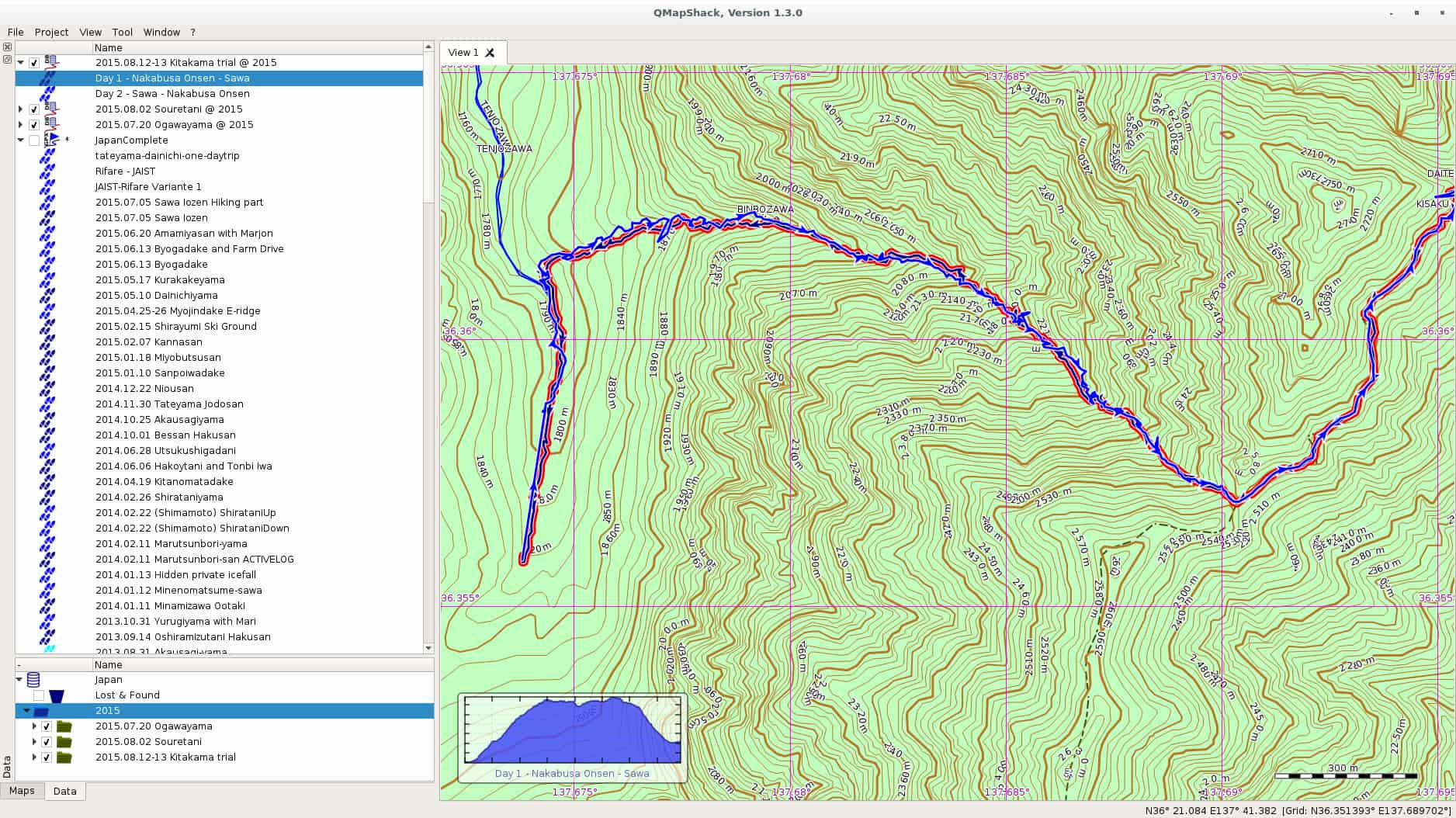
In one of the comments on my last post on Windows 10, a friendly reader from my home country pointed me at QMapShack as a replacement for QuoVadis. I have been using QuoVadis now for many many years, and it contains my mountaineering history all the way back. All the guiding work, all the track. QuoVadis is a great program, able to work with various commercial digital maps as well as GPS receivers. It only has one disadvantage, it doesn t work on Linux. QMapShack is very similar in the target audience, but very different in usage. The one big difference is of course the set of maps one can use with QMapShack. Fortunately, Garmin Maps are supported, and since all my maps regarding Japan are Garmin maps, I am now in the process to converting to QMapShack at least for my Japan GPS data. qmapshack Let us start with the program I was using since ages, and still are using, QuoVadis. QuoVadis is a great program, there is nothing to complain. It is extremely feature-rich, and above all it can work with many different maps. While working as mountain guide in Europe it was an essential tool for me. I could use the digital raster maps of Austria, Switzerland (SwissTOPO), Germany, France, Italy, as well as Garmin vector maps. For serious work as a professional it was indispensable for me. Unfortunately, it never worked on Linux. For some time I had a VirtualBox installation of Windows, but that was more a clutch than anything else. So for most of the GPS work I had to reboot my laptop to Windows, do my stuff there, and then switch back to Linux. QMapShack is far from as feature rich as QuoVadis, but as far as I see now, it does have enough features for me and my mountaineering in Japan. Dealing with GPS units is not a problem, this is the easy part. The difficult part are the digital maps. Fortunately, QMapShack supports Garmin vector maps, the only maps that are (as far as I know) available digitally for Japan. Getting used to QMapShack is a bit a challenge coming from QuoVadis, but the Wiki help pages allowed a quick start. Within short time I had maps set up. Next step was to download a data from my last weekend trip to Yarigadake, Kitakama-ridge (unfortunately we had to turn back due to rain). Connecting the unit and mounting it was already enough to show up in QMapShack, and allowed me to copy the tracks to my local database. Next I switched to Windows and exported some tracks from my Japan folder to a gpx file. After rebooting to Linux, I loaded the gpx file into QMapShack and without failure all the tracks and routes showed up, as it can be seen in the above screenshot (click on it to get a bigger version). Also the display of the Garmin map worked perfectly. Update: Please see the comment section for explanation of the necessary functions. QMapShack does provide similar functionality. Thanks to Oliver for pointing me at it! After some time of working there are a few functions from QuoVadis I am missing for now at QMapShack: Although these two functionalities are missing, all in all I am very happy for now with QMapShack. My next steps are: Finally, above all, I see a future where I do not need to reboot into Windows for doing my GPS work. For now I will import all the data into both applications, but if QMapShack holds its promises from the first day of usage, I am confident that this will not be necessary in future. Enjoy.

13 August 2015

Julien Danjou: Reading LWN.net with Pocket

I've started to use Pocket a few months ago to store my backlog of things to read. It's especially useful as I can use it to read content offline since we still don't have any Internet access in places such as airplanes or the Paris metro. It's only 2015 after all. I am also a LWN.net subscriber for years now, and I really like their articles from the weekly edition. Unfortunately, as the access is restricted to subscribers, you need to login: it makes it impossible to add these articles to Pocket directly. Sad. Yesterday, I thought about that and decided to start hacking on it. LWN provides a feature called "Subscriber Link" that allows you to share an article with a friend. I managed to use that feature to share the articles with my friend Pocket! As doing that every week is tedious, I wrote a small Python program called lwn2pocket that I published on GitHub. Feel free to use it, hack it and send pull requests.

Tiago Bortoletto Vaz: c3video for debconf #4

This is a follow-up to my previous post related the DebConf videoteam using a new software stack for the next conferences: http://acaia.ca/~tiago/posts/c3video-for-dc-take-3/. As mentioned before, C3TT provides a set of scripts which will work in background for most reviewing and video processing tasks. The first will just check if the talk is done and mark the related ticket as recorded. The second script, B-mount4cut, does a nice job by mounting a custom fuse filesystem providing the following files (more detailed explanation here: uncut.dv: full original dv file used as input file for the final trimming. project.kdenlive: Kdenlive project file for the operator. Once it's saved with the trim marks, fuse-vdv will do a parse on it and use the marks for cutting. cut.dv: contains only the frames between the trim marks extracted from project.kdenlive. cut-complete.dv: contains the frames between the trim marks extracted from project.kdenlive, plus a prepended intro and an appended video. Paths for these files should be previously set in the web interface as properties Processing.Path.Outro and Processing.Path.Intros. The outro file can be, for instance, an appended video file with a common thanks for sponsors. The intro files is usually an individual frame for each talk, being a colorful presentation poster. We can also set the intro duration in the Processing.Duration.Intro property. cut.wav: demuxed audio from cut.dv Note: in fact, fuse-vdv provides virtual video files as a concatenation of original input files, so avoiding copying large and redundant data. Ideally, these fuse mountpoints will be shared over the network for operators via glusterFS, but I'll skip that for now. After adding the trimming marks and saving the project using Kdenlive, the operator should go to the web interface and mark the ticket as cut:
/images/c3tt_cut.png

Mark ticket as cut

Note: I've been able to do the marks in Kdenlive using double-click in the video, then editing the crop start/end options. The buttons "[" and "]" didn't work in my Kdenlive version for some unknown reason. In the current DebConf video environment I had to make a link builder for translating the path/file names to the C3TT format. So, for the Amsterdam/2015-08-13/09:57:02.dv we should have a amsterdam-2015.08.13-09_57_02.dv symlink. From now the system will delivery the next tasks to C-cut-postprocessor script. This script will just check the marks from the Kdenlive project file and do the cutting job. So far it has worked perfectly here for the first video sessions in DebCamp, with zero hack in the original code, wow! Next post will be about the encoding script, named D-encoding.

Matthew Palmer: Your "Infrastructure as Code" is still code!

Whether you re a TDD zealot, or you just occasionally write a quick script to reproduce some bug, it s a rare coder who doesn t see value in some sort of automated testing. Yet, somehow, in all of the new-age Infrastructure as Code mania, we appear to have forgotten this, and the tools that are commonly used for implementing Infrastructure as Code have absolutely woeful support for developing your Infrastructure Code. I believe this has to change. At present, the state of the art in testing system automation code appears to be, spin up a test system, run the manifest/state/whatever, and then use something like serverspec or testinfra to SSH in and make sure everything looks OK . It s automated, at least, but it isn t exactly a quick process. Many people don t even apply that degree of rigour to their system config systems, and rely on manual testing, or even just doing it live! , to shake out the bugs they ve introduced. Speed in testing is essential. As the edit-build-test-debug cycle gets longer, frustration grows exponentially. If it takes two minutes to get a something went wrong report out of my tests, I m not going to run them very often. If I m not running my tests very often, then I m not likely to write tests much, and suddenly oops. Everything s on fire. In traditional software development, the unit tests are the backbone of the fast feedback cycle. You re running thousands of tests per second, ideally, and an entire test run might take 5-10 seconds. That s the sweet spot, where you can code and test in a rapid cycle of ever-increasing awesomeness. Interestingly, when I ask the users of most infrastructure management systems about unit testing, they either get a blank look on their face, or, at best, point me in the direction of the likes of Test Kitchen, which is described quite clearly as an integration platform, not a unit testing platform. Puppet has rspec-puppet, which is a pretty solid unit testing framework for Puppet manifests although it isn t widely used. Others, though nobody seems to have any ideas. The blank look is near-universal. If infrastructure developers want to be taken seriously, we need to learn a little about what s involved in the development part of the title we ve bestowed upon ourselves. This means knowing what the various types of testing are, and having tools which enable and encourage that testing. It also means things like release management, documentation, modularity and reusability, and considering backwards compatibility. All of this needs to apply to everything that is within the remit of the infrastructure developer. You don t get to hand-wave away any of this just because it s just configuration! . This goes double when your just configuration! is a hundred lines of YAML interspersed with templating directives (SaltStack, I m looking at you).

12 August 2015

Tiago Bortoletto Vaz: c3video for debconf #3

This is a follow-up to my previous post related the DebConf videoteam using a new software stack for the next conferences: http://acaia.ca/~tiago/posts/c3video-for-dc-take-2/. An outdated documentation for current subject is available at https://wiki.fem.tu-ilmenau.de/streaming/projekte/c3/28c3/crs/pipeline. Although the system may work differently nowadays, the basic idea remains the same. A newer, but incomplete documentation can be found in https://repository.fem.tu-ilmenau.de/trac/c3tt/wiki. Btw, CCC people from #voc at hackint.eu have been very kind and supportive. I've set an instance of C3TT for DebConf15 in http://c3tt.acaia.ca/. If you want to play with it just ping me in #debconf-video at oftc. As you can see, we can keep a single external C3TT server for all Debian events, without much work left to the local side, doesn't it sound amazing?
Setting a new conference Go to Projects, then Create. In the project area we'll need to import the Tickets. Tickets will come from the schedule file, which is a XML as generated from frab. With a minor hack we've been able to make the schedule XML from DebConf Summit quite compatible to it (kudos cate!):
/images/import_tickets.png

Importing tickets

By importing the schedule from https://summit.debconf.org/debconf15.xml we'll be asked from which rooms we want to import the events. Usually those that have video coverage will be selected:
/images/chosing_rooms.png

Choosing rooms

Then, we may want to exclude some talks that we won't provide video:
/images/chosing_talks.png

Choosing talks

We're also required to adjust some Properties for a given conference. An example with some explanation of these properties is availabe at https://c3voc.de/wiki/c3tracker. For my initial tests the ones below seem to be enough:
/images/c3tt_properties.png

Setting properties

The backend: basic understand The screen UI mentioned above will run a set of scripts in background which will automate most of the tasks, preparing videos for cutting to deploying them in different online services. Tab 0: A-recording-scheduler Each 30 seconds it will check if there's any ticket in the state scheduled or recording. It's based in the start/end datetime of the talk, so the ticket will be kept as scheduled (current < talk start), or marked as recording (start => current =< end) or recorded (current > end). Tab 1: B-mount4cut Each 30 seconds it will check if there's any ticket in the state recorded. That means the talk is already finished, and the raw video file is available in the path which has previously been set as a property (Path.Capture) in the web interface. For each ticket marked as recorded it will try to find the related video file in the capture path. The file format should be <room>-YYYY-MM-DD_HH-MM-SS.<extension>. The script will then use fuse-vdv to create a custom filesystem with some needed files for human interaction (fancy stuff!). Here's an example of talks in a room called Heidelberg, after being recorded and auto-mounted by the B-mount4cut script:
/images/c3tt_fuse.png

Mounting custom fuse FS

The human interaction is just a short review process using Kdenlive. The reviewers will access these files via a glusterFS network share. There's even a Debian Virtualbox image provided for that, including all the necessary tools. I'm going into this right now and will report what I get in the next hours. Hopefully the following scripts will also be covered, very soon-ish :) Tab 2: C-cut-postprocessor Tab 3: D-encoding Tab 4: E-postencoding (auphonic) Tab 5: F-postprocessing(upload) DebCamp is fun.

Elena 'valhalla' Grandi: Printing a 2965 lines text file

Printing a 2965 lines text file

Let us image I have a reason https://people.debian.org/~anibal/ksp-dc15/ksp-dc15.html to print a text file that is 2965 lines long, is encoded in utf-8 (so a2ps and enscript don't work) and I don't want to destroy a whole forest for it.

I've started by using xelatex to get a nicely typeset A5 page with my file in a monospaced font: partecipants.tex

\documentclass[a5paper] article
\usepackage fontspec
\usepackage[left=1cm,right=1cm,top=0.8cm,bottom=1cm,foot=0.2cm] geometry
\usepackage listings

\lstset %
basicstyle=\ttfamily\scriptsize,
frame=none,
keepspaces=true,


\begin document
\lstinputlisting ksp-dc15.txt
\end document


This gets compiled into partecipants.pdf with


$ xelatex partecipants.tex


And resulted in 44 pages, 4 less than the 48 needed by a2ps, and printable on just 11 A4 sheets.

I wanted it to be easily manageable while walking around, taking notes into it while standing, so I decided to arrange it in booklet form:


$ pdfbook partecipants.pdf


The result, partecipants-book.pdf was printed (two sided, of course) folded and stitched in the middle.

I could have arranged it into signatures, but this would have required an additional sheet to bring the number of pages to a multiple of 16.

I know that there are electronic alternatives around, and I've also considered just carrying around the file and adding notes (to a copy?) with vim, but I'd trust a paper copy more.

11 August 2015

Jonathan McDowell: Programming the FST-01 (gnuk) with a Bus Pirate + OpenOCD

Last year at DebConf14 Lucas authorized the purchase of a handful of gnuk devices, one of which I obtained. At the time it only supported 2048 bit RSA keys. I took a look at what might be involved in adding 4096 bit support during DebConf and managed to brick my device several times in doing so. Thankfully gniibe was on hand with his STLinkV2 to help me recover. However subsequently I was loathe to experiment further at home until I had a suitable programmer. As it is this year has been busy and the 1.1.x release train is supposed to have 4K RSA (as well as ECC) support. DebConf15 is coming up and I felt I should finally sort out playing with the device properly. I still didn t have a suitable programmer. Or did I? Could my trusty Bus Pirate help? The FST-01 has an STM32F103TB on it. There is an exposed SWD port. I found a few projects that claimed to do SWD with a Bus Pirate - Will Donnelly has a much cloned Python project, the MC HCK project have a programmer in Ruby and there s LibSWD though that s targeted to smarter programmers. None of them worked for me; I could get the Python bits as far as correctly doing the ID of the device, but not reading the option bytes or successfully flashing (though I did manage an erase). Enter the old favourite, OpenOCD. This already has SWD support and there s an outstanding commit request to add Bus Pirate support. NodoNogard has a post on using the ST-Link/V2 with OpenOCD and the FST-01 which provided some useful pointers. I grabbed the patch from Gerrit, applied it to OpenOCD git and built an openocd.cfg that contained:
source [find interface/buspirate.cfg]
buspirate_port /dev/ttyUSB0
buspirate_vreg 1
buspirate_mode normal
transport select swd
source [find target/stm32f1x.cfg]
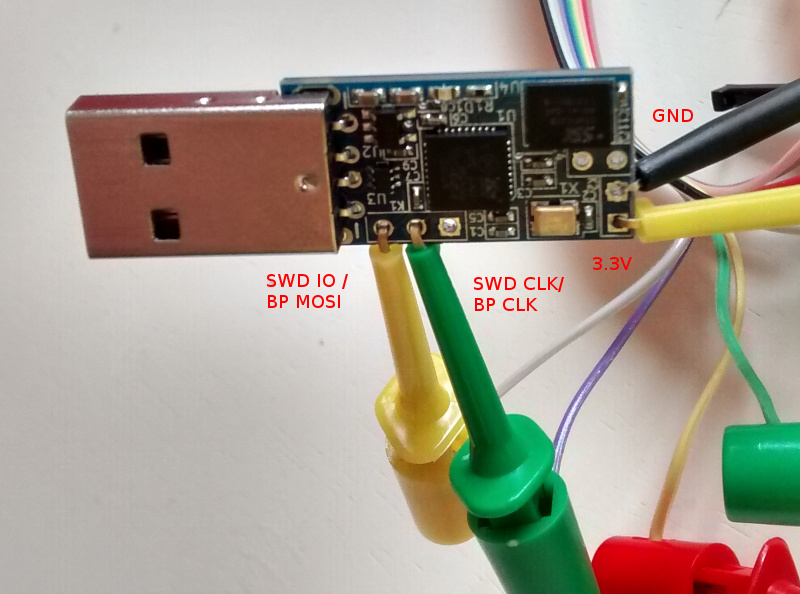
My BP has the Seeed Studio probe cable, so my hookups look like this: Bus Pirate + FST-01 SWD connection That s BP MOSI (grey) to SWD IO, BP CLK (purple) to SWD CLK, BP 3.3V (red) to FST-01 PWR and BP GND (brown) to FST-01 GND. Once that was done I fired up OpenOCD in one terminal and did the following in another:

$ telnet localhost 4444
Trying ::1...
Trying 127.0.0.1...
Connected to localhost.
Escape character is '^]'.
Open On-Chip Debugger
> reset halt
target state: halted
target halted due to debug-request, current mode: Thread
xPSR: 0x01000000 pc: 0xfffffffe msp: 0xfffffffc
Info : device id = 0x20036410
Info : SWD IDCODE 0x1ba01477
Error: Failed to read memory at 0x1ffff7e2
Warn : STM32 flash size failed, probe inaccurate - assuming 128k flash
Info : flash size = 128kbytes
> stm32f1x unlock 0
Device Security Bit Set
stm32x unlocked.
INFO: a reset or power cycle is required for the new settings to take effect.
> reset halt
target state: halted
target halted due to debug-request, current mode: Thread
xPSR: 0x01000000 pc: 0xfffffffe msp: 0xfffffffc
> flash write_image erase /home/noodles/checkouts/gnuk/src/build/gnuk.elf
auto erase enabled
wrote 109568 bytes from file /home/noodles/checkouts/gnuk/src/build/gnuk.elf in 95.055603s (1.126 KiB/s)
> stm32f1x lock 0
stm32x locked
> reset halt
target state: halted
target halted due to debug-request, current mode: Thread 
xPSR: 0x01000000 pc: 0x08000280 msp: 0x20005000
Then it was a matter of disconnecting the gnuk from the BP, plugging it into my USB port and seeing it come up successfully:
usb 1-2: new full-speed USB device number 11 using xhci_hcd
usb 1-2: New USB device found, idVendor=234b, idProduct=0000
usb 1-2: New USB device strings: Mfr=1, Product=2, SerialNumber=3
usb 1-2: Product: Gnuk Token
usb 1-2: Manufacturer: Free Software Initiative of Japan
usb 1-2: SerialNumber: FSIJ-1.1.7-87063020
usb 1-2: ep 0x82 - rounding interval to 1024 microframes, ep desc says 2040 microframes
More once I actually have a 4K key loaded on it.

Tiago Bortoletto Vaz: c3video for debconf #1

Some context DebConf has provided live streaming and recordings from talks since 2004. We used to work with a set of scripts which worked together with Pentabarf for most of videoteam tasks, including volunteer shifts coordination, reviewing process, encoding and deployment. Things has changed since DebConf14, when Pentabarf was replaced by Summit as the conference management system. Without those old Pentabarf features and hacks we had to invent new ways of dealing with the video workflow in DebConf. We gave veyepar a try in 2014, and we will probably do it again in DebConf15. However, for a long term solution we are considering the software stack from CCC Video Operation Center, which so far I see as a free, solid and community-oriented mix of Debian-friendly tools. I will be reporting the progress on setting up and testing the CCC software strucutre for DebConf. Having the opportunity of being in DebCamp together with other videoteam folks will certainly make things easier :)
Setting up the CCC Ticket Tracker C3TT is a ticket/tracker system used by CCC for reviewing/encoding process. The web side of C3TT is written in PHP and can be cloned from http://git.fem.tu-ilmenau.de/cccongress.git. Some documentation is available at https://repository.fem.tu-ilmenau.de/trac/c3tt/wiki and from https://c3voc.de/wiki/c3tracker. What I've done so far to get it working: Installing some dependencies:
$ apt-get install postgresql-9.4 php5-pgsql php5-xsl postgresql-contrib-9.4 php5-xmlrpc php5 php5-curl
Creating database and users:
$ su -s /bin/bash postgres
$ createuser -DRS dc15
$ createdb -O dc15 c3tt
$ psql
postgres=# ALTER ROLE dc15 WITH PASSWORD 'xxx';
Basic site config using lighttpd:
$HTTP["host"] =~ "c3tt\.your\.host"  
  server.document-root = "/var/www/c3tt/Public/"
  alias.url = ("/javascript/" => "/var/www/js/")
  url.rewrite-once = ( ".*\.(js ico gif jpg png css)$" => "$0", "^(.*?)$" => "index.php/$1",)
   
Running the installer script:
$ php -q Install/install.php
This will ask you some questions, then will create the config file and populate the database. At this point you should be able to access the ticket track system from your browser. The set of scripts from C3TT doesn't need to be installed in the same host as the web side, they communicate via XML/RPC. In a next post I will report the installation and initial setup for these scripts.

Matthias Klumpp: AppStream/DEP-11 for everyone! (beta!)

One of the things we discussed at this year s Akademy conference is making AppStream work on Kubuntu.appstream-logo On Debian-based systems, we use a YAML-based implementation of AppStream, called DEP-11 . DEP-11 exists for historical reasons (the DEP-11 YAML format was a superset of AppStream once) and because YAML, unlike XML, is one accepted file format by the Debian FTPMasters team, who we want to have on board when adding support for AppStream. So I ve spent the last few days on setting up the DEP-11 generator for Kubuntu, as well as improving it greatly to produce more meaningful error messages and to generate better output. It became a bit slower in the process, but the greatly improved diagnostics data is worth it. For example, maintainers of Debian packages will now get a more verbose explanation of issues found with metadata in their packages, making them easier to fix for people who didn t get in contact with AppStream yet. At time, we generate AppStream metadata for Tanglu, Kubuntu and Debian, but so far only Tanglu makes real use of it by shipping it in a .deb package. Shipping the data as package is only a workaround though, for a proper implementation, the data will be downloaded by Apt. To achieve that, the data needs to reach the archive first, which is something that I can hopefully discuss and implement with the FTPMasters team of Debian at this year s Debconf. When this is done, the new metadata will automatically become available in tools like GNOME-Software or Muon Discover. How can I see if there are issues with my package? The dep11-generator tool will return HTML pages to show both the extracted metadata, as well as issues with it. You can find the information for the respective distribution here: Each issue tag will contain a detailed explanation of what went wrong. Errors generally lead to ignoring the metadata, so it will not be processed. Warnings usually concern things which might reduce the amount of metadata or make it less useful, while Info-type hints contain information on how to improve the metadata or make it more useful. Can I use the data already? Yes, you can. You just need to place the compressed YAML files in /var/cache/app-info/yaml and the icons in /var/cache/app-info/icons/<suite>-<component>/<size>, for example: /var/cache/app-info/icons/jessie-amd64/64 64 I think I found a bug in the generator In that case, please report the issue against the appstream-dep11 package at Debian, or file an issue at Github.. The only reason why I announce this feature now is to find remaining generator bugs, before officially announcing the feature on debian-devel-announce. When will this be officially announced? I want to give this feature a little bit more testing, and ideally have the integration into the archive ready, so people can see how the metadata looks like when rendered in GNOME-Software/Discover. I also want to write a bit more documentation to help Debian developers and upstreams to improve their metadata. Ideally, I also want to incorporate some feedback at Debconf when announcing full AppStream support in Debian. So take all the stuff you ve read above as a little sneak peek  Debconf15goingI will also give a talk at Debconf, titled AppStream, Limba, XdgApp Where we are going. The aim of this talk is to give an insight i tnto the new developments happening in the software distribution area, and what the goal of these different projects is (the talk should give an overview of what s in the oven and how it will impact Debian). So if you are interested, please drop by :-) Maybe setting up a BOF would also be a good idea.

10 August 2015

Matthias Klumpp: Akademy 2015

I am very late with this, but I still wanted to write a few words about Akademy 2015. First of all: It was an awesome conference! Meeting all the great people involved with KDE and seeing who I am working with (as in: face to face, not via email) was awesome. We had some very interesting discussions on a wide variety of topics, and also enjoyed quite some beer together. Particularly important to me was of course talking to Daniel Vr til who is working on XdgApp, and Aleix Pol of Muon Discover fame.
Also meeting with the other Kubuntu members was awesome I haven t seen some of them for about 3 years, and also met many cool people for the first time. My talk on AppStream/Limba went well, except that I got slightly confused by the timer showing that I had only 2 minutes left, after I had just completed the first half of my talk. It turned out that the timer was wrong  Another really nice aspect was to be able to get an insight into areas where I am usually not involved with, like visual design. It was really interesting to learn about the great work others are doing and to talk to people about their work and I also managed to scratch an itch in the Systemsettings application, where three categories had shown the same icon. Now Systemsettings looks like it is supposed to be, finally :-) The only thing I could maybe complain about was the weather, which was more Scotland/Wales like than Spanish but that didn t stop us at all, not even at the social event outside. So I actually don t complain  We also managed to discuss some new technical stuff, like AppStream for Kubuntu, and plenty of other things that I ll write about in a separate blog post. Generally, I got so many new impressions from this year s Akademy, that I could write a 10-pages long blogpost about it while still having to leave out things.

Kudos to the organizers of this Akademy, you did a fantastic job! I also want to thank the Ubuntu community for funding my flight, and the Kubuntu community for pushing me a little to attend :-). KDE is a great community with people driving the development of Free Software forward. The diversity of people, projects and ideas in KDE is a pleasure, and I am very happy to be part of this community. Akademy2015

Mirco Bauer: Smuxi 1.0 "Finally" Release

And here we go again! We're proud to announce the new version of Smuxi, release 1.0 "Finally". During the development, 20 bug reports and 10 feature requests in 285 commits were worked on.

Finally 1.0 Smuxi is celebrating its 10th anniversary! 10 years ago, Mirco Bauer made the first commit to the Smuxi source code repository and is still very committed to it. He started the Gnosmirc project in 2005 when the only way a 24/7 "always-on" experience with IRC meant you had to use a console based IRC client like bitchx, irssi or epic combined with screen and SSH. This looks very practical at first and is a powerful Unix-ish way of accomplishing that job, but it has the big downside that it doesn't integrate with a desktop environment like GNOME. A bit later the Gnosmirc project was renamed to Smuxi when the new code architecture allowed other frontend implementations besides the GNOME one. The ncurses/STFL based text frontend was later implemented and is considered stable and useful enough for day to day use, but still has some rough edges. WinForms and WPF frontends also exist but need more work to reach a usable state. At this point Smuxi 1.0 contains all features that we could have imagined and even goes beyond with very advanced features like message patterns or language agnostic scripting.

Changes since Smuxi 0.11

Message Persistence One of the biggest drawbacks of the IRC protocol ever was that messages can't be retrieved from the IRC server because the IRC server is simply relaying messages to the connected clients. So, if an IRC client is freshly started and connects it starts to receive new messages, but all message you had received before are no longer available. This always made IRC in a way "volatile" unlike other communication systems like email where messages are relayed and stored on the client side. One common approach for IRC clients is to store log files in a text file. This is a simple feature and gives the user the possibility to read older conversations. Smuxi also supports text file logging like other IRC clients but it has a big user experience drawback as you need to open the file from the disk outside of the IRC client. In Smuxi 1.0 messages sent and received are now stored on the disk in a way they can automatically be retrieved/loaded when you restart Smuxi. It is like you have never closed Smuxi! This feature was already available in Smuxi for some time as a technical preview and it used the Db4o object database, but we were never happy about the performance neither with the stability so it always stayed an optional feature you need to enable. This year we tried a new message buffer backend using the famous SQLite database and it works much faster and stable as a rock. So finally we can enable this feature by default because it just works and enhanced your experience. We hope you enjoy it. Documentation of how you can change Smuxi message buffer backend and behavior can be found here. For instructions how to convert your existing db4o history to SQLite can be found in the "smuxi-message-buffer tool" section.

User Interface Enhancements
  • Synced message markers: the position of of the seen/unseen messages marker is pushed to the smuxi-server and remembered when the frontend reconnects. (Sebastian Poeplau)
  • Persistent message markers: the message marker position is also remembered across Smuxi(-server) restarts.
  • Message Counter: in addition to the highlight counter next to a chat new/unseen messages are also counted. This makes it easy to identify chats with much traffic.
  • Single application instance support. If you start Smuxi again from the menu it will bring the existing instance into the foreground. This makes the Ubuntu Messaging Menu much nicer.
  • The command/message entry is alignment with the messages. (Lex Berezhny)

Text Frontend Enhancements
  • The console background color can now be configured using: /config set STFL/Interface/TerminalBackgroundColor = #000000 (Ond ej Ho ek)
  • The text color contrast if nicks with the background is now ensured (Ond ej Ho ek) #1033
  • Messages containing images will not be skipped but their alternative text is shown instead (Ond ej Ho ek) #1035

New smuxi-message-buffer tool This is a new commandline tool that allows you to convert and export the message history of Smuxi message buffer files. This can be used to convert your existing Db4o history to SQLite like this for example:
for DB_DB4O in $HOME/.local/share/smuxi/buffers/*/*/*/*.db4o; do
    DB_SQLITE=$ DB_DB4O/.db4o/.sqlite3 
    smuxi-message-buffer convert $DB_DB4O $DB_SQLITE
done
Smuxi shouldn't be running when using this tool.

Scripting Enhancements

New Hook Points Smuxi 1.0 supports with the following new hook points:
  • engine/protocol-manager/on-presence-status-changed/ This hook point is raised when the presence status of a protocol manager changes. This happens for example when an IRC connection toggles the away state.
  • engine/session/on-event-message/ This hook point raises event messages that usually begin with "-!-". This can be useful to track state changes that are shown as a message without having a dedicated hook point for it.
  • engine/session/command-$cmd/ This hook point is raised on the engine side for commands, e.g. /some_command that isn't handled by the frontend or engine built-in commands. This is useful for commands that should be available for all frontends and isn't specific to the frontend environment.

New Plugins The following new plugins are supported by Smuxi 1.0:
  • topic-diff: Shows the word differences of the topic after topic changes. (meebey)
  • away-nick: Automatically appends and removes $AWAY_SUFFIX to/from the nick name when you go away using the /away command or by disconnecting all frontends from the smuxi-server. (meebey)
  • system-info: Shows system info. Includes system kernel version, distro name, and CPU vendor information. (AK0)
  • now-playing: This plugin is not new but was rewritten in Python to get rid of the spaghetti code monster which was written in Bash. (jamesaxl)

IRC Enhancements
  • NICKSERV support Notices from Nick/ChanServ are no longer shown on all channels as they like to send greeting messages and other spam which is annoying to see on all channels. #868
  • Automatic rejoin of channels protected with a key works as expected again
  • Connecting to irc.gitter.im is now supported. Gitter's IRCd implementation has a bug in the IRC protocol which is now tolerated.

Twitter Enhancements
  • The /search command shows tweets as live stream
  • Added /delete, /favorite and /unfavorite commands

Behind the Scenes
  • Re-licensed smuxi-common from GPLv2 to MIT/X11

Contributors Contributors to this release are the following people:
  • Mirco Bauer (199 commits)
  • Carlos Mart n Nieto (15 commits)
  • Andr s G. Aragoneses (14 commits)
  • Piotr Dr g (12 commits)
  • Ond ej Ho ek (11 commits)
  • Oliver Schneider (5 commits)
  • Calvin B (4 commits)
  • Victor Seva (3 commits)
  • Will Johansson (2 commits)
  • Sebastian Poeplau (2 commits)
  • Julian Taylor (2 commits)
  • James Axl (2 commits)
  • Daniel Mustieles (2 commits)
  • Christopher James Halse Rogers (2 commits)
  • . Uzun (1 commit)
  • Lex Berezhny (1 commit)
  • Kalle Kaitala (1 commit)
  • Jordi Mas (1 commit)
  • Joe Hansen (1 commit)
  • Jimmie Elvenmark (1 commit)
  • Dimitris Spingos (1 commit)
  • Dean Lee (1 commit)
  • Cl ment Bourgeois (1 commit)
  • Carlos Hernandez (1 commit)
Thank you very much for your contributions to Smuxi! Want this? Go here and grab it right now!

Posted Sun Aug 9 17:48:18 2015

9 August 2015

Yves-Alexis Perez: WPS and Network Manager

So, everybody knows that WPS (Wi-Fi Protected Setup) is broken. But sometimes, you don't own the access point, and you'd just want the wireless to work. That happens for example when you're a guest in some place using an Orange Livebox and you don't have the WPA passphrase (usually because it's written somewhere you don't have access too, or because someone forgot to tell you). Liveboxes WPS is the press button thing: you press a button on the front for one second, then any device can connect in the next two minutes. That works fine with Android devices, for example, but it didn't work with my laptop and NetworkManager, which doesn't support WPS at all. Fortunately, the underlying piece of software (wpa_supplicant) does support WPS, and even the push button style. And you can nicely ask it to reveal the passphrase to you with the following trick.
  1. Disconnect NetworkManager from the network, disable the wireless link, stop it; just make sure wpa_supplicant is not running;
  2. Put a stub wpa_supplicant.conf file with only the following content:
    update_config=1
    
  3. Start wpa_supplicant in the foreground with your stub config file:
    wpa_supplicant -iwlan0 -c wpa_supplicant.conf
    
  4. Start wpa_cli
Inside wpa_cli:
  1. Scan the network:
    scan
    
  2. Get the results:
    scan_results
    
    and identity the bssid of the Livebox
  3. Press the WPS button on the Livebox
  4. Run
    wps_pbc <bssid>
    ; some text should appear in the wpa_cli window, and it should eventually connect successfully (at that point you can even run a dhclient on wlan0)
  5. Run
    save_config
    
The last command will update your stub configuration file, adding a new network block with the passphrase in the clear. You can then use that passphrase inside Network Manager if it's more convenient for you. There might be something easier, but at least it worked just fine for me during the holidays.

Next.

Previous.