Search Results: "zed"

20 June 2008

Manoj Srivastava: Manoj: The Command Prompt

Or theming PS1 I am not fanatical about my command prompt. No sirree, not me. It is just that I spend half my life either staring at an Emacs window, or at an xterm command prompt; so even a marginal boost in productivity goes a long way. And I am often logged in over ssh to machines half a continent away, and am still comfortable enough on the Linux VT to spend time there, and I often do not have the GUI gew-gaws feeding me data. Hmm. Data. inpuuut. No. Must focus. With all these open xterms and Emacs terminal mode frames floating around, it is easy to lose track of where I am on each terminal, and what the working directory is. So I want my command prompt to help me keep track of where I am. If the terminal is an xterm, the title can be setup like
 "user@host:../shotened/path/to/current/working/dir"
I want to know what machine, id (am I root?), and directory I am in. If I am deep down in the labyrinths of some work related directory tree, I want the path to be pruned, from the left, one component at a time. However, this does not help me on the console; so I also want the path to be in the command prompt; but it should not take up too much of the command line; and ideally, should just go away as I type a longish command. Gawd, I love zsh. I once did a analysis of the command history. The most often used command sequences were
 cd some-place, ls
So. pwd and ls. I really really want to see the directory listing when I change directory to a new one. As one grows old, memorizing the directory contents for dozens of machines all the time taxes the gray cells a bit. So, I figure, why not let the command prompt handle all that? Having the current working dir always visible cuts down a heck of a lot on the pwd commands, and so all that s left is to insist that the command prompt thingy always run ls after a change directory. Simple enough. Saves on typing. And time. And this is not just some crazy talk. I want help with noticing whether the previous command exited with an error status (useful for commands that normally do not create an output). If I am logged in to a machine on battery power, I want to know that. I also like visual cues to the amount of power remaining (good for my laptop on the long flights). I don t want to have to know f the machine uses APM or ACPI, I just want my prompt color to change as the power fades. I want my command prompt to let me know if I am in a directory which is under version control, and if so, what branch I am on. (I occasionally have to come in contact with arch, bzr, git, subversion, svk, and mercurial). If I am in a version controlled project, where I am relative to the root of the checked out tree is often more important than the absolute path, so I want to see relative paths, not absolute paths. I want to know if there are uncommitted files in the working directory. Visually. I want to be reminded if I am in the middle of an ongoing
 rebase -i .
This is not asking for too much, is it? Command Prompt So, here is a screen-shot of this in action: I start from my home directory, go to a directory not under version control, go to a project under git, then a different project with uncommitted files, and then finally to a subversion checkout. All with an angry fruit salad of colors warrantied to make Martin Krafft want to claw his eyes out biggrin.png . If you use zsh, then just grab hold of this, and then do:
 autoload -U promptinit
 promptinit
 prompt manoj
This might be a bit of a hit on slow machines, but even my laptop is a core 2 duo, so I do not find it noticeable. Oh, and if you liked this article, you might also like Theming Emacs, and Theming XTerms.

19 June 2008

Manoj Srivastava: Manoj: Theming XTerms

Or configuring LS COLORS After successfully Theming Emacs, I decoded to turn my efforts to providing more copacetic colors in other aspects of my working environment. I ll write more about my effort to write my own color theme for fvwm when it is closer to being done. For now, I ll concentrate on ANSI Colors in XTerms, and how one may theme those. The old Tektronics (or ANSI) terminals had 8 colors, namely, black, red, green, yellow, blue, magenta, cyan, and white. These colors had a normal, and a bright mode. The default set of colors is OK, but is not optimal, since they have to work on both dark and light backgrounds; however, I use mostly dark background colors. ls colors Given that, I set to design my own colors, using fully laturated colors, with a base luminosity of 70, and equally spaced in chroma and used the same saturation and chroma, but a luminosity of 80, for the bright set. This results in a pleasant pastely set of colors, which are e4asy on the eyes, when used on very dark backgrounds. The configuration can be seen in XTerm. I set the colors for rxvt as well as xterm. Now, the most noticeable effect of these changes is if using the color option for ls, therefore the next thing to do was to configure the colors used by ls using a utility dedicated for that task, namely, dircolors. By trial and error, I modified the default configuration provided by dircolors and ended up with dir colors, with the results as you see.

17 June 2008

Adam Jensen: 17 Jun 2008

The overall situation (admittedly a bit of a stretch):
The chicken cycle
(The soil depends on the chicken to keep it fertilized. Work with me here.) There are an infinitude of cycles that could be extracted from this, but we're only interested in the set of shortest-length cycles. Exhibit A:
Exhibit B:
And the classic philosophical gem, Exhibit C:
Is the problem solved, then? Not quite. The current DebGraph cycle detection operator works well for dependencies, but we also want to discover cycles of conflicting packages. Furthermore, one of our documented use cases involves finding nodes that depend on and conflict with one another.

13 June 2008

Theodore Ts'o: Learning how to communicate

Pity poor Dr. Ari Jaaksi from Nokia. He gave a talk at the Handsets World conference in Berlin on Tuesday, where according to ZDnet, he lectured Open Source Developers that they needed to learn why DRM and other closed technologies were necessary, because of business issues such as subsidized (device) business models. I suspect he wasn’t prepared for the reaction, which took the form of a major fuss on Slashdot, as well as some declarations from a few people on the maemo-users mailing lists that they would never buy another Nokia device. Dr Jaaski then posted today on his blog an entry entitled, “Some learning to do?”, where he stated that while Nokia needs to learn how the open source world works (not just licenses and legal issues, but also the spirit), that the open source world also needed to learn as well — about WHY things are the way they are. He ended the post with “I’m not a teacher, I’m a learner” — which is fair enough. I actually think that Dr. Jaaksi is right; we all should be interested in learning, and having talked with a number of Nokia employees, I can testify that their hearts are very much in the right place, and there are some strong reasons regarding the demands of carriers, the subsidized business model of handsets in the US, the attitudes of suppliers for components in mobile devices, that very much tie their hands — as well the hands of every other handset company out there. Progress in this space will come slowly, and but I believe there is hope that in the long run things will get better. However, at the same time, I would suggest to Dr. Jaaksi that it’s also important how to communicate with the open source community — or with any community that holds views sometimes with great passion. Many people do not react well to being told that they need to learn something — even if it is true that they do. Admitting that they need to learn is for some people tantamount to admitting ignorance, or even worse admitting stupidity, and so they are loath to do this. Telling them this just makes them defensive and angry. My suggestion for how get people to learn without making them defensive is to use a modified Socratic method. It works especially well with the Open Source crowd, because many of them are engineers, and engineers are by nature problem solvers. So if you give them a problem to solve, they will go to work trying to find potential solutions, and thus start thinking and learning about the problem from a different point of view. Hence, a better approach is to give them a series of business constraints (time to market, the demands of carriers, the fact that most end users prefer to buy subsidized phones with 1-2 year lock-in contracts, the intransigence of suppliers, why a single company can’t afford to create their own chipsets from scratch and have to rely on companies like Broadcom, etc.) and then tell them — we’d love to delight our customers in any way we can, and clearly you are very passionate about DRM, open device drivers, and other OSS issues. We however have to create successful products and sell them at a price such that we don’t go out of business — can you help us work through all of these constraints? Let’s work together so we can make an open source mobile platform that meets the spirit as well as the legal requirements of the open source world! Dr. Jaaksi and his team are struggling with a hard problem, and I am very sympathetic to their issues. And, they have to be commended for investing as much time and effort on the Maemo platform, as well as other Linux and Open Source platforms as they have to date. The strength of the Open Source community is that we work together to solve our mutual problems, while celebrating and giving permission to people to “scratch their own itches”. In order to do that, we need to learn how to better communicate with each other, and that is something that goes in both directions. When I was at MIT as an undergraduate, far too many years ago than I care to admit, I took economics classes and Sloan School of Management classes (even though they were not necessary for a Computer Science degree) for that very reason. I encourage open source advocates to learn how to walk a mile or two in business people’s shoes, since if you want to influence them them to change in the ways that you desire, you need to know where they are coming from — just shouting and throwing rotten tomatoes generally won’t get you very far. On the flip side, people who are on the corporate side of the divide also need to understand that certain ways of engaging the community can be more productive than others. At the end of the day, hopefully we can all agree with Dr. Jaaksi that everyone will benefit if we all commit to learning from each other. Update: I’ve fixed Dr. Jaaksi’s name so it is spelled correctly; my apologies for the error.

12 June 2008

Enrico Zini: How to resize a luks partition

How to resize a luks partition After things-not-to-do.mdwn I want to be careful when resizing a luks partition: here's a note with the right procedure. As explained in this bug report, the way to resize a luks partition is:
# lvresize -L+100M /dev/vg00/test 
  Extending logical volume test to 400.00 MB
  Logical volume test successfully resized
# cryptsetup resize test1 
# resize2fs /dev/mapper/test1

Biella Coleman: Free Speech: A Comparative Perspective

While free speech rights are valued and recognized in most liberal democracies, the degree and scope of these rights are by no means uniform. The United States, which has the most expansive free speech protections in the world, actually stands apart as this New York Times article on the subject makes clear. The article covers familiar ground (at least for those who follow free speech debates) but it does so well and discusses an interesting case now unfolding in Canada, concerning a pretty inflammatory magazine article denouncing Islam. The magazine is currently under trial for violating provincial hate laws.

10 June 2008

Gunnar Wolf: Nekkid city - yet again!

After thinking it over a couple of times, I did it. I told you here about the World Naked Bike Ride. Thousands of bikers, in over 130 cities around the world, voiced their concerns about the lack of caution drivers have towards us, about the abuse of fossil fuels for urban transportation, about the easy we are not to be seen. Many among us have been run over by careless drivers (in my case, no consequences except a broken helmet - And yes, MJ: although the impact was on the flat surface of the road and not on the kerb, the strength of the impact still amazes me). We feel naked against the motorized traffic. So, the WNBR decides to show it by taking the streets of our many cities - Naked.
It was a completely different experience of the massive naked Spencer Tunick photo, as we were there not just to show our freedom and enjoy, but to get the people to look at us. There were some of the same elements of comradeship and trust we had there (and, of course, that many of us learnt in Finland when we became GNUdists at DebConf 5's unforgettable saunas).
Anyway... I did not make the full route (I rode Chapultepec-Z calo-Diana, ~15Km, but missed the Diana-Gandhi-Cibeles part, maybe some 5Km) as I had an appointment I was already late for. But it was a unique, great experience. If you are interested, we got a fair share of press coverage. Oh, and I must say: I am famous now. And in my favorite newspaper, nothing less :).

8 June 2008

Manoj Srivastava: Manoj: Using org-mode with Ikiwiki

Using org mode to write ikiwiki posts I have been much taken by org-mode in Emacs recently. Firstly, this has allowed me to actually effectively implement the tenets of Getting things done , which is amazing by itself. I always used to start with great enthusiasm, which rarely lasted longer than a week. Until org-mode. Then this is so amazingly flexible. It has better handling of tables and even a spreadsheet mode than anything I have used and it has a pretty decent HTML export function. I practically live in org-mode on work days now. I strongly recommend org-mode, from things like agendas, TODO lists, calendars, appointments, articles, and now Ikiwiki posts. I rarely ever use markdown, apart from blogging using Ikiwiki and thus, since I blog so infrequently, I rarely ever remember all the syntax. On the other hand, org-mode syntax is now at my finger tips so I decided it was time to write a Ikiwiki plugin so I can now write my blog posts using syntax I can actually remember. It is still rough around the edges firstly, this requires emacs23 (or, on Debian, there is the unofficial emacs-snapshot package), secondly, it uses hueristic hacks to prune away the bits of the stand alone HTML page that org-mode creates; all I can say is that it currently works for me, as you can see from this post. How git this is for mainlne inclusion is another matter. The code is here: org.pm. It can be dropped in to the Ikiwiki plug-in directory, and that s all you need. With this, Ikiwiki pre-process things in the input file, and then passes it to emacs to htmlize it.

5 June 2008

Marc 'Zugschlus' Haber: Serial Console Server for the Poor II

This is the second installment of my article about the Serial Console Server for the Poor. First installment here. The last part of the article having covered the hardware and the udev part creating the device nodes, this part addresses the part of the software that connects the user to the device node. The idea of the software side is to allow users access only to certain serial ports without giving out a shell account on the server itself. Communication between user and the console server should be encrypted (which certainly means ssh), and users should be able to authenticate both with a key and with a password. Serial parameters (baud rate, parity, stop bits etc) should be configured on the console server to keep this possible error source away from the users. For years, I have been thinking about using UUCP’s cu to access the serial port. This time, it’s not going to be used because it offers a shell escape which cannot be turned off. That would give a user shell to the users indirectly, which is not what I want. Minicom seems still to be the most-used application to access a serial port. I have never understood the sense of using a terminal emulator inside a terminal emulator, especially if one has to break the terminal emulator’s habit of trying to initialize a non-existent modem. So I settled on the application that I usually use to access a serial port: ser2net. This is a Linux implementation of Cisco’s “reverse telnet” feature which “connects” a TCP port to a serial port with a given set of parameters. For example,
4016:telnet:600:/dev/USBserial6:38400 8DATABITS NONE 1STOPBIT banner
connects TCP port 4016 with /dev/USBserial6 with an 38400 8n1 parameter set. If you telnet to localhost 4016, you’ll find yourself talking to the device connected to the appropriate serial port. This moves the security risk to the telnet client, which - unfortunately - offers a shell escape function from the telnet command line reachable with the escape character. The only way to remove this is to use the -E command line option, which turns off the escape function completely. This unfortunately excludes the user from cleanly quitting the telnet session, so the only way to get out of a telnet -E is to have the remote side close the serial port (which ain’t happening on a serial console) or to kill the telnet process, for example by closing the carrying ssh session. That’s a turn-off, but one that one can live with. Now, the only challenge left is to have the appropriate telnet client started automatically for the user. I decided on connecting this to the account being connected to, so that ssh USBserial4@hostname will automatically do the right thing. Since password authentication needs to work (optionally), this precludes the use of the command modifier in an authorized_keys file. Another possibility to force a command being executed on login is to set it as the users’ login shell in /etc/passwd. One drawback: The command must not have any parameters, so one needs to pass needed parameters to the program some other way. Additionally, the program must be listed in /etc/shells or it will be silently ignored. My /etc/passwd entries look like
USBserial2:x:1002:1002:USBserial2,,,:/home/USBserial2:/usr/local/sbin/serialconnect-shell
with /usr/local/sbin/serialconnect-shell looking like
#!/bin/bash
set -eu
case “$(id --user --name)” in
  USBserial1) PORT=“2011”;; 
  USBserial2) PORT=“2012”;;
  USBserial3) PORT=“6013”;;
  USBserial4) PORT=“6014”;;
  USBserial5) PORT=“2015”;;
  USBserial6) PORT=“2016”;;
  USBserial7) PORT=“6017”;;
  *) echo “called from unknown account, terminating.”; exit 1;;
esac
telnet -E localhost $PORT
Just for reference, here are the appropriate entries in /etc/ser2net.conf:
2011:telnet:600:/dev/USBserial1:9600 8DATABITS NONE 1STOPBIT banner
2012:telnet:600:/dev/USBserial2:9600 8DATABITS NONE 1STOPBIT banner
6013:telnet:600:/dev/USBserial3:115200 8DATABITS NONE 1STOPBIT banner
6014:telnet:600:/dev/USBserial4:115200 8DATABITS NONE 1STOPBIT banner
2015:telnet:600:/dev/USBserial5:9600 8DATABITS NONE 1STOPBIT banner
2016:telnet:600:/dev/USBserial6:9600 8DATABITS NONE 1STOPBIT banner
6017:telnet:600:/dev/USBserial7:115200 8DATABITS NONE 1STOPBIT banner
If one wants to authenticate for a given serial port with an ssh key, all you need to do is put the appropriate key into the authorized_keys file of the appropriate account, and you’re all set. I do sincerely hope that I didn’t put any blatant security goofs into this setup, but if I did, you’ll tell me in the comments, right? Just one more challenge for my valued readers: The port numbers in my ser2net.conf have a system. Can you explain it to me?

3 June 2008

Clint Adams: Thank you for visiting Hoss, sit back and relax, enjoy the sauce

[Ravioli] Somewhere, probably not in the space between spaces, but somewhere, at this very moment, someone is experiencing distress. He is not keeping this distress clutched tightly inside. He is sharing his distress with others, in the form of a rant, even though no one there has solicited his opinion. He goes on, full steam, disregarding the feeble attempts at participation by those listeners who perhaps feel it polite to acknowledge him. He is not trying to entice anyone to act. He is not trying to troll for arguments. Perhaps he believes himself to be sharing generously his important thoughts. Those hypnotized by his ravings are experiencing a variety of reactions. Some are forced to confront the Truth in his words, and they themselves become distressed as they think about the Unfairness and Injustice created by the actions of others. This distress will cause some of them to wander off elsewhere and help the process cascade by performing rants of their own. Some others will bristle at the Lies and Misrepresentations he tosses out liberally and casually, and they will become distressed as well, and they may suddenly feel motivated to lend their efforts to push a political agenda contrary to the Speaker's. Some are nonplussed. Some become distressed because some self-important fool appears to think he has the right to bother them with his ideas. All this because some asshole decided to throw his weight around when it wasn't and isn't his place. I am not talking about Star Simpson.

Marc 'Zugschlus' Haber: Serial Console Server for the Poor I

The serial port is still the way to access network components out of band. It is slow, but reliable, and remarkably well standardized. It does not have technical whiz-bangs that can fail when one needs things to just work. That makes it the natural way to access critical infrastructure and still being sure that this access vector still works when most other things are down. Every communication link has two sides, so there is a market for devices with a network link and a bigger number of serial ports to connect the actual devices to. Commercial vendors have a broad choice of serial console servers. Most of them, especially the small products with five to ten ports, are quite expensive, so I have been investigating how do build a serial console server with el cheapo hardware. USB comes to mind here, of course.
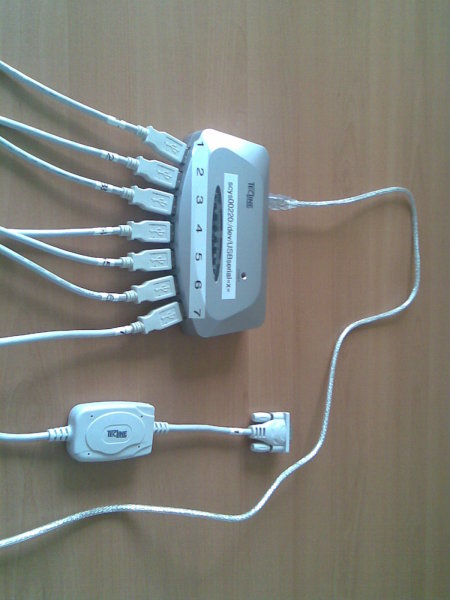
Picture of the fully equipped USB hub
The hardware side is actually quite easy: A seven-port USB hub, and seven USB-to-serial adaptors (using the widely-deployed Prolific PL2303) are easily purchased for well below a hundred Euros, and naively connected. In my test setup, connected to the hp compaq nc8000 that my blog readers should know only too well by now, the hub does not even need to have its power supply connected. The notebook can power the hub and the seven adaptors just fine. When the UMTS card is plugged in, the ttyUSBx device nodes appear in the order of plugging in the devices. When the system is booted, the order is not very predictable, so one needs - again - udev to give predictable device node names. udevinfo is an important tool to obtain the data set of an USB device which is available to match a device and to act appropriately when it is connected. udevinfo sorts the devices into a tree and shows the relationship of the devices, which device is “behind” which other device from the system’s point of view. udevinfo’s output starts at the leaf of the device tree and shows the information for each node up the tree until its root is reached. One pitfall is that one can only match against the leaf and _one_ other node more up the tree. So you cannot do matches like “the pl2303-based device connected to port 3 on hub 2-3 will be designated USBserial3”. If you try this, your rule will silently be ignored. This is a major turn-off in udev’s implementation. I didn’t try it on sid, but etch definetely shows this behavior. So one can only match like “the tty on the USB subsystem connected to port 3 on hub 2-3 will be designated USBserial3”, but that’s probably as good as it’ll get. The cause for my hub having only seven ports clearly shows itself when one looks at the udevinfo outputs of the fully equipped USB hub: The adapters are connected to ports 1, 2, 3, 4.1, 4.2, 4.3 and 4.4. The seven-port hub is actually two four-port hubs in a single case, with the second one connected to the first one’s port 4. This reflects itself, of course, in the udev rules necessary to address the adapters by the hub port they’re plugged in:
SUBSYSTEM==“tty”, SUBSYSTEMS==“usb”, DRIVERS==“usb”, \
   KERNELS==“*-*.1”, \
   SYMLINK=“USBserial1”
SUBSYSTEM==“tty”, SUBSYSTEMS==“usb”, DRIVERS==“usb”, \
   KERNELS==“*-*.2”, \
   SYMLINK=“USBserial2”
SUBSYSTEM==“tty”, SUBSYSTEMS==“usb”, DRIVERS==“usb”, \
   KERNELS==“*-*.3”, \
   SYMLINK=“USBserial3”
SUBSYSTEM==“tty”, SUBSYSTEMS==“usb”, DRIVERS==“usb”, \
   KERNELS==“*-*.4.1”, \
   SYMLINK=“USBserial4”
SUBSYSTEM==“tty”, SUBSYSTEMS==“usb”, DRIVERS==“usb”, \
   KERNELS==“*-*.4.2”, \
   SYMLINK=“USBserial5”
SUBSYSTEM==“tty”, SUBSYSTEMS==“usb”, DRIVERS==“usb”, \
   KERNELS==“*-*.4.3”, \
   SYMLINK=“USBserial6”
SUBSYSTEM==“tty”, SUBSYSTEMS==“usb”, DRIVERS==“usb”, \
   KERNELS==“*-*.4.4”, \
   SYMLINK=“USBserial7”
These rules will only work for a similary structured hub that is directly connected to the notebook. If there are more hubs in between the “final” hub and the host, the address matched against in the KERNELS matches are going to have a different structure. In the test setup, the first two parts of the address needed to be wildcarded since these addresses keep changing when the host is booted or the hub plugged out and in. So I guess that these udev rules are probably going to fail miserably when more hubs and/or USB-to-serial adaptors are connected. But if one does not do too many changes, things are just fine, and it is possible to put numbers on the USB hub ports and be sure that the USB-to-serial adaptor connected to port 4 is going to be /dev/USBserial4 in the host system. I tried plugging in and out the adaptors in random order, unplugged and plugged the hub itself, booted the host, and the relationship between the port and the device node was stable. In the test environment, I only tested one adapter at a time, but all these tests were successful as well. I guess that many more of these adaptors will eventually need a powered USB hub, but with seven adaptors on a single hub, the power from the USB host is sufficient to live without extra power on the hub. And, I guess, there is some hard limit for the number of USB adapters being used, and some soft limit when managing the ports and adapters is going to get harder. But, I think that a site in need of more than, say, sixteen serial ports on the console server can afford a “real” console server from one of the major vendors, which can be accessed via ethernet, UMTS, ISDN and whatever you can think of. This concludes the hardware part of my serial console server for the poor. Tomorrow, I’ll blog about the software side needed on the host to allow the serial ports to be accessed from the network while still being reasonably secure. The next article will involve ssh, /etc/passwd shells, /etc/shells, a small perl script, ser2net and telnet. And, shell escape is the cue word for grey hairs sprouting on my head.

Marc 'Zugschlus' Haber: Works with a more recent card as well

Today, I had the opportunity to try my UMTS initialization mechanism that I built this weekend with more recent hardware, a newer Option Globetrotter 3G Express Card with Vodafone branding (reporting itself to be a “Globetrotter HSDPA Modem” with Vendor ID 0xaf0 and Product ID 0x6701). To get the card connected to my test Notebook, a hp compaq nc8000, I had a “Expresscard in a PC card slot” adapter and a passive “Expresscard at a normal USB port” adapter. The USB adapter had cost about ten Euros, and I don’t imagine the PC card adapter to be much more expensive. The later Option card is recognized as three USB-connected serial ports by the Option kernel driver (CONFIG_USB_SERIAL_OPTION) as the older one is, and it works just fine. The only difference is that the udev rule needs a different value for the ATTRS modalias setting. My umts-pin script complains about an “illegal seek” after entering the PIN, but the card registers itself with the network nevertheless. Both gammu to send SMS and pppd for IP connectivity worked out of the box. Especially the “Expresscard-to-USB” adapter setup is very sexy for setups where neither an Expresscard nor a PC Card slot is available, and USB cables can be nice and long. So one could even mount the UMTS interface near the window and pull a longer USB cable to the actual system. I decided on putting the UMTS interface into a notebook, though, and mount the notebook near the window to be able to monitor the monitoring systems and send out SMS even when the whole datacenter is without power (by virtue of the notebook having a built-in UPS).

1 June 2008

Gunnar Wolf: A long-needed explanation on $self->status

[Attention] Personal content follows. If you got to this post expecting technical or organizational content, go ahead and skip it.
Sometimes, when you don't want something to happen... You don't even talk about it. Sometimes you try hard not even to think about it - Well, it wasn't so in this case, as it has been a long time devoted to... Thinking, thinking a lot.
The important thing is that I feel there is a fact I should have shared with the people I consider close to me. And some people do know it, of course, but it has been hardest for me to share this with who I consider my closest friends - maybe out of hope that the result will be something different?
Anyway... the fact is I have been living on my own for the last two months. Nadezhda and I decided to take a three month period to... Decide what comes next. And most of the time since this strange period began has been quite decent... But the last week or so has been... A bit different. I have been much more... introspective. Maybe it could be seen as more depressive, more introverted.
So, what does this mean? Do I have my mind clear on what to do? No. Not by far. But I am working on finding my feelings and my reality, full-time. I might be under-achieving both in my Real-Life works and in Debian - please cope with me. There is a reason for it, as you now see.
And, no, this post is not aiming at getting sympathy and hugs... It is just... Because I need to finally share this thing I am going through with. Think of it as finally stepping out of the closet, more as a step for myself than for anything else... A significant share of who I consider dear to me, even though we share no contact besides mailing lists I have mostly abandoned and two cathartic and beautiful (and, of course, technically productive!) weeks a year, lives in different timezones and countries - I do hope to have stabilized on either of the two possible realities by the time I meet my Debian fellows. As for my Mexican friends following my life by this blog... Well, just excuse me for not speaking out face to face, as this should have been done.
Comments intentionally closed. Want to say something? Just think it hard enough, it will get to its destination ;-)

Marc 'Zugschlus' Haber: Automatic initialization of a Option 3G Datacard

For mobile UMTS/GSM, I have been using an Option 3G Data Card for two and a half years now. I blogged about getting the card to work (in German, sorry) on Linux in July 2005. I never found the time - until now - to automate the card initialization so that I had been using a horrible chat script for card initialization when the PPP connection was built. I recently took the time to automate this, so that the PIN is transmitted to the card automatically when the card is plugged in. This article documents what I did. On a side note: Unfortunately, the vendors’ attitude towards Linux hasn’t changed since 2005. Their Hotlines still deny that their products can be used with Linux at all, and they surely do not publish any documentation that can be of help. Otoh, Vodafone has published a software that supposedly aids usage of their products under Linux. I haven’t tried it yet since it is not packaged yet for Debian. Additionally, Vodafone support media and sales do not seem to know about this effort, they still deny that their products work with Linux. Windows users happily install proprietary software products that do little more than sending a handful of AT commands to the emulated USB modem and hand over the connection to Windows’ PPP Stack. A very unsatisfying situation. Just for the record: Dear Vodafone DE, a week ago you missed the sale of a new USB UMTS interface because you don’t even document it on Linux. This motivated me to look into the drawer that holds the old, non-HSDPA PC cards that have been decommissioned at the customers’ site and use an old, used device. Your fault. But now back on topic: For a data center monitoring system, I want to send out alerts as text message (for German speakers: SMS - we have a rather strange vocabulary for mobile communications), and am reluctant to do so via IP: IP is one of the things that can fail, so it is preferred to directly inject the text messages into the network of the operator that provides service to the recipients of the text messages. Fortunately, most of the recipients are in the same network. After evaluating current hardware solutions that could be plugged directly into the “real” server doing the monitoring and running into the wall of non-support provided by the network operators and hardware vendors, I decided on taking things a little further and to build an Ethernet-Connected text message device. An old hp compaq nc8000 (no, not mine, mine still works fine and is in daily use) and an old, first generation Option Datacard 3G will be mounted near the datacenter’s windows and equipped with Debian and Nagios. That way, the text message device can itself monitor the monitoring system and even send out a warning message when the data center goes out of power: It has a built-in UPS. But now back on topic: For the text messages to go out reliably, it is necessary that the UMTS card is initialized automatically when the system comes up. A great opportunity to finally address this issue for Linux, on customers’ expense **grins**. UMTS card initialization is done in two steps: First, when the card is plugged in, the virtual OHCI host port appears. Initialization of the virtual OHCI happens automatically. Most documentation on the web says that you now need to load an appropriately parametrized usbserial module, and I did it this way for years, but that’s not necessary any more. CONFIG_USB_SERIAL_OPTION is a dedicated kernel module for the Option 3G data card, which gets automatically loaded if it is available. If you don’t have the Option module for some reason, you still need the following udev rule to automatically load the generic USB serial module. I figured that out yesterday before I learned about the Option module in a comment made to the original version of this article.
SUBSYSTEM==“usb”, \
   SYSFS idProduct ==“5000”, SYSFS idVendor ==“0af0”, \
   ACTION==“add”, \
   RUN+=“/sbin/modprobe usbserial vendor=0x$attr idVendor  product=0x$attr idProduct ”
SUBSYSTEM==“usb”, \
   SYSFS idProduct ==“5000”, SYSFS idVendor ==“0af0”, \
   ACTION==“remove”, \
   RUN+=“/sbin/modprobe -r usbserial”
Unfortunately, the usbserial and option modules stay around after the card is pulled. This doesn’t hurt though. Next, we see three virtual serial interfaces, which we can detect via udev, and assign “speaking” device names and transmit the PIN. This goes into /etc/udev/rules.d/50-option3g.rules:
SUBSYSTEM==“tty”, SUBSYSTEMS==“usb”, DRIVERS==“option”, \
   ATTRS bInterfaceNumber ==“00”, \
   ATTRS modalias ==“usb:v0AF0p5000d0000dc00dsc00dp00icFFiscFFipFF”, \
   SYMLINK=“UMTS-DATA”
SUBSYSTEM==“tty”, SUBSYSTEMS==“usb”, DRIVERS==“option”, \
   ATTRS bInterfaceNumber ==“02”, \
   ATTRS modalias ==“usb:v0AF0p5000d0000dc00dsc00dp00icFFiscFFipFF”, \
   SYMLINK=“UMTS-CONTROL”, RUN+=“/usr/local/sbin/umts-pin --device %k”
I am not sure what the modalias attribute identifies, but it looks like it identifies the hardware model: An identical Option Datacard 3G, plugged into the other PC Card Slot gets properly initialized as well. These two udev stanzas do two different things: First, they make sure that the new devices are symlinked to /dev/UMTS-DATA and /dev/UMTS-CONTROL, suggesting the intended use of the interface. The second virtual interface of the 3G Data Card does not seem to be useable at all, and you cannot build an actual data connection over the third. So, we baptize the first interface /dev/UMTS-DATA and ignore the second. The third gets called /dev/UMTS-CONTROL. Now to the real magic: /usr/local/sbin/umts-pin is a perl script that sends the PIN to the Card. %k gets expanded to the device name of the device that has just been detected, so umts-pin gets called with “--device ttyUSB2”. It makes use of Cosimo Streppone’s Device::Modem module (Device::Gsm is not yet packaged for Debian and might be of better use here) to talk to the UMTS device. Unfortunately, I have not yet fully understood the logging and answer processing features of Device::Modem, so the implementation might look a little clumsy. I hope that it can be clearly understood anyway. The actual PIN is read from a configuration file in an apache-like format, which is by default looked for in /etc/umts/pin.conf:
<pin>
        <default>
                pin xyzw
        </default>
</pin>
The reason I settled for this rather complex configuration file format is that the ultimate goal is to automatically detect which of my SIMs is currently inserted in the UMTS card and to automatically send the correct PIN. I haven’t been successful in doing so since I didn’t find an AT command yet to get the UMTS card to divulge the SIM serial number or the IMSI before the PIN is transmitted to the SIM. So currently, the only things that are supported are the “default” stanza and an identically formatted “override” stanza which takes precedence over the default stanza if present. If the first attempt to send the PIN fails, the script tries again ten seconds later. On my test system, this happens about once in twenty times. That must be some weird timing issue. So, if you have the wrong PIN configured, you’ll need the PUK after plugging in the card for the second time, since the first try will eat two of your three attempts. Beware. If you feel uncomfortable with all this scripting and the “quality” of my code, you can also use gammu’s entersecuritycode function. I discovered this after my PIN script was already written, and gammu currently forces you to expose the PIN on the command line (see #484102), and of course my script’s PIN handling is vastly superior **grins**. And one end note: More current hardware, most notably the Huawei series of cards, are reported to show themselves as virtual USB storage first to allow identification and installation of Windows drivers, and need an explicit command to show their virtual USB serial side. I have read web pages where people have managed to do this in Linux, but since I use an older card and do not have a current card available (again, Vodafone, your fault!) I cannot comment about this. But there are reports that this can be done, so don’t panic if you have more recent hardware.

31 May 2008

Kartik Mistry: KDE 4.1 beta migration


* Even I am on much needed unofficial vacation because of job transition (more on this later when its done!) and even after enough playing with Kavin, I had enough time to switch to KDE 4.1 beta (4.0.80). Here are my some points and experiences which may help you in migration. My Desktop with KDE 4.1beta * I assume that you are running Debian ;) * First, follow, ana’s detailed help to switch to KDE 4.1 beta. * Panel can be resized and configure now. That sliders are so sweet. But, if you find that your KDE desktop becomes ‘white’ as Gandalf the white, do following: mv ~/.kde4/share/config/plasmarc ~/.kde4/share/config/plasmarc.OLDANDHATED
mv ~/.kde4/share/config/plasma-appletsrc ~/.kde4/share/config/plasma-appletsrc.OLDANDHATED Thanks to pinotree for help! * kmail and friends (kontact..) will not be migrated properly, as they are using .kde, just cp -r .kde/share/apps to .kde4/share/apps will help. * I can find everything in kontact works perfect after migration. You just need to reconfigure your pop/smtp settings. I am figuring out why it wasn’t happen. Also, kaddressbook is missing all email address, but that should not be big issue as I have backup using Gmail’s web addressbook. * I just saw that Peter and Fathi (fabo) mentioned their experiences (and answers) too. pusling continues thread too ;)

30 May 2008

Peter Eisentraut: KDE 4.1 experience

I tried the installation of KDE 4.1 beta 1 on Debian, as described here. I ended up undoing this about an hour later. The environment isn't really usable yet, so my advice to the public is: don't do it, on a system you plan to actually use.

Here is a random assortment of problems I encountered:
So it was quite obvious that that various pieces don't really fit together all that well yet. On the upside, I noticed many really good ideas that I would look forward to using if the overall environment worked.

The good news is that the packaging appears to be really robust (I found one packaging bug with a file conflict) and the upgrade and downgrade works well (you have to use aptitude, as described in Ana's post; apt craps out completely).
So when KDE 4 is actually usable, Debian will be ready. But not for lenny; that would be suicide in my opinion.

Fathi Boudra: reply to KDE 4.1 experience

I don’t know if Peter tries KDE 4.1 beta1 (4.0.80) but I tend to disagree with some comments. False. See the plasma icon on panel ? click on it and you’ll have what you want: panel-configuration.png Could be nice to be more verbose. True, but it’s better with each release and not really a showstopper. Which one do you want ? Indeed. KDE3 uses .kde as home directory and KDE4 uses .kde4. It is intended to not break your KDE3 until we test upgrade path. I don’t know :) I continue to use Kontact from KDE3. Modestas and Sune have switched to kde4pim and they found it better than expected. Hmm It works for me. Konsole saves maximized/normal state. Make sure you unlock widgets with plasma icon on the top-right corner. Drag and drop from K-Menu to panel. Sebas made a nice rough guide to plasma. Take a look !!! KDE4 is more than usable. It contains some glitches but we are far from sucide ;)

Russell Coker: CPU Capacity for Virtualisation

Today a client asked me to advise him on how to dramatically reduce the number of servers for his business. He needs to go from 18 active servers to 4. Some of the machines in the network are redundant servers. By reducing some of the redundancy I can remove four servers, so now it’s a need to go from 14 to 4. To determine the hardware requirements I analyzed the sar output from all machines. The last 10 days of data were available, so I took the highest daily average numbers from each machine for user and system CPU load and added them up, the result was 221%. So for the average daily CPU use three servers would have enough power to run the entire network. Then I looked at the highest 5 minute averages for user and system CPU load from each machine which add up to 582%. So if all machines were to have their peak usage times simultaneously (which doesn’t happen) then the CPU power of six machines would be needed. I conclude that the CPU power requirements are somewhere between 3 and 6 machines, so 4 machines may do an OK job. The next issue is IO capacity. The current network has 2G of RAM in each machine and I plan to run it all on 4G Xen servers, so it’s a total of 16G of RAM instead of 36G. While some machines currently have unused memory I expect that the end result of this decrease in total RAM will be more cache misses and more swapping so the total IO capacity use will increase slightly. Now four of the servers (which will eventually become Xen Dom0’s) have significant IO capacity (large RAIDs - they appear to have 10*72G disks in a RAID-5) and the rest have a smaller IO capacity (they appear to have 4*72G disks in a RAID-10). The other 14 machines have the highest daily averages for iowait adding up to 9% and the highest 5 minute averages adding up to 105%. I hope that spreading that 105% of the IO capacity of a 4 DISK RAID-10 across four sets of 10 disk RAID-5’s won’t give overly bad performance. I am concerned that there may be some flaw in the methodology that I am using to estimate capacity. One issue is that I’m very doubtful about the utility of measuring iowait, one issue is that iowait is the amount of IDLE CPU time when there are processes blocked on IO. So if for example you have 100% CPU time being used then iowait will be zero regardless of how much disk IO is in progress! One check that I performed was to add the maximum CPU time used, the maximum iowait, and the minimum IDLE time. Most machines gave totals that were very close to 100% when those columns were added, so it seems that if the maximum iowait for a 5 minute period plus the maximum CPU use plus the minimum idle time add up to 100% and the minimum idle time was not very low then it seems unlikely that there was any significant overlap between disk IO and CPU use to hide iowait. One machine had a total of 147% for those fields in the 5 minute average which suggests that the IO load may be higher than the 66% iowait number may indicate. But if I put that in a DomU on the machine with the most unused IO capacity then it should be OK. I will be interested to read any suggestions for how to proceed with this. But unfortunately it will probably be impossible to consider any suggestion which involves extra hardware or abandoning the plan due to excessive risk… I will write about the results.

Joey Hess: locking down ssh authorized keys

The way .ssh/authorized_keys is typically used is not secure. Because using it securely is hard, and dumping in passwordless ssh keys is easy. I spent about 5 hours today locking down my authorized_keys. rsync The only easy case is a rsync of a single directory. Follow these good instructions. If you need to rsync multiple separate directories, it's easy to find several documents involving a validate-rsync.sh. Do not use, it is insecure -- it allows rsync to be run with any parameters. Including parameters that allow the remote system to rsync in a new ~/.ssh/authorized_keys. Oops. (You can probably also trick validate-rsync.sh into running other arbitrary commands.) To be secure, you have to check the rsync parameters against some form of whitelist. git Locking down git should be easy. Use git-shell. Unless you also want to be able to log in to an interactive shell on the same account. To do that, you'll need to generate a separate ssh key for git. Both git servers I use are named git.*, so I set it up like this in ~/.ssh/config on the client:
Host git.*
    IdentityFile ~/.ssh/id_rsa.git
Then on the server, I added the key to authorized_keys, prefixed with this:
command="perl -e 'exec qw(git-shell -c), $ENV SSH_ORIGINAL_COMMAND '"
(I also tried the simpler command="git-shell -c $SSH_ORIGINAL_COMMAND"; but it didn't work with alioth's old version of openssh, and I didn't want to worry about exposing SSHORIGINALCOMMAND to the shell.) Before arriving at that, I took a detour to using gitosis. It can make it impressively easy to manage locked down git over ssh, but you have to fit how it does things. Including repository layout, and a dedicated account. So I spent several hours changing my git repo layout. In the end, I decided gitosis was too complicated and limiting for what I needed, but I do recommend checking it out. svn Like git, this is fairly easy, since svn provides svnserve. The svnbook documents how to use it in .authroized_keys. Basically, just use
command="svnserve -t"
A similar approach as used for git can be used here if you want to have a dedicated ssh key that causes svnserve to be run. d-i daily builds d-i has a d-i-unpack-helper that can be put in authorized_keys. unison Can probably be locked down similarly to rsync, but I haven't tried yet. duplicity The only way seems to not use duplicity over ssh at all, and instead use a different transport. too hard What if you want to allow locked down git, and a rsync, and maybe unison too, all to the same account? You'll end up with some nasty mismash of all of the above, and there are plenty more things using ssh as a transport that need other techniques to lock them down. Until this becomes easier, a majority will just dump passwordless ssh keys in ~/.ssh/authorized_keys, creating exploitable trust paths that don't need to exist.

28 May 2008

Ingo Juergensmann: Xen Hosting to lower costs

Russel Coker is looking for a Xen domU to rent for a new project he's going to start.
Using shared Xen hosting to lower costs is quite common these days. Steve Kemp does it and so do I (german). Prices are not that high that you can make a business out of this or earn your living from that, IMHO. At least not with a major investment beforehand. So, shared Xen hosting is mostly used to lower costs by sharing them amongst friends.

Just order a dedicated server, for example a dual AMD64, 4 GB RAM, 2x 400 GB harddisks, a /29 net and umlimited traffic (1 TB free at 100 Mbps, after that the bandwidth is reduced to 10 Mbps) for 59.- and go for it. Get as much memory as you can get. I've found 2 GB RAM a little bit undersized, whereas I still have approx. 2 GB RAM unused/free for other domUs with 4 GB RAM, so there's some room for other domUs.
Currently I'm running 4 domUs:

  1. 1 GB RAM: central services host (PostgreSQL, MySQL, Mailserver, IMAP/POP3)

  2. 512 MB RAM: Apache

  3. 128 MB RAM: providing shells for irc, Jabber, ...

  4. 256 MB RAM: a VPN gateway for a local freifunk club


Anyway, when someone would consider sharing a dedicated server with some friends, go for it! It's better for the environment as well, when some people will share the servers instead each of them getting their own one.

Next.

Previous.