Search Results: "will"

22 July 2017

Niels Thykier: Improving bulk performance in debhelper

Since debhelper/10.3, there has been a number of performance related changes. The vast majority primarily improves bulk performance or only have visible effects at larger input sizes. Most visible cases are: For debhelper, this mostly involved: How to take advantage of these improvements in tools that use Dh_Lib: Credits: I would like to thank the following for reporting performance issues, regressions or/and providing patches. The list is in no particular order: Should I have missed your contribution, please do not hesitate to let me know.
Filed under: Debhelper, Debian

20 July 2017

Gunnar Wolf: Hey, everybody, come share the joy of work!

I got several interesting and useful replies, both via the blog and by personal email, to my two previous posts where I mentioned I would be starting a translation of the Made With Creative Commons book. It is my pleasure to say: Welcome everybody, come and share the joy of work! Some weeks ago, our project was accepted as part of Hosted Weblate, lowering the bar for any interested potential contributor. So, whoever wants to be a part of this: You just have to log in to Weblate (or create an account if needed), and start working! What is our current status? Amazingly better than anything I have exepcted: Not only we have made great progress in Spanish, reaching >28% of translated source strings, but also other people have started translating into Norwegian Bokm l (hi Petter!) and Dutch (hats off to Heimen Stoffels!). So far, Spanish (where Leo Arias and myself are working) is most active, but anything can happen. I still want to work a bit on the initial, pre-po4a text filtering, as there are a small number of issues to fix. But they are few and easy to spot, your translations will not be hampered much when I solve the missing pieces. So, go ahead and get to work! :-D Oh, and if you translate sizeable amounts of work into Spanish: As my university wants to publish (in paper) the resulting works, we would be most grateful if you can fill in the (needless! But still, they ask me to do this...) authorization for your work to be a part of a printed book.

18 July 2017

Daniel Silverstone: Yay, finished my degree at last

A little while back, in June, I sat my last exam for what I hoped would be the last module in my degree. For seven years, I've been working on a degree with the Open University and have been taking advantage of the opportunity to have a somewhat self-directed course load by taking the 'Open' degree track. When asked why I bothered to do this, I guess my answer has been a little varied. In principle it's because I felt like I'd already done a year's worth of degree and didn't want it wasted, but it's also because I have been, in the dim and distant past, overlooked for jobs simply because I had no degree and thus was an easy "bin the CV". Fed up with this, I decided to commit to the Open University and thus began my journey toward 'qualification' in 2010. I started by transferring the level 1 credits from my stint at UCL back in 1998/1999 which were in a combination of basic programming in Java, some mathematics including things like RSA, and some psychology and AI courses which at the time were aiming at a degree called 'Computer Science with Cognitive Sciences'. Then I took level 2 courses, M263 (Building blocks of software), TA212 (The technology of music) and MS221 (Exploring mathematics). I really enjoyed the mathematics course and so... At level 3 I took MT365 (Graphs, networks and design), M362 (Developing concurrent distributed systems), TM351 (Data management and analysis - which I ended up hating), and finally finishing this June with TM355 (Communications technology). I received an email this evening telling me the module result for TM355 had been posted, and I logged in to find I had done well enough to be offered my degree. I could have claimed my degree 18+ months ago, but I persevered through another two courses in order to qualify for an honours degree which I have now been awarded. Since I don't particularly fancy any ceremonial awarding, I just went through the clicky clicky and accepted my qualification of 'Batchelor of Science (Honours) Open, Upper Second-class Honours (2.1)' which grants me the letters 'BSc (Hons) Open (Open)' which, knowing me, will likely never even make it onto my CV because I'm too lazy. It has been a significant effort, over the course of the past few years, to complete a degree without giving up too much of my personal commitments. In addition to earning the degree, I have worked, for six of the seven years it has taken, for Codethink doing interesting work in and around Linux systems and Trustable software. I have designed and built Git server software which is in use in some universities, and many companies, along with a good few of my F/LOSS colleagues. And I've still managed to find time to attend plays, watch films, read an average of 2 novel-length stories a week (some of which were even real books), and be a member of the Manchester Hackspace. Right now, I'm looking forward to a stress free couple of weeks, followed by an immense amount of fun at Debconf17 in Montr al!

Matthew Garrett: Avoiding TPM PCR fragility using Secure Boot

In measured boot, each component of the boot process is "measured" (ie, hashed and that hash recorded) in a register in the Trusted Platform Module (TPM) build into the system. The TPM has several different registers (Platform Configuration Registers, or PCRs) which are typically used for different purposes - for instance, PCR0 contains measurements of various system firmware components, PCR2 contains any option ROMs, PCR4 contains information about the partition table and the bootloader. The allocation of these is defined by the PC Client working group of the Trusted Computing Group. However, once the boot loader takes over, we're outside the spec[1].

One important thing to note here is that the TPM doesn't actually have any ability to directly interfere with the boot process. If you try to boot modified code on a system, the TPM will contain different measurements but boot will still succeed. What the TPM can do is refuse to hand over secrets unless the measurements are correct. This allows for configurations where your disk encryption key can be stored in the TPM and then handed over automatically if the measurements are unaltered. If anybody interferes with your boot process then the measurements will be different, the TPM will refuse to hand over the key, your disk will remain encrypted and whoever's trying to compromise your machine will be sad.

The problem here is that a lot of things can affect the measurements. Upgrading your bootloader or kernel will do so. At that point if you reboot your disk fails to unlock and you become unhappy. To get around this your update system needs to notice that a new component is about to be installed, generate the new expected hashes and re-seal the secret to the TPM using the new hashes. If there are several different points in the update where this can happen, this can quite easily go wrong. And if it goes wrong, you're back to being unhappy.

Is there a way to improve this? Surprisingly, the answer is "yes" and the people to thank are Microsoft. Appendix A of a basically entirely unrelated spec defines a mechanism for storing the UEFI Secure Boot policy and used keys in PCR 7 of the TPM. The idea here is that you trust your OS vendor (since otherwise they could just backdoor your system anyway), so anything signed by your OS vendor is acceptable. If someone tries to boot something signed by a different vendor then PCR 7 will be different. If someone disables secure boot, PCR 7 will be different. If you upgrade your bootloader or kernel, PCR 7 will be the same. This simplifies things significantly.

I've put together a (not well-tested) patchset for Shim that adds support for including Shim's measurements in PCR 7. In conjunction with appropriate firmware, it should then be straightforward to seal secrets to PCR 7 and not worry about things breaking over system updates. This makes tying things like disk encryption keys to the TPM much more reasonable.

However, there's still one pretty major problem, which is that the initramfs (ie, the component responsible for setting up the disk encryption in the first place) isn't signed and isn't included in PCR 7[2]. An attacker can simply modify it to stash any TPM-backed secrets or mount the encrypted filesystem and then drop to a root prompt. This, uh, reduces the utility of the entire exercise.

The simplest solution to this that I've come up with depends on how Linux implements initramfs files. In its simplest form, an initramfs is just a cpio archive. In its slightly more complicated form, it's a compressed cpio archive. And in its peak form of evolution, it's a series of compressed cpio archives concatenated together. As the kernel reads each one in turn, it extracts it over the previous ones. That means that any files in the final archive will overwrite files of the same name in previous archives.

My proposal is to generate a small initramfs whose sole job is to get secrets from the TPM and stash them in the kernel keyring, and then measure an additional value into PCR 7 in order to ensure that the secrets can't be obtained again. Later disk encryption setup will then be able to set up dm-crypt using the secret already stored within the kernel. This small initramfs will be built into the signed kernel image, and the bootloader will be responsible for appending it to the end of any user-provided initramfs. This means that the TPM will only grant access to the secrets while trustworthy code is running - once the secret is in the kernel it will only be available for in-kernel use, and once PCR 7 has been modified the TPM won't give it to anyone else. A similar approach for some kernel command-line arguments (the kernel, module-init-tools and systemd all interpret the kernel command line left-to-right, with later arguments overriding earlier ones) would make it possible to ensure that certain kernel configuration options (such as the iommu) weren't overridable by an attacker.

There's obviously a few things that have to be done here (standardise how to embed such an initramfs in the kernel image, ensure that luks knows how to use the kernel keyring, teach all relevant bootloaders how to handle these images), but overall this should make it practical to use PCR 7 as a mechanism for supporting TPM-backed disk encryption secrets on Linux without introducing a hug support burden in the process.

[1] The patchset I've posted to add measured boot support to Grub use PCRs 8 and 9 to measure various components during the boot process, but other bootloaders may have different policies.

[2] This is because most Linux systems generate the initramfs locally rather than shipping it pre-built. It may also get rebuilt on various userspace updates, even if the kernel hasn't changed. Including it in PCR 7 would entirely break the fragility guarantees and defeat the point of all of this.

comment count unavailable comments

Norbert Preining: Calibre and rar support

Thanks to the cooperation with upstream authors and the maintainer Martin Pitt, the Calibre package in Debian is now up-to-date at version 3.4.0, and has adopted a more standard packaging following upstream. In particular, all the desktop files and man pages have been replaced by what is shipped by Calibre. What remains to be done is work on RAR support.

Rar support is necessary in the case that the eBook uses rar as compression, which happens quite often in comic books (cbr extension). Calibre 3 has split out rar support into a dynamically loaded module, so what needs to be done is packaging it. I have prepared a package for the Python library unrardll which allows Calibre to read rar-compressed ebooks, but it depends on the unrar shared library, which unfortunately is not built in Debian. I have sent a patch to fix this to the maintainer, see bug 720051, but without reaction from the maintainer. Thus, I am publishing updated packages for unrar shipping also libunrar5, and unrardll Python package in my calibre repository. After installing python-unrardll Calibre will happily import meta-data from rar-compressed eBooks, as well as display them.
deb http://www.preining.info/debian/ calibre main
deb-src http://www.preining.info/debian/ calibre main
The releases are signed with my Debian key 0x6CACA448860CDC13 Enjoy

17 July 2017

Steinar H. Gunderson: Solskogen 2017: Nageru all the things

Solskogen 2017 is over! What a blast that was; I especially enjoyed that so many old-timers came back to visit, it really made the party for me. This was the first year we were using Nageru for not only the stream but also for the bigscreen mix, and I was very relieved to see the lack of problems; I've had nightmares about crashes with 150+ people watching (plus 200-ish more on stream), but there were no crashes and hardly a dropped frame. The transition to a real mixing solution as well as from HDMI to SDI everywhere gave us a lot of new opportunities, which allowed a number of creative setups, some of them cobbled together on-the-spot: It's been a lot of fun, but also a lot of work. And work will continue for an even better show next year after some sleep. :-)

16 July 2017

Jose M. Calhariz: Crossgrading a complex Desktop and Debian Developer machine running Debian 9

This article is an experiment in progress, please recheck, while I am updating with the new information. I have a very old installation of Debian, possibly since v2, dot not remember, that I have upgraded since then both in software and hardware. Now the hardware is 64bits, runs a kernel of 64bits but the run-time is still 32bits. For 99% of tasks this is very good. Now that I have made many simulations I may have found a solution to do a crossgrade of my desktop. I write here the tentative procedure and I will update with more ideias on the problems that I may found. First you need to install a 64bits kernel and boot with it. See my previous post on how to do it. Second you need to do a bootstrap of crossgrading and the instalation of all the libs as amd64:
 apt-get update
 apt-get upgrade
 apt-get clean
 dpkg --list > original.dpkg
 apt-get --download-only install dpkg:amd64 tar:amd64 apt:amd64 bash:amd64 dash:amd64 init:amd64 mawk:amd64
 cd /var/cache/apt/archives/
 dpkg --install dpkg_*amd64.deb tar_*amd64.deb apt_*amd64.deb bash_*amd64.deb dash_*amd64.deb *.deb
 dpkg --configure --pending
 dpkg -i --skip-same-version dpkg_*_amd64.deb apt_*_amd64.deb bash_*_amd64.deb dash_*_amd64.deb mawk_*_amd64.deb *.deb
 
 for pack32 in $(grep i386 original.dpkg    egrep "^ii "   awk ' print $2 ' ) ; do 
   echo $pack32 ; 
   if dpkg --status $pack32   grep -q "Multi-Arch: same" ; then 
     apt-get --download-only install -y --allow-remove-essential $ pack32%:i386 :amd64 ; 
   fi ; 
 done
 dpkg --install /var/cache/apt/archives/*_amd64.deb
 dpkg --install /var/cache/apt/archives/*_amd64.deb
 dpkg --print-architecture
 dpkg --print-foreign-architectures
But this procedure does not prevent the "apt-get install" to have broken dependencies. So trying to install the core packages and the libraries using "dpkg -i".
apt-get update
apt-get upgrade
apt-get autoremove
apt-get clean
dpkg --list > original.dpkg
apt-get --download-only install dpkg:amd64 tar:amd64 apt:amd64 bash:amd64 dash:amd64 init:amd64 mawk:amd64
for pack32 in $(grep i386 original.dpkg   egrep "^ii "   awk ' print $2 ' ) ; do 
  echo $pack32 ; 
  if dpkg --status $pack32   grep -q "Multi-Arch: same" ; then 
    apt-get --download-only install -y --allow-remove-essential $ pack32%:i386 :amd64 ; 
  fi ; 
done
cd /var/cache/apt/archives/
dpkg --install dpkg_*amd64.deb tar_*amd64.deb apt_*amd64.deb bash_*amd64.deb dash_*amd64.deb *.deb
dpkg --configure --pending
dpkg --install --skip-same-version dpkg_*_amd64.deb apt_*_amd64.deb bash_*_amd64.deb dash_*_amd64.deb mawk_*_amd64.deb *.deb
dpkg --remove libcurl4-openssl-dev
dpkg -i libcurl4-openssl-dev_*_amd64.deb
Remove packages until all there is no brokens packages
dpkg --print-architecture
dpkg --print-foreign-architectures
apt-get --fix-broken --allow-remove-essential install
Still broken, because apt-get removed dpkg So instead of only installing the libs with dpkg -i, I am going to try to install all the packages with dpkg -i:
apt-get update
apt-get upgrade
apt-get autoremove
apt-get clean
dpkg --list > original.dpkg
apt-get --download-only install dpkg:amd64 tar:amd64 apt:amd64 bash:amd64 dash:amd64 init:amd64 mawk:amd64
for pack32 in $(grep i386 original.dpkg   egrep "^ii "   awk ' print $2 ' ) ; do 
  echo $pack32 ; 
  apt-get --download-only install -y --allow-remove-essential $ pack32%:i386 :amd64 ; 
done
cd /var/cache/apt/archives/
dpkg --install dpkg_*amd64.deb tar_*amd64.deb apt_*amd64.deb bash_*amd64.deb dash_*amd64.deb *.deb
dpkg --configure --pending
dpkg --install --skip-same-version dpkg_*_amd64.deb apt_*_amd64.deb bash_*_amd64.deb dash_*_amd64.deb mawk_*_amd64.deb *.deb
dpkg --configure --pending
Remove packages and reinstall selected packages until you fix all off them. Follow the trial for my machine:
dpkg --remove rkhunter
dpkg --remove libmarco-private1:i386 marco mate-control-center mate-desktop-environment-core mate-desktop-environment-core  mate-desktop-environment mate-desktop-environment-core mate-desktop-environment-extras
dpkg --remove libmate-menu2:i386 libmate-window-settings1:i386 mate-panel mate-screensaver python-mate-menu libmate-slab0:i386 mozo mate-menus
dpkg --remove libmate-menu2:i386 mate-panel python-mate-menu mate-applets mate-menus
dpkg -i libmate-menu2_1.16.0-2_amd64.deb
dpkg --remove  gir1.2-ibus-1.0:i386 gnome-shell gnome-shell-extensions gdm3 gnome-session
dpkg --remove  gir1.2-ibus-1.0:i386
dpkg --remove libmateweather1:i386
dpkg -i libmateweather1_1.16.1-2_amd64.deb
apt-get --fix-broken --download-only install
dpkg --skip-same-version --install dpkg_*amd64.deb tar_*amd64.deb apt_*amd64.deb bash_*amd64.deb dash_*amd64.deb *.deb
dpkg --configure --pending
dpkg -i python_2.7.13-2_amd64.deb
dpkg --configure --pending
dpkg -i perl_5.24.1-3+deb9u1_amd64.deb perl-base_5.24.1-3+deb9u1_amd64.deb
dpkg -i exim4-daemon-light_4.89-2+deb9u1_amd64.deb exim4-base_4.89-2+deb9u1_amd64.deb
dpkg -i libuuid-perl_0.27-1_amd64.deb
dpkg --configure --pending
dpkg --install gstreamer1.0-plugins-bad_1.10.4-1_amd64.deb libmpeg2encpp-2.1-0_1%3a2.1.0+debian-5_amd64.deb libmplex2-2.1-0_1%3a2.1.0+debian-5_amd64.deb
dpkg --configure --pending
dpkg --audit
Now fixing broken dependencies on apt-get. Found no other way than removing all the broken packages.
dpkg --remove $(apt-get --fix-broken install   cut -f 2 -d ' ' )
apt-get install $(grep -v ":i386" ~/original.dpkg   egrep "^ii"   grep -v "aiccu"   grep -v "acroread"   grep -v "flash-player-properties"   grep -v "flashplayer-mozilla"   egrep -v "tp-flash-marillat"   awk ' print $2 ')

15 July 2017

Vasudev Kamath: debcargo: Replacing subprocess crate with git2 crate

In my previous post I talked about using subprocess crate to extract beginning and ending year from git repository for generating debian/copyright file. In this post I'm going to talk on how I replaced subprocess with native git2 crate and achieved the same result in much cleaner and safer way. git2 is a native Rust crate which provides access to Git repository internals. git2 does not involve any unsafe invocation as it is built against libgit2-sys which is actually using Rust FFI to directly bind to underlying libgit library. Below is the new copyright_fromgit function with git2 crate.
fn copyright_fromgit(repo_url: &str) -> Result<String>  
   let tempdir = TempDir::new_in(".", "debcargo")?;
   let repo = Repository::clone(repo_url, tempdir.path())?;
   let mut revwalker = repo.revwalk()?;
   revwalker.push_head()?;
   // Get the latest and first commit id. This is bit ugly
   let latest_id = revwalker.next().unwrap()?;
   let first_id = revwalker.last().unwrap()?; // revwalker ends here is consumed by last
   let first_commit = repo.find_commit(first_id)?;
   let latest_commit = repo.find_commit(latest_id)?;
   let first_year =
       DateTime::<Utc>::from_utc(
               NaiveDateTime::from_timestamp(first_commit.time().seconds(), 0),
               Utc).year();
   let latest_year =
       DateTime::<Utc>::from_utc(
             NaiveDateTime::from_timestamp(latest_commit.time().seconds(), 0),
             Utc).year();
   let notice = match first_year.cmp(&latest_year)  
       Ordering::Equal => format!(" ", first_year),
       _ => format!(" - ,", first_year, latest_year),
    ;
   Ok(notice)
 
So here is what I'm doing
  1. Use git2::Repository::clone to clone the given URL. We are thus avoiding exec of git clone command.
  2. Get a revision walker object. git2::RevWalk implements Iterator trait and allows walking through the git history. This is what we are using to avoid exec of git log command.
  3. revwalker.push_head() is important because we want to tell revwalker from where we want to walk the history. In this case we are asking it to walk history from repository HEAD. Without this line next line will not work. (Learned it in hard way :-) ).
  4. Then we extract git2::Oid which is we can say similar to commit hash and can be used to lookup a particular commit. We take latest commit hash using RevWalk::next call and the first commit using Revwalk::last, note the order this is because Revwalk::last consumes the revwalker so doing it in reverse order will make borrow checker unhappy :-). This replaces exec of head -n1 command.
  5. Look up the git2::Commit objects using git2::Repository::find_commit
  6. Then convert the git2::Time to chrono::DateTime and take out the years.
After this change I found an obvious error which went unnoticed in previous version, that is if there was no repository key in Cargo.toml. When there was no repo URL git clone exec did not error out and our shell commands happily extracted year from the debcargo repository!. Well since I was testing code from debcargo repository It never failed, but when I executed from non-git repository folder git threw an error but that was git log and not git clone. This error was spotted right away because git2 threw me an error that I gave it empty URL. When it comes to performance I see that debcargo is faster compared to previous version. This makes sense because previously it was doing 5 fork and exec system calls and now that is avoided.

14 July 2017

Chris Lamb: Installation birthday

Fancy receiving congratulations on the anniversary of when you installed your system? Installing the installation-birthday package on your Debian machines will celebrate each birthday of your system by automatically sending a message to the local system administrator. The installation date is based on the system installation time, not the package itself. installation-birthday is available in Debian 9 ("stretch") via the stretch-backports repository, as well as in the testing and unstable distributions:
$ apt install installation-birthday
Enjoy, and patches welcome. :)

Norbert Preining: TeX Live contrib repository (re)new(ed)

It is my pleasure to announce the renewal/rework/restart of the TeX Live contrib repository service. The repository is collecting packages that cannot enter TeX Live directly (mostly due to license reasons), but are free to distribute. The basic idea is to provide a repository mimicking Debian s nonfree branch. The packages on this site are not distributed inside TeX Live proper for one or another of the following reasons: In short, anything related to TeX that can not be on TeX Live but can still legally be distributed over the Internet can hav e a placeon TLContrib. Currently there are 52 packages in the repository, falling roughly into the following categories: The full list of packages can be seen here. The ultimate goal is to provide a companion to the core TeX Live (tlnet) distribution in much the same way as Debian s non-free tree is a companion to the normal distribution. The goal is not to replace TeX Live: packages that could go into TeX Live itself should stay (or be added) there. TLContrib is simply trying to fill in a gap in the current distribution system. Quick Start If you are running the current version of TeX Live, which is 2017 at the moment, the following code will suffice:
  tlmgr repository add http://contrib.texlive.info/current tlcontrib
  tlmgr pinning add tlcontrib '*'
In future there might be releases for certain years. Verification The packages are signed with my GnuPG RSA key: 0x6CACA448860CDC13. tlmgr will automatically verify authenticity if you add my key:
  curl -fsSL https://www.preining.info/rsa.asc   tlmgr key add -
After that tlmgr will tell you about failed authentication of this repository. History Taco Hoekwater started in 2010, but it hasn t seen much activity in recent years. Taco agreed to hand it over to myself, who is currently maintaining the repository. Big thanks to Taco for his long support and cooperation. In contrast to the original tlcontrib page, we don t offer an automatic upload of packages or user registration. If you want to add packages here, see below. Adding packages If you want to see a package included here that cannot enter TeX Live proper, the following ways are possible (from most appreciated to least appreciated): Git repository The packages are kept in a git repository and the tlmgr repo is built from after changes. The location is https://git.texlive.info/tlcontrib. Enjoy.

13 July 2017

Lucy Wayland: Basic Chilli Template

Amounts are to taste:
[Stage one]
Chopped red onion
Chopped garlic
Chopped fresh ginger
Chopped big red chillies (mild)
Chopped birds eye chillies (red or green, quite hot)
Chopped scotch bonnets (hot)
[Fry onion in some olive oil. When getting translucent, and rest of ingredients. May need to add some more oil. When the garlic is browning. On to stage two.]
[Stage two]
Some tins of chopped tomato
Some tomato puree
Some basil
Some thyme
Bay leaf optional
Some sliced mushroom
Some chopped capsicum pepper
Some kidney beans
Other beans optional (butter beans are nice)
Lentils optional (Pro tip: if adding lentils to adding lentils, especially red lentils, I recommend adding some garam masala as well. Lifts the flavour.)
Veggie mince optional
Pearled barley very optional
Stock (some reclaimed from swilling water around tom tims)
Water to keep topping up with if it get too sticky or dry
Dash of red wine optional
Worcester sauce optional
Any other flavouring you feel like optional (I quite often add random herbs or spices
[[Secret ingredient: a spoonful of Marmite]]
[Cook everything up together, but wait until there is enough fluid before you add the dry/sticky ingredients in.]
[Serve with carb of choice. I currently fond of using Ryvita as dipper instead of tortilla chips.]
[Also serve with a a cooler such as natural yogurt, soured cream or something else. You want more than one type of chilli in there to broaden the flavour. I use all three, plus occasionally others as well. If you are feeling masochistic you can go hotter than scotch bonnets, but I although you may get something of the same heat, I think you lose something in the flavour. BTW if you get the chance, of all the tortilla chips, I think blue corn ones are the best. Only seem to find them in health food shops. There you go. It s a Zen recipe, which is why I couldn t give you a link. You just do it until it looks right, feels right, tastes right. And with practice you get it better and better.

12 July 2017

Yakking: Time - What are clocks?

System calls You can't talk about time without clocks. A standard definition of clocks is "An instrument to measure time". Strictly speaking the analogy isn't perfect, since these clocks aren't just different ways of measuring time, they measure some different notions of time, but this is a somewhat philosophical point. The interface for this in Linux are system calls with a clkid_t parameter, though not all system calls are valid for every clock. This is not an exhaustive list of system calls, since there are also older system calls for compatibility with POSIX or other UNIX standards, that offer a subset of the functionality of the above ones. System calls beginning clock_ are about getting the time or waiting, beginning timer_ are for setting periodic or one-shot timers, timerfd_ are for timers that can be put in event loops. For the sake of not introducing too many concepts at once, we're going to start with the simplest clock and work our way up. CLOCK_MONOTONIC_RAW The first clock we care about is CLOCK_MONOTONIC_RAW. This is the simplest clock. It it initialised to an arbitrary value on boot and counts up at a rate of one second per second to the best of its ability. This clock is of limited use on its own since the only clock-related system calls that work with it are clock_gettime(2) and clock_getres(2). It can be used to determine the order of events, if the time of the event was recorded and the relative time difference between when they happened, since we know that the clock increments one second per second. Example In this program below, we time how long it takes to read 4096 bytes from /dev/zero, and print the result.
#include <stdio.h> /* fopen, fread, printf */
#include <time.h> /* clock_gettime, CLOCK_MONOTONIC_RAW, struct timespec */
int main(void)  
    FILE *devzero;
    int ret;
    struct timespec start, end;
    char buf[4096];
    devzero = fopen("/dev/zero", "r");
    if (!devzero)  
        return 1;
     
    /* get start time */
    ret = clock_gettime(CLOCK_MONOTONIC_RAW, &start);
    if (ret < 0)  
        return 2;
     
    if (fread(buf, sizeof *buf, sizeof buf, devzero) != sizeof buf)  
        return 3;
     
    /* get end time */
    ret = clock_gettime(CLOCK_MONOTONIC_RAW, &end);
    if (ret < 0)  
        return 4;
     
    end.tv_nsec -= start.tv_nsec;
    if (end.tv_nsec < 0)  
        end.tv_sec--;
        end.tv_nsec += 1000000000l;
     
    end.tv_sec -= start.tv_sec;
    printf("Reading %zu bytes took %.0f.%09ld seconds\n",
           sizeof buf, (double)end.tv_sec, (long)end.tv_nsec);
    return 0;
 

You're possibly curious about the naming of the clock called MONOTONIC_RAW. In the next article we will talk about CLOCK_MONOTONIC, which may help you understand why it's named the way it is. I suggested the uses of this clock are for the sequencing of events and for calculating the relative period between them. If you can think of another use please send us a comment. If you like to get hands-on, you may want to try reimplementing the above program in your preferred programming language, or extending it to time arbitrary events.

11 July 2017

Joey Hess: bonus project

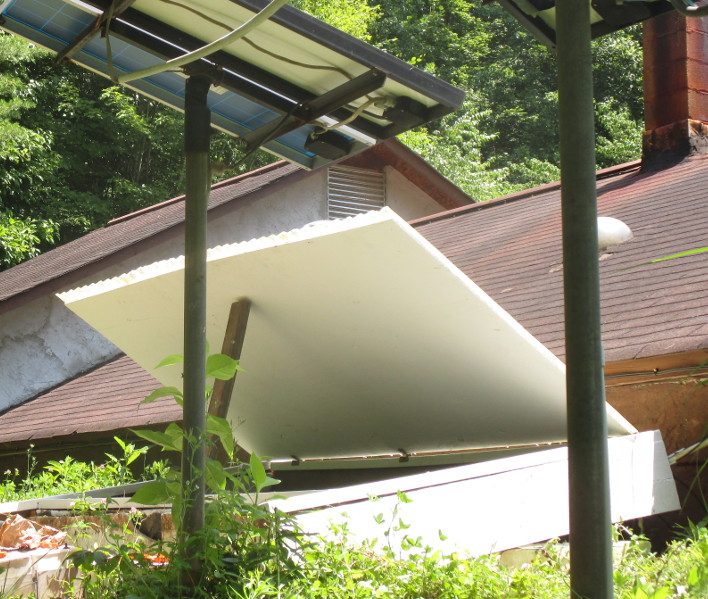
Little bonus project after the solar upgrade was replacing the battery box's rotted roof, down to the cinderblock walls. Except for a piece of plywood, used all scrap lumber for this project, and also scavenged a great set of hinges from a discarded cabinet. I hope the paint on all sides and an inch of shingle overhang will be enough to protect the plywood. Bonus bonus project to use up paint. (Argh, now I want to increase the size of the overflowing grape arbor. Once you start on this kind of stuff..) After finishing all that, it was time to think about this while enjoying this. (Followed by taking delivery of a dumptruck full of gravel -- 23 tons -- which it turns out was enough for only half of my driveway..)
Andreas Bombe: PDP-8/e Replicated Overview

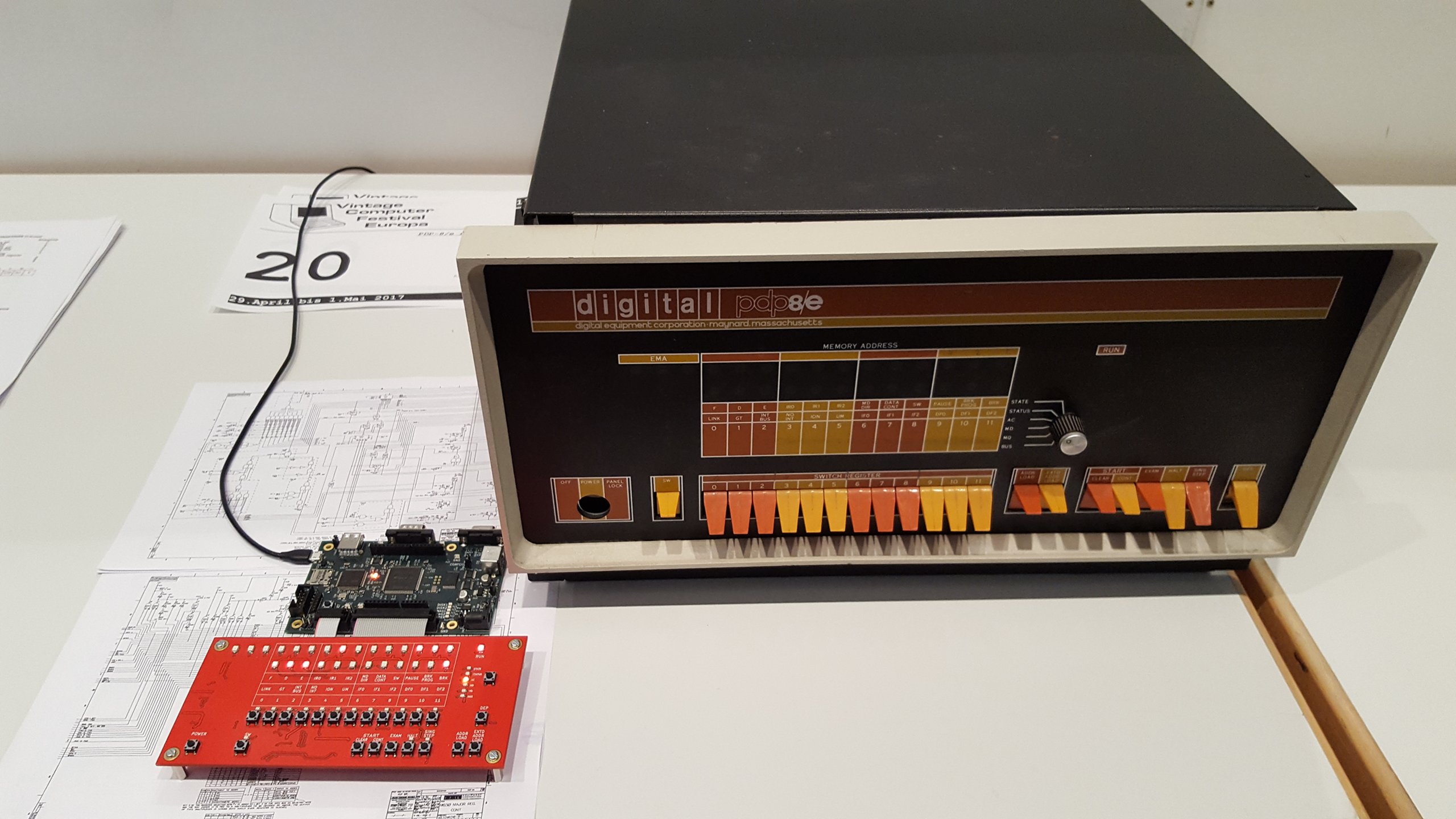
This is an overview of the hardware and internals of the PDP-8/e replica I m building.

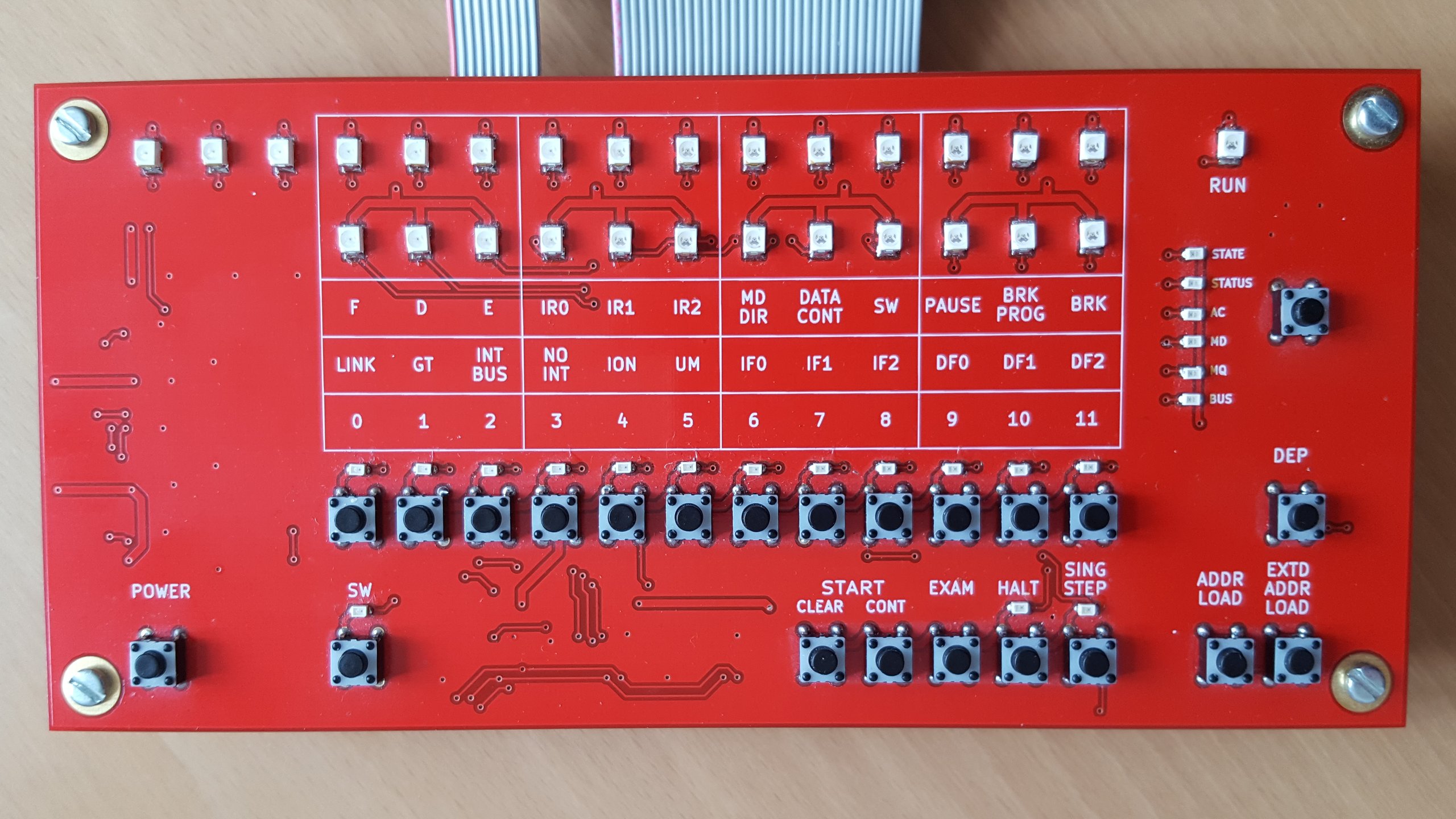
The front panel board
functional replica of the PDP-8/e front panel
If you know the original or remember the picture from the first post it is clear that this is a functional replica not aiming to be as pretty as those of the other projects I mentioned. I have reordered the switches into two rows to make the board more compact (which also means cheaper) without sacrificing usability. There s the two rows of display lights plus one run light the 8/e provides. The upper row is the address made up of 12 bits of memory address and 3 bits of extended memory address or field. Below are the 12 bits indicator which can show one data set out of six as selected by the user. All the switches of the original are implemented as more compact buttons1. While momentary switches are easily substituted by buttons, all buttons implementing two position switches toggle on/off with each press and they have a LED above that shows the current state. The six position rotary switch is implemented as a button cycling through all indicator displays together with six LEDs which show the active selection. Markings show the meaning of the indicator and switches as on the original, grouped in threes as the predominant numbering system for the PDPs was octal. The upper line shows the meaning for the state indicator, the middle for the status indicator and bit numbers for the rest. Note that on the PDP-8 and opposite to modern conventions, the most significant bit was numbered 0. I designed it as a pure front panel board without any PDP-8 simulation parts. The buttons and associated lights are controllable via SPI lines with a 3.3 V supply. The address and indicator lights have a separate common anode configuration with all cathodes individually available on a pin header without any resistors in the path, leaving voltage and current regulation up to the simulation board. This board is actually a few years old from a similar project where I emulated the PDP-8 in software on a microcontroller and the flexible design allowed me to reuse it unchanged.

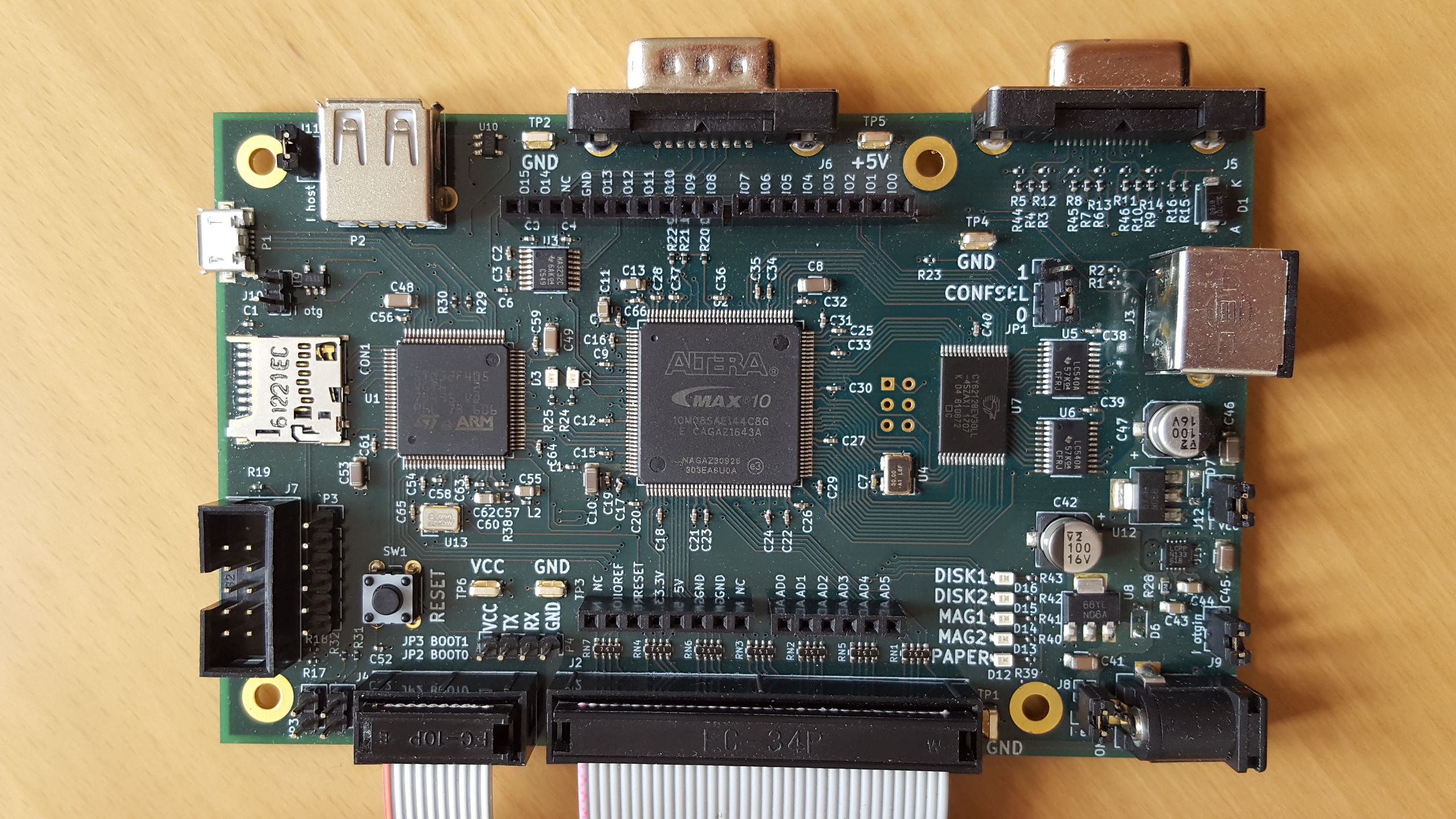
The main board
main board with CPU and peripherals of the replicated PDP-8/e
This is where the magic happens. You can see three big ICs on the board: On the left is the STM32F405 microcontroller (with ARM Cortex-M4 core), the bigger one in the middle is the Altera2 MAX 10 FPGA and finally to the right is the SRAM that is large enough to hold all the main memory of the 32 KW maximum expansion of the PDP-8/e. The two smaller chips to the right of that are just buffers that drive the front panel address LEDs, the small chip at the top left is a RS-232 level shifter. The idea behind this is that the PDP-8 and peripherals that are simple to directly implement, such as GPIO or a serial port, are fully on the FPGA. Other peripherals such as paper and magnetic tape and disks, which are after all not connected to real PDP-8 drives but disk images on a microSD, are implemented on the microcontroller interfacing with stub devices in the FPGA. Compared to implementing everything everything in the FPGA, the STM32F4 has the advantage of useful built in peripherals such as two host/device capable USB ports. 5 V tolerant I/O pins are very useful and simply not available in any FPGA. I have to admit that this board was a bit of a rush job in order to have something at all to show at the Vintage Computer Festival Europe 18.0. Given that it was my first time designing a board with a large microcontroller and the first time with an FPGA, it wasn t exactly my fastest progressing project either and I got basic functionality (front panel allows toggling in small programs and running them) working just in time. For various reasons the project hasn t progressed much since, so the following is still just plans, but plans for which the hardware was designed. Since the aim is to have a cycle accurate PDP-8/e implementation, digital I/O was always planned. Rather than defining my own header I have included Arduino R3 compatible headers (for 3.3 V compatible boards only) that have become a popular even outside the Arduino world for this purpose. The digital Arduino pins are connected directly to the FPGA and will be directly controllable by PDP-8 software. The downside of choosing the Arduino headers is that the original PDP-8 digital I/O interface is not a perfect match since it naturally has 12 lines whereas the Arduino has 15. The analog inputs are not connected to the FPGA, the documentation of the MAX10 s ADC in the EQFP package are not very encouraging. They are connected to the STM32 instead3. Another interface connected directly to the FPGA and that would be directly under PDP-8 control is a standard 9 pin RS-232 interface. RX, TX, CTS and RTS are connected and level-shifted between 3.3 V and RS-232 levels by a MAX3232. Besides the PDP-8, I also plan to implement a full video terminal on the board. The idea is that with a power supply, keyboard and monitor this board would form a complete system without the need of connecting another computer to act as a terminal. To that end, there is a VGA port attached to the FPGA with simple resistor network DACs for 9 bits color (RGB with 3 bits each). This is another spot where I left myself room to expand, for e.g. a VT220 you really only need one color in two brightness levels. Keyboards will be connected either via the PS/2 connector on the right or the USB-A host port at the top left. Last of the interface ports is the USB micro-AB port on the left, which for now I am using only for power supply. I mainly plan to use it to provide alternative or additional serial ports to the PDP-8 or to export the video terminal serial port for testing purposes. Other possible uses are access to the image files on the microSD and firmware updates. This has gotten rather long again, so I m stopping here and leave some implementation notes for another post.

  1. They are also much cheaper. Given the large number of switches, the savings are substantial. Additionaly the buttons are nicer to operate than long rows of tiny switches. [return]
  2. Or rather Intel now. At least Altera s web site, documentation and software have already been thoroughly rebranded, but the chips I got were produced prior to that. [return]
  3. That s not to say that the analog conversions on the STM32 are necessarily better than those of the MAX10 when you can t follow their guidelines, I have no comparisons. Certainly following the guidelines would have been prohibitive given how many pins usage they restrict. [return]

10 July 2017

Markus Koschany: My Free Software Activities in June 2017

Welcome to gambaru.de. Here is my monthly report that covers what I have been doing for Debian. If you re interested in Java, Games and LTS topics, this might be interesting for you. Debian Games Debian Java + Android Debian LTS This was my sixteenth month as a paid contributor and I have been paid to work 16 hours on Debian LTS, a project started by Rapha l Hertzog. In that time I did the following: Misc Thanks for reading and see you next time.

9 July 2017

Steinar H. Gunderson: Nageru 1.6.1 released

I've released version 1.6.1 of Nageru, my live video mixer. Now that Solskogen is coming up, there's been a lot of activity on the Nageru front, but hopefully everything is actually coming together now. Testing has been good, but we'll see whether it stands up to the battle-hardening of the real world or not. Hopefully I won't be needing any last-minute patches. :-) Besides the previously promised Prometheus metrics (1.6.1 ships with a rather extensive set, as well as an example Grafana dashboard) and frame queue management improvements, a surprising late addition was that of a new transcoder called Kaeru (following the naming style of Nageru itself, from the japanese verb kaeru ( ) which means roughly to replace or excahnge iKnow! claims it can also mean convert , but I haven't seen support for this anywhere else). Normally, when I do streams, I just let Nageru do its thing and send out a single 720p60 stream (occasionally 1080p), usually around 5 Mbit/sec; less than that doesn't really give good enough quality for the high-movement scenarios I'm after. But Solskogen is different in that there's a pretty diverse audience when it comes to networking conditions; even though I have a few mirrors spread around the world (and some JavaScript to automatically pick the fastest one; DNS round-robin is really quite useless here!), not all viewers can sustain such a bitrate. Thus, there's also a 480p variant with around 1 Mbit/sec or so, and it needs to come from somewhere. Traditionally, I've been using VLC for this, but streaming is really a niche thing for VLC. I've been told it will be an increased focus for 4.0 now that 3.0 is getting out the door, but over the last few years, there's been a constant trickle of little issues that have been breaking my transcoding pipeline. My solution for this was to simply never update VLC, but now that I'm up to stretch, this didn't really work anymore, and I'd been toying around with the idea of making a standalone transcoder for a while. (You'd ask why not the ffmpeg(1) command-line client? , but it's a bit too centered around files and not streams; I use it for converting to HLS for iOS devices, but it has a nasty habit of I/O blocking real work, and its HTTP server really isn't meant for production work. I could survive the latter if it supported Metacube and I could feed it into Cubemap, but it doesn't.) It turned out Nageru had already grown most of the pieces I needed; it had video decoding through FFmpeg, x264 encoding with speed control (so that it automatically picks the best preset the machine can sustain at any given time) and muxing, audio encoding, proper threading everywhere, and a usable HTTP server that could output Metacube. All that was required was to add audio decoding to the FFmpeg input, and then replace the GPU-based mixer and GUI with a very simple driver that just connects the decoders to the encoders. (This means it runs fine on a headless server with no GPU, but it also means you'll get FFmpeg's scaling, which isn't as pretty or fast as Nageru's. I think it's an okay tradeoff.) All in all, this was only about 250 lines of delta, which pales compared to the ~28000 lines of delta that are between 1.3.1 (used for last Solskogen) and 1.6.1. It only supports a rather limited set of Prometheus metrics, and it has some limitations, but it seems to be stable and deliver pretty good quality. I've denoted it experimental for now, but overall, I'm quite happy with how it turned out, and I'll be using it for Solskogen. Nageru 1.6.1 is on its way into Debian, but it depends on a new version of Movit which needs to go through the NEW queue (a soname bump), so it might be a few days. In the meantime, I'll be busy preparing for Solskogen. :-)

8 July 2017

Urvika Gola: Outreachy Progress on Lumicall

unnamedLumicall 1.13.0 is released!  Through Lumicall, you can make encrypted calls and send messages using open standards. It uses the SIP protocol to inter-operate with other apps and corporate telephone systems. During the Outreachy Internship period I worked on the following issues :-

I researched on creating a white label version of Lumicall. Few ideas on how the white label build could be used..
  1. Existing SIP providers can use white label version of Lumicall to expand their business and launch SIP client. This would provide a one stop shop for them!!
  2. New SIP clients/developers can use Lumicall white label version to get the underlying working of making encrypted phone calls using SIP protocol, it will help them to focus on other additional functionalities they would like to include.
Documentation for implementing white labelling Link 1 and Link 2 Since Lumicall is majorly used to make encrypted calls, there was a need to designate quiet times and the phone will not make an audible ringing tone during that time & if the user has multiple SIP accounts, the user can set the silent mode functionality on one of them, maybe, the Work account.
Documentation for adding silent mode feature Link 1 and Link 2 Using Lumicall, users can send SIP messages across. Just to improve the UI a little, I added a 9 patch image in the message screen. A 9 patch image is created using 9 patch tools and are saved as imagename.9.png . The image will resize itself according to the text length and font size. Documentation for 9 patch image Link 9patch You can try the new version of Lumicall here ! and know more about Lumicall on a blog by Daniel Pocock.
Looking forward to your valuable feedback !!

Daniel Silverstone: Gitano - Approaching Release - Access Control Changes

As mentioned previously I am working toward getting Gitano into Stretch. A colleague and friend of mine (Richard Maw) did a large pile of work on Lace to support what we are calling sub-defines. These let us simplify Gitano's ACL files, particularly for individual projects. In this posting, I'd like to cover what has changed with the access control support in Gitano, so if you've never used it then some of this may make little sense. Later on, I'll be looking at some better user documentation in conjunction with another friend of mine (Lars Wirzenius) who has promised to help produce a basic administration manual before Stretch is totally frozen.

Sub-defines With a more modern lace (version 1.3 or later) there is a mechanism we are calling 'sub-defines'. Previously if you wanted to write a ruleset which said something like "Allow Steve to read my repository" you needed:
define is_steve user exact steve
allow "Steve can read my repo" is_steve op_read
And, as you'd expect, if you also wanted to grant read access to Jeff then you'd need yet set of defines:
define is_jeff user exact jeff
define is_steve user exact steve
define readers anyof is_jeff is_steve
allow "Steve and Jeff can read my repo" readers op_read
This, while flexible (and still entirely acceptable) is wordy for small rulesets and so we added sub-defines to create this syntax:
allow "Steve and Jeff can read my repo" op_read [anyof [user exact jeff] [user exact steve]]
Of course, this is generally neater for simpler rules, if you wanted to add another user then it might make sense to go for:
define readers anyof [user exact jeff] [user exact steve] [user exact susan]
allow "My friends can read my repo" op_read readers
The nice thing about this sub-define syntax is that it's basically usable anywhere you'd use the name of a previously defined thing, they're compiled in much the same way, and Richard worked hard to get good error messages out from them just in case.

No more auto_user_XXX and auto_group_YYY As a result of the above being implemented, the support Gitano previously grew for automatically defining users and groups has been removed. The approach we took was pretty inflexible and risked compilation errors if a user was deleted or renamed, and so the sub-define approach is much much better. If you currently use auto_user_XXX or auto_group_YYY in your rulesets then your upgrade path isn't bumpless but it should be fairly simple:
  1. Upgrade your version of lace to 1.3
  2. Replace any auto_user_FOO with [user exact FOO] and similarly for any auto_group_BAR to [group exact BAR].
  3. You can now upgrade Gitano safely.

No more 'basic' matches Since Gitano first gained support for ACLs using Lace, we had a mechanism called 'simple match' for basic inputs such as groups, usernames, repo names, ref names, etc. Simple matches looked like user FOO or group !BAR. The match syntax grew more and more arcane as we added Lua pattern support refs ~^refs/heads/$ user /. When we wanted to add proper PCRE regex support we added a syntax of the form: user pcre ^/.+?... where pcre could be any of: exact, prefix, suffix, pattern, or pcre. We had a complex set of rules for exactly what the sigils at the start of the match string might mean in what order, and it was getting unwieldy. To simplify matters, none of the "backward compatibility" remains in Gitano. You instead MUST use the what how with match form. To make this slightly more natural to use, we have added a bunch of aliases: is for exact, starts and startswith for prefix, and ends and endswith for suffix. In addition, kind of match can be prefixed with a ! to invert it, and for natural looking rules not is an alias for !is. This means that your rulesets MUST be updated to support the more explicit syntax before you update Gitano, or else nothing will compile. Fortunately this form has been supported for a long time, so you can do this in three steps.
  1. Update your gitano-admin.git global ruleset. For example, the old form of the defines used to contain define is_gitano_ref ref ~^refs/gitano/ which can trivially be replaced with: define is_gitano_ref ref prefix refs/gitano/
  2. Update any non-zero rulesets your projects might have.
  3. You can now safely update Gitano
If you want a reference for making those changes, you can look at the Gitano skeleton ruleset which can be found at https://git.gitano.org.uk/gitano.git/tree/skel/gitano-admin/rules/ or in /usr/share/gitano if Gitano is installed on your local system. Next time, I'll likely talk about the deprecated commands which are no longer in Gitano, and how you'll need to adjust your automation to use the new commands.

6 July 2017

Holger Levsen: 20170706-fcmc.tv

a media experiment: fcmc.tv / G20 not welcome Our view currently every day and night: No one is illegal! No football for fascists! The FC/MC is a collective initiative to change the perception of the G20 in Hamburg - the summit itself and the protests surrounding it. FC/MC is a media experiment, located in the stadium of the amazing St.Pauli football club. We will operate until this Sunday, providing live coverage (text, photos, audio, video), back stories and much much more. Another world is possible! Disclaimer: I'm not involved in content generation, I'm just doing computer stuff as usual, but that said, I really like the work of those who are! :-)

Thadeu Lima de Souza Cascardo: News on Debian on apexqtmo

I had been using my Samsung Galaxy S Relay 4G for almost three years when I decided to get a new phone. I would use this new phone for daily tasks and take the chance to get a new model for hacking in the future. My apexqtmo would still be my companion and would now be more available for real hacking. And so it also happened that its power button got stuck. It was not the first time, but now it would happen every so often, and would require me to disassemble it. So I managed to remove the plastic button and leave it with a hole so I could press the button with a screwdriver or a paperclip. That was the excuse I needed to get it to running Debian only. Though it's now always plugged on my laptop, I got the chance to hack on it on my scarce free time. As I managed to get a kernel I built myself running on it, I started fixing things like enabling devtmpfs. I didn't insist much on running systemd, though, and kept with System V. The Xorg issues were either on the server or the client, depending on which client I ran. I decided to give a chance to running the Android userspace on a chroot, but gave up after some work to get some firmware loaded. I managed to get the ALSA controls right after saving them inside a chroot on my CyanogenMod system. Then, restoring them on Debian allowed to play songs. Unfortunately, it seems I broke the audio jack when disassembling it. Otherwise, it would have been a great portable audio player. I even wrote a small program that would allow me to control mpd by swiping on the touchscreen. Then, as Debian release approached, I decided to investigate the framebuffer issue closely. I ended finding out that it was really a bug in the driver, and after fixing it, the X server and client crashes were gone. It was beautiful to get some desktop environment running with the right colors, get a calculator started and really using the phone as a mobile device. There are two lessons or findings here for me. The first one is that the current environments are really lacking. Even something like GPE can't work. The buttons are tiny, scrollbars are still the only way for scrolling, some of the time. No automatic virtual keyboards. So, there needs to be some investing in the existing environments, and maybe even the development of new environments for these kinds of devices. This was something I expected somehow, but it's still disappointing to know that we had so much of those developed in the past and now gone. I really miss Maemo. Running something like Qtopia would mean grabing a very old unmaintained software not available in Debian. There is still matchbox, but it's as subpar as the others I tested. The second lesson is that building a userspace to run on old kernels will still hit the problem of broken drivers. In my particular case, unless I wrote code for using Ion instead of the framebuffer, I would have had that problem. Or it would require me to add code to xorg-xserver that is not appropriate. Or fix the kernel drivers of available kernel sourcecodes. But this does not scale much more than doing the right thing and adding upstream support for these devices. So, I decided it was time I started working on upstream support for my device. I have it in progress and may send some upstream patches soon. I have USB and MMC/SDcard working fine. DRM is still a challenge, but thanks to Rob Clark, it's something I expect to get working soon, and after that, I would certainly celebrate. Maybe even consider starting the work on other devices a little sooner. Trying to review my post on GNU on smartphones, here is where I would put some of the status of my device and some extra notes. On Halium I am really glad people started this project. This was one of the things I criticized: that though Ubuntu Phone and FirefoxOS built on Android userspace, they were not easily portable to many devices out there. But as I am looking for a more pure GNU experience, let's call it that, Halium does not help much in that direction. But I'd like to see it flourish and allow people to use more OSes on more devices. Unfortunately, it suffers from similar problems as the strategy I was trying to go with. If you have a device with a very old kernel, you won't be able to run some of the latest userspace, even with Android userspace help. So, lots of devices would be left unsupported, unless we start working on some upstream support. On RYF Hardware My device is one of the worst out there. It's a modem that has a peripherical CPU. Much has already been said about Qualcomm chips being some of the least freedom-friendly. Ironically, it's some with the best upstream support, as far as I found out while doing this upstreaming work. Guess we'll have to wait for opencores, openrisc and risc-v to catch up here. Diversity Though I have been experimenting with Debian, the upstream work would sure benefit lots of other OSes out there, mainly GNU+Linux based ones, but also other non-GNU Linux based ones. Not so much for other kernels. On other options After the demise of Ubuntu Phone, I am glad to see UBports catching up. I hope the project is sustainable and produce more releases for more devices. Rooting This needs documentation. Most of the procedures rely on booting a recovery system, which means we are already past the root requirement. We simply boot our own system, then. However, for some debugging strategies, getting root on the OEM system is useful. So, try to get root on your system, but beware of malware out there. Booting Most of these devices will have their bootloaders in there. They may be unlocked, allowing unsigned kernels to be booted. Replacing these bootloaders is still going to be a challenge for another future phase. Though adding a second bootloader there, one that is freedom respecting, and that allows more control on that booting step to the user is something possible once you have some good upstream support. One could either use kexec for that, or try to use the same device tree for U-Boot, and use the knowledge of the device drivers for Linux on writing drivers for U-Boot, GRUB or Libreboot. Installation If you have root on your OEM system, this is something that could be worked on. Otherwise, there is magic-device-tool, whose approach is one that could be used. Kernels While I am working on adding Linux upstream support for my device, it would be wonderful to see more kernels supporting those gadgets. Hopefully, some of the device driver writing and reverse engineering could help with that, though I am not too much optimistic. But there is hope. Basic kernel drivers Adding the basic support, like USB and MMC, after clocks, gpios, regulators and what not, is the first step to a long road. But it would allow using the device as a board computer, under better control of the user. Hopefully, lots of eletronic garbage out there would have some use as control gadgets. Instead of buying a new board, just grab your old phone and put it to some nice use. Sensors, input devices, LEDs There are usually easy too. Some sensors may depend on your modem or some userspace code that is not that easily reverse engineered. But others would just require some device tree work, or some small input driver. Graphics Here, things may get complicated. Even basic video output is something I have some trouble with. Thanks to some other people's work, I have hope at least for my device. And using the vendor's linux source code, some framebuffer should be possible, even some DRM driver. But OpenGL or other 3D acceleration support requires much more work than that, and, at this moment, it's not something I am counting on. I am thankful for the work lots of people have been doing on this area, nonetheless. Wireless Be it Wifi or Bluetooth, things get ugly here. The vendor driver might be available. Rewriting it would take a long time. Even then, it would most likely require some non-free firmware loading. Using USB OTG here might be an option. Modem/GSM The work of the Replicant folks on that is what gives me some hope that it might be possible to get this working. Something I would leave to after I have a good interface experience in my hands. GPS Problem is similar to the Modem/GSM one, as some code lives in userspace, sometimes talking to the modem is a requirement to get GPS access, etc. Shells This is where I would like to see new projects, even if they work on current software to get them more friendly to these form factors. I consider doing some work there, though that's not really my area of expertise. Next steps For me, my next steps are getting what I have working upstream, keep working on DRM support, packaging GPE, then experimenting with some compositor code. In the middle of that, trying to get some other devices started. But documenting some of my work is something I realized I need to do more often, and this post is some try on that.

Next.

Previous.