Search Results: "pm"

9 September 2011

Raphaël Hertzog: People behind Debian: Enrico Zini, member of the New Maintainer Frontdesk

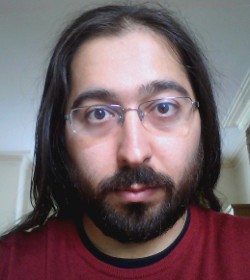
Enrico ZiniEven though Enrico is not smiling on this picture, he s one of the friendliest Debian person that I know. I always enjoy his presentations because he can t refrain from inserting jokes or other funny tricks. :-) That said he s serious too, there s lots of good stuff that he has developed over the years (starting with Debtags) and he has put a lot of effort in reforming the New Maintainer process. Read on to learn more about his various projects. Raphael: Who are you? Enrico: Hi, I m Enrico Zini, a DD from Italy. I m 35 and I work as a freelance Free Software developer. One of my historical roles in Debian is taking care of Debtags, but that is not all I do: my paid work led me to write and maintain some weather forecast related software in Debian, and recently I gained a Front Desk hat, and then a DAM hat. Raphael: How did you start contributing to Debian? Enrico: It was 2001, I was at uni, I was using Debian. At some point I wanted to learn packaging so I read through the whole Policy from top to bottom. Then I thought: why package only for myself? . There were many DDs at my uni, and it only seemed natural to me to join Debian as well. Evidently this was also natural for Zack [Note from editor: Stefano Zacchiroli], who had become DD 6 months earlier and didn t hesitate to advocate me. I found the Policy and the Developer s Reference to be very interesting things to read, and I welcomed my AM s questions as an excuse to learn more. I completely understand those people who have fun trying to answer all the questions in the NM templates while they wait for an AM. With my super DAM powers I can see that my AM report was submitted on October 16, 2001 by my AM Martin Michlmayr, and that James Troup created my account 9 days later, on October 25. Raphael: You have a special interest in the New Maintainer (NM) Process since you are a Debian Account Manager (DAM) and a member of the NM Frontdesk. Thanks to your work the process is much less academic/bureaucratic than it used to be. Can you remember us the main changes? Enrico: One of the first things I noticed when I become a Front Desk member is that there was a tendency to advocate people too early, thinking by the time they ll get an AM, they ll know enough . Unfortunately, this didn t always work, and once the real NM process started it would turn into a very long and demotivating experience both for the applicant and for the AM. So we tried raising the bar on advocacies, and that seems to have helped a lot. If people join NM when they are ready, it means that NM is quick and painless both for them and their AMs, who are therefore able to process more applicants. We also did a rather radical cleanup of the NM templates , which are a repository of questions that Application Managers can ask to their applicants. We realized that AMs were just sending the whole templates to their applicants, so we moved all non-essential questions to separate files, to drastically reduce the amounts of questions that are asked by default. Other improvements in the NM process came from other parts of Debian: nowadays there are lots of ways to learn and gradually gain experience and reputation inside the project before joining NM, which means that we get many candidates who we can process quickly. For example, packages can now be uploaded via sponsors, and the Mentors project helps new contributors to find sponsors and get their first packages reviewed. Then one can now become Debian Maintainer and take full responsibility of their own packages, gaining experience and reputation. The idea of working in teams also helped: big teams like the Perl, Python, KDE, Ocaml, Haskell teams (and many more) are excellent entry points for people who have something to package. But Debian is not just for packagers, and one could join teams like the Website team, the Press and Publicity team, the Events and Merchandise team or their local translation team. Becoming DDs the non-uploading way is not just for non-technical people: one could enjoy programming but not packaging. An interesting way to get involved in that way is to help writing or maintaining some of the many Debian services. Note that I m not suggesting this as a way to learn how to program, but as a way to get involved in Debian by writing code. Finally, we started to appreciate the importance of having people activities in Debian explicitly visible, which means that the more obviously good work one has done in Debian, the less questions we need to ask. Jan Dittberner s DDPortfolio is an excellent resource for AMs and Front Desk, and I m maintaining a service called minechangelogs that for people who have done lots of work in Debian is able to fully replace the Tasks&Skills parts of the NM process. Raphael: What are your plans for Debian Wheezy? Enrico: For Wheezy I hope to be able to streamline and simplify Debtags a bit more. At Debconf11 I had a conversation with FTP-masters on how to make some tags more official, and I now have to work a bit more on that. I d also like to considerably downsize the codebase behind the debtags package, now that its job is quite clear and I don t need to experiment with fancy features the way I did in the past. I have to say that I enjoy programming more than I enjoy packaging, so most of my plans in Debian are not tied to releases. For example, I d like to finish and deploy the new NM website codebase soon: it would mean to have a codebase that s much easier to maintain, and in which it s much easier to implement new features. I d also like to design a way to allow maintainers to review the tag submission to their own packages instead of having to wait for me or David Paleino to do a regular review of all the submissions. Finally, I d like to promote the usage of apt-xapian-index in more cutting-edge packaging applications. And to design a way to maintain up to date popcon information in one s local index. And improve and promote those services that I maintain, and I tend to often have ideas for new ones. Raphael: If you could spend all your time on Debian, what would you work on? Enrico: If I could spend all my time on Debian, I would do a lot of software development: I love doing software development, but most of my development energy is spent on my paid work. I guess I would start my all your time in Debian by taking better care of the things that I m already doing, and by promoting them better so that I wouldn t end up being the only person maintaining them. After that, however, I reckon that I do have a tendency of noticing new, interesting problems in need(?) of a solution, and I guess I would end up wildly experimenting new ideas in Debian much like a victorian mad scientist. Which reminds me that I most definitely need minions! Where can I find minions? Raphael: You re the author of the Debian Community Guidelines. I have always felt that this document should be more broadly advertised. For example by integrating it in the Developer s Reference. What do you think? Enrico: The DCG was really a collection of tips to improve one s online communication, based on ideas and feedback that I collected from pestering many experienced and well-respected people for some time. Like every repository of common sense, I think it should be widely promoted but never ever turned into law. It wouldn t be a bad idea to mention it in the Developer s Reference, or to package it as a separate file in the developers-reference package. The reasons I haven t actively been pushing for that to happen are two: there isn t much in the DCG that is specific to Debian, and I don t have the resources to do a proper job maintaining it. It d be great if somebody could take over its maintenance and make it become some proper, widespread, easy-to-quote online reference document, like one of those HOWTOs that all serious people have read at some point in their lives. Raphael: What s the biggest problem of Debian? Enrico: It s sometimes hard to get feedback or help if you work on something unusual. That is partly to be expected, and partly probably due to me not having yet learnt how to get people involved in what I do. Raphael: What motivates you to continue to contribute year after year? Enrico: Debian keeps evolving, so there is always something to learn. And Debian is real, so everything I do is constantly measured against reality. What more intellectual stimulation could one possibly want? Raphael: Is there someone in Debian that you admire for their contributions? Enrico: I don t think I could reasonably list everyone I admire in Debian: pretty much in every corner of the project there is someone, sometimes not very well known, who is putting a lot of Quality in what they do. Someone who decided that X should work well in Debian or that Debian should work well for Y or that Z is something Debian people can rely on and makes sure that it is so. Those are the people who make sure Debian is and will be not just a hobby, but a base upon which I can rely for my personal and working life.
Thank you to Enrico for the time spent answering my questions. I hope you enjoyed reading his answers as I did.

Subscribe to my newsletter to get my monthly summary of the Debian/Ubuntu news and to not miss further interviews. You can also follow along on Identi.ca, Twitter and Facebook.

5 comments Liked this article? Click here. My blog is Flattr-enabled.

Martin Pitt: Dropping PostgreSQL 9.0 packages for Debian/Ubuntu/backports

PostgreSQL 9.1 has had its first release candidate out for some two weeks without major problem reports, so it s time to promote this more heavily. If you use PostgreSQL, now is the time to try it out and report problems. We always strive to minimize the number of major versions which we have to support. They not only mean more maintenance for developers, but also more upgrade cycles for the users. 9.0 has not been in any stable Debian or Ubuntu release, and 9.1 final will be released soon. So we recently updated the current Ubuntu development release for 11.10 ( oneiric ) to 9.1. In Debian, the migration from 8.4/9.0 to 9.1 is making good progress, and there is not much which is left until postgresql-9.0 can be removed. Consequently, I also removed 9.0 from my PostgreSQL backports PPA, as there is nothing any more to backport it from. However, that mostly means that people will now set up installations with 9.1 instead of 9.0, and won t magically make your already installed 9.0 packages go away. They will just be marked as obsolete in the postgresql-common debconf note. If you want to build future 9.0 packages yourself, you can do this based on the current branch: bzr branch lp:~pitti/postgresql/debian-9.0, get a the new upstream tarball, name it accordingly, add a new changelog with a new upstream version number, and run bzr bd to build the package (you need to install the bzr-builddeb package for this). Update 2011-09-09: As I got a ton of pleas to continue the 9.0 backports for a couple of months, and to keep it in Debian unstable for a while longer, I put them back now. I also updated the removal request in Debian to point out that I m mainly interested in getting 9.0 out of testing. I don t mind much maintaining it for a couple of more months in unstable. My dear, I had no idea that my backports PPA was that popular!
8 September 2011

Russell Coker: Moving from a Laptop to a Cloud Lifestyle

My Laptop History In 1998 I bought my first laptop, it was a Thinkpad 385XD, it had a PentiumMMX 233MHz CPU, 96M of RAM, and an 800*600 display. This was less RAM than I could have afforded in a desktop system and the 800*600 display didn t compare well to the 1280*1024 resolution 17 inch Trinitron monitor I had been using. Having only 1/3 the pixels is a significant loss and a 12.1 inch TFT display of that era compared very poorly with a good Trinitron monitor. In spite of this I found it a much better system to use because it was ALWAYS with me, I used it for many things that were probably better suited to a PDA (there probably aren t many people who have carried a 7.1 pound (3.2Kg) laptop to as many places as I did). But some of my best coding was done on public transport. But I didn t buy my first laptop for that purpose, I bought it because I was moving to another country and there just wasn t any other option for having a computer. In late 1999 I bought my second laptop, it was a Thinkpad 600E [1]. It had twice the CPU speed, twice the RAM, and a 1024*768 display that displayed color a lot better. Since then I had another three Thinkpads, a T21, a T43, and now a T61. One of the ways I measure a display is the number of 80*25 terminal windows that I can display at one time, my first Thinkpad could display four windows with a significant amount of overlap. My second could display four with little overlap, my third (with 1280*1024 resolution) could display four clearly and another two with overlap, and my current Thinkpad does 1680*1050 and can display four windows clearly and another five without excessive overlap. For most of the last 13 years my Thinkpads weren t that far behind what I could afford to get as a desktop system, until now. A Smart Phone as the Primary Computing Device For the past 6 months the Linux system I ve used most frequently is my Sony Ericsson Xperia X10 Android phone [2]. Most of my computer use is on my laptop, but the many short periods of time using my phone add up. This has forced some changes to the way I work. I now use IMAP instead of POP for receiving mail so I can use my phone and my laptop with the same mail spool. This is a significant benefit for my email productivity, instead of having 100 new mailing list messages waiting for me when I get home I can read them on my phone and then have maybe 1 message that can t be addressed without access to something better than a phone. My backlog of 10,000 unread mailing list messages lasted less than a month after getting an Android phone! A few years ago I got an EeePC 701 that I use for emergency net access when a server goes down. But even a 920g EeePC is more weight than I want to carry, as I need to have a mobile phone anyway there is effectively no extra mass or space used to have a phone capable of running a ssh client. My EeePC doesn t get much use nowadays. A Cheap 27 inch Monitor from Dell Dell Australia is currently selling a 27 inch monitor that does 2560*1440 (WQHD) for $899AU. Dell Australia offers a motor club discount which pretty much everyone in Australia can get as almost everyone is either a member of such a club or knows a member well enough to use their membership number for the discount. This discount reduces the price to $764.15. The availability of such a great cheap monitor has caused me to change my working habits. It doesn t make sense to have a reasonably powerful laptop used in one location for almost all the time when a desktop system with a much better monitor can be used. The Plan Now that my 27 inch monitor has arrived I have to figure out a way of making things work. I still need to work from a laptop on occasion but my main computer use is going to be a smart-phone and a desktop system. Email is already sorted out, I already have three IMAP client systems (netbook, laptop, and phone), adding a desktop system as a fourth isn t going to change anything. The next issue is software development. In the past I haven t used version control systems that much for my hobby work, I have just released a new version every time I had some significant changes. Obviously to support development on two or three systems I need to use a VCS rigorously. I m currently considering Subversion and Git. Subversion is really easy to use (for me), but it seems to be losing popularity. Git is really popular so if I use it for my own projects then I could allow anonymous access for anyone who s interested maybe that will encourage more people to contribute. One thing I haven t even investigated yet is how to manage my web browsing work-flow in a distributed manner. My pattern when using a laptop is to have many windows and tabs open at the same time for issues that I am researching and to only close them days or weeks later when I have finished with the issue. For example if I m buying some new computer gear I will typically open a web browser window with multiple tabs related to the equipment (hardware, software, prices, etc) and keep them all open until I have received it and got it working. Chromium, Mozilla, and presumably other modern web browsers have a facility to reopen windows after a crash. It would be ideal for me if there was some sort of similar facility that allowed me to open the windows that are open on another system and to push window open commands to another system. For example when doing web browsing on my phone I would like to be able to push the URLs of pages that can t be viewed on a phone to my desktop system and have them open waiting for me when I get home. It would be nice if web browsing could be conceptually similar to a remote desktop service in terms of what the user sees. Finally in my home directory there are lots of random files. Probably about half of them could be deleted if I was more organised (disk space is cheap and most of the files are small). For the rest it would be good if they could be accessed from other locations. I have read about people putting the majority of their home directory under version control, but I m not sure that would work well for me. It would be good if I could do something similar with editor sessions, if I had a file open in vi on my desktop before I left home it would be good if I could get a session on my laptop to open the same file (well the same named file checked out of the VCS). Configuring the Desktop System One of the disadvantages of a laptop is that RAID usually isn t viable. With a desktop system software RAID-1 is easy to configure but it results in two disks making heat and noise. For my new desktop system I m thinking of using a DRBD device for /home to store the data locally as well as almost instantly copying it to RAID-1 storage on the server. The main advantage of DRBD over NFS, NBD, and iSCSI is that I can keep working if the server becomes unavailable (EG use the desktop system to ask Google how to fix a server fault). Also with DRBD it s a configuration option to allow synchronous writes to return after the data is written locally which is handy if the server is congested. Another option that I m considering is a diskless system using NBD or iSCSI for all storage. This will prevent using swap (you can t swap to a network device to avoid deadlocks) but that won t necessarily be a problem given the decrease in RAM prices as I can just buy enough RAM to not need swap. The Future Eventually I want to be able to use a tablet for almost everything including software development. While a tablet display isn t going to be great for coding I m sure that I can make use of enough otherwise wasted time to justify the expense. I will probably need a tablet that acts like a regular Linux computer not an Android tablet.

7 September 2011

Soeren Sonnenburg: Shogun at Google Summer of Code 2011

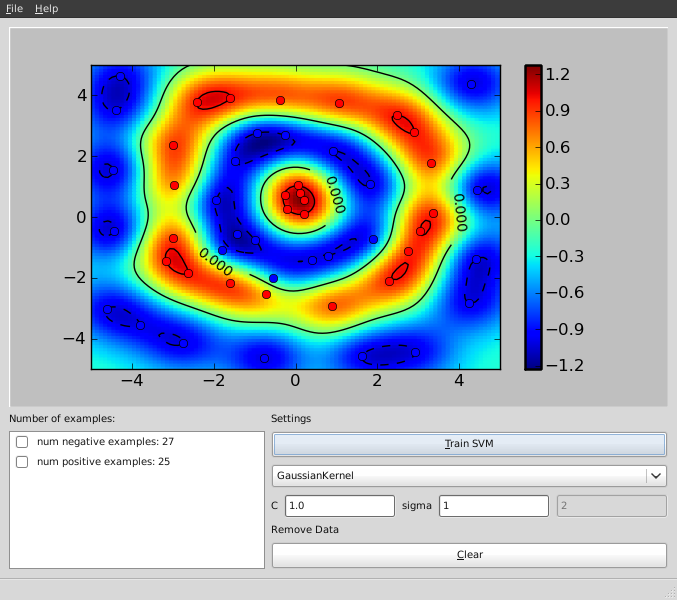
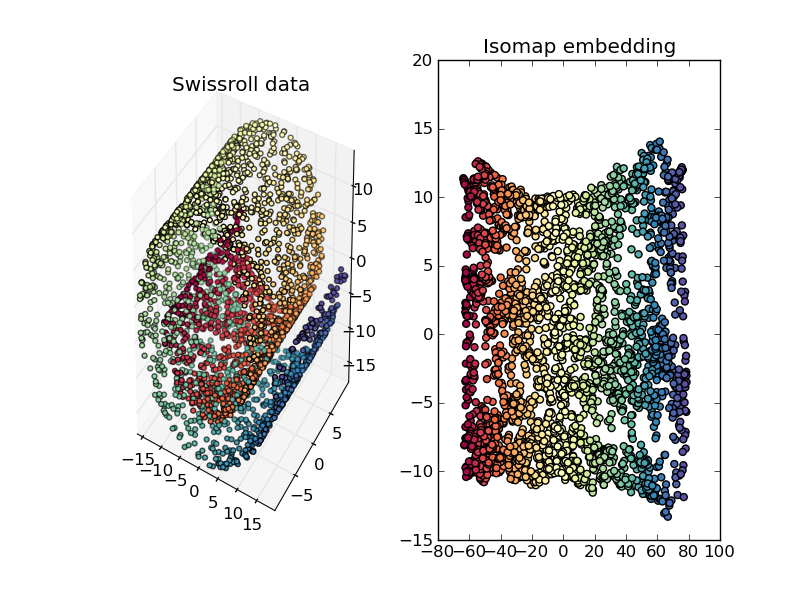
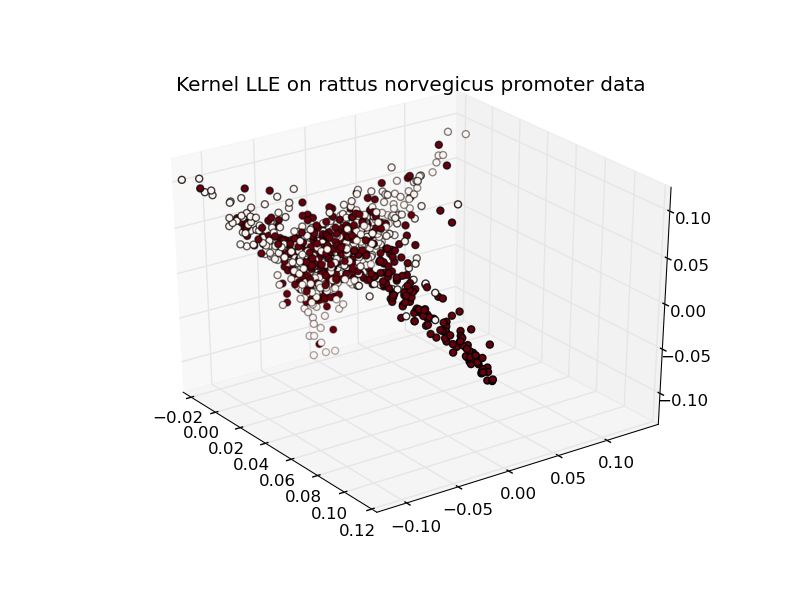
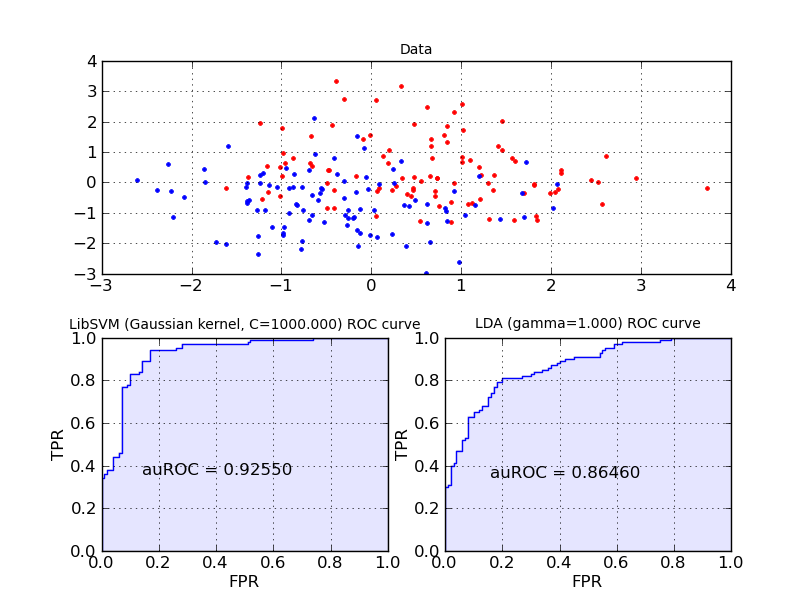
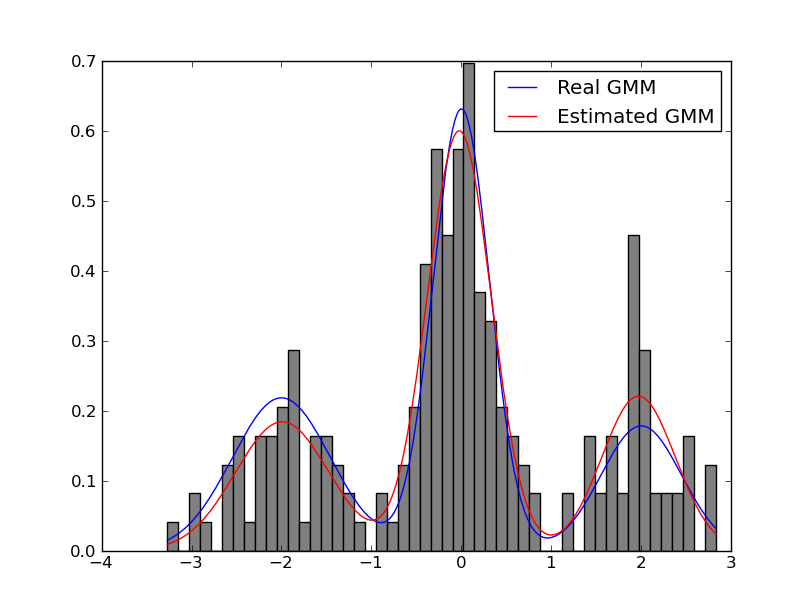
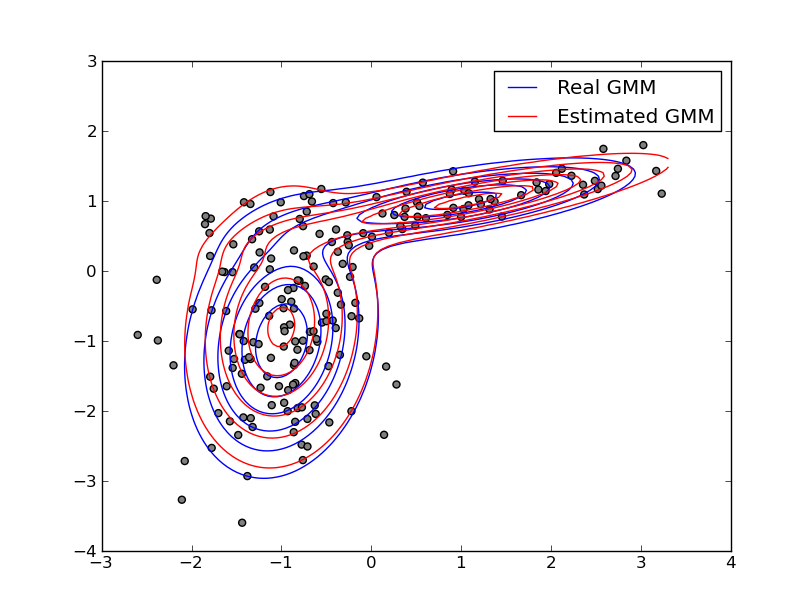
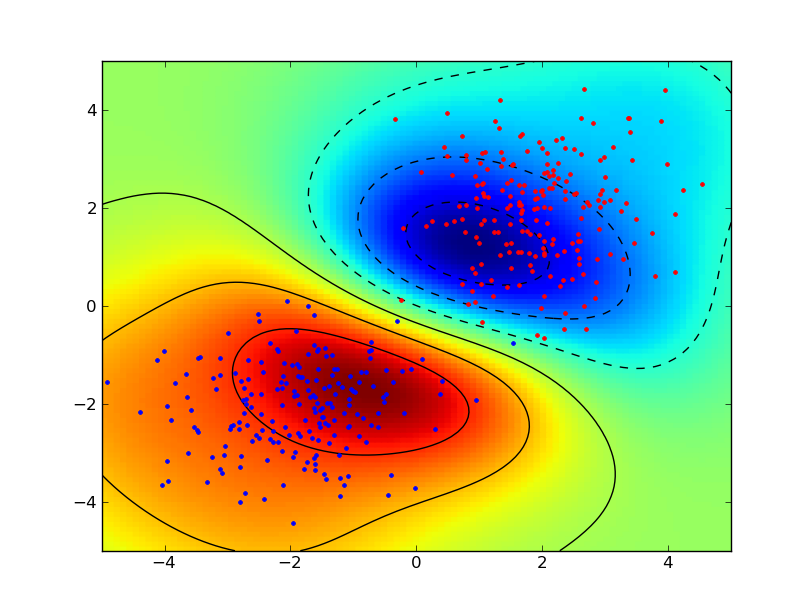
Google Summer of Code 2011 gave a big boost to the development of the shogun machine learning toolbox. In case you have never heard of shogun or machine learning: Machine Learning involves algorithms that do intelligent'' and even automatic data processing and is nowadays used everywhere to e.g. do face detection in your camera, compress the speech in you mobile phone, powers the recommendations in your favourite online shop, predicts solulabily of molecules in water, the location of genes in humans, to name just a few examples. Interested? Then you should give it a try. Some very simple examples stemming from a sub-branch of machine learning called supervised learning illustrate how objects represented by two-dimensional vectors can be classified in good or bad by learning a so called support vector machine. I would suggest to install the python_modular interface of shogun and to run the example interactive_svm_demo.py also included in the source tarball. Two images illustrating the training of a support vector machine follow (click to enlarge): svm svm interactive Now back to Google Summer of Code: Google sponsored 5 talented students who were working hard on various subjects. As a result we now have a new core developer and various new features implemented in shogun: Interfaces to new languages like java, c#, ruby, lua written by Baozeng; A model selection framework written by Heiko Strathman, many dimension reduction techniques written by Sergey Lisitsyn, Gaussian Mixture Model estimation written by Alesis Novik and a full-fledged online learning framework developed by Shashwat Lal Das. All of this work has already been integrated in the newly released shogun 1.0.0. In case you want to know more about the students projects continue reading below, but before going into more detail I would like to summarize my experience with GSoC 2011. My Experience with Google Summer of Code We were a first time organization, i.e. taking part for the first time in GSoC. Having received many many student applications we were very happy to hear that we at least got 5 very talented students accepted but still had to reject about 60 students (only 7% acceptance rate!). Doing this was an extremely tough decision for us. Each of us ended up in scoring students even then we had many ties. So in the end we raised the bar by requiring contributions even before the actual GSoC started. This way we already got many improvements like more complete i/o functions, nicely polished ROC and other evaluation routines, new machine learning algorithms like gaussian naive bayes and averaged perceptron and many bugfixes. The quality of the contributions and independence of the student aided us coming up with the selection of the final five. I personally played the role of the administrator and (co-)mentor and scheduled regular (usually) monthly irc meetings with mentors and students. For other org admins or mentors wanting into GSoC here come my lessons learned: Now please read on to learn about the newly implemented features: Dimension Reduction Techniques Sergey Lisitsyn (Mentor: Christian Widmer) Dimensionality reduction is the process of finding a low-dimensional representation of a high-dimensional one while maintaining the core essence of the data. For one of the most important practical issues of applied machine learning, it is widely used for preprocessing real data. With a strong focus on memory requirements and speed, Sergey implemented the following dimension reduction techniques: See below for the some nice illustrations of dimension reduction/embedding techniques (click to enlarge). isomap swissrollrno kllelocal tangent space alignment Cross-Validation Framework Heiko Strathmann (Mentor: Soeren Sonnenburg) Nearly every learning machine has parameters which have to be determined manually. Before Heiko started his project one had to manually implement cross-validation using (nested) for-loops. In his highly involved project Heiko extend shogun's core to register parameters and ultimately made cross-validation possible. He implemented different model selection schemes (train,validation,test split, n-fold cross-validation, stratified cross-validation, etc and did create some examples for illustration. Note that various performance measures are available to measure how good'' a model is. The figure below shows the area under the receiver operator characteristic curve as an example. foo Interfaces to the Java, C#, Lua and Ruby Programming Languages Baozeng (Mentor: Mikio Braun and Soeren Sonnenburg) Boazeng implemented swig-typemaps that enable transfer of objects native to the language one wants to interface to. In his project, he added support for Java, Ruby, C# and Lua. His knowlegde about swig helped us to drastically simplify shogun's typemaps for existing languages like octave and python resolving other corner-case type issues. The addition of these typemaps brings a high-performance and versatile machine learning toolbox to these languages. It should be noted that shogun objects trained in e.g. python can be serialized to disk and then loaded from any other language like say lua or java. We hope this helps users working in multiple-language environments. Note that the syntax is very similar across all languages used, compare for yourself - various examples for all languages ( python, octave, java, lua, ruby, and csharp) are available. Largescale Learning Framework and Integration of Vowpal Wabbit Shashwat Lal Das (Mentor: John Langford and Soeren Sonnenburg) Shashwat introduced support for 'streaming' features into shogun. That is instead of shogun's traditional way of requiring all data to be in memory, features can now be streamed from e.g. disk, enabling the use of massively big data sets. He implemented support for dense and sparse vector based input streams as well as strings and converted existing online learning methods to use this framework. He was particularly careful and even made it possible to emulate streaming from in-memory features. He finally integrated (parts of) vowpal wabbit, which is a very fast large scale online learning algorithm based on SGD. Expectation Maximization Algorithms for Gaussian Mixture Models Alesis Novik (Mentor: Vojtech Franc) The Expectation-Maximization algorithm is well known in the machine learning community. The goal of this project was the robust implementation of the Expectation-Maximization algorithm for Gaussian Mixture Models. Several computational tricks have been applied to address numerical and stability issues, like An illustrative example of estimating a one and two-dimensional Gaussian follows below. 1D GMM2D GMM Final Remarks All in all, this year s GSoC has given the SHOGUN project a great push forward and we hope that this will translate into an increased user base and numerous external contributions. Also, we hope that by providing bindings for many languages, we can provide a neutral ground for Machine Learning implementations and that way bring together communities centered around different programming languages. All that s left to say is that given the great experiences from this year, we d be more than happy to participate in GSoC2012.

Gunnar Wolf: Language designers, API designers, PHP and utter fails

After many years of successfully dodging doing any serious programming in PHP, I had to get my feet wet with PHP for my RL job: I was requested to develop a simple but non-trivial module for our Institute's Drupal-based webpage. It basically meant two and a half weeks devoted to head-scratching: I had read the very good John van Dyk's Pro Drupal Development book, and knew it would be an important resource were I to face writing a module or work on a theme beyond the most basic stuff So I checked it out of the library, and started basically writing something similar to my good and trusty Perl code. After all, PHP seems quite similar to Perl, although forcing you to write more for no gain (i.e. requiring an array() declaration whenever you want to store more than one value together) or lacking important and useful constructs (not having a sane way to prepare a SQL statement for multiple executions with different parameters Yes, there are DB access methods that do provide it, but Drupal 6 does not use them). Anyway, book in hand, I started understanding while implementing (which is way different than just reading the book, right?) Drupal's notions. I cannot say I like them, but it's ahem doable. Now, I hit a problem twice. I chose to ignore it the first time, as it was a corner case I'd look into later on, but had to devote for hours of my attention later on. When designing the menu (which for Drupal means not only the facility which prepares/displays links to the bits of functionality, but also the access control layer and the action dispatcher a huge yay! for responsability separation!), I had only two access levels: Public and administrator. So, this seemed like a good fit:
  1. $public = array('first/action', 'second/action',
  2. 'third/action', 'something/else');
  3. foreach (array_keys($items) as $item)
  4. if (array_search($item, $public))
  5. $items[$item]['access callback'] = TRUE
  6. else
  7. $items[$item]['access arguments'] = array('diradmin');
But... No matter what I did, the first element in $public refused to be publicly visible. It was not until after a severe amount of head-scratching I came across this jewel in the PHP online manual:
Warning This function may return Boolean FALSE, but may also return a non-Boolean value which evaluates to FALSE, such as 0 or "". Please read the section on Booleans for more information. Use the === operator for testing the return value of this function.
GRAH. Using a sane language for some time had made me forget about the problems of true/false sharing space with other meaningful values. So, yes, checking for inclusion of a value in an array in PHP this way should be compared with class-bound identity (that's what === means) to FALSE, or better yet, using a function that exclusively returns a boolean (as in_array()). Anyway While arrays (which in PHP are any kind of list, be it keyed as a hash or consecutive as a traditional array) are such an usual construct in any language, please do take a look at PHP's array-handling API. Too long. Too complex. Too many corner cases. I cannot but wonder what keeps PHP as a popular language. It hurts.

5 September 2011

Steve McIntyre: Armhf buildds and porter box hosted at ARM

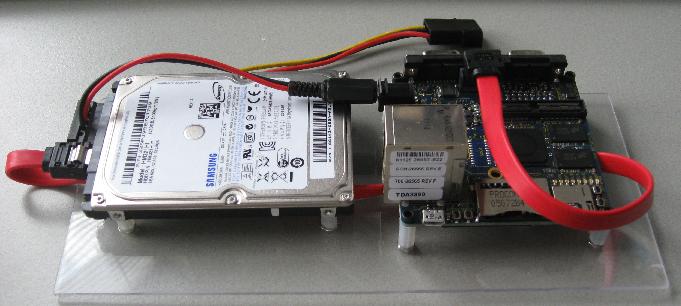
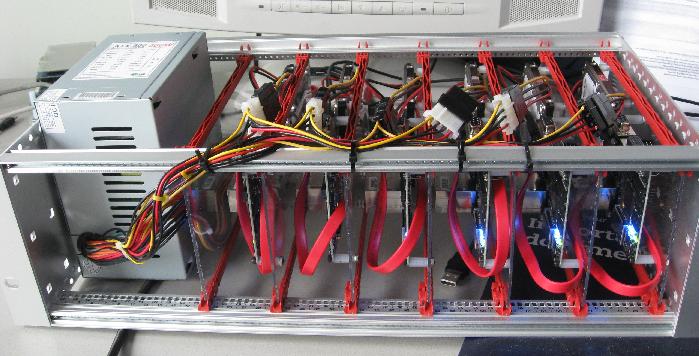
I'm in the middle of setting up new build machines for the armhf port (see the wiki for more details). We'll shortly have six machines set up in the machine room here at ARM in Cambridge: hartmann All of these machines are Freescale i.MX53 Quickstart (aka "loco") development boards. They include a 1GHz i.MX53 CPU (based around the ARM Cortex A8, one of the ARMv7-A family). They have 1GB of RAM and native SATA. They're lovely little machines, measuring just 3 inches square. To mount them usefully in a machine room, I've mounted each board with a 320GB notebook hard drive and the necessary cabling onto a small perspex card as you can see here. Then we can fit 6 such machines and a normal PC-style ATX PSU into a 3U mini-rack. Well, it almost fits - the power supply pokes out a little so we'll need 4U of space when we come to mount it. armhf mini rack The Quickstart boards have been sponsored by Linaro, and ditto my time setting up these machines. Thanks! As is common with new development boards, these machines are not quite fully supported in Debian yet. The kernels we're using are locally-built, using the sources supplied by Freescale. For now, that means a heavily-patched "2.6.35" kernel but we're expecting to be able to switch to mainline very soon. The .config I'm using is kernel.config, and I've built it natively on harris using fakeroot make -j2 deb-pkg DEBEMAIL=93sam@debian.org DEBFULLNAME="Steve McIntyre" KDEB_PKGVERSION=1buildd1 Similarly to the setup for the armel machines, for now I've tweaked things when installing the kernel: Finally, I've tweaked the uboot config on the machines to use the uImage and uInitrd files that are generated by flash-kernel:
MX53-LOCO U-Boot > setenv loadaddr 0x70800000
MX53-LOCO U-Boot > setenv initrdaddr 0x71000000
MX53-LOCO U-Boot > setenv bootargs_sata set bootargs \$\ bootargs\  root=/dev/sda2 rw rootwait
MX53-LOCO U-Boot > setenv load_sata_kernel ext2load sata 0:1 \$\ loadaddr\  /uImage
MX53-LOCO U-Boot > setenv load_sata_initrd ext2load sata 0:1 \$\ initrdaddr\  /uInitrd
MX53-LOCO U-Boot > setenv load_sata run load_sata_kernel load_sata_initrd
MX53-LOCO U-Boot > setenv bootcmd_sata sata init\; run bootargs_base bootargs_sata load_sata\; bootm \$\ loadaddr\  \$\ initrdaddr\ 
MX53-LOCO U-Boot > setenv bootcmd run bootcmd_sata
And I've added extra config into uboot to use the pre-installed Ubuntu system on the micro SD card as a fall-back:
MX53-LOCO U-Boot > setenv bootcmd_rescue sata init\; run bootargs_base bootargs_sata\; mmc read 0 \$\ loadaddr\  0x800 0x1800\; bootm

4 September 2011

Kai Wasserb ch: Untangling the Linux graphics stack

[UPDATE 2011-09-05]I received some questions (or saw them), which I tried to answer with a follow-up entry.[/UPDATE] As I tried to explain this a few times in the past to others and had trouble myself, when I started using Linux, I thought I take some time today and write down what parts comprise the Linux graphics stack and how they interact. I'll ignore some parts which aren't too interesting to an average user at the moment, to keep this post as consise as possible. Apart from that, I hope I'm able to put all the relevant data into one spot. Let us start our little journey in the kernel. There, in a directory named gpu you'll find the drm directory, which contains all DRM drivers. In this post, we'll focus on those. The drivers in that directory are the kernel side of the Direct Rendering Infrastructure (DRI) and are responsible for managing concurrent access to the graphics hardware. They also provide interfaces to pass commands and data to the GPU. The DRI wiki explains the three main purposes of the DRM modules. The DRM module is also the part that decides whether KMS or UMS is used. Other acronyms you might hear with regard to graphics acceleration on Linux and are referring to the Kernel part are: Apart from that, every driver has its hardware-specific parts like utilizing power-saving functions of the respective GPUs, loading firmware, if required, etc. Now we move from Kernel space to user land. We'll ignore any non-X and non-Mesa parts (like acceleration for TTYs). That means, that our next GPU specific part is most likely the DDX. (Please note, that the classic DDX might be replaced by a Gallium3D state tracker, currently that would be the xorg state tracker, but xorg will be replaced by XA. This is only an option if the Gallium driver for your GPU supports one of those state trackers, see the Gallium status page for further details.) The DDX for your GPU offers plain (2D) X acceleration on your hardware. The respective DDX' are generally named xf86-video-[NAME], where [NAME] is replaced by e.g. ati or intel. The DDX decides which X acceleration paths are available. Acronyms you might hear, referring to the DDX part of the graphics stack, are: We're almost through: the last important part is the 3D acceleration offered by a Mesa driver. Mesa drivers come in two flavours: classic (e.g. all Intel drivers which are supported by Intel) and Gallium3D-based (like the drivers for Radeon chips from the R300 onwards). The difference here is, that the Gallium3D drivers try to share as much code as possible (and thus simplify writing a new driver supporting many platforms, systems and technologies), while the classic drivers are specific to certain platforms, chips, and technologies. They share much less code among each other. All parts of Mesa need direct access to the graphics hardware (DRI) The Mesa drivers use the 3D pipeline of the GPUs for accelerated drawing, even for non-3D applications like video acceleration (recently VDPAU, XvMC and VA support were added to Gallium3D, driver support followed quickly). Otherwise the Mesa drivers are mainly used for OpenGL acceleration. Users of OpenGL include scientific programs, CAD and of course games. This concludes our little journey through the various parts of the Linux graphics stack. I hope it helps in understanding the building blocks.

3 September 2011

Gregor Herrmann: RC bugs 2011/21 - 2011/35

over 3 months without a posting about my RC bug squashing activities. that also means I hardly looked at any bugs in packages I'm not (co-)maintaining. anyway, here's the list of fixed RC bugs:

2 September 2011

Asheesh Laroia: Debian bug squashing party at SIPB, MIT


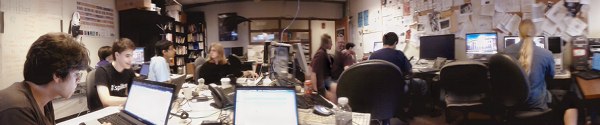
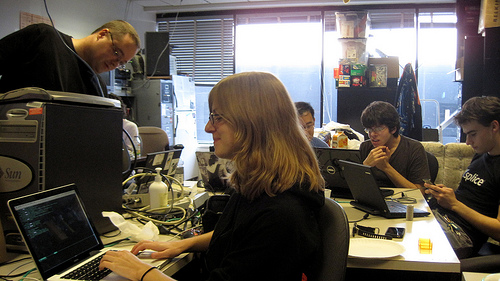
(Photo credit: Obey Arthur Liu; originally on Picasa, license.) Three weekends ago, I participated in a Debian bug squashing party. It was more fun than I had guessed! The event worked: we squashed bugs. Geoffrey Thomas (geofft) organized it as an event for MIT's student computing group, SIPB. In this post, I'll review the good parts and the bad. I'll conclude with beaming photos of my two mentees and talk about the bugs they fixed. So, the good:

The event was a success, but as always, there are some things that could have gone more smoothly. Here's that list: Still, it turned out well! I did three NMUs, corresponding to three patches submitted for release-critical bugs by my two mentees. Those mentees were: Jessica enjoying herself Jessica McKellar is a software engineer at Ksplice Oracle and a recent graduate of MIT's EECS program. She solved three release-critical bugs. This was her first direct contribution to Debian. In particular: Jessica has since gotten involved in the Twisted project's personal package archive. Toward the end of the sprint, she explained, "I like fixing bugs. I will totally come to the next bug squashing party." Noah grinning Noah Swartz is a recent graduate of Case Western Reserve University where he studied Mathematics and played Magic. He is an intern at the MIT Media Lab where he contributes to DoppelLab in Joe Paradiso's Responsive Environments group. This was definitely his first direct contribution to Debian. It was also one of the most intense command-line experiences he has had so far. Noah wasn't originally planning to come, but we were having lunch together before the hackathon, and I convinced him to join us. Noah fixed #625177, a fails-to-build-from-source (FTBFS) bug in nslint. The problem was that "-Wl" was instead written in all lowercase in the debian/rules file, as "-wl". Noah fixed that, making sure the package properly built in pbuilder, and then spent some quality time with lintian figuring out the right way to write a debian/changelog. That's a wrap! We'll hopefully have one again in a few months, and before that, I hope to write up a guide so that we run things even more smoothly next time.

1 September 2011

Niels Thykier: DEP-5, JW, dev docs and other goodies

Are you using DEP-5 in copyright file? Are you doing it right? Thanks to the work of Jakub Wilk, Lintian 2.5.3 will spot some of the regular mistakes (including syntax errors) and check if you are using the newest revision. This is far from the only thing Jakub Wilk has added to Lintian in this development cycle. Most of his contributions in 2.5.3 are listed next to a little [JW] in the changelog and I hope to see a lot more of those. :) Together with Jeremiah Foster, we have created a small POD document that hopefully will help aspiring developers. The file currently explains how the source code is divided, some core concepts and how to run specific tests in the test suite. The plan is to make it available on lintian.d.o along with a link to the git source code (#639974). Last time, I mentioned we have gotten rid of collection/fields by a simple improvement to our Lintian::Collect API. Turns out the same improvement could also be used on collection/source-control-file. This means we no longer create a file per field in the d/control of the source package. To avoid (any more) confusion, Lintian will now inform you if the package carries an override for a non-overridable tag (except if you use --quiet). On a related note, Lintian will now error out if it sees an unknown field in a vendor profile. Previously it would just silently ignore the field. There is one more change I would like to highlight and this one is probably best served with an example:
$ lintian --show-overrides ../lintian_2.5.2.dsc
N: We build-depend on cdbs for the test suite
O: lintian source: unused-build-dependency-on-cdbs
N: We build-depend on quilt for the test suite
O: lintian source: quilt-build-dep-but-no-series-file
N: We don't have a patch system for lintian itself
O: lintian source: patch-system-but-no-source-readme
Lintian will now attempt to extract and print the comment related to the override from the overrides file. The comment will be printed above each tag the override applies to (so you may see some repeated comments). The full documentation for how Lintian finds the comments (or why it does not find the comment) is available in the Lintian User Manual. The exact format of the comments being outputted may change in the near future. Particularly, we may add a marker to assist the tools generating lintian.d.o to find the comments. Hopefully we will be able to close #512901 soon. Beyond the changes above, I am very happy to see the bug count drop below 180 unfixed bugs[1]. We have not been this low there since the 2.5.0~rc1 upload (in February) and I hope we can keep it this time. :) Finally if you ever wanted to run your own little lintian.d.o , then you may find the Lintian harness proposal interesting. The basic idea the is to clean up the current tools and make a proper frontend out of them. Should you be interested, feel free to come with suggestions or requests. [1] Lintain bug page I use the number next to Outstanding under Status near the bottom. So pending bugs are considered fixed in my numbering.

Lars Wirzenius: File copying and removal benchmarking

As part of my development of a backup application, I run benchmarks on it, and that means creating a test data set, running some backups, and then removing the test data set. One of the test data sets I use is a 140 gibibytes of my real data. The benchmark first copies the data to a temporary location. In other words, a fair bit of my current life is spent waiting for files to be copied and removed. The faster that goes, the better. Overnight, I ran a little benchmark on those operations, to compare a couple of ways to do them. The results are below:
  elapsed  cmd
      (s)
    107.2  rm -rf tmp/data
     98.4  find tmp/data -delete
    100.1  find tmp/data -exec rm -rf   +
    116.2  find tmp/data -depth -print0   xargs -0 rm -rf
  elapsed  cmd
      (s)
   3567.5  cp -a tmp/data tmp/copy
   3219.5  cd tmp && mkdir copy && tar -C data -cf - .   tar -C copy -xf -
It is surprising, but it's clear that find is significantly faster than rm in deleting files, by almost ten percent. Since performance is a feature, this would indicate that that feature in rm is buggy. For file copying, the piping of two tars is a common trick, and it really is faster, again by almost ten percent. Obviously, there might also be a problem with the benchmark. I attach the script, which uses benchmark-cmd in extrautils, which I wrote for this kind of thing. If there is a problem with the benchmark, don't hesitate to provide a patch to fix that. There may be other ways to remove or copy files that should be compared, too. rsync? cpio? For file removal, a tool using Linux getdents directly would probably be faster than the portable code in GNU coreutils and findutils. Somebody should write that and compare. In all cases above, the test data set to be removed or copied is 30 GiB. Copies happened to the same disk (that's what happens with my backup benchmarks too). The filesystem used was ext4.

29 August 2011

Uwe Hermann: Flashrom 0.9.4 released - Flashing BIOS/ROM chips from the Unix/Linux command line using various programmers

flashrom logo Forgot to mention this here: We released flashrom 0.9.4 a few days ago, the latest release of the open-source, GPL'd ROM chip flashing software for Linux, *BSD, DOS, and partially also Windows (work in progress, though). Here's a quick summary of the release announcement. Some of the noteworthy news items include: Get the latest release tarball, or download and build the most recent version via Subversion:
  $ svn co svn://flashrom.org/flashrom/trunk flashrom
  $ cd flashrom
  $ make
I already updated the Debian package to 0.9.4 (it has also already migrated to Debian testing and Ubuntu), other people have updated Fedora, Gentoo, NetBSD etc. etc. There's already a huge amount of patches queued for the next release, including support for even more programmers, PowerPC support (tested on Mac Mini and others), and of course the usual "more boards, more chips" items...

28 August 2011

Christian Perrier: 10 years being Debian Developer - part 3: the news and genealogy years

I stopped my story in early 1994, after my Big Switch to the mysterious and new world of Linux. My home server, kheops, is now running Debian and is fed with news and mail by FrMug, formerly French Minix Users Group and now run by AFAU, the "Association Fran aise des Amateurs de Usenet". As I'm still console-challenged, I'm reading mail and news on another machine I have at home, named "khephren", which is running an, ahem, beta copy of Microsoft Windows 95. Yeah, I know...:-) These 1994-1999 years were mostly the Usenet years, for me. I gradually became more and more involved in several fr.* newsgroups, either related to the Linux world...or to the Windows world. The latter was professionnally a bonus for me as 1994 is also the year where I switched from the Material Science department at Onera to the Network and Computing Department. My mission there was to accompany the increasing prevalence of personal desktop workstations in the daily life of what was formerly the Big Castle of Computing at Onera, hosting various generations of Cray computers, most of which being in the Top500 world supercomputers (we even had one in the Top10, very briefly, at somepoint). So, I was "the PC and Windows guy" in this world of supercomputing, Unix and network wizards. But my hobby at home helped me keeping and growing skills in both "worlds" which, over the years, has proven to be a not so common profile..:-) Meanwhile, at home, I was spending hours and nights reading those newsgroups...or getting involved in fr.* hierarchy management..or expanding my friends network to many people in the news, Linux, BSD worlds. That lasted for about 3 years with ups and downs (with three young kids at home, you end up having slightly less time...). I was gradually improving my home server use, adding more functionalities to it, for instance setting it up as a file and print server with Samba 1.9.something (this will be the beginning of a long story with samba!). Unfortunately, my dear Ren had passed in the meantime. Ren did so much for Linux in France that he'll be the only link I give in this article. If you happen to go through P re Lachaise cemetery in Paris, go to its Memory garden instead of visiting Jim Morrison's grave and drink a whisky bottle in memory of Ren . Or just install one of the most funnily named Debian packages: le-dico-de-rene-cougnenc and, again, drink something to his memory (whisky is highly preferred). We then reached 1997 and a specific event: my father (who was very sick for years) passed during summer, some time after my grand-father passed too. As it apparently happens for many people, it triggerred me into the interest for family history. After all, those people who are going away are family memories. And, in some way, I wanted to keep track of this memory. As a consequence, I started collecting family memories, interviewing my close relatives (the oldest ones) and ending, of course, in tracking all this with my computers. That was the start of a long genealogy research that sent me on the track of the Perrier family (of course), but also all other branches, on my mother and father side, as well as reconstructing the tree of cousins we have, etc, etc. As anybody who did that knows, this is quite an endless task but I went very committed to it. I quickly ended up in joining research groups that were using the recent growth of personal access to Internet communication. Those groups were, in these 90's, building elaborated systems where people can help together in their research instead of having to travel to places where archives are stored. I participated to many such groups and even ended up animating one who was doing research in archives of the "Yvelines" "d partement", my place of living (even though I have no family branch there). At the same time, other groups were sending me research results for my own family in the French region where my roots are. Collective effort, help others for free, you can recognize things that are a constant all over these years, indeed. It actually helped me in tracking my Perrier ancestors up to about 1680, with 11 generations of men holding that name (from Jean-Baptiste, my son, up to tienne Perrier, who is born about 1640-1650, in the small village named Briant in Sa ne et Loire, in France). Or even climbing up to Laurent Polette, born circa 1510, mentioned in a document date February 1562. He his my oldest known ancestor.Those folks being 15 generations before me. My oldest ancestor is born under Fran ois the First, King of France, protector of Leonardo Da Vinci, at the time La Joconde was painted or the Chambord castle was built. Doh. Unfortunately, genealogy software, at that time, was quite poor for Unix systems. Lifelines was a quite strong development but wasn't that user-friendly and I ended up using a Windows-based "shareware" software written by an individual. Still, my Linux machine was used quite intensively: databases were stored there, and saved there, all important informations were there, my mail was received there, along with dozens of mailing lists I was reading. I even hosted a few mailing lists on my home server. Still, in the meantime also, again in 1997, in October, another event happened. We had a pollution peak in Paris area and October 1st was the first (and as of now the only ever) day where driving restrictions were applied. Up to that moment, I was driving to/from work (30 kilometers one way). I decided to use this opportunity to really test public transport, for one full month. As I knew it would take me much more time than driving, I tried to imagine a way to use that time. How about reading mail and news on a laptop instead of only at home? Done... In a few days, I found a used Compaq Aero laptop (486 16MHz), I installed Debian "bo" on it, switched my mail and news workflow to console programs (mutt and slrn) and here we go! So, finally, in October 1997, I was using Linux nearly all time long, the only exception being genealogy data handling. That laptop was named "mykerinos" (the small pyramid) and....my laptop is still named mykerinos, though it's now the 5th mykerinos I have..:-) Ah, and since then, I nearly always use public transport to go to/from work. Debian addiction is good for the planet! At some point (I don't remember exactly when...about 1999, I think), DSL connections appeared and one of the first DSL FAI emerged on France: Free. I was already using their services for dialup access, but DSL was then a revolution: persistent connection! And nearly immediately, static IP! I became one of their first DSL customers (and I'm still one). Moreover, I had then friends working there...and they had many Debian machines to host their services. So, with the help of my Freenix friends, some DNS hosting on their machines and the still tireless eu.org entirely free domain, perrier.eu.org was born. Immediately, this gave me opportunities for doing many interesting things with my home server: setting up www.perrier.eu.org and use it....for learning web things and sharing genealogical data. For instance, I ended up hosting some data sent by other genealogists such as digital copies of archives for some French regions, all served through my 512/128kbps DSL line (quickly upgraded to 2Mb, IIRC). And, very quickly, I felt the need to share my family tree, of course! And here comes Geneweb. Written (in Ocaml) by Daniel de Rauglaudre, Geneweb was (and still is) by far one of the best tools to share genealogy data over the Net. So, I ended up installing it on my home machine. Guess how I did that? "apt-get install geneweb", of course. Yes, it was packaged. Indeed by Brent Fulgham who did the initial release on July 22nd 2000. Here, my memory is a little bit vague. I think I actually packaged Geneweb for my own use and sharing it on upstream FTP site, forking Brent's package as a start, but updating to latest upstream release. Then I quickly ended up having discussions with Brent about this new upstream release, and that lead to:
geneweb (3.10-3) unstable; urgency=low
  * Merging with unofficial package from Geneweb ftp site
    (in preparation of new maintainer [Christian Perrier] takeing
    over responsibility).  Note that all of this work is from
    Christian.
  * Default database dir is now writable by members of geneweb group
  * New geneweb group added at installation
  * Package tries to properly handle former installations of the
    unofficial Geneweb package available on Geneweb ftp site
  * Debconf dialogs translated in french
  * More languages available
  * Creation of /var/geneweb/etc, /var/geneweb/cnt, /var/geneweb/images
    with proper permission so that authorised users may use these also
  * When de-installed, all databases are exported with gwu (should allow
    smooth upgrades when the databse format changes)
 -- Brent A. Fulgham <bfulgham>  Mon, 22 Jan 2001 19:30:47 -0800
See? Already "debconf translation to French"! "More languages available". Here we are. As discussed with Brent, he propsoed me to take the package over. So, on January 11th 2001, I had applied in the New Maintainer Process. I'm amazed how quickly it went indeed: there was a tool I needed, it needed to be packaged, I could handle the packaging...and then I decided to be involved. Here we are: bubulle is on his way to become one of those magicians who are building the best universal operating system. Yes, me, the clueless material scientist..:-) How did it go? You'll know this in next episode, of course...

Micha Lenk: Finally transitioning to a new GnuPG key

Finally I managed to write up a transition statement for my not so new, but stronger GnuPG key. See below:
-----BEGIN PGP SIGNED MESSAGE-----
Hash: SHA1,SHA256
I am transitioning my GPG key from an old 1024-bit key to a new 4096-bit key.
The old key will continue to be valid for some time, but I prefer all new
correspondence to be encrypted for the new key, and will be making all
signatures going forward with the new key.
If you have signed my old key, I would appreciate signatures on my new key as
well, provided that your signing policy permits that without reauthenticating
me.
The old key, which I am transitioning away from, is:
pub   1024D/99E141B4 2004-02-10
      Key fingerprint = 25FE 4741 4770 0558 949D  1DB1 58DD 3FE2 99E1 41B4
The new key, to which I am transitioning, is:
pub   4096R/51B85139 2009-06-18
      Key fingerprint = A3EB B41F C5AB D675 CEE4  1C45 EA6C A6B9 51B8 5139
Thanks in advance.
Cheers,
Micha Lenk
-----BEGIN PGP SIGNATURE-----
Version: GnuPG v1.4.10 (GNU/Linux)
iEYEARECAAYFAk5aOnkACgkQWN0/4pnhQbTxPgCgzRhREZlQiKJyI9UIdJLLs3Zq
bH4AnA1myFxgDWM7aUMHXgvvsujLTjiWiQIcBAEBCAAGBQJOWjp5AAoJEOpsprlR
uFE5gCsP/0dtCUPl9aQHV1MbQl7+bMofpsC2ikkpdZmrzi68jTG16We49BuzY+PV
S8FhXqg17/YxhKYDnDNTowfztUOyjAOJxy5vrqm3X5xiLwTqN3js9mra+vb4s35k
EVbKMzLLDhj3i0FjeargWEmJmm9cVhaZWKvOvQUhDJAilqvEQ0/50P7B8I+1YvtV
UHoQKbweTljVSlK5R1YPPy9i6r2/oZBYxK4nrknWwS+qPQ5luqelJd+mZdgQ6tow
7HIvtmPgCblJ+hYZWFpoZK6vxs8RaBbuCQcKwYArNhZT/v4TeD/LAaUmIkbQMyKV
J2TKuEHya4+5GMbtg6BGKeiZpleEHPnAq1AfvGpz6opkxjxCLG3RO3X8D3EuM3RW
mkq60mWM8+Zwu1yKbb62iHplp6jpyiQgdjJlB6eHjX7SdY7CvHgYZxGDx4kclP0/
HAdig2U1T+nG6Nn5XflmmKwvNLuKlQlIwJ5NeXyCONRnYvdomQn2hgvkjwMLCdFh
ulIhxa4UvDY7/aQNPZeOrvDHb2XYpiV3TwA9hLgQXXWd0FPmUMVVPpKpRjilaWth
Mtq/QiMGP5Mq/YxgLInRZHGyajDtE67RD4+RgHYOP50cP3UGPoB4ncc2EEtM2kfe
BzJrXPHmdtyGEA6Korl0YwUTRnYsqkqkY1VqDsO0UkOLlV7RAzb9
=9vw1
-----END PGP SIGNATURE-----

26 August 2011

Luca Bruno: OpenOCD and the Bus Pirate

As an enthusiast Open Hardware supporter, I regularly read the always brilliant Dangerous Prototype blog.
Last week it featured a short but complete tutorial about unbricking a Seagate Dockstar with OpenOCD and the Bus Pirate. The Bus Pirate is an open source hacker multi-tool that talks to electronic stuff, and which can be used as a JTAG adaptor (and much more!).
OpenOCD, the widespread free JTAG debugger, recently gained support for it. The good news is that, after almost a year and half of development, OpenOCD 0.5.0 has been finally released and is currently available in both Debian testing and unstable. Get it from the repository while it is hot, no need to fiddle with autotools and build tools anymore :) As a side-note for interested parties, SWD (Serial Wire Debugging) support is currently under development, along with its companion library (libswd). Hack and enjoy!

24 August 2011

Christian Perrier: 10 years being Debian Developer - part 2: before 1992-1994 - the switch

So, we stopped our very boring story around 1992. Let's summarize where I was at that moment: We're in 1992. Magali is about to come. Three children, from 0 to 4. I'm getting bored of these BBS things. OK, I did fun things like translating (eh) the documentation of Frontdoor a Fidonet node system written by a norwegian dude. But, still. Among my BBS friends, Ren is now playing regularly with a strange thing coming from Finland. This is pretty much like these mysterious "Unix" machines I hear about, sometimes at Onera, ran by strange wizards that often look like hippies from the 70's (hey...these were my youth years). I also have these few friends from the BBS world who are also playing with these thingies. Ollivier, noticeably, who is using of these mysterious @frmug.fr.net "email" addresses, from his PC running 386BSD (what? A PC not running those wonderful MS-DOS programs? How weird). Ren is apparently playing with another tribe. He often talks about an evolution of Minix written by a Finnish student, which is available with source code, just like Ren programs. Ren is also a member of that FrMug tribe, the FRench Minix Users Group, who are comunicating with "newsgroups" that are apparently similar to what we're doing with our BBS....but apparently more funnily hackish...and most often in that mysterious "U**x" world. Ah, that thing is called Linux. You can download it by FTP on "the Internet". But I don't have "the Internet". Oh, sure, we have this thing called BitNet at work, I even have what they call "an email address" as perrier@froner81.bitnet. We can maybe do things with that. Ah yes, there are funny tools that allow "downloading" files on "FTP" (WTH is that?) servers but doing that by mail. You receive dozenes of mails "uuencoded" (WTH is that? I'm not using Unix, I'm using Dos...but, eh, it works, still). Oh, fun, I now downloaded a full set of disks (14....I need to find 14 floppies, doh!) of something called Slackware. Apparently, a crazy freak, somewhere, did assemble things so that it's easy for dummies like me to install "a Linux machine". What? This 386 DX/16 PC I borrowed from my lab could be something like one of these very very very mysterious and expensive Sun machines that a few very bearded and very smelly dudes are using at Onera to perform high performance calculations? I have to do this. Not growing a beard, but install Linux. I could even "read mail" on them. Doh, I could even read those mysterious "newsgroups", that look like our Fidonet "conferences", the only difference being. All this is so interesting. So, at first, let's help my friend Ren to spread out this marvel to the world. Ren did setup his "Renux" box for this and everybody can access it through this very modern UUCP technology, to download Slackware disk images, last versions of the Linux kernel (direct from ftp.ibp.fr, thanks to another pionneer, R my Card....ext2fs author). So, I did setup an incredibly weird system to "download" this stuff by FTPmail, de-uuencode it, process it on my work machine and then re-upload it to my home BBS and make it available in one of the first "Linux" sections of French BBS. Yay. Even of my BBS machine is not running this wonder. Still, gradually, I was becoming bored of this BBS stuff. The sirens of open systems were constantly singing in my ears and the amount of work to put in running a Fidonet node wasn't really motivating for me anymore. Finally, after our daughter Magali was born, in March 1992, I decided to shut down my BBS....and just run as a Fidonet "point" (a personal system not opened to the public) and gradually switched my interest to these open systems. I thus ended running an "experimental" Linux system at work on this refurbished 386DX machine, already and playing between both worlds for about 18 months. At some point, around mid-1993, it became obvious to me that I more wanted to participate to newsgroups-style communication, participate to the advent of this Linux thing and learn things about what was to become "The Internet" (understand "the web", aha). Meanwhile, Ren did great work translating "The Linux System" by this guy, Matt Welsh, making The Thing accessible to dummies like me. So, after summer, I decided it was time to move on and shutdown this Fidonet thing and build something like my "Freenix" friends were running, and be able to download news and mail by UUCP, with my fast HST modem, and process them with Real Men tools such as inn, sendmail, pine and trn. And then, around October 1993, here I come ready to install a Linux machine at home, and therefore zap a few years of BBS stuff on my 40MB hard disk. But, eh, I just read about this shiny new thing named Debian, that was just announced a few weeks ago. It seems to be meant for dummies like me who need a little bit more than tarballs of binary code and have no clue about libraries, ABI and such mysterious things that apparenyl constantly lead to "core dumps" on my work experimental Slackware machine. Also, I don't really understand everything to what these dude says in his "Manifesto" but that seems interesting and his (their? dunno) thing seem easy to use. Let's download the 0.93whatever version of this thing and put this on a big set of floppies. A few days after, voil . I have my first Linux system at home and it is running that Debian thing. It will need several weeks of poking around documentations, playing weird things with INN and sendmail without understanding a s**t of both....and a lot of help from Freenix friends....and I end up with a working machine that can call out FrMug for UUCP downloads of mail and news and then feed local sendmail and INN servers with them and then allow the "bubulle" user to read them remotely...from his Windows machine. Yay, admitedly, I spent a few years still using a Windows machine for mail and news! How to say that? At that time, the GUI environments were a little bit rustic and, anyway, there was no point-and-click programs for mail and news. In the meantime, the machine got upgraded to Debian 1.1 by reinstalling the system. "kheops" was born....and so was bubulle@kheops.frmug.fr.net. We're probably around early 1994 and I'm running my first Debian server at home. The beard didn't grew up, I'm not eating pizzas all day long (but I drink beer) and I'm even practicing physical activities (I was a volleyball player at that time). Despite all these flaws, I'm turning into a geek, slowly. In next episode, you'll learn how I ended up dropping the use of Windows, compiling some free software and contributing to my first package. These will be "the genealogy years".

23 August 2011

Nathan Handler: Google Summer of Code Report #5

This is my fifth and final report about dextools for the 2011 Google Summer of Code program. During the summer, I worked with Matt Zimmerman and Stefano Zacchiroli to create a replacement web dashboard for the Debian Derivatives Exchange (DEX). The dashboard displays a list of projects and their respective tasks and then allows users to easily update the status of these tasks. The dashboard also contains two graphs for tracking the progress of projects and providing instant recognition of all contributions to a project. At the start of the summer, I knew that I wanted to to work on improving the DEX infrastructure. I had worked with the team on the ancient-merges project, and while a lot of good work was accomplished, the process for tracking our progress was a bit clunky and difficult to interact with. Anyone who read my initial proposal for the Summer of Code would probably agree that it was quite vague. I really did not have a solid plan for what I wanted to accomplish. This began to change after my initial phone call with my mentor, Matt Zimmerman. We decided that the first thing I would work on would be a basic dashboard. Our plan was to have all of the data stored on the Debian BTS. This would allow Debian Maintainers to benefit from DEX without needing to learn about DEX s tools and workflows. The dashboard would support multiple derivatives and multiple projects for each derivative. Each project would be made up of a list of tasks, where each task is linked to a BTS bug. I prepared a mockup and some initial code based on that plan. The dashboard was able to successfully display a list of BTS bugs and their information. It generated the lists by assuming that bugs would be usertagged with a user of debian-derivatives@lists.debian.org and a tag in the format of dex
. At this point, we started trying to make sure that the dashboard would work for things like the ancient-patches, python2.7, and the upcoming large-merges projects. It did not take long to determine that it would not work for all of these things. The ancient-patches project started with a simple list of patch names. While most of these patches eventually ended up as bugs on the BTS, they did not start this way. The dashboard would need to support specifying a list of task names. This meant that it would also need to store data itself and that not all data could be located on the BTS. This is when we first started to define what a task is. The dashboard tracks tasks. It does not directly track bugs or patches. A task is nothing more than a title and status with an optional assignee, note, and bug. This made it simple to convert a list of patch names or a list of bug numbers to a list of tasks. During the early early stages of the project, the dashboard moved around a lot. We hoped to have it end up on dex.alioth.debian.org, but we were not sure whether Alioth would meet all of our needs. This was right around the time of the Alioth migration. Thanks to some tips, I figured out that I could use a simple cronjob on wagner to pull the git repository for vasks. This would allow the running instance of the dashboard to always be up-to-date. The Alioth admins have also been quite supportive. They have installed several additional packages for me that were necessary to keep the dashboard running. From the start, Matt felt it was important to have some public documentation about the project. This would allow us to point people to something other than my blog posts. I decided to put this information on the wiki. At one point, I also had a copy of the wiki page stored in the git repository. This file was updated via a cronjob, and I then committed and pushed it when I had code changes. I ultimately decided that the best approach would be to maintain the page on the wiki. A basic README file is included in the git repository that simply links to the wiki page. On wagner, I have a cronjob running to pull a copy of the wiki page so that it can be accessed via the web. Since Matt was traveling/moving this Summer, he arranged for Stefano Zacchiroli to fill in for him as my mentor temporarily. It was at this point in the summer that I began working on the first graph script. The goal was to have a script to parse the list of tasks and generate a graph showing the number of open tasks versus time. This would allow us to easily track our progress, estimate when a project will be complete, and detect periods of slowing down. We decided that while we liked the Ubuntu burndown charts, they were a bit more complex than we needed, so we did not reuse their code. A dashboard that can t be modified is not that useful. An early goal of this project was to allow users to update the dashboard via the web. This proved to be a bit more difficult than I initially thought. First, all of the html files that make up the dashboard are generated by a script. This means that if you modify one of the html files directly, all changes will be lost the next time the script runs. When you make a change on a web form and hit submit, you usually expect to see the changes the next time you visit the page. In order to accomplish this, I made the form processing script directly modify the html files. However, at this point, we did not have a way to locally store extended information about tasks, causing the python script to delete all changes made via the web form. This issue was rectified fairly quickly. There is now a changes file that stores all information submitted via the web form. The python script reads this file and applies the changes when it is generating the html files. A second problem concerned the text inputs that were being used in most of the cells on the table. By default, some fields would have text cut-off if the string was too long. Text inputs have a size attribute that is meant to specify the number of visible characters. I attempted to set this attribute in a script to the length of the input s value. Strangely, the inputs ended up with a lot of extra whitespace following the text. This resulted in the table being stretched horizontally. After many hours of research and testing, I was unable to find a solution to this problem. We ultimately decided to simply remove the size attribute and accept that text will be cut-off. My code got some early testing from Allison Randal and other people working on the dex-ubuntu-python2.7 project. They were a huge help in providing feedback and finding bugs in the code. While the dashboard was unable to meet all of their needs (due to being in the early stages of development), I hope that it at least helped to make it easier to track the project s status. Whenever a script is accepting input from a user, it is important to validate it. Although the dashboard uses a select box to limit the choices for the status , it is still trivial to submit an arbitrary status for a task. That is why I added some validation to the form processing script. It will ignore any unknown values, ensuring that all tasks have a valid status. The other fields are a bit more tricky. They were designed to be arbitrary text fields. As a result, almost anything can be entered. There is no way to tell if something is a title or a person. We thought of a few ways we could change this, but most of them involved locking down the dashboard and restricting changes. The old dashboard treated the fields as arbitrary text, so we decided to not include any validation in the new one. One popular feature request was the ability to link directly to a project. Early versions of the dashboard had one main dex.html page that used javascript to pull in the various projects. To get around this, I first trying using the query string to allow users to specify a distribution and project. While this worked, it resulted in long and ugly URLs. It took a while for me to be able to implement a cleaner solution. However, I eventually split each project into its own static HTML file. This meant that people could simply copy the URL from the address bar to link to a particular project. The main reason for doing this was that we felt the typical person would be interested in working on a specific project; most people won t be interested in navigating between the different projects. This change also allowed links that utilized the #graph anchor to function properly. Before, due to the way the page went about loading the project, trying to specify a specific project and #graph in the URL did not work properly. There is a plugin for jquery that allows tables to be sorted by particular columns. For tables that just contain text, this works fine without any issues. However, once I started using select boxes and text inputs, things got a bit messed up. After some research, I finally figured out how to use addParser to instruct the tablesorter plugin in how to sort each column in the table. In some of the earlier versions, I used some zebra stripes to make the table easy to read. Thanks to a suggestion from Paul Wise (pabs), I got rid of this striping and modified the code to color the rows based on the task s status. Complete tasks are green, in progress tasks are yellow, and incomplete tasks are red. This makes it very easy to find tasks that still need work as well as measure the overall status of a project. Sometimes, a large task list can feel very intimidating. That is why I added the ability to hide completed tasks with the check of a box. Matt wanted to take this one step farther; he wanted the ability to also hide tasks with a closed bug. This is why you will find 2 checkboxes at the top of the dashboard that allow you to custimize which tasks are visible. Eventually, I might add support for specifying this in the URL to allow groups to link to a particular view of the dashboard. In order to make it as easy as possible for new contributors to get involved with DEX projects, I wanted to have a way to document what a project is about and how to handle tasks. I decided to use the wiki for this. All of the per-project documentation lives at http://wiki.debian.org/DEX//
. You can even take advantage of wiki markup to format the documentation. The script will parse the HTML files generated by the wiki, do some minor cleanup, and then display the documentation at the top of the page. My original plan was to use the ?action=raw output, but the lack of formatting proved too restrictive. My second plan was to try and use something like BeautifulSoup or a regex to filter non-whitelisted tags out of the wiki-generated html. This failed and proved to be unnecessary. The wiki does a pretty decent job of preventing malicious markup from ending up on the dashboard. There is a second graph that is displayed on the dashboard. This graph shows the number of tasks each person has completed. The graph is sorted so that the tallest bars on the left, and the goal is to provide some immediate recognition of work done by contributors. Since we essentially allow anyone to go ahead and modify the dashboard, we knew it was important to have a method in place for dealing with abuse. Any malicious edits made on the wiki can easily be reverted. This idea of reverting to an earlier revision is what inspired me to use a second local git repository to store the projects/ directory. This directory stores all of the changes made via the web interface. Whenever the form is submitted or the script runs to update the list of tasks, any changes made to the projects/ directory are committed. This means that if a malicious user decides to delete everything on the dashboard, we can quickly and easily revert the changes. The revision history might also be interesting to analyze at a future date. When multiple people are collaborating on a project, an issue tracker can be quite useful. For some reason, we did not set one up until quite late into the project. Despite that, we are still using it to track known bugs and feature requests. The issue tracker will become even more useful once the dashboard starts to be utilized by more people. I spent a fair bit of time working on having the dashboard immediately respond to changes. For example, if you change the status of a task, the row color will instantly update. The form will also be submitted in the background, eliminating the need to hit submit to save the change. I also use ajax in some new dialogs that allow the user to create new projects and/or tasks via the web. While these forms are submitted in the background via ajax, I am unable to have the changes show up on the dashboard immediately. The generation of the task list is a bit slow, so having the script run more often is not really a good idea. The next step for the dashboard is to really open it up for testing. We hope to start up a new DEX project shortly. This will allow us to see which features work and which need fixing. It will also help us find some of the bugs that are probably hiding in the code. Finally, if you are interested in helping out with DEX or dextools, my code is available in a git repository (http://anonscm.debian.org/gitweb/?p=dex/gsoc2011.git) on alioth. There is also the issue tracker (https://alioth.debian.org/tracker/index.php?group_id=100600&atid=413120) where you can report bugs and request new features. Finally, you can join the debian-derivatives mailing list, join #debian-derivatives on OFTC, or contact me directly via email or on IRC (nhandler). I have really enjoyed working on dextools this summer. I would like to thank Matt Zimmerman, Stefano Zacchiroli, and everyone else who helped with the project. I look forward to working with all of you more in the future.

Matthew Palmer: UPSes in Datacentres

(This was going to be a comment on this blog post, but it s a Turdpress site that wants JS and cookies to comment. Bugger that for a game of skittles. Rimuhosting s recent extended outage due to power problems was apparently caused by a transfer switch failure at their colo provider. This has led people to wonder if putting UPSes in individual racks is a wise move. The theory is that in the event of a small outage, the UPS can keep things humming, and in an extended outage you can gracefully shut things down rather than having a hard thump. I happen to think this theory is bunkum. Your UPS is a newly instituted single point of failure. I d be willing to bet that the cost of purchasing, installing, and maintaining the UPSes, as well as the cost of the outages that inevitably result from their occasional failure, would be far greater than the cost of the occasional power outage you get in a well-managed facility. Good facilities don t have small outages. They don t have squirrels in the roof cavities, and they don t have people dropping spanners across busbars. The only outages they have are the big ones, when some piece of overengineered equipment turns out to be not so overengineered the multi-hour (or multi-day) ones where your UPS isn t going to stop you from going down. Your SLA credit and customer goodwill is already toast, so all you re saving is the incremental cost of a little bit more downtime while you get fscks run. If you want the best possible power reliability, get yourself into a really well engineered facility, and run dual-power on everything. Definitely run the numbers before you go down the UPS road; I ll bet you find they re not worth it.

Rudy Godoy: Compute clusters for Debian development and building final report

Compute clusters for Debian development and building final report Summary
-
The goal of this project was intended to have Eucalyptus cloud to
support ARM images so it allows Debian developers and users to be able
to use such facility for taks such package building, software
development (ie. Android) under a Debian pre-set image,
software testing many others. What was expected to have at the end is a modified version of Eucalyptus
Cloud that supports ARM images on the first place. To date this goal has
been reached but is not complete, read production-ready. Extensive test
needs to be done. Besides that we have another goal which is to get
Debian community to use this new extended tool. Project overview
-
Eucalyptus is a hybrid cloud computing platform which has a Open Source
(FLOSS) version. It s targetted to be used for PaaS (Platform as a
Service), IaaS (Infrastructure as a Service) and other distribution
models. It can be used also for cloud management. Given that it has
implemented the EC2, for computing, and the S3, for storage, API, it s
compatible with existing public clouds such Amazon EC2. Currently it
supports running i386 and amd64 images or NC (Node Controllers) in
Eucalyptus naming. Eucalyptus is a complex piece of software. It s architechture it s
modular composed by five components. Cloud Controller (CLC), Walrus (W),
Storage Controller (SC), Cluster Controller (CC) and Node Controller
(NC). The first three are written in Java and the remaining are written
in C. Our project modifications was targetted to the NC component,
altough there is a remaining task for hacking the UI to allow setting
the arch of the uploaded NC image instance. The Node Controller is in charge of setting the proper information for
Eucalyptus to be able to run virtualized images. Eucalyptus uses XEN and
KVM hyphervisor to handle internal virtualization subsystem, and
Libvirt, which is an abstraction of the existing virtualization
libraries, for program interfacing. Having that in mind we are back to our project. For our project to be
sucessful we had various tasks to do. Beginning with understanding such
complex piece of software, followed by hacking the requiered bits and
later integrate the work so it results in a useful tool. Our approach to
the project was then inline with such description. The project s history
I started my participation in GSoC approaching Steffen to discuss about
what was expected, or more accurately, what was in his mind. We
exchanged emails previous to my application and that resulted on my
application being submitted. From the beginning I should tell that I
wasn t much clear on the final product of the project, however we
refined ideas and goals during the weeks following to the official
begining of the project. What was clear for me, after all, is that for
this to see the light and gain adoption Eucalyptus code needed to be
dealt with. Our first task was review ARM image creation from scratch, using the
work done by Aurelien and Dominique in previous GSoC. I ve managed to
get an updated ARM image running under qemu-system-arm. The issues
presented in the past were almost unexistant now that the versatile
kernel is official. You can see this on my first report. After that being done and sometimes in parallel my main goal was then understand
the internals of the Eucalyptus software in order to figure out it s
feasibility, where do we need to extend and how big the task is, we
didn t knew upfront. From the beginning of the project Steffen was kind
to introduce me to the Eucalyptus developers and that have resulted in a
good outcome for Debian, IMHO, to date. Understanding Eucalyptus internals was quite a fun task to say the less. As you
can see on the first part of the report Eucalyptus is modularized and
the component I was expected to work with was the NC (Node
Controller). Given that I isolated my work focus, I started to focus on
learning the internals about that component. Node Controller as described is in charge of talking with
virtualization hyphervisors in order to arrange things to run guest
image instances. The module has basically one main component: handler.c,
in charge to talk to the appropiate hyphervisor and there are
extensions (think of OOP polymorphism but acknoledge it s plain C)
that interact with KVM or XEN. I figured that if qemu-kvm is ran in Hyphervisor mode we can manage to
run an ARM image with qemu-system-arm. Given that Eucalyptus has
interaction with KVM hyphervisor in place, this answered the question of
the project s feasibility. First green light on.
>From this point the scope reduced to interacting with the KVM handler
(node/handler_kvm.c) and extend it to support running an image that is
not amd64 or i386. NC makes use of libvirt to abstract interaction with Hyphervisors. So,
the next phase was learning about it s API and figure what s needed to
be modified next. Libvirt uses a XML file for setting Domain (in
libvirt s naming) definitions. So, Eucalyptus provides a Perl wrapper to
generate this file on runtime and allow the NC to invoke libvirt s API
to run the instance. Next task then, was adapt such script to support
ARM arch. The current script is taiolred for amd64 and i383. I worked on
that front and managed to get a script prototype, that can later be
improved and support more arch s. Generating an adequate Libvirt s XML Domain definition file for ARM can
be a heroic task. There are many things to have in mind given the
diversity of the ARM processor and vendors. I focused on the versatile
flavour given that I was going to test the image I built on the first
place and it ran fine under qemu-system-arm.
The Perl script wrapper then was adapted for such configuration and it
can be tested independently by issuing the following command: $ tools/gen_kvm_libvirt_xml arch arm The arch parameter is what I implemented and it s intended to be
called from the kvm handler on instance creation. With the extensibility
in mind I ve created a hash to associate the arch with their
corresponding emulator. our %arches = (
amd64 => /usr/bin/kvm ,
arm => /usr/bin/qemu-system-arm ,
); Added the arch parameter to the GetOptions() function and used
conditions to tell whether the user is looking for a particular arch,
arm in our case. The most important parts to be considered are the
, and entries. hvm $local_kvm There s also and that require to be tailored for arm. root=0800 As output the script generates an XML template that can be adapted to
your needs and it could be used and tested with tools like Libvirt s
virsh. So that, it can be useful independently of Eucalyptus. I managed
to get to this point before the midterm evaluation. Now that we had the XML wrapper almost done, the next task was to make
the handler call pass the arch as an argument to the script, so the
image is loaded with the proper settings and we are able to run it. Eucalyptus doesn t have a arch field for NC s instances. So, after approaching
Eucalyptus developers, with whom we had already being interacting, I
settled to my proposal of extending the ncInstance struct with an arch
field (util/data.h). The ncInstance_t struct stores the metadata for the
instance being created. It s used for storing runtime data as well as
network configuration and more. It was indeed the right place to add a
new field. I did so by creating the archId field.
Now I needed to make sure the arch information is stored and later used on the
libvirt s call. typedef struct ncInstance_t
char instanceId[CHAR_BUFFER_SIZE];
char imageId[CHAR_BUFFER_SIZE];
char imageURL[CHAR_BUFFER_SIZE];
char kernelId[CHAR_BUFFER_SIZE];
char kernelURL[CHAR_BUFFER_SIZE];
char ramdiskId[CHAR_BUFFER_SIZE];
char ramdiskURL[CHAR_BUFFER_SIZE];
char reservationId[CHAR_BUFFER_SIZE];
char userId[CHAR_BUFFER_SIZE];
char archId[CHAR_BUFFER_SIZE];
int retries; /* state as reported to CC & CLC */
char stateName[CHAR_BUFFER_SIZE]; /* as string */
int stateCode; /* as int */ /* state as NC thinks of it */
instance_states state; char keyName[CHAR_BUFFER_SIZE*4];
char privateDnsName[CHAR_BUFFER_SIZE];
char dnsName[CHAR_BUFFER_SIZE];
int launchTime; // timestamp of RunInstances request arrival
int bootTime; // timestamp of STAGING->BOOTING transition
int terminationTime; // timestamp of when resources are released (->TEARDOWN transition) virtualMachine params;
netConfig ncnet;
pthread_t tcb; /* passed into NC via runInstances for safekeeping */
char userData[CHAR_BUFFER_SIZE*10];
char launchIndex[CHAR_BUFFER_SIZE];
char groupNames[EUCA_MAX_GROUPS][CHAR_BUFFER_SIZE];
int groupNamesSize; /* updated by NC upon Attach/DetachVolume */
ncVolume volumes[EUCA_MAX_VOLUMES];
int volumesSize;
ncInstance; With that in place what was left was modifying the functions that
store/update the ncInstance data, and also the libvirt s function that
calls the gen_kvm_libvirt_xml script. I ve modified the following files:
- util/data.c
- node/handlers_kvm.c
- node/handlers. c,h
- node/test.c
- node/client-marshall-adb.c Most important the allocate_instance() function that is in charge of setting up
the instance metadata a prepare it to pass it to the handler, then
hyphervisor trough Libvirt s API. The function now has a new archId
parameter as well, to keep coherence with the field name. It also
handles whether the field is set or not. We (Eucalyptus developers and
I) haven t settled wether to initialize this field with a default value
or not. I d stepped up and initialized with a NULL value for this string
type var. if (archId != NULL)
strncpy(inst->archId, archId, CHAR_BUFFER_SIZE);
Stores the value only if it s passed to the function. This is essential to
don t break existing functionality and keep consistency for later releases.
With this we almost finished the part of extending Eucalyptus to support
arm images. It took quite long to get to that point. Next step: test. As I mentioned in my previous report the current Eucalyptus packaging
has issues. From the beginning I ve approached the pkg-eucalyptus team,
who were very hepful. So I myself set me up and joined the pkg team with
commit access to the repo. Even the GSoC is not intended for packaging
labour, I needed to clear things on that side because what we want is
adoption so anyone, say a DSA or a user, could setup a cloud that has
support for running arm instances under amd64 arch. Over the weeks between mid-term evaluation and past week I ve worked on
that front. Results were good, as you can see in the pkg-eucalyptus
mailing list and SVN repo.
Eucalyptus has a couple of issues that because of it s nature and complexity
triggered build errors. Those issues came from the Java side of the project and
few form the C-side. The C-part was a problem with AXIS2 Jar used to generate
stubs for later inclusion on build-time. There s no definitive solution to date
because one of the Makefile on gatherlog/Makefile issues a subshell call that
doesn t catches the AXIS_HOME environment variable. I ve worked around this
by defining it as a session env var from .zshrc. The other problem is related
to the Java libary versioning and most likely (we had to investigate further)
to groovy versioning. As I explained Eucalyptus has 3 components written in Java. The Java code uses
extensively the AXIS2 library for implementing webservices calls, the groovy
language for JVM, and many other Java libaries. Eucalyptus open source version
ships both online and offline versions. The difference is basically that
the offline version ships the Java libaries JAR files inside the source code,
so you can build with all required deps. Our former packaging used a file to list which Java libraries the package
depends on and it symlinked them using system wide installed packages. This
rather than helping out triggered a lot of problems I explaing with more detail
on the pkg-eucalyptus ml. I worked around this by telling the debian/rules
not to use such file to symlink and instead use the existing ones from
the source. The last weekend I managed to get to that point and built
sucessfully the software under Debian. I ve done that in order to have a
complete build-cycle for my changes, and then test. In fact today I ve
spotted and fixed a couple of bugs there. What s available now

To date we have a Eucalyptus branch where my patches are sent. The level of
extension is nearly complete, more testing needed. One missing bit is to
change the UI so that the user selects which arch her image is and that
value is passed to the corresponding functions on the Node Controller
component. We also have an ARM image that can be tested and later automated. I ve
recently learned about David Went s VMBuilder repo that extends Ubuntu s
vmbuilder to support image creationg. I might talk to him to adapt the tool
in order to support creation of arm images and use it to upload to an
Eucalyptus cloud. I ve also created a wiki page with different bits on which I was working on.
I ve yet need to craft it to be more educational. I guess I m going to use
this report as a source :) We also had more strong cooperation with the Eucalyptus project and
involved their developers on the packaging and this project, which is
something I consider a great outcome for this project and GSoC goals:
to attract more people to contribute to FLOSS. I ve also been contacted by
people from the Panda Project and we might cooperate also. Future work

I plan to keep working on the project regardless the GSoC ends. Our goal
as Debian could be integrating this into the Eucalyptus upstream
branch. We have good relations with them so expect news from that side.
I also plan to keep working with the Eucalyptus team and related
software in Debian, given that I m familiarized with the tools and
projects.
I m also planning to advocate SoC for Debian in my faculty. To date we
had already 4 students, IIRC, that have participated in the past. Project challenges and lessons
During the project I faced many challenges both in the personal side
and in the technical one. This part is a bit personal but I expect we
learn from this. First challenge was the where do I sit problem. My project was
particular, indeed quite different from the others on it s nature. I had
to work on a software that is not Debian s and then come and say Hey we
have this nice tool for you, come test it! . So, indeed, my focus was on
the understanding of such tool, Eucalyptus, and not much on looking back
at Debian because I didn t feel I had something to advertise yet and
indeed I got most valuable/useful feedback from Eucalyptus developers
rather than Debian s, which for the case is OK IMHO. I had great
mentoring. This situation probably looked a bit of isolation from my
side, from Debian s POV, but it was not intended it s just how it needed
to be IMHO. I felt that I wasn t contributing directly to the
project. I ve spoke about such thing with Steffen a couple of times. I d
like to say that it was also my concern but I probably failed on
communicating this, second challenge. Third challenge was more technical and related to the first one. Since I
was not writing any code for a Debian native package/program but instead for
other project I faced the situation of where to publish my
contributions. Eucalyptus had some issues on managing their FLOSS repo
and the current development one is outdated comparing to the
-src-offline 2.0.3 release. The project didn t fit pkg-eucalyptus repo
neither, even we thought to branch the existing trunk and ship my
contribs as quilt patches, but it involved a lot of more work and burn
on reworking something that has issues now. Later on time I branched the
bzr eucalyptus-devel Launchpad repo and synced there with the
src-offline code. I was slow to react on thing I can say. Fourth challenge was also technical and still dealing with. I was looking to
setup a machine to set a cloud and test my branch. The Dean of my faculty
kindly offered a machine but I ve never managed to get things arranged
with the technical team. Steffen and I discussed about this and evaluated
options, at the end we settled on pushing adoption rather than showcasing it.
Since for adoption we need a use case, I ve spend some SoC money on hardware
for doing this. I should have news this week on that side :) Finally, I d like to thank everyone on the Debian SoC team for this
opportunity to participate. I like to thank Steffen for his effort on
arranging things for me, Graziano from Eucalyptus for his advice on
working with the software code. The different people from Eucalyptus I
interacted with and showed interest on the project s sucess. My
classmates and teachers from the Computer Science School at UCSP in
Arequipa-Peru, friends from the computing community in Peru SPC and
finally my family. Thank you, I learned a lot, specially on the personal
side. As Randy Pausch put: The brick walls are there to give us a
chance to show how badly we want something. Resources
Please see the Wiki page[1] for any reference to the project s resources. 1- http://wiki.debian.org/SummerOfCode2011/BuildWithEucalyptus/ProjectLog Best regards,
Rudy

21 August 2011

Chris Lamb: Timezone bingo in debian/changelog files

Tim pointed out that it's worth travelling simply for the new timezone in your debian/changelog entries. We can use AptFs to work out who has collected the most so far:
import os
import glob
import itertools
import collections
from dateutil.parser import parse
from debian.changelog import Changelog
data = collections.defaultdict(set)
for package in glob.glob('/apt/*'):
    if os.path.islink(package):
        continue # Consider source packages only
    try:
        changelog = Changelog(open('%s/debian/changelog' % package))
    except:
        continue # Ignore invalid changelogs
    for entry in changelog:
        try:
            data[entry.author].add(parse(entry.date).strftime('%z'))
        except ValueError:
            pass # Ignore invalid dates
fn = lambda x: len(x[1])
top = sorted(data.items(), key=fn, reverse=True)
for k, g in itertools.groupby(top, key=fn):
    print "\n%d timezone(s):" % k
    for author, timezones in sorted(g):
        print " * %s (%s)" % (
            author.encode('utf8', 'ignore'),
            ', '.join(sorted(timezones, reverse=True)),
        )
14 timezone(s):
 * Bdale Garbee <bdale@gag.com> (-0800, -0700, -0600, -0500, -0400, -0300,
   +1300, +1100, +1030, +0900, +0300, +0200, +0100, +0000)
12 timezone(s):
 * Joey Hess <joeyh@debian.org> (-1000, -0900, -0800, -0700, -0500, -0400,
   -0300, -0200, +0300, +0200, +0100, +0000)
11 timezone(s):
 * Paul Wise <pabs@debian.org> (-0400, -0300, +1300, +1100, +1000, +0930,
   +0900, +0800, +0200, +0100, +0000)
9 timezone(s):
 * Barak A. Pearlmutter <bap@debian.org> (-0700, -0600, -0500, -0400, +0500,
   +0300, +0200, +0100, +0000)
 * Martin Michlmayr <tbm@cyrius.com> (-1000, -0700, -0300, +1100, +1000,
   +0300, +0200, +0100, +0000)
 * Martin Pitt <mpitt@debian.org> (-0800, -0700, -0600, -0500, -0400, +0300,
   +0200, +0100, +0000)
 * Sam Hocevar (Debian packages) <sam+deb@zoy.org> (-0700, -0500, -0400, -0300,
   +0930, +0300, +0200, +0100, +0000)
Full output. However, something tells me we aren't going to see widespread gamification of Debian development.

Next.

Previous.