Search Results: "reg"

12 March 2015

Hideki Yamane: localized directory name is harmful

Summary: xdg user directory spec is broken, I want to fix it.

One of annoyed things in Linux Desktop environment is localized user's directory (e.g. $HOME/ , instead of $HOME/Download). I know it is handled by XDG, my ~/.config/user-dirs.dirs has setting as below (by default).

XDG_DESKTOP_DIR="$HOME/ "
XDG_DOWNLOAD_DIR="$HOME/ "
XDG_TEMPLATES_DIR="$HOME/ "
XDG_PUBLICSHARE_DIR="$HOME/ "
XDG_DOCUMENTS_DIR="$HOME/ "
XDG_MUSIC_DIR="$HOME/ "
XDG_PICTURES_DIR="$HOME/ "
XDG_VIDEOS_DIR="$HOME/ "

So XDG utlility program changes it as setting, moves ~/Desktop to ~/ . However, it is NOT what users want.

Because if you would play with shell, you should also input localized characters in your terminal. Imagine, sometimes I download files with browser, then use it in terminal - download some tar.xz file and extract it. Well, it is downloaded in ~/ directory... it's not convinient - you cannot use tab completion without IME (input method editor), e.g. Anthy or Mozc for Japanese. And if you don't want to install it, what do you do? Use mouse to copy&paste?

Then, some Japanese people create webpages about "How to change localized user directory back to English name" ;)

Windows and OS X has localized Desktop, Download, Document directory, too. But it's not directory itself. In Windows, you can see " " (Desktop) with Windows Explorer but it is seen as just "Desktop" directory with cmd.exe (I don't know how to trick it. Maybe Windows registory magic). And in OS X, same thing with Finder. Those users don't annoy with localized directory name, it's friendly and convinient for cmd/shell users, and also for GUI (Windows' Explorer/OS X's Finder) users.


And also, it seems that localized directory name is good for average users who use File manager (Nautilus, etc). Just labeled with only English is not friendly to non-English native users like my mother ;) (Yes, localization is important!) But it's _better_ for *everyone* to set directory name with English _and_ localized with hardlink (and probably not harm anyone).

So lazyweb, could you tell me where should I go to talk this issue with upstream? It's not big thing, but still annoying. I can change it with xdg-user-dirs-update for my environment but it's just a workaround, not solution for this problem.

11 March 2015

Richard Hartmann: 100g for deleting

On the assumption that the post titled "Delete file when you have more than 100g for deleting" on the "Linux.com - Content Feed" is not an elaborate joke, it's not unlikely that it will be deleted so I will conserve it here: Hello Linix community members, Today I would like to share a simple script for deleting files when you have more than 100g for deleting and when you try to delete using rm -rm /path/fo/files failed. To do this I use the following procedure; first I use a "for" ciclo to read file that I going to delete also you can use a mtime for calculate file's date that you're going to delete or you can to calculate previous date of a past day "x=TZ=GMT+24 date +%Y%m%d" Ex;
#!/bin/bash -x
x= TZ=GMT+24 date +%Y%m%d 
delcnt=0
for files in  find /path/of/file/to/eraser/ -name \*$x*.bin.gz 
do
echo "Deleting file $files"
/bin/rm -rf $files
delcnt=$(($delcnt + 1))
done

Best regards Charles E. Rivera Solaris Server Specialist Engeeneer But then, Linux.com still aggregates Phoronix, so their focus is not exactly on quality.

9 March 2015

Ulrike Uhlig: Final report from the Outreach Program round 9

Between december 9th 2014 and march 9th 2015 I ve been working as an intern for Debian on Improving AppArmor support in Debian. Progress Before the internship started, I had no clue about AppArmor at all. Reading the Wikipedia page and the AppArmor wiki did barely enlighten me. At least, until I got my hands dirty and installed and activated it. I was able to do this only because there was already some basic documentation on the Debian wiki on how to get AppArmor running on a Debian system. When the internship started I felt a little bit lost. I started to read the documentation and to play around with some AppArmor profiles. But the error messages I saw and the profiles I opened for reading overwhelmed me. What did all these lines mean? Then one mentor briefed me about the current status of AppArmor in Debian. I took many notes and tried to bring some order into the information I was being given. These notes became the first page of the documentation and my first blog post.
Surprise: suddenly I was in the middle of knowing what we were talking about and how the next few weeks would look like. To start with, I have set up a test environment and continued to test some of the profiles which came with the packages I had installed, namely apparmor-profiles-extra which provided me with a profile for Pidgin. I was very much interested in securing this several thousand lines long C-code application on my machine! As a Pidgin user, I noticed immediately that one of my favourite features pidgin blinklight threw an error in the logs. I tried to fix it on my test VM and eventually made it work. Now knowing that such fixes should first be done upstream, i cloned the corresponding upstream repository and sent my first patch. It was not easy at first to switch to another VCS than Git, although I had been using Bazaar and Subversion years ago. Shortly afterwards, I saw my patch showing up on the upstream mailing list, and some days later it got merged. That was a huge encouragement. I was now able to write more documentation on how to contribute upstream. In order to organize the documentation, we ve set up some User Stories. I did not know about this tool before and had quite a hard time to grasp all the details but it proved to be very useful as some pages started to become long and confusing. Writing the documentation took up a lot of time, but before being able to write anything down, I needed to work everything out! This way I incidentally learned how to interact with many parts of Debian s infrastructure: While playing around with the tools provided to inspect AppArmor status on the system, I even accidentally found a little bug in one of the upstream tools. It got fixed very quickly after I mentioned it on the AppArmor team s mailing list. Organization Although I was uncomfortable with this in the beginning, we organized public meetings every two weeks on IRC. These meetings were also attended by MeetBot who took care of taking notes and leaving a trace of our discussions.
Based on the meetings, I maintained a progress page and todo list on the Debian wiki, which helped us to know which tasks were planned for the next two weeks. Before each meeting I sent a status update to the mailing list, so the mentors could catch up with my work. During the meetings I was not only asked to provide feedback on progress but also on mentoring itself. It proved to be very useful to be able to say where I was stuck and if the mentoring process worked out well enough (it did!).
Furthermore, I got regular, detailed and pedantic (thanks for trying to push me to perfection!) feedback on the team s mailing list. The mentors had introduced me on the upstream IRC channel in the beginning, so most of the people who are active there knew about my existence, something which also proved to be handy! Future The internship time is over, but some work remains to be done. As a new member of the AppArmor Packaging team, I am committed to make it happen: Thanks I feel much more confident after these three months, technically but also personally. Thank you: Holger Levsen and intrigeri for mentoring and encouraging me on this journey and to upstream contributors Christian Boltz, Steve Beattie (and everybody else I might forget here) for providing help and feedback. The Debian community (OPW organizers, sponsors, Alioth maintainers, planet.debian.org maintainers although my posts don t show up anymore :( -and others) has been very friendly and welcoming and I am very happy to be part of it.

8 March 2015

Gregor Herrmann: RC bugs 2015/07-10

finally, some simple RC bugs appeared, & I could contribute a bit towards the jessie release:

6 March 2015

Dirk Eddelbuettel: Rcpp 0.11.5

The new release 0.11.5 of Rcpp just reached the CRAN network for GNU R, and a Debian package has also been be uploaded. Rcpp has become the most popular way of enhancing GNU R with C++ code. As of today, 345 packages on CRAN depend on Rcpp for making analyses go faster and further; BioConductor adds another 41 packages, and casual searches on GitHub suggests dozens mores. This release continues the 0.11.* release cycle, adding another large number of small bug fixes, polishes and enhancements. Since the previous release in January, we incorporated a number of pull requests and changes from several contributors. This time, JJ deserves a special mention as he is responsible for a metric ton of the changes listed below, making Rcpp Attributes even more awesome. As always, you can follow the development via the GitHub repo and particularly the Issue tickets and Pull Requests. And any discussions, questions, ... regarding Rcpp are always welcome at the rcpp-devel mailing list. See below for a detailed list of changes extracted from the NEWS file.
Changes in Rcpp version 0.11.5 (2015-03-04)
  • Changes in Rcpp API:
    • An error handler for tinyformat was defined to prevent the assert() macro from spilling.
    • The Rcpp::warning function was added as a wrapper for Rf_warning.
    • The XPtr class was extended with new checked_get and release functions as well as improved behavior (throw an exception rather than crash) when a NULL external pointer is dereferenced.
    • R code is evaluated within an R_toplevelExec block to prevent user interrupts from bypassing C++ destructors on the stack.
    • The Rcpp::Environment constructor can now use a supplied parent environment.
    • The Rcpp::Function constructor can now use a supplied environment or namespace.
    • The attributes_hidden macro from R is used to shield internal functions; the R_ext/Visibility.h header is now included as well.
    • A Rcpp::print function was added as a wrapper around Rf_PrintValue.
  • Changes in Rcpp Attributes:
    • The pkg_types.h file is now included in RcppExports.cpp if it is present in either the inst/include or src.
    • sourceCpp was modified to allow includes of local files (e.g. #include "foo.hpp"). Implementation files (.cc; .cpp) corresponding to local includes are also automatically built if they exist.
    • The generated attributes code was simplified with respect to RNGScope and now uses RObject and its destructor rather than SEXP protect/unprotect.
    • Support addition of the rng parameter in Rcpp::export to suppress the otherwise automatic inclusion of RNGScope in generated code.
    • Attributes code was made more robust and can e.g. no longer recurse.
    • Version 3.2 of the Rtools is now correctly detected as well.
    • Allow 'R' to come immediately after '***' for defining embedded R code chunks in sourceCpp.
    • The attributes vignette has been updated with documentation on new features added over the past several releases.
  • Changes in Rcpp tests:
    • On Travis CI, all build dependencies are installed as binary .deb packages resulting in faster tests.
  • Thanks to CRANberries, you can also look at a diff to the previous release As always, even fuller details are on the Rcpp Changelog page and the Rcpp page which also leads to the downloads page, the browseable doxygen docs and zip files of doxygen output for the standard formats. A local directory has source and documentation too. Questions, comments etc should go to the rcpp-devel mailing list off the R-Forge page.

    This post by Dirk Eddelbuettel originated on his Thinking inside the box blog. Please report excessive re-aggregation in third-party for-profit settings.

    5 March 2015

    EvolvisForge blog: I have to give you that one

    After seeing what the Wildfly (formerly JBoss AS) and Liferay combo does to /tmp, and somewhat attempting to fix it, I saw JVM_TMP in the Debian tomcat7 init script and thought, oh no, not another one. Is that even safe, what they do here, or is that a possibility to instantly pwn? The net is full of literature for how to obtain temporary files and directories, but there is nothing about how to reliably obtain paths under /tmp or, more generally, directories not just writable for one single user (think the g+w thing that got FusionForge CVE-2013-1423). The scenario here is: I am root, and I want to start something as another user, and pass it a stable path, such as /tmp/liferay. So I can just mkdir /tmp/liferay die; chown thatuser /tmp/liferay and, in the stop process, rm -rf /tmp/liferay, right? (Of course not. Also, bad example, as the liferay thing can also be started as thatuser, and our devs regularily need to do that, the init script is there just for the admin convenience and reboot-safety. But I still am interested if there is a secure way to achieve this.) The tomcat7 scenario is trivial : on That Other Init System , it would just get its private /tmp declared in the .service file, and good is, no more hassle. That s one I have to give you. (No idea if this is actually shipped in jessie. Our production systems run wheezy anyway, so there is not even the slightest bit of temptation. Plus, it would not solve the liferay issue, see above. Still, a point for going into the right direction.) The idea here is the same. It creates a directory on start and tears it down on stop. If there was nothing to do on start, the init script could just use mktemp -d. Heck, maybe it still should, but it would need to note down, and communicate to the stop instance, the actual name used. What a drag This is something I see popping up from time to time. I want to use stable paths for SSH session multiplexing control sockets in my ssh_config(5) file, but have them on tmpfs (Linux) or mfs (BSD) so they get properly removed on reboot. No Unix traditionally has per-user temporary directories that are clean and created after reboot. (Adjusting the paths is trivial once you have them.) Android has it worse, what with not having a world-writable tmp directory, which the shell needs e.g. for here documents; there are two components here, to have a directory the current user can write to, and to know its location. Some fail at the first, some at the second, some at both, and the classic /tmp is not the cure, as we have seen. (But if you ever see mksh erroring out due to lack of write permissions somewhere (including /sqlite_stmt_journals which used to be it) as non-root on Android, or even as root, set TMPDIR to something writable; it s tracked, so the change gets active immediately.)

    2 March 2015

    Jonathan Dowland: Debian and Docker

    I've been playing around with Debian and Docker a little bit. I found Joey Hess' post about Docker trust interesting reading, in particular this advice:

    I'd recommend only trusting docker images you build yourself. I have some docker images published somewhere that are built with 100% straight debootstrap with no modifications (...) But I'm not going to link to them, because again, you should only trust docker images you built yourself.
    On that advice, I did exactly that. I've pushed the basic scripts I used to build my images to github:jmtd/debian-docker. Suggestions welcome! However, I am planning to share the images I build, at least for my own convenience, on the Docker repository. I'm hoping to publish some PGP-signed sums somewhere so you could verify the binary images on the Docker registry if you so wish. The three images I'm currently maintaining are: (note: I haven't pushed them all yet.) With docker 1.5.x at least, the i386 image works fine on amd64 hosts. I've used it as the basis for running wine and Windows binaries. I might push a wine image if I generalise it enough to be more useful. The Docker folks recommend using Debian as a base image because it's a small size (approx. 163M for my base image, 85.01M for the semi-official one: See Joey's blog for some of the differences) but with a good set of tools. I wondered whether I could leverage the efforts of the Emdebian project to get an even smaller base image. Unfortunately, the Emdebian project discontinued their 'Grip' project midway through last year. A basic Emdebian grip install is a fair bit smaller than the equivalent wheezy image, but once you've applied security updates most of the difference is lost. I suspect that some of Emdebian's minimisation techniques would be useful and applicable for shrinking Docker base images.

    DebConf team: Inviting speakers to DebConf15 (Posted by Ren Mayorga)

    Last year for the DebConf edition that took place in Portland, we had some invited speakers that helped bring a different point of view to the matters discussed during the conference. This year we would like to do this again. If you would like to suggest inviting someone that would not regularly attend DebConf, the DebConf Content Team encourages you to do that now. We will stop accepting new suggestions on 10 March 2015. You can follow the simple procedure described on the Inviting Speakers page in the DebConf s Wiki Please keep in mind that we don t promise to bring to Heidelberg everyone that is suggested. The final list of invited speakers will depend on the speakers availability and our limited budget.

    1 March 2015

    Dirk Eddelbuettel: drat 0.0.2: Improved Support for Lightweight R Repositories

    A few weeks ago we introduced the drat package. Its name stands for drat R Archive Template, and it helps with easy-to-create and easy-to-use repositories for R packages. Two early blog posts describe drat: First Steps Towards Lightweight Repositories, and Publishing a Package. A new version 0.0.2 is now on CRAN. It adds several new features: Courtesy of CRANberries, there is a comparison to the previous release. More detailed information is on the drat page.

    This post by Dirk Eddelbuettel originated on his Thinking inside the box blog. Please report excessive re-aggregation in third-party for-profit settings.

    Thorsten Alteholz: My Debian Activities in February 2015

    FTP assistant Processing the new queue got off the ground again. This month I marked 154 packages for accept and rejected 20 packages. Some emails I got were rather funny and people are very creative when trying to interpret the license of upstream. But hey, most of the time upstream has a reason to choose a specific wording. You can try to interpret those words, but don t waste your time. Better ask upstream about their intention and whether this fits into the world of Debian. It only sounds strange when upstream publishes their stuff under licenseA and wants to distribute their files under licenseB but insists on keeping the wording of licenseA. That s life! Squeeze LTS This was my eighth month that I did some work for the Squeeze LTS initiative, started by Raphael Hertzog at Freexian. This month I got assigned a workload of 14.5h and I spent these hours to upload new versions of: For whatever reason, the DLA-145-2 didn t reach debian-lts-announce. As the listmaster didn t find any reason for this (at least the other emails all appeared), I think there has been some extraterrestrial influence ( The Truth Is Out There ). Anyway, I also worked on an upload for binutils, but one patch is a real 100kB-beast. Meanwhile I am down to only one regression in one source file, so I hope that there will be an upload in March. I also uploaded one DLA for libgtk2-perl ([DLA 161-1] libgtk2-perl security update although no LTS sponsor indicated any interest. Other packages I didn t do any work on other packages, but looking at the bug count, the number of bugs has increased. So, sorry, if you sent in a bug report and I didn t answer. It is not forgotten. Donations After adding some micro payment buttons to my blog in January, I already got a donation of 20 in February. I really appreciate this and I feel vindicated that my contributions to Debian are still useful.

    28 February 2015

    Ben Hutchings: Debian LTS work, February 2015

    This was my third month working on Debian LTS, and the first where I actually uploaded packages. I also worked on userland packages for the first time. In the middle of February I finished and uploaded a security update for the kernel package (linux-2.6 version 2.6.32-48squeeze11, DLA 155-1). I decided not to include the fix for CVE-2014-9419 and the large FPU/MMX/SSE/AVX state management changes it depends on, as they don't seem to be worth the risk. The old patch system used in linux-2.6 in squeeze still frustrates me, but I committed a script in the kernel subversion repository to simplify adding patches to it. This might be useful to any other LTS team members working on it. In the past week I uploaded security updates for cups (version 1.4.4-7+squeeze7, DLA 159-1) and sudo (1.7.4p4-2.squeeze.5, DLA 160-1). My work on the cups package was slowed down by its reliance on dpatch, which thankfully has been replaced in later versions. sudo is a more modern quilt/debhelper package, but upstream has an odd way of building manual pages. In the version used in squeeze the master format is Perl POD, while in wheezy it's mandoc, but in both cases the upstream source includes pre-generated manual pages and doesn't rebuild them by default. debian/rules is supposed to fix this but doesn't (#779363), so I had to regenerate 'by hand' and fold the changes into the respective patches. Finally, I started work on addressing the many remaining security issues in eglibc. Most of the patches applied to wheezy were usable with minimal adjustment, but I didn't have time left to perform any meaningful testing. I intend to upload what I've done to people.debian.org for testing by interested parties and then make an upload early in March (or let someone else on the LTS or glibc team do so). Update: I sent mail about the incomplete eglibc update to the debian-lts list.

    Dirk Eddelbuettel: RcppEigen 0.3.2.4.0

    A new release of RcppEigen is now on CRAN and in Debian. It synchronizes the Eigen code with the 3.2.4 upstream release, and updates the RcppEigen.package.skeleton() package creation helper to use the kitten() function from pkgKitten for enhanced package creation. The NEWS file entry follows.
    Changes in RcppEigen version 0.3.2.4.0 (2015-02-23)
    • Updated to version 3.2.4 of Eigen
    • Update RcppEigen.package.skeleton() to use pkgKitten if available
    Courtesy of CRANberries, there is also a diffstat report for the most recent release.

    This post by Dirk Eddelbuettel originated on his Thinking inside the box blog. Please report excessive re-aggregation in third-party for-profit settings.

    Gunnar Wolf: Welcome to the world, little ones!

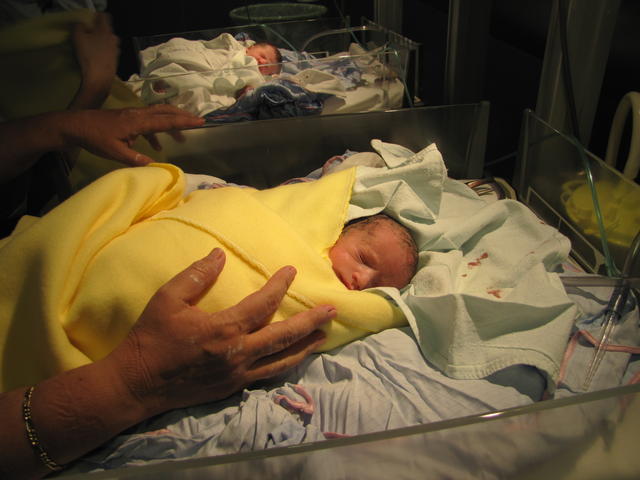
    Welcome to the world, little ones!
    Welcome little babies! Yesterday night, we entered the hospital. Nervous, heavy, and... Well, would we ever be ready? As ready as we could. A couple of hours later, Alan and Elena Wolf Daichman became individuals on their own right. As is often the case in the case of twins, they were brought to this world after a relatively short preparation (34 weeks, that's about 7.5 months). At 1.820 and 1.980Kg, they are considerably smaller than either of the parents... But we will be working on that! Regina is recovering from the operation, the babies are under observation. As far as we were told, they seem to be quite healthy, with just minor issues to work on during neonatal care. We are waiting for our doctors to come today and allow us to spend time with them. And as for us... It's a shocking change to finally see the so long expected babies. We are very very very happy... And the new reality is hard to grasp, to even begin understanding :) PS- Many people have told me that my blog often errors out under load. I expect it to happen today :) So, if you cannot do it here, there are many other ways to contact us. Use them! :)

    27 February 2015

    Dirk Eddelbuettel: RcppArmadillo 0.4.650.1.1 (and also 0.4.650.2.0)

    A new Armadillo release 4.650.1 was released by Conrad a few days ago. Armadillo is a powerful and expressive C++ template library for linear algebra aiming towards a good balance between speed and ease of use with a syntax deliberately close to a Matlab. It turned out that this release had one shortcoming with respect to the C++11 RNG initializations in the R use case (where we need to protect the users from the C++98 RNG deemed unsuitable by the CRAN gatekeepers). And this lead to upstream release 4.650.1 which we wrapped into RcppArmadillo 0.4.650.1.1. As before this, was tested against all 107 reverse dependencies of RcppArmadillo on the CRAN repo. This version is now on CRAN, and was just uploaded to Debian. Its changes are summarized below based on the NEWS.Rd file.
    Changes in RcppArmadillo version 0.4.650.1.1 (2015-02-25)
    • Upgraded to Armadillo release Version 4.650.1 ("Intravenous Caffeine Injector")
      • added randg() for generating random values from gamma distributions (C++11 only)
      • added .head_rows() and .tail_rows() to submatrix views
      • added .head_cols() and .tail_cols() to submatrix views
      • expanded eigs_sym() to optionally calculate eigenvalues with smallest/largest algebraic values fixes for handling of sparse matrices
    • Applied small correction to main header file to set up C++11 RNG whether or not the alternate RNG (based on R, our default) is used
    Now, it turns out that another small fix was needed for the corner case of a submatrix within a submatrix, ie V.subvec(1,10).tail(5). I decided not to re-release this to CRAN given the CRAN Repository Policy preference for releases no more than every 1 2 months . But fear not, for we now have drat. I created a drat package repository in the RcppCore account (to not put a larger package into my main drat repository often used via a fork to initialize a drat). So now with these two simple commands
    ## if needed, first install 'drat' via:   install.packages("drat")
    drat:::add("RcppCore")
    update.packages()
    you will get the newest RcppArmadillo via this drat package repository. And course install.packages("RcppArmadillo") would also work, but takes longer to type :) Lastly, courtesy of CRANberries, there is also a diffstat report for the most recent CRAN release. As always, more detailed information is on the RcppArmadillo page. Questions, comments etc should go to the rcpp-devel mailing list off the R-Forge page.

    This post by Dirk Eddelbuettel originated on his Thinking inside the box blog. Please report excessive re-aggregation in third-party for-profit settings.

    25 February 2015

    Eddy Petrișor: Occasional Rsnapshot v1.3.0

    It is almost exactly 1 year and a half since I came up with the idea of having a way of making backups using Rsnapshot automatically triggered by my laptop when I have the backup media connected to my laptop. This could mean connecting a USB drive directly to the laptop or mounting a NFS/sshfs share in my home network. Today I tagged Occasional Rsnapshot the v1.3.0 version, the first released version that makes sure even when you connect your backup media occasionally, your Rsnapshot backups are done if and when it makes sense to do it, according to the rsnapshot.conf file and the status of the existing backups on the backup media.

    Quoting from the README, here is what Occasional Rsnapshot does:

    This is a tool that allows automatic backups using rsnapshot when the external backup drive or remote backup media is connected.

    Although the ideal setup would be to have periodic backups on a system that is always online, this is not always possible. But when the connection is done, the backup should start fairly quickly and should respect the daily/weekly/... schedules of rsnapshot so that it accurately represents history.

    In other words, if you backup to an external drive or to some network/internet connected storage that you don't expect to have always connected (which is is case with laptops) you can use occasional_rsnapshot to make sure your data is backed up when the backup storage is connected.

    occasional_rsnapshot is appropriate for:
    • laptops backing up on:
      • a NAS on the home LAN or
      • a remote or an internet hosted storage location
    • systems making backups online (storage mounted locally somehow)
    • systems doing backups on an external drive that is not always connected to the system
    The only caveat is that all of these must be mounted in the local file system tree somehow by any arbitrary tool, occasional_rsnapshot or rsnapshot do not care, as long as the files are mounted.

    So if you find yourself in a simillar situation, this script might help you to easily do backups in spite of the occasional availability of the backup media, instead of no backups at all. You can even trigger backups semi-automatically when you remember to or decide is time to backup, by simply pulging in your USB backup HDD.

    But how did I end up here, you might ask?

    In December 2012 I was asking about suggestions for backup solutions that would work for my very modest setup with Linux and Windows so I can backup my and my wife's system without worrying about loss of data.

    One month later I was explaining my concept of a backup solution that would not trust the backup server, and leave to the clients as much as possible the decision to start the backup at their desired time. I was also pondering on the problems I might encounter.

    From a security PoV, what I wanted was that:
    1. clients would be isolated from each other
    2. even in the case of a server compromise:
        • the data would not be accessible since they would be already encrypted before leaving the client
        • the clients could not be compromised


      The general concept was sane and supplemental security measures such as port knocking and initiation of backups only during specific time frames could be added.

      The problem I ran to was that when I set up this in my home network a sigle backup cycle would take more than a day, due to the fact that I wanted to do backup of all of my data and my server was a humble Linksys NSLU2 with a 3TB storage attached on USB.

      Even when the initial copy was done by attaching the USB media directly to the laptop, so the backup would only copy changed data, the backup with the HDD attached to the NSLU2 was not finished even after more than 6 hours.

      The bottleneck was the CPU speed and the USB speed. I tried even mounting the storage media over sshfs so the tiny xscale processor in the NSLU2 would not be bothered by any of the rsync computation. This proved to an exercise in futility, any attempt to put the NSLU2 anywhere in the loop resulted in an unacceptable and impractically long backup time.

      All these attempts, of course, took time, but that meant that I was aware I still didn't have appropriate backups and I wasn't getting closer to the desired result.

      So this brings us August 2013, when I realized I was trying to manually trigger Rsnapshot backups from time to time, but having to do all sorts of mental gymnastics and manual listing to evaluate if I needed to do monthly, weekly and daily backups or if weekly and daily was due.

      This had to stop.
      Triggering a backup should happen automatically as soon as the backup media is available, without any intervention from the user.
      I said.

      Then I came up with the basic concept for Occasional Rsnapshot: a very silent script that would be called from cron every 5 minutes, would check if the backup media is mounted, if is not, exit silently to not generate all sorts of noise in cron emails, but if mounted, compute which backup intervals should be triggered, and trigger them, if the appropriate amount of time passed since the most recent backup in that backup interval.

      Occasional Rsnapshot version v1.3.0 is the 8th and most recent release of the script. Even if I used Occasional Rsnapshot since the day 1, v1.3.0 is the first one I can recommend to others, without fearing they might lose data due to it.

      The backup media can be anything, starting from your regular USB mounted HDD, your sshfs mounted backup partition on the home NAS server to even a remote storage such as Amazon S3 online storage, and there are even brief instructions on how to do encrypted backups for the cases where you don't trust the remote storage.

      So if you think you might find anything that I described remotely interesting, I recommend downloading the latest release of Occasional Rsnapshot, go through the README and trying it out.

      Feedback and bug reports are welcome.
      Patches are welcomed with a 'thank you'.
      Pull requests are eagerly waited for :) .

      23 February 2015

      Richard Hartmann: Accuracy

      Even if you disregard how amazing this is, this quote blows my proverbial mind: The test rig is carefully designed to remove any possible sources of error. Even the lapping of waves in the Gulf of Mexico 25 miles away every three to four seconds would have showed up on the sensors, so the apparatus was floated pneumatically to avoid any influence. The apparatus is completely sealed, with power and signals going through liquid metal contacts to prevent any force being transmitted through cables.

      Simon Josefsson: Laptop Buying Advice?

      My current Lenovo X201 laptop has been with me for over four years. I ve been looking at new laptop models over the years thinking that I should upgrade. Every time, after checking performance numbers, I ve always reached the conclusion that it is not worth it. The most performant Intel Broadwell processor is the the Core i7 5600U and it is only about 1.5 times the performance of my current Intel Core i7 620M. Meanwhile disk performance has increased more rapidly, but changing the disk on a laptop is usually simple. Two years ago I upgraded to the Samsung 840 Pro 256GB disk, and this year I swapped that for the Samsung 850 Pro 1TB, and both have been good investments. Recently my laptop usage patterns have changed slightly, and instead of carrying one laptop around, I have decided to aim for multiple semi-permanent laptops at different locations, coupled with a mobile device that right now is just my phone. The X201 will remain one of my normal work machines. What remains is to decide on a new laptop, and there begins the fun. My requirements are relatively easy to summarize. The laptop will run a GNU/Linux distribution like Debian, so it has to work well with it. I ve decided that my preferred CPU is the Intel Core i7 5600U. The screen size, keyboard and mouse is mostly irrelevant as I never work longer periods of time directly on the laptop. Even though the laptop will be semi-permanent, I know there will be times when I take it with me. Thus it has to be as lightweight as possible. If there would be significant advantages in going with a heavier laptop, I might reconsider this, but as far as I can see the only advantage with a heavier machine is bigger/better screen, keyboard (all of which I find irrelevant) and maximum memory capacity (which I would find useful, but not enough of an argument for me). The sub-1.5kg laptops with the 5600U CPU on the market that I have found are:
      Lenovo X250 1.42kg 12.5 1366 768
      Lenovo X1 Carbon (3rd gen) 1.44kg 14 2560 1440
      Dell Latitude E7250 1.25kg 12.5 1366 768
      Dell XPS 13 1.26kg 13.3 3200 1800
      HP EliteBook Folio 1040 G2 1.49kg 14 1920 1080
      HP EliteBook Revolve 810 G3 1.4kg 11.6 1366 768
      I find it interesting that Lenovo, Dell and HP each have two models that meets my 5600U/sub-1.5kg criteria. Regarding screen, possibly there exists models with other screen resolutions. The XPS 13, HP 810 and X1 models I looked had touch screens, the others did not. As screen is not important to me, I didn t evaluate this further. I think all of them would suffice, and there are only subtle differences. All except the XPS 13 can be connected to peripherals using one cable, which I find convenient to avoid a cable mess. All of them have DisplayPort, but HP uses DisplayPort Standard and the rest uses miniDP. The E7250 and X1 have HDMI output. The X250 boosts a 15-pin VGA connector, none of the others have it I m not sure if that is a advantage or disadvantage these days. All of them have 2 USB v3.0 ports except the E7250 which has 3 ports. The HP 1040, XPS 13 and X1 Carbon do not have RJ45 Ethernet connectors, which is a significant disadvantage to me. Ironically, only the smallest one of these, the HP 810, can be memory upgraded to 12GB with the others being stuck at 8GB. HP and the E7250 supports NFC, although Debian support is not certain. The E7250 and X250 have a smartcard reader, and again, Debian support is not certain. The X1, X250 and 810 have a 3G/4G card. Right now, I m leaning towards rejecting the XPS 13, X1 and HP 1040 because of lack of RJ45 ethernet port. That leaves me with the E7250, X250 and the 810. Of these, the E7250 seems like the winner: lightest, 1 extra USB port, HDMI, NFC, SmartCard-reader. However, it has no 3G/4G-card and no memory upgrade options. Looking for compatibility problems, it seems you have to be careful to not end up with the Dell Wireless card and the E7250 appears to come in a docking and non-docking variant but I m not sure what that means. Are there other models I should consider? Other thoughts?

      Dirk Eddelbuettel: drat Tutorial: Publishing a package

      Introduction The drat package was released earlier this month, and described in a first blog post. I received some helpful feedback about what works and what doesn't. For example, Jenny Bryan pointed out that I was not making a clear enough distinction between the role of using drat to publish code, and using drat to receive/install code. Very fair point, and somewhat tricky as R aims to blur the line between being a user and developer of statistical analyses, and hence packages. Many of us are both. Both the main point is well taken, and this note aims to clarify this issue a little by focusing on the former. Another point make by Jenny concerns the double use of repository. And indeed, I conflated repository (in the sense of a GitHub code repository) with repository for a package store used by a package manager. The former, a GitHub repository, is something we use to implement a personal drat with: A GitHub repository happens to be uniquely identifiable just by its account name, and given an (optional) gh-pages branch also offers a stable and performant webserver we use to deliver packages for R. A (personal) code repository on the other hand is something we implement somewhere---possibly via drat which supports local directories, possibly on a network share, as well as anywhere web-accessible, e.g. via a GitHub repository. It is a little confusing, but I will aim to make the distinction clearer.

      Just once: Setting up a drat repository So let us for the remainder of this post assume the role of a code publisher. Assume you have a package you would like to make available, which may not be on CRAN and for which you would like to make installation by others easier via drat. The example below will use an interim version of drat which I pushed out yesterday (after fixing a bug noticed when pushing the very new RcppAPT package). For the following, all we assume (apart from having a package to publish) is that you have a drat directory setup within your git / GitHub repository. This is not an onerous restriction. First off, you don't have to use git or GitHub to publish via drat: local file stores and other web servers work just as well (and are documented). GitHub simply makes it easiest. Second, bootstrapping one is trivial: just fork my drat GitHub repository and then create a local clone of the fork. There is one additional requirement: you need a gh-pages branch. Using the fork-and-clone approach ensures this. Otherwise, if you know your way around git you already know how to create a gh-pages branch. Enough of the prerequisities. And on towards real fun. Let's ensure we are in the gh-pages branch:
      edd@max:~/git/drat(master)$ git checkout gh-pages
      Switched to branch 'gh-pages'
      Your branch is up-to-date with 'origin/gh-pages'.
      edd@max:~/git/drat(gh-pages)$ 

      Publish: Run one drat command to insert a package Now, let us assume you have a package to publish. In my case this was version 0.0.1.2 of drat itself as it contains a fix for the very command I am showing here. So if you want to run this, ensure you have this version of drat as the CRAN version is currently behind at release 0.0.1 (though I plan to correct that in the next few days). To publish an R package into a code repository created via drat running on a drat GitHub repository, just run insertPackage(packagefile) which we show here with the optional commit=TRUE. The path to the package can be absolute are relative; the easists is often to go up one directory from the sources to where R CMD build ... has created the package file.
      edd@max:~/git$ Rscript -e 'library(drat); insertPackage("drat_0.0.1.2.tar.gz", commit=TRUE)'
      [gh-pages 0d2093a] adding drat_0.0.1.2.tar.gz to drat
       3 files changed, 2 insertions(+), 2 deletions(-)
       create mode 100644 src/contrib/drat_0.0.1.2.tar.gz
      Counting objects: 7, done.
      Delta compression using up to 8 threads.
      Compressing objects: 100% (7/7), done.
      Writing objects: 100% (7/7), 7.37 KiB   0 bytes/s, done.
      Total 7 (delta 1), reused 0 (delta 0)
      To git@github.com:eddelbuettel/drat.git
         206d2fa..0d2093a  gh-pages -> gh-pages
      edd@max:~/git$ 
      You can equally well run this as insertPackage("drat_0.0.1.2.tar.gz"), then inspect the repo and only then run the git commands add, commit and push. Also note that future versions of drat will most likely support git operations directly by relying on the very promising git2r package. But this just affect package internals, the user-facing call of e.g. insertPackage("drat_0.0.1.2.tar.gz", commit=TRUE) will remain unchanged. And in a nutshell that really is all there is to it. With the newly drat-ed package pushed to your GitHub repository with a single function call), it is available via the automatically-provided gh-pages webserver access to anyone in the world. All they need to do is to point R's package management code (which is built into R itself and used for e.g._ CRAN and BioConductor R package repositories) to the new repo---and that is also just a single drat command. We showed this in the first blog post and may expand on it again in a follow-up. So in summary, that really is all there is to it. After a one-time setup / ensuring you are on the gh-pages branch, all it takes is a single function call from the drat package to publish your package to your drat GitHub repository.

      This post by Dirk Eddelbuettel originated on his Thinking inside the box blog. Please report excessive re-aggregation in third-party for-profit settings.

      22 February 2015

      Rog rio Brito: User-Agent strings and privacy

      I just had my hands on some mobile devices (a Samsung's Galaxy Tab S 8.4", an Apple's iPad mini 3, and my no-name tablet that runs Android). I got curious to see how the different browsers identify themselves to the world via their User agent strings and I must say that each browser's string reveals a lot about both the browser makers and their philosophies regarding user privacy. Here is a simple table that I compiled with the information that I collected (sorry if it gets too wide):
      Device Browser User-Agent String
      Samsung Galaxy Tab S Firefox 35.0 Mozilla/5.0 (Android; Tablet; rv:35.0) Gecko/35.0 Firefox/35.0
      Samsung Galaxy Tab S Firefox 35.0.1 Mozilla/5.0 (Android; Tablet; rv:35.0.1) Gecko/35.0.1 Firefox/35.0.1
      Samsung Galaxy Tab S Android's 4.4.2 stock browser Mozilla/5.0 (Linux; Android 4.4.2; en-gb; SAMSUNG SM-T700 Build/KOT49H) AppleWebKit/537.36 (KHTML, like Gecko) Version/1.5 Chrome/28.0.1500.94 Safari/537.36
      Samsung Galaxy Tab S Updated Chrome Mozilla/5.0 (Linux; Android 4.4.2; SM-T700 Build/KOT49H) AppleWebKit/537.36 (KHTML, like Gecko) Chrome/40.0.2214.109 Safari/537.36
      Vanilla tablet Android's 4.1.1 stock browser Mozilla/5.0 (Linux; U; Android 4.1.1; en-us; TB1010 Build/JRO03H) AppleWebKit/534.30 (KHTML, like Gecko) Version/4.0 Safari/534.30
      Vanilla tablet Firefox 35.0.1 Mozilla/5.0 (Android; Tablet; rv:35.0.1) Gecko/35.0.1 Firefox/35.0.1
      iPad Safari's from iOS 8.1.3 Mozilla/5.0 (iPad; CPU OS 8_1_3 like Mac OS X) AppleWebKit/600.1.4 (KHTML, like Gecko) Version/8.0 Mobile/12B466 Safari/600.1.4
      Notebook Debian's Iceweasel 35.0.1 Mozilla/5.0 (X11; Linux x86_64; rv:35.0) Gecko/20100101 Firefox/35.0 Iceweasel/35.0.1
      So, briefly looking at the table above, you can tell that the stock Android browser reveals quite a bit of information: the model of the device (e.g., SAMSUNG SM-T700 or TB1010) and even the build number (e.g., Build/KOT49H or Build/JRO03H)! This is super handy for malicious websites and I would say that it leaks a lot of possibly undesired information. The iPad is similar, with Safari revealing the version of the iOS that it is running. It doesn't reveal, though, the language that the user is using via the UA string (it probably does via other HTTP fields). Chrome is similar to the stock Android browser here, but, at least, it doesn't reveal the language of the user. It does reveal the version of Android, including the patch-level (that's a bit too much, IMVHO). I would say that the winner respecting privacy of the users among the browsers that I tested is Firefox: it conveys just the bare minimum, not differentiating from a high-end tablet (Samsung's Galaxy Tab S with 8 cores) and a vanilla tablet (with 2 cores). Like Chrome, Firefox still reveals a bit too much in the form of the patch-level. It should be sufficient to say that it is version 35.0 even if the user has 35.0.1 installed. The bonus points with Firefox is that it is also available on F-Droid, in two versions: as Firefox itself and as Fennec.

      21 February 2015

      Dirk Eddelbuettel: RcppAPT 0.0.1

      Over the last few days I put together a new package RcppAPT which interfaces the C++ library behind the awesome apt, apt-get, apt-cache, ... commands and their GUI-based brethren. The package currently implements two functions which permit search for package information via a regular expression, as well as a (vectorised) package name-based check. More to come, and contributions would be very welcome. A few examples just to illustrate follow.
      R> hasPackages(c("r-cran-rcpp", "r-cran-rcppapt"))
         r-cran-rcpp r-cran-rcppapt 
                TRUE          FALSE 
      This shows that Rcpp is (of course) available as a binary, but this (very new) package is (unsurprisingly) not yet available pre-built. We can search by regular expression:
      R> library(RcppAPT)
      R> getPackages("^r-base-c.")
                Package      Installed       Section
      1 r-base-core-dbg 3.1.2-1utopic0 universe/math
      2 r-base-core-dbg           <NA> universe/math
      3     r-base-core 3.1.2-1utopic0 universe/math
      4     r-base-core           <NA> universe/math
      R> 
      With the (default) expression catching everything, we see a lot of packages:
      R> dim(getPackages())
      [1] 104431      3
      R> 
      A bit more information is on the package page here as well as as the GitHub repo.

      This post by Dirk Eddelbuettel originated on his Thinking inside the box blog. Please report excessive re-aggregation in third-party for-profit settings.

      Next.

      Previous.