Search Results: "nic"

28 January 2016

Sean Whitton: Becoming a Debian contributor

Over the past two months or so I have become a contributor to the Debian Project. This is something that I ve wanted to do for a while. Firstly, just because I ve got so much out of Debian over the last five or six years both as a day-to-day operating system and a place to learn about computing and I wanted to contribute something back. And secondly, in following the work of Joey Hess for the past three or four years I ve come to share various technical and social values with Debian. Of course, I ve long valued the project of making it possible for people to run their computers entirely on Free Software, but more recently I ve come to appreciate how Debian s mature technical and social infrastructure makes it possible for a large number of people to work together to produce and maintain high quality packages. The end result is that the work of making a powerful software package work well with other packages on a Debian system is carried out by one person or a small team, and then as many users who want to make use of that software need only apt-get it. It s hard to get the systems and processes to make this possible right, especially without a team being paid full-time to set it all up. Debian has managed it on the backs of volunteers. That s something I want to be a part of. So far, most of my efforts have been confined to packaging addons for the Emacs text editor and the Firefox web browser. Debian has common frameworks for packaging these and lots of scripts that make it pretty easy to produce new packages (I did one yesterday in about 30 minutes). It s valuable to package these addons because there are a great many advantages for a user in obtaining them from their local Debian mirror rather than downloading them from the de facto Emacs addons repository or the Mozilla addons site. Users know that trusted Debian project volunteers have reviewed the software I cannot yet upload my packages to the Debian archive by myself and the whole Debian infrastructure for reporting and classifying bugs can be brought to bear. The quality assurance standards built into these processes are higher than your average addon author s, not that I mean to suggest anything about authors of the particular addons I ve packaged so far. And automating the installation of such addons is easy as there are all sorts of tools to automate installations of Debian systems and package sets. I hope that I can expand my work beyond packaging Emacs and Firefox addons in the future. It s been great, though, to build my general knowledge of the Debian toolchain and the project s social organisation while working on something that is both relatively simple and valuable to package. Now I said at the beginning of this post that it was following the work of Joey Hess that brought me to Debian development. One thing that worries me about becoming involved in more contentious parts of the Debian project is the dysfunction that he saw in the Debian decision-making process, dysfunction which eventually led to his resignation from the project in 2014. I hope that I can avoid getting quagmired and demotivated.

Holger Levsen: 20160127-torbrowser-daily-tests

Daily tests of torbrowser-launcher, and on every git commit too Tor Browser for reasons beyond this blog post is not part of Debian. To easily and securely use it, one can run
sudo apt-get install torbrowser-launcher
and then run torbrowser-launcher which will download Tor Browser and well, launch it. And this sometimes breaks, when things change, which is rather frequently the case So yesterday I finally woke up to see what I wished to see every morning since November 15th last year, when I started testing torbrowser-launcher systematically on jenkins.debian.net: This is the graphical status overview of torbrowser tests on Debian which are tests installing torbrowser-launcher on and from sid, stretch, jessie-backports, jessie and wheezy-backports, which first download torbrowser via https and via tor, then launches it to finally connect to a debian mirror via an onion-address and then to www.debian.org. In addition to these there are also tests installing the package from stretch on jessie as well as the package from sid on stretch and jessie. Finally there are also tests for building the package from our git branches for various suites and finally we also build a package based on the upstream git master branch merged with our sid packaging. There are 17 different tests currently and they are configured in just two files, a 220 line yaml file defining the jenkins jobs and 528 lines of bash script containing the actual test code. The tests are using schroot, xvfb, kvkbd and gocr and are executed either daily or weekly (those testing the package from ftp.d.o) or on every commit and at least once every month (those testing the package build from git). At least briefly I have been looking at the this page every day since setting up these tests two months ago. Back then, torbrowser-launcher was broken in many suites and then it broke some more and instead of fixing it, I first made these tests so that at least in future there will be automatic notifications when things break. This has worked out rather nicely and torbrowser-launcher got fixed over time too. Doing so in jessie proper took longest as we missed 8.2. Once jessie was fixed the fix for wheezy-backports was also finally accepted very quickly. Which was this Monday, so yesterday on Tuesday I could enjoy for the first time an all "green page"! :-) And then on Wednesday, which is now also yesterday, the nice green page became less green due two new issues: #805173 really needs ca-certificates as depends and not recommends and then also the rendering of the new 5.5 version of torbrowser changed slightly Both issues have been addressed by now. I'm curious how this page will look tomorrow morning. And when I'll consider it the number of false negatives to be low enough so as I'll happily enable notifications to be send to the pkg privacy maintainers mailing list. I think it's almost the case and will keep an eye on the results the coming weeks and months. Last not least: if you want to run similar tests for your Debian project, I'd be glad to help! See you at FOSDEM?

27 January 2016

Jonas Smedegaard: BOSS - Barath Operating System Solutions

Siri and I are on a journey through India and Nepal, with the aim of learning about needs of Debian derivatives, to improve Debian and encourage closer integration.

C-DAC and BOSS Centre for Development of Advanced Computing (C-DAC) is a large organization serving country- and state-level institutions in India, with offices and training facilities several major cities. In Chennai, C-DAC has a staff of 25 developers working full time on Barath Operating System Solutions (BOSS). BOSS is a Debian derivative with several flavors - a desktop for use at primary schools (EduBOSS), a desktop for governmental offices (BOSS), and a range of server-oriented use cases using same core as the desktops with various (non-packaged) code and configuration on top. The core common to all BOSS flavors is a derivative of Debian. Major work has been in strengthening localization and related code - including the development of a font covering all officially supported indic scripts, tuning input methods configuration, and bugfixing LibreOffice handling of complex scripts. All that work is all passed directly to upstream code projects (some still show as derived work until sifting down again into Debian). Besides locale derivations, BOSS currently includes 11 packages not yet in Debian - a mixture of package dependencies, branding data and configuration tweaks. Seems most if not all can fit into Debian with a bit of restructuring work.

small computers As some of you know, I always had a special interest in low-resource (yet general purpose) computers (partly driven by my lack of money to spend on shinier hardware), and since ~2009 particularly in ARM-based computers. After 4 days of meetings and discussion with C-DAC, - literally few minutes before departure - I casually mentioned my interest in small computers, and much to my surprise it turned out that C-DAC also works on that, just didn't get around to mention it yet at the Debian wiki page. C-DAC have worked for a year on tuning BOSS to work on the Vidyut laptop (successor to the Aakash tablet). All except builtin camera is allegedly working. C-DAC is also looking into Olimex boards - my favorites - possibly for use with small server setups but our time was up, we had to leave for our train to Pune, so details on that we will have to figure out through mail.

collaboration In the past, C-DAC have kept in touch with their users through BOSS-specific places like a dedicated IRC channel. Recent changes in management style at the development office have caused less attention available to that communication, however. C-DAC have politely offered their code changes upstram for years, but maybe "too polite": Maybe they have offered only polished fixes, being less loud about "interesting problems". I suggested, as way to improve while limiting (ideally avoiding) extra work, is to mentally take a step up the stream: Treat BOSS not as a derivative but a subset of Debian itself, hang out and discuss issues and ideas at debian irc channels, and maintain your packages directly in Debian. Only parts unfit for Debian - secret stuff done for India military, and dirty configuration hacks not yet possible within Debian Policy - really need to be kept away from Debian. C-DAC agreed, and Debian now has a BOSS team! Anyone interested to follow BOSS as a Debian blend, and perhaps even contribute with opinions and/or code, is quite welcome to join the newly created mailinglist on Debian Alioth: https://lists.alioth.debian.org/mailman/listinfo/boss-devel. Our meetings with BOSS developers have been very pleasant. Even those working at the top of cloud or big data stacks - furthest away from our mindset of tightly "locking down" all parts as packages - were patient with us. Thanks in particular to Prema S and Prathibha B, working on packaging of BOSS for the past 5+ years, and both likely to enter the Debian New Maintainer Queue before long :-)

26 January 2016

Vincent Sanders: Creativity is allowing yourself to make mistakes. Art is knowing which ones to keep.

It seems Scott Adams insights sometimes reach beyond his disturbingly accurate satire. I have written before about my iterative approach to designing the things I make. such as my attempts at furniture and more recently enclosures for various projects.

Raspberry Pi B case design with the faliures
In the workshop today I had a selection of freshly laser cut.completed cases for several single board computers out on the desk. I was asked by a new member of the space how I was able to produce these with no failures?

I was slightly taken aback at the question and had to explain that the designs I was happily running off on the laser cutter are all the result of mistakes, lots of them. The person I was talking to was surprised when I revealed that I was not simply generating fully formed working designs first time.

We chatted for a while and it became apparent that they had been holding themselves back from actually making something because they were afraid the result would be wrong. I went to my box and retrieved the failures from my most recent case design for a Raspberry Pi model B to put alongside the successful end product to try and encourage them.

I explained that my process was fairly iterative, sure I attempted to get it right first time by reusing existing working solutions as a basis but that when the cost of iterating is relatively small it is sometimes worthwhile to just accept the failures.

For example in this latest enclosure:

My collection of failed cases
Generally I do not need this many iterations and get it right second time, however experience caused me to use offcuts and scrap material for the initial versions expecting to have issues. The point is that I was willing to make the iterations and not see them as failures.

The person I was talking to could not get past the possibility of having a pile of scrap material, it was wasteful in their view and my expectation to fail was unfathomable. They left with somewhat of a bad view of me and my approach.

I pondered this turn of events for a time and they did have a point in that I have a collection of thirty or so failures from all my various designs most of which is unusable. I then realised I have produced over fifty copies of those designs not just for myself but for other people and published them for anyone else to replicate, so on balance I think I am doing ok on wastage.

The stronger argument for me personally is that I have made something. I love making things, be that software, electronics or physical designs. It may not always be the best solution but I usually end up with something that works.

That makespace member may not like my approach but in the final reckoning, I have made something, their idea is still just an idea. So Scott I may not be an artist but I am at least creative and that is halfway there.

25 January 2016

Vincent Fourmond: QSoas tips and tricks: using the fit interface to explore parameters to a function

As I said before, one of the very strong points of QSoas, my data analysis software, is its fitting capacities, and its fitting interface. Today, as a first post in a series of tips and tricks about QSoas, I will show you that the fit interface can also be used for a quick exploration of the effect of parameters on a given function. For that, I have chosen a simple system, the Van der Pol oscillator. The differential equation can be written for QSoas in the following form (in a file named vanderpol.ode):
x = x_0
y = dx_0
d_x = y
d_y = mu * (1 - x**2) * y - x
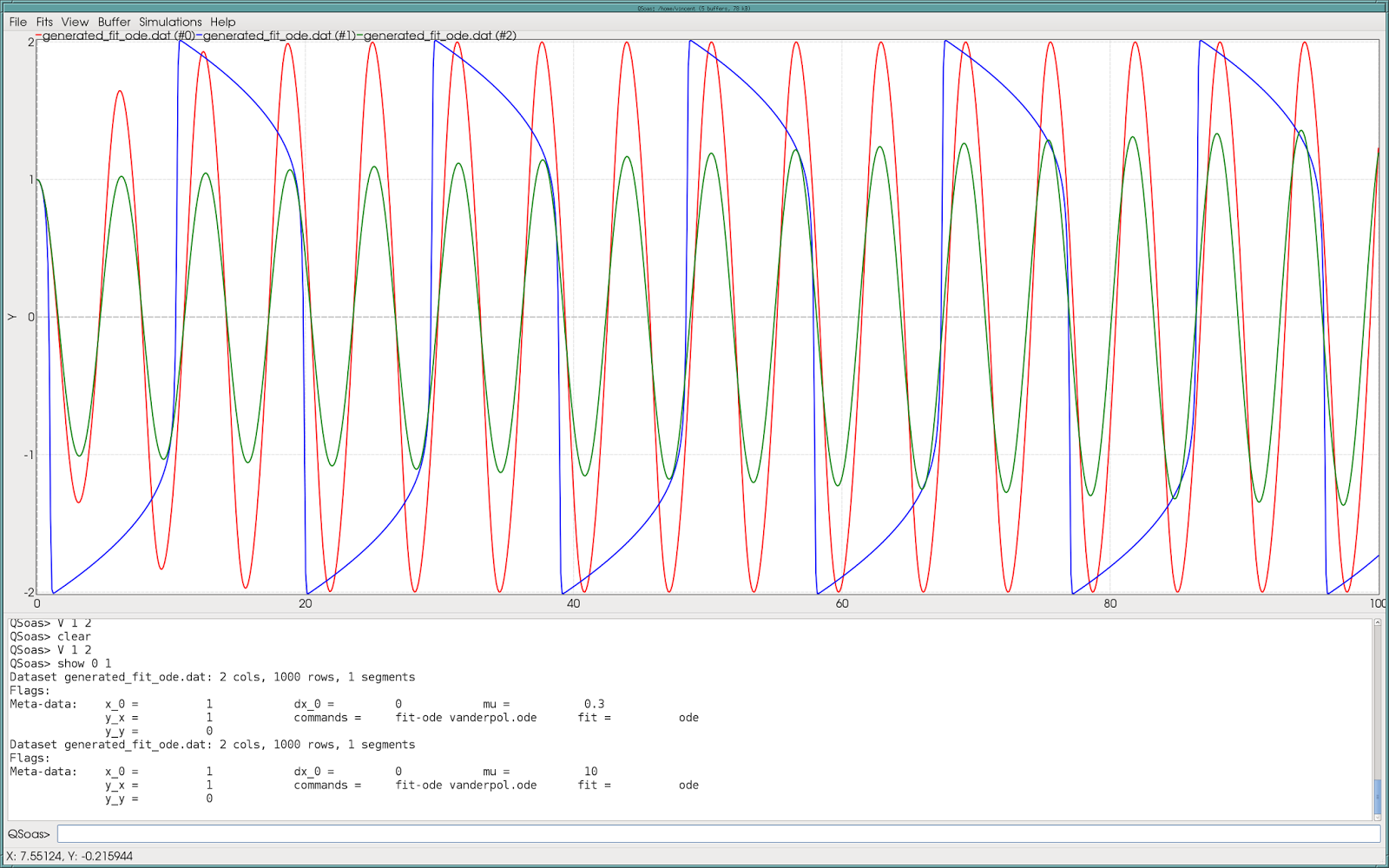
Note the blank line between the initial conditions and the expression for the derivatives. This is the representation of the form using y as the derivative of x. The integration variable in QSoas is the time t. You can learn more about how to specify differential equations in QSoas from the manual. The game is now simply to use fit-ode to launch the fit interface, but before that, one needs data to serve as a template, generated using generate-buffer:
QSoas> generate-buffer 0 100 1
QSoas> fit-ode vanderpol.ode
Now, the fit interface looks like this:
You can play around with the parameters, and in particular the value of mu... For every modification, hit the Update button, or just Ctrl+U, to see the effect. For data you'd wish to take a closer look at, use the Push current to stack action from the Data... menu, which creates new buffers on the stack. A nice thing is that QSoas keeps the fit parameters as meta-data, which you can see later on using show:
See the values of mu in the terminal above ?This feature of QSoas makes it easy to quickly explore the effect of the parameters of a model on the shape of the resulting curve. I have used that very heavily in my research, I hope others will find it useful too. Enjoy !

Antoine Beaupr : Internet in Cuba

A lot has been written about the Internet in Cuba over the years. I have read a few articles, from New York Times' happy support for Google's invasion of Cuba to RSF's dramatic and fairly outdated report about censorship in Cuba. Having written before about Internet censorship in Tunisia, I was curious to see if I could get a feel of what it is like over there, now that a new Castro is in power and the Obama administration has started restoring diplomatic ties with Cuba. With those political changes coming signifying the end of an embargo that has been called genocidal by the Cuban government, it is surprisingly difficult to get fresh information about the current state of affairs. This article aims to fill that gap in clarifying how the internet works in Cuba, what kind of censorship mechanisms are in place and how to work around them. It also digs more technically into the network architecture and performance. It is published in the hope of providing both Cubans and the rest of the world with a better understanding of their network and, if possible, Cubans ways to access the internet more cheaply or without censorship.

"Censorship" and workarounds Unfortunately, I have been connected to the internet only through the the Varadero airport and the WiFi of a "full included" resort near Jibacoa. I have to come to assume that this network is likely to be on a segregated, uncensored internet while the rest of the country suffers the wrath of the Internet censorship in Cuba I have seen documented elsewhere. Through my research, I couldn't find any sort of direct censorship. The Netalyzr tool couldn't find anything significantly wrong with the connection, other than the obvious performance problems related both to the overloaded uplinks of the Cuban internet. I ran an incomplete OONI probe as well, and it seems there was no obvious censorship detected there as well, at least according to folks in the helpful #ooni IRC channel. Tor also works fine, and could be a great way to avoid the global surveillance system described later in this article. Nevertheless, it still remains to be seen how the internet is censored in the "real" Cuban internet, outside of the tourist designated areas - hopefully future visitors or locals can expand on this using the tools mentioned above, using the regular internet. Usual care should be taken when using any workaround tools, mentioned in this post or not, as different regimes over the world have accused, detained, tortured and killed sometimes for the mere fact of using or distributing circumvention tools. For example, a Russian developer was arrested and detained in 2001 by United States' FBI for exposing vulnerabilities in the Adobe e-books copy protection mechanisms. Similarly, people distributing Tor and other tools have been arrested during the period prior to the revolution in Tunisia.

The Cuban captive portal There is, however, a more pernicious and yet very obvious censorship mechanism at work in Cuba: to get access to the internet, you have to go through what seems to be a state-wide captive portal, which I have seen both at the hotel and the airport. It is presumably deployed at all levels of the internet access points. To get credentials through that portal, you need a username and password which you get by buying a Nauta card. Those cards cost 2$CUC and get you an hour of basically unlimited internet access. That may not seem like a lot for a rich northern hotel party-goer, but for Cubans, it's a lot of money, given that the average monthly salary is around 20$CUC. The system is also pretty annoying to use, because it means you do not get continuous network access: every hour, you need to input a new card, which will obviously make streaming movies and other online activities annoying. It also makes hosting servers basically impossible. So while Cuba does not have, like China or Iran, a "great firewall", there is definitely a big restriction to going online in Cuba. Indeed, it seems to be how the government ensures that Cubans do not foment too much dissent online: keep the internet slow and inaccessible, and you won't get too many Arab spring / blogger revolutions.

Bypassing the Cuban captive portal The good news is that it is perfectly possible for Cubans (or at least for a tourist like me with resources outside of the country) to bypass the captive portal. Like many poorly implemented portals, the portal allows DNS traffic to go through, which makes it possible to access the global network for free by using a tool like iodine which tunnels IP traffic over DNS requests. Of course, the bandwidth and reliability of the connection you get through such a portal is pretty bad. I have regularly seen 80% packet loss and over two minutes of latency:
--- 10.0.0.1 ping statistics ---
163 packets transmitted, 31 received, 80% packet loss, time 162391ms
rtt min/avg/max/mdev = 133.700/2669.535/64188.027/11257.336 ms, pipe 65
Still, it allowed me to login to my home server through SSH using Mosh to workaround the reliability issues. Every once in a while, mosh would get stuck and keep on trying to send packets to probe the server, which would clog the connection even more. So I regularly had to restart the whole stack using these commands:
killall iodine # stop DNS tunnel
nmcli n off # turn off wifi to change MAC address
macchanger -A wlan0 # change MAC address
nmcli n on # turn wifi back on
sleep 3 # wait for wifi to settle
iodine-client-start # restart DNS tunnel
The Koumbit Wiki has good instructions on how to setup a DNS tunnel. I am wondering if such a public service could be of use for Cubans, although I am not sure how it could be deployed only for Cubans, and what kind of traffic it could support... The fact is that iodine does require a server to operate, and that server must be run on the outside of the censored perimeter, something that Cubans may not be able to afford in the first place. Another possible way to save money with the captive portal would be to write something that automates connecting and disconnecting from the portal. You would feed that program a list of credentials and it would connect to the portal only on demand, and disconnect as soon as no traffic goes through. There are details on the implementation of the captive portal below that may help future endeavours in that field.

Private information revealed to the captive portal It should be mentioned, however, that the captive portal has a significant amount of information on clients, which is a direct threat to the online privacy of Cuban internet users. Of course the unique identifiers issued with the Nauta cards can be correlated with your identity, right from the start. For example, I had to give my room number to get a Nauta card issued. Then the central portal also knows which access point you are connected to. For example, the central portal I was connected to Wifi_Memories_Jibacoa which, for anyone that cares to research, will give them a location of about 20 square meters where I was located when connected (there is only one access point in the whole hotel). Finally, the central portal also knows my MAC address, a unique identifier for the computer I am using which also reveals which brand of computer I am using (Mac, Lenovo, etc). While this address can be changed, very few people know that, let alone how. This led me to question whether I would be allowed back in Cuba (or even allowed out!) after publishing this blog post, as it is obvious that I can be easily identified based on the time this article was published, my name and other details. Hopefully the Cuban government will either not notice or not care, but this can be a tricky situation, obviously. I have heard that Cuban prisons are not the best hangout place in Cuba, to say the least...

Network configuration assessment This section is more technical and delves more deeply in the Cuban internet to analyze the quality and topology of the network, along with hints as to which hardware and providers are being used to support the Cuban government.

Line quality The internet is actually not so bad in the hotel. Again, this may be because of the very fact that I am in that hotel, and I get a privileged access to the new fiber line to Venezuela, the ALBA-1 link. The line speed I get is around 1mbps, according to speedtest, which selected a server from LIME in George Town, Cayman Islands:
[1034]anarcat@angela:cuba$ speedtest
Retrieving speedtest.net configuration...
Retrieving speedtest.net server list...
Testing from Empresa de Telecomunicaciones de Cuba (152.206.92.146)...
Selecting best server based on latency...
Hosted by LIME (George Town) [391.78 km]: 317.546 ms
Testing download speed........................................
Download: 1.01 Mbits/s
Testing upload speed..................................................
Upload: 1.00 Mbits/s
Latency to the rest of the world is of couse slow:
--- koumbit.org ping statistics ---
122 packets transmitted, 120 received, 1,64% packet loss, time 18731,6ms
rtt min/avg/max/sdev = 127,457/156,097/725,211/94,688 ms
--- google.com ping statistics ---
122 packets transmitted, 121 received, 0,82% packet loss, time 19371,4ms
rtt min/avg/max/sdev = 132,517/160,095/724,971/93,273 ms
--- redcta.org.ar ping statistics ---
122 packets transmitted, 120 received, 1,64% packet loss, time 40748,6ms
rtt min/avg/max/sdev = 303,035/339,572/965,092/97,503 ms
--- ccc.de ping statistics ---
122 packets transmitted, 72 received, 40,98% packet loss, time 19560,2ms
rtt min/avg/max/sdev = 244,266/271,670/594,104/61,933 ms
Interestingly, Koumbit is actually the closest host in the above test. It could be that Canadian hosts are less affected by bandwidth problems compared to US hosts because of the embargo.

Network topology The various traceroutes show a fairly odd network topology, but that is typical of what I would described as "colonized internet users", which have layers and layers of NAT and obscure routing that keep them from the real internet. Just like large corporations are implementing NAT in a large scale, Cuba seems to have layers and layers of private RFC 1918 IPv4 space. A typical traceroute starts with:
traceroute to koumbit.net (199.58.80.33), 30 hops max, 60 byte packets
 1  10.156.41.1 (10.156.41.1)  9.724 ms  9.472 ms  9.405 ms
 2  192.168.134.137 (192.168.134.137)  16.089 ms  15.612 ms  15.509 ms
 3  172.31.252.113 (172.31.252.113)  15.350 ms  15.805 ms  15.358 ms
 4  pos6-0-0-agu-cr-1.mpls.enet.cu (172.31.253.197)  15.286 ms  14.832 ms  14.405 ms
 5  172.31.252.29 (172.31.252.29)  13.734 ms  13.685 ms  14.485 ms
 6  200.0.16.130 (200.0.16.130)  14.428 ms  11.393 ms  10.977 ms
 7  200.0.16.74 (200.0.16.74)  10.738 ms  10.019 ms  10.326 ms
 8  ix-11-3-1-0.tcore1.TNK-Toronto.as6453.net (64.86.33.45)  108.577 ms  108.449 ms
Let's take this apart line by line:
 1  10.156.41.1 (10.156.41.1)  9.724 ms  9.472 ms  9.405 ms
This is my local gateway, probably the hotel's wifi router.
 2  192.168.134.137 (192.168.134.137)  16.089 ms  15.612 ms  15.509 ms
This is likely not very far from the local gateway, probably still in Cuba. It in one bit away from the captive portal IP address (see below) so it is very likely related to the captive portal implementation.
 3  172.31.252.113 (172.31.252.113)  15.350 ms  15.805 ms  15.358 ms
 4  pos6-0-0-agu-cr-1.mpls.enet.cu (172.31.253.197)  15.286 ms  14.832 ms  14.405 ms
 5  172.31.252.29 (172.31.252.29)  13.734 ms  13.685 ms  14.485 ms
All those are withing RFC 1918 space. Interestingly, the Cuban DNS servers resolve one of those private IPs as within Cuban space, on line #4. That line is interesting because it reveals the potential use of MPLS.
 6  200.0.16.130 (200.0.16.130)  14.428 ms  11.393 ms  10.977 ms
 7  200.0.16.74 (200.0.16.74)  10.738 ms  10.019 ms  10.326 ms
Those two lines are the only ones that actually reveal that the route belongs in Cuba at all. Both IPs are in a tiny (/24, or 256 IP addresses) network allocated to ETECSA, the state telco in Cuba:
inetnum:     200.0.16/24
status:      allocated
aut-num:     N/A
owner:       EMPRESA DE TELECOMUNICACIONES DE CUBA S.A. (IXP CUBA)
ownerid:     CU-CUBA-LACNIC
responsible: Rafael L pez Guerra
address:     Ave. Independencia y 19 Mayo, s/n,
address:     10600 - La Habana - CH
country:     CU
phone:       +53 7 574242 []
owner-c:     JOQ
tech-c:      JOQ
abuse-c:     JEM52
inetrev:     200.0.16/24
nserver:     NS1.NAP.ETECSA.NET
nsstat:      20160123 AA
nslastaa:    20160123
nserver:     NS2.NAP.ETECSA.NET
nsstat:      20160123 AA
nslastaa:    20160123
created:     20030512
changed:     20140610
Then the last hop:
 8  ix-11-3-1-0.tcore1.TNK-Toronto.as6453.net (64.86.33.45)  108.577 ms  108.449 ms  108.257 ms
...interestingly, lands directly in Toronto, in this case going later to Koumbit but that is the first hop that varies according to the destination, hops 1-7 being a common trunk to all external communications. It's also interesting that this shoves a good 90 milliseconds extra in latency, showing that a significant distance and number of equipment crossed. Yet a single hop is crossed, not showing the intermediate step of the Venezuelan link or any other links for that matter. Something obscure is going on there... Also interesting to note is the traceroute to the redirection host, which is only one hop away:
traceroute to 192.168.134.138 (192.168.134.138), 30 hops max, 60 byte packets
 1  192.168.134.138 (192.168.134.138)  6.027 ms  5.698 ms  5.596 ms
Even though it is not the gateway:
$ ip route
default via 10.156.41.1 dev wlan0  proto static  metric 1024
10.156.41.0/24 dev wlan0  proto kernel  scope link  src 10.156.41.4
169.254.0.0/16 dev wlan0  scope link  metric 1000
This means a very close coordination between the different access points and the captive portal system. Finally, note that there seems to be only three peers to the Cuban internet: Teleglobe, formerly Canadian, now owned by the Indian [[!wiki Tata group]], and Telef nica, the Spanish Telco that colonized most of Latin America's internet, all the way down to Argentina. This is confirmed by my traceroutes, which show traffic to Koumbit going through Tata and Google's going through Telef nica.

Captive portal implementation The captive portal is https://www.portal-wifi-temas.nauta.cu/ (not accessible outside of Cuba) and uses a self-signed certificate. The domain name resolves to 190.6.81.230 in the hotel. Accessing http://1.1.1.1/ gives you a status page which allows you to disconnect from the portal. It actually redirects you to https://192.168.134.138/logout.user. That is also a self-signed, but different certificate. That certificate actually reveals the implication of Gemtek which is a "world-leading provider of Wireless Broadband solutions, offering a wide range of solutions from residential to business". It is somewhat unclear if the implication of Gemtek here is deliberate or a misconfiguration on the part of Cuban officials, especially since the certificate is self-signed and was issued in 2002. It could be, however, a trace of the supposed involvement of China in the development of Cuba's networking systems, although Gemtek is based in Taiwan, and not in the China mainland. That IP, in turn, redirects you to the same portal but in a page that shows you the statistics:
https://www.portal-wifi-temas.nauta.cu/?mac=0024D1717D18&script=logout.user&remain_time=00%3A55%3A52&session_time=00%3A04%3A08&username=151003576287&clientip=10.156.41.21&nasid=Wifi_Memories_Jibacoa&r=ac%2Fpopup
Notice how you see the MAC address of the machine in the URL (randomized, this is not my MAC address), along with the remaining time, session time, client IP and the Wifi access point ESSID. There may be some potential in defrauding the session time there, I haven't tested it directly. Hitting Actualizar redirects you back to the IP address, which redirects you to the right URL on the portal. The "real" logout is at:
http://192.168.134.138/logout.user?cmd=logout
The login is performed against https://www.portal-wifi-temas.nauta.cu/index.php?r=ac/login with a referer of:
https://www.portal-wifi-temas.nauta.cu/?&nasid=Wifi_Memories_Jibacoa&nasip=192.168.134.138&clientip=10.156.41.21&mac=EC:55:F9:C5:F2:55&ourl=http%3a%2f%2fgoogle.ca%2f&sslport=443&lang=en-US%2cen%3bq%3d0.8&lanip=10.156.41.1
Again, notice the information revealed to the central portal.

Equipment and providers I ran Nmap probes against both the captive portal and the redirection host, in the hope of finding out how they were built and if they could reveal the source of the equipment used. The complete nmap probes are available in nmap, but it seems that the captive portal is running some embedded device. It is confusing because the probe for the captive portal responds as if it was the gateway, which blurs even more the distinction between the hotel's gateway and the captive portal. This raises the distinct possibility that all access points are actually captive portal that authenticate to another central server. The nmap traces do show three distinct hosts however:
  • the captive portal (www.portal-wifi-temas.nauta.cu, 190.6.81.230)
  • some redirection host (192.168.134.138)
  • the hotel's gateway (10.156.41.1)
They do have distinct signatures so the above may be just me misinterpreting traceroute and nmap results. Your comments may help in clarifying the above. Still, the three devices show up as running Linux, in the two last cases versions between 2.4.21 and 2.4.31. Now, to find out which version of Linux it is running is way more challenging, and it is possible it is just some custom Linux distribution. Indeed, the webserver shows up as G4200.GSI.2.22.0155 and the SSH server is running OpenSSH 3.0.2p1, which is basically prehistoric (2002!) which corroborates the idea that this is some Gemtek embedded device. The fact that those devices are running 14 years old software should be a concern to the people responsible for those networks. There is, for example, a remote root vulnerability that affects that specific version of OpenSSH, among many other vulnerabilities.

A note on Nauta card's security Finally, one can note that it is probably trivial to guess card UIDs. All cards i have here start with the prefix 15100, the following digits being 3576 or 4595, presumably depending on the "batch" that was sent to different hotels, which seems to be batches of 1000 cards. You can also correlate the UID with the date at which the card was issued. For example, 15100357XXX cards are all valid until 19/03/2017, and 151004595XXX cards are all valid until 23/03/2017. Here's the list of UIDs I have seen:
151004595313
151004595974
151003576287
151003576105
151003576097
The passwords, on the other hand, do seem fairly random (although my sample size is small). Interestingly, those passwords are also 12 digits long, which is about as strong as a seven-letter password (mixed uppercase and lowercase). If there are no rate-limiting provisions on that captive portal, it could be possible to guess those passwords, since you have free rein on accessing those routers. Depending on the performance of the routers, you could be lucky and find a working password for free...

Conclusion Clearly, Internet access in Cuba needs to be modernized. We can clearly see that Cuba years behind the rest of the Americas, if only through the percentage of the population with internet access, or download speeds. The existence of a centralized captive portal also enables a huge surveillance potential that should be a concern for any Cuban, or for that matter, anyone wishing to live in a free society. The answer, however, lies not in the liberalization of commerce and opening the doors to the US companies and their own systems of surveillance. It should be possible, and even desirable for Cubans to establish their own neutral network, a proposal I have made in the past even for here in Qu bec. This network could be used and improved by Cubans themselves, prioritizing local communities that would establish their own infrastructure according to their own needs. I have been impressed by this article about the El Paquete system - it shows great innovation and initiative from Cubans which are known for engaging in technology in a creative way. This should be leveraged by letting Cubans do what they want with their networks, not telling them what to do. The best the Googles of this world can do to help Cuba is not to colonize Cuba's technological landscape but to cleanup their own and make their own tools more easily accessible and shareable offline. It is something companies can do right now, something I detailed in a previous article.

24 January 2016

Lunar: Reproducible builds: week 39 in Stretch cycle

What happened in the reproducible builds effort between January 17th and January 23rd:

Toolchain fixes James McCoy uploaded subversion/1.9.3-2 which removes -Wdate-time from CPPFLAGS passed to swig enabling several packages to build again. The switch made in binutils/2.25-6 to use deterministic archives by default had the unfortunate effect of breaking a seldom used feature of make. Manoj Srivastava asked on debian-devel the best way to communicate the changes to Debian users. Lunar quickly came up with a patch that displays a warning when Make encounters deterministic archives. Manoj made it available in make/4.1-2 together with a NEWS file advertising the change. Following Guillem Jover's comment on the latest patch to make mtimes of packaged files deterministic, Daniel Kahn Gillmor updated and extended the patch adding the --clamp-mtime option to GNU Tar. Mattia Rizzolo updated texlive-bin in the reproducible experimental repository.

Packages fixed The following packages became reproducible after getting fixed: Some uploads fixed some reproducibility issues, but not all of them: Patches submitted which have not made their way to the archive yet:

reproducible.debian.net Transition from reproducible.debian.net to the more general tests.reproducible-builds.org has started. More visual changes are coming. (h01ger) A plan on how to run tests for F-Droid has been worked out. (hc, mvdan, h01ger) A first step has been made by adding a Jenkins job to setup an F-Droid build environment. (h01ger)

diffoscope development diffoscope 46 has been released on January 19th, followed-up by version 47 made available on January 23rd. Try it online at try.diffoscope.org! The biggest visible change is the improvement to ELF file handling. Comparisons are now done section by section, using the most appropriate tool and options to get meaningful results, thanks to Dhole's work and Mike Hommey's suggestions. Also suggested by Mike, symbols for IP-relative ops are now filtered out to remove clutter. Understanding differences in ELF files belonging to Debian packages should also be much easier as diffoscope will now try to extract debug information from the matching dbgsym package. This means objdump disassembler should output line numbers for packages built with recent debhelper as long as the associated debug package is in the same directory. As diff tends to consume huge amount of memory on large inputs, diffoscope has a limit in place to prevent crashes. diffoscope used to display a difference every time the limit was hit. Because this was confusing in case there were actually no differences, a hash is now internally computed to only report a difference when one exists. Files in archives and other container members are now compared in the original order. This should not matter in most case but overall give more predictable results. Debian .buildinfo files are now supported. Amongst other minor fixes and improvements, diffoscope will now properly compare symlinks in directories. Thanks Tuomas Tynkkynen for reporting the problem.

Package reviews 70 reviews have been removed, 125 added and 33 updated in the previous week, gcc-5 amongst others. 25 FTBFS issues have been filled by Chris Lamb, Daniel Stender, Martin Michlmayr.

Misc. The 16th FOSDEM will happen in Brussels, Belgium on January 30-31st. Several talks will be about reproducible builds: h01ger about the general ecosystem, Fabian Keil about the security oriented ElectroBSD, Baptiste Daroussin about FreeBSD packages, Ludovic Court s about Guix.

Petter Reinholdtsen: Creepy, visualise geotagged social media information - nice free software

Most people seem not to realise that every time they walk around with the computerised radio beacon known as a mobile phone their position is tracked by the phone company and often stored for a long time (like every time a SMS is received or sent). And if their computerised radio beacon is capable of running programs (often called mobile apps) downloaded from the Internet, these programs are often also capable of tracking their location (if the app requested access during installation). And when these programs send out information to central collection points, the location is often included, unless extra care is taken to not send the location. The provided information is used by several entities, for good and bad (what is good and bad, depend on your point of view). What is certain, is that the private sphere and the right to free movement is challenged and perhaps even eradicated for those announcing their location this way, when they share their whereabouts with private and public entities.

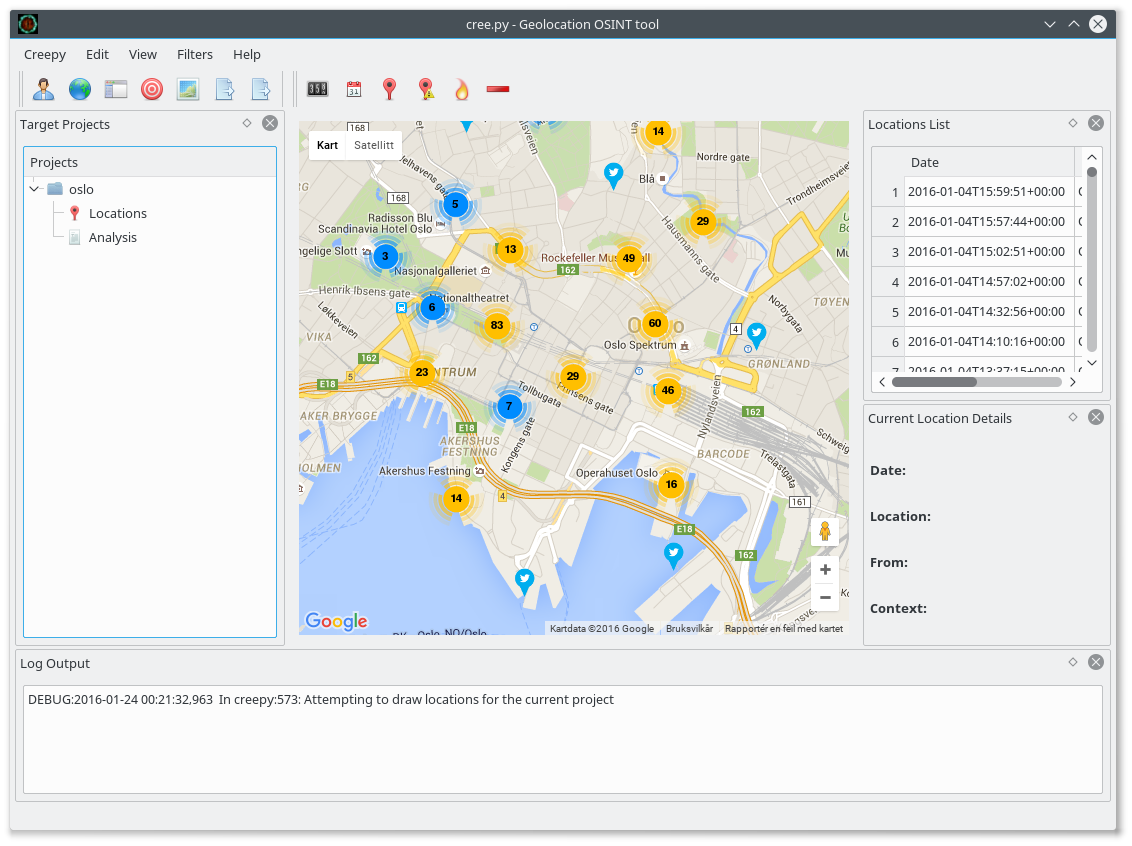
The phone company logs provide a register of locations to check out when one want to figure out what the tracked person was doing. It is unavailable for most of us, but provided to selected government officials, company staff, those illegally buying information from unfaithful servants and crackers stealing the information. But the public information can be collected and analysed, and a free software tool to do so is called Creepy or Cree.py. I discovered it when I read an article about Creepy in the Norwegian newspaper Aftenposten i November 2014, and decided to check if it was available in Debian. The python program was in Debian, but the version in Debian was completely broken and practically unmaintained. I uploaded a new version which did not work quite right, but did not have time to fix it then. This Christmas I decided to finally try to get Creepy operational in Debian. Now a fixed version is available in Debian unstable and testing, and almost all Debian specific patches are now included upstream. The Creepy program visualises geolocation information fetched from Twitter, Instagram, Flickr and Google+, and allow one to get a complete picture of every social media message posted recently in a given area, or track the movement of a given individual across all these services. Earlier it was possible to use the search API of at least some of these services without identifying oneself, but these days it is impossible. This mean that to use Creepy, you need to configure it to log in as yourself on these services, and provide information to them about your search interests. This should be taken into account when using Creepy, as it will also share information about yourself with the services. The picture above show the twitter messages sent from (or at least geotagged with a position from) the city centre of Oslo, the capital of Norway. One useful way to use Creepy is to first look at information tagged with an area of interest, and next look at all the information provided by one or more individuals who was in the area. I tested it by checking out which celebrity provide their location in twitter messages by checkout out who sent twitter messages near a Norwegian TV station, and next could track their position over time, making it possible to locate their home and work place, among other things. A similar technique have been used to locate Russian soldiers in Ukraine, and it is both a powerful tool to discover lying governments, and a useful tool to help people understand the value of the private information they provide to the public. The package is not trivial to backport to Debian Stable/Jessie, as it depend on several python modules currently missing in Jessie (at least python-instagram, python-flickrapi and python-requests-toolbelt). (I have uploaded the image to screenshots.debian.net and licensed it under the same terms as the Creepy program in Debian.)

21 January 2016

Jonas Smedegaard: IT@school

Siri and I are on a journey through India and Nepal, with the aim of learning about needs of Debian derivatives, to improve Debian and encourage closer integration.

Distribution IT@school is a distribution originally based on Debian, later rebased on Ubuntu. Next release will possibly again be a direct derivative of Debian, or maybe even - time will tell - a Debian pure blend.

Aim is education As its name indicates, IT@school is targeted at schools: The system is used in 8th - 10th grades of most (or all?) public primary schools in Kerala, Together with KEK members Anto and Fayad, Siri and I met with former and current key participants in the project where we learned about its history and current status, and discussed some differences between Ubuntu and Debian. IT@school has a strong emphasis on the educational aspect, arguably setting it apart from Skolelinux/DebianEdu which emphasizes the technical aspect of relieving teachers from admin tasks. In the early years of deployment the project faced many hardware issues - e.g. in getting sound cards to work. This was seen not as problems but as beneficial learning for the teachers facing those issues. Kerala public school system has set the standard for other states in India, but sadly political support within the state has been weak in recent years. It is hoped that next election - this April - will bring a positive change.

School book IT@school is accompagnied by a school book written specifically for use of the included tools. No explicit license is applied to the book (which means it defaults to classic copyright). Possibly it will get Creative Commons licensed. If the school book gets a DFSG-free license, several collaboration opportunities emerge: Currently the book is drafted in LibreOffice but then - due to state procedures - finalized with PageMaker. Would be interesting to setup an alternate process using only Free tools - either with Scribus or XeLaTeX. An important detail here is to ensure that the process supports malayalam script.

Curriculum Work is in progress mapping FLOSS tools to the state curriculum. I recommended to share that work publicly with a Free license, to encourage comparisons across countries, and invite collaboration e.g. with Skolelunux/DebianEdu.

Blend for SBCs Some Kerala higher education schools (sorry, don't remember which) have bought some thousands of RaspberryPi2. I suggested to create a Debian Blend for SBCs (Single Board Computers) - we will see what comes of that idea

Blend for education I also suggested to make a Debian blend around IT@school distribution itself, with its strong focus on educational content - i.e. not just as addon to technical tools but the primary purpose pulling in tools as needed.

20 January 2016

Scott Kitterman: Python Packaging Build-Depends

As a follow-up to my last post where I discussed common Python packaging related errors, I thought it would be worth to have a separate post on how to decide on build-depends for Python (and Python3) packages. The python ecosystem has a lot of packages built around supporting multiple versions of python (really python3 now) in parallel. I m going to limit this post to packages you might need to build-depend on directly.

Python (2) Since Jessie (Debian 8), python2.7 has been the only supported python version. For development of Stretch and backports to Jessie there is no need to worry about multiple python versions. As a result, several all packages are (and will continue to be) equivalent to their non- all counterparts. We well continue to provide the all packages for backward compatibility, but they aren t really needed any more. python (or python-all) This is the package to build-depend on if your package is pure Python (no C extensions) and does not for some other reason need access to the Python header files (there are a handful of packages this latter caveat applies to, if you don t know if it applies to your package, it almost certainly doesn t). You should also build-depend on dh-python. It was originally shipped as part of the python package (and there is still an old version provided), but to get the most current code with new bug fixes and features, build-depend on dh-python. python-dev (or python-all-dev) If your package contains compiled C or C++ extensions, this package either provides or depends on the packages that provide all the header files you need. Do not also build-depend on python. python-dev depends on it and it is just an unneeded redundancy. python-dbg (or python-all-dbg) Add this if you build a -dbg package (not needed for -dbgsym). Other python packages There is not, AFAICT, any reason to build-dep on any of the other packages provided (e.g. libpython-dev). It is common to see things like python-all, python, python-dev, libpython-dev in build-depends. This could be simplified just to python-all-dev since it will pull the rest in.

Python3 Build-depends selection for Python 3 is generally similar, except that we continue to want to be able to support multiple python3 versions (as we currently support python3.4 and python3.5). There are a few differences: All or not -all Python3 transitions are much easier when C extensions are compiled for all supported versions. In many cases all that s needed if you use pybuild is to build-depend on python3-all-dev. While this is preferred, in many cases this would be technically challenging and not worth the trouble. This is mostly true for python3 based applications. Python3-all is mostly useful for running test suites against all supported python3 versions. Transitions As mentioned in the python section above, build-depends on python3- all- dev is generally only needed for compiled C extensions. For python3 these are also the packages that need to be rebuilt for a transition. Please avoid -dev build-depends whenever possible for non-compiled packages. Please keep your packages that do need rebuilding binNMU safe. Transitions happen in three stages:
  1. A new python3 version is added to supported python3 versions and packages that need rebuilding due to compiled code and that support multiple versions are binNMUed to add support for the new version.
  2. The default python3 is changed to be the new version and packages that only support a single python3 version are rebuilt.
  3. The old python3 version is dropped from supported versions and packages will multiple-version support are binNMUed to remove support for the dropped version.
This may seem complex (OK, it is a bit), but it enables a seamless transition for packages with multi-version support since they always support the default version. For packages that only support a single version there is an inevitable period when they go uninstallable once the default version has changed and until they can be rebuilt with the new default. Specific version requirements Please don t build-depend against specific python3 versions. Those don t show up in the transition tracker. Use X-Python3-Version (see python policy for details) to specify the version you need.

Summary Please check your packages and only build-depend on the -dev packages when you need it. Check for redundancy and remove it. Try and build for all python3 versions. Don t build-depend on specific python3 versions.

Craig Sanders: lm-sensors configs for Asus Sabertooth 990FX and M5A97 R2.0

I had to replace a motherboard and CPU a few days ago (bought an Asus M5A97 R2.0), and wanted to get lm-sensors working properly on it. Got it working eventually, which was harder than it should have been because the lm-sensors site is MIA, seems to have been rm -rf -ed. For anyone else with this motherboard, the config is included below. This inspired me to fix the config for my Asus Sabertooth 990FX motherboard. Also included below. To install, copy-paste to a file under /etc/sensors.d/ and run sensors -s to make sensors evaluate all of the set statemnents.
# Asus M5A97 R2.0
# based on Asus M5A97 PRO from http://blog.felipe.lessa.nom.br/?p=93
chip "k10temp-pci-00c3"
     label temp1 "CPU Temp (rel)"
chip "it8721-*"
     label  in0 "+12V"
     label  in1 "+5V"
     label  in2 "Vcore"
     label  in2 "+3.3V"
     ignore in4
     ignore in5
     ignore in6
     ignore in7
     ignore fan3
     compute in0  @ * (515/120), @ / (515/120)
     compute in1  @ * (215/120), @ / (215/120)
     label temp1 "CPU Temp"
     label temp2 "M/B Temp"
     set temp1_min 30
     set temp1_max 70
     set temp2_min 30
     set temp2_max 60
     label fan1 "CPU Fan"
     label fan2 "Chassis Fan"
     label fan3 "Power Fan"
     ignore temp3
     set in0_min  12 * 0.95
     set in0_max  12 * 1.05
     set in1_min  5 * 0.95
     set in1_max  5 * 1.05
     set in3_min  3.3 * 0.95
     set in3_max  3.3 * 1.05
     ignore intrusion0
#Asus Sabertooth 990FX
# modified from the version at http://www.spinics.net/lists/lm-sensors/msg43352.html
chip "it8721-isa-0290"
# Temperatures
    label temp1  "CPU Temp"
    label temp2  "M/B Temp"
    label temp3  "VCORE-1"
    label temp4  "VCORE-2"
    label temp5  "Northbridge"         # I put all these here as a reference since the
    label temp6  "DRAM"                # Asus Thermal Radar tool on my Windows box displays
    label temp7  "USB3.0-1"            # all of them.
    label temp8  "USB3.0-2"            # lm-sensors ignores all but the CPU and M/B temps.
    label temp9  "PCIE-1"              # If that is really what they are.
    label temp10 "PCIE-2"
    set temp1_min 0
    set temp1_max 70
    set temp2_min 0
    set temp2_max 60
    ignore temp3
# Fans
    label fan1 "CPU Fan"
    label fan2 "Chassis Fan 1"
    label fan3 "Chassis Fan 2"
    label fan4 "Chassis Fan 3"
#    label fan5 "Chassis Fan 4"      # lm-sensor complains about this
    ignore fan2
    ignore fan3
    set fan1_min 600
    set fan2_min 600
    set fan3_min 600
# Voltages
    label in0 "+12V"
    label in1 "+5V"
    label in2 "Vcore"
    label in3 "+3.3V"
    label in5 "VDDA"
    compute  in0  @ * (50/12), @ / (50/12)
    compute  in1  @ * (205/120), @ / (205/120)
    set in0_min  12 * 0.95
    set in0_max  12 * 1.05
    set in1_min  5 * 0.95
    set in1_max  5 * 1.05
    set in2_min  0.80
    set in2_max  1.6
    set in3_min  3.20
    set in3_max  3.6
    set in5_min  2.2
    set in5_max  2.8
    ignore in4
    ignore in6
    ignore in7
    ignore intrusion0
chip "k10temp-pci-00c3"
     label temp1 "CPU Temp"
lm-sensors configs for Asus Sabertooth 990FX and M5A97 R2.0 is a post from: Errata

18 January 2016

Norbert Preining: Debian/TeX Live 2015.20160117-1 and biber 2.3-1

About one month has passed and here is the usual updated of TeX Live packages for Debian, this time also with an update to biber to accompany the updated version of biblatex. Nothing spectacular here besides fixes for some broken links of fonts. Debian - TeX Live 2015 As a bonus this time, I provide (auto-generated) links to the packages on CTAN, so that one can check the package descriptions and manuals. Updated packages academicons, acro, apnum, babel, babel-french, babel-icelandic, babel-spanish, babel-vietnamese, bclogo, biblatex, bibtexperllibs, calxxxx-yyyy, chemformula, chemgreek, chess-problem-diagrams, chickenize, cjk-gs-integrate, cmcyr, csplain, datatool, dvips, embrac, enotez, etex-pkg, fibeamer, fithesis, invoice, isodoc, l3kernel, latexdiff, luamplib, mathastext, mcf2graph, media9, nameauth, newpx, newtx, newtxsf, nucleardata, paralist, pdftex, pgfplots, pict2e, pmxchords, prftree, ptex, reledmac, schwalbe-chess, siunitx, tempora, tetex, tex4ht, texinfo, texlive-cz, texlive-docindex, texlive-scripts, thalie, thuthesis, tkz-orm, uantwerpendocs, unicode-data, xassoccnt, xespotcolor. New packages continue, ecobiblatex, econometrics, getitems, librebodoni, lshort-estonian, moodle, nimbus15, seuthesix, uantwerpendocs. Enjoy.

14 January 2016

Jan Wagner: Running Ghost blogging platform via Docker

When I was thinking about using Ghost, I did read the installations guide and then I just closed the browser window.
I didn't wanted to install npm, yet another package manager, and just hack init scripts. Not speaking about updating Ghost itself. Some weeks later I did think about using Ghost again. It has a nice Markdown Editor and some nice other features. Since everybody is jumping on the Docker band wagon actually and I had used it for some tests already, I thought trying the Ghost Docker image might be a good idea. If you are interested into how I did that, read on. I suppose you have installed a stock Debian Jessie.

Installing Docker

Pulling the Docker image Just in case you didn't, you need to (re)start docker to work with service docker restart
# docker pull ghost

Making Ghost (container image) run forever I did not like systemd in the first place for many reasons. But in some circumstances it makes sense. In case of handling a Docker container, using a systemd unit file makes life much easier.
# mkdir -p /srv/docker/ghost/
# cat > /etc/systemd/system/ghost.service << EOF
[Unit]
Description=GHost Service  
After=docker.service  
Requires=docker.service
[Service]
ExecStartPre=-/usr/bin/docker kill ghost  
ExecStartPre=-/usr/bin/docker rm ghost  
ExecStartPre=-/usr/bin/docker pull ghost  
ExecStart=/usr/bin/docker run  --name ghost --publish 2368:2368 --env 'NODE_ENV=production' --volume /srv/docker/ghost/:/var/lib/ghost ghost  
ExecStop=/usr/bin/docker stop ghost
[Install]
WantedBy=multi-user.target  
EOF  
# systemctl enable ghost && systemctl daemon-reload && systemctl start ghost 
This will start your container on start and even is looking for a new Docker image and is fetching it, if needed. If you don't like this behavior, just comment out the line in the config and reread it with systemctl daemon-reload. Now you should have listening something on port 2368:
# netstat -tapn   grep 2368
tcp6       0      0 :::2368                 :::*                    LISTEN      7061/docker-proxy  
Update: Jo l Dinel did send me a mail, that starting your Docker container with --restart always will take care that it is brought up again if Docker or (even) the whole system will get restarted. For real I used that before and might be a lightweight solution, but I liked the systemd unit file solution a lot more.

Persistent Data Thanks to the Docker mount option you can find all your data in /srv/docker/ghost/. So your blog will still have content, even if the ghost Docker images is updated:
# ls /srv/docker/ghost/
apps  config.js  data  images  themes  

Accessing the container To kick your ghost into production, it might be useful if you make it available on port 80 at least. This can be done for example by changing your Docker publish configuration or adding a DNAT to your firewall. But I would recommand using a proxy in front of your Docker container. This might be part of one of my next articles.

12 January 2016

Gunnar Wolf: Readying up for the second "Embedded Linux" diploma course

I am happy to share here a project I was a part of during last year, that ended up being a complete success and now stands to be repeated: The diploma course on embedded Linux, taught at Facultad de Ingenier a, UNAM, where I'm teaching my regular classes as well. Back in November, we held the graduation for our first 10 students. This photo shows only seven, as the remaining three have already relocated to Guadalajara, where they were hired by Continental, a company that promoted the creation of this specialization program. After this first excercise, we went over the program and made some adequations; future generations will have a shorter and more focused program (240 instead of 288 hours, leaving out several topics that were not deemed related to the topic or were thoroughly understood by students to begin with); we intend to start the semester-long course in early February. I will soon update here with the full program and promotional material, as soon as I receive it. update (01-19): You can download the promotional information, or go to an (unofficial) URL with the full information. We are close to starting the program, so hurry! I am specially glad that this course is taught by people I admire and recognize, and a very interesting mix between long-time academic and stemming from my free-software-related friends: From the academic side, Facultad de Ingenier a's professors Laura Sandoval, Karen S enz and Oscar Valdez, and from the free-software side, Sandino Araico, Iv n Chavero, C sar Y ez and Gabriel Salda a (and myself on both camps, of course )
AttachmentSize
OT401_nota.jpg75.82 KB
Linux Embebido - Folleto.pdf455.32 KB

Bits from Debian: New Debian Developers and Maintainers (November and December 2015)

The following contributors got their Debian Developer accounts in the last two months: The following contributors were added as Debian Maintainers in the last two months: Congratulations!

Russell Coker: Sociological Images 2015

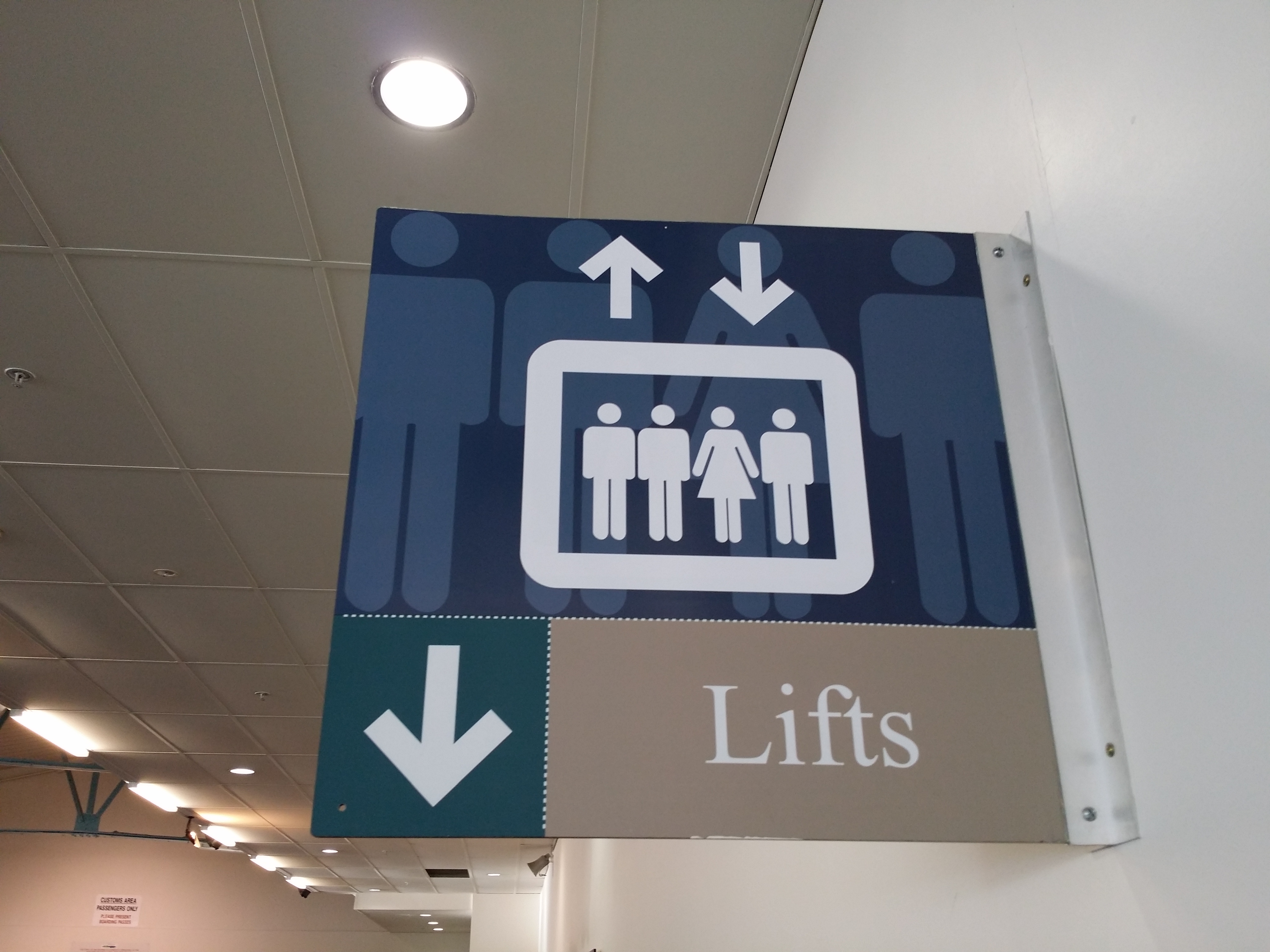
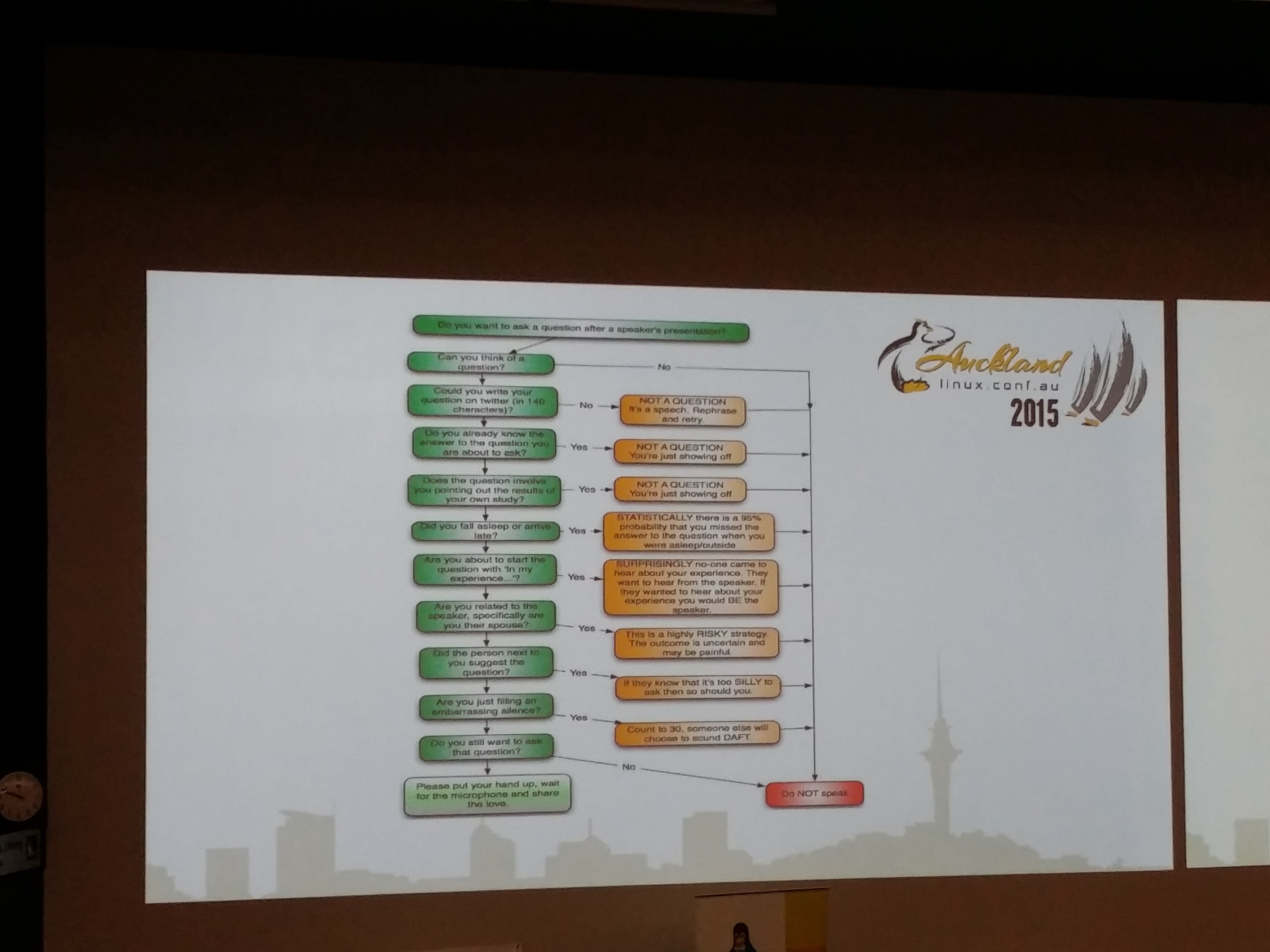
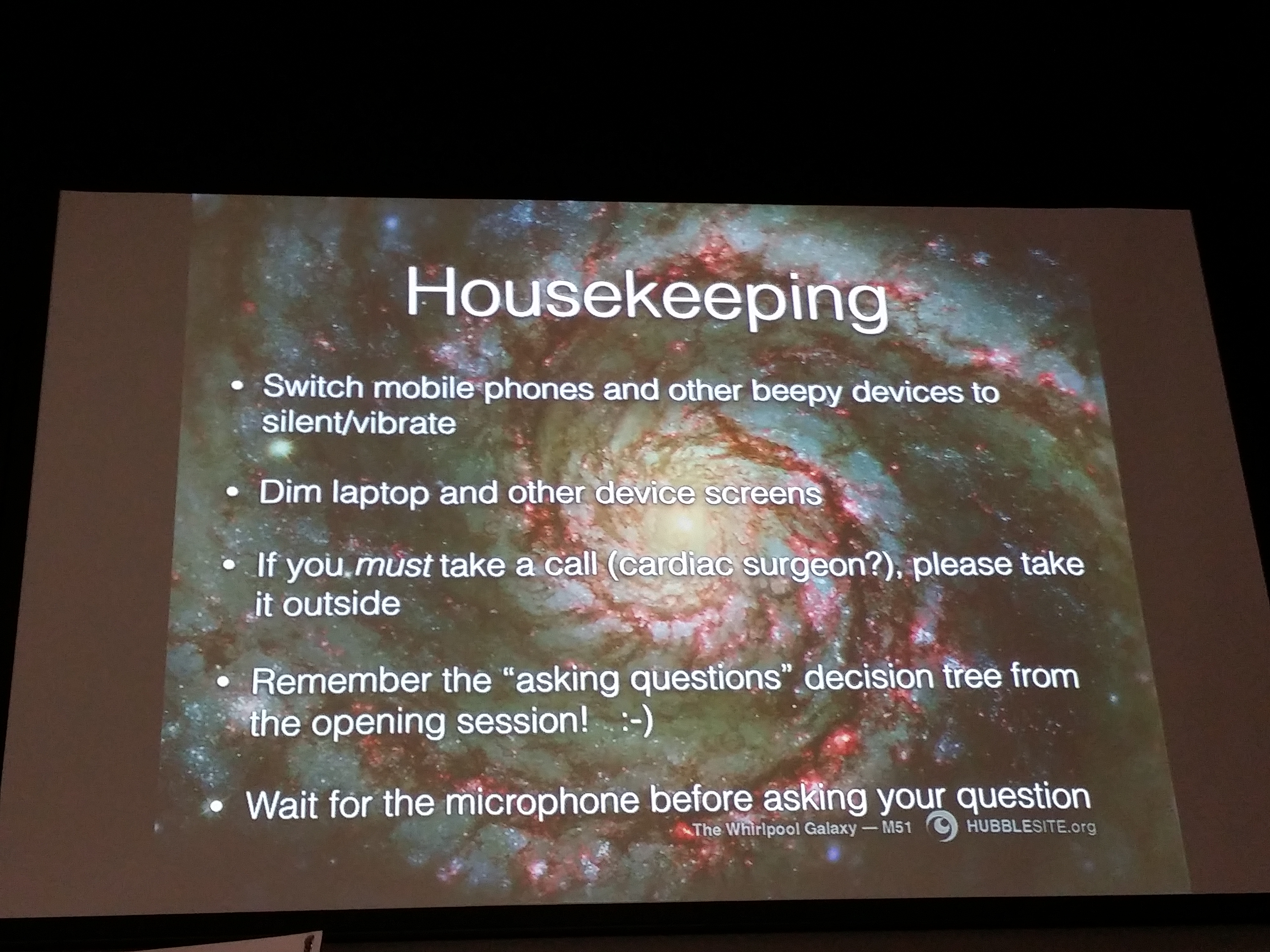
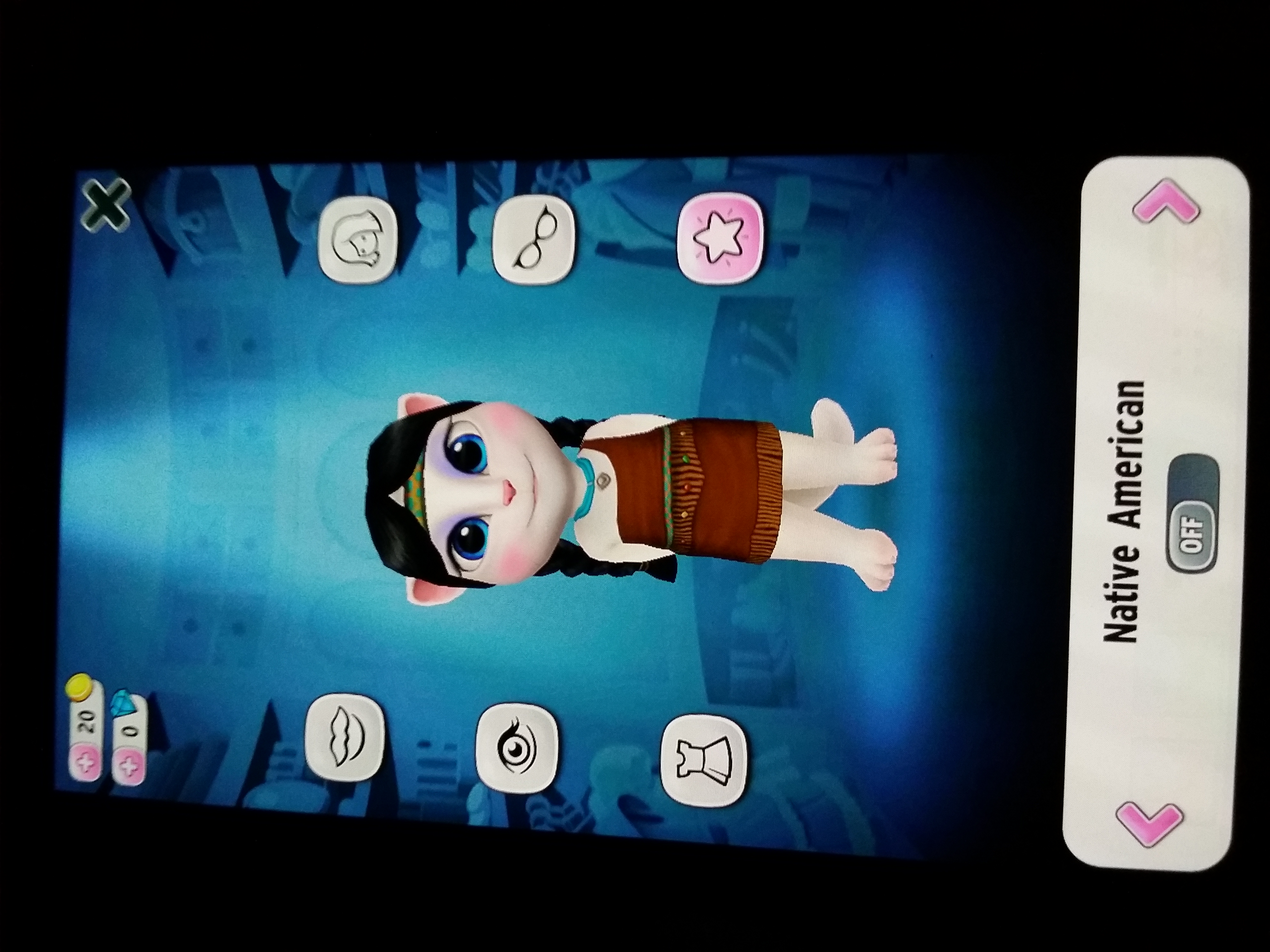
3 men 1 women on lift sign The above sign was at the Melbourne Docks in December 2014 when I was returning from a cruise. I have no idea why there are 3 men and 1 woman on the sign (and a dock worker was also surprised when I explained why I was photographing it). I wonder whether a sign that had 3 women and 1 man would ever have been installed or not noticed if it was installed. rules for asking questions at LCA2015 At the start of the first day of LCA 2015 the above was displayed at the keynote as a flow-chart for whether someone should ask a question at a lecture. Given that the first real item in the list is that a question should fit in a tweet I think it was inspired by my blog post about the length of conference questions [1]. Astronomy Miniconf suggestions for delegates At the introduction to the Astronomy Miniconf the above slide was displayed. In addition to referencing the flow-chart for asking questions it recommends dimming laptop screens (among other things). sign saying men to the left because women are always right The above sign was at a restaurant in Auckland in January 2015. I thought that sort of sexist joke went out of fashion a few decades ago. gendered nerf weaponary The above photo is from a Melbourne department store in February 2015. Why gender a nerf gun? That just doesn t make sense. Also it appeared that the only nerf crossbow was the purple/pink one, is a crossbow considered feminine nowadays? Picture of Angela appropriating Native American clothing The above picture is a screen-shot of one of the Talking Angela series of Android games from March. Appropriating the traditional clothing of marginalised groups is a bad thing. People of Native American heritage who want to wear their traditional clothing face discrimination when they do so, when white people play dress-up in clothing that is a parody of Native American style it s really offensive. The site Racialicious.com has a tag for articles about appropriation [2]. The above was in a library advertising an Ebook reader. In this case they didn t even have pointlessly gendered products they just had pointlessly gendered adverts for the same product. They also perpetuate the myth that only girls read vampire books and only boys read about space. Also why is the girl lying down to read while the boy is sitting up? Above is an Advent calendar on sale in a petrol station. Having end of year holiday presents that have nothing to do with religious festivals makes sense. But Advent is a religious observance. I think this would be a better candidate for war on Christmas paranoia than a coffee cup of the wrong colour. The above photo is of boys and girls pipette suckers. Pointlessly gendered recreational products like Nerf guns is one thing, but I think that doing it to scientific equipment is a bigger problem. Are scientists going to stop work if they can t find a pipette sucker of the desired gender? Is worrying about this going to distract them from their research (really bad if working with infectious or carcinogenic solutions). The Integra advertising claims to be doing this to promote breast cancer research which is also bogus. Here is a Sociological Images article about the problems of using pink to market breast cancer research [3] and the Sociological Images post about pinkwashing (boobies against breast cancer) is also worth reading [4]. As an aside I made a mistake in putting a pipette sucker over the woman s chest in that picture. The way that Integra portreyed her chest is relevant to analysis of this advert. But unfortunately I didn t photograph that. Here is a link to my sociological images post from 2014 [5].

11 January 2016

Thadeu Lima de Souza Cascardo: GNU on Smartphones (part II)

Some time ago, I wrote how to get GNU on a smartphone. This is going to be a long discussion on why and how we should work on more operating systems for more devices. On Android So, why should we bother if we already have Android, some might ask? If it's just because of some binary blobs, one could just use Replicant, right? Well, one of the problems is that Android development is done in hiding, and pushed downstream when a new version is launched. There is no community behind that anyone can join. Replicant ends up either following it or staying behind. It could do a fork and have its own innovations. And I am all for it. But the lack of manpower for supporting devices and keeping up with the latest versions and security fixes already takes most of the time for the one or two developers involved. Also, Android has a huge modularity problem, that I will discuss further below. But it's hard to replace many components in the system, unless you replace them all. And that also causes the problem that applications can hardly share extra components. I would rather see Debian running on my devices and supporting good environments and frameworks for all kinds of devices, like phones, tablets, TVs, cars, etc. It's developed by a community I can join, it allows a diverse set of frameworks and environments, and it's much easier to replace single components on such a system. On Copyleft Hardware I get it. Hardware is not free or libre. Its design is. I love the concept of copyleft hardware, where one applies the copyleft principles to a hardware design. Also, there is the concept of Hardware that Respects Your Freedom, that is, one that allows you to use it with only free software. Note that RYF hardware is not necessarily copyleft hardware. In fact, most of the time, the original vendor has not helped at all, and it required reverse engineering efforts by other people to be able to run free software on those systems. My point here is that we should not prevent people from running free software on hardware that does not RYF or that is not copyleft. We should continue the efforts of reverse engineering and of pushing hardware vendors to not only ship free software for their hardware, but also release their design under free licenses. But in the meantime, we need to make free software flourish in the plethora of devices on the hands of so many people around the world. On Diversity I won't go into details on this post about two things. One topic I love is retrocomputing and how Linux supported so many devices, and how many free or quasi-free operating systems ran on so many of them in the past. I could mention ucLinux, Familiar, PDAs, Palmtops, Motorolas, etc. But I will leave it to another time and go from Openmoko and Maemo forward. The other topic is application scalability. Even Debian with so many software available does not ship all free software there is available. And it doesn't support all third-party services out there. How can we solve that? It has to do with platforms, protocols, open protocols, etc. I will not go into that today. Because I believe that either way, it's healthy for our society to have diversity. I believe we should have other operating systems available for our devices. Even if application developers will not develop for all of them. That is already the case today. There are other ways to fix that, when that needs fixing. Sometimes, it's sufficient that you can have your own operating system on your device, that you can customize it, enhance it and share it with friends. And also, that would allow for innovation. It would make possible that some other operating system would have enough market share on some other niche. Other than Android and iOS, for example. But that requires that we can support that operating system on different devices. And that is the scalability that I want to talk about. How to support more devices with less effort. Options But before I go into that, let me write more about the alternatives we have out there. And some of the history around it. Openmoko Openmoko developed a set of devices that had some free design. And it has some free operating systems running on top. The community developed a lot of their own as well. Debian could (still can) run on it. There is SHR, which uses FSO, a mobile middleware based on D-Bus. It even spawned other devices to be developed, like GTA04, a successor board, that can be shipped inside a Neo Freerunner case. Maemo, Moblin, Meego and Tizen I remember the announcement of Nokia N770. During FISL in 2005, I even criticized a lot, because it shipped with proprietary drivers. And applications. But it was the first time we heard of Maemo. It was based on Debian and GNOME. The GNOME Mobile initiative was born from that, I believe, but died later on. But with the launch of N900, and later events, like the merge of Moblin with Maemo, to create Meego, we all had an operating system that was based on community developed components, that had some community participation, and was much more like the systems we were used to. You could run gcc on N900. You could install Das U-Boot and have other operating systems running there. But Nokia has gone a different path. Intel has started Tizen with Samsung. There is so much legacy there, that could still be developed upon. I am just sad that Jolla decided to put proprietary layers on top of that, to create SailfishOS. But we still have Mer, Nemo. But it looks like Cordia is gone. At least, (http://cordiahd.org) seems to have been registered by a domain seller. Not to forget, Neo900, a project to upgrade the board, in the same vein as GTA04. FirefoxOS and Ubuntu What can I say about FirefoxOS and Ubuntu Phone? In summary, I think we need more than Web, and Canonical has a history of not being too community oriented as we'd like. I won't go too much here in what I think about the Web as a platform. But I think we need a system that has more options for platforms. I haven't participated in projects directed by Mozilla either, so I can't say much about that. Ubuntu Phone should be a system more like what we are used to. But Canonical is going to set the directions to the project, it's not a community project. Nonetheless, I think they add to the diversity, and users should be able to try them, or their free parts or versions. But there are challenges there, that I think need to be discussed. So, both of these systems are based on Android. They don't use Dalvik or the application framework. But they use what is below that, which means device drivers in userspaces, like RIL, for the modem drivers, and EGL, for graphics drivers. The reason they do that is to build on top of all the existing vendor support for Android. If a SOC and phone vendor already supports Android, there should be not much needed to do to support FirefoxOS or Ubuntu Phone. In practice, this has not benefited the users or the projects. Porting should be as simple as getting a generic FirefoxOS or Ubuntu Phone image and run it on top of your Android or CyanogenMod port. Porting usually requires doing all the same work as porting Android. Even though one should be able to take advantage of existing ports, it still requires doing a lot of integration work and building an entire image, most of the time, including the upper layers, that should be equal in all devices. This process should require at most creating a new image based on other images and loading it on the device. I will discuss more about this below. I can't forget to mention the Matchstick TV project. It is based on FirefoxOS. I think it would have much more changes to succeed if it was easier for testers to have images available for all of their gadgets capable of running some form of Android. Replicant And then we have Replicant. It has a lot of the problems Android has. Even so, it's a tremendously important project. First, it offers a free version of Android, removing all proprietary pieces. This is very good for the community. But more than that, it tries to free the devices beyond that. What the project has been done is reverse engineer some of the pieces, mostly the modem drivers. That allows other projects to build upon that work, and support those modems. Without that, there is no telephony or celullar data available on any of these devices. Not without proprietary software, that is. They also have been working on free bootloaders, which is another important step for a completely free system. Next steps There are many challenges here, but I believe we should work on a set of steps that make it more palatable and produce intermediary results that can be used by users and other projects. One of the goals should be good modularity. The ability to replace some pieces with the least trouble necessary. The update of a single framework library should be just a package install, instead of building the entire framework again. If there is ABI breakage, users should still be able to have access to binaries (and accompanying source code) and only need to update the library and its reverse dependencies. If one layer does not have these properties, at least it should be possible to update this big chunk without interfering with the other layers. One example is FirefoxOS and Ubuntu Phone. Even if there is a big image with all system userspace and middleware, the porting, install and upgrade process should allow the user to keep the applications and to leverage porting already done by similar projects. Heck, these two projects should be able to share porting efforts without any trouble. So what follows is a quick discussion on Android builds, then suggestions on how to approach some of the challenges. On Android build The big problem with Android build is its non-modularity. You need to build the world and more to get a single image in the end. Instead of packages that could be built independently, that generated modular package images, that could be bundled in a single system image. Better yet would be the ability to pick only those components that matter. Certainly, portability would be just as interesting, being able to build certain components on top a GNU system with GNU libc. At times, it seems like this is done by design, to make it difficult for "fragmentation" and competition. Basically, making it difficult to exercise the freedom to modify the software and share your modifications with others. Imagine the possibilities of being able to: There are some dangers in promoting the use of Android like this. Since it promotes proprietary drivers, relying on such layers instead of better community oriented layers means giving an advantage to the first. So, the best plan would be to replace those layers, when they are used, for things like ofono and Wayland, for example. But, in the meantime, making it easier for users to experiment with FirefoxOS, Ubuntu Phone, Matchstick TV, Replicant on other devices, without resorting to building the entire Android system, would be a very nice thing. It is possible that there are some challenges with respect to API and ABI. That these layers are too intermingled that some changes present in one port would prevent FirefoxOS to run on top of it without changes in either of the layers. I can't confirm that is the case, but can't deny the possibility. Rooting One of the challenges we have that may have trouble in scaling is rooting devices. Unfortunately, most of the devices are owned by the vendor or carrier, not the user. The user is prevented from replacing software components in the system, by removing its permissions from replacing most of the files in the filesystem, or writing to block devices, or change boot parameters or write to the storage devices. Fortunately, there are many documents, guides, howtos, and whatnots out there instructing on how to root a lot of devices. In some cases, it depends on software bugs that can be patched by the users as instructed by vendors. Certainly, favoring devices that are built to allow rooting, hacking, etc, is a good thing. But we should still help those users out there who do not have such devices, and allow them to run free software on them. Booting Then, comes booting, which is a large discussion on its own, and also related to rooting, or how to allow users to replace their software. First, we have the topic of bootloaders, which are usually not free, and embedded in the chip, not on external storage. So, there are those pieces of the bootloader which we can replace more easily and those that we are not, because they would require changing a piece of ROM, for example. Das U-Boot would be one of the preferred options for a system. It supports a lot of hardware platforms out there, a lot of storage devices and filesystems, network booting, USB and serial booting, and a lot of other things. Porting is not an easy task, but it is possible. Meanwhile, using the bootloaders that ship with the system, when possible, would allow a path where other pieces of the system would be free. One of the challenges here is building single images that could boot everywhere. The lack of a single ARM boot environment is a curse and a blessing. It makes it hard to have this single boot image, but, on the other hand, it has allowed so much of the information for such systems to be free, to be embedded in copyleft software, instead of having blobs executed by our free systems, like ACPI encourages. Device trees have pushed this portability issue from the kernel to the bootloaders. Possibily encouraging vendors to now hide and copyright this information in the form of proprietary device trees. But it has made it easier for single images. In practice, we still need to see a lot of devices out there supporting this single kernel scenario. And this mechanism only brings us the possibility of a single kernel. We still need to ship bootable images that have pieces of bootloaders that are not as portable. This has caused lots of operating systems out there to be built for a single board. Or to support just a small set of boards. I struggle with the concept. Why are we not able to mix device-specific pieces with generic pieces and get a resulting image that will boot on our choice of board? Why does every project need to do all the porting work again, repeating the efforts? Or have one entier ISO image for every supported board? Check how Geexbox does it, for an example. Fortunately, I see Debian going in a good direction. Here, one can see how it instructs the user to combine a system-dependent part with a system-independent part. Installation Which brings us to the installation challenge. We should make this easy and also customizable by the user. Every project might have its own method, and that is part of the diversity that we should allow. The great challenge here is handling rooting and booting for the user. But it's also possible to leave that as separate efforts, as it would be nice to have good installers as we have in the desktop and server environments. Linux Linux is one of the most ported kernels out there. Of course, it would be healthy to the diversity I propose that other kernels and systems out there should work on those mobile devices. NetBSD, for example, has a reputation of being very portable and ported to many platforms. And GNU runs on many of them, either together with the original systems, or as the main system on top of other kernels, as proven by the Debian GNU/kFreeBSD port, which uses GNU libc. But, though I would love to see HURD running directly on those devices, Linux and its derivatives are already running on them. Easier to tackle is to get Linux-libre running on those systems. But though this looks like one of the easier tasks at hand, it is not. If you run a derivative version from Linux, provided by the vendor, things should go smooth. But most of the time, the vendor does not provide patches upstream, and leave their fork to rot, if you are lucky, in the earlier 3.x series. And some times, there is not even source code available. There are vendors out there who do not respect the GPL and that is one of the reasons why GPL enforcement is important. I take this opportunity to call attention to the work of Software Freedom Conservancy and its current efforts to raise funds to continue their work. Running an existing binary version of Linux on your device with a free userspace is part of the strategy of replacing pieces one at a time while allowing for good diversity and reaching more users. Drivers Then we have the matter of drivers. And in this case, it's not only Linux drivers, but drivers running in userspace. Though others exist, there are two important and common cases, which are modem and graphics drivers, both of which are usually provided by Android frameworks, and that other systems try to leverage, instead of using alternatives that are more community friendly. In the case of modem drivers, Android uses its RIL. Besides not using a Radio or Modem at all, there are two strategies for free versions. One is using free versions of the drivers for RIL. That's what Replicant does, because, well, it uses the other Android subsystems after all. The other one is using a system that is developed by the community. ofono is one that, even though it's an Intel iniative, looks more community governed or open to community participation than any Android subsystem ever was. As for Graphics, Canonical even built its Mir project with the goal of being able to use Android GPU drivers. Luckily, there has been a lot of reverse engineering efforts out there for a lot of those GPUs shipped with ARM SoCs. Then, we can use Mesa, Wayland and X.org. Other option, until then, is just using a framebuffer driver, possibly one that does not need any initialization, depending on one done by the bootloader, for example. Middleware and Shells Plasma Active, that I just found out now is Plasma Mobile, looks like a great system. Built by folks behind KDE, we can expect great freedom to come from it. Unfortunately, it suffers from what we have been discussing here, which is lack of good device support, or shipping images that run on top of single devices, without leveraging the porting that has come before of other systems. Fortunately, that is just what I want to accomplish with this effort. FSO, that I mentioned before, is a good middleware, that we should try to run on top of these devices. Running GNOME or Unity shell, and use rpm or deb based systems, that's all part of the plan on diversity. You could use systemd, or System V init systems, whatever gives you the kicks. It's not an easy task, since there are so many new things on these new kinds of devices. Besides touch, there is telephony, which as I mentioned, would be a good task for ofono. As for TV sets or dongles, I would love to see OpenFlint, created by the Matchstick TV guys, flourish out there and allow me to flint stuff from my mobile phone running Debian into my TV dongle running Debian. Project So, is there a project out there you can start contributing to? Well, I pointed out a lot of them. All of them make part of this plan. Contributing to reverse engineering GPUs, or to Plasma Mobile, ofono, GNOME, Linux-libre, bootloaders, Debian, and so many other projects. My plans are to contribute in the scope of Debian and make sure it works well on top of semi-liberated devices, and make sure there is a nice user interface and good applications when using either GNOME or Plasma. Integrating ofono is a good next step, but I am running ahead of myself. Right now, I don't think there is need for an integrated effort. If you think otherwise, please let me know. If you are doing something in this direction, I would love to know. Paul Wise reminded me to point out to the Debian Mobile, where I will probably contribute any documentation and other relevant results. Thanks There are some many people to thank, but I would like to remember Ian Murdock, who created Debian, one of the projects who inspires me the most. I think the best way to handle his passing is to celebrate what he has helped create, and move forward, taking more free software to more people in an easy and modular way. I have been wanting to write something like this for a long time, so I thank Chris Webber for inspiring me on doing it.

Daniel Pocock: FOSDEM RTC Dev-room schedule published

If you want to help make Free Real-time Communication (RTC) with free, open source software surpass proprietary solutions this year, a great place to start is the FOSDEM RTC dev-room. On Friday we published the list of 17 talks accepted in the dev-room (times are still provisional until the FOSDEM schedule is printed). They include a range of topics, including SIP, XMPP, WebRTC and peer-to-peer Real-time communication. RTC will be very prominent at FOSDEM this year with several talks on this topic, including my own, in the main track.

Keith Packard: Altos1.6.2

AltOS 1.6.2 TeleMega v2.0 support, bug fixes and documentation updates Bdale and I are pleased to announce the release of AltOS version 1.6.2. AltOS is the core of the software for all of the Altus Metrum products. It consists of firmware for our cc1111, STM32L151, STMF042, LPC11U14 and ATtiny85 based electronics and Java-based ground station software. This is a minor release of AltOS, including support for our new TeleMega v2.0 board, a small selection of bug fixes and a major update of the documentation AltOS Firmware TeleMega v2.0 added The updated six-channel flight computer, TeleMega v2.0, has a few changes from the v1.0 design: None of these change the basic functionality of the device, but they do change the firmware a bit so there's a new package. AltOS Bug Fixes We also worked around a ground station limitation in the firmware: AltosUI and TeleGPS applications A few minor new features are in this release Documentation I spent a good number of hours completely reformatting and restructuring the Altus Metrum documentation.
10 January 2016

Andrew Shadura: Public transport map of Managua

Holger Levsen writes about the public transport map of Managua, Nicaragua, which is, according to him, the first detailed map of Managua s bus network:
If you haven t been to Managua, you might not be able to immediatly appreciate the usefulness of this. Up until now, there has been no map nor timetable for the bus system, which as you can see now easily and from far away, is actually quite big and is used by 80% of the population in a city, where the streets still have no names.
Having had a look at the map they produced, I have to admit I quite liked it: MapaNica.net, Rutas de Managua y Ciudad Sandino MapaNica, the community behind said map, are raising funds to make lives of locals easier by publishing a printed version of the map and distributing it. They have already raised more than $3300 of their $7500 goal. Every further donation will help them print more maps. Please go to support.mapanica.net and support their initiative!

Next.

Previous.