Russell Coker: Debian S390X Emulation
I decided to setup some virtual machines for different architectures. One that I decided to try was S390X the latest 64bit version of the IBM mainframe. Here s how to do it, I tested on a host running Debian/Unstable but Buster should work in the same way.
First you need to create a filesystem in an an image file with commands like the following:
truncate -s 4g /vmstore/s390x
mkfs.ext4 /vmstore/s390x
mount -o loop /vmstore/s390x /mnt/tmp
Then visit the Debian Netinst page [1] to download the S390X net install ISO. Then loopback mount it somewhere convenient like /mnt/tmp2. The package qemu-system-misc has the program for emulating a S390X system (among many others), the qemu-user-static package has the program for emulating S390X for a single program (IE a statically linked program or a chroot environment), you need this to run debootstrap. The following commands should be most of what you need.
# Install the basic packages you need
apt install qemu-system-misc qemu-user-static debootstrap
# List the support for different binary formats
update-binfmts --display
# qemu s390x needs exec stack to solve "Could not allocate dynamic translator buffer"
# so you probably need this on SE Linux systems
setsebool allow_execstack 1
# commands to do the main install
debootstrap --foreign --arch=s390x --no-check-gpg buster /mnt/tmp file:///mnt/tmp2
chroot /mnt/tmp /debootstrap/debootstrap --second-stage
# set the apt sources
cat << END > /mnt/tmp/etc/apt/sources.list
deb http://YOURLOCALMIRROR/pub/debian/ buster main
deb http://security.debian.org/ buster/updates main
END
# for minimal install do not want recommended packages
echo "APT::Install-Recommends False;" > /mnt/tmp/etc/apt/apt.conf
# update to latest packages
chroot /mnt/tmp apt update
chroot /mnt/tmp apt dist-upgrade
# install kernel, ssh, and build-essential
chroot /mnt/tmp apt install bash-completion locales linux-image-s390x man-db openssh-server build-essential
chroot /mnt/tmp dpkg-reconfigure locales
echo s390x > /mnt/tmp/etc/hostname
chroot /mnt/tmp passwd
# copy kernel and initrd
mkdir -p /boot/s390x
cp /mnt/tmp/boot/vmlinuz* /mnt/tmp/boot/initrd* /boot/s390x
# setup /etc/fstab
cat << END > /mnt/tmp/etc/fstab
/dev/vda / ext4 noatime 0 0
#/dev/vdb none swap defaults 0 0
END
# clean up
umount /mnt/tmp
umount /mnt/tmp2
# setcap binary for starting bridged networking
setcap cap_net_admin+ep /usr/lib/qemu/qemu-bridge-helper
# afterwards set the access on /etc/qemu/bridge.conf so it can only
# be read by the user/group permitted to start qemu/kvm
echo "allow all" > /etc/qemu/bridge.conf
Some of the above can be considered more as pseudo-code in shell script rather than an exact way of doing things. While you can copy and past all the above into a command line and have a reasonable chance of having it work I think it would be better to look at each command and decide whether it s right for you and whether you need to alter it slightly for your system. To run qemu as non-root you need to have a helper program with extra capabilities to setup bridged networking. I ve included that in the explanation because I think it s important to have all security options enabled. The -object rng-random,filename=/dev/urandom,id=rng0 -device virtio-rng-ccw,rng=rng0 part is to give entropy to the VM from the host, otherwise it will take ages to start sshd. Note that this is slightly but significantly different from the command used for other architectures (the ccw is the difference). I m not sure if noresume on the kernel command line is required, but it doesn t do any harm. The net.ifnames=0 stops systemd from renaming Ethernet devices. For the virtual networking the ccw again is a difference from other architectures. Here is a basic command to run a QEMU virtual S390X system. If all goes well it should give you a login: prompt on a curses based text display, you can then login as root and should be able to run dhclient eth0 and other similar commands to setup networking and allow ssh logins.
qemu-system-s390x -drive format=raw,file=/vmstore/s390x,if=virtio -object rng-random,filename=/dev/urandom,id=rng0 -device virtio-rng-ccw,rng=rng0 -nographic -m 1500 -smp 2 -kernel /boot/s390x/vmlinuz-4.19.0-9-s390x -initrd /boot/s390x/initrd.img-4.19.0-9-s390x -curses -append "net.ifnames=0 noresume root=/dev/vda ro" -device virtio-net-ccw,netdev=net0,mac=02:02:00:00:01:02 -netdev tap,id=net0,helper=/usr/lib/qemu/qemu-bridge-helperHere is a slightly more complete QEMU command. It has 2 block devices, for root and swap. It has SE Linux enabled for the VM (SE Linux works nicely on S390X). I added the lockdown=confidentiality kernel security option even though it s not supported in 4.19 kernels, it doesn t do any harm and when I upgrade systems to newer kernels I won t have to remember to add it.
qemu-system-s390x -drive format=raw,file=/vmstore/s390x,if=virtio -drive format=raw,file=/vmswap/s390x,if=virtio -object rng-random,filename=/dev/urandom,id=rng0 -device virtio-rng-ccw,rng=rng0 -nographic -m 1500 -smp 2 -kernel /boot/s390x/vmlinuz-4.19.0-9-s390x -initrd /boot/s390x/initrd.img-4.19.0-9-s390x -curses -append "net.ifnames=0 noresume security=selinux root=/dev/vda ro lockdown=confidentiality" -device virtio-net-ccw,netdev=net0,mac=02:02:00:00:01:02 -netdev tap,id=net0,helper=/usr/lib/qemu/qemu-bridge-helperTry It Out I ve got a S390X system online for a while, ssh root@s390x.coker.com.au with password SELINUX to try it out. PPC64 I ve tried running a PPC64 virtual machine, I did the same things to set it up and then tried launching it with the following result:
qemu-system-ppc64 -drive format=raw,file=/vmstore/ppc64,if=virtio -nographic -m 1024 -kernel /boot/ppc64/vmlinux-4.19.0-9-powerpc64le -initrd /boot/ppc64/initrd.img-4.19.0-9-powerpc64le -curses -append "root=/dev/vda ro"Above is the minimal qemu command that I m using. Below is the result, it stops after the 4. from 4.19.0-9 . Note that I had originally tried with a more complete and usable set of options, but I trimmed it to the minimal needed to demonstrate the problem.
  Copyright (c) 2004, 2017 IBM Corporation All rights reserved.
  This program and the accompanying materials are made available
  under the terms of the BSD License available at
  http://www.opensource.org/licenses/bsd-license.php
Booting from memory...
Linux ppc64le
#1 SMP Debian 4.
The kernel is from the package linux-image-4.19.0-9-powerpc64le which is a dependency of the package linux-image-ppc64el in Debian/Buster. The program qemu-system-ppc64 is from version 5.0-5 of the qemu-system-ppc package. Any suggestions on what I should try next would be appreciated.

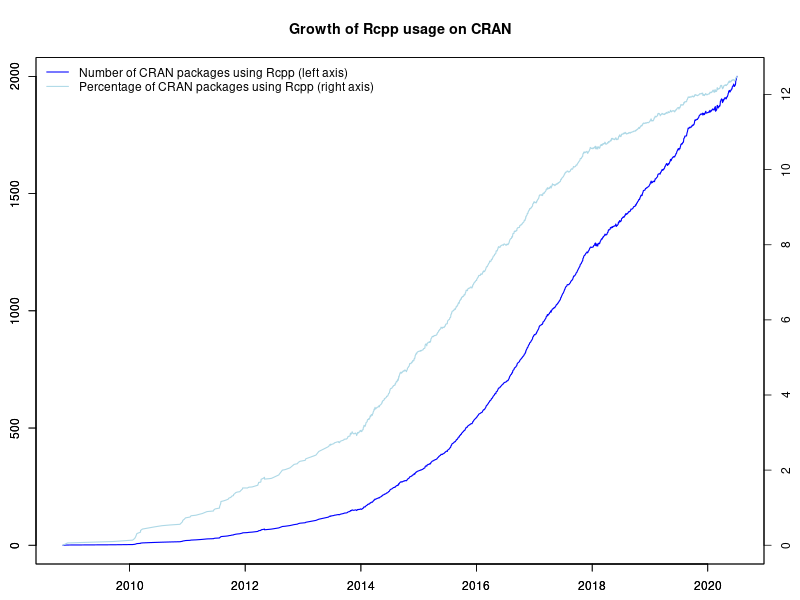 As of yesterday,
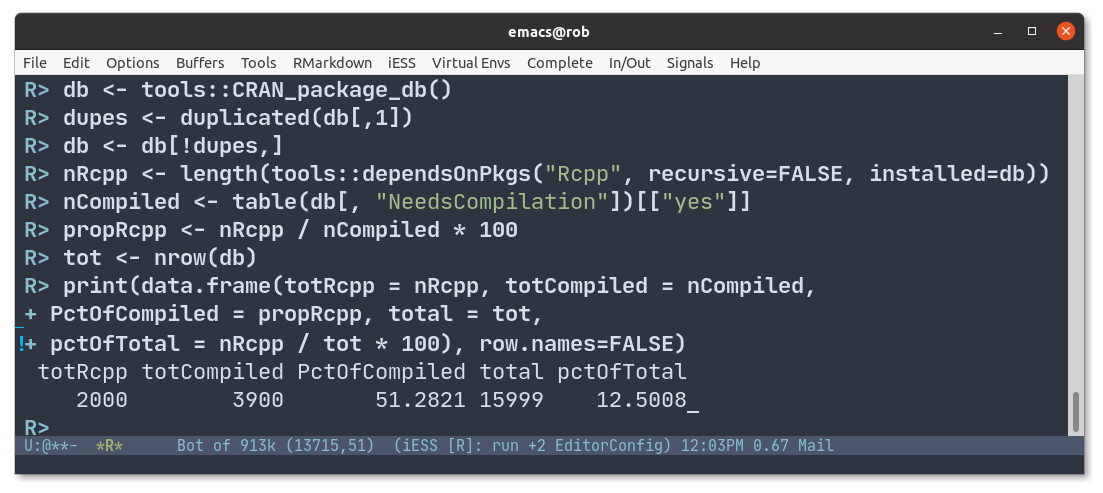 2000 user packages is pretty mind-boggling. We can use the progression of
 I was assigned 20 hours of work by Freexian's Debian LTS initiative,
and worked all 20 hours this month.
I sent a final
 In June 2020, I have worked on the Debian LTS project for 8 hours (of 8 hours planned).
LTS Work

 I was wondering: What happens if I have a Haskell module with Template Haskell that embeds some information from the environment (time, environment variables). Will such a module be reliable recompiled? And what if it gets recompiled, but the source code produced by Template Haskell is actually unchanged (e.g., because the environment variable has not changed), will all depending modules be recompiled (which would be bad)?
Here is a quick experiment, using GHC-8.8:

 Also this was the last month before shifting suites: goodbye to Jessie LTS and Wheezy ELTS, welcome Stretch LTS and Jessie ELTS.
ELTS - Wheezy

 Last month, I got selected as a


 Here is my monthly update covering what I have been doing in the free software world during June 2020 (
 More than a month has passed since the last update of TeX Live packages in Debian, so here is a new checkout!
 All arch all packages have been updated to the tlnet state as of 2020-06-29, see the detailed update list below.
Enjoy.
New packages
 The twelveth release of
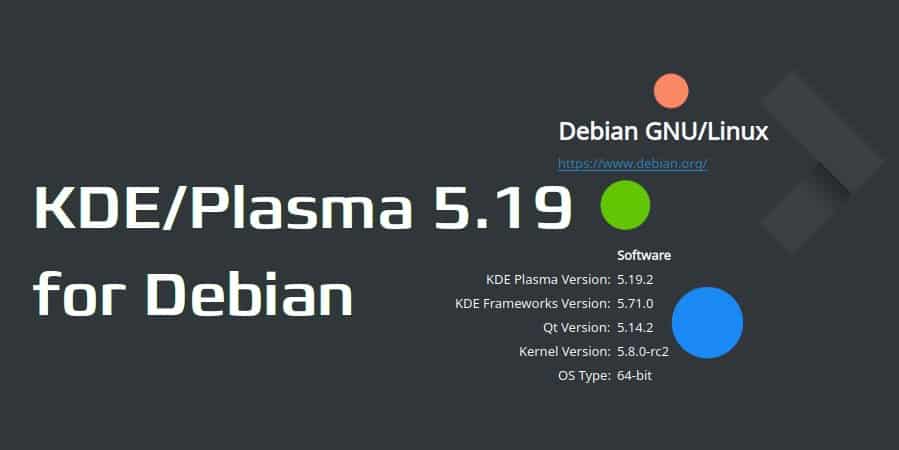 I have been preparing this release for quite some time, but due to Qt 5.12 I could only test it in a virtual machine using Debian/experimental. But now, finally, a full upgrade to Plasma 5.19(.2) has arrived.
Unfortunately, it turned out that the OBS build servers are either overloaded, incapable, or broken, but they do not properly build the necessary packages. Thus, I make the Plasma 5.19.2 (and framework) packages available via my server, for amd64. Please use the following apt line: