Search Results: "edd"

25 June 2008

Kartik Mistry: Wait is not yet over!


* As I mentioned in my previous wait() post. I was waiting for laptop from reseller, thats done and my Macbook (White, 2GB RAM, 160 GB HDD etc) finally arrived! Yay!! Spent some time in getting familiar with Mac OS and reading docs for installing Debian on Macbook. I started installation today but due to removal of lilo from Lenny, it was halted :( Now, trying again with some more bravery ;) And, I am also waiting for FD to wake up from 2 months of AM report. No big issues in it though..

23 June 2008

Kartik Mistry: wait()


* We all know that ‘Good things come to those who waits’. But, I am not in mood for that today. - Laptop, Dealer is saying (%$#^@@#) that it will come in half hour since last one week. - Rented home, People are just playing with words and has no value of time. - Bike, I am not finding nice model :( Thankfully, Firefox3 Party Pack is just arrived as scheduled on time from UPS.com. Their package tracking system aka PTS rocks! And got new sports shoes, even I know that I am not going to use it for running.

20 June 2008

Edd Dumbill: Secure LDAP replication

Ever the sucker for punishment, I decided to pick three difficult things and stick them all together: LDAP, SSL and replication. Here's how to make it go on Debian and Ubuntu. The problem You want LDAP replication to happen over the internet, and you want it to happen securely. The caveat I'm not going to tell you how to set up your LDAP from scratch here: I'm assuming you've reached a solution you're happy with and want to replicate it. The solution We're going to set up a replicating slave LDAP server, which communicates with the master over the internet via an SSL-protected connection. Enabling replication First up, the master LDAP server needs to be configured to permit replication.  The key lines to add to your slapd.conf include:
moduleload syncprov
index entryCSN,entryUUID eq
overlay syncprov
syncprov-checkpoint 100 10
syncprov-sessionlog 200
These load up the synchronization module, add indices which make sync go faster, and enable sync. For more detail see the OpenLDAP site. Next you need to add a replicator user to your LDAP database, give your replicator user access to passwords as well as general read access. To create the replicator user, I made this simple LDIF file and fed it to ldapadd.
dn: cn=replicator,dc=mydomain,dc=com
objectClass: simpleSecurityObject
objectClass: organizationalRole
cn: replicator
description: LDAP replicator
userPassword: TOPSEKRIT
Once this user is in your LDAP database, you should give it read access to passwords (I assume you've already given read access to authenticated users.) I have this in my slapd.conf:
access to attrs=userPassword,sambaNTPassword,sambaLMPassword
...
   by dn="cn=replicator,dc=mydomain,dc=com" read
To check that this works, try using ldapsearch to check that the passwords are returned:
ldapsearch -x -D cn=replicator,dc=mydomain,dc=com \
  -W   grep -i password
Enter the replicator password when prompted, and you should see the encrypted passwords from your LDAP database. Securing access Now you've got replication enabled on the master, you will want to ensure it is available on the internet only via TLS or SSL. Here's what I added to slapd.conf to enable this:
TLSCertificateFile      /etc/ssl/certs/ldapserver_crt.pem
TLSCertificateKeyFile   /etc/ssl/private/ldapserver_key.pem
TLSCACertificateFile    /etc/ssl/certs/myCA.pem
TLSVerifyClient         demand
As you will guess from the configuration, the first two lines set the SSL key and certificate the master uses (see "A little twist" below for an important note on key permissions.) The third line tells slapd where to find my site-local certificate authority (CA), and the fourth line says slapd must require any connecting client to have a valid SSL certificate signed by the site-local CA. This is important, as it provides a second layer of access control: a replicating client must connect using a certificate you signed, plus the replicator password. Before this enables TLS access, we must tell slapd which network interfaces to listen on. To do this, edit the SLAPD_SERVICES variable in /etc/default/slapd. Here's my configuration:
SLAPD_SERVICES="ldap://127.0.0.1/ ldap://192.168.0.1/ ldaps:///"
This enables regular LDAP on the loopback and intranet network interfaces, and LDAP/SSL on all interfaces, including the public internet. So, with slapd restarted we are at this situation: connections are now possible from the internet, as long as they are made over SSL with a certificate signed by our site-local CA. (In fact, you can make much finer-grained access restrictions in your configuration than I have done. Using LDAPS rather than TLS over regular LDAP is a rather broad precaution. As explained on the OpenLDAP site, the ssf= parameter can be used to require a certain level of secure connectivity on a per-user or client basis.) Setting up the replicating server
Your slave server should have the same configuration as the master, except you can leave out the bits enabling replication. Firstly, you'll need add to slapd.conf the replication configuration:
syncrepl rid=123
        provider=ldaps://ldapmaster.mydomain.com/
        type=refreshAndPersist
        searchbase="dc=mydomain,dc=com"
        filter="(objectClass=*)"
        scope=sub
        attrs="*"
        schemachecking=off
        bindmethod=simple
        binddn="cn=replicator,dc=mydomain,dc=com"
        credentials=TOPSEKRIT
Most of this I took as boilerplate from the OpenLDAP documentation. Items to note include: And here's the /etc/default/slapd configuration:
SLAPD_SERVICES="ldap://127.0.0.1/"
The slave slapd exists only in this case to serve the local machine. Finally, there's the tricky bit! You need to configure slapd to connect to the master server using a certificate. I'll assume you've created and signed a key and certificate pair for your slave server (see my post Low-tech SSL certificate maintenance for more on this.) Awkwardly, the TLS configuration in slapd.conf is for the server only. Replication works as a client, and thus needs separate configuration. Furthermore, you cannot configure this globally on your machine, as the SSL certificate is a per-user only parameter (see man ldap.conf for more information on this.) Instead, we must set it in slapd's environment. Add these two lines to the end of /etc/default/slapd:
export LDAPTLS_CERT=/etc/ssl/certs/slapd.crt
export LDAPTLS_KEY=/etc/ssl/private/slapd.key
This file is sourced as a shell script by slapd's init script. Amend the path to your certificate and keys as required. Use /etc/init.d/slapd restart and you should be good to go. Finally, we want the slave server to be certain it's talking to the real master. So we also configure client connections to verify the SSL certificate of the peer, in ldap.conf again:
TLS_CACERT      /etc/ssl/certs/myCA.crt
TLS_REQCERT     demand
A little twist One gotcha to notice with both client and server is that slapd runs as the openldap user by default on Debian. Also by default SSL keys are readable only by the ssl-cert group. You'll need add the openldap user to this group, otherwise it won't be able to access /etc/ssl/private. Related articles on this site: Join the conversation about this post

Kartik Mistry: When my creativity went to /dev/null


* I did this. Created using http://scionspeak.com

19 June 2008

Martin F. Krafft: IPv6 with Debian

Even though I ve dealt with IPv6 for almost a decade, have delivered presentations, and given multi-day courses on IPv6 security aspects, I ve never actually added IPv6 to my own server/home network infrastructure because it seemed that Linux and/or Debian just weren t ready for it. This seems to have changed (although there are still a number of problems) and in less than a day, I put a few of my machines online. In the following, I d like to share with you how I did it.

Kernel versions and stateful connection tracking Unfortunately, I have to start off with some bad news: even though Debian etch, our current stable release, which uses a Linux kernel version 2.6.18, speaks IPv6, I cannot recommend it for deployment, as the 2.6.18 kernel does not support proper stateful connection tracking for IPv6, and thus makes it impossible to firewall hosts in a sensible manner (I always add local packet filters to all my hosts, and if only to guard against the situation when a user installs a malicious programme to listen on a high port). Of course, it is possible to configure a packet filter statelessly in an acceptable manner once you know the use case, so do with this information what you wish; I prefer to stay general for now. For me, a remedy is almost around the corner: the 2.6.24 kernel seems to support stateful connection tracking for IPv6, and it s even available for etch as it will be included in the upcoming etch-and-a-half release. I simply ended up using the kernel packages pre-release, and so far have not had a problem with it. To do so, add the following line to your /etc/apt/sources.list, making sure to use a close archive mirror:
deb http://ftp.xx.debian.org/debian etch-proposed-updates main

I then just upgraded the system and pulled in all proposed updates. As that may have let in software that won t be part of etch-and-a-half, or even lenny, you may want to pin the archive and only upgrade the kernel packages, by adding to /etc/apt/preferences (replacing amd64 with your architecture):
Package: *
Pin: release a=proposed-updates
Pin-Priority: -1
Package: linux-image-2.6.24-etchnhalf.1-amd64
Pin: release a=proposed-updates
Pin-Priority: 600

Alternatively, you could use the 2.6.24 linux kernel packages on backports.org.

Xen and IPv6 One drawback of switching to 2.6.24 is that you cannot run a dom0 on that machine any longer, so by practical extension, you cannot connect it to the IPv6 network with a packet filter in place. Supposedly, running 2.6.24 instances on a 2.6.18 dom0 is reported to work, however.

Configuring the packet filter The first thing I did was to configure the packet filter on each host appropriately. Unfortunately, this is harder than it should be, because to quote one of the netfilter developers when ip6tables was conceived, someone had a big bad brainfart : rather than adding IPv6 rules to your existing iptables ruleset, you have to create a new ruleset, duplicate all chains, networks, hosts, and individual rules, and maintain the two in parallel. Even though there are efforts of unification on the way, I speculate it ll take another couple of years until PF_INET6 will be fused into PF_INET and one will be able to do sensible cross-address-family packet filtering with Linux. Since I ve recently started to look (again) at pyroman, maybe the most logical way forward would be to extend it to write both, IPv4 and IPv6 rulesets from its knowledge about the hosts and networks you configured. Anyway, we want to get stuff working now! Thus, let s configure ourselves a packet filter. (Almost) all IPv6-related filtering must be configured via ip6tables (read on further down about IPv6 in IPv4 tunneling, the reason I said almost ). The following is a simple default ruleset to start with, which I put into /etc/network/ip6tables to load with ip6tables-restore:
*filter
:INPUT REJECT [0:0]
:FORWARD REJECT [0:0]
:OUTPUT ACCEPT [0:0]
:in-new - [0:0]
### INPUT chain
# allow all loopback traffic
-A INPUT -i lo -j ACCEPT
# RT0 processing is disabled since 2.6.20.9
#-A INPUT -m rt --rt-type 0 -j REJECT
# allow all ICMP traffic
-A INPUT -p icmpv6 -j ACCEPT
# packets belonging to an establish connection or related to one can pass
-A INPUT -m state --state RELATED,ESTABLISHED -j ACCEPT
# packets that are out-of-sequence are silently dropped
-A INPUT -m state --state INVALID -j DROP
# new connections unknown to the kernel are handled in a separate chain
-A INPUT -m state --state NEW -j in-new
# pass SYN packets for SSH
-A in-new -p tcp -m tcp --dport 22 --syn -j ACCEPT
# log everything else
-A INPUT -m limit --limit 3/min --limit-burst 10 -j LOG --log-prefix "[INPUT6]: "
### OUTPUT chain
# RT0 processing is disabled since 2.6.20.9
#-A OUTPUT -m rt --rt-type 0 -j REJECT
# allow outgoing traffic, explicitly (despite chain policy)
-A OUTPUT -j ACCEPT
### FORWARD chain
# RT0 processing is disabled since 2.6.20.9
#-A FORWARD -m rt --rt-type 0 -j REJECT
# disallow forwarded traffic, explicitly (despite chain policy)
-A FORWARD -j REJECT
COMMIT

Note that this recipe is pretty much unusable on pre-2.6.20 kernels due to their broken implementation of stateful connection tracking. The ruleset should be fairly obvious, but you might wonder about my use of REJECT and allowing all ICMP after all, you ve heard for the past 30 years that ICMP is a bad hacker protocol , and Internet security is no domain for being nice to people, so to prevent any information disclosure, you should DROP connections, not let people know that they re simply not allowed. Well, to hell with all that! I don t see a single reason or attack vector that is foiled by DROP or disallowing ICMP. In fact, it s just security by obscurity, and might inconvenient at the same time. ICMP is also much more important with IPv6 than with IPv4 (it replaces ARP, for instance), and it s actually useful to be able to ping hosts, or get back informational messages on why something failed. Finally, rejecting traffic rather than dropping it doesn t suggest to a hacker that something s hidden here. Then there is RFC 4890, which almost made me puke. This document is part of the reason why I say: let s fix problems in the kernel, rather than shielding them with unreadable and unmanageable rulesets!

Getting connected If you already have an IPv6 address, you re basically ready to go, but may want to read further down on how to connect your local network to the IPv6 Internet as well. If you are searching for a provider, have a look at the list of providers with native IPv6 connectivity over at sixxs.net. If you are reading up to here, I assume you are connected to the Net with IPv4. There are two ways for you to move towards IPv6: 6to4 or by way of a tunnel provider. A Kiwi website explains how to setting up 6to4 connectivity, and thus I will concentrate only on the tunnel approach. Even though everyone can set up 6to4 in a breeze without any accounts or waiting, there are a number of security considerations, it s pretty ugly to debug (due in part to asymmetric routing), and makes your life unnecessarily difficult when all you have is a dynamic IP that changes from time to time. If you are stuck behind a NAT gateway, you cannot use 6to4 either. Thus, I prefer the tunnel approach. With the tunnel approach, IPv6 packets are wrapped up in IPv4 packets on your host, and sent to the IPv4 address of your tunnel provider, who has native IPv6 connectivity. The tunnel provider unwraps your packet and shoves the contained IPv6 packet onto the backbone. The IPv6 address you used as source address is routed to the tunnel provider, so any replies arrive at their machines, where they re again wrapped into IPv4 packets and sent to your (publicly-accessible) IPv4 address. Those IPv4 packets specify payload type 41 ( ipv6 ), which is why we need those -p ipv6 -j ACCEPT rules in the iptables ruleset. There are a few tunnel providers out there. I chose SixXS and have not regretted my choice. I shall thus assume that you do the same: sign up for an account right now, so that you have it by the time you finished reading this document! SixXS works on a credit system: tunnels and subnets cost credits, which you can accumulate by maintaining your tunnels properly. This ensures that everyone can play around, but to do more advanced stuff, you need to first display competence with the basic concepts. Your first step with SixXS will be to request a tunnel. SixXS offers three types of tunnels:
  • static tunnels, for those with static IPs,
  • heartbeat tunnels, for those with dynamic IPs, and
  • AYIYA tunnels, for those behind NAT gateways.
Each of these tunnels have advantages and disadvantages, as everything does: the first two types of tunnels use IP protocol 41 packets to encapsulate the IPv6 packets. As such, there are security considerations involving the impersonation by spoofing, and all upstream firewalls must let protocol 41 pass. AYIYA addresses these problems by using signed packets, but that solution comes with extra computation overhead and smaller MTUs. I suggest to use the first type of tunnel that fits your situation. Debian s aiccu package can take care of heartbeat and AYIYA tunnels for you, and it can even set up static ones. During registration, you will also need to choose a PoP , which stands for Point of Presence . If your country only has a single PoP, that s the one you will end up using (unless you have a good reason for another one), but if there are more options, I strongly suggest that you go through the list of PoPs and select the one with the best roundtrip time and lowest latency from your location! Note that you must answer ping requests (ICMP echo-request) from the PoP you chose, or else the tunnel will not be created. Once your tunnel request gets approved, you ll get a /64 prefix, in which you only use two addresses: the PoP will configure the :1 address and you need to configure your host to use the :2 address on the tunnel interface. You ll also be told the IPv4 address of your PoP endpoint . Joey Hess taught me that aiccu can set up the interface for you, using the data it queries from the SixXS registration (TIC) server. I tried it, and it works. However, I prefer the pure ifupdown approach, as it makes things explicit and allows me to use the hooks for stuff like loading the packet filter. So in my /etc/network/interfaces, you can find:
auto sixxs
iface sixxs inet6 v4tunnel
  endpoint 194.1.163.40
  address 2001:41e0:ff00:3b::2
  netmask 64
  gateway 2001:41e0:ff00:3b::1
  ttl 64
  pre-up ip6tables-restore < /etc/network/ip6tables
  up ip link set mtu 1480 dev $IFACE
  up invoke-rc.d aiccu start
  down invoke-rc.d aiccu stop

Make sure to read about MTU values of the tunnel and adjust the 1480 value in the above to your tunnel settings and ISP connectivity. Also set ipv6_interface sixxs in /etc/aiccu.conf, if you are using aiccu, or else aiccu will bring up a duplicate/additional interface. If you tell it to use the same interface, it will actually execute all the same commands (which will fail), but won t report any errors. A future version will have a switch to prevent it from configuring the interface. Unfortunately, this will probably not work. The reason is that your regular IP packet filter (iptables, without the 6) doesn t let those encapsulating IPv4 packets pass, unless we tell it to; we probably want to do this early on in the chain, and also limit it to our tunnel peer, so:
iptables -I INPUT -p ipv6 -s 194.1.163.40/32 -j ACCEPT

For AYIYA, you need to open port 5072, either for UDP, TCP, or SCTP, depending on how you configured it. Also have a look at this FAQ entry on what a firewall needs to pass. If it still doesn t work, you have an upstream packet filter that needs some of those holes poked. Good luck. In most situations, the FORWARD chain does not get such a rule, since the tunnel terminates at the gateway, which routes to a native IPv6 network, or another tunnel. Allowing tunnels through a gateway is almost always a bad thing, as it would allow undetected and untraceable traffic from compromised boxes in the local network. The OUTPUT chain also does not need such a rule, if you have configured stateful filtering properly. Now bring up the interface and verify the connection:
# ifup sixxs
# ping6 -nc1 2001:41e0:ff00:3b::1
PING 2001:41e0:ff00:3b::1(2001:41e0:ff00:3b::1) 56 data bytes
64 bytes from 2001:41e0:ff00:3b::1: icmp_seq=1 ttl=64 time=74.0 ms
[...]
# ping6 -nc1 ipv6.aerasec.de
PING ipv6.aerasec.de(2001:a60:9002:1::184:1) 56 data bytes
64 bytes from 2001:a60:9002:1::184:1: icmp_seq=1 ttl=55 time=91.5 ms
[...]

Welcome to the Internet of the future!

Setting up an IPv6-capable gateway Your IPv6 connection works, but it s limited to a single address, and you do not get to specify the reverse DNS PTR record for it. Since the concept of NAT is mostly absent from IPv6 (thanks! thanks! thanks!), you will not be able to connect any other hosts to the IPv6 network. If your local network has a few hosts behind a gateway, you will need to request a subnet from SixXS and configure your gateway (which has the tunnel connection) appropriately. Don t worry, this is not really very difficult. First, request a subnet for your tunnel from your PoP via your SixXS homepage. Once approved, you will get a /48 prefix for your own use: 2^80 1.2 heptillion addresses which are yours to assign to every dust particle in your office or home, if you so desire. The way I set it up is to add the first of these addresses to your internal interface on the gateway, by adding the following two lines to the interface s stanza in /etc/network/interfaces; you will need the iproute package installed (which you should be using for everything network-related anyway):
up ip -6 addr add 2001:41e0:ff12::1/64 dev $IFACE
down ip -6 addr del 2001:41e0:ff12::1/64 dev $IFACE

Instead of bringing the interface down and up, just run ip -6 addr add 2001:41e0:ff12::1/64 dev eth0. Note the use of the /64 prefix instead of the /48 that got assigned, leaving only 20 pentillion addresses. Oh no! The reason for this is buried in the specs: basically, /48 is a site prefix, but individual networks should not be larger than /64, which is the prefix length of links in the IPv6 domain. Now is also a good time to enable IPv6 forwarding, e.g. like so:
# echo net.ipv6.conf.all.forwarding = 1 >> /etc/sysctl.conf
# sysctl -p /etc/sysctl.conf

Obviously, you will also need to change the policy on the ip6tables FORWARD chain. For now, let s just set it to accept. You should later create a proper ruleset, though!
# ip6tables -I FORWARD -j ACCEPT

Bringing IPv6 to your local network The final step is to spread the love to your local network. Refrain from selecting addresses from your subnet and assigning them to the local hosts, or wondering how to configure the DHCP server, because IPv6 does it differently: your gateway will advertise its routes (which includes a default route) to your network, and each host will pick an address based on its MAC address (unless it already has an EUI-64 address assigned. This all happens automagically, at least with current Debian and Windows machines. On the gateway, you need to install radvd and simply tell it which prefix to use on which interface. My /etc/radvd looks like this, and I won t explain it:
interface eth0
 
  AdvSendAdvert on;
  prefix 2001:41e0:ff12::/64
   
   ;
 ;

Note again how we advertise a /64 network rather than the /48 we own . You cannot advertise smaller networks if you want automatic configuration to work, and you should not use networks larger than /64 in any case. If 2^64 addresses are not enough for you, I trust you ll be able to figure out how to advertise another of your 65536 /64 prefixes in the /48 subnet to appropriate hosts. Restart radvd and run over to another host to witness how it automagically gets connected to the IPv6 network by scanning /var/log/kern.log and watching the output of ip -6 addr and ip -6 route. Try ping6ing from there! Find the dancing turtle! It should all work. If you don t like the automagic aspect of this, look into stateful configuration, using DHCPv6, as provided by dibbler-server and ?wide-dhcpv6-server.

Resolving names Take note of the IPv6 address of each host. There s a way to determine it given the host s MAC address, but this is easier (ipv6calc is also useful). You might want to let your local DNS server know by adding AAAA records in parallel to the existing A records, and possibly even adding PTR entries. If you re serious about IPv6, you can tell SixXS to delegate reverse lookups for the IPv6 addresses to your DNS servers, but you ought to refrain from polluting the DNS namespace. Note that bind9-host provides an improved host tool, which fetches all kinds of information about names, not just the one single information configured as default:
% host pulse.madduck.net
pulse.madduck.net has address 130.60.75.74
pulse.madduck.net has IPv6 address 2001:41e0:ff1a::1
pulse.madduck.net mail is handled by 99 b.mx.madduck.net.
pulse.madduck.net mail is handled by 10 a.mx.madduck.net.
% host 2001:41e0:ff1a::1
1.0.0.0.0.0.0.0.0.0.0.0.0.0.0.0.0.0.0.0.a.1.f.f.0.e.1.4.1.0.0.2.ip6.arpa
domain name pointer pulse.madduck.net.

Oh, and if you re really that curious about how IPv6 addresses are computed from MAC addresses, read RFC 2464. Basically, given a prefix 2001:41e0:ff1a:: and a MAC address aa:bb:cc:dd:ee:ff, the resulting IPv6 address is obtained by:
  1. inserting ff:fe into the middle of the MAC address to yield aa:bb:cc:ff:fe:dd:ee:ff;
  2. flipping the second lowest bit of the first octet to yield a8:bb:cc:ff:fe:dd:ee:ff;
  3. removing the odd colons to yield a8bb:ccff:fedd:eeff, the EUI-64;
  4. concatenating the prefix and this result to get 2001:41e0:ff1a::a8bb:ccff:fedd:eeff.
If you find your (Windows) IPv6 addresses changing all the time, you might be faced by privacy features .

Remaining issues Even though my IPv6 connectivity works, I have two remaining issues.

Sending larger amounts of data to the network I am experiencing a curious issue where outgoing ssh IPv6 connections time out and outgoing data transfers hiccup. I have yet to find out what s going on.

Mapping names to laptops Laptops generally have two interfaces, one with a cable, and the other wireless. Both of these interfaces will have separate MAC addresses, and by extension, the laptop will have different IPv6 addresses depending on how it is connected to the local network. I want to be able to connect to laptops without knowing the medium they use to connect to the network. Unfortunately, there seems to be no feasible way. The solutions I see are:
  • override the MAC address of one interface with that of the other, which is going to cause bgi problems in the case when the laptop (accidentally) gets connected to the same network twice;
  • add both IPv6 addresses as AAAA records to the laptop s DNS name, which will cause random delays when connecting as the resolver may return the currently inactive address first;
  • set up mobile IPv6, e.g. by following this Mobile IPv6 how-to, which would allow accessing the laptop uniformly, no matter where in the world it is. Unfortunately, Debian s support for Mobile IPv6 is severly lacking at time of writing. Also, Yves-Alexis Perez notes that this how-to is horribly outdated and promised to tend to it Real Soon Now .
The second solution works for me for now, but I am interested in the third. In response to this document, Andreas Henriksson has suggested the replace the stateless configuration (radvd) with stateful configuration, using DHCPv6. I have yet to investigate this option. Jeroen Massar suggests to unite cable and wireless into a bridged interface, which seems like a very good idea.

Credits Thanks to Bernhard Schmidt, William Boughton, and Jeroen Massar, and everyone on #ipv6/irc.freenode.org for their help over the past few weeks, and all those who fed back comments in response to this document!

18 June 2008

Matthew Garrett

The Linux Plumbers Conference[1] now has a call for papers, with registration also being open. Why is this important? Because it's the first conference aimed at getting together developers from all walks of the Linux world and fixing the core infrastructural problems. Ever looked at a kernel interface and wondered how the christ any userspace programmer was supposed to use it? Ever looked at a desktop application and wondered what kind of $2 crack they were on when they wrote it? Here's your chance to find out or get it fixed.

I'm running the power management microconf. We're looking at discussing what sort of interfaces the kernel needs to export to userspace and how userspace needs to make use of them. Want to be part of engineering the first OS to have high quality power management all the way from embedded to servers? Be in Portland in September. Ideally at the conference rather than a bar, though there'll be plenty of time for that as well.

So, if you have opinions on power management (or any of the other topics), sign up now. Otherwise we'll ignore them and you'll be unhappy.

[1] Plumbers? Plumbers'? Plumbers's? Almost certainly not Plumber's.

Edd Dumbill: Low-tech SSL certificate maintenance

I maintain a bunch of SSL certificates, mostly signed by my own site authority. Too many not to automate, but not enough to warrant heavy machinery. Here's how I do it. The configuration files Each certificate needs a config to describe what's in it. I create each of these and name it with a .cnf suffix. Here's an example:
[ req ]
prompt                  = no
distinguished_name      = server_distinguished_name
[ server_distinguished_name ]
commonName              = server.usefulinc.com
stateOrProvinceName     = England
countryName             = GB
emailAddress            = edd@usefulinc.com
organizationName        = Useful Information Company
organizationalUnitName  = Hosting
[ req_extensions ]
subjectAltName=edd@usefulinc.com
issuerAltName=issuer:copy
nsCertType            = server
[ x509_extensions ]
subjectAltName=edd@usefulinc.com
issuerAltName=issuer:copy
nsCertType            = server
Let's say this config is server.cnf. I then just type make server.pem to generate the corresponding certificate and key, signed by my local certificate authority. As I don't want to attend the startup of every service, I ensure the key is password-less. The Makefile rules Here are the makefile steps I use to generate and sign keys.
.SUFFIXES: .pem .cnf
.cnf.pem:
        OPENSSL_CONF=$< openssl req -newkey rsa:1024 -keyout tempkey.pem -keyform PEM -out tempreq.pem -outform PEM
        openssl rsa <tempkey.pem >  basename $< .cnf _key.pem
        chmod 400  basename $< .cnf _key.pem
        OPENSSL_CONF=./usefulCA/openssl.cnf openssl ca -in tempreq.pem -out  basename $< .cnf _crt.pem
        rm -f tempkey.pem tempreq.pem
        cat  basename $< .cnf _key.pem  basename $< .cnf _crt.pem > $@
        chmod 400 $@
        ln -sf $@  openssl x509 -noout -hash < $@ .0
The resultant files are: Some notes on these steps: my site-local certificate authority is in the directory usefulCA, along with an OpenSSL config which describes my preferences. This config was created by copying and making appropriate adjustments to the default /etc/ssl/openssl.cnf which ships with Debian. For generating certificate signing requests to ship to a commercial certificate authority, it's a bit simpler. I save the config files with a .reqcnf suffix instead, and use this rule:
.SUFFIXES: .pem .cnf .reqcnf .csr
.reqcnf.csr:
        OPENSSL_CONF=$< openssl req -newkey rsa:1024 -keyout  basename $< .reqcnf .key -keyform PEM -out  basename $< .reqcnf .csr -outform PEM
And finally, a rule I use to sign incoming certificate requests from other systems:
.csr.pem:
        OPENSSL_CONF=./usefulCA/openssl.cnf openssl ca -in $< -out  basename $< .csr _crt.pem
I offer these without warranty in the hope they might be useful to somebody. They're not much more than a transcription of a how-to into a makefile, but it's just enough technology to ensure creating certificates isn't a big nuisance. Further reading Notes Why do I bother with a site-local CA, rather than just self-sign? It lets me bypass the annoyance of SSL warnings on clients once I've installed my own CA certificate, and gives me a coarse grained level of access control: for instance, only clients with certificates signed by my CA are allowed to access the site's LDAP server. My personal next step with this is to integrate the certificate production process with my emerging Puppet recipes for managing local infrastructure.Join the conversation about this post

Kartik Mistry: Happy (belated) Birthday to Kavin!


* Many many returns of the day to my dear Kavin, his birthday was on 16th and we had very small party too. Some pics are uploaded to my flickr and thanks to barkha for giving her digicam for capturing great moments. Now back to Ahmedabad and waiting for rain to use my new umbrealla.

16 June 2008

Edd Dumbill: We're all ops people now

Ten years ago, most of us wouldn't have dreamt we'd be managing terabits of storage, tens of megabits of bandwidth, arrays of network-distributed services. The height of a programmer's worry would likely be choice of UI toolkit or finding the right way to indent code, and the height of consumer concern deciding which room to put the new computer in. Now the problems associated with managing large networks are becoming real for everyone, right down to the consumer level. Stupendously large amounts of computing resource are available at an instant. Your household probably has more than a terabyte of storage already. Issues such as single sign-on are going to hit home over the next year, as networked computing and entertainment devices profilerate. Features such as Apple's Time Machine will be increasingly vital — software that makes traditionally gnarly sysadmin tasks consumer-friendly. The rebranding of .Mac into "Mobile Me" is also a step in this direction. The impact on developers As software developers, we also have to cope with the effects of this resource-richness. For small sums of money we can get access to large computing clusters, geographically redundant hosting services. Our programs have left the desktop and found their new home on the web. System administration issues loom large upon us, security concerns lurk auspiciously in the corners of our minds. Although the cost of infrastructure has dropped radically, other costs remain high and are going to stay that way. System administrators are not only grumpy, they demand high wages. Commercial software license fees spiral out of control: traditional per-CPU licensing models make little sense when you can quickly bring up tens of machines. The cost in power is already troubling large companies, and there's no reason to suspect the problems won't ripple down. Help is at hand from a variety of technologies. If they don't yet make massive resource management trivial, they at least make it possible. Some of these also inhabit the weird territory of being both the source of a problem and a solution at the same time: virtualization, for example. Distributed revision control systems Distributed revision control is a technology whose time has finally come in popular circles, thanks in part to Linus Torvald's Git system. DRCS has several important impacts on today's developer: All these trends lower the barrier to entry, increase collaboration and agility of development. You can the value of this as more software tools become free. Selling such tools is rapidly becoming a thing of the past, the advantages of sharing enable the developers at the sharp end to get their jobs done quicker. However, such increased agility and, well, messiness leave other problems to solve, which the next two technologies address. Virtualization Hardware-as-a-service, infrastructure-as-a-service, call it what you will. The ability to create what we used to call entire machines, pick them up and move them around the network is revolutionary, and it's something that will have a real impact on regular developers. The benefits are at several levels. Configuration management Computing is a zero-sum game, and despite our increased ability to create and distribute software, problems still exist. We just pushed them to the next level. In good part, this next level is the problem of configuration management. We now have networks and clusters of (virtual) machines, software so agile we need six decimal places to describe its revision levels, and network and authentication paths that are starting to tangle. How do we manage that? One thing developers crave is repeatability. That's why we love our makefiles, autoconf, Ant, rake and so on. It's the one time even the most imperative-minded programmer writes declarative code. We like to say "let the world be like this." Our new sprawling world lacks this feature, and the best of our old toolkits — .debs, RPMs — address things only at the level of packages in a single environment. So developers must look to the world of operations, a territory we probably thought we needn't enter. In this world the new "make" is called Puppet. You write recipes to describe how things ought to be, and Puppet will make it so. I've been spending some time digging into Puppet, and feel excited by the confidence it's giving me. Now my applications exceed single source trees, and single machines, it gives me the means to tie the whole together. This article was going to be solely about Puppet, but that will have to wait now for another time. It's likely you'll have played with virtual machines and distributed revision control, but have you tried Puppet yet? Give it a spin, and let your mind wander over the benefits for your organization and development approaches. Conclusions
For developers and users alike, our world is changing. Hardware, connectivity and increasingly software is becoming cheap or free. The solidity of the old things we put value on — real things you can touch like disks — is eroding. What really matters is our data, our creations, and their communication. If they don't quite yet exist in a universal "cloud" yet, they're certainly getting frisky. As vendors provide solutions for consumers to manage their new domestic infrastructure, developers must look to network-aware toolkits and operations techniques to manage and get the best from their emergent infrastructures. Also on this topic: Join the conversation about this post

14 June 2008

Lior Kaplan: The 2nd Debian Openoffice.org bug triage has ended - 300+ bugs processed


The 2nd bug triage began with 285 bugs, which grow to around 310 bugs, since during the 4 months of the triage more bugs were reported.
So, I m glad to announce the beginning of (my) 2nd openoffice.org bug triage. This triage targets 285 bugs out of 330 open oo.org bugs. The selected bug are ones which were reported against versions lower the 2.3.1 or have no version information at all.
At first, the triage advanced quickly with 21% of the bugs processed during the first 24 hours and 40% during the first 10 days. This left a long trail of bugs to handle manually. The triage began for version 2.3.1, but was delayed to let version 2.4.0 to propagate into Lenny, as that was Rene’s preferable version to release with. When the triage resumed in late April, I had a 2.4.0 available in all of our repositories (sid, testing and backprots). Which meant that everyone could verify their bugs against the same oo.org version. Bug triaging heaven (: Two thirds (66%) of the bugs were closed in this triage, most of them after a check from the submitter or myself and a few after the submitter was unresponsive and I couldn’t verify the bug myself. Verifying the bugs myself is the most demanding part of the triage. Reading each report and understanding the problem takes a lot of time. Reproducing the problem usually takes less time than understand it. That’s way have test cases attached to bug reports are so important. In several cases the instructions were so simple I could just open the file, check something and verify the bug. That was done in a robotic manner or in a monkey like one. These kind of attachments enables a lot of people to help with triaging, even if the lake the technical background of the program in subject. So after closing 200 bugs and verifying around 100+, the oo.org bug count is set to 140 outstanding bugs, and 70 bug being forwarded to upstream. Except from about 10 bugs, all of the remaining 130 bugs are relevant for version 2.4.0. No need to wonder if the bug still occurs before reading the report…

13 June 2008

Neil Williams: Cross-building autobuilder

Just released emdebian-tools 1.1.5 to Emdebian. Next step is 1.2.0 for Debian unstable - one more Debian release may be needed before Lenny.

Most of the changes relate to getting a cross-building autobuilder. The need to continually updated patches (most of the relevant bugs are already filed) complicates the normal autobuild process, on top of the cross-building requirements. The one bug that would have an immense impact on reducing these patches is 448615 - dh_installdocs : Please consider a separate handler for debian/copyright for embedded use. (hint, Joey?)

The autobuilder is experimental - it mostly works on my own systems but there are a few gotchas:
  1. Having patches in SVN means that noninteractive mode for a prolonged distro-wide build needs to be handled as anonymous - which means a separate tree for those with authenticated SVN access. Yes, I could try svn:switch and then svn:switch back but that would cause more trouble than it is worth IMHO (and potentially be a minefield to automate). Besides, authenticated SVN is only part of the problem:

  2. sudo suffers the same problem of caching timing out.


The solution is to use the existing empdebuild cross-building chroot. It causes a few problems itself but those are things that I'm confident the scripts can solve. Hooks for customised dput.cf config and custom upload scripts for the build logs are implemented in 1.1.5.

Once I can get widespread "nodocs" support in Debian and then file the rest of the long term mass bug filing for cross build support bugs to implement "nodocs" and "nochecks" in packages that don't use debhelper (or at least don't use debhelper exclusively).

The goal, as ever, is to get full cross building support into all relevant Debian packages, maintain a cross-building autobuilder and move towards making Emdebian an unofficial port alongside kfreebsd.

David Welton: New &quot;Jim&quot; Maintainer

Tcl is a fairly old language, nearly 20 years old this year. It's also quite widespread, even if it's not as popular as it once was. This means that a lot of things are fairly set in stone, and not likely to change short term. It also means that with time, it has grown quite a bit as a system, and has lots of pieces. Several years ago, my friend Salvatore "antirez" Sanfilippo set out to create his own version of Tcl, something smaller and more flexible, and under his control so as to avoid being tied down with baggage from the past. The result was Jim, which, according to the web page:
... implements a large subset of Tcl and adds new features like references with garbage collection, closures, built-in Object Oriented Programming system, Functional Programming commands, First class arrays. All this with a binary size of about 85kb (that can be reduced further excluding some non-vital commands, and commands not available in Tcl itself).
which has made it popular with people who need a small scripting language for things like embedded systems. Unfortunately, Salvatore hasn't had as much time to work on it as he might like, being busy with money making web things (it's tough to make money on programming languages), so it's good to see that he has added yvind Harboe as a maintainer to the project in order for it to move forward. Good luck!

Juan Luis Belmonte: Debian goes for clubbing. Rocks & Glow


I met up with some friends, of the company I used to work. We try to keep on touch every week for having some beer, talk about computers, programing, girls.. whatever. Last night we were on a club where some coca-cola promotional people, set up a huge glowing blackboard, where you can draw with a green laser. I Asked them for a try and make a photo that I think I have to share with all of you. The girl asked me about what was the meaning of that. I told her but I think that she didn’t realize what I was talking about. Anyway but I went out of there so happy with my little piece of art. Have a nice day.

12 June 2008

Biella Coleman: Free Speech: A Comparative Perspective

While free speech rights are valued and recognized in most liberal democracies, the degree and scope of these rights are by no means uniform. The United States, which has the most expansive free speech protections in the world, actually stands apart as this New York Times article on the subject makes clear. The article covers familiar ground (at least for those who follow free speech debates) but it does so well and discusses an interesting case now unfolding in Canada, concerning a pretty inflammatory magazine article denouncing Islam. The magazine is currently under trial for violating provincial hate laws.

Juan Luis Belmonte: First versions of update-pam &update-nsswitch ready.


Both helpers, update-pam and update-nsswitch are ready for testing. I’ve tried as many combinations and possible use errors as I could imagine, but probably I’ve missed up some one. If you try and find something not spected, something strange or have any suggestions, do not hesitate to contact me. update-nsswitch can modify nsswitch.conf, and update-pam, modifies, the different pam.d/common-* files To use them, you need to copy your nsswitch and pam.d in the same directory where the code is unpacked, this is for preventing on modifying the real files. If you want to try it with real ones is up to you and under your responsability. Download
None documentation is done yet, but with the usage() may be enough.

Kartik Mistry: How to kill good ideas?


* Derived from yesterday’s ‘Developing Leadership Skills’ training at AMA: - It’s against company policy - Doesn’t fit in system - It will never be approved - The timing is just not right - It didn’t work before - Too wild - We’re not yet ready for that - I will think about it - Put something in writing and get back to me - Let’s form a committee

Edd Dumbill: Gandi's VM hosting beta now closed to new users

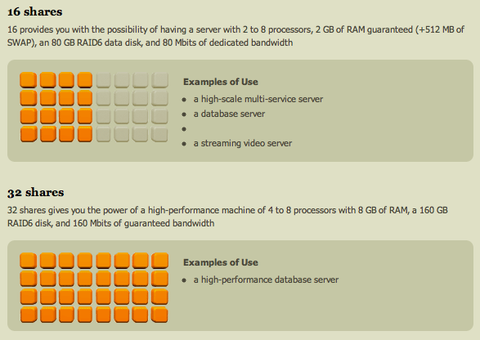
I've been experimenting with Gandi's virtual hosting service recently. In fact, this blog is now hosted on it. Gandi have created by far the easiest hosting service I've used. The web interface allows you to buy credit, create pre-installed virtual machines and log in, all in under 15 minutes. Add the ease of Ubuntu to the mix (just one of the preinstalled images you can choose from), and commissioning times for new services are low indeed. The hosting service is based on Xen, and allows you to dynamically change the resources your VMs can access (CPU/memory/disk), on a scheduled basis if required. It has an API which provides enough functionality for you to white-label hosting as part of your own web app. Gandi's hosting options
Excerpt from Gandi's explanation of the amount of resource you can allocate to a virtual machine Gandi's service isn't yet as flexible as Amazon's EC2, but it comes at the problem from the other end — its initial offering "just works" as an alternative hosting solution, with the added flexibility their Xen infrastructure brings to the mix. Even with all its tool support, Amazon EC2 feels like stepping into an alternate universe. I'm pretty excited about the directions in which Gandi's service will develop. And yes, now I've told you all this, unfortunately you can't yet play with the beta service if you've not got an account already. The initial success means Gandi are closing new signups for a little time to concentrate on improving their infrastructure. The good news is that Gandi say this is the final step before the full release of the system. I can't wait! It's so good to see innovative, high-quality internet solutions coming from Europe.Join the conversation about this post

10 June 2008

Gunnar Wolf: Running, biking, and the like

Bubulle's improvements on running make me envy him. Of course, I'm nowhere close to Dirk's (or for that matter, I can only hope never to be as insane as Mauricio).
I must admit that I have heavily reduced my running. This is in no small part due to the fact that it's not easy to find decently-priced running shoes of the right size in Mexico - But well, that's only an excuse after all. But yes, if I run over 7Km with my current shoes, I get blisters, invariably. And I'm a bit short on money right now...
Partly, I've been moving my preferred excercise to biking - I don't do heavy biking, of course, but I do try to get at least 15Km every day (and as I bike to and from work, I only have to take small extra detours to reach that point - although splitting an excercise session in several sub-sessions is very close to cheating on myself) and at least a longer, continuous, 25-30Km ride every weekend. But yes, I've lowered my rythm.
Also, I'm running less because of where I am currently living - Very close to my usual area, but quite a bit more hilly, and it has made my knees ache every now and then.... And by far, it is not as nice and friendly area.
I do hope to work on this - And, of course, the Debconf Morning Jog is one of the events I most look forward to. Running in Edinburgh was, after all, my favorite and most productive way to get to know the city.

9 June 2008

Kartik Mistry: How to lose your customer?


* Sometime back regarding my experiences with redbus.in, I happily wrote post how to not lose your customer? post. Now yesterday evening, I felt bored and tried my hands on indiaplaza.in shopping website and ordered two usb laptop lights (without having laptop!!). I was happy that site was accepting debit card and transaction was done smooth, but after finishing icici payment procedure, order was showing ‘Pending Authorization’. So, I tried again and checked in my bank account - great, money was drawn two times and indiaplaza.in was showing ‘Pending Authorization’ from ‘My Accounts’ section. I have written long mail to them. Awaiting action and 4 usb laptop light. I will give it to whoever wish on FCFS basis ;) Update: Order is now confirmed and ready for shipping. Good things comes for those who waits!

Matthew Garrett

Things in your computer that you do not have the source code for:Anyone think of anything I've missed?

Things people have suggested:
More suggestions:

Next.

Previous.