Since gitorious' shutdown I decided it was time to start hosting my
own git repositories for my own little projects (although the company
which took over gitorious has a Free software offering it seems that
their hosted offering is based on the proprietary version, and in any
case
once bitten, twice shy and all that).
After a bit of investigation I settled on using
gitolite and
gitweb. I did consider
(and even had a vague preference for)
cgit but it wasn't available in Wheezy
(even backports, and the backport looked tricky) and I haven't
upgraded my VPS yet. I may reconsider cgit this once I switch to
Jessie.
The only wrinkle was that my VPS is shared with a friend and I didn't
want to completely take over the
gitolite and
gitweb namespaces in
case he ever wanted to setup
git.hisdomain.com, so I needed
something which was at least somewhat compatible with
vhosting.
gitolite doesn't appear to support such things out of the
box but I found an
interesting/useful
post
from Julius Plenz which included sufficient inspiration that I thought
I knew what to do.
After a bit of trial and error here is what I ended up with:
Install gitolite
The
gitolite website has
plenty of documentation on configuring gitolite. But since
gitolite is
in Debian its even more trivial than even the quick install makes out.
I decided to use the newer
gitolite3 package from
wheezy-backports instead of the
gitolite (v2) package
from Wheezy. I already had backports enabled so this was just:
# apt-get install gitolite3/wheezy-backports
I accepted the defaults and gave it the public half of the ssh key
which I had created to be used as the
gitolite admin key.
By default this added a user
gitolite3 with a home directory of
/var/lib/gitolite3. Since they username forms part of the URL used
to access the repositories I want it to include the 3, so I edited
/etc/passwd,
/etc/groups,
/etc/shadow and
/etc/gshadow to say
just
gitolite but leaving the home directory as
gitolite3.
Now I could clone the
gitolite-admin repo and begin to configure
things.
Add my user
This was simple as dropping the public half into the
gitolite-admin
repo as
keydir/ijc.pub, then
git add,
commit and
push.
Setup vhosting
Between
the gitolite
docs and
Julius'
blog
post
I had a pretty good idea what I wanted to do here.
I wasn't too worried about making the vhost transparent from the
developer's (ssh:// URL) point of view, just from the
gitweb and
git clone side. So I decided to adapt things to use a simple
$VHOST/$REPO.git schema.
I created
/var/lib/gitolite3/local/lib/Gitolite/Triggers/VHost.pm
containing:
package Gitolite::Triggers::VHost;
use strict;
use warnings;
use File::Slurp qw(read_file write_file);
sub post_compile
    my %vhost = ();
    my @projlist = read_file("$ENV HOME /projects.list");
    for my $proj (sort @projlist)
        $proj =~ m,^([^/\.]*\.[^/]*)/(.*)$, or next;
        my ($host, $repo) = ($1,$2);
        $vhost $host  //= [];
        push @ $vhost $host  => $repo;

    for my $v (keys %vhost)
        write_file("$ENV HOME /projects.$v.list",
                     atomic => 1  , join("\n",@ $vhost $v ));


1;
I then edited
/var/lib/gitolite3/.gitolite.rc and ensured it
contained:
LOCAL_CODE                =>  "$ENV HOME /local",
POST_COMPILE => [ 'VHost::post_compile', ],
(The first I had to uncomment, the second to add).
All this trigger does is take the global
projects.list, in which
gitolite will list any repo which is configured to be accessible via
gitweb, and split it into several vhost specific lists.
Create first repository
Now that the basics were in place I could create my first repository
(for hosting
qcontrol).
In the
gitolite-admin repository I edited
conf/gitolite.conf and added:
repo hellion.org.uk/qcontrol
    RW+     =   ijc
After adding, committing and pushing I now have
"/var/lib/gitolite3/projects.list" containing:
hellion.org.uk/qcontrol.git
testing.git
(the
testing.git repository is configured by default) and
/var/lib/gitolite3/projects.hellion.org.uk.list containing just:
qcontrol.git
For cloning the URL is:
gitolite@$ VPSNAME :hellion.org.uk/qcontrol.git
which is rather verbose (
$ VPSNAME is quote long in my case too),
so to simplify things I added to my
.ssh/config:
Host gitolite
Hostname $ VPSNAME
User gitolite
IdentityFile ~/.ssh/id_rsa_gitolite
so I can instead use:
gitolite:hellion.org.uk/qcontrol.git
which is a bit less of a mouthful and almost readable.
Configure gitweb (http:// URL browsing)
Following the
documentation's
advice I edited
/var/lib/gitolite3/.gitolite.rc to set:
UMASK => 0027,
and then:
$ chmod -R g+rX /var/lib/gitolite3/repositories/*
Which arranges that members of the
gitolite group can read anything
under
/var/lib/gitolite3/repositories/*.
Then:
# adduser www-data gitolite
This adds the user
www-data to the
gitolite group so it can take
advantage of those relaxed permissions. I'm not super happy about this
but since gitweb runs as
www-data:www-data this seems to be the
recommended way of doing things. I'm consoling myself with the fact
that I don't plan on hosting anything sensitive... I also arranged
things such that members of the groups can only list the contents of
directories from the vhost directory down by setting
g=x not
g=rx
on higher level directories. Potentially sensitive files do not have group
permissions at all either.
Next I created
/etc/apache2/gitolite-gitweb.conf:
die unless $ENV GIT_PROJECT_ROOT ;
$ENV GIT_PROJECT_ROOT  =~ m,^.*/([^/]+)$,;
our $gitolite_vhost = $1;
our $projectroot = $ENV GIT_PROJECT_ROOT ;
our $projects_list = "/var/lib/gitolite3/projects.$ gitolite_vhost .list";
our @git_base_url_list = ("http://git.$ gitolite_vhost ");
This extracts the vhost name from
$ GIT_PROJECT_ROOT (it must be
the last element) and uses it to select the appropriate vhost specific
projects.list.
Then I added a new vhost to my apache2 configuration:
<VirtualHost 212.110.190.137:80 [2001:41c8:1:628a::89]:80>
        ServerName git.hellion.org.uk
        SetEnv GIT_PROJECT_ROOT /var/lib/gitolite3/repositories/hellion.org.uk
        SetEnv GITWEB_CONFIG /etc/apache2/gitolite-gitweb.conf
        Alias /static /usr/share/gitweb/static
        ScriptAlias / /usr/share/gitweb/gitweb.cgi/
</VirtualHost>
This configures
git.hellion.org.uk (don't forget to update DNS too)
and sets the appropriate environment variables to find the custom
gitolite-gitweb.conf and the project root.
Next I edited
/var/lib/gitolite3/.gitolite.rc again to set:
GIT_CONFIG_KEYS => 'gitweb\.(owner description category)',
Now I can edit the repo configuration to be:
repo hellion.org.uk/qcontrol
    owner   =   Ian Campbell
    desc    =   qcontrol
    RW+     =   ijc
    R       =   gitweb
That
R permission for the
gitweb pseudo-user causes the repo to be
listed in the global
projects.list and the trigger which we've added
causes it to be listed in
projects.hellion.org.uk.list, which is
where our custom
gitolite-gitweb.conf will look.
Setting
GIT_CONFIG_KEYS allows those options (
owner and
desc are
syntactic sugar for two of them) to be set here and propagated to the
actual repo.
Configure git-http-backend (http:// URL cloning)
After all that this was pretty simple. I just added this to my vhost
before the
ScriptAlias / /usr/share/gitweb/gitweb.cgi/ line:
        ScriptAliasMatch \
                "(?x)^/(.*/(HEAD   \
                                info/refs   \
                                objects/(info/[^/]+   \
                                         [0-9a-f] 2 /[0-9a-f] 38    \
                                         pack/pack-[0-9a-f] 40 \.(pack idx))   \
                                git-(upload receive)-pack))$" \
                /usr/lib/git-core/git-http-backend/$1
This (which I stole straight from the
git-http-backend(1) manpage
causes anything which
git-http-backend should deal with to be sent
there and everything else to be sent to
gitweb.
Having done that access is enabled by editing the repo configuration
one last time to be:
repo hellion.org.uk/qcontrol
    owner   =   Ian Campbell
    desc    =   qcontrol
    RW+     =   ijc
    R       =   gitweb daemon
Adding
R permissions for
daemon causes
gitolite to drop a stamp
file in the repository which tells
git-http-backend that it should
export it.
Configure git daemon (git:// URL cloning)
I actually didn't bother with this,
git http-backend supports the
smart HTTP mode which
should be as efficient as the git
protocol. Given
that I couldn't see any reason to run another network facing daemon on
my VPS.
FWIW it looks like vhosting could have been achieved by using the
--interpolated-path option.
Conclusion
There's quite a few moving parts, but they all seems to fit together
quite nicely. In the end apart from adding
www-data to the
gitolite group I'm pretty happy with how things ended up.
 If you are in a situation where you want to set up a SFTP server in a more secure way, don't want to expose anything from the server via SFTP and do not want to enable SSH login on the account allowed to sftp, you might find the information below useful.
 This morning, I pushed out version 2.11.17 of the Geode X.Org driver. This is the driver used by the OLPC XO-1 and by a plethora of low-power desktops, micro notebooks and thin clients. This is a minor release. It merges conditional support for the OpenBSD MSR device (Marc Ballmer, Matthieu Herrb), fixes a condition that prevents compiling on some embedded platforms (Brian A. Lloyd) and upgrades the code for X server 1.17 compatibility (Maarten Lankhorst).
 The other day I received from my Japanese teacher an interesting article by Yamazaki Masakazu
 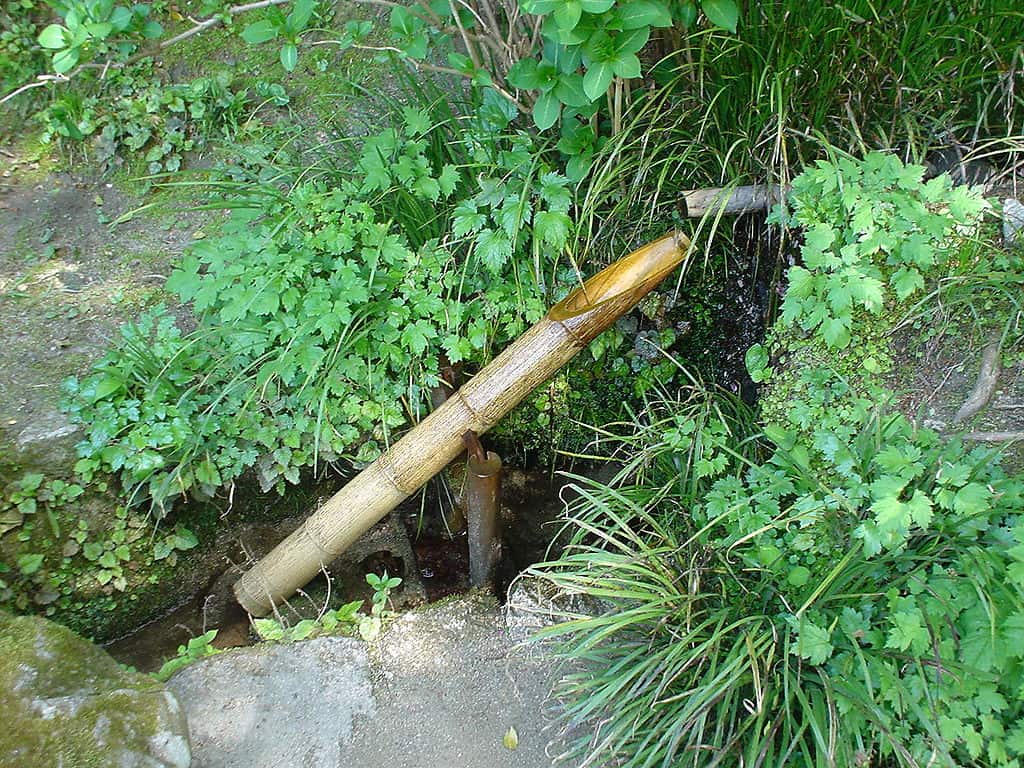 The author describes his feelings and thoughts about the shishiodoshi, in particular connects human life (stress and relieve, cycles), the flow of time, and some other concepts with the shishiodoshi. Up to here it is a wonderful article providing interesting insights into the way the author thinks. Unfortunately, then the author tries to underline his ideas by comparing the Japanese shishiodoshi with European style water fountains, describing the former with all favorable properties and full of deep meaning, while the latter is qualified as beautiful and nice, but bare of any deeper meaning.
I don t go into details that the whole comparison is anyway a bad one, as he is comparing Baroque style fountains, a very limited period, and furthermore ignores the fact that water fountains are not genuinely European (isn t there one in the Kenrokuen, one of the three most famous gardens in Japan!?), nor does he consider any other water-installation that might be available. What really destroys the in principle very nice article is the tone:
The general tone of the article then can be summarized into: The shishiodoshi is rich on meaning, connects to the life of humans, instigates philosophical reflections, represents nature, the flow of time etc. The water fountain is beautiful and gorgeous, but that is all.
I don t think that this separation, or this negative undertone, was created on purpose by the author. A person of his stature is supposedly above this level of primitive comparison. I believe that it is nothing else but a consequence of upbringing and the general attitude that permeates the whole society with this feeling of separateness.
Us and They
Repeatedly providing sentences like Japanese people and Western people have different tastes.. ( ). About 10 times in this short article expressions like Japanese and Westerner appear, leaving the reader with a bitter taste of an author that considers first the Japanese a people (what about Ainu, Ryukyu, etc?), and second that the Japanese are exclusive in the sense that they are set apart from the rest of the world in their way of thinking, living, being.
What puzzles me is that this is not only a singular opinion, but a very general straight in the Japanese media, TV, radio, newspaper, books. Everyone considers Japan and Japanese as something that is fundamentally and profoundly different from everyone else in the world.
There is We the Japanese (and that doesn t mean nationality of passport, but blood line!), and there are They the Rest or, as the way of writing and and description on many occasion suggestions, They the Barbarians .
A short anecdote will underly this: One of the favorite TV talk show / pseudo-documentary style is about Japanese living abroad. That day a lady married in Paris was interviewed. What followed was a guided tour through Paris showing: Dirt in the gutter, street cleaning cars, waste disposal places. Yes, that was all. Just about the dirt . Of course, at length the (unfortunately only apparent) cleanliness of Japanese cities and neighborhoods are mentioned and shown to remind everyone how wonderful Japan is and how dirty the Barbarians. I don t want to say that I consider Japan more dirty than most other countries just the visible part is clean, the moment you step a bit aside and around the corner, there are the worst trash just thrown away without consideration. Anyway.
To return to the topic of Us and They I consider us all humans, first and foremost, and nationality, birthplace, and all that are just by chance. I do NOT reject cultural differences, they are here, of course. But cultural differences are one thing, separating one self and one s perceived people from the rest of the world is another.
Conclusion
I repeat, I don t think that the author had any ill intentions, but it would have been nicer if the article wouldn t make such a stark distinction. He could have written about Shishiodoshi and water fountains without using the Us They categorization. He could have compared other water installations, could have discussed the long tradition of small ponds in European gardens, just to name a few things. But the author choose to highlight differences instead of commonalities.
It is the Us against Them feeling that often makes life in Japan for a foreigner difficult. Japanese are not special, Austrians, too, are not special, nor are Americans, Russians, Tibetans, or any other nationality. No nationality is special, we are all humans. Maybe at some point this will arrive also in the Japanese society and thinking.
The author describes his feelings and thoughts about the shishiodoshi, in particular connects human life (stress and relieve, cycles), the flow of time, and some other concepts with the shishiodoshi. Up to here it is a wonderful article providing interesting insights into the way the author thinks. Unfortunately, then the author tries to underline his ideas by comparing the Japanese shishiodoshi with European style water fountains, describing the former with all favorable properties and full of deep meaning, while the latter is qualified as beautiful and nice, but bare of any deeper meaning.
I don t go into details that the whole comparison is anyway a bad one, as he is comparing Baroque style fountains, a very limited period, and furthermore ignores the fact that water fountains are not genuinely European (isn t there one in the Kenrokuen, one of the three most famous gardens in Japan!?), nor does he consider any other water-installation that might be available. What really destroys the in principle very nice article is the tone:
The general tone of the article then can be summarized into: The shishiodoshi is rich on meaning, connects to the life of humans, instigates philosophical reflections, represents nature, the flow of time etc. The water fountain is beautiful and gorgeous, but that is all.
I don t think that this separation, or this negative undertone, was created on purpose by the author. A person of his stature is supposedly above this level of primitive comparison. I believe that it is nothing else but a consequence of upbringing and the general attitude that permeates the whole society with this feeling of separateness.
Us and They
Repeatedly providing sentences like Japanese people and Western people have different tastes.. ( ). About 10 times in this short article expressions like Japanese and Westerner appear, leaving the reader with a bitter taste of an author that considers first the Japanese a people (what about Ainu, Ryukyu, etc?), and second that the Japanese are exclusive in the sense that they are set apart from the rest of the world in their way of thinking, living, being.
What puzzles me is that this is not only a singular opinion, but a very general straight in the Japanese media, TV, radio, newspaper, books. Everyone considers Japan and Japanese as something that is fundamentally and profoundly different from everyone else in the world.
There is We the Japanese (and that doesn t mean nationality of passport, but blood line!), and there are They the Rest or, as the way of writing and and description on many occasion suggestions, They the Barbarians .
A short anecdote will underly this: One of the favorite TV talk show / pseudo-documentary style is about Japanese living abroad. That day a lady married in Paris was interviewed. What followed was a guided tour through Paris showing: Dirt in the gutter, street cleaning cars, waste disposal places. Yes, that was all. Just about the dirt . Of course, at length the (unfortunately only apparent) cleanliness of Japanese cities and neighborhoods are mentioned and shown to remind everyone how wonderful Japan is and how dirty the Barbarians. I don t want to say that I consider Japan more dirty than most other countries just the visible part is clean, the moment you step a bit aside and around the corner, there are the worst trash just thrown away without consideration. Anyway.
To return to the topic of Us and They I consider us all humans, first and foremost, and nationality, birthplace, and all that are just by chance. I do NOT reject cultural differences, they are here, of course. But cultural differences are one thing, separating one self and one s perceived people from the rest of the world is another.
Conclusion
I repeat, I don t think that the author had any ill intentions, but it would have been nicer if the article wouldn t make such a stark distinction. He could have written about Shishiodoshi and water fountains without using the Us They categorization. He could have compared other water installations, could have discussed the long tradition of small ponds in European gardens, just to name a few things. But the author choose to highlight differences instead of commonalities.
It is the Us against Them feeling that often makes life in Japan for a foreigner difficult. Japanese are not special, Austrians, too, are not special, nor are Americans, Russians, Tibetans, or any other nationality. No nationality is special, we are all humans. Maybe at some point this will arrive also in the Japanese society and thinking.


 Today I feel more special than I have ever felt.
Or... Well, or something like that.
Thing is, there is no clear adjective for this But I successfully finished my Specialization degree! Yes, believe it or not, today I can formally say I am
Today I feel more special than I have ever felt.
Or... Well, or something like that.
Thing is, there is no clear adjective for this But I successfully finished my Specialization degree! Yes, believe it or not, today I can formally say I am 
 What happened about the

 Lately, I have been dedicating a lot of my time (well, at least compared to
what I used to) to Free Software projects. In particular, I have spent a
moderate amount of time with two projects written in Python.
In this post, I want to talk about the first, more popular project is called
Lately, I have been dedicating a lot of my time (well, at least compared to
what I used to) to Free Software projects. In particular, I have spent a
moderate amount of time with two projects written in Python.
In this post, I want to talk about the first, more popular project is called
 If you like the project,
  (This came up in a
  I've recently been contacted by


 This evening I've been mostly playing with removing duplicate content. I've had this idea for the past few days about object-storage, and obviously in that context if you can handle duplicate content cleanly that's a big win.
The naive implementation of object-storage involves splitting uploaded files into chunks, storing them separately, and writing database-entries such that you can reassemble the appropriate chunks when the object is retrieved.
If you store chunks on-disk, by the hash of their contents, then things are nice and simple.
The end result is that you might upload the file /etc/passwd, split that into four-byte chunks, and then hash each chunk using SHA256.
This leaves you with some database-entries, and a bunch of files on-disk:
This evening I've been mostly playing with removing duplicate content. I've had this idea for the past few days about object-storage, and obviously in that context if you can handle duplicate content cleanly that's a big win.
The naive implementation of object-storage involves splitting uploaded files into chunks, storing them separately, and writing database-entries such that you can reassemble the appropriate chunks when the object is retrieved.
If you store chunks on-disk, by the hash of their contents, then things are nice and simple.
The end result is that you might upload the file /etc/passwd, split that into four-byte chunks, and then hash each chunk using SHA256.
This leaves you with some database-entries, and a bunch of files on-disk:
 I approached the



 In my
In my