Search Results: "will"

7 August 2017

Mario Lang: If your software should be cross platform and accessible, forget about Qt

A few years ago, I started to write software which primary audience is going to be blind musicians. I did a small presentation of the UI at DebConf15. Most of the functionality is in a compiler-alike backend. But eventually, I wanted to create a user interface to improve the interactive experience. So, the problem again: which toolkit to choose which would be accessible on most platforms? Last time I needed to solve a similar problem, I used Java/Swing. This has its problems, but it actually works on Windows, Linux and (supposedly) Mac. This time around, my implementation language is C++, so Swing didn't look that interesting. It appears there is not much that fullfils these requirements. Qt looked like it could. But since I had my bad experiences already with Qt claiming accessibility they really never implemented, I was at least a bit cautious. Around 10 years ago, when Qt 4 was released, I found that the documentation claimed that Qt4 was accessible on Linux, but it really never was until a very late 4.x release. This information was a blatant lie, trying to lure uninformed programmers into using Qt, much to the disservice of their disabled users. If you ask a random blind Windows user who knows a bit about toolkits, they will readily tell you that they hate every app written in Qt. With this knowledge, and the spirit of "We can change the world" I wrote a private mail to the person responsible for maintaining Qt accessibility. I explained to them that I am about to choose Qt as the UI platform for my program, and that my primary audience is users that rely on Accessibility. I also explained that cross-platform support (esp. good support on Windows) is a necessary requirement for my project. I basically got a nice marketing speak answer back, but when I read it back then, I didn't fully realize that just yet. The tone basicallly: "No problem. Qt works on Linux, Mac and Windows, and if you find any problems, just report them to us and we are going to fix them." Well, I was aware that I am not a paying customer of Qt Company, so the promise above is probbably a bit vague (I thought), but still, it sounded quite encouraging. So off I went, and started to learn enough Qt to implement the simple user interface I wanted. First tests on Linux seemed to work, that is nice. After a while, I started to test on Windows. And BANG, of course, there is a "hidden" problem. The most wide-spread (commercial) screen reader used by most blind people somehow does not see the content of text entry widgets. This was and still is a major problem for my project. I have a number of text entry fields in my UI. Actually, the main part of the UI is a simple editor, so you might see the problem already. So some more testing was done, just to realize that yes, text entry fields indeed do not work with the most widely used screen reader on Windows. While other screen readers seemed to work (NVDA) it is simply not feasable to ask my future users to switch to a different screen reader just for a single program. So I either needed to get JAWS fixed, or drop Qt. Well, after a lot of testing, I ended up submitting a bug to the Qt tracker. That was a little over a year ago. The turnaround time of private mail was definitely faster. And now I get a reply to my bug explaining that JAWS was never a priority, still is not, and that my problem will probably go away after a rewrite which has no deadline yet. Why did I expect this already? At least now I know why no blind users wants to have any Qt on their machines. If you want to write cross-platform accessible software: You definitely should not use Qt. And no other Free Software toolkit for that matter, because they basically all dont give a shit about accessibility on non-Linux platforms. Yes, GTK has a Windows port, but that isn't accessible at all. Yes, wxWindows has a Windows port, but that has problems with, guess what, text entry fields (at least last time I checked). Free Software is NOT about Accessibility or equality. I see evidence for that claim since more then 15 years now. It is about coolness, self-staging, scratch-your-own-itchness and things like that. When Debian released Jessie, I was told that something like Accessibility is not important enough to delay the release. If GNOME just broke all the help system by switching to not-yet-accessible webkit, that is just bad luck, I was told. But it is outside of the abilities of package maintainers to ensure that what we ship is accessible. I hereby officially give up. And I admit my own stupidity. Sorry for claiming Free Software would be a good thing for the world. It is definitely not for my kin. If Free Software ever takes over, the blind will be unable to use their computers. Don't get me wrong. I love my command-line. But as the well-known saying goes: "Free Software will be ready for the desktop user, perhaps, next year?" The scratch-your-own-itch philosophy simply doesn't work together with a broad list of user requirements. If you want to support users with disabilities, you probably should not rely on hippie coders right now. I repeat: If you want to write compliant software, that would be also useable to people with disabilities, you can not use Qt. For now, you will need to write a native UI for every platform you want to support. Oh, and do not believe Qt Company marketing texts, your users will suffer if you do.

6 August 2017

Daniel Silverstone: STM32 and RTFM

I have been working with STM32 chips on-and-off for at least eight, possibly closer to nine years. About as long as ST have been touting them around. I love the STM32, and have done much with them in C. But, as my previous two posts may have hinted, I would like to start working with Rust instead of C. To that end, I have been looking with great joy at the work which Jorge Aparicio has been doing around Cortex-M3 and Rust. I've had many comments in person at Debconf, and also several people mention on Twitter, that they're glad more people are looking at this. But before I can get too much deeper into trying to write my USB stack, I need to sort a few things from what Jorge has done as demonstration work.

Okay, this is fast, but we need Ludicrous speed All of Jorge's examples seem to leave the system clocks in a fairly default state, excepting turning on the clocks to the peripherals needed during the initialisation phase. Sadly, if we're going to be running the USB at all, we need the clocks to run a tad faster. Since my goal is to run something moderately CPU intensive on the end of the USB too, it makes sense to try and get our STM32 running at maximum clock speed. For the one I have, that's 72MHz rather than the 8MHz it starts out with. Nine times more cycles to do computing in makes a lot of sense. As I said above, I've been doing STM32 in C a lot for many years; and fortunately I have built systems with the exact chip that's on the blue-pill before. As such, if I rummage, I can find some old C code which does what we need...
    /* Enable HSE */
    RCC_HSEConfig(RCC_HSE_ON);
    /* Wait till HSE is ready */
    HSEStartUpStatus = RCC_WaitForHSEStartUp();
    if (HSEStartUpStatus == SUCCESS)
     
      /* Enable Prefetch Buffer */
      FLASH_PrefetchBufferCmd(FLASH_PrefetchBuffer_Enable);
      /* Flash 2 wait state */
      FLASH_SetLatency(FLASH_Latency_2);
      /* HCLK = SYSCLK */
      RCC_HCLKConfig(RCC_SYSCLK_Div1);
      /* PCLK2 = HCLK */
      RCC_PCLK2Config(RCC_HCLK_Div1);
      /* PCLK1 = HCLK/2 */
      RCC_PCLK1Config(RCC_HCLK_Div2);
      /* ADCCLK = PCLK2/6 */
      RCC_ADCCLKConfig(RCC_PCLK2_Div6);
      /* PLLCLK = 8MHz * 9 = 72 MHz */
      RCC_PLLConfig(RCC_PLLSource_HSE_Div1, RCC_PLLMul_9);
      /* Enable PLL */
      RCC_PLLCmd(ENABLE);
      /* Wait till PLL is ready */
      while (RCC_GetFlagStatus(RCC_FLAG_PLLRDY) == RESET)
       
      /* Select PLL as system clock source */
      RCC_SYSCLKConfig(RCC_SYSCLKSource_PLLCLK);
      /* Wait till PLL is used as system clock source */
      while (RCC_GetSYSCLKSource() != 0x08)
       
     
This code, rather conveniently, uses an 8MHz external crystal so we can almost direct-port it to the blue-pill Rust code and see how we go. If you're used to the CMSIS libraries for STM32, then you won't completely recognise the above since it uses the pre-CMSIS core libraries to do its thing. Library code from 2008 and it's still good on today's STM32s providing they're in the right family :-) A direct conversion to Rust, using Jorge's beautifully easy to work with crates made from svd2rust results in:
    fn make_go_faster(rcc: &RCC, flash: &FLASH)  
        rcc.cr.modify( _, w  w.hseon().enabled());
        while !rcc.cr.read().hserdy().is_ready()  
        flash.acr.modify( _, w  w.prftbe().enabled());
        flash.acr.modify( _, w  w.latency().two());
        rcc.cfgr.modify( _, w  w
                        .hpre().div1()
                        .ppre2().div1()
                        .ppre1().div2()
                        // .adcpre().bits(8)
                        .pllsrc().external()
                        .pllxtpre().div1()
                        .pllmul().mul9()
        );
        rcc.cr.modify( _, w  w.pllon().enabled());
        while rcc.cr.read().pllrdy().is_unlocked()  
        rcc.cfgr.modify( _,w  w.sw().pll());
        while !rcc.cfgr.read().sws().is_pll()  
     
Now, I've not put the comments in which were in the C code, because I'm being very lazy right now, but if you follow the two together you should be able to work it through. I don't have timeouts for the waits, and you'll notice a single comment there (I cannot set up the ADC prescaler because for some reason the SVD is missing any useful information and so the generated crate only carries an unsafe function (bits()) and I'm trying to steer clear of unsafe for now. Still, I don't need the ADC immediately, so I'm okay with this. By using this function in the beginning of the init() function of the blinky example, I can easily demonstrate the clock is going faster since the LED blinks more quickly. This function demonstrates just how simple it is to take bit-manipulation from the C code and turn it into (admittedly bad looking) Rust with relative ease and without any of the actual bit-twiddling. I love it.

Mess with time, and you get unexpected consequences Sadly, when you mess with the clock tree on a microcontroller, you throw a lot of things out of whack. Not least, by adjusting the clock frequency up we end up adjusting the AHB, APB1, and APB2 clock frequencies. This has direct consequences for peripherals floating around on those busses. Fortunately Jorge thought of this and while the blue-pill crate hard-wires those frequencies to 8MHz, they are, at least, configurable in code in some sense. If we apply the make_go_faster() function to the serial loopback example, it simply fails to work because now the bus which the USART1 peripheral is connected to (APB2) is going at a different speed from the expected power-on default of 8MHz. If you remember from the function, we did .hpre().div1() which set HCLK to 72MHz, then .ppre1().div2() which sets the APB1 bus clock to be HCLK divided by 2, and .ppre2().div1() which sets APB2 bus clock to be HCLK. This means that we'd need to alter src/lib.rs to reflect these changes in the clock frequences and in theory loopback would start working once more. It'd be awkward to try and demonstrate all that to you since I only have a phone camera to hand, but if you own a blue-pill then you can clone Jorge's repo and have a go yourself and see that I'm not bluffing you. With all this done, it'll be time to see if we can bring the USB peripheral in the STM32 online, and that will be the topic of my next post in this discovery series.

Joachim Breitner: Communication Failure

I am still far from being a professor, but I recently got a glimps of what awaits you in that role
From: Sebastian R. < @gmail.com>
To: joachim@cis.upenn.edu
Subject: re: Errors I've spotted a basic error in your course on Haskell (https://www.seas.upenn.edu/~cis194/fall16/). Before I proceed, it's cool if you're not receptive to errors being indicated; I've come across a number of professors who would rather take offense than admit we're all human and thus capable of making mistakes... My goal is to find a resource that might be useful well into the future, and a good indicator of that is how responsive the author is to change. In your introduction note you have written:
n contrast to a classical intro into Haskell, we do not start with numbers, booleans, tuples, lists and strings, but we start with pictures. These are of course library-defined (hence the input CodeWorld) and not part of the language . But that does not make them less interesting, and in fact, even the basic boolean type is library defined it just happens to be the standard library.
Howeverm there is no input CodeWorld in the code above. Have you been made aware of this error earlier? Regards, ...
Nice. I like when people learn from my lectures. The introduction is a bit werid, but ok, maybe this guy had some bad experiences. Strangley, I don t see a mistake in the material, so I respond:
From: Joachim Breitner <noscript>joachim at cis dot upenn dot edu</noscript>
To: Sebastian R. < @gmail.com>
Subject: Re: Errors Dear Sebastian, thanks for pointing out errors. But the first piece of code under Basic Haskell starts with
 -# LANGUAGE OverloadedStrings #- 
import CodeWorld
so I am not sure what you are referring to. Note that these are lecture notes, so you have to imagine a lecturer editing code live on stage along with it. If you only have the notes, you might have to infer a few things. Regards, Joachim
A while later, I receive this response:
From: Sebastian R. < @gmail.com>
To: Joachim Breitner <noscript>joachim at cis dot upenn dot edu</noscript>
Subject: Re: Errors Greetings, Joachim. Kindly open the lecture slides and search for "input CodeWorld" to find the error; it is not in the code, but in the paragraph that implicitly refers back to the code. You might note that I quoted this precisely from the lectures... and so I repeat myself... this came from your lectures; they're not my words!
In contrast to a classical intro into Haskell, we do not start with numbers, booleans, tuples, lists and strings, but we start with pictures. These are of course library-defined (hence the input CodeWorld) and not part of the language . But that does not make them less interesting, and in fact, even the basic boolean type is library defined it just happens to be the standard library.
This time around, I've highlighted the issue. I hope that made it easier for you to spot... Nonetheless, I got my answer. Don't reply if you're going to fight tooth and nail about such a basic fix; it's simply a waste of both of our time. I'd rather learn from somewhere else... On Tue, Aug 1, 2017 at 11:19 PM, Joachim Breitner <noscript>joachim at cis dot upenn dot edu</noscript> wrote:
I am a bit reminded of Sean Spicer they re not my words! but clearly I am missing something. And indeed I am: In the code snippet, I wrote correctly import CodeWorld, but in the text I had input CodeWorld. I probably did write LaTeX before writing the lecture notes. Well, glad to have that sorted out. I fixed the mistake and wrote back:
From: Joachim Breitner <noscript>joachim at cis dot upenn dot edu</noscript>
To: Sebastian R. < @gmail.com>
Betreff: Re: Errors Dear Sebastian, nobody is fighting, and I see the mistake now: The problem is not that the line is not in the code, the problem is that there is a typo in the line and I wrote input instead of import . Thanks for the report, although you did turn it into quite a riddle a simple you wrote import when it should have been import would have been a better user of both our time. Regards, Joachim Am Donnerstag, den 03.08.2017, 13:32 +1000 schrieb Sebastian R.:
(And it seems I now made the inverse typo, writing import instead of input . Anyways, I did not think of this any more until a few days later, when I found this nice message in my mailbox:
From: Sebastian R. < @gmail.com>
To: Joachim Breitner <noscript>joachim at cis dot upenn dot edu</noscript>
Subject: Re: Errors
a simple you wrote import when it should have been import would have been a better user of both our time.
We're both programmers. How about I cut ALL of the unnecessary garbage and just tell you to s/import/input/ on that last quotation (the thing immediately before this paragraph, in case you didn't know). I blatantly quoted the error, like this:
In your introduction note you have written:
n contrast to a classical intro into Haskell, we do not start with numbers, booleans, tuples, lists and strings, but we start with pictures. These are of course library-defined (hence the input CodeWorld) and not part of the language . But that does not make them less interesting, and in fact, even the basic boolean type is library defined it just happens to be the standard library.
Howeverm there is no input CodeWorld in the code above.
Since that apparently wasn't clear enough, in my second email to you I had to highlight it like so:
You might note that I quoted this precisely from the lectures... and so I repeat myself... this came from your lectures; they're not my words!
In contrast to a classical intro into Haskell, we do not start with numbers, booleans, tuples, lists and strings, but we start with pictures. These are of course library-defined (hence the input CodeWorld) and not part of the language . But that does not make them less interesting, and in fact, even the basic boolean type is library defined it just happens to be the standard library.
This time around, I've highlighted the issue. I hope that made it easier for you to spot...
I'm not sure if you're memeing at me or not now, but it seems either your reading comprehension, or your logical deduction skills might be substandard. Unfortunately, there isn't much either of us can do about that, so I'm happy to accept that some people will be so stupid; after all, it's to be expected and if we don't accept that which is to be expected then we live our lives in denial. Happy to wrap up this discusson here, Seb... On Fri, Aug 4, 2017 at 12:22 AM, Joachim Breitner <noscript>joachim at cis dot upenn dot edu</noscript> wrote:
Well, I chose to be amused by this, and I am sharing my amusement with you.

5 August 2017

Bits from Debian: Google Platinum Sponsor of DebConf17

Googlelogo We are very pleased to announce that Google has committed support to DebConf17 as a Platinum sponsor. Google is one of the largest technology companies in the world, providing a wide range of Internet-related services and products as online advertising technologies, search, cloud computing, software, and hardware. Google has been supporting Debian by sponsoring DebConf since more than ten years, and at gold level since DebConf12. With this additional commitment as Platinum Sponsor for DebConf17, Google contributes to make possible our annual conference, and directly supports the progress of Debian and Free Software helping to strengthen the community that continues to collaborate on Debian projects throughout the rest of the year. Thank you very much Google, for your support of DebConf17! DebConf17 is starting! Many Debian contributors are already taking advantage of DebCamp and the Open Day to work individually or in groups developing and improving Debian. DebConf17 will officially start on August 6, 2017. Visit the DebConf17 website at https://debconf17.debconf.org to know the schedule, live streaming and other details.

Lars Wirzenius: Enabling TRIM/DISCARD on Debian, ext4, luks, and lvm

I realised recently that my laptop isn't set up to send TRIM or DISCARD commands to its SSD. That means the SSD firmware has a harder time doing garbage collection (see whe linked Wikipedia page for more details.) After some searching, I found two articles by Christopher Smart: one, update. Those, plus some addition reading of documentation, and a little experimentation, allowed me to do this. Since the information is a bit scattered, here's the details, for Debian stretch, as much for my own memory as to make sure this is collected into one place. Note that it seems to be a possible information leak to TRIM encryped devices. I don't know the details, but if that bothers you, don't do it. I don't know of any harmful effects for enabling TRIM for everything, except the crypto bit above, so I wonder if it wouldn't make sense for the Debian installer to do this by default.

Daniel Silverstone: USB Device Stacks, on RTFM, part 2

Previously we talked about all the different kinds of descriptors which USB devices use to communicate their capability. This is important stuff because to write any useful USB device firmware we need to be able to determine how to populate our descriptors. However, having that data on the device is entirely worthless without an understanding of how it gets from the device to the host so that it can be acted upon. To understand that, let's look at the USB wire protocol.
Note, I'll again be talking mostly about USB2.0 low- and full-speed. I believe that high speed is approximately the same but with faster wires, except not quite that simple.

Down to the wire I don't intend to talk about the actual electrical signalling, though it's not un-reasonable for you to know that USB is a pair of wires forming a differentially signalled bidirectional serial communications link. The host is responsible for managing all the framing and timing on the link, and for formatting the communications into packets. There are a number of packet types which can appear on the USB link:
Packet type Purpose
Token Packet When the host wishes to send a message to the Control endpoint to configure the device, read data IN, or write data OUT, it uses this to start the transaction.
Data(0/1) Packet Following a Setup, In, or Out token, a Data packet is a transfer of data (in either direction). The 0 and 1 alternate to provide a measure of confidence against lost packets.
Handshake Packet Following a data packet of some kind, the other end may ACK the packet (all was well), NAK the packet (report that the device cannot, temporarily, send/receive data, or that an interrupt endpoint isn't triggered), or STALL the bus in which case the host needs to intervene.
Start of Frame Every 1ms (full-speed) the host will send a SOF packet which carries a frame number. This can be used to help keep time on very simple devices. It also divides the bus into frames within which bandwidth is allocated.
As an example, when the host wishes to perform a control transfer, the following packets are transacted in turn:
  1. Setup Token - The host addresses the device and endpoint (OUT0)
  2. Data0 Packet - The host transmits a GET_DESCRIPTOR for the device descriptor
  3. Ack Packet - The device acknowledges receipt of the request
This marks the end of the first transaction. The device decodes the GET_DESCRIPTOR request and prepares the device descriptor for transmission. The transmission occurs as the next transaction on the bus. In this example, we're assuming 8 byte maximum transmission sizes, for illustrative purposes.
  1. In Token - The host addresses the device and endpoint (IN0)
  2. Data1 Packet - The device transmits the first 8 bytes of the descriptor
  3. Ack Packet - The host acknowledges the data packet
  4. In Token - The host addresses the device and endpoint (IN0)
  5. Data0 Packet - The device transmits the remaining 4 bytes of the descriptor (padded)
  6. Ack Packet - The host acknowledges the data packet
The second transaction is now complete, and the host has all the data it needs to proceed. Finally a status transaction occurs in which:
  1. Out Token - The host addresses the device and endpoint (OUT0)
  2. Data1 Packet - The host transmits a 0 byte data packet to indicate successful completion
  3. Ack Packet - The device acknowledges the completion, indicating its own satisfaction
And thus ends the full control transaction in which the host retrieves the device descriptor. From a high level, we need only consider the activity which occurs at the point of the acknowledgement packets. In the above example:
  1. On the first ACK the device prepares IN0 to transmit the descriptor, readying whatever low level device stack there is with a pointer to the descriptor and its length in bytes.
  2. On the second ACK the low levels are still thinking.
  3. On the third ACK the transmission from IN0 is complete and the endpoint no longer expects to transfer data.
  4. On the fourth ACK the control transaction is entirely complete.

Thinking at the low levels of the control interface Before we can build a high level USB stack, we need to consider the activity which might occur at the lower levels. At the low levels, particularly of the device control interface, work has to be done at each and every packet. The hardware likely deals with the token packet for us, leaving the data packets for us to process, and the resultant handshake packets will be likely handled by the hardware in response to our processing the data packets. Since every control transaction is initiated by a setup token, let's look at the setup requests which can come our way...
Setup Packet (Data) Format
Field Name Byte start Byte length Encoding Meaning
bmRequestType 0 1 Bitmap Describes the kind of request, and the target of it. See below.
bRequest 1 1 Code The request code itself, meanings of the rest of the fields vary by bRequest
wValue 2 2 Number A 16 bit value whose meaning varies by request type
wIndex 4 2 Number A 16 bit value whose meaning varies by request type but typically encodes an interface number or endpoint.
wLength 6 2 Number A 16 bit value indicating the length of the transfer to come.
Since bRequest is essentially a switch against which multiple kinds of setup packet are selected between, here's the meanings of a few...
GET_DESCRIPTOR (Device) setup packet
Field Name Value Meaning
bmRequestType 0x08 Data direction is IN (from device to host), recipient is the device
bRequest 0x06 GET_DESCRIPTOR (in this instance, the device descriptor is requested)
wValue 0x0001 This means the device descriptor
wIndex 0x0000 Irrelevant, there's only 1 device descriptor anyway
wLength 12 This is the length of a device descriptor (12 bytes)
SET_ADDRESS to set a device's USB address
Field Name Value Meaning
bmRequestType 0x00 Data direction is OUT (from host to device), recipient is the device
bRequest 0x05 SET_ADDRESS (Set the device's USB address)
wValue 0x00nn The address for the device to adopt (max 127)
wIndex 0x0000 Irrelevant for address setting
wLength 0 There's no data transfer expected for this setup operation
Most hardware blocks will implement an interrupt at the point that the Data packet following the Setup packet has been receive. This is typically called receiving a 'Setup' packet and then it's up to the device stack low levels to determine what to do and dispatch a handler. Otherwise an interrupt will fire for the IN or OUT tokens and if the endpoint is zero, the low level stack will handle it once more. One final thing worth noting about SET_ADDRESS is that it doesn't take effect until the completion of the zero-length "status" transaction following the setup transaction. As such, the status request from the host will still be sent to address zero (the default for new devices).

A very basic early "packet trace" This is an example, and is not guaranteed to be the packet sequence in all cases. It's a good indication of the relative complexity involved in getting a fresh USB device onto the bus though... When a device first attaches to the bus, the bus is in RESET state and so the first event a device sees is a RESET which causes it to set its address to zero, clear any endpoints, clear the configuration, and become ready for control transfers. Shortly after this, the device will become suspended. Next, the host kicks in and sends a port reset of around 30ms. After this, the host is ready to interrogate the device. The host sends a GET_DESCRIPTOR to the device, whose address at this point is zero. Using the information it receives from this, it can set up the host-side memory buffers since the device descriptor contains the maximum transfer size which the device supports. The host is now ready to actually 'address' the device, and so it sends another reset to the device, again around 30ms in length. The host sends a SET_ADDRESS control request to the device, telling it that its new address is nn. Once the acknowledgement has been sent from the host for the zero-data status update from the device, the device sets its internal address to the value supplied in the request. From now on, the device shall respond only to requests to nn rather than to zero. At this point, the host will begin interrogating further descriptors, looking at the configuration descriptors and the strings, to build its host-side representation of the device. These will be GET_DESCRIPTOR and GET_STRING_DESCRIPTOR requests and may continue for some time. Once the host has satisfied itself that it knows everything it needs to about the device, it will issue a SET_CONFIGURATION request which basically starts everything up in the device. Once the configuration is set, interrupt endpoints will be polled, bulk traffic will be transferred, Isochronous streams begin to run, etc.

Okay, but how do we make this concrete? So far, everything we've spoken about has been fairly abstract, or at least "soft". But to transfer data over USB does require some hardware. (Okay, okay, we could do it all virtualised, but there's no fun in that). The hardware I'm going to be using for the duration of this series is the STM32 on the blue-pill development board. This is a very simple development board which does (in theory at least) support USB device mode. If we view the schematic for the blue-pill, we can see a very "lightweight" USB interface which has a pullup resistor for D+. This is the way that a device signals to the host that it is present, and that it wants to speak at full-speed. If the pullup were on D- then it would be a low-speed device. High speed devices need a little more complexity which I'm not going to go into for today. The USB lines connect to pins PA11 and PA12 which are the USB pins on the STM32 on the board. Since USB is quite finicky, the STM32 doesn't let you remap that function elsewhere, so this is all looking quite good for us so far. The specific STM32 on the blue-pill is the STM32F103C8T6. By viewing its product page on ST's website we can find the reference manual for the part. Jumping to section 23 we learn that this STM32 supports full-speed USB2.0 which is convenient given the past article and a half. We also learn it supports up to eight endpoints active at any one time, and offers double-buffering for our bulk and isochronous transfers. It has some internal memory for packet buffering, so it won't use our RAM bandwidth while performing transfers, which is lovely. I'm not going to distill the rest of that section here, because there's a large amount of data which explains how the USB macrocell operates. However useful things to note are:
  • How IN OUT and SETUP transfers work.
  • How the endpoint buffer memory is configured.
  • That all bus-powered devices MUST respond to suspend/resume properly
  • That the hardware will prioritise endpoint interrupts for us so that we only need deal with the most pressing item at any given time.
  • There is an 'Enable Function' bit in the address register which must be set or we won't see any transactions at all.
  • How the endpoint registers signal events to the device firmware.
Next time, we're going to begin the process of writing a very hacky setup routine to try and initialise the USB device macrocell so that we can see incoming transactions through the ITM. It should be quite exciting, but given how complex this will be for me to learn, it might be a little while before it comes through.

Gunnar Wolf: DebConf17 Key Signing Party: You are here

I ran my little analysis program written last year to provide a nice map on the DebConf17 key signing party, based on the . What will you find if you go there? As an example, here is my location on the map (click on the graph to enlarge): Its main use? It will help you find what clusters are you better linked with - And who you have not cross-signed with. Some people have signed you but you didn't sign them? Or the other way around? Whom should you approach to make the keyring better connected? Can you spot some attendees who are islands and can get some help getting better connected to our keyring? Please go ahead and do it! PS There are four keys that are mentioned in the DebConf17 Keysigning Party Names file I used to build this from: 0xE8446B4AC8C77261, 0x485E1BD3AE76CB72, 0x4618E4C700000173, E267B052364F028D. The public keyserver network does not know about them. If you control one of those keys and you want me to run my script again to include it, please send it to the keyservers and mail me. If your key is not in the keyservers, nobody will be able to sign it!

4 August 2017

Daniel Silverstone: USB Device Stacks, on RTFM

I have been spending time with Jorge Aparicio's RTFM for Cortex M3 framework for writing Rust to target Cortex-M3 devices from Arm (and particularly the STM32F103 from ST Microelectronics). Jorge's work in this area has been of interest to me ever since I discovered him working on this stuff a while ago. I am very tempted by the idea of being able to implement code for the STM32 with the guarantees of Rust and the language features which I have come to love such as the trait system. I have been thinking to myself that, while I admire and appreciate the work done on the GNUK, I would like to, personally, have a go at implementing some kind of security token on an STM32 as a USB device. And with the advent of the RTFM for M3 work, and Jorge's magical tooling to make it easier to access and control the registers on an M3 microcontroller, I figured it'd be super-nice to do this in Rust, with all the advantages that entails in terms of isolating unsafe behaviour and generally having the potential to be more easily verified as not misbehaving. To do this though, means that I need a USB device stack which will work in the RTFM framework. Sadly it seems that, thus-far, only Jorge has been working on drivers for any of the M3 devices his framework supports. And one person can only do so much. So, in my infinite madness, I decided I should investigate the complexity of writing a USB device stack in Rust for the RTFM/M3 framework. (Why I thought this was a good idea is lost to the mists of late night Googling, but hey, it might make a good talk at the next conference I go to). As such, this blog post, and further ones along these lines, will serve as a partial tour of what I'm up to, and a partial aide-memoir for me about learning USB. If I get something horribly wrong, please DO contact me to correct me, otherwise I'll just continue to be wrong. If I've simplified something but it's still strictly correct, just let me know if it's an oversimplification since in a lot of cases there's no point in me putting the full details into a blog posting. I will mostly be considering USB2.0 protocol details but only really for low and full speed devices. (The hardware I'm targetting does low-speed and full-speed, but not high-speed. Though some similar HW does high-speed too, I don't have any to hand right now)

A brief introduction to USB In order to go much further, I needed a grounding in USB. It's a multi-layer protocol as you might expect, though we can probably ignore the actual electrical layer since any device we might hope to support will have to have a hardware block to deal with that. We will however need to consider the packet layer (since that will inform how the hardware block is implemented and thus its interface) and then the higher level protocols on top. USB is a deliberately asymmetric protocol. Devices are meant to be significantly easier to implement, both in terms of hardware and software, as compared with hosts. As such, despite some STM32s having OTG ports, I have no intention of supporting host mode at this time. USB is arranged into a set of busses which are, at least in the USB1.1 case, broadcast domains. As such, each device has an address assigned to it by the host during an early phase called 'configuration'. Once the address is assigned, the device is expected to only ever respond to messages addressed to it. Note that since everything is asymmetric in USB, the device can't send messages on its own, but has to be asked for them by the host, and as such the addressing is always from host toward device. USB devices then expose a number of endpoints through which communication can flow IN to the host or OUT to the device. Endpoints are not bidirectional, but the in and out endpoints do overlap in numbering. There is a special pair of endpoints, IN0 and OUT0 which, between them, form what I will call the device control endpoints. The device control endpoints are important since every USB device MUST implement them, and there are a number of well defined messages which pass over them to control the USB device. In theory a bare minimum USB device would implement only the device control endpoints.

Configurations, and Classes, and Interfaces, Oh My! In order for the host to understand what the USB device is, and what it is capable of, part of the device control endpoints' responsibility is to provide a set of descriptors which describe the device. These descriptors form a heirarchy and are then glommed together into a big lump of data which the host can download from the device in order to decide what it is and how to use it. Because of various historical reasons, where a multi-byte value is used, they are defined to be little-endian, though there are some BCD fields. Descriptors always start with a length byte and a type byte because that way the host can parse/skip as necessary, with ease. The first descriptor is the device descriptor, is a big one, and looks like this:
Device Descriptor
Field Name Byte start Byte length Encoding Meaning
bLength 0 1 Number Size of the descriptor in bytes (18)
bDescriptorType 1 1 Constant Device Descriptor (0x01)
bcdUSB 2 2 BCD USB spec version compiled with
bDeviceClass 4 1 Class Code, assigned by USB org (0 means "Look at interface descriptors", common value is 2 for CDC)
bDeviceSubClass 5 1 SubClass Code, assigned by USB org (usually 0)
bDeviceProtocol 6 1 Protocol Code, assigned by USB org (usually 0)
bMaxPacketSize 7 1 Number Max packet size for IN0/OUT0 (Valid are 8, 16, 32, 64)
idVendor 8 2 ID 16bit Vendor ID (Assigned by USB org)
idProduct 10 2 ID 16bit Product ID (Assigned by manufacturer)
bcdDevice 12 2 BCD Device version number (same encoding as bcdUSB)
iManufacturer 14 1 Index String index of manufacturer name (0 if unavailable)
iProduct 15 1 Index String index of product name (0 if unavailable)
iSerialNumber 16 1 Index String index of device serial number (0 if unavailable)
bNumConfigurations 17 1 Number Count of configurations the device has.
This looks quite complex, but breaks down into a relatively simple two halves. The first eight bytes carries everything necessary for the host to be able to configure itself and the device control endpoints properly in order to communicate effectively. Since eight bytes is the bare minimum a device must be able to transmit in one go, the host can guarantee to get those, and they tell it what kind of device it is, what USB protocol it supports, and what the maximum transfer size is for its device control endpoints. The encoding of the bcdUSB and bcdDevice fields is interesting too. It is of the form 0xMMmm where MM is the major number, mm the minor. So USB2.0 is encoded as 0x0200, USB1.1 as 0x0110 etc. If the device version is 17.36 then that'd be 0x1736. Other fields of note are bDeviceClass which can be 0 meaning that interfaces will specify their classes, and idVendor/idProduct which between them form the primary way for the specific USB device to be identified. The Index fields are indices into a string table which we'll look at later. For now it's enough to know that wherever a string index is needed, 0 can be provided to mean "no string here". The last field is bNumConfigurations and this indicates the number of ways in which this device might function. A USB device can provide any number of these configurations, though typically only one is provided. If the host wishes to switch between configurations then it will have to effectively entirely quiesce and reset the device. The next kind of descriptor is the configuration descriptor. This one is much shorter, but starts with the same two fields:
Configuration Descriptor
Field Name Byte start Byte length Encoding Meaning
bLength 0 1 Number Size of the descriptor in bytes (9)
bDescriptorType 1 1 Constant Configuration Descriptor (0x02)
wTotalLength 2 2 Number Size of the configuration in bytes, in total
bNumInterfaces 4 1 Number The number of interfaces in this configuration
bConfigurationValue 5 1 Number The value to use to select this configuration
iConfiguration 6 1 Index The name of this configuration (0 for unavailable)
bmAttributes 7 1 Bitmap Attributes field (see below)
bMaxPower 8 1 Number Maximum bus power this configuration will draw (in 2mA increments)
An important field to consider here is the bmAttributes field which tells the host some useful information. Bit 7 must be set, bit 6 is set if the device would be self-powered in this configuration, bit 5 indicates that the device would like to be able to wake the host from sleep mode, and bits 4 to 0 must be unset. The bMaxPower field is interesting because it encodes the power draw of the device (when set to this configuration). USB allows for up to 100mA of draw per device when it isn't yet configured, and up to 500mA when configured. The value may be used to decide if it's sensible to configure a device if the host is in a low power situation. Typically this field will be set to 50 to indicate the nominal 100mA is fine, or 250 to request the full 500mA. Finally, the wTotalLength field is interesting because it tells the host the total length of this configuration, including all the interface and endpoint descriptors which make it up. With this field, the host can allocate enough RAM to fetch the entire configuration descriptor block at once, simplifying matters dramatically for it. Each configuration has one or more interfaces. The interfaces group some endpoints together into a logical function. For example a configuration for a multifunction scanner/fax/printer might have an interface for the scanner function, one for the fax, and one for the printer. Endpoints are not shared among interfaces, so when building this table, be careful. Next, logically, come the interface descriptors:
Interface Descriptor
Field Name Byte start Byte length Encoding Meaning
bLength 0 1 Number Size of the descriptor in bytes (9)
bDescriptorType 1 1 Constant Interface Descriptor (0x04)
bInterfaceNumber 2 1 Number The number of the interface
bAlternateSetting 3 1 Number The interface alternate index
bNumEndpoints 4 1 Number The number of endpoints in this interface
bInterfaceClass 5 1 Class The interface class (USB Org defined)
bInterfaceSubClass 6 1 SubClass The interface subclass (USB Org defined)
bInterfaceProtocol 7 1 Protocol The interface protocol (USB Org defined)
iInterface 8 1 Index The name of the interface (or 0 if not provided)
The important values here are the class/subclass/protocol fields which provide a lot of information to the host about what the interface is. If the class is a USB Org defined one (e.g. 0x02 for Communications Device Class) then the host may already have drivers designed to work with the interface meaning that the device manufacturer doesn't have to provide host drivers. The bInterfaceNumber is used by the host to indicate this interface when sending messages, and the bAlternateSetting is a way to vary interfaces. Two interfaces with the came bInterfaceNumber but different bAlternateSettings can be switched between (like configurations, but) without resetting the device. Hopefully the rest of this descriptor is self-evident by now. The next descriptor kind is endpoint descriptors:
Endpoint Descriptor
Field Name Byte start Byte length Encoding Meaning
bLength 0 1 Number Size of the descriptor in bytes (7)
bDescriptorType 1 1 Constant Endpoint Descriptor (0x05)
bEndpointAddress 2 1 Endpoint Endpoint address (see below)
bmAttributes 3 1 Bitmap Endpoint attributes (see below)
wMaxPacketSize 4 2 Number Maximum packet size this endpoint can send/receive
bInterval 6 1 Number Interval for polling endpoint (in frames)
The bEndpointAddress is a 4 bit endpoint number (so there're 16 endpoint indices) and a bit to indicate IN vs. OUT. Bit 7 is the direction marker and bits 3 to 0 are the endpoint number. This means there are 32 endpoints in total, 16 in each direction, 2 of which are reserved (IN0 and OUT0) giving 30 endpoints available for interfaces to use in any given configuration. The bmAttributes bitmap covers the transfer type of the endpoint (more below), and the bInterval is an interval measured in frames (1ms for low or full speed, 125 s in high speed). bInterval is only valid for some endpoint types. The final descriptor kind is for the strings which we've seen indices for throughout the above. String descriptors have two forms:
String Descriptor (index zero)
Field Name Byte start Byte length Encoding Meaning
bLength 0 1 Number Size of the descriptor in bytes (variable)
bDescriptorType 1 1 Constant String Descriptor (0x03)
wLangID[0] 2 2 Number Language code zero (e.g. 0x0409 for en_US)
wLangID[n] 4.. 2 Number Language code n ...
This form (for descriptor 0) is that of a series of language IDs supported by the device. The device may support any number of languages. When the host requests a string descriptor, it will supply both the index of the string and also the language id it desires (from the list available in string descriptor zero). The host can tell how many language IDs are available simply by dividing bLength by 2 and subtracting 1 for the two header bytes. And for string descriptors of an index greater than zero:
String Descriptor (index greater than zero)
Field Name Byte start Byte length Encoding Meaning
bLength 0 1 Number Size of the descriptor in bytes (variable)
bDescriptorType 1 1 Constant String Descriptor (0x03)
bString 2.. .. Unicode The string, in "unicode" format
This second form of the string descriptor is simply the the string is in what the USB spec calls 'Unicode' format which is, as of 2005, defined to be UTF16-LE without a BOM or terminator. Since string descriptors are of a variable length, the host must request strings in two transactions. First a request for 2 bytes is sent, retrieving the bLength and bDescriptorType fields which can be checked and memory allocated. Then a request for bLength bytes can be sent to retrieve the entire string descriptor.

Putting that all together Phew, this is getting to be quite a long posting, so I'm going to leave this here and in my next post I'll talk about how the host and device pass packets to get all that information to the host, and how it gets used.

Michal &#268;iha&#345;: Changes to Docker container for Weblate

I've made several changes to the Weblate Docker container which are worth mentioning today. First of all if you are still using nijel/weblate, you should switch to weblate/weblate. They both currently share same configuration, but it might happen that some future updates will go to the weblate owned container only. Now back to the container changes. Since beginning we were using Django built in server. That's fine for development purposes, but it really doesn't work that well in production as it can handle only one request at time. Therefore we've switched to more robust approach using nginx + uwsgi + supervisor. Thanks to this, the docker-compose no longer needs separate nginx server as everything is now sanely handled within the weblate container itself.

Filed under: Debian English Gammu phpMyAdmin SUSE Weblate

Dirk Eddelbuettel: R for System Adminstration

Just getting back from the most fun meetup I have been to in quite some time: episode 23 (by their count) of Open Source Open Mic hosted by Matt Godbolt and Joe Walnes here in Chicago. Nothing but a sequence of lightning talks. Plus beer and pizza. Sounds awesome? It was! We had fantastic talks across at least half a dozen languages, covering both new-ish (Pony) and interesting ones such (Rust, Go, ...) plus of course some Javascript and some Python, no Java (yay!) and a few batshit crazy things like a self-hosting database in its own (shell) code, a terminal gif viewer (!!), and more. And it gave me an opportunity to quickly (one evening and morning commute) jam out a presentation about what is in the title: R for system administration. And I am only half-joking. I had used R a couple of years ago when I needed to select, subset, modify, ... a large number of image files given some timestamp and filename patterns. And given how well R works in a vectorised manner with both regular expressions and timestamps, as well as on top of essentially all standard POSIX-style operating system / file-system functions, I picked up that thread again on the problem of ... cleaning up the file storage underlying CRANberries which by now has well over fifty-seven thousand (!!) tarballs of CRAN packages based on now ten years of CRANberries. So I showed how to prune this in essentially half a dozen lines of R (and data.table code), plus some motivation---all just right for a lightning talk. Seemingly the talk went well enough as quite a few folks gave a thumbs up and compliments over beers afterwards. But see for yourself as the slides are now uploaded to my standard talks page. My thanks to Matt and Joe for organizing the meetup. I think I will be back.

3 August 2017

Elena 'valhalla' Grandi: Debian Day in Varese

Debian Day in Varese

I'm stuck home instead of being able to go to DebConf, but that doesn't mean that Debian Day will be left uncelebrated!

Since many of the locals are away for the holidays, we of @Gruppo Linux Como and @LIFO aren't going to organize a full day of celebrations, but at the very least we are meeting for a dinner in Varese, at some restaurant that will be open on that date.

Everybody is welcome: to join us please add your name (nickname or identifier of any kind, as long as it fits in the box) on dudle.inf.tu-dresden.de/debday before thursday, August 10th, so that we can
get a reservation at the restaurant.

Michal &#268;iha&#345;: Going to DebConf17

After fours years, I will again make it to DebConf, I'm looking forward to meet many great people, so if you want to meet and happen to be in Montreal next week come and say hello to me :-). It seems I've settled down on four year schedule - I've attended DebConf09 and DebConf13 so far. Let's see if next one will come in 2021 or earlier.

Filed under: Debian English Gammu phpMyAdmin Weblate

2 August 2017

Markus Koschany: My Free Software Activities in July 2017

Welcome to gambaru.de. Here is my monthly report that covers what I have been doing for Debian. If you re interested in Java, Games and LTS topics, this might be interesting for you. Debian Games Debian Java Debian LTS This was my seventeenth month as a paid contributor and I have been paid to work 23,5 hours on Debian LTS, a project started by Rapha l Hertzog. In that time I did the following: Non-maintainer upload Thanks for reading and see you next time.
Markus Koschany: PDFsam: How to upgrade a Maven application for Debian

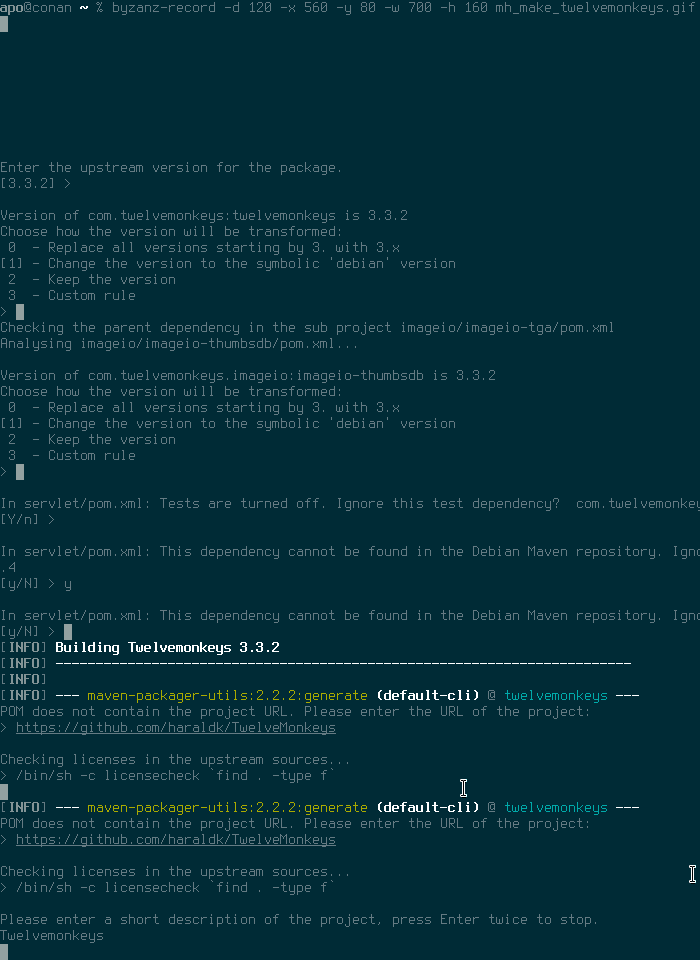
In the coming weeks and months I intend to write a mini series about packaging Java software for Debian. The following article basically starts in the middle of this journey because the PDFsam upgrade is still fresh in my mind. It requires some preexisting knowledge about build tools like Maven and some Java terminology. But do not fear. Hopefully it will make sense in the end when all pieces fall into place. A month ago I decided to upgrade PDFsam, a Java application to split, merge, extract, mix and rotate PDF documents. The current version 1.1.4 is already seven years old and uses Ant as its build system. Unfortunately up to now nobody was interested enough to invest the time to upgrade it to the latest version. A quick internet search unveils that the current sources can be found on github.com. Another brief look reveals we are dealing with a Maven project here because we can find a pom.xml file in the root directory and there is no sign of Ant s typical build.xml file anymore. Here are some general tips how to proceed from this point by using the PDFsam upgrade as an example. Find out how many new dependencies you really need The pom.xml file declares its dependencies in the <dependencies> section. It is good practice to inspect the pom.xml file and determine how much work will be required to upgrade the package. A seasoned Java packager will quickly find common dependencies like Hibernate or the Apache Commons libraries. Fortunately for you they are already packaged in Debian because a lot of projects depend on them. If you are unsure what is and what is not packaged for Debian, tracker.debian.org and codesearch.debian.net are useful tools to search for those packages. If in doubt just ask on debian-java@lists.debian.org. There is no automagical tool (yet) to find out what dependencies are really new (we talk about mh_make soon) but if you use the aforementioned tools and websites you will notice that in June 2017 one could not find the following artifacts: fontawesomefx, eventstudio, sejda-* and jackson-jr-objects. There are also jdepend and testFx but notice they are marked as <scope>test</scope> meaning they are only required if you would like to run upstream s test suite as well. For the sake of simplicity, it is best to ignore them for now and to focus on packaging only dependencies which are really needed to compile the application. Test dependencies can always be added later. This pom.xml investigation leads us to the following conclusion: PDFsam depends on Sejda, a PDF library. Basically Sejda is the product of a major refactoring that happened years ago and allows upstream to develop PDFsam faster and in multiple directions. For Debian packagers it is quite clear now that the upgrade of PDFsam is in reality more like packaging a completely new application. The inspection of Sejda s pom.xml file (another Maven project) reveals we also have to package imgscalr, Twelvemonkeys and SAMBox. We continue with these pom.xml analyses and end up with these new source packages: jackson-jr, libimgscalr-java, libsambox-java, libsejda-java, libsejda-injector-java, libsejda-io-java, libsejda-eventstudio-java, libtwelvemonkeys-java, fontawesomefx and libpdfbox2-java. Later I discovered that gettext-maven-plugin was also required. This was not obvious at first glance if you only check the pom.xml in the root directory but PDFsam and Sejda are multi-module projects! In this case every subdirectory (module) contains another pom.xml with additional information, so ideally you should check those too before you decide to start with your packaging. But don t worry it is often possible to ignore modules with a simple ignore rule inside your debian/*.poms file. The package will have less functionality but it can be still useful if you only need a subset of the modules. Of course in this case ignoring the gettext-maven-plugin artifact would result in a runtime error. C est la vie. A brief remark about Java package names: Java library packages must be named like libXXX-java. This is important for binary packages to avoid naming collisions. We are more tolerant when it comes to source package names but in general we recommend to use the exact same name as for the binary package. There are exceptions like prefixing source packages with their well known project name like jackson-XXX or jboss-XXX but this should only be used when there are already existing packages that use such a naming scheme. If in doubt, talk to us. mh_make or how to quickly generate an initial debian directory Packaging a Maven library is usually not very difficult even if it consists of multiple modules. The tricky part is to get the maven.rules, maven.IgnoreRules and your *.poms file right but debian/rules often only consists of a single dh line and the rest is finding the build-dependencies and adding them to debian/control. A small tool called mh_make, which is included in maven-debian-helper, can lend you a helping hand. The tool is not perfect yet. It requires that most build-dependencies are already installed on your local system, otherwise it won t create the initial debian directory and will only produce some unfinished (but in some cases still useful) files. A rule of thumb is to start with a package that does not depend on any other new dependency and requires the fewest build-dependencies. I have chosen libtwelvemonkeys-java because it was the simplest package and met the aforementioned criteria. Here is how mh_make looks like in action. (The animated GIF was created with Byzanz) First of all download the release tarball, unpack it and run mh_make inside the root directory. Ok, what is happening here? First you can choose a source and binary package name. Then disable the tests and don t run javadoc to create the documentation. This will simplify things a little. Tests and javadoc settings can be added later. Choose the version you want to package and then you can basically follow the default recommendations and confirm them by hitting the Enter key. Throughout the project we choose to transform the upstream version with the symbolic debian version. Remember that Java/Maven is version-centric. This will ensure that our Maven dependencies are always satisfied later and we can simply upgrade our Maven libraries and don t have to change the versions by hand in various pom.xml files; maven-debian-helper will automatically transform them for us to debian . Enable all modules. If you choose not to, you can select each module individually. Note that later on some of the required build-dependencies cannot be found because they are either not installed (libjmagick6-java) or they cannot be found in Debian s Maven repository under /usr/share/maven-repo. You can fix this by entering a substitution rule or, as I did in this case, you can just ignore these artifacts for now. They will be added to maven.IgnoreRules. In order to successfully compile your program you have to remove them from this file later again, create the correct substitution rule in maven.rules and add the missing build-dependencies to debian/control. For now we just want to quickly create our initial debian directory. If everything went as planned a complete debian directory should be visible in your root directory. The only thing left is to fix the substitution rule for the Servlet API 3.1. Add libservlet3.1-java to Build-Depends and the following rule to maven.rules: javax.servlet s/servlet-api/javax.servlet-api/ * s/.*/3.1/ * *
s/javax.servlet/javax.servlet.jsp/ s/jsp-api/javax.servlet.jsp-api/ * s/.*/2.3/ * * The maven.rules file consists of multiple rows separated by six columns. The values represent groupId, artifactId, type, version number and two fields which I never use.  You can just use an asterisk to match any value. Every value can be substituted. This is necessary when the value of upstream s pom.xml file differs from Debian s system packages. This happens frequently for API packages which are uploaded to Maven Central multiple times under a different groupId/artifactId but provide the same features. In this case the Twelvemonkeys pom requires an older API version but Debian is already at version 3.1. Note that we require a strict version number in this case because libservlet3.1-java does not use a symbolic debian version since we provide more than one Servlet API in the archive and this measure prevents conflicts. Thanks for reading this far. More articles about Java packaging will follow in the near future and hopefully they will clarify some terms and topics which could only be briefly mentioned in this post.
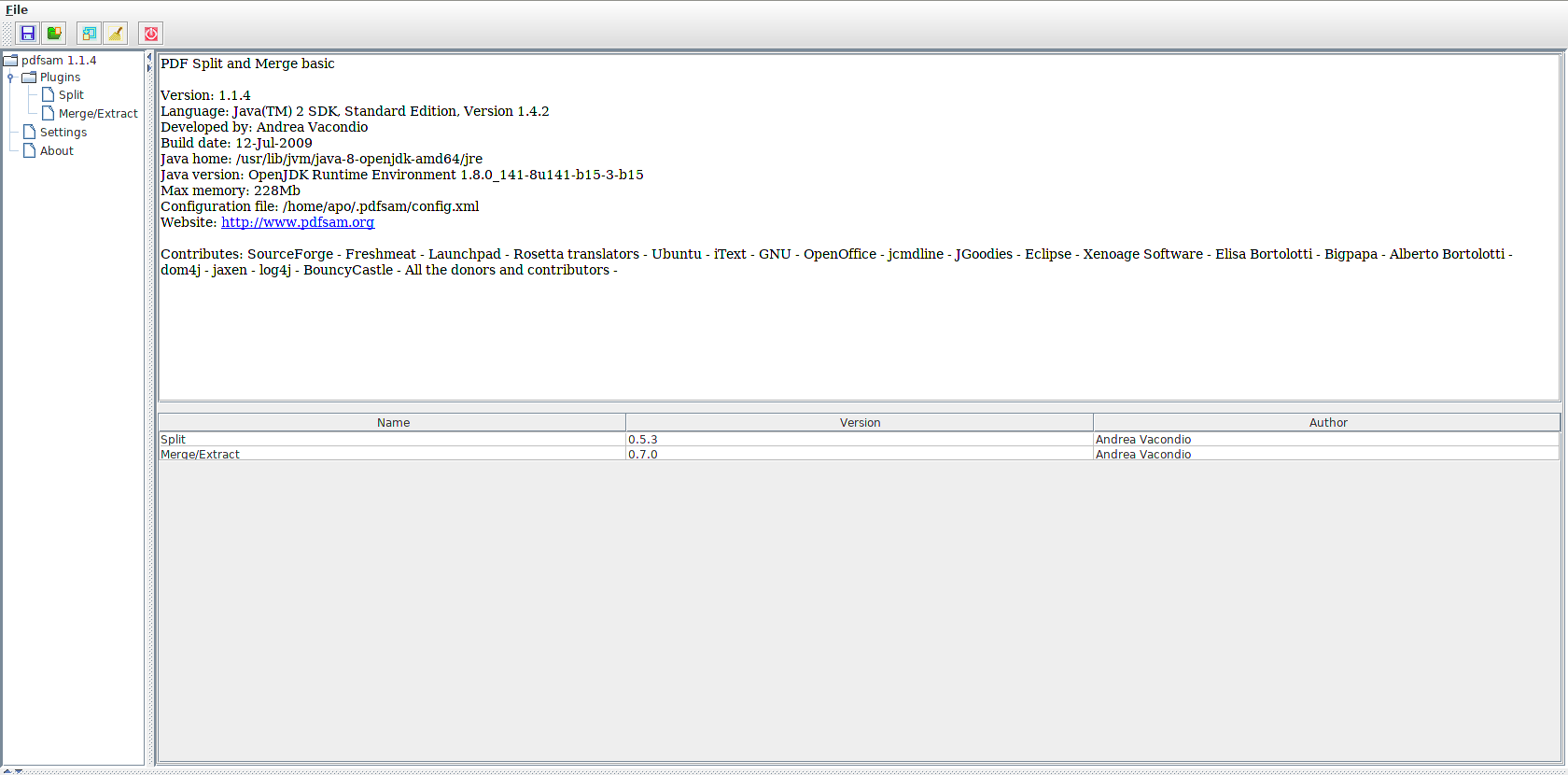
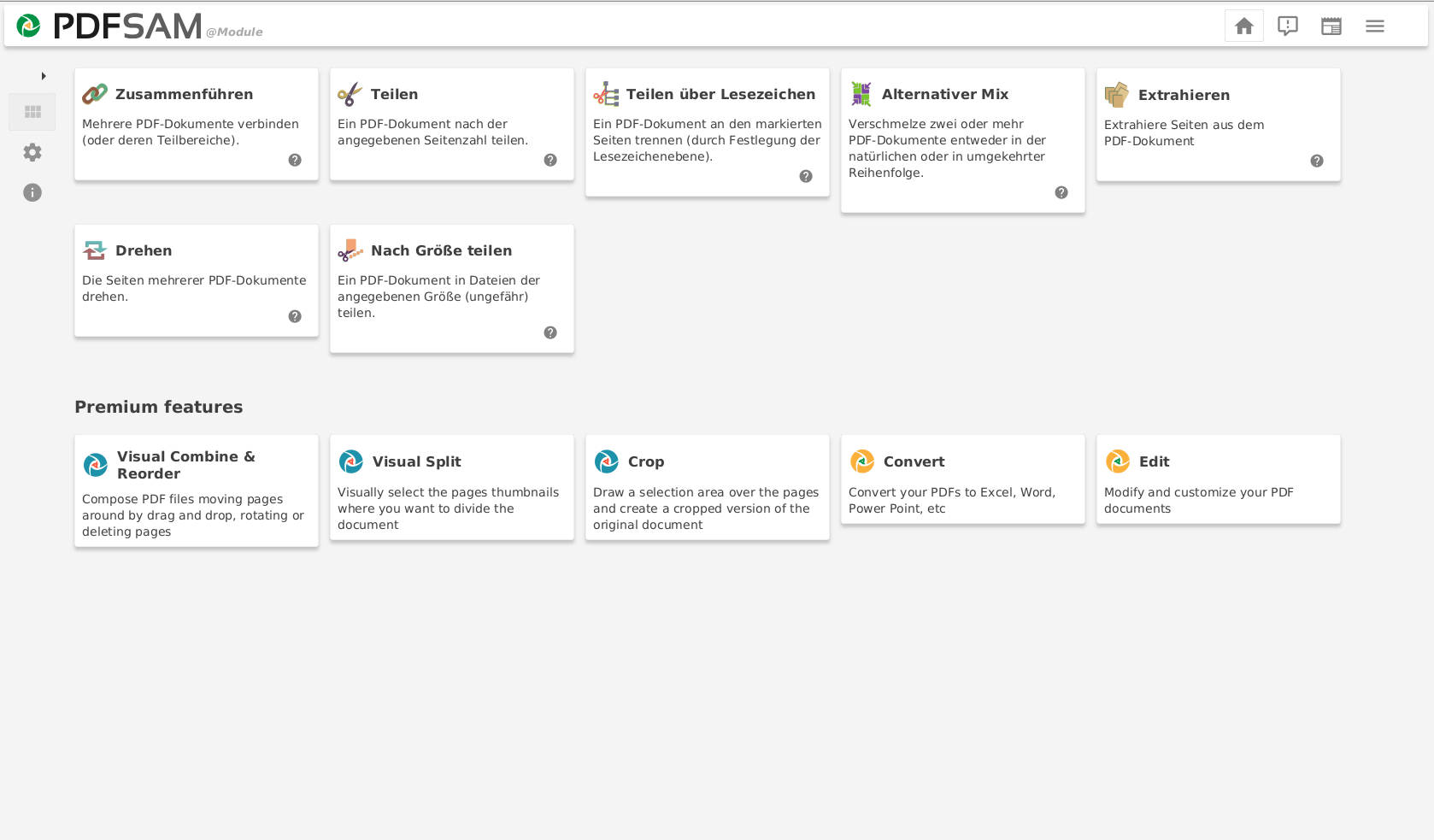
before

and after

1 August 2017

Thorsten Alteholz: My Debian Activities in July 2017

FTP assistant This month I am back to normal numbers and accepted 319 packages. I also kept the promise from last month and rejected 26 uploads. Debian LTS This was my thirty-seventh month that I did some work for the Debian LTS initiative, started by Raphael Hertzog at Freexian. This month my all in all workload went up to 23.5h. During that time I did LTS uploads of: I could also remove libtorrent-rasterbar and pspp from dla-needed.txt as the affected code was not in the Wheezy version or it was just a simple bug. Last but not least I also had a few days of frontdesk duties. Other stuff This month I uploaded a new version of entropybroker with a revised set of systemd service files. At the moment there is public instance of entropybroker running at eb.debian.net. Its entropy is fed by several Entropy Keys made by Simtec Electronics. Though it is public, it is not yet anonymous, so if you need some entropy please drop me a line. At the moment there are two consumers, but the buffers are still filled. I also uploaded several new packages, orcania, yder, hoel and ulfius. If everything works as expected, there will be soon an oauth2 server available in Debian. Last but not least my DOPOM of this month has been ptunnel.

Russell Coker: QEMU for ARM Processes

I m currently doing some embedded work on ARM systems. Having a virtual ARM environment is of course helpful. For the i586 class embedded systems that I run it s very easy to setup a virtual environment, I just have a chroot run from systemd-nspawn with the --personality=x86 option. I run it on my laptop for my own development and on a server my client owns so that they can deal with the hit by a bus scenario. I also occasionally run KVM virtual machines to test the boot image of i586 embedded systems (they use GRUB etc and are just like any other 32bit Intel system). ARM systems have a different boot setup, there is a uBoot loader that is fairly tightly coupled with the kernel. ARM systems also tend to have more unusual hardware choices. While the i586 embedded systems I support turned out to work well with standard Debian kernels (even though the reference OS for the hardware has a custom kernel) the ARM systems need a special kernel. I spent a reasonable amount of time playing with QEMU and was unable to make it boot from a uBoot ARM image. The Google searches I performed didn t turn up anything that helped me. If anyone has good references for getting QEMU to work for an ARM system image on an AMD64 platform then please let me know in the comments. While I am currently surviving without that facility it would be a handy thing to have if it was relatively easy to do (my client isn t going to pay me to spend a week working on this and I m not inclined to devote that much of my hobby time to it). QEMU for Process Emulation I ve given up on emulating an entire system and now I m using a chroot environment with systemd-nspawn. The package qemu-user-static has staticly linked programs for emulating various CPUs on a per-process basis. You can run this as /usr/bin/qemu-arm-static ./staticly-linked-arm-program . The Debian package qemu-user-static uses the binfmt_misc support in the kernel to automatically run /usr/bin/qemu-arm-static when an ARM binary is executed. So if you have copied the image of an ARM system to /chroot/arm you can run the following commands like the following to enter the chroot: cp /usr/bin/qemu-arm-static /chroot/arm/usr/bin/qemu-arm-static
chroot /chroot/arm bin/bash Then you can create a full virtual environment with /usr/bin/systemd-nspawn -D /chroot/arm if you have systemd-container installed. Selecting the CPU Type There is a huge range of ARM CPUs with different capabilities. How this compares to the range of x86 and AMD64 CPUs depends on how you are counting (the i5 system I m using now has 76 CPU capability flags). The default CPU type for qemu-arm-static is armv7l and I need to emulate a system with a armv5tejl. Setting the environment variable QEMU_CPU=pxa250 gives me armv5tel emulation. The ARM Architecture Wikipedia page [2] says that in armv5tejl the T stands for Thumb instructions (which I don t think Debian uses), the E stands for DSP enhancements (which probably isn t relevant for me as I m only doing integer maths), the J stands for supporting special Java instructions (which I definitely don t need) and I m still trying to work out what L means (comments appreciated). So it seems clear that the armv5tel emulation provided by QEMU_CPU=pxa250 will do everything I need for building and testing ARM embedded software. The issue is how to enable it. For a user shell I can just put export QEMU_CPU=pxa250 in .login or something, but I want to emulate an entire system (cron jobs, ssh logins, etc). I ve filed Debian bug #870329 requesting a configuration file for this [1]. If I put such a configuration file in the chroot everything would work as desired. To get things working in the meantime I wrote the below wrapper for /usr/bin/qemu-arm-static that calls /usr/bin/qemu-arm-static.orig (the renamed version of the original program). It s ugly (I would use a config file if I needed to support more than one type of CPU) but it works. #include <stdio.h>
#include <unistd.h>
#include <stdlib.h> int main(int argc, char **argv)

if(setenv("QEMU_CPU", "pxa250", 1))

printf("Can't set $QEMU_CPU\n");
return 1;

execv("/usr/bin/qemu-arm-static.orig", argv);
printf("Can't execute \"%s\" because of qemu failure\n", argv[0]);
return 1;

Russ Allbery: Review: The Fifth Season

Review: The Fifth Season, by N.K. Jemisin
Series: The Broken Earth #1
Publisher: Orbit
Copyright: 2015
ISBN: 0-316-22930-X
Format: Kindle
Pages: 497
The world of The Fifth Season is one of near-constant seismic activity. Volcanoes, massive earthquakes, and all the catastrophes that follow them are a constant threat. Civilization barely survives the turmoil, and only because of two things: strict cultural rules about how to handle a "fifth season" of heavy seismic activity and its aftermath (called stonelore), and the orogenes. Orogenes are humans (well, there is some debate about that) who have an organ that others don't, a biological ability to manipulate the seismic activity and the earth itself. They can protect others by damping down activity, smoothing faults, and redirecting seismic shock waves, but they can also destroy: pull earth out of shape, set off quakes, and create paths for magma to surface. And, to gather the power to manipulate the earth, they draw energy from everything around them, including from other people, often fatally. Orogenes are feared and hated by the typical person. The Stillness, the ironically-named continent on which this book is set, is very old and has had numerous civilizations destroyed by some seismic catastrophe. The landscape is scattered with useless or dangerous remnants of previous forgotten civilizations; the history, likewise, with only the stonelore and some muddled mythology available to most people. The current rulers have kept their empire for a surprising length of time, however, due mostly to the stable ground beneath their centrally-located capital. That stability comes from Fulcrum-trained orogenes, who are taken from their family as children and trained harshly to serve their society by suppressing or fixing dangerous seismic events. Fulcrum orogenes don't have an awful life (well, most of them; for some, it is pure torture), but they're effectively slaves, kept under the watchful eye of Guardians who have mysterious powers of their own. Against this background, The Fifth Season tells three interwoven stories. Essun lives in a small village (comm) at the start of the book, leading a quiet life, until one of her children is beaten to death by her husband following a seismic event that he thinks the child stopped. He's taken their other child and left. Essun, severely traumatized, heads after him to attempt a rescue, or at least revenge. Damaya is a child from another comm who is sold to the Guardians by her parents when she demonstrates orogenic ability, and who goes through Fulcrum training. And Syenite is a Fulcrum orogene, assigned to a field mission with a difficult but very senior orogene named Alabaster. All of these stories eventually interweave, and eventually reveal where they fit in the somewhat unobvious chronology of the story, but it takes some time to get there. It also takes some time for the primary characters to have much in the way of agency. Essun starts with the most, once she recovers her senses enough to start her hunt for revenge. Syenite is ambitious but junior, and Damaya is a child, trying to navigate an unknown world of student politics and strict rules. And all three of the main characters are orogenes, rogga when one is being insulting, and this world does not like orogenes. At all. The Fifth Season starts with an unusual narrative style: a conversational narrator who begins with some of the world background and some mysterious scenes that didn't make sense until much later in the book (late enough that I didn't remember them or make sense of them until I re-read them for this review). The book then focuses on Essun, whose scenes are written in second person present. Normally I think second person feels weirdly intrusive and off-putting, but once I got used to it here, I think it works as well as I've seen it work anywhere. I also see why Jemisin did it: Essun starts the story so traumatized that she's partly disassociating. First person wouldn't have worked, and the second-person voice gives that trauma some immediacy and emotional heft that would have been hard to achieve in third person. The story starts slowly, and builds slowly, as the world is introduced and Jemisin lays down the texture and history of the world. The world-building is ambitious in tracing down the ramifications of the seismic chaos and the implications of orogene ability (although it's best to think of it as pure magic, despite the minor science fiction trappings). But through that world-building, what this story is building is a deep, powerful, frustrated rage. The Fifth Season is an angry book. It's a book about outcasts, about slaves. About people who, even if they're succeeding within the parameters they're given, are channeled and stymied and controlled. It's a story about smiling, kind paternalism hiding lies, control, and abuse, about how hard it is to find enough space from the smothering destructiveness of a totalitarian culture to let yourself relax. It's a story about the horrible things people are willing to do to those they don't consider fully human, and all the ways in which safety, expediency, tradition, culture, and established social roles conspire to keep people within the box where they belong. And it's a story about how being constantly on edge, constantly dreading the next abuse, breaking under it, and being left wanting to burn the whole world to the ground. I struggled at the start of this book, but it grew on me, and by about halfway through it had me hooked completely. At first, Syenite's part of the story (the most traditionally told) was my favorite, but the coming-of-age stories of her and Damaya were overtaken by Essun's far more complex, cautious, and battle-weary tale. And I loved Jemisin's world-building. There's a lot of depth here, a lot of things going on that are unexplained but clearly important, and a restraint and maturity in how the world is revealed that makes it feel older and more layered than Jemisin's The Hundred Thousand Kingdoms. The major drawback of this book is that it is very much the first book of a series, and it doesn't so much have an ending as a hard stop. It's not quite a cliff-hanger, but it's nearly as unsatisfying as one. Most of the major questions of the book who the stone eaters are and what they want, and the fate of Essun's husband and child, just to name two are still unresolved at the end of the story. There is a bit of emotional closure, but not a true moment of catharsis for all of the rage. Hopefully that will be coming in a future book. This is a very unusual story, mixing fantasy and a sort of magic (orogeny) with some science fiction elements and a deep history. It's gritty, textured, emotional, and furious, and very much worth reading. I'm looking forward to the next book in the series. Followed by The Obelisk Gate. Rating: 8 out of 10

31 July 2017

Jonathan McDowell: How to make a keyring

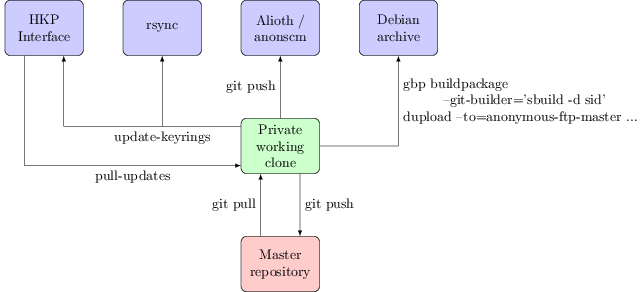
Every month or two keyring-maint gets a comment about how a key update we say we ve performed hasn t actually made it to the active keyring, or a query about why the keyring is so out of date, or told that although a key has been sent to the HKP interface and that is showing the update as received it isn t working when trying to upload to the Debian archive. It s frustrating to have to deal with these queries, but the confusion is understandable. There are multiple public interfaces to the Debian keyrings and they re not all equal. This post attempts to explain the interactions between them, and how I go about working with them as part of the keyring-maint team. First, a diagram to show the different interfaces to the keyring and how they connect to each other: keyring-maint workflow
Public interfaces

rsync: keyring.debian.org::keyrings This is the most important public interface; it s the one that the Debian infrastructure uses. It s the canonical location of the active set of Debian keyrings and is what you should be using if you want the most up to date copy. The validity of the keyrings can be checked using the included sha512sums.txt file, which will be signed by whoever in keyring-maint did the last keyring update.

HKP interface: hkp://keyring.debian.org/ What you talk to with gpg --keyserver keyring.debian.org. Serves out the current keyrings, and accepts updates to any key it already knows about (allowing, for example, expiry updates, new subkeys + uids or new signatures without the need to file a ticket in RT or otherwise explicitly request it). Updates sent to this interface will be available via it within a few hours, but must be manually folded into the active keyring. This in general happens about once a month when preparing for a general update of the keyring; for example b490c1d5f075951e80b22641b2a133c725adaab8. Why not do this automatically? Even though the site uses GnuPG to verify incoming updates there are still occasions we ve seen bugs (such as #787046, where GnuPG would always import subkeys it didn t understand, even when that subkey was already present). Also we don t want to allow just any UID to be part of the keyring. It is thus useful to retain a final set of human based sanity checking for any update before it becomes part of the keyring proper.

Alioth/anonscm: https://anonscm.debian.org/git/keyring/keyring/ A public mirror of the git repository the keyring-maint team use to maintain the keyring. Every action is recorded here, and in general each commit should be a single action (such as adding a new key, doing a key replacement or moving a key between keyrings). Note that pulling in the updates sent via HKP count as a single action, rather than having a commit per key updated. This mirror is updated whenever a new keyring is made active (i.e. made available via the rsync interface). Until that point pending changes are kept private; we sometimes deal with information such as the fact someone has potentially had a key compromised that we don t want to be public until we ve actually disabled it. Every keyring push (as we refer to the process of making a new keyring active) is tagged with the date it was performed. Releases are also tagged with their codenames, to make it easy to do comparisons over time.

Debian archive This is actually the least important public interface to the keyring, at least from the perspective of the keyring-maint team. No infrastructure makes use of it and while it s mostly updated when a new keyring is made active we only make a concerted effort to do so when it is coming up to release. It s provided as a convenience package rather than something which should be utilised for active verification of which keys are and aren t currently part of the keyring.

Team interface

Master repository: kaufmann.debian.org:/srv/keyring.debian.org/master-keyring.git The master git repository for keyring maintenance is stored on kaufmann.debian.org AKA keyring.debian.org. This system is centrally managed by DSA, with only DSA and keyring-maint having login rights to it. None of the actual maintenance work takes place here; it is a bare repo providing a central point for the members of keyring-maint to collaborate around.

Private interface

Private working clone This is where all of the actual keyring work happens. I have a local clone of the repository from kaufmann on a personal machine. The key additions / changes I perform all happen here, and are then pushed to the master repository so that they re visible to the rest of the team. When preparing to make a new keyring active the changes that have been sent to the HKP interface are copied from kaufmann via scp and folded in using the pull-updates script. The tree is assembled into keyrings with a simple make and some sanity tests performed using make test. If these are successful the sha512sums.txt file is signed using gpg --clearsign and the output copied over to kaufmann. update-keyrings is then called to update the active keyrings (both rsync + HKP). A git push public pushes the changes to the public repository on anonscm. Finally gbp buildpackage --git-builder='sbuild -d sid' tells git-buildpackage to use sbuild to build a package ready to be uploaded to the archive. Hopefully that helps explain the different stages and outputs of keyring maintenance; I m aware that it would be a good idea for this to exist somewhere on keyring.debian.org as well and will look at doing so.

Daniel Silverstone: F/LOSS activity, July 2017

Once again, my focus was on Gitano, which we're working toward a 1.1 for. We had another one of our Gitano developer days which was attended by Richard maw and myself. You are invited to read the wiki page but a summary of what happened, which directly involved me, is: Other than that, related to Gitano during July I: I don't think I've done much non-Gitano F/LOSS work in July, but I am now in Montr al for debconf 2017 so hopefully more to say next month.

Russell Coker: Running a Tor Relay

I previously wrote about running my SE Linux Play Machine over Tor [1] which involved configuring ssh to use Tor. Since then I have installed a Tor hidden service for ssh on many systems I run for clients. The reason is that it is fairly common for them to allow a server to get a new IP address by DHCP or accidentally set their firewall to deny inbound connections. Without some sort of VPN this results in difficult phone calls talking non-technical people through the process of setting up a tunnel or discovering an IP address. While I can run my own VPN for them I don t want their infrastructure tied to mine and they don t want to pay for a 3rd party VPN service. Tor provides a free VPN service and works really well for this purpose. As I believe in giving back to the community I decided to run my own Tor relay. I have no plans to ever run a Tor Exit Node because that involves more legal problems than I am willing or able to deal with. A good overview of how Tor works is the EFF page about it [2]. The main point of a Middle Relay (or just Relay ) is that it only sends and receives encrypted data from other systems. As the Relay software (and the sysadmin if they choose to examine traffic) only sees encrypted data without any knowledge of the source or final destination the legal risk is negligible. Running a Tor relay is quite easy to do. The Tor project has a document on running relays [3], which basically involves changing 4 lines in the torrc file and restarting Tor. If you are running on Debian you should install the package tor-geoipdb to allow Tor to determine where connections come from (and to not whinge in the log files). ORPort [IPV6ADDR]:9001 If you want to use IPv6 then you need a line like the above with IPV6ADDR replaced by the address you want to use. Currently Tor only supports IPv6 for connections between Tor servers and only for the data transfer not the directory services. Data Transfer I currently have 2 systems running as Tor relays, both of them are well connected in a European DC and they are each transferring about 10GB of data per day which isn t a lot by server standards. I don t know if there is a sufficient number of relays around the world that the share of the load is small or if there is some geographic dispersion algorithm which determined that there are too many relays in operation in that region.

Next.

Previous.