Search Results: "sto"

11 February 2017

Reproducible builds folks: Reproducible Builds: week 93 in Stretch cycle

Here's what happened in the Reproducible Builds effort between Sunday January 29 and Saturday February 4 2017: Media coverage Dennis Gilmore and Holger Levsen presented "Reproducible Builds and Fedora" (Video, Slides) at Devconf.cz on February 27th 2017. On February 1st, stretch/armhf reached 90% reproducible packages in our test framework, so that now all four tested architectures are 90% reproducible in stretch. Yay! For armhf this means 22472 reproducible source packages (in main); for amd64, arm64 and i386 these figures are 23363, 23062 and 22607 respectively. Chris Lamb appeared on the Changelog podcast to talk about reproducible builds: Holger Levsen pitched Reproducible Builds and our need for a logo in the "Open Source Design" room at FOSDEM 2017 (Video, 09:36 - 12:00). Upcoming Events Reproducible work in other projects We learned that the "slightly more secure" Heads firmware (a Coreboot payload) is now reproducibly built regardless of host system or build directory. A picture says more than a thousand words: reproducible heads build on two machines Docker started preliminary work on making image builds reproducible. Toolchain development and fixes Ximin Luo continued to write code and test cases for the BUILD_PATH_PREFIX_MAP environment variable. He also did extensive research on cross-platform and cross-language issues with enviroment variables, filesystem paths, and character encodings, and started preparing a draft specification document to describe all of this. Chris Lamb asked CPython to implement an environment variable PYTHONREVERSEDICTKEYORDER to add an an option to reverse iteration order of items in a dict. However this was rejected because they are planning to formally fix this order in the next language version. Bernhard Wiedemann and Florian Festi added support for our SOURCE_DATE_EPOCH environment variable, to the RPM Package Manager. James McCoy uploaded devscripts 2.17.1 with a change from Guillem Jover for dscverify(1), adding support for .buildinfo files. (Closes: #852801) Piotr O arowski uploaded dh-python 2.20170125 with a change from Chris Lamb for a patch to fix #835805. Chris Lamb added documentation to diffoscope, strip-nondeterminism, disorderfs, reprotest and trydiffoscope about uploading signed tarballs when releasing. He also added a link to these on our website's tools page. Packages reviewed and bugs filed Bugs filed: Reviews of unreproducible packages 83 package reviews have been added, 86 have been updated and 276 have been removed in this week, adding to our knowledge about identified issues. 2 issue types have been updated: Weekly QA work During our reproducibility testing, the following FTBFS bugs have been detected and reported by: diffoscope development Work on the next version (71) continued in git this week: reproducible-website development Daniel Shahaf added more notes on our "How to chair a meeting" document. tests.reproducible-builds.org Holger unblacklisted pspp and tiledarray. If you think further packages should also be unblacklisted (possibly only on some architectures), please tell us. Misc. This week's edition was written by Ximin Luo, Holger Levsen and Chris Lamb & reviewed by a bunch of Reproducible Builds folks on IRC & the mailing lists.

Mark Brown: We show up

It s really common for pitches to managements within companies about Linux kernel upstreaming to focus on cost savings to vendors from getting their code into the kernel, especially in the embedded space. These benefits are definitely real, especially for vendors trying to address the general market or extend the lifetime of their devices, but they are only part of the story. The other big thing that happens as a result of engaging upstream is that this is a big part of how other upstream developers become aware of what sorts of hardware and use cases there are out there. From this point of view it s often the things that are most difficult to get upstream that are the most valuable to talk to upstream about, but of course it s not quite that simple as a track record of engagement on the simpler drivers and the knowledge and relationships that are built up in that process make having discussions about harder issues a lot easier. There are engineering and cost benefits that come directly from having code upstream but it s not just that, the more straightforward upstreaming is also an investment in making it easier to work with the community solve the more difficult problems. Fundamentally Linux is made by and for the people and companies who show up and participate in the upstream community. The more ways people and companies do that the better Linux is likely to meet their needs.

Noah Meyerhans: Using FAI to customize and build your own cloud images

At this past November's Debian cloud sprint, we classified our image users into three broad buckets in order to help guide our discussions and ensure that we were covering the common use cases. Our users fit generally into one of the following groups:
  1. People who directly launch our image and treat it like a classic VPS. These users most likely will be logging into their instances via ssh and configuring it interactively, though they may also install and use a configuration management system at some point.
  2. People who directly launch our images but configure them automatically via launch-time configuration passed to the cloud-init process on the agent. This automatic configuration may optionally serve to bootstrap the instance into a more complete configuration management system. The user may or may not ever actually log in to the system at all.
  3. People who will not use our images directly at all, but will instead construct their own image based on ours. They may do this by launching an instance of our image, customizing it, and snapshotting it, or they may build a custom image from scratch by reusing and modifying the tools and configuration that we use to generate our images.
This post is intended to help people in the final category get started with building their own cloud images based on our tools and configuration. As I mentioned in my previous post on the subject, we are using the FAI project with configuration from the fai-cloud-images. It's probably a good idea to get familiar with FAI and our configs before proceeding, but it's not necessary. You'll need to use FAI version 5.3.4 or greater. 5.3.4 is currently available in stretch and jessie-backports. Images can be generated locally on your non-cloud host, or on an existing cloud instance. You'll likely find it more convenient to use a cloud instance so you can avoid the overhead of having to copy disk images between hosts. For the most part, I'll assume throughout this document that you're generating your image on a cloud instance, but I'll highlight the steps where it actually matters. I'll also be describing the steps to target AWS, though the general workflow should be similar if you're targeting a different platform. To get started, install the fai-server package on your instance and clone the fai-cloud-images git repository. (I'll assume the repository is cloned to /srv/fai/config.) In order to generate your own disk image that generally matches what we've been distributing, you'll use a command like:
sudo fai-diskimage --hostname stretch-image --size 8G \
--class DEBIAN,STRETCH,AMD64,GRUB_PC,DEVEL,CLOUD,EC2 \
/tmp/stretch-image.raw
This command will create an 8 GB raw disk image at /tmp/stretch-image.raw, create some partitions and filesystems within it, and install and configure a bunch of packages into it. Exactly what packages it installs and how it configures them will be determined by the FAI config tree and the classes provided on the command line. The package_config subdirectory of the FAI configuration contains several files, the names of which are FAI classes. Activating a given class by referencing it on the fai-diskimage command line instructs FAI to process the contents of the matching package_config file if such a file exists. The files use a simple grammar that provides you with the ability to request certain packages to be installed or removed. Let's say for example that you'd like to build a custom image that looks mostly identical to Debian's images, but that also contains the Apache HTTP server. You might do that by introducing a new file to package_config/HTTPD file, as follows:
PACKAGES install
apache2
Then, when running fai-diskimage, you'll add HTTPD to the list of classes:
sudo fai-diskimage --hostname stretch-image --size 8G \
--class DEBIAN,STRETCH,AMD64,GRUB_PC,DEVEL,CLOUD,EC2,HTTPD \
/tmp/stretch-image.raw
Aside from custom package installation, you're likely to also want custom configuration. FAI allows the use of pretty much any scripting language to perform modifications to your image. A common task that these scripts may want to perform is the installation of custom configuration files. FAI provides the fcopy tool to help with this. Fcopy is aware of FAI's class list and is able to select an appropriate file from the FAI config's files subdirectory based on classes. The scripts/EC2/10-apt script provides a basic example of using fcopy to select and install an apt sources.list file. The files/etc/apt/sources.list/ subdirectory contains both an EC2 and a GCE file. Since we've enabled the EC2 class on our command line, fcopy will find and install that file. You'll notice that the sources.list subdirectory also contains a preinst file, which fcopy can use to perform additional actions prior to actually installing the specified file. postinst scripts are also supported. Beyond package and file installation, FAI also provides mechanisms to support debconf preseeding, as well as hooks that are executed at various stages of the image generation process. I recommend following the examples in the fai-cloud-images repo, as well as the FAI guide for more details. I do have one caveat regarding the documentation, however: FAI was originally written to help provision bare-metal systems, and much of its documentation is written with that use case in mind. The cloud image generation process is able to ignore a lot of the complexity of these environments (for example, you don't need to worry about pxeboot and tftp!) However, this means that although you get to ignore probably half of the FAI Guide, it's not immediately obvious which half it is that you get to ignore. Once you've generated your raw image, you can inspect it by telling Linux about the partitions contained within, and then mount and examine the filesystems. For example:
admin@ip-10-0-0-64:~$ sudo partx --show /tmp/stretch-image.raw
NR START      END  SECTORS SIZE NAME UUID
 1  2048 16777215 16775168   8G      ed093314-01
admin@ip-10-0-0-64:~$ sudo partx -a /tmp/stretch-image.raw 
partx: /dev/loop0: error adding partition 1
admin@ip-10-0-0-64:~$ lsblk 
NAME      MAJ:MIN RM    SIZE RO TYPE MOUNTPOINT
xvda      202:0    0      8G  0 disk 
 xvda1   202:1    0 1007.5K  0 part 
 xvda2   202:2    0      8G  0 part /
loop0       7:0    0      8G  0 loop 
 loop0p1 259:0    0      8G  0 loop 
admin@ip-10-0-0-64:~$ sudo mount /dev/loop0p1 /mnt/
admin@ip-10-0-0-64:~$ ls /mnt/
bin/   dev/  home/        initrd.img.old@  lib64/       media/  opt/   root/  sbin/  sys/  usr/  vmlinuz@
boot/  etc/  initrd.img@  lib/             lost+found/  mnt/    proc/  run/   srv/   tmp/  var/  vmlinuz.old@
In order to actually use your image with your cloud provider, you'll need to register it with them. Strictly speaking, these are the only steps that are provider specific and need to be run on your provider's cloud infrastructure. AWS documents this process in the User Guide for Linux Instances. The basic workflow is:
  1. Attach a secondary EBS volume to your EC2 instance. It must be large enough to hold the raw disk image you created.
  2. Use dd to write your image to the secondary volume, e.g. sudo dd if=/tmp/stretch-image.raw of=/dev/xvdb
  3. Use the volume-to-ami.sh script in the fail-cloud-image repo to snapshot the volume and register the resulting snapshot with AWS as a new AMI. Example: ./volume-to-ami.sh vol-04351c30c46d7dd6e
The volume-to-ami.sh script must be run with access to AWS credentials that grant access to several EC2 API calls: describe-snapshots, create-snapshot, and register-image. It recognizes a --help command-line flag and several options that modify characteristics of the AMI that it registers. When volume-to-ami.sh completes, it will print the AMI ID of your new image. You can now work with this image using standard AWS workflows. As always, we welcome feedback and contributions via the debian-cloud mailing list or #debian-cloud on IRC.

9 February 2017

Sven Hoexter: Limit host access based on LDAP groupOfUniqueNames with sssd

For CentOS 4 to CentOS 6 we used pam_ldap to restrict host access to machines, based on groupOfUniqueNames listed in an openldap. With RHEL/CentOS 6 RedHat already deprecated pam_ldap and highly recommended to use sssd instead, and with RHEL/CentOS 7 they finally removed pam_ldap from the distribution. Since pam_ldap supported groupOfUniqueNames to restrict logins a bigger collection of groupOfUniqueNames were created to restrict access to all kind of groups/projects and so on. But sssd is in general only able to filter based on an "ldap_access_filter" or use the host attribute via "ldap_user_authorized_host". That does not allow the use of "groupOfUniqueNames". So to allow a smoth migration I had to configure sssd in some way to still support groupOfUniqueNames. The configuration I ended up with looks like this:
[domain/hostacl]
autofs_provider = none 
ldap_schema = rfc2307bis
# to work properly we've to keep the search_base at the highest level
ldap_search_base = ou=foo,ou=people,o=myorg
ldap_default_bind_dn = cn=ro,ou=ldapaccounts,ou=foo,ou=people,o=myorg
ldap_default_authtok = foobar
id_provider = ldap
auth_provider = ldap
chpass_provider = none
ldap_uri = ldaps://ldapserver:636
ldap_id_use_start_tls = false
cache_credentials = false
ldap_tls_cacertdir = /etc/pki/tls/certs
ldap_tls_cacert = /etc/pki/tls/certs/ca-bundle.crt
ldap_tls_reqcert = allow
ldap_group_object_class = groupOfUniqueNames
ldap_group_member = uniqueMember
access_provider = simple
simple_allow_groups = fraappmgmtt
[sssd]
domains = hostacl
services = nss, pam
config_file_version = 2
Important side note: With current sssd versions you're more or less forced to use ldaps with a validating CA chain, though hostnames are not required to match the CN/SAN so far. Relevant are: In practise what we do is match the member of the groupOfUniqueNames to the sssd internal group representation. The best explanation about the several possible object classes in LDAP for group representation I've found so far is unfortunately in a german blog post. Another explanation is in the LDAP wiki. In short: within a groupOfUniqueNames you'll find a full DN, while in a posixGroup you usually find login names. Different kind of object class requires a different handling. Next step would be to move auth and nss functionality to sssd as well.

Iustin Pop: Solarized colour theme

Solarized A while back I was looking for some information on the web, and happened upon a blog post about the subject. I don't remember what I was looking for, but on the same blog, there was a screen shot of what I then learned was the Solarized theme. This caught my eye that I decided to try it myself ASAP. Up until last year, I've been using for many years the 'black on light yellow' xterm scheme. This is good during the day, but too strong during night, so on some machines I switched to 'white on black', but this was not entirely satisfying. The solarized theme promises to have consistent colours over both light and dark background, which would help to make my setups finally consistent, and extends to a number of programs. Amongst these, there are themes for mutt on both light and dark backgrounds using only 16 colours. This was good, as my current hand-built theme is based on 256 colours, and this doesn't work well in the Linux console. So I tried changing my terminal to the custom colours, played with it for about 10 minutes, then decided that its contrast is too low, bordering on unreadable. I switch to another desktop where I still had open an xterm using white-on-black, and this being at night my eyes immediately go 'no no no too high contrast'. In about ten minutes I got so used to it that the old theme was really really uncomfortable. There was no turning back now Interestingly, the light theme was not that much better than black-on-light-yellow, as that theme is already pretty well behaved. But I still migrated for consistency. Programs/configs Starting from the home page and the internet, I found resources for: 16 vs 256 colours The solarized theme/configuration can be done in two ways: Upstream recommends the custom ones, as they are precisely tuned, instead of using the approximated ones; honestly I don't know if they would make a difference. It's too bad upstream went silent a few years back, as technically it's possible to override also colours above 16 in the 256-colour palette, but in any case, each of the two options has its own cons: So either way it's not perfect. Desktop-wide consistency Also not perfect is that for proper consistent look, many more programs would have to be changed; but I don't see that happening in today's world. I've seen for example 3 or 4 Midnight Commander themes, but none of them were actually in the spirit of solarized, even though they were tweaked for solarized. Even between vim and emacs, which both have one canonical solarized theme, the look is close but not really the same (looking at the markdown source for this blog post: URLs, headers and spelling mistakes are all different), but this might be due not necessarily the theme itself. So no global theme consistency (I'd wish), but still, I find this much better on the eyes and not lower on readability after getting used to it. Thanks Ethan!

Steve Kemp: Old packages are interesting.

Recently Vincent Bernat wrote about writing his own simple terminal, using vte. That was a fun read, as the sample code built really easily and was functional. At the end of his post he said :
evilvte is quite customizable and can be lightweight. Consider it as a first alternative. Honestly, I don t remember why I didn t pick it.
That set me off looking at evilvte, and it was one of those rare projects which seems to be pretty stable, and also hasn't changed in any recent release of Debian GNU/Linux: I wonder if it would be possible to easily generate a list of packages which have the same revision in multiple distributions? Anyway I had a look at the source, and unfortunately spotted that it didn't entirely handle clicking on hyperlinks terribly well. Clicking on a link would pretty much run:
 firefox '%s'
That meant there was an obvious security problem. It is a great terminal though, and it just goes to show how short, simple, and readable such things can be. I enjoyed looking at the source, and furthermore enjoyed using it. Unfortunately due to a dependency issue it looks like this package will be removed from stretch.

8 February 2017

Steve Kemp: Old packages are interesting.

Recently Vincent Bernat wrote about writing his own simple terminal, using vte. That was a fun read, as the sample code built really easily and was functional. At the end of his post he said :
evilvte is quite customizable and can be lightweight. Consider it as a first alternative. Honestly, I don t remember why I didn t pick it.
That set me off looking at evilvte, and it was one of those rare projects which seems to be pretty stable, and also hasn't changed in any recent release of Debian GNU/Linux: I wonder if it would be possible to easily generate a list of packages which have the same revision in multiple distributions? Anyway I had a look at the source, and unfortunately spotted that it didn't entirely handle clicking on hyperlinks terribly well. Clicking on a link would pretty much run:
 firefox '%s'
That meant there was an obvious security problem. It is a great terminal though, and it just goes to show how short, simple, and readable such things can be. I enjoyed looking at the source, and furthermore enjoyed using it. Unfortunately due to a dependency issue it looks like this package will be removed from stretch.

Antoine Beaupr : Reliably generating good passwords

Passwords are used everywhere in our modern life. Between your email account and your bank card, a lot of critical security infrastructure relies on "something you know", a password. Yet there is little standard documentation on how to generate good passwords. There are some interesting possibilities for doing so; this article will look at what makes a good password and some tools that can be used to generate them. There is growing concern that our dependence on passwords poses a fundamental security flaw. For example, passwords rely on humans, who can be coerced to reveal secret information. Furthermore, passwords are "replayable": if your password is revealed or stolen, anyone can impersonate you to get access to your most critical assets. Therefore, major organizations are trying to move away from single password authentication. Google, for example, is enforcing two factor authentication for its employees and is considering abandoning passwords on phones as well, although we have yet to see that controversial change implemented. Yet passwords are still here and are likely to stick around for a long time until we figure out a better alternative. Note that in this article I use the word "password" instead of "PIN" or "passphrase", which all roughly mean the same thing: a small piece of text that users provide to prove their identity.

What makes a good password? A "good password" may mean different things to different people. I will assert that a good password has the following properties:
  • high entropy: hard to guess for machines
  • transferable: easy to communicate for humans or transfer across various protocols for computers
  • memorable: easy to remember for humans
High entropy means that the password should be unpredictable to an attacker, for all practical purposes. It is tempting (and not uncommon) to choose a password based on something else that you know, but unfortunately those choices are likely to be guessable, no matter how "secret" you believe it is. Yes, with enough effort, an attacker can figure out your birthday, the name of your first lover, your mother's maiden name, where you were last summer, or other secrets people think they have. The only solution here is to use a password randomly generated with enough randomness or "entropy" that brute-forcing the password will be practically infeasible. Considering that a modern off-the-shelf graphics card can guess millions of passwords per second using freely available software like hashcat, the typical requirement of "8 characters" is not considered enough anymore. With proper hardware, a powerful rig can crack such passwords offline within about a day. Even though a recent US National Institute of Standards and Technology (NIST) draft still recommends a minimum of eight characters, we now more often hear recommendations of twelve characters or fourteen characters. A password should also be easily "transferable". Some characters, like & or !, have special meaning on the web or the shell and can wreak havoc when transferred. Certain software also has policies of refusing (or requiring!) some special characters exactly for that reason. Weird characters also make it harder for humans to communicate passwords across voice channels or different cultural backgrounds. In a more extreme example, the popular Signal software even resorted to using only digits to transfer key fingerprints. They outlined that numbers are "easy to localize" (as opposed to words, which are language-specific) and "visually distinct". But the critical piece is the "memorable" part: it is trivial to generate a random string of characters, but those passwords are hard for humans to remember. As xkcd noted, "through 20 years of effort, we've successfully trained everyone to use passwords that are hard for human to remember but easy for computers to guess". It explains how a series of words is a better password than a single word with some characters replaced. Obviously, you should not need to remember all passwords. Indeed, you may store some in password managers (which we'll look at in another article) or write them down in your wallet. In those cases, what you need is not a password, but something I would rather call a "token", or, as Debian Developer Daniel Kahn Gillmor (dkg) said in a private email, a "high entropy, compact, and transferable string". Certain APIs are specifically crafted to use tokens. OAuth, for example, generates "access tokens" that are random strings that give access to services. But in our discussion, we'll use the term "token" in a broader sense. Notice how we removed the "memorable" property and added the "compact" one: we want to efficiently convert the most entropy into the shortest password possible, to work around possibly limiting password policies. For example, some bank cards only allow 5-digit security PINs and most web sites have an upper limit in the password length. The "compact" property applies less to "passwords" than tokens, because I assume that you will only use a password in select places: your password manager, SSH and OpenPGP keys, your computer login, and encryption keys. Everything else should be in a password manager. Those tools are generally under your control and should allow large enough passwords that the compact property is not particularly important.

Generating secure passwords We'll look now at how to generate a strong, transferable, and memorable password. These are most likely the passwords you will deal with most of the time, as security tokens used in other settings should actually never show up on screen: they should be copy-pasted or automatically typed in forms. The password generators described here are all operated from the command line. Password managers often have embedded password generators, but usually don't provide an easy way to generate a password for the vault itself. The previously mentioned xkcd cartoon is probably a common cultural reference in the security crowd and I often use it to explain how to choose a good passphrase. It turns out that someone actually implemented xkcd author Randall Munroe's suggestion into a program called xkcdpass:
    $ xkcdpass
    estop mixing edelweiss conduct rejoin flexitime
In verbose mode, it will show the actual entropy of the generated passphrase:
    $ xkcdpass -V
    The supplied word list is located at /usr/lib/python3/dist-packages/xkcdpass/static/default.txt.
    Your word list contains 38271 words, or 2^15.22 words.
    A 6 word password from this list will have roughly 91 (15.22 * 6) bits of entropy,
    assuming truly random word selection.
    estop mixing edelweiss conduct rejoin flexitime
Note that the above password has 91 bits of entropy, which is about what a fifteen-character password would have, if chosen at random from uppercase, lowercase, digits, and ten symbols:
    log2((26 + 26 + 10 + 10)^15) = approx. 92.548875
It's also interesting to note that this is closer to the entropy of a fifteen-letter base64 encoded password: since each character is six bits, you end up with 90 bits of entropy. xkcdpass is scriptable and easy to use. You can also customize the word list, separators, and so on with different command-line options. By default, xkcdpass uses the 2 of 12 word list from 12 dicts, which is not specifically geared toward password generation but has been curated for "common words" and words of different sizes. Another option is the diceware system. Diceware works by having a word list in which you look up words based on dice rolls. For example, rolling the five dice "1 4 2 1 4" would give the word "bilge". By rolling those dice five times, you generate a five word password that is both memorable and random. Since paper and dice do not seem to be popular anymore, someone wrote that as an actual program, aptly called diceware. It works in a similar fashion, except that passwords are not space separated by default:
    $ diceware
    AbateStripDummy16thThanBrock
Diceware can obviously change the output to look similar to xkcdpass, but can also accept actual dice rolls for those who do not trust their computer's entropy source:
    $ diceware -d ' ' -r realdice -w en_orig
    Please roll 5 dice (or a single dice 5 times).
    What number shows dice number 1? 4
    What number shows dice number 2? 2
    What number shows dice number 3? 6
    [...]
    Aspire O's Ester Court Born Pk
The diceware software ships with a few word lists, and the default list has been deliberately created for generating passwords. It is derived from the standard diceware list with additions from the SecureDrop project. Diceware ships with the EFF word list that has words chosen for better recognition, but it is not enabled by default, even though diceware recommends using it when generating passwords with dice. That is because the EFF list was added later on. The project is currently considering making the EFF list be the default. One disadvantage of diceware is that it doesn't actually show how much entropy the generated password has those interested need to compute it for themselves. The actual number depends on the word list: the default word list has 13 bits of entropy per word (since it is exactly 8192 words long), which means the default 6 word passwords have 78 bits of entropy:
    log2(8192) * 6 = 78
Both of these programs are rather new, having, for example, entered Debian only after the last stable release, so they may not be directly available for your distribution. The manual diceware method, of course, only needs a set of dice and a word list, so that is much more portable, and both the diceware and xkcdpass programs can be installed through pip. However, if this is all too complicated, you can take a look at Openwall's passwdqc, which is older and more widely available. It generates more memorable passphrases while at the same time allowing for better control over the level of entropy:
    $ pwqgen
    vest5Lyric8wake
    $ pwqgen random=78
    Theme9accord=milan8ninety9few
For some reason, passwdqc restricts the entropy of passwords between the bounds of 24 and 85 bits. That tool is also much less customizable than the other two: what you see here is pretty much what you get. The 4096-word list is also hardcoded in the C source code; it comes from a Usenet sci.crypt posting from 1997. A key feature of xkcdpass and diceware is that you can craft your own word list, which can make dictionary-based attacks harder. Indeed, with such word-based password generators, the only viable way to crack those passwords is to use dictionary attacks, because the password is so long that character-based exhaustive searches are not workable, since they would take centuries to complete. Changing from the default dictionary therefore brings some advantage against attackers. This may be yet another "security through obscurity" procedure, however: a naive approach may be to use a dictionary localized to your native language (for example, in my case, French), but that would deter only an attacker that doesn't do basic research about you, so that advantage is quickly lost to determined attackers. One should also note that the entropy of the password doesn't depend on which word list is chosen, only its length. Furthermore, a larger dictionary only expands the search space logarithmically; in other words, doubling the word-list length only adds a single bit of entropy. It is actually much better to add a word to your password than words to the word list that generates it.

Generating security tokens As mentioned before, most password managers feature a way to generate strong security tokens, with different policies (symbols or not, length, etc). In general, you should use your password manager's password-generation functionality to generate tokens for sites you visit. But how are those functionalities implemented and what can you do if your password manager (for example, Firefox's master password feature) does not actually generate passwords for you? pass, the standard UNIX password manager, delegates this task to the widely known pwgen program. It turns out that pwgen has a pretty bad track record for security issues, especially in the default "phoneme" mode, which generates non-uniformly distributed passwords. While pass uses the more "secure" -s mode, I figured it was worth removing that option to discourage the use of pwgen in the default mode. I made a trivial patch to pass so that it generates passwords correctly on its own. The gory details are in this email. It turns out that there are lots of ways to skin this particular cat. I was suggesting the following pipeline to generate the password:
    head -c $entropy /dev/random   base64   tr -d '\n='
The above command reads a certain number of bytes from the kernel (head -c $entropy /dev/random) encodes that using the base64 algorithm and strips out the trailing equal sign and newlines (for large passwords). This is what Gillmor described as a "high-entropy compact printable/transferable string". The priority, in this case, is to have a token that is as compact as possible with the given entropy, while at the same time using a character set that should cause as little trouble as possible on sites that restrict the characters you can use. Gillmor is a co-maintainer of the Assword password manager, which chose base64 because it is widely available and understood and only takes up 33% more space than the original 8-bit binary encoding. After a lengthy discussion, the pass maintainer, Jason A. Donenfeld, chose the following pipeline:
    read -r -n $length pass < <(LC_ALL=C tr -dc "$characters" < /dev/urandom)
The above is similar, except it uses tr to directly to read characters from the kernel, and selects a certain set of characters ($characters) that is defined earlier as consisting of [:alnum:] for letters and digits and [:graph:] for symbols, depending on the user's configuration. Then the read command extracts the chosen number of characters from the output and stores the result in the pass variable. A participant on the mailing list, Brian Candler, has argued that this wastes entropy as the use of tr discards bits from /dev/urandom with little gain in entropy when compared to base64. But in the end, the maintainer argued that reading "reading from /dev/urandom has no [effect] on /proc/sys/kernel/random/entropy_avail on Linux" and dismissed the objection. Another password manager, KeePass uses its own routines to generate tokens, but the procedure is the same: read from the kernel's entropy source (and user-generated sources in case of KeePass) and transform that data into a transferable string.

Conclusion While there are many aspects to password management, we have focused on different techniques for users and developers to generate secure but also usable passwords. Generating a strong yet memorable password is not a trivial problem as the security vulnerabilities of the pwgen software showed. Furthermore, left to their own devices, users will generate passwords that can be easily guessed by a skilled attacker, especially if they can profile the user. It is therefore essential we provide easy tools for users to generate strong passwords and encourage them to store secure tokens in password managers.
Note: this article first appeared in the Linux Weekly News.

Alberto Garc a: QEMU and the qcow2 metadata checks

When choosing a disk image format for your virtual machine one of the factors to take into considerations is its I/O performance. In this post I ll talk a bit about the internals of qcow2 and about one of the aspects that can affect its performance under QEMU: its consistency checks. As you probably know, qcow2 is QEMU s native file format. The first thing that I d like to highlight is that this format is perfectly fine in most cases and its I/O performance is comparable to that of a raw file. When it isn t, chances are that this is due to an insufficiently large L2 cache. In one of my previous blog posts I wrote about the qcow2 L2 cache and how to tune it, so if your virtual disk is too slow, you should go there first. I also recommend Max Reitz and Kevin Wolf s qcow2: why (not)? talk from KVM Forum 2015, where they talk about a lot of internal details and show some performance tests. qcow2 clusters: data and metadata A qcow2 file is organized into units of constant size called clusters. The cluster size defaults to 64KB, but a different value can be set when creating a new image: qemu-img create -f qcow2 -o cluster_size=128K hd.qcow2 4G Clusters can contain either data or metadata. A qcow2 file grows dynamically and only allocates space when it is actually needed, so apart from the header there s no fixed location for any of the data and metadata clusters: they can appear mixed anywhere in the file. Here s an example of what it looks like internally:
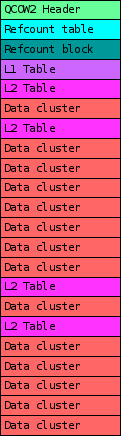
In this example we can see the most important types of clusters that a qcow2 file can have: Metadata overlap checks In order to detect corruption when writing to qcow2 images QEMU (since v1.7) performs several sanity checks. They verify that QEMU does not try to overwrite sections of the file that are already being used for metadata. If this happens, the image is marked as corrupted and further access is prevented. Although in most cases these checks are innocuous, under certain scenarios they can have a negative impact on disk write performance. This depends a lot on the case, and I want to insist that in most scenarios it doesn t have any effect. When it does, the general rule is that you ll have more chances of noticing it if the storage backend is very fast or if the qcow2 image is very large. In these cases, and if I/O performance is critical for you, you might want to consider tweaking the images a bit or disabling some of these checks, so let s take a look at them. There are currently eight different checks. They re named after the metadata sections that they check, and can be divided into the following categories:
  1. Checks that run in constant time. These are equally fast for all kinds of images and I don t think they re worth disabling.
    • main-header
    • active-l1
    • refcount-table
    • snapshot-table
  2. Checks that run in variable time but don t need to read anything from disk.
    • refcount-block
    • active-l2
    • inactive-l1
  3. Checks that need to read data from disk. There is just one check here and it s only needed if there are internal snapshots.
    • inactive-l2
By default all tests are enabled except for the last one (inactive-l2), because it needs to read data from disk. Disabling the overlap checks Tests can be disabled or enabled from the command line using the following syntax: -drive file=hd.qcow2,overlap-check.inactive-l2=on
-drive file=hd.qcow2,overlap-check.snapshot-table=off It s also possible to select the group of checks that you want to enable using the following syntax: -drive file=hd.qcow2,overlap-check.template=none
-drive file=hd.qcow2,overlap-check.template=constant
-drive file=hd.qcow2,overlap-check.template=cached
-drive file=hd.qcow2,overlap-check.template=all Here, none means that no tests are enabled, constant enables all tests from group 1, cached enables all tests from groups 1 and 2, and all enables all of them. As I explained in the previous section, if you re worried about I/O performance then the checks that are probably worth evaluating are refcount-block, active-l2 and inactive-l1. I m not counting inactive-l2 because it s off by default. Let s look at the other three: Conclusion The qcow2 consistency checks are useful to detect data corruption, but they can affect write performance. If you re unsure and you want to check it quickly, open an image with overlap-check.template=none and see for yourself, but remember again that this will only affect write operations. To obtain more reliable results you should also open the image with cache=none in order to perform direct I/O and bypass the page cache. I ve seen performance increases of 50% and more, but whether you ll see them depends a lot on your setup. In many cases you won t notice any difference. I hope this post was useful to learn a bit more about the qcow2 format. There are other things that can help QEMU perform better, and I ll probably come back to them in future posts, so stay tuned! Acknowledgments My work in QEMU is sponsored by Outscale and has been made possible by Igalia and the help of the rest of the QEMU development team.

Shirish Agarwal: Sex, death and nature

Yin-Yang-Balance

Yin-Yang-Balance

There is/was a somewhat controversial book by Osho which I read long back Sambhog se Samadhi Ki Aur or the English version From Sex to Superconsciousness While I can t say I understand or understood it all, read it about a decade back, the main point shared in the book was that if you are able to achieve bliss/orgasm during sex, you might be able to have a glimpse of super-consciousness. I had to share the above context as I had gone to a meetup couple of weeks back had gone to a meetup where a friend, Dr. Swati Shome is attempting to write an educational book for teenagers to talk about sex. I did help her a bit in the past I tried to share some of the concerns I had as my generation didn t have any guidance from parents or teachers. Most of us were left to our own devices which is similar to today s children as well with the exception that they have the web. You look at both the books, both written in Pune (my home-town) and both talking about the same subject but from so different a view-point. If you see the comments on the meetup page, it really pains to see people s concerns. I don t know if there is any solution to the widespread ignorance, myth-making etc. and hence felt a bit sad  . Sharing a small clip I had seen few months back. Just to give a bit of context, the law as has been shared as passed in 2015 has happened after the 2012 Delhi Gang Rape. A part of it is also that the Indian society still frowns upon live-in relationships so in part it may also be a push-back from the conservatives. After all the BJP, a right of the center party has been in power for 2.5 years now so it s possible that they were part of it. As I don t have enough knowledge of what the actual case was, who were the litigants and the defendants, the lawyers and the judge involved, I cannot further speculate. If somebody has more info. or link please pass it on. It would be interesting to know if it was a single bench ruling or 3-5 judge bench. The yin-yan symbol I had shared becomes a bit more apt as in quite a few cultures, including Indian and Japanese, the two are seen as parts of the same coin. One life-giving, the other life-taking or not even taking but converting into something else.
Death

Death

That came few days later when I was reading an article about sleep. The purpose of sleep, is to forget . It was slightly strange and yet interesting article. What disturbed me though, was the bit about the mouse being killed and his brain being sliced. I tried to find many a justification for it, but none I could have peace with. And the crux of that is because the being, the creature s wilful consent hasn t been taken. In nature s eyes humans and mice are one and the same. We don t get any special passes due to the fact that we are human. A natural disaster doesn t care whether you are small or big, fat or strong, mouse or wo/man, coward or brave. It s sheer luck and after disaster preparedness that people and animals get saved or not. I thought quite a bit that instead of animals being used for scientific experiments, why don t we use actual humans. While I m sure PETA supporters probably may have spear-headed this idea for a long time, but it doesn t mean I can t come to this realization by myself. After all, it s not about pandering to a group but rather what I think is right. Passing the baton to humans does have its own knotty problems though. For any such kind of endeavour, people s participation and wilful consent would be needed. While humans can and do give wilful consent, it is difficult problem as you don t know the situation in which that consent has been taken. We all know about Organ trafficking . Many people especially from lower economic background may be enticed and cheated with the whole economics for science. In most Indian middle and higher-middle classes religion plays a part even though with death the body is cremated and is supposed to scatter among the Pancha Mahaboota, the five elements. I, for one have no hang-ups if some scientist were to slice my brain to find something, provided I m dead  or for that matter any part of the body. If more people thought like that, probably we wouldn t have to specially grow and then kill lab mice and guinea-pigs to test out theories. Possibly medical innovations would probably be a lot faster than now. Ironically, most medical innovations have happened during wars and continues to do so till date. Comments, ideas, suggestions and criticisms all are welcome.
Filed under: Miscellenous Tagged: #Death, #Innocence, #Medical Innovatiion, #Medicine, #Murder, #PETA, #Sex, #sleep, #war, education, exploitation, nature

7 February 2017

Vincent Bernat: Write your own terminal emulator

I was an happy user of rxvt-unicode until I got a laptop with an HiDPI display. Switching from a LoDPI to a HiDPI screen and back was a pain: I had to manually adjust the font size on all terminals or restart them. VTE is a library to build a terminal emulator using the GTK+ toolkit, which handles DPI changes. It is used by many terminal emulators, like GNOME Terminal, evilvte, sakura, termit and ROXTerm. The library is quite straightforward and writing a terminal doesn t take much time if you don t need many features. Let s see how to write a simple one.

A simple terminal Let s start small with a terminal with the default settings. We ll write that in C. Another supported option is Vala.
#include <vte/vte.h>
int
main(int argc, char *argv[])
 
    GtkWidget *window, *terminal;
    /* Initialise GTK, the window and the terminal */
    gtk_init(&argc, &argv);
    terminal = vte_terminal_new();
    window = gtk_window_new(GTK_WINDOW_TOPLEVEL);
    gtk_window_set_title(GTK_WINDOW(window), "myterm");
    /* Start a new shell */
    gchar **envp = g_get_environ();
    gchar **command = (gchar *[]) g_strdup(g_environ_getenv(envp, "SHELL")), NULL  ;
    g_strfreev(envp);
    vte_terminal_spawn_sync(VTE_TERMINAL(terminal),
        VTE_PTY_DEFAULT,
        NULL,       /* working directory  */
        command,    /* command */
        NULL,       /* environment */
        0,          /* spawn flags */
        NULL, NULL, /* child setup */
        NULL,       /* child pid */
        NULL, NULL);
    /* Connect some signals */
    g_signal_connect(window, "delete-event", gtk_main_quit, NULL);
    g_signal_connect(terminal, "child-exited", gtk_main_quit, NULL);
    /* Put widgets together and run the main loop */
    gtk_container_add(GTK_CONTAINER(window), terminal);
    gtk_widget_show_all(window);
    gtk_main();
 
You can compile it with the following command:
gcc -O2 -Wall $(pkg-config --cflags --libs vte-2.91) term.c -o term
And run it with ./term: Simple VTE-based terminal

More features From here, you can have a look at the documentation to alter behavior or add more features. Here are three examples.

Colors You can define the 16 basic colors with the following code:
#define CLR_R(x)   (((x) & 0xff0000) >> 16)
#define CLR_G(x)   (((x) & 0x00ff00) >>  8)
#define CLR_B(x)   (((x) & 0x0000ff) >>  0)
#define CLR_16(x)  ((double)(x) / 0xff)
#define CLR_GDK(x) (const GdkRGBA)  .red = CLR_16(CLR_R(x)), \
                                    .green = CLR_16(CLR_G(x)), \
                                    .blue = CLR_16(CLR_B(x)), \
                                    .alpha = 0  
vte_terminal_set_colors(VTE_TERMINAL(terminal),
    &CLR_GDK(0xffffff),
    &(GdkRGBA)  .alpha = 0.85  ,
    (const GdkRGBA[]) 
        CLR_GDK(0x111111),
        CLR_GDK(0xd36265),
        CLR_GDK(0xaece91),
        CLR_GDK(0xe7e18c),
        CLR_GDK(0x5297cf),
        CLR_GDK(0x963c59),
        CLR_GDK(0x5E7175),
        CLR_GDK(0xbebebe),
        CLR_GDK(0x666666),
        CLR_GDK(0xef8171),
        CLR_GDK(0xcfefb3),
        CLR_GDK(0xfff796),
        CLR_GDK(0x74b8ef),
        CLR_GDK(0xb85e7b),
        CLR_GDK(0xA3BABF),
        CLR_GDK(0xffffff)
 , 16);
While you can t see it on the screenshot1, this also enables background transparency. Color rendering

Miscellaneous settings VTE comes with many settings to change the behavior of the terminal. Consider the following code:
vte_terminal_set_scrollback_lines(VTE_TERMINAL(terminal), 0);
vte_terminal_set_scroll_on_output(VTE_TERMINAL(terminal), FALSE);
vte_terminal_set_scroll_on_keystroke(VTE_TERMINAL(terminal), TRUE);
vte_terminal_set_rewrap_on_resize(VTE_TERMINAL(terminal), TRUE);
vte_terminal_set_mouse_autohide(VTE_TERMINAL(terminal), TRUE);
This will:
  • disable the scrollback buffer,
  • not scroll to the bottom on new output,
  • scroll to the bottom on keystroke,
  • rewrap content when terminal size change, and
  • hide the mouse cursor when typing.

Update the window title An application can change the window title using XTerm control sequences (for example, with printf "\e]2;$ title \a"). If you want the actual window title to reflect this, you need to define this function:
static gboolean
on_title_changed(GtkWidget *terminal, gpointer user_data)
 
    GtkWindow *window = user_data;
    gtk_window_set_title(window,
        vte_terminal_get_window_title(VTE_TERMINAL(terminal))?:"Terminal");
    return TRUE;
 
Then, connect it to the appropriate signal, in main():
g_signal_connect(terminal, "window-title-changed", 
    G_CALLBACK(on_title_changed), GTK_WINDOW(window));

Final words I don t need much more as I am using tmux inside each terminal. In my own copy, I have also added the ability to complete a word using ones from the current window or other windows (also known as dynamic abbrev expansion). This requires to implement a terminal daemon to handle all terminal windows with one process, similar to urxvtcd. While writing a terminal from scratch 2 suits my need, it may not be worth it. evilvte is quite customizable and can be lightweight. Consider it as a first alternative. Honestly, I don t remember why I didn t pick it. UPDATED: evilvte has not seen an update since 2014. Its GTK+3 support is buggy. It doesn t support the latest versions of the VTE library. Therefore, it s not a good idea to use it. You should also note that the primary goal of VTE is to be a library to support GNOME Terminal. Notably, if a feature is not needed for GNOME Terminal, it won t be added to VTE. If it already exists, it will likely to be deprecated and removed.

  1. Transparency is handled by the composite manager (Compton, in my case).
  2. For some definition of scratch since the hard work is handled by VTE.

Carl Chenet: The Gitlab database incident and the Backup Checker project

The Gitlab.com database incident of 2017/01/31 and the resulting data loss reminded everyone (at least for the next days) how it s easy to lose data, even when you think all your systems are safe. Being really interested by the process of backing up data, I read with interest the report (kudos to the Gitlab company for being so transparent about it) and I was soooo excited to find the following sentence:
Regular backups seem to also only be taken once per 24 hours, though team-member-1 has not yet been able to figure out where they are stored. According to team-member-2 these don t appear to be working, producing files only a few bytes in size.
Whoa, guys! I m so sorry for you about the data loss, but from my point of view I was so excited to find a big FOSS company publicly admitting and communicating about a perfect use case for the Backup Checker project, a Free Software I ve been writing these last years. Data loss: nobody cares before, everybody cries after Usually people don t care about the backups. It s a serious business for web hosters and the backup team from big companies but otherwise and in other places, nobody cares. Usually everybody agrees about how backups are important but few people make them or install an automatized system to create backups and the day before, nobody verifies they are usable. The reason is obvious: it s totally boring, and in some cases e.g for large archives, difficult. Because verifying backups is boring for humans, I launched the Backup Checker project in order to automatize this task. Backup Checker offers a wide range of features, checking lots of different archives (tar. gz,bz2,xz , zip, tree of files and offer lots of different tests (hash sum, size equal, smaller/greater than , unix rights, ,). Have a look at the official documentation for a exhaustive list of features and possible tests. Automatize the controls of your backups with Backup Checker Checking your backups means to describe in a configuration file how a backup should be, e.g a gzipped database dump. You usually know about what size the archive is going to be, what the owner and the group owner should be. Even easier, with Backup Checker you can generate this list of criterias from an actual archive, and remove uneeded criterias to create a template you can re-use for different kind of archives. Ok, 2 minutes of your time for a real word example, I use an existing database sql dump in an tar.gz archive to automatically create the list describing this backup:
$ backupchecker -G database-dump.tar.gz
$ cat database-dump.list
[archive]
mtime  1486480274.2923253
[files]
database.sql  =7854803 uid 1000 gid 1000 owner chaica group chaica mode 644 type f mtime 1486480253.0
Now, just remove parameters too precise from this list to get a backup template. Here is a possible result:
[files]
database.sql  >6m uid 1000 gid 1000 mode 644 type f
We define here a template for the archive, meaning that the database.sql file in the archive should have a size greater than 6 megabytes, be owned by the user with the uid of 1000 and the group with a gid of 1000, this file should have the mode 644 and be a regular file. In order to use a template instead of the complete list, you also need to remove the sha512 from the .conf file. Pretty easy hmm? Ok, just for fun, lets replicate the part of the Gitlab.com database incident mentioned above and write an archive with an empty sql dump inside an archive:
$ touch /tmp/database.sql && \
tar zcvf /tmp/database-dump.tar.gz /tmp/database.sql && \
cp /tmp/database-dump.tar.gz .
Now we launch Backup Checker with the previously created template. If you didn t change the name of database-dump.list file, the command should only be:
$ backupchecker -C database-dump.conf
$ cat a.out 
WARNING:root:1 file smaller than expected while checking /tmp/article-backup-checker/database-dump.tar.gz: 
WARNING:root:database.sql size is 0. Should have been bigger than 6291456.
The automatized controls of Backup Checker trigger a warning in the log file. The empty sql dump has been identified inside the archive. A step further As you could read in this article, verifying some of your backups is not a time consuming task, given the fact you have a FOSS project dedicated to this task, with an easy way to realize a template of your backups and to use it. This article provided a really simple example of such a use case, the Backup Checker has lots of features to offer when verifying your backups. Read the official documentation for more complete descriptions of the available possibilities. Data loss, especially for projets storing user data is always a terrible event in the life of an organization. Lets try to learn from mistakes which could happen to anyone and build better backup systems. More information about the Backup Checker project

Olivier Berger: Making Debian stable/jessie images for OpenStack with bootstrap-vz and cloud-init

I m investigating the creation of VM images for different virtualisation solutions. Among the target platforms is a destop as a service platform based on an OpenStack public cloud. We ve been working with bootstrap-vz for creating VMs for Vagrant+VirtualBox so I wanted to test its use for OpenStack. There are already pre-made images available, including official Debian ones, but I like to be able to re-create things instead of depending on some external magic (which also means to be able to optimize, customize and avoid potential MitM, of course). It appears that bootstrap-vz can be used with cloud-init provided that some bits of config are specified. In particular the cloud_init plugin of bootstrap-vz requires a metadata_source set to NoCloud, ConfigDrive, OpenStack, Ec2 . Note we explicitely spell it OpenStack and not Openstack as was mistakenly done in the default Debian cloud images (see https://bugs.debian.org/854482). The following snippet of manifest provides the necessary bits :
---
name: debian- system.release - system.architecture - %Y %m %d 
provider:
  name: kvm
  virtio_modules:
  - virtio_pci
  - virtio_blk
bootstrapper:
  workspace: /target
  # create or reuse a tarball of packages
  tarball: true
system:
  release: jessie
  architecture: amd64
  bootloader: grub
  charmap: UTF-8
  locale: en_US
  timezone: UTC
volume:
  backing: raw
  partitions:
    #type: gpt
    type: msdos
    root:
      filesystem: ext4
      size: 4GiB
    swap:
      size: 512MiB
packages:
  # change if another mirror is closer
  mirror: http://ftp.fr.debian.org/debian/
plugins:
  root_password:
    password: whatever
  cloud_init:
    username: debian
    # Note we explicitely spell it 'OpenStack' and not 'Openstack' as done in the default Debian cloud images (see https://bugs.debian.org/854482)
    metadata_sources: NoCloud, ConfigDrive, OpenStack, Ec2
  # admin_user:
  #   username: Administrator
  #   password: Whatever
  minimize_size:
    # reduce the size by around 250 Mb
    zerofree: true
I ve tested this with the bootstrap-vz version in stretch/testing (0.9.10+20170110git-1) for creating jessie/stable image, which were booted on the OVH OpenStack public cloud. YMMV. Hope this helps

Sven Hoexter: Dell Latitude E7470 hold and mark with upper left touchpad button

Recently some of my coworkers and I experienced an issue with using the upper left touchpad button on our Dell Latitude E7470 and similar laptops (E5xxx from the current generation). Some time in January we could no longer hold down this button and select text with the touchpad. Using the left button below the touchpad still worked. This hit my coworker running Fedora and myself running Debian/stretch. So I first thought that it's likely a libinput issue (same version in Debian/stretch and Fedora and I recently pulled that in as an update), somehow blacklisting the upper left key because it's connected to the trackpoint. So I filled #99594 upstream. While this was not very helpful at first, and according to Peter very unlikely to be related to libinput, another coworker using Debian/jessie found this issue to hit him when he upgraded the backports kernel in use from 4.8 to 4.9. That finally led to the conclusion that it's a bug in the Linux alps driver, which is already fixed in 4.10 and probably 4.9.6. Until the Debian kernel team pulls in a fresh 4.9 point release I'm using 4.10-rc6 from experimental. For Debian/jessie + backports kernel user it might be more convenient to just stay at 4.8 in case this issue annoys you. Kudos to Peter, Benjamin, TW and WW for the help in locating the origin of this issue! Lessons learned:

6 February 2017

Martin Pitt: Migrated blog from WordPress to Hugo

My WordPress blog got hacked two days ago and now twice today. This morning I purged MySQL and restored a good backup from three days ago, changed all DB and WordPress passwords (both the old and new ones were long and autogenerated ones), but not even an hour after the redeploy the hack was back. (It can still be seen on Planet Debian and Planet Ubuntu. Neither the Apache logs nor the Journal had anything obvious, nor were there any new files in global or user www directories, so I m a bit stumped how this happened. Certainly not due to bruteforcing a password, that would both have shown in the logs and also have triggered ban2fail, so this looks like an actual vulnerability. I upgraded to WordPress 4.7.1 a few days ago, and apparently 4.7.2 fixes a few vulnerabilities, although all of them don t sound like they would match my situation. jessie-backports is still at 4.7.1, so I missed that update. But either way, all WordPress blogs hosted on my server are down for the time being. I took this as motivation to finally migrate to something more robust. WordPress has tons of features that I never need, and also a lot of overhead (dynamic generation, MySQL, its own user/passwords, etc.). I had a look around, and it seems Hugo and Blogofile are nice contenders no privileges, no database, outputting static files, input is Markdown (so much nicer to type than HTML!), and maintaining your blog in git and previewing the changes on my local laptop are straightforward. I happened to try Hugo first, and like it enough to give it an extended try you have plenty of themes to choose from and they are straightforward to customize, so I don t need to spend a lot of time learning and crafting CSS. I ran the WordPress to Hugo Exporter, and it produced remarkable results fairly usable HTML Markdown and metadata conversion, it keeps all the original URLs, and it s painless to use. Nicely done! So here it is, on to a much more secure server now! \o/

Wouter Verhelst: FOSDEM 2017 is finished...

... but that doesn't mean the work is over. One big job that needs to happen after the conference is to review and release the video recordings that were made. With several hundreds of videos to be checked and only a handful of people with the ability to do so, review was a massive job that for the past three editions took several months; e.g., in 2016 the last video work was done in July, when the preparation of the 2017 edition had already started. Obviously this is suboptimal, and therefore another solution was required. After working on it for quite a while (in my spare time), I came up with SReview, a video review and transcoding system written in Perl. An obvious question that could be asked is why I wrote yet another system, though, and did not use something that already existed. The short answer to that is "because what's there did not exactly do what I wanted to". The somewhat longer answer also involves the fact that I felt like writing something from scratch. The full story, however, is this: there isn't very much out there, and what does exist is flawed in some ways. I am aware of three other review systems that are or were used by other conferences:
  1. A bunch of shell scripts that were written by the DebConf video team and hooked into the penta database. Nobody but DebConf ever used it. It allowed review via an NFS share and a webinterface, and required people to watch .dv files directly from the filesystem in a media player. For this and other reasons, it could only ever be used from the conference itself. If nothing else, that final limitation made it impossible for FOSDEM to use it, but even if that wasn't the case it was still too basic to ever be useful for a conference the size of FOSDEM.
  2. A review system used by the CCC "voc" team. I've never actually seen it in use, but I've heard people describe it. It involves a complicated setup of Samba servers, short MPEG transport stream segments, a FUSE filesystem, and kdenlive, which took someone several days to set up as an experiment back at DebConf15. Critically, important parts of it are also not licensed as free software, which to me rules it out for a tool in support of FOSDEM. Even if that wasn't the case, however, I'm still not sure it would be ideal; this system requires intimate knowledge of how it works from its user, which makes it harder for us to crowdsource the review to the speaker, as I had planned to.
  3. Veyepar. This one gets many things right, and we used it for video review at DebConf from DebConf14 onwards, as well as FOSDEM 2014 (but not 2015 or 2016). Unfortunately, it also gets many things wrong. Most of these can be traced back to the fact that Carl, as he freely admits, is not a programmer; he's more of a sysadmin type who also manages to cobble together a few scripts now and then. Some of the things it gets wrong are minor issues that would theoretically be fixable with a minimal amount of effort; others would be more involved. It is also severely underdocumented, and so as a result it is rather tedious for someone not very familiar with the system to be able to use it. On a more personal note, veyepar is also written in the wrong language, so while I might have spent some time improving it, I ended up starting from scratch.
Something all these systems have in common is that they try to avoid postprocessing as much as possible. This only makes sense; if you have to deal with loads and loads of video recordings, having to do too much postprocessing only ensures that it won't get done... Despite the issues that I have with it, I still think that veyepar is a great system, and am not ashamed to say that SReview borrows many ideas and concepts from it. However, it does things differently in some areas, too:
  1. A major focus has been on making the review form be as easy to use as possible. While there is still room for improvement (and help would certainly be welcome in that area from someone with more experience in UI design than me), I think the SReview review form is much easier to use than the veyepar one (which has so many options that it's pretty hard to understand sometimes).
  2. SReview assumes that as soon as there are recordings in a given room sufficient to fill all the time that a particular event in that room was scheduled for, the whole event is available. It will then generate a first rough cut, and send a notification to the speaker in question, as well as the people who organized the devroom. The reviewer will then almost certainly be required to request a second (and possibly third or fourth) cut, but I think the advantage of that is that it makes the review workflow be more intuitive and easier to understand.
  3. Where veyepar requires one or more instances of per-state scripts to be running (which will then each be polling the database and just start a transcode or cut or whatever script as needed), SReview uses a single "dispatch" script, which needs to be run once for the whole system (if using an external scheduler) or once per core that may be used (if not using an external scheduler), and which does all the database polling required. The use of an external scheduler seemed more appropriate, given that things like gridengine exist; gridengine is a job scheduler which allows one to submit a job to be ran on any node in a cluster, along with the resources that this particular job requires, and which will then either find an appropriate node to run the job on, or will put the job in a "pending" state until the required resources can be found. This allows me to more easily add extra encoding capacity when required, and allows me to also do things like allocate less resources to a particular part of the whole system, even while jobs are already running, without necessarily needing to abort jobs that might be using those resources.
The system seems to be working fine, although there's certainly still room for improvement. I'm thinking of using it for DebConf17 too, and will therefore probably work on improving it during DebCamp. Additionally, the experience of using it for FOSDEM 2017 has given me ideas of where to improve it further, so it can be used more easily by different parties, too. Some of these have been filed as issues against a "1.0" milestone on github, but others are only newly formed in my gray matter and will need some thinking through before they can be properly implemented. Certainly, it looks like this will be something that'll give me quite some fun developing further. In the mean time, if you're interested in the state of a particular video of FOSDEM 2017, have a look at the video overview page, which lists all talks along with their review/transcode status. Also, if you were a speaker or devroom organizer at FOSDEM 2017, please check your mailbox and review your talk! With your help, we should hopefully be able to release all our videos by the end of the week. Update (2017-02-06 17:18): clarified my position on the qualities of some of the other systems after feedback from people who were a bit disappointed by my description of them... and which was fair enough. Apologies. Update (2017-02-08 16:26): Fixes to the c3voc stuff after feedback from them.

5 February 2017

Iustin Pop: Short rant/review of La La Land

Warning: Spoilers below. Rant below. Much angry, MANY ALL-CAPS. You've been warned! So, today we went to see "La La Land", because I've heard good things about it, and because I do enjoy good musicals. And because of this, I wrote this post, instead of what I originally had in mind (related to kernel configuration). Was it a good movie? Definitely yes. Was it a good musical? So and so. Did I like the ending? HELL NO, over and over NO. The movie itself was much better than I expected. I don't read plot details in advance nor real reviews, so I expected more of a musical, and less of a good plot. But the movie had a very good plot. Two young people, striving to fulfil their artistic dreams, fall in love, and they fight through-sometimes helping, sometimes hindering each other until, finally, each gets their own breakthrough, etc. The choice of actress was spot on halfway through the movie, I was thinking that I can't imagine the same plot played by a different actress. Of course many other actresses could have played the part, but Emma Stone played so well, I have trouble seeing the same character with the same always half-happy, half-sad attitude. The choice of actor was I think OK at first I was in doubt, but he played also well. Or maybe it was just that I couldn't identify with him at first. Not that I identify well with artists in general The dance scenes were OK, and the singing good, but as I said, the musical part was secondary to the actual struggles of the characters. The movie itself was, technically, very well done; a lot of filming was in bars/clubs/locations with difficult lighting, and the shooting was very good. They also had a scene on a pier, looking towards the ocean and the setting sun, and the characters walking towards the beach so heavily back-lighted, and I kept thinking "If I get only one shot this perfectly exposed and colour correct(ed), I'm happy". So high notes here. Back to the plot. The story of how she and him fought their own struggles was very nicely told. Tick-tack, up and down (hope and rejection), leaning on the other to get morale back, is a captivating story. The cliff-hanger at the pre-end with her career, the going back home, the last minute save, all very well told. So at this stage, I would have given the movie a 9/10. And I was happy. Then we have the usual "one character has to go away to a far away country for a long time", except in this case it was just 4 months. And they have the usual discussion "what do we do with our relation, where do we take it", and she says "I will always love you", to which he replies "And I will too" (or equivalent). In my mind, this means they'll have to survive during the break, they'll have to also survive through his touring months/years, but in the end love will be stronger. Because this is what the movie told us until now, that she made it because of him, and he made it because of her. Neither of them would have been this strong without the other (he wouldn't have picked up the invitation from his old pal, she wouldn't have gone to the final audition request nor write the play which got her the audition/recognition). Estimated movie ending: awesome. And then something happens. The timeline jumps 5 years in the future (as expected), and she is famous, married (WITH SOMEONE ELSE) and happy mother of a 3-year old. Through fate, she and her husband enter the club of Sebastian (as he also fulfilled his dream), she and Sebastian see each other, he plays their song, during which we're served a re-run of the movie but in stupid "everything goes well" style (all bad events eliminated), in which it is she and Sebastian who enter the club (which belongs now to somebody else), and then we're back in real time, song ends, she and her husband leave, but before that she and Sebastian exchange one last smile, THE END. And I'm sitting there, not believing my eyes. WHAT THE? So I get home, not write this post for four hours to calm down, but I can't. Because this doesn't make sense. AT ALL. What does the internet say? Quoting from this CNN article, written exactly today. The director says:
"That ending was there from the get-go," [director Damien Chazelle] told CNN in a recent interview. "I think I just have a thing about love stories where the lovers don't wind up together at the end; I find it very romantic."
Huh, excuse me?
"I think there's a reason why most of the greatest love stories in history don't end with happily ever after," Chazelle said. "To me, if you're telling a story about love, love has to be bigger than the characters." Chazelle sees Mia and Sebastian's love as a "third character" and something that "lives on." "[The ending gives] you that sense that even if the relationship itself might be over in practical terms, the love is not over," he said. "The love lasts, and I think that's just a beautiful kind of thing."
OH FOR THE LOVE OF. This is a wishy-washy explanation that tries to approach the thing from the artistic side. No, this is bullshit, because of multiple things. Let me try to roll back and explain what I think was the intention.
  1. An earlier fight between Mia and Sebastian points to the fact that they're both very dedicated to their careers, and this means it's hard for them to stay together if they both chase their dream. He has to be on tour, and she has to rehearse for her play, so they won't see each other for at least two weeks (in this instance). Later, she calls him and leaves a message that she hasn't seen him in a while (complex scene which ends in another fight, which is very well done). So we see the conflict that seems to say "You can't have a relation of equals; one party has to give up their dream". While this might be partially true in the real world, I don't go to movies to see the real world.
  2. After the year-long window into their life, I can't think that either Sebastian or Mia can be really successful without the other; because they are so alike, so passionate about their dreams, that a normal person wouldn't be able to understand and push the other when they need. However, the ending show both Mia and Sebastian quite successful, so one has to wonder: did they make it alone? Sebastian seems so (we don't see a partner for him), Mia unclear, likely not. How did Sebastian get through? What did Mia find in her husband?
  3. This is very one-sided, since I'm a man, so bear with me: Sebastian helped Mia through her tough time. Once she got the breakthrough (and they split), she found somebody else, and I have to wonder in what circumstances they met. In the sense that maybe her husband only knew "successful Mia" and not "struggling/aspiring Mia". Her husband seems completely oblivious to all the eye contact between Mia and Sebastian in the club, seems to know Sebastian/about Sebastian not. How deep is their relation?
  4. This is still one sided, sorry. When they break up (before Mia leaves for Paris), Sebastian asks "so where do we go from here?". Mia says "Nowhere". He asks once more, she rejects him again. So after one year of mad love and cries and happy moments, he gives up over two sentences? He's been following his dream (proper Jazz) in spite of all downturns in life until then, but he gives up on his real love over this? It doesn't make sense; trying to identify my self with the character, I can't reconcile this scene at all, unless he didn't really love her.
So no, I don't see them ending apart as romantic. I see it as the director is saying "You can't have both love and your [career] dreams. Choose either.", and he gives the "love" fake ending in the mini-re-roll of the movie, and the "career" wrong ending in the actual ending. And worse, he does it by negating significant parts of the character development done until now. Moreover, this conclusion is wrong. Wrong because this is a movie, and if movies don't manage to make you dream that you can achieve all, if movies tell you "choose either", then all is lost. Their love is not a separate character; them struggling to find each other in the successful phase of their life, learning to adapt to the new "he" and "she", would be the third thing. As it was shown, their love is simply a young love, that can't really survive the changes in life; they each said "I'll love you forever", but with this ending it sounds more "I'll cherish the memory of young you forever". Or differently said, it sounded like a cheap excuse to use when ending their relationship, in order to not negate the relationship itself. My version of the movie is another half hour long. It explains how Sebastian get over the "only jazz is pure old jazz" and manages to build a successful business around his old-style-but-modern jazz, instead of the pop-style jazz of the touring band (while thinking about her). It explains how Mia becomes a successful actress and gets over her first/second movies (while thinking about him), because one movie doesn't make one really successful (that reminds me: 3 year old child after 5 year forward-jump? when/how did her career go?). Hell, make it even more bitter show how their correspondence starts strong but becomes more and more sporadic over time, dying after the first 2 years. Show how both of them try other relations, and not find the same spark that they had before. And then, after they have matured, they meet again. And, just like the first time, they fall for each other, once again. She for his music, him for her passion for acting/for acting itself. She finds that him naming his club after her suggestion is oh-so-grown-up-and-sweet, he is happy that she finally grew into what he saw in her from the beginning. And he sings their song once more. But no. I'm not an artist, so I can only get the "die hope die die die love because I can" version. I still recommend the movie, but not the "after 5 years" scenes. Also, I didn't get time to bike today nor yesterday, so all you really get here is an ANGRY RANT. Because while I drink the coffee black and the tea without sugar, I like my happy endings, DAMN IT.

Francois Marier: IPv6 and OpenVPN on Linode Debian/Ubuntu VPS

Here is how I managed to extend my OpenVPN setup on my Linode VPS to include IPv6 traffic. This ensures that clients can route all of their traffic through the VPN and avoid leaking IPv6 traffic, for example. It also enables clients on IPv4-only networks to receive a routable IPv6 address and connect to IPv6-only servers (i.e. running your own IPv6 broker).

Request an additional IPv6 block The first thing you need to do is get a new IPv6 address block (or "pool" as Linode calls it) from which you can allocate a single address to each VPN client that connects to the server. If you are using a Linode VPS, there are instructions on how to request a new IPv6 pool. Note that you need to get an address block between /64 and /112. A /116 like Linode offers won't work in OpenVPN. Thankfully, Linode is happy to allocate you an extra /64 for free.

Setup the new IPv6 address If your server only has an single IPv4 address and a single IPv6 address, then a simple DHCP-backed network configuration will work fine. To add the second IPv6 block on the other hand, I had to change my network configuration (/etc/network/interfaces) to this:
auto lo
iface lo inet loopback
allow-hotplug eth0
iface eth0 inet dhcp
    pre-up iptables-restore /etc/network/iptables.up.rules
iface eth0 inet6 static
    address 2600:3c01::xxxx:xxxx:xxxx:939f/64
    gateway fe80::1
    pre-up ip6tables-restore /etc/network/ip6tables.up.rules
iface tun0 inet6 static
    address 2600:3c01:xxxx:xxxx::/64
    pre-up ip6tables-restore /etc/network/ip6tables.up.rules
where 2600:3c01::xxxx:xxxx:xxxx:939f/64 (bound to eth0) is your main IPv6 address and 2600:3c01:xxxx:xxxx::/64 (bound to tun0) is the new block you requested. Once you've setup the new IPv6 block, test it from another IPv6-enabled host using:
ping6 2600:3c01:xxxx:xxxx::1

OpenVPN configuration The only thing I had to change in my OpenVPN configuration (/etc/openvpn/server.conf) was to change:
proto udp
to:
proto udp6
in order to make the VPN server available over both IPv4 and IPv6, and to add the following lines:
server-ipv6 2600:3c01:xxxx:xxxx::/64
push "route-ipv6 2000::/3"
to bind to the right V6 address and to tell clients to tunnel all V6 Internet traffic through the VPN. In addition to updating the OpenVPN config, you will need to add the following line to /etc/sysctl.d/openvpn.conf:
net.ipv6.conf.all.forwarding=1
and the following to your firewall (e.g. /etc/network/ip6tables.up.rules):
# openvpn
-A INPUT -p udp --dport 1194 -j ACCEPT
-A FORWARD -m state --state NEW -i tun0 -o eth0 -s 2600:3c01:xxxx:xxxx::/64 -j ACCEPT
-A FORWARD -m state --state NEW -i eth0 -o tun0 -d 2600:3c01:xxxx:xxxx::/64 -j ACCEPT
-A FORWARD -m state --state ESTABLISHED,RELATED -j ACCEPT
in order to ensure that IPv6 packets are forwarded from the eth0 network interface to tun0 on the VPN server. With all of this done, apply the settings by running:
sysctl -p /etc/sysctl.d/openvpn.conf
ip6tables-apply
systemctl restart openvpn.service

Testing the connection Now connect to the VPN using your desktop client and check that the default IPv6 route is set correctly using ip -6 route. Then you can ping the server's new IP address:
ping6 2600:3c01:xxxx:xxxx::1
and from the server, you can ping the client's IP (which you can see in the network settings):
ping6 2600:3c01:xxxx:xxxx::1002
Once both ends of the tunnel can talk to each other, you can try pinging an IPv6-only server from your client:
ping6 ipv6.google.com
and then pinging your client from an IPv6-enabled host somewhere:
ping6 2600:3c01:xxxx:xxxx::1002
If that works, other online tests should also work.

Shirish Agarwal: Flights of fancy how to figure trends for Airline tickets.

Google Flights Fees tracking

Google Flights Fees tracking between PNQ and YUL and back, economy fares.

Couple of weeks ago, either on some mailing list, on IRC or somewhere else, somebody mentioned that people always put higher amount of airline expenditure for self when asking for sponsorship. Now last year, between sending the application and getting the approval for sponsorship, there was 3 months of difference between the two. Now if you put up an application for sponsorship like I did last year, I had added 10% to the cost of flight tickets of the cheapest prevailing prices at that point in time on skyscanner or any of the meta-search-engines were showing me at that point in time. I was sceptical whether the amount that I had put for the to and fro tickets would be enough or not. Strangely, I was lucky enough to get my ticket around the new estimated price. I would have to mention though that there were only 2 tickets left at the new price and if I had waited just a few hours more, those tickets would have gone too and all other tickets were around 25% more than before. The only reasons I could fathom are a. Luck, pure and simple. b. Going at the end of the tourism season This was evident as I was able to book my extended stay at any hostel just 2 days before my stay at UCT (University of Cape Town) was over. Was corroborated by hostel staff, shop-owners as well as whatever info. I found on the web before and during my stay in SA. c. South Africa being more lenient than probably Canada is giving and processing visas. While looking at the third point, thought I better check world tourism rankings and saw the Wikipedia page for it. Interestingly, South Africa seems to have a slight edge over Canada when it comes to statistics and hence strengthens my assumptions that probably more people apply for SA than Canada as they know the possibility of more people making through visa processing. It would stand to be logical that more people would apply for a tourist or similar short-term resident visas if they know they have a good chance going through. While researching on the topic I also came across/ hunted to find the hardest places to get a Visa for and was surprised to find India being lasted therein.Coincidentally, that site also has a UK domain.It does burst the bubble in Incredible India a little bit. As a newbie who had no clue I knew I was probably a victim of Information Asymmetry where the airlines have much more information about travel trends, ongoing trends at Airports, Politics and Economics of Countries, Price of Crude Oil, Profit, Competition and probably many more factors that I haven t taken into account which decide fares. While researching on the topic, one of the interesting finds I had while trying to figure the above is that Airlines didn t pass on fuel savings to their customers. Now I don t know whether this was the same around the world or was this only in UK. I am shocked that British (and by definition EU, as UK was part of EU at that time) travellers or consumer groups didn t file a suit in the court of law as reading the above smells of anticompetitive behaviour. The most shocking statement was this Average fares to Spain rose by 10 per cent over the same period. Telegraph, UK. In order to lessen this information asymmetry a bit, I used google flights and its data of the past 2 months to see how the fares have been changing to have some insight of where the fares might end up. I know google is hated by one and all, but in this instance I couldn t find any comparable site which does this kind of thing. As can be seen in the graph, the tickets had started relatively cheap from around INR 65k ish to around 80k ish at this point in time. That is a jump of around 30% in the last couple of months. All of these flights have a layover somewhere in Europe and taking a second flight from there to Canada. The one which didn t show much of action is the direct plan between BOM YUL and back but then this seems to be a premium service . Taking a direct flight from BOM YUL is north of INR 90k/- which doesn t make much sense unless one is fond of spending 13+ hours in flight. Definitely not my cup of tea. With layovers it makes the experience a bit more bearable. While the real action is probably 3 or bit more months away, its interesting to see how things are panning out at least on airline price tickets and the dynamics involved therein. Even with all the above attempts at finding the answer, I m no closer to figuring out to estimate airline ticket prices when window is largish 3 months in making. Any ideas anybody? If the previous jump is any indication, then 10-15% escalation bit might not hack this time around. Any strategies that people could advise while trying to put a ball-park figure.
Filed under: Miscellenous Tagged: #air-travel, #Airfares, #Competition, #Price Estimation, #Sponsorship

3 February 2017

Sven Hoexter: chromium --enable-remote-extensions

From time to time I've to use chromium for creepy stuff like lifesize video conferencing with document sharing. The document sharing requires a chromium extension. Suddenly that stopped working today and I could not reinstall the extension. After trying a lot of stuff I had a look at the debian changelog and found out about:
chromium --enable-remote-extensions
See also #851927.

Next.

Previous.