Search Results: "cas"

16 June 2015

Simon Josefsson: SSH Host Certificates with YubiKey NEO

If you manage a bunch of server machines, you will undoubtedly have run into the following OpenSSH question:
The authenticity of host 'host.example.org (1.2.3.4)' can't be established.
RSA key fingerprint is 1b:9b:b8:5e:74:b1:31:19:35:48:48:ba:7d:d0:01:f5.
Are you sure you want to continue connecting (yes/no)?
If the server is a single-user machine, where you are the only person expected to login on it, answering yes once and then using the ~/.ssh/known_hosts file to record the key fingerprint will (sort-of) work and protect you against future man-in-the-middle attacks. I say sort-of, since if you want to access the server from multiple machines, you will need to sync the known_hosts file somehow. And once your organization grows larger, and you aren t the only person that needs to login, having a policy that everyone just answers yes on first connection on all their machines is bad. The risk that someone is able to successfully MITM attack you grows every time someone types yes to these prompts. Setting up one (or more) SSH Certificate Authority (CA) to create SSH Host Certificates, and have your users trust this CA, will allow you and your users to automatically trust the fingerprint of the host through the indirection of the SSH Host CA. I was surprised (but probably shouldn t have been) to find that deploying this is straightforward. Even setting this up with hardware-backed keys, stored on a YubiKey NEO, is easy. Below I will explain how to set this up for a hypothethical organization where two persons (sysadmins) are responsible for installing and configuring machines. I m going to assume that you already have a couple of hosts up and running and that they run the OpenSSH daemon, so they have a /etc/ssh/ssh_host_rsa_key* public/private keypair, and that you have one YubiKey NEO with the PIV applet and that the NEO is in CCID mode. I don t believe it matters, but I m running a combination of Debian and Ubuntu machines. The Yubico PIV tool is used to configure the YubiKey NEO, and I will be using OpenSC s PKCS#11 library to connect OpenSSH with the YubiKey NEO. Let s install some tools:
apt-get install yubikey-personalization yubico-piv-tool opensc-pkcs11 pcscd
Every person responsible for signing SSH Host Certificates in your organization needs a YubiKey NEO. For my example, there will only be two persons, but the number could be larger. Each one of them will have to go through the following process. The first step is to prepare the NEO. First mode switch it to CCID using some device configuration tool, like yubikey-personalization.
ykpersonalize -m1
Then prepare the PIV applet in the YubiKey NEO. This is covered by the YubiKey NEO PIV Introduction but I ll reproduce the commands below. Do this on a disconnected machine, saving all files generated on one or more secure media and store that in a safe.
user=simon
key= dd if=/dev/random bs=1 count=24 2>/dev/null   hexdump -v -e '/1 "%02X"' 
echo $key > ssh-$user-key.txt
pin= dd if=/dev/random bs=1 count=6 2>/dev/null   hexdump -v -e '/1 "%u"' cut -c1-6 
echo $pin > ssh-$user-pin.txt
puk= dd if=/dev/random bs=1 count=6 2>/dev/null   hexdump -v -e '/1 "%u"' cut -c1-8 
echo $puk > ssh-$user-puk.txt
yubico-piv-tool -a set-mgm-key -n $key
yubico-piv-tool -k $key -a change-pin -P 123456 -N $pin
yubico-piv-tool -k $key -a change-puk -P 12345678 -N $puk
Then generate a RSA private key for the SSH Host CA, and generate a dummy X.509 certificate for that key. The only use for the X.509 certificate is to make PIV/PKCS#11 happy they want to be able to extract the public-key from the smartcard, and do that through the X.509 certificate.
openssl genrsa -out ssh-$user-ca-key.pem 2048
openssl req -new -x509 -batch -key ssh-$user-ca-key.pem -out ssh-$user-ca-crt.pem
You import the key and certificate to the PIV applet as follows:
yubico-piv-tool -k $key -a import-key -s 9c < ssh-$user-ca-key.pem
yubico-piv-tool -k $key -a import-certificate -s 9c < ssh-$user-ca-crt.pem
You now have a SSH Host CA ready to go! The first thing you want to do is to extract the public-key for the CA, and you use OpenSSH's ssh-keygen for this, specifying OpenSC's PKCS#11 module.
ssh-keygen -D /usr/lib/x86_64-linux-gnu/opensc-pkcs11.so -e > ssh-$user-ca-key.pub
If you happen to use YubiKey NEO with OpenPGP using gpg-agent/scdaemon, you may get the following error message:
no slots
cannot read public key from pkcs11
The reason is that scdaemon exclusively locks the smartcard, so no other application can access it. You need to kill scdaemon, which can be done as follows:
gpg-connect-agent SCD KILLSCD SCD BYE /bye
The output from ssh-keygen may look like this:
ssh-rsa AAAAB3NzaC1yc2EAAAADAQABAAABAQCp+gbwBHova/OnWMj99A6HbeMAGE7eP3S9lKm4/fk86Qd9bzzNNz2TKHM7V1IMEj0GxeiagDC9FMVIcbg5OaSDkuT0wGzLAJWgY2Fn3AksgA6cjA3fYQCKw0Kq4/ySFX+Zb+A8zhJgCkMWT0ZB0ZEWi4zFbG4D/q6IvCAZBtdRKkj8nJtT5l3D3TGPXCWa2A2pptGVDgs+0FYbHX0ynD0KfB4PmtR4fVQyGJjJ0MbF7fXFzQVcWiBtui8WR/Np9tvYLUJHkAXY/FjLOZf9ye0jLgP1yE10+ihe7BCxkM79GU9BsyRgRt3oArawUuU6tLgkaMN8kZPKAdq0wxNauFtH
Now all your users in your organization needs to add a line to their ~/.ssh/known_hosts as follows:
@cert-authority *.example.com ssh-rsa AAAAB3NzaC1yc2EAAAADAQABAAABAQCp+gbwBHova/OnWMj99A6HbeMAGE7eP3S9lKm4/fk86Qd9bzzNNz2TKHM7V1IMEj0GxeiagDC9FMVIcbg5OaSDkuT0wGzLAJWgY2Fn3AksgA6cjA3fYQCKw0Kq4/ySFX+Zb+A8zhJgCkMWT0ZB0ZEWi4zFbG4D/q6IvCAZBtdRKkj8nJtT5l3D3TGPXCWa2A2pptGVDgs+0FYbHX0ynD0KfB4PmtR4fVQyGJjJ0MbF7fXFzQVcWiBtui8WR/Np9tvYLUJHkAXY/FjLOZf9ye0jLgP1yE10+ihe7BCxkM79GU9BsyRgRt3oArawUuU6tLgkaMN8kZPKAdq0wxNauFtH
Each sysadmin needs to go through this process, and each user needs to add one line for each sysadmin. While you could put the same key/certificate on multiple YubiKey NEOs, to allow users to only have to put one line into their file, dealing with revocation becomes a bit more complicated if you do that. If you have multiple CA keys in use at the same time, you can roll over to new CA keys without disturbing production. Users may also have different policies for different machines, so that not all sysadmins have the power to create host keys for all machines in your organization. The CA setup is now complete, however it isn't doing anything on its own. We need to sign some host keys using the CA, and to configure the hosts' sshd to use them. What you could do is something like this, for every host host.example.com that you want to create keys for:
h=host.example.com
scp root@$h:/etc/ssh/ssh_host_rsa_key.pub .
gpg-connect-agent "SCD KILLSCD" "SCD BYE" /bye
ssh-keygen -D /usr/lib/x86_64-linux-gnu/opensc-pkcs11.so -s ssh-$user-ca-key.pub -I $h -h -n $h -V +52w ssh_host_rsa_key.pub
scp ssh_host_rsa_key-cert.pub root@$h:/etc/ssh/
The ssh-keygen command will use OpenSC's PKCS#11 library to talk to the PIV applet on the NEO, and it will prompt you for the PIN. Enter the PIN that you set above. The output of the command would be something like this:
Enter PIN for 'PIV_II (PIV Card Holder pin)': 
Signed host key ssh_host_rsa_key-cert.pub: id "host.example.com" serial 0 for host.example.com valid from 2015-06-16T13:39:00 to 2016-06-14T13:40:58
The host now has a SSH Host Certificate installed. To use it, you must make sure that /etc/ssh/sshd_config has the following line:
HostCertificate /etc/ssh/ssh_host_rsa_key-cert.pub
You need to restart sshd to apply the configuration change. If you now try to connect to the host, you will likely still use the known_hosts fingerprint approach. So remove the fingerprint from your machine:
ssh-keygen -R $h
Now if you attempt to ssh to the host, and using the -v parameter to ssh, you will see the following:
debug1: Server host key: RSA-CERT 1b:9b:b8:5e:74:b1:31:19:35:48:48:ba:7d:d0:01:f5
debug1: Host 'host.example.com' is known and matches the RSA-CERT host certificate.
Success! One aspect that may warrant further discussion is the host keys. Here I only created host certificates for the hosts' RSA key. You could create host certificate for the DSA, ECDSA and Ed25519 keys as well. The reason I did not do that was that in this organization, we all used GnuPG's gpg-agent/scdaemon with YubiKey NEO's OpenPGP Card Applet with RSA keys for user authentication. So only the host RSA key is relevant. Revocation of a YubiKey NEO key is implemented by asking users to drop the corresponding line for one of the sysadmins, and regenerate the host certificate for the hosts that the sysadmin had created host certificates for. This is one reason users should have at least two CAs for your organization that they trust for signing host certificates, so they can migrate away from one of them to the other without interrupting operations.

Martin Pitt: autopkgtest 3.14 now twice as rebooty

Almost every new autopkgtest release brings some small improvements, but 3.14 got some reboot related changes worth pointing out. First of all, I simplified and unified the implementation of rebooting across all runners that support it (ssh, lxc, and qemu). If you use a custom setup script for adt-virt-ssh you might have to update it: Previously, the setup script needed to respond to a reboot function to trigger a reboot, wait for the testbed to go down, and come back up. This got split into issuing the actual reboot system command directly by adt-run itself on the testbed, and the wait for go down and back up part. The latter now has a sensible default implementation: it simply waits for the ssh port to become unavailable, and then waits for ssh to respond again; most testbeds should be fine with that. You only need to provide the new wait-reboot function in your ssh setup script if you need to do anything else (such as re-enabling ssh after reboot). Please consult the manpage and the updated SKELETON for details. The ssh runner gained a new --reboot option to indicate that the remote testbed can be rebooted. This will automatically declare the reboot testbed capability and thus you can now run rebooting tests without having to use a setup script. This is very useful for running tests on real iron. Finally, in testbeds which support rebooting your tests will now find a new /tmp/autopkgtest-reboot-prepare command. Like /tmp/autopkgtest-reboot it takes an arbitrary marker , saves the current state, restores it after reboot and re-starts your test with the marker; however, it will not trigger the actual reboot but expects the test to do that. This is useful if you want to test a piece of software which does a reboot as part of its operation, such as a system-image upgrade. Another use case is testing kernel crashes, kexec or another nonstandard way of rebooting the testbed. README.package-tests shows an example how this looks like. 3.14 is now available in Debian unstable and Ubuntu wily. As usual, for older releases you can just grab the deb and install it, it works on all supported Debian and Ubuntu releases. Enjoy, and let me know if you run into troubles or have questions!

13 June 2015

Craig Small: Linux 4.0 ate my docker images

I have previously written about the gitlab CI runners that use docker. Yesterday I made some changes to procps and pushed them to gitlab which would then start the CI. This morning I checked and it said build failed ok, so that s not terribly unusual. The output from the runner was:
gitlab-ci-multi-runner 0.3.3 (dbaf96f)
Using Docker executor with image csmall/testdebian ...
Pulling docker image csmall/testdebian ...
Build failed with Error: image csmall/testdebian: not found
Hmm, I know I have that image, it just must be the runner so, let s see what images I have:
$ docker images
REPOSITORY TAG IMAGE ID CREATED VIRTUAL SIZE
Now, I know I have images, I had about 10 or so of them, where did they go? I even looked in the /var/lib/docker directories and can see the json configs, what have you done with my images docker? Storage Drivers The first hint I got from stackexchange where someone lost their AUFS images and needed to load the aufs kernel module. Now I know there are two places or methods where docker stores its images. They are called aufs and devicemapper. There is some debate around which one is better and to be honest with what I do I don t much care, I just want it to work. The version of kernel is significant. It seems the default storage container was AUFS and this requires the aufs.ko kernel module. Linux 4.0 (the version shipped with Debian) does NOT have that module, or at least I couldn t find it. For new images, this isn t a problem. Docker will just create the new images using devicemapper and everyone is happy. The problem is where you have old aufs images, like me. I want those images. Rescue the Images I m not sure if this is the best or most correct way of getting your images, but for me it worked. I got the idea basically from someone who wanted to switch from aufs to devicemapper images for other reasons. You first need to reboot and select at the grub prompt a 3.x kernel that has aufs support. Then when the system comes up, you should see all your images, like this:
$ docker images
REPOSITORY TAG IMAGE ID CREATED VIRTUAL SIZE
csmall/testdebian latest 6979033105a4 5 weeks ago 369.4 MB
gcc 5.1 b063030b23b8 5 weeks ago 1.225 GB
gcc 5.1.0 b063030b23b8 5 weeks ago 1.225 GB
gcc latest b063030b23b8 5 weeks ago 1.225 GB
ruby 2.1 236bf35223e7 6 weeks ago 779.8 MB
ruby 2.1.6 236bf35223e7 6 weeks ago 779.8 MB
debian jessie 41b730702607 6 weeks ago 125.1 MB
debian latest 41b730702607 6 weeks ago 125.1 MB
debian 8 41b730702607 6 weeks ago 125.1 MB
debian 8.0 41b730702607 6 weeks ago 125.1 MB
busybox buildroot-2014.02 8c2e06607696 8 weeks ago 2.433 MB
busybox latest 8c2e06607696 8 weeks ago 2.433 MB
What a relief to see this! Work out what images you need to transfer over. In my case it was just the csmall/testdebian one. You need to save it to a tar file.
$ docker save csmall/testdebian &gt; csmall-testdebian.tar.gz
Once you have all your images you want, reboot back to your 4.x kernel. You then need to load each image back into docker.
$ docker load csmall-testdebian.tar.gz
and then test to see its there
$ docker images
REPOSITORY TAG IMAGE ID CREATED VIRTUAL SIZE
csmall/testdebian latest 6979033105a4 5 weeks ago 368.3 MB
The size of my image was slightly different. I m not too sure why this is the case but assume it is to do with the storage types. My CI builds now run, they re failing because my test program is trying to link with the library (it shouldn t be) but at least its not a docker problem.

Steve Kemp: I'm still moving, but ..

Previously I'd mentioned that we were moving from Edinburgh to Newcastle, such that my wife could accept a position in a training-program, and become a more specialized (medical) doctor. Now the inevitable update: We're still moving, but we're no longer moving to Newcastle, instead we're moving to Helsinki, Finland. Me? I care very little about where I end up. I love Edinburgh, I always have, and I never expected to leave here, but once the decision was made that we needed to be elsewhere the actual destination does/didn't matter too much to me. Sure Newcastle is the home of Newcastle Brown Ale, and has the kind of proper-Northern accents I both love and miss but Finland has Leip juusto, Saunas, and lovely people. Given the alternative - My wife moves to Finland, and I do not - Moving to Helsinki is a no-brainer. I'm working on the assumption that I can keep my job and work more-remotely. If that turns out not to be the case that'll be a real shame given the way the past two years have worked out. So .. 60 days or so left in the UK. Fun.

9 June 2015

Norbert Preining: Debian/TeX Live 2015 the new layout

While updating the TeX Live package for Debian for the upcoming 2015 release, one of my aims was to convert as much as possible of the TeX configuration infrastructure to use dpkg triggers. We used the trigger mechanism already for the update of the font map configuration file (calls to updmap-sys), but till now neither for files installed into texmf trees, nor for format generation. In this blog I will describe the new management of all TeX related configuration files, while in the following one I will describe how things have been implemented with dpkg triggers. In due time this information will also be codified in the Debian TeX sub-policy. Debian - TeX Live 2015 Let us start with recalling the different actions that have to be taken when TeX packages are installed, removed, or updated. Required actions for TeX packages Filename database The simplest case are packages that only include files ment to be loaded while running TeX or Metafont or similar programs. In this case the file name database of TeX (and the one of ConTeXt) needs to be updated. Usually this is done by calling mktexlsr on the changed trees, plus, if ConTeXt is installed, running mtxrun --generate. Font map activation More complicated are font packages that provide PostScript fonts. These packages need to ship a so called map file which maps TeX font names to PostScript fonts names. Examples are lm.map which defines this mapping for the Latin Modern fonts. All these map files have to be collected in one or more updmap.cfg files, and then a call to updmap(-sys) is necessary to generate configuration files for dvips, pdftex, and some other programs. Format and hyphenation definitions Even more complicated is the case of additional hyphenation patterns and additional format definitions. At the moment, hyphenation patterns are only shipped from the TeX Live packages itself, but additional format definitions are already provided by other packages than the TeX Live ones. Again, in both cases all the different format and hyphenation pattern definitions must be combined, into configuration files fmtutil.cnf and several language.* files, respectively. After this some incantation of fmtutil(-sys) is necessary to update the format dumps of TeX. Status up to Debian/TeX Live 2014 Up to now most of these actions are done in the postinstall script of the providing packages, generated by dh_installtex. The tex-common package shipped besides the program dh_installtex also postinstall and postrm snippets that took care of all the necessary steps, and ensuring that configuration succeeds even if some of the programs were missing. While this worked quite nicely for many years, I saw several disadvantages: Furthermore, /etc/texmf/ was filled with snippet-configuration directories, e.g., /etc/texmf/hyphen.d/ and /etc/texmf/fmt.d/ where the standard configuration of TeX was saved, and system administrators could change the necessary settings. While this is a good thing, i.e., to give system administrators the chance to change their configuration, it carries a big risk: most system administrators, most users, have not the blankest idea how to write a proper format definition for TeX, nor a proper entry for a hyphenation pattern. And the TeX engines are not forgiving in this respect and will bail out immediately. Finally, having so many configuration files hanging around in /etc/texmf/ makes it complicated to update between releases, where these files might have changed completely, files might have been added or removed. New layout for Debian/TeX Live 2015 and onward Thanks to a rewrite of fmtutil in Perl (also one of my endeavors), and adding the capability to read multiple fmtutil.cnf files in the same way updmap can read multiple updmap.cfg files, starting with Debian/TeX Live 2015 we can finally do the following: So let us dive into the details, following the above order: Filename database Update of the filename databases is now done automatically via a trigger on the two directories that are searched by kpathsea and used by Debian packages: /usr/share/texlive/texmf-dist/ (for TeX Live packages) and /usr/share/texmf/ (for all other packages). Thus, if a Debian package installs files into one of these directories, automatically mktexlsr (and, if ConTeXt is installed also mtxrun) is run from the tex-common trigger action. As a consequence for package maintainers of TeX related packages, if you are not adding font maps, formats, or hyphens, there is no need anymore to call dh_installtex or do anything TeX specific besides installing the files into the proper locations. Font map activation Here nothing has changed from the previous status, I just repeat that map snippets should be installed into /var/lib/tex-common/fontmap-cfg/texlive/ (for TeX Live packages) and /var/lib/tex-common/fontmap-cfg/texmf/ (for all other packages). One snippet can contain arbitrary many Map or MixedMap lines. Example: /var/lib/tex-common/fontmap-cfg/texmf/tex-gyre.cfg:
Map qag.map
Map qbk.map
Map qcr.map
Map qcs.map
Map qhv.map
Map qpl.map
Map qtm.map
Map qzc.map
There is a necessary action to be taken in postinst and postrm, which is calling update-texmf-conf map (but take care when writing your own code in postrm, as update-texmf-conf might not be available!). Format and hyphenation definitions Format definitions and hyphenations are now treated in the very same way as font maps. That is: Package maintainers are advised to use dh_installtex as it also caters for the removal of format dumps under /var/lib/texmf/web2c. Format of the configuration files Files under /var/lib/tex-common/fmtutil-cnf/ must consist of syntactically correct lines for fmtutil.cnf, that is white-space separated entries where the first word is the name of the format, the second the name of the engine, the third the respective hyphenation configuration file or a literal if none, and the rest of the line are additional arguments to the respective initex program, where the last entry is the ini-file. A typical example would be /var/lib/tex-common/fmtutil-cnf/texlive/texlive-omega.cnf:
aleph aleph - *aleph.ini
lamed aleph language.dat *lambda.ini
Files under /var/lib/tex-common/hyphen-cnf have a slightly changed syntax from the ones we used to have back in /etc/texmf/hyphen.d. The new syntax is taken directly from the TeX Live database, execute statement AddHyphen. That is one line of key=value pairs, where the following keys are allowed: name, synonyms, lefthyphenmin, righthyphenmin, file, file_patterns, file_exceptions, and luaspecial. A typical example would be /var/lib/tex-common/hyphen-cnf/texlive/texlive-lang-polish.cnf:
name=polish lefthyphenmin=2 righthyphenmin=2 file=loadhyph-pl.tex file_patterns=hyph-pl.pat.txt file_exceptions=hyph-pl.hyp.txt
In addition, package maintainers that have shipped files in /etc/texmf/fmt.d or /etc/texmf/hyphen.d are advised to remove them on package upgrade, using PACKAGE.maintscript and the proper rm_conffile directive (see the musixtex package for an example. Overriding system settings In case an administrator wants to override any of the default setting, it has become much easier in case of font maps and formats, due to the multi-feature of the respective programs. For hyphenations a separate configuration file needs to be provided. Overriding font maps and formats This can be handled by dropping a updmap.cfg or fmtutil.cnf file, respectively, into either /etc/texmf/web2c/ or /usr/local/share/texmf/web2c/ (both will work). The new files will be evaluated by the respective programs (updmap(-sys) and fmtutil(-sys), respectively), and allow by default to override entries in other files. Please see the manual page of the two programs for details, or this entry for updmap and this entry for fmtutil. Overriding hyphenation patterns When generating the various language.* files, update-language evaluates last the file /etc/texmf/web2c/local-hyphen.cnf, which should contain hyphenation patterns in the very same format as described above. Using this entry one can add additional patterns, or override given ones. Current status of uploads Several packages have already been uploaded to experimental: tex-common, musixtex, context, texinfo. What remains are the TeX Live packages itself, but here we are facing two problems: So, in case you cannot wait for the next century to happen (or, that all the packages are accepted), and still want to give it a shot, here are the apt-get lines:
deb http://people.debian.org/~preining/TeX/ exp/
deb-src http://people.debian.org/~preining/TeX/ exp/
but be warned, there might be more changes coming in. Warnings: First, in case you have already texlive-binaries 2015.20150524.37493-2 installed, please downgrade to the new version -1 which is now on the server. They are the same packages, only the version number has changed. Yes, and if you test it, don t be surprised if suddenly you are left with a not-working TeX system. Don t tell me I didn t warn you  Anyway, I hope to hear some feedback and installation reports. Conclusion While packaging has become easier for maintainers, and there is less clutter in /etc/texmf/, we now are depending on dpkg to call the tex-common triggers. Thus, if this happens rather often, then especially fmtutil-sys --all will be called several times. This is a slight regression from the previous setup, but paid off (IMNSHO) by the arguments given in the beginning. That said, there will be of course a certain time of transition until the new setup has proven its merits, and bugs are ironed out. But having bugs that need to be mostly fixed only in one package, namely tex-common, seems like an easier task to me. Enjoy.

8 June 2015

Lunar: Reproducible builds: week 6 in Stretch cycle

What happened about the reproducible builds effort for this week: Presentations On May 26th,Holger Levsen presented reproducible builds in Debian at CCC Berlin for the Datengarten 52. The presentation was in German and the slides in English. Audio and video recordings are available. Toolchain fixes Niels Thykier fixed the experimental support for the automatic creation of debug packages in debhelper that being tested as part of the reproducible toolchain. Lunar added to the reproducible build version of dpkg the normalization of permissions for files in control.tar. The patch has also been submitted based on the main branch. Daniel Kahn Gillmor proposed a patch to add support for externally-supplying build date to help2man. This sparkled a discussion about agreeing on a common name for an environment variable to hold the date that should be used. It seems opinions are converging on using SOURCE_DATE_UTC which would hold a ISO-8601 formatted date in UTC) (e.g. 2015-06-05T01:08:20Z). Kudos to Daniel, Brendan O'Dea, Ximin Luo for pushing this forward. Lunar proposed a patch to Tar upstream adding a --clamp-mtime option as a generic solution for timestamp variations in tarballs which might also be useful for dpkg. The option changes the behavior of --mtime to only use the time specified if the file mtime is newer than the given time. So far, upstream is not convinced that it would make a worthwhile addition to Tar, though. Daniel Kahn Gillmor reached out to the libburnia project to ask for help on how to make ISO created with xorriso reproducible. We should reward Thomas Schmitt with a model upstream trophy as he went through a thorough analysis of possible sources of variations and ways to improve the situation. Most of what is missing with the current version in Debian is available in the latest upstream version, but libisoburn in Debian needs help. Daniel backported the missing option for version 1.3.2-1.1. akira submitted a new issue to Doxygen upstream regarding the timestamps added to the generated manpages. Packages fixed The following 49 packages became reproducible due to changes in their build dependencies: activemq-protobuf, bnfc, bridge-method-injector, commons-exec, console-data, djinn, github-backup, haskell-authenticate-oauth, haskell-authenticate, haskell-blaze-builder, haskell-blaze-textual, haskell-bloomfilter, haskell-brainfuck, haskell-hspec-discover, haskell-pretty-show, haskell-unlambda, haskell-x509-util, haskelldb-hdbc-odbc, haskelldb-hdbc-postgresql, haskelldb-hdbc-sqlite3, hasktags, hedgewars, hscolour, https-everywhere, java-comment-preprocessor, jffi, jgit, jnr-ffi, jnr-netdb, jsoup, lhs2tex, libcolor-calc-perl, libfile-changenotify-perl, libpdl-io-hdf5-perl, libsvn-notify-mirror-perl, localizer, maven-enforcer, pyotherside, python-xlrd, python-xstatic-angular-bootstrap, rt-extension-calendar, ruby-builder, ruby-em-hiredis, ruby-redcloth, shellcheck, sisu-plexus, tomcat-maven-plugin, v4l2loopback, vim-latexsuite. The following packages became reproducible after getting fixed: Some uploads fixed some reproducibility issues but not all of them: Patches submitted which did not make their way to the archive yet: Daniel Kahn Gilmor also started discussions for emacs24 and the unsorted lists in generated .el files, the recording of a PID number in lush, and the reproducibility of ISO images in grub2. reproducible.debian.net Notifications are now sent when the build environment for a package has changed between two builds. This is a first step before automatically building the package once more. (Holger Levsen) jenkins.debian.net was upgraded to Debian Jessie. (Holger Levsen) A new variation is now being tested: $PATH. The second build will be done with a /i/capture/the/path added. (Holger Levsen) Holger Levsen with the help of Alexander Couzens wrote extra job to test the reproducibility of coreboot. Thanks James McCoy for helping with certificate issues. Mattia Rizollo made some more internal improvements. strip-nondeterminism development Andrew Ayer released strip-nondeterminism/0.008-1. This new version fixes the gzip handler so that it now skip adding a predetermined timestamp when there was none. Holger Levsen sponsored the upload. Documentation update The pages about timestamps in manpages generated by Doxygen, GHC .hi files, and Jar files have been updated to reflect their status in upstream. Markus Koschany documented an easy way to prevent Doxygen to write timestamps in HTML output. Package reviews 83 obsolete reviews have been removed, 71 added and 48 updated this week. Meetings A meeting was held on 2015-06-03. Minutes and full logs are available. It was agreed to hold such a meeting every two weeks for the time being. The time of the next meeting should be announced soon.

Timo Jyrinki: Quick Look: Dell XPS 13 Developer Edition (2015) with Ubuntu 14.04 LTS

I recently obtained the newest Dell's Ubuntu developer offering, XPS 13 (2015, model 9343). I opted in for FullHD non-touch display, mostly because of better battery life, the actual no need for higher resolution, and matte screen which is great outside. Touch would have been "nice-to-have", but in my work I don't really need it.

The other specifications include i7-5600U CPU, 8GB RAM, 256GB SSD [edit: lshw], and of course Ubuntu 14.04 LTS pre-installed as OEM specific installation. It was not possible to directly order it from Dell site, as Finland is reportedly not online market for Dell... The wholesale company however managed to get two models on their lists and so it's now possible to order via retailers. [edit: here are some country specific direct web order links however US, DE, FR, SE, NL]

In this blog post I give a quick look on how I started up using it, and do a few observations on the pre-installed Ubuntu included. I personally was interested in using the pre-installed Ubuntu like a non-Debian/Ubuntu developer would use it, but Dell has also provided instructions for Ubuntu 15.04, Debian 7.0 and Debian 8.0 advanced users among else. Even if not using the pre-installed Ubuntu, the benefit from buying an Ubuntu laptop is obviously smaller cost and on the other hand contributing to free software (by paying for the hardware enablement engineering done by or purchased by Dell).
Unboxing
The Black Box. (and white cat)

Opened box.


First time lid opened, no dust here yet!
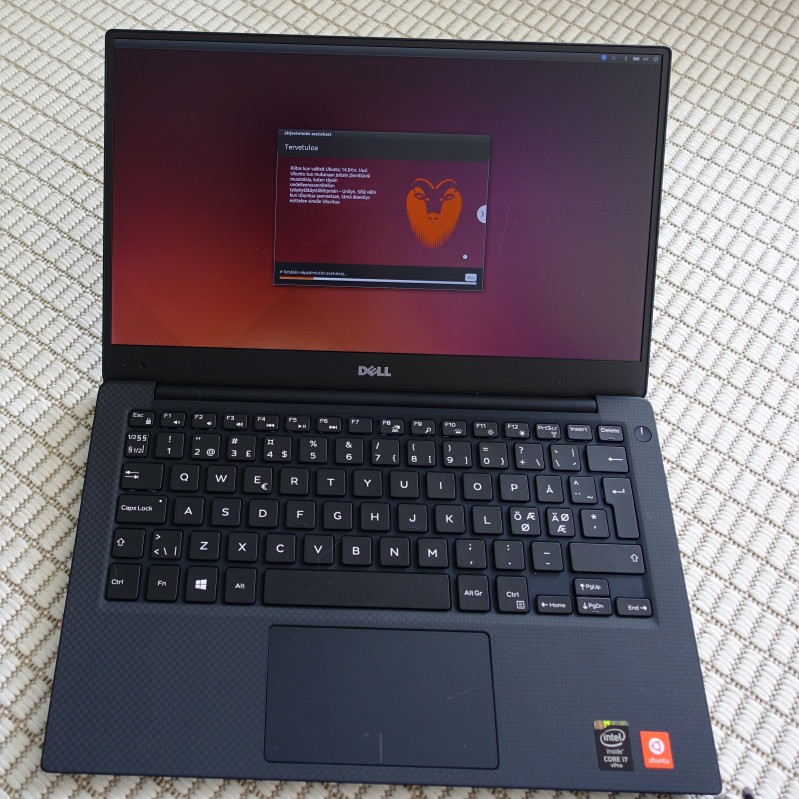
First time boot up, transitioning from the boot logo to a first time Ubuntu video.
A small clip from the end of the welcoming video.
First time setup. Language, Dell EULA, connecting to WiFi, location, keyboard, user+password.
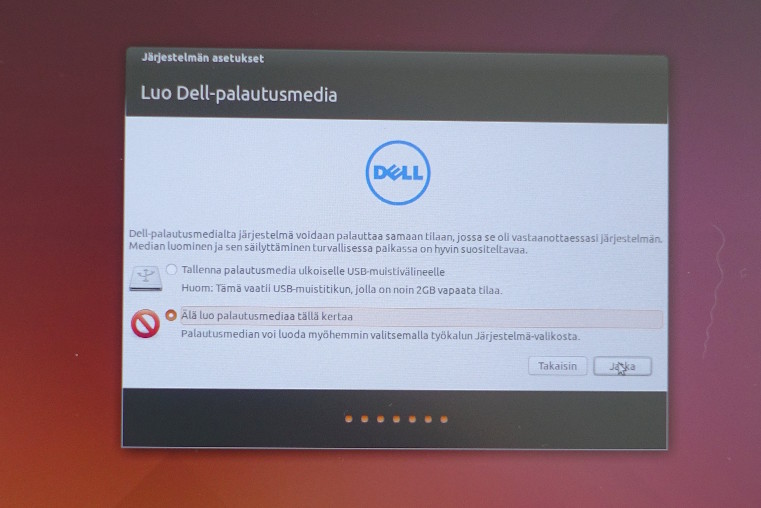
Creating recovery media. I opted not to do this as I had happened to read that it's highly recommended to install upgrades first, including to this tool.
Finalizing setup.
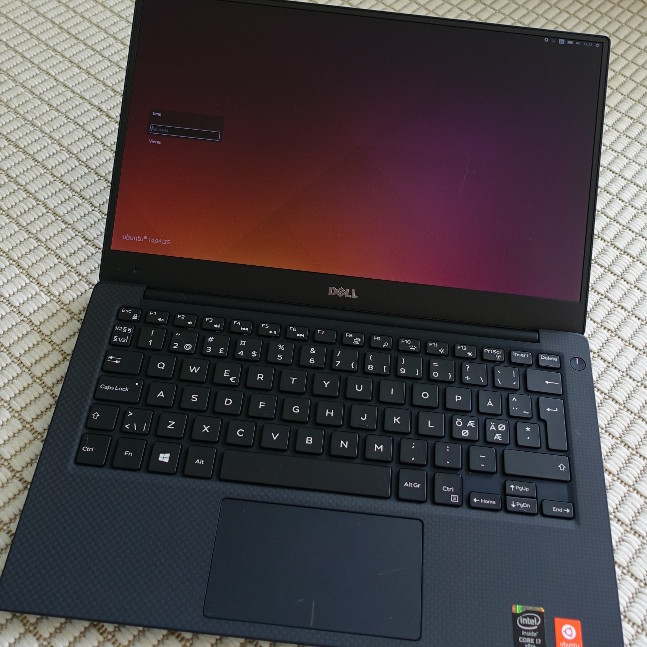
Ready to log in!
It's alive!
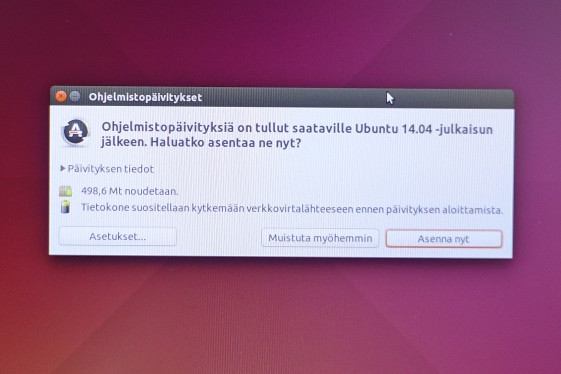
Not so recent 14.04 LTS image... lots of updates.
Problems in the First BatchUnfortunately the first batch of XPS 13:s with Ubuntu are going to ship with some problems. They're easy to fix if you know how to, but it's sad that they're there to begin with in the factory image. There is no knowledge when a fixed batch will start shipping - July maybe?

First of all, installing software upgrades stops. You need to run the following command via Dash Terminal once: sudo apt-get install -f (it suggests upgrading libc-dev-bin, libc6-dbg, libc6-dev and udev). After that you can continue running Software Updater as usual, maybe rebooting in between.

Secondly, the fixed touchpad driver is included but not enabled by default. You need to enable the only non-enabled Additional Driver as seen in the picture below or instructed in Youtube.

Dialog enabling the touchpad driver.

Clarification: you can safely ignore the two paragraphs below, they're just for advanced users like me who want to play with upgraded driver stacks.

Optionally, since I'm interested in the latest graphics drivers especially in case of a brand new hardware like Intel Broadwell, I upgraded my Ubuntu to use the 14.04.2 Hardware Enablement stack (matches 14.10 hardware support): sudo apt install --install-recommends libgles2-mesa-lts-utopic libglapi-mesa-lts-utopic linux-generic-lts-utopic xserver-xorg-lts-utopic libgl1-mesa-dri-lts-utopic libegl1-mesa-drivers-lts-utopic libgl1-mesa-glx-lts-utopic:i386

Even though it's much better than a normal Ubuntu 14.10 would be since many of the Dell fixes continue to be in use, some functionality might become worse compared to the pre-installed stack. The only thing I have noticed though is the internal microphone not working anymore out-of-the-box, requiring a kernel patch as mentioned in Dell's notes. This is not a surprise since the real eventual upstream support involves switching from HDA to I2S and during 14.10 kernel work that was not nearly done. If you're excited about new drivers, I'd recommend waiting until August when the 15.04 based 14.04.3 stack is available (same package names, but 'vivid' instead of 'utopic'). [edit: I couldn't resist myself when I saw linux-generic-lts-vivid (3.19 kernel) is already in the archives. 14.04.2 + that gives me working microphone again!]
ConclusionDell XPS 13 Developer Edition with Ubuntu 14.04 LTS is an extremely capable laptop + OS combination nearing perfection, but not quite there because of the software problems in the launch pre-install image. The laptop looks great, feels like a quality product should and is very compact for the screen size.

I've moved over all my work onto it and everything so far is working smoothly in my day-to-day tasks. I'm staying at Ubuntu 14.04 LTS and using my previous LXC configuration to run the latest Ubuntu and Debian development versions. I've also done some interesting changes already like LUKS In-Place Conversion, converting the pre-installed Ubuntu into whole disk encrypted one (not recommended for the faint hearted, GRUB reconfiguration is a bit of a pain).

I look happily forward to working a few productive years with this one!

Russ Allbery: Review: Late Eclipses

Review: Late Eclipses, by Seanan McGuire
Series: October Daye #4
Publisher: DAW
Copyright: March 2011
ISBN: 1-101-50253-3
Format: Kindle
Pages: 372
Late Eclipses is the fourth book the October Daye series, and relies heavily on characters introduced in the previous books. I recommend reading this series from the start; jumping into the middle would miss a lot of nuance. Thankfully, though, enough is explained that you don't have to have read the previous books recently. (I wish more series would do that.) Unsurprisingly, the book opens with Toby's life getting more complicated. Also unsurprisingly, that means getting more entangled in the affairs of the fae court, as Toby gets pushed farther out of her comfort zone. But that quickly takes a back seat to much worse news: Toby's close friend Lily is deathly ill. That isn't supposed to be possible for an undine. And Lily isn't the last person to get deathly ill in this book. I should note up-front that this book contains one of my least favorite tropes in fiction of this sort: a protagonist who falls under the influence of something mind-altering and has to keep second-guessing her own perceptions. I have this problem with most books about drugs or some equivalent. There was enough of that here to irritate me, but this is just a personal quirk and I'm used to other people liking those books better, so you may need to adjust my rating accordingly. That said, I liked Late Eclipses better than An Artificial Night, even with that drawback. It's less dark, less bleak, and returns to some of the mystery feel of the first two books of the series. A lot of urban fantasy mixes in a bit of a detective element, usually from the noir tradition, and I think that provides a useful plot driver. There's a lot at stake in this story, but Toby also gets a lot of agency. She's out doing things, making guesses and following up on them, rather than trying to endure vast horror. And she has more trust in her instincts and abilities, and is gathering more allies and respect. There was a bit too much of "abuse the protagonist" for my tastes, but some of the court maneuvering is quite satisfying. There's always a risk with power curves taking away the risk in stories like this, or of having to constantly invent a bigger bad than the previous one, but McGuire is doing a good job keeping control of that. Toby is getting stronger, and it's obvious that she's more than she appears or realizes. Coming to terms with the edges of that is part of this story. But the dangers in these stories have been very different in kind rather than escalating degree. The complex political machinations of the fae court help here considerably, creating problems that Toby has to navigate through with allies and careful thought. One of my favorite parts of this series continues to be the supporting cast. We don't get as much of the Luidaeg here, but we get lots of May (who is becoming one of my favorite characters of the series) and several other excellent supporting characters. It's rare that I like the supporting cast of an urban fantasy series this well without feeling like they're overshadowing the protagonist. Some parts of this story bugged me for idiosyncratic reasons, but I still thought it was a step up from the previous installment. McGuire's world doesn't seem to be running out of steam. I'll definitely keep reading. Followed by One Salt Sea. Rating: 7 out of 10

5 June 2015

Laura Arjona: Games

Nota: Este art culo, en espa ol, aqu . I m not a gamer, although probably I ve played with machines/computers more than most of the girls of my age. My path has been: handheld machine, Pong and tenis in my uncle s console, MSX (with that one, in addition to playing, I learnt what was an algorithm and a program, and I started to write small programs in Basic, and I copied and ran the source code of small games and programs to make graphics, which I found in MSX magazines). My parents considered that arcade machines in bars were like slot machines so they were banned for us (even pinball, only table soccer was saved from them, and only if my father was playing with us). In the MSX I played Magical Tree, Galaxians, Arkanoid, Konami s Sports Games, Spanish games from Dinamic, and some arcades like Golden Axe, Xenon, and maybe some more. The next computers (PC AT, later a 286) were not so for gaming; let s say that we played more with the printer (Harvard Graphics, Bannermania ). Later, I was interested in other things more than in computer games, and later there were highschool homework, dBase III, and later the University and programming again and more, and it was the end of gaming, computer was for office and Uni homework.
Later, it came the internet and since then, reading and writing and communicating was more interesting for me than playing. I was not good at playing, and if you are not good, you play less, and you don t get better, so you begin to find other ways to loose your time, or to win it :) The new generation My son is 6 years old now, and I m living with him a second adventure about games. Games have changed a lot, and the family computing try to stay in the libre software side whenever I am the one that can decide, so sometimes some challenges arise. Android (phone and tablet) The kid has played games in the phone and tablet with Android since he was a baby. We tried some of the last years popular games. I am not so keen of banning things, but I don t feel comfortable with the popular games for Android (advertisements, nonfree software, addictive elements, massive data recollection and possible surveillance ), so I try to control without being Cruella de Vil . Some techniques I use: On the other side, in my phone there is no Google Play, so we have been able to discover the section Games of F-Droid. We have tried (all of them available in F-Droid, emphasis in the ones that he liked best): 2048, AndroFish, Bomber, Coloring for Kids, Core, Dodge, Falling Blocks, Free Fall, Frozen Bubble, HeriSwap (this one in the tablet), Hex, HyperRogue, Meerkat Challenge, Memory, Pixel Dungeon, Robotfindskitten, Slow it!, Tux Memory, Tux Rider, Vector Pinball. Playing in my phone with CyanogenMod and having downloaded the games from F-Droid provides a relief similar to the one when playing a non-computer game. At least with the games that I have listed above. Maybe it is because they are simpler games, or they make me remember the ones that I played time ago. But it s also because of the peace of mind of knowing that they are libre software, that have been audited by the F-Droid community, that they don t abuse the user. The same happens with Debian, what takes me to the next part of this blogpost. Computer games: Debian The kid has learnt to play with the tablet and the phone before than with the computer, because our computers have no joysticks nor touchscreens. He learnt to use the touchpad before than the mouse, because it s easier and we have no mouse at home. He learnt to use the mouse at school, where they work with educative games via CD or via web, using Flash :( So Flash player appears and dissapears from my Debian setup depending on his willness to play with the school games . Until few time ago, in the computer we played with GCompris, ChildsPlay, and TuxPaint.
When he learnt to use the arrow keys, I installed Hannah and he liked a lot, specially when we learnt to do hannah -l 900 :) Later, in ClanTV there were advertisements about some online computer games about their favorite series, resulting in that they need Flash or a framework called Unity3D (no, it s not Ubuntu s Unity), and after digging a bit I decided that I was not going to install that #@%! in my Debian, so when he insisted in play those games, I booted the Windows 7 partition in his father s laptop and I installed it there. Windows is slow and sad in the computer, and those web games with that framework are not very light, so luckily they have not become very interesting. We have not played in the computer much more, maybe some incursion in Minetest, what takes me to the next section. (Not without stating my eternal thanks to the Games Team in Debian. I think they do a very important work and I think that next year I ll try to get involved in some way, because I know that the future of our family computer games is tied to libre games in Debian). PlayStation 3 and Minecraft Some time ago my husband bought a PlayStation 3 for home. The shop had discounts prices and so. He would play together with the kid an so.
The machine came home with some games for free (included in the price), but most of them were classified for +13 or so, so the only two left were Pro Evolution Soccer, and Minecraft.
I decided not to connect the machine to the network. Maybe we are loosing cool things, but I feel safer like that. So, no ethernet cable plugged, no registration in the Sony shop (or whatever its name is). The controllers are quite complex for the three of us. They are DualShock don t-know-what, and I think there is something (software) that makes the game adaptative to the person playing, because my husband is worse player after the son plays, if they play in turns and use the same controller. The kid liked Minecraft. I didn t know anything about that game (well, I knew that there was a libre clone called Minetest), so, for learning the basics I had a look at the wiki and searched videos about how to and we began learning. Now, the kid can read a bit so he needs less help, and he has watched a lot of videos about Minecraft, so he is interested in exploring and building. I had a look at Minetest, and I installed it in Debian. Having to use the keyboard is a disadvantage, and we didn t know how to dig, so it was not much attractive at first sight. I have looked a bit about how to use the PS3 controller in the computer, via USB, and it seems to work, but I suppose I need to write something to match each controller button with the corresponding key and subsequent action in Minetest. This is work, and I am lazy, and the boy seems not very interested in playing with the computer. Watching the videos we have infered that it s possible to download saved games and worlds to upload them in the videogame console. We have done some tests. I wanted to upload a saved game about an amusement park, but the file was in a folder of name NPEB01899* and even when the PS3 saw it to copy it from USB to the console, later it didn t appear in the list of saved games (our sved games were in folders named BLES01976). And renaming the folder didn t work, of course. I understood that we had met Sony s restrictions, so I searched for more info. The games are saved using an encryption key and you are not able to use saved games from consoles in other world zone or using a media different than ours (the game can be played using a disc or purchasing it in the digital shop, it seems). Very ugly all of this! I read somewhere that there is certain software (libre software, BTW) that allows to break the encryption and re-encrypt the saved game with the zone and type of media of your console, but it seems the program only works for Windows, and it needs a console ID that we have not, because we didn t register the console in the PlayStation network. All these things look shaky grounds for me, unpleasant stuff, I don t want to spend time on this, maybe I should learn a bit more about Minetest and make it work and interesting and tell Sony go fly a kite. Finally, I found a saved game in the same format as ours (BLES01976), it s not an amusement park but it is a world with interesting places to explore and many things already built, so I ve tried to import it and it worked, so my son will be happy for some time, I suppose. We have tried Minetest in the tablet too, but the touchscreen is not comfortable for this kind of games. I feel quite frustrated and angry about this issue of Sony s restrictions on saved games. So I suppose that in the next months I ll try to learn more about Minetest in Debian, game controllers in Debian, and games in Debian in general. So I hope to be able to offer cool stuff to my son, and he becomes more interested in playing in a safe environment which does not abuse the user. And with this, I finish Libre games in GNU/Linux, Debian, and info about games in internet When we have searched info about games in internet, I found that many times you need to go out from the secure environment: webpages with links to downloads that who knows if they contain what they say they contain, advertisements, videoblogs with a language not adequate for kids (or any person that loves their mother language) That s why I believe the path is to go into detail about libre games provided by the distro you use (Debian in my case). Here I bookmark a list of website with info that surely will be useful for me, to read in depth: We ll see how it goes. Comments? You can comment in this Pump.io thread.
Filed under: My experiences and opinion Tagged: Debian, English, F-Droid, Free culture, Free Software, Games, libre software, Moving into free software

Simon McVittie: Why polkit (or, how to mount a disk on modern Linux)

I've recently found myself explaining polkit (formerly PolicyKit) to one of Collabora's clients, and thought that blogging about the same topic might be useful for other people who are confused by it; so, here is why udisks2 and polkit are the way they are. As always, opinions in this blog are my own, not Collabora's. Privileged actions Broadly, there are two ways a process can do something: it can do it directly (i.e. ask the kernel directly), or it can use inter-process communication to ask a service to do that operation on its behalf. If it does it directly, the components that say whether it can succeed are the Linux kernel's normal permissions checks (DAC), and if configured, AppArmor, SELinux or a similar MAC layer. All very simple so far. Unfortunately, the kernel's relatively coarse-grained checks are not sufficient to express the sorts of policies that exist on a desktop/laptop/mobile system. My favourite example for this sort of thing is mounting filesystems. If I plug in a USB stick with a FAT filesystem, it's reasonable to expect my chosen user interface to either mount it automatically, or let me press a button to mount it. Similarly, to avoid data loss, I should be able to unmount it when I'm finished with it. However, mounting and unmounting a USB stick is fundamentally the same system call as mounting and unmounting any other filesystem - and if ordinary users can do arbitrary mount system calls, they can cause all sorts of chaos, for instance by mounting a filesystem that contains setuid executables (privilege escalation), or umounting a critical OS filesystem like /usr (denial of service). Something needs to arbitrate: you can mount filesystems, but only under certain conditions . The kernel developer motto for this sort of thing is mechanism, not policy : they are very keen to avoid encoding particular environments' policies (the sort of thing you could think of as business rules ) in the kernel, because that makes it non-generic and hard to maintain. As a result, direct mount/unmount actions are only allowed by privileged processes, and it's up to user-space processes to arrange for a privileged process to make the desired mount syscall. Here are some other privileged actions which laptop/desktop users can reasonably expect to just work , with or without requiring a sysadmin-like (root-equivalent) user: In environments that use a MAC framework like AppArmor, actions that would normally be allowed can become privileged: for instance, in a framework for sandboxed applications, most apps shouldn't be allowed to record audio. This prevents carrying out these actions directly, again resulting in the only way to achieve them being to ask a service to carry out the action. Ask a system service to do it On to the next design, then: I can submit a request to a privileged process, which does some checks to make sure I'm not trying to break the system (or alternatively, that I have enough sysadmin rights that I'm allowed to break the system if I want to), and then does the privileged action for me. You might think I'm about to start discussing D-Bus and daemons, but actually, a prominent earlier implementation of this was mount(8), which is normally setuid root:

% ls -l /bin/mount
-rwsr-xr-x 1 root root 40000 May 22 11:37 /bin/mount
If you look at it from an odd angle, this is inter-process communication across a privilege boundary: I run the setuid executable, creating a process. Because the executable has the setuid bit set, the kernel makes the process highly privileged: its effective uid is root, and it has all the necessary capabilities to mount filesystems. I submit the request by passing it in the command-line arguments. mount does some checks - specifically, it looks in /etc/fstab to see whether the filesystem I'm trying to mount has the user or users flag - then carries out the mount system call. There are a few obvious problems with this: Ask a system service to do it, via D-Bus or other IPC To avoid the issues of setuid, we could use inter-process communication in the traditional sense: run a privileged daemon (on boot or on-demand), make it listen for requests, and use the IPC channel as our privilege boundary. udisks2 is one such privileged daemon, which uses D-Bus as its IPC channel. D-Bus is a commonly-used inter-process system; one of its intended/designed uses is to let user processes and system services communicate, especially this sort of communication between a privileged daemon and its less-privileged clients. People sometimes criticize D-Bus as not doing anything you couldn't do yourself with some AF_UNIX sockets. Well, no, of course it doesn't - the important bit of the reference implementation and the various interoperable reimplementations consists of a daemon and some AF_UNIX sockets, and the rest is a simple matter of programming. However, it's sufficient for most uses in its problem space, and is usually better than inventing your own. The advantage of D-Bus over doing your own thing is precisely that you are not doing your own thing: good IPC design is hard, and D-Bus makes some structural decisions so that fewer application authors have to think about them. For instance, it has a central hub daemon (the dbus-daemon, or message bus ) so that n communicating applications don't need O(n ) sockets; it uses the dbus-daemon to provide a total message ordering so you don't have to think about message reordering; it has a distributed naming model (which can also be used as a distributed mutex) so you don't have to design that; it has a serialization format and a type system so you don't have to design one of those; it has a framework for activating" run-on-demand daemons so they don't have to use resources initially, implemented using a setuid helper and/or systemd; and so on. If you have religious objections to D-Bus, you can mentally replace D-Bus with AF_UNIX or something and most of this article will still be true. Is this OK? In either case - exec'ing a privileged helper, or submitting a request to a privileged daemon via IPC - the privileged process has two questions that it needs to answer before it does its work: It needs to make some sort of decision on the latter based on the information available to it. However, before we even get there, there is another layer: In the setuid model, there is a simple security check that you can apply: you can make /bin/mount only executable by a particular group, or only executable by certain AppArmor profiles, or similar. That works up to a point, but cannot distinguish between physically-present and not-physically-present users, or other facts that might be interesting to your local security policy. Similarly, in the IPC model, you can make certain communication channels impossible, for instance by using dbus-daemon's ability to decide which messages to deliver, or AF_UNIX sockets' filesystem permissions, or a MAC framework like AppArmor. Both of these are quite coarse-grained checks which don't really understand the finer details of what is going on. If the answer to "is this safe? is something of the form maybe, it depends on... , then they can't do the right thing: they must either let it through and let the domain-specific privileged process do the check, or deny it and lose potentially useful functionality. For instance, in an AppArmor environment, some applications have absolutely no legitimate reason to talk to udisks2, so the AppArmor policy can just block it altogether. However, once again, this is a coarse-grained check: the kernel has mechanism, not policy, and it doesn't know what the service does or why. If the application does need to be able to talk to the service at all, then finer-grained access control (obeying some, but not all, requests) has to be the service's job. dbus-daemon does have the ability to match messages in a relatively fine-grained way, based on the object path, interface and member in the message, as well as the routing information that it uses itself (i.e. the source and destination). However, it is not clear that this makes a great deal of sense conceptually: these are facts about the mechanics of the IPC, not facts about the domain-specific request (because the mechanics of the IPC are all that dbus-daemon understands). For instance, taking the udisks2 example again, dbus-daemon can't distinguish between an attempt to adjust mount options for a USB stick (probably fine) and an attempt to adjust mount options for /usr (not good). To have a domain-specific security policy, we need a domain-specific component, for instance udisks2, to get involved. Unlike dbus-daemon, udisks2 knows that not all disks are equal, knows which categories make sense to distinguish, and can identify which categories a particular disk is in. So udisks2 can make a more informed decision. So, a naive approach might be to write a function in udisks2 that looks something like this pseudocode:
may_i_mount_this_disk (user, disk, mount options)   boolean
 
    if (user is root   user is root-equivalent)
        return true;
    if (disk is not removable)
       return false;
    if (mount options are scary)
       return false;
    if (user is in  manipulate non-local disks  group)
        return true;
    if (user is not logged-in locally)
       return false;
    # https://en.wikipedia.org/wiki/Multiseat_configuration
    if (user is not logged-in on the same seat where the disk is
            plugged in)
       return false;
    return true;
 
Delegating the security policy to something central The pseudocode security policy outlined above is reasonably complicated already, and doesn't necessarily cover everything that you might want to consider. Meanwhile, not every system is the same. A general-purpose Linux distribution like Debian might run on server/mainframe systems with only remote users, personal laptops/desktops with one root-equivalent user, locked-down corporate laptops/desktops, mobile devices and so on; these systems should not necessarily all have the same security policy. Another interesting factor is that for some privileged operations, you might want to carry out interactive authorization: ask the requesting user to confirm that the action (which might have come from a background process) should take place (like Windows' UAC), or to prove that the person currently at the keyboard is the same as the person who logged in by giving their password (like sudo). We could in principle write code for all of this in udisks2, and in NetworkManager, and in systemd, ... - but that clearly doesn't scale, particularly if you want the security policy to be configurable. Enter polkit (formerly PolicyKit), a system service for applying security policies to actions. The way polkit works is that the application does its domain-specific analysis of the request - in the case of udisks2, whether the device to be mounted is removable, whether the mount options are reasonable, etc. - and converts it into an action. The action gives polkit a way to distinguish between things that are conceptually different, without needing to know the specifics. For instance, udisks2 currently divides up filesystem-mounting into org.freedesktop.udisks2.filesystem-mount, org.freedesktop.udisks2.filesystem-mount-fstab, org.freedesktop.udisks2.filesystem-mount-system and org.freedesktop.udisks2.filesystem-mount-other-seat. The application also finds the identity of the user making the request. Next, the application sends the action, the identity of the requesting user, and any other interesting facts to polkit. As currently implemented, polkit is a D-Bus service, so this is an IPC request via D-Bus. polkit consults its database of policies in order to choose one of several results: So how does polkit decide this? The first thing is that it reads the machine-readable description of the actions, in /usr/share/polkit-1/actions, which specifies a default policy. Next, it evaluates a local security policy to see what that says. In the current version of polkit, the local security policy is configured by writing JavaScript in /etc/polkit-1/rules.d (local policy) and /usr/share/polkit-1/rules.d (OS-vendor defaults). In older versions such as the one currently shipped in Debian unstable, there was a plugin architecture; but in practice nobody wrote plugins for it, and instead everyone used the example local authority shipped with polkit, which was configured via files in /etc/polkit-1/localauthority and /etc/polkit-1/localauthority.d. These policies can take into account useful facts like: For instance, gnome-control-center on Debian installs this snippet:
polkit.addRule(function(action, subject)  
        if ((action.id == "org.freedesktop.locale1.set-locale"  
             action.id == "org.freedesktop.locale1.set-keyboard"  
             action.id == "org.freedesktop.hostname1.set-static-hostname"  
             action.id == "org.freedesktop.hostname1.set-hostname"  
             action.id == "org.gnome.controlcenter.datetime.configure") &&
            subject.local &&
            subject.active &&
            subject.isInGroup ("sudo"))  
                    return polkit.Result.YES;
             
 );
which is reasonably close to being pseudocode for active local users in the sudo group may set the system locale, keyboard layout, hostname and time, without needing to authenticate . A system administrator could of course override that by dropping a higher-priority policy for some or all of these actions into /etc/polkit-1/rules.d. Summary

Patrick Schoenfeld: Testing puppet modules: an overview

When it comes to testing puppet modules, there are lot of options, but for someone entering the world of puppet module testing, the pure variety may seem overwhelming. This is a try to provide some overview. So you ve written a puppet module and would like to add some tests. Now what?As of today, puppet tests basically can be done in two ways, complementing each other: Catalog tests
In most cases you should at least write some catalog tests.
As of writing this (June 2015) the tool of choice is rspec-puppet. There used to be at least one other and you might have heard about it, but it s deprecated. For an introduction to this tool, you are best served by reading its brief but sufficient docs. Function acceptance tests
If catalog testing is not enough for you (e.g. you want to test that your website profile is actually installing and serving your site on port 80 and port 443) the next logical step is to write beaker tests for tests in a real system (as real as a virtual machine can be). This is also what you need, if you are writing custom types. Today s tool of choice for this job is beaker with beaker-rspec. After you ve written some rspec tests, this might feel similar. Since the documentation, might not seem very newbie friendly at first glance, the page Howto Beaker lists the relevant pages in the documentation to get started in a sensible order. Basically it s: Update your modules build depencies (Gemfile), decide for a hypervisor, create (or describe) your test environment, write spec tests and execute them :)
Skeleton of a module If testing puppet modules falls into your lap and you ve already written your puppet code, it s to late too start with a module anatomy as generated by puppet module generate But: It s certainly a good bet to know which technologies are todays common best practice. Further reading A very good guide to setting things up and writing tests of both types is the threepart blog post by Micka l Can vet written for camptocamp. It is a basic guide into test-driven development (writing tests before writing actual code) on a practical example.

Guido G nther: Debian work in May

May was the first month I started to contribute to Debian LTS under the Freexian umbrella. In total I spent six hours working on: My current work flow looks like Now I have an already patched source tree to add the backported patches to. Especially in cases where the Jessie version is already fixed this makes it rather quick to get an idea what the affected versions are and to see how the code evolved over time. In order for this to work properly I made (on non LTS time) some improvements to gbp:

2 June 2015

Julien Danjou: Get back up and try again: retrying in Python

I don't often write about tools I use when for my daily software development tasks. I recently realized that I really should start to share more often my workflows and weapons of choice. One thing that I have a hard time enduring while doing Python code reviews, is people writing utility code that is not directly tied to the core of their business. This looks to me as wasted time maintaining code that should be reused from elsewhere. So today I'd like to start with retrying, a Python package that you can use to retry anything. It's OK to fail
Often in computing, you have to deal with external resources. That means accessing resources you don't control. Resources that can fail, become flapping, unreachable or unavailable. Most applications don't deal with that at all, and explode in flight, leaving a skeptical user in front of the computer. A lot of software engineers refuse to deal with failure, and don't bother handling this kind of scenario in their code. In the best case, applications usually handle simply the case where the external reached system is out of order. They log something, and inform the user that it should try again later. In this cloud computing area, we tend to design software components with service-oriented architecture in mind. That means having a lot of different services talking to each others over the network. And we all know that networks tend to fail, and distributed systems too. Writing software with failing being part of normal operation is a terrific idea. Retrying
In order to help applications with the handling of these potential failures, you need a plan. Leaving to the user the burden to "try again later" is rarely a good choice. Therefore, most of the time you want your application to retry. Retrying an action is a full strategy on its own, with a lot of options. You can retry only on certain condition, and with the number of tries based on time (e.g. every second), based on a number of tentative (e.g. retry 3 times and abort), based on the problem encountered, or even on all of those. For all of that, I use the retrying library that you can retrieve easily on PyPI. retrying provides a decorator called retry that you can use on top of any function or method in Python to make it retry in case of failure. By default, retry calls your function endlessly until it returns rather than raising an error.
import random
from retrying import retry

@retry
def pick_one():
if random.randint(0, 10) != 1:
raise Exception("1 was not picked")

This will execute the function pick_one until 1 is returned by random.randint. retry accepts a few arguments, such as the minimum and maximum delays to use, which also can be randomized. Randomizing delay is a good strategy to avoid detectable pattern or congestion. But more over, it supports exponential delay, which can be used to implement exponential backoff, a good solution for retrying tasks while really avoiding congestion. It's especially handy for background tasks.
@retry(wait_exponential_multiplier=1000, wait_exponential_max=10000)
def wait_exponential_1000():
print "Wait 2^x * 1000 milliseconds between each retry, up to 10 seconds, then 10 seconds afterwards"
raise Exception("Retry!")

You can mix that with a maximum delay, which can give you a good strategy to retry for a while, and then fail anyway:
# Stop retrying after 30 seconds anyway
>>> @retry(wait_exponential_multiplier=1000, wait_exponential_max=10000, stop_max_delay=30000)
... def wait_exponential_1000():
... print "Wait 2^x * 1000 milliseconds between each retry, up to 10 seconds, then 10 seconds afterwards"
... raise Exception("Retry!")
...
>>> wait_exponential_1000()
Wait 2^x * 1000 milliseconds between each retry, up to 10 seconds, then 10 seconds afterwards
Traceback (most recent call last):
File "<stdin>", line 1, in <module>
File "/usr/local/lib/python2.7/site-packages/retrying.py", line 49, in wrapped_f
return Retrying(*dargs, **dkw).call(f, *args, **kw)
File "/usr/local/lib/python2.7/site-packages/retrying.py", line 212, in call
raise attempt.get()
File "/usr/local/lib/python2.7/site-packages/retrying.py", line 247, in get
six.reraise(self.value[0], self.value[1], self.value[2])
File "/usr/local/lib/python2.7/site-packages/retrying.py", line 200, in call
attempt = Attempt(fn(*args, **kwargs), attempt_number, False)
File "<stdin>", line 4, in wait_exponential_1000
Exception: Retry!

A pattern I use very often, is the ability to retry only based on some exception type. You can specify a function to filter out exception you want to ignore or the one you want to use to retry.
def retry_on_ioerror(exc):
return isinstance(exc, IOError)

@retry(retry_on_exception=retry_on_ioerror)
def read_file():
with open("myfile", "r") as f:
return f.read()

retry will call the function passed as retry_on_exception with the exception raised as first argument. It's up to the function to then return a boolean indicating if a retry should be performed or not. In the example above, this will only retry to read the file if an IOError occurs; if any other exception type is raised, no retry will be performed. The same pattern can be implemented using the keyword argument retry_on_result, where you can provide a function that analyses the result and retry based on it.
def retry_if_file_empty(result):
return len(result) <= 0

@retry(retry_on_result=retry_if_file_empty)
def read_file():
with open("myfile", "r") as f:
return f.read()

This example will read the file until it stops being empty. If the file does not exist, an IOError is raised, and the default behavior which triggers retry on all exceptions kicks-in the retry is therefore performed. That's it! retry is really a good and small library that you should leverage rather than implementing your own half-baked solution!

1 June 2015

Russ Allbery: Review: Hild

Review: Hild, by Nicola Griffith
Series: Hild #1
Publisher: Farrar, Straus and Giroux
Copyright: 2013
ISBN: 0-374-28087-8
Format: Hardcover
Pages: 539
Hild was born in seventh-century Britain, daughter of Hereric (would-be king of Daria) and Breguswith. Born, her mother said, to be a light to the land. This much is documented by the Venerable Bede, in The Ecclesiastical History of the English Nation, along with Hild's later rise to become one of the most powerful abbesses in British history. But nearly all of Hild's early life is a cipher. Hild fills in some of that gap with fiction. Specifically, it takes Hild from a child of three, learning her father has been killed, to a young woman, an advisor of Edwin king. It's a coming of age story in part, following her maturation both physically and mentally, her training in when to speak and how, and the dangers of being close to royalty in a fractious, political, and war-torn land. It's also the story of endless maneuvering and care, initially by her mother Breguswith and then by Hild herself sometimes in opposition to her mother, sometimes in alliance as her mother attempts to make a safe place for her daughter and herself in a treacherous court of shifting dangers. But Hild is also a story about Britain. It's a novel about how it felt and how it sounded. How it was organized, primarily among the high-born but with snippets of perspective from the lower classes. And it's a story about women: about weaving, about medicine, about friendships and partnerships and alliances among women, about the politics of marriage and childbirth, but also about the places women held and made in a time when surviving official history is all about the men. Hild is a painstakingly-researched, sprawling, lush, and sensual immersion in a part of history that gets little formal attention: after the Romans, before what we think of as medieval, before England as a country. I've been waiting for a new Nicola Griffith novel for quite a while, since Always in 2007. Hild doesn't disappoint, but it's also different than Griffith's previous writing. It has less of the strong narrative drive and clarity of either her SF or Aud Torvingen stories. Instead, the goal of Hild is to immerse and transport you, to help you feel the shape of Hild's world, to understand her days and tasks, her dreams and dangers. Like all of Griffith's work, it's beautifully written. Griffith puts description at the fore, in the sharp eyes of an observant girl who loves the outdoors, and who has been taught to watch for signs of weather and tools of healing. From early on, Hild's mother sets her up as a seer and prophetess as a way of establishing her value to war leaders and kings, and while some of it is drama and cryptic words, so much of it is careful observation, networks of information-gathering, and sharp deduction about the motives and politics of surrounding kings. Hild is very good at what she does because she has a sharp, quick mind that has been carefully trained, and because she has the aid of her mother's networks and then aid in building her own. Griffith does a wonderful job showing the reader what Hild sees, how she appreciates the world both for its own beauty and for the information she can gather from it, and how to build influence by navigating tense and dangerous moments: waiting for just the right moment and the right word, and taking sudden, impulsive risks and accepting their consequences. Unfortunately for me, this setting is also rich in complex politics and numerous actors, with older and unfamiliar names, and I got lost. Constantly. That's the drawback to immersion: Griffith doesn't hold the reader's hand. We get Hild's thoughts and analysis, and the reader has to keep up. Sometimes I did; sometimes I didn't. There's a dizzying flurry of names here, both personal and place, and while there is a map and a single family tree, neither helped me as much as I wanted them to. At several points, I found myself skimming through the latest shift in the balance between various petty kings because, while I knew I'd seen all the names before, they had come adrift from their context in the story. That was my major frustration with this book. It was all interesting enough that I would have kept thumbing back to a detailed dramatis personae, and indeed I kept checking the family tree, but there just wasn't enough detail there. Even better would have been a brief factual history of the political and military conflicts Hild was living through, keyed by chapter. Hild is startlingly intelligent, leaping from insight to insight, which is wonderful for building character, but which occasionally leaves the reader scrambling to catch up with the connections between her thoughts. I felt like, had I the broader context, I could have understood her insight more readily. All this information is likely available, since Griffith is playing off of documented history, but I'm not the sort of reader who likes doing Internet research while engrossed in a book. So, that's the downside, at least for me. But this book has many strengths, even if you're lost much of the time. Hild as written by Griffith is a fascinating character, full of sharp edges and difficult moods and a powerful belief in what she feels is right. Griffith is at the height of her writing ability when describing Hild making hard choices and taking on burdens that seem too large for her to bear. There are two sections of the book, where Hild is forced by circumstances to lead men in violence, that I think are two of the best bits of writing Griffith has ever published not just because of those scenes themselves, but because of the aftermath, the lingering echos, the way that they shape and inform everything Hild does afterwards. The mingling of reward and loss, maturation and trauma, the sense that the world has shifted both inside and out and it's nearly impossible to say whether the change is for the better or worse. Griffith also knows when not to say too much, and while I found that frustrating for the politics, it does wonders for the characters. Hild's complex and fraught relationship with Gwaldus is the best example. We never know exactly what Gwaldus is thinking; Hild can only guess, and at times one is fairly sure that she guesses wrong. But that doesn't lead to sudden revelations, where the characters finally understand each other. Instead, they both adjust, they maneuver around each other, they find space and understanding where they can, and sometimes they just close off. This book is full of relationships like this: loves that are too complicated for words, bonds that are too dangerous to acknowledge, and characters who can't relax even though they wish the best for each other. At times, it's exhausting reading, but it gives Hild a tension that one wouldn't expect from a sprawling novel full of description and scene-building. Hild is clearly the first book of a series, and leaves quite a lot unresolved. If you want closure in relationships and in politics, there's a lot here that you may find frustrating. And if, like me, you struggle to keep names and politics straight, you're probably going to get lost. But it's well worth the effort for the description, for Hild's thought processes, and for a few haunting scenes that I will be replaying in my head for a very long time. Expect to take your time with this, and wait until you're in the mood for immersion and puzzling out context as you go, but recommended. I suspect it would be even better on a second reading. Rating: 8 out of 10

27 May 2015

Norbert Preining: USB stick update: TAILS 1.4, GParted 0.22, SysResCD 4.5.2, Debian Jessie

I have posted a view times (here and here) about how to get a multi-boot/multi-purpose USB stick working. Now that TAILS has seens a major upgrade, and Debian 8.0 Jessie has been released, I think it is time to update the procedure to reflect the latest releases. That turned out to be a painful experience, in particular since Debian removed support for any reasonable boot method.

(Update: See this post for fixes to get Debian working again)
multi-usb-stick So going through these explanations one will end up with a usable USB stick that can boot you into TAILS, System Rescue CD, GNU Parted Live CD, but unfortunately not anymore to boot into an installation of Debian 8.0 Jessie installation. But the USB stick will still be usable as normal media. Let us repeat some things from the original post concerning the wishlist and the main players: I have a long wishlist of items a boot stick should fulfill This time I have added the GNOME/GNU Partition Editor gparted as it came in useful at times. Requirements A USB stick, the iso images of TAILS 1.4, SystemRescueCD 4.5.2, GParted Lice CD 0.22.0, and some tool to access iso images, for example ISOmaster (often available from your friendly Linux distribution). I assume that you have already an USB stick prepared as described previously. If this is not the case, please go there and follow the section on preparing your usb stick. Two types of boot options We will employ two different approaches to boot special systems: the one is directly from an iso image, the other via extraction of the necessary kernels and images. At the moment we have the following status with respect to boot methods: What is a pity is that during the testing phase, booting and installation from testing images worked for Debian as documented previously. But with the final images (and my guess it has to do with systemd, wouldn t surprise me), there is no Debian CD detected as it cannot find the iso image on the USB stick. Bummer. That means that for having a Debian/USB stick you need a dedicated one. Booting from ISO image Grub has gained quite some time ago the ability to boot directly from an ISO image. In this case the iso image is mounted via loopback, and the kernel and initrd are specified relatively to the iso image root. For both SystemRescueCD and GNOME Partition Live CD, just drop the iso files into /boot/iso/, in my case /boot/iso/systemrescuecd-x86-4.5.2.iso and /boot/iso/gparted-live-0.22.0-1-i586.iso. After that, entries like the following have to be added to grub.cfg. For the full list see grub.cfg:
submenu "System Rescue CD 4.5.2 (via ISO) ---> "  
  set isofile="/boot/iso/systemrescuecd-x86-4.5.2.iso"
  menuentry "SystemRescueCd (64bit, default boot options)"  
        set gfxpayload=keep
        loopback loop (hd0,1)$isofile
        linux   (loop)/isolinux/rescue64 isoloop=$isofile
        initrd  (loop)/isolinux/initram.igz
   
  ...
 
 
submenu "GNU/Gnome Parted Live CD 0.22.0 (via ISO) ---> "  
  set isofile="/boot/iso/gparted-live-0.22.0-1-i586.iso"
  menuentry "GParted Live (Default settings)" 
    loopback loop (hd0,1)$isofile
    linux (loop)/live/vmlinuz boot=live username=user config components quiet noswap noeject  ip=  nosplash findiso=$isofile
    initrd (loop)/live/initrd.img
   
  ...
 
Note the added isoloop=$isofile and findiso=$isofile that helps the installer find the iso images. Booting via extraction of kernels and images This is a bit more tedious, but still not too bad. Installation of TAILS files Assuming you have access to the files on the TAILS CD via the directory ~/tails, execute the following commands:
mkdir -p /usbstick/boot/tails
cp -a ~/tails/live/* /usbstick/boot/tails/
The grub.cfg entries look now similar to the following:
submenu "TAILS Environment 1.4 ---> "  
  menuentry "Tails64 Live System"  
        linux   /boot/tails/vmlinuz2 boot=live live-media-path=/boot/tails config live-media=removable nopersistent noprompt timezone=Etc/UTC block.events_dfl_poll_msecs=1000 splash noautologin module=Tails  libata.force=noncq
        initrd  /boot/tails/initrd2.img
   
  ...
 
The important part here is the live-media-path=/boot/tails, otherwise TAILS will not find the correct files for booting. The rest of the information was extracted from the boot setup of TAILS itself. Current status of USB stick Just to make sure, the usb stick should contain at the current stage the following files:
/boot/
    iso/
        gparted-live-0.22.0-1-i586.iso
        systemrescuecd-x86-4.5.2.iso
    tails/
        vmlinuz Tails.module initrd.img ....
    grub/
        fonts/
            lots of files
        locale/
            lots of files
        x86_64-efi/
            lots of files
        font.pf2
        grubenv
        grub.cfg            *this file we create in the next step!!*
/EFI
    BOOT/
        BOOTX64.EFI
The Grub config file grub.cfg The final step is to provide a grub config file in /usbstick/boot/grub/grub.cfg. I created one by looking at the isoboot.cfg files both in the SystemRescueCD, TAILS iso images, GParted iso image, and the Debian/Jessie image, and converting them to grub syntax. Excerpts have been shown above in the various sections. I spare you all the details, grab a copy here: grub.cfg Conclusion That s it. Now you can anonymously provide data about your evil government, rescue your friends computer, fix a forgotten Windows password, and above all, install a proper free operating system. If you have any comments, improvements or suggestions, please drop me a comment. I hope this helps a few people getting a decent USB boot stick running. Enjoy. Postscriptum concerning Debian/Jessie Working method is now described in this post. So I have first tried to boot directly into the Debian Jessie firmware ISO image by dropping the ISO into /boot/iso/firmware-8.0.0-amd64-i386-netinst.iso and adding a grub entry like:
submenu "Debian 8.0 Jessie NetInstall ---> "  
    set isofile="/boot/iso/firmware-8.0.0-amd64-i386-netinst.iso"
 
    menuentry '64 bit Install'  
        set background_color=black
        loopback loop (hd0,1)$isofile
        linux    (loop)/install.amd/vmlinuz iso-scan/ask_second_pass=true iso-scan/filename=$isofile vga=788 -- quiet 
        initrd   (loop)/install.amd/initrd.gz
     
    ...
 
That was a no go. I have added the iso-scan/ask_second_pass=true iso-scan/filename=$isofile thingy after some research in forum and web, without any change. Of course I have also tried the official ISO image debian-8.0.0-amd64-netinst.iso, with the same effect. Although I was sure it doesn t make any difference, I have also tried to extract the kernel and initrd, and boot directly from it, i.e., copying the files to /usbstick/boot/debian/ as follows:
mkdir -p /usbstick/boot/debian
cp -a ~/tails/install.amd /usbstick/boot/debian/
cp -a ~/tails/install.386 /usbstick/boot/debian/
In addition, copy the iso image itself into /usbstick/boot/iso (or directly into the root of the usb stick, didn t change anything), and added a grub.cfg entry as follows:
submenu "Debian 8.0 Jessie NetInstall ---> "  
  menuentry '64 bit Install'  
    set background_color=black
    linux    /boot/debian/install.amd/vmlinuz vga=788 -- quiet 
    initrd   /boot/debian/install.amd/initrd.gz
   
  ...
 
All these were without success, always ending up in error messages like: Mounting sdb, this is not a Debian Installation CD, etc etc. I have also submitted a bug report to the installation reports, unfortunately no answer (not that I expected one). In case someone has a better idea, please let me know! It is very sad that these kind of support is removed. The Installation Manual lists some options to install from USB, and the only difference is that there syslinux on a FAT16 system is used. This restricts the USB stick size a lot, and does not allow for easy multi boot via grub. As reported here, I had this actually running. Unfortunately, I stupidly removed the old iso image and replaced it with the current Jessie ISO image, assuming that there will be no regression. Wrong assumption. Now I cannot even investigate the changes by looking into the initrd. Looking at the date of the original post I see that it is more or less one year ago, so before the Systemd introduction. I don t know whether this has any effect, I doubt, as the installer is separate. But something happened in the mean time. Bad for us.

Vincent Bernat: Live patching QEMU for VENOM mitigation

CVE-2015-3456, also known as VENOM, is a security vulnerability in QEMU virtual floppy controller:
The Floppy Disk Controller (FDC) in QEMU, as used in Xen [ ] and KVM, allows local guest users to cause a denial of service (out-of-bounds write and guest crash) or possibly execute arbitrary code via the FD_CMD_READ_ID, FD_CMD_DRIVE_SPECIFICATION_COMMAND, or other unspecified commands.
Even when QEMU has been configured with no floppy drive, the floppy controller code is still active. The vulnerability is easy to test1:
#define FDC_IOPORT 0x3f5
#define FD_CMD_READ_ID 0x0a
int main()  
    ioperm(FDC_IOPORT, 1, 1);
    outb(FD_CMD_READ_ID, FDC_IOPORT);
    for (size_t i = 0;; i++)
        outb(0x42, FDC_IOPORT);
    return 0;
 
Once the fix installed, all processes still have to be restarted for the upgrade to be effective. It is possible to minimize the downtime by leveraging virsh save. Another possibility would be to patch the running processes. The Linux kernel attracted a lot of interest in this area, with solutions like Ksplice (mostly killed by Oracle), kGraft (by Red Hat) and kpatch (by Suse) and the inclusion of a common framework in the kernel. The userspace has far less out-of-the-box solutions2. I present here a simple and self-contained way to patch a running QEMU to remove the vulnerability without requiring any sensible downtime. Here is a short demonstration:

Proof of concept First, let s find a workaround that would be simple to implement through live patching: while modifying running code text is possible, it is easier to modify a single variable.

Concept Looking at the code of the floppy controller and the patch, we can avoid the vulnerability by not accepting any command on the FIFO port. Each request would be answered by Invalid command (0x80) and a user won t be able to push more bytes to the FIFO until the answer is read and the FIFO queue reset. Of course, the floppy controller would be rendered useless in this state. But who cares? The list of commands accepted by the controller on the FIFO port is contained in the handlers[] array:
static const struct  
    uint8_t value;
    uint8_t mask;
    const char* name;
    int parameters;
    void (*handler)(FDCtrl *fdctrl, int direction);
    int direction;
  handlers[] =  
      FD_CMD_READ, 0x1f, "READ", 8, fdctrl_start_transfer, FD_DIR_READ  ,
      FD_CMD_WRITE, 0x3f, "WRITE", 8, fdctrl_start_transfer, FD_DIR_WRITE  ,
    /* [...] */
      0, 0, "unknown", 0, fdctrl_unimplemented  , /* default handler */
 ;
To avoid browsing the array each time a command is received, another array is used to map each command to the appropriate handler:
/* Associate command to an index in the 'handlers' array */
static uint8_t command_to_handler[256];
static void fdctrl_realize_common(FDCtrl *fdctrl, Error **errp)
 
    int i, j;
    static int command_tables_inited = 0;
    /* Fill 'command_to_handler' lookup table */
    if (!command_tables_inited)  
        command_tables_inited = 1;
        for (i = ARRAY_SIZE(handlers) - 1; i >= 0; i--)  
            for (j = 0; j < sizeof(command_to_handler); j++)  
                if ((j & handlers[i].mask) == handlers[i].value)  
                    command_to_handler[j] = i;


    /* [...] */
 
Our workaround is to modify the command_to_handler[] array to map all commands to the fdctrl_unimplemented() handler (the last one in the handlers[] array).

Testing with gdb To check if the workaround works as expected, we test it with gdb. Unless you have compiled QEMU yourself, you need to install a package with debug symbols. Unfortunately, on Debian, they are not available, yet3. On Ubuntu, you can install the qemu-system-x86-dbgsym package after enabling the appropriate repositories. The following function for gdb maps every command to the unimplemented handler:
define patch
  set $handler = sizeof(handlers)/sizeof(*handlers)-1
  set $i = 0
  while ($i < 256)
   set variable command_to_handler[$i++] = $handler
  end
  printf "Done!\n"
end
Attach to the vulnerable process (with attach), call the function (with patch) and detach of the process (with detach). You can check that the exploit is not working anymore. This could be easily automated.

Limitations Using gdb has two main limitations:
  1. It needs to be installed on each host to be patched.
  2. The debug packages need to be installed as well. Moreover, it can be difficult to fetch previous versions of those packages.

Writing a custom patcher To overcome those limitations, we can write a customer patcher using the ptrace() system call without relying on debug symbols being present.

Finding the right memory spot Before being able to modify the command_to_handler[] array, we need to know its location. The first clue is given by the symbol table. To query it, use readelf -s:
$ readelf -s /usr/lib/debug/.build-id/09/95121eb46e2a4c13747ac2bad982829365c694.debug   \
>   sed -n -e 1,3p -e /command_to_handler/p
Symbol table '.symtab' contains 27066 entries:
   Num:    Value          Size Type    Bind   Vis      Ndx Name
  8485: 00000000009f9d00   256 OBJECT  LOCAL  DEFAULT   26 command_to_handler
This table is usually stripped out of the executable to save space, like shown below:
$ file -b /usr/bin/qemu-system-x86_64   tr , \\n
ELF 64-bit LSB shared object
 x86-64
 version 1 (SYSV)
 dynamically linked
 interpreter /lib64/ld-linux-x86-64.so.2
 for GNU/Linux 2.6.32
 BuildID[sha1]=0995121eb46e2a4c13747ac2bad982829365c694
 stripped
If your distribution provides a debug package, the debug symbols are installed in /usr/lib/debug. Most modern distributions are now relying on the build ID4 to map an executable to its debugging symbols, like the example above. Without a debug package, you need to recompile the existing package without stripping debug symbols in a clean environment5. On Debian, this can be done by setting the DEB_BUILD_OPTIONS environment variable to nostrip. We have now two possible cases:
  • the easy one, and
  • the hard one.

The easy case On x86, here is the standard layout of a regular Linux process in memory6: Memory layout of a regular process on x86 The random gaps (ASLR) are here to prevent an attacker from reliably jumping to a particular exploited function in memory. On x86-64, the layout is quite similar. The important point is that the base address of the executable is fixed. The memory mapping of a process is also available through /proc/PID/maps. Here is a shortened and annotated example on x86-64:
$ cat /proc/3609/maps
00400000-00401000         r-xp 00000000 fd:04 483  not-qemu [text segment]
00601000-00602000         r--p 00001000 fd:04 483  not-qemu [data segment]
00602000-00603000         rw-p 00002000 fd:04 483  not-qemu [BSS segment]
[random gap]
02419000-0293d000         rw-p 00000000 00:00 0    [heap]
[random gap]
7f0835543000-7f08356e2000 r-xp 00000000 fd:01 9319 /lib/x86_64-linux-gnu/libc-2.19.so
7f08356e2000-7f08358e2000 ---p 0019f000 fd:01 9319 /lib/x86_64-linux-gnu/libc-2.19.so
7f08358e2000-7f08358e6000 r--p 0019f000 fd:01 9319 /lib/x86_64-linux-gnu/libc-2.19.so
7f08358e6000-7f08358e8000 rw-p 001a3000 fd:01 9319 /lib/x86_64-linux-gnu/libc-2.19.so
7f08358e8000-7f08358ec000 rw-p 00000000 00:00 0
7f08358ec000-7f083590c000 r-xp 00000000 fd:01 5138 /lib/x86_64-linux-gnu/ld-2.19.so
7f0835aca000-7f0835acd000 rw-p 00000000 00:00 0
7f0835b08000-7f0835b0c000 rw-p 00000000 00:00 0
7f0835b0c000-7f0835b0d000 r--p 00020000 fd:01 5138 /lib/x86_64-linux-gnu/ld-2.19.so
7f0835b0d000-7f0835b0e000 rw-p 00021000 fd:01 5138 /lib/x86_64-linux-gnu/ld-2.19.so
7f0835b0e000-7f0835b0f000 rw-p 00000000 00:00 0
[random gap]
7ffdb0f85000-7ffdb0fa6000 rw-p 00000000 00:00 0    [stack]
With a regular executable, the value given in the symbol table is an absolute memory address:
$ readelf -s not-qemu   \
>   sed -n -e 1,3p -e /command_to_handler/p
Symbol table '.dynsym' contains 9 entries:
   Num:    Value          Size Type    Bind   Vis      Ndx Name
    47: 0000000000602080   256 OBJECT  LOCAL  DEFAULT   25 command_to_handler
So, the address of command_to_handler[], in the above example, is just 0x602080.

The hard case To enhance security, it is possible to load some executables at a random base address, just like a library. Such an executable is called a Position Independent Executable (PIE). An attacker won t be able to rely on a fixed address to find some helpful function. Here is the new memory layout: Memory layout of a PIE process on x86 With a PIE process, the value in the symbol table is now an offset from the base address.
$ readelf -s not-qemu-pie   sed -n -e 1,3p -e /command_to_handler/p
Symbol table '.dynsym' contains 17 entries:
   Num:    Value          Size Type    Bind   Vis      Ndx Name
    47: 0000000000202080   256 OBJECT  LOCAL  DEFAULT   25 command_to_handler
If we look at /proc/PID/maps, we can figure out where the array is located in memory:
$ cat /proc/12593/maps
7f6c13565000-7f6c13704000 r-xp 00000000 fd:01 9319  /lib/x86_64-linux-gnu/libc-2.19.so
7f6c13704000-7f6c13904000 ---p 0019f000 fd:01 9319  /lib/x86_64-linux-gnu/libc-2.19.so
7f6c13904000-7f6c13908000 r--p 0019f000 fd:01 9319  /lib/x86_64-linux-gnu/libc-2.19.so
7f6c13908000-7f6c1390a000 rw-p 001a3000 fd:01 9319  /lib/x86_64-linux-gnu/libc-2.19.so
7f6c1390a000-7f6c1390e000 rw-p 00000000 00:00 0
7f6c1390e000-7f6c1392e000 r-xp 00000000 fd:01 5138  /lib/x86_64-linux-gnu/ld-2.19.so
7f6c13b2e000-7f6c13b2f000 r--p 00020000 fd:01 5138  /lib/x86_64-linux-gnu/ld-2.19.so
7f6c13b2f000-7f6c13b30000 rw-p 00021000 fd:01 5138  /lib/x86_64-linux-gnu/ld-2.19.so
7f6c13b30000-7f6c13b31000 rw-p 00000000 00:00 0
7f6c13b31000-7f6c13b33000 r-xp 00000000 fd:04 4594  not-qemu-pie [text segment]
7f6c13cf0000-7f6c13cf3000 rw-p 00000000 00:00 0
7f6c13d2e000-7f6c13d32000 rw-p 00000000 00:00 0
7f6c13d32000-7f6c13d33000 r--p 00001000 fd:04 4594  not-qemu-pie [data segment]
7f6c13d33000-7f6c13d34000 rw-p 00002000 fd:04 4594  not-qemu-pie [BSS segment]
[random gap]
7f6c15c46000-7f6c15c67000 rw-p 00000000 00:00 0     [heap]
[random gap]
7ffe823b0000-7ffe823d1000 rw-p 00000000 00:00 0     [stack]
The base address is 0x7f6c13b31000, the offset is 0x202080 and therefore, the location of the array is 0x7f6c13d33080. We can check with gdb:
$ print &command_to_handler
$1 = (uint8_t (*)[256]) 0x7f6c13d33080 <command_to_handler>

Patching a memory spot Once we know the location of the command_to_handler[] array in memory, patching it is quite straightforward. First, we start tracing the target process:
/* Attach to the running process */
static int
patch_attach(pid_t pid)
 
    int status;
    printf("[.] Attaching to PID %d...\n", pid);
    if (ptrace(PTRACE_ATTACH, pid, NULL, NULL) == -1)  
        fprintf(stderr, "[!] Unable to attach to PID %d: %m\n", pid);
        return -1;
     
    if (waitpid(pid, &status, 0) == -1)  
        fprintf(stderr, "[!] Error while attaching to PID %d: %m\n", pid);
        return -1;
     
    assert(WIFSTOPPED(status)); /* Tracee may have died */
    if (ptrace(PTRACE_GETSIGINFO, pid, NULL, &si) == -1)  
        fprintf(stderr, "[!] Unable to read siginfo for PID %d: %m\n", pid);
        return -1;
     
    assert(si.si_signo == SIGSTOP); /* Other signals may have been received */
    printf("[*] Successfully attached to PID %d\n", pid);
    return 0;
 
Then, we retrieve the command_to_handler[] array, modify it and put it back in memory7.
static int
patch_doit(pid_t pid, unsigned char *target)
 
    int ret = -1;
    unsigned char *command_to_handler = NULL;
    size_t i;
    /* Get the table */
    printf("[.] Retrieving command_to_handler table...\n");
    command_to_handler = ptrace_read(pid,
                                     target,
                                     QEMU_COMMAND_TO_HANDLER_SIZE);
    if (command_to_handler == NULL)  
        fprintf(stderr, "[!] Unable to read command_to_handler table: %m\n");
        goto out;
     
    /* Check if the table has already been patched. */
    /* [...] */
    /* Patch it */
    printf("[.] Patching QEMU...\n");
    for (i = 0; i < QEMU_COMMAND_TO_HANDLER_SIZE; i++)  
        command_to_handler[i] = QEMU_NOT_IMPLEMENTED_HANDLER;
     
    if (ptrace_write(pid, target, command_to_handler,
           QEMU_COMMAND_TO_HANDLER_SIZE) == -1)  
        fprintf(stderr, "[!] Unable to patch command_to_handler table: %m\n");
        goto out;
     
    printf("[*] QEMU successfully patched!\n");
    ret = 0;
out:
    free(command_to_handler);
    return ret;
 
Since ptrace() only allows to read or write a word at a time, ptrace_read() and ptrace_write() are wrappers to read or write arbitrary large chunks of memory8. Here is the code for ptrace_read():
/* Read memory of the given process */
static void *
ptrace_read(pid_t pid, void *address, size_t size)
 
    /* Allocate the buffer */
    uword_t *buffer = malloc((size/sizeof(uword_t) + 1)*sizeof(uword_t));
    if (!buffer) return NULL;
    /* Read word by word */
    size_t readsz = 0;
    do  
        errno = 0;
        if ((buffer[readsz/sizeof(uword_t)] =
                ptrace(PTRACE_PEEKTEXT, pid,
                       (unsigned char*)address + readsz,
                       0)) && errno)  
            fprintf(stderr, "[!] Unable to peek one word at address %p: %m\n",
                    (unsigned char *)address + readsz);
            free(buffer);
            return NULL;
         
        readsz += sizeof(uword_t);
      while (readsz < size);
    return (unsigned char *)buffer;
 

Putting the pieces together The patcher is provided with the following information:
  • the PID of the process to be patched,
  • the command_to_handler[] offset from the symbol table, and
  • the build ID of the executable file used to get this offset (as a safety measure).
The main steps are:
  1. Attach to the process with ptrace().
  2. Get the executable name from /proc/PID/exe.
  3. Parse /proc/PID/maps to find the address of the text segment (it s the first one).
  4. Do some sanity checks:
    • check there is a ELF header at this location (4-byte magic number),
    • check the executable type (ET_EXEC for regular executables, ET_DYN for PIE), and
    • get the build ID and compare with the expected one.
  5. From the base address and the provided offset, compute the location of the command_to_handler[] array.
  6. Patch it.
You can find the complete patcher on GitHub.
$ ./patch --build-id 0995121eb46e2a4c13747ac2bad982829365c694 \
>         --offset 9f9d00 \
>         --pid 16833
[.] Attaching to PID 16833...
[*] Successfully attached to PID 16833
[*] Executable name is /usr/bin/qemu-system-x86_64
[*] Base address is 0x7f7eea912000
[*] Both build IDs match
[.] Retrieving command_to_handler table...
[.] Patching QEMU...
[*] QEMU successfully patched!

  1. The complete code for this test is on GitHub.
  2. An interesting project seems to be Katana. But there are also some insightful hacking papers on the subject.
  3. Some packages come with a -dbg package with debug symbols, some others don t. Fortunately, a proposal to automatically produce debugging symbols for everything is near completion.
  4. The Fedora Wiki contains the rationale behind the build ID.
  5. If the build is incorrectly reproduced, the build ID won t match. The information provided by the debug symbols may or may not be correct. Debian currently has a reproducible builds effort to ensure that each package can be reproduced.
  6. Anatomy of a program in memory is a great blog post explaining in more details how a program lives in memory.
  7. Being an uninitialized static variable, the variable is in the BSS section. This section is mapped to a writable memory segment. If it wasn t the case, with Linux, the ptrace() system call is still allowed to write. Linux will copy the page and mark it as private.
  8. With Linux 3.2 or later, process_vm_readv() and process_vm_writev() can be used to transfer data from/to a remote process without using ptrace() at all. However, ptrace() would still be needed to reliably stop the main thread.

Matthew Garrett: This is not the UEFI backdoor you are looking for

This is currently the top story on the Linux subreddit. It links to this Tweet which demonstrates using a System Management Mode backdoor to perform privilege escalation under Linux. This is not a story.

But first, some background. System Management Mode (SMM) is a feature in most x86 processors since the 386SL back in 1990. It allows for certain events to cause the CPU to stop executing the OS, jump to an area of hidden RAM and execute code there instead, and then hand off back to the OS without the OS knowing what just happened. This allows you to do things like hardware emulation (SMM is used to make USB keyboards look like PS/2 keyboards before the OS loads a USB driver), fan control (SMM will run even if the OS has crashed and lets you avoid the cost of an additional chip to turn the fan on and off) or even more complicated power management (some server vendors use SMM to read performance counters in the CPU and adjust the memory and CPU clocks without the OS interfering).

In summary, SMM is a way to run a bunch of non-free code that probably does a worse job than your OS does in most cases, but is occasionally helpful (it's how your laptop prevents random userspace from overwriting your firmware, for instance). And since the RAM that contains the SMM code is hidden from the OS, there's no way to audit what it does. Unsurprisingly, it's an interesting vector to insert malware into - you could configure it so that a process can trigger SMM and then have the resulting SMM code find that process's credentials structure and change it so it's running as root.

And that's what Dmytro has done - he's written code that sits in that hidden area of RAM and can be triggered to modify the state of the running OS. But he's modified his own firmware in order to do that, which isn't something that's possible without finding an existing vulnerability in either the OS or (or more recently, and) the firmware. It's an excellent demonstration that what we knew to be theoretically possible is practically possible, but it's not evidence of such a backdoor being widely deployed.

What would that evidence look like? It's more difficult to analyse binary code than source, but it would still be possible to trace firmware to observe everything that's dropped into the SMM RAM area and pull it apart. Sufficiently subtle backdoors would still be hard to find, but enough effort would probably uncover them. A PC motherboard vendor managed to leave the source code to their firmware on an open FTP server and copies leaked into the wild - if there's a ubiquitous backdoor, we'd expect to see it there.

But still, the fact that system firmware is mostly entirely closed is still a problem in engendering trust - the means to inspect large quantities binary code for vulnerabilities is still beyond the vast majority of skilled developers, let alone the average user. Free firmware such as Coreboot gets part way to solving this but still doesn't solve the case of the pre-flashed firmware being backdoored and then installing the backdoor into any new firmware you flash.

This specific case may be based on a misunderstanding of Dmytro's work, but figuring out ways to make it easier for users to trust that their firmware is tamper free is going to be increasingly important over the next few years. I have some ideas in that area and I hope to have them working in the near future.

comment count unavailable comments

26 May 2015

Norbert Preining: Debian/TeX Live 2015 preparations

I have uploaded a preliminary version of the texlive-bin based on the 2015 sources (plus the first fixes) to the Debian archive, targeting experimental. As there are four new packages built from the sources (libtexlua52, -dev, libtexluajit2, -dev) the packages have to go through the NEW queue, which at the moment is an impressive 500+ entries long (nearly top in total history). But ftp-masters are currently very active and I hope they continue for some time. Debian - TeX Live 2015 Anyway, there are still many things to work out, especially a rework of tex-common for the new fmtutil, in the same way we did some time ago for updmap That also means that all packages shipping formats will need to be rebuild with the new tex-common. Fortunately there are not many additional formats shipped, I think all of them are under my control, so that should be easy. For those who want to peak at the current packages, here they are compiled for amd64. Also available as apt-sources:
deb http://people.debian.org/~preining/TeX/ exp/
deb-src http://people.debian.org/~preining/TeX/ exp/
WARNING Do not try to actually run these binaries unless you know what you are doing  In case you have some spare time and bit of programming experience, the Debian TeX Team is looking for a bit of support in these days.

23 May 2015

Eddy Petri&#537;or: Linksys NSLU2 adventures into the NetBSD land passed through JTAG highlands - part 1

About 2 months ago I set a goal to run some kind of BSD on the spare Linksys NSLU2 I had. This was driven mostly by curiosity, after listening to a few BSDNow episodes and becoming a regular listener, but it was a really interesting experience (it was also somewhat frustrating, mostly due to lacking documentation or proprietary code).

Looking for documentation on how to install any BSD flavour on the Linksys NSLU2, I have found what appears to be some too-incomplete-to-be-useful-for-a-BSD-newbie information about installing FreeBSD, no information about OpenBSD and some very detailed information about NetBSD on the Linksys NSLU2.

I was very impressed by the NetBSD build.sh script which can be used to cross-compile the entire NetBSD system - to do that, it also builds the appropriate toolchain - NetBSD kernel and the base system, even when ran on a Linux host. Having some experience with cross compilation for GNU/Linux embedded systems I can honestly say this is immensely impressive, well done NetBSD!

Gone were a few failed attempts to properly follow the instruction and lots of hours of (re)building, but then I had the kernel and the sets (the NetBSD system is split into several parts which are grouped by functionality, these are the sets), so I was in the position to have to set things up to be able to net boot - kernel loading via TFTP and rootfs on NFS.

But it wouldn't be challenging if the instructions were followed to the letter, so the first thing I wanted to change was that I didn't want to run dhcpd just to pass the DHCP boot configuration to the NSLU2, that seemed like a waste of resources since I already had dnsmasq running.

After some effort and struggling with missing documentation, I managed to use dnsmasq to pass DHCP boot parameters to the slug, but also use it as TFTP server - after some time I documented this for future reference on my blog and expect to refer to it in the future.

Setting up NFS wasn't a problem, but, when trying to boot, I found that I managed to misread at least 3 or 4 times some of the NSLU2 related information on the NetBSD wiki. To be able to debug what was happening I concluded the slug should have a serial console attached to it, which helped a lot.

Still the result was that I wasn't able to boot the trunk version of the NetBSD code on my NSLU2.

Long story short, with the help of some people from the #netbsd IRC channel on Freenode and from the port-arm NetBSD mailing list I found out that I might have a better chance with specific older versions. In practice what really worked was the code from the netbsd_6_1 branch.

Discussions on the port-arm mailing list, some digging into the (recently found) PR (problem reports), and a successful execution of the trunk kernel (at the time, version 7.99.4) together with 6.1.5 userspace lead me to the conclusion the NetBSD userspace for armbe was broken in the trunk branch.

And since I concluded this would be a good occasion to learn a few details about NetBSD, I set out to git bisect through the trunk history to identify when this happened. But that meant being able to easily load kernels and run them from TFTP, which was not how the RedBoot bootloader flashed into the slug behaves by default.

Be default, the RedBoot bootloader flashed into the NSLU2 waits for 2 seconds for a manual interaction (it waits for a ^C) on the serial console or on the telnet RedBoot prompt, then, if no such event happens, it copies the Linux image it has in flash starting with adress 0x50060000 into RAM at address 0x01d00000 (after stripping the Sercomm header) and then executes the copied code from RAM.

Of course, this is not a very handy way to try to boot things from TFTP, so my first idea to overcome this limitation was to use a second stage bootloader which would do the loading via TFTP of the NetBSD kernel, then execute it from RAM. Flashing this second stage bootloader instead of the Linux kernel at 0x50060000 would make sure that no manual intervention except power on would be necessary when a new kernel+userspace pair is ready to be tested.

Another advantage was that I would not risk bricking the NSLU2 since I would not be changing RedBoot, the original bootloader.

I knew Apex was used as the second stage bootloader in Debian, so I started configuring my own version of the APEX bootloader to make it work for the netbsd-nfs.bin image to be loaded via TFTP.

My first disappointment was that Apex was did not support receiving the boot parameters via DHCP, but only via RARP (it was clear it was less tested with BOOTP or DHCP) and TFTP was documented in the code as being problematic. That meant that I would have to hard code the boot configuration or configure RARP, but that wasn't too bad.

Later I found out that I wasted time on that avenue because the network driver in Apex was some Intel code (NPE Access Library) which can't be freely distributed, but could have been downloaded from Intel's site back in 2008-2009. The bad news was that current versions did not work at all with the old patch work that was done in Apex to allow for the driver made for Linux to compile in a world of its own so it could be incorporated in Apex.

I was stuck and the only options I were:
  1. Fight with the available Intel code and make it compile in Apex
  2. Incorporate the NPE driver from NetBSD into a rump kernel which will be included in Apex, since I knew the NetBSD driver only needed a very easily obtainable binary blob, instead of the entire driver as was in Apex before
  3. Hack together an Apex version that simulates the typing of the necessary commands to load the netbsd-nfs.bin image inside RedBoot, or in other words, call from Apex the RedBoot functions necessary to load from TFTP and execute NetBSD.
Option 1 did not look that appealing after looking into the horrible Intel build system and its endless dependencies into a specific Linux kernel version.

Option 2 was more appealing, but since I didn't knew NetBSD and only tried once to build and run a NetBSD rump kernel, it seemed like a doable project only for an experienced NetBSD developer or at least an experienced NetBSD user, which I was not.

So I was left with option 3, which meant I had to do some reverse engineering of the code, because, although RedBoot is GPL, Linksys did not publish the source from which the running RedBoot was built from.


(continues here)

Eddy Petri&#537;or: Linksys NSLU2 adventures into the NetBSD land passed through JTAG highlands - part 2 - RedBoot reverse engineering and APEX hacking

(continuation of Linksys NSLU2 adventures into the NetBSD land passed through JTAG highlands - part 1; meanwhile, my article was mentioned briefly in BSDNow Episode 89 - Exclusive Disjunction around minute 36:25)

Choosing to call RedBoot from a hacked Apex
As I was saying in my previous post, in order to be able to automate the booting of the NetBSD image via TFTP, I opted for using a 2nd stage bootloader (planning to flash it in the NSLU2 instead of a Linux kernel), and since Debian was already using Apex, I chose Apex, too.

The first problem I found was that the networking support in Apex was relying on an old version of the Intel NPE library which I couldn't find on Intel's site. The new version was incompatible/not building with the old build wrapper in Apex, so I was faced with 3 options:
  1. Fight with the availabel Intel code and try to force it to compile in Apex
  2. Incorporate the NPE driver from NetBSD into a rump kernel to be included in Apex instead of the original Intel code, since the NetBSD driver only needed an easily compilable binary blob
  3. Hack together an Apex version that simulates the typing necessary RedBoot commands to load via TFTP the netbsd image and execute it.
After taking a look at the NPE driver buildsystem, I concluded there were very few options less attractive that option 1, among which was hammering nails through my forehead as a improvement measure against the severe brain damage which I would probably be likely to be inflicted with after dealing with the NPE "build system".

Option 2 looked like the best option I could have, given the situation, but my NetBSD foo was too close to 0 to even dream to endeavor on such a task. In my opinion, this still remains the technically superior solution to the problem since is very portable and a flexible way to ensure networking works in spite of the proprietary NPE code.

But, in practice, the best option I could implement at the time was option 3. I initially planned to pre-fill from Apex my desired commands into the RedBoot buffer that stored the keyboard strokes typed by the user:

load -r -b 0x200000 -h 192.168.0.2 netbsd-nfs.bin
g
Since this was the first time ever for me I was going to do less than trivial reverse engineering in order to find the addresses and signatures of interesting functions in the RedBoot code, it wasn't bad at all that I had a version of the RedBoot source code.

When stuck with reverse engineering, apply JTAG
The bad thing was that the code Linksys published as the source of the RedBoot running inside the NSLU2 was, in fact, a different code which had some significant changes around the code pieces I was mostly interested in. That in spite of the GPL terms.

But I thought that I could manage. After all, how hard could it be to identify the 2-3 functions I was interested in and 1 buffer? Even if I only had the disassembled code from the slug, it shouldn't be that hard.

I struggled with this for about 2-3 weeks on the few occasions I had during that time, but the excitement of leaning something new kept me going. Until I got stuck somewhere between the misalignment between the published RedBoot code and the disassembled code, the state of the system at the time of dumping the contents from RAM (for purposes of disassemby), the assembly code generated by GCC for some specific C code I didn't have at all, and the particularities of ARM assembly.

What was most likely to unblock me was to actually see the code in action, so I decided attaching a JTAG dongle to the slug and do a session of in-circuit-debugging was in order.

Luckily, the pinout of the JTAG interface was already identified in the NSLU2 Linux project, so I only had to solder some wires to the specified places and a 2x20 header to be able to connect through JTAG to the board.


JTAG connections on Kinder (the NSLU2 targeting NetBSD)

After this was done I tried immediately to see if when using a JTAG debugger I could break the execution of the code on the system. The answer was sadly, no.

The chip was identified, but breaking the execution was not happening. I tried this in OpenOCD and in another proprietary debugger application I had access to, and the result was the same, breaking was not happening.
$ openocd -f interface/ftdi/olimex-arm-usb-ocd.cfg -f board/linksys_nslu2.cfg
Open On-Chip Debugger 0.8.0 (2015-04-14-09:12)
Licensed under GNU GPL v2
For bug reports, read
http://openocd.sourceforge.net/doc/doxygen/bugs.html
Info : only one transport option; autoselect 'jtag'
adapter speed: 300 kHz
Info : ixp42x.cpu: hardware has 2 breakpoints and 2 watchpoints
0
Info : clock speed 300 kHz
Info : JTAG tap: ixp42x.cpu tap/device found: 0x29277013 (mfg: 0x009,
part: 0x9277, ver: 0x2)
[..]

$ telnet localhost 4444
Trying ::1...
Trying 127.0.0.1...
Connected to localhost.
Escape character is '^]'.
Open On-Chip Debugger
> halt
target was in unknown state when halt was requested
in procedure 'halt'
> poll
background polling: on
TAP: ixp42x.cpu (enabled)
target state: unknown
Looking into the documentation I found a bit of information on the XScale processors[X] which suggested that XScale processors might necessarily need the (otherwise optional) SRST signal on the JTAG interface to be able to single step the chip.

This confused me a lot since I was sure other people had already used JTAG on the NSLU2.

The options I saw at the time were:
  1. my NSLU2 did have a fully working JTAG interface (either due to the missing SRST signal on the interface or maybe due to a JTAG lock on later generation NSLU-s, as was my second slug)
  2. nobody ever single stepped the slug using OpenOCD or other JTAG debugger, they only reflashed, and I was on totally new ground
I even contacted Rod Whitby, the project leader of the NSLU2 project to try to confirm single stepping was done before. Rod told me he never did that and he only reflashed the device.

This confused me even further because, from what I encountered on other platforms, in order to flash some device, the code responsible for programming the flash is loaded in the RAM of the target microcontroller and that code is executed on the target after a RAM buffer with the to be flashed data is preloaded via JTAG, then the operation is repeated for all flash blocks to be reprogrammed.

I was aware it was possible to program a flash chip situated on the board, outside the chip, by only playing with the chip's pads, strictly via JTAG, but I was still hoping single stepping the execution of the code in RedBoot was possible.

Guided by that hope and the possibility the newer versions of the device to be locked, I decided to add a JTAG interface to my older NSLU2, too. But this time I decided I would also add the TRST and SRST signals to the JTAG interface, just in case single stepping would work.

This mod involved even more extensive changes than the ones done on the other NSLU, but I was so frustrated by the fact I was stuck that I didn't mind poking a few holes through the case and the prospect of a connector always sticking out from the other NSLU2, which was doing some small, yet useful work in my home LAN.

It turns out NOBODY single stepped the NSLU2 After biting the bullet and soldering JTAG interface with also the TRST and the SRST signals connected as the pinout page from the NSLU2 Linux wiki suggested, I was disappointed to observe that I was not able to single step the older NSLU2 either, in spite of the presence of the extra signals.

I even tinkered with the reset configurations of OpenOCD, but had not success. After obtaining the same result on the proprietary debugger, digging through a presentation made by Rod back in the hay day of the project and the conversations on the NSLU2 Linux Yahoo mailing list, I finally concluded:
Actually nobody single stepped the NSLU2, no matter the version of the NSLU2 or connections available on the JTAG interface!
So I was back to square 1, I had to either struggle with disassembly, reevaluate my initial options, find another option or even drop entirely the idea. At that point I was already committed to the project, so dropping entirely the idea didn't seem like the reasonable thing to do.

Since I was feeling I was really close to finish on the route I had chosen a while ago, I was not any significantly more knowledgeable in the NetBSD code, and looking at the NPE code made me feel like washing my hands, the only option which seemed reasonable was to go on.

Digging a lot more through the internet, I was finally able to find another version of the RedBoot source which was modified for Intel ixp42x systems. A few checks here and there revealed this newly found code was actually almost identical to the code I had disassembled from the slug I was aiming to run NetBSD on. This was a huge step forward.

Long story short, a couple of days later I had a hacked Apex that could go through the RedBoot data structures, search for available commands in RedBoot and successfully call any of the built-in RedBoot commands!

Testing with loading this modified Apex by hand in RAM via TFTP then jumping into it to see if things woked as expected revealed a few small issues which I corrected right away.

Flashing a modified RedBoot?! But why? Wasn't Apex supposed to avoid exactly that risky operation?
Since the tests when executing from RAM were successful, my custom second stage Apex bootloader for NetBSD net booting was ready to be flashed into the NSLU2.

I added two more targets in the Makefile in the code on the dedicated netbsd branch of my Apex repository to generate the images ready for flashing into the NSLU2 flash (RedBoot needs to find a Sercomm header in flash, otherwise it will crash) and the exact commands to be executed in RedBoot are also print out after generation. This way, if the command is copy-pasted, there is no risk the NSLU2 is bricked by mistake.

After some flashing and reflashing of the apex_nslu2.flash image into the NSLU2 flash, some manual testing, tweaking and modifying the default built in APEX commands, checking that the sequence of commands 'move', 'go 0x01d00000' would jump into Apex, which, in turn, would call RedBoot to transfer the netbsd-nfs.bin image from a TFTP to RAM and then execute it successfully, it was high time to check NetBSD would boot automatically after the NSLU was powered on.

It didn't. Contrary to my previous tests, no call made from Apex to the RedBoot code would return back to Apex, not even the execution of a basic command such as the 'version' command.

It turns out the default commands hardcoded into RedBoot were 'boot; exec 0x01d00000', but I had tested 'boot; go 0x01d0000', which is not the same thing.

While 'go' does a plain jump at the specified address, the 'exec' command also does some preparations so it allows a jump into the Linux kernel and those preparations break some environment the RedBoot commands expect. I don't know which those are and didn't had the mood or motivation to find out.

So the easiest solution was to change the RedBoot's built-in command and turn that 'exec' into a 'go'. But that meant this time I was actually risking to brick the NSLU, unless I
was able to reflash via JTAG the NSLU2.


(to be continued - next, changing RedBoot and bisecting through the NetBSD history)

[X] Linksys NSLU2 has an XScale IXP420 processor which is compatible at ASM level with the ARMv5TEJ instruction set

Next.

Previous.