Search Results: "ana"

14 October 2015

Norbert Preining: On Lars Wirzenius, Mart n Ferrari, and Debian

Now that the tsunami that followed my recent blog post has passed, I can read through all the nice comments and blogs of other people. I didn t expect that just writing up some links to posts on LKML, plus adding my personal opinion on what has happened and about my interpretation concerning Debian could gather so much attention. Anyway, let us look at the blog posts written in the aftermath. debian-newspeak-coc In particular do I want to answer to two blogs: Lars Wirzenius blog and Mart n Ferrari s blog, both of which are excellent examples of insults. I also want to mention that although the previous two are bad examples, there are fortunately also those who are able to resist primitive insults, in particular Gunnar Wolf (direct link to the blog does not work), and Miriam Ruiz blog, which contradict my blog and propose a different view, without pulling the knife. Lars Wirzenius Let us start with Lars (ah sorry, I have to call him Wirzenius here, strange custom has suddenly popped up in Debian!):
I think Preining mis-characterises what happens on the Linux kernel mailing list, and in Debian, in free software development in general, and what Sarah Sharp has said and done. I continue to think he is wrong about everything on this topic.
I am very surprised that Lars^WWirzenius is in possession of a crystal ball that allows him to see and evaluate my attitude towards all these items, considering that I have presented links to posts on the LKML, and yes, my interpretation of the matter. Mind that the whole text amounts to about 130 lines on my screen, while my personal opinion was stated in two paragraphs of total 9 lines plus some interspersed comments. And in these maybe 20 lines I didn t make general statements about open source, kernel development etc etc. Lars, I know you have closed your blog for comments so I couldn t ask you but please, can you send me one of your crystal balls if you have more of them? At least he has managed to keep a bit of proper writing and disagreed with my statement on Debian (whether there is fun or not in Debian). He is of course free to do that, but please, don t rob me the right to state that I think Debian has changed. All this dispute centers around people not being capable to distinguish two things: One, being against the Code of Conduct due to the inclusion of administrative actions without clear definitions, and Two, being pro offensive behavior and and insults. Now, dear Lars^WWirzenius, please listen: I never advocated abusive behavior or insults, nor do I defend it. (Did you hear that!) I simply opposed the Code of Conduct as ruling instrument. And what kind of emails I got due to my opposition was far outside the Code of Conduct you are so strongly defending. So please, stay at the facts, and stop insulting me. Thanks. Mart n Ferrari Concerning Mart n I don t have much to say but please, stop spreading lies. You stated:
Once again, he s complaining about how the fun from Debian has been lost because making sexist jokes, or treating other people like shit is not allowed any more.
Could you please come up with a reference to this? Or are you just interpreting? I am very disappointed about this level of discussion between Debian Developers. You not even cared to answer my comment on your blog. Should I say something clear here you should be happy that this has not been written on a Debian mailing list, otherwise I hope the Code of Conduct hammer would hit you.
So yes, it seems that at least these two blogs underline exactly what my opinion is: Communication culture in Debian has changed to be more company-like. Probably due to the ever increasing amount of developers that are paid for their work on Debian (Ubuntu), the pressure to follow US company codes has taken a firm grip, so firm that even stating my diverging opinion is already enough to get branded. Good Future!

13 October 2015

Julien Danjou: Benchmarking Gnocchi for fun & profit

We got pretty good feedback on Gnocchi so far, even if we only had little. Recently, in order to have a better feeling of where we were at, we wanted to know how fast (or slow) Gnocchi was. The early benchmarks that some of the Mirantis engineers ran last year showed pretty good signs. But a year later, it was time to get real numbers and have a good understanding of Gnocchi capacity. Benchmark tools The first thing I realized when starting that process, is that we were lacking of tools to run benchmarks. Therefore I started to write some benchmark tools in python-gnocchiclient, which provides a command line tool to interrogate Gnocchi. I added a few basic commands to measure metric performance, such as:
$ gnocchi benchmark metric create -w 48 -n 10000 -a low
+----------------------+------------------+
Field Value
+----------------------+------------------+
client workers 48
create executed 10000
create failures 0
create failures rate 0.00 %
create runtime 8.80 seconds
create speed 1136.96 create/s
delete executed 10000
delete failures 0
delete failures rate 0.00 %
delete runtime 39.56 seconds
delete speed 252.75 delete/s
+----------------------+------------------+

The command line tool supports the --verbose switch to have detailed progress report on the benchmark progression. So far it supports metric operations only, but that's the most interesting part of Gnocchi. Spinning up some hardware I got a couple of bare metal servers to test Gnocchi on. I dedicated the first one to Gnocchi, and used the second one as the benchmark client, plugged on the same network. Each server is made of 2 Intel Xeon E5-2609 v3 (12 cores in total) and 32 GB of RAM. That provides a lot of CPU to handle requests in parallel. Then I simply performed a basic RHEL 7 installation and ran devstack to spin up an installation of Gnocchi based on the master branch, disabling all of the others OpenStack components. I then tweaked the Apache httpd configuration to use the worker MPM and increased the maximum number of clients that can sent request simultaneously. I configured Gnocchi to use the PostsgreSQL indexer, as it's the recommended one, and the file storage driver, based on Carbonara (Gnocchi own storage engine). That means files were stored locally rather than in Ceph or Swift. Using the file driver is less scalable (you have to run on only one node or uses a technology like NFS to share the files), but it was good enough for this benchmark and to have some numbers and profiling the beast. The OpenStack Keystone authentication middleware was not enabled in this setup, as it would add some delay validating the authentication token. Metric CRUD operations Metric creation is pretty fast. I managed to attain 1500 metric/s created pretty easily. Deletion is now asynchronous, which means it's faster than in Gnocchi 1.2, but it's still slower than creation: 300 metric/s can be deleted. That does not sound like a huge issue since metric deletion is actually barely used in production. Retrieving metric information is also pretty fast and goes up to 800 metric/s. It'd be easy to achieve very higher throughput for this one, as it'd be easy to cache, but we didn't feel the need to implement it so far. Another important thing is that all of these numbers are constant and barely depends on the number of the metric already managed by Gnocchi.
Operation Details Rate
Create metric Created 100k metrics in 77 seconds 1300 metric/s
Delete metric Deleted 100k metrics in 190 seconds 524 metric/s
Show metric Show a metric 100k times in 149 seconds 670 metric/s
Sending and getting measures Pushing measures into metrics is one of the hottest topic. Starting with Gnocchi 1.1, the measures pushed are treated asynchronously, which makes it much faster to push new measures. Getting new numbers on that feature was pretty interesting. The number of metric per second you can push depends on the batch size, meaning the number of actual measurements you send per call. The naive approach is to push 1 measure per call, and in that case, Gnocchi is able to handle around 600 measures/s. With a batch containing 100 measures, the number of calls per second goes down to 450, but since you push 100 measures each time, that means 45k measures per second pushed into Gnocchi! I've pushed the test further, inspired by the recent blog post of InfluxDB claiming to achieve 300k points per second with their new engine. I ran the same benchmark on the hardware I had, which is roughly two times smaller than the one they used. I achieved to push Gnocchi to a little more than 120k measurement per second. If I had same hardware as they used, I could interpolate the results to achieve almost 250k measures/s pushed. Obviously, you can't strictly compare Gnocchi and InfluxDB since they are not doing exactly the same thing, but it still looks way better than what I expected. Using smaller batch sizes of 1k or 2k improve the throughput further to around 125k measures/s.
Operation Details Rate
Push metric 5k Push 5M measures with batch of 5k measures in 40 seconds 122k measures/s
Push metric 4k Push 5M measures with batch of 4k measures in 40 seconds 125k measures/s
Push metric 3k Push 5M measures with batch of 3k measures in 40 seconds 123k measures/s
Push metric 2k Push 5M measures with batch of 2k measures in 41 seconds 121k measures/s
Push metric 1k Push 5M measures with batch of 1k measures in 44 seconds 113k measures/s
Push metric 500 Push 5M measures with batch of 500 measures in 51 seconds 98k measures/s
Push metric 100 Push 5M measures with batch of 100 measures in 112 seconds 45k measures/s
Push metric 10 Push 5M measures with batch of 10 measures in 852 seconds 6k measures/s
Push metric 1 Push 500k measures with batch of 1 measure in 800 seconds 624 measures/s
Get measures Push 43k measures of 1 metric 260k measures/s
What about getting measures? Well, it's actually pretty fast too. Retrieving a metric with 1 month of data with 1 minute interval (that's 43k points) takes less than 2 second. Though it's actually slower than what I expected. The reason seems to be that the JSON is 2 MB big and encoding it takes a lot of time for Python. I'll investigate that. Another point I discovered, is that by default Gnocchi returns all the datapoints for each granularities available for the asked period, which might double the size of the returned data for nothing if you don't need it. It'll be easy to add an option to the API to only retrieve what you need though! Once benchmarked, that meant I was able to retrieve 6 metric/s per second, which translates to around 260k measures/s. Metricd speed New measures that are pushed into Gnocchi are processed asynchronously by the gnocchi-metricd daemon. When doing the benchmarks above, I ran into a very interesting issue: sending 10k measures on a metric would make gnocchi-metricd uses up to 2 GB RAM and 120 % CPU for more than 10 minutes. After further investigation, I found that the naive approach we used to resample datapoints in Carbonara using Pandas was causing that. I reported a bug on Pandas and the upstream author was kind enough to provide a nice workaround, that I sent as a pull request to Pandas documentation. I wrote a fix for Gnocchi based on that, and started using it. Computing the standard aggregation methods set (std, count, 95pct, min, max, sum, median, mean) for 10k batches of 1 measure (worst case scenario) for one metric with 10k measures now takes only 20 seconds and uses 100 MB of RAM 45 faster. That means that in normal operations, where only a few new measures are processed, the operation of updating a metric only takes a few milliseconds. Awesome! Comparison with Ceilometer For comparison sake, I've quickly run some read operations benchmark in Ceilometer. I've fed it with one month of samples for 100 instances polled every minute. That represents roughly 4.3M samples injected, and that took a while almost 1 hour whereas it would have taken less than a minute in Gnocchi. Then I tried to retrieve some statistics in the same way that we provide them in Gnocchi, which mean aggregating them over a period of 60 seconds over a month.
Operation Details Rate
Read metric SQL Read measures for 1 metric 2min 58s
Read metric MongoDB Read measures for 1 metric 28s
Read metric Gnocchi Read measures for 1 metric 2s
Obviously, Ceilometer is very slow. It has to look into 4M of samples to compute and return the result, which takes a lot of time. Whereas Gnocchi just has to fetch a file and pass it over. That also means that the more samples you have (so the more time you collect data and the more resources you have), slower Ceilometer will become. This is not a problem with Gnocchi, as I emphasized when I started designing it. Most Gnocchi operations are O(log R) where R is the number of metrics or resources, whereas most Ceilometer operations are O(log S) where S is the number of samples (measures). Since is R millions of time smaller than S, Gnocchi gets to be much faster. And what's even more interesting, is that Gnocchi is entirely scalable horizontally. Adding more Gnocchi servers (for the API and its background processing worker metricd) will multiply Gnocchi performances by the number of servers added. Improvements There are several things to improve in Gnocchi, such as splitting Carbonara archives to make them more efficient, especially from drivers such as Ceph and Swift. It's already on my plate, and I'm looking forwarding to working on that! And if you have any questions, feel free to shoot them in the comment section.

12 October 2015

Joachim Breitner: Incredible Proof Machine put to the test

I m currently on the way home, returning from a four-day workshop for high school students; ages 13 to 20, grade 9 to 13. My goal was to teach them something about proofs and logic, in a ambitiously formal and abstract way. For this workshop, I created a computer program called The Incredible Proof Machine that allows the kids to explore creating a proof, by placing blocks on a canvas and drawing connections between them (see my previous blog post for an introduction). Subtracting time spent on on breaks, organizational stuff, the time the student needed to prepare a final presentation, I think we were working for a total of 14 hours, during which we covered propositional logic. I generally let the students explore and try to solve the tasks of one session mostly on their own, followed by a common discussion of what they have just done, what it means why it makes sense etc. The sessions were: assumptions and conclusions in general, with conjunction; implication; disjunction; falsum and tertium non datur. We also briefly discussed paper proofs with the student: how they look, and how they relate to the Proof Machine proofs. We had some lecture notes that we handed out pice-wise after each session. The sections were mildly1 password-protected to avoid that the quicker students would work ahead, thus keeping the group together. One or two of the 13 students were doing very well and eventually, I gave them the passwords to the predicate logic section and let them work them on them on their own. The quickest managed to solve almost all of these as well, but (as far I as I can tell) without a deeper understanding of the quantifiers, and more a mechanical intuition. As expected, the students were able to solve most of the exercises, even when a proper understanding of the logical semantics was not yet fully developed. This was by design: I believe that this way it was more motivating and encouraging, as they could make it work , compared to a more traditional approach of first throwing a lot of theory at them and then expecting them to apply it. This was confirmed by their feedback after the workshop. I was happy with my implementation. The students immediately could work with it with very few hick-ups, and only one minor bug occurred2, which I could fix on the spot. Having everything run on in the browser was a big plus, given that we had no stable internet connection for everyone: Once the Incredible Proof Machine was loaded, the student could continue to work offline. Personally, I find that the UI is occasionally too sluggish, especially on the weaker laptops, but it seems that the students did not seem to mind. Some students tried to connect outputs with outputs or inputs with inputs and the visualization did make it clearly visible that such a link is not actually connected to the block. The predicate logic part is a bit less convincing, with e.g. scoping of local constants not easily understood. I would say that this part would work better if some explanation is given before the students start working on the more involved rules. Our room was equipped with a smartboard, and I was delighted when I found out, mostly by accident, that I could actually use my finger to drag the blocks of the proof and to draw connections. This not only gave me a Minority Report -like feeling, but also meant that it was much easier for the students to follow my explanations when they could just watch my hand, instead of trying to locate the mouse pointer on a regular projector. I m generally doubtful whether such fancy technological toys are useful in the class room, but in this case at least I liked it. The ability to scribble anywhere on the screen was occasionally a plus as well. All in all I believe the Proof Machine was a useful tool, and I am sure that without it, it would have been tricky to have students voluntarily spend 14 hours on such a relatively dry and abstract topic. Given the amount of work that went into the development, I hope that this will not be the last occasion where it is put to good use. So if you have to teach formal logic and natural deduction-style proofs, you are welcome to use the Incredible Proof Machine to get your students excited. It is purely static, i.e. needs no special server-side infrastructure, and you can define your own logic (i.e. proof rules), sessions and tasks. Also, there are a few interesting way in which the Proof Machine could be extended. In particular, I d like it to be able to generate a normal , natural-language proof from a given proof even if it will sound a bit mechanical and then use hover-highlight effects to relate the formulas and sentences in the text proof to the connections and blocks in the graphical proof. Contributions are welcome!

  1. JavaScript based with no crypto or even obfuscation in the code.
  2. Due to differences between the task specification as given in the code, and the task specification when normalizing the syntax of the terms, the proofs that the students created were lost when they re-loaded the page.

Steve Kemp: So about that idea of using ssh-keygen on untrusted input?

My previous blog post related to using ssh-keygen to generate fingerprints from SSH public keys. At the back of my mind was the fear that running the command against untrusted, user-supplied, keys might be a bad plan. So I figured I'd do some fuzzing to reassure myself. The most excellent LWN recently published a piece on Fuzzing with american fuzzy lop, so with that to guide me I generated a pair of SSH public keys, and set to work. Two days later I found an SSH public key that would make ssh-keygen segfault, and equally the SSH client (same parser), so that was a shock. The good news is that my Perl module to fingerprint keys is used like so:
my $helper = SSHKey::Fingerprint->new( key => "ssh ...." );
if ( $helper->valid() )  
   my $fingerprint = $helper->fingerprint();
   ...
 
The validity-test catches my bogus key, so in my personal use-cases this OK. That said it's a surprise to see this:
skx@shelob ~ $ ssh -i key.trigger.pub steve@ssh.steve.org.uk 
Segmentation fault
Similarly running "ssh-keygen -l -f ~/key.trigger.pub" results in an identical segfault. In practice this is a low risk issue, hence mentioning it, and filing the bug-report publicly, even if code execution is possible. Because in practice how many times do people fingerprint keys from unknown sources? Except for things like githubs key management page? Some people probably do it, but I assume they do it infrequently and only after some minimal checking. Anyway we'll say this is my my first security issue of 2015, we'll call it #roadhouse, and we'll get right on trademarking the term, designing the logo, and selling out for all the filthy filthy lucre ;)

Daniel Pocock: RTC Quick Start becoming a book, now in beta

The Real-Time Communications (RTC) Quick Start Guide started off as a web site but has recently undergone bookification. As of today, I'm calling this a beta release, although RTC is a moving target and even when a 1.0 release is confirmed, the book will continue to evolve. An important aspect of this work is that the book needs to be freely and conveniently available to maximize participation in Free RTC. (This leads to the question of which free license should I choose?) The intended audience for this book are people familiar with setting up servers and installing packages, IT managers, system administrators and support staff and product managers. There are other books that already explain things like how to setup Asterisk. The RTC Quick Start Guide takes a more strategic view. While other books discuss low-level details, like how to write individual entries in the Asterisk extensions.conf file, the RTC Quick Start Guide looks at the high level questions about how to create a network of SIP proxies, XMPP servers and Asterisk boxes and how to modularize configuration and distribute it across these different components so it is easier to manage and support. Some chapters give very clear solutions, such as DNS setup while other chapters present a discussion of issues that are managed differently in each site, such as user and credential storage. One of the key themes of the book is the balance between Internet architecture and traditional telephony, with specific recommendations about mixing named user accounts with extension numbers. Many people have tried SIP or XMPP on Linux in the past and either found themselves overwhelmed by all the options in Asterisk (start with a SIP proxy, it is easier) or struggling with NAT issues (this has improved with the introduction of ICE and TURN, explained in a chapter on optimizing connectivity). The guide also looks at the next generation of RTC solutions based on WebRTC and gives specific suggestions to people deploying it with JSCommunicator. Help needed There are many ways people can help with this effort. The most important thing is for people to try it out. If you follow the steps in the guide, does it help you reach a working solution? Give feedback on the Free RTC mailing list or raise bug reports against any specific packages if they don't work for you. The DocBook5 source code of the book is is available on Github and people can submit changes as pull requests. There are various areas where help is needed: improvements to the diagrams, extra diagrams and helping add details to the chapter about phones, apps and softphones. How could the book be made more useful for specific sectors such as ISPs, hosting providers, the higher education sector or other domains that typically lead in the deployment of new technology? There is a PDF version of the book for download, it has been created using the default templates and stylesheets. How could the appearance be improved? Should I look at options for having it made available in print? The book is only available in English at the moment, what is the best strategy for supporting translations and engaging with translators? Are there specific communities or projects that the book should be aligned with, such as The Linux Documentation Project? (Note: RTC is not just for Linux and people use many of these components on BSD-like platforms, Windows, Mac and Android). Which is the best license to choose to engage contributors and translators and ensure the long term success of the project? Another great way to help is to create links to the book from other web sites and documents. Any questions or feedback on these topics would be very welcome through theFree RTC mailing list.

11 October 2015

Ben Armstrong: Colours of Autumn 2015, Bluff Trail

My friend Ross Mayhew and I enjoyed a perfect Autumn afternoon yesterday, full of colours on the Bluff Trail. Not all of these photos do justice to the splendour and intricate detail I had hoped to capture, but I hope you enjoy them all the same. Click the photo to start the slideshow.
Late afternoon at the top of Pot Lake loopLate afternoon at the top of Pot Lake loop
On my way to hike, the Canada holly hints of things to come Canada holly berries bright red and close to the branch (vs. dusky red false holly berries on long stems) Unsure which fern this is. Ross says Christmas, but the leaf margins aren t serrated, but smooth. Sheltered by this mossy stump, a pretty mushroom Moss found climbing up a rotted stump, peculiar in that it has flat, fern-like fronds Ross and I spent a while examining this peculiar flat-fronded moss The reds of the huckleberries and maples were striking A tiny fern by a trickle of water across the path A familiar view overlooking Cranberry Lake, now in its fall splendour Brilliant Canada holly berries along the bog at our hike s end
facebooktwittergoogle_plusredditpinterestlinkedinmail

9 October 2015

Antoine Beaupr : Finding Debian release history with etckeeper

I praise etckeeper enough. That you use or not formal configuration management tools, you should have etckeeper installed, even if to do ad-hoc changes in an emergency. For example, I just thought I could use it to figure out which Debian release I originally installed on this machine, and when I did the upgrades. Turns out it's amazingly easy:
cd /etc
sudo git log --oneline -p --no-prefix  /etc/issue
Here is the result here:
root@marcos:/etc# git log --oneline -p --no-prefix --pretty=format:'%s (%ai)' /etc/issue   cat
Initial commit (2011-02-23 00:14:08 -0500)
diff --git issue issue
new file mode 100644
index 0000000..9d52ed2
--- /dev/null
+++ issue
@@ -0,0 +1,2 @@
+Debian GNU/Linux 6.0 \n \l
+
saving uncommitted changes in /etc prior to apt run (2011-05-22 19:08:20 -0400)
diff --git issue issue
index 9d52ed2..647d490 100644
--- issue
+++ issue
@@ -1,2 +1,2 @@
-Debian GNU/Linux 6.0 \n \l
+Debian GNU/Linux wheezy/sid \n \l
committing changes in /etc after apt run (2013-01-23 09:40:27 -0500)
diff --git issue issue
index 647d490..d363ace 100644
--- issue
+++ issue
@@ -1,2 +1,2 @@
-Debian GNU/Linux wheezy/sid \n \l
+Debian GNU/Linux 7.0 \n \l
committing changes in /etc after apt run (2013-06-15 13:02:04 -0400)
diff --git issue issue
index d363ace..efc8255 100644
--- issue
+++ issue
@@ -1,2 +1,2 @@
-Debian GNU/Linux 7.0 \n \l
+Debian GNU/Linux 7 \n \l
committing changes in /etc after apt run (2014-02-02 23:28:12 -0500)
diff --git issue issue
index efc8255..e65d112 100644
--- issue
+++ issue
@@ -1,2 +1,2 @@
-Debian GNU/Linux 7 \n \l
+Debian GNU/Linux jessie/sid \n \l
committing changes in /etc after apt run (2014-12-18 11:32:43 -0500)
diff --git issue issue
index e65d112..6478eed 100644
--- issue
+++ issue
@@ -1,2 +1,2 @@
-Debian GNU/Linux jessie/sid \n \l
+Debian GNU/Linux 8 \n \l
In other words: Unfortunately, there isn't much more details about the exact upgrade points, especially since /etc/os-release is a symlink starting with Jessie. Besides things are much more in flux than we would like to believe, especially when you run a rolling distribution like "testing", but it still gives a good idea of my upgrade history: There is of course more information available directly in git log, namely the exact package version changes. With some more commandline filtering, we can see exactly when each upgrade was done, including minor releases:
# git log --date iso --grep base-files --reverse   egrep "^commit ^Date base-files"
commit 34ad962ff10c6e4e201378698e0fe0d4b03c8c39
Date:   2011-04-02 22:21:11 -0400
    -base-files 6.0
    +base-files 6.0squeeze1
commit 1cba7d2e097091e86eba1a2d8e4f5a9771e746a1
Date:   2011-07-09 19:40:05 -0400
    -base-files 6.3
    +base-files 6.4
commit cb409a0fbe2f95c3cd6a7c1ff0af263b55c7d597
Date:   2011-09-28 17:54:57 -0400
    -base-files 6.4
    +base-files 6.5
commit cf6d9dab6f79f4b50e5bd80dcba1769b0aa6c84b
Date:   2012-03-25 19:18:44 -0400
    -base-files 6.5
    +base-files 6.7
commit bb1b6aab4406276388542cefd7b4eff92d960533
Date:   2012-06-29 00:42:32 -0400
    -base-files 6.7
    +base-files 6.9
commit c6d9218ba75b3276ea44d949ef3410c35713d487
Date:   2012-09-29 14:25:01 -0400
    -base-files 6.9
    +base-files 6.11
commit bd730398e572c8403b2b9c0421df64a407669877
Date:   2013-01-23 09:40:27 -0500
    -base-files 6.11
    +base-files 7.1
commit af42616d72c4fe5c4a0e43ee8948031732735ec5
Date:   2013-06-15 13:02:04 -0400
    -base-files 7.1
    +base-files 7.1wheezy1
commit d2ef5df9c689073b62b4898a12e42bb8488c8cdc
Date:   2013-10-14 18:15:11 -0400
    -base-files 7.1wheezy1
    +base-files 7.1wheezy2
commit 104ea49559eb2b6b2aff21817b3980b274882a28
Date:   2013-12-14 11:07:09 -0500
    -base-files 7.1wheezy2
    +base-files 7.1wheezy3
commit bfa19b7ad737cb22c495af9429e922e6ec46202d
Date:   2014-02-02 23:28:12 -0500
    -base-files 7.1wheezy3
    +base-files 7.2
commit 830570ca4083af0c4b87c6c7c746c9513e260cf7
Date:   2014-05-15 11:20:13 -0400
    -base-files 7.2
    +base-files 7.3
commit 4c9e6ca21bb8189810199e6d518250432a62391d
Date:   2014-07-27 19:50:14 -0400
    -base-files 7.3
    +base-files 7.5
commit 4bc6abe2ba193cb6fac4eae00fa855eb32b86400
Date:   2014-10-20 16:14:09 -0400
    -base-files 7.5
    +base-files 7.6
commit a5e2ce476982201338220a314b1f9ccb03c99517
Date:   2014-11-28 19:45:56 -0500
    -base-files 7.6
    +base-files 7.10
commit eaa69b112fee60ef71938d9a725c07f9f29b2011
Date:   2014-12-18 11:32:43 -0500
    -base-files 7.10
    +base-files 8
commit f95a199df77030dc9ee6ab55bf4fa246fa88c959
Date:   2015-07-24 12:34:04 -0400
    -base-files 8
    +base-files 8+deb8u1
commit db4ab55b7327cecea54c5fe6a65560ba0e385978
Date:   2015-09-07 19:09:47 -0400
    -base-files 8+deb8u1
    +base-files 8+deb8u2

8 October 2015

Jonathan McDowell: The sad state of home entertainment software platforms

I got home from a law lecture[1] today and took apart my TV. As you do. I d a couple of motivations for this. The TV is an LG 55LM8600-UC. That -UC is important - it means it s the US model. I shipped it back to the UK along with the rest of my belongings at the start of the year. It s a lovely TV, and I m very happy with the picture quality. Up until now I ve been running it through a 240v->120v transformer, because the back clearly states 120v 50/60Hz. Having had success converting my Roomba PSU to UK voltage I was wondering if it might be easy enough to do the same for the TV. So the first reason for taking it apart was to look at the PSU board and work out if I could replace it with a UK version, or fix up a handful of components myself. Turns out its rated for 100-240v 50/60Hz so it looks like it should be fine to plug into UK mains directly. And, having done so, it all seems fine. However I don t take any responsibility if you try this yourself and it all goes up in smoke. The other reason was to have a general poke at trying to get access to the onboard CPU - the firmware updates are signed and encrypted so I m a bit stuck working from just those. My TV is from the US; it therefore has an ATSC tuner, and is no good for picking up the DVB-T/T2 broadcast in the UK. It also has a range of smart apps built in. Of course are also tailored to the US, so the Amazon Instant Video app connects to amazon.com and is no use with my Amazon UK account. Netflix is smarter about this and detects where you re located rather than requiring logging in to the appropriate geographic site. However the Netflix app is old and doesn t support user profiles. Which causes a problem when I spend an afternoon watching Unbreakable Kimmy Schmidt and it screws up the recommendations for my girlfriend. In an ideal world I d easily be able to update the apps on my TV to recent versions appropriate for my geographic location. Instead, the current state of home entertainment software platforms is at least 10 years behind mobile phones. Some devices allow you to get hold of SDKs even as an end user, but you re stuck with a multiple ecosystems even between different models from the same manufacturer. LG has no interest in updating my 2012-era TV. They d rather I buy a nice new 2015 TV. Which means at present my TV is mostly a really nice monitor for my XBMC/Kodi box. I can get away with using my Blu-ray player for Netflix, as it does user profile, but it s also a US model and again Amazon Instant Video doesn t work with a UK account. I should point out /that/ box is from Panasonic, just in case anyone thinks I m needlessly picking on LG. My amp is an Onkyo and it would be nice if it could stream music from Amazon/Google as well (it supports Spotify and a couple of others already), but again no joy there. I understand there are DRM issues around video and audio content, but these problems seem to have largely been solved in the Android world while still providing a fairly standard development environment and allowing end users to install their own software. It would seem to make more sense if there was a standard TV / Blu-ray platform that the likes of Netflix and Amazon could write apps once for, reducing the effort required on both sides to get the latest and greatest services on end user equipment. I guess this is some of what Google was trying to achieve with Google TV, but it s probably less interesting to them than mobile devices as I certainly don t tend to do things like search on my TV; I just want to view content and would be mighty pissed off if it started advertising things at me unexpectedly. While I m not planning to buy a new TV any time soon, I could do with a UK spec 3D-capable Blu-ray player. Is there anything out there with some commitment to open apps / proper updates? I haven t found anything, but I d love to be proved wrong. [1] It was on the duty of care and negligence, if you care.

7 October 2015

Emanuele Rocca: systemd is your friend

Today I want to talk a bit about some cool features of systemd, the default Debian init system since the release of Jessie. Ubuntu has also adopted systemd in 15.04, meaning that you are going to find it literally everywhere.
Logging The component responsible for logging in systemd is called journal. It collects and stores logs in a structured, indexed journal (hence the name). The journal can replace traditional syslog daemons such as rsyslog and syslog-ng, or work together with them. By default Debian keeps on using rsyslog, but if you don't need to ship logs to a centralized server (or do other fancy things) it is possible to stop using rsyslog right now and rely on systemd-journal instead. The obvious question is: why would anybody use a binary format for logs instead of a bunch of tried and true plain-text files? As it turns out, there are quite a lot of good reasons to do so. The killer features of systemd-journald for me are:
  • Index tons of logs while being able to search with good performance: O(log(n)) instead of O(n) which is what you get with text files
  • No need to worry about log rotation anymore, in any shape or form
The last point in particular is really critical in my opinion. Traditional log rotation implementations rely on cron jobs to check how much disk space is used by logs, compressing/removing old files. Log rotation is usually: 1) annoying to configure; 2) hard to get right; 3) prone to DoS attacks. With journald, there is pretty much nothing to configure. Log rotation is built into the daemon disk space allocation logic itself. This also allows to avoid vulnerability windows due to time-based rotation, which is what you get with logrotate and friends. Enough high-level discussions though, here is how to use the journal! Check if you already have the directory /var/log/journal, otherwise create it (as root). Then restart systemd-journald as follows: sudo systemctl restart systemd-journald You can get all messages produced since the last boot with journalctl -b. All messages produced today can get extracted using journalctl --since=today. Want to get all logs related to ssh? Try with journalctl _SYSTEMD_UNIT=ssh.service. There are many more filtering options available, you can read all about them with man journalctl. journald's configuration file is /etc/systemd/journald.conf. Two of the most interesting options are SystemMaxUse and SystemKeepFree, which can be used to change the amount of disk space dedicated to logging. They default to 10% and 15% of the /var filesystem respectively. Here is a little cheatsheet:
journalctl -b                # Show all messages since last boot
journalctl -f                # Tail your logs
journalctl --since=yesterday # Show all messages produced since yesterday
journalctl -pcrit            # Filter messages by priority
journalctl /bin/su           # Filter messages by program
journalctl --disk-usage      # The amount of space in use for journaling
Further reading:
Containers A relatively little known component of systemd is systemd-nspawn. It is a small, straightforward container manager. If you don't already have a chroot somewhere, here is how to create a basic Debian Jessie chroot under /srv/chroots/jessie:
$ debootstrap jessie /srv/chroots/jessie http://http.debian.net/debian/
With systemd-nspawn you can easily run a shell inside the chroot:
$ sudo systemd-nspawn -D /srv/chroots/jessie
Spawning container jessie on /srv/chroots/jessie.
Press ^] three times within 1s to kill container.
/etc/localtime is not a symlink, not updating container timezone.
root@jessie:~#
Done. Everything works out of the box: no need for you to mount /dev, /run and friends, systemd-nspawn took care of that. Networking also works. If you want to actually boot the system, just add the -b switch to the previous command:
$ sudo systemd-nspawn -b -D /srv/chroots/jessie
Spawning container jessie on /srv/chroots/jessie.
Press ^] three times within 1s to kill container.
/etc/localtime is not a symlink, not updating container timezone.
systemd 215 running in system mode. (+PAM +AUDIT +SELINUX +IMA +SYSVINIT +LIBCRYPTSETUP +GCRYPT +ACL +XZ -SECCOMP -APPARMOR)
Detected virtualization 'systemd-nspawn'.
Detected architecture 'x86-64'.
Welcome to Debian GNU/Linux jessie/sid!
Set hostname to <orion>.
[  OK  ] Reached target Remote File Systems (Pre).
[  OK  ] Reached target Encrypted Volumes.
[  OK  ] Reached target Paths.
[  OK  ] Reached target Swap.
[  OK  ] Created slice Root Slice.
[  OK  ] Created slice User and Session Slice.
[  OK  ] Listening on /dev/initctl Compatibility Named Pipe.
[  OK  ] Listening on Delayed Shutdown Socket.
[  OK  ] Listening on Journal Socket (/dev/log).
[  OK  ] Listening on Journal Socket.
[  OK  ] Created slice System Slice.
[  OK  ] Created slice system-getty.slice.
[  OK  ] Listening on Syslog Socket.
         Mounting POSIX Message Queue File System...
         Mounting Huge Pages File System...
         Mounting FUSE Control File System...
         Starting Copy rules generated while the root was ro...
         Starting Journal Service...
[  OK  ] Started Journal Service.
[  OK  ] Reached target Slices.
         Starting Remount Root and Kernel File Systems...
[  OK  ] Mounted Huge Pages File System.
[  OK  ] Mounted POSIX Message Queue File System.
[  OK  ] Mounted FUSE Control File System.
[  OK  ] Started Copy rules generated while the root was ro.
[  OK  ] Started Remount Root and Kernel File Systems.
         Starting Load/Save Random Seed...
[  OK  ] Reached target Local File Systems (Pre).
[  OK  ] Reached target Local File Systems.
         Starting Create Volatile Files and Directories...
[  OK  ] Reached target Remote File Systems.
         Starting Trigger Flushing of Journal to Persistent Storage...
[  OK  ] Started Load/Save Random Seed.
         Starting LSB: Raise network interfaces....
[  OK  ] Started Create Volatile Files and Directories.
         Starting Update UTMP about System Boot/Shutdown...
[  OK  ] Started Trigger Flushing of Journal to Persistent Storage.
[  OK  ] Started Update UTMP about System Boot/Shutdown.
[  OK  ] Started LSB: Raise network interfaces..
[  OK  ] Reached target Network.
[  OK  ] Reached target Network is Online.
[  OK  ] Reached target System Initialization.
[  OK  ] Listening on D-Bus System Message Bus Socket.
[  OK  ] Reached target Sockets.
[  OK  ] Reached target Timers.
[  OK  ] Reached target Basic System.
         Starting /etc/rc.local Compatibility...
         Starting Login Service...
         Starting LSB: Regular background program processing daemon...
         Starting D-Bus System Message Bus...
[  OK  ] Started D-Bus System Message Bus.
         Starting System Logging Service...
[  OK  ] Started System Logging Service.
         Starting Permit User Sessions...
[  OK  ] Started /etc/rc.local Compatibility.
[  OK  ] Started LSB: Regular background program processing daemon.
         Starting Cleanup of Temporary Directories...
[  OK  ] Started Permit User Sessions.
         Starting Console Getty...
[  OK  ] Started Console Getty.
[  OK  ] Reached target Login Prompts.
[  OK  ] Started Login Service.
[  OK  ] Reached target Multi-User System.
[  OK  ] Reached target Graphical Interface.
         Starting Update UTMP about System Runlevel Changes...
[  OK  ] Started Cleanup of Temporary Directories.
[  OK  ] Started Update UTMP about System Runlevel Changes.
Debian GNU/Linux jessie/sid orion console
orion login:
That's it! Just one command to start a shell in your chroot or boot the container, again zero configuration needed. Finally, systemd provides a command called machinectl that allows you to introspect and control your container:
$ sudo machinectl status jessie
jessie
           Since: Wed 2015-10-07 11:22:56 CEST; 55min ago
          Leader: 32468 (systemd)
         Service: nspawn; class container
            Root: /srv/chroots/jessie
         Address: fe80::8e70:5aff:fe81:2290
                  192.168.122.1
                  192.168.1.13
              OS: Debian GNU/Linux jessie/sid
            Unit: machine-jessie.scope
                   32468 /lib/systemd/systemd
                   system.slice
                     dbus.service
                       32534 /usr/bin/dbus-daemon --system --address=systemd: --nofork --nopidfile -...
                     cron.service
                       32539 /usr/sbin/cron
                     systemd-journald.service
                       32487 /lib/systemd/systemd-journald
                     systemd-logind.service
                       32532 /lib/systemd/systemd-logind
                     console-getty.service
                       32544 /sbin/agetty --noclear --keep-baud console 115200 38400 9600 vt102
                     rsyslog.service
                       32540 /usr/sbin/rsyslogd -n
With machinectl you can also reboot, poweroff, terminate your containers and more. There are so many things to learn about systemd and containers! Here are some references. This stuff is pretty exciting. Now that all major distributions use systemd by default, we can expect to have access to tools like journalctl and systemd-nspawn everywhere!

Norbert Preining: Kobo DRM removal on Linux

Finally it has been done to remove the DRM of a Kobo eBook one does not need to switch to Windows or Mac anymore, deal with the brain-dead Kobo Desktop app, etc etc. The only thing you need is a Kobo device! DRM is evil, we know that, please read up on DRM protection here. kobo-drm I wrote about the Pain of DRM some time ago, and after two years of fighting finally it is here the latest release of Apprentice Alf s DeDRM tools starting with version 6.3.4a makes the Obok plugin usable on Linux, too. Just get the latest tools, unzip them, install the obok_plugin.zip from the Obok_calibre_plugin directory, and restart your Calibre. After that connect your device and press the Obok button, and there we go, you can backup you purchased eBooks on your computer. Of course the same is true on Windows and Mac, so if you have a device, there is no need for Kobo Desktop anymore. Just one warning: Don t use it for pirating ebooks, the tools have the sole purpose to backup and make properly purchased ebooks available on different devices (Linux computer).

6 October 2015

Matthew Garrett: Going my own way

Reaction to Sarah's post about leaving the kernel community was a mixture of terrible and touching, but it's still one of those things that almost certainly won't end up making any kind of significant difference. Linus has made it pretty clear that he's fine with the way he behaves, and nobody's going to depose him. That's unfortunate, because earlier today I was sitting in a presentation at Linuxcon and remembering how much I love the technical side of kernel development. "Remembering" is a deliberate choice of word - it's been increasingly difficult to remember that, because instead I remember having to deal with interminable arguments over the naming of an interface because Linus has an undying hatred of BSD securelevel, or having my name forever associated with the deepthroating of Microsoft because Linus couldn't be bothered asking questions about the reasoning behind a design before trashing it.

In the end it's a mixture of just being tired of dealing with the crap associated with Linux development and realising that by continuing to put up with it I'm tacitly encouraging its continuation, but I can't be bothered any more. And, thanks to the magic of free software, it turns out that I can avoid putting up with the bullshit in the kernel community and get to work on the things I'm interested in doing. So here's a kernel tree with patches that implement a BSD-style securelevel interface. Over time it'll pick up some of the power management code I'm still working on, and we'll see where it goes from there. But, until there's a significant shift in community norms on LKML, I'll only be there when I'm being paid to be there. And that's improved my mood immeasurably.

(Edited to add a context link for the "deepthroating of Microsoft" reference)

comment count unavailable comments

Norbert Preining: Craft Beer Kanazawa 2015

Last weekend the yearly Craft Beer Kanazawa Festival took place in central Kanazawa. This year 14 different producers brought about 80 different kind of beers for us to taste. Compared with 6 years ago when I came to Japan and Japan was still more or less Kirin-Asahi-Sapporo country without any distinguishable taste, the situation as improved vastly, and we can now enjoy lots of excellent local beers!
beer-festival-1 Returning from a trip to Swansea and a conference in Fukuoka, I arrived at Kanazawa train station and went directly to the beer festival. A great welcome back in Kanazawa, but due to excessive sleep deprivation and the feeling of finally I want to come home , I only enjoyed 6 beers from 6 different producers. In the gardens behind the Shinoki Cultural Center lots of small tents with beer and food were set up. Lots of tables and chairs were also available, but most people enjoyed flocking around in the grass around the tents. What a difference to last year s rainy and cold beer festival!
beer-festival-5 This year s producers were (in order from left to right, page links according to language): beer-festival-3 With only 6 beers to my avail (due to ticket system), I choose the ones I don t have nearby. Mind that the following comments are purely personal and do not define a quality standards  I just say what I like from worst to best: beer-festival-2 A great beer festival and I am looking for next years festival to try a few more. In the mean time I will stock up beers at home, so that I have always a good Yoho Brewery beer at hand! Enjoy

2 October 2015

Daniel Pocock: Want to be selected for Google Summer of Code 2016?

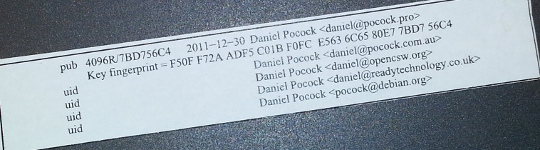
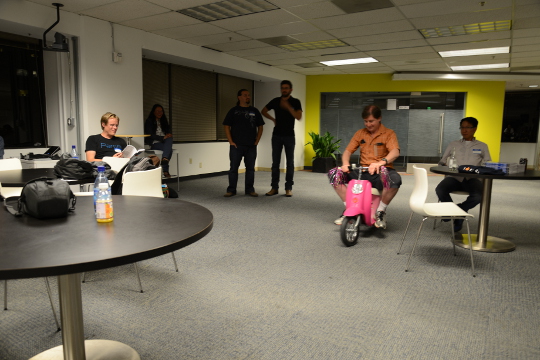
I've mentored a number of students in 2013, 2014 and 2015 for Debian and Ganglia and most of the companies I've worked with have run internships and graduate programs from time to time. GSoC 2015 has just finished and with all the excitement, many students are already asking what they can do to prepare and be selected for Outreachy or GSoC in 2016. My own observation is that the more time the organization has to get to know the student, the more confident they can be selecting that student. Furthermore, the more time that the student has spent getting to know the free software community, the more easily they can complete GSoC. Here I present a list of things that students can do to maximize their chance of selection and career opportunities at the same time. These tips are useful for people applying for GSoC itself and related programs such as GNOME's Outreachy or graduate placements in companies. Disclaimers There is no guarantee that Google will run the program again in 2016 or any future year until the Google announcement. There is no guarantee that any organization or mentor (including myself) will be involved until the official list of organizations is published by Google. Do not follow the advice of web sites that invite you to send pizza or anything else of value to prospective mentors. Following the steps in this page doesn't guarantee selection. That said, people who do follow these steps are much more likely to be considered and interviewed than somebody who hasn't done any of the things in this list. Understand what free software really is You may hear terms like free software and open source software used interchangeably. They don't mean exactly the same thing and many people use the term free software for the wrong things. Not all projects declaring themselves to be "free" or "open source" meet the definition of free software. Those that don't, usually as a result of deficiencies in their licenses, are fundamentally incompatible with the majority of software that does use genuinely free licenses. Google Summer of Code is about both writing and publishing your code and it is also about community. It is fundamental that you know the basics of licensing and how to choose a free license that empowers the community to collaborate on your code well after GSoC has finished. Please review the definition of free software early on and come back and review it from time to time. The The GNU Project / Free Software Foundation have excellent resources to help you understand what a free software license is and how it works to maximize community collaboration. Don't look for shortcuts There is no shortcut to GSoC selection and there is no shortcut to GSoC completion. The student stipend (USD $5,500 in 2014) is not paid to students unless they complete a minimum amount of valid code. This means that even if a student did find some shortcut to selection, it is unlikely they would be paid without completing meaningful work. If you are the right candidate for GSoC, you will not need a shortcut anyway. Are you the sort of person who can't leave a coding problem until you really feel it is fixed, even if you keep going all night? Have you ever woken up in the night with a dream about writing code still in your head? Do you become irritated by tedious or repetitive tasks and often think of ways to write code to eliminate such tasks? Does your family get cross with you because you take your laptop to Christmas dinner or some other significant occasion and start coding? If some of these statements summarize the way you think or feel you are probably a natural fit for GSoC. An opportunity money can't buy The GSoC stipend will not make you rich. It is intended to make sure you have enough money to survive through the summer and focus on your project. Professional developers make this much money in a week in leading business centers like New York, London and Singapore. When you get to that stage in 3-5 years, you will not even be thinking about exactly how much you made during internships. GSoC gives you an edge over other internships because it involves publicly promoting your work. Many companies still try to hide the potential of their best recruits for fear they will be poached or that they will be able to demand higher salaries. Everything you complete in GSoC is intended to be published and you get full credit for it. Imagine a young musician getting the opportunity to perform on the main stage at a rock festival. This is how the free software community works. It is a meritocracy and there is nobody to hold you back. Having a portfolio of free software that you have created or collaborated on and a wide network of professional contacts that you develop before, during and after GSoC will continue to pay you back for years to come. While other graduates are being screened through group interviews and testing days run by employers, people with a track record in a free software project often find they go straight to the final interview round. Register your domain name and make a permanent email address Free software is all about community and collaboration. Register your own domain name as this will become a focal point for your work and for people to get to know you as you become part of the community. This is sound advice for anybody working in IT, not just programmers. It gives the impression that you are confident and have a long term interest in a technology career. Choosing the provider: as a minimum, you want a provider that offers DNS management, static web site hosting, email forwarding and XMPP services all linked to your domain. You do not need to choose the provider that is linked to your internet connection at home and that is often not the best choice anyway. The XMPP foundation maintains a list of providers known to support XMPP. Create an email address within your domain name. The most basic domain hosting providers will let you forward the email address to a webmail or university email account of your choice. Configure your webmail to send replies using your personalized email address in the From header. Update your ~/.gitconfig file to use your personalized email address in your Git commits. Create a web site and blog Start writing a blog. Host it using your domain name. Some people blog every day, other people just blog once every two or three months. Create links from your web site to your other profiles, such as a Github profile page. This helps reinforce the pages/profiles that are genuinely related to you and avoid confusion with the pages of other developers. Many mentors are keen to see their students writing a weekly report on a blog during GSoC so starting a blog now gives you a head start. Mentors look at blogs during the selection process to try and gain insight into which topics a student is most suitable for. Create a profile on Github Github is one of the most widely used software development web sites. Github makes it quick and easy for you to publish your work and collaborate on the work of other people. Create an account today and get in the habbit of forking other projects, improving them, committing your changes and pushing the work back into your Github account. Github will quickly build a profile of your commits and this allows mentors to see and understand your interests and your strengths. In your Github profile, add a link to your web site/blog and make sure the email address you are using for Git commits (in the ~/.gitconfig file) is based on your personal domain. Start using PGP Pretty Good Privacy (PGP) is the industry standard in protecting your identity online. All serious free software projects use PGP to sign tags in Git, to sign official emails and to sign official release files. The most common way to start using PGP is with the GnuPG (GNU Privacy Guard) utility. It is installed by the package manager on most Linux systems. When you create your own PGP key, use the email address involving your domain name. This is the most permanent and stable solution. Print your key fingerprint using the gpg-key2ps command, it is in the signing-party package on most Linux systems. Keep copies of the fingerprint slips with you. This is what my own PGP fingerprint slip looks like. You can also print the key fingerprint on a business card for a more professional look. Using PGP, it is recommend that you sign any important messages you send but you do not have to encrypt the messages you send, especially if some of the people you send messages to (like family and friends) do not yet have the PGP software to decrypt them. If using the Thunderbird (Icedove) email client from Mozilla, you can easily send signed messages and validate the messages you receive using the Enigmail plugin. Get your PGP key signed Once you have a PGP key, you will need to find other developers to sign it. For people I mentor personally in GSoC, I'm keen to see that you try and find another Debian Developer in your area to sign your key as early as possible. Free software events Try and find all the free software events in your area in the months between now and the end of the next Google Summer of Code season. Aim to attend at least two of them before GSoC. Look closely at the schedules and find out about the individual speakers, the companies and the free software projects that are participating. For events that span more than one day, find out about the dinners, pub nights and other social parts of the event. Try and identify people who will attend the event who have been GSoC mentors or who intend to be. Contact them before the event, if you are keen to work on something in their domain they may be able to make time to discuss it with you in person. Take your PGP fingerprint slips. Even if you don't participate in a formal key-signing party at the event, you will still find some developers to sign your PGP key individually. You must take a photo ID document (such as your passport) for the other developer to check the name on your fingerprint but you do not give them a copy of the ID document. Events come in all shapes and sizes. FOSDEM is an example of one of the bigger events in Europe, linux.conf.au is a similarly large event in Australia. There are many, many more local events such as the Debian UK mini-DebConf in Cambridge, November 2015. Many events are either free or free for students but please check carefully if there is a requirement to register before attending. On your blog, discuss which events you are attending and which sessions interest you. Write a blog during or after the event too, including photos. Quantcast generously hosted the Ganglia community meeting in San Francisco, October 2013. We had a wild time in their offices with mini-scooters, burgers, beers and the Ganglia book. That's me on the pink mini-scooter and Bernard Li, one of the other Ganglia GSoC 2014 admins is on the right. Install Linux GSoC is fundamentally about free software. Linux is to free software what a tree is to the forest. Using Linux every day on your personal computer dramatically increases your ability to interact with the free software community and increases the number of potential GSoC projects that you can participate in. This is not to say that people using Mac OS or Windows are unwelcome. I have worked with some great developers who were not Linux users. Linux gives you an edge though and the best time to gain that edge is now, while you are a student and well before you apply for GSoC. If you must run Windows for some applications used in your course, it will run just fine in a virtual machine using Virtual Box, a free software solution for desktop virtualization. Use Linux as the primary operating system. Here are links to download ISO DVD (and CD) images for some of the main Linux distributions: If you are nervous about getting started with Linux, install it on a spare PC or in a virtual machine before you install it on your main PC or laptop. Linux is much less demanding on the hardware than Windows so you can easily run it on a machine that is 5-10 years old. Having just 4GB of RAM and 20GB of hard disk is usually more than enough for a basic graphical desktop environment although having better hardware makes it faster. Your experiences installing and running Linux, especially if it requires some special effort to make it work with some of your hardware, make interesting topics for your blog. Decide which technologies you know best Personally, I have mentored students working with C, C++, Java, Python and JavaScript/HTML5. In a GSoC program, you will typically do most of your work in just one of these languages. From the outset, decide which language you will focus on and do everything you can to improve your competence with that language. For example, if you have already used Java in most of your course, plan on using Java in GSoC and make sure you read Effective Java (2nd Edition) by Joshua Bloch. Decide which themes appeal to you Find a topic that has long-term appeal for you. Maybe the topic relates to your course or maybe you already know what type of company you would like to work in. Here is a list of some topics and some of the relevant software projects:


  • System administration, servers and networking: consider projects involving monitoring, automation, packaging. Ganglia is a great community to get involved with and you will encounter the Ganglia software in many large companies and academic/research networks. Contributing to a Linux distribution like Debian or Fedora packaging is another great way to get into system administration.
  • Desktop and user interface: consider projects involving window managers and desktop tools or adding to the user interface of just about any other software.
  • Big data and data science: this can apply to just about any other theme. For example, data science techniques are frequently used now to improve system administration.
  • Business and accounting: consider accounting, CRM and ERP software.
  • Finance and trading: consider projects like R, market data software like OpenMAMA and connectivity software (Apache Camel)
  • Real-time communication (RTC), VoIP, webcam and chat: look at the JSCommunicator or the Jitsi project
  • Web (JavaScript, HTML5): look at the JSCommunicator
Before the GSoC application process begins, you should aim to learn as much as possible about the theme you prefer and also gain practical experience using the software relating to that theme. For example, if you are attracted to the business and accounting theme, install the PostBooks suite and get to know it. Maybe you know somebody who runs a small business: help them to upgrade to PostBooks and use it to prepare some reports. Make something Make some small project, less than two week's work, to demonstrate your skills. It is important to make something that somebody will use for a practical purpose, this will help you gain experience communicating with other users through Github. For an example, see the servlet Juliana Louback created for fixing phone numbers in December 2013. It has since been used as part of the Lumicall web site and Juliana was selected for a GSoC 2014 project with Debian. There is no better way to demonstrate to a prospective mentor that you are ready for GSoC than by completing and publishing some small project like this yourself. If you don't have any immediate project ideas, many developers will also be able to give you tips on small projects like this that you can attempt, just come and ask us on one of the mailing lists. Ideally, the project will be something that you would use anyway even if you do not end up participating in GSoC. Such projects are the most motivating and rewarding and usually end up becoming an example of your best work. To continue the example of somebody with a preference for business and accounting software, a small project you might create is a plugin or extension for PostBooks. Getting to know prospective mentors Many web sites provide useful information about the developers who contribute to free software projects. Some of these developers may be willing to be a GSoC mentor. For example, look through some of the following: Getting on the mentor's shortlist Once you have identified projects that are interesting to you and developers who work on those projects, it is important to get yourself on the developer's shortlist. Basically, the shortlist is a list of all students who the developer believes can complete the project. If I feel that a student is unlikely to complete a project or if I don't have enough information to judge a student's probability of success, that student will not be on my shortlist. If I don't have any student on my shortlist, then a project will not go ahead at all. If there are multiple students on the shortlist, then I will be looking more closely at each of them to try and work out who is the best match. One way to get a developer's attention is to look at bug reports they have created. Github makes it easy to see complaints or bug reports they have made about their own projects or other projects they depend on. Another way to do this is to search through their code for strings like FIXME and TODO. Projects with standalone bug trackers like the Debian bug tracker also provide an easy way to search for bug reports that a specific person has created or commented on. Once you find some relevant bug reports, email the developer. Ask if anybody else is working on those issues. Try and start with an issue that is particularly easy and where the solution is interesting for you. This will help you learn to compile and test the program before you try to fix any more complicated bugs. It may even be something you can work on as part of your academic program. Find successful projects from the previous year Contact organizations and ask them which GSoC projects were most successful. In many organizations, you can find the past students' project plans and their final reports published on the web. Read through the plans submitted by the students who were chosen. Then read through the final reports by the same students and see how they compare to the original plans. Start building your project proposal now Don't wait for the application period to begin. Start writing a project proposal now. When writing a proposal, it is important to include several things:
  • Think big: what is the goal at the end of the project? Does your work help the greater good in some way, such as increasing the market share of Linux on the desktop?
  • Details: what are specific challenges? What tools will you use?
  • Time management: what will you do each week? Are there weeks where you will not work on GSoC due to vacation or other events? These things are permitted but they must be in your plan if you know them in advance. If an accident or death in the family cut a week out of your GSoC project, which work would you skip and would your project still be useful without that? Having two weeks of flexible time in your plan makes it more resilient against interruptions.
  • Communication: are you on mailing lists, IRC and XMPP chat? Will you make a weekly report on your blog?
  • Users: who will benefit from your work?
  • Testing: who will test and validate your work throughout the project? Ideally, this should involve more than just the mentor.
If your project plan is good enough, could you put it on Kickstarter or another crowdfunding site? This is a good test of whether or not a project is going to be supported by a GSoC mentor. Learn about packaging and distributing software Packaging is a vital part of the free software lifecycle. It is very easy to upload a project to Github but it takes more effort to have it become an official package in systems like Debian, Fedora and Ubuntu. Packaging and the communities around Linux distributions help you reach out to users of your software and get valuable feedback and new contributors. This boosts the impact of your work. To start with, you may want to help the maintainer of an existing package. Debian packaging teams are existing communities that work in a team and welcome new contributors. The Debian Mentors initiative is another great starting place. In the Fedora world, the place to start may be in one of the Special Interest Groups (SIGs). Think from the mentor's perspective After the application deadline, mentors have just 2 or 3 weeks to choose the students. This is actually not a lot of time to be certain if a particular student is capable of completing a project. If the student has a published history of free software activity, the mentor feels a lot more confident about choosing the student. Some mentors have more than one good student while other mentors receive no applications from capable students. In this situation, it is very common for mentors to send each other details of students who may be suitable. Once again, if a student has a good Github profile and a blog, it is much easier for mentors to try and match that student with another project. GSoC logo generic Conclusion Getting into the world of software engineering is much like joining any other profession or even joining a new hobby or sporting activity. If you run, you probably have various types of shoe and a running watch and you may even spend a couple of nights at the track each week. If you enjoy playing a musical instrument, you probably have a collection of sheet music, accessories for your instrument and you may even aspire to build a recording studio in your garage (or you probably know somebody else who already did that). The things listed on this page will not just help you walk the walk and talk the talk of a software developer, they will put you on a track to being one of the leaders. If you look over the profiles of other software developers on the Internet, you will find they are doing most of the things on this page already. Even if you are not selected for GSoC at all or decide not to apply, working through the steps on this page will help you clarify your own ideas about your career and help you make new friends in the software engineering community.

Norbert Preining: Updates for OSX 10.11 El Capitan: cjk-gs-integrate and jfontmaps 20151002.0

Now that OSX 10.11 El Capitan is released and everyone is eagerly updating, in cooperation with the colleagues from the Japanese TeX world we have released new versions of the jfontmaps and cjk-gs-integrate packages. With these two packages in TeX Live, El Capitan users can take advantage of the newly available fonts in the Japanese TeX engines ((u)ptex et al), and directly in Ghostscript. cjk-ghostscript For jfontmaps the changes were minimal, Yusuke Terada fixed a mismatch in ttc index numbers for some fonts. Without this fix, Hiragino Interface is used instead of HiraginoSans-W3 and -W6. On the other hand, cjk-gs-integrate has seen a lot more changes: For more explanations concerning how to run cjk-gs-integrate, please see the dedicated page: CJK fonts and Ghostscript integration. For feedback and bug reports, please use the github project pages: jfontmaps, cjk-gs-support. Both packages should arrive in your local TeX Live CTAN repository within a day or two. We hope that with this users of El Capitan can use their fonts to the full extend. Enjoy.

1 October 2015

Mike Gabriel: My FLOSS activities in August/September 2015

Here comes my "monthly" FLOSS report for August and September 2015. As 50% of August 2015 had been dedicated to taking some time off (spending time in Sweden with the family), it happened that even more workload had to be processed in September 2015. Received Sponsorship My monthly 8h portion of working for the Debian LTS project I had to dispatch from August into September. Thus, I received 16h of paid work for working on Debian LTS in September 2015. For details, see below. Thanks to Raphael Hertzog for having me on the team [1]. Thanks to all the people and companies sponsoring the Debian LTS Team's work. The development of GOsa Plugin SchoolManager (for details, see below) was done on contract for a school in Nothern Germany. The code will be released under the same license as the GOsa software itself. Completion of MATE 1.10 in Debian testing/unstable and Ubuntu 15.10 In the first half of September all MATE 1.10 packages finally landed in Debian testing (aka stretch). Martin Wimpress handled most of the packaging changes, whereas my main job was being reviewer and uploader of his efforts. Thanks to John Paul Adrian Glaubitz for jumping in as reviewer and uploader during my vacation time. read more

Clint Adams: I'm a broken man on a Halifax pier, the last of Barrett's Privateers

shroomies

30 September 2015

Chris Lamb: Free software activities in September 2015

Inspired by Rapha l Hertzog, here is a monthly update covering a large part of what I have been doing in the free software world:
Debian The Reproducible Builds project was also covered in depth on LWN as well as in Lunar's weekly reports (#18, #19, #20, #21, #22).
Uploads
  • redis A new upstream release, as well as overhauling the systemd configuration, maintaining feature parity with sysvinit and adding various security hardening features.
  • python-redis Attempting to get its Debian Continuous Integration tests to pass successfully.
  • libfiu Ensuring we do not FTBFS under exotic locales.
  • gunicorn Dropping a dependency on python-tox now that tests are disabled.


RC bugs


I also filed FTBFS bugs against actdiag, actdiag, bangarang, bmon, bppphyview, cervisia, choqok, cinnamon-control-center, clasp, composer, cpl-plugin-naco, dirspec, django-countries, dmapi, dolphin-plugins, dulwich, elki, eqonomize, eztrace, fontmatrix, freedink, galera-3, golang-git2go, golang-github-golang-leveldb, gopher, gst-plugins-bad0.10, jbofihe, k3b, kalgebra, kbibtex, kde-baseapps, kde-dev-utils, kdesdk-kioslaves, kdesvn, kdevelop-php-docs, kdewebdev, kftpgrabber, kile, kmess, kmix, kmldonkey, knights, konsole4, kpartsplugin, kplayer, kraft, krecipes, krusader, ktp-auth-handler, ktp-common-internals, ktp-text-ui, libdevice-cdio-perl, libdr-tarantool-perl, libevent-rpc-perl, libmime-util-java, libmoosex-app-cmd-perl, libmoosex-app-cmd-perl, librdkafka, libxml-easyobj-perl, maven-dependency-plugin, mmtk, murano-dashboard, node-expat, node-iconv, node-raw-body, node-srs, node-websocket, ocaml-estring, ocaml-estring, oce, odb, oslo-config, oslo.messaging, ovirt-guest-agent, packagesearch, php-svn, php5-midgard2, phpunit-story, pike8.0, plasma-widget-adjustableclock, plowshare4, procps, pygpgme, pylibmc, pyroma, python-admesh, python-bleach, python-dmidecode, python-libdiscid, python-mne, python-mne, python-nmap, python-nmap, python-oslo.middleware, python-riemann-client, python-traceback2, qdjango, qsapecng, ruby-em-synchrony, ruby-ffi-rzmq, ruby-nokogiri, ruby-opengraph-parser, ruby-thread-safe, shortuuid, skrooge, smb4k, snp-sites, soprano, stopmotion, subtitlecomposer, svgpart, thin-provisioning-tools, umbrello, validator.js, vdr-plugin-prefermenu, vdr-plugin-vnsiserver, vdr-plugin-weather, webkitkde, xbmc-pvr-addons, xfsdump & zanshin.

Norbert Preining: 6 years in Japan

Exactly 6 years ago, on October 1, 2009, I started my work at the Japan Advanced Institute of Science and Technology (JAIST), arriving the previous day in a place not completely unknown, but with a completely different outlook: I had a position as Associate Professor, and somehow was looking forward to an interesting and challenging time. japan-flag 6 years later I am still here at the JAIST, but things have changed considerably, and my future is even less clear than 6 years ago. So it is time to reflect a bit about the last years. The biggest achievement My biggest achievement in these 6 years is probably that I managed to learn Japanese to a degree that I can teach in Japanese (math, logic, etc), can read Japanese books to a certain degree, and have generally no problem communicating in daily life. Said that, there is still a long way to go. Reading, and much more writing, is still requiring concentration and power, far from the natural flow in my other languages. While talking feels rather natural, the complexity of the written language is a huge hurdle. But this is probably the good, the high point of the 6 years, a great challenge, that keeps my mind busy and working and challenged over long time, with still more to do. The happiest thing Many events here in Japan were of great fun and enjoyment for me. The rich culture, paired with a spectacular love for traditional handicraft I haven t seen anywhere else, is a guarantee for enjoyable and intellectually stimulating activities. But the biggest joy of my time here of course was that I found a lovely, beautiful, and caring wife. Not knowing the challenges of an international marriage, I was caught without preparation, and so we had (and still have) rough times due to the cultural differences, and different expectations. But this is what makes life interesting, and so I am always grateful for this chance. Whatever happens in the future, she will be part of my decisions and the center of my life. The biggest disappointment Of course, when you live in a country for some time, you learn to know the highs and lows. As someone interested in politics and social systems, Japan is a pain in the butt in many respects. But the biggest disappointment was in a different area: Working environment. While I love my work and had great surroundings, there is something that always is present in the background: Foreigners here are not considered assets, but embellishment. Meaning that they are the first ones to loose their jobs when times are difficult, meaning that they are not considered as full members. After many years at a university here, and with no outlook on a job after March, I can only say, Japan is a country of Japanese first , especially when it comes to jobs. Of course, other countries are not that different, but looking at the average mixture of nationalities at universities in Europe or the US, and comparing them to Japanese universities, a bleak image is arising. I enjoyed my time here, I worked hard and did a lot for my university, but the economically hard times make it necessary to change things, and that means getting rid of foreigners. That is the reason why the work environment is the biggest disappointment in these years. Future The future is unclear, as it always was. The dire fate of many researchers. Being in my 40ies without a permanent position and a family, I am forced to think hard what my next options are. The hide-and-seek games of Japanese (and other) universities seem to me less and less an option. Sad as it is, after having worked 20+ years in academics, having done some interesting (for me) research and having managed to secure a name in our community, I am not sure where my future is. Continuing on definite contracts does not sound like a great option for me. Several things for the future come to my mind: starting my own business, work as programmer (maybe Google still wants me after I rejected them 2 years ago), work as mountain guide (have done that for some years before going to Japan). All of that is possible, but my loosing the time to research will always be a pain, since I enjoy cracking my brain on some complicated and deep logical problems. Whatever comes, I will take it as a chance to learn new things. And in one way or another it will work out, I hope.

29 September 2015

Norbert Preining: Multi-boot stick update: TAILS 1.6, SysresCD 4.6.0, GParted 0.23, Debian 8.2

Updates for my multi-boot/multi-purpose USB stick: All components have been updated to the latest versions and I have confirmed that all of them still boot properly although changes in the grub.cfg file are necessary. So going through these explanations one will end up with a usable USB stick that can boot you into TAILS, System Rescue CD, GNU Parted Live CD, GRML, and also can boot into an installation of Debian 8.2 Jessie installation. All this while still being able to use the USB stick as normal media. multi-usb-disk Since there have been a lot of updates, and also changes in the setup and grub config file, I include the full procedure here, that is, merging and updating these previous posts: USB stick with Tails and SystemRescueCD, Tails 1.2.1, Debian jessie installer, System Rescue CD on USB, USB stick update: TAILS 1.4, GParted 0.22, SysResCD 4.5.2, Debian Jessie, and USB stick update: Debian is back, plus GRML. Let us repeat some things from the original post concerning the wishlist and the main players: I have a long wishlist of items a boot stick should fulfill Requirements A USB stick, the iso images of TAILS 1.6, SystemRescueCD 4.6.0, GParted Lice CD 0.23.0, GRML 2014.11, and some tool to access iso images, for example ISOmaster (often available from your friendly Linux distribution). I assume that you have already an USB stick prepared as described previously. If this is not the case, please go there and follow the section on preparing your usb stick. Three types of boot options We will employ three different approaches to boot special systems: the one is directly from an iso image (easiest, simple to update), the other via extraction of the necessary kernels and images (bit painful, needs some handwork), and the last one is a mixture necessary to get Debian booting (most painful, needs additional downloads and handwork). At the moment we have the following status with respect to boot methods: Booting from ISO image Grub has gained quite some time ago the ability to boot directly from an ISO image. In this case the iso image is mounted via loopback, and the kernel and initrd are specified relatively to the iso image root. This system makes it extremely easy to update the respective boot option: just drop the new iso image onto the USB stick, and update the isofile setting. One could even use some -latest method, but I prefer to keep the exact name. For both SystemRescueCD, GNOME Partition Live CD, and GRML, just drop the iso files into /boot/iso/, in my case /boot/iso/systemrescuecd-x86-4.6.0.iso and /boot/iso/gparted-live-0.23.0-1-i586.iso. After that, entries like the following have to be added to grub.cfg. For the full list see grub.cfg:

submenu "System Rescue CD 4.6.0 (via ISO) ---> "  
  set isofile="/boot/iso/systemrescuecd-x86-4.6.0.iso"
  menuentry "SystemRescueCd (64bit, default boot options)"  
        set gfxpayload=keep
        loopback loop (hd0,1)$isofile
        linux   (loop)/isolinux/rescue64 isoloop=$isofile
        initrd  (loop)/isolinux/initram.igz
   
  ...
 
 
submenu "GNU/Gnome Parted Live CD 0.23.0 (via ISO) ---> "  
  set isofile="/boot/iso/gparted-live-0.23.0-1-i586.iso"
  menuentry "GParted Live (Default settings)" 
    loopback loop (hd0,1)$isofile
    linux (loop)/live/vmlinuz boot=live union=overlay username=user config components quiet noswap noeject  ip= net.ifnames=0 nosplash findiso=$isofile
    initrd (loop)/live/initrd.img
   
  ...
 
 
submenu "GRML 2014.11 ---> "  
  menuentry "Grml Rescue System 64bit"  
        iso_path="/boot/iso/grml64-full_2014.11.iso"
        export iso_path
        loopback loop (hd0,1)$iso_path
        set root=(loop)
        kernelopts=" ssh=foobarbaz toram  "
        export kernelopts
        configfile /boot/grub/loopback.cfg
    
 
Note the added isoloop=$isofile and findiso=$isofile that helps the installer find the iso images. Booting via extraction of kernels and images This is a bit more tedious, but still not too bad. Installation of TAILS files Assuming you have access to the files on the TAILS CD via the directory ~/tails, execute the following commands:
mkdir -p /usbstick/boot/tails
cp -a ~/tails/live/* /usbstick/boot/tails/
The grub.cfg entries look now similar to the following:
submenu "TAILS Environment 1.6 ---> "  
  menuentry "Tails64 Live System"  
        linux   /boot/tails/vmlinuz2 boot=live live-media-path=/boot/tails config live-media=removable nopersistent noprompt timezone=Etc/UTC block.events_dfl_poll_msecs=1000 splash noautologin module=Tails
        initrd  /boot/tails/initrd2.img
 
   
  ...
 
The important part here is the live-media-path=/boot/tails, otherwise TAILS will not find the correct files for booting. The rest of the information was extracted from the boot setup of TAILS itself. Mixture of iso image and extraction Debian jessie As mentioned in the previous post, booting Debian/Jessie installation images via any method laid out above didn t work, since the iso images is never found. It turned out that the current installer iso images do not contain the iso-scan package, which is responsible for searching and loading of iso images. But with a small trick one can overcome this: One needs to replace the initrd that is on the ISO image with one that contains the iso-scan package. And we do not need to create these initrd by ourselves, but simply use the ones from hd-media type installer. I downloaded the following four gzipped initrds from one of the Debian mirrors: i386/initrd text mode, i386/initrd gui mode, amd64/initrd text mode, amd64/initrd gui mode, and put them into the USB stick s boot/debian/install.386, boot/debian/install.386/gtk, boot/debian/install.amd, boot/debian/install.amd/gtk, respectively. Finally, I added entries similar to this one (rest see the grub.cfg file):
submenu "Debian 8.2 Jessie NetInstall ---> "  
    set isofile="/boot/iso/firmware-8.2.0-amd64-i386-netinst.iso"
    menuentry '64 bit Install'  
        set background_color=black
        loopback loop (hd0,1)$isofile
        linux    (loop)/install.amd/vmlinuz iso-scan/ask_second_pass=true iso-scan/filename=$isofile vga=788 -- quiet 
        initrd   /boot/debian/install.amd/initrd.gz
     
    ...
 
Again an important point, don t forget the two kernel command line options: iso-scan/ask_second_pass=true iso-scan/filename=$isofile, otherwise you probably will have to make the installer scan all disks and drives completely, which might take ages. Current status of USB stick Just to make sure, the usb stick should contain at the current stage the following files:
/boot/
    iso/
        firmware-8.2.0-amd64-i386-netinst.iso
        gparted-live-0.23.0-1-i586.iso
        grml64-full_2014.11.iso
        systemrescuecd-x86-4.6.0.iso
    tails/
        vmlinuz Tails.module initrd.img ....
    grub/
        fonts/
            lots of files
        locale/
            lots of files
        x86_64-efi/
            lots of files
        font.pf2
        grubenv
        grub.cfg            *this file we create in the next step!!*
/EFI
    BOOT/
        BOOTX64.EFI
The Grub config file grub.cfg The final step is to provide a grub config file in /usbstick/boot/grub/grub.cfg. I created one by looking at the isoboot.cfg files both in the SystemRescueCD, TAILS iso images, GParted iso image, and the Debian/Jessie image, and converting them to grub syntax. Excerpts have been shown above in the various sections. I spare you all the details, grab a copy here: grub.cfg Conclusion That s it. Now you can anonymously provide data about your evil government, rescue your friends computer, fix a forgotten Windows password, and above all, install a proper free operating system. If you have any comments, improvements or suggestions, please drop me a comment. I hope this helps a few people getting a decent USB boot stick running. Enjoy.

Erich Schubert: Ubuntu broke Java because of Unity

Unity, that is the Ubuntu user interface, that nobody else uses. Since it is a Ubuntu-only thing, few applications have native support for its OSX-style hipster "global" menus. For Java, someone once wrote a hack called java-swing-ayatana, or "jayatana", that is preloaded into the JVM via the environment variable JAVA_TOOL_OPTIONS. The hacks seems to be unmaintained now. Unfortunately, this hack seems to be broken now (Google has thousands of problem reports), and causes a NullPointerException or similar crashes in many applications; likely due to a change in OpenJDK 8. Now all Java Swing applications appear to be broken for Ubuntu users, if they have the jayatana package installed. Congratulations! And of couse, you see bug reports everywhere. Matlab seems to no longer work for some, NetBeans appears to have issues, and I got a number of bug reports on ELKI because of Ubuntu. Thank you, not.

Next.

Previous.