Search Results: "spa"

29 December 2015

Ritesh Raj Sarraf: Device Mapper Multipath status in Debian

For Debian Jessie, the multipath support relied on sysvinit scripts. So, if you were using systemd, the level of testing would have been minimal. At DebConf15, I got to meet many people whom I'd worked with, over emails, over the years. With every person, my ask was to use the SAN Storage stack in a test environement, and report bugs early. Not after the next release. This applies also to the usual downstream distribution projects. That said, today, I spent time building a Root File System on SAN setup using the following stack, of the versions that'd be part of the next stable release:
  • Linux
  • Open-iSCSI Initiator
  • Device Mapper Multipath
  • LIO Target
I'm pretty happy that nothing much has changed in terms of setup, from what has already been documented in README.Debian files. The systemd integration has been very transparent. But that is my first hand experience. I'm request all users of the above mentioned stack to build the setup and report issues, if any. Please do not wait for the last minute of the release/freeze.
root@debian-sanboot:~# systemctl status -l multipath-tools
  multipathd.service - Device-Mapper Multipath Device Controller
   Loaded: loaded (/lib/systemd/system/multipathd.service; enabled; vendor preset: enabled)
   Active: active (running) since Tue 2015-12-29 18:38:58 IST; 1min 23s ago
  Process: 246 ExecStartPre=/sbin/modprobe dm-multipath (code=exited, status=0/SUCCESS)
 Main PID: 260 (multipathd)
   Status: "running"
   CGroup: /system.slice/multipathd.service
            260 /sbin/multipathd -d -s
Dec 29 18:39:04 debian-sanboot multipathd[260]: sdb [8:16]: path added to devmap sanroot
Dec 29 18:39:04 debian-sanboot multipathd[260]: sdc: add path (uevent)
Dec 29 18:39:04 debian-sanboot multipathd[260]: sanroot: load table [0 16777216 multipath 0 0 3 1 service-time 0 1 1 8:16 1 service-time 0 1 1 8:0 1 service-time 0 1 1 8:32 1]
Dec 29 18:39:04 debian-sanboot multipathd[260]: sdc [8:32]: path added to devmap sanroot
Dec 29 18:39:04 debian-sanboot multipathd[260]: sdd: add path (uevent)
Dec 29 18:39:04 debian-sanboot multipathd[260]: sanroot: load table [0 16777216 multipath 0 0 4 1 service-time 0 1 1 8:16 1 service-time 0 1 1 8:32 1 service-time 0 1 1 8:48 1 service-time 0 1 1 8:0 1]
Dec 29 18:39:04 debian-sanboot multipathd[260]: sdd [8:48]: path added to devmap sanroot
Dec 29 18:39:13 debian-sanboot multipathd[260]: sanroot: sda - directio checker reports path is up
Dec 29 18:39:13 debian-sanboot multipathd[260]: 8:0: reinstated
Dec 29 18:39:13 debian-sanboot multipathd[260]: sanroot: remaining active paths: 4
root@debian-sanboot:~# multipath -ll
sanroot (36001405ead943c8222140268e019ba49) dm-0 LIO-ORG,IBLOCK
size=8.0G features='0' hwhandler='0' wp=rw
 -+- policy='service-time 0' prio=1 status=active
   - 4:0:0:0 sdb 8:16 active ready running
 -+- policy='service-time 0' prio=1 status=enabled
   - 3:0:0:0 sdc 8:32 active ready running
 -+- policy='service-time 0' prio=1 status=enabled
   - 5:0:0:0 sdd 8:48 active ready running
 -+- policy='service-time 0' prio=1 status=enabled
   - 2:0:0:0 sda 8:0  active ready running
root@debian-sanboot:~# iscsiadm -m session
tcp: [1] 172.16.20.40:3260,1 iqn.2003-01.org.linux-iscsi.debian.sanboot (non-flash)
tcp: [2] 172.16.20.41:3260,1 iqn.2003-01.org.linux-iscsi.debian.sanboot (non-flash)
tcp: [3] 172.16.20.42:3260,1 iqn.2003-01.org.linux-iscsi.debian.sanboot (non-flash)
tcp: [4] 172.16.20.43:3260,1 iqn.2003-01.org.linux-iscsi.debian.sanboot (non-flash)
root@debian-sanboot:~# mount   grep sanroot
/dev/mapper/sanroot on / type ext4 (rw,relatime,errors=remount-ro,stripe=8191,data=ordered)

Categories:

Keywords:

Like:

Norbert Preining: CafeOBJ 1.5.5 released

Yesterday we have released CafeOBJ 1.5.5 with a long list of changes, and many more internal changes. Documentation pages have been updated with the latest reference manual (PDF, Html) as well as some new docs on CITP (in Japanese for now) and tutorials. cafeobj-logo To quote from our README:
CafeOBJ is a new generation algebraic specification and programming language. As a direct successor of OBJ, it inherits all its features (flexible mix-fix syntax, powerful typing system with sub-types, and sophisticated module composition system featuring various kinds of imports, parameterised modules, views for instantiating the parameters, module expressions, etc.) but it also implements new paradigms such as rewriting logic and hidden algebra, as well as their combination.
Changes Availability Binary packages for Windows, MacOS, and Linux have been built, and can be found at the CafeOBJ download page. The source code can also be found on the download page, or directly from here: cafeobj-1.5.5.tar.gz. The CafeOBJ Debian package will be updated soon. Macports file has also been updated, please see the above download/install page for details how to add our sources to your macport. Bug reports If you find a bug, have suggestions, or complains, please open an issue at the issue tracker for CafeOBJ. For other inquiries, please use info@cafeobj.org

28 December 2015

Dirk Eddelbuettel: BH 1.60.0-1

A new release of BH is now on CRAN. BH provides a large part of the Boost C++ libraries as a set of template headers for use by R, possibly with Rcpp as well as other packages. This release both upgrades the version of Boost to the recently-released upstream version Boost 1.60.0 and also adds Boost Phoenix. A brief summary of changes from the NEWS file is below.
Changes in version 1.60.0-1 (2015-12-24)
  • Upgraded to Boost 1.60 installed directly from upstream source
  • Added Boost phoenix as discussed in GH ticket #19
Courtesy of CRANberries, there is also a diffstat report for the most recent release. Comments and suggestions are welcome via the mailing list or the issue tracker at the GitHubGitHub repo.

Edited on 2015-12-30: Typo in titled corrected, it is BH 1.60.0-1

This post by Dirk Eddelbuettel originated on his Thinking inside the box blog. Please report excessive re-aggregation in third-party for-profit settings.

Carl Chenet: Parse your rss feed and post to Twitter with feed2tweet

What s more important today for a website than relaying your new blog posts to the social networks, especially Twitter ? Lots of unmaintained or unreliable third-parties web services offer this feature. I tried and was really disappointed using them. Feed2tweet, forked from rss2twitter, now offer a self-hosted, documented, easy-to-read Python application to automatically transfer the new posts in your RSS feed to the social network Twitter. Have a look at the official documentation on Readthedocs in order to install, configure and use Feed2tweet. It is as easy as creating a Twitter app, then writing a feed2tweet.ini file with the following lines:
[twitter]
consumer_key=ml9jaiBnf3pmU9uIrKNIxAr3v
consumer_secret=8Cmljklzerkhfer4hlj3ljl2hfvc123rezrfsdctpokaelzerp
access_token=213416590-jgJnrJG5gz132nzerl5zerwi0ahmnwkfJFN9nr3j
access_token_secret=3janlPMqDKlunJ4Hnr90k2bnfk3jfnwkFjeriFZERj32Z
  • Une erreur est survenue ; le flux est probablement indisponible. Veuillez r essayer plus tard.
uri: https://www.mycoolwebsite.com/rss [hashtaglist] several_words_hashtags_list: severalwordshashtaglist.txt
Then just launch feed2tweet:
$ feed2tweet -c /path/to/feed2tweet.ini
The first version 0.1 is now available from Github. If it helps you, Github stars are appreciated :)

27 December 2015

Gregor Herrmann: RC bugs 2015/51-52

the upload of perl 5.22 to unstable some days ago provided ample opportunity to fix some new RC bugs. here's the list of my work:

Gregor Herrmann: RC bugs 2015/51-52

the upload of perl 5.22 to unstable some days ago provided ample opportunity to fix some new RC bugs. here's the list of my work:

Benjamin Mako Hill: Trust your technolust.

"Trust your technolust." from Hackers (1995)If you ve ever lusted for a Trust your technolust. poster like the one seen in background of the climactic sequence in the 1995 film Hackers, you re in luck. Just print this PDF template (also an SVG) onto a piece of yellow US letter paper. Although I m not even the first person I know to reproduce the poster, I did spend some time making sure that I got the typeface, kerning, wordspacing, and placement on the page just right. I figured I would share.

25 December 2015

Norbert Preining: Plex Home Theater becomes OpenPHT release 1.5.0 for Debian sid and jessie

The nice guys from RasPlex have forked the abandoned Plex Home Theater into OpenPHT (github, Plex forum) and updated it with several improvements. Plex itself is now developing a new player called Plex Media Player, which unfortunately uses closed source components. I tried to build also the Plex Media Player for Debian, but a hitherto unreleased Qt versions is necessary, so I gave up for now. So here is a new built of OpenPHT for Debian/sid and jessie, amd64 and i386. This new package conflicts with the old plexhometheater. plex-debian-new Note also that the lines for sources.list have changed again. I will also remove the builds of plexhometheater from my server soon. sid and testing For sid use the following lines:
deb http://www.preining.info/debian/ openpht-sid main
deb-src http://www.preining.info/debian/ openpht-sid main
You can also grab the binary for amd64 directly here for amd64 and i386, you can get the source package with
dget http://www.preining.info/debian/pool/main/o/openpht/openpht_1.5.0.502-1.dsc
jessie For the stable release jessie, use the following lines:
deb http://www.preining.info/debian/ openpht-jessie main
deb-src http://www.preining.info/debian/ openpht-jessie main
You can also grab the binary for amd64 directly here for amd64 and i386, you can get the source package with
dget http://www.preining.info/debian/pool/main/o/openpht/openpht_1.5.0.502-1~bpo8+1.dsc
The release file and changes file are signed with my official Debian key 0x860CDC13. Now be ready for enjoying the next movie!

22 December 2015

Ian Wienand: Platform bootstrap for OpenStack Infrastructure

This is a terse guide on bootstrapping virtual-machine images for OpenStack infrastructure, with the goal of adding continuous-integration support for new platforms. It might also be handy if you are trying to replicate the upstream CI environment. It covers deployment to Rackspace for testing; Rackspace is one of the major providers of capacity for the OpenStack Infrastructure project, so it makes a good place to start when building up your support story. Firstly, get an Ubuntu Trusty environment to build the image in (other environments, like CentOS or Fedora, probably work -- but take this step to minimise differences to what the automated machinery of what upstream does). You want a fair bit of memory, and plenty of disk-space. The tool used for building virtual-machine images is diskimage-builder. In short, it takes a series of elements, which are really just scripts run in different phases of the build process. I'll describe building a Fedora image, since that's been my focus lately. We will use a fedora-minimal element -- this means the system is bootstrapped from nothing inside a chroot environment, before eventually being turned into a virtual-machine image (contrast this to the fedora element, which bases itself off the qcow2 images provided by the official Fedora cloud project). Thus you'll need a few things installed on the Ubuntu host to deal with bootstrapping a Fedora chroot
apt-get install yum yum-utils python-lzma
You will hit stuff like that python-lzma dependency on this road-less-travelled -- technically it is a bug that yum packages on Ubuntu don't depend on it; without it you will get strange yum errors about unsupported compression. At this point, you can bootstrap your diskimage-builder environment. You probably want diskimage-builder from git, and then build up a virtualenv for your support bits and pieces.
git clone git://git.openstack.org/openstack/diskimage-builder
virtualenv dib_env
. dib_env/bin/activate
pip install dib-utils
dib-utils is a small part of diskimage-builder that is split-out; don't think too much about it. While diskimage-builder is responsible for the creation of the basic image, there are a number of elements provided by the OpenStack project-config repository that bootstrap the OpenStack environment. This does a lot of stuff, including caching all git trees (so CI jobs aren't cloning everything constantly) and running puppet setup.
git clone git://git.openstack.org/openstack-infra/project-config
There's one more trick required for building the VHD images that Rackspace requires; make sure you install the patched vhd-util as described in the script help. At this point, you can probably build an image. Here's something approximating what you will want to do
break=after-error \
TMP_DIR=~/tmp \
ELEMENTS_PATH=~/project-config/nodepool/elements \
DIB_DEV_USER_PASSWORD="password"  DIB_DEV_USER_PWDLESS_SUDO=1 \
DISTRO=23 \
./bin/disk-image-create -x --no-tmpfs -t vhd \
   fedora-minimal vm devuser simple-init \
   openstack-repos puppet nodepool-base node-devstack
To break some of this down This goes and does its thing; it will take about 20 minutes. Depending on how far your platform diverges from the existing support, it will require a lot of work to get everything working so you can get an image out the other side. To see a rough example of what should be happening, see the logs of the official image builds that happen for a variety of platforms. At some point, you should get a file image.vhd which is now ready to be deployed. The only reasonable way to do this is with shade. You can quickly grab this into the virtualenv we created before
pip install shade
Now you'll need to setup a clouds.yaml file to give yourself the permissions to upload the image. It should look something like
clouds:
  rax:
    profile: rackspace
    auth:
       username: your_rax_username
       password: your_rax_password
       project_id: your_rax_accountnum
    regions:
    - IAD
You should know your user-name and password (whatever you log into the website with), and when you login to Rackspace your project_id value is listed in the drop-down box labeled with your username as Account #. shade has no UI as such, so a simple script will do the upload.
import shade
shade.simple_logging(debug=True)
cloud = shade.openstack_cloud(cloud='rax')
image = cloud.create_image('image-name', filename='image.vhd', wait=True)
Now wait -- this will also take a while. Even after upload it takes a fair while to process (you will see the shade debug output looping around some glance calls seeing if it is ready). If everything works, the script should return and you should be able to see the new image in the output of nova list-images. At this point, you're ready to try booting! One caveat is that the Rackspace web interface does not seem to give you the option to boot with a configuration drive available to the host, essential for simple-init to bring up the network. So boot via the API with something like
nova boot --flavor=2 --image=image-uuid --config-drive 1 test-image
This should build and boot your image! This will allow you to open a whole new door of debugging to get your image booting correctly. You can now iterate by rebuilding/uploading/booting as required. Note these are pretty big images, and uploaded in broken-up swift files, so I find swift delete --all helpful to reset between builds (obviously, I have nothing else in swift that I want to keep). The Rackspace java-based console UI is rather annoying; it cuts itself off every time the host reboots. This makes it quite difficult to catch the early bootup, or modify grub options via the boot-loader, etc. You might need to fiddle timeout options, etc in the image build. If you've managed to get your image booting and listening on the network, you're a good-deal of the way towards having your platform supported in upstream OpenStack CI. At this point, you likely want to peruse the nodepool configuration and get an official build happening here. Once that is up, you can start the process of adding jobs that use your platform to test! Don't worry, there's plenty more that can go wrong from here -- but you're on the way! OpenStack infra is a very dynamic environment, which many changes in progress; so in general, #openstack-infra on freenode is going to be a great place to start looking for help.

Dmitry Shachnev: ReText 5.3 released

On Sunday I have released ReText 5.3, and here finally comes the official announcement. Highlights in this release are: Also, a week before ReText 5.3 a new version of PyMarkups was released, bringing enhanced support for the Textile markup. You can now edit Textile files in ReText too, provided that python-textile module for Python 3 is installed. As usual, you can get the latest release from PyPI or from the Debian/Ubuntu repositories. Please report any bugs you find to our issue tracker.

21 December 2015

David Bremner: Bootable Debian USB

Umm. Somehow I thought this would be easier than learning about live-build. Probably I was wrong. There are probably many better tutorials on the web. Two useful observations: zeroing the key can eliminate mysterious grub errors, and systemd-nspawn is pretty handy. One thing that should have been obvious, but wasn't to me is that it's easier to install grub onto a device outside of any container. Find device
 $ dmesg
Count sectors
 # fdisk -l /dev/sdx
Assume that every command after here is dangerous. Zero it out. This is overkill for a fresh key, but fixed a problem with reusing a stick that had a previous live distro installed on it.
 # dd if=/dev/zero of=/dev/sdx bs=1048576 count=$sectors
Make file system. There are lots of options. I eventually used parted
 # parted
 (parted) mklabel msdos
 (parted) mkpart primary ext2 1 -1
 (parted) set 1 boot on
 (parted) quit
Make a file system
 # mkfs.ext2 /dev/sdx1
 # mount /dev/sdx1 /mnt
Install the base system
 # debootstrap --variant=minbase jessie /mnt http://httpredir.debian.org/debian/
Install grub (no chroot needed)
 # grub-install --boot-directory /mnt/boot /dev/sdx1
Set a root password
 # chroot /mnt
 # passwd root
 # exit
create up fstab
# blkid -p /dev/sdc1   cut -f2 -d' ' > /mnt/etc/fstab
Now edit to fix syntax, tell ext2, etc... Now switch to system-nspawn, to avoid boring bind mounting, etc..
# systemd-nspawn -b -D /mnt
login to the container, install linux-base, linux-image-amd64, grub-pc EDIT: fixed block size of dd, based on suggestion of tg.

20 December 2015

Iain R. Learmonth: A Week of Debian

For the last week I have been stuck in England. For the vast majority of that time, I've had nothing to do except work on Debian and this blog post documents some of the things I worked on. Obviously spending a whole week on Debian, there's going to be some packaging involved. The following packages got new versions in unstable this last week: Packaging updates were one of the simpler tasks tackled this week though. I spent a lot of time this week on Debian Live along with others in the #debian-live IRC channel. Over the last week we achieved a number of things, possibly the most important being that all the generic live support packages (i.e. live-boot, live-config and live-tools) have now been converted into native packages, have their VCS repositories hosted on Alioth and have seen a good number of patches merged from the BTS and from the old patch system. All future patches will be managed via the BTS for Debian Live, as with other Debian projects. We've also put effort into getting documentation online again now that the live.debian.net server has been turned off and we now have the live-build documentation and the live-wrapper documentation hosted on the project's Alioth webspace. The live-wrapper user documentation was mostly written this week so may not be amazing. On the smaller task list for Debian Live, the KGB bots are now present in the channel and reporting on git commits, a number of the more popular URLs from live.debian.net are now being redirected to their new locations (although we've had to recover these URLs from web.archive.org, the list of redirections is certainly not complete) and we've made updates to the wiki pages about how to contribute to the project. Unfortunately, no one has stepped forwards as a new lead for live-build and so this package has been orphaned. This does not necessarily mean that the package will be removed from Debian any time soon, just that it does not currently have a maintainer. If you're interested in taking over maintainence of live-build, see #808048. For testing the core live support packages, new live images for stretch have been built using live-wrapper and are available here. There are known issues with the syslinux configuration and these are not isohybrid images. My other major project this week has been my efforts to form a Debian Metadata team. The Debian Metadata team would produce the frameworks and run the services that make data about Debian available in a number of formats to make the data as accessible as possible and to encourage its use both within Debian and in external projects. Currently this includes two experimental services: rdf.debian.net and map.debian.net. We're don't plan to duplicate any of the work done by UDD, but make the data aggregated in UDD more accessible to users and developers. This means publishing that data in JSON/JSONP, KML, RDF, iCalendar and any other format that makes sense. There may be instances where it makes sense to augment the published data with live data, for example mirror availability should probably be live and not just a recent snapshot. If you're interested in participating in the Debian Metadata team, you can register your interested on bug #808049. This is not a complete summary of all my activities over the last week, but for those interested, it should give you an idea of what I've been up to. Finally, for those of you that have been waiting for my write-up on the airgapped GnuPG master key, I decided in the end that my blog was not the right place for this. You can find the guide in two parts: key generation and key export to the YubiKey. I've tried to keep these guides as generic as possible while still being as useful as possible. While writing these up on the wiki, I've also created pages for OpenPGP and GnuPG and I've almost entirely rewritten the DebianKeyring wiki page. I discovered this awesome guide to OpenPGP concepts which I would recommend to anyone that is new to OpenPGP.

Lars Wirzenius: FUUG grant for Obnam development: what happened then

In September, The FUUG Foundation gave me a grant to buy some hardware for Obnam development. I used this money to buy a new desktop-ish machine, see below for details. It's sat in a corner, and I use it as a server: it's not normally connected to a monitor or keyboard. It runs Obnam benchmarks. Before this, I ran Obnam benchmarks and experiments on my laptop, or on BigV virtual servers donated by Bytemark. The hardware The parts: Not to brag, but it's a nice machine. Much more power than my 2012 era laptop. The SSD is the system drive, the HDDs are for running Obnam benchmarks on. The HDDs are not RAIDed. Each drive is a PV for LVM2. All the data on those drives is scratch data: it's not valuable, and I do not care if it is lost. In fact, most of the data gets created and deleted during a benchmark run, and usually the disks are empty. The SSD contains the host operating system, and the virtual disks for all the virtual machines. I assembled the machine myself, with the help of a friend, and installed Debian jessie on it. The Debian installation is pretty bare bones, just enough to run and manage a bunch of virtual machines using libvirt and ansible. All the actual work, including benchmarks, are run in virtual machines. The benchmarks The benchmarks are run by a kludge, called obbench, and the results are published at http://benchmark.obnam.org/. Here's a snapshot of the results so far:
date many files one big file
2015-09-28 2165.0 1381.9
2015-12-06 1461.6 384.0
In a bit over two months, I've made some significant progress, I think. The two benchmarks that I currently run are: These are two extreme cases of what a backup needs to deal with: either the file metadata, or its content. They incur different costs for a backup program. Thus, two benchmarks. In both cases, the benchmark consists of an initial backup, a restore, and a second backup, without changes to the live data. The second backup is an extreme case of what backups usually do: most data usually doesn't change, so keeping that in mind for optimisation is important. The above benchmarks are synthetic: they use data that's generated by a program (genbackupdata), so that they can be reproduced. Synthetic benchmarks are useful, especially for looking at particular aspects of a program's operation for optimisation. However, they do not necessarily reflect how a program behaves in actual use. I also run, by hand, experiments with real data. I have a snapshot of our home file server and my laptop on the benchmark machine. The snapshots are static, and do not get updated. I experiment by running Obnam backups manually, the initial full backup and a no-change incremental one. In early October, I couldn't finish the initial full backups. They took too long, more than a week. Now I can finish them in about a day. This remarkable change is not evident from the synthetic benchmarks. In numbers: 572986 files in the live data, containing 4.5 TiB. Initial backup, about 18.5 hours. Incremental backup, 4m13s. This is from a local disk to a local disk. In addition to these, I've run numerous experiments on the new machine. These would have been much less easy to run on my laptop, and so I probably wouldn't have. Running benchmarks was always painful on my laptop, since it does not have the necessary disk space, and I'd really rather like to use it for other things. The results Thanks to the benchmarks and experiments I've been able to take the in-development version of Obnam from being quite impractical for real use to being in experimental use for real data. I now use the new version as my primary backup of my laptop, with two secondary backups (with the old Obnam version, and rsync) in parallel. This would not have happened this year without the extra hardware. In addition to the Obnam work, I've used the new machine to develop a test suite for vmdebootstrap. My actual development still happens on my laptop, except for things that are heavy enough to be slow on the laptop. I've made sure I can do most development purely on my laptop, while offline, including running a CI system, and testing things on two architecture and three releases of Debian. I do not want my development to be dependent on incidental things such as network access, unless I'm doing things that by their nature depend on the network, such as publishing changes or releases.

18 December 2015

Carl Chenet: My Free activities in November 2015

Personal projects: Debian : Others: That s all folks! See you next month!

17 December 2015

Alberto Garc a: Improving disk I/O performance in QEMU 2.5 with the qcow2 L2 cache

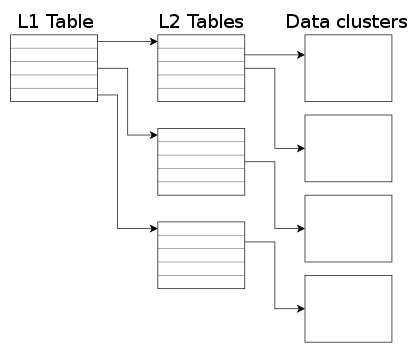
QEMU 2.5 has just been released, with a lot of new features. As with the previous release, we have also created a video changelog. I plan to write a few blog posts explaining some of the things I have been working on. In this one I m going to talk about how to control the size of the qcow2 L2 cache. But first, let s see why that cache is useful. The qcow2 file format qcow2 is the main format for disk images used by QEMU. One of the features of this format is that its size grows on demand, and the disk space is only allocated when it is actually needed by the virtual machine. A qcow2 file is organized in units of constant size called clusters. The virtual disk seen by the guest is also divided into guest clusters of the same size. QEMU defaults to 64KB clusters, but a different value can be specified when creating a new image: qemu-img create -f qcow2 -o cluster_size=128K hd.qcow2 4G In order to map the virtual disk as seen by the guest to the qcow2 image in the host, the qcow2 image contains a set of tables organized in a two-level structure. These are called the L1 and L2 tables. There is one single L1 table per disk image. This table is small and is always kept in memory. There can be many L2 tables, depending on how much space has been allocated in the image. Each table is one cluster in size. In order to read or write data to the virtual disk, QEMU needs to read its corresponding L2 table to find out where that data is located. Since reading the table for each I/O operation can be expensive, QEMU keeps a cache of L2 tables in memory to speed up disk access.
The L2 cache can have a dramatic impact on performance. As an example, here s the number of I/O operations per second that I get with random read requests in a fully populated 20GB disk image:
L2 cache size Average IOPS
1 MB 5100
1,5 MB 7300
2 MB 12700
2,5 MB 63600
If you re using an older version of QEMU you might have trouble getting the most out of the qcow2 cache because of this bug, so either upgrade to at least QEMU 2.3 or apply this patch. (in addition to the L2 cache, QEMU also keeps a refcount cache. This is used for cluster allocation and internal snapshots, but I m not covering it in this post. Please refer to the qcow2 documentation if you want to know more about refcount tables) Understanding how to choose the right cache size In order to choose the cache size we need to know how it relates to the amount of allocated space. The amount of virtual disk that can be mapped by the L2 cache (in bytes) is: disk_size = l2_cache_size * cluster_size / 8 With the default values for cluster_size (64KB) that is disk_size = l2_cache_size * 8192 So in order to have a cache that can cover n GB of disk space with the default cluster size we need l2_cache_size = disk_size_GB * 131072 QEMU has a default L2 cache of 1MB (1048576 bytes) so using the formulas we ve just seen we have 1048576 / 131072 = 8 GB of virtual disk covered by that cache. This means that if the size of your virtual disk is larger than 8 GB you can speed up disk access by increasing the size of the L2 cache. Otherwise you ll be fine with the defaults. How to configure the cache size Cache sizes can be configured using the -drive option in the command-line, or the blockdev-add QMP command. There are three options available, and all of them take bytes: There are two things that need to be taken into account:
  1. Both the L2 and refcount block caches must have a size that is a multiple of the cluster size.
  2. If you only set one of the options above, QEMU will automatically adjust the others so that the L2 cache is 4 times bigger than the refcount cache.
This means that these three options are equivalent: -drive file=hd.qcow2,l2-cache-size=2097152
-drive file=hd.qcow2,refcount-cache-size=524288
-drive file=hd.qcow2,cache-size=2621440
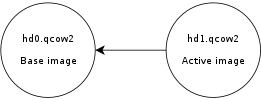
Although I m not covering the refcount cache here, it s worth noting that it s used much less often than the L2 cache, so it s perfectly reasonable to keep it small: -drive file=hd.qcow2,l2-cache-size=4194304,refcount-cache-size=262144 Reducing the memory usage The problem with a large cache size is that it obviously needs more memory. QEMU has a separate L2 cache for each qcow2 file, so if you re using many big images you might need a considerable amount of memory if you want to have a reasonably sized cache for each one. The problem gets worse if you add backing files and snapshots to the mix. Consider this scenario:
Here, hd0 is a fully populated disk image, and hd1 a freshly created image as a result of a snapshot operation. Reading data from this virtual disk will fill up the L2 cache of hd0, because that s where the actual data is read from. However hd0 itself is read-only, and if you write data to the virtual disk it will go to the active image, hd1, filling up its L2 cache as a result. At some point you ll have in memory cache entries from hd0 that you won t need anymore because all the data from those clusters is now retrieved from hd1. Let s now create a new live snapshot:
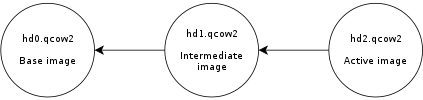
Now we have the same problem again. If we write data to the virtual disk it will go to hd2 and its L2 cache will start to fill up. At some point a significant amount of the data from the virtual disk will be in hd2, however the L2 caches of hd0 and hd1 will be full as a result of the previous operations, even if they re no longer needed. Imagine now a scenario with several virtual disks and a long chain of qcow2 images for each one of them. See the problem? I wanted to improve this a bit so I was working on a new setting that allows the user to reduce the memory usage by cleaning unused cache entries when they are not being used. This new setting is available in QEMU 2.5, and is called cache-clean-interval . It defines an interval (in seconds) after which all cache entries that haven t been accessed are removed from memory. This example removes all unused cache entries every 15 minutes: -drive file=hd.qcow2,cache-clean-interval=900 If unset, the default value for this parameter is 0 and it disables this feature. Further information In this post I only intended to give a brief summary of the qcow2 L2 cache and how to tune it in order to increase the I/O performance, but it is by no means an exhaustive description of the disk format. If you want to know more about the qcow2 format here s a few links: Acknowledgments My work in QEMU is sponsored by Outscale and has been made possible by Igalia and the invaluable help of the QEMU development team.
Enjoy QEMU 2.5!

Dirk Eddelbuettel: RcppArmadillo 0.6.400.2.2

armadillo image And yet another updated of Armadillo by Conrad bringing us to 6.400.2. I folded that yesterday into RcppArmadillo 0.6.400.2.2; and this is now on CRAN and Debian. There was even an interim-CRAN-only release 0.6.300.2.2 with a refinement for tests of imcompleye LAPACK libraries---which we encounter whenver R is build with its own (partial) copy of LAPACK as on Windows, and on bigger computers whenver this was chosen over the default of system LAPACK. Armadillo is a powerful and expressive C++ template library for linear algebra aiming towards a good balance between speed and ease of use with a syntax deliberately close to a Matlab. This release brings the following changes:
Changes in RcppArmadillo version 0.6.400.2.0 (2015-12-15)
  • Upgraded to Armadillo 6.400.2 ("Flying Spaghetti Monster Deluxe")
    • expanded each_col(), each_row() and each_slice() to handle C++11 lambda functions
    • added ind2sub() and sub2ind()
    • fixes for corner cases in gmm_diag class
Changes in RcppArmadillo version 0.6.300.2.2 (2015-12-12)
  • Upgraded to Armadillo 6.300.3-test ("Flying Spaghetti Monster")
    • Additional test in auxlib_meat.hpp for limited LAPACK
  • Updated test and #define for limited LAPACK version R might be built with on Unix-alike systems
Courtesy of CRANberries, there is also a diffstat report for the most recent CRAN release. As always, more detailed information is on the RcppArmadillo page. Questions, comments etc should go to the rcpp-devel mailing list off the R-Forge page.

This post by Dirk Eddelbuettel originated on his Thinking inside the box blog. Please report excessive re-aggregation in third-party for-profit settings.

Steinar H. Gunderson: sRGB weirdness: Doing the right thing causes a worse result

A while back, I wrote about how you should always do image calculations in linear light, not gamma space; since then, Tom Forsythe has come out with a much better metaphor than I could cough up myself, namely that you should look at sRGB value as compressed values, not integers. So naturally, when I needed a deinterlacing filter for Movit, my GPU filter library, I wanted to do it in linear light. (In fact, all pixel processing in Movit is in linear light, except in the cases where it's 100% equivalent to do it on the gamma-encoded values and the conversion can be skipped for speed.) After some deliberations, I made an implementation of Martin Weston's three-field deinterlacing filter, known in ffmpeg as w3fdif. I won't discuss deinterlacing in detail here since it's really hard, but I'll note that w3fdif works by way of applying two filters; low-frequency components are estimated from the current field, and high-frequency from the previous and next fields. (This makes intuitive sense; you cannot get the HF information from the current field since you don't have the lines you need for that, but you can hope it hasn't changed too much.) Aha! A filter. Brilliant, that's exactly when linear light means the most, too. But when implementing it, I found that it sometimes looked weird -- and ffmpeg's implementation (which works directly on the sRGB values, which we already established is wrong) didn't. After lots of tweaking back and forth, I decided to set up a synthetic test to settle this once and for all; I took a static test picture (eliminating everything related to video capture, codecs, frame rates, etc.) and compared to ffmpeg. Of course, deinterlacing is all about movement, but this would do to try to nail things down. So after lots of fruitless debugging, I did a last-ditch: What if I turned off the gamma conversions? This gave me a huge surprise; indeed it looked better! I'll provide some upscaled versions; left is the original image, middle is deinterlaced in sRGB space and right is deinterlaced in linear light: Original picture Deinterlaced in sRGB space Deinterlaced in linear light If that's not dramatic enough for you (trust me, you'll notice it when it's animated as you flicker through the two different fields), here's an even more high-contrast example (same ordering): Original picture Deinterlaced in sRGB space Deinterlaced in linear light I guess it's obvious in retrospect what happens; the HF filter picks up residue from its outer edges, and even if the coefficient is just 0.031 (well, times two; it adds that value from both the previous and next field), 3% the photons of a fully lit pixel (which is what you get when working in linear light) is actually quite a bit, whereas a 3% gray is only pixel value 8 or so, which is barely visible. So what am I to make of this? I'm honestly not sure. Maybe it's somehow related to that these filter values were chosen in 1988, where they were relatively unlikely to do this in linear light (although if they did it with analog circuitry, perhaps they could?) and it was tweaked to look good despite doing the wrong thing. Or maybe I need to change my approach here entirely. It always sucks when your fundamental assumptions are challenged, but I think it shows once again that if you notice something funny in your output, you really ought to investigate, because you never know how deep the rabbit hole goes. :-/

15 December 2015

Chris Lamb: Peake Nationalism

Timothy Peake boarded the International Space Station a few hours ago becoming the United Kingdom's first official astronaut. It has become headline news, dominating the day's news cycle. But whilst Peake left our pale blue dot with only the humble honorific "Mister", he has subsequently been awarded the dubious appellation of "British Astronaut". Now, I'm no open-borders pan-nationalist and nor do I in any wish to detract or denigrate Peake's accomplishments indeed, it is only out of a genuine respect of "our Tim's" achievements that I pen this in the first place but are we still clinging to the idea that an extraordinary effort by a co-member of our species requires a nationalistic qualifier? How much do we really have in common with our "fellow countrymen"? This is, after all, the International Space Station, to which Peake was elevated from Kazakhstan on the back of a Russian rocket, in order that he may peacefully collaborate with an American, a Ukrainian, etc. I encountered the rebuttal that support of this nature is inspirational and incentive to others, but is it really motivating to know that if you toil to achieve greatness in this life then your accomplishments will be cheaply co-opted by mediocrities who only share the same colour passport as you? In this sense, isn't national pride really a form of national insecurity? A "Briton" in space: if space travel can teach us anything, it's that broadcasting the specific patch of ground you were born in is an outdated, tribalistic contrivance and should be assigned to the dustbin of history.

Vasudev Kamath: Persisting resource control options for systemd-nspawn containers

In my previous post on systemd-nspawn I mentioned, I was unclear on how to persist resource control options for a container. Today I accidentally discovered how can the property be persisted across boot without modifying service file or writing custom service file for container. It is done using systemctl set-property To set CPUAccounting and CPUShares for a container we need to run following command.
systemctl set-property systemd-nspawn@container.service  CPUACCounting=1 CPUShares=200
This actually persists these settings at location, /etc/systemd/systemd-nspawn@container.service.d/ folder. So in our case there will be 2 files created under above location by name 50-CPUAccounting.conf and 50-CPUShares.conf with following contents.
# 50-CPUAccounting.conf
[Service]
CPUAccounting=yes
# 50-CPUShares.conf
[Service]
CPUShares=200
Today when I discovered this folder and saw the file contents, I became curious and started to wonder who created this folder. The look at systemctl man page made showed me this.
set-property NAME ASSIGNMENT...

Set the specified unit properties at runtime where this is supported. This allows changing configuration parameter properties such as resource control settings at runtime. Not all properties may be changed at runtime, but many resource control settings (primarily those in systemd.resource-control(5)) may. The changes are applied instantly, and stored on disk for future boots, unless --runtime is passed, in which case the settings only apply until the next reboot. The syntax of the property assignment follows closely the syntax of assignments in unit files. Example: systemctl set-property foobar.service CPUShares=777

Note that this command allows changing multiple properties at the same time, which is preferable over setting them individually. Like unit file configuration settings, assigning the empty list to list parameters will reset the list.

I did remember doing this for my container and hence it became clear these files are actually written by systemctl set-property. In case you don't want to persist the properties across boot you can simply pass --runtime switch. Basically this is not just for container, resource control can be thus applied to any running service on the system. This is actually cool.

14 December 2015

Vasudev Kamath: Ordering mount points in Jessie (systemd < 220)

In the previous post I had mentioned that I didn't figure out how to add dependency on mount points so as to achieve correct ordering of mount points. After a lot of search today I finally figured it out thanks to the bug report and the patch which adds x-systemd.requires and other option to systemd. So basically you can add additional ordering information to the .mount files generated by systemd-fstab-generator by adding a ordering.conf file to path /etc/systemd/system/usr-local-bin.mount.d/ path with following contents.
[Unit]
After=home.mount
And that is it, now usr-local-bin.mount will be mounted after home.mount is activated. I couldn't find this information directly in related manpages like systemd.mount or systemd.automount. Also this information is not directly available in search results!.

Next.

Previous.