Search Results: "mak"

27 May 2017

Russ Allbery: Optimistic haul

I never have as much time to read as I wish I did, but I keep buying books, of course. Maybe someday I'll have a good opportunity to take extended time off work and just read for a bit. Well, retirement, at least, right? Charlie Jane Anders All the Birds in the Sky (sff)
Peter C. Brown, et al. Make It Stick (nonfiction)
April Daniels Dreadnought: Nemesis (sff)
T. Kingfisher The Halcyon Fairy Book (sff collection)
T. Kingfisher Jackalope Wives and Other Stories (sff collection)
Margot Lee Shetterly Hidden Figures (nonfiction)
Cordwainer Smith Norstrilia (sff)
Kristine Smith Code of Conduct (sff)
Jonathan Taplin Move Fast and Break Things (nonfiction)
Sarah Zettel Fool's War (sff)
Sarah Zettel Playing God (sff)
Sarah Zettel The Quiet Invasion (sff) It doesn't help that James Nicoll keeps creating new lists of books that all sound great. And there's some really interesting nonfiction being written right now. Make It Stick is the current book for the work book club.

Lars Wirzenius: Distix movement

Distix is my distributed ticketing system. I initially wrote the core of it as a bit of programming performance art, to celebrate my 30 years as a programmer. Distix is built on top of git and emails in Maildirs. It is a silent listener to your issue and bug discussions: as long as you ensure it gets a copy of each mail, it takes care of automatically arranging things into separate tickets based on email threading. Users and customers do not need to even know Distix is being used. Only the "support staff" need ever interact with Distix, and they mostly only need to close tickets that have been dealt with. I've been using Distix for my own stuff for some time now, and recently we've started using it at work. I slowly improve it as we find problems. It's not a sleek, smooth, finished tool. It's clunky, weird, and probably not what you want. But it's what I want. Changes in recent months: I've discussed with a friend the possibility of writing a web UI, and some day maybe that will happen. For now, distix is a command line applicaton that can generate a static HTML site.

26 May 2017

Steinar H. Gunderson: Last minute stretch bugs

The last week, I found no less than three pet bugs I have hope that will be allowed to go in before stretch release: I promise, none of these were found late because I upgraded to stretch too late just a perfect storm. :-)

Michal Čihař: Running Bitcoin node on Turris Omnia

For quite some I'm happy user of Turris Omnia router. The router has quite good hardware, so I've decided to try if I can run Bitcoin node on that and ElectrumX server. To make the things easier to manage, I've decided to use LXC and run all these in separate container. First of all you need LXC on the router. This is the default setup, but in case you've removed it, you can add it back in the Updater settings. Now we will create Debian container. There is basic information on using in Turris Documentation on how to create the container, in latter documentation I assume it is called debian. It's also good idea to enable LXC autostart, to do so add your container to cat /etc/config/lxc-auto on :
config container
    option name debian
You might also want to edit lxc container configration to enable clean shutdown:
# Send SIGRTMIN+3 to shutdown systemd (37 on Turris Omnia)
lxc.haltsignal = SIGRTMIN+3
To make the system more recent, I've decided to use Debian Stretch (one of reasons was that ElectrumX needs Python 3.5.3 or newer). Which is anyway probably sane choice right now given that it's already frozen and will be soon stable. As Stretch is not available as a download option in Omnia, I've chosen to use Debian Jessie and upgrate it later:
$ lxc-attach  --name debian
$ sed -i s/jessie/stretch/ /etc/apt/sources.list
$ apt update
$ apt full-upgrade
Now you have up to date system and we can start installing dependencies. First thing to install is Bitcoin Core. Just follow the instructions on their website to do that. Now it's time to set it up and wait for downloading full blockchain:
$ adduser bitcoin
$ su - bitcoin
$ bitcoind -daemon
Depending on your connection speed, the download will take few hours. You can monitor the progress using bitcoin-cli, you're waiting for 450k blocks:
$ bitcoin-cli getinfo
 
  "version": 140000,
  "protocolversion": 70015,
  "walletversion": 130000,
  "balance": 0.00000000,
  "blocks": 301242,
  "timeoffset": -1,
  "connections": 8,
  "proxy": "",
  "difficulty": 8853416309.1278,
  "testnet": false,
  "keypoololdest": 1490267950,
  "keypoolsize": 100,
  "paytxfee": 0.00000000,
  "relayfee": 0.00001000,
  "errors": ""
 
Depending how much memory you have (mine has 2G) and what all you run on the router, you will have to tweak bitcoind configuration to consume less memory. This can be done by editing .bitcoin/bitcoin.conf, I've ended up with following settings:
par=1
dbcache=150
maxmempool=150
You can also create startup unit for Bitcoin daemon (place that as /etc/systemd/system/bitcoind.service):
[Unit]
Description=Bitcoind
After=network.target
[Service]
ExecStart=/opt/bitcoin/bin/bitcoind
User=bitcoin
TimeoutStopSec=30min
Restart=on-failure
RestartSec=30
[Install]
WantedBy=multi-user.target
Now we can enable services to start on container start:
systemctl enable bitcoind.service
Then I wanted to setup ElectrumX as well, but I've quickly realized that it uses way more memory that my router has, so there is no option to run it without using swap, what will probably make it quite slow (I haven't tried that).

Filed under: Debian English OpenWrt

23 May 2017

Dirk Eddelbuettel: Rcpp 0.12.11: Loads of goodies

The elevent update in the 0.12.* series of Rcpp landed on CRAN yesterday following the initial upload on the weekend, and the Debian package and Windows binaries should follow as usual. The 0.12.11 release follows the 0.12.0 release from late July, the 0.12.1 release in September, the 0.12.2 release in November, the 0.12.3 release in January, the 0.12.4 release in March, the 0.12.5 release in May, the 0.12.6 release in July, the 0.12.7 release in September, the 0.12.8 release in November, the 0.12.9 release in January, and the 0.12.10.release in March --- making it the fifteenth release at the steady and predictable bi-montly release frequency. Rcpp has become the most popular way of enhancing GNU R with C or C++ code. As of today, 1026 packages on CRAN depend on Rcpp for making analytical code go faster and further, along with another 91 in BioConductor. This releases follows on the heels of R's 3.4.0 release and addresses on or two issues from the transition, along with a literal boatload of other fixes and enhancements. James "coatless" Balamuta was once restless in making the documentation better, Kirill Mueller addressed a number of more obscure compiler warnings (triggered under under -Wextra and the like), Jim Hester improved excecption handling, and much more mostly by the Rcpp Core team. All changes are listed below in some detail. One big change that JJ made is that Rcpp Attributes also generate the now-almost-required package registration. (For background, I blogged about this one, two, three times.) We tested this, and do not expect it to throw curveballs. If you have an existing src/init.c, or if you do not have registration set in your NAMESPACE. It should cover most cases. But one never knows, and one first post-release buglet related to how devtools tests things has already been fixed in this PR by JJ.

Changes in Rcpp version 0.12.11 (2017-05-20)
  • Changes in Rcpp API:
    • Rcpp::exceptions can now be constructed without a call stack (Jim Hester in #663 addressing #664).
    • Somewhat spurious compiler messages under very verbose settings are now suppressed (Kirill Mueller in #670, #671, #672, #687, #688, #691).
    • Refreshed the included tinyformat template library (James Balamuta in #674 addressing #673).
    • Added printf-like syntax support for exception classes and variadic templating for Rcpp::stop and Rcpp::warning (James Balamuta in #676).
    • Exception messages have been rewritten to provide additional information. (James Balamuta in #676 and #677 addressing #184).
    • One more instance of Rf_mkString is protected from garbage collection (Dirk in #686 addressing #685).
    • Two exception specification that are no longer tolerated by g++-7.1 or later were removed (Dirk in #690 addressing #689)
  • Changes in Rcpp Documentation:
  • Changes in Rcpp Sugar:
    • Added sugar function trimws (Nathan Russell in #680 addressing #679).
  • Changes in Rcpp Attributes:
    • Automatically generate native routine registrations (JJ in #694)
    • The plugins for C++11, C++14, C++17 now set the values R 3.4.0 or later expects; a plugin for C++98 was added (Dirk in #684 addressing #683).
  • Changes in Rcpp support functions:
    • The Rcpp.package.skeleton() function now creates a package registration file provided R 3.4.0 or later is used (Dirk in #692)

Thanks to CRANberries, you can also look at a diff to the previous release. As always, even fuller details are on the Rcpp Changelog page and the Rcpp page which also leads to the downloads page, the browseable doxygen docs and zip files of doxygen output for the standard formats. A local directory has source and documentation too. Questions, comments etc should go to the rcpp-devel mailing list off the R-Forge page.

This post by Dirk Eddelbuettel originated on his Thinking inside the box blog. Please report excessive re-aggregation in third-party for-profit settings.

22 May 2017

Michal Čihař: HackerOne experience with Weblate

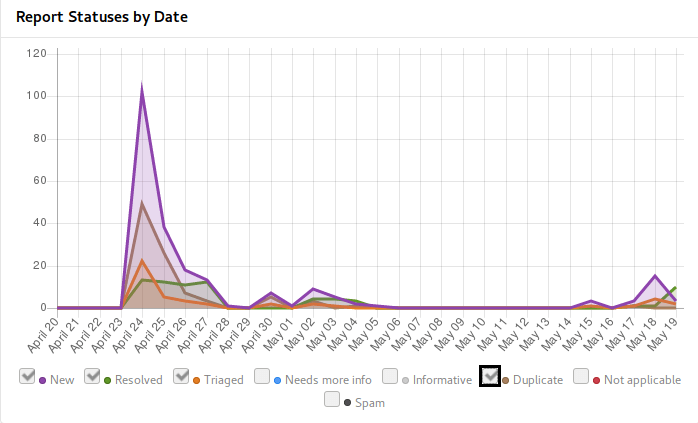
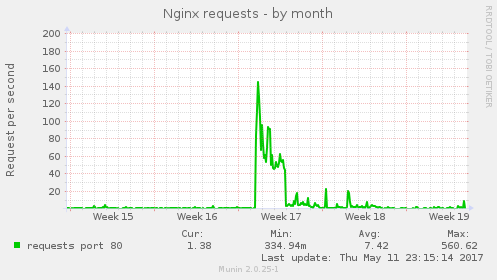
Weblate has started to use HackerOne Community Edition some time ago and I think it's good to share my experience with that. Do you have open source project and want to get more attention of security community? This post will answer how it looks from perspective of pretty small project. I've applied with Weblate to HackerOne Community Edition by end of March and it was approved early in April. Based on their recommendations I've started in invite only mode, but that really didn't bring much attention (exactly none reports), so I've decided to go public. I've asked for making the project public just after coming from two weeks vacation, while expecting the approval to take some time where I'll settle down things which have popped up during vacation. In the end that was approved within single day, so I was immediately under fire of incoming reports: Reports on HackerOne I was surprised that they didn't lie - you will really get huge amount of issues just after making your project public. Most of them were quite simple and repeating (as you can see from number of duplicates), but it really provided valuable input. Even more surprisingly there was second peak coming in when I've started to disclose resolved issues (once Weblate 2.14 has been released). Overall the issues could be divided to few groups: In the end it was really challenging week to be able to cope with the incoming reports, but I think I've managed it quite well. The HackerOne metrics states that there are 2 hours in average to respond on incoming incidents, what I think will not work in the long term :-). Anyway thanks to this, you can now enjoy Weblate 2.14 which more secure than any release before, if you have not yet upgraded, you might consider doing that now or look into our support offering for self hosted Weblate. The downside of this all was that the initial publishing on HackerOne made our website target of lot of automated tools and the web server was not really ready for that. I'm really sorry to all Hosted Weblate users who were affected by this. This has been also addressed now, but the infrastructure really should have been prepared before on this. To share how it looked like, here is number of requests to the nginx server: nxing requests I'm really glad I could make Weblate available on HackerOne as it will clearly improve it's security and security of hosted offering we have. I will certainly consider providing swag and/or bounties on further severe reports, but that won't be possible without enough funding for Weblate.

Filed under: Debian English SUSE Weblate

21 May 2017

Ritesh Raj Sarraf: apt-offline 1.8.0 released

I am pleased to announce the release of apt-offline, version 1.8.0. This release is mainly a forward port of apt-offline to Python 3 and PyQt5. There are some glitches related to Python 3 and PyQt5, but overall the CLI interface works fine. Other than the porting, there's also an important bug fixed, related to memory leak when using the MIME library. And then there's some updates to the documentation (user examples) based on feedback from users. Release is availabe from Github and Alioth

What is apt-offline ?

Description: offline APT package manager
apt-offline is an Offline APT Package Manager.
.
apt-offline can fully update and upgrade an APT based distribution without
connecting to the network, all of it transparent to APT.
.
apt-offline can be used to generate a signature on a machine (with no network).
This signature contains all download information required for the APT database
system. This signature file can be used on another machine connected to the
internet (which need not be a Debian box and can even be running windows) to
download the updates.
The downloaded data will contain all updates in a format understood by APT and
this data can be used by apt-offline to update the non-networked machine.
.
apt-offline can also fetch bug reports and make them available offline.

Categories:

Keywords:

Like:

Russ Allbery: Review: Sector General

Review: Sector General, by James White
Series: Sector General #5
Publisher: Orb
Copyright: 1983
Printing: 2002
ISBN: 0-312-87770-6
Format: Trade paperback
Pages: 187
Sector General is the fifth book (or, probably more accurately, collection) in the Sector General series. I blame the original publishers for the confusion. The publication information is for the Alien Emergencies omnibus, which includes the fourth through the sixth books in the series. Looking back on my previous reviews of this series (wow, it's been eight years since I read the last one?), I see I was reviewing them as novels rather than as short story collections. In retrospect, that was a mistake, since they're composed of clearly stand-alone stories with a very loose arc. I'm not going to go back and re-read the earlier collections to give them proper per-story reviews, but may as well do this properly here. Overall, this collection is more of the same, so if that's what you want, there won't be any negative surprises. It's another four engineer-with-a-wrench stories about biological and medical puzzles, with only a tiny bit of characterization and little hint to any personal life for any of the characters outside of the job. Some stories are forgettable, but White does create some memorable aliens. Sadly, the stories don't take us to the point of real communication, so those aliens stop at biological puzzles and guesswork. "Combined Operation" is probably the best, although "Accident" is the most philosophical and an interesting look at the founding principle of Sector General. "Accident": MacEwan and Grawlya-Ki are human and alien brought together by a tragic war, and forever linked by a rather bizarre war monument. (It's a very neat SF concept, although the implications and undiscussed consequences don't bear thinking about too deeply.) The result of that war was a general recognition that such things should not be allowed to happen again, and it brought about a new, deep commitment to inter-species tolerance and politeness. Which is, in a rather fascinating philosophical twist, exactly what MacEwan and Grawlya-Ki are fighting against: not the lack of aggression, which they completely agree with, but with the layers of politeness that result in every species treating all others as if they were eggshells. Their conviction is that this cannot create a lasting peace. This insight is one of the most profound bits I've read in the Sector General novels and supports quite a lot of philosophical debate. (Sadly, there isn't a lot of that in the story itself.) The backdrop against which it plays out is an accidental crash in a spaceport facility, creating a dangerous and potentially deadly environment for a variety of aliens. Given the collection in which this is included and the philosophical bent described above, you can probably guess where this goes, although I'll leave it unspoiled if you can't. It's an idea that could have been presented with more subtlety, but it's a really great piece of setting background that makes the whole series snap into focus. A much better story in context than its surface plot. (7) "Survivor": The hospital ship Rhabwar rescues a sole survivor from the wreck of an alien ship caused by incomplete safeguards on hyperdrive generators. The alien is very badly injured and unconscious and needs the full attention of Sector General, but on the way back, the empath Prilicla also begins suffering from empathic hypersensitivity. Conway, the protagonist of most of this series, devotes most of his attention to that problem, having delivered the rescued alien to competent surgical hands. But it will surprise no regular reader that the problems turn out to be linked (making it a bit improbable that it takes the doctors so long to figure that out). A very typical entry in the series. (6) "Investigation": Another very typical entry, although this time the crashed spaceship is on a planet. The scattered, unconscious bodies of the survivors, plus signs of starvation and recent amputation on all of them, convinces the military (well, police is probably more accurate) escort that this is may be a crime scene. The doctors are unconvinced, but cautious, and local sand storms and mobile vegetation add to the threat. I thought this alien design was a bit less interesting (and a lot creepier). (6) "Combined Operation": The best (and longest) story of this collection. Another crashed alien spacecraft, but this time it's huge, large enough (and, as they quickly realize, of a design) to indicate a space station rather than a ship, except that it's in the middle of nowhere and each segment contains a giant alien worm creature. Here, piecing together the biology and the nature of the vehicle is only the beginning; the conclusion points to an even larger problem, one that requires drawing on rather significant resources to solve. (On a deadline, of course, to add some drama.) This story requires the doctors to go unusually deep into the biology and extrapolated culture of the alien they're attempting to rescue, which made it more intellectually satisfying for me. (7) Followed by Star Healer. Rating: 6 out of 10

Adnan Hodzic: Automagically deploy & run containerized WordPress (PHP7 FPM, Nginx, MariaDB) using Ansible + Docker on AWS

In this blog post, I ve described what started as simple migration of WordPress blog to AWS, ended up as automation project consisting of publishing multiple Ansible roles deploying and running multiple Docker images. If you re not interested in reading about my entire journey, cognition gains and how this process came to be, please skim down to Birth of: containerized-wordpress-project (TL;DR) section. Migrating WordPress blog to AWS (EC2, Lightsail?) Since I ve been sold on Amazon s AWS idea of cloud computing services for couple of years now. I ve wanted, and been trying to migrate this (WordPress) blog to AWS, but somehow it never worked out. Moving it to EC2 instance, with its own ELB volumes, AMI, EIP, Security Group it just seemed as an overkill. When AWS Lightsail was first released, it seemed that was an answer to all my problems. But it wasn t, disregarding its bit restrictive/dumbed down versions of original features. Living in Amsterdam, my main problem with it was that it was only available in a single US region. Regardless, I thought it had everything I needed for WordPress site, and as a new service, it had great potential. Its regional limitations were also good in a sense that they made me realize one important thing. And that s once I migrate my blog to AWS, I want to be able to seamlessly move/migrate it across different EC2 s and different regions once they were available. If done properly, it meant I could even have it moved across different clouds (I m talking to you Google Cloud). P.S: AWS Lightsail is now available in couple of different regions across Europe. Rollout which was almost smoothless. Fundamental problem of every migration is migration

Phase 1: Don t reinvent the wheel? When you have a WordPress site that s not self hosted. You want everything to work, but yet you really don t want to spend any time managing infrastructure it s on. And as soon as I started looking what could fit this criteria, I found that there were pre-configured, running out of box WordPress EC2 images available on AWS Marketplace, great! But when I took a look, although everything was running out of box, I wasn t happy with software stack it was all built on. Namely Ubuntu 14.04 and Apache, and all of the services were started using custom scripts. Yuck. With this setup, when it was time to upgrade (and it s already that time) you wouldn t be thinking about upgrade. You d only be thinking about another migration. Phase 2: What if I built everything myself? Installing and configuring everything manually, and then writing huge HowTo which I would follow when I needed to re-create whole stack was not an option. Same case with was scripting whole process, as overhead of changes that had to be tracked was too way too big. Being a huge Ansible fan, automating this step was a natural next step. I even found an awesome Ansible role which seemed like it s going to do everything I need. Except, I realized I needed to update all software that s deployed with it, and customize it since configuration it was deployed on wasn t as generic. So I forked it and got to work. But soon enough, I was knee deep in making and fiddling with various system changes. Something I was trying to get away in this case, and most importantly something I was trying to avoid when it was time for next update. Phase 3: Marriage made in heaven: Ansible + Docker + AWS Idea to have everything Dockerized was around from very start. However, it never made a lot of sense until I put Ansible into same picture. And it was at this point where my final idea and requirements become crystal clear. Use Ansible to configure and setup host ready for Docker ecosystem. Ecosystem consisting of multiple separate containers for each required service (WordPress + Nginx + MariaDB). Link them all together as a single service using Docker Compose. Idea was backed by thought to spend minimum to no time (and effort) on manual configuration of anything on the server. Level of attachment to this server was so low that I didn t even want to SSH to it. If there was something wrong, I could just nuke the whole thing and deploy code on a new healthy rolled out server with everything working out of box. After it was clear what needed to be done, I got to work.

Birth of: containerized-wordpress-project (TL;DR)

After a lot of work, end result is project which allows you to automagically deploy & run containerized WordPress instance which consists of 3 separate containers running:

Once run, containerized-wordpress playbook will guide you through interactive setup of all 3 containers, after which it will run all Ansible roles created for this project. End result is that host you have never even SSH-ed to will be fully configured and running containerized WordPress instace out of box.

Most importantly, this whole process will be completed in <= 5 minutes and doesn t require any Docker or Ansible knowledge! containerized-wordpress demo Console output of running containerized-wordpress Ansible Playbook: Console output of running "containerized-wordpress" Ansible Playbook

Accessing WordPress instance created from containerized-wordpress Ansible Playbook:

Accessing WordPress instance created from "containerized-wordpress" Ansible Playbook Did I end up migrating to AWS in the end? You bet. Thanks to efforts made in containerized-wordpress-project, I m happy to report my whole WordPress migration to AWS was completed in matter of minutes and that this blog is now running on Docker and on AWS! I hope this same project will help you take a leap in your migration. Happy hacking!

Elena 'valhalla' Grandi: Modern XMPP Server

Modern XMPP Server

I've published a new HOWTO on my website www.trueelena.org/computers/ho:

www.enricozini.org/blog/2017/d already wrote about the Why (and the What, Who and When), so I'll just quote his conclusion and move on to the How.

I now have an XMPP setup which has all the features of the recent fancy chat systems, and on top of that it runs, client and server, on Free Software, which can be audited, it is federated and I can self-host my own server in my own VPS if I want to, with packages supported in Debian.


How

I've decided to install prosody.im/, mostly because it was recommended by the RTC QuickStart Guide rtcquickstart.org/; I've heard that similar results can be reached with www.ejabberd.im/ and other servers.

I'm also targeting www.debian.org/ stable (+ backports); as I write this is jessie; if there are significant differences I will update this article when I will upgrade my server to stretch. Right now, this means that I'm using prosody 0.9 (and that's probably also the version that will be available in stretch).

Installation and prerequisites

You will need to enable the backports.debian.org/ repository and then install the packages prosody and prosody-modules.

You also need to setup some TLS certificates (I used Let's Encrypt letsencrypt.org/); and make them readable by the prosody user; you can see Chapter 12 of the RTC QuickStart Guide rtcquickstart.org/guide/multi/ for more details.

On your firewall, you'll need to open the following TCP ports:


The latter two are needed to enable some services provided via http(s), including rich media transfers.

With just a handful of users, I didn't bother to configure LDAP or anything else, but just created users manually via:

prosodyctl adduser alice@example.org

In-band registration is disabled by default (and I've left it that way, to prevent my server from being used to send spim en.wikipedia.org/wiki/Messagin).

prosody configuration

You can then start configuring prosody by editing /etc/prosody/prosody.cfg.lua and changing a few values from the distribution defaults.

First of all, enforce the use of encryption and certificate checking both for client2server and server2server communications with:


c2s_require_encryption = true
s2s_secure_auth = true


and then, sadly, add to the whitelist any server that you want to talk to and doesn't support the above:


s2s_insecure_domains = "gmail.com"


virtualhosts

For each virtualhost you want to configure, create a file /etc/prosody/conf.avail/chat.example.org.cfg.lua with contents like the following:


VirtualHost "chat.example.org"
enabled = true
ssl =
key = "/etc/ssl/private/example.org-key.pem";
certificate = "/etc/ssl/public/example.org.pem";


For the domains where you also want to enable MUCs, add the follwing lines:


Component "conference.chat.example.org" "muc"
restrict_room_creation = "local"


the "local" configures prosody so that only local users are allowed to create new rooms (but then everybody can join them, if the room administrator allows it): this may help reduce unwanted usages of your server by random people.

You can also add the following line to enable rich media transfers via http uploads (XEP-0363):


Component "upload.chat.example.org" "http_upload"

The defaults are pretty sane, but see modules.prosody.im/mod_http_up for details on what knobs you can configure for this module

Don't forget to enable the virtualhost by linking the file inside /etc/prosody/conf.d/.

additional modules

Most of the other interesting XEPs are enabled by loading additional modules inside /etc/prosody/prosody.cfg.lua (under modules_enabled); to enable mod_something just add a line like:


"something";

Most of these come from the prosody-modules package (and thus from modules.prosody.im/ ) and some may require changing when prosody 0.10 will be available; when this is the case it is mentioned below.


@Gruppo Linux Como @LIFO

20 May 2017

Neil Williams: Software, service, data and freedom

Free software, free services but what about your data? I care a lot about free software, not only as a Debian Developer. The use of software as a service matters as well because my principle free software development is on just such a project, licensed under the GNU Affero General Public License version 3. The AGPL helps by allowing anyone who is suitably skilled to install their own copy of the software and run their own service on their own hardware. As a project, we are seeing increasing numbers of groups doing exactly this and these groups are actively contributing back to the project. So what is the problem? We've got an active project, an active community and everything is under a free software licence and regularly uploaded to Debian main. We have open code review with anonymous access to our own source code CI and anonymous access to project planning, open mailing list archives as well as an open bug tracker and a very active IRC channel (#linaro-lava on OFTC). We develop in the open, we respond in the open and we publish frequently (monthly, approximately). The code we write defaults to public visibilty at runtime with restrictions available for certain use cases. What else can we be doing? Well it was a simple question which started me thinking.
The lava documentation has various example test scripts e.g. https://validation.linaro.org/static/docs/v2/examples/test-jobs/qemu-kernel-standard-sid.yaml these have no licence information, we've adapted them for a Linux Foundation project, what licence should apply to these files? Robert Marshall
Those are our own examples, contributed as part of the documentation and covered by the AGPL like the rest of the documentation and the software which it documents, so I replied with the same. However, what about all the other submissions received by the service?
Data Freedom LAVA acts by providing a service to authenticated users. The software runs your test code on hardware which might not be available to the user or which is simply inconvenient for the test writer to setup themselves. The AGPL covers this nicely. What about the data contributed by the users? We make this available to other users who will, naturally, copy and paste for their own tests. In most cases, because the software defaults to public access, anonymous users also get to learn from the contributions of other test writers. This is a good thing and to be encouraged. (One reason why we moved to YAML for all submissions was to allow comments to help other users understand why the submission does specific things.) Writing a test job submission or a test shell definition from scratch is a non-trivial amount of work. We've written dozens of pages of documentation covering how and how not to do it but the detail of how a test job runs exactly what the test writer requires can involve substantial effort. (Our documentation recommends using version control for each of these works for exactly these reasons.) At what point do these works become software? At what point do these need licensing? How could that be declared?
Perils of the Javascript Trap approach When reading up on the AGPL, I also read about Service as a Software Substitute (SaaSS) and this led to The Javascript Trap. I don't consider LAVA to be SaaSS although it is Software as a Service (SaaS). (Distinguishing between those is best left to the GNU document as it is an almighty tangle at times.) I did look at the GNU ideas for licensing Javascript but it seems cumbersome and unnecessary - a protocol designed for the specific purposes of their own service rather than as a solution which could be readily adopted by all such services. The same problems affect trying to untangle sharing the test job data within LAVA.
Adding Licence text The traditional way, of course, is simply to add twenty lines or so of comments at the top of every file. This works nicely for source code because the comments are hidden from the final UI (unless an explicit reference is made in the --help output or similar). It is less nice for human readable submissions where the first thing someone has to do is scroll passed the comments to get to what they want to see. At that point, it starts to look like a popup or a nagging banner - blocking the requested content on a website to try and get the viewer to subscribe to a newsletter or pay for the rest of the content. Let's not actively annoy visitors who are trying to get things done.
Adding Licence files This can be done in the remote version control repository - then a single line in the submitted file can point at the licence. This is how I'm seeking to solve the problem of our own repositories. If the reference URL is included in the metadata of the test job submission, it can even be linked into the test job metadata and made available to everyone through the results API.
metadata:
  licence.text: http://mysite/lava/git/COPYING
  licence.name: BSD 3 clause
Metadata in LAVA test job submissions is free-form but if the example was adopted as a convention for LAVA submissions, it would make it easy for someone to query LAVA for the licences of a range of test submissions. Currently, LAVA does not store metadata from the test shell definitions except the URL of the git repo for the test shell definition but that may be enough in most cases for someone to find the relevant COPYING or LICENCE file.
Which licence? This could be a problem too. If users contribute data under unfriendly licences, what is LAVA to do? I've used the BSD 3 clause in the above example as I expect it to be the most commonly used licence for these contributions. A copyleft licence could be used, although doing so would require additional metadata in the submission to declare how to contribute back to the original author (because that is usually not a member of the LAVA project).
Why not Creative Commons? Although I'm referring to these contributions as data, these are not pieces of prose or images or audio. These are instructions (with comments) for a specific piece of software to execute on behalf of the user. As such, these objects must comply with the schema and syntax of the receiving service, so a code-based licence would seem correct.
Results Finally, a word about what comes back from your data submission - the results. This data cannot be restricted by any licence affecting either the submission or the software, it can be restricted using the API or left as the default of public access. If the results and the submission data really are private, then the solution is to take advantage of the AGPL, take the source code of LAVA and run it internally where the entire service can be placed within a firewall.
What happens next?
  1. Please consider editing your own LAVA test job submissions to add licence metadata.
  2. Please use comments in your own LAVA test job submissions, especially if you are using some form of template engine to generate the submission. This data will be used by others, it is easier for everyone if those users do not have to ask us or you about why your test job does what it does.
  3. Add a file to your own repositories containing LAVA test shell definitions to declare how these files can be shared freely.
  4. Think about other services to which you submit data which is either only partially machine generated or which is entirely human created. Is that data free-form or are you essentially asking the service to do a precise task on your behalf as if you were programming that server directly? (Jenkins is a classic example, closely related to LAVA.)
    • Think about how much developer time was required to create that submission and how the service publishes that submission in ways that allow others to copy and paste it into their own submissions.
    • Some of those submissions can easily end up in documentation or other published sources which will need to know about how to licence and distribute that data in a new format (i.e. modification.) Do you intend for that useful purpose to be defeated by releasing your data under All Rights Reserved?
Contact I don't enable comments on this blog but there are enough ways to contact me and the LAVA project in the body of this post, it really shouldn't be a problem for anyone to comment.

19 May 2017

Benjamin Mako Hill: Children s Perspectives on Critical Data Literacies

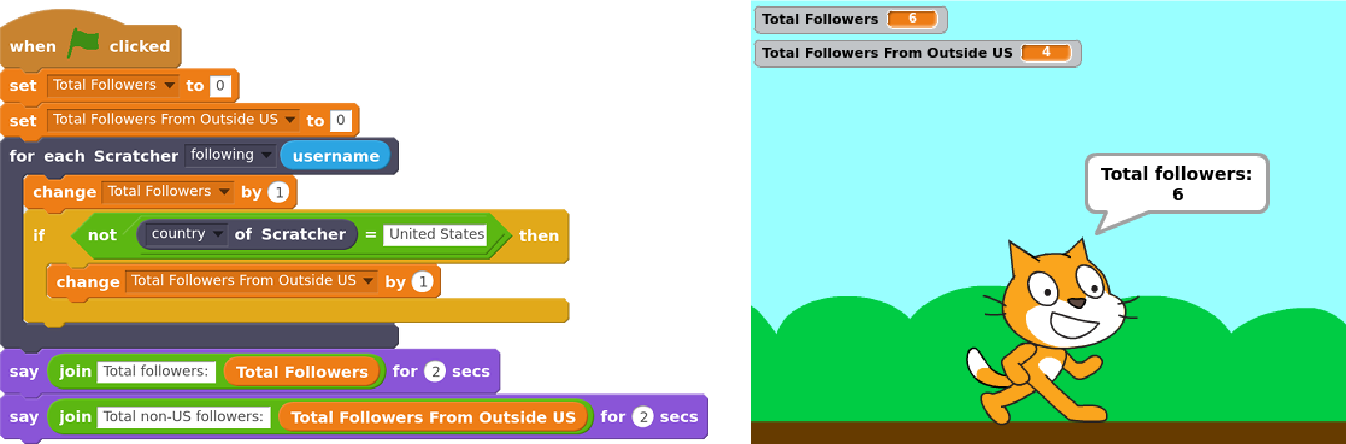
Last week, we presented a new paper that describes how children are thinking through some of the implications of new forms of data collection and analysis. The presentation was given at the ACM CHI conference in Denver last week and the paper is open access and online. Over the last couple years, we ve worked on a large project to support children in doing and not just learning about data science. We built a system, Scratch Community Blocks, that allows the 18 million users of the Scratch online community to write their own computer programs in Scratch of course to analyze data about their own learning and social interactions. An example of one of those programs to find how many of one s follower in Scratch are not from the United States is shown below. Last year, we deployed Scratch Community Blocks to 2,500 active Scratch users who, over a period of several months, used the system to create more than 1,600 projects. As children used the system, Samantha Hautea, a student in UW s Communication Leadership program, led a group of us in an online ethnography. We visited the projects children were creating and sharing. We followed the forums where users discussed the blocks. We read comment threads left on projects. We combined Samantha s detailed field notes with the text of comments and forum posts, with ethnographic interviews of several users, and with notes from two in-person workshops. We used a technique called grounded theory to analyze these data. What we found surprised us. We expected children to reflect on being challenged by and hopefully overcoming the technical parts of doing data science. Although we certainly saw this happen, what emerged much more strongly from our analysis was detailed discussion among children about the social implications of data collection and analysis. In our analysis, we grouped children s comments into five major themes that represented what we called critical data literacies. These literacies reflect things that children felt were important implications of social media data collection and analysis. First, children reflected on the way that programmatic access to data even data that was technically public introduced privacy concerns. One user described the ability to analyze data as, creepy , but at the same time, very cool. Children expressed concern that programmatic access to data could lead to stalking and suggested that the system should ask for permission. Second, children recognized that data analysis requires skepticism and interpretation. For example, Scratch Community Blocks introduced a bug where the block that returned data about followers included users with disabled accounts. One user, in an interview described to us how he managed to figure out the inconsistency:

At one point the follower blocks, it said I have slightly more followers than I do. And, that was kind of confusing when I was trying to make the project. [ ] I pulled up a second [browser] tab and compared the [data from Scratch Community Blocks and the data in my profile]. Third, children discussed the hidden assumptions and decisions that drive the construction of metrics. For example, the number of views received for each project in Scratch is counted using an algorithm that tries to minimize the impact of gaming the system (similar to, for example, Youtube). As children started to build programs with data, they started to uncover and speculate about the decisions behind metrics. For example, they guessed that the view count might only include unique views and that view counts may include users who do not have accounts on the website. Fourth, children building projects with Scratch Community Blocks realized that an algorithm driven by social data may cause certain users to be excluded. For example, a 13-year-old expressed concern that the system could be used to exclude users with few social connections saying:

I love these new Scratch Blocks! However I did notice that they could be used to exclude new Scratchers or Scratchers with not a lot of followers by using a code: like this:
when flag clicked
if then user s followers < 300
stop all.
I do not think this a big problem as it would be easy to remove this code but I did just want to bring this to your attention in case this not what you would want the blocks to be used for.
Fifth, children were concerned about the possibility that measurement might distort the Scratch community s values. While giving feedback on the new system, a user expressed concern that by making it easier to measure and compare followers, the system could elevate popularity over creativity, collaboration, and respect as a marker of success in Scratch.

I think this was a great idea! I am just a bit worried that people will make these projects and take it the wrong way, saying that followers are the most important thing in on Scratch. Kids conversations around Scratch Community Blocks are good news for educators who are starting to think about how to engage young learners in thinking critically about the implications of data. Although no kid using Scratch Community Blocks discussed each of the five literacies described above, the themes reflect starting points for educators designing ways to engage kids in thinking critically about data. Our work shows that if children are given opportunities to actively engage and build with social and behavioral data, they might not only learn how to do data analysis, but also reflect on its implications.

This blog-post and the work that it describes is a collaborative project by Samantha Hautea, Sayamindu Dasgupta, and Benjamin Mako Hill. We have also received support and feedback from members of the Scratch team at MIT (especially Mitch Resnick and Natalie Rusk), as well as from Hal Abelson from MIT CSAIL. Financial support came from the US National Science Foundation.

18 May 2017

Michael Prokop: Debugging a mystery: ssh causing strange exit codes?

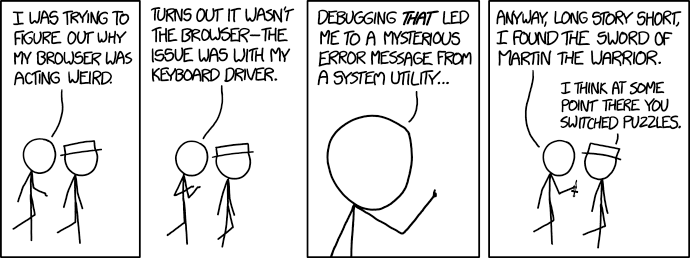
XKCD comic 1722 Recently we had a WTF moment at a customer of mine which is worth sharing. In an automated deployment procedure we re installing Debian systems and setting up MySQL HA/Scalability. Installation of the first node works fine, but during installation of the second node something weird is going on. Even though the deployment procedure reported that everything went fine: it wasn t fine at all. After bisecting to the relevant command lines where it s going wrong we identified that the failure is happening between two ssh/scp commands, which are invoked inside a chroot through a shell wrapper. The ssh command caused a wrong exit code showing up: instead of bailing out with an error (we re running under set -e ) it returned with exit code 0 and the deployment procedure continued, even though there was a fatal error. Initially we triggered the bug when two ssh/scp command lines close to each other were executed, but I managed to find a minimal example for demonstration purposes:
# cat ssh_wrapper 
chroot << "EOF" / /bin/bash
ssh root@localhost hostname >/dev/null
exit 1
EOF
echo "return code = $?"
What we d expect is the following behavior, receive exit code 1 from the last command line in the chroot wrapper:
# ./ssh_wrapper 
return code = 1
But what we actually get is exit code 0:
# ./ssh_wrapper 
return code = 0
Uhm?! So what s going wrong and what s the fix? Let s find out what s causing the problem:
# cat ssh_wrapper 
chroot << "EOF" / /bin/bash
ssh root@localhost command_does_not_exist >/dev/null 2>&1
exit "$?"
EOF
echo "return code = $?"
# ./ssh_wrapper 
return code = 127
Ok, so if we invoke it with a binary that does not exist we properly get exit code 127, as expected.
What about switching /bin/bash to /bin/sh (which corresponds to dash here) to make sure it s not a bash bug:
# cat ssh_wrapper 
chroot << "EOF" / /bin/sh
ssh root@localhost hostname >/dev/null
exit 1
EOF
echo "return code = $?"
# ./ssh_wrapper 
return code = 1
Oh, but that works as expected!? When looking at this behavior I had the feeling that something is going wrong with file descriptors. So what about wrapping the ssh command line within different tools? No luck with stdbuf -i0 -o0 -e0 ssh root@localhost hostname , nor with script -c ssh root@localhost hostname /dev/null and also not with socat EXEC: ssh root@localhost hostname STDIO . But it works under unbuffer(1) from the expect package:
# cat ssh_wrapper 
chroot << "EOF" / /bin/bash
unbuffer ssh root@localhost hostname >/dev/null
exit 1
EOF
echo "return code = $?"
# ./ssh_wrapper 
return code = 1
So my bet on something with the file descriptor handling was right. Going through the ssh manpage, what about using ssh s -n option to prevent reading from standard input (stdin)?
# cat ssh_wrapper
chroot << "EOF" / /bin/bash
ssh -n root@localhost hostname >/dev/null
exit 1
EOF
echo "return code = $?"
# ./ssh_wrapper 
return code = 1
Bingo! Quoting ssh(1):
     -n      Redirects stdin from /dev/null (actually, prevents reading from stdin).
             This must be used when ssh is run in the background.  A common trick is
             to use this to run X11 programs on a remote machine.  For example,
             ssh -n shadows.cs.hut.fi emacs & will start an emacs on shadows.cs.hut.fi,
             and the X11 connection will be automatically forwarded over an encrypted
             channel.  The ssh program will be put in the background.  (This does not work
             if ssh needs to ask for a password or passphrase; see also the -f option.)
Let s execute the scripts through strace -ff -s500 ./ssh_wrapper to see what s going in more detail.
In the strace run without ssh s -n option we see that it s cloning stdin (file descriptor 0), getting assigned to file descriptor 4:
dup(0)            = 4
[...]
read(4, "exit 1\n", 16384) = 7
while in the strace run with ssh s -n option being present there s no file descriptor duplication but only:
open("/dev/null", O_RDONLY) = 4
This matches ssh.c s ssh_session2_open function (where stdin_null_flag corresponds to ssh s -n option):
        if (stdin_null_flag)                                              
                in = open(_PATH_DEVNULL, O_RDONLY);
          else  
                in = dup(STDIN_FILENO);
         
This behavior can also be simulated if we explicitly read from /dev/null, and this indeed works as well:
# cat ssh_wrapper
chroot << "EOF" / /bin/bash
ssh root@localhost hostname >/dev/null </dev/null
exit 1
EOF
echo "return code = $?"
# ./ssh_wrapper 
return code = 1
The underlying problem is that both bash and ssh are consuming from stdin. This can be verified via:
# cat ssh_wrapper
chroot << "EOF" / /bin/bash
echo "Inner: pre"
while read line; do echo "Eat: $line" ; done
echo "Inner: post"
exit 3
EOF
echo "Outer: exit code = $?"
# ./ssh_wrapper
Inner: pre
Eat: echo "Inner: post"
Eat: exit 3
Outer: exit code = 0
This behavior applies to bash, ksh, mksh, posh and zsh. Only dash doesn t show this behavior.
To understand the difference between bash and dash executions we can use the following test scripts:
# cat stdin-test-cmp
#!/bin/sh
TEST_SH=bash strace -v -s500 -ff ./stdin-test 2>&1   tee stdin-test-bash.out
TEST_SH=dash strace -v -s500 -ff ./stdin-test 2>&1   tee stdin-test-dash.out
# cat stdin-test
#!/bin/sh
: $ TEST_SH:=dash 
$TEST_SH <<"EOF"
echo "Inner: pre"
while read line; do echo "Eat: $line"; done
echo "Inner: post"
exit 3
EOF
echo "Outer: exit code = $?"
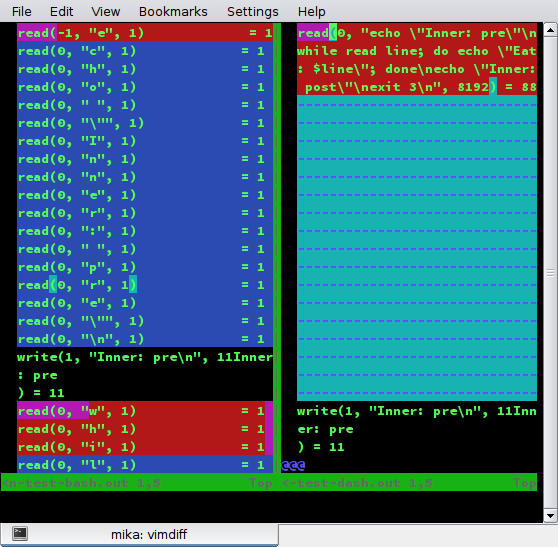
When executing ./stdin-test-cmp and comparing the generated files stdin-test-bash.out and stdin-test-dash.out you ll notice that dash consumes all stdin in one single go (a single read(0, ) ), instead of character-by-character as specified by POSIX and implemented by bash, ksh, mksh, posh and zsh. See stdin-test-bash.out on the left side and stdin-test-dash.out on the right side in this screenshot: screenshot of vimdiff on *.out files So when ssh tries to read from stdin there s nothing there anymore. Quoting POSIX s sh section:
When the shell is using standard input and it invokes a command that also uses standard input, the shell shall ensure that the standard input file pointer points directly after the command it has read when the command begins execution. It shall not read ahead in such a manner that any characters intended to be read by the invoked command are consumed by the shell (whether interpreted by the shell or not) or that characters that are not read by the invoked command are not seen by the shell. When the command expecting to read standard input is started asynchronously by an interactive shell, it is unspecified whether characters are read by the command or interpreted by the shell. If the standard input to sh is a FIFO or terminal device and is set to non-blocking reads, then sh shall enable blocking reads on standard input. This shall remain in effect when the command completes.
So while we learned that both bash and ssh are consuming from stdin and this needs to prevented by either using ssh s -n or explicitly specifying stdin, we also noticed that dash s behavior is different from all the other main shells and could be considered a bug (which we reported as #862907). Lessons learned: Thanks to Guillem Jover for review and feedback regarding this blog post.

16 May 2017

Daniel Pocock: Building an antenna and receiving ham and shortwave stations with SDR

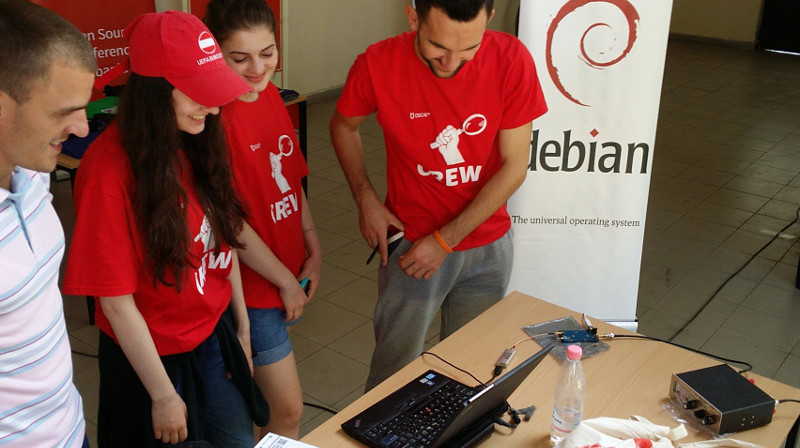
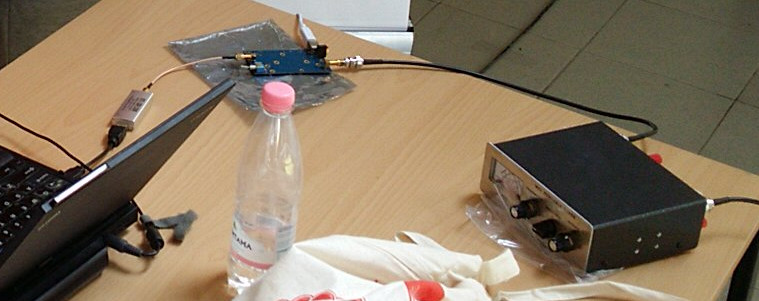
In my previous blog on the topic of software defined radio (SDR), I provided a quickstart guide to using gqrx, GNU Radio and the RTL-SDR dongle to receive FM radio and the amateur 2 meter (VHF) band. Using the same software configuration and the same RTL-SDR dongle, it is possible to add some extra components and receive ham radio and shortwave transmissions from around the world. Here is the antenna setup from the successful SDR workshop at OSCAL'17 on 13 May: After the workshop on Saturday, members of the OSCAL team successfully reconstructed the SDR and antenna at the Debian info booth on Sunday and a wide range of shortwave and ham signals were detected: Here is a close-up look at the laptop, RTL-SDR dongle (above laptop), Ham-It-Up converter (above water bottle) and MFJ-971 ATU (on right): Buying the parts
Component Purpose, Notes Price/link to source
RTL-SDR dongle Converts radio signals (RF) into digital signals for reception through the USB port. It is essential to buy the dongles for SDR with TCXO, the generic RTL dongles for TV reception are not stable enough for anything other than TV. ~ 25
Enamelled copper wire, 25 meters or more Loop antenna. Thicker wire provides better reception and is more suitable for transmitting (if you have a license) but it is heavier. The antenna I've demonstrated at recent events uses 1mm thick wire. ~ 10
4 (or more) ceramic egg insulators Attach the antenna to string or rope. Smaller insulators are better as they are lighter and less expensive. ~ 10
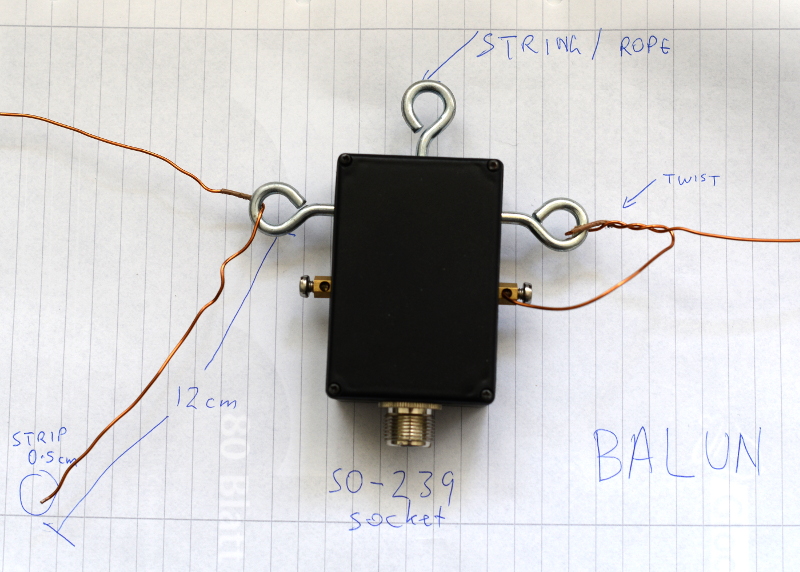
4:1 balun The actual ratio of the balun depends on the shape of the loop (square, rectangle or triangle) and the point where you attach the balun (middle, corner, etc). You may want to buy more than one balun, for example, a 4:1 balun and also a 1:1 balun to try alternative configurations. Make sure it is waterproof, has hooks for attaching a string or rope and an SO-239 socket. from 20
5 meter RG-58 coaxial cable with male PL-259 plugs on both ends If using more than 5 meters or if you want to use higher frequencies above 30MHz, use thicker, heavier and more expensive cables like RG-213. The cable must be 50 ohm. ~ 10
Antenna Tuning Unit (ATU) I've been using the MFJ-971 for portable use and demos because of the weight. There are even lighter and cheaper alternatives if you only need to receive. ~ 20 for receive only or second hand
PL-259 to SMA male pigtail, up to 50cm, RG58 Joins the ATU to the upconverter. Cable must be RG58 or another 50 ohm cable ~ 5
Ham It Up v1.3 up-converter Mixes the HF signal with a signal from a local oscillator to create a new signal in the spectrum covered by the RTL-SDR dongle ~ 40
SMA (male) to SMA (male) pigtail Join the up-converter to the RTL-SDR dongle ~ 2
USB charger and USB type B cable Used for power to the up-converter. A spare USB mobile phone charge plug may be suitable. ~ 5
String or rope For mounting the antenna. A ligher and cheaper string is better for portable use while a stronger and weather-resistent rope is better for a fixed installation. 5
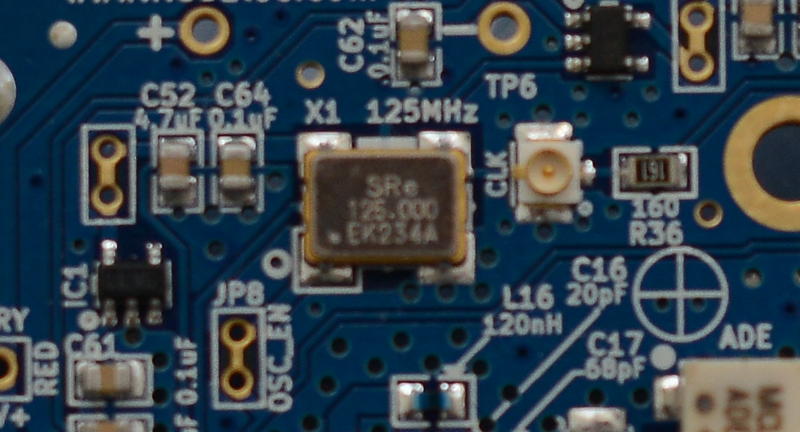
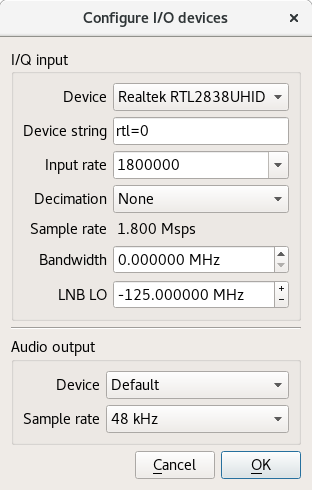
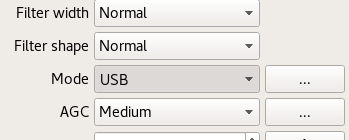
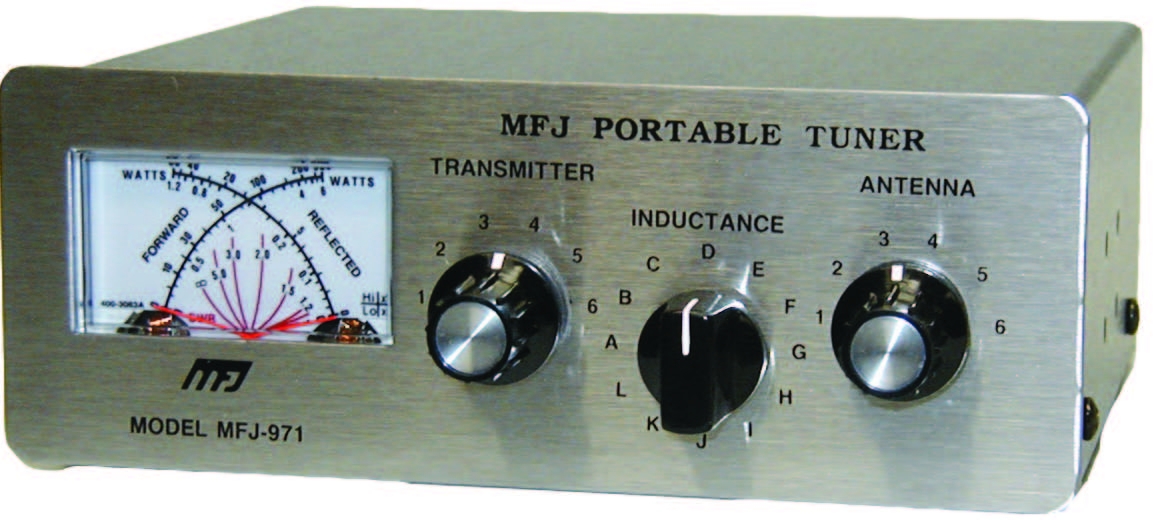
Building the antenna There are numerous online calculators for measuring the amount of enamelled copper wire to cut. For example, for a centre frequency of 14.2 MHz on the 20 meter amateur band, the antenna length is 21.336 meters. Add an extra 24 cm (extra 12 cm on each end) for folding the wire through the hooks on the balun. After cutting the wire, feed it through the egg insulators before attaching the wire to the balun. Measure the extra 12 cm at each end of the wire and wrap some tape around there to make it easy to identify in future. Fold it, insert it into the hook on the balun and twist it around itself. Use between four to six twists. Strip off approximately 0.5cm of the enamel on each end of the wire with a knife, sandpaper or some other tool. Insert the exposed ends of the wire into the screw terminals and screw it firmly into place. Avoid turning the screw too tightly or it may break or snap the wire. Insert string through the egg insulators and/or the middle hook on the balun and use the string to attach it to suitable support structures such as a building, posts or trees. Try to keep it at least two meters from any structure. Maximizing the surface area of the loop improves the performance: a circle is an ideal shape, but a square or 4:3 rectangle will work well too. For optimal performance, if you imagine the loop is on a two-dimensional plane, the first couple of meters of feedline leaving the antenna should be on the plane too and at a right angle to the edge of the antenna. Join all the other components together using the coaxial cables. Configuring gqrx for the up-converter and shortwave signals Inspect the up-converter carefully. Look for the crystal and find the frequency written on the side of it. The frequency written on the specification sheet or web site may be wrong so looking at the crystal itself is the best way to be certain. On my Ham It Up, I found a crystal with 125.000 written on it, this is 125 MHz. Launch gqrx, go to the File menu and select I/O devices. Change the LNB LO value to match the crystal frequency on the up-converter, with a minus sign. For my Ham It Up, I use the LNB LO value -125.000000 MHz. Click OK to close the I/O devices window. On the Input Controls tab, make sure Hardware AGC is enabled. On the Receiver options tab, change the Mode value. Commercial shortwave broadcasts use AM and amateur transmission use single sideband: by convention, LSB is used for signals below 10MHz and USB is used for signals above 10MHz. To start exploring the 20 meter amateur band around 14.2 MHz, for example, use USB. In the top of the window, enter the frequency, for example, 14.200 000 MHz. Now choose the FFT Settings tab and adjust the Freq zoom slider. Zoom until the width of the display is about 100 kHZ, for example, from 14.15 on the left to 14.25 on the right. Click the Play icon at the top left to start receiving. You may hear white noise. If you hear nothing, check the computer's volume controls, move the Gain slider (bottom right) to the maximum position and then lower the Squelch value on the Receiver options tab until you hear the white noise or a transmission. Adjust the Antenna Tuner knobs Now that gqrx is running, it is time to adjust the knobs on the antenna tuner (ATU). Reception improves dramatically when it is tuned correctly. Exact instructions depend on the type of ATU you have purchased, here I present instructions for the MFJ-971 that I have been using. Turn the TRANSMITTER and ANTENNA knobs to the 12 o'clock position and leave them like that. Turn the INDUCTANCE knob while looking at the signals in the gqrx window. When you find the best position, the signal strength displayed on the screen will appear to increase (the animated white line should appear to move upwards and maybe some peaks will appear in the line). When you feel you have found the best position for the INDUCTANCE knob, leave it in that position and begin turning the ANTENNA knob clockwise looking for any increase in signal strength on the chart. When you feel that is correct, begin turning the TRANSMITTER knob. Listening to a transmission At this point, if you are lucky, some transmissions may be visible on the gqrx screen. They will appear as darker colours in the waterfall chart. Try clicking on one of them, the vertical red line will jump to that position. For a USB transmission, try to place the vertical red line at the left hand side of the signal. Try dragging the vertical red line or changing the frequency value at the top of the screen by 100 Hz at a time until the station is tuned as well as possible. Try and listen to the transmission and identify the station. Commercial shortwave broadcasts will usually identify themselves from time to time. Amateur transmissions will usually include a callsign spoken in the phonetic alphabet. For example, if you hear "CQ, this is Victor Kilo 3 Tango Quebec Romeo" then the station is VK3TQR. You may want to note down the callsign, time, frequency and mode in your log book. You may also find information about the callsign in a search engine. The video demonstrates reception of a transmission from another country, can you identify the station's callsign and find his location? If you have questions about this topic, please come and ask on the Debian Hams mailing list. The gqrx package is also available in Fedora and Ubuntu but it is known to crash on startup in Ubuntu 17.04. Users of other distributions may also want to try the Debian Ham Blend bootable ISO live image as a quick and easy way to get started.

Foteini Tsiami: Outreachy internship!

Hello everyone! I am very happy that I have been accepted as an intern in the Outreachy 2017 round. My project task is to adapt sch-scripts into a new project ltsp-manager , primarily through internationalization and localization as well as documentation.

Sch-scripts is a graphical tool that assists with management of a classroom computer lab, managing users and network booted computers with LTSP, and is used in more than 1000 schools in Greece along with the epoptes user monitoring software.

Traditionally, maintaining an LTSP environment requires comfort with a commandline interface, but sch-scripts provides a graphical tool that simplifies the installation, configuration and management of an LTSP classroom.

Epoptes allows the teacher to monitor or assist users in the computer lab, as well as send messages, boot and shut down computers.

Both LTSP and Epoptes are present in Debian, and internationalizing sch-scripts is an important step towards making the same interface used successfully in Greek schools available to all Debian and Ubuntu users.

Francois Marier: Recovering from an unbootable Ubuntu encrypted LVM root partition

A laptop that was installed using the default Ubuntu 16.10 (xenial) full-disk encryption option stopped booting after receiving a kernel update somewhere on the way to Ubuntu 17.04 (zesty). After showing the boot screen for about 30 seconds, a busybox shell pops up:
BusyBox v.1.21.1 (Ubuntu 1:1.21.1-1ubuntu1) built-in shell (ash)
Enter 'help' for list of built-in commands.
(initramfs)
Typing exit will display more information about the failure before bringing us back to the same busybox shell:
Gave up waiting for root device. Common problems:
  - Boot args (cat /proc/cmdline)
    - Check rootdelay= (did the system wait long enough?)
    - Check root= (did the system wait for the right device?)
  - Missing modules (cat /proc/modules; ls /dev)
ALERT! /dev/mapper/ubuntu--vg-root does not exist. Dropping to a shell! 
BusyBox v.1.21.1 (Ubuntu 1:1.21.1-1ubuntu1) built-in shell (ash)   
Enter 'help' for list of built-in commands.  
(initramfs)
which now complains that the /dev/mapper/ubuntu--vg-root root partition (which uses LUKS and LVM) cannot be found. There is some comprehensive advice out there but it didn't quite work for me. This is how I ended up resolving the problem.

Boot using a USB installation disk First, create bootable USB disk using the latest Ubuntu installer:
  1. Download an desktop image.
  2. Copy the ISO directly on the USB stick (overwriting it in the process):
     dd if=ubuntu.iso of=/dev/sdc1
    
and boot the system using that USB stick (hold the option key during boot on Apple hardware).

Mount the encrypted partition Assuming a drive which is partitioned this way:
  • /dev/sda1: EFI partition
  • /dev/sda2: unencrypted boot partition
  • /dev/sda3: encrypted LVM partition
Open a terminal and mount the required partitions:
cryptsetup luksOpen /dev/sda3 sda3_crypt
vgchange -ay
mount /dev/mapper/ubuntu--vg-root /mnt
mount /dev/sda2 /mnt/boot
mount -t proc proc /mnt/proc
mount -o bind /dev /mnt/dev
Note:
  • When running cryptsetup luksOpen, you must use the same name as the one that is in /etc/crypttab on the root parition (sda3_crypt in this example).
  • All of these partitions must be present (including /proc and /dev) for the initramfs scripts to do all of their work. If you see errors or warnings, you must resolve them.

Regenerate the initramfs on the boot partition Then "enter" the root partition using:
chroot /mnt
and make sure that the lvm2 package is installed:
apt install lvm2
before regenerating the initramfs for all of the installed kernels:
update-initramfs -c -k all

15 May 2017

Michal &#268;iha&#345;: New projects on Hosted Weblate

Hosted Weblate provides also free hosting for free software projects. The hosting requests queue was over one month long, so it's time to process it and include new project. This time, the newly hosted projects include: We now also host few new Minetest mods: If you want to support this effort, please donate to Weblate, especially recurring donations are welcome to make this service alive. You can do them on Liberapay or Bountysource.

Filed under: Debian English SUSE Weblate

intrigeri: GNOME and Debian usability testing, May 2017

During the Contribute your skills to Debian event that took place in Paris last week-end, we conducted a usability testing session. Six people were tasked with testing a few aspects of the GNOME 3.22 desktop environment and of the Debian 9 (Stretch) operating system. A number of other people observed them and took notes. Then, two observers and three testers analyzed the results, that we are hereby presenting: we created a heat map visualization, summed up the challenges met during the tests, and wrote this blog post together. We will point the relevant upstream projects to our results. A couple of other people also did some usability testing but went in much more depth: their feedback is much more detailed and comes with a number of improvement ideas. I will process and publish their results as soon as possible. Missions Testers were provided a laptop running GNOME on a a Debian 9 (Stretch) Live system. A quick introduction (mostly copied from the one we found in some GNOME usability testing reports) was read. Then they were asked to complete the following tasks. A. Nautilus Mission A.1 Download and rename file in Nautilus
  1. Download a file from the web, a PDF document for example.
  2. Open the folder in which the file has been downloaded.
  3. Rename the dowloaded file to SUCCESS.pdf.
  4. Toggle the browser window to full screen.
  5. Open the file SUCCESS.pdf.
  6. Go back to the File manager.
  7. Close the file SUCCESS.pdf.
Mission A.2 Manipulate folders in Nautilus
  1. Create a new folder named cats in your user directory.
  2. Create a new folder named to do in your user directory.
  3. Move the cats folder to the to do folder.
  4. Delete the cats folder.
Mission A.3 Create a bookmark in Nautilus
  1. Create a folder named unicorns in your personal directory.
  2. This folder is important. Add a bookmark for unicorns in order to find it again in a few weeks.
Mission A.4 Nautilus display settings Folders and files are usually listed as icons, but they can also be displayed differently.
  1. Configure the File manager to make it show items as a list, with one file per line.
  2. You forgot your glasses and the font size is too small for you to see the text: increase the size of the text.
B. Package management Introduction On Debian, each application is available as a "package" which contains every file needed for the software to work. Unlike in other operating systems, it is rarely necessary and almost never a good idea, to download and install software from the authors website. We can rather install it from an online library managed by Debian (like an appstore). This alternative offers several advantages, such as being able to update all the software installed in one single action. Specific tools are available to install and update Debian packages. Mission B.1 Install and remove packages
  1. Install the vlc package.
  2. Start VLC.
  3. Remove the vlc package.
Mission B.2 Search and install a package
  1. Find a piece of software which can download files with BitTorrent in a graphical interface.
  2. Install the corresponding package.
  3. Launch that BitTorrent software.
Mission B.3 Upgrade the system Make sure the whole system (meaning all installed packages) is up to date. C. Settings Mission C.1 Change the desktop background
  1. Download an image you like from the web.
  2. Set the downloaded image as the desktop wallpaper.
Mission C.2 Tweak temporary files management Configure the system so that temporary files older than three days are deleted automatically. Mission C.3 Change the default video player
  1. Install VLC (ask for help if you could not do it during the previous mission).
  2. Make VLC the default video player.
  3. Download a video file from the web.
  4. Open the downloaded video, then check if it opens with VLC.
Mission C.4 Add and remove world clocks When you click the time and date in the top bar, a menu pops-up. There, you can display clocks in several time-zones.
  1. Add a clock with Rio de Janeiro timezone, then another showing the current time in Boston.
  2. Check that the time and date menu now displays these two additional clocks.
  3. Remove the Boston clock.
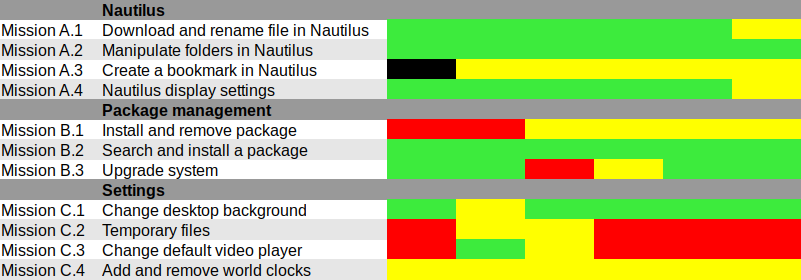
Results and analysis Heat map We used Jim Hall's heat map technique to summarize our usability test results. As Renata puts it, it is "a great way to see how the users performed on each task. The heat map clarifies how easy or difficult it was for the participant to accomplish a certain task.
  1. Scenario tasks (from the usability test) are arranged in rows.
  2. Test participants (for each tester) are arranged in columns.
  3. The colored blocks represent each tester s difficulty with each scenario task.
Green blocks represent the ability of the participant to accomplish the tasks with little or no difficulty. Yellow blocks indicate the tasks that the tester had significant difficulties accomplishing. Red blocks indicate that testers experienced extreme difficulty or where testers completed the tasks incorrectly. Black blocks indicate tasks the tester was unable to complete." Alternatively, here is the spreadsheet that was used to create this picture, with added text to avoid relying on colors only. Most tasks were accomplished with little or no difficulty so we will now focus on the problematic parts. What were the challenges? The heat map shows several "hot" rows, that we will now be looking at in more details. Mission A.3 Create a bookmark in Nautilus Most testers right-clicked the folder first, and eventually found they could simply drag'n'drop to the bookmarks location in the sidebar. One tester thought that he could select a folder, click the hamburger icon, and from there use the "Bookmark this folder" menu item. However, this menu action only works on the folder one has entered, not on the selected one. Mission B.1 Install and remove a package Here we faced a number of issues caused by the fact that Debian Live images don't include package indices (with good reason), so no package manager can list available software. Everyone managed to start a graphical package manager via the Overview (or via the CLI or Alt-F2 for a couple power users). Some testers tried to use GNOME Software, which listed only already installed packages (Debian bug #862560) and provided no way we could find to refresh the package indices. That's arguably a bug in Debian Live, but still: GNOME Software might display some useful information when it detects this unusual situation. We won't list here all the obstacles that were met in Synaptic: it's no news its usability is rather sub-optimal and better alternatives (such as GNOME Software) are in the works. Mission C.2 Tweak temporary files management The mission was poorly phrased: some observers had to clarify that it was specifically about GNOME, and not generic Linux system administration: some power-users were already searching the web for command-line tools to address the task at hand. Even with this clarification, no tester would have succeeded without being told they were allowed to use the web with a search query including the word "GNOME", or use the GNOME help or the Overview. Yet eventually all testers succeeded. It's interesting to note that regular GNOME users had the same problem as others: they did not try searching "temporary" in the Overview and did not look-up the GNOME Help until they were suggested to do so. Mission C.3 Change the default video player One tester configured one single video file format to be opened by default with VLC, via right-click in Nautilus Open with etc. He believed this would be enough to make VLC the default video player, missing the subtle difference between "default video player" and "default player for one single video format". One tester tried to complete this task inside VLC itself and then needed some help to succeed. It might be that the way web browsers ask "Do you want ThisBrowser to become the default web browser?" gave a hint an application GUI is the right place to do it. Two testers searched "default" in the Overview (perhaps the previous mission dealing with temporary files was enough to put them in this direction). At least one tester was confused since the only search result (Details View information about your system), which is the correct one to get there, includes the word View, which suggests that one cannot modify settings there, but only view them. One long-term GNOME user looked in Tweak Tool first, and then used the Overview. Here again, GNOME users experienced essentially the same issues as others. Mission C.4 Add and remove world clocks One tester tried to look for the clock on the top right corner of the screen, then realized it was in the middle. Other than this, all testers easily found a way to add world clocks. However, removing a world clock was rather difficult; although most testers managed to do it, it took them a number of attempts to succeed:
  1. Several testers left-clicked or right-clicked the clock they wanted to remove, expecting this would provide them with a way to remove it (which is not the case).
  2. After a while, all testers noticed the Select button (that has no text label nor tooltip info), which allowed them to select the clock they wanted to remove; then, most testers clicked the 1 selected button, hoping it would provide a contextual menu or some other way to act on the selected clocks (it doesn't).
  3. Eventually, everyone managed to locate the Delete button on the bottom right corner of the window; some testers mentioned that it is less visible and flashy than the blue bar that appears on the top of the screen once they had entered "Selection" mode.
General notes and observations

14 May 2017

Russ Allbery: Review: The Raven and the Reindeer

Review: The Raven and the Reindeer, by T. Kingfisher
Publisher: Red Wombat Tea Company
Copyright: 2016
ASIN: B01BKTT73A
Format: Kindle
Pages: 191
Once upon a time, there was a boy born with frost in his eyes and frost in his heart. There are a hundred stories about why this happens. Some of them are close to true. Most of them are merely there to absolve the rest of us of blame. It happens. Sometimes it's no one's fault.
Kay is the boy with frost in his heart. Gerta grew up next door. They were inseparable as children, playing together on cold winter days. Gerta was in love with Kay for as long as she could remember. Kay, on the other hand, was, well, kind of a jerk.
There are not many stories about this sort of thing. There ought to be more. Perhaps if there were, the Gertas of the world would learn to recognize it. Perhaps not. It is hard to see a story when you are standing in the middle of it.
Then, one night, Kay is kidnapped in the middle of the night by the Snow Queen while Gerta watches, helpless. She's convinced that she's dreaming, but when she wakes up, Kay is indeed gone, and eventually the villagers stop the search. But Gerta has defined herself around Kay her whole life, so she sets off, determined to find him, totally unprepared for the journey but filled with enough stubborn, practical persistence to overcome a surprising number of obstacles. Depending on your past reading experience (and cultural consumption in general), there are two things that may be immediately obvious from this beginning. First, it's written by Ursula Vernon, under her T. Kingfisher pseudonym that she uses for more adult fiction. No one else has quite that same turn of phrase, or writes protagonists with quite the same sort of overwhelmed but stubborn determination. Second, it's a retelling of Hans Christian Andersen's "The Snow Queen." I knew the first, obviously. I was completely oblivious to the second, having never read "The Snow Queen," or anything else by Andersen for that matter. I haven't even seen Frozen. I therefore can't comment in too much detail on the parallels and divergences between Kingfisher's telling and Andersen's (although you can read the original to compare if you want) other than some research on Wikipedia. As you might be able to tell from the quote above, though, Kingfisher is rather less impressed by the idea of childhood true love than Andersen was. This is not the sort of story in which the protagonist rescues the captive boy through the power of pure love. It's something quite a bit more complicated and interesting: a coming-of-age story for Gerta, in which her innocence is much less valuable than her fundamental decency, empathy, and courage, and in which her motives for her journey change as the journey proceeds. It helps that Kingfisher's world is populated by less idealized characters, many of whom are neither wholly bad nor wholly good, but who think of themselves as basically decent and try to do vaguely the right thing. Although sometimes they need some reminding. The story does feature a talking raven. (Most certainly not a crow.) His name is the Sound of Mouse Bones Crunching Under the Hooves of God. He's quite possibly the best part. Gerta does not rescue Kay through the power of pure love. But there is love here, of a sort that Gerta wasn't expecting at all, and of a sort that Andersen never had in mind when he wrote the original. There's also some beautifully-described shapeshifting, delightful old women, and otters. (Also, I find the boy who appears at the very end of the story utterly fascinating, with all his implied parallel story and the implicit recognition that the world does not revolve around Kay and Greta.) But I think my favorite part is how clearly different Greta is at the end of her journey than at the beginning, how subtly Kingfisher makes that happen through the course of the story, and how understated but just right her actions are at the very end. This is really excellent stuff. The next time you're feeling in the mood for a retold and modernized fairy tale, I recommend it. Rating: 8 out of 10

13 May 2017

Vincent Fourmond: Run QSoas complely non-interactively

QSoas can run scripts, and, since version 2.0, it can be run completely without user interaction from the command-line (though an interface may be briefly displayed). This possibility relies on the following command-line options:If you create a script.cmds file containing the following commands:
generate-buffer -10 10 sin(x)
save sin.dat
and run the following command from your favorite command-line interpreter:
~ QSoas --stdout --run '@ script.cmds' --exit-after-running
This will create a sin.dat file containing a sinusoid. However, if you run it twice, a Overwrite file 'sin.dat' ? dialog box will pop up. You can prevent that by adding the /overwrite=true option to save. As a general rule, you should avoid all commands that may ask questions in the scripts; a /overwrite=true option is also available for save-buffers for instance.I use this possibility massively because I don't like to store processed files, I prefer to store the original data files and run a script to generate the processed data when I want to plot or to further process them. It can also be used to generate fitted data from saved parameters files. I use this to run automatic tests on Linux, Windows and Mac for every single build, in order to quickly spot platform-specific regressions.To help you make use of this possibility, here is a shell function (Linux/Mac users only, add to your $HOME/.bashrc file or equivalent, and restart a terminal) to run directly on QSoas command files:
qs-run ()  
        QSoas --stdout --run "@ $1" --exit-after-running
 
To run the script.cmds script above, just run
~ qs-run script.cmds

About QSoasQSoas is a powerful open source data analysis program that focuses on flexibility and powerful fitting capacities. It is described in Fourmond, Anal. Chem., 2016, 88 (10), pp 5050 5052. Current version is 2.1

Next.

Previous.